Where to buy
Check the latest price, availability and delivery on Amazon. Orders are placed on Amazon. We may earn a commission from qualifying purchases.
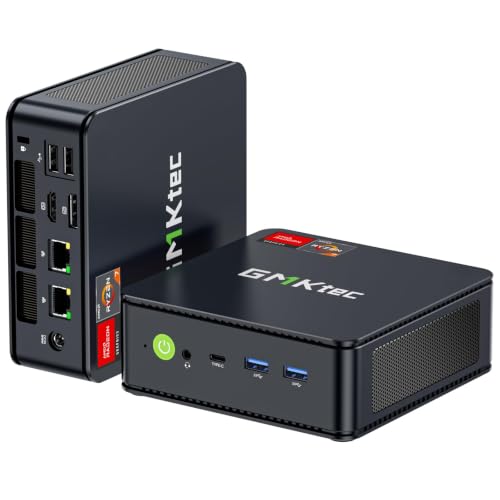
- Best overall workstation under $400: GMKtec M5 Plus Mini PC, Ryzen 7 5825U, 32GB RAM, 1TB SSD — Check on Amazon
- Beelink SER5 MAX Mini PC, Ryzen 7 5800H, 16GB RAM, 500GB SSD — Check on Amazon
- KAMRUI E3B Mini PC, Ryzen 5 7430U, 32GB RAM, 512GB SSD — Check on Amazon
- Dell OptiPlex 7060 SFF Desktop, Core i5-8500, 16GB RAM, 512GB SSD (Renewed) — Check on Amazon
See 2 more Amazon options
- BOSGAME P4 Mini PC, Ryzen 7 5700U, 32GB RAM, 1TB SSD — Check on Amazon
- MeLE Quieter4C Mini PC, Intel N150, 8GB RAM, 256GB SSD, Fanless — Check on Amazon
Read the full guide ↓
Disclosure: As an Amazon Associate, reviewstook.com earns from qualifying purchases. Links to Amazon on this page are affiliate links; they cost you nothing extra. Listing details such as price and availability change often, so check the current Amazon listing before you buy.
A small workspace changes what a good workstation is. In a spare-bedroom office, a studio corner, a dorm desk or a kitchen-table setup that has to clear away at night, the computer is not competing on specification alone — it is competing for the same square feet as your monitors, your keyboard, your notebooks and your elbows. The good news is that the under-$400 workstation market is unusually kind to small rooms: five of the six machines in this guide are mini PCs that occupy less desk than a paperback book, and several of them can leave the desk entirely and live behind a monitor. The sixth is a renewed corporate small-form-factor desktop — still compact by tower standards, but a different kind of furniture decision, and this guide grades it as one.
So this guide grades the install as hard as the specification. Every pick is assessed on where it physically goes, what air it needs around it, where its power brick lives, how its cables fall, and how much heat it pushes into a small room across a working day. The workstation honesty still applies in full: at $400 there is no ECC memory anywhere in this set — none of the six platforms documents it — no ISV-certified professional graphics, and integrated graphics everywhere. What $400 buys is a work-first machine with real multi-core strength, memory that mostly grows to 64GB, and outputs for a proper multi-monitor desk, in a box that respects a small room. Two disciplines run through everything below. Dimensions and mounting claims are printed only where the base research for this set documents them — three of the six picks have documented measurements, and exactly two have a documented VESA mount; for the rest, this guide says so and sends you to the live listing with a tape measure rather than inventing numbers. And no pick in this guide goes inside a sealed cabinet, drawer or closed media unit. Not one. Small is a placement discipline, not a hiding place.
In this guide
Quick Picks
Short on time, or comparing several options at once? Each row below names a type of worker and the machine that suits them, with a link to the listing. Installation class is stated up front because at this budget it decides as much as the processor does.
| Buyer type | Pick | Why it stands out | Link |
|---|---|---|---|
| Best overall workstation | GMKtec M5 Plus, Ryzen 7 5825U, 32GB, 1TB | Eight cores, 32GB socketed to 64GB, three 4K outputs — in mini-PC form | Check on Amazon |
| Best sustained CPU power | Beelink SER5 MAX, Ryzen 7 5800H, 16GB, 500GB | Eight cores at a 54W power budget, in a documented sub-five-inch box | Check on Amazon |
| Best value | KAMRUI E3B, Ryzen 5 7430U, 32GB, 512GB | 32GB memory and a VESA mount in the box with strong budget-tier value | Check on Amazon |
| Best expansion path | Dell OptiPlex 7060 SFF (Renewed), i5-8500, 16GB, 512GB | The only pick with a PCIe slot — a slim tower that stands beside the desk | Check on Amazon |
| Best storage and networking | BOSGAME P4, Ryzen 7 5700U, 32GB, 1TB | 1TB fitted plus dual 2.5GbE, in mini-PC form for shelf or desk corner | Check on Amazon |
| Best silent workstation | MeLE Quieter4C, Intel N150, 8GB, 256GB | Fanless, VESA-mountable, barely five inches long — for light duties only | Check on Amazon |
How These Picks Were Chosen
The starting filter is the workstation one, unchanged: the budget is a ceiling for a complete, working computer, so every pick is a real Amazon listing positioned within the $400 budget — check price on Amazon for the current pricing before you buy. Barebone kits with no memory, storage or operating system were excluded however strong the processor. On top of that sat the work filters: core and thread counts and the power class the processor can sustain, fitted memory and whether it sits in sockets that accept 64GB later or is soldered down forever, storage capacity and spare slots, and physical display outputs counted port by port — a pick earns a three-monitor claim only where its listing documents three outputs. Two honesty filters closed the set: no ECC memory is claimed for any pick because none of the six platforms documents it, and no certified professional GPU exists here — every pick runs integrated graphics, and the one machine that can accept a card later takes only a low-power one.
The small-spaces grading was then applied as its own pass, and it is deliberately strict about evidence. A pick’s installation class — behind-monitor, on-desk, shelf, under-desk or floor-standing — is argued from its form factor and its documented facts only. Measurements appear in this guide for exactly three picks, the ones whose dimensions the underlying research documents: the Beelink SER5 MAX, the Dell OptiPlex 7060 and the MeLE Quieter4C. For the GMKtec, the KAMRUI and the BOSGAME, no chassis measurement is printed, because none is documented in this set’s research; their reviews tell you to take the figure from the live listing and check it against your space before ordering, which is Step 1 of the checklist below. Mounting is stricter still: a VESA claim is made only for the two picks whose documentation includes one — the KAMRUI E3B, whose retail package includes the mount, and the MeLE Quieter4C. For the other four picks this guide makes no mounting claim of any kind, and the FAQ says so plainly. Power bricks are discussed as a placement problem — every mini here runs from an external adapter that has to live somewhere — without a single invented wattage; the Dell, with its internal supply, is the exception that proves the rule. Finally, heat is graded by power class: a 54W sustained processor, an efficiency-tuned mini and a fanless box are three different thermal citizens in a small room, and the reviews treat them that way.
The Installed Footprint: What “Small” Actually Costs You
A mini PC’s product photo is the most misleading measurement in this guide. The box itself is tiny — but the installed footprint, the space the working setup truly consumes, is the box plus the air it breathes, plus the fall of its cables, plus the brick on its power lead, plus the heat it sheds into the room — and grading all five changes the shape of this set.
The box. Three picks carry documented dimensions: the MeLE Quieter4C at 5.2 × 3.2 × 0.7 inches — closer to a phone than a computer; the Beelink SER5 MAX at 4.96 × 4.44 × 1.65 inches, under five inches square; and the Dell OptiPlex 7060 SFF at 11.42 × 3.7 × 11.5 inches, a different species — slim, but a tower. The GMKtec, KAMRUI and BOSGAME are mini-PC-class machines whose exact measurements are not documented in this set’s research; take their figures from the live listing before you commit a shelf to them.
The air. Every fan-cooled pick needs clearance on its intake and exhaust faces — a hand’s breadth is the working rule, and it belongs in your measurement, not as an afterthought. The fanless MeLE is the subtle one: with no fan, its chassis is the heatsink, so it needs open air on all sides more faithfully than any pick here, not less. A fanless box sealed in a drawer is not silent computing; it is slow cooking. The SER5 MAX earns a specific note: its 54W power class makes it both the strongest worker here and the warmest exhaust — give its vents the clearest run in your layout.
The cable drop. A three-monitor mini carries at least five cables out of a box the size of a sandwich: three display leads, power, and Ethernet or USB peripherals. Where those cables fall decides whether a small desk feels calm or cluttered. Behind-monitor mounting, where a documented mount allows it, drops the whole bundle down one path behind the screen. On-desk placement wants the box at the desk’s back edge so the drop is short and shared with the monitors’ own cables. The Dell, standing on the floor or desk end, has the longest and easiest drop of the set — the one installation luxury its size buys.
The brick. Each mini’s external power adapter is a second object roughly the size of a bar of soap, and it needs an address: a cable tray under the desk, the floor beside the outlet strip, or a shelf edge — never buried in a cable pile where its warmth has nowhere to go, and never counted as zero when you measure the spot. The Dell’s internal 200W supply deletes this problem entirely, one of the quieter arguments for its larger box.
The heat. In a small room, the computer is a space heater with opinions. The efficiency-tuned minis and the fanless MeLE — which draws power in the low teens of watts under load — add little. The 54W SER5 MAX under a long compile adds noticeably more, and the Dell’s desktop-class internals sit between. None of this is a reason to reject a pick; all of it is a reason the sealed cabinet is refused for every machine in this guide. Enclosed furniture traps exactly the heat a small room already struggles to shed, and it starves exactly the intakes these boxes breathe through. Open air, a short cable drop, a brick with an address: that is the whole discipline, and it costs nothing but measuring first.
Measure Before You Buy: The Five-Step Checklist
- Measure the spot. Tape-measure the exact place the machine will live — shelf depth, monitor-back clearance, desk-end width, floor slot beside the desk. For the three picks with documented dimensions in this guide, compare directly. For the other three, take the measurements from the live Amazon listing; do not order a mini on class vibes and discover it is the one wide model in the line.
- Check the ventilation clearance. Add a hand’s breadth on every face the machine breathes through, and confirm the spot is open — not a drawer, not a closed cabinet, not a media unit with a door. If the only available spot is enclosed furniture, the honest answer is to change the spot, not to hope the machine tolerates it. For the fanless pick this step is everything: its silence depends on free air.
- Give the brick an address. Decide now where the power adapter will sit — cable tray, floor by the strip, shelf edge — with air around it and a lead run that does not stretch across a walkway. If your chosen spot has no honest place for a brick, that is an argument for the Dell’s internal supply or for a different spot.
- Plan the cable drop. Count the cables your desk actually runs — displays first, then Ethernet, then USB — and trace each one’s fall from the machine’s position to its destination. Behind-monitor mounting, where a pick documents a mount, collapses the drop to a single bundle behind the screen. On-desk and shelf placements want the box at the back edge so cables fall together, not across your working surface.
- Then order. Only now — spot measured, air confirmed, brick addressed, cables traced — place the order, and run the configuration checks this guide flags on delivery day: the exact processor and memory variant on the listing family you chose, confirmed in the cart before payment and in the system settings when the box arrives.
The 6 Best Workstation PCs for Small Spaces Under $400
GMKtec M5 Plus Mini PC — Ryzen 7 5825U, 32GB RAM, 1TB SSD
Who it suits: The professional in a small room who wants the most complete work machine in this guide without giving the desk to it — developers, analysts, photo editors and heavy multitaskers working from a spare corner, a studio or a shared table.
Installation grade: Mini-PC class, desk or shelf. No chassis dimension is documented for this pick in this set’s research, so no figure is printed here — take the measurements from the live listing and run them through Step 1 of the checklist before ordering. No VESA mount is documented for it either, so this guide makes no behind-monitor claim: plan on it sitting on the desk’s back edge or a shelf, with a hand’s breadth of air around it and its brick in a tray or on the floor by the strip. Its three display cables fall together from one small box, which is the tidiest multi-monitor drop a non-mounted machine offers.
The specification is the most balanced in the guide, and it matters that none of it asks for more room later. The Ryzen 7 5825U brings eight cores and sixteen threads, and it arrives with 32GB of DDR4 fitted as two 16GB sticks — the point where professional multitasking stops being a negotiation: an IDE, a local development stack, dozens of browser tabs, chat and a spreadsheet suite all open at once. The memory is socketed and the platform takes 64GB, so growth is a pair of replacement sticks swapped inside the same small box — the footprint you install today is the footprint you keep. Storage follows suit: a 1TB NVMe SSD fitted, a second M.2 slot documented, headroom the listing puts at 4TB in total. Nothing about this machine’s future requires a bigger desk.
The desk wiring is equally considered. Triple 4K display output across HDMI, DisplayPort and USB-C covers the standard professional arrangement — code or canvas in the middle, reference and communication at the sides. Dual 2.5GbE network ports are unusual at this tier and genuinely useful in a small office: one link to the network, one to a NAS or a direct-attached second machine, moving project files at two and a half times gigabit speed. Windows 11 Pro brings BitLocker, Remote Desktop hosting and the domain features the Home edition omits. The integrated Radeon graphics are the package’s honest ceiling: fine for photo editing, 1080p timelines, multi-monitor productivity and light CAD; not a rendering card, and never upgradeable to one. Thermally it is an efficiency-tuned U-series machine, an easy citizen in a small room. Check price on Amazon for the M5 Plus’s current pricing — it sits in the upper part of this guide’s budget tier.
- Eight cores and 32GB socketed to 64GB — the complete specification, in a box that asks for one small patch of desk.
- Triple 4K outputs and dual 2.5GbE: the full three-monitor, fast-network setup from a single cable cluster.
- Growth happens inside the box — memory and storage upgrades never change the install.
Honest limitation: No documented dimensions and no documented VESA mount in this set’s research — measure from the live listing, and do not plan a behind-monitor install on this pick. Integrated graphics only, permanently.
Choose it if you want the strongest all-round work specification here on a desk-edge or shelf placement. Skip it if a documented in-box mount is your whole plan — that is the KAMRUI below.

Beelink SER5 MAX Mini PC — Ryzen 7 5800H, 16GB RAM, 500GB SSD
Who it suits: The small-room worker whose bottleneck is sustained processor throughput — long compiles, data jobs, software builds and batch work — and who needs the machine itself to disappear while it grinds.
Installation grade: The best-documented small install in the guide. This pick’s dimensions are documented: 4.96 × 4.44 × 1.65 inches, under five inches square and under two inches tall, so it can be measured against a shelf, a monitor stand’s footprint or the back edge of a narrow desk with certainty before you order. No VESA mount is documented for it in this set’s research, so no mounting claim is made — it sits rather than hangs, but at this size sitting is nearly disappearing. Its one installation demand is air: this is the warmest-running pick in the set under load, so its vents get the clearest run in your layout.
The reason to accept that demand is the Ryzen 7 5800H, an eight-core, sixteen-thread processor from AMD’s higher-power mobile line running at a documented 54W power budget. U-series chips sprint and then ease off; an H-series chip at 54W holds its effort through minute ten of a compile, an export or a test suite, which is precisely the shape of workstation load. For CPU-bound professional work this is the strongest engine in the guide, and it does that work from the smallest documented footprint among the fan-cooled picks.
The trade is fitted capacity, made openly. It arrives with 16GB of memory and a 500GB SSD — half the M5 Plus’s fitted amounts — but the chassis is built to be opened: memory expansion to 64GB and storage swaps up to 2TB are documented, so the specification is a starting point inside the same tiny box. Display output covers three monitors via HDMI, DisplayPort and USB-C, and Windows 11 Pro is fitted. One identity check matters at purchase: the SER5 MAX name also covers a different configuration under a different listing, so confirm this ASIN’s 5800H build in the cart and on arrival. Check price on Amazon for the SER5 MAX’s current pricing — it positions in the mid-range of this budget tier, leaving room in the budget for the second memory stick or larger SSD that completes the machine without enlarging it by a millimetre.
- Documented 4.96 × 4.44 × 1.65-inch chassis — the surest small fit among the powerful picks.
- Eight cores at a sustained 54W: the best multi-core endurance in the guide for compiles and batch jobs.
- Memory to 64GB and storage to 2TB inside the same box — upgrades that never touch the install.
Honest limitation: It arrives with 16GB of RAM and 500GB of storage — budget the upgrade as machine plus parts — and its 54W heat class demands the open air Step 2 of the checklist exists to guarantee.
Choose it if your work is CPU-bound and sustained and your space is measured in inches. Skip it if the machine must arrive finished, with 32GB and a terabyte already inside — the M5 Plus above is that purchase.

KAMRUI E3B Mini PC — Ryzen 5 7430U, 32GB RAM, 512GB SSD
Who it suits: The small-space professional whose dream install is no visible computer at all — the developer, writer, analyst or student-engineer who wants the desk back and the machine behind the monitor.
Installation grade: The cleanest install in the guide, and the only fan-cooled pick that earns the word “mounted” here. The listing’s own documentation confirms the retail package includes a VESA mount and an HDMI cable, so this machine bolts behind a compatible monitor and vanishes: desk footprint zero, cable drop a single short bundle behind the screen, brick addressed once in a tray or at the strip. No chassis dimension is documented for it in this set’s research, so none is printed — the mount makes the footprint question mostly moot, but confirm your monitor’s VESA pattern and the listing’s measurements before ordering. Give the mounted box its air: behind a monitor is open space, not an enclosure.
The value case is the other half of its argument. Check price on Amazon for the E3B’s current pricing — it positions as a budget-friendly option in this guide — and for that tier it fits 32GB of memory in a dual-channel pair, the same capacity as the guide’s best overall pick. For the browser-heavy, many-applications-open pattern of most professional work, memory capacity is the specification felt every hour. The Ryzen 5 7430U is a six-core, twelve-thread processor: two cores fewer than the leaders, which shows in long all-core jobs and not at all in office, coding and light-editing days.
The platform details reward the small-space buyer specifically. Two M.2 2280 slots are documented — one NVMe, one SATA-only — so a second drive for projects or backups arrives without a bigger box. Memory tops out at 64GB. Display output is documented precisely: HDMI 2.0, DisplayPort 1.4 and USB-C, three 4K outputs at 60Hz, the full three-monitor desk with no asterisks — though behind a single mounted screen most buyers will run one or two. The listing’s own product-information table confirms Windows 11 Pro. Two cautions belong here. A 16GB version of this machine exists under a separate listing (a different ASIN), so confirm the 32GB configuration is what lands in your cart. And reviewers have noted the fan becomes audible under sustained heavy load — behind a monitor that noise is close to your ears, so if your room must stay silent under load, read the last pick in this guide first.
- VESA mount and HDMI cable in the box — the only fan-cooled pick here that truly leaves the desk.
- 32GB of dual-channel memory with strong budget-tier value in the guide.
- Two M.2 slots, a 64GB memory ceiling and three documented 4K outputs.
Honest limitation: Six cores rather than eight, a fan that turns audible under sustained load, and a 16GB sibling listing that makes the cart check mandatory.
Choose it if a zero-footprint mounted install and memory value top your list. Skip it if your day is long compiles in a quiet room — the eight-core picks earn their premium, and the MeLE owns silence.
Dell OptiPlex 7060 SFF Desktop (Renewed) — Core i5-8500, 16GB RAM, 512GB SSD
Who it suits: The space-conscious professional who still wants a serviceable, expandable machine — and whose “small space” has a floor slot beside the desk or a desk end to give, rather than a shelf to fill.
Installation grade: The big install of the set, graded honestly as one. Dell’s documented chassis dimensions are 11.42 × 3.7 × 11.5 inches: under four inches wide, so it stands slim at a desk’s end or on the floor beside it, or lies along the back edge behind the monitors. It is not a behind-monitor machine and no mounting is documented or claimed — it is furniture-adjacent, and in a truly tiny room that footprint is a real cost to weigh against everything it buys. What it deletes is the brick problem: its power supply is internal, a documented 200W unit, so the install is one power cord and the easiest cable drop in the guide. Airflow is desktop-class and forgiving, but the sealed-cabinet refusal applies to it exactly as to the minis — a closed media unit is out.
The reason to spend floor space on it is that every other machine in this guide is a sealed mini, and this one is a corporate desktop built to be opened. Dell’s specification documents a PCIe x16 slot and a second open-ended slot inside — the only expansion slots in the guide, and the only route any of these machines has to a graphics card, capped by the 200W supply and sub-four-inch width at low-profile, bus-powered cards. That never makes it a rendering rig, but for light CAD or monitor needs that outgrow integrated graphics, a modest card added later is a real path no mini here can offer.
As it stands it is a sound office workstation. The Core i5-8500 is a six-core 8th-generation Intel processor — the generation floor of Microsoft’s Windows 11 supported list, which is why this renewed unit runs Windows 11 Pro legitimately while cheaper 6th- and 7th-generation renewed stock cannot. Memory is 16GB of DDR4 and storage a 512GB SSD, both serviceable in a chassis built for IT hands. Display output needs care: two DisplayPort outputs are standard, with a third video port fitted only as a factory option, so this guide guarantees two monitors — check the exact unit if you need three. A keyboard and mouse are included in the listing. The renewed ledger applies in full: check price on Amazon for current pricing, as renewed pricing varies with refurbisher stock, and the protection behind it is the Amazon Renewed guarantee — a program floor of 90 days — not a manufacturer’s warranty. That is the trade, stated plainly: a budget-tier entry point and the only upgrade slot, in exchange for used hardware, a shorter safety net, and the largest footprint in the guide.
- The sole PCIe slot in the guide — a low-profile graphics card later is a real possibility here and nowhere else.
- Internal power supply: no brick to place, the simplest cable drop here.
- Budget-tier entry point, keyboard and mouse included, Windows 11 Pro on a supported processor.
Honest limitation: The largest install in the set at 11.42 × 3.7 × 11.5 inches; only two monitors guaranteed; the 200W supply caps any future GPU at low-profile bus-powered cards; renewed cover is a 90-day program guarantee, not a factory warranty.
Choose it if expandability and serviceability matter more than footprint, and your small room has a floor slot or desk end to give. Skip it if every inch is spoken for — the minis above are yours.
BOSGAME P4 Mini PC — Ryzen 7 5700U, 32GB RAM, 1TB SSD
Who it suits: The professional in a small room whose work lives on storage and networks — large project libraries, a home lab, or a desk machine that doubles as the household’s always-on server from a shelf corner.
Installation grade: Mini-PC class, shelf or desk corner. No chassis dimension is documented for this pick in this set’s research, so none is printed — take the figure from the live listing and measure your shelf before ordering, and note that no VESA mount is documented for it, so no behind-monitor claim is made. Its install personality is set by its job: an always-on machine wants a permanent, ventilated shelf spot with its brick addressed once and forgotten, short Ethernet runs to the router or switch, and air that never gets closed in — and as an efficiency-tuned machine it runs cool and quiet, the right profile for a box that may never switch off.
The specification matches the guide’s leaders on the headline numbers — an eight-core, sixteen-thread Ryzen 7 5700U, 32GB of memory and a full 1TB SSD — and then adds what earns its place: dual 2.5GbE network ports. For a workstation that moves big files all day, that second fast port is a direct high-speed link to a NAS, a dedicated workgroup connection, or the foundation of a small home lab hosting virtual machines, containers and file services alongside its day job. In a sustained all-core sprint the U-series processor yields a little to the SER5 MAX’s higher-power chip; in exchange it does its work quietly, which suits both the small room and the always-on role.
Three 4K displays are documented across HDMI, DisplayPort and USB-C, Windows 11 Pro is in the listing title, and Wi-Fi 6E and Bluetooth 5.2 cover the wireless side — though a server-hearted install should run wired, and this pick is built for exactly that. Check price on Amazon for its current pricing — it is a budget-friendly route here to eight cores, 32GB and a terabyte together. One verification habit is required: this listing family has also been sold in a 5825U variant under a near-identical title, so confirm the 5700U configuration on the live listing before ordering and again on the box when it arrives.
- The full headline trio — eight cores, 32GB, a terabyte — with strong budget-tier value compared with rivals here.
- Dual 2.5GbE ports — the pick for NAS work, home labs and always-on server duties from one shelf spot.
- Efficiency-tuned and cool-running: the right install profile for a machine that never sleeps.
Honest limitation: The U-series processor trails the 54W SER5 MAX under sustained all-core load, no dimensions or mount are documented for it in this set’s research, and the listing family’s variant history makes the configuration check mandatory.
Choose it if your work is measured in terabytes moved and shares served, or if this box will moonlight as the household’s always-on server. Skip it if sustained CPU throughput above all is the brief — that is the SER5 MAX, in a documented smaller box.

MeLE Quieter4C Mini PC — Intel N150, 8GB RAM, 256GB SSD, Fanless
Who it suits: The worker whose small space is also a quiet space — a recording-adjacent desk, a clinic or consultation room, a reception point, a bedroom office — doing genuinely light work and wanting the computer to simply not exist.
Installation grade: The smallest and quietest install in the guide, with one strict condition. The chassis is documented at 5.2 × 3.2 × 0.7 inches — barely five inches long and under an inch thick — and a VESA mount is documented for it, so it bolts behind a monitor and disappears completely: zero desk, zero noise, a power draw in the low teens of watts under load. The condition is air. This machine is fanless, passively cooled by design — manufacturer-stated and reviewer-confirmed — which means its chassis is its heatsink. Mounted behind a monitor in open room air, it is in its element. Sealed in a drawer, a cabinet or any closed furniture, it will cook itself slowly — the refusal in this guide applies to it most of all, precisely because it is the pick people are most tempted to hide.
Its framing must precede its virtues, because it is the weakest computer in this guide by a wide margin. Its Intel N150 is a four-core efficiency chip; its 8GB of memory is LPDDR5 soldered to the board for life; its storage is 256GB. Heavy multitasking, big compiles, serious editing — all of it belongs on other machines, and nothing in this review will dress this one up for the job. Within its light-duty brief, though, the platform documents three 4K display outputs at 60Hz across dual HDMI and USB-C, so a three-monitor desk of documents, terminals, web applications and dashboards is entirely realistic. Windows 11 Pro is fitted, Wi-Fi 6 and gigabit Ethernet cover connectivity. Check price on Amazon for its current pricing — it positions toward the premium end of this budget tier for a fanless design, so checking the live listing before you buy is worthwhile. Buy it as what it is: a silent appliance for light professional duties that runs for years without a sound. And when a workload outgrows it, the upgrade is not a larger Quieter — none exists — it is one of the Ryzen machines above.
- No fan, no noise, a power draw in the low teens of watts — the sole candidate for rooms where sound is the problem.
- Documented 5.2 × 3.2 × 0.7-inch chassis with a documented VESA mount: the total-disappearance install.
- Windows 11 Pro and three 4K outputs behind a deskful of light applications.
Honest limitation: Four efficiency cores, 8GB of soldered memory that can never grow, and 256GB of storage — a light-duty appliance, and the pick most harmed by an enclosed placement.
Choose it if silence and invisibility are hard requirements and your work is documents, terminals, web apps and dashboards. Skip it if your day involves compiling, editing, rendering or serious multitasking — the other five picks each outmuscle it several times over.

Comparison Table
| Product | Processor | Memory | Installation class | Link |
|---|---|---|---|---|
| GMKtec M5 Plus | Ryzen 7 5825U, 8 cores | 32GB, socketed to 64GB | Mini PC — desk edge or shelf; no mount documented | Check on Amazon |
| Beelink SER5 MAX | Ryzen 7 5800H, 8 cores, 54W | 16GB, upgradable to 64GB | Mini PC — documented 4.96 × 4.44 × 1.65 in; needs the clearest air | Check on Amazon |
| KAMRUI E3B | Ryzen 5 7430U, 6 cores | 32GB, upgradable to 64GB | Mini PC — VESA mount in the box; behind-monitor install | Check on Amazon |
| Dell OptiPlex 7060 SFF (Renewed) | Core i5-8500, 6 cores | 16GB, serviceable chassis | SFF tower — documented 11.42 × 3.7 × 11.5 in; floor or desk end, internal PSU | Check on Amazon |
| BOSGAME P4 | Ryzen 7 5700U, 8 cores | 32GB, 1TB fitted | Mini PC — shelf or desk corner; no mount documented | Check on Amazon |
| MeLE Quieter4C | Intel N150, 4 cores | 8GB, soldered — fixed forever | Fanless mini — documented 5.2 × 3.2 × 0.7 in; VESA mount documented; open air essential | Check on Amazon |
How to Choose a Workstation PC for a Small Space Under $400
- Decide the install class before the processor. Behind-monitor (only where a mount is documented — here, the KAMRUI and the MeLE), on-desk, shelf, or floor-standing (the Dell). The class decides your cable drop, your air and your noise; the processor only decides your compile times.
- Measure, then trust only documented numbers. Three picks in this guide carry documented dimensions; for the rest, the live listing is the only honest source. A mini bought on class assumptions and measured on arrival is a return waiting to happen.
- Never seal a working machine in furniture. Every pick here — fan-cooled or fanless — is refused for drawers, closed cabinets and doored media units. If the only spot is enclosed, change the spot. This is the single most expensive mistake in small-space computing.
- Count cores for your actual bottleneck. Anything that fans out across cores — a build, an export, a data job, a stack of virtual machines — gets faster as threads multiply, which is why the eight-core Ryzen machines anchor this guide. Work that lives in documents and browser tabs barely notices extra cores; it notices memory, and spends accordingly.
- Buy memory headroom, not just memory. 32GB fitted is the comfortable professional standard at this tier, and four of the six picks take 64GB later inside the same small box. The single soldered-8GB machine here is a considered exception, bought for silence and light duty. As a main workstation, soldered memory is a purchase to refuse.
- Weigh the power class behind the processor name. An H-series chip at 54W sustains its speed through long jobs and sheds the most heat doing it; U-series chips are tuned for efficiency and ease off. In a small room, that difference is both a performance story and a heating story.
- Count physical display outputs. Three documented outputs is the norm here — five picks have them. The renewed Dell is the exception: two DisplayPorts are certain, and a third exists only on units the factory built with the optional port. Adapters cannot create outputs the machine does not have — and each output is a cable in your drop plan.
- Price the brick and the drop. Every mini’s external adapter needs an address with air around it, and every cable needs a planned fall. The Dell’s internal supply is the one install in this guide that skips the brick question entirely.
- Weigh the renewed trade honestly. The Dell offers a budget-tier entry compared with the new minis and out-expands all of them; what it surrenders is cover — a 90-day program guarantee where the new picks carry a manufacturer’s warranty. If the machine earns your living, settle whether that shorter net is acceptable before it arrives — and keep backups whatever you decide.
Common Buying Mistakes
- Putting any of these machines inside a closed cabinet, drawer or media unit. It is refused for all six — the fanless pick most of all, because its chassis is its heatsink.
- Assuming a mini PC can be VESA-mounted because it is small. Only two picks in this guide document a mount. For the other four, a behind-monitor plan is a fiction — check the listing, or choose a pick that documents it.
- Measuring the box and forgetting the install: the brick, the cable bundle and the hand’s breadth of air are part of the footprint. The spot that fits the computer may not fit the computer working.
- Believing the word “workstation” on a listing implies ECC memory or certified graphics. At this price it implies neither — none of the six platforms documents ECC, and every pick runs integrated graphics.
- Buying soldered memory in a main work machine. 8GB that can never grow turns a three-year computer into an eighteen-month one.
- Skipping the configuration check on delivery. At this tier, one listing family often hides several machines: another processor, half the memory, a title that barely changes. Open the system settings on delivery day and confirm what actually arrived — the cheapest insurance in this guide.
- Judging by processor name alone and missing the power class — a U-series chip and an H-series chip with similar names behave very differently through a long compile, and heat a small room differently too.
- Trusting a monitor headline over the physical port list. A triple-display claim should always trace back to three physical sockets — and on the renewed Dell the guaranteed count stops at two.
Final Recommendation
- Most professionals in small rooms: GMKtec M5 Plus — the complete specification on one small patch of desk.
- Sustained CPU work in the smallest documented box: Beelink SER5 MAX.
- The disappearing install, mount included: KAMRUI E3B.
- Expansion, serviceability, a GPU someday: Dell OptiPlex 7060 SFF (Renewed) — if your room has the floor slot.
- Storage, fast networking, an always-on shelf machine: BOSGAME P4.
- Silence and invisibility above all, light duties: MeLE Quieter4C.
Our top two for small-space work at this budget are the GMKtec M5 Plus — eight cores, 32GB that grows to 64GB, a terabyte of storage, three 4K outputs and dual fast networking, asking for nothing but a desk edge and open air — and the Beelink SER5 MAX, whose documented sub-five-inch chassis houses the strongest sustained processor in the guide for anyone whose day is measured in compile times. Between them they cover the two shapes this search usually takes: the finished machine, and the strong small base you complete yourself. If the install itself is the priority, the KAMRUI E3B’s in-box mount is the only fan-cooled route here to a truly empty desk; if a graphics card or a serviceable chassis is on your roadmap and your room can spare the floor, the renewed Dell is the only door that opens that way; and if the machine must never be seen or heard, the little MeLE is honest about exactly what it is. More room in the budget opens the next tier in Best Workstation PC For Small Spaces Under $500 and Best Workstation PC For Small Spaces Under $700. Measure the spot, confirm the air, give the brick an address, trace the cable drop — then order, and check the live price and the delivered configuration when you do.
Frequently Asked Questions
Can I put one of these PCs inside a cabinet or media unit?
No — not any of the six, and this guide refuses the placement rather than softening it. Fan-cooled machines starve their intakes in enclosed furniture and recycle their own exhaust; the fanless MeLE is worse off still, because its chassis is its heatsink and it has no fan to compensate. If the only available spot is a closed cabinet, drawer or doored media unit, the correct purchase decision is to change the spot — an open shelf, a desk’s back edge, behind a monitor where a mount is documented — not to pick a different machine and hope.
Which of these PCs can actually mount behind a monitor?
Two, on documented evidence: the KAMRUI E3B, whose retail package includes a VESA mount and an HDMI cable, and the MeLE Quieter4C, for which a VESA mount is documented. For the GMKtec M5 Plus, Beelink SER5 MAX, BOSGAME P4 and the Dell, no mount is documented in this set’s research, so this guide claims none — if a live listing shows a mount option for one of them, verify it there before planning the install around it, and confirm your monitor carries a compatible VESA pattern either way.
How much desk space does the Dell OptiPlex actually take?
Its documented chassis measures 11.42 × 3.7 × 11.5 inches — slim for a desktop, enormous next to the minis. Plan it as furniture: standing at a desk’s end, lying along the back edge behind the monitors, or on the floor beside the desk. In exchange it is the only pick with an internal power supply (no brick to place), the only one with PCIe expansion for a future low-profile graphics card, and the only one whose cables drop from a fixed, full-size rear panel. In a genuinely tiny room, that footprint is the price of expandability — the minis exist for rooms that cannot pay it.
Where does the power brick go for a mini PC?
Somewhere with an address and air: a cable tray under the desk, the floor beside the outlet strip, or a shelf edge — decided at Step 3 of the checklist, before you order. Do not bury it in a cable pile, coil its lead tightly, or count it as zero when you measure the spot; it is a second object in the install, and it warms up in use. If your space has no honest place for a brick, that is a genuine argument for the Dell’s internal supply.
Will a mini PC heat up a small room?
By power class, in order: the fanless MeLE draws in the low teens of watts under load and adds almost nothing; the efficiency-tuned U-series minis add a little more; the SER5 MAX, sustaining 54W through long jobs, is the warmest citizen in this set; the Dell’s desktop internals sit between. None of them is a reason to avoid a pick in an open placement — all of them are reasons the sealed-cabinet refusal exists. A small room sheds heat slowly, and an enclosed box sheds it not at all.
Can you really buy a workstation PC for under $400?
A genuinely capable work computer, yes: eight cores, 32GB of memory that can grow, a terabyte of storage, three monitor outputs. A workstation in the professional-certification sense, no. ECC memory, ISV-certified graphics and Xeon or Threadripper processors simply do not exist at this price, from any seller. Read this guide as the strongest honest version of the category: machines for professional workloads that do not require certified hardware, sized for rooms that cannot spare a tower.
Does any PC in this guide have ECC memory?
No. Not one of the six platforms lists ECC support in its documentation, so the claim is made for none of them here. If your work involves long computations or data where a silent memory error would matter, you need a platform whose specification lists ECC explicitly — that search starts above this budget, and typically above mini-PC form factors as well.
Is the fanless MeLE powerful enough for real work?
For light work, genuinely yes: documents, terminals, web applications, communication tools and dashboards across up to three 4K displays. For heavy work, no — four efficiency cores and 8GB of soldered memory that can never grow set a hard ceiling, and this guide states it at full size rather than letting the silent install seduce the wrong buyer. If your workload might grow teeth, buy one of the socketed-memory Ryzen picks instead, and leave this machine to the rooms that need silence more than speed.
- Best Workstation PC Under $400
- Best Workstation PC For Small Spaces Under $500
- Best Workstation PC For Beginners Under $400
- Best Workstation PC For Streaming Under $400
- Best Mini PC For Small Spaces Under $400
- Best Home Office PC For Small Spaces Under $400
- Best Small Form Factor Gaming PC For Small Spaces Under $400


