Where to buy
Check the latest price, availability and delivery on Amazon. Orders are placed on Amazon. We may earn a commission from qualifying purchases.
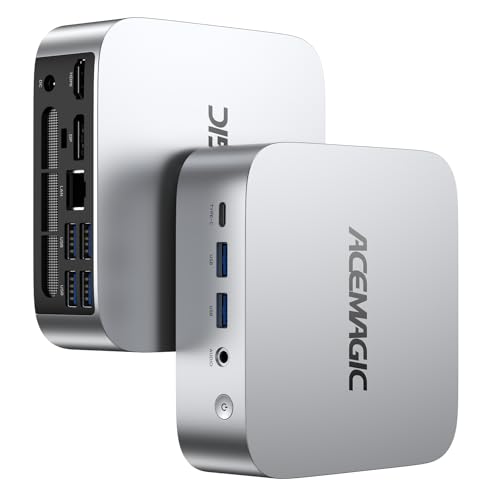
- Best small white gaming PC under $400: ACEMAGIC Vista V1 Mini PC, Ryzen 5 3500U, 8GB RAM, 256GB SSD — Check on Amazon
- GMKtec NucBox M5 Plus, Ryzen 7 5825U, 32GB RAM, 1TB SSD, Lunar Blue — Check on Amazon
- CHUWI LarkBox X Mini PC, Core i3-1220P, 8GB RAM, 256GB SSD — Check on Amazon
- ACEMAGIC Vista V1 Mini PC, Intel N150, 16GB RAM, 1TB SSD — Check on Amazon
See 2 more Amazon options
- STGAubron Gaming PC Desktop, Core i7, RX 580 8G, 32GB RAM, 512GB SSD, White (a full-size tower, and over the $400 budget — see the review) — Check on Amazon
- LXZ Gaming PC Desktop, Ryzen 5 5600GT, 16GB RAM, 1TB SSD, Sea View Room White (a full-size tower, and over the $400 budget — see the review) — Check on Amazon
Read the full guide ↓
Disclosure: As an Amazon Associate, reviewstook.com earns from qualifying purchases. Links to Amazon on this page are affiliate links; they cost you nothing extra. Listing details such as price and availability change often, so check the current Amazon listing before you buy.
Small room, white desk, $400. Each of those three requirements is easy on its own; together they describe a corner of the market that barely exists, and this guide starts by showing you its actual shape rather than the shape the search results pretend it has. White gaming PCs under $400 are already scarce — the mainstream market builds black — and white gaming towers under $400 do not exist at all: the verified examples sit above this budget, and both are full-size furniture that a small room has to be planned around. What genuinely fits a small space at this budget is the mini PC: a box small enough to sit on a shelf, tuck beside a monitor or disappear behind one on a VESA mount. So the honest structure of this list is four light-finish mini PCs that earn their place by being small, plus the two white towers included as flagged exhibits — over budget and not small — because a guide that hid them would leave you wondering whether a white tower was the answer.
Each review below leads with where the machine can physically live — form-factor class, documented dimensions and mounting where they exist, brick and cable placement — and only then talks about games. One rule applies to all six picks without exception: none of these machines goes inside a sealed cabinet, a closed TV stand or an unventilated cupboard. Every one of them breathes through vents that need open room air; seal the air away and even the smallest, coolest mini on this list will cook itself slowly. If your only available spot is behind a closed door, the correct purchase is a different spot, not a different PC.
In this guide
Quick Picks
Short on time, or comparing several options at once? Each row below names a small-space situation and the machine that suits it, with a link to the listing. The installation verdict in each review follows the grading explained under How These Picks Were Chosen.
| Small-space situation | Pick | Why it stands out | Link |
|---|---|---|---|
| Best small white gaming PC under $400 | ACEMAGIC Vista V1 (Ryzen 5 3500U) | Palm-size silver-white box, VESA mount in the box, the strongest in-budget mini graphics | Check on Amazon |
| Most performance in a mini footprint | GMKtec NucBox M5 Plus (Ryzen 7 5825U) | Eight Zen 3 cores, 32GB and 1TB in a mini chassis — but the finish is pale blue, not white | Check on Amazon |
| Whitest lid, shelf-friendly project box | CHUWI LarkBox X (Core i3-1220P) | A genuinely white top panel and a 10-core CPU, with slots to fix its small memory later | Check on Amazon |
| Tiniest commitment, real storage | ACEMAGIC Vista V1 (Intel N150) | The same silver-white shell with 16GB and 1TB, for light games and everyday use | Check on Amazon |
| White tower with a graphics card | STGAubron Gaming PC (RX 580) | A verified white case and a real discrete GPU — but full-size, and over budget — check price on Amazon | Check on Amazon |
| White showpiece tower | LXZ Gaming PC (Ryzen 5 5600GT) | Panoramic white glass and a modern APU — full-size furniture, over budget — check price on Amazon | Check on Amazon |
How These Picks Were Chosen
The budget rule is the same one a buyer would apply: a machine belongs in the main list if it sits at or under the $400 budget when checked on Amazon. Four mini PCs qualify. The two white towers are carried as clearly flagged exhibits above the budget, for the reason given in the introduction — they are the genuinely white gaming towers closest to this budget on Amazon, and knowing they sit above it is part of knowing this market. Every ASIN and specification here was verified against a real Amazon listing or an Amazon-linked record during the base research this variant reuses.
The installation grading works like this. Each pick is first assigned its form-factor class — palm-size mini, compact mini, or full-size tower — because class, not the listing photo, decides where a machine can live. Dimensions are printed only where the base research itself documented them: two of the minis carry verified measurements; for the rest, this guide says plainly that no figure is documented and routes you to the live listing and your own tape measure. No dimension or volume figure has been imported from any other guide or any other machine’s listing — a number measured on a different box would be a lie with decimal points. Mounting is graded with the same strictness: a VESA claim appears only where the base research documents a mount or bracket in the box; where none is documented, the review grades the machine as a shelf-or-desk placement, however small it is. Finally, each review accounts for what the product photo crops out: the external power brick (every mini here uses one; the listings do not state its color, and this class of adapter is black as a rule), the cable drop, and the heat a small room has to absorb.
The finish grading is inherited from the base guide, because “white” is still half of this keyword. Grade A means the case itself is white, confirmed in the listing’s own color field or the maker’s specification. Grade B means a silver-white metallic finish — unmistakably light, reads as white across a room, honestly silver in the hand. Grade C means a partial match: a white top over a dark base, or a pale tint that is honestly another color. Several strong budget gaming minis failed this color test outright during the base research — specification tables stating “Color: Black” beneath pale photography, a dark gunmetal LCD-fronted mini, a popular N100 box sold only in black and teal — and one famous near-miss bears repeating: Beelink manufactures its EQ12 in a Pearl White finish, but Amazon US stocks grey and blue, so it cannot be recommended as a white purchase in the US. Gaming expectations are graded in game classes — esports, indie, older AAA at low settings — never in invented frame rates; no machine here has a discrete GPU except the over-budget STGAubron.
The Installed Footprint: What “Small” Has to Include
Before the reviews, one section of arithmetic that small-space buyers get wrong more than any other: the footprint of a PC is not the footprint of its box. It is the box, plus the clearance its vents need, plus the brick, plus the cables, plus the warm air leaving it.
The air. Every pick here cools itself with room air drawn in and pushed out through vents, and every one needs that air to be open room air. Leave a hand’s width of clear space on any vented side, and never let an exhaust blow straight into a wall a few centimetres away — the hot air pools, gets drawn back in, and the fans work harder and louder for worse cooling. This is also where the sealed-cabinet refusal comes from: a closed TV stand or media cupboard is a box of recirculated heat, and no pick here — mini or tower, however quiet its marketing — is graded for it. An open-backed shelf, a desktop, or the back of a monitor are the placements this guide endorses; a door that closes is a refusal, for all six.
The brick. All four minis run from external power adapters, and the adapter is a physical object that needs an address: it cannot hang by its cable, it should not sit on carpet where its own heat has nowhere to go, and in this class it is black whatever the shell color — the listings do not state brick colors, which is itself the tell. Plan for a brick-length of space behind or below the desk, on a hard surface, with its cable run untensioned. The towers invert the problem: their power supplies are internal, so there is no brick to place, but the machine is tethered to wherever the wall outlet and the floor space agree — a tower’s “brick address” is the outlet it stands next to.
The 6 Best White Gaming PCs for Small Spaces Under $400
ACEMAGIC Vista V1 Mini PC — Ryzen 5 3500U, 8GB RAM, 256GB SSD
Who it suits: The small-room buyer who wants the whole problem to simply go away — a white-look machine that mounts behind the monitor, leaves the desk surface empty, and still plays real games.
Installation grade: the easiest install in this guide. The Vista V1’s shell measures about 3.9 inches square and 1.3 inches thick — a palm-size mini that fits anywhere a paperback book fits. Better, ACEMAGIC includes a VESA mount in the box, so the definitive small-space placement is available out of the carton: bolt it to the back of a monitor and the computer’s desk footprint becomes zero, its cable drop becomes the short fall behind the screen, and the only remaining placement question is the black external brick, which wants a hard surface behind or below the desk rather than a dangle. Shelf and desktop placements are equally undemanding — leave a hand’s width around the vents and it is installed. The sealed-cabinet refusal applies to it as to everything here, but it is the pick least likely to tempt anyone into a cabinet, because hiding it behind the monitor is easier.Finish grade: B — silver-white metallic, the lightest verified finish on a gaming-capable mini under $400; across a desk it reads as a white setup piece, in the hand it is honestly silver, and if it lives behind the monitor the question politely dissolves.
The gaming hardware is the strongest in this guide’s in-budget minis. The Ryzen 5 3500U is a four-core, eight-thread Zen+ APU whose Radeon Vega 8 integrated graphics sit a genuine class above the Intel UHD graphics in the N-series boxes — enough for esports titles at 720p to 1080p on low settings, indie games, emulation and older AAA releases turned down. HDMI and DisplayPort drive two 4K displays, Windows 11 Pro is preinstalled, and it is sold by ACEMAGIC’s own store on Amazon — check the current price on Amazon; its positioning inside this budget can leave room for the white monitor and keyboard that finish a small desk. One configuration note carried from the base research: ACEMAGIC also sells a 16GB version of this same 3500U machine; if that configuration is in stock when you shop, check its price on Amazon too — it is the better buy, because the 8GB fitted here is this pick’s ceiling as much as its spec.
- Documented 3.9-inch-square shell and a VESA mount in the box — the only zero-footprint install here that needs no extra parts.
- Radeon Vega 8 integrated graphics — the strongest mini GPU in this guide that stays in budget.
- Check price on Amazon — positioned to leave room in the budget for the white peripherals a small desk still needs.
Honest limitation: This configuration’s 8GB of RAM and 256GB SSD are a starting point, not a library, and silver-white is not matte white — anyone set on a true white case should read the two tower reviews below before compromising.
Choose it if you want the smallest honest answer to this keyword: light finish, real gaming ability, an install that takes minutes. Skip it if 8GB of RAM ends the conversation and the 16GB configuration is out of stock — your machine is the GMKtec below.

GMKtec NucBox M5 Plus — Ryzen 7 5825U, 32GB RAM, 1TB SSD
Who it suits: The performance-first small-room buyer — someone whose space is tight but whose games are not light, and who will accept a pale tint instead of white to get a much stronger machine into the same mini footprint class.
Installation grade: mini-class placement, the most cables in the guide. The M5 Plus is a compact mini PC of the same broad class as the other minis here — a shelf or desktop object rather than furniture — but the base research documents no exact dimensions and no VESA mount for this model, so this guide claims neither: grade it as a desk-or-shelf placement, and run the checklist’s tape-measure step against the live listing’s stated size before committing a specific nook to it. What the installation does have to plan for is connection density. Dual 2.5GbE Ethernet ports, Wi-Fi 6E and triple 4K display output make this the most connected mini in the guide, and a fully dressed one — two or three display leads, a wired Ethernet run, the black external brick — trails the heaviest cable drop of any mini here. In a small room that drop needs a wall to fall against or a cable channel to fall into; budget the ten minutes for a tidy install. Heat and noise stay mini-class: it warms its corner gently compared with any tower. Finish grade: C — Lunar Blue, a pale tint that is not white. GMKtec sells this machine in black and in a finish it calls Lunar Blue, a pale blue-grey that can join a white-and-pastel palette but will read as blue next to a genuinely white case; the listing sells both colors from the same page, so confirm the Lunar Blue version is selected before ordering.
What the color compromise buys is the best hardware in this guide under the ceiling. The Ryzen 7 5825U is an eight-core, sixteen-thread Zen 3 chip boosting to 4.5GHz, with Radeon Vega 8 graphics clocked at 2000MHz, 32GB of dual-channel DDR4 in two sockets (expandable to 64GB), and a 1TB NVMe SSD with a second slot for up to 4TB total — a specification that reads like a small workstation that happens to game, handling esports and older AAA titles at 1080p low settings or 720p more comfortably than anything else here under $400. Its positioning softens the surrender further: it sits at the top of this budget band and is frequently discounted, so check the current price on Amazon — the buyer is partly paid for the tint in cores, memory and storage.
- The strongest in-budget hardware in the guide: eight Zen 3 cores, 32GB of socketed RAM and a 1TB SSD with a second slot waiting.
- Dual 2.5GbE, Wi-Fi 6E and triple 4K output — plan the cable drop and the desk stays clean.
- Frequently discounted below its usual position at the top of this budget band — check price on Amazon — which takes some edge off the color compromise.
Honest limitation: It is not white, and no mount or measurement is documented for it in the base research — Lunar Blue is a pale tint a strict white build will register as blue, and its exact fit in a specific nook is a live-listing check, not a number this guide can give you.
Choose it if gaming headroom matters more than a perfect color match and your small room has one good shelf. Skip it if the desk must be truly white — the Vista V1 above, or the towers below, exist for that standard.

CHUWI LarkBox X Mini PC — Core i3-1220P, 8GB RAM, 256GB SSD
Who it suits: The buyer with one good shelf and a tolerance for a small project — the whitest-looking mini in the guide from the angles a desk is actually viewed from, with the slots to fix its one real weakness after arrival.
Installation grade: documented dimensions, documented bracket, one warm lid to respect. The LarkBox X is the second mini here with verified measurements in the base research: 127 × 127 × 49 mm, a squat square puck that sits happily on a shelf or a monitor stand. CHUWI includes a VESA bracket in the box alongside its 65W power adapter, so the behind-the-monitor install is documented for this pick too — with one nuance the other VESA mini does not have: the large round mesh vent in its white top panel is a breathing surface, so whether it sits on a shelf or hangs behind a screen, the top needs open air above it, not a shelf pressed down close or a monitor back flush against the vent. Mount it with a small standoff gap and it breathes as designed. The brick is the documented 65W adapter, color unstated and assumed black as the class dictates, wanting the usual hard surface behind the desk. Finish grade: B− — a true-white lid over a dark base. The two-tone shell reads as a white machine from above and from the front — the angles in every desk photo you will ever take — and shows its dark lower body honestly from the side; CHUWI describes the design as black-and-white, and that is exactly what arrives.
The surprise is the chip: a 10-core Core i3-1220P — two performance cores, eight efficiency cores, up to 4.4GHz — that out-muscles every other processor here at everyday computing, strategy and simulation games, and plain multitasking. The counterweight is its Intel UHD integrated graphics: a light-gaming part — esports at low settings, older titles, emulation — sitting a class below the Vega 8 machines wherever a game gets graphically ambitious. The configuration is the other caveat: it ships only as 8GB of RAM and a 256GB SSD, both small for the processor — but two SO-DIMM slots (32GB maximum) and two M.2 slots mean the machine you buy is a starting point rather than a sealed verdict, and a second memory stick also feeds the integrated graphics the dual-channel bandwidth they are starved of here. Check the current price on Amazon — its positioning in this band is honest for the project it is.
- The only true-white panel fitted to any mini here — a lid that reads white from the angles a desk is seen from.
- Documented 127 × 127 × 49 mm footprint and a VESA bracket in the box — measure once, mount or shelve it.
- A 10-core i3-1220P that out-runs every other CPU here at everyday work and CPU-bound games.
- Two memory slots and two M.2 slots, so the small shipped configuration is a fixable one.
Honest limitation: As shipped, 8GB of single-stick memory and 256GB of storage undersell the processor and hold back its graphics; the white is a lid, not a whole case; and the top vent rules out any placement that caps the lid.
Choose it if you want the whitest-looking mini, a measured fit, and a small upgrade path. Skip it if the strongest gaming graphics per dollar, straight out of the box, is the brief — that title belongs to the Vista V1 or the M5 Plus.

ACEMAGIC Vista V1 Mini PC — Intel N150, 16GB RAM, 1TB SSD
Who it suits: The buyer whose small room is mostly for everyday computing, media and light games — and who would rather have generous memory and storage in the same tiny silver-white shell than the Ryzen version’s stronger graphics.
Installation grade: identical to the lead pick — the same shell, the same mount, the same tiny ask. This is the second configuration of the guide’s lead machine, and its installation story is the lead machine’s: the same bright silver-white shell at about 3.9 inches square and 1.3 inches thick, the same VESA mount for a zero-footprint home behind a monitor, the same black-brick-by-default external adapter to park on a hard surface behind the desk, and the same hand’s-width of vent clearance as the whole placement ceremony. In a small room its lower-power internals also make it the gentlest heat citizen in the guide — the pick that warms a bedsit or a box room the least across a long evening. Finish grade: B — silver-white metallic, same shell as the Ryzen Vista V1: light enough to anchor a white desk, honestly silver in the hand — and, mounted behind a monitor, invisible either way.
Inside, the trade is explicit. The Intel N150 is a four-core efficiency chip; its UHD integrated graphics take 2D and indie games, emulation of older systems, browser gaming and video in their stride — and that is the whole of their stride. Current 3D games are simply beyond it, at any setting worth sitting through. What arrives instead is everything the Ryzen version lacks: 16GB of RAM, a full 1TB SSD, dual 4K output over HDMI and DisplayPort, and it is positioned as the lowest-cost route here to the silver-white shell with a specification everyday use will not outgrow — check price on Amazon. Think of it as the small room’s office-and-indie machine: it completes the look, plays the lighter library beautifully, and leaves the heavy gaming to a console, a cloud service or a later, bigger room.
- Same documented tiny shell and VESA mount as the lead pick, with double the memory and four times the storage.
- Check price on Amazon — positioned below every other light-finish machine in the guide.
- The lowest heat output here; dual 4K output for a two-monitor small desk.
Honest limitation: The N150’s integrated graphics are the weakest in this guide — fine for indies, emulation and older games, not a machine for modern 3D titles at any size of room.
Choose it if your gaming is light, your storage needs are not, and your room is the smallest one in the flat. Skip it if you play current 3D games — choose the Ryzen Vista V1 instead, which installs identically.
STGAubron Gaming PC Desktop — Core i7, RX 580 8G, 32GB RAM, 512GB SSD, White (over budget)
Who it suits: The buyer for whom “white gaming PC” means a white tower with a real graphics card — and whose small room has a floor corner genuinely going spare, because that is what this machine will take.
Installation grade: a floor-standing tower, graded as furniture. Nothing about this pick is small, and this guide will not launder it into the mini conversation: it is a full-size desktop tower that stands on the floor or consumes a desk corner outright, needs open air on its vented sides like every machine here, and is refused for sealed cabinets in the strongest terms in this guide — a tower with a discrete graphics card is the fastest heater on this list, and a closed media unit is exactly where it must never go. Its installation mercies are the tower format’s usual ones: the power supply is internal, so there is no brick to place, and the three RGB fans behind the front panel and the included RGB keyboard and mouse mean the box arrives as a complete station — though the listing confirms the peripherals are in the box without stating their finish, so check the listing photos before assuming the whole bundle is white, and expect the power cable, as ever, to be black.Finish grade: A — verified white case, the only machine in the guide whose Amazon listing data states its color outright as White. It is included as the budget exhibit: it is the genuinely white, discrete-GPU gaming tower closest to this budget that we could verify on Amazon — check price on Amazon — which means the honest answer to “a white tower under $400” is that such towers start above this budget — and the honest answer to “a white tower for a small space” is that the tower is the space decision, made before any other furniture.
Under the white panels sits a time capsule — with a real GPU in it. The Radeon RX 580 8GB dates from 2017 and remains a legitimate 1080p gaming part for esports and older AAA titles — stronger, categorically, than every integrated GPU in this guide — paired with 32GB of RAM, a 512GB SSD, Wi-Fi 6 and Windows 11 Home. The processor is the caution: the listing offers a Core i7 “up to 3.9GHz” and declines to name it, while coverage of this configuration identifies a fourth-generation part — a decade-old platform wearing a modern-sized price tag. Layer in the family’s mixed buyer reports on stability and support and the conclusion draws itself: the white tower tax, itemized. The money buys the color and the card, riding on an old platform from a budget integrator. Nobody should pay it unknowingly — and nobody in a small room should pay it without measuring the corner first.
- The sole verified white case anywhere near this budget that carries a discrete GPU — an RX 580, for real 1080p gaming.
- The 32GB of RAM and the bundled RGB keyboard and mouse take some sting out of its over-budget positioning.
- Internal power supply — no brick to place; its over-budget positioning is the guide’s key evidence that white towers start above this budget, not inside it.
Honest limitation: It is over the $400 budget, it is not small by any definition this guide uses, and it is built on a fourth-generation Core i7 platform the listing does not name precisely, from a budget brand with mixed reliability reports — the white finish and the GPU are what the money buys.
Choose it if a white tower with a graphics card is non-negotiable, stretching above this budget is reachable, and your room has the floor corner measured and waiting. Skip it if space is the binding constraint — it is, on this keyword — because this tier buys far newer hardware in the M5 Plus class, in a box a fraction of the size.

LXZ Gaming PC Desktop — Ryzen 5 5600GT, 16GB RAM, 1TB SSD, Sea View Room White (over budget)
Who it suits: The showpiece builder with a slightly bigger “small” room — someone whose white PC is meant to be looked at through glass, who has a floor or desk-end position worthy of it, and who can stretch above this budget for the case the minis cannot be.
Installation grade: the biggest object in this guide, and the least forgiving install. LXZ’s “Sea View Room” case is a panoramic tempered-glass tower: it wants to be seen, which in a small room means it wants the room’s one good position — a floor spot or desk end with open air around it and sightlines to it. The listing record puts it at just over 18 pounds, so treat it as a floor placement unless your desk is genuinely sturdy; seven addressable RGB fans move its air, and a glass tower under gaming load is a real heat source in a small room, so the sealed-cabinet refusal applies here with the least ambiguity of any pick: glass showpiece and closed cupboard are opposite ideas. There is no external brick — the power supply is internal — but the listing does not state that supply’s wattage, a number that matters the day you add a graphics card, and one to confirm with the seller before planning that upgrade. Peripherals are not included, so the white keyboard and mouse that complete the photograph are a further purchase with their own desk space to find.Finish grade: A− — white panoramic case, white-themed build, sold in an Amazon listing whose color field states White outright; it is the best-looking machine in this guide by a distance, and — check price on Amazon — it is also the clearest example of the white premium at tower scale: sitting above this guide’s budget buys the case, the glass and the fans, wrapped around integrated graphics.
Behind the glass sits a properly modern platform: six cores and twelve threads of Ryzen 5 5600GT, Radeon Vega 7 integrated graphics, 16GB of DDR4, a 1TB NVMe SSD and Windows 11 Pro. As shipped it is an esports-and-older-games machine at 720p to 1080p low settings — the same gaming class as the minis above, in a case many times their size. Its argument is the future: a standard tower on a current-generation socket is the one machine in this guide that can become a serious gaming PC later by adding a discrete GPU, which no mini here can do at any price. Buy it as a white foundation with a measured home and its premium positioning is defensible; buy it expecting premium-tier gaming today and the minis expose it — the M5 Plus matches or beats its gaming from a lower position in the range, in pale blue, on a shelf.
- A white panoramic glass case with seven ARGB fans, verified in the listing’s color field — the one true showpiece here.
- A modern 6-core 5600GT platform with 16GB and 1TB — and the only pick here that can take a graphics card later.
- It embodies the white tower premium exactly: above this budget, and a room position to match — check price on Amazon.
Honest limitation: It is over budget, it is the largest and heaviest install here, it ships with integrated graphics only, includes no peripherals, and its listing leaves the PSU wattage unstated — verify it before planning a GPU upgrade.
Choose it if the white tower look is the point, the room has a position measured for it, and you will add a graphics card later. Skip it if your space is truly small — every mini above it wins the room, and most win on gaming value too.

Comparison Table
| Product | Form factor & install | Finish grade | Graphics | Best use | Link |
|---|---|---|---|---|---|
| ACEMAGIC Vista V1 (Ryzen 5 3500U) | Palm-size mini, ~3.9 in square; VESA mount in box — zero desk footprint | B — silver-white metallic | Radeon Vega 8 integrated | Best small white gaming value under $400 | Check on Amazon |
| GMKtec NucBox M5 Plus (Ryzen 7 5825U) | Compact mini; desk/shelf placement, heaviest cable drop here | C — pale Lunar Blue | Radeon Vega 8 integrated | Most performance in a mini footprint | Check on Amazon |
| CHUWI LarkBox X (Core i3-1220P) | Mini, 127 × 127 × 49 mm; VESA bracket in box — keep the top vent clear | B− — white top, dark base | Intel UHD integrated | Whitest lid, strongest CPU, upgrade project | Check on Amazon |
| ACEMAGIC Vista V1 (Intel N150) | Palm-size mini, ~3.9 in square; VESA mount — lowest heat here | B — silver-white metallic | Intel UHD integrated | Light gaming with 16GB and 1TB | Check on Amazon |
| STGAubron Gaming PC (RX 580) — over budget | Full-size tower; floor placement, internal PSU, no brick | A — verified white case | Radeon RX 580 8GB discrete | Only white tower with a graphics card | Check on Amazon |
| LXZ Gaming PC (Ryzen 5 5600GT) — over budget | Full-size glass tower; floor/showpiece position, internal PSU | A− — white panoramic glass | Radeon Vega 7 integrated | White showpiece with a GPU upgrade path | Check on Amazon |
Measure Before You Buy: The Five-Step Small-Space Checklist
Run these five steps in order, with a tape measure and the live listing open, before any machine in this guide goes into a cart. The order is the point: each step can veto the purchase cheaply, and the veto gets more expensive the later it lands.
Step 1 — Measure the spot. Decide where the machine will actually live — shelf, desk corner, floor patch, back of the monitor — and measure it: width, depth, and the height of anything that hangs above it. Compare against a documented figure where one exists (the Vista V1’s roughly 3.9-inch-square shell, the LarkBox X’s 127 × 127 × 49 mm) or against the live listing’s stated dimensions where it does not. If the spot is a floor corner and the pick is a tower, measure the corner as furniture, because that is what it is. A spot that only fits with the machine wedged tight is not a fit — Step 2 explains why.
Step 2 — Check the ventilation clearance. For the spot you measured, confirm a hand’s width of open air on every vented side and nothing closing over the top — and if the spot is inside anything with a door, stop here: no pick in this guide is graded for a sealed cabinet, a closed TV stand or an unventilated cupboard, and that refusal is final rather than a challenge to your cable management. Open-backed shelves pass. Desks pass. The back of a monitor passes. A door that shuts fails, for all six machines, every time.
Step 3 — Give the brick an address. If the pick is a mini, it runs from an external adapter, and that adapter needs a named home before the order: a hard, flat surface behind or below the desk, not carpet, not dangling by its cable, with slack in both leads. Assume the brick is black whatever the shell — the listings do not state its color — and decide now whether it hides behind the desk or joins the setup visibly. If the pick is a tower, this step becomes the outlet plan: the internal supply tethers the machine to a wall socket, so confirm the measured spot and a reachable outlet agree.
Step 4 — Walk the cable drop. Count what will hang off the back: display leads (two for most of these minis, three for the M5 Plus if you dress it fully), power, Ethernet if you wire it, USB for the peripherals you already own. Confirm the drop has somewhere to go — a wall behind the desk, a cable channel, a floor run nobody trips over in a room where floor is scarce. A floating desk mid-room turns every cable into decor; if that is your layout, the VESA-mounted minis, whose drop hides behind the monitor, are the picks this step is quietly voting for.
Step 5 — Then order. Only now: open the live listing, confirm the configuration and the color version selected are the ones reviewed here — the M5 Plus page sells black and Lunar Blue from the same page, and the Vista V1 name covers several different chips — check the current price on Amazon, and order knowing the machine has a measured, ventilated, powered, cabled home waiting for it.
How to Choose a White Gaming PC for a Small Space Under $400
- Let the room pick the form factor first. If the honest inventory of your space is “a shelf” or “the back of a monitor,” the answer is a mini and the only remaining question is which one. Towers enter the conversation only when a floor corner is genuinely free — and at this budget they enter it over budget, flagged, as the two exhibits below the minis.
- Grade the whole setup, not the case. In this class the brick and cables are black with near-perfect consistency, and the typical white PC keeps company with a black-bezeled monitor and a black keyboard. Mount a mini behind the monitor and the problem evaporates — out of sight, it cannot clash with anything.
- Spend on graphics class before color purity. Among the minis, the Vega-class integrated graphics in the two Ryzen picks open a visibly wider library than the Intel UHD boxes manage. If your games are 3D, that difference matters more than the gap between silver-white and white — especially once the machine is mounted out of sight.
- Treat 8GB configurations as starter kits. Two picks ship with 8GB of RAM. The LarkBox X’s empty second slot makes its fix cheap — and the added channel feeds its graphics too — while the Vista V1 3500U’s fix is shopping for its 16GB configuration instead of this one.
- If the dream is a tower, understand its real tier first. Verified white towers sit above this budget — one with a discrete GPU on an old platform, one with a modern APU and no GPU — and both need a measured floor position. The tier where white towers actually live is covered by our companion guide, Best White Gaming PC Under $500.
- Re-check the configuration on the live listing — every single time. Budget minis travel in families: one name, several chips, several colors, several memory sizes. Confirm the chip, the memory, the storage and — on this keyword above all — the color version in the selector before ordering.
Common Buying Mistakes
- Buying the box and forgetting the installation. The machine arrives, the shelf is two centimetres too shallow, the brick has nowhere to live, and the “small” PC ends up on the floor in the walkway. The five-step checklist exists because this is the most common failure on this keyword.
- Sealing a PC into a closed cabinet or TV stand because it fits. It fits, and then it bakes: every pick here breathes room air through vents, and a closed door turns any of them into a slow oven. Open-backed or open-air placements only — no exceptions at any size.
- Ordering the wrong version of a shared listing. One M5 Plus page sells black and Lunar Blue side by side, and one Vista V1 name covers four different chips. What arrives is whatever the checkout selectors said — not whatever the review you read described.
- Paying the white tax twice: the premium machine first, then the discovery that the matching white monitor, keyboard and mouse were never budgeted. Price the whole desk, not the PC.
- Chasing the Pearl White unicorn. Beelink builds a white EQ12 that Amazon US does not stock — it ships grey and blue here, and a hopeful order earns you a blue box and a returns label instead of a white PC.
- Forgetting that color adds no performance. A stronger black machine at a comparable position in the range is the standing temptation: the frames surrendered for white are a genuine cost, worth paying for a desk you love, never worth paying by accident. Our Best Gaming PC Under $400 guide shows what the same money buys with no color filter at all.
Final Recommendation
- Most small-room white buyers under $400: ACEMAGIC Vista V1 (Ryzen 5 3500U).
- Most gaming performance in a mini footprint: GMKtec NucBox M5 Plus.
- Whitest-looking mini, measured fit, upgrade-friendly: CHUWI LarkBox X.
- Light gaming, generous storage, lowest-cost positioning and lowest heat: ACEMAGIC Vista V1 (Intel N150).
- White tower with a graphics card, budget and floor stretched: STGAubron Gaming PC (RX 580).
- White showpiece to upgrade later, room position reserved: LXZ Gaming PC (Ryzen 5 5600GT).
The top two are both Ryzen minis, chosen for opposite reasons. The Vista V1 3500U is the guide’s honest center: the lightest verified finish on a gaming-capable machine, real Vega 8 graphics, a documented palm-size shell with a VESA mount in the box, and a position inside this budget that can leave room for the white peripherals that finish a small desk — check the current price on Amazon. The M5 Plus is the performance answer — eight Zen 3 cores, 32GB and 1TB under the ceiling — for buyers who will trade a true white for a pale tint and a much stronger machine on the same shelf. If neither trade suits, the LarkBox X offers the whitest lid and a measured, mountable fit, the N150 Vista V1 offers the shell with everyday storage at the lowest-cost positioning in the set and the least heat, and the two flagged towers mark what insisting on a white case with glass actually costs — in money, and in floor. Readers still deciding between form factors should also see Best Small Form Factor Gaming PC Under $400 and Best Compact Gaming PC Under $400; anyone whose room turns out bigger than their budget should read Best White Gaming PC Under $400 for the full white list without the space filter. Whatever you choose, run the five steps and verify the color field, the configuration and the current price on the live listing before you order.
Frequently Asked Questions
Can a white gaming PC actually fit a small space for under $400?
Yes — as a mini PC. The four in-budget picks in this guide are palm-to-puck-size boxes that sit on a shelf or mount behind a monitor, in silver-white, two-tone or pale-tint finishes. What does not exist is a small white tower under $400: the verified white towers closest to this budget sit above it, and both are full-size floor furniture. The keyword’s honest answer is that “small” and “white” are both achievable at this price, as long as the machine is a mini.
Can I put one of these PCs inside my TV stand or media cabinet?
No — not if the door closes. Every machine in this guide cools itself with room air through vents, and a sealed cabinet recirculates its own exhaust until the hardware throttles or worse. An open-backed stand, an open shelf, a desktop or the back of a monitor are all good placements; a closed cupboard is a refusal for all six picks, minis included. If the cabinet is the only spot, leave its door permanently open and treat it as an open shelf — or choose a different spot.
Which of these PCs can mount behind a monitor?
Two, on documented evidence: both ACEMAGIC Vista V1 configurations include a VESA mount in the box, and the CHUWI LarkBox X includes a VESA bracket alongside its 65W adapter. The base research documents no mount for the GMKtec M5 Plus, so this guide makes no mounting claim for it — check the live listing if a behind-monitor install is your plan — and the two towers are floor furniture that mounts nowhere. Wherever you mount, keep the vents clear of the monitor’s back panel; the LarkBox X in particular breathes through the mesh in its top lid.
Is there a white gaming PC with a graphics card that fits a small space?
Not a verified one at anything near this budget. The only discrete GPU in this guide belongs to the over-budget STGAubron, a full-size tower positioned above this budget — check price on Amazon. Small-space gaming under $400 runs on integrated graphics — Vega-class in the Ryzen minis, Intel UHD in the others — which means esports, indie and older titles at modest settings. If a graphics card is non-negotiable, the room has to make space for a tower and the budget has to stretch; Best White Gaming PC Under $500 is where that conversation starts.
What about the white Beelink EQ12 I have seen recommended?
The Pearl White EQ12 is real — Beelink builds it, and it sits in the maker’s own lineup. Stocking is the catch: Amazon US lists the EQ12 in grey and blue, so a US order placed in hope of white arrives in one of those. In its documented colors it is a perfectly decent N100 mini — it sits in our Best Mini Gaming PC Under $400 guide on merit — but as a white purchase in the US it cannot be recommended today.
Will a gaming PC heat up a small room?
The minis, barely: they draw modest power and their heat output across an evening is gentle, with the N150 Vista V1 the gentlest here. A tower under gaming load is a different matter — it exhausts its case heat into the room continuously, and in a bedroom-sized space in summer you will feel it.
- Best White Gaming PC Under $400
- Best White Gaming PC Under $500
- Best White Gaming PC Under $700
- Best White Gaming PC For Beginners Under $400
- Best White Gaming PC For Streaming Under $400
- Best White Gaming PC For 1440p Gaming Under $400
- Best Small Form Factor Gaming PC Under $400
- Best Mini Gaming PC Under $400


