Where to buy
Check the latest price, availability and delivery on Amazon. Orders are placed on Amazon. We may earn a commission from qualifying purchases.
- Best white gaming value under $400: ACEMAGIC Vista V1 Mini PC, Ryzen 5 3500U, 8GB RAM, 256GB SSD — Check on Amazon
- GMKtec NucBox M5 Plus, Ryzen 7 5825U, 32GB RAM, 1TB SSD, Lunar Blue — Check on Amazon
- CHUWI LarkBox X Mini PC, Core i3-1220P, 8GB RAM, 256GB SSD — Check on Amazon
- ACEMAGIC Vista V1 Mini PC, Intel N150, 16GB RAM, 1TB SSD — Check on Amazon
See 2 more Amazon options
- STGAubron Gaming PC Desktop, Core i7, RX 580 8G, 32GB RAM, 512GB SSD, White (over the $400 budget — see the review) — Check on Amazon
- LXZ Gaming PC Desktop, Ryzen 5 5600GT, 16GB RAM, 1TB SSD, Sea View Room White (over the $400 budget — see the review) — Check on Amazon
Read the full guide ↓
Disclosure: As an Amazon Associate, reviewstook.com earns from qualifying purchases. Links to Amazon on this page are affiliate links; they cost you nothing extra. Listing details such as price and availability change often, so check the current Amazon listing before you buy.
Start with the sentence nobody selling white PCs wants to print: under $400, a white gaming PC is not really a product category — it is a finish you hunt for inside someone else’s category. The mainstream gaming market builds black towers and dark mini PCs, and at this budget it barely builds anything else. Search Amazon for a white gaming PC under $400 and the results fill up with machines whose listing photos glow pale and silver in the thumbnail while their own specification tables quietly say “Color: Black.” We know, because checking those spec tables — and the manufacturers’ own color lists — is most of the work behind this guide. What survives the check is a short, honest list: a handful of mini PCs in genuinely light finishes, and no in-budget white tower at all. The two white towers below are included precisely because they prove the rule — they are the cheapest truly white gaming towers on Amazon, and both sit above $400, flagged as such rather than smuggled in.
So set expectations the way this guide sets them. At $400, white gaming hardware means APU mini PCs — small, quiet boxes whose integrated graphics play esports titles, indies and older games at modest settings — wearing silver-white, pale-tinted or white-topped shells. It does not mean a white tower with a graphics card; that machine sits in the tier above this budget. The white tax is real and measurable: builders charge more for white cases, white components sell in smaller volumes, and at this end of the market the tax is often the difference between a discrete GPU and integrated graphics. And the last honesty note is the simplest: color adds zero performance. A white case has never produced a single extra frame. What it produces is a desk that looks the way you wanted — which is a perfectly good reason to buy, as long as you buy it with open eyes and grade each machine on how white it actually is. That grading — case, power brick, cables and peripherals, not just the hero photo — is what the six reviews below do.
In this guide
Quick Picks
Short on time, or comparing several options at once? Each row below names a buyer type and the machine that suits it, with a link to the listing. The finish grade in each review follows the scale explained under How These Picks Were Chosen.
| Buyer type | Pick | Why it stands out | Link |
|---|---|---|---|
| Best white gaming value under $400 | ACEMAGIC Vista V1 (Ryzen 5 3500U) | Silver-white shell and Vega 8 graphics at the low end of this budget tier | Check on Amazon |
| Most gaming performance under $400 | GMKtec NucBox M5 Plus (Ryzen 7 5825U) | Eight Zen 3 cores, 32GB of RAM and 1TB — but the finish is pale blue, not white | Check on Amazon |
| Whitest top, strongest CPU | CHUWI LarkBox X (Core i3-1220P) | A genuinely white lid over a 10-core chip, with slots to fix its small memory later | Check on Amazon |
| Cheapest light finish with real storage | ACEMAGIC Vista V1 (Intel N150) | The same silver-white shell with 16GB and 1TB, for lighter games and everyday play | Check on Amazon |
| Only white tower with a graphics card | STGAubron Gaming PC (RX 580) | A verified white case and a real discrete GPU — over budget; check price on Amazon | Check on Amazon |
| White showpiece tower | LXZ Gaming PC (Ryzen 5 5600GT) | Panoramic white glass case and a modern APU — over budget; check price on Amazon | Check on Amazon |
How These Picks Were Chosen
The budget was applied the way a buyer applies it: a pick belongs in the main list if it sits inside the under-$400 tier — check the current price on Amazon, because prices at this tier move often. Four picks qualify. Two more — the only genuinely white gaming towers we could verify — are included as clearly flagged exhibits above the budget, because a guide to white PCs under $400 that hid the fact that white towers live in a higher tier would be lying by omission. Every ASIN and specification in this guide was verified against a real Amazon listing or an Amazon-linked record during research; nothing is here on the strength of a search-result thumbnail.
The color grading is the part of the method this keyword lives or dies on, so it is worth spelling out. Each machine gets a finish grade based on everything the listing documents: Grade A means the case itself is white, confirmed in the listing’s own color field or the maker’s specification — not inferred from a bright photo. Grade B means a silver-white metallic finish: unmistakably light, reads as white across a room, but shows its silver in your hand. Grade C means a partial match — a white top over a dark base, or a pale tint that is honestly another color. On top of the case grade, each review notes what the listing says (or does not say) about the visible extras: mini PCs in this class almost universally ship with black power bricks and black cables whatever the shell color, and where a listing is silent about the brick we say so rather than assume. A white case trailing a black brick and black leads is a partial white setup, and the reviews grade it as one.
The exclusion list is as informative as the picks. Several of the strongest budget gaming minis failed the color test outright: machines whose Amazon specification tables state “Color: Black” even where their marketing photos look pale, a popular LCD-fronted mini that turns out to be dark gunmetal in its product photography, and a well-known N100 box whose maker sells it in black and teal only. One famous near-miss deserves naming: Beelink genuinely manufactures its EQ12 mini PC in a Pearl White finish — but the configurations stocked on Amazon US are grey and blue, so a US buyer following a “white EQ12” recommendation would receive a colored box. It is mentioned here so you know it exists, and excluded from the picks because you cannot reliably buy the white one. Gaming expectations were graded with the same strictness: no machine in this guide has a discrete GPU except the over-budget STGAubron, so performance is described in game classes — esports, indie, older AAA at low settings — and never in invented frame rates.
The 6 Best White Gaming PCs Under $400
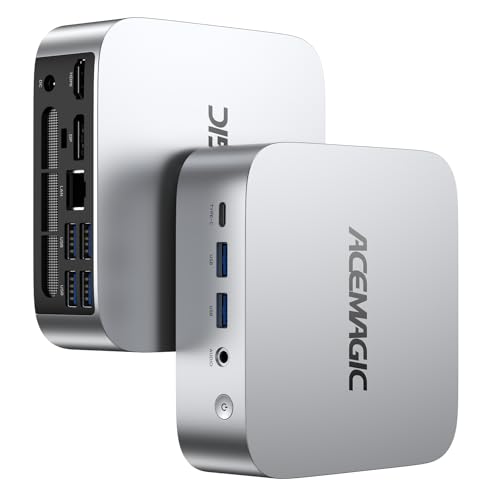
ACEMAGIC Vista V1 Mini PC — Ryzen 5 3500U, 8GB RAM, 256GB SSD
Who it suits: The white-setup builder on a real budget — someone who wants the desk to read white or near-white, plays esports and older games, and would rather spend the savings on a white monitor and keyboard than on a tower that does not exist at this price.
Finish grade: B — silver-white metallic. Start with the color, because it is the reason this machine leads the guide. The Vista V1’s shell is a bright silver-white metallic finish — the lightest mini PC casing we could verify as actually buyable under $400. Across a desk it reads as a white setup piece; in your hand it is honestly silver, with a metallic sheen no matte-white case has. The listing data does not state the power adapter’s color, and this class of mini PC ships with black bricks and black cables as a rule — so budget the setup as silver-white box, black leads, and route the brick behind the desk if the trailing cable offends you. Graded as a whole setup, it is a strong partial match; graded as a case, it is the closest thing to white that real gaming hardware wears at this money.
The gaming side is better than the price suggests. The Ryzen 5 3500U is a four-core, eight-thread Zen+ APU whose Radeon Vega 8 integrated graphics are the strongest GPU in this guide’s in-budget mini PCs — a genuine step above the Intel UHD graphics in the N-series boxes, and enough for esports titles at 720p to 1080p on low settings, indie games, emulation and older AAA releases turned down. The box itself is tiny — about 3.9 inches square and 1.3 inches thick — with HDMI and DisplayPort driving two 4K displays, a VESA mount in the box for hiding it behind a monitor entirely, and Windows 11 Pro preinstalled. Check the current price on Amazon — it sits comfortably inside this budget tier, sold by ACEMAGIC’s own store, which leaves room inside a $400 budget for the white peripherals that complete the look. One buying note: ACEMAGIC also sells a 16GB version of this same 3500U machine — if you find that configuration in stock, it is the better buy, because the 8GB fitted here is this pick’s ceiling as much as its spec.
- The lightest verified finish on a gaming-capable mini under $400 — silver-white metallic.
- Vega 8 integrated graphics: the strongest in-budget mini GPU in this guide.
- Check price on Amazon — positioned low in this budget tier, leaving room for white peripherals; VESA mount included for a hidden install.
Honest limitation: The pinned configuration carries 8GB of RAM and a 256GB SSD — enough to start, tight for a growing game library — and the finish is silver-white, not matte white; a buyer set on a true white case should read the two tower reviews below before settling.
Choose it if you want the best balance of light finish, real gaming ability and price in this guide. Skip it if 8GB of RAM is a dealbreaker and the 16GB configuration is out of stock — the GMKtec below is your machine.

GMKtec NucBox M5 Plus — Ryzen 7 5825U, 32GB RAM, 1TB SSD
Who it suits: The performance-first buyer who wants the strongest gaming mini PC under $400 and is willing to accept that the lightest finish on it is a pale tint rather than a true white.
Finish grade: C — pale Lunar Blue, not white. GMKtec sells this machine in black and in a finish it calls Lunar Blue, and honesty requires the grade to match the name: Lunar Blue is a pale blue-grey, the lightest colorway on any strong mini PC in this price class, and next to a genuinely white case its blue tint is unmistakable. In a white-and-pastel setup it can pass as part of the palette; in a strict all-white build it will be the one piece that is visibly another color. The power brick and cables follow the class pattern — dark — and the listing’s color versions are stated plainly, so confirm you have the Lunar Blue version selected before ordering, because the black one shares the same listing page.
What the compromise buys is the best hardware in this guide under the ceiling. The Ryzen 7 5825U is an eight-core, sixteen-thread Zen 3 chip boosting to 4.5GHz, with Radeon Vega 8 graphics clocked at 2000MHz, 32GB of dual-channel DDR4 in two sockets (expandable to 64GB), and a 1TB NVMe SSD with a second slot for up to 4TB total. Around that sit dual 2.5GbE Ethernet ports, Wi-Fi 6E, and triple 4K display output — a specification that reads like a small workstation that happens to game, and at 1080p low settings or 720p it handles esports and older AAA games more comfortably than anything else here that stays under $400. Its positioning is the other half of the argument: it sits at the top of this budget tier — check the current price on Amazon — so you give up true white, and you are paid for the surrender in cores, memory and storage.
- Strongest in-budget hardware here: 8 Zen 3 cores, 32GB socketed RAM, 1TB SSD plus a spare slot.
- Dual 2.5GbE, Wi-Fi 6E and triple 4K output — the most connected mini in the guide.
- Sits at the top of the under-$400 tier — check price on Amazon — which softens the color compromise.
Honest limitation: It is not white. Lunar Blue is a pale tint that a strict white build will register as blue, and buyers for whom the color is the whole point should treat this as the performance alternative, not the white pick.
Choose it if gaming headroom matters more than a perfect color match. Skip it if the desk has to be truly white — that is what the Vista V1 above and the towers below are for.

CHUWI LarkBox X Mini PC — Core i3-1220P, 8GB RAM, 256GB SSD
Who it suits: The buyer who wants the whitest-looking mini PC in the guide from the angles a desk is actually viewed from — and a strong everyday CPU — and who is comfortable upgrading memory and storage as the first project.
Finish grade: B− — genuinely white top, dark base. The LarkBox X wears a two-tone shell: a white top panel with a large round mesh vent, over a dark lower body. From above and from the front — the angles in every desk photo you will ever take — it reads as a white machine. From the side, the two-tone split is honest and visible. CHUWI describes the design as black-and-white, and that is exactly what arrives; this is the only mini in the guide where any major panel is true white rather than silver or tint. The included 65W power adapter’s color is not stated in the listing data, so assume the usual black brick and plan the cable run accordingly.
The chip is the surprise: a 10-core Core i3-1220P (two performance cores, eight efficiency cores, up to 4.4GHz) that out-muscles every other processor in this guide for everyday computing, strategy and simulation games, and multitasking. Its Intel UHD integrated graphics are the honest counterweight — a light-gaming part for esports at low settings, older titles and emulation, a class below the Vega 8 machines for anything graphically ambitious. The configuration is the other caveat: it ships only as 8GB of RAM and a 256GB SSD, both small for the processor. CHUWI’s mitigation is real, though — two SO-DIMM slots (32GB maximum) and two M.2 slots mean the machine you buy is a starting point rather than a sealed verdict, and a second memory stick also feeds the integrated graphics the dual-channel bandwidth they are starved of here. Check the current price on Amazon — it is positioned in this tier like the project it is.
- The only true-white panel on any mini in this guide — a white lid that reads white from desk angles.
- 10-core i3-1220P: the strongest CPU here for everyday work and CPU-bound games.
- Two memory slots and two M.2 slots — the small shipped configuration is fixable.
Honest limitation: As shipped, 8GB of single-stick memory and 256GB of storage undersell the processor and hold back its graphics; the white is a lid, not a whole case.
Choose it if you want the whitest-looking mini and enjoy a small upgrade path. Skip it if you want the strongest gaming graphics out of the box — that is the Vista V1 or the M5 Plus.

ACEMAGIC Vista V1 Mini PC — Intel N150, 16GB RAM, 1TB SSD
Who it suits: The buyer whose white setup is mostly for everyday computing, media and light games — and who would rather have generous memory and storage in the same silver-white shell than the Ryzen version’s stronger graphics.
Finish grade: B — silver-white metallic, same shell as the Ryzen Vista V1. This is the second configuration of the guide’s lead machine, and it earns its own review rather than a footnote because it answers a different buyer. The shell is identical — bright silver-white metallic, VESA-mountable, about 3.9 inches square — and the grading is identical too: light enough to anchor a white desk, honestly silver in the hand, with the class-standard black power brick the listing does not describe. If the two Vista V1s were photographed side by side you could not tell them apart, which is rather the point: ACEMAGIC sells the white-look shell across its whole budget range, and this is the configuration for people whose games are the lighter half of the hobby.
Inside, the trade is explicit. The Intel N150 is a four-core efficiency chip whose UHD integrated graphics handle 2D and indie games, emulation of older systems, browser gaming and video without complaint — and stop there. Modern 3D titles are beyond it at any setting worth playing, and this guide will not pretend otherwise. What you get instead is the specification the Ryzen version lacks: 16GB of RAM and a full 1TB SSD, dual 4K output over HDMI and DisplayPort, and a position at the low end of this budget tier — check the current price on Amazon — as the cheapest route in this guide to the silver-white shell with a specification you will not outgrow for everyday use. Think of it as the white desk’s office-and-indie machine: it completes the look, plays the lighter library beautifully, and leaves the heavy gaming to a console, a cloud service or a later upgrade.
- Same silver-white shell as the lead pick, with double the memory and four times the storage.
- Check price on Amazon — the cheapest light-finish machine in the guide, at the low end of the tier.
- Quiet, tiny and VESA-mountable; dual 4K output for a two-monitor white desk.
Honest limitation: The N150’s integrated graphics are the weakest in this guide — fine for indies, emulation and older games, not a machine for modern 3D titles.
Choose it if your gaming is light and your storage needs are not. Skip it if you play current 3D games — step up to the Ryzen Vista V1 instead.
STGAubron Gaming PC Desktop — Core i7, RX 580 8G, 32GB RAM, 512GB SSD, White (over budget)
Who it suits: The buyer for whom “white gaming PC” means a white tower with a real graphics card — and who would rather see the true price of that sentence than buy a mini and pretend.
Finish grade: A — verified white case. This is the only machine in the guide whose Amazon listing data states its color outright as White, and it is included as the budget exhibit: it is the cheapest genuinely white, discrete-GPU gaming tower we could verify on Amazon — check the current price on Amazon — which means the honest answer to “a white tower under $400” is that it starts in the tier above this budget. The case carries three RGB fans behind its front panel, and the box includes an RGB keyboard and mouse — the listing confirms the peripherals are in the box, though it does not state their finish, so check the listing photos before assuming the whole bundle is white; the power cable, as ever, will be black.
The hardware is a time capsule with a real GPU in it. The Radeon RX 580 8GB is a 2017 card that remains a legitimate 1080p gaming part for esports and older AAA titles — categorically stronger than every integrated GPU in this guide — paired with 32GB of RAM, a 512GB SSD, Wi-Fi 6 and Windows 11 Home. The caution is the processor: the listing describes a Core i7 “up to 3.9GHz” without naming the model, and coverage of this configuration identifies it as a fourth-generation part — a decade-old platform carrying a modern-sized price. Add the family’s mixed buyer reports about stability and support, and the verdict writes itself: this is the white tower tax made visible. You are paying for the color and the card, on an old platform, from a budget integrator. Some buyers will pay it gladly because the desk matters; nobody should pay it unknowingly.
- The only verified white case with a discrete GPU anywhere near this budget — an RX 580 for real 1080p gaming.
- 32GB of RAM and an included RGB keyboard and mouse soften the over-budget price.
- Its over-budget position is the guide’s key evidence: white towers live in a higher tier than this one.
Honest limitation: It is over the $400 budget, built on a fourth-generation Core i7 platform the listing does not name precisely, from a budget brand with mixed reliability reports — the white finish and the GPU are what the money buys.
Choose it if a white tower with a graphics card is non-negotiable and stretching above the $400 budget is reachable. Skip it if you can accept a mini — the same money buys far newer hardware in the M5 Plus class, in black.

LXZ Gaming PC Desktop — Ryzen 5 5600GT, 16GB RAM, 1TB SSD, Sea View Room White (over budget)
Who it suits: The showpiece builder — someone whose white PC is meant to be looked at through glass, who wants a modern platform with an upgrade path, and who can stretch above this budget for the case the minis cannot be.
Finish grade: A− — white panoramic case, white-themed build. LXZ’s “Sea View Room” case is the white aesthetic in its current fashion: a panoramic tempered-glass tower in white, showing off seven addressable RGB fans, sold in an Amazon listing whose color field states White outright. It is the best-looking machine in this guide by a distance, and — check the current price on Amazon — it is also the clearest measurement of the white tax at tower scale: stretching above this guide’s budget buys you the case, the glass and the fans, wrapped around integrated graphics. Peripherals are not included, so the white keyboard and mouse that complete the photograph are a further purchase, and the listing does not state the power supply’s wattage — a number that matters the day you add a graphics card, and one to confirm with the seller before planning that upgrade.
Inside the glass sits a genuinely modern platform: a six-core, twelve-thread Ryzen 5 5600GT with Radeon Vega 7 integrated graphics, 16GB of DDR4 and a 1TB NVMe SSD, running Windows 11 Pro. As shipped it is an esports-and-older-games machine at 720p to 1080p low settings — the same gaming class as the minis above, in a case five times their size. Its argument is the future: a standard tower with a current-generation socket is the one machine in this guide that can become a serious gaming PC later by adding a discrete GPU, which no mini here can do at any price. Buy it as a white foundation and the over-budget stretch is defensible; buy it expecting a full tower’s worth of gaming today and the minis expose it — the M5 Plus matches or beats its gaming while staying in budget, in pale blue.
- A verified white panoramic glass case with seven ARGB fans — the guide’s only true showpiece.
- Modern 6-core 5600GT platform with 16GB and 1TB: the only pick with a real GPU upgrade path.
- It prices the white tower premium exactly: a step above this budget tier — check price on Amazon.
Honest limitation: It is over budget, ships with integrated graphics only, includes no peripherals, and its listing leaves the PSU wattage unstated — verify it before planning a GPU upgrade.
Choose it if the white tower look is the point and you will add a graphics card later. Skip it if you want the most gaming for your budget today — every mini above it wins that contest.

Comparison Table
| Product | Finish grade | Graphics | Best use | Link |
|---|---|---|---|---|
| ACEMAGIC Vista V1 (Ryzen 5 3500U) | B — silver-white metallic | Radeon Vega 8 integrated | Best white gaming value under $400 | Check on Amazon |
| GMKtec NucBox M5 Plus (Ryzen 7 5825U) | C — pale Lunar Blue | Radeon Vega 8 integrated | Most performance under $400 | Check on Amazon |
| CHUWI LarkBox X (Core i3-1220P) | B− — white top, dark base | Intel UHD integrated | Whitest lid, strongest CPU, upgrade project | Check on Amazon |
| ACEMAGIC Vista V1 (Intel N150) | B — silver-white metallic | Intel UHD integrated | Light gaming with 16GB and 1TB | Check on Amazon |
| STGAubron Gaming PC (RX 580) — over budget | A — verified white case | Radeon RX 580 8GB discrete | Only white tower with a graphics card | Check on Amazon |
| LXZ Gaming PC (Ryzen 5 5600GT) — over budget | A− — white panoramic glass | Radeon Vega 7 integrated | White showpiece with a GPU upgrade path | Check on Amazon |
How to Choose a White Gaming PC Under $400
- Decide what “white” has to mean before you shop. A strict all-white desk, a light-and-bright desk, and a white-accented desk are three different purchases. Only the towers in this guide are truly white; the minis are silver-white, two-tone or pale-tinted, and each is graded above so you can match the machine to the standard you actually hold.
- Verify color in the specification table, never the photo. Listing photography is lit to make charcoal look silver. The color field in the listing’s own product data is the truth — several strong budget gaming PCs were excluded from this guide because that field says Black, whatever the thumbnail suggests.
- Grade the whole setup, not the case. Power bricks and cables in this class are black almost without exception, and most white PCs sit next to a black monitor bezel and a black keyboard. A mini hidden behind the monitor on its VESA mount sidesteps the problem entirely — the whitest mini PC is sometimes the one you cannot see.
- Spend on graphics class first, color second. Within the minis, Vega-class integrated graphics (the two Ryzen picks) play a visibly wider library than Intel UHD boxes. If your games are 3D, that difference matters more than the gap between silver-white and white.
- Treat 8GB configurations as starter kits. Two picks ship with 8GB of RAM. On the LarkBox X the second slot makes it a cheap fix that also feeds the graphics; on the Vista V1 3500U, look for the 16GB configuration of the same machine before settling.
- Read the white tax before paying it. The same hardware in black is consistently cheaper at this tier. Knowing the premium is substantial at tower scale — and smaller but real on minis — lets you decide whether the look is worth it to you, instead of discovering it in a comparison later.
- If a tower is the dream, price the real floor. Verified white towers start in the tier above this budget — one with a discrete GPU on an old platform, one with a modern APU and no GPU; check the current price on Amazon for either. Our companion guide to Best White Gaming PC Under $500 covers the tier where white towers actually live.
- Check the configuration on the live listing, every time. Budget mini PCs are sold in families that share names across chips, colors and memory sizes. Confirm the processor, the RAM, the storage and — above all on this keyword — the color version selected, before the order is placed.
What the White Tax Actually Costs
It is worth isolating the premium, because at this budget it is large enough to change what you can buy. On towers the evidence in this guide is direct: the cheapest verified white tower with a discrete graphics card and the cheapest verified white tower on a modern platform both sit in the tier above this guide — while black towers with comparable or better hardware routinely sit at or under this budget. The premium is not one fee but three stacked ones. White cases are produced in smaller runs than black ones, so the case itself costs more. White components — boards, coolers, fans, cables — are niche parts with niche pricing. And the builders who assemble white systems know their buyers are shopping by appearance, which is another way of saying the demand is less price-sensitive. None of that makes the purchase foolish; it makes it a purchase to make knowingly.
There is one more line item worth naming, because it surprises buyers at unboxing: the brick. Every mini PC in this guide powers from an external adapter, and in this class that adapter is black essentially regardless of the shell it feeds — the listings rarely state its color, which is itself the tell. A silver-white mini trailing a black brick and a black power lead is the normal state of a budget white setup, and the fixes are unglamorous: route the brick behind the desk, use the VESA mount to hide the machine entirely, or accept the contrast as the price of the tier. Tower buyers face the same arithmetic inside the case, where a white exterior can still hide a black power supply and black cabling behind the glass. Grade the setup you will actually see, not the render you were shown.
On mini PCs the tax takes a subtler form: not a higher price for the same box, but absence. The strongest budget gaming minis simply are not offered in white — their makers sell black, gunmetal and dark blue, and the light finishes cluster on the everyday models instead. That is why this guide’s performance pick wears a pale blue tint and its whitest mini carries an office-class graphics chip. The practical conclusion for a $400 white build is to choose which currency you pay in: money (stretch to the towers), performance (accept a light finish on a stronger mini), or purity (accept lighter gaming on the whitest minis). Every pick above is one of those three trades, labeled.
Common Buying Mistakes
- Trusting the thumbnail. Pale photography of a black case is the single most common trap on this keyword — check the listing’s color field, and the maker’s color list, before ordering.
- Assuming a white case means a white setup. The brick, the power cable, the HDMI lead and the stock peripherals are usually black; a setup graded honestly often needs cable management or a VESA-hidden mini to look the way the product photo promised.
- Paying the white tax twice — buying a white premium machine, then discovering the matching white monitor, keyboard and mouse were never in the budget. Price the whole desk, not the PC.
- Buying an N-series Intel mini for modern 3D games because the shell was right. The N150 Vista V1 is a fine light-gaming box; it is not a AAA machine at any color.
- Ordering the wrong version of a shared listing. The M5 Plus page sells black and Lunar Blue on the same listing; the Vista V1 name covers four different chips. The configuration and color you receive are the ones selected at checkout, not the ones in the review you read.
- Chasing the Pearl White unicorn. Beelink makes a white EQ12, but Amazon US stocks grey and blue — ordering hopefully and returning a blue box wastes the week the guide was meant to save.
- Judging the STGAubron by its graphics card alone. The RX 580 is real; so is the unnamed fourth-generation platform under it. At that over-budget position you are buying color and card together — go in knowing the split.
- Forgetting that color adds no performance. If a black machine in the same tier carries a stronger GPU, the frames you give up for white are a real cost — sometimes worth it for the desk you live at, never worth it by accident.
Final Recommendation
- Most white-setup buyers under $400: ACEMAGIC Vista V1 (Ryzen 5 3500U).
- Most gaming performance under $400: GMKtec NucBox M5 Plus.
- Whitest-looking mini, upgrade-friendly: CHUWI LarkBox X.
- Light gaming, generous storage, lowest price: ACEMAGIC Vista V1 (Intel N150).
- White tower with a graphics card, budget stretched: STGAubron Gaming PC (RX 580).
- White showpiece to upgrade later: LXZ Gaming PC (Ryzen 5 5600GT).
Our top two are the two Ryzen minis, for opposite reasons. The Vista V1 3500U is the guide’s honest center: the lightest verified finish on a gaming-capable machine, real Vega 8 graphics, and a low position in this budget tier — check the current price on Amazon — that leaves room in the budget for the white peripherals that finish the desk. The M5 Plus is the performance answer — eight Zen 3 cores, 32GB and 1TB under the ceiling — for buyers who will trade a true white for a pale tint and a much stronger machine. If neither trade suits, the LarkBox X offers the whitest lid and an upgrade path, the N150 Vista V1 offers the shell with everyday storage at the lowest end of the tier, and the two flagged towers mark the real cost of insisting on a white case with glass. Readers whose hearts are set on a tower should also see Best White Gaming PC Under $500 and Best Gaming PC Under $400 — the first is where white towers live, the second is what the same money buys when color is not the filter. Whatever you choose, verify the color field and the configuration on the live listing, and check the current price before you order.
Frequently Asked Questions
Can you actually buy a white gaming PC for under $400?
Yes — if “gaming PC” means a light-finish mini PC with integrated graphics that plays esports, indie and older games, which is what this guide’s four in-budget picks are. If it means a white tower, no: the cheapest verified white towers on Amazon sit in the tier above this budget, and both are included above as flagged exhibits rather than hidden. The keyword promises a category the market only half stocks at this price, and the honest guide is the one that shows the seam.
Is there a white gaming PC with a graphics card under $400?
Not a new one that we could verify. The white STGAubron with a Radeon RX 580 — a genuine discrete GPU — sits above this budget; check the current price on Amazon. White towers with lesser cards do not sit lower. Renewed and refurbished listings occasionally dip lower, but their colors and configurations vary unit by unit; if you shop that route, verify the case color on the specific listing and expect the fourth-generation-era platforms that dominate white budget towers.
Why does white cost more than black for the same hardware?
Volume and intent. Black cases and components are produced in far larger runs, so they are cheaper to make and discount; white parts are niche runs aimed at buyers shopping by appearance, and builders price accordingly. At this tier the premium is substantial on towers, and on minis it appears as absence — the strongest budget gaming minis are simply not sold in white at all.
Does a silver mini PC count as a white setup?
It counts as a silver-white setup, and this guide grades it that way rather than rounding up. Across a desk, a bright metallic silver shell reads as part of a white theme, especially paired with a white monitor and keyboard; in the hand it is plainly silver. If your standard is a coordinated light desk, Grade B finishes satisfy it. If your standard is matte white everywhere, only the two towers and the LarkBox X’s lid qualify — which is precisely why the grades are printed per machine.
What about the white Beelink EQ12 I have seen recommended?
Beelink does manufacture the EQ12 in a Pearl White finish — the colorway exists in the maker’s lineup. The catch is stocking: the EQ12 configurations listed on Amazon US are grey and blue, so a US order placed for a “white EQ12” will not arrive white. It is a fine N100 mini PC in its documented colors, and it appears in our Best Mini Gaming PC Under $400 guide on its merits — but it cannot be recommended as a white purchase in the US today.
Can these mini PCs play modern games?
In classes, honestly: the Vega 8 Ryzen minis handle esports titles at 720p to 1080p on low settings, indie games broadly, emulation well, and older AAA releases turned down. The LarkBox X’s Intel UHD graphics and the N150’s graphics sit a class below — light esports, older and 2D titles, emulation. No in-budget pick runs current AAA games at native settings; the only discrete GPU in the guide is the over-budget STGAubron’s RX 580. For small-space white setups, Best White Gaming PC For Small Spaces Under $400 applies the same grading to the compact end of the list.


