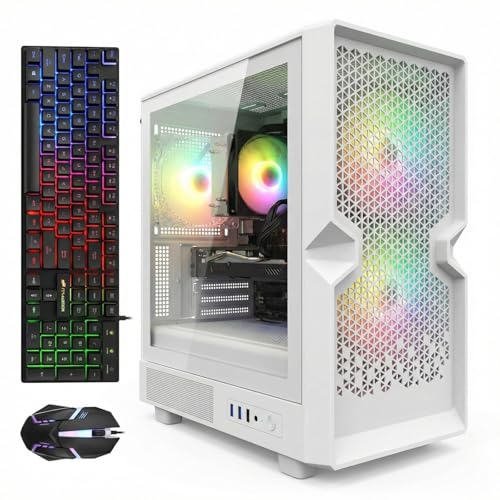
Where to Buy the White Gaming PCs in This Guide
Every pick below is sold on Amazon. Prices move constantly at this end of the market, and two of the six picks carry a strict buy-only rule explained in their reviews, so check the current price on Amazon before you check out.
- Best overall white tower: STGAubron Gaming PC Desktop, White (Core i7, RX 580 8GB, 32GB RAM, 512GB SSD)
- Best hardware, deal-watch pick: suevery Desktop Computer, White (Core i5-12400F, RTX 3050 6GB, 32GB RAM, 1TB SSD)
- Best-looking white case: LXZ Gaming PC Desktop, Sea View Room White (Ryzen 5 5600GT, 16GB RAM, 1TB SSD)
- Strongest integrated graphics in a white tower: LXZ Desktop PC, White (Ryzen 7 5700G, 16GB RAM, 512GB SSD)
- Best performance per dollar (not white): Beelink SER5 MAX Mini PC (Ryzen 7 7735HS, Radeon 680M, 24GB RAM, 1TB SSD)
- Cheapest route to real gaming (not white): GMKtec M6 Mini PC (Ryzen 5 6600H, Radeon 680M, 32GB RAM, 1TB SSD)
Affiliate disclosure: reviewstook.com is a reader-supported site. When you buy through links on this page, we may earn an Amazon commission at no extra cost to you. That is how the testing and research behind guides like this one get paid for. It never changes which products we pick: every system below earned its place on verified specifications and an honest grade for how white it actually is — and two of the six picks are on this page specifically because we are willing to tell you when the white option is not the smart buy.
The Honest Starting Point: White Costs You Choice, Not Frames
A white gaming PC under $500 is a genuinely hard brief, and it is better to say that in the first paragraph than to dress up weak hardware in a pretty case. Here is the reality of this market in late 2026. Component prices have spiked hard — memory and SSD prices have roughly doubled from their lows, and graphics cards sell well above their launch prices — so $500 already buys less computer than it did a year ago. Restricting the search to white systems shrinks the field again: most budget towers are black, most white towers are built by small brands with thin documentation, and the genuinely good white machines from bigger brands start hundreds of dollars above this budget.
So this guide does three things most roundups will not. First, it grades whiteness honestly for every pick: the case color, the graphics card shroud color where a discrete card exists, and whether any included peripherals continue the theme. A white case wrapped around a black graphics card, a black motherboard, and black cables is a two-tone build, and we call it that. Second, it looks honestly at the “white tax” — the premium for choosing white over the equivalent black system — by comparing direct sibling models where a true pair exists, and judging whether color alone explains how each version is positioned in its tier. Third, it states the obvious plainly: color adds zero frames. A white RX 580 and a black RX 580 render the same pixels at the same speed. You are paying for how the machine looks on your desk, and that is a perfectly good reason to buy something — as long as nobody pretends it is a performance feature.
What actually fills this price tier, once the color filter is applied, is a short and specific list: previous-generation discrete-GPU towers from STGAubron’s white line, one modern white tower from suevery that hovers just over the line, two white AM4 towers from LXZ running integrated graphics, and — because the brief for this batch keeps the resident integrated-graphics champion from the plain under-$500 tier — two mini PCs with Radeon 680M graphics that are not white at all and are graded as such. If your heart is set on white, the first four picks are your real shortlist. If you reach the end of their reviews and decide the compromises are too much, picks five and six are the honest escape hatches: the strongest gaming performance this budget buys, in the wrong color.
One more piece of housekeeping before the picks. This guide does not print fixed prices for individual systems, because budget prebuilt pricing churns weekly and any printed figure goes stale fast. Instead, each pick tells you where it sits in this tier — inside the budget, hovering just over the line, or positioned toward the lower end — and asks you to check price on Amazon before ordering. Configurations also change under the same listing, and two picks below are only worth buying at or under this guide’s $500 budget even though they often sit above it. Each review states its rule clearly. Follow the rule, not the headline.
In this guide
Quick Picks: The Six Systems at a Glance
Best overall white tower — STGAubron White, Core i7 / RX 580 8GB / 32GB / 512GB. The only white tower with a discrete graphics card positioned inside this guide’s budget — check price on Amazon to confirm it still sits under the line before you order. White case, white-trimmed presentation, and an RGB keyboard and mouse in the box. The compromises are real: the listing never cleanly states the i7 generation (one spec field reads “Core i7 4th,” which would make this a 2014-era platform), and the RX 580 is a 2017 card. It is the best white answer under the line, with eyes open.
Best hardware, if the price behaves — suevery White, Core i5-12400F / RTX 3050 6GB / 32GB / 1TB. The only genuinely modern white tower anywhere near this budget: a 12th-gen Intel CPU, an RTX 3050, 32GB of DDR4, and a full terabyte of NVMe storage in a listing that advertises a pure white theme. It typically hovers just over this guide’s budget line, so check the current price on Amazon before you commit. This is a deal-watch pick with a hard rule: buy it only when it sits at or under this guide’s budget, and walk away above that.
Best-looking white build — LXZ Sea View Room White, Ryzen 5 5600GT / 16GB / 1TB. A white panoramic glass case with seven addressable RGB fans, positioned right at the top of this guide’s budget — check price on Amazon before ordering. It is the prettiest machine in this guide by a wide margin. It is also the clearest trade in the guide: there is no discrete graphics card, only the 5600GT’s integrated Vega 7, so you are buying a gorgeous, upgradable AM4 platform whose gaming today is light esports at modest settings.
Strongest integrated graphics in white — LXZ White, Ryzen 7 5700G / 16GB / 512GB. The 5700G’s Vega 8 is the strongest integrated graphics ever put in a desktop APU of its generation, and this is its white tower: eight Zen 3 cores, a 512GB NVMe drive, and a modest 400W power supply. Pricing for this exact configuration is hard to pin down — its higher-storage sibling sits well above this tier — so check the current price on Amazon and apply the same hard rule: buy only at or under this guide’s budget, or not at all.
Best performance per dollar, wrong color — Beelink SER5 MAX, Ryzen 7 7735HS / Radeon 680M / 24GB / 1TB. Positioned at the top end of this guide’s budget — check price on Amazon. The Radeon 680M is the strongest integrated graphics in this guide, full stop, and this mini PC is the resident 680M pick carried over from our plain under-$500 testing. Its whiteness grade is zero: it is a dark mini PC. It is here because some readers will decide, correctly for them, that frames beat color.
Cheapest real gaming, wrong color — GMKtec M6, Ryzen 5 6600H / Radeon 680M / 32GB / 1TB. Same 680M graphics as the Beelink, positioned toward the lower end of this tier — check the current price on Amazon, since its positioning moves around more than any other pick here. Matte black, tiny, and the best value in this entire guide if you can live without the white desk setup. If you cannot, it still earns its place as the value anchor that shows what the white requirement costs you.
How We Chose These Six (and What We Rejected)
We started with every white or white-listed gaming desktop we could find on Amazon at or near this budget, then verified each candidate against the actual listing: the spec block’s color field and the configuration in the title. Anything we could not verify was either rejected or carried with an explicit rule, and you deserve to see the rejections, because at this tier the rejected list is most of the market.
The whiteness grading. Every pick gets graded on three layers. Layer one is the case: is it actually white per the listing’s own spec block, not just photographed under bright light? Layer two is the graphics card shroud, where a discrete card exists: true white GPUs exist, but they are premium parts, and none of the towers here document one — the cards inside these budget white cases should be assumed standard dark shrouds unless the listing photos prove otherwise. Layer three is peripherals: does the box include a keyboard and mouse, and do they continue the theme? A pick can win on layer one and lose on layers two and three, and the reviews say so each time.
Rejected: white towers that never reach this budget. STGAubron’s own white line illustrates the cliff. Its white GTX 1660 Ti tower (16GB, 512GB) and its white RTX 3050 6GB tower both sit above this guide’s ceiling — good machines, positioned in the next tier up. The white ZER-LON tower with an RTX 4060 sits well above this tier. ViprTech’s white Stryker 1.0, a genuinely nice-looking white build with a GTX 1660 Super, also sits above this budget. LXZ’s own white 5700G in its 1TB, 650W configuration sits well above this tier, and its white 5600G tower sits above it too. The pattern is consistent: step up into the next tier and white towers with modern or near-modern discrete cards exist; at this budget and below, they do not.
Rejected: white in name only. Several listings surface in white-PC searches that fail the color check. STGAubron’s i5/RX 550 tower (ASIN B0BRL5PF1L) appears in budget roundups constantly, but its spec block reads Color: Black. The 512GB variant of STGAubron’s white-model-number 3200G tower (ABR0724) is likewise the black variant; the white 1TB variant of that model exists, but we could not pin down its positioning in this tier, so it is mentioned here rather than picked. A white HP all-in-one runs an Intel N100 with 8GB of RAM and 128GB of storage — a fine kitchen computer and not, by any honest definition, a gaming PC.
Rejected: the white mini PC that does not exist. We looked hard for a true-white mini PC with Radeon 680M graphics at this price, because it would have been the perfect pick. It is not there. The GMKtec M6 and its Ultra sibling are matte black. Minisforum’s small 680M machines are silver, with no current Amazon listing we could pin. The Beelink and ACEMAGIC 680M minis that anchor the plain under-$500 tier are dark grey and black. So the 680M class is represented here by its two best verified members, graded honestly at zero for whiteness, rather than by a silver machine relabeled to fit the headline.
The white tax, in context. Where a true black/white pair exists, we compared how the two versions are positioned. The cleanest pair is STGAubron’s i7/RX 580 tower: the white version carries double the memory of its black sibling, yet the two sit in the same part of this tier once that configuration difference is accounted for — color alone does not explain a premium here. At this tier, on the one pair we could compare end to end, the white tax is effectively negligible — you pay for the configuration lottery, not the color. That will not hold at higher tiers, where white editions of graphics cards and cases carry real premiums, and it does not hold for the suevery, whose black-configured equivalents undercut it. But anyone who tells you a white tower in this tier automatically costs far more than black has not compared the pair like for like.
The Detailed Reviews
1. STGAubron White (Core i7, RX 580 8GB, 32GB RAM, 512GB SSD) — Best Overall White Tower
Who it suits: the buyer who wants a white tower, a real discrete graphics card, and a position actually inside this guide’s budget — and who accepts previous-generation hardware and a documentation gamble to get all three at once. This is the pick for a white desk setup that plays esports and older AAA titles at 1080p today, not a machine you buy for the next five years of releases.
Whiteness grade: case yes, card undocumented, peripherals yes. The listing’s spec block states Color: White, and the case is a white tower with three RGB fans. The box includes an RGB keyboard and mouse, which keeps the desk theme going better than any other pick here manages. The honest gap is inside the glass: the listing does not document the RX 580’s shroud color, and RX 580s in towers at this price are standard dark cards. Expect a white shell around a two-tone interior, lit by the fans. If your standard is a full snow build — white card, white board, white cables — nothing in this tier meets it, and this pick does not pretend to.
What you are actually getting. The verified configuration is an Intel Core i7 (up to 3.9GHz per the listing), a Radeon RX 580 8GB, 32GB of RAM, a 512GB SSD, WiFi 6, Bluetooth 5.0, and Windows 11 Home, sold by STG USA — check price on Amazon for this exact configuration before ordering. The RX 580 is a 2017 card, and the fair expectation is the one independent coverage of this machine gives: 1080p esports titles like Fortnite, Valorant, Rocket League, and Minecraft run capably at medium-to-high settings, while recent AAA games will push it to low settings or below, with no ray tracing and no modern frame generation to lean on. The 32GB of RAM is genuinely generous for the tier and removes the first upgrade most budget buyers face.
The honest limitation: the listing cannot tell you which i7 you are buying. One field of its own spec block reads “Core i7 4th” — a 2014-era Haswell platform — while the headline copy just says Core i7 up to 3.9GHz, and deal coverage of this machine flags the same ambiguity. A 4th-gen i7 still plays esports fine paired with an RX 580, but it is a dead-end platform with no upgrade path, and it changes the value math from “previous-gen” to “two generations past previous-gen.” Add the brand-level caveat: buyer reports across STGAubron’s related models include Wi-Fi instability, shutdowns, and early failures, so buy it as a calculated risk with Amazon’s return window as your safety net, and stress-test it hard in the first two weeks. Verify on the listing page, before ordering, that the configuration shown is the 32GB one — sibling listings wear 16GB.
- Pros: only discrete-GPU white tower positioned inside this guide’s budget; 32GB RAM at a tier where 16GB is standard; keyboard and mouse included; no clear color premium against its black sibling once configuration is accounted for
- Cons: CPU generation ambiguous, possibly 2014-era; RX 580 is 2017 hardware with no ray tracing or frame generation; 512GB fills fast; brand reliability reports are mixed
Choose it if white is non-negotiable, your games are esports and back-catalog titles, and you will verify the configuration and stress-test on arrival. Skip it if you need a platform you can upgrade for years, or the CPU ambiguity bothers you — the suevery below is the modern answer if its price cooperates, and our plain guide to the STGAubron white tower alternatives starts with the mini PCs at picks five and six.

2. suevery Desktop, White (Core i5-12400F, RTX 3050 6GB, 32GB RAM, 1TB SSD) — Best Hardware, Deal-Watch Only
Who it suits: the patient buyer. If you can watch a listing and strike when it dips, this is the only white tower near this budget whose internals belong to the current era — and the difference is not subtle. Everyone else in this guide is asking you to accept 2017-to-2021 silicon; this machine asks you to accept positioning that typically hovers just over this guide’s budget line — check the current price on Amazon and be ready to wait for it to settle inside the budget.
Whiteness grade: the strongest claim in the guide, partially documented. The listing (series SUV9W3) states Color: white, advertises a pure white theme across the whole machine, and fits five RGB fans in a white case with WiFi 6 on board. That is the most complete white presentation of any tower here. The same honesty rule applies, though: the listing does not separately document the RTX 3050’s shroud color, so treat “pure white theme” as the seller’s framing and check the listing photos for the card before you buy. Even graded skeptically, this is the white pick most likely to look the part through the glass.
What you are actually getting. An Intel Core i5-12400F — a six-core 12th-generation chip that remains a legitimately good gaming CPU — an RTX 3050 6GB, 32GB of DDR4, and a 1TB NVMe SSD. Every element is a class above the STGAubron: the CPU is years newer and far stronger per core, the storage doubles, and the RTX 3050, while an entry card, brings DLSS upscaling and modern driver support that the RX 580 lacks. Realistic expectations: comfortable 1080p gaming across esports and mainstream titles at medium-to-high settings, with DLSS as your lever for heavier games. This is also the only tower in the guide with a sane upgrade story — the platform, the storage, and the memory all have somewhere to go.
The honest limitation: the price. This tower typically sits just over this guide’s budget, and no amount of enthusiasm changes that — check price on Amazon, because its positioning in this listing family is volatile in both directions, with used units in the same family positioned far higher still. So the rule is absolute: buy the suevery white tower only when checking the current price on Amazon shows it at or under this guide’s budget. Just over the line it is a good PC and a broken promise; inside the budget it is the best pick in this guide by a wide margin. Set a price alert and let the listing come to you.
- Pros: only modern platform in the guide (12th-gen i5); RTX 3050 with DLSS; 32GB RAM and 1TB NVMe as standard; strongest white presentation of any tower here
- Cons: typically sits just over this guide’s budget; pricing is volatile; GPU shroud color not separately documented; small brand with a thin track record
Choose it if you can wait for a dip and want the white tower you will not outgrow in eighteen months. Skip it if you need to buy today with positioning verified inside this guide’s budget — that is the STGAubron above, or the LXZ below if the panoramic look matters more than a discrete card.

3. LXZ Gaming PC, Sea View Room White (Ryzen 5 5600GT, 16GB RAM, 1TB SSD) — The Look, Bought as a Platform
Who it suits: the buyer whose priority is honestly the aesthetic — a white panoramic-glass showpiece for a white desk setup — and whose gaming is light enough, or whose upgrade plans are firm enough, that buying a platform instead of a finished gaming PC makes sense. Also the buyer who wants a pick positioned inside this guide’s budget without a deal-watch rule attached — check the current price on Amazon to confirm before ordering; this configuration is sold by Romiromi.
Whiteness grade: the best in the guide. The Sea View Room case is a white panoramic design — glass arranged to show the interior rather than hide it — fitted with seven addressable RGB fans per the seller’s listing copy. Against white lighting this is the machine that actually delivers the look people picture when they search for a white gaming PC. The interior caveat flips here: with no discrete card, there is no dark GPU shroud breaking the theme, and the visible interior is the board, the cooler, and the fans. Peripherals are not the story with this pick — budget for your own white keyboard and mouse if the full setup matters, because the theme stops at the case.
What you are actually getting. A Ryzen 5 5600GT — a six-core Zen 3 APU — with 16GB of DDR4 (the listing notes headroom to 64GB), a 1TB NVMe SSD, and integrated Radeon Vega 7 graphics. The CPU itself is a perfectly good modern-enough processor, and that is the point of the pick: the AM4 platform, the case, the storage, and the power delivery are a foundation. Gaming today, on the Vega 7 alone, means esports and indie titles at 1080p low or 720p, and older games at modest settings. Buyer feedback on this listing makes the same point from experience: owners praise the machine and note plainly that integrated graphics limit gaming until a card goes in. The empty PCIe slot is the most important component in the box. Budget a future graphics card — even a previous-generation card transforms this from the weakest gamer in the guide into a balanced 1080p system, and the white case will show it off properly.
The honest limitation: as shipped, this is the least capable gaming machine among the towers, despite sitting at the top of this guide’s budget. You are paying for a case, a platform, and integrated graphics at a moment when the STGAubron above delivers a discrete card and double the RAM within the same budget tier. The 400W-class power delivery in towers of this type also caps how ambitious your future GPU upgrade can be without a PSU swap — check the listing’s stated wattage before planning around a hungry card. Buy this with the upgrade already planned and budgeted, or do not buy it.
- Pros: best white presentation in the guide, panoramic glass and seven ARGB fans; positioned inside this guide’s budget; 1TB NVMe storage; AM4 platform with RAM headroom and an empty GPU slot
- Cons: integrated Vega 7 graphics only — light gaming as shipped; upgrade cost still ahead of you; modest power supply limits GPU choices; no included peripherals carrying the theme
Choose it if the white showpiece look is the point and a GPU upgrade within the year is genuinely in your budget. Skip it if you need the strongest gaming you can get on day one within this budget — every other pick in this guide out-games it as shipped.

4. LXZ Desktop, White (Ryzen 7 5700G, 16GB RAM, 512GB SSD) — Strongest Integrated Graphics in a White Tower
Who it suits: the buyer who wants a white tower and the best no-graphics-card gaming available in one, and who plays esports, indie, and older titles rather than new AAA releases. The 5700G is the chip that defined the APU era, and this is its white tower form.
Whiteness grade: case yes, interior standard. The listing’s spec block states Color: White for this LXZ-R7pro configuration, in a white case with glass presentation. Like the 5600GT machine, the absence of a discrete card means no dark shroud interrupts the theme; unlike it, this is the more conventional tower presentation rather than the panoramic showpiece. No peripherals are documented with this configuration, so the theme, again, is the case itself.
What you are actually getting. A Ryzen 7 5700G: eight Zen 3 cores and sixteen threads, with Radeon Vega 8 integrated graphics — a step up from the 5600GT’s Vega 7 and the strongest integrated graphics fitted to any tower in this guide — plus 16GB of DDR4 and a 512GB NVMe SSD, on a 400W power supply. The eight cores make this the best productivity machine among the white towers, and the Vega 8 handles the esports catalog at 1080p low-to-medium settings more comfortably than the Vega 7. It remains integrated graphics: no ray tracing, no DLSS, and new AAA titles are a low-settings negotiation. The upgrade path mirrors the 5600GT pick — an empty slot and a modest PSU — with the stronger CPU making the eventual GPU pairing better balanced.
The honest limitation: pricing for this exact 512GB configuration is hard to pin down, and the evidence around it is not encouraging. The same model in its 1TB, 650W configuration sits well above this tier. Configurations under one model number drift in price independently, so the 512GB version may well settle inside this guide’s budget — but until checking shows it there, treat its position as unconfirmed rather than assumed. The rule is the same as the suevery’s, for the opposite reason: buy the LXZ 5700G white tower only when checking the current price on Amazon shows it at or under this guide’s budget. Above that, its own higher-storage sibling’s positioning shows where this model’s center of gravity sits, and the STGAubron’s discrete card wins the comparison outright.
- Pros: strongest integrated graphics in a white tower (Vega 8); eight Zen 3 cores — best multitasking and productivity of the white picks; real GPU upgrade path; white case confirmed in the spec block
- Cons: pricing for this configuration is hard to pin down — strict buy-only-inside-the-budget rule; 512GB storage is the tier’s floor; 400W PSU caps upgrades; integrated graphics ceiling applies to every new AAA title
Choose it if your games suit an APU, you value the eight-core CPU for work alongside play, and checking the current price on Amazon shows it at or under this guide’s budget line. Skip it if it sits over the budget when you check — at that point the suevery’s discrete RTX 3050, when it dips inside the budget, is the better white buy, and the minis below are the better buy on positioning within this tier.

5. Beelink SER5 MAX (Ryzen 7 7735HS, Radeon 680M, 24GB RAM, 1TB SSD) — The Performance Escape Hatch
Who it suits: the buyer who came in wanting white, read the four reviews above, and decided that what they actually want is the best gaming this budget buys, full stop. This is the resident Radeon 680M pick from our plain under-$500 guide, carried into this one deliberately — check price on Amazon, as it sits at the top end of this guide’s budget.
Whiteness grade: zero. The SER5 MAX is a dark mini PC. It will not match a white desk setup, it will not photograph like the LXZ, and no lighting trick fixes that. What it offers instead is disappearance: it is small enough to mount behind a monitor or tuck behind a white case’s worth of peripherals, which is the closest thing to a white setup a black mini can give you — out of sight entirely.
What you are actually getting. A Ryzen 7 7735HS with Radeon 680M integrated graphics — twelve RDNA 2 compute units that outrun every Vega system in this guide by a wide margin — 24GB of LPDDR5 RAM, and a 1TB SSD, in a mini PC that sips power compared to the towers. The 680M is the strongest integrated graphics in this guide: esports at 1080p with real headroom, and mainstream titles at 1080p low-to-medium settings that the Vega machines cannot attempt. It is still integrated graphics, with the same no-ray-tracing ceiling, but it sits a full class above picks three and four for gaming, and it doubles the STGAubron’s storage, even though its 24GB of memory is a step below that tower’s 32GB. There is no GPU upgrade path — the 680M is the beginning and the end of this machine’s graphics story — which is the trade for the size and the positioning in this tier.
The honest limitation: it fails the brief. This guide is about white gaming PCs, and this is not one. It is included because a guide that hides the best-performing option at the budget, on a technicality of color, would be serving the headline instead of the reader. If the white look is the point of the purchase, this pick is a skip, and that is fine — picks one through four exist for you. If performance per dollar is the point, this is the pick, and the white towers are the compromise.
- Pros: strongest integrated graphics in the guide (Radeon 680M); 24GB RAM and 1TB SSD; positioned at the top end of this guide’s budget — check price on Amazon; tiny, quiet, mountable out of sight
- Cons: not white — fails the brief outright; no graphics upgrade path, ever; 24GB memory is soldered, never expandable; laptop-class CPU in a desktop comparison; no included peripherals
Choose it if frames beat color and you want the strongest all-round gaming this budget verifies. Skip it if the white setup is the actual goal — in which case the STGAubron is your discrete-card answer and the LXZ 5600GT is your showpiece.

6. GMKtec M6 (Ryzen 5 6600H, Radeon 680M, 32GB RAM, 1TB SSD) — The Value Anchor
Who it suits: the buyer who wants 680M-class gaming positioned as low in this tier as possible and treats the white requirement as a preference rather than a rule. Also the buyer who wants a second machine — a living-room or travel gaming box — alongside a white main setup.
Whiteness grade: zero, and not close. The M6 is matte black; independent reviews of the machine describe the finish in exactly those terms. There is no white variant. Like the Beelink, its aesthetic strategy is smallness: it takes up less desk than the keyboard in front of it.
What you are actually getting. A Ryzen 5 6600H with the same Radeon 680M graphics as the SER5 MAX, 32GB of RAM, and a 1TB SSD, positioned toward the lower end of this tier — check the current price on Amazon, because this pick’s positioning moves the most in the guide. The 6600H gives up two CPU cores to the Beelink’s 7735HS; the graphics, which are what games feel, are the same silicon. That makes the M6 the value story of this entire guide: the same gaming class as pick five, positioned noticeably lower in the tier — headroom that can go toward a white monitor, a white keyboard and mouse, and most of a white desk’s worth of theme around a black box the size of a paperback. Positioned low in the tier, it is also the pick most likely to leave real headroom inside this guide’s budget for the peripherals that make a white setup read as white.
The honest limitation: same as the Beelink, squared. It is not white, it has no upgrade path beyond storage and memory service, and its CPU is the weaker of the two 680M minis for productivity work. Its pricing is also the most volatile in the guide, so the value case depends on where it sits when you check — positioned low in the tier it is the smartest buy on this page for anyone whose white commitment is negotiable; positioned near the top of the tier it is merely good.
- Pros: Radeon 680M gaming positioned lowest in this guide’s tier; 32GB RAM and 1TB SSD; leaves headroom in the budget for white peripherals and monitor
- Cons: matte black — the opposite of the brief; six-core CPU trails the Beelink; no GPU upgrade path; value case depends on where its pricing sits when you check
Choose it if you want the most gaming per dollar and can build the white theme around the desk instead of inside the case. Skip it if the PC itself must be white — that is what picks one through four are for.

Comparison Table: All Six Picks Side by Side
| Pick | CPU | Graphics | RAM / Storage | Whiteness grade | Price |
|---|---|---|---|---|---|
| STGAubron White | Core i7, up to 3.9GHz (generation not cleanly stated; one spec field reads “Core i7 4th”) | RX 580 8GB (discrete) | 32GB / 512GB SSD | White case + included RGB keyboard & mouse; GPU shroud undocumented | Check price on Amazon |
| suevery White | Core i5-12400F | RTX 3050 6GB (discrete) | 32GB DDR4 / 1TB NVMe | “Pure white theme” per listing; GPU shroud not separately documented | Check price on Amazon — buy only at or under this guide’s budget |
| LXZ Sea View Room White | Ryzen 5 5600GT | Radeon Vega 7 (integrated) | 16GB DDR4 / 1TB NVMe | Best in guide: white panoramic glass case, 7 ARGB fans | Check price on Amazon |
| LXZ 5700G White | Ryzen 7 5700G | Radeon Vega 8 (integrated) | 16GB DDR4 / 512GB NVMe | White case per spec block; no discrete card to break the theme | Check the current price on Amazon — buy only at or under this guide’s budget |
| Beelink SER5 MAX | Ryzen 7 7735HS | Radeon 680M (integrated) | 24GB / 1TB SSD | Zero — dark mini PC | Check price on Amazon |
| GMKtec M6 | Ryzen 5 6600H | Radeon 680M (integrated) | 32GB / 1TB SSD | Zero — matte black mini PC | Check price on Amazon |
How to Choose a White Gaming PC Under $500
Decide what “white” has to mean before you shop. There are three standards hiding inside the same search term. Standard one is a white case: four of our picks meet it. Standard two is a white build — white case, white or light interior components, white cabling — and in this tier essentially nothing meets it, because white graphics cards and white motherboards are premium parts that do not appear in budget towers. Standard three is a white setup: the case plus a white monitor, keyboard, mouse, and desk accessories. Standard three is achievable at this budget only by spending less on the PC itself — which is the real argument for the GMKtec M6 positioned low in this tier — or by accepting the STGAubron’s included peripherals as a head start. Know which standard you are buying to, because the listings will happily sell you standard one while photographing like standard two.
Rank graphics before everything else, color included. The performance ladder in this guide is strict: the RTX 3050 (suevery) and RX 580 (STGAubron) are discrete cards that play real games at 1080p; the Radeon 680M (both minis) is the strongest integrated graphics and sits a half-step below them; the Vega 8 (LXZ 5700G) and Vega 7 (LXZ 5600GT) are a full step below that, suited to esports and older titles. Color does not move any machine up or down that ladder — a white Vega 7 tower and a black Vega 7 tower are the same gaming experience in different paint. Choose your rung first, then find the whitest machine on it.
Compare the black sibling before paying any white tax. Our one fully comparable pair — STGAubron’s i7/RX 580 in white with 32GB against its black sibling with 16GB — suggests that, once the configuration difference is accounted for, color alone explains little of how the two are positioned in this tier, and any premium can shrink or disappear when configurations differ. That is not a universal law: white editions of retail components do carry premiums, and the suevery’s modern configuration costs more than black equivalents. It is a habit, not a conclusion: find the same configuration in black, compare like for like on RAM and storage by checking the current price on Amazon for both, and refuse to pay a large premium for color alone at this budget. If the gap is large, the color is subsidizing the seller, not your setup.
Treat configuration drift as the default, not the exception. Budget listings change components under a stable title. The STGAubron family sells the same headline configuration with 16GB and 32GB under different listings; LXZ sells the 5700G with 512GB and a 400W supply and with 1TB and 650W under one model name. Before ordering, read the spec block on the live listing — the RAM line, the storage line, the color line — and screenshot it. If what arrives differs, that screenshot is your return case.
Plan the second purchase. Every tower here has a known next step: a graphics card for the LXZ pair (with a PSU check first), storage for the 512GB machines, nothing at all for the suevery beyond time. The minis have no second purchase — which is either simplicity or a dead end, depending on how long you keep machines. A white PC in this tier is a starting point; buy the one whose next step you can actually afford.
Common Mistakes When Buying a White Gaming PC
Believing the render. Listing photography for white PCs is shot bright, and interiors are often rendered rather than photographed. A “white build” in the hero image can be a white case around entirely standard dark components. The spec block’s color field describes the case. Nothing else is promised unless it is written down.
Paying the tax without checking it. Shoppers assume white costs more and sellers price accordingly. In this tier our comparable pair showed no clear tax at all once configuration was accounted for. Always compare the black configuration of the same machine before paying a premium for the color — and compare full configurations, since a white model with double the RAM is not a tax, it is a different machine.
Buying integrated graphics for AAA games because the case was pretty. The LXZ 5600GT is the best-looking machine in this guide and the weakest tower for gaming. Panoramic glass does not render frames. If your library is new releases, the discrete-card picks or the 680M minis are your list, whatever color they come in.
Ignoring the power supply in the upgrade plan. Both LXZ towers ship with modest wattage — 400W is documented on the 5700G configuration. A future graphics card upgrade that ignores the PSU becomes two upgrades. Check the stated wattage on the live listing and plan the card around it, or budget the PSU swap honestly.
Skipping the stress test. Small-brand budget towers earn their prices partly through variable quality control, and buyer reports on the STGAubron family include early failures. Whatever you buy, run games, updates, and Wi-Fi hard during the return window. A machine that survives two weeks of heavy use has cleared the highest-risk period.
Final Recommendation
If you are buying a white gaming PC under $500 today, buy the STGAubron White. It is the only pick that satisfies every word of the brief at once — white case, discrete graphics, peripherals in the box, positioned inside this guide’s budget; check price on Amazon to confirm before ordering — and its flaws (an ambiguous, possibly 2014-era CPU and a 2017 graphics card) are the honest price of the brief itself. Verify the 32GB configuration on the listing, stress-test it on arrival, and it will run a white-desk esports and back-catalog setup exactly as promised.
If you can wait for a price dip, wait for the suevery. It is the best machine in this guide by a generation, and it hovers close enough to this guide’s budget line that a routine dip settles it — check the current price on Amazon, and at or under the budget it becomes the recommendation, no caveats beyond the brand’s youth. If the look is the whole point and a GPU upgrade is already budgeted, the LXZ Sea View Room White is the showpiece, bought as a platform with open eyes. And if reading this guide has clarified that performance matters more than color, the Beelink SER5 MAX, positioned at the top end of this tier, and the GMKtec M6, positioned toward its lower end, are waiting, in black, with the strongest integrated graphics this budget buys — check price on Amazon for both. Color adds zero frames — so spend on it deliberately, in the amount your desk is worth to you, and not a dollar more.
Frequently Asked Questions
Does a white gaming PC perform any differently from a black one? No. Color adds zero frames. Identical components in a white case and a black case produce identical performance; the only differences are appearance and, sometimes, price. Thermals are a property of case design and airflow, not paint — a white case with a mesh front runs cooler than a black case with a sealed one, and vice versa.
How much is the white tax under $500? On the one direct pair we could compare end to end — STGAubron’s i7/RX 580 tower — effectively negligible once configuration is accounted for: the white version carries double the memory of its black sibling, yet the two sit in the same part of this tier. Premiums for white do exist on retail components and higher-tier systems, but at this budget, configuration differences matter more than color. Compare the black sibling — check the current price on Amazon for both versions — before assuming a tax exists.
Can I get a white graphics card in a PC under $500? Not in any verified prebuilt we found. White-shrouded graphics cards are premium parts, and none of the towers in this guide document one — the cards inside should be assumed standard dark shrouds. If a full snow build is the goal, the realistic route is a higher budget or a self-build with a white-edition card bought separately.
Is integrated graphics enough for gaming in a white tower? It depends on the chip and the games. The 5700G’s Vega 8 and the 5600GT’s Vega 7 handle esports, indie, and older titles at 1080p low-to-medium settings. They do not handle new AAA releases comfortably. The Radeon 680M in the mini PCs is a clear step stronger — but those machines are not white, which is the central trade of this entire guide.
Why are two black mini PCs in a white gaming PC guide? Because they are the strongest gaming performance verified at this budget, and hiding them would serve the headline instead of the reader. They are graded zero for whiteness, labeled as escape hatches, and recommended only to buyers whose priority turns out to be performance. The four white towers are the guide’s actual answer to its title.
What should I check on the listing before ordering a budget white tower? Four fields: the color field in the spec block (case color is all it certifies), the RAM capacity (16GB and 32GB versions of the same headline configuration both exist), the storage size, and the power supply wattage if you plan a GPU upgrade. Screenshot the spec block at order time; budget listings drift, and the screenshot is your evidence if the delivered machine differs.
Is $500 enough for a white gaming PC that plays new games? For new AAA releases at native settings, honestly no — in any color. In this tier you are choosing among previous-generation discrete cards (RX 580 class), entry current cards on a deal watch (RTX 3050 class), and strong integrated graphics (680M class). That menu plays esports beautifully and older AAA well. New releases at high settings start a tier or two above this budget.
Keep Reading
- Best Gaming PC Under $500 — the plain under-$500 guide this one branches from, with no color filter applied
- Best Prebuilt Gaming PC Under $500 — every prebuilt route at this budget, towers and minis together
- Best Budget Gaming PC Under $500 — the strictest value cut of the same market
- Best 1080p Gaming PC Under $500 — ranked purely by 1080p gaming capability
- Best RGB Gaming PC Under $500 — if lighting matters as much as case color
- Best White Gaming PC Under $400 — the white brief on a tighter budget
- Best White Gaming PC Under $700 — where white towers with stronger cards begin
- Best White Gaming PC Under $800 — the white tier with modern mid-range graphics
- Best Mini Gaming PC Under $500 — the 680M mini PC field in full
- Best Compact Gaming PC Under $500 — small-footprint alternatives to a full white tower
- Best Gaming PC Under $700 — what the next $200 buys when you are ready to step up


