Where to buy
Check the latest price, availability and delivery on Amazon. Orders are placed on Amazon. We may earn a commission from qualifying purchases.
- Best overall white gaming PC under $800: ZER-LON Gaming PC, Ryzen 5 5500, RTX 4060, White — Check on Amazon
- STGAubron Gaming PC, Ryzen 5 5500, RTX 3050 6GB, White, RGB Keyboard & Mouse — Check on Amazon
- LXZ Gaming PC, Ryzen 5 5500, RTX 3050 8GB, 32GB RAM, White — Check on Amazon
- HP Victus 15L Gaming Desktop, i5-13400F, RTX 3050, White — Check on Amazon
See 2 more Amazon options
- abytespark Gaming PC, Core i7-7700, RTX 4060, White — Check on Amazon
- STGAubron Gaming PC, Ryzen 7 5700X, RTX 3060 12GB, White — Check on Amazon
Read the full guide ↓
Disclosure: As an Amazon Associate, reviewstook.com earns from qualifying purchases. Links to Amazon on this page are affiliate links; they cost you nothing extra. Listing details such as price and availability change often, so check the current Amazon listing before you buy.
White is the hardest color to buy honestly in a budget gaming PC, because “white” in a listing title can mean anything from a genuinely coordinated build — white case, white fans, light-colored internals — down to a white steel box wrapped around the exact same black components everyone else sells. At $800 that gap matters more than at any other budget, because the white machines are a small subset of an already small market, and the subset tax is real. This guide grades every pick on what is actually documented as white in its listing, not on what the hero photo suggests: case, fans, memory, graphics card shroud and bundled peripherals are scored separately, and where a listing does not say, the review says that instead of guessing from a picture.
The performance honesty note comes first, because it constrains everything below. Under $800, an RTX 4060 prebuilt is a deal-dependent buy, not an everyday one — the plain black benchmark for this tier, a CyberPowerPC Gamer Xtreme with an i5-13400F and an RTX 4060, itself only fits this tier when its pricing dips. The white RTX 4060 machines in this guide live by the same rule: check the current price on Amazon, buy only when the live price falls at or under $800, and expect several to spend part of the year above the line. Everything else here is RTX 3050 class. And $800 buys no resolution jump over $700: this is a 1080p tier, exactly as the $700 tier is. The extra money over a $700 guide buys you the color, a better chance at the 4060 when it dips, and in one case double the memory — it does not buy native 1440p, and any listing implying otherwise at this budget is selling you upscaling with the label torn off.
The white tax is real, because this batch of guides also covers the black equivalents. The white ZER-LON RTX 4060 machine below tends to sit a step above the plain CyberPowerPC benchmark, though the ZER-LON pays part of its tax in platform instead of cash, with an older Ryzen 5 5500 and Wi-Fi 5 where the black machine runs a 13th-generation i5. The white STGAubron RTX 3050 likewise sits above its black counterpart in the same model family — a modest premium for the color on otherwise similar hardware. That premium stays modest when you buy well and grows sharply whenever you buy a white machine at the top of a price swing instead of waiting for it to settle — so check the current price on Amazon for both the white pick and its black equivalent before you decide. Below are the quick picks, detailed reviews of all six machines, a comparison table, a section that grades exactly how white each pick really is, and the mistakes that waste money in this color.
In this guide
Quick Picks
Short on time, or comparing several options at once? Each row below names a buyer type and the machine that suits it, with a link to the listing.
| Buyer type | Pick | Why it stands out | Link |
|---|---|---|---|
| Best overall | ZER-LON Gaming PC, Ryzen 5 5500, RTX 4060, White | The only white RTX 4060 here positioned in this budget tier — check price on Amazon | Check on Amazon |
| Best complete white package | STGAubron Gaming PC, RTX 3050 6GB, White | Six RGB fans plus an RGB keyboard and mouse in the box | Check on Amazon |
| Best for big game libraries | LXZ Gaming PC, RTX 3050 8GB, 32GB RAM, White | Double the memory of everything else here, and the 8GB card | Check on Amazon |
| Best big-brand support | HP Victus 15L, i5-13400F, RTX 3050, White | A real manufacturer’s warranty and service network | Check on Amazon |
| Best graphics card, oldest platform | abytespark Gaming PC, i7-7700, RTX 4060, White | An RTX 4060 paired with a 2017 processor — read the review first | Check on Amazon |
| Strongest hardware, deal-watch only | STGAubron Gaming PC, Ryzen 7 5700X, RTX 3060 12GB, White | Eight cores and 12GB of VRAM — deal-watch only, check price on Amazon | Check on Amazon |
How These Picks Were Chosen
The budget was applied as a ceiling with sale discipline, the same way this batch of guides treats every $800 list. A machine belongs here when it is positioned in this budget tier — and where a machine only fits when its live pricing dips, the review says so and prints the walk-away rule: check the current price on Amazon and buy only at or under $800. Two picks are labeled deal-watch in plain language: both often sit above the ceiling and only become buys when the live price falls within budget. Both are included because they answer real versions of this search — the big-brand buyer and the strongest-hardware buyer — and both carry their warning in the heading, the review and the comparison table rather than in a footnote.
We did not use these PCs ourselves. We read the maker listings and specification data, and compared processors, graphics cards, memory, storage, published power supplies and — for this guide — the documented color of each visible component. That last filter excluded more machines than any other. White editions of well-known lines were checked and left out when their pricing never reaches this budget: the white Skytech Archangel RTX 3050 sits well above this tier on Amazon, the white Skytech Azure and Archangel RTX 4060 machines live in the $1,200 tier and up, and the white WIWB Ryzen machines cluster in that higher tier as well. A white guide that quietly fills itself with machines from a higher budget tier would not answer the search you made.
Two further rules shaped the list. First, no invented figures: where a listing does not publish a power supply wattage, a graphics card’s memory, or the color of a component, the review does not assert one — it flags the gap as something to confirm on the live listing. Second, whiteness is graded end to end. A white case is the floor, not the achievement; the grade rises when the fans, memory heat spreaders, graphics card and bundled peripherals are documented to match, and the grading section below the reviews scores all six picks on exactly that scale.
The 6 Best White Gaming PCs Under $800
ZER-LON Gaming PC — Ryzen 5 5500, RTX 4060 8GB, White (Model AOV4060)
Who it suits: The buyer who wants the white build and the current-generation graphics card in the same box, and who is patient enough to buy on the dip rather than on the day the old PC dies.
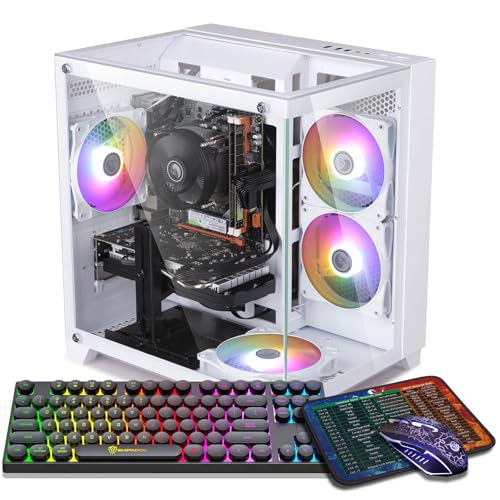
This is the machine the whole guide is organized around, because it is the only white RTX 4060 prebuilt in this batch’s verified research positioned under the $800 ceiling — check price on Amazon before you buy. The specification is the familiar budget-4060 recipe: a Ryzen 5 5500 six-core processor, 16GB of DDR4 memory, a 1TB NVMe SSD, Wi-Fi 5 and Windows 11 Home, in a white tower with four RGB fans. The graphics card is the reason to buy it. The RTX 4060 is a genuine step above everything else in this guide: strong 1080p performance at high settings in modern titles, high-refresh esports play, and DLSS 3 frame generation, which no RTX 3050 in this list can offer. In a white case, within this budget tier, that combination is the tier’s headline — check the current price on Amazon.
The taxes are itemized rather than hidden. Part is timing: this listing’s pricing moves around the ceiling, so the machine is in this guide strictly on a buy-at-or-under-$800 rule — check price on Amazon and walk away when it sits above the budget. Part is platform: the Ryzen 5 5500 is an older AM4 chip with PCIe 3.0, which costs the 4060’s narrow interface a few percent in some games and closes the processor upgrade path at the top of a finished socket; the plain black benchmark at this tier runs a newer i5 in a similar tier position. And part is the color grade itself: the listing documents a white case and RGB fans, and does not state the color of the graphics card’s shroud or the memory. What you are verified to be buying is a white tower with lit fans — the card inside may or may not match, and the listing photos and the live listing are where to confirm it.
- The tier’s best graphics card — RTX 4060 with DLSS 3 frame generation — in a documented white case.
- Positioned in this budget tier when its live pricing dips — check price on Amazon — with a 1TB SSD as standard.
- Four RGB fans documented in the listing, so the white case has the lit interior the look depends on.
Honest limitation: Its pricing often sits above the ceiling, the Ryzen 5 5500 platform is a generation behind the black benchmark’s, Wi-Fi is the older 5 standard, and only the case and fans are documented white — the graphics card’s color is not stated in the listing.
Choose it if you want the strongest card in the guide and can wait until the live price — check price on Amazon — falls at or under $800. Skip it if you need to buy today at whatever it costs, or you want a platform with years of processor upgrades ahead of it.

STGAubron Gaming PC — Ryzen 5 5500, RTX 3050 6GB, White (Model ABR1722)
Who it suits: The buyer furnishing a desk from scratch — first gaming PC, gift setup, a room being built around the white theme — who wants the box to arrive with the matching extras already in it.
Where the ZER-LON above wins on the graphics card, this STGAubron wins on completeness of the white package as an everyday option in this tier — check price on Amazon. The verified specification runs a Ryzen 5 5500, an RTX 3050 with 6GB of memory, 16GB of DDR4, a 1TB SSD, Wi-Fi 6 and Bluetooth 5.0 — and the presentation is the fullest in the guide: a white case lit by six RGB fans, with an RGB keyboard and mouse included in the box. Its pricing position is the calmest here: it typically sits within this budget tier without needing a sale event — check the current price on Amazon to confirm. Against its own black counterpart in the same model family, the white version carries a modest premium — the clearest example of the white tax in this guide, paid for the color and the fan count on otherwise similar hardware.
The graphics card defines what this machine is. The RTX 3050 6GB is an entry-class card: honest 1080p gaming at medium-to-high settings in most titles, strong esports performance, and DLSS upscaling to lean on in heavier games — but it is a clear class below the RTX 4060 above, with less memory and no frame generation. The brand defines the rest of the bargain. STGAubron is a budget integrator, not a household name: its listings do not publish the power supply wattage, and its model family is documented in this batch’s research to carry listing inconsistencies — a sibling configuration’s copy has contradicted itself on storage size — so the delivery-day routine matters: confirm the configuration on the live listing before ordering, and verify what arrives against it while the return window is open. Note also what the whiteness grade does and does not include: the case and fans are documented white and lit; the listing data describes the bundled keyboard and mouse as RGB without specifying their color, so do not count on white peripherals until the live listing confirms them.
- The fullest documented white presentation in the guide: white case, six RGB fans, RGB keyboard and mouse included.
- Typically positioned under budget at ordinary times, no sale required — check price on Amazon.
- Wi-Fi 6 and Bluetooth 5.0, a generation ahead of the ZER-LON’s wireless.
Honest limitation: The RTX 3050 6GB is entry class — a full step below the 4060 — the power supply is unpublished, and the bundled peripherals’ color is not specified in the listing data.
Choose it if the complete white desk setup matters more than the last tier of graphics performance. Skip it if you play demanding new releases and would rather put your budget toward the 4060 above.

LXZ Gaming PC — Ryzen 5 5500, RTX 3050 8GB, 32GB RAM, White
Who it suits: The buyer whose PC is also the household’s everything machine — games plus a dozen browser tabs, chat, a stream or a video call running alongside — and who keeps a large installed library.
Every other machine in this guide ships with 16GB of memory; this LXZ ships with 32GB, and that single specification changes who should buy it. Sixteen gigabytes is enough for a game on its own, but modern play is rarely a game on its own — it is the game, a voice client, a browser with guides and chat, and Windows helping itself in the background — and 32GB is the configuration that stops being the bottleneck in that company. The rest of the verified build is the white version of the budget recipe: a Ryzen 5 5500, an RTX 3050 in its 8GB form — the better of the two 3050 variants, with more memory headroom for texture-heavy titles than the 6GB card above — and a 1TB NVMe SSD, in a case the listing sells explicitly as the white model.
The cautions are about documentation rather than hardware. This listing family’s detail data mixes variant information — a different processor and graphics card combination appears in the same page data — so the exact configuration must be confirmed in the cart before ordering, a warning this batch’s research attaches to this ASIN specifically. Pricing needs the same care: the wider LXZ Ryzen 5 5500 and RTX 3050 line includes lesser configurations positioned lower in the range, so do not assume a headline for another variant describes this 32GB build — treat $800 as the hard ceiling, check the current price on Amazon, and let the configuration in the cart, not the headline, decide. The whiteness grade is case-level: the listing documents the white case, and does not document fan lighting or component colors, so this is the guide’s quiet white option rather than its showpiece.
- 32GB of memory — double every other pick — for gaming alongside the modern pile of background apps.
- The 8GB version of the RTX 3050, with more texture headroom than the 6GB card.
- 1TB NVMe storage and a case sold explicitly as the white model.
Honest limitation: The listing family mixes variant data, so the configuration must be confirmed in the cart and the current price checked on Amazon; the documented whiteness stops at the case.
Choose it if memory headroom and library size are your real constraints. Skip it if you want the strongest graphics card for the budget — that is the ZER-LON — or a listing whose configuration needs no detective work.

HP Victus 15L Gaming Desktop — Core i5-13400F, RTX 3050, White (TG02-1020h)
Who it suits: The buyer who wants a white gaming PC from a manufacturer with a real warranty, a service network and a name that will still exist in three years — and who can wait for the price to come to them.
The Victus 15L is the only big-brand machine in this guide, and its virtues and its price both follow from that. The verified configuration pairs an Intel Core i5-13400F — a newer, stronger processor than the Ryzen 5 5500s around it — with an RTX 3050 and a compact white chassis of about 15.5 liters that sits on a desk the way a console does. HP publishes its machines properly, supports them through a national network, and the white finish here is a factory color rather than a marketplace variant. For a PC bought for a teenager, a shared family room, or anyone who wants a phone number to call when something fails, that structure is worth real money.
The two problems are printed on the specification sheet, and this guide will not soften either. The first is memory: this configuration ships with 8GB of RAM, half the modern minimum, in a guide where every other pick has 16GB or 32GB. Budget for a second stick from day one and treat the pair — machine plus memory — as the real purchase. The second is pricing: this model often sits above this guide’s ceiling, so check the current price on Amazon rather than assuming it fits. So the framing is strict: this is a deal-watch pick. At or under $800 with the memory upgrade accounted for, it is the support-conscious buy of the guide; when it sits above the ceiling, it is a $1,200-guide machine wearing the wrong guide’s badge. One documentation note: the verified material does not headline this card’s memory figure, so none is claimed here — confirm it on the live listing. The compact proprietary case also caps future graphics upgrades, which is the standing trade of the 15L format.
- The only manufacturer-backed pick: HP warranty, service network and published specifications.
- The strongest processor in the guide’s 3050 group — a 13th-generation Core i5.
- Compact roughly 15.5-liter white chassis, the most desk-friendly footprint here.
Honest limitation: It ships with 8GB of memory — budget a second stick immediately — its pricing often sits above the ceiling so check price on Amazon, and the compact proprietary case limits graphics upgrades.
Choose it if support and brand accountability top your list and you can buy on a dip to $800 or below. Skip it if you need 16GB in the box on day one or plan to upgrade the graphics card later.

abytespark Gaming PC — Core i7-7700, RTX 4060 8GB, White (Model AOV590)
Who it suits: The esports-focused buyer on a strict budget who understands exactly which half of this machine is new — and it is included as much as a lesson as a pick, so read the whole review before the headline tempts you.
On the headline, this looks like the guide’s best deal: an RTX 4060 with 8GB of memory, 16GB of RAM, a 1TB NVMe SSD, Wi-Fi 5 and four RGB fans in a white case — the same graphics card as the top pick, from a brand whose towers have appeared in this batch’s research before. Then the processor line: a Core i7-7700. That is a four-core chip from 2017, three generations older than the Ryzen 5 5500s in this guide and six behind the Victus’s i5. The pairing is the oldest trick in the budget-listing book — a current graphics card doing headline duty in front of a platform that was already mature when the card’s architecture was designed — and its consequences are specific. In esports titles and GPU-bound games the 4060 will still do much of its work; in CPU-heavy modern games, open-world titles and anything that streams or records while it plays, the four old cores will hold the card back, and there is no upgrade path: the socket is finished, so the next processor means a new motherboard and memory too.
The pricing discipline is the strictest in this guide: check the current price on Amazon, because the live price is the whole decision here. It earns its place only under a rule: if the live Amazon price is at or under $800, and you have read the paragraph above and still want the card for esports-first play, it is a defensible purchase with its ceiling understood. If it sits above $800, the ZER-LON at the top of this guide is the same card on a newer platform in a similar tier position, and this one should be skipped without a second thought. The whiteness grade is documented at case-and-fans level — a white case with four RGB fans in the listing data — with the graphics card’s own color, as with most picks here, not stated.
- RTX 4060 graphics with DLSS 3 — the guide’s joint-best card — in a documented white case with RGB fans.
- 16GB of memory and a 1TB NVMe SSD, the full-size versions of both.
- From a brand with other towers verified in this batch’s research.
Honest limitation: The Core i7-7700 is a 2017 four-core processor on a finished socket — it will bottleneck the card in CPU-heavy games and offers no upgrade path — and the live price — check price on Amazon — is the whole decision.
Choose it if the live price — check price on Amazon — is at or under $800 and your play is esports-first with the platform ceiling understood. Skip it if it sits above the budget or above the ZER-LON when you check both live prices, or you play CPU-heavy modern titles.

STGAubron Gaming PC — Ryzen 7 5700X, RTX 3060 12GB, White (Model ABR1722)
Who it suits: The patient buyer who wants the strongest all-round hardware in a white case and treats this guide as a watchlist — because this machine often sits above the $800 budget, and this review will not pretend otherwise.
Start with the warning, since it is the most important sentence in the review: this listing often sits above this guide’s budget — check the current price on Amazon. It is included — labeled, here and in the tables — as the deal-watch exception, because it is the white machine this guide’s readers will find on their own and wonder about, and because if it ever dips to $800 or below it becomes the best hardware buy in the list. The specification earns that attention: a Ryzen 7 5700X with eight cores — two more than every other pick — an RTX 3060 in its 12GB form, 16GB of DDR4, a 1TB SSD, Wi-Fi 6 and Bluetooth 5.2, and four RGB fans in a white case. The 3060 12GB is the connoisseur’s budget card: a step below the 4060 in raw speed and features, but with half again the memory of the 8GB cards, which is the specification that decides how gracefully a card ages as game textures grow. Paired with the eight-core processor, this is the only pick here built for gaming plus streaming or recording on one machine without apology.
Everything else about the pick follows the STGAubron pattern documented in its sibling review above: a budget integrator whose listings do not publish the power supply, whose model family has carried copy inconsistencies before, and whose configurations must be confirmed on the live listing and again on delivery. The whiteness grade is case-and-fans: white case, four RGB fans documented; the card’s shroud color is not stated. So the rule is absolute. At $800 or below on the live listing, verified in the cart, this is arguably the guide’s best machine. When it sits above that line, it belongs to the under-$1,200 conversation, and buying it from this page at that level would make this guide a liar. Watch it — check price on Amazon — or buy the ZER-LON.
- The strongest hardware here: eight-core Ryzen 7 5700X and the 12GB RTX 3060, the best-aging card in the guide.
- Wi-Fi 6, Bluetooth 5.2, 1TB SSD and a documented white case with four RGB fans.
- The only pick genuinely suited to gaming and streaming on one machine.
Honest limitation: It often sits above budget — check price on Amazon. It is a watchlist pick with a hard buy-only-at-$800-or-below rule, from a brand whose unpublished power supply and listing inconsistencies demand delivery-day verification.
Choose it if you find it live at $800 or below and confirm the configuration in the cart. Skip it if it sits anywhere above that line — at that level, the under-$1,200 guides are where it competes.

Comparison Table
| Product | CPU / GPU | RAM / Storage | Documented whiteness | Price | Link |
|---|---|---|---|---|---|
| ZER-LON Gaming PC (AOV4060) | Ryzen 5 5500 / RTX 4060 8GB | 16GB / 1TB | White case, RGB fans; card color not stated | Check price on Amazon — buy only within the $800 budget | Check on Amazon |
| STGAubron Gaming PC (ABR1722) | Ryzen 5 5500 / RTX 3050 6GB | 16GB / 1TB | White case, 6 RGB fans, RGB keyboard & mouse | Check price on Amazon — typically positioned within this budget tier | Check on Amazon |
| LXZ Gaming PC | Ryzen 5 5500 / RTX 3050 8GB | 32GB / 1TB | White case; lighting not documented | Check price on Amazon — verify configuration and live price | Check on Amazon |
| HP Victus 15L (TG02-1020h) | i5-13400F / RTX 3050 | 8GB / 512GB | White compact chassis, factory finish | Check price on Amazon — deal-watch only within the $800 budget | Check on Amazon |
| abytespark Gaming PC (AOV590) | i7-7700 / RTX 4060 8GB | 16GB / 1TB | White case, RGB fans; card color not stated | Check price on Amazon — buy only within the $800 budget | Check on Amazon |
| STGAubron Gaming PC (5700X) | Ryzen 7 5700X / RTX 3060 12GB | 16GB / 1TB | White case, RGB fans; card color not stated | Check price on Amazon — often above budget, watchlist only | Check on Amazon |
How White Is White? Grading the Six
The word does different amounts of work in different listings, so this guide grades it on a simple scale built only from documented facts. Grade one is a white case around unspecified internals — the floor, and the honest description of most budget white machines. Grade two adds documented lit fans, because a white case with a glass panel is really a frame for what glows inside it. Grade three adds documented matching components — memory, graphics card — or bundled peripherals that extend the theme onto the desk. On that scale: the STGAubron 3050 grades highest, with its white case, six RGB fans and included RGB keyboard and mouse — though even it does not document white peripherals, only RGB ones. The ZER-LON, the abytespark and the STGAubron 5700X sit at grade two: white case, documented RGB fans, card and memory colors unstated. The Victus is a factory white chassis whose grade is about finish quality rather than lighting. The LXZ is grade one on documentation — a white case, full stop — whatever its photos suggest.
Two practical consequences follow. The first is about the graphics card, the largest visible component behind any glass panel: not one listing in this guide states that its card is a white model. White editions of graphics cards exist and carry their own premiums in the DIY market; at this budget, in prebuilts, the card that arrives will be whatever the integrator fitted — Skytech’s listings say “brand may vary” outright, and the others simply do not promise. If a fully coordinated interior is the point of the purchase, this tier cannot document it, and the honest routes are the under-$1,200 white guides — see Best White Gaming PC Under $1200 — or accepting the case-and-lighting version of white that $800 actually sells. The second consequence is maintenance: white cases show dust and cable clutter that black cases forgive, and they reward the ten minutes of cable tidying that a glass panel turns into part of the furniture. Budget the microfiber cloth with the machine.
How to Choose a White Gaming PC Under $800
- Decide what “white” must mean before you shop. Case-only, case-and-lighting, or coordinated end to end? At $800 the first two are buyable and the third is not documentable — knowing which you need stops you paying grade-three hopes for grade-one hardware.
- Buy the graphics card first, the color second. The RTX 4060 and the RTX 3050 are different tiers of gaming, whatever color the box is. A white 3050 machine is a 1080p medium-to-high PC; a white 4060 machine is a 1080p high-settings PC with frame generation. The color should break ties, not make them.
- Apply the white tax test. Find the black equivalent of any white machine you like and check the current price on Amazon for both. The white premium in this guide is modest when you buy well. If the white version sits far above its black twin on the day you buy, you are not paying a color premium — you are buying at the top of a price swing.
- Respect the walk-away rule. Three picks here are only in the guide at or under $800: the ZER-LON, the Victus and the STGAubron 5700X. Check price on Amazon for each and walk away when the live price sits above the budget. The discipline is the deal.
- Count memory like it matters, because it does. 32GB (the LXZ) is the comfortable modern figure, 16GB is the working minimum, and 8GB (the Victus) is a second purchase waiting to happen — factor the extra stick into any comparison.
- Check the processor’s generation, not its badge. An i7 from 2017 is slower at gaming than a Ryzen 5 from 2022. Listing headlines lead with the graphics card; the processor line is where budget white machines hide their age.
- Confirm the configuration in the cart. Variant mixing is documented on the LXZ listing family and copy inconsistencies on STGAubron’s. Screenshot the configuration you ordered and check the delivered machine against it in the first week.
- Keep expectations at 1080p. Nothing in this guide is a native 1440p machine, at $800 any more than at $700. For the step up, the honest routes are Best Gaming PC Under $1200 and the 1440p variant of this search, Best White Gaming PC For 1440p Gaming Under $800 — read its honesty notes before believing its title.
What the Step Sideways to White Actually Buys
Shoppers reasonably ask whether white is a tier of its own. It is not a performance tier — it is a filter, and filters shrink markets. The plain $800 tier in this batch’s research offers RTX 4060 machines with newer processors; the white filter removes most of them and leaves a list where the same budget buys the same cards on slightly older platforms, or the same platforms with a lesser card. That is the whole economics of the color at this budget: a modest premium when you buy well, paid in cash or in specification, for a machine that looks like the room you planned instead of the warehouse it shipped from. For a PC that sits under a desk, that trade is hard to defend. For a PC that sits on the desk, in a room built around it, in every photograph of the setup — it is the cheapest part of the theme, because the white monitor, desk and peripherals around a black tower would cost far more to redo than the tower’s premium ever will.
What the filter does not change deserves equal clarity. It does not change the resolution: 1080p. It does not change the memory math, the storage math or the rule that a listing’s unpublished power supply is a ceiling on your upgrades. And it does not exempt any machine from the late-2026 market, in which component costs have pushed prebuilt pricing up across every color — in white and black alike, so check the current price on Amazon rather than assuming an older tier position still holds.
Common Buying Mistakes
- Believing the hero photo. A listing’s render shows the whitest version of the machine; the specification block is the contract. Where the block does not say the card, memory or peripherals are white, they are not promised.
- Paying the full white tax at the top of a price swing — buying the ZER-LON when its live price sits well above the budget, or the STGAubron 5700X at a higher-tier level because it appears in an under-$800 guide with a warning you skipped. Check price on Amazon and respect the walk-away rule.
- Reading “i7” as fast. The abytespark’s 2017 four-core i7 is the slowest gaming processor in this guide; generation beats badge, every time.
- Accepting 8GB of memory as a finished specification. On the Victus it is a starting point with a second stick to add, not a saving.
- Skipping the cart check on variant-mixed listings. The LXZ family page carries more than one configuration’s data; the one in your cart is the one you own.
- Expecting a resolution jump from $700 to $800. There is none, in any color. The step buys presentation and sale access to the 4060, not pixels.
- Forgetting that white shows everything. Dust, cable clutter and a yellowed cable sleeve are all visible through the glass you paid for — buy the color only if you will keep it.
Final Recommendation
- Most buyers: ZER-LON Gaming PC — the white RTX 4060, bought only when its live price falls within the budget — check price on Amazon.
- The complete white desk: STGAubron Gaming PC (RTX 3050) — fans, keyboard and mouse in the box as an everyday option in this tier — check price on Amazon.
- Multitaskers and big libraries: LXZ Gaming PC — 32GB of memory and the 8GB card.
- Brand and warranty first: HP Victus 15L — on a dip to $800 or below, with a second memory stick budgeted.
- Esports on a strict budget: abytespark Gaming PC — only if the live price is at or under $800, with the 2017 platform understood.
- The patient: STGAubron 5700X — the watchlist machine, bought only at $800 or below.
Our top two are the ZER-LON, for putting the tier’s best graphics card in a documented white case with pricing that can fall inside the budget — check price on Amazon — Check on Amazon — and the white STGAubron RTX 3050, for the most complete white package in a tier position that does not need a sale to behave — check price on Amazon — Check on Amazon. Between them they cover the two shapes this search takes: performance that happens to be white, and a white setup that happens to game. Buyers whose budget is genuinely firm and whose timing is not should also see Best White Gaming PC Under $700 and Best Budget Gaming PC Under $800; buyers furnishing a first desk from zero will find the peripheral math in Best White Gaming PC For Beginners Under $800; and anyone planning to stream from the same machine should read Best White Gaming PC For Streaming Under $800 before assuming any single-PC pick here is a streaming rig. Check the current price on Amazon, confirm the configuration in the cart, and let the walk-away rule do its work.
Frequently Asked Questions
How much extra does a white gaming PC cost over a black one?
It varies by model, but at this tier the white premium is usually modest when you buy well: the white ZER-LON RTX 4060 sits a step above the plain black benchmark in tier position, and the white STGAubron 3050 sits above its black family counterpart. The premium turns expensive only when you buy at the top of a price swing instead of waiting for the live price to settle — check the current price on Amazon for both the white pick and its black equivalent before you decide.
Are the components inside white gaming PCs actually white?
Usually only some of them, and the listings rarely promise more. In this guide, cases and fans are documented white or lit; not one listing states that its graphics card is a white model, and memory colors go unstated. Grade a listing by its specification block, not its photographs, and assume any component whose color is not stated will be the standard black version.
Can I get an RTX 4060 in a white PC for under $800?
Yes, but only with sale discipline. Check price on Amazon for the ZER-LON in this guide, which can fall within this budget when its pricing dips; the abytespark pairs the same card with a 2017 processor, so its live price decides everything. There is no white RTX 4060 prebuilt that sits under $800 permanently — that machine does not exist in this batch’s research, in any color.
Is $800 enough for 1440p gaming in a white PC?
Not natively. Everything in this guide is a 1080p machine; the RTX 4060 picks can reach a 1440p monitor with DLSS upscaling and tuned settings, which is a legitimate way to play but is not native 1440p rendering. The honest native-1440p tier starts around $1,200 — see Best White Gaming PC Under $1200 — and the $800 1440p variant of this search should be read with its upscaling notes attached.
Why does the guide include a PC that often sits above budget?
Because readers will find the STGAubron 5700X on their own and it is the strongest white machine near this budget — eight cores and the 12GB RTX 3060. It is labeled deal-watch in its heading, its review, the quick picks and the comparison table, with a hard rule: buy it only at $800 or below on the live listing — check price on Amazon. When it sits above that line it belongs to the under-$1,200 guides, and the review says so.
Which pick is best for a first gaming PC?
The white STGAubron RTX 3050, for most first-time buyers: it is typically positioned under budget — check price on Amazon — the keyboard and mouse are in the box, and its 1080p performance covers esports and mainstream titles honestly. The dedicated first-PC treatment of this search is at Best White Gaming PC For Beginners Under $800.
Does a white case run hotter or need special care?
The color itself changes nothing thermally — airflow is set by the case’s panels and fans, and the mesh-front designs move air the same in any color. The care difference is cosmetic: white shows dust, cable clutter and scuffs that black hides, so the glass panel you paid for asks for occasional cleaning and tidy cables. That is a chore, not a cooling problem.


