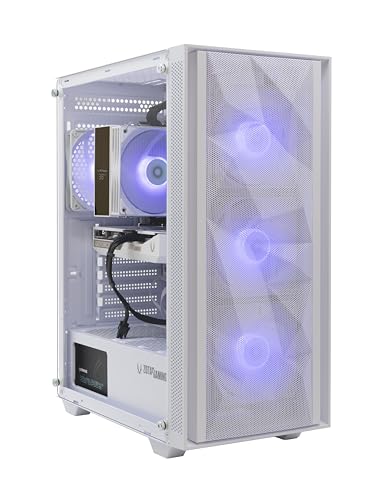
Where to buy
Check the latest price, availability and delivery on Amazon. Orders are placed on Amazon. We may earn a commission from qualifying purchases.
- Best overall white build: ZOTAC MEK Gaming PC, Ryzen 5 9600X, RTX 5060 White Edition, 16GB DDR5, 1TB NVMe — Check on Amazon
- Skytech Archangel, i5-14400F, RTX 4060, 32GB DDR5 RGB, 2TB SSD, White — Check on Amazon
- Thermaltake LCGS Quartz i1460, i5-14400F, RTX 5060, RGB ToughRam, White — Check on Amazon
- Skytech Shiva, Ryzen 5 5600X, RTX 4060 Ti, White In Win 101 Case — Check on Amazon
See 2 more Amazon options
- ZER-LON Gaming PC, Ryzen 5 5500, RTX 4060, White, RGB Fan x4 — Check on Amazon
- STGAubron Gaming PC, Ryzen 5 5500, RTX 3050 6GB, White, RGB Fan x6 — Check on Amazon
Read the full guide ↓
Disclosure: As an Amazon Associate, reviewstook.com earns from qualifying purchases. Links to Amazon on this page are affiliate links; they cost you nothing extra. Listing details such as price and availability change often, so check the current Amazon listing before you buy.
Twelve hundred dollars is the budget where a white gaming PC stops being a black PC that happens to sit in a white box. Cheaper white systems are almost all case-deep: a white shell, a glass panel, and a standard black motherboard, black graphics card and black cables glowing behind it. At $1,200 the genuine article appears — systems where the graphics card itself is a white edition, the memory carries white or RGB heat spreaders, the cooler matches, and the whole interior reads as one deliberate color instead of an accident. The hardware underneath is the same class as the plain $1,200 tier: RTX 4060 Ti and RTX 5060 graphics, current Intel and AMD processors, 16GB to 32GB of memory and 1TB to 2TB of NVMe storage. What changes is how much of the machine the color actually covers, and that coverage — not the case — is what this guide grades.
The honesty note first, because white PCs attract more marketing fog than any other corner of the prebuilt market. A white case proves nothing about the parts inside it. Several listings in this guide say “GPU brand may vary,” which means the single largest, most visible component in the window can arrive in whatever color the integrator had on the shelf — usually black. So every review below separates what the listing documents as white (the case, and where stated the graphics card, memory and cooler) from what it does not document at all, and grades each machine as a complete white build, a partial build, or a case-only build. We also considered the color itself: compared with equivalent black systems in this same tier, the white premium at this budget is generally modest, and in one pick below the premium is not color at all but doubled memory and storage wearing a white case. Below are the quick picks, detailed reviews of all six systems, a comparison table, a section that examines the white tax pick by pick, the mistakes white-PC buyers make, and the questions to settle before ordering.
In this guide
Quick Picks
Short on time, or comparing several options at once? Each row below names a buyer type and the system that suits it, with a link to the listing.
| Buyer type | Pick | Why it stands out | Link |
|---|---|---|---|
| Best overall white build | ZOTAC MEK, Ryzen 5 9600X, RTX 5060 White Edition | The only pick whose graphics card is a documented white edition, on a current AM5 platform | Check on Amazon |
| Best showpiece and capacity | Skytech Archangel, i5-14400F, RTX 4060 | White glass case, RGB ring fans and RGB memory, with 32GB RAM and 2TB storage | Check on Amazon |
| Best current-generation value | Thermaltake LCGS Quartz i1460, RTX 5060 | White chassis, RGB ToughRam and motherboard-synced lighting — check price on Amazon | Check on Amazon |
| Best graphics card | Skytech Shiva, Ryzen 5 5600X, RTX 4060 Ti | The tier’s native-1440p card inside a white In Win 101 case with tempered glass | Check on Amazon |
| Best budget white build | ZER-LON AOV4060, Ryzen 5 5500, RTX 4060 | White case and four RGB fans on a full RTX 4060 system — check price on Amazon | Check on Amazon |
| Cheapest full white presentation | STGAubron White, Ryzen 5 5500, RTX 3050 6GB | Six RGB fans plus RGB keyboard and mouse in white — check price on Amazon | Check on Amazon |
How These Picks Were Chosen
The budget was applied as a ceiling on the whole system: every pick below is a real Amazon listing positioned at or regularly within the $1,200 budget in the United States — check the current price on Amazon before you buy, because listings move. Two of these systems live close to the ceiling; their reviews say so. Anything whose white claim collapsed under inspection — a “white” listing whose own photos and spec block described a black system, or a white edition that turned out to be a different, weaker configuration — was excluded, however good the hardware looked.
We did not use these systems ourselves. We read the maker listings, specification pages and manuals, and compared what each listing actually documents. That distinction matters more for white PCs than for any other category, because the product being sold is partly visual. For every pick we recorded the graphics card and its memory, the processor and platform, the memory and storage, the power supply where the maker publishes it, and then the white layer separately: case color and panel construction, whether the graphics card is a named white edition or an unspecified brand, whether the memory and cooler are documented as white or RGB, and how the lighting is controlled. Where a listing is silent on a component’s color, the review says “not documented” rather than guessing from a render — listing renders are routinely more coordinated than the machine that arrives.
Three filters sat on top of that. The first is the completeness filter: a pick earns more credit for every major visible component the listing documents in white or RGB, and loses credit for every one it leaves unspecified — a white case hiding an unspecified black graphics card is a partial build, and it is graded as one. The second is the hardware floor: presentation never outranks the graphics card, so the weakest card in this guide is an RTX 3050 6GB, included only because it is the cheapest complete white presentation on Amazon and labeled as a 1080p machine wherever it appears. The third is the platform filter: DDR5 systems with a processor upgrade path ahead of them are credited for it, and finished DDR4 platforms are named as finished, because a showpiece you cannot upgrade becomes a black-PC problem in a white case within two years.
How White Is “White”? The Grading Used in This Guide
There are three honest grades of white PC, and the listings rarely tell you which one you are buying. A complete white build documents the case, the graphics card and the memory or cooler in white or matching RGB, so the interior reads as one color through the glass. A partial build documents the case and some interior pieces — RGB memory, light-colored fans — but leaves the graphics card, the largest object in the window, unspecified or black. A case-only build documents the shell and nothing behind it. None of these is a scam; a case-only build at the lower end of the market is a fair product. The problem is only the price: a case-only build sold at complete-build money is a bad purchase, and at $1,200 several listings skate close to that line.
Two listing habits deserve naming. The first is “GPU brand may vary,” standard practice for high-volume integrators: the graphics card’s model and memory are contracted, its maker and color are not. On a black PC that clause costs you nothing visually. On a white PC it decides whether the build is complete, and the seller will not promise it either way — so this guide treats every “brand may vary” card as an undocumented color, full stop. The second habit is the render: product images are frequently shot or rendered with a coordinated white interior that the shipped configuration does not guarantee. Judge the spec block, not the photograph. Where the spec block names a white-edition card — as exactly one pick below does, in the listing’s own product information — that is a contracted part of the product, and it is worth real money.
Native 1440p, Defined Properly
Every system in this guide will be advertised somewhere as a 1440p machine, so the term needs pinning down before the reviews. Native 1440p means the game is rendered at the full 2560×1440 resolution. DLSS upscaling renders internally at a lower resolution and reconstructs the image: at 1440p output, DLSS Quality renders around 1707×960, Balanced around 1485×835, and Performance at 1280×720. Those modes look good and are a legitimate way to play, but they are not native rendering, and a card that needs Performance upscaling to hold a frame rate at 1440p output is a 1080p card wearing a 1440p label. Judged that way, this tier divides cleanly. The RTX 4060 Ti in the Shiva is the tier’s native-1440p card in mainstream titles. The RTX 5060 systems render natively in lighter titles and lean on DLSS — including DLSS 4 multi frame generation in supported games, a presentation feature that raises displayed frame rates without reducing input latency — in heavier ones. The RTX 4060 machines are 1080p-native cards that negotiate 1440p title by title. The RTX 3050 6GB is a 1080p card, and this guide never calls it anything else. Nothing in this guide is a native 4K machine.
The 6 Best White Gaming PCs Under $1,200
ZOTAC MEK Gaming PC — Ryzen 5 9600X, GeForce RTX 5060 Twin Edge OC White Edition, 16GB DDR5, 1TB NVMe
Who it suits: Buyers who want the white build to be real all the way through the glass — white card, white case, current platform — and who would rather have the color contracted in the spec sheet than promised in a photograph.
This is the only system in the guide whose graphics card is a named white edition in the listing’s own product information: a ZOTAC GAMING GeForce RTX 5060 Twin Edge OC White Edition with 8GB of GDDR7, fitted in a white case with a seamless tempered-glass panel. ZOTAC’s own description of the machine is a “clean white build,” and unusually for this category, the paperwork agrees with the pitch — the Amazon product information block lists the color as white and names the white-edition card by model. The rest of the presentation is considered rather than loud: a tower air cooler with a temperature display, 120mm fans, a magnetic dust grill you can actually clean, and a built-in digital display showing system information. The hardware under it is the most current in the guide alongside the Quartz: a Ryzen 5 9600X on the AM5 platform, 16GB of DDR5 memory, a 1TB NVMe SSD, a 650W 80 Plus Gold power supply, Wi-Fi 6E and Bluetooth 5.3, with Windows 11 Home installed. ZOTAC backs the system with a one-year complete-system warranty and a three-year GPU warranty, serviced through ZOTAC USA.
The performance story is the RTX 5060’s: a native-1080p card that handles 1440p in lighter titles and uses DLSS 4 — including multi frame generation in supported games — in heavier ones. That is a presentation feature, not a latency feature, and the review of every 50-series system in this batch says the same. The honest limits are capacity and documentation. Sixteen gigabytes of memory is the tier’s floor, not its ceiling, and while the AM5 platform makes a later memory and processor upgrade straightforward, the listing does not individually document the motherboard color or the cable sleeving — so even the best white build in this guide is graded on what it contracts: case and graphics card in white, the two largest surfaces in the window, with the cabling and board left unspecified rather than assumed. On price, check the current price on Amazon — this machine is positioned in the same tier as plain RTX 5060 systems, so the complete-white treatment does not automatically carry a large premium; when its current price sits comfortably within the budget, that is exactly when to buy it.
- Graphics card is a contracted white edition (RTX 5060 Twin Edge OC White Edition), not a brand-may-vary lottery.
- Current AM5 platform: Ryzen 5 9600X, DDR5 memory, Wi-Fi 6E, and a published 650W Gold power supply.
- Three-year GPU warranty on top of the one-year system warranty, serviced in the US.
Honest limitation: 16GB of memory is the floor for this tier, and the listing does not document motherboard color or cable sleeving — the white is contracted for the case and card, not for every last cable.
Choose it if the completeness of the white build is the point of the purchase and you want a current platform under it. Skip it if you need 32GB of memory and 2TB of storage on day one — that is the Archangel below.

Skytech Archangel — Intel Core i5-14400F, GeForce RTX 4060, 32GB DDR5 RGB, 2TB SSD, White
Who it suits: Buyers who want the biggest, brightest white showpiece in the tier and a machine that never needs a capacity upgrade — and who accept that the graphics card’s color is the one thing the listing will not promise.
The Archangel is the presentation flagship of Skytech’s line and the most generously specified system in this guide: an Intel Core i5-14400F, 32GB of DDR5-5600 RGB memory, a 2TB NVMe SSD and a published 650W Gold power supply, in a white tempered-glass case with four RGB ring fans and a mesh front on the current edition. Through the glass, the documented white layer is the case itself plus the lit memory and fans — a bright, coordinated interior that photographs exactly like the listing, because the case, the lighting and the memory are the parts Skytech specifies. The capacity is the real argument: in a market where 32GB DDR5 kits can be strikingly expensive on their own, a system that ships with 32GB and 2TB already fitted removes the two upgrades every other pick in this guide eventually needs. Skytech assembles in the USA and covers the machine with a one-year parts and labor warranty and lifetime free technical support.
The grading, though, has to be honest: this is a partial white build. The RTX 4060 — an 8GB card, and a 1080p-native one that negotiates 1440p rather than owning it — is covered by Skytech’s “GPU brand may vary” clause, which means its maker and its color are not contracted. The largest single object in the window may arrive black. Buyers for whom that would spoil the build should either accept the risk knowingly or choose the ZOTAC above, whose card color is in writing. On price, check the current price on Amazon — and here is the useful surprise: compared with plain RTX 4060 systems in this tier, most of this machine’s premium is the doubled memory and storage, not the color. The white premium on this machine is small; the capacity is what you are paying for.
- 32GB of DDR5 RGB memory and a 2TB SSD — double the capacity of every other pick here.
- White glass case with four RGB ring fans and a mesh front on the current edition.
- Published 650W Gold power supply; assembled in the USA with lifetime free tech support.
Honest limitation: The RTX 4060’s brand — and therefore its color — may vary, so the biggest component in the window is not contracted white; the card is also 1080p-native rather than a true 1440p card.
Choose it if you want the showpiece look with capacity you will never outgrow at this tier. Skip it if a possibly black graphics card would bother you every time you look at the case — buy the ZOTAC instead.

Thermaltake LCGS Quartz i1460 — Intel Core i5-14400F, GeForce RTX 5060, 16GB RGB ToughRam, 1TB NVMe, White
Who it suits: Buyers who want a current-generation white system with the most coherent lighting control in the guide, positioned as strong current-generation value — check the current price on Amazon.
Thermaltake builds this system out of its own parts catalog, and it shows in the coordination. Independent reviews and roundups of this exact configuration confirm a white chassis with a 3mm tempered-glass side panel, a full-length power supply cover, a mesh front, an ARGB tower air cooler and RGB ToughRam memory — with the lighting synced through the motherboard’s software rather than a bundled remote, which is the control route that ages best because it is one ecosystem instead of three. The hardware is current: an Intel Core i5-14400F, an RTX 5060 with 8GB, 16GB of DDR4-3600 ToughRam, a 1TB NVMe SSD and a 600W 80 Plus Gold power supply, with Wi-Fi and Windows 11 fitted. The RTX 5060 brings DLSS 4 multi frame generation in supported titles — again, a displayed-frames feature, not an input-latency one — and renders 1440p natively in lighter games while leaning on upscaling in heavier ones.
Two honest notes. The platform is DDR4 on an LGA1700 board: perfectly serviceable, and the memory is cheaper to expand than DDR5, but it is a finished generation with no processor upgrade path worth planning around, unlike the AM5 ZOTAC above. And the white grading is partial in a specific way — the chassis, cooler and memory are documented light-colored or RGB, but the listing material does not name the graphics card’s color, so the card should be assumed standard until the live listing says otherwise. Expansion also deserves a check before ordering: configuration coverage of this system notes a single populated M.2 slot arrangement, so confirm the live listing’s storage expansion if a second SSD is in your plans. Value is the pick’s best argument: check the current price on Amazon — it is positioned as an accessible entry to a current-generation white system in this guide, without a large white premium against comparable plain RTX 5060 systems.
- White chassis, ARGB tower cooler and RGB ToughRam, all synced through motherboard software.
- Current-generation RTX 5060 with DLSS 4, positioned as strong value in this guide’s top class — check price on Amazon.
- Published 600W Gold power supply and a full-length PSU cover for a clean interior.
Honest limitation: The DDR4/LGA1700 platform is a finished generation, and the graphics card’s color is not documented — the white is case, cooler and memory, with the card unspecified.
Choose it if you want current graphics and tidy, single-software lighting control for the least money here. Skip it if a long upgrade path matters more — the AM5 systems above and below bracket it.

Skytech Shiva — AMD Ryzen 5 5600X, GeForce RTX 4060 Ti, 16GB DDR4, 1TB NVMe, White
Who it suits: Buyers who rank the graphics card first and the color second — who want the strongest GPU in the guide and are happy for it to live in a genuinely white case, on an older platform they do not intend to upgrade.
The Shiva’s argument is one sentence long: it is the only system here with an RTX 4060 Ti, the tier’s native-1440p card, and it wraps that card in the In Win 101 — a white mATX mid-tower with tempered glass that has been a small-form showpiece case for years — with three RGB fans and a high-performance ARGB air cooler. The rest of the specification is the previous generation done properly: a Ryzen 5 5600X, 16GB of DDR4-3200, a 1TB NVMe SSD, a 600W Gold power supply, Wi-Fi and Windows 11 Home, assembled in the USA under Skytech’s one-year parts and labor warranty with free technical support. For a buyer whose monitor is 1440p and whose games are the point, this is the pick: the 4060 Ti renders natively where the guide’s 4060 machines upscale, and DLSS frame generation stretches it further in supported titles.
The trade-offs are platform and paperwork. AM4 and DDR4 are finished: the 5600X is a capable gaming processor, but there is no upgrade path here that does not start with a new motherboard and memory, so this machine is bought as a complete object rather than a starting point. The white grading is partial — the case is documented white and the fans are RGB, but Skytech’s listings reserve “GPU brand may vary,” so the 4060 Ti’s color is not contracted, and a black card in the white In Win case is a real possibility to accept before ordering. Price needs the most care of any pick in the guide: its strongest documented offers have depended on a coupon being applied, which means the cart total — coupon clipped, before checkout — is the only figure that counts, so check the current price on Amazon carefully. When a coupon brings it comfortably within budget it is the best graphics-focused white system in the tier; at the top of the budget without that help, its value case is much weaker.
- RTX 4060 Ti 8GB — the only native-1440p card in this guide.
- White In Win 101 tempered-glass case with three RGB fans and an ARGB air cooler.
- Published 600W Gold power supply; assembled in the USA.
Honest limitation: The AM4/DDR4 platform is finished with no meaningful upgrade path, the card’s color is not contracted, and the best documented price depends on a coupon being live at checkout.
Choose it if 1440p gaming performance is the priority and the platform’s age does not matter because you buy systems whole. Skip it if you plan to upgrade the processor later, or if the coupon is gone and the price is at list.

ZER-LON Gaming PC (AOV4060) — AMD Ryzen 5 5500, GeForce RTX 4060, 16GB DDR4, 1TB NVMe, White
Who it suits: Buyers who want a white system with a real RTX 4060 in it without paying the dearer picks’ premium, and who grade the white honestly as a case-and-fans treatment rather than a full interior build.
The ZER-LON is the budget door into this guide that does not compromise the graphics card: a Ryzen 5 5500, an RTX 4060 with 8GB, 16GB of DDR4 memory, a 1TB NVMe SSD, Wi-Fi 5 and Windows 11 Home, in a white case with four RGB fans. That specification is the same hardware class as dearer systems in this guide, and its positioning reflects a smaller brand’s discount: check the current price on Amazon, and compare it with plain black RTX 4060 systems in this tier — the white premium here is small, among the smallest color upgrades in the guide, and that is a key reason this machine earns its place over prettier systems with weaker cards. The RTX 4060’s limits are the familiar ones: 8GB of memory and a 1080p-native rendering class that negotiates 1440p through DLSS rather than owning it.
What the money does not buy is documentation and headroom. The white execution is case-only by this guide’s grading: the case and its four RGB fans are specified, and nothing behind the glass — card color, board, cabling — is documented at all, so expect a standard black interior and be pleasantly surprised if it is otherwise. The platform is AM4 with DDR4, a finished generation, and Wi-Fi 5 is a generation behind the Wi-Fi 6 and 6E fitted to the dearer picks. The power supply is not published in the verified listing data, which caps the sensible GPU upgrade path until you can read the label on the unit that arrives. None of that disqualifies the machine; it defines it. It is a white 4060 system at a black-system price, sold by a smaller brand with a thinner paper trail, and buyers who understand that trade are getting the best value in the guide.
- Full RTX 4060 hardware with only a small white premium over plain equivalents — check price on Amazon.
- White case with four RGB fans and a 1TB NVMe SSD fitted.
- 16GB of memory and Windows 11 Home included, ready out of the box.
Honest limitation: Case-only white grading — no interior component color is documented — on a finished AM4/DDR4 platform with Wi-Fi 5 and an unpublished power supply.
Choose it if the budget is real and the RTX 4060 matters more than interior coordination. Skip it if you are paying for the complete-white look — that is the ZOTAC at the top of this guide.

STGAubron Gaming PC, White — AMD Ryzen 5 5500, GeForce RTX 3050 6GB, 16GB DDR4, 1TB SSD, RGB Fan x6
Who it suits: Buyers whose priority is the complete white presentation — case, fans and matching lit peripherals — for the least money in the guide, and whose gaming is honestly 1080p: esports titles, older games and lighter modern ones.
This is the presentation-first value pick. The white case carries six RGB fans — the most in the guide — and the box includes an RGB keyboard and mouse, so the desk reads as one white-and-lit setup the day it arrives, with a Ryzen 5 5500, 16GB of DDR4, a 1TB SSD, Wi-Fi 6 and Bluetooth 5.0 under Windows 11 Home. Its positioning makes it the cheapest route in: check the current price on Amazon to confirm it still sits at the bottom of this guide’s tier. As a piece of room furniture that also plays games, nothing else in this guide competes at that money, and for a younger player’s first setup or a streaming-room backdrop machine, the presentation is the product.
The grading must be just as plain about the rest. The graphics card is an RTX 3050 with 6GB — a full class below the 4060 machines above, a 1080p card at medium-to-high settings with DLSS doing real work in modern titles, and not a 1440p card by any honest definition. The white execution is case-and-peripherals: six lit fans and a white shell, with the card and board colors undocumented, so the interior behind the glass is a standard build wearing a white case. The power supply is not published in the verified data for this brand, which limits upgrade planning, and the listing family’s own storage descriptions have contradicted themselves in sibling research for this batch — headline and body text disagreeing — so the delivered configuration deserves a check on arrival against the order. Buy it as the cheapest complete white presentation with a 1080p card inside, when the current price on Amazon confirms that entry-level positioning, and it is a fair product. Buy it expecting the other picks’ performance and it will disappoint exactly as much as the spec sheet said it would.
- Six RGB fans plus RGB keyboard and mouse included — the fullest white presentation for its tier here.
- Positioned as the cheapest pick in the guide by a wide margin — check price on Amazon.
- Wi-Fi 6 and Bluetooth 5.0 fitted, a generation ahead of the ZER-LON above.
Honest limitation: The RTX 3050 6GB is a 1080p card a full class below the guide’s 4060 systems, the interior colors are undocumented, and the configuration should be verified on arrival.
Choose it if the white desk presentation is the purchase and your gaming is 1080p esports and back-catalog. Skip it if you play modern AAA titles or any 1440p — every system above it in this guide exists for you.

Comparison Table
| Product | Graphics card | White grade | Best use | Link |
|---|---|---|---|---|
| ZOTAC MEK, 9600X, RTX 5060 | RTX 5060 8GB, white edition | Complete (case + card documented) | The genuine all-white build on a current platform | Check on Amazon |
| Skytech Archangel, 14400F, RTX 4060 | RTX 4060 8GB, brand may vary | Partial (case, fans, RGB memory) | Showpiece looks with 32GB and 2TB capacity | Check on Amazon |
| Thermaltake Quartz i1460, RTX 5060 | RTX 5060 8GB, color undocumented | Partial (case, cooler, RGB memory) | Current-gen value with synced lighting control | Check on Amazon |
| Skytech Shiva, 5600X, RTX 4060 Ti | RTX 4060 Ti 8GB, brand may vary | Partial (white case, RGB fans) | Strongest graphics card, native 1440p | Check on Amazon |
| ZER-LON AOV4060, RTX 4060 | RTX 4060 8GB, color undocumented | Case-only | White 4060 system at a black-system price | Check on Amazon |
| STGAubron White, RTX 3050 6GB | RTX 3050 6GB, color undocumented | Case-only (plus lit peripherals) | Cheapest complete white desk presentation | Check on Amazon |
The White Tax, in Perspective
Color is a line item, so we considered it against equivalent plain systems in this same tier. The white ZER-LON, in the same RTX 4060 class as plain black systems, carries only a small white premium — among the smallest in the guide. The white Shiva’s value depends heavily on deal timing and on whether a coupon is live at checkout, so its premium over plain RTX 4060 Ti systems moves a great deal from one offer to the next; check the current price on Amazon and the cart total before judging it. The ZOTAC MEK, the most completely white machine here, is positioned squarely in plain RTX 5060 system territory, so its color premium can be effectively negligible when its current price sits comfortably within budget. And the Archangel’s premium looks like the biggest in the guide until the specification is read: its 32GB of memory and 2TB of storage account for most of the difference, and the color itself contributes little. The pattern is the lesson: at the $1,200 budget the white premium is real but generally modest, and it is dwarfed by the swings these listings make between deal events. Timing matters more than color. What the premium cannot buy at any point in this tier is a guarantee: only the ZOTAC contracts its card’s color in writing.
How to Choose a White Gaming PC Under $1,200
- Grade the white before you price it. Decide whether you are buying a complete build, a partial build or a case. Then check the listing’s spec block — not its photographs — for which of the case, graphics card, memory and cooler are documented in white or RGB.
- Treat “GPU brand may vary” as “GPU color unknown.” The card’s model and memory are contracted; its color is not. If a black card in a white case would bother you, only a named white-edition card in the spec block removes the risk.
- Pick the graphics card for your monitor, not the case. Native 1440p means the RTX 4060 Ti here. The RTX 5060 and 4060 machines are strong 1080p systems that negotiate 1440p with DLSS; the RTX 3050 is 1080p only. No white paint changes that arithmetic.
- Separate the color premium from the capacity premium. A white system can cost more because it is white or because it carries double the memory and storage. The Archangel is the second kind; know which kind you are paying for.
- Check the platform’s future. AM5/DDR5 systems (the ZOTAC) accept tomorrow’s processors and memory. AM4 and LGA1700/DDR4 systems are finished platforms — fine when bought whole and cheap, a trap when bought as a “starting point.”
- Ask how the lighting is controlled. Motherboard-synced ARGB (the Thermaltake) is one ecosystem that survives component swaps. Remote-and-preset control works but strands the lighting when you upgrade parts. Undocumented control means assume presets.
- Read the power supply line before planning upgrades. Published Gold units (ZOTAC 650W, Archangel 650W, Quartz 600W, Shiva 600W) tell you what the machine can grow into. An unpublished PSU means the upgrade budget starts with a flashlight and the label on the unit that arrives.
- Check the current price, not an old headline. Every system here moves between deal events, and two picks live close to the ceiling. Check the current price on Amazon, set a walk-away line within your $1,200 budget, and let the deal come to you.
- Photograph the interior on delivery day. If the card color, memory or storage does not match what the listing documented, that is a returns conversation — and it is only available while the return window is open.
Common Buying Mistakes
- Believing the render. Listing photographs show coordinated white interiors that the shipped configuration does not always guarantee; the spec block is the contract, the picture is an aspiration.
- Paying complete-build money for a case-only build. A white shell over a standard black interior is a fair product at the lower end of the market and a poor one at this budget.
- Ignoring “GPU brand may vary” on the one purchase where color is the point. On a white build that clause decides the look of the whole window.
- Letting the case choose the graphics card. A beautiful white system with an RTX 3050 is a 1080p machine; the prettiest case in this guide cannot render 1440p.
- Counting a coupon price as the price. The Shiva’s best documented offers need the coupon clipped at checkout — check the current price on Amazon and the cart total, not the headline.
- Assuming white components stay white. White plastics and cable sleeving yellow with heat and age at different rates; a build that starts uniform may not stay uniform, and no warranty covers cosmetics.
- Skipping the delivery-day check. Variant drift is normal in this market — verify the card, memory size and storage against the listing while returns are still free.
- Buying a finished platform as a project. AM4 and DDR4 systems in this guide are complete objects; the upgrade path belongs to the AM5 pick.
Final Recommendation
- The genuine white build: ZOTAC MEK with the RTX 5060 White Edition.
- Showpiece plus capacity: Skytech Archangel.
- Current generation for least money: Thermaltake LCGS Quartz i1460.
- Strongest graphics: Skytech Shiva.
- White on a budget: ZER-LON AOV4060.
- Cheapest full presentation: STGAubron White.
Our top two are the ZOTAC MEK, because it is the only system here that contracts the whole point of the purchase — a white graphics card in a white case, on the platform with the longest future — and the Skytech Archangel, because its premium turns out to be capacity rather than color, and 32GB with 2TB is the specification every other pick eventually wishes it had. Between them they cover the two honest shapes of this search: white done completely, and white done generously. If your monitor is 1440p and the games outrank the furniture, the Shiva’s 4060 Ti is the card to own, bought when a coupon keeps its current price comfortably within budget; if the budget is the immovable object, the ZER-LON puts a real 4060 behind white glass at strong value. Shoppers working to a tighter ceiling should also see Best White Gaming PC Under $800, and those who care about the lighting more than the color can compare Best RGB Gaming PC Under $1200. Whatever you choose, grade the white from the spec block, check the current price on Amazon and the cart total, and photograph the interior the day it arrives.
Frequently Asked Questions
Is a white gaming PC more expensive than a black one with the same parts?
Slightly, and less than the marketing suggests. Compared with equivalent plain systems in this tier, the white versions in this guide range from roughly the same price to a modest premium, depending on the model and the day — check the current price on Amazon for the machine you are considering. The bigger variable is timing: these listings move substantially between deal events, which can dwarf the color premium. One caution — a white system can also cost more because it carries more memory and storage, which is a capacity premium, not a color tax.
What makes a white build “complete” rather than just a white case?
Documentation. A complete build’s listing specifies the case, the graphics card and the memory or cooler in white or matching RGB. A partial build specifies the case and some lit components but leaves the graphics card’s color open. A case-only build specifies the shell alone. In this guide only the ZOTAC MEK contracts a white-edition graphics card in its product information; the Skytech systems reserve “GPU brand may vary,” which leaves the largest component in the window uncontracted.
Can these PCs actually play at 1440p?
One of them natively, the rest with help. Native 1440p means rendering at the full 2560×1440; the Shiva’s RTX 4060 Ti does that in mainstream titles. The RTX 5060 and RTX 4060 systems reach 1440p output through DLSS upscaling — rendering internally at a lower resolution and reconstructing — which looks good but is a different thing, and the RTX 3050 system is a 1080p machine outright. None of the six is a native 4K system.
Will a white PC stay white?
Mostly, with realistic expectations. Painted steel cases hold their color well. White plastics, fan frames and cable sleeving can yellow gradually and unevenly with heat and light exposure, and different materials age at different rates, so a build that starts perfectly uniform may drift. It is a cosmetic risk no warranty covers, and it is the honest long-term cost of the aesthetic — budget systems with case-only white treatments carry the least of it, since there is less white to drift.
Is it better to buy a white prebuilt or build a white PC myself?
At the time of writing, the prebuilt is often the rational route at this tier: component costs — memory especially — have been elevated compared with their historical norms, and several systems in this guide carry 32GB of DDR5 or current-generation cards in combinations a parts list can struggle to match on value — check the current price on Amazon before deciding. Building yourself guarantees every component’s color, which no prebuilt except the ZOTAC fully contracts. So the honest answer splits: buy the prebuilt for value, build it yourself only if complete color control is worth a premium and a weekend.
What should I check when the PC arrives?
Everything the listing documented, while the return window is open. Confirm the graphics card model and memory, its color if one was specified, the memory size and stick count, the storage size, and the power supply label. Compare against the listing’s spec block rather than its photographs. Integrators revise components under the same model name, and the delivery-day check is the only moment the discrepancy costs you nothing.
- Best White Gaming PC Under $1200
- Best White Gaming PC Under $800
- Best White Gaming PC Under $1500
- Best White Gaming PC For Beginners Under $1200
- Best White Gaming PC For Streaming Under $1200
- Best White Gaming PC For Small Spaces Under $1200
- Best White Gaming PC For 1440p Gaming Under $1200
- Best Gaming PC Under $1200
- Best Prebuilt Gaming PC Under $1200


