Where to buy
Check the latest price, availability and delivery on Amazon. Orders are placed on Amazon. We may earn a commission from qualifying purchases.
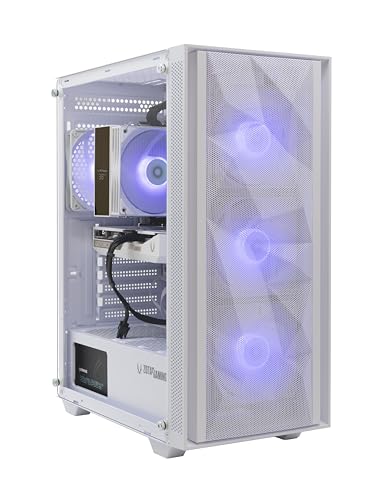
- Best first white PC overall: ZOTAC MEK Gaming PC, Ryzen 5 9600X, RTX 5060 White Edition, 16GB DDR5, 1TB NVMe — Check on Amazon
- Skytech Archangel, i5-14400F, RTX 4060, 32GB DDR5 RGB, 2TB SSD, White — Check on Amazon
- Thermaltake LCGS Quartz i1460, i5-14400F, RTX 5060, RGB ToughRam, White — Check on Amazon
- Skytech Shiva, Ryzen 5 5600X, RTX 4060 Ti, White In Win 101 Case — Check on Amazon
See 2 more Amazon options
- ZER-LON Gaming PC, Ryzen 5 5500, RTX 4060, White, RGB Fan x4 — Check on Amazon
- STGAubron Gaming PC, Ryzen 5 5500, RTX 3050 6GB, White, RGB Fan x6 — Check on Amazon
Read the full guide ↓
Disclosure: As an Amazon Associate, reviewstook.com earns from qualifying purchases. Links to Amazon on this page are affiliate links; they cost you nothing extra. Listing details such as price and availability change often, so check the current Amazon listing before you buy.
Buying your first gaming PC is confusing enough in black. In white it gets worse, because you are buying two products at once — a computer and a look — and the listings are much better at selling the look than describing it honestly. A white case in the photograph tells you nothing about the parts behind the glass. On several machines below, the biggest part in the window — the graphics card — is not promised in white at all, and can legitimately arrive black under a clause most first-time buyers have never heard of. None of that makes white a bad first PC. It makes it a purchase where a beginner needs the vocabulary before the credit card — which is what this guide is for.
So this version of our white-under-$1,200 guide is written for first-time buyers. It starts with a plain-language glossary translating every term the listings use. It states plainly what kind of machines these are: all six are complete, ready-to-run computers with Windows installed — none is a second-hand renewed unit, none is a barebone kit you finish yourself, and none has its memory soldered in place, so every one can be opened up and improved later. It walks you through your first evening step by step, including the commonest beginner mistake — plugging the monitor into the wrong socket — and the one warning that genuinely matters in this set: two of these six computers have processors with no backup graphics at all, and on those two, the wrong socket means a black screen, full stop.
The hardware is the same class as our standard $1,200 white guide: RTX 5060 and RTX 4060 Ti graphics at the top, RTX 4060 in the middle, one honest RTX 3050 at the bottom, 16GB to 32GB of memory, 1TB to 2TB of storage. Prices change often, so check the current price on Amazon for each pick before you decide. Where a listing may use a coupon, the review says so and reminds you to confirm the total in the cart.
In this guide
Quick Picks
Short on time, or comparing several options at once? Each row below names a buyer type and the system that suits it, with a link to the listing.
| Buyer type | Pick | Why it stands out | Link |
|---|---|---|---|
| Best first white PC overall | ZOTAC MEK, Ryzen 5 9600X, RTX 5060 White Edition | The only pick whose graphics card is white in writing, on the platform with the longest future | Check on Amazon |
| Most memory and storage | Skytech Archangel, i5-14400F, RTX 4060 | 32GB of memory and a 2TB drive already fitted, so the usual first upgrades are done | Check on Amazon |
| Cheapest current-generation system | Thermaltake LCGS Quartz i1460, RTX 5060 | New-generation graphics and tidy lighting control — check price on Amazon | Check on Amazon |
| Strongest graphics card | Skytech Shiva, Ryzen 5 5600X, RTX 4060 Ti | The only card here that renders 1440p natively, in a white In Win glass case | Check on Amazon |
| White on the tightest budget | ZER-LON AOV4060, Ryzen 5 5500, RTX 4060 | A real RTX 4060 in a white case, positioned toward the lower end of this tier — check price on Amazon | Check on Amazon |
| Cheapest complete white desk setup | STGAubron White, Ryzen 5 5500, RTX 3050 6GB | Six lit fans plus a light-up keyboard and mouse in the box — check price on Amazon | Check on Amazon |
How These Picks Were Chosen
Every machine below is a real Amazon listing included for this under-$1,200 guide in the United States — check the current price on Amazon to confirm it still fits your budget. We did not use these systems ourselves. We read the manufacturers’ listings and specification pages and recorded what each one actually documents: the graphics card and its memory, the processor, the memory and storage, the power supply where the maker publishes it, and — separately — the color story: which parts the listing names as white or light-up, and which it says nothing about at all. That second list is where white PCs are won and lost: renders routinely show matched interiors the shipped machine does not guarantee, so color is graded only from the words in the spec block.
Three rules shaped the list. First, the color had to survive inspection: a “white” listing whose own details described a black machine, or whose white edition turned out to be a weaker configuration wearing the name, was excluded. Second, presentation never outranked the graphics card: the weakest card here is an RTX 3050 6GB, included only because it is the cheapest complete white presentation on Amazon, and labeled a 1080p machine wherever it appears. Third, beginners were protected from homework: every pick is a complete computer with Windows installed and memory and storage in ordinary slots — no renewed units, no barebone kits, nothing soldered — because a first PC should start with playing games, not finishing a build.
The Words on the Listing, Translated
Listings are written in shorthand. Here is every term you need for the six machines below, in plain language.
- Graphics card (GPU): the part that draws your games — the most important component for gaming, and the biggest object visible through the glass panel, which is why its color matters so much here. The figure in its name (8GB, 6GB) is its own memory; more lets it hold bigger, sharper game worlds.
- Processor (CPU): the part that runs the game itself — the world, the physics, the other players — while the graphics card draws it. All six here are comfortably fast enough for their cards.
- Memory (RAM): the computer’s short-term workspace, in gigabytes. 16GB is the working minimum for gaming today; 32GB is comfortable headroom. In all six machines it sits in slots and can be upgraded later — nothing here is soldered down.
- Storage (SSD, NVMe): where games and Windows live, also in gigabytes (1TB ≈ 1,000GB). NVMe is simply the fast modern kind of SSD. Games are large, so storage fills faster than beginners expect.
- Power supply (PSU): the box inside the PC feeding electricity to everything else, in watts. Invisible and unglamorous, but it decides whether a stronger graphics card can be fitted later: a published wattage is a plan; an unpublished one is a question only the label on the delivered unit can answer.
- Motherboard: the board everything plugs into. Its “platform” (AM5, AM4, LGA1700) decides which future processors fit. AM5 is current, with years of upgrades ahead; AM4 and LGA1700 here are finished platforms — good machines, bought whole rather than as starting points.
- Integrated graphics: a small backup graphics chip built into some processors — fine for a basic picture, far too weak for real gaming. It matters for one reason: the motherboard’s monitor sockets are connected to it, not to your graphics card.
- The letter F: Intel processors whose name ends in F — like the i5-14400F in two machines below — have no integrated graphics at all. Their motherboard monitor sockets are dead: plug your screen into them and you get a black screen, guaranteed. The graphics card’s sockets are the only ones that work.
- DLSS and upscaling: a trick modern NVIDIA cards use to draw a game at a lower internal resolution and rebuild it sharper — DLSS Quality at a 1440p setting is really rendering about 1707×960 inside. It looks good and is a legitimate way to play, but it is not full-resolution rendering, and this guide never confuses the two.
- Native resolution: rendering the game at the screen’s full pixel count — 2560×1440 for a 1440p monitor. “Native 1440p card” here means a card strong enough to do that in mainstream games without leaning on upscaling.
- RGB and ARGB lighting: the colored lights in the fans and memory. RGB here means the parts light up; ARGB means each light can be a different color, usually controlled through the motherboard’s software — the arrangement that ages best.
- White grade — complete, partial, case-only: this guide’s honesty scale. Complete: the listing documents the case and the graphics card in white. Partial: case and some lit parts documented, the card’s color not promised. Case-only: the shell is white and nothing behind the glass is documented at all.
- Renewed and barebone: two words to watch for when shopping generally. Renewed means second-hand and refurbished; barebone means a partial kit you finish with your own parts. None of the six below is either — all are new, complete and ready to run — but on a first PC both are best avoided.
What the Color Costs
Think of the white finish as one part of each machine’s position in this tier, not as a separate item with a fixed cost. Some white systems in this guide sit close to plainer equivalents with the same class of graphics card, while others sit higher in the tier because of their case, lighting or capacity as well as their color. The ZER-LON is positioned toward the lower end of the tier for an RTX 4060 system, the Shiva sits higher with its stronger RTX 4060 Ti card and white In Win case, and the ZOTAC sits toward the top of the tier as the most completely documented white build here. The lesson for a beginner: at the $1,200 budget level, compare each machine’s hardware, white grade and capacity first, then check the current price on Amazon — timing and current offers can change how the color premium looks on the day you buy.
The 6 Best White Gaming PCs for Beginners Under $1,200
ZOTAC MEK Gaming PC — Ryzen 5 9600X, GeForce RTX 5060 Twin Edge OC White Edition, 16GB DDR5, 1TB NVMe
Who it suits: The beginner who wants the white to be real — a machine where the color is written into the specification, not hoped for from a photograph — on the platform that will stay current the longest.
This is the only system in the guide whose graphics card is a named white edition in the listing’s own product information: a ZOTAC GAMING GeForce RTX 5060 Twin Edge OC White Edition with 8GB of GDDR7 memory, in a white case with a seamless tempered-glass panel, with Amazon’s product information naming the white-edition card and listing the color as white. That makes this a complete white build on contracted evidence — the two largest surfaces in the window, case and card, are white in writing. The supporting cast is tasteful rather than loud: a tower air cooler with a small temperature display, 120mm fans, a magnetic dust grill, and a built-in digital readout of system information.
The computer underneath is the most current here alongside the Quartz. The Ryzen 5 9600X sits on the AM5 platform, so tomorrow’s processors and memory still fit this motherboard. Memory is 16GB of DDR5, storage a 1TB NVMe SSD, and the power supply is a published 650W 80 Plus Gold unit. That published wattage matters: with a standard case, a stronger graphics card can be swapped in later without first replacing the power supply — a promise only the four published-PSU picks in this guide can make. Windows 11 Home is installed, with Wi-Fi 6E and Bluetooth 5.3. ZOTAC covers the system for one year and the graphics card separately for three years, serviced through ZOTAC USA.
Performance, in plain terms: the RTX 5060 is a strong 1080p card that renders lighter games at 1440p natively and uses DLSS upscaling, including DLSS 4 multi frame generation in supported games, in heavier ones. It is not a native-1440p card across the board, and not a 4K card at all; no pick here is. Check the current price on Amazon before ordering — this machine sits toward the top of this tier, so confirm it still fits the under-$1,200 budget on the live listing. One configuration warning: a different ZOTAC MEK built around a Ryzen 5 5500 also circulates in some roundups, so confirm on the live listing that you are looking at the 9600X machine with the white-edition card before ordering.
- The only contracted white graphics card in the guide — a named White Edition in the listing’s own product information.
- Current AM5 platform with DDR5, Wi-Fi 6E and a published 650W Gold power supply that leaves room for a future card swap.
- Three-year warranty on the graphics card, on top of a one-year system warranty.
Honest limitation: 16GB of memory is the floor at this budget, not the ceiling — most owners will add more later (covered honestly in the what-else section below) — and the motherboard color and cable sleeving are not documented, so the complete grade covers case and card, not every last wire.
Choose it if the complete white look is the point and you want the longest-lived platform under it. Skip it if you want 32GB of memory and 2TB of storage already fitted on day one — that is the Archangel below, at the cost of an unpromised card color.

Skytech Archangel — Intel Core i5-14400F, GeForce RTX 4060, 32GB DDR5 RGB, 2TB SSD, White
Who it suits: The beginner who wants to skip the two upgrades everyone else ends up making — more memory, more storage — and accepts one honest uncertainty about the graphics card’s color in exchange.
The Archangel is the most generously specified machine in this guide, and for a first-time buyer its generosity is practical, not flashy. It ships with 32GB of DDR5-5600 RGB memory and a 2TB NVMe SSD — double the memory and storage of every other pick here. That matters: memory is the component whose price has swung hardest lately, and this machine never asks you to shop for it. The rest is equally settled: an Intel Core i5-14400F processor, an RTX 4060 graphics card with 8GB, a published 650W Gold power supply, Wi-Fi and Windows 11 Home, in a white tempered-glass case with four RGB ring fans and a mesh front on the current edition. Skytech assembles in the USA and backs the machine with a one-year parts and labor warranty plus lifetime free technical support — worth more than it sounds the first time something confuses you.
Two things must be said plainly. First, the processor: the i5-14400F ends in F, which means it has no integrated graphics — there is no backup chip. The motherboard’s monitor sockets are dead, and if you plug your screen into them on your first evening you will get a black screen; the fix is simply to use the sockets on the graphics card itself, as the walkthrough below repeats. Second, the color: this is a partial white build. The case, the ring fans and the lit memory are documented, but Skytech’s listing reserves “GPU brand may vary,” so the RTX 4060’s maker — and therefore its color — is not promised. The biggest object in the window may arrive black. If that would bother you every time you looked at it, the ZOTAC above is the pick whose card color is in writing.
On performance, the RTX 4060 is a 1080p-native card that negotiates 1440p through DLSS rather than owning it — strong for the great majority of games a new player actually plays. The published 650W Gold power supply and standard case mean a stronger card can be swapped in later, so the graphics are the one part of this machine with a planned future. Check the current price on Amazon before you judge its value. Its position toward the top of this tier reflects the doubled memory and storage, not the white paint alone — the capacity is the main reason it sits above plainer RTX 4060 systems in the tier.
- 32GB of memory and 2TB of storage fitted — the two standard first upgrades, already done.
- White glass case with four RGB ring fans, a mesh front on the current edition, and a published 650W Gold power supply.
- Assembled in the USA with lifetime free technical support — a genuine beginner benefit.
Honest limitation: The graphics card’s brand and color may vary, so the biggest component in the window is not contracted white; the processor has no integrated graphics, so the motherboard’s monitor sockets are dead; and the card itself is a 1080p-native part, not a true 1440p one.
Choose it if you want the showpiece look with capacity you will not outgrow at this tier, and a black card would not spoil it for you. Skip it if it would — or if the current price on Amazon pushes it beyond what you want to pay for this tier and you would rather check again later.

Thermaltake LCGS Quartz i1460 — Intel Core i5-14400F, GeForce RTX 5060, 16GB RGB ToughRam, 1TB NVMe, White
Who it suits: The beginner who wants current-generation graphics and the easiest lighting to live with, positioned toward the more accessible end of its class — check price on Amazon — and who does not plan to upgrade the processor years from now.
Thermaltake builds this system from its own parts catalog, which shows in how the lighting works: a white chassis with a 3mm tempered-glass side panel, a mesh front, a full-length cover hiding the power supply, an ARGB tower air cooler and RGB ToughRam memory — all synced through the motherboard’s software. For a beginner that single point of control is the friendliest arrangement in the guide: one program runs every light, instead of a drawer full of remotes and three competing apps. Independent reviews of this exact configuration confirm that white layer; what they do not confirm is the graphics card’s color, which the listing material does not name. So the Quartz grades partial: case, cooler and memory documented, card unspecified and best assumed standard until the live listing says otherwise.
The hardware is current where it counts. An Intel Core i5-14400F — the same F-suffix warning as the Archangel applies: no integrated graphics, motherboard monitor sockets dead, screen into the graphics card or black screen — pairs with an RTX 5060 with 8GB, 16GB of DDR4-3600 memory, a 1TB NVMe SSD and a published 600W 80 Plus Gold power supply, with Wi-Fi and Windows 11 fitted. The 5060 renders 1440p natively in lighter games and leans on DLSS upscaling, including DLSS 4 multi frame generation in supported titles, in heavier ones; it is a strong 1080p card first. The published power supply and standard case leave a later graphics-card swap open, which is just as well, because the platform underneath is the honest compromise: DDR4 memory on an LGA1700 board is a finished generation. DDR4 is cheaper to expand than DDR5, but there is no processor upgrade path worth planning around — buy this machine as the complete object it is. One practical check: configuration coverage notes a single populated M.2 arrangement, so if fitting a second SSD later is in your plans, confirm the storage expansion on the live listing before ordering.
Its position in the tier is part of its appeal. It sits toward the more accessible end of the current-generation white systems in this guide, close in positioning to comparable plain RTX 5060 systems — check the current price on Amazon to confirm where it sits when you buy.
- White chassis, ARGB cooler and RGB memory all controlled from one piece of motherboard software — the beginner-friendliest lighting here.
- Current-generation RTX 5060 with a published 600W Gold power supply — check price on Amazon.
- A full-length power-supply cover keeps the interior looking tidy through the glass.
Honest limitation: The platform is a finished DDR4 generation with no processor upgrade path, and the graphics card’s color is not documented.
Choose it if you want new-generation graphics and calm, single-software lighting at the more accessible end of this class — check the current price on Amazon. Skip it if a long processor upgrade path matters to you — that is the AM5 ZOTAC at the top of this guide.

Skytech Shiva — AMD Ryzen 5 5600X, GeForce RTX 4060 Ti, 16GB DDR4, 1TB NVMe, White
Who it suits: The beginner whose monitor is 1440p and whose priority is the strongest graphics card in the guide — someone buying a finished machine to keep whole, not a project to upgrade piece by piece.
The Shiva’s case is the In Win 101, a white mATX mid-tower with tempered glass, fitted with three RGB fans and a high-performance ARGB air cooler. Inside it sits the specification that defines this pick: an RTX 4060 Ti with 8GB, the only graphics card in this guide that renders mainstream games at native 1440p — the full 2560×1440, no upscaling required — with DLSS frame generation stretching it further in supported titles. Around it, the previous generation done properly: a Ryzen 5 5600X processor, 16GB of DDR4-3200 memory, a 1TB NVMe SSD, a published 600W Gold power supply, Wi-Fi and Windows 11 Home. Skytech assembles in the USA, with a one-year parts and labor warranty and free technical support. The published power supply means the graphics card — the part a gamer is likeliest to want more of in three years — can be swapped for a stronger one down the line.
Three cautions matter for a beginner. First, the platform: AM4 and DDR4 are finished. The 5600X is a capable gaming processor, but upgrading it later means a new motherboard and new memory too, so this machine is bought whole and kept whole — its one planned upgrade is the card itself. Second, the color: the case is documented white and the fans light up, but Skytech reserves “GPU brand may vary,” so the 4060 Ti’s color is not contracted. This is a partial white build, and a black card inside the white In Win case is a real possibility to accept before you order, not a defect to discover after. Third — the one that costs beginners money — the price. Check the current price on Amazon, and check whether any coupon shown on the listing is actually applied in the cart. A coupon is not part of the total until it is clipped and the cart total confirms it. With a coupon applied, this can be a strong-value white system for its graphics class in this tier; without it, judge the live total against the rest of the under-$1,200 budget before deciding.
- RTX 4060 Ti 8GB — the only native-1440p graphics card in this guide.
- The white In Win 101 glass case, with three RGB fans and an ARGB air cooler inside it.
- Published 600W Gold power supply, so a future graphics-card swap stays open; assembled in the USA.
Honest limitation: A finished AM4/DDR4 platform, a graphics card whose color is not contracted, and a total that can depend on whether a coupon is live at checkout.
Choose it if 1440p gaming is the priority, you buy systems whole, and the current price on Amazon — with any coupon applied in the cart — still fits this tier well. Skip it if no coupon is available and the live total no longer makes sense for this budget, or if you already know you will want to upgrade the processor later.

ZER-LON Gaming PC (AOV4060) — AMD Ryzen 5 5500, GeForce RTX 4060, 16GB DDR4, 1TB NVMe, White
Who it suits: The beginner with a firm budget who refuses to compromise the graphics card — someone who would rather have a real RTX 4060 in a white case than a prettier interior wrapped around a weaker card.
Here is the ZER-LON’s whole argument, and it is a good one: a Ryzen 5 5500, an RTX 4060 with 8GB, 16GB of DDR4 memory, a 1TB NVMe SSD, Wi-Fi 5 and Windows 11 Home, in a white case with four RGB fans — the same hardware class as higher-positioned machines in this guide. As a smaller-brand system it is positioned toward the lower end of this tier for RTX 4060 hardware, close to plainer equivalents in positioning — check the current price on Amazon to confirm where it sits when you buy. The card’s limits are the class’s limits: 8GB of memory, and rendering that owns 1080p and negotiates 1440p through DLSS rather than natively.
What the money does not buy is paperwork, and a beginner should know where the gaps are. The white grading is case-only: the case and its four fans are specified, and nothing behind the glass — card color, motherboard, cabling — is documented at all, so expect a standard black interior and treat anything else as a bonus. The platform is AM4 with DDR4, a finished generation. Wi-Fi 5 is a step behind the Wi-Fi 6 and 6E in the dearer picks — perfectly usable, worth knowing. And the power supply is not published in the verified listing data, which has a direct consequence: unlike the four picks above, no graphics-card swap can be promised here. The upgrade may well be possible, but it starts with opening the case and reading the wattage on the label of the unit that arrived — do that before spending anything on a new card. None of this makes the machine a bad buy; it makes it a known trade: full 4060 hardware at near-black-system money, from a smaller brand with a thinner paper trail.
- Full RTX 4060 hardware positioned toward the lower end of this tier, close to plain equivalents — check price on Amazon.
- White case with four RGB fans and a 1TB NVMe SSD, ready out of the box with Windows 11 Home.
- The same 16GB memory and 1TB storage as the guide’s dearer mid-tier picks.
Honest limitation: Case-only white grading with no interior color documented, a finished AM4/DDR4 platform, older Wi-Fi 5, and an unpublished power supply that makes any future card swap a read-the-label-first exercise.
Choose it if the budget is real and the graphics card matters more than interior coordination. Skip it if you are paying for the complete-white look — that is the ZOTAC — or if a documented upgrade path matters more than the saving.

STGAubron Gaming PC, White — AMD Ryzen 5 5500, GeForce RTX 3050 6GB, 16GB DDR4, 1TB SSD, RGB Fan x6
Who it suits: The beginner whose priority is the complete white desk — case, lights and matching peripherals — at the most accessible position in this guide, and whose gaming is honestly 1080p: esports titles, older games and lighter modern ones.
This is the presentation-focused pick, and for a first setup it has one practical charm none of the higher-tier machines match: the box includes an RGB keyboard and mouse alongside the white case and its six RGB fans — the most fans in the guide — so the desk reads as one coordinated white-and-lit setup the day it arrives. Underneath: a Ryzen 5 5500, 16GB of DDR4, a 1TB SSD, Wi-Fi 6 and Bluetooth 5.0 under Windows 11 Home. It is positioned at the lowest end of this guide’s tier by a wide margin — check the current price on Amazon. As a younger player’s first setup or a streaming-room backdrop that also plays games, nothing else here is positioned as accessibly in this tier.
The grading has to be just as plain about the rest, because this is the pick a beginner is most likely to misunderstand. The graphics card is an RTX 3050 with 6GB — a full class below the 4060 machines above it. It plays at 1080p, at medium-to-high settings, with DLSS doing real work in modern titles; it is not a 1440p card by any honest definition, and no white paint changes that. The white grading is case-only, plus the lit peripherals: the card and motherboard colors are undocumented, so behind the glass is a standard build in a white shell. The power supply is not published in the verified data for this brand, so — as with the ZER-LON — no card swap can be promised until you have read the label on the delivered unit. And this listing family’s own storage descriptions have contradicted themselves in this batch’s research, headline against body text, so check the delivered configuration against your order on arrival, while returning it is still free. Judged as the most accessibly positioned complete white presentation in this tier, with a 1080p card inside, it is a fair product; bought expecting the performance of the picks above it, it will disappoint by exactly the amount the specification said it would.
- Six RGB fans plus an RGB keyboard and mouse included — the fullest white presentation in this tier, and the fewest extra purchases for a first setup.
- Positioned at the lowest end of this tier, the most accessible pick in the guide by a wide margin — check price on Amazon.
- Wi-Fi 6 and Bluetooth 5.0, a generation ahead of the ZER-LON above.
Honest limitation: The RTX 3050 6GB is a 1080p card a full class below the guide’s 4060 systems, the interior colors are undocumented, the power supply is unpublished, and the delivered configuration should be verified on arrival.
Choose it if the white desk presentation is the purchase and your games are 1080p esports and back-catalog. Skip it if you play modern big-budget titles or anything at 1440p — every system above it in this guide exists for you.

Comparison Table
| Product | Graphics card | White grade | Best use | Link |
|---|---|---|---|---|
| ZOTAC MEK, 9600X, RTX 5060 | RTX 5060 8GB, white edition | Complete (case + card documented) | The genuine all-white build on a current platform | Check on Amazon |
| Skytech Archangel, 14400F, RTX 4060 | RTX 4060 8GB, brand may vary | Partial (case, fans, RGB memory) | Showpiece looks with 32GB and 2TB already fitted | Check on Amazon |
| Thermaltake Quartz i1460, RTX 5060 | RTX 5060 8GB, color undocumented | Partial (case, cooler, RGB memory) | Current-gen value with single-software lighting | Check on Amazon |
| Skytech Shiva, 5600X, RTX 4060 Ti | RTX 4060 Ti 8GB, brand may vary | Partial (white case, RGB fans) | Strongest graphics card, native 1440p | Check on Amazon |
| ZER-LON AOV4060, RTX 4060 | RTX 4060 8GB, color undocumented | Case-only | White 4060 system at near-black-system money | Check on Amazon |
| STGAubron White, RTX 3050 6GB | RTX 3050 6GB, color undocumented | Case-only (plus lit peripherals) | Cheapest complete white desk presentation | Check on Amazon |
Your First Evening: Setup, Step by Step
Every machine in this guide arrives as a complete computer with Windows installed. There is nothing to build. Work through these steps in order and you will be playing the same evening.
- Unbox and photograph the interior. Before plugging anything in, look through the glass and compare what you see with the listing: graphics card model, memory size, storage size. If something does not match what was documented, that is a returns conversation, and it is only free while the return window is open — so check now, not next month. Remove any packing material the builder placed inside the case for shipping before switching on.
- Place it where it can breathe. Leave open space around the vents, never seal the machine inside a closed cabinet, and keep it off thick carpet if the case draws air from underneath.
- Plug the monitor into the graphics card — this is the step that matters. The graphics card has its own row of monitor sockets, lower down on the back of the case. The motherboard has a similar-looking set higher up. They are not interchangeable. On the Archangel and the Quartz, whose processors end in F and have no integrated graphics at all, the motherboard sockets are dead: use them and your screen stays black — not broken, just plugged into nothing. On the other four machines, a motherboard socket may show a picture, but the wrong one: a small backup chip drawing your game slowly while your graphics card sits idle — the commonest first-evening disappointment there is. Card sockets, always, on every pick in this guide.
- Connect keyboard, mouse and internet. Only the STGAubron includes a keyboard and mouse (an RGB set, in the box); for the other five, use whatever you have — anything with a USB plug works to start. For the internet, a cable to your router is best if the desk allows it; otherwise use the built-in Wi-Fi — every pick here has it, from Wi-Fi 5 on the ZER-LON to Wi-Fi 6E on the ZOTAC.
- Power on and let Windows finish setting itself up. Follow the on-screen steps, create your account, then leave the machine alone with its updates for a while: a new PC downloads a backlog of Windows updates on its first evening, and letting it finish beats fighting it.
- Update the graphics driver. Install NVIDIA’s current driver for your card — the software that lets games talk to the graphics card. A fresh driver is the cheapest performance you will ever get.
- Set the lights once. On the Quartz, everything answers to the motherboard’s lighting software; on the others, follow the builder’s instructions for the fans and memory. Pick a color, set it, and leave it alone — it will still be there after the novelty wears off.
- Install one game and play it. Not five — one. Confirm the machine runs, the picture comes from the graphics card (your game settings will name the card; check it says RTX, not a basic display adapter), and everything feels right while returns are still free. The library can grow tomorrow.
What Else You Will Spend
Your budget in this guide buys the computer, not everything around it — know the difference before ordering, not after. In order of importance:
- A monitor comes first. None of the six machines includes one. Match it to the card you bought: the Shiva’s RTX 4060 Ti earns a 1440p monitor; the 4060 and 5060 machines are happiest at 1080p or 1440p with upscaling; the STGAubron’s RTX 3050 belongs on a 1080p screen. Buying a 4K monitor for any machine in this guide is money spent on pixels the card cannot feed.
- A keyboard and mouse, for five of the six. Only the STGAubron includes a set. If you own nothing, any basic USB set gets you started; nicer ones can come whenever, because peripherals are the easiest purchases in this hobby to change later. No speakers or headset are included with any pick either — whatever you already own, earbuds included, is fine for the first evening.
- The memory catch, on the 16GB machines. Five picks ship with 16GB. That is enough to start, and the honest way to think about the upgrade is as machine + fix, kept separate from the machine itself. For the ZOTAC, the only DDR5 machine here, check the current price on Amazon for a compatible 32GB DDR5 kit on the day you need it, not today, because memory pricing changes often. DDR4 memory follows the same rule for the DDR4 picks, and the Archangel skips the question entirely by shipping with 32GB.
- Storage room, eventually. Modern games are big, and 1TB fills faster than new players expect. The Archangel’s 2TB postpones the question; on the Quartz, confirm the live listing’s expansion arrangement before counting on a second SSD, since configuration coverage notes a single populated M.2 slot.
What you do not need to budget for: Windows (installed on all six), or tools and parts to finish a build — there is no build. The machine in the box is the machine, complete.
How to Choose a White Gaming PC Under $1,200
- Decide how white you are actually buying. Complete, partial or case-only — then check the listing’s spec block, not its photographs, for which parts are documented in white or light-up form. Only the ZOTAC contracts its card’s color here.
- Read “GPU brand may vary” as “GPU color unknown.” The card’s model and memory are promised; its maker and color are not. If a black card in a white case would bother you daily, that clause is the whole decision.
- Pick the graphics card for your monitor. Native 1440p means the Shiva’s RTX 4060 Ti. The 5060 and 4060 machines are strong 1080p systems that negotiate 1440p with DLSS. The 3050 is 1080p only. The case’s color changes none of that arithmetic.
- Check for the letter F. If the processor’s name ends in F — both Intel picks here — it has no integrated graphics, so the monitor must go into the graphics card and there is no fallback. It is not a flaw; it is a fact to know before your first evening, not during it.
- Count memory and storage before color. Separate the color premium from the capacity premium: some of these machines cost more for the paint, while the Archangel costs more for its doubled memory and storage. Know which one you are paying.
- Look for a published power supply if you ever want a stronger card. The ZOTAC, Archangel, Quartz and Shiva publish theirs (650W, 650W, 600W and 600W Gold respectively), so a later card swap is a plan. The ZER-LON and STGAubron do not — there, the upgrade starts with reading the label on the delivered unit.
- Know your platform’s future. The AM5 ZOTAC accepts tomorrow’s processors. The AM4 and LGA1700/DDR4 machines are finished platforms — good bought whole and cheap, a trap bought as a “starting point.”
- Check the current price on Amazon, not an old listing figure. Current prices change between deal events, and some picks sit toward the top of this tier. The Shiva adds a special case: any coupon needs to be clipped and confirmed, so judge the cart total on the live listing.
Common Buying Mistakes
- Believing the photograph. Listing images show coordinated white interiors the shipped configuration does not always guarantee; the spec block is the contract.
- Plugging the monitor into the motherboard. On the two F-processor machines here the screen stays black; on the others you get a slow picture drawn by the wrong chip while the graphics card idles. Card sockets, always.
- Paying complete-build positioning for a case-only build. A white shell over a standard interior is a fair product at the lower end of this tier, where the STGAubron and ZER-LON sit, and a poor one at the top of the tier.
- Counting a coupon as already applied. For the Shiva, any coupon shown has to be clipped and confirmed in the cart total — check the current price on Amazon and the cart total before you celebrate.
- Letting the case choose the graphics card. The prettiest white system with an RTX 3050 inside is still a 1080p machine; no case renders 1440p.
- Skipping the delivery-day check. Builders revise components under the same model name, and this batch’s research found one listing family contradicting its own storage figures — verify card, memory and storage against the listing while returns are free.
- Assuming white stays perfectly white. White plastics and sleeving can yellow gradually and unevenly with heat and light, and no warranty covers cosmetics. Painted cases hold up best; know the risk is part of the aesthetic.
Final Recommendation
- The genuine white build, and our top pick for a first PC: ZOTAC MEK with the RTX 5060 White Edition.
- Capacity without the homework: Skytech Archangel.
- Newest generation in this tier: Thermaltake LCGS Quartz i1460.
- Strongest graphics: Skytech Shiva.
- White on a budget: ZER-LON AOV4060.
- Cheapest full presentation: STGAubron White.
For most first-time buyers our top two are the ZOTAC MEK and the Skytech Archangel — the two honest ways to buy white at $1,200. The ZOTAC is the only machine that contracts the point of the purchase — a white graphics card, in writing, in a white case — on the AM5 platform with the longest future, a published power supply and a three-year card warranty; and check the current price on Amazon to confirm it still fits this budget well. The Archangel’s premium is capacity rather than color: 32GB of memory and 2TB of storage fitted from the start — provided a possibly black graphics card would not spoil the window for you. If your monitor is 1440p and games outrank furniture, the Shiva’s 4060 Ti is the card to own — check the current price on Amazon and confirm any coupon in the cart before deciding; if the budget is immovable, the ZER-LON puts a real 4060 behind white glass at a lower position in this tier, close to plainer equivalents, and the STGAubron builds the whole white desk — peripherals included — at the most accessible position here. Working to a tighter ceiling? See Best White Gaming PC Under $800 and Best White Gaming PC For Beginners Under $800. Comparing the other ways into this tier, look at Best White Gaming PC Under $1200 and Best RGB Gaming PC Under $1200. Whatever you choose: grade the white from the spec block, plug the monitor into the graphics card, and photograph the interior the day it arrives.
Frequently Asked Questions
My screen is black on first boot. Is the PC broken?
Almost certainly not — check where the monitor cable goes. It must plug into the graphics card’s sockets, low on the back of the case. If it is in the motherboard’s sockets higher up, then on the Archangel and Quartz — whose F-suffix processors have no integrated graphics — those sockets carry no picture at all. On the other machines they can produce a picture, but a slow one drawn by a backup chip instead of your graphics card. Move the cable to the card and the problem almost always disappears.
What does “GPU brand may vary” actually mean for me?
The listing promises the graphics card’s model and memory — an RTX 4060 with 8GB, say — but not which company manufactured that card, and therefore not its color. On a black PC that costs you nothing; on a white PC it decides whether the biggest object in the window matches the case. Only the ZOTAC’s card color is contracted in writing here; both Skytech picks carry the may-vary clause.
Is 16GB of memory enough for a beginner?
Yes, to start — every current game runs on it, and five of these six machines ship with it. It is the first thing keen players upgrade, which is why this guide treats it honestly as machine + fix, kept separate from the machine itself. The Archangel skips the question entirely with 32GB fitted, and in every pick the memory sits in slots, so adding more later is a normal upgrade, not surgery.
Can I upgrade one of these later, or am I locked in?
You are not locked in, but the honest answer splits. The four picks with published power supplies — ZOTAC, Archangel, Quartz and Shiva — can take a stronger graphics card later as a planned upgrade. On the ZER-LON and STGAubron the power supply is unpublished, so check the wattage on the delivered unit’s label before buying any card. Processor upgrades differ: only the AM5-based ZOTAC has a real path; the AM4 and LGA1700 machines are finished platforms, bought to be kept whole.
- Best White Gaming PC Under $1200
- Best White Gaming PC Under $800
- Best White Gaming PC Under $1500
- Best White Gaming PC For Beginners Under $800
- Best White Gaming PC For Streaming Under $1200
- Best White Gaming PC For Small Spaces Under $1200
- Best White Gaming PC For 1440p Gaming Under $1200
- Best Gaming PC Under $1200
- Best Prebuilt Gaming PC Under $1200


