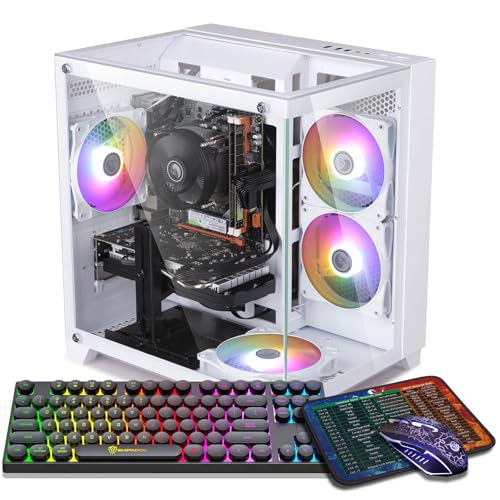
Where to buy
Check the latest price, availability and delivery on Amazon. Orders are placed on Amazon. We may earn a commission from qualifying purchases.
- Best white streaming PC under $800 for most people: ZER-LON Gaming PC, Ryzen 5 5500, RTX 4060, White — Check on Amazon
- STGAubron Gaming PC, Ryzen 5 5500, RTX 3050 6GB, White, RGB Keyboard & Mouse — Check on Amazon
- LXZ Gaming PC, Ryzen 5 5500, RTX 3050 8GB, 32GB RAM, White — Check on Amazon
- HP Victus 15L Gaming Desktop, i5-13400F, RTX 3050, White — Check on Amazon
See 2 more Amazon options
- abytespark Gaming PC, Core i7-7700, RTX 4060, White — Check on Amazon
- STGAubron Gaming PC, Ryzen 7 5700X, RTX 3060 12GB, White (deal-watch — verified above $800) — Check on Amazon
Read the full guide ↓
Disclosure: As an Amazon Associate, reviewstook.com earns from qualifying purchases. Links to Amazon on this page are affiliate links; they cost you nothing extra. Listing details such as price and availability change often, so check the current Amazon listing before you buy.
A streaming PC has a different job from a gaming PC, and it is worth defining before a single machine is graded, because the definition decides the ranking below. One machine runs everything at once: the game itself, OBS compositing your scenes, a browser full of chat and dashboards, alert and voice software, and — for streamers who edit — a local recording being written to disk the whole time. The live output that job produces is more modest than the hardware talk around it suggests. On Twitch, a mainstream broadcast runs at roughly 6,000 kbps with constant bitrate (CBR) encoding and two-second keyframes, in H.264. YouTube accepts higher bitrates, takes 1440p ingest and carries AV1 live streams where the hardware supports them. A 4K live stream, by contrast, is limited by the platforms’ ingest and transcoding long before a PC at any price in this guide runs out of power — no purchase fixes that, and no listing should sell you one as if it could.
Inside that workflow, one component matters to a streamer in a way it never matters to a pure gamer: the encoder, the hardware block that turns your gameplay into the video your viewers receive. Every pick below is graded encoder-first — which encoder its graphics card carries, which generation it belongs to, and whether it can encode AV1 — because that grading, not the gaming benchmark, is what separates a white gaming PC that can stream from a white streaming PC. The short version, stated up front: exactly two machines in this guide carry an encoder that can produce AV1, and both do it with the same graphics card. The other four encode in H.264 and HEVC only, forever — no driver update changes silicon. If your platform plans include AV1, that sentence is the guide.
Then there is the reason this guide exists as its own search. A streaming PC is the one gaming PC that is guaranteed to be on camera. It sits in the frame, behind or beside the streamer, in every broadcast and every photograph of the setup — which makes the white finish a working part of a stream room rather than a vanity, and makes this batch’s usual whiteness discipline worth keeping: every pick is graded on what its listing actually documents as white (case, fans, memory, graphics card shroud, bundled peripherals scored separately), not on what a hero photo suggests. The color also carries a measurable premium: tracked against their black equivalents, the white machines here cost noticeably more, and several qualify only when their live price dips to the budget line, not at their everyday pricing. The walk-away rules are printed with each pick, at full size.
In this guide
Quick Picks
Short on time, or comparing several options at once? Each row below names a streamer type and the machine that suits it, with a link to the listing.
| Streamer type | Pick | Why it stands out | Link |
|---|---|---|---|
| Best for most streamers | ZER-LON Gaming PC, Ryzen 5 5500, RTX 4060, White | The set’s best encoder — Ada-generation NVENC with AV1 — in a white case — check the current price on Amazon | Check on Amazon |
| Best starter stream desk | STGAubron Gaming PC, RTX 3050 6GB, White | Keyboard and mouse in the box, calm everyday pricing, an honest Ampere encoder | Check on Amazon |
| Best for stream-plus-everything multitaskers | LXZ Gaming PC, RTX 3050 8GB, 32GB RAM, White | 32GB of memory for game, OBS, chat and browser at once; the 8GB card | Check on Amazon |
| Best big-brand streaming buy, on a deal | HP Victus 15L, i5-13400F, RTX 3050, White | HP’s warranty behind a compact white box — with an 8GB memory catch to fix | Check on Amazon |
| Best encoder, oldest platform | abytespark Gaming PC, i7-7700, RTX 4060, White | The joint-best encoder in the guide, carried by a 2017 four-core — read the review first | Check on Amazon |
| Strongest all-round streamer, deal-watch only | STGAubron Gaming PC, Ryzen 7 5700X, RTX 3060 12GB, White | Eight cores for software encoding and the best-aging card — verified above budget | Check on Amazon |
How These Picks Were Chosen
The starting list was the six verified machines from this batch’s white under-$800 research — the same ASINs and the same deal rules, graded in Best White Gaming PC Under $800 on gaming and whiteness. This guide re-grades that exact set on the streaming job, and the re-grading is not cosmetic: the encoder map below reorders what matters (a card’s encoder generation outranks its gaming tier), and two picks change meaning entirely. The machine that base guide treats as its cautionary tale carries one of the two best encoders here; the machine it calls the strongest all-round hardware is the only one whose processor can genuinely share the encoding work. Nothing was added or removed, and every buy-only and deal-only rule survives at full strength; prices themselves are never printed here — check the current price on Amazon for any pick before you buy.
We did not use these PCs ourselves. We read the maker listings and specification data behind the base research and judged each system against the three loads a streaming PC carries at once: the game, the encode, and everything around the broadcast. Encoder claims are stated per chip: a card’s encoder generation and its AV1 support are properties of the chip, not of the listing’s adjectives, and where a listing does not publish a fact this guide needs (a power supply wattage, a network port speed, a component’s color), the review flags the gap instead of filling it. Whiteness is graded on documentation for the same reason: cases and fans are documented white or lit across this set; not one listing states that its graphics card is a white model, and the one set of bundled peripherals is documented as RGB, with its color unspecified.
The budget discipline is inherited unchanged. A machine qualifies only when its live Amazon price sits at or under $800 — and two picks are labeled deal-watch in plain language, because one has been verified only above the line and one has never been verified under it at all. A streaming guide that quietly filled itself with machines priced over the budget would not answer the search you made.
The Encoder Map: What Each Pick Can Actually Broadcast
Everything in the reviews below follows from this section, so it comes first. An encoder is a dedicated block of silicon on the graphics card that converts gameplay into compressed video without asking the game or the processor to do the work. Two properties decide a streaming machine: the encoder’s generation, which sets the quality it produces at a given bitrate, and whether it can encode AV1, the newer codec YouTube’s live pipeline rewards and local recordings benefit from. Applied to this set’s documented hardware, the map is short and absolute.
The two RTX 4060 machines — the ZER-LON and the abytespark — carry NVIDIA’s Ada-generation NVENC with AV1 encode. That is the current encoder class: the cleanest H.264 at Twitch’s roughly 6,000 kbps ceiling, HEVC for recordings, and AV1 for YouTube live and for high-quality local archives. The four remaining picks carry the previous Ampere-generation NVENC — the RTX 3050 machines and the RTX 3060 12GB — which is a genuinely good H.264 encoder and the correct tool for Twitch, but which cannot encode AV1 at all. That is a permanent property of the silicon, not a setting — the single largest streaming difference inside this guide.
There is no second encoder to fall back on anywhere in this set, and the reasons differ by pick. The HP Victus pairs its RTX 3050 with an i5-13400F — the F suffix means that processor has no integrated graphics at all, so there is no Intel Quick Sync in that box; the card’s NVENC is the only encoder it will ever have. The three Ryzen 5 5500 machines and the Ryzen 7 5700X machine likewise document no integrated-graphics encoder to plan around. The one genuine alternative route is software encoding on the processor (x264 in OBS), and it grades strictly by cores and age: the 5700X’s eight modern cores make it a real option, the six-core 5500s can carry a light software encode alongside undemanding games, and the abytespark’s four 2017 cores should be treated as no fallback at all. The reviews grade each pick against exactly this map — nothing in them upgrades an encoder the silicon does not have.
The 6 Best White Gaming PCs for Streaming Under $800
ZER-LON Gaming PC — Ryzen 5 5500, RTX 4060 8GB, White (Model AOV4060)
Who it suits: The streamer who wants the modern encoder and the white on-camera build in the same box — and who can buy on a price dip rather than on a deadline.
For streaming, this is the guide’s headline machine, for one reason that outranks everything else about it: the RTX 4060’s Ada-generation NVENC is the best encoder in this set. It produces the cleanest H.264 picture at Twitch’s roughly 6,000 kbps ceiling, it encodes HEVC for local recordings, and it is one of only two blocks here that can encode AV1 — which is the difference between using YouTube’s modern live pipeline and being structurally locked out of it. The encode runs on dedicated silicon, so the broadcast costs the game almost nothing; the six-core Ryzen 5 5500 is left to run the game, OBS’s scene compositing and the chat browser, a division of labor it handles honestly at 1080p. The same card is also the tier’s strongest gamer — high-settings 1080p with DLSS 3 frame generation — which matters to a streamer twice: the audience watches the game you are actually playing, and headroom in the game is headroom in the broadcast.
The rules and taxes carry over from the base research at full size. This listing’s price moves, and it has been seen on both sides of this guide’s ceiling, so the pick lives under a strict buy-at-or-under-$800 rule: check the current price on Amazon, and when it sits inside the budget it is the guide’s best streaming value; when it drifts above the line, it belongs in an under-$1,200 guide instead. The platform is the older AM4 generation with Wi-Fi 5, which the OBS section below addresses directly: the wireless generation is a reason to run a cable, not a reason to skip the pick. And its documented whiteness is a white tower with four RGB fans; the graphics card’s shroud color and the memory color are not stated, so confirm the interior the camera will see from the live listing’s photos before planning a stream room around it.
- Ada-generation NVENC with AV1 encode — the set’s best broadcast hardware, and one of only two AV1 encoders here.
- The tier’s strongest gaming card as well, with DLSS 3 frame generation for headroom.
- A 1TB SSD for recordings and game installs — check the current price on Amazon before you buy.
Honest limitation: Its price has also been seen above this guide’s ceiling, the Ryzen 5 5500’s six cores leave software encoding as a light-duty fallback only, Wi-Fi is the older 5 standard, and only the case and fans are documented white — the card’s own color is not stated.
Choose it if you stream to YouTube as well as Twitch, or want the encoder that will still be current in three years, and you can buy at or under $800. Skip it if the listing is sitting at its high when you shop, or your stream is Twitch-only and the STGAubron below covers it for less.

STGAubron Gaming PC — Ryzen 5 5500, RTX 3050 6GB, White (Model ABR1722)
Who it suits: The first-time streamer furnishing a desk from zero — first PC, first broadcast — who wants the box to arrive with the peripherals already in it and a price that behaves without a sale.
Grade this machine by what a Twitch broadcast actually consumes and it is better than its gaming tier suggests. Its RTX 3050 carries the Ampere-generation NVENC: a mature, well-supported H.264 encoder that is entirely adequate at roughly 6,000 kbps, which is the whole of the Twitch job. What it cannot do is encode AV1 — not slowly, not at lower quality, at all — so a streamer whose plans center on YouTube’s AV1 live pipeline should read this review as a polite refusal and take the ZER-LON instead. Within the H.264 world, the rest of the package is the most complete starter kit in the guide: a white case lit by six RGB fans — the fullest on-camera presentation here — with an RGB keyboard and mouse in the box, Wi-Fi 6 and Bluetooth 5.0, and pricing that stays under the ceiling at ordinary prices — check the current price on Amazon. Against its black family counterpart, the white version carries a clear premium, the cleanest white-tax measurement in the set.
The brand caveats are the base research’s, unsoftened. STGAubron is a budget integrator: its listings do not publish the power supply wattage, and its model family has carried listing inconsistencies — a sibling configuration’s copy has contradicted itself on storage size — so confirm the configuration on the live listing before ordering and verify what arrives while the return window is open. Two whiteness notes belong in a streaming guide specifically, because your audience will see this machine: the case and fans are documented white and lit, but the bundled keyboard and mouse are documented as RGB with their color unspecified — do not promise your stream room white peripherals until the live listing confirms them. The 6GB of video memory and the six-core processor set the multitasking ceiling: game plus OBS plus chat is the designed load, and a simultaneous high-bitrate local recording is where this class of machine starts asking you to choose.
- Ampere NVENC — the correct, honest tool for a Twitch broadcast at standard bitrates.
- The fullest documented white presentation in the guide: white case, six RGB fans, keyboard and mouse included.
- Everyday pricing that sits under budget without a sale event — check the current price on Amazon.
Honest limitation: No AV1 encode, ever; the RTX 3050 6GB is entry class for gaming as well as streaming; the power supply is unpublished, and the bundled peripherals’ color is not specified in the listing data.
Choose it if you are starting from an empty desk, broadcast to Twitch, and want the complete white package at an everyday price. Skip it if AV1 or YouTube-first streaming is in your plans, or you record locally at high bitrate every session.

LXZ Gaming PC — Ryzen 5 5500, RTX 3050 8GB, 32GB RAM, White
Who it suits: The streamer whose broadcast is a crowd — game, OBS with layered scenes, chat, a browser of dashboards, a voice call — all running at once on one machine.
Streaming loads memory in a way gaming alone does not, and this is the only machine in the guide built for that load. Every other pick ships 16GB of system memory or less; the LXZ ships 32GB, and that is the specification that decides whether OBS, the game, a browser full of stream dashboards and a chat client coexist without the machine swapping to disk mid-broadcast. Its encoder is the same Ampere NVENC as the STGAubron’s — honest H.264 at Twitch bitrates, HEVC available, AV1 absent — carried here by the 8GB version of the RTX 3050, whose extra video memory over the 6GB card is texture headroom for the game rather than an encoder upgrade; the guide will not pretend the bigger number changes the broadcast. What it changes is the company the broadcast keeps: this is the pick for the streamer who clips, tabs and multitasks through a session, and whose previous machine’s problem was never the encoder — it was everything else asking for memory at the same moment.
The cautions are inherited documentation problems, and they matter more to a streamer planning a setup around the machine. This listing family’s detail data mixes variant information — a different processor and graphics card combination appears in the same page data — so the exact configuration must be confirmed in the cart before ordering, a warning the base research attaches to this ASIN specifically. Pricing needs the same care: the wider LXZ Ryzen 5 5500 and RTX 3050 line includes cheaper listings, but those figures belong to lesser 16GB configurations, and no exact price for this 32GB build is claimed here. Treat $800 as the hard ceiling, check the current price on Amazon, and let the configuration in the cart decide. The whiteness grade is case-level only — the listing documents the white case and does not document fan lighting or component colors — so on camera this is the guide’s quiet white option: present and pale, not a light show.
- 32GB of memory — double every other pick — sized for the full streaming desktop, not just the game.
- The RTX 3050 in its 8GB form, carrying more texture headroom than the 6GB card.
- 1TB NVMe storage for a large installed library plus recordings.
Honest limitation: The encoder is Ampere class with no AV1; the listing family mixes variant data, so the configuration must be confirmed in the cart; and no exact price for this 32GB build is verified — the live listing is the whole decision.
Choose it if your sessions run heavy scenes, many apps and a big library, and you will do the cart check. Skip it if you want the strongest encoder per dollar — that is the ZER-LON — or a listing that needs no detective work.

HP Victus 15L Gaming Desktop — Core i5-13400F, RTX 3050, White (TG02-1020h)
Who it suits: The streamer who wants a manufacturer standing behind the machine that earns their income — and who can fix one printed flaw and wait for one printed price.
The Victus’s streaming story begins with a suffix. Its i5-13400F is the strongest gaming processor among this guide’s 3050 machines, but the F means it has no integrated graphics whatsoever — so there is no Intel Quick Sync encoder in this box, no second encoder of any kind, and the RTX 3050’s Ampere NVENC carries the broadcast alone. That is not a disqualification: NVENC is the encoder a streamer would choose anyway, and it handles Twitch’s H.264 job completely. It simply means the encoder map for this pick has exactly one entry, and buyers comparing spec sheets should not imagine a fallback the silicon does not contain. Around that single-encoder core, the Victus offers what no other pick here can: HP’s warranty, service network and published specifications, in a compact white chassis of roughly 15.5 liters that sits in a stream room like a console — the most camera-tidy footprint in the guide, with a factory white finish.
The two flaws are printed in the base research and are not softened here. The first is memory: this configuration ships with 8GB of RAM, half the working minimum for a machine that must run a game and OBS and a browser at once. For a streamer this is not a footnote — budget a second stick from day one and treat machine-plus-memory as the real purchase price, because an 8GB streaming PC will make its shortage known on air. The second is price: its list pricing sits above the ceiling, and while the model has been seen well below the line in older tracking, that is not a current promise — check the current price on Amazon. So the framing is strict deal-watch: at or under $800, with the memory upgrade accounted for, this is the support-conscious streaming buy; at list pricing, it belongs to a higher guide. One documentation note carried from the base: the verified material does not headline this card’s memory figure, so none is claimed here — confirm it on the live listing. The compact proprietary case also caps future graphics upgrades, which for a streamer means the encoder you buy is the encoder you keep.
- HP warranty and service network — the only manufacturer-backed pick in the guide.
- The strongest processor in the 3050 group, and a compact roughly 15.5-liter white chassis.
- Ampere NVENC covers the Twitch job completely, with no pretense of a second encoder.
Honest limitation: It ships with 8GB of memory — a second stick is part of the purchase, not an upgrade — the F-suffix processor means no Quick Sync exists in the box, its list pricing is above the ceiling, with only older tracking showing it below the line, and the proprietary case limits graphics upgrades.
Choose it if brand accountability tops your list and you can buy on a dip to $800 or below with the memory fix budgeted. Skip it if you need a finished streaming specification in the box on day one.

abytespark Gaming PC — Core i7-7700, RTX 4060 8GB, White (Model AOV590)
Who it suits: The esports-first streamer who understands this machine precisely — a current encoder riding on a 2017 platform — and it is included as much as a lesson as a pick, so read the whole review before the graphics card tempts you.
Streaming inverts this machine’s reputation. In the base guide it is the cautionary tale: an RTX 4060 doing headline duty in front of a Core i7-7700, a four-core processor from 2017 on a finished socket. For a broadcast, though, the division of labor flatters it — because the encode does not run on the processor. The 4060’s Ada-generation NVENC with AV1 encode is the joint-best broadcast hardware in this guide, identical in class to the top pick’s, and it works at full quality regardless of the elderly chip beside it: Twitch H.264, YouTube AV1, high-bitrate local recordings, all on dedicated silicon. In esports titles, where the four cores still feed the card adequately, this machine streams like a guide-topper. The ceiling appears exactly where the base research said it would: CPU-heavy modern games will hold the card back, and anything that asks the processor to share the work — software encoding as a fallback, heavy production software, a busy editing timeline — meets four old cores with no upgrade path short of a new motherboard and memory.
The pricing discipline is the strictest in this guide and is inherited word-for-word in effect: no reliable third-party pricing for this listing was found in the base research, so no price is claimed for it here — nothing at all. It earns its place only under a rule: if the live Amazon price is at or under $800, and your play and your broadcast are esports-first with the platform ceiling understood, it is a defensible purchase. If it sits above $800, the ZER-LON is the same encoder on a newer platform for similar money, and this one should be skipped without a second thought. Its documented whiteness stops at the case and its four RGB fans; the graphics card’s own color goes unstated, as it does for most picks here.
- Ada-generation NVENC with AV1 encode — the guide’s joint-best broadcast hardware.
- Full-size supporting specifications — 16GB of memory and a 1TB NVMe SSD.
- A brand whose other towers this batch’s research has verified in sibling guides.
Honest limitation: The Core i7-7700 is a 2017 four-core processor on a finished socket — it bottlenecks the card in CPU-heavy games, offers no software-encoding fallback worth the name and no upgrade path — and no verified pricing exists for this listing, so the live price is the whole decision.
Choose it if the live price is at or under $800 and your streaming is esports-first with the ceiling understood. Skip it if it costs more than the ZER-LON’s dip price, or your games and production work are CPU-heavy.

STGAubron Gaming PC — Ryzen 7 5700X, RTX 3060 12GB, White (Model ABR1722) — Deal-Watch Only
Who it suits: The patient streamer who wants the strongest all-round single-PC streaming hardware in a white case and treats this guide as a watchlist — because at its verified pricing, this machine is not under $800, and this review will not pretend otherwise.
Start with the warning, since it is the most important sentence in the review: this listing’s verified pricing sits above this guide’s budget — check the current price on Amazon. It is included — labeled here, in the quick picks and in the comparison table — because it is the white machine streaming readers will find on their own and wonder about, and because the base research already identified it as the one pick genuinely built for gaming plus streaming on one machine. The specification earns that verdict twice over. Its RTX 3060 12GB carries the Ampere NVENC — no AV1, stated plainly — and behind it sits the Ryzen 7 5700X, the only eight-core processor in this guide. Those cores are a streaming specification, not a luxury: they make software x264 encoding a real second route alongside the hardware encoder, they absorb OBS’s scene work, chat software and a recording habit without negotiating with the game, and the card’s 12GB of video memory is the memory figure that decides how gracefully a streaming-and-gaming machine ages. If this listing ever reaches $800 or below, it becomes the most complete streaming hardware in the list.
Everything else follows the STGAubron pattern documented in its sibling review above: a budget integrator whose listings do not publish the power supply, whose model family has carried copy inconsistencies before, and whose configurations must be confirmed on the live listing and again on delivery. The whiteness grade is case-and-fans — white case, four RGB fans documented; the card’s shroud color is not stated. So the rule is absolute and identical to the base guide’s. At $800 or below on the live listing, verified in the cart, this is arguably the guide’s best streaming machine. While it sits above the line, its real competition lives in the under-$1,200 guides, and this page will not pretend otherwise. Watch it, or buy the ZER-LON.
- The strongest streaming hardware here: eight-core 5700X for software encoding and multitasking, and the 12GB RTX 3060.
- A documented white case with four RGB fans, plus Wi-Fi 6, Bluetooth 5.2 and a 1TB SSD.
- The only pick with a genuine second encoding route — the processor itself.
Honest limitation: Its verified pricing sits above budget, and its encoder is Ampere class with no AV1. Treat it strictly as a watchlist entry under a buy-only-at-$800-or-below rule, from a brand whose unpublished power supply and history of listing inconsistencies make delivery-day verification mandatory.
Choose it if the live listing shows $800 or below and the cart confirms the configuration. Skip it if the figure is any higher — while it sits above the line, its rivals are the under-$1,200 machines.

Comparison Table
| Product | CPU / GPU | Encoder | RAM / Storage | Price check | Link |
|---|---|---|---|---|---|
| ZER-LON Gaming PC (AOV4060) | Ryzen 5 5500 / RTX 4060 8GB | Ada NVENC — H.264, HEVC, AV1 | 16GB / 1TB | Has sat on both sides of the line — buy only at ≤$800; check price on Amazon | Check on Amazon |
| STGAubron Gaming PC (ABR1722) | Ryzen 5 5500 / RTX 3050 6GB | Ampere NVENC — H.264, HEVC; no AV1 | 16GB / 1TB | Everyday pricing under budget — check price on Amazon | Check on Amazon |
| LXZ Gaming PC | Ryzen 5 5500 / RTX 3050 8GB | Ampere NVENC — H.264, HEVC; no AV1 | 32GB / 1TB | No exact price verified for this build — check price on Amazon, ≤$800 only | Check on Amazon |
| HP Victus 15L (TG02-1020h) | i5-13400F / RTX 3050 | Ampere NVENC only — F-suffix CPU, no Quick Sync; no AV1 | 8GB / 512GB | List pricing above the ceiling — deal-watch; check price on Amazon | Check on Amazon |
| abytespark Gaming PC (AOV590) | i7-7700 / RTX 4060 8GB | Ada NVENC — H.264, HEVC, AV1 | 16GB / 1TB | No verified pricing — buy only if live ≤$800; check price on Amazon | Check on Amazon |
| STGAubron Gaming PC (5700X) | Ryzen 7 5700X / RTX 3060 12GB | Ampere NVENC + 8-core x264 route; no AV1 | 16GB / 1TB | Verified above budget — watchlist only; check price on Amazon | Check on Amazon |
Setting Up OBS on These Machines
The hardware grading above becomes a broadcast through one piece of software, and the settings that matter are few enough to state exactly. In OBS, set the output mode to advanced and choose the encoder that matches your pick: NVENC H.264 for every machine in this guide when the destination is Twitch — including the two RTX 4060 machines, whose newer encoder produces its cleanest H.264 at exactly this job — and reserve NVENC AV1 for YouTube live and for local recordings on those two 4060 picks, where the codec’s efficiency is yours to keep. Use constant bitrate (CBR) at roughly 6,000 kbps for Twitch, with a keyframe interval of two seconds; both numbers are platform expectations, not preferences, and streams that ignore the keyframe rule are a common cause of ingest problems that get blamed on hardware. The Ampere machines should run the same settings minus AV1 — their H.264 at 6,000 kbps is the standard Twitch picture, and no preset unlocks a codec the chip does not carry. On the STGAubron 5700X alone, software x264 at a veryfast-or-faster preset is a legitimate alternative worth testing, because its eight cores are the only ones here with the headroom; on every other pick, keep the encode on the card.
When a stream stutters, OBS tells you which of three separate problems you have — its statistics window keeps three counters, and confusing them is how streamers buy hardware to fix a cable. Rendering lag means the graphics card could not composite your scene in time, because the game is using all of it: the fix is on the gaming side — cap the game’s frame rate, lower its settings, or trim heavy OBS sources — and it is the counter the 3050 machines will meet first in demanding titles. Encoding lag means the encoder itself was overloaded: drop to a faster NVENC preset, hold the output at 1080p or below, and do not stack a maximum-bitrate local recording on the same encoder until the live output is stable. Network dropped frames are neither of those — they are your connection discarding the stream on its way out, and no component in the PC fixes them. Their fix is a cable and, if the cable is not enough, a lower bitrate.
That last counter is why this section ends with the least glamorous rule in the guide: run Ethernet to the streaming desk. The base research documents wireless standards for several picks — Wi-Fi 5 on the ZER-LON and the abytespark, Wi-Fi 6 on both STGAubron machines — and documents no wired port speed for any pick in this set, so no speed is claimed for any of them here; confirm the port on the live listing of whichever machine you buy. A broadcast is an upload held open for hours, and upload stability — not download bandwidth, not the wireless generation on the box — is what your viewers experience as quality. Every pick here can hold a clean stream over a cable; none should be asked to prove it over Wi-Fi.
What Else the Stream Desk Needs
The PC is the largest purchase in a streaming setup and not the first one your audience will judge. What follows is the order this guide would spend in, deliberately without prices — peripheral pricing moves too fast for a figure printed here to stay honest, and the PC’s own price should be checked live on Amazon rather than totalled up from anything printed in a guide.
- A microphone, before anything else. Viewers forgive a soft picture for an evening; they leave a bad-sounding stream in a minute, and they do not come back to explain why. Audio is the first upgrade after the PC, ahead of every visual improvement, on every pick in this guide — the encoder differences above are smaller than the difference between a headset microphone and a real one.
- Light for the camera — and for the white build. A white PC in the frame is part of the set you are broadcasting, and it reads on camera exactly as well as it is lit. Modest, deliberate lighting does more for both your face and the machine behind you than any case fan configuration, and it is why the documented whiteness grades in the reviews matter more to a streamer than to any other buyer of these PCs.
- A second screen for chat and dashboards. Not a component of the PC, but the quality-of-life item streamers buy next: chat, alerts and OBS statistics visible without tabbing out of the game — the workload the LXZ’s 32GB exists for.
- A capture card — only for console or a second PC. If you play on the same machine you stream from, which is every setup this guide describes, a capture card does nothing: the game is already in the PC, and OBS takes it from there. A capture card earns its place only when the gameplay comes from somewhere else — a console, or a second gaming PC. Buying one for a single-PC setup is the most common wasted purchase in starter streaming, and no pick here needs one.
How to Choose a White Streaming PC Under $800
- Choose the encoder before the graphics tier. For streaming, the RTX 4060’s advantage over the 3050 is as much its Ada-generation encoder and AV1 support as its frame rates. Decide by platform: Twitch-only broadcasting is honestly served by Ampere NVENC; YouTube AV1 live requires one of the two 4060 picks, and no other pick can be upgraded into it.
- Count cores for the second job. Hardware encoding frees the processor, but OBS scenes, chat software and production tools still spend cores. Six modern cores (the 5500 machines) run a standard broadcast; eight (the 5700X) add a real software-encoding route; four from 2017 (the abytespark) leave no fallback at all.
- Count memory like a streamer, not a gamer. A game alone fits in 16GB; a game plus OBS plus a browser of dashboards wants the LXZ’s 32GB, and the Victus’s 8GB is a second purchase, counted in any honest comparison as machine plus fix.
- Respect the walk-away rules. Three picks here are conditional, each under a buy-at-or-under-$800 rule because its pricing has been seen above the line: the ZER-LON, the Victus and the deal-watch STGAubron 5700X. Check the current price on Amazon for each, and walk away above the line. The discipline is the deal, in a streaming guide exactly as in the base one.
- Plan the cable with the PC. No wired port speed is documented for any pick in this set, so check the live listing — and whatever it says, budget the Ethernet run to the desk as part of the setup, not as an afterthought when the network counter starts climbing.
- Grade the white by documentation, because it is on camera. Cases and fans are documented across this set; graphics card shrouds, memory colors and one set of bundled peripherals are not. Your audience sees this machine every session — buy the grade the listing can prove.
- Match the pick to the broadcast you actually run. Esports on Twitch: almost anything here, including the abytespark under its price rule. A multitasking variety stream: the LXZ. A YouTube-first channel: a 4060 pick or nothing. The wrong match costs more than the white tax ever will — for the wider streaming field beyond the color filter, see Best Streaming PC Under $800.
Common Buying Mistakes
- Assuming a newer graphics card implies AV1. The encoder generation is what matters: the RTX 3060 is a strong card whose Ampere encoder will never produce AV1. The rule is silicon, not branding.
- Buying a capture card for a single-PC setup. With the game and OBS on the same machine there is nothing to capture; the money belongs in a microphone.
- Streaming over Wi-Fi because the listing advertised a fast wireless standard. The wireless figure describes the radio, not your upload stability at hour three of a broadcast. The network dropped-frames counter will not care what the box said.
- Reading dropped frames as a hardware verdict. Rendering lag, encoding lag and network loss are three different problems with three different fixes, two of which are free. Diagnose in OBS’s statistics before spending on any of them.
- Skipping the streamer’s half of the specification. An 8GB memory configuration that a gamer might tolerate will announce itself on air; a four-core 2017 processor behind a fine encoder works until the day you ask it to do anything else. Budget for the fix, or buy the pick that does not need it.
- Paying above-the-line prices for the conditional picks — the ZER-LON or the STGAubron 5700X while either is sitting over the ceiling — because a streaming guide listed them. The rules printed with each pick are the pick.
- Judging the white by the hero photo for a machine your audience will inspect nightly. Where the specification block does not say the card, memory or peripherals are white, they are not promised — and on camera, “not promised” is visible.
Final Recommendation
- Most streamers: ZER-LON Gaming PC — the set’s best encoder with AV1, in a documented white case, bought only when its live price sits at or under $800.
- Starting a stream desk from zero: STGAubron Gaming PC (RTX 3050) — peripherals in the box and an honest Twitch encoder at an everyday price.
- Heavy multitaskers: LXZ Gaming PC — 32GB of memory for the full streaming desktop.
- Brand and warranty first: HP Victus 15L — on a dip to $800 or below, with the second memory stick budgeted.
- Esports streamers on a strict budget: abytespark Gaming PC — only if the live price is at or under $800, with the 2017 platform understood.
- The patient: STGAubron 5700X — the strongest streaming hardware here, bought only at $800 or below.
Our top two are the ZER-LON, for putting the modern Ada encoder into a white case at a price inside the budget — Check on Amazon — and the white STGAubron RTX 3050, for the streamer starting from an empty desk, whose Ampere encoder does the whole Twitch job at a price that needs no sale to behave — Check on Amazon. Between them they mark this guide’s honest boundary: everything a Twitch broadcast asks for is buyable in white under $800 today, and AV1 is buyable too — but only in two machines, only on their price rules, and not in any other pick at any setting. Buyers furnishing a first desk should also read Best White Gaming PC For Beginners Under $800; buyers whose stream room is small enough that the PC’s footprint is a placement problem should read Best White Gaming PC For Small Spaces Under $800; and buyers who decide the color is negotiable after all will find the wider field in Best Streaming PC Under $800 and the gaming-first grading of this same set in Best White Gaming PC Under $800. Check the live price, confirm the configuration in the cart, and let the walk-away rules do their work.
Frequently Asked Questions
Can I stream from a white gaming PC under $800, or do I need a separate streaming PC?
One machine is enough, and it is what every pick in this guide is graded for. Hardware encoding is the reason: the NVENC block on each of these graphics cards converts gameplay to broadcast video on dedicated silicon, leaving the processor for the game and OBS. A second PC was the old answer to a problem the encoder already solves at this budget; the money is better spent on the microphone and the cable.
Which of these PCs can stream in AV1?
Two: the ZER-LON and the abytespark, because both carry the RTX 4060’s Ada-generation encoder, the only AV1-capable encoder in this set. The RTX 3050 and RTX 3060 machines encode H.264 and HEVC through their Ampere-generation NVENC and cannot produce AV1 at any setting — that is a property of the silicon. For Twitch, which is an H.264 broadcast at roughly 6,000 kbps, all six picks are equipped; AV1 matters for YouTube live and for efficient local recordings.
Can any of these PCs stream in 4K?
Not in any sense a purchase can deliver. Live platforms limit 4K broadcasting through ingest bitrates, transcoding and account rules long before a PC’s encoder is the constraint, so the honest targets at this budget are a clean 1080p broadcast and — on YouTube, with a 4060 pick — higher-resolution and AV1 options where the platform offers them. Any listing at this price selling a “4K streaming PC” is selling a platform policy it does not control.
Why does the guide say there is no Quick Sync in the HP Victus?
Because of the F in i5-13400F. That suffix marks an Intel processor with its integrated graphics disabled entirely, and Quick Sync is the integrated graphics’ encoder — so the Victus contains exactly one encoder, the RTX 3050’s NVENC. That encoder is the one a streamer would choose anyway, but the distinction matters when comparing listings: a non-F version of the same processor would carry a second encoder, and this one does not.
Is Wi-Fi good enough for streaming on these machines?
The wireless standards documented here — Wi-Fi 5 on two picks, Wi-Fi 6 on two others — describe the radio, not the stability of an upload held open for hours, and no wired port speed is documented for any pick in this set. The working rule is a cable: run Ethernet to the desk, confirm the port on the live listing of the machine you choose, and treat OBS’s network dropped-frames counter as the judge. It is the cheapest stream-quality upgrade in this entire guide.
Why include a PC priced above the budget in an under-$800 streaming guide?
Because streamers will find the STGAubron 5700X on their own, and it is the strongest single-PC streaming hardware near this budget — the only eight-core processor here, with a genuine software-encoding route beside its hardware encoder. It is labeled deal-watch in its heading, its review, the quick picks and the comparison table, under a hard rule: buy it only at $800 or below on the live listing. While it sits above the line at its verified pricing, it belongs to the under-$1,200 guides, and the review says so.
Does the white finish affect streaming performance or cooling on camera?
No. The color changes nothing about encoders, airflow or thermals — those are set by the card, the case’s panels and its fans. What the finish changes is visibility: a white machine in the frame shows dust and cable clutter that a black case hides, and it rewards the tidy cabling and occasional cleaning that a broadcast setup benefits from anyway. Buy the documented grade, keep it clean, and it works as set dressing that also streams.
- Best White Gaming PC Under $800
- Best White Gaming PC Under $700
- Best White Gaming PC Under $1200
- Best White Gaming PC For Beginners Under $800
- Best White Gaming PC For Small Spaces Under $800
- Best White Gaming PC For 1440p Gaming Under $800
- Best Streaming PC Under $800
- Best Budget Gaming PC Under $800
- Best RGB Gaming PC Under $800
- Best Prebuilt Gaming PC Under $800


