Where to buy
Check the latest price, availability and delivery on Amazon. Orders are placed on Amazon. We may earn a commission from qualifying purchases.
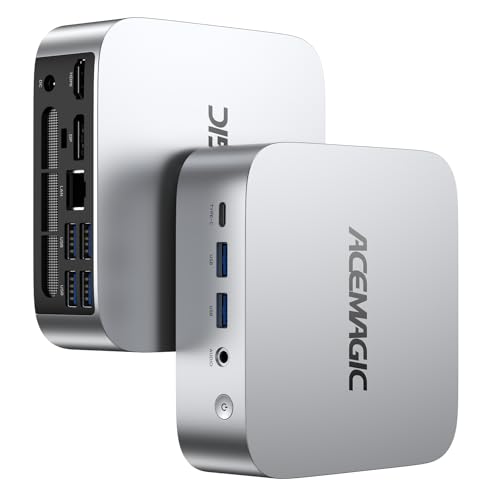
- Best first white gaming PC under $400: ACEMAGIC Vista V1 Mini PC, Ryzen 5 3500U, 8GB RAM, 256GB SSD — Check on Amazon
- GMKtec NucBox M5 Plus, Ryzen 7 5825U, 32GB RAM, 1TB SSD, Lunar Blue — Check on Amazon
- CHUWI LarkBox X Mini PC, Core i3-1220P, 8GB RAM, 256GB SSD — Check on Amazon
- ACEMAGIC Vista V1 Mini PC, Intel N150, 16GB RAM, 1TB SSD — Check on Amazon
See 2 more Amazon options
- STGAubron Gaming PC Desktop, Core i7, RX 580 8G, 32GB RAM, 512GB SSD, White (costs more than $400 — the review explains why it is here) — Check on Amazon
- LXZ Gaming PC Desktop, Ryzen 5 5600GT, 16GB RAM, 1TB SSD, Sea View Room White (costs more than $400 — the review explains why it is here) — Check on Amazon
Read the full guide ↓
Disclosure: As an Amazon Associate, reviewstook.com earns from qualifying purchases. Links to Amazon on this page are affiliate links; they cost you nothing extra. Listing details such as price and availability change often, so check the current Amazon listing before you buy.
If this is your first gaming PC, welcome — and before anything else, here is the one thing nobody selling computers will tell a beginner: under $400, a white gaming PC barely exists. The big gaming brands build almost everything in black at this price, so searching for a white one drops you into a corner of the market where the photos lie. Pale, silvery product pictures turn out to belong to machines whose own specification tables say “Color: Black.” We checked those tables, one listing at a time, and what survived is the short, truthful list in this guide: four small mini PCs in light finishes that genuinely cost $400 or less, plus the two cheapest truly white towers on Amazon — both of which cost more than $400, and both labelled as over budget wherever they appear, because a beginner deserves to see that honestly.
Here is what that means in plain terms. The four affordable picks are mini PCs: quiet little boxes, roughly the size of a thick paperback, whose graphics are built into the main chip rather than living on a separate card. They play the friendly end of gaming — competitive esports titles, indie games, classics and older big releases with the settings turned down — and they wear silver-white, pale-tinted or white-topped shells. None of them is a white tower with a graphics card inside, because that machine sits above this guide’s budget. There is also a “white tax” to know about: white cases and white parts are made in smaller numbers, so they cost more, and at this budget the tax is often the gap between a graphics card and no graphics card. And the last beginner truth is the kindest one: colour adds no speed at all. A white case has never made a game run one bit faster. It makes your desk look the way you dreamed it — a perfectly good reason to buy, as long as you know exactly how white each machine really is. Every review below grades that honestly, and nothing here assumes you have ever opened a PC or plugged one in before.
In this guide
Quick Picks
Short on time, or comparing several options at once? Each row below names a first-time buyer and the machine that suits them, with a link to the listing. New words are translated in the glossary right after this table; the whiteness grades are explained under How These Picks Were Chosen.
| First-time buyer | Pick | Why it stands out | Link |
|---|---|---|---|
| Best first white gaming PC under $400 | ACEMAGIC Vista V1 (Ryzen 5 3500U) | The lightest finish and the strongest built-in graphics of any in-budget mini here, at the lowest price in the guide | Check on Amazon |
| Most power for a beginner under $400 | GMKtec NucBox M5 Plus (Ryzen 7 5825U) | Eight cores, 32GB of memory and 1TB of storage — but the finish is a pale blue tint, not white | Check on Amazon |
| Whitest-looking mini, happy to tinker later | CHUWI LarkBox X (Core i3-1220P) | A genuinely white lid on a strong everyday processor, with slots inside to fix its small memory later | Check on Amazon |
| Gentle games, lots of storage, lowest price | ACEMAGIC Vista V1 (Intel N150) | The same silver-white shell with 16GB of memory and 1TB of storage, for lighter games and everyday use | Check on Amazon |
| Must have a white tower with a graphics card | STGAubron Gaming PC (RX 580) | A confirmed white case and a real graphics card — over budget; check price on Amazon | Check on Amazon |
| White showpiece to grow into | LXZ Gaming PC (Ryzen 5 5600GT) | A panoramic white glass case on a modern platform — over budget; check price on Amazon | Check on Amazon |
The Words on the Box, Translated
PC listings are written in a dialect that assumes you already own three computers. You do not need most of it. These are the only terms this guide uses, in the plainest language we can manage — come back to this list whenever a review throws one at you.
- CPU (the processor): the chip that does the computer’s thinking. Listings brag about its cores — separate thinking units working side by side. More cores help when a game, a browser and chat run all at once; cores are not the main thing that makes games look good.
- Graphics card (also called a GPU, or a “discrete” card): a separate circuit board whose only job is drawing the game on your screen. It is the single biggest factor in how well games play. Only one machine in this guide — the over-budget STGAubron tower — has one.
- Integrated graphics: a small graphics unit built into the main processor instead of living on its own card. Cheaper, quieter and far weaker than a card — and what every other pick in this guide uses, which is why they suit esports, indie and older games rather than the newest releases.
- APU: AMD’s name for a processor with unusually capable integrated graphics inside it. When a mini PC calls itself an APU machine, it means “the graphics are built in, and they are the better kind of built-in.”
- RAM (memory): the computer’s short-term workspace, measured in gigabytes (GB). Too little and everything stutters when you switch between a game and a browser. For a first gaming PC, 16GB is comfortable, 8GB is a starting point you will probably grow out of, and 32GB is generous headroom.
- SSD (storage): where your games and files live permanently, also measured in GB (1,000GB is written 1TB). Modern games are huge, so 256GB fills up after a handful of big titles; 1TB is breathing room.
- Resolution (720p, 1080p, 4K): how many dots make up the picture. More dots look sharper and demand far more graphics power. Integrated graphics are happiest at 720p or 1080p; a listing shouting “4K output” only means the box can fill a 4K screen with a desktop or a film — not that games will run well at 4K.
- Settings (low, medium, high): the detail dials inside each game. Turning them down is not failure; it is the normal, expected way to play on integrated graphics, and many games still look lovely on low.
- Power brick: the chunky adapter on a mini PC’s power cable, like an oversized laptop charger. In this price class the brick and cables are black almost no matter what colour the PC itself is — which matters when the whole point is a white desk.
- VESA mount: a small metal bracket, sometimes included in the box, that screws a mini PC to the back of a monitor — how a light-coloured mini can vanish entirely.
- Renewed: a polite word for refurbished — a used machine that has been checked, cleaned and resold, usually cheaper and with a shorter warranty than new.
- Barebone: a half-finished PC sold without some parts — typically you must add your own memory, storage and Windows before it does anything. Beginners should avoid barebones for a first machine.
- Soldered vs. slotted memory: some machines have their RAM permanently soldered to the board, so the amount you buy is the amount you keep forever; others hold it in little slots (called SO-DIMM slots) you can upgrade later with a screwdriver. Where a pick below has slots, the review says so; where the listing does not document slots, we do not promise an upgrade.
How These Picks Were Chosen
The budget was applied the way you would apply it at checkout: a machine belongs in the main list only if it sits at $400 or less in this guide’s budget tier. Prices at this end hop around weekly, so check the current price on Amazon before you order. Four machines qualify. The two white towers are included as clearly flagged exhibits above the budget, because the most useful thing a beginner’s guide can do with the sentence “white towers start above this budget” is show you the two machines that prove it. Every product name and specification here was verified against a real Amazon listing during research; nothing earned a place from a pretty search-result photo.
Because this keyword lives or dies on colour, each machine carries a finish grade based on everything its listing documents — the case itself, and what is (or is not) said about the extras. Grade A means the case is white, confirmed in the listing’s own colour field or the maker’s specification, not guessed from a bright photograph. Grade B means a silver-white metallic finish: unmistakably light, reads as white from across the room, but honestly silver in your hand. Grade C means a partial match — a white top over a dark base, or a pale tint that is really another colour wearing a light disguise. Layered over the grade is the setup truth: mini PCs in this class ship with black power bricks and black cables whatever the shell colour, and where a listing says nothing about its brick, we say nothing either — we grade the desk you will actually see.
Three plain statements belong here, because first-time buyers ask about all three. None of the six picks is renewed or refurbished — every one is sold new. None is a barebone kit — every one arrives with its memory and storage fitted and Windows installed, ready for the setup walkthrough later in this guide. And on upgrades: two of the minis (the GMKtec and the CHUWI) hold their memory in slots the maker documents, so adding more later is a real, supported project; for the others, treat the configuration you buy as the configuration you keep, and choose accordingly. Gaming expectations were graded with the same strictness as colour: only the over-budget STGAubron has a separate graphics card, so everywhere else, performance is described in kinds of games — esports, indie, older releases at low settings — and never in invented frame rates.
The rejects deserve a sentence each, because they teach the trap. Several strong budget gaming minis failed the colour test completely — their specification tables state “Color: Black” even where the marketing photos glow pale — and a popular mini with a little screen on its front turns out to be dark gunmetal in the maker’s own photography. One famous near-miss is worth naming: Beelink really does manufacture its EQ12 mini PC in a Pearl White finish, but the versions stocked on Amazon US are grey and blue — order one hopefully and a blue box is what the courier brings. It is named here so you know it exists, and excluded because a US beginner cannot reliably buy the white one.
The 6 Best White Gaming PCs Under $400
ACEMAGIC Vista V1 Mini PC — Ryzen 5 3500U, 8GB RAM, 256GB SSD
Who it suits: The first-time buyer who wants the desk to look light and bright, plays esports, indie and older games, and would rather keep the change for a white monitor and keyboard than chase a tower that does not exist at this price.
Finish grade: B — a silver-white metallic shell. Colour first, since colour is why you are here. This little box wears the lightest finish we could verify as genuinely buyable under $400: a bright silver-white metallic shell. From your chair it reads as a white setup piece; pick it up and it is honestly silver, with a sheen no matte-white case has. The listing does not state the colour of its power brick, and bricks in this class are black as a rule — so picture the setup honestly: silver-white box, black leads, with the brick tucked behind the desk where it belongs. Graded as a case it is the closest thing to white that real gaming hardware wears at this money; graded as a whole desk it is a strong partial match.
The gaming side punches above the price. Inside is a Ryzen 5 3500U — four cores, eight threads — whose Radeon Vega 8 integrated graphics are the strongest built-in graphics among this guide’s in-budget minis, a clear step above the Intel graphics in the N-series boxes. In beginner terms: esports titles at 720p to 1080p on low settings, indie games of every stripe, emulation of older consoles, and yesterday’s big releases with the dials turned down. The box itself is about 3.9 inches square and 1.3 inches thick, drives two 4K displays over HDMI and DisplayPort (for your desktop and films — games stay at the lower resolutions above), includes a VESA mount in the box for hiding it behind a monitor, and arrives with Windows 11 Pro installed. Check the current price on Amazon — sold by ACEMAGIC’s own store, it sits low in this budget tier, leaving genuine room inside a $400 budget for the white accessories that finish the look. One buying note that matters: ACEMAGIC also sells a 16GB version of this same machine, positioned higher in the same budget tier. If it is in stock, buy that one instead — the 8GB fitted here is this pick’s weak spot, and the 16GB configuration is the fix, bought as a configuration rather than added later.
- No lighter finish exists on a gaming-capable mini PC under $400 that we could verify — this silver-white shell is it.
- Vega 8 integrated graphics: the strongest built-in graphics of any in-budget mini in this guide.
- Low in this budget tier — check price on Amazon — leaving real room for white peripherals; a VESA mount is in the box.
Honest limitation: The pinned configuration carries 8GB of memory and a 256GB SSD — enough to start, tight once your game library grows — and the finish is silver-white rather than true matte white. A beginner set on a genuinely white case should read the two tower reviews below before settling.
Choose it if one box has to balance a light finish, honest gaming ability and a gentle price — this is that balance. Skip it if 8GB of memory is a dealbreaker and the 16GB configuration is out of stock — the GMKtec below is your machine.

GMKtec NucBox M5 Plus — Ryzen 7 5825U, 32GB RAM, 1TB SSD
Who it suits: The beginner who cares more about how games run than about a perfect colour match — someone happy with a pale, light desk theme who wants the strongest little PC under $400 and the least to outgrow.
Finish grade: C — Lunar Blue, a pale tint that is not white. Let us be as blunt with you as we would want a guide to be with us: this machine is not white. GMKtec sells it in black and in a finish called Lunar Blue, a pale blue-grey that is the lightest colourway on any strong mini PC in this class — and next to a truly white case, its blue tint is obvious. In a white-and-pastel desk theme it can blend in as part of the palette; in a strict all-white build it will be the one piece that is visibly another colour. The brick and cables follow the class pattern and are dark. The listing states its colour versions plainly, which creates the one trap to avoid: the black version sits on the same page, so check that Lunar Blue is the version selected before you order.
What the compromise buys is the best hardware in this guide under the ceiling, and for a beginner it is the specification with the fewest built-in regrets. The Ryzen 7 5825U is an eight-core, sixteen-thread Zen 3 processor boosting to 4.5GHz, with Radeon Vega 8 graphics clocked at 2000MHz. Around it sit 32GB of memory — held in two slots, expandable to 64GB later if you ever feel brave — and a 1TB SSD with a second slot free, up to 4TB total. It has two fast wired network ports, Wi-Fi 6E, and output for three 4K displays. Read that as: a small workstation that also games, handling esports and older big titles at 1080p low settings or 720p more comfortably than anything else here under $400. Its tier positioning softens the colour surrender — near the top of this budget band, so check the current price on Amazon. You give up true white; in return, its cores, memory and storage hand some of the white tax back.
- Strongest in-budget hardware here: 8 Zen 3 cores, 32GB of slotted memory, 1TB SSD plus a spare slot.
- Two fast wired network ports, Wi-Fi 6E and triple display output — the most connected mini in the guide.
- Near the top of this budget tier — check price on Amazon — softening the colour compromise against the hardware.
Honest limitation: It is not white. Lunar Blue is a pale tint that a strict white build will register as blue, and beginners for whom the colour is the entire point should treat this as the performance alternative, not the white pick.
Choose it if frames and headroom outrank a perfect colour match in your priorities. Skip it if the desk has to be truly white — that job belongs to the Vista V1 above and the towers below.

CHUWI LarkBox X Mini PC — Core i3-1220P, 8GB RAM, 256GB SSD
Who it suits: The beginner who wants the whitest-looking mini in the guide from the angles a desk is actually seen from, likes the idea of one small upgrade project later, and plays games that lean on the processor — strategy, simulation, everyday favourites — more than on graphics.
Finish grade: B− — a genuinely white lid over a dark base. The LarkBox X is built in two tones: a white top panel with a large round mesh vent, sitting over a dark lower body. From above and from the front — the angles in every desk photograph you will ever take — it reads as a white machine. From the side, the split is honest and visible. CHUWI itself describes the design as black-and-white, and that is exactly what arrives: this is the only mini in the guide where a major panel is true white rather than silver or tint. The included 65W power adapter’s colour is not stated in the listing data, so assume the usual black brick and plan your cable run to hide it.
The processor is the pleasant surprise. The Core i3-1220P has ten cores (two strong performance cores plus eight efficiency cores, up to 4.4GHz) and out-thinks every other chip in this guide at everyday computing, multitasking, and the strategy and simulation games that lean on thinking rather than drawing. Its Intel UHD integrated graphics are the honest counterweight — a light-gaming part, a class below the Vega 8 machines, suited to esports at low settings, older titles and emulation rather than anything graphically ambitious. The shipped configuration is the caveat a beginner must understand: only 8GB of memory, in a single stick, and a 256GB SSD — both small for the processor. Inside are two memory slots (32GB maximum) and two storage slots, so the machine you buy is a starting point, not a sealed verdict — and a second memory stick also feeds the integrated graphics the extra bandwidth they are starved of here. Check the current price on Amazon; it sits mid-tier in this budget, like the starter kit it honestly is.
- No other mini in this guide has a panel this white — the lid reads white from every angle a desk is viewed from.
- 10-core i3-1220P: the strongest processor here for everyday work and thinking-heavy games.
- Two memory slots and two storage slots — the small shipped configuration is fixable later.
Honest limitation: As shipped, a single 8GB memory stick and 256GB of storage undersell the processor and hold back its graphics; and the white is a lid, not a whole case.
Choose it if you want the whitest-looking mini and the idea of one easy upgrade appeals to you. Skip it if you want the strongest gaming graphics per dollar straight out of the box — that is the Vista V1 or the M5 Plus.

ACEMAGIC Vista V1 Mini PC — Intel N150, 16GB RAM, 1TB SSD
Who it suits: The beginner whose white desk is mostly for everyday computing, films and gentle games — and who would rather have generous memory and storage in the same silver-white shell than the Ryzen version’s stronger graphics.
Finish grade: B — the same silver-white metallic shell as the Ryzen Vista V1. This is the second configuration of the guide’s lead machine, given its own review rather than a footnote because it answers a different beginner. The shell is identical — bright silver-white metallic, VESA-mountable, about 3.9 inches square — and so is the grading: light enough to anchor a white desk, honestly silver in the hand, with the class-standard black power brick the listing does not describe. ACEMAGIC sells this same light shell across its budget range, and this is the configuration for people whose games are the lighter half of the hobby.
Inside, the trade is stated plainly so no beginner trips over it. The Intel N150 is a small four-core efficiency chip whose UHD integrated graphics handle 2D and indie games, emulation of older systems, browser games and video without complaint — and stop there. Modern 3D games are beyond it at any setting worth playing, and this guide will not pretend otherwise. What you get instead is the specification the Ryzen version lacks: 16GB of memory and a full 1TB SSD, dual 4K output over HDMI and DisplayPort for a two-screen white desk, and a position at the low end of this budget tier — check price on Amazon — the lowest-priced route in this guide to this shell with a specification you will not outgrow for everyday use. Think of it as the white desk’s office-and-indie machine: it completes the look, plays the lighter library beautifully, and leaves heavy gaming to a console, a streaming service or a later, bigger purchase.
- The lead pick’s shell, but with twice the memory and four times the storage inside it.
- At the low end of this budget tier — check price on Amazon; no light-finish machine here sits lower.
- Quiet, tiny and VESA-mountable; dual display output for a two-monitor white desk.
Honest limitation: The N150’s integrated graphics are the feeblest in this guide. Indies, emulation and older games run happily; modern 3D titles are simply beyond this chip.
Choose it if your games are gentle ones and your file collection is not. Skip it if anything you play is a current 3D title — the Ryzen Vista V1 is the version of this shell you need.
STGAubron Gaming PC Desktop — Core i7, RX 580 8G, 32GB RAM, 512GB SSD, White (over budget)
Who it suits: The beginner for whom “white gaming PC” means a white tower with a real graphics card inside — and who would rather see the true price of that sentence than buy a mini and pretend it is the same thing.
Finish grade: A — verified white case. This is the only machine in the guide whose Amazon listing data states its colour outright as White, and it is here as the budget exhibit: check price on Amazon — above this budget, and among the cheapest genuinely white towers with a separate graphics card we could verify on Amazon. Which means the honest answer to “a white tower under $400” is that it starts above this budget, and a beginner is better off knowing that from us than from a checkout page. The case carries three RGB fans behind its front panel — RGB simply means the lights can change colour — and the box includes an RGB keyboard and mouse. The listing confirms those peripherals are in the box but does not state their finish, so check the listing photos before assuming the whole bundle is white; the power cable, as ever, will be black.
The hardware pairs something good with something old, and a beginner should understand both halves. The good half is the Radeon RX 580 8GB graphics card — a 2017 card that remains a legitimate 1080p gaming part for esports and older big titles, and categorically stronger than every integrated graphics unit in this guide; this is the only pick where games are drawn by a real card. With it come 32GB of memory, a 512GB SSD, Wi-Fi 6 and Windows 11 Home. The caution is the processor: the listing describes a Core i7 “up to 3.9GHz” without naming the model, and coverage of this configuration identifies it as a fourth-generation part — roughly a decade-old platform carrying a modern-sized price. Factor in the family’s mixed buyer reports about stability and support, and the conclusion is unavoidable: this machine is the white tower tax with the price tag showing. You are paying for the colour and the card, on an old platform, from a budget builder. Some beginners will pay it gladly because the desk matters most; nobody should pay it unknowingly. One practical note for setup day: this is the one pick where the walkthrough’s monitor-plug warning truly bites.
- The only verified white case with a graphics card anywhere near this budget — an RX 580 for real 1080p gaming.
- 32GB of memory and an included RGB keyboard and mouse soften the over-budget price.
- Its over-budget positioning teaches the central lesson: verified white towers begin above this $400 budget.
Honest limitation: It is over the $400 budget, built on a fourth-generation Core i7 platform the listing does not name precisely, from a budget brand with mixed reliability reports — the white finish and the graphics card are what the money buys.
Choose it if nothing but a white tower with a graphics card will do, and stretching above this guide’s budget is money you can reach. Skip it if a mini could make you happy — in the M5 Plus class, the same money buys far newer hardware, albeit in black.

LXZ Gaming PC Desktop — Ryzen 5 5600GT, 16GB RAM, 1TB SSD, Sea View Room White (over budget)
Who it suits: The beginner building a showpiece — someone whose white PC is meant to be admired through glass, who wants a modern platform they can grow with, and who can stretch above this guide’s budget for the case the minis can never be.
Finish grade: A− — a white panoramic glass case with a white-themed build inside. The “Sea View Room” case is the white aesthetic in its current fashion: a panoramic tempered-glass tower in white, showing off seven addressable RGB fans (addressable simply means each light can be controlled individually), sold in a listing whose colour field states White outright. It is the best-looking machine in this guide by a distance — and, sitting above this budget (check the current price on Amazon), it is also the clearest measure of the white tax at tower scale: the stretch buys the case, the glass and the fans, wrapped around integrated graphics. Peripherals are not included, so the white keyboard and mouse that complete the photograph are a further purchase — they are counted honestly in the spending section below. And the listing does not state the power supply’s wattage, a number that matters the day you want to add a graphics card. Because that wattage is unpublished, this guide makes you no upgrade promise about this machine: confirm the figure with the seller first, in writing, before planning any card purchase around it.
Inside the glass sits a genuinely modern platform: a six-core, twelve-thread Ryzen 5 5600GT with Radeon Vega 7 integrated graphics, 16GB of memory and a 1TB SSD, running Windows 11 Pro. As shipped, it plays the same classes as the minis above — esports and older games at 720p to 1080p on low settings — in a case five times their size. Its real argument is the future: a standard tower on a current-generation socket is the one shape in this guide that could accept a graphics card later, which no mini here can do at any price — subject to that power-supply homework above, which is why we flag it instead of promising around it. Buy it as a white foundation and its over-budget positioning is defensible; buy it expecting over-budget gaming performance today and the minis expose it, because the M5 Plus matches or beats its gaming while sitting inside this budget, in pale blue.
- A confirmed white panoramic glass case with seven ARGB fans — nothing else in this guide looks like it.
- Modern 6-core 5600GT platform with 16GB and 1TB: the only pick shaped for a future graphics card.
- Its over-budget positioning measures the white tower premium: the case and glass sit above this budget tier.
Honest limitation: It is over budget, ships with integrated graphics only, includes no peripherals, and its listing leaves the power supply wattage unstated — verify it before planning any graphics-card upgrade.
Choose it if the glass-tower look is the whole point and a graphics card may follow one day. Skip it if today’s gaming per dollar is your measure — on that measure every mini above beats it.

Comparison Table
| Product | Finish grade | Graphics | Best use | Link |
|---|---|---|---|---|
| ACEMAGIC Vista V1 (Ryzen 5 3500U) | B — silver-white metallic | Radeon Vega 8 integrated | Best first white gaming PC under $400 | Check on Amazon |
| GMKtec NucBox M5 Plus (Ryzen 7 5825U) | C — pale Lunar Blue | Radeon Vega 8 integrated | Most power under $400 | Check on Amazon |
| CHUWI LarkBox X (Core i3-1220P) | B− — white top, dark base | Intel UHD integrated | Whitest lid, strong processor, upgrade project | Check on Amazon |
| ACEMAGIC Vista V1 (Intel N150) | B — silver-white metallic | Intel UHD integrated | Light gaming with 16GB and 1TB | Check on Amazon |
| STGAubron Gaming PC (RX 580) — over budget | A — verified white case | Radeon RX 580 8GB card | Only white tower with a graphics card | Check on Amazon |
| LXZ Gaming PC (Ryzen 5 5600GT) — over budget | A− — white panoramic glass | Radeon Vega 7 integrated | White showpiece to grow into | Check on Amazon |
Your First Evening: Setup, Step by Step
Every pick in this guide arrives complete, with Windows installed — no building, no parts to fit. Here is the whole first evening, in order, written for someone who has never done it.
- Unbox on a table, not the floor. Keep the box and packaging until you are sure the machine is staying; returns are painless with packaging and miserable without it. Check the colour and configuration on the unit against your order confirmation now, not next week — a wrong colour version is a five-minute fix today and a saga later.
- Place it where air can move. Minis can sit on the desk, or disappear behind the monitor using the VESA mount several picks include. Towers go beside or under the desk with a hand’s width of clear space around their vents. Never inside a closed cabinet — heat is the quiet killer of small PCs.
- Connect the power brick. Plug the brick into the wall first, then into the PC. Yes, the brick is almost certainly black even on the lightest pick in this guide; route it behind the desk and it stops being part of the picture.
- Connect the monitor — into the right sockets. On the four minis, every display socket is on the little box itself, so any of them is correct. On the STGAubron tower, this step is the whole ballgame: plug the screen cable into the graphics card’s sockets — the row of ports low on the back, sitting sideways — and not into the similar-looking ports higher up near the other plugs, which belong to the motherboard. Here is the trap, and it catches thousands of first-time buyers: the motherboard ports will still show you a picture, because the processor has weak built-in graphics of its own. Nothing looks broken. Your desktop appears, your browser works — and your games quietly run on the feeble built-in graphics instead of the card you paid for, crawling at a fraction of their proper speed. No warning, no error, just a mysteriously slow PC. If a card-equipped PC ever feels far slower than it should, check where the screen cable is plugged before you check anything else.
- Add keyboard and mouse. Wired ones simply plug in; wireless ones use a tiny USB receiver from their box. The STGAubron includes a keyboard and mouse; the LXZ tower does not, and the minis leave the choice to you.
- Power on and let Windows introduce itself. The first start takes a few minutes and asks for a language, a Wi-Fi network and a Microsoft account. Connect to your home Wi-Fi (or plug in a network cable — wired is steadier for gaming, and the M5 Plus even has two wired ports). Then let Windows Update run, restart when it asks, and repeat until it stops asking; a new PC often needs two or three rounds on its first evening, and skipping them is how beginners inherit strange bugs.
- Install one game store and one game. Steam is the standard starting point and free to install. Download one game you know you enjoy — something modest first — rather than five enormous ones; you are testing the machine, not filling it.
- Set the game up honestly. In the game’s display settings, choose 1080p (or 720p if it stutters) and the Low preset. On integrated graphics this is the intended way to play, and a smooth game on low looks far better than a beautiful slideshow on high.
What Else You Will Spend
The PC itself is the beginning of a first setup, not the end of it, and beginners deserve the full list up front. Where a machine needs a fix, we count it as machine plus fix, openly — never hidden inside a pick’s own positioning.
- A monitor comes first. None of the six picks includes a screen, and it is the one extra you cannot skip. Any ordinary 1080p monitor suits these machines; a white bezel completes the look but changes nothing about how games play, and the “4K output” in the listings is about desktop sharpness and films, not a reason to buy a 4K screen for gaming here.
- Keyboard and mouse. Only the STGAubron includes them. The LXZ tower and all four minis assume you will bring your own — and white ones, if the desk theme matters, are a separate purchase to budget for.
- The LarkBox X’s second memory stick. Its single 8GB stick is its known catch; the fix is one more stick in its empty slot, bought later as machine plus fix, which also feeds its graphics the bandwidth they are missing. The Vista V1 3500U’s equivalent fix is different: not a part, but its 16GB configuration, positioned higher in the same budget tier — buy that configuration at the start rather than the 8GB one plus regret.
- Storage headroom, eventually. The two 256GB picks (Vista V1 3500U, LarkBox X) will feel a growing game library within months; the LarkBox X has a second storage slot waiting, while the Vista V1’s answer is deleting finished games or an external drive later.
- Little things: a power strip with room for the brick, and five minutes of cable routing — the white-desk look is mostly cable management, and cable management is mostly free.
How to Choose a White Gaming PC Under $400
- Decide what “white” must mean before you shop. A strict all-white desk, a light-and-bright desk and a white-accented desk are three different purchases. Only the towers here are truly white; the minis are silver-white, two-tone or pale-tinted, each graded above so you can match the machine to the standard you actually hold.
- Verify colour in the specification table, never the photo. Listing photos are lit to flatter, and charcoal can photograph as silver. The colour field in the listing’s own data is the truth — several strong budget PCs were excluded from this guide because that field says Black, whatever the thumbnail suggests.
- Spend on graphics class first, colour second. Within the minis, Vega-class integrated graphics (the two Ryzen picks) play a visibly wider library than the Intel boxes. If your games are three-dimensional, that gap outweighs the one between silver-white and true white.
- Treat 8GB configurations as starter kits. Two picks ship with 8GB of memory. On the LarkBox X a second stick is a cheap, documented fix; on the Vista V1 3500U, choose the 16GB configuration of the same machine instead.
- Know the white tax before paying it. The same hardware in black is consistently cheaper at this tier — a noticeable premium at tower scale, and on minis the tax appears as absence, because the strongest budget gaming minis are simply not sold in white. Our guide to Best Gaming PC Under $400 shows what the same money buys when colour is not the filter, and Best White Gaming PC Under $500 covers the tier where white towers actually live.
- Confirm the exact configuration on the live listing before ordering. Budget mini PCs are sold in families sharing names across chips, colours and memory sizes. Confirm the processor, memory, storage and — above all on this keyword — the colour version selected, before ordering.
Common Buying Mistakes
- Trusting the thumbnail. Pale photography of a black case is the most common trap on this keyword — check the listing’s colour field before ordering.
- Assuming a white case means a white setup. The brick, cables and stock peripherals are usually black; a mini hidden behind its monitor on the included VESA mount sidesteps the problem entirely.
- Plugging the monitor into the motherboard on a tower with a graphics card. The picture appears, nothing complains, and your games run on the weak built-in graphics — the silent slow-PC trap from the setup walkthrough.
- Picking an N-series Intel mini for modern 3D games because the shell was the right colour. The N150 Vista V1 is a fine light-gaming box; it is not a machine for current 3D titles at any colour.
- Ordering the wrong version of a shared listing. The M5 Plus page sells black and Lunar Blue at the same price; the Vista V1 name covers several different chips. What arrives is what was selected at checkout.
- Judging the STGAubron by its graphics card alone. The RX 580 is genuinely good; the unnamed fourth-generation platform beneath it is genuinely old. At its over-budget positioning you are buying colour and card together — go in knowing the split.
- Forgetting the extras. Monitor, keyboard and mouse are not in most of these boxes; budget for the whole desk, not just the PC.
Final Recommendation
- Most first-time white-setup buyers under $400: ACEMAGIC Vista V1 (Ryzen 5 3500U).
- The performance pick under $400: GMKtec NucBox M5 Plus.
- Whitest-looking mini, happy to tinker later: CHUWI LarkBox X.
- Gentle games, big storage, smallest spend: ACEMAGIC Vista V1 (Intel N150).
- A white tower with a graphics card, if the budget stretches: STGAubron Gaming PC (RX 580).
- The white showpiece to grow into: LXZ Gaming PC (Ryzen 5 5600GT).
Two Ryzen minis top our list, chosen for opposite virtues. The Vista V1 3500U is the guide’s honest centre: the lightest verified finish on a gaming-capable machine, the strongest built-in graphics under budget, and a low position in this budget tier that leaves room for the white monitor and keyboard that finish the desk. The M5 Plus is the performance answer, with eight cores, 32GB of memory and 1TB of storage under the ceiling, for beginners who will trade true white for a pale tint and a much stronger machine. The LarkBox X offers the whitest lid and a friendly upgrade path, the N150 Vista V1 offers the same shell with everyday storage at the lowest price, and the two flagged towers mark the real cost of insisting on a white case with glass. If your ambitions grow past a first machine, Best Gaming PC For Beginners Under $400 drops the colour filter entirely, and Best White Gaming PC For 1440p Gaming Under $400 shows what the white desk asks at the next resolution up. Whatever you choose, verify the colour field and configuration on the live listing, and check the current price before you order.
Frequently Asked Questions
I have never owned a gaming PC. Which of these should I actually buy?
For most beginners, the ACEMAGIC Vista V1 with the Ryzen 5 3500U — ideally its 16GB configuration if that is in stock. It has the lightest finish, the strongest built-in graphics under budget, the lowest price, and its setup is exactly the walkthrough above. Choose the M5 Plus instead only if you care more about power than colour, and the towers only if a white tower is truly the dream and the budget can stretch.
Can you actually buy a white gaming PC for under $400?
Yes, with one honest definition: if by “gaming PC” you mean a light-finish mini PC whose integrated graphics play esports, indie and older games, the four in-budget picks in this guide are exactly that. If it means a white tower, no — the two cheapest verified white towers on Amazon both sit above this guide’s budget, which is why both appear above wearing their over-budget labels in plain sight.
Why are my games slow even though the picture looks fine?
On a PC with a separate graphics card — in this guide, the STGAubron tower — the likeliest cause is the monitor cable. Plugged into the motherboard’s ports instead of the card’s, the screen still works, but games run on the processor’s weak built-in graphics. Move the cable to the card’s sockets, low on the back of the tower, and the same machine wakes up. On the minis there is only one set of sockets, so the equivalent fix is simpler: lower the game’s resolution and settings, as the walkthrough describes.
Should I just buy the white Beelink EQ12 I keep seeing recommended?
Beelink does manufacture the EQ12 in a Pearl White finish — the colourway genuinely exists in the maker’s lineup. The catch is stocking: Amazon US lists the EQ12 only in grey and blue configurations, so an order placed in the US hoping for white will not arrive white. It is a fine N100 mini PC in its documented colours, and it appears in our Best Mini Gaming PC Under $400 guide on its merits — but it cannot be recommended as a white purchase in the US today.
Can these mini PCs play modern games?
In classes, honestly: the Vega 8 Ryzen minis handle esports titles at 720p to 1080p on low settings, indie games broadly, emulation well, and older big releases turned down. The LarkBox X’s Intel UHD graphics and the N150’s sit a class below that — light esports, older and 2D titles, emulation. No in-budget pick runs current big releases at native settings; the only graphics card in the guide is the over-budget STGAubron’s RX 580. For compact white setups, Best White Gaming PC For Small Spaces Under $400 applies the same grading to the small end of the list.


