Where to buy
Check the latest price, availability and delivery on Amazon. Orders are placed on Amazon. We may earn a commission from qualifying purchases.
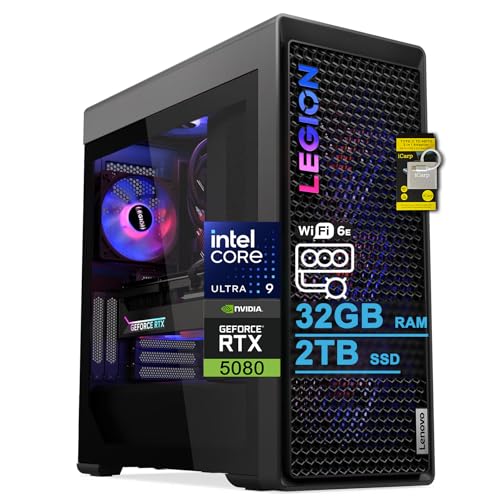
- Tidiest install in a tight room: Lenovo Legion Tower 7i Gen 10, Core Ultra 9 285K, RTX 5080, ARGB Fans — Check on Amazon
- Skytech King 95, Ryzen 7 9800X3D, RTX 5070 Ti, Panoramic Glass — Check on Amazon
- ZOTAC MEK, Ryzen 7 9700X, RTX 5070 Ti, Side LCD Display, ARGB Fans — Check on Amazon
- CLX Set, Ryzen 7 9800X3D, RTX 5080, Phanteks XT View, 6 RGB Fans — Check on Amazon
See 2 more Amazon options
- Alienware Aurora ACT1250, Core Ultra 9 285, RTX 5080, AlienFX Lighting — Check on Amazon
- iBUYPOWER Y40 PRO, Ryzen 9 7900X, RTX 5070 Ti, HYTE Y40 Panoramic Glass — Check on Amazon
Read the full guide ↓
Disclosure: As an Amazon Associate, reviewstook.com earns from qualifying purchases. Links to Amazon on this page are affiliate links; they cost you nothing extra. Listing details such as price and availability change often, so check the current Amazon listing before you buy.
Start with the sentence nobody selling these machines will put in their headline: not one of the six PCs in this guide is small. Every pick below is a full-size tower — panoramic glass, liquid cooling, a full-length graphics card — and if your actual requirement is a computer that disappears behind a monitor or rides on a VESA bracket, this is the wrong page and we would rather tell you that now: the machines built for that job are in Best Mini PC Under $3000 and Best Mini Gaming PC Under $3000. This guide exists for the other, very common situation: you have one specific spot — the end of a short desk, a shelf bay, a patch of floor beside a bookcase, the top of a dresser — and you want the best RGB gaming PC under $3,000 that can be installed in that spot properly, with its vents breathing, its cables reaching, and its glass somewhere you can actually see it.
So the judging here is installation-first. The honesty rules from our main guide still apply in full: there is no RTX 5090 system anywhere near $3,000 (complete 5090 prebuilts sit far above this budget), and the RTX 5080 appears under this budget only when a deal brings it within reach, which is why three of these reviews carry a strict buy-only-while-it-sits-within-budget rule. But within that frame, the picks are ranked on the questions a small room actually asks: can you verify the footprint before the box arrives, where does the case breathe and exhaust, and how many cables and boxes come with it? And the rule that overrides every other consideration in this guide: none of these six machines goes inside a sealed cabinet, a closed TV stand or an enclosed desk cubby. Not the quiet one, not the expensive one, not on a dare. A tower that cannot exhaust its heat is a tower cooking its own components in a wooden box, and no pick below is graded as suitable for it.
Two more disciplines run through everything that follows. The first is measurements: only one pick in this guide — the Skytech King 95 — comes with case dimensions documented in its verified listing research (18.7 × 11.8 × 17.4 inches), so it is the only footprint figure printed anywhere in this article. For the other five, we grade by form-factor class and documented installation facts — intake design, radiator size, panel access, published power supply — and we tell you plainly where the live listing’s dimension field is a pre-order homework item rather than inventing numbers. The second is mounting: no pick documents VESA or any bracket fitting, so none is claimed for any of them, anywhere below. These are desk-and-floor towers. Our top pick is the Lenovo Legion Tower 7i Gen 10, not because it is the smallest — it is not — but because it is the tidiest installation here: a mesh front that breathes honestly, a tool-free side panel, a single-cable Thunderbolt 4 desk run, 2TB of storage so no external drive colonises your desk, and peripherals in the box.
In this guide
Quick Picks
Short on time, or comparing several options at once? Each row below names a room situation and the system that handles it best, with a link to the listing.
| Your situation | Pick | Why it installs best | Link |
|---|---|---|---|
| Tidiest desk setup, fewest cables and boxes | Lenovo Legion Tower 7i Gen 10 | Thunderbolt 4 one-cable run, 2TB storage, keyboard and mouse included | Check on Amazon |
| A measured spot you must verify before ordering | Skytech King 95 (ST-KING95-1671-W-AM) | The only documented footprint here: 18.7 × 11.8 × 17.4 in | Check on Amazon |
| A desk-end or corner where the case side faces the room | ZOTAC MEK (MEKA5071A9700XBR3) | Side LCD display and published 750W Gold PSU — no delivery-day surprises | Check on Amazon |
| An open shelf or floor spot beside the desk | CLX Set (TGMSETRTU5105BM) | Standard parts, 2TB storage, remote-controlled fans — no extra software | Check on Amazon |
| You want the maker to service it, not you | Alienware Aurora ACT1250 | Proprietary build means Dell handles the inside; you just place it | Check on Amazon |
| Cheapest full showpiece for a display spot | iBUYPOWER Y40 PRO (Y40BA9N57T01) | Panoramic glass and peripherals included — positioned at the bottom of this tier | Check on Amazon |
How These Picks Were Chosen
The six systems are the same six verified listings as our main Best RGB Gaming PC Under $3000 guide — same ASINs, same deal rules — re-graded here on installation criteria and re-ranked accordingly. The budget was applied as a ceiling, not a target: every system here belongs at or under $3,000, and where a pick only qualifies at a deal price rather than its everyday price, the review says so and makes the recommendation conditional on the live price. Prices in this category move weekly — one system below has been seen both within this budget and well above it in the same configuration — so check the current price on Amazon before any money moves.
The installation grading used five documented factors, and only documented factors. Form-factor class: all six are full-size towers, but they differ in shape language — wide dual-chamber glass, vertical showcase, conventional tower — and shape decides which spots are even candidates. Documented dimensions: printed only where the verified research has them, which is the King 95 alone; the absence of a figure for the other five is stated in each review rather than papered over, because in a small room an invented dimension is worse than no dimension. Air path: where the case takes air in (a mesh front, side and bottom intakes behind glass) and where its radiator exhausts — 360mm radiators on four picks, 240mm on two — because in a tight spot the exhaust needs somewhere to go that is not a wall, a curtain or the inside of a cabinet. Cable and box count: documented outputs, networking and included peripherals, since every extra cable drop and every external drive is a small-room cost. Delivery-day certainty: whether the listing publishes its power supply wattage, because a machine whose PSU you must open the case to identify is a machine whose installation includes an unplanned workbench session.
Three standing refusals complete the method. No pick is credited with VESA or bracket mounting, because none documents it. No pick is recommended for a sealed or enclosed space, because all six are liquid-cooled towers that exhaust real heat. And no pick is described as “compact,” “mini” or “small-form-factor,” because none is — readers who need those words to be true should be in the mini PC guides linked in the introduction, or in Best Compact Gaming PC Under $3000 and Best Small Form Factor Gaming PC Under $3000.
The 6 Best RGB Gaming PCs for Small Spaces Under $3,000
Lenovo Legion Tower 7i Gen 10 — Core Ultra 9 285K, RTX 5080
Who it suits: The small-room buyer whose priority is a clean desk: one cable run, nothing extra stored on the surface, and a case front that does not need to hide from the wall.
The Legion wins this guide on accumulation of small mercies. Start with the front: where the showpiece cases in this guide wrap themselves in glass, the Legion Tower 7i Gen 10 wears a 3D mesh front bezel, which makes it the one pick whose intake faces the room in the ordinary way — it still needs clear air in front of it, but it is not asking you to preserve a side-intake gap against a bookcase. The side panel is transparent and tool-free, which in a tight room is worth more than it sounds: when you need to check a cable or clear dust, you are not hunting for a screwdriver and four screws in a space with no workbench. Behind the glass sit ARGB fans — rear and top positions are documented on Lenovo’s own spec pages — a 360mm liquid cooler exhausting on the top-and-rear path the case is built around, and lighting unified under Lenovo’s Legion Spectrum control.
The cable story is the best in this guide. Thunderbolt 4 is documented on this machine, and in a small room that is an installation feature, not a spec-sheet ornament: a single-cable run to a docked desk setup means the tower can live on the floor or a low shelf while the desk itself carries only the monitor and peripherals. The documented 2.5Gb Ethernet covers the wired connection a gaming PC should have, the 2TB SSD means your game library lives inside the machine instead of on an external drive taking up the desk, and a keyboard and mouse are in the box — two fewer items to buy, unbox and find homes for. The hardware is flagship-grade: a Core Ultra 9 285K, an RTX 5080 16GB, 32GB of DDR5 and a published 850W power supply. Check the current price on Amazon before anything else: Lenovo’s own store prices comparable configurations well above this budget, so the channel rule is absolute — this pick is an Amazon purchase, never a Lenovo-direct one.
- Mesh front bezel — the most placement-forgiving intake design in this guide.
- Tool-free transparent side panel, for servicing in rooms with no workbench.
- Thunderbolt 4, 2.5Gb Ethernet, 2TB storage and included peripherals — the fewest cables and boxes here.
Honest limitation: Lenovo’s listing material states a maximum memory capacity of 32GB for this configuration, and the verified research behind this guide documents no case dimensions for it — treat the live listing’s dimension field as a required check against your measured spot before ordering, and note the lighting lives inside Lenovo’s own software.
Choose it if your spot is an open floor patch or low shelf and you want the tower to disappear into the setup. Skip it if the live Amazon price has climbed above this budget, or your spot is enclosed — no pick in this guide survives a sealed cabinet, this one included.

Skytech King 95 — Ryzen 7 9800X3D, RTX 5070 Ti (Model ST-KING95-1671-W-AM)
Who it suits: The buyer whose spot is already measured — a specific desk, a specific shelf — and who wants to verify the fit on paper before a very large box arrives.
This is the only pick in the guide whose footprint you can check in advance, and in a small room that is a genuine feature rather than a footnote. The Montech KING 95 case documentation behind this listing puts the chassis at roughly 18.7 × 11.8 × 17.4 inches. Read those numbers the way an installer would. The 17.4-inch height and 18.7-inch length are unremarkable for the class; the 11.8-inch width is the story. This is a dual-chamber case — the power supply and drives live in a second chamber behind the motherboard — and dual-chamber means wide. On a shallow desk, that width is desk depth you no longer have; on a shelf, it is the difference between fitting and not. The curved tempered glass runs from the front around the side with no corner pillar, which also means the case wants viewing distance: jammed into a corner at arm’s length from your chair, the panoramic effect you paid for is mostly lost.
Its air path is documented and favourable, with a condition. The case’s fans draw from the side and bottom rather than through the glass front, so the machine does not need a breathing gap in front — it needs the side intakes kept clear and the bottom intake off deep carpet, and its 360mm liquid cooler’s exhaust needs an open path upward. Keep those three things true and it installs happily in spots a front-intake tower would not. The rest of the installation file is clean: a published 850W Gold ATX 3.0 power supply (no delivery-day guessing), standard motherboard and ARGB connections throughout, so the machine can be serviced where it sits, and ARGB fans, an ARGB cooler and RGB memory presenting as one installation. The specification is the strongest gaming setup here short of the 5080 deals — a Ryzen 7 9800X3D with an RTX 5070 Ti 16GB, 32GB of DDR5-5600 and a 1TB Gen4 NVMe SSD — positioned in the middle of this tier; check the current price on Amazon. Two disclosures from the base research stay in force: Skytech’s listing states the graphics card brand may vary, and near-identical King 95 systems exist under other ASINs, so match the model number ST-KING95-1671-W-AM at checkout.
- Documented 18.7 × 11.8 × 17.4 in footprint — the only pre-order fit check in this guide.
- Side and bottom intake path: no front breathing gap required, exhaust via the 360mm radiator.
- Published 850W Gold ATX 3.0 PSU and standard parts, serviceable in place.
Honest limitation: The dual-chamber width is the largest desk-depth commitment here, the curved glass wants viewing distance a cramped desk may not give it, and the 1TB storage means a growing library may eventually ask for desk space of its own.
Choose it if your tape measure says the width fits and you want the complete showpiece around the best gaming CPU in the guide. Skip it if the 11.8-inch width eats your desk, or the spot cannot keep its side and bottom intakes clear.

ZOTAC MEK — Ryzen 7 9700X, RTX 5070 Ti (Model MEKA5071A9700XBR3)
Who it suits: The buyer with a desk-end, dresser-top or corner spot where the side of the case faces the room — the one placement where this machine’s signature feature earns its keep.
The MEK’s defining installation fact is its side: an integrated LCD panel that displays system parameters such as CPU and GPU temperatures and fan speeds, set into a vertical case wrapped in three tempered glass panels. Everything about placing this machine follows from that. Put it where the side faces a wall or the side of a bookcase and you have paid for a screen nobody sees; put it at the end of a desk or on a dresser with the side to the room and it is the only pick in the guide that turns its own monitoring into furniture. Three glass panels also mean three faces to protect: this is not the pick to wedge between a desk and a wall with millimetres to spare, and it is the pick to keep its packaging for — moving a glass-wrapped tower through a small room’s doorways is the riskiest journey it will take.
Against those placement demands, the MEK offers the most complete delivery-day file in the guide. Its 750W 80+ Gold power supply is published in the open — no case-opening required to learn what you bought — and the specification sheet is the cleanest here: a Ryzen 7 9700X, ZOTAC’s own RTX 5070 Ti 16GB with SPECTRA lighting, 32GB of DDR5-6000 RGB memory, six ARGB fans, a 360mm AIO whose exhaust path needs the usual open route upward, Wi-Fi 6E, Bluetooth 5.3 and Windows 11 Pro. For the cable drop, its outputs are documented — HDMI 2.1b plus three DisplayPort 2.1b — so you can plan the display run before the box arrives, a small courtesy the other listings mostly skip. Deal coverage of this machine has consistently placed it at the lower end of this tier, below its own list positioning — it is the most affordable full showpiece here, so check the current price on Amazon. The honest trade-offs are performance-side, not placement-side: the 9700X is a strong eight-core chip that trails the 9800X3D systems for pure gaming, storage is 1TB where two rivals fit 2TB, and one secondary source flagged inconsistencies in ZOTAC’s secondary documentation — the Amazon listing’s headline specification is what this review cites and what you should hold it to.
- Side LCD system display — a feature that only exists if your spot shows the case’s side.
- Published 750W Gold PSU and documented display outputs (HDMI 2.1b, 3× DisplayPort 2.1b) for planning the install.
- Positioned at the lower end of the tier — the most affordable complete showpiece in the guide; check price on Amazon.
Honest limitation: Three tempered glass panels want clearance and careful handling on multiple faces, and the verified research documents no case dimensions for it — confirm the footprint on the live listing against your spot before ordering.
Choose it if your spot presents the case’s side to the room and you want the guide’s presentation features to lead the purchase. Skip it if the side will face a wall, or your spot is a tight slot the glass cannot be serviced in.

CLX Set — Ryzen 7 9800X3D, RTX 5080 (Model TGMSETRTU5105BM)
Who it suits: The buyer with an open shelf bay or a floor spot beside the desk, who wants the fastest gaming pairing in the guide and standard parts they can service in place.
CLX builds the Set from standard, nameable components in a Phanteks XT View mid-tower — a conventional tower shape, which is itself an installation virtue: it asks for the ordinary clearances, fits the ordinary spots, and can be opened and serviced where it stands because nothing inside is proprietary. Owner reports on this model name an ASRock X870 motherboard and a Zotac RTX 5080 fitted, though the exact board and card remain CLX’s choice per order. The hardware is the guide’s fastest gaming pairing — a Ryzen 7 9800X3D driving an RTX 5080 16GB — with 32GB of DDR5-5600 RGB memory, a 2TB NVMe SSD that keeps external storage off your desk, CLX’s Quench 360mm AIO, and a published warranty of one year on parts with lifetime labor.
Two installation quirks deserve plain statement. The six RGB case fans run from CLX’s fan controller and are adjusted with an included remote rather than syncing through motherboard ARGB software out of the box. In a small room that cuts both ways: there is no software layer to fight, and the lighting is adjustable from the chair — but the remote becomes a small object your room must not lose, and a single-dashboard lighting plan is not what this machine offers as delivered. The second quirk is not about the room at all: the price. Deal coverage has recorded this configuration within this budget; other coverage of the same configuration has placed it well above the budget, and another major retailer has listed the same model higher still. The buy rule is therefore part of the installation plan — while its live price sits within the $3,000 budget this is the fastest machine in the guide; once it has climbed above the budget, it is the same tower wearing a worse decision, so check the current price on Amazon before you commit the spot. One further delivery-day item: the base research does not headline this pick’s power supply wattage, so reading the PSU label belongs on your first-evening checklist, alongside verifying the delivered configuration against the model number TGMSETRTU5105BM.
- Conventional tower shape and standard parts — ordinary clearances, serviceable in place.
- 2TB storage keeps external drives off a small desk; remote-adjusted fans need no software.
- Fastest gaming pairing here (9800X3D + RTX 5080) when its live price sits within budget.
Honest limitation: The price is the most volatile in this guide — seen both within this budget and well above it for the same configuration — the fans answer to a remote rather than motherboard sync, and the PSU wattage is a delivery-day read rather than a published figure.
Choose it if you catch it while its live price sits within this budget and your spot is an open shelf or floor position. Skip it if the live price has climbed, or your spot is enclosed — the refusal in this guide applies to the fastest pick exactly as much as to the cheapest.

Alienware Aurora ACT1250 — Core Ultra 9 285, RTX 5080, AlienFX (Model DACT1250-9575BLK-PUS)
Who it suits: The buyer who wants an appliance, not a project: a machine that gets placed once, lights beautifully, and whose insides are Dell’s problem for its whole life.
There is a genuine small-room argument for the Aurora, and it is the mirror image of the usual enthusiast one. Alienware builds the Aurora around its own motherboard and power supply designs rather than standard ATX parts, which closes off DIY upgrades — and simultaneously means you never need a workbench, a parts shelf or a plan for opening it. In a room with no workspace, a machine whose service model is “Dell handles it” is a rational installation choice, and this guide scores it as one. The placement itself is simple: a matte basalt-black chassis with a clear side panel, AlienFX lighting zones including the illuminated stadium ring across the front, a lit power button and AlienFX on the 240mm liquid cooler’s pump head, all choreographed from Alienware Command Center. The specification is the guide’s performance ceiling: a Core Ultra 9 285, an RTX 5080 16GB, 32GB of DDR5-5200, a 1TB SSD and a published 1000W Platinum-rated power supply.
The paperwork needs more care than the placement. Amazon’s listing contradicts itself in two places — describing the Ultra 9 285 as a 20-core processor where Intel specifies 24 cores (8 performance + 16 efficiency), and describing the liquid cooling as both fitted and “optional” — so trust Intel’s core count and confirm the cooler with the seller before ordering. The deal discipline is the other half of the file: this configuration appears on Amazon within this budget at deal times, below the typical price Amazon displays for it and well below Dell-direct comparable pricing in deal coverage — so check the current price on Amazon rather than assuming either figure. While its live price sits within budget it is the strongest performance value here; at its typical price it is over this budget and the correct installation plan is to not install it — wait, or buy the Legion or King 95.
- Proprietary build reframed honestly: no workbench, no parts shelf, Dell services the inside.
- AlienFX stadium lighting and a lit pump head behind a clear panel — the most polished single-brand presentation here.
- RTX 5080 with a published 1000W Platinum PSU — a buy only while its live price sits within budget, well below its typical level.
Honest limitation: Proprietary motherboard and PSU designs lock upgrades and repairs to Dell, the listing contradicts itself on core count and cooling, and the price qualifies only when a deal brings it within budget.
Choose it if the listing’s live price sits within this budget and the appliance model suits your room. Skip it if the price has drifted up toward its typical above-budget level, or you intend to open and upgrade the machine yourself over the years.

iBUYPOWER Y40 PRO — Ryzen 9 7900X, RTX 5070 Ti (Model Y40BA9N57T01)
Who it suits: The buyer with a display spot — a dresser top, a desk end, a media shelf — who wants the panoramic-glass look for the least money in this guide, peripherals included.
The Y40 PRO is built in HYTE’s Y40 case: two-piece panoramic tempered glass with no corner post, and the graphics card mounted vertically on an included PCIe 4.0 riser so the RTX 5070 Ti 16GB faces the room. As an installation, that design has a specific geography. The vertical GPU and wraparound glass are a viewing exhibit, and exhibits need a sightline: this is the pick for a spot at sitting eye level with a little distance in front of it, not for a floor corner behind the desk where its entire reason for existing points at a wall. Its air path is engineered rather than accidental — the case feeds the graphics card from an intake beneath the power supply shroud — and its 240mm RGB liquid cooler exhausts on the case’s planned path, so the placement rule is the usual one: keep the intake fed and the exhaust unblocked, and keep it out of anything enclosed. iBUYPOWER fits RGB fans and 32GB of DDR5-5200 RGB memory, and — alone in this guide alongside the Legion — includes an RGB keyboard and mouse, so the desk-wide picture starts complete. The platform is a twelve-core Ryzen 9 7900X with a 2TB NVMe SSD and a one-year manufacturer warranty, and its positioning is the headline: it sits at the bottom of this tier, well under the budget ceiling — check the current price on Amazon.
Why, then, does the cheapest complete install rank last in a small-spaces guide? One documented reason: the power supply wattage is not headlined in the verified listing material. For most buyers that is a footnote; for a small-room installation it is a scheduling problem, because confirming it means opening the case on delivery day — an event you have to plan a surface for. The recommendation is therefore explicitly conditional: buy it while its live price stays at the lower end of this tier, and confirm the PSU on the live listing or on delivery before the return window becomes a factor. Two smaller honesty items complete the file. The bare HYTE Y40 case ships with no built-in lighting of its own — every light in this system comes from the components iBUYPOWER fitted, so the case contributes the glass, not the glow. And the Y40 PRO name also covers a different 7800X3D configuration under another ASIN; this review is only the 7900X model Y40BA9N57T01, so match the model number, not the name.
- Panoramic two-piece glass and a vertical GPU — a display-spot machine, cheapest in the guide.
- RGB keyboard and mouse included; 2TB storage keeps the desk clear.
- The most affordable full showpiece here — positioned below every rival in the tier; check price on Amazon.
Honest limitation: The PSU wattage is unpublished in the verified listing material, so the recommendation stays conditional on confirming it — and confirming it may mean opening the case in a room with no workspace to spare.
Choose it if you catch it while its live price stays at the lower end of the tier and your spot gives the glass a sightline. Skip it if the live listing cannot confirm the power supply, or the only available spot hides the case’s side from the room.

Comparison Table
| Product | Graphics card | Installation facts that decide the fit | Link |
|---|---|---|---|
| Lenovo Legion Tower 7i Gen 10 | RTX 5080 16GB | Mesh front intake, tool-free panel, Thunderbolt 4 one-cable run, peripherals included | Check on Amazon |
| Skytech King 95 (9800X3D) | RTX 5070 Ti 16GB | Documented 18.7 × 11.8 × 17.4 in; wide dual-chamber; side/bottom intakes | Check on Amazon |
| ZOTAC MEK (9700X) | RTX 5070 Ti 16GB | Side LCD needs the side facing the room; three glass panels; outputs documented | Check on Amazon |
| CLX Set (9800X3D) | RTX 5080 16GB | Conventional tower, standard parts, remote-controlled fans, PSU read on delivery | Check on Amazon |
| Alienware Aurora ACT1250 | RTX 5080 16GB | Proprietary appliance — place it once; Dell services the inside | Check on Amazon |
| iBUYPOWER Y40 PRO (7900X) | RTX 5070 Ti 16GB | Panoramic glass and vertical GPU need a sightline; PSU unpublished — confirm first | Check on Amazon |
Measure Before You Buy: The Five-Step Checklist
Every failed small-room installation in this category fails on the same day: the day the box arrives. Work these five steps in order, before any money moves.
- Step 1 — Measure the spot. Tape-measure the actual place the tower will live: width, height and depth of the desk section, shelf bay or floor patch, including the skirting board and the shelf above. Only the King 95 publishes a documented footprint in this guide’s research — 18.7 × 11.8 × 17.4 inches — so it is the only pick you can pass or fail at this step on paper. For the other five, open the live listing, find its dimension field, and treat that check as part of the purchase, not an afterthought; if a listing’s dimensions cannot be confirmed, order only with a return window you are prepared to use.
- Step 2 — Clear the ventilation. Walk the air path of the pick you chose. The Legion breathes through its mesh front, so the front cannot sit flush against a wall or a row of books. The King 95 and Y40 PRO breathe from the side and bottom, so their sides stay clear and their bottoms stay off deep carpet. Every pick exhausts through a liquid-cooling radiator — 360mm on the Legion, King 95, MEK and CLX, 240mm on the Aurora and Y40 PRO — and that warm air needs an open route out of the spot, not a curtain, a close wall or a shelf directly overhead. And the absolute rule, repeated because it is the one that kills machines: if the spot is a closed cabinet, an enclosed TV stand or a lidded desk cubby, it is not a spot. All six picks are refused for sealed spaces, without exception.
- Step 3 — Give the power supply an address. Not one of these six machines uses an external power brick — every pick has an internal power supply — so there is no brick to hide behind the desk, no brick venting heat into your cable tray, and no brick to trip over. The step is therefore about the wall, not a brick: locate the socket the tower will use, confirm the supplied cord reaches it without crossing the radiator’s exhaust path or stretching tight around furniture, and if the run needs an extension or a strip, place it where the case’s exhaust does not blow across it. One pick adds a rider: the Y40 PRO’s PSU wattage is unpublished, so its address includes a delivery-day label read — plan the surface you will open the case on before the box arrives.
- Step 4 — Plan the cable drop. Count what must travel between the tower and the desk, and route it on paper. Every pick needs a display cable and power; the Legion can collapse much of the desk run into a single Thunderbolt 4 cable and documents 2.5Gb Ethernet for the wired connection, while the MEK documents its display outputs (HDMI 2.1b, three DisplayPort 2.1b) so its drop can be planned exactly. The Legion and Y40 PRO include a keyboard and mouse, shortening their lists; the other four do not, so their peripherals are part of your drop whether you planned them or not. Route cables so none of them drape across an intake or hang in the radiator’s exhaust stream, and leave enough slack to pull the tower forward for the tool-free-panel check or the delivery-day PSU read without unplugging the room.
- Step 5 — Then order. Only now: re-check the live price against this guide’s one money rule — the three RTX 5080 picks qualify only while their live prices sit within the $3,000 budget, and the Legion is an Amazon purchase, never a Lenovo-direct one — match the exact model number from the review — ST-KING95-1671-W-AM, DACT1250-9575BLK-PUS, TGMSETRTU5105BM, MEKA5071A9700XBR3, Y40BA9N57T01 — and keep the packaging until the machine has survived its first week in the spot — glass cases punish people who throw the box away on day one.
How to Choose an RGB Gaming PC for a Small Space Under $3,000
- Be honest about which problem you have. If the machine must vanish — behind a monitor, on a bracket, in a drawer-sized footprint — none of these six is your answer and the mini PC guides are. If the machine must fit one known spot and be seen doing it, that is the problem this guide solves.
- Decide the card first, then the placement. The fork is unchanged by the room: RTX 5080 when a deal brings it within budget versus RTX 5070 Ti at an everyday in-budget price — and there is no RTX 5090 at this budget under any circumstances. Buy the card on purpose; then check whether its machine fits your spot.
- Match the intake to the spot. A spot with clear air in front suits the mesh-fronted Legion. A spot against a wall with open sides suits the side-and-bottom-breathing King 95 or Y40 PRO. A spot with neither is not a spot, whatever the listing photos suggest.
- Score the cable plan, not just the case. In a small room, Thunderbolt 4 (the Legion) and included peripherals (the Legion and Y40 PRO) are worth real money, because every cable and box you do not have to route and store is space returned to you.
- Prefer delivery-day certainty. Four picks publish their PSU wattage; the CLX leaves it to a delivery-day read and the Y40 PRO leaves it unpublished entirely. If your room cannot host an unplanned case-opening, that difference belongs in the ranking — it is in ours.
- Give the glass a sightline or don’t buy glass. The MEK’s side LCD, the Y40 PRO’s vertical GPU and the King 95’s curved panoramic panel are all features that exist only from certain chairs. Walk your room, sit in the seat, and check what the case’s show face will actually face.
- Treat storage as desk space. The Legion, CLX and Y40 PRO carry 2TB inside the machine. The three 1TB picks are fine machines whose libraries will eventually spill onto an external drive — and an external drive is a desk-space purchase you have not counted yet.
- Apply the budget rule without sentiment. Aurora: buy while its live price sits within the $3,000 budget, walk when it climbs to its typical above-budget level. CLX Set: buy within budget, walk above it. Legion: buy at the Amazon listing, never at Lenovo-direct prices. The 5070 Ti systems sit in the middle-to-lower part of this tier on any ordinary day — and the tier below is fully formed, so Best RGB Gaming PC For Small Spaces Under $2500 is worth a look before the extra $500 is assumed necessary.
- If the lighting is negotiable, say so early. The same money ranked purely on performance lives in Best Gaming PC Under $3000 and Best Prebuilt Gaming PC Under $3000; the same machines ranked for an audience live in Best RGB Gaming PC For Streaming Under $3000; and the same tier in a different finish lives in Best White Gaming PC Under $3000.
Common Buying Mistakes
- Ordering first and measuring when the box arrives. A full-size tower that misses its spot by an inch misses it completely — and return-shipping a glass case is nobody’s idea of a good week. Measure in step 1, order in step 5.
- Putting a liquid-cooled tower in a closed cabinet because it “looks tidy.” It looks tidy and cooks slowly. Every pick in this guide is refused for sealed spaces; the tidy answer is an open shelf or a smaller class of machine entirely.
- Assuming a bracket exists. No pick here documents VESA or any wall/under-desk mounting, and improvising a mount for a heavy glass tower is how both the tower and the wall lose. If it must mount, it must be a different machine.
- Copying a dimension from the wrong listing. These product families span many configurations, and a sibling model’s measurements are not your pick’s measurements. The only footprint this guide prints is the King 95’s documented 18.7 × 11.8 × 17.4 inches; everything else comes from your pick’s own live listing or it does not come at all.
- Blocking the intake that is not in front. Glass-front cases breathe from the side and bottom; a King 95 pushed tight against a bookcase on its intake side, or a Y40 PRO sunk into deep carpet, is starved exactly as surely as a mesh front against a wall.
- Paying the typical price for a deal-dependent pick. The Aurora and the CLX at their typical above-budget prices are the same towers that are buys when a deal brings them within this budget. In a small room the mistake compounds: you have overpaid and committed the spot.
- Forgetting the peripherals in the floor plan. Four of these six include no keyboard or mouse. Their boxes, cables and charging habits all land in the same small room — plan them, or buy one of the two picks that includes them.
- Skipping the PSU question on the Y40 PRO. It is the cheapest complete showpiece here and the only pick whose power supply is a complete unknown in the verified material. Confirm it, or choose with your eyes open.
Final Recommendation
- Most small-room buyers: Lenovo Legion Tower 7i Gen 10 — check the current price on Amazon; the tidiest installation in the guide.
- A measured spot, verified on paper first: Skytech King 95 — the only documented footprint, wrapped around the best gaming CPU here.
- A side-facing display spot: ZOTAC MEK — the LCD earns its money only where the room can see it.
- Raw gaming speed in an open spot: CLX Set — only while its live price sits within budget, with no drift above it.
- The appliance model: Alienware Aurora ACT1250, while a deal keeps its live price within budget.
- Tightest budget, display spot: iBUYPOWER Y40 PRO, positioned at the bottom of the tier — with the PSU confirmed.
Our top two are the Legion, for the installation that asks the least of a small room — mesh front, tool-free panel, one-cable Thunderbolt 4 run, nothing extra on the desk — and the King 95, for the buyer whose spot is measured and fixed and who wants the one footprint in the guide that can be verified before ordering, with the strongest gaming processor in the tier behind the glass. Between them they cover the two shapes a small-space purchase takes: the tower that disappears into the setup, and the tower measured into its place like furniture. If the machine is a first gaming PC as well as a furniture decision, Best RGB Gaming PC For Beginners Under $3000 covers the ownership basics; if the monitor is the priority, Best RGB Gaming PC For 1440p Gaming Under $3000 ranks this tier by the screen; and if the budget itself is the flexible part, Best Budget Gaming PC Under $3000 shows what the same room gets for less. Measure the spot, clear the air path, plan the drop, check the live price against the budget — and then order.
Frequently Asked Questions
Are any of these PCs actually small?
No — and this guide would rather repeat that than let a headline imply otherwise. All six are full-size towers with panoramic or display glass, liquid cooling and full-length graphics cards. They are graded here on how well they install in a specific spot, not on being small. If the machine genuinely has to disappear, the correct guides are the mini PC ones linked in the introduction.
Can I put one of these in a closed TV cabinet or an enclosed desk cubby?
No. This is the guide’s one absolute. Every pick is a liquid-cooled tower that exhausts real heat through a 240mm or 360mm radiator; sealed inside furniture, that heat has nowhere to go and the machine cooks its own components while the fans work harder and louder. If the only available spot is enclosed, the honest options are an open-backed modification you discuss with whoever owns the furniture, a different spot, or a smaller class of machine — not any pick on this page.
Can I wall-mount one, or hang it under the desk on a VESA bracket?
Not on anything documented. No pick in this guide publishes VESA mounting or any bracket fitting, and these are heavy glass towers designed to stand on a desk or the floor. Treat mounting as unavailable for all six; if your room plan requires a mounted machine, that requirement selects a mini PC, not a tower from this guide.
Which pick can I check against my measurements before ordering?
Only the Skytech King 95, whose case documentation gives a footprint of roughly 18.7 × 11.8 × 17.4 inches — remembering that the 11.8-inch width is the dual-chamber tax to check against your desk depth. For the other five, the verified research behind this guide documents no dimensions, so the live listing’s dimension field is a required pre-order check, and ordering inside a usable return window is the sensible hedge.
Do any of these have an external power brick to hide?
None of them. All six machines use internal power supplies, so there is no brick to place, vent or trip over — the power-planning step in the checklist is about the wall socket’s position and the cord’s reach, not about hiding a brick. Five of the six also publish their PSU wattage; the Y40 PRO is the exception, which is why its recommendation is conditional on confirming it.
Does the RTX 5080 make sense in a small room, or should I take the 5070 Ti?
On installation grounds they are closer than the spec sheets suggest: both classes sit in full-size towers with liquid cooling, and the exhaust discipline in the checklist is identical. The real difference is the deal rule — the 5080 machines qualify only when a deal brings them within the $3,000 budget and are over budget at typical prices, while the 5070 Ti systems sit in the middle-to-lower part of this tier on ordinary days. Buy the 5080 if you catch it within budget and the spot fits its machine; otherwise the 5070 Ti picks are the honest under-$3,000 answer, and the tier below — covered in Best RGB Gaming PC Under $2500 — is where they live at everyday prices.


