Where to buy
Check the latest price, availability and delivery on Amazon. Orders are placed on Amazon. We may earn a commission from qualifying purchases.
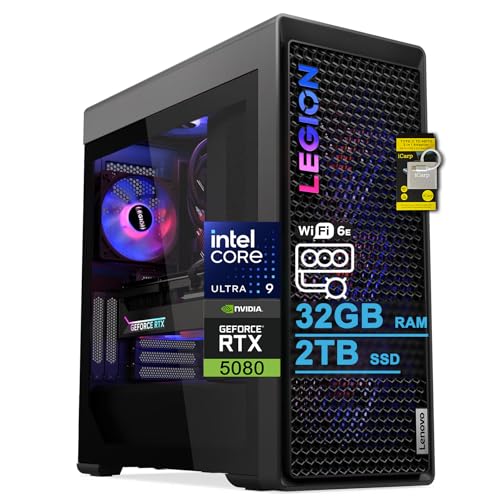
- Best RGB streaming PC overall: Lenovo Legion Tower 7i Gen 10, Core Ultra 9 285K, RTX 5080, 2TB SSD — Check on Amazon
- iBUYPOWER Y40 PRO, Ryzen 9 7900X, RTX 5070 Ti, Panoramic Glass, RGB Peripherals Included — Check on Amazon
- Alienware Aurora ACT1250, Core Ultra 9 285, RTX 5080, AlienFX Lighting — Check on Amazon
- CLX Set, Ryzen 7 9800X3D, RTX 5080, Phanteks XT View, 6 RGB Fans — Check on Amazon
See 2 more Amazon options
- Skytech King 95, Ryzen 7 9800X3D, RTX 5070 Ti, Panoramic Glass — Check on Amazon
- ZOTAC MEK, Ryzen 7 9700X, RTX 5070 Ti, Side LCD Display, ARGB Fans — Check on Amazon
Read the full guide ↓
Disclosure: As an Amazon Associate, reviewstook.com earns from qualifying purchases. Links to Amazon on this page are affiliate links; they cost you nothing extra. Listing details such as price and availability change often, so check the current Amazon listing before you buy.
A streaming PC has two jobs that never take turns. It has to play the game at the quality your viewers came for, and at the same moment it has to compress that gameplay into a clean broadcast feed, run your scenes and overlays, keep a local recording, and do all of it for hours without a stutter your chat can see. At $3,000, with an RGB showpiece brief on top — because for most streamers the PC is not hidden under the desk, it is in the camera frame, part of the set — the buying question changes shape. It is no longer “can this machine stream?” Every system in this guide can. The real questions are: what encodes the picture, what is left over for everything else the production demands, how much recording storage you get before you are deleting last month’s VODs, and whether the light show behind you behaves like studio equipment or like a toy.
So let us define the workflow this guide grades against, because “streaming” means specific numbers. On Twitch, the standard partner-grade setup is a constant-bitrate (CBR) feed at roughly 6,000 kbps with two-second keyframes, encoded in H.264 — Twitch’s ingest is an H.264 world for most broadcasters, and its AV1 support remains a limited enhanced-broadcasting programme. YouTube is the generous platform: it accepts much higher bitrates, takes 1440p and higher-resolution feeds, and supports AV1 live encoding, which is where a modern encoder earns its keep in visibly cleaner fast-motion picture at the same bitrate. Streaming in 4K is platform-limited rather than hardware-limited — the services, not these PCs, set that ceiling — so this guide grades the 1080p and 1440p workflows you can actually broadcast today. Everything below is judged encoder-first against that workflow, then on simultaneous-load headroom, then on the RGB presentation, because a PC that glows beautifully while dropping encoded frames is a lamp, not a streaming rig.
Two honesty notes before the picks, carried over from everything we verified about this tier. First, there is no RTX 5090 system anywhere near $3,000 — complete 5090 prebuilts sit well above this budget — so close any listing that drapes “5090-class” language over a lesser card at this price. Second, the RTX 5080 sits at the very top of this budget: 5080 prebuilts typically sit above the under-$3,000 line, so the three 5080 systems below belong here only within budget — check price on Amazon first. The resident card at this budget on ordinary days is the RTX 5070 Ti 16GB. Here is the twist that shapes this whole guide: for streaming specifically, that distinction matters less than the spec sheet suggests, because — as the encoder map below shows — the 5070 Ti and the 5080 carry the same dual-encoder hardware. What actually separates these six machines for a streamer is everything around that encoder, and that is what we ranked.
Our top pick is the Lenovo Legion Tower 7i Gen 10, because it is the only system here that documents the complete streaming checklist in one box: a 24-core processor, 2TB of recording storage, a documented 2.5-gigabit Ethernet port, and a Quick Sync reserve encoder alongside the main one. Below: the quick picks, the encoder map this ranking is built on, reviews of all six systems, a comparison table, a complete OBS setup section, kit costing for everything the PC does not include, buying guidance, common mistakes, and an FAQ.
In this guide
Quick Picks
Short on time, or comparing several options at once? Each row below names a streamer type and the system that suits it, with a link to the listing.
| Streamer type | Pick | Why it stands out | Link |
|---|---|---|---|
| Best RGB streaming PC overall | Lenovo Legion Tower 7i Gen 10 | RTX 5080 dual NVENC, 24-core 285K, 2TB storage, documented 2.5Gb Ethernet, Quick Sync reserve | Check on Amazon |
| Best value for streamers | iBUYPOWER Y40 PRO (Y40BA9N57T01) | 12-core 7900X, 5070 Ti dual NVENC with AV1, 2TB, RGB peripherals included, lower end of this tier — check price on Amazon | Check on Amazon |
| Best single-brand streaming setup (deal only) | Alienware Aurora ACT1250 | RTX 5080, 24-core Ultra 9 285 with Quick Sync reserve, AlienFX set lighting | Check on Amazon |
| Best for pure gaming streams (deal only) | CLX Set (TGMSETRTU5105BM) | 9800X3D and RTX 5080, 2TB storage, standard parts throughout | Check on Amazon |
| Best showpiece backdrop | Skytech King 95 (ST-KING95-1671-W-AM) | Panoramic curved glass and synced ARGB around a 9800X3D and 5070 Ti | Check on Amazon |
| Best compact-budget showpiece | ZOTAC MEK (MEKA5071A9700XBR3) | Side LCD system display, six ARGB fans, Windows 11 Pro, lower end of this tier — check price on Amazon | Check on Amazon |
How These Picks Were Chosen
The budget was applied as a ceiling, not a target: every system below is a real Amazon listing that fits at or under $3,000 in the United States. Prices here move often, so this guide prints no fixed price — each review places its system within the tier, and you should check price on Amazon and confirm it still fits the budget. That matters most for the RTX 5080 systems, whose pricing is the most volatile here.
The grading order is the streaming order. First, the encoder: which hardware compresses your broadcast, whether it can encode AV1 for YouTube, and whether it can run a stream encode and a recording encode simultaneously. Every encoder claim in this guide is derived from the graphics card and processor each listing actually documents — nothing is credited to hardware a listing does not name. Second, simultaneous-load headroom: the processor cores left for the game, OBS scene composition, chat tooling and background production once the encode is accounted for; the memory (32GB in all six, the comfortable streaming tier); and the storage, because a 1440p recording habit eats a 1TB drive in a season. Third, the network path, because streaming is an upload workload and the wired connection is non-negotiable. Only after all of that did the RGB get its say — and it does get a say, because on camera the case is scenery: how many lighting zones there are and whether they sync from one piece of software you can set before a stream and forget.
We did not use these systems ourselves. We read the maker listings, specification sheets and manufacturer pages, and compared what can actually be verified. Where a listing leaves something material unpublished — one pick below never headlines its power supply wattage — the review flags it as a confirm-before-ordering item rather than papering over the gap. No per-game frame-rate figures are claimed anywhere in this guide, because no per-system benchmark source was verified for these exact configurations; performance language stays qualitative.
The Encoder Map: What Actually Compresses Your Stream
This section is the technical heart of the guide, and it contains a result that surprises people who shop by graphics-card tier: at the encoder, this guide is a six-way tie. Every system here — whether it carries an RTX 5080 or an RTX 5070 Ti — is built on NVIDIA’s Blackwell generation, and both of those cards carry two ninth-generation NVENC encoder units with AV1 encoding. That single fact drives most of what a streamer should do with this budget, so it is worth unpacking carefully.
NVENC is dedicated silicon on the graphics card that compresses video without meaningfully taxing the game running on the same card. Two encoder units matter for a working streamer in a way one does not: you can run your live stream encode on one unit and a high-quality local recording encode on the other, simultaneously, at full quality — the stream goes out at Twitch’s roughly 6,000 kbps H.264 while the recording lands on your drive at a far higher bitrate in AV1 or HEVC for editing and upload. Streamers on single-encoder cards choose between a good stream and a good recording, or accept a compromised version of one. Nobody in this guide has to make that choice. The AV1 encode matters for the YouTube side of a dual-platform life: AV1 at a given bitrate holds detail in fast motion — foliage, particle effects, camera pans — visibly better than H.264, and YouTube accepts it live today. On Twitch, plan on H.264 NVENC as your broadcast encode, and these cards’ H.264 NVENC quality at 6,000 kbps is the best that workflow currently gets.
Two of the six systems carry a genuine second, independent encoder as a reserve. The Lenovo Legion (Core Ultra 9 285K) and the Alienware Aurora (Core Ultra 9 285) use Intel processors with integrated graphics, and that integrated graphics block carries Intel Quick Sync — a separate hardware encoder you can assign in OBS to the recording encode, a vertical clip feed, or a backup stream, leaving both NVENC units to the game and the main broadcast. Two disciplines apply to that reserve, and this guide holds both. Quick Sync here is credited for H.264 and HEVC work only: no AV1 encoding is claimed for Quick Sync on these processors, so the AV1 jobs stay on NVENC where they belong. And the reserve exists only on those two machines — the four AMD-processor systems (the two 9800X3D builds, the 9700X ZOTAC and the 7900X iBUYPOWER) get no integrated-graphics encoder claim of any kind in this guide, because their listings document no such encoder for streaming use; their dual NVENC units are the whole encoding story, and as established, that story is sufficient.
The fallback deserves one honest paragraph. OBS can encode in software with x264 on the processor, and on a 24-core or 12-core machine that is technically possible — but it spends the exact CPU headroom your game and production need. Treat x264 as the emergency spare tyre: good to know it exists, never the plan. The plan, on every pick in this guide, is NVENC for the broadcast, NVENC or Quick Sync for the recording, and the processor left free to be a processor.
Simultaneous Load: The Rest of the Production
Encoding solved, the next question is what the machine feels like at hour three of a stream, with the game at full settings, OBS compositing a camera, alerts and overlays, dashboards and chat bots running, and the recording writing to disk. That is a cores-and-storage question, and it is where these six systems genuinely separate.
On cores: the two Intel systems (Legion 285K, Aurora 285) and the iBUYPOWER (Ryzen 9 7900X, twelve cores) are the multitasking shapes — the Intel pair’s 24-core layouts and the 7900X’s dozen full-performance cores leave the most room for production software and clip rendering between streams. The three eight-core gaming chips — the 9800X3D in the Skytech and CLX, the 9700X in the ZOTAC — are the fastest pure gaming processors here (the 9800X3D is the gaming chart-topper of this guide), and with the encode offloaded to NVENC they stream perfectly well; what they have less of is spare capacity for heavy simultaneous production. Know which kind of streamer you are: game-first with a clean single feed, or production-heavy with everything running at once.
On storage, the split is blunt: the Legion, CLX and iBUYPOWER carry 2TB; the Aurora, Skytech and ZOTAC carry 1TB. High-bitrate local recordings are large files, and a streamer who records every session will feel a 1TB drive — shared with a modern game library — within months. That is not a disqualifier; it is a line item, and the 1TB picks should be bought with a second drive planned. Memory, happily, is a non-issue at this tier: 32GB in every system is the right amount for game-plus-production, with one ceiling to note — Lenovo’s listing for the Legion states a 32GB maximum for its configuration, so the generous fitted amount is also the final amount; verify on the live listing if a 64GB future matters to you.
On networking, one documented fact and one universal rule. The documented fact: the Legion lists 2.5-gigabit Ethernet, the only wired-networking specification any of these listings publishes, and for a machine whose job includes pushing a constant upload for hours, that port is a real feature. The universal rule: whatever you buy, stream on a wire — every system here carries Wi-Fi, and Wi-Fi is for everything except the broadcast.
The 6 Best RGB Gaming PCs for Streaming Under $3,000
Lenovo Legion Tower 7i Gen 10 — Core Ultra 9 285K, RTX 5080
Who it suits: The streamer who wants the complete checklist in one purchase — top encoder hardware, a reserve encoder, recording space, a documented wired network port — from a brand with a real service network.
Start with the streaming inventory, because the Legion is the only pick that ticks every box on it. The RTX 5080 brings the dual ninth-generation NVENC units with AV1 encode described in the encoder map. Behind it, the Core Ultra 9 285K’s integrated graphics add the Quick Sync reserve — assign the local recording there and both NVENC units stay free, or hold it as the backup encoder. The 2TB SSD is the recording drive the 1TB picks make you plan around. And the listing documents 2.5-gigabit Ethernet — a port faster than any home upload it will ever feed. Add Thunderbolt 4 for fast capture and storage peripherals, 32GB of memory, an 850W power supply, a 360mm liquid cooler and a keyboard and mouse in the box, and this is simply the most completely specified streaming machine in the guide.
The presentation is the grown-up version of the showpiece idea. A storm-grey chassis with a 3D mesh front bezel — mesh where rivals put glass, which is also why this front end breathes best — a tool-free transparent side panel, ARGB fans and the 360mm cooler, all unified under Lenovo’s Legion Spectrum control. On camera it reads as professional equipment rather than a light show, which suits many channels better. Check price on Amazon for this configuration and compare with Lenovo-direct pricing for comparable 285K/5080 configurations — then match the exact configuration at checkout, because Legion Tower variants multiply quickly.
- Dual NVENC with AV1 encode, plus a Quick Sync reserve encoder — the most flexible encoding layout here.
- 2TB SSD and documented 2.5Gb Ethernet: recording space and the wired port, both in the box.
- Legion Spectrum unified lighting, mesh front bezel, 360mm liquid cooling, peripherals included.
Honest limitation: Lenovo’s listing states a 32GB memory maximum for this configuration, capping the obvious upgrade, and Legion Spectrum is Lenovo’s own ecosystem — third-party ARGB parts added later will not automatically join it.
Choose it if you want the fewest compromises and the strongest all-round streaming specification within budget. Skip it if its price has moved above the under-$3,000 budget, or a 64GB future matters and the live listing still shows the 32GB ceiling — the iBUYPOWER below covers the multitasking brief for far less.

iBUYPOWER Y40 PRO — Ryzen 9 7900X, RTX 5070 Ti (Model Y40BA9N57T01)
Who it suits: The production-minded streamer — clips, edits, uploads between streams — who wants twelve cores, 2TB of storage and the full panoramic look for the least money in this guide.
The streaming case for the Y40 PRO starts with the processor. The Ryzen 9 7900X’s twelve cores are the multitasking shape: game on some, OBS and production on others, and enough left over to render yesterday’s highlights. The RTX 5070 Ti carries the same dual NVENC units with AV1 encode as the 5080 picks — the encoder map’s six-way tie means this machine’s broadcast and recording quality matches the pricier 5080 systems in this guide; what the 5080 buys is game frame rates, not stream quality. The 2TB SSD swallows a recording habit, and the platform is standard parts throughout, so upgrades are ordinary work.
On camera, this is the signature look of the streaming era for a reason: HYTE’s Y40 case wraps the build in two-piece panoramic tempered glass with no corner post, and the graphics card mounts vertically on the included PCIe 4.0 riser, facing the room — and your viewers — instead of the floor. iBUYPOWER fits RGB fans, a 240mm RGB liquid cooler and 32GB of DDR5-5200 RGB memory, and alone in this guide includes an RGB keyboard and mouse, so the desk-wide picture starts complete. Its place at the lower end of this tier makes it the value pick by a wide margin — check price on Amazon. A dual-encoder, twelve-core, 2TB showpiece at that end of the tier is the easiest recommendation in this guide to defend.
- Twelve-core 7900X — the best simultaneous-load headroom per dollar here — with 2TB of recording storage.
- Same dual NVENC + AV1 encoder hardware as the 5080 picks; the stream does not know you saved money.
- Panoramic glass, vertical GPU, and RGB keyboard and mouse included, at the lower end of this tier — check price on Amazon.
Honest limitation: The power supply wattage is not headlined in the listing material we verified — confirm it on the live listing before ordering — and the bare HYTE Y40 case has no built-in lighting of its own; every light comes from the fitted components.
Choose it if its price on Amazon confirms its place at the lower end of this tier and your channel runs on clips and edits as much as live hours. Skip it if the live listing cannot confirm the power supply, or you want a reserve encoder as well as the NVENC pair — that is the Legion above. Note the Y40 PRO name also covers a different 7800X3D configuration under another ASIN; this review is the 7900X model Y40BA9N57T01, so match the model number.

Alienware Aurora ACT1250 — Core Ultra 9 285, RTX 5080, AlienFX (Model DACT1250-9575BLK-PUS)
Who it suits: The streamer who wants the 5080, the reserve encoder and the most polished single-brand set design in the guide — and who accepts Dell’s walled garden and buys only within budget.
The Aurora matches the Legion’s encoding layout: the RTX 5080’s dual NVENC units with AV1 encode, plus a Quick Sync reserve in the Core Ultra 9 285’s integrated graphics for the recording encode or a backup feed. The 24-core processor leaves deep simultaneous-load headroom, and a 1000W Platinum-rated power supply is the most generously specified in the guide. As a streaming appliance it is superb, and Alienware Command Center extends that management across Alienware peripherals, so the whole desk’s lighting follows one scheme.
That matters more for streamers than for anyone, because the Aurora’s AlienFX lighting is the most deliberately designed set dressing here: the illuminated stadium ring across the front intake, the lit power button, AlienFX on the 240mm liquid cooler’s pump head, all behind a clear side panel. If your channel’s look is a single brand’s design language, nothing else in this guide integrates machine and peripherals that completely. Check price on Amazon: this configuration belongs here only while its price fits the under-$3,000 budget, and Dell-direct pricing for comparable configurations runs higher.
The honesty section is structural. The storage is 1TB — for a recording streamer, plan the second drive from day one. Alienware builds around its own motherboard and power supply designs rather than standard ATX parts, so upgrades and out-of-warranty repairs route through Dell. Amazon’s listing also contradicts itself in two places — describing the Ultra 9 285 as a 20-core processor where Intel specifies 24 cores, and describing the liquid cooling as both fitted and “optional”; trust Intel’s count and confirm the cooler with the seller. And the budget discipline is absolute: within budget this is a top-three streaming pick; once its price moves over budget, wait or buy elsewhere in this guide.
- Dual NVENC with AV1 plus a Quick Sync reserve — encoding flexibility matched only by the Legion.
- AlienFX stadium lighting and Command Center sync across Alienware peripherals: the most integrated set design.
- 1000W Platinum PSU and 24-core headroom; buy within budget — check price on Amazon.
Honest limitation: 1TB of storage is tight for a recording workflow, and the proprietary motherboard and PSU designs limit DIY upgrades and lock repairs to Dell.
Choose it if its price on Amazon still fits the budget and you value the integrated ecosystem over parts freedom. Skip it if that price has drifted over budget, or you plan to upgrade the machine yourself over five years — the Legion and CLX keep standard-parts doors open.

CLX Set — Ryzen 7 9800X3D, RTX 5080 (Model TGMSETRTU5105BM)
Who it suits: The game-first streamer whose broadcast is only as good as the gameplay — the fastest gaming pairing in the guide, in a glass showcase, bought only within budget.
The pitch is the pairing: a Ryzen 7 9800X3D — the cache-stacked chip that tops gaming charts — driving an RTX 5080, whose dual NVENC units with AV1 encode handle stream and recording simultaneously while the processor concentrates on the game. For a streamer whose content is high-level play, this division of labour is the ideal one: the best gaming CPU here, an encoder that never touches it. The supporting specification suits the workflow too: 2TB of NVMe storage for the recording archive, 32GB of DDR5-5600 RGB memory, CLX’s Quench 360mm AIO, and a build assembled from standard, nameable parts — owner reports on this model name an ASRock X870 motherboard and a Zotac RTX 5080 — under a warranty of one year on parts with lifetime labor, from a US boutique whose phone support owners specifically praise.
The case is Phanteks’ XT View mid-tower with glass panels and six RGB LED fans, and it carries this pick’s one genuine streaming-relevant quirk: the fans run from CLX’s fan controller and are adjusted with an included remote, rather than syncing through motherboard ARGB software out of the box. For a streamer that is a workflow detail, not a dealbreaker — you will set the lighting before a stream and leave it — but if your plan is software scenes that change the case lighting when you go live, this pick asks for a rewire or a compromise. The price demands the sterner warning. Pricing for this configuration is the most volatile in this guide, and the same model can appear well above budget elsewhere. Treat the budget as the buy condition: check price on Amazon, and if it has climbed over $3,000, look elsewhere in this guide.
- 9800X3D and RTX 5080 — the fastest gaming pairing here — with the encode fully offloaded to dual NVENC.
- 2TB storage, standard parts throughout, one-year parts and lifetime labor warranty.
- Glass Phanteks case with six RGB fans and a 360mm AIO.
Honest limitation: Case lighting runs from a controller and remote rather than motherboard sync out of the box, and the price is the most volatile in this guide, so confirm it still fits the budget.
Choose it if its price on Amazon still fits the budget and your channel sells gameplay first. Skip it if the live price has climbed, or your production runs many simultaneous applications — the twelve- and 24-core picks above carry that load better.

Skytech King 95 — Ryzen 7 9800X3D, RTX 5070 Ti (Model ST-KING95-1671-W-AM)
Who it suits: The streamer whose channel aesthetic is the point — the most complete on-camera showpiece in the guide, wrapped around the best gaming CPU here.
If the PC sits in your frame, this is the frame’s best furniture. Montech’s KING 95 chassis wraps curved tempered glass from the front around the side with no corner pillar in the way, plus an integrated addressable RGB light strip along the front panel. Skytech fills it with ARGB case fans, a 360mm ARGB liquid cooler and 32GB of DDR5-5600 RGB memory with light-diffusing heat spreaders — and because the lighting hangs off standard ARGB connections and a standard motherboard, it syncs through ordinary motherboard software: no proprietary ecosystem to join, no remote to lose, and any standard lit part you add later joins the same dashboard. For a streamer who changes scenes and colour schemes often, that open, software-driven control is the practical choice.
The streaming hardware is the gaming-first shape. The RTX 5070 Ti’s dual NVENC units with AV1 encode put its broadcast and recording quality level with the 5080 picks — the encoder tie again — and the 9800X3D is the strongest gaming processor in this guide, so the game your viewers watch runs at its best while NVENC handles the feed. A published 850W Gold ATX 3.0 power supply gives upgrade headroom. This model sits in the middle of the tier — check price on Amazon, including other Amazon-fulfilled offers for the same model. Two disclosures belong in the open: Skytech’s listing states the graphics card brand may vary — the contracted spec is an RTX 5070 Ti 16GB, and the board partner, and with it the card’s own lighting design, is Skytech’s choice — and near-identical King 95 systems exist under other ASINs, so match model ST-KING95-1671-W-AM at checkout. The streaming-specific catch is storage: 1TB fills fast under a recording habit, so budget the second drive.
- The best view in this guide: curved panoramic glass, ARGB strip, fans, cooler and memory synced by motherboard software.
- 9800X3D gaming performance with dual NVENC + AV1 encoding; published 850W Gold ATX 3.0 PSU.
- Standard parts and standard ARGB throughout — the open-ecosystem showpiece.
Honest limitation: 1TB of storage is the tightest fit here for a recording workflow, and the graphics card brand may vary, so the GPU’s lighting and cooler design are not guaranteed.
Choose it if the on-camera presentation and gaming performance outrank production multitasking and its price still fits your budget. Skip it if you record everything and edit heavily between streams — the Y40 PRO’s cores and storage serve that life better, at the lower end of this tier.

ZOTAC MEK — Ryzen 7 9700X, RTX 5070 Ti (Model MEKA5071A9700XBR3)
Who it suits: The streamer who wants a genuine showpiece flourish — including the only live system display in this guide — at the lower end of this tier, with a spec sheet that hides nothing.
The MEK’s party trick is on its side: an integrated LCD panel showing system parameters such as CPU and GPU temperatures and fan speeds, with a customizable background. On a streamer’s desk that screen is quietly useful — a glance tells you the machine’s thermal state mid-broadcast — and on camera it is a detail no rival here matches. Around it, ZOTAC fits six ARGB fans, a 360mm AIO, 32GB of DDR5-6000 RGB memory and its own ZOTAC GAMING RTX 5070 Ti, whose SPECTRA lighting syncs through ZOTAC’s FireStorm utility, inside a vertical case wrapped in three tempered glass panels. The streaming fundamentals hold up: the 5070 Ti’s dual NVENC units with AV1 encode are the same encoder hardware as every pick above it in this guide, so the broadcast quality is not the budget version of anything.
The rest of the specification is the cleanest published sheet here: a Ryzen 7 9700X, 1TB NVMe SSD, a 750W 80+ Gold power supply with its wattage printed in the open, Wi-Fi 6E, Bluetooth 5.3 and Windows 11 Pro where most rivals ship Home. It sits at the lower end of the tier — check price on Amazon and compare with ZOTAC’s own store pricing for the same model. The honest debits: the 9700X is a strong eight-core chip but the least simultaneous-load headroom in this guide — fine for game plus stream plus recording, less happy rendering edits mid-session — and storage is 1TB where three rivals fit 2TB, so the second-drive plan applies here too. One secondary source flagged inconsistencies in ZOTAC’s secondary documentation around the Windows edition and outputs; the Amazon listing’s headline specification is what this review cites, and what you should hold the listing to.
- Integrated side LCD showing temperatures and fan speeds — useful at a glance, distinctive on camera.
- Dual NVENC + AV1 encoding identical to the pricier picks; complete published spec sheet including the 750W Gold PSU.
- Six ARGB fans, three glass panels, Windows 11 Pro, at the lower end of this tier — check price on Amazon.
Honest limitation: The eight-core 9700X offers the least production headroom here, and 1TB of storage means planning a second drive for a recording archive.
Choose it if you want maximum presentation per dollar and a clean, single-feed streaming workflow. Skip it if your production is heavy — many apps, mid-stream rendering — where the Y40 PRO or Legion cores earn their price.

Comparison Table
| Product | Encoder setup | Streaming strengths | Link |
|---|---|---|---|
| Lenovo Legion Tower 7i Gen 10 | 2× NVENC + AV1 (RTX 5080), Quick Sync reserve | 2TB storage, documented 2.5Gb Ethernet, 24 cores, Legion Spectrum lighting | Check on Amazon |
| iBUYPOWER Y40 PRO (7900X) | 2× NVENC + AV1 (RTX 5070 Ti) | 12 cores, 2TB storage, panoramic glass, RGB peripherals included | Check on Amazon |
| Alienware Aurora ACT1250 | 2× NVENC + AV1 (RTX 5080), Quick Sync reserve | AlienFX set lighting, 24 cores, 1000W Platinum PSU; 1TB storage | Check on Amazon |
| CLX Set (9800X3D) | 2× NVENC + AV1 (RTX 5080) | Fastest gaming pairing, 2TB storage, standard parts; remote-controlled fans | Check on Amazon |
| Skytech King 95 (9800X3D) | 2× NVENC + AV1 (RTX 5070 Ti) | Best on-camera showpiece, motherboard-synced ARGB; 1TB storage | Check on Amazon |
| ZOTAC MEK (9700X) | 2× NVENC + AV1 (RTX 5070 Ti) | Side LCD system display, Windows 11 Pro, lower end of this tier; 1TB storage | Check on Amazon |
Setting Up OBS on These Machines
Every pick in this guide runs the same OBS configuration skeleton, because every pick carries the same dual-NVENC hardware. Set it up once, properly, and the machine disappears from your production worries.
Assign the encoders deliberately. Your broadcast encode goes on NVENC, always. For Twitch, that means NVENC H.264 at CBR, roughly 6,000 kbps, with a two-second keyframe interval — the platform’s expected shape. For YouTube, you can use the same H.264 feed at a higher bitrate, or switch the YouTube encode to NVENC AV1 and take the cleaner fast-motion picture AV1 gives you at equal bitrate, including at 1440p. Your local recording goes on the second NVENC unit at a much higher bitrate — this is the dual-encoder dividend, a stream and an archive that never compromise each other. On the two Intel systems (Legion and Aurora), you have a third option: put the recording on Quick Sync (H.264 or HEVC) and keep both NVENC units entirely for broadcast duties — useful if you run separate Twitch and YouTube encodes simultaneously. On the four AMD systems, the two NVENC units cover stream-plus-recording between them; do not go hunting for an integrated-graphics encoder the listings do not document.
Read the three lag counters like instruments. OBS reports three distinct failure counters, and each has a different cause and a different fix — treating them as one “lag” is how streamers waste weekends. Rendering lag means the GPU could not composite your OBS scene in time: the fix is to lighten the scene (fewer browser sources, lower the in-game settings a notch, cap the game’s frame rate so the card keeps compositing headroom). Encoding lag means the encoder itself fell behind: on these machines that should be rare, and the fix is to step the encoder preset one notch faster or confirm you have not accidentally set the recording to a software encoder. Network dropped frames mean the upload path failed, and no setting inside the PC fixes a bad path: the fix is the wire, the router and the ISP, in that order.
The wired-Ethernet rule is absolute. Stream on a cable. Every system here ships Wi-Fi, and every one of them should broadcast through its Ethernet port — the Legion’s is documented at 2.5-gigabit, and the rule holds for the other five regardless of what their listings print. Wi-Fi drops are bursty, invisible in a speed test and fatal to a CBR feed’s stability; a cable removes the entire category of problem. Then rehearse: before your first real broadcast on a new machine, run a one-hour private test at full load — game, stream encode, recording, all production apps open — inside the return window, and watch the three counters. A machine that passes that hour will pass your schedule.
Costing the Rest of the Kit
The PC is the largest purchase in a streaming setup and not the only one. This section costs the rest of the kit in priority order — deliberately without prices, because accessory prices churn fast and the order matters more than the amounts.
Microphone first. Viewers forgive a soft picture for an evening; they leave bad audio in minutes. A dedicated microphone on an arm, close to your mouth, with the PC’s fans out of its pickup pattern, is the first purchase after the machine itself — ahead of any camera upgrade. Lighting second, and understand what the case lights are not. The RGB in these systems is background and set dressing: it makes the backdrop read as a gaming space on camera, and it is genuinely valuable for that. It does not light your face. A key light aimed at you is a separate, unglamorous purchase, and it improves your picture more than any camera does. Set the case lighting to a fixed scheme that flatters the room rather than a rainbow cycle that fights your camera’s exposure. Camera third. A competent webcam covers most channels; a dedicated camera is a later refinement, bought when the channel’s look is the bottleneck and not before. Capture card: console only. If you stream console games, a capture card is how the console’s picture reaches OBS on any of these PCs. If you play on the PC itself, a capture card does nothing at all — the game is already in the machine — and buying one for single-PC streaming is the classic wasted purchase in this hobby. Round the kit out with headphones you can wear for four hours, and the Ethernet cable the previous section made non-negotiable.
How to Choose an RGB Gaming PC for Streaming Under $3,000
- Start from the encoder, then forget it. Every system here carries dual NVENC with AV1 encode, so broadcast quality is a solved problem at this budget. Spend your decision on cores, storage, networking and presentation — that is where these machines actually differ for a streamer.
- Match the processor to your production, not just your game. Game-first with a clean feed: the 9800X3D systems (Skytech, CLX) are ideal. Production-heavy — clips, edits, many apps at once: the twelve-core iBUYPOWER or the 24-core Intel systems (Legion, Aurora) carry that load.
- Count recording storage honestly. A high-bitrate recording habit outgrows 1TB within months once a game library shares the drive. The Legion, CLX and iBUYPOWER ship 2TB; the other three should be bought with a second drive planned.
- Value a documented wired port. Streaming is an upload workload. The Legion’s documented 2.5Gb Ethernet is the only published wired spec here — and whatever you buy, the broadcast runs on a cable, not Wi-Fi.
- Judge the lighting as studio equipment. Ask how the lights are controlled: one software dashboard (Legion Spectrum, AlienFX, motherboard ARGB) you set before a stream, or a remote in a drawer (the CLX’s fan hub). Ask also whether the ecosystem is open or closed if you plan to add lit peripherals later.
- Check the current price against the budget, every time. Aurora, CLX Set and Legion: buy only while the price on Amazon fits the under-$3,000 budget, and walk away once it moves over budget — for the Legion, compare Amazon with Lenovo-direct pricing for the same configuration first. The 5070 Ti systems sit more comfortably inside the tier; the same check applies.
- Match the model number, not the product name. King 95, Legion Tower and Y40 PRO are families, not configurations. The reviews name the exact model for each pick; a same-named system with a lesser card is a different purchase — and a different encoder story.
- Decide whether a reserve encoder matters to you. Only the Legion and Aurora add Quick Sync alongside NVENC. If you run simultaneous multi-platform encodes plus a recording, that third path is real value; for a standard stream-plus-recording setup, dual NVENC already covers you.
- Consider the plain alternatives. If the glass and lighting are negotiable, Best Prebuilt Gaming PC For Streaming Under $3000 and Best Gaming PC For Streaming Under $3000 rank this budget on streaming merit alone, and Best RGB Gaming PC Under $3000 ranks the same showpieces for buyers who never broadcast.
Common Buying Mistakes
- Paying for a 5080 “for the stream.” The encoder hardware is identical across the 5070 Ti and 5080 picks here — dual NVENC with AV1. The 5080 buys game performance and 4K headroom, not a better broadcast. Buy it for the game if you buy it at all.
- Streaming over Wi-Fi because the listing advertises fast wireless. A CBR upload wants a wire. Bursty wireless drops do not show in speed tests and do show in your dropped-frames counter.
- Recording everything to a 1TB drive with no plan. The archive always wins eventually. Buy the 2TB picks, or budget the second drive with the 1TB ones.
- Buying a capture card for single-PC streaming. It captures nothing — the game is already in the machine. Capture cards are for consoles and second PCs.
- Treating the case RGB as face lighting. The glow is your backdrop. Your face needs its own light, and your microphone needs buying before either.
- Buying a budget-dependent pick without checking the live price. The Aurora and CLX are identical hardware whether their price fits the budget or has drifted above it. The listing will not flag that for you; check price on Amazon first.
- Encoding the broadcast in software “for quality.” x264 spends the CPU your game and production need, at no live-quality advantage over these NVENC units. NVENC is the plan; software encoding is the spare tyre.
- Skipping the rehearsal. One full-load private test hour inside the return window finds the misconfigured preset, the weak cable and the hot room while they are still free to fix.
Final Recommendation
- Most streamers: Lenovo Legion Tower 7i Gen 10 — the complete checklist in one box.
- Production-heavy channels on a budget: iBUYPOWER Y40 PRO — twelve cores, 2TB and dual NVENC at the lower end of this tier.
- Single-brand set design: Alienware Aurora ACT1250, within budget.
- Gameplay-first channels: CLX Set, within budget, or the Skytech King 95 for the best backdrop.
- Maximum presentation per dollar: ZOTAC MEK.
Our top two are the Lenovo Legion Tower 7i Gen 10, for the streamer who wants every part of the workflow — dual NVENC with AV1, a Quick Sync reserve, 2TB of recording space, a documented 2.5-gigabit wired port, 24 cores — documented in a single purchase, and the iBUYPOWER Y40 PRO, which delivers the same encoder hardware, twelve cores and 2TB inside the panoramic-glass look at the lower end of this tier. Between them they cover the two shapes of this search: the complete appliance, and the value production rig. If the broadcast is a backdrop to a first gaming PC rather than the main event, Best RGB Gaming PC For Beginners Under $3000 covers the ownership basics; if desk space is the constraint, Best RGB Gaming PC For Small Spaces Under $3000 grades this tier by footprint; and the tier below is fully formed for streamers too — see Best RGB Gaming PC For Streaming Under $2500. Check price on Amazon, match the model number, plug in the Ethernet cable — and then go live.
Frequently Asked Questions
Do I need an RTX 5080 to stream well, or is a 5070 Ti enough?
For the broadcast itself, the 5070 Ti is enough in the fullest sense: in this guide the 5070 Ti and 5080 systems carry the same dual ninth-generation NVENC encoders with AV1 encode, so stream and recording quality are identical. The 5080 buys game-side performance — higher settings, 4K headroom — which your viewers see as a prettier game, not a better-encoded one. Buy the card for the game you play, not for the encoder, because the encoder does not change.
What bitrate and settings should I use on Twitch and YouTube?
On Twitch, the standard setup is NVENC H.264 at constant bitrate around 6,000 kbps with a two-second keyframe interval. On YouTube you have more room: higher bitrates are accepted, 1440p feeds are supported, and AV1 live encoding — which every pick here can produce — holds fast-motion detail better at the same bitrate. Streaming in 4K is limited by the platforms rather than by any machine in this guide.
Can these PCs stream and record at the same time without losing quality?
Yes — that is exactly what the dual NVENC layout is for. One encoder unit carries the live broadcast while the second records locally at a much higher bitrate, and neither compromises the other. The Legion and Aurora add a third path, Intel Quick Sync, which can take the recording instead. What simultaneous load does consume is processor cores, memory and storage, which is why this guide grades those next.
Does the RGB lighting actually matter for a streamer?
As set dressing, yes; as illumination, no. A lit, glass-sided PC in the camera frame is part of many channels’ visual identity, and unified software control — Legion Spectrum, AlienFX or motherboard ARGB — lets you set that look once and trust it. But case lighting does not light your face, and it cannot react to your stream on the remote-controlled pick. Budget for a microphone first and a key light second; the case glow is the backdrop, not the lighting rig.
Is Wi-Fi good enough for streaming on these systems?
No, and the listings’ Wi-Fi specifications do not change that. A constant-bitrate upload over hours needs the stability of a cable; wireless drops arrive in bursts that speed tests hide and dropped-frame counters expose. Every pick here has an Ethernet port — the Legion’s is documented at 2.5-gigabit — and the broadcast should run through it, with Wi-Fi reserved for everything else the desk does.
Are the RTX 5080 systems in this guide really under $3,000?
They sit at the very top of this budget, so it depends on the price when you shop: the Alienware, CLX and Legion belong here only while their price on Amazon fits the under-$3,000 budget, because 5080 prebuilts generally sit above this tier. Check price on Amazon before you buy. If it is over $3,000, the honest answer is a 5070 Ti system — remember, the encoder is the same — or patience.
Can I upgrade these machines as my channel grows?
The Skytech King 95, CLX Set, ZOTAC MEK and iBUYPOWER Y40 PRO are built from standard motherboards, power supplies and cases, so storage, memory and graphics upgrades are ordinary work. The Alienware uses Dell’s own board and PSU designs, routing major upgrades through Dell, and the Legion’s listing states a 32GB memory maximum for its configuration. For a growing channel the first upgrade is usually storage, and all six accept additional drives; readers weighing the resolution side of growth should also see Best RGB Gaming PC For 1440p Gaming Under $3000.


