Where to buy
Check the latest price, availability and delivery on Amazon. Orders are placed on Amazon. We may earn a commission from qualifying purchases.
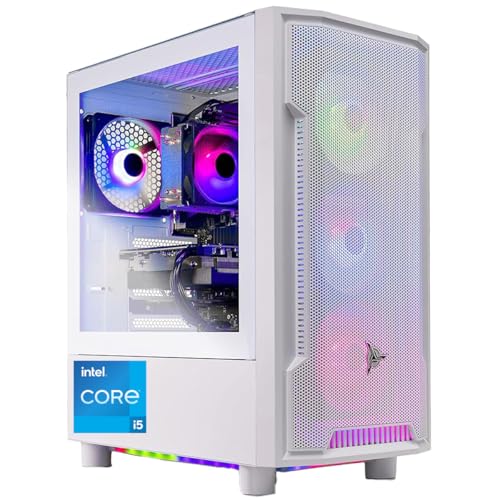
- Best for a small space: Skytech Archangel, i5-14400F, RTX 4060, 32GB RAM, 2TB SSD — Check on Amazon
- Skytech Blaze4 Mini, Ryzen 7 5700, RTX 4060 Ti — Check on Amazon
- Thermaltake LCGS Quartz i1460, i5-14400F, RTX 5060 — Check on Amazon
- iBUYPOWER Scale, Ryzen 5 7600, RTX 4060 Ti — Check on Amazon
See 2 more Amazon options
- CyberPowerPC Gamer Master, Ryzen 7 8700F, RTX 4060 Ti — Check on Amazon
- CyberPowerPC Gamer Xtreme VR, i7-13700F, RTX 4060 Ti 16GB — Check on Amazon
Read the full guide ↓
Disclosure: As an Amazon Associate, reviewstook.com earns from qualifying purchases. Links to Amazon on this page are affiliate links; they cost you nothing extra. Listing details such as price and availability change often, so check the current Amazon listing before you buy.
Start with the sentence nobody selling these machines will put in a headline: at $1,200, a prebuilt gaming PC is a tower. Every one of the six machines in this guide is a floor-standing or desk-standing tower case with a graphics card, a power supply and fans inside it. None of them is a mini PC. None of them mounts behind a monitor. None of them disappears into a bookshelf the way the small machines in our Best Mini PC For Small Spaces Under $1200 coverage do. If your space problem can only be solved by a computer the size of a hardback book, this is the wrong guide and the honest move is to stop here and go there.
If, instead, your space problem is the ordinary one — a small room, a shared room, a desk that is also a dining table, a corner that has to hold the whole setup — then this guide is written for you, because towers differ enormously in how they behave once they arrive in a tight spot. Some arrive finished: every part you will ever need already fitted, the power supply published on the spec sheet, nothing scheduled that requires opening the case in week one. Others arrive with homework attached — a power supply whose wattage you can only learn by opening the case and reading a label, a memory configuration you cannot confirm until the box is open, a second stick or a second drive already pencilled in. In a large room with a workbench, that homework is a shrug. In a small space, where the tower’s final position may be awkward to reach and every reopening means dragging it back out, it is the difference between a machine that settles and a machine that keeps interrupting the room.
So this guide re-judges the six best prebuilt gaming PCs under $1,200 on installation first: how finished each machine is on arrival, how much case-opening it schedules, how its cables fall, how its heat leaves, and how honestly its size can be known before it ships. One warning about that last point. The verified listing material behind this guide documents no dimensions for any of these six machines — not one. The single pick with “Mini” in its name documents no measurements either, because in that name, Mini is a word, not a measurement. Every size figure for your spot has to come from the live listing at order time, which is why this guide grades by form-factor class, prints no invented measurements, and ends with a five-step checklist that begins with a tape measure and ends with the order button — in that order.
In this guide
Quick Picks
Short on time, or comparing several options at once? Each row below names the small-space situation and the machine that fits it, with a link to the listing.
| Your situation | Pick | Why it stands out in a small space | Link |
|---|---|---|---|
| Place it once, never reopen it | Skytech Archangel | 32GB of RAM and a 2TB SSD already fitted, power supply published — nothing left to install | Check on Amazon |
| Best value, ordinary tower spot | Skytech Blaze4 Mini | Published 650W Gold PSU — but “Mini” is a name, not a size; check price on Amazon | Check on Amazon |
| Newest graphics features | Thermaltake LCGS Quartz i1460 | RTX 5060 in a standard tower from a case maker, 600W Gold PSU documented, complete as shipped | Check on Amazon |
| One spot for the long term | iBUYPOWER Scale | AM5 platform that can grow in place — but plan one reopening for its single memory stick | Check on Amazon |
| Eight cores, tower spot, patient buyer | CyberPowerPC Gamer Master (GMA2900A) | AM5 multitasking headroom; budget a delivery-day label check and a configuration check | Check on Amazon |
| Strongest machine, awkward install | CyberPowerPC Gamer Xtreme VR (GXiVR8040A14) | The longest-lived GPU here — and the most delivery-day verification of the six | Check on Amazon |
How These Picks Were Chosen
The six machines are the same verified sub-$1,200 prebuilts this site recommends on performance — real Amazon listings, with current prices to check on Amazon, because prices in this category change often, and two picks that belong in this budget only when they are on sale. What changed for this guide is the judging. Each machine was graded on five installation questions, in the order a small room asks them.
First: does it arrive finished? A machine that ships with its memory and storage already at the level you intend to keep asks nothing of your space after placement. A machine that ships one memory stick short, or with a drive you already plan to supplement, schedules a reopening — and in a tight spot a reopening is not a five-minute job, it is a relocation. Second: is the power supply published? Three of these builders print a Gold-rated wattage on the spec sheet. The other three do not, and the only way to learn the figure is to open the delivered case and read the label — a check the base research recommends for upgrade planning, and one that has to happen while the tower is still somewhere you can get at it. Third: what is the form-factor class, honestly stated? All six are towers. They differ in role — some read as furniture-adjacent desk towers, some as full gaming towers that expect floor space beside the desk — but none is small, and this guide will not pretend otherwise. Fourth: how do the cables fall? Every tower here takes its power from an internal supply, so there is no external brick to house; the cable question is the drop from the tower’s rear panel — power, display, network — and whether your spot lets those cables fall and bend without being pinched against a wall. Fifth: where does the heat go? A gaming tower exhausts warm air into the room continuously under load. In a small room that is a real thermal budget, and it rules out the single most common small-space instinct, the closed cabinet, for every pick in this guide.
Two disciplines govern everything below. We did not use these machines ourselves; the grading rests on the verified listing material behind the base guide, and where that material is silent — above all on dimensions — the review says so and sends you to the live listing rather than filling the gap with a plausible number. And no mounting claim is made for any pick: no VESA bracket, no behind-monitor fitting, no wall kit is documented for any of these six towers, so none is promised. If a listing later shows one, treat it as a bonus you verified yourself, not a feature this guide sold you.
The 6 Best Prebuilt Gaming PCs for Small Spaces Under $1,200
Skytech Archangel — i5-14400F, RTX 4060, 32GB RAM, 2TB SSD (ST-ARCH4-1247-W-AM)
Who it suits: The buyer with exactly one workable tower spot, who wants to put the machine in it, connect it, and never open it again.
On performance alone this machine sits last in its own guide — its plain RTX 4060 is a step below the 4060 Ti class around it. On installation it sits first, and it is not close. The Archangel is the only machine here that arrives with the two most common post-purchase installations already done: 32GB of DDR5 memory fitted instead of 16GB, and a 2TB SSD instead of 1TB. In a market where a 32GB memory kit bought separately is a significant purchase on its own, that is not a trim detail; it is the difference between a tower that gets placed and a tower that gets placed, dragged out, opened, upgraded and placed again. Skytech also publishes the power supply — 650W 80 Plus Gold — which removes the other scheduled opening, the delivery-day label hunt. What remains is the simplest install in this guide: position the tower, give its vents room, drop three cables off the back, done.
The placement itself is ordinary tower discipline. It is a full-size case that wants floor space beside the desk or a generous under-desk bay, with clearance at the intake and exhaust rather than a flush fit against furniture on every side. Its power supply is internal, so the cable drop is the standard one — mains lead, display cable into the graphics card’s ports, network cable if you wire it — with no brick competing for the floor. The graphics compromise deserves its honest sentence: at 1080p the RTX 4060 is entirely comfortable, and at 1440p it plays natively in many titles while leaning sooner on upscaling in the heaviest ones, with 8GB of VRAM the first part of this machine that will age. When that day comes, the published 650W Gold supply means the replacement card can be chosen from facts. Check price on Amazon before you buy: the fitted capacity here is unmatched in this guide.
- Arrives finished: 32GB of memory and 2TB of storage fitted, so no stick or drive installation is scheduled.
- Power supply published at 650W 80 Plus Gold — no delivery-day label check inside the case.
- Internal power supply and standard tower cabling: the simplest cable drop of the six.
Honest limitation: Finished is not small. It is a full-size tower with the weakest graphics card in this guide, and no dimensions are documented in the verified listing material — measure your spot against the live listing before ordering.
Choose it if your spot is hard to reach and you want the machine that asks the least of it. Skip it if maximum 1440p frame rates matter more than a one-and-done install — every 4060 Ti pick below is faster today.

Skytech Blaze4 Mini — Ryzen 7 5700, RTX 4060 Ti (ST-BLAZE4MINI-1266-B-AM)
Who it suits: The value hunter with an ordinary tower-sized spot who has read the name on the box correctly — as a name.
Deal with the name first, because in a small-spaces guide it is the most misleading word in this article. The Blaze4 Mini’s verified listing material documents no dimensions at all: no width, no depth, no volume, nothing that would let anyone honestly call it small. Treat “Mini” the way you would treat “Pro” — as branding. What the machine verifiably is: a tower prebuilt with a Ryzen 7 5700, an RTX 4060 Ti 8GB, 16GB of DDR4 memory and a 1TB SSD, graded here as tower-class, planned for as tower-class, and measured for — by you, from the live listing — as tower-class. Any guide that prints a litre figure for it is importing a number from somewhere else; this one declines to.
Judged on what is documented, its installation story is genuinely good. Skytech publishes the power supply — a 650W 80 Plus Gold unit — so there is no label check and no mystery ceiling over a future card. The machine arrives complete, with no memory or storage catch in the verified record that schedules a reopening. The power supply is internal; the cable drop is the standard rear-panel one. And its value positioning is the famous one: it is one of the more affordable picks in this tier — check price on Amazon — which, in a small room, is a specific virtue. A value-priced tower leaves room in the budget for the things a tight setup actually needs: a proper stand or plinth, a monitor arm that returns desk surface, cable channeling that keeps the drop tidy. The two debits are structural rather than spatial. The Ryzen 7 5700 rides the finished AM4 platform with DDR4 memory, so there is no in-place processor future — when it feels slow, the replacement is a platform, not a part. And its value is timing-dependent: on sale it is the value pick of the guide, at its usual positioning it is ordinary, and when it is priced at the top of this tier the iBUYPOWER below takes over — check price on Amazon before deciding. One listing note: Skytech reserves that the graphics card brand may vary between units; the model and memory size are the contracted spec, the badge on the cooler is not.
- Published 650W 80 Plus Gold power supply — installation and upgrade planning start from facts.
- Complete as shipped, with no documented catch scheduling a case opening.
- Strong value positioning for a setup that also needs a stand, arm and cable management — check price on Amazon.
Honest limitation: “Mini” is unmeasured branding — no dimensions are documented for this machine anywhere in the verified material — and the AM4/DDR4 platform underneath it is finished, with no processor upgrade path.
Choose it if you catch it near its low and your spot fits a tower, whatever the name suggests. Skip it if you are shopping for actual smallness, or if its current price is not competitive — check price on Amazon.

Thermaltake LCGS Quartz i1460 — i5-14400F, RTX 5060 (S2QT-B760-560-LCS)
Who it suits: The buyer who wants the newest graphics architecture in a standard tower, installed once, from a company whose main business is cases and cooling.
The Quartz earns its place in a small-spaces guide on provenance as much as specification. Thermaltake sells cases and cooling for a living, and this machine is a standard, serviceable tower from that catalogue culture: nothing proprietary about the format, an interior laid out to be opened by its owner on the rare occasions it needs opening, and airflow treated as a design subject rather than an afterthought — which matters in a small room, where a tower’s exhaust becomes the room’s weather. Its verified configuration documents a 600W 80 Plus Gold power supply, so like the two Skytechs above it asks for no delivery-day label expedition. It arrives complete: an Intel Core i5-14400F, an RTX 5060, 16GB of DDR4-3600 memory and a 1TB NVMe SSD, positioned inside this budget tier — check price on Amazon — so no sale-stalking is required before you can plan the install.
The graphics card needs its one precise paragraph, because it is the reason to buy this machine and the easiest to oversell. The RTX 5060 plays in the same native-1440p league as the 4060 Ti machines here; what it adds is DLSS 4 with multi frame generation, which inserts generated frames to raise displayed frame rates in supported titles. Generated frames are not rendered frames and do not reduce input latency, so the feature is a bonus on top of honest performance, not a substitute for it — and none of it changes the installation story either way. The debits are generational: LGA1700 and DDR4 are both finished standards, making this a closed purchase with no processor or memory-generation future, and the DDR4 kit fitted cannot follow you into a later build. None of that makes the tower bigger, hotter or harder to place. Buy it as the current-generation, install-once option, with eyes open about what is finished underneath.
- Standard tower from a case-and-cooling maker — a serviceable, owner-friendly format.
- 600W 80 Plus Gold power supply documented for this configuration; no label check needed.
- Complete as shipped, and positioned inside this budget tier — check price on Amazon.
Honest limitation: A full-size tower on two finished platforms — LGA1700 and DDR4 — with no dimensions documented in the verified material; multi frame generation raises displayed frame rates without reducing input latency.
Choose it if you want the newest feature set and a straightforward, one-time install. Skip it if an in-place upgrade path matters — both AM5 picks outlive it.

iBUYPOWER Scale — Ryzen 5 7600, RTX 4060 Ti (SCA5N46T01)
Who it suits: The buyer settling into one spot for years, who wants the machine there to have a future — and who will do its one scheduled job before the tower goes into its final position.
The Scale is the calmest purchase in the base guide, positioned inside this budget tier — check price on Amazon — so no sale has to be caught before the install can be planned. Its strategic heart is the Ryzen 5 7600 on AMD’s AM5 socket, the one platform here that accepts later processor generations, which in a small space has a specific meaning: the machine can grow where it stands. A processor swap in three years is an afternoon with the tower pulled forward, not a second full-size box arriving in a room that already holds one. Two small-space credits belong in the record too. The listing includes a keyboard and mouse in the box, so the setup’s cable count and packaging count start lower than with builders who ship the tower alone. And the listing states a one-year warranty — the whole-system cover that is the core argument for buying prebuilt at all.
Against that, this machine schedules more week-one work than the three picks above it, and in a tight spot the order of operations matters. The 16GB of DDR5-5200 memory ships as a single stick (16×1), which leaves memory running in single-channel mode and gives up a measurable slice of performance in CPU-sensitive games until a matching second stick is added — an extra purchase to factor in, and physically a case opening. iBUYPOWER also does not publish this model’s power-supply wattage in the verified listing material, so the delivery-day label check applies before any future graphics upgrade: a second reason to open the case early. Neither debit is large, but both point the same way — do them on day one, on a table, before the tower is slid into the position you measured for it. Handled that way, the Scale is the long-term pick of this guide. Handled the other way — placed first, opened later — it is the pick most likely to be dragged back out of a tight corner in its first month.
- AM5 platform: the only socket here that accepts future processors, so the machine grows in place.
- Keyboard and mouse included and a one-year warranty stated — fewer boxes, one support door.
- Positioned inside this budget tier — check price on Amazon; no sale timing to plan around.
Honest limitation: It schedules two early case openings — the second memory stick its single-stick configuration asks for, and the power-supply label check its unpublished wattage requires. Do both before final placement.
Choose it if you are buying a spot for the long term and will do the day-one jobs on a table first. Skip it if you want a strictly place-and-forget machine — that is the Archangel.

CyberPowerPC Gamer Master — Ryzen 7 8700F, RTX 4060 Ti (GMA2900A)
Who it suits: The streamer or multitasker with an ordinary tower spot, willing to spend fifteen minutes on delivery-day verification in exchange for eight cores and a living platform.
The proposition here is headroom on a future-proofed base: a Ryzen 7 8700F with eight cores on a B650 motherboard — AM5 again, so the platform story matches the Scale’s — with 16GB of DDR5 memory, a 1TB PCIe Gen4 SSD and RTX 4060 Ti 8GB graphics. This configuration is positioned inside this budget tier — check price on Amazon. For a player who streams or keeps a second workload running alongside the game, the two extra cores over the six-core picks are headroom you feel in year two rather than week one. The installation, though, comes with a checklist of its own, and a small room is exactly where checklists get skipped — so treat this paragraph as part of the product. CyberPowerPC does not publish this model’s power-supply wattage in the verified material, so the label check applies: open the case on delivery day, read the label, write the figure down somewhere you will find it in three years.
Two further cautions, both from the verified record. The 8700F has no integrated graphics — the F in the name is doing real work — which shapes maintenance in a tower you cannot easily reach: if the graphics card is ever removed, sold or fails, the machine has no display output of its own until a card goes back in. Plan any card swap as a single session, not a two-week gap. And this model family has drifted: newer variants under similar names now ship an RTX 5060 Ti in a higher tier, so the configuration check on arrival — graphics model, memory, storage, against the listing — is not paranoia but procedure, and it is far easier on a table than in a corner. With those checks done, the machine settles like any other tower here: internal power supply, standard rear cable drop, open air around the vents. It asks more of your first evening than the Skytechs and repays it with the strongest multitasking ceiling in the guide.
- Eight AM5 cores on a B650 board — multitasking headroom and a platform future in one tower.
- Positioned inside this budget tier — check price on Amazon.
- Standard tower installation once the delivery-day checks are done.
Honest limitation: The most verification homework of the AM5 picks: an unpublished power supply to label-check, a drifted model family to confirm on arrival, and no integrated graphics if the card ever comes out.
Choose it if you stream or multitask and will run the arrival checks before placing it. Skip it if you want the set-and-forget purchase — the Scale’s documentation is cleaner.

CyberPowerPC Gamer Xtreme VR — i7-13700F, RTX 4060 Ti 16GB (GXiVR8040A14)
Who it suits: The buyer who wants the longest-lived graphics card at this budget and can keep the tower somewhere accessible through its first week of checks.
On the base guide’s terms this is the best machine here, and its hardware case survives the move to a small room intact. The specification that matters is two words long: sixteen gigabytes. The RTX 4060 Ti 16GB shares its GPU with the 8GB version — the extra memory is headroom, not horsepower — but at 1440p that VRAM is texture insurance, the difference between a card that ages gracefully and one that starts forcing settings down as games grow heavier. The Core i7-13700F is the strongest all-round processor in this guide, with cores to spare for streaming and the background clutter of a real desktop, and the DDR5 platform leaves a cleaner memory path than the DDR4 machines. If the tower is going into a spot it will occupy for four or five years, this is the specification you would choose to be stuck with.
It is also, on installation, the most demanding pick in this guide — the strongest machine with the worst place-it-once story. CyberPowerPC does not headline this model’s power-supply wattage, so the label check applies. Worse, the memory configuration — whether the 16GB arrives as one stick or two — is not confirmed in the verified listing data, so a second opening to add a matching stick may be scheduled by a fact you cannot learn until the box is open. And its pricing is a condition, not a detail: it belongs in this budget tier only when it is on sale — check price on Amazon before you buy. None of this disqualifies it. It sequences it. Buy it when it is priced inside this tier, keep it on a table through the label check and the memory check, do whatever the second stick requires, and only then give it the tight spot — where its longevity becomes the virtue, because the machine least likely to need replacing is the one a small room most wants.
- RTX 4060 Ti with 16GB of VRAM — the texture headroom that decides how a card ages at 1440p.
- Core i7-13700F: the strongest general-purpose processor in this guide.
- DDR5 platform and a 1TB NVMe SSD as standard.
Honest limitation: Two delivery-day unknowns — an unpublished power supply and an unconfirmed memory configuration — plus deal-only pricing: it fits this budget tier only on sale — check price on Amazon. Verify everything before it goes into a hard-to-reach spot.
Choose it if you can buy it when it is priced inside this budget tier and will finish the checks before final placement. Skip it if it is currently priced above this budget tier, or your spot cannot be reached twice.

Comparison Table
| Product | Graphics | Arrives finished? | Power supply | Price |
|---|---|---|---|---|
| Skytech Archangel | RTX 4060 8GB | Yes — 32GB RAM and 2TB SSD fitted, nothing scheduled | Published — 650W Gold | Check price on Amazon |
| Skytech Blaze4 Mini | RTX 4060 Ti 8GB | Yes — complete as shipped (“Mini” is a name, not a measurement) | Published — 650W Gold | Check price on Amazon |
| Thermaltake LCGS Quartz i1460 | RTX 5060 | Yes — complete as shipped | Documented — 600W Gold | Check price on Amazon |
| iBUYPOWER Scale | RTX 4060 Ti 8GB | Mostly — one memory stick fitted, second stick is a planned job | Unpublished — label check | Check price on Amazon |
| CyberPowerPC Gamer Master (GMA2900A) | RTX 4060 Ti 8GB | Mostly — label check and configuration check on arrival | Unpublished — label check | Check price on Amazon |
| CyberPowerPC Gamer Xtreme VR (GXiVR8040A14) | RTX 4060 Ti 16GB | Verify first — power supply and memory configuration both unconfirmed | Unpublished — label check | Check price on Amazon — fits this tier on sale |
Measure Before You Buy: The Five-Step Checklist
Every regret in a small-space install is born before the order, not after it. Run these five steps in order; the order is the point.
Step 1 — Measure the spot. Width, depth and height, with a tape, written down. Then open the live Amazon listing for the machine you intend to buy and read its dimensions there — the verified material behind this guide documents no measurements for any of these six towers, so the listing is the only honest source, and if the listing’s figures and your figures do not agree, the listing wins and the machine loses. Remember that the spot’s depth has to hold the tower plus the cables leaving its back, not the tower alone.
Step 2 — Clear the ventilation. Decide, before ordering, where the machine’s air comes from and where it goes. Every pick here intakes and exhausts through its case panels and needs open air around them; none may be sealed into a closed cabinet, a shut cupboard or a fabric-sided cubby, however perfectly it fits one. If the only available spot is enclosed, the spot is wrong — change the furniture plan, or change the machine category entirely toward the genuinely small machines in Best Small Form Factor Gaming PC Under $1200.
Step 3 — Give the power its address. The good news first: all six towers run on internal power supplies, so there is no external brick to house, hide or trip over — one less object than a mini PC asks of the room. What remains is the socket. The tower needs a reachable wall outlet its mains lead can drop to without an extension stretched across a walkway, and the socket has to stay reachable after placement, because the machine you cannot unplug without moving furniture is a machine whose every check becomes a project.
Step 4 — Walk the cable drop. From the tower’s rear panel, trace each run in your head: the display cable to the monitor — which, on the F-suffix processors fitted to several of these picks, must land in the graphics card’s ports, since the motherboard’s ports have no integrated graphics behind them — the network cable if you wire it, the keyboard and mouse leads. Cables should fall and bend in gentle curves with slack to spare. A drop that only works with the tower pushed flush to the wall is a drop that will fail the first time anything is unplugged.
Step 5 — Then order. Only now, with the spot measured, the air planned, the socket chosen and the cables walked, does the order make sense — and when the machine arrives, reverse the instinct to place it immediately. Run the delivery-day checks first, on a table, in the open: the power-supply label on the three picks that do not publish it, the memory size and stick count, the graphics model against the listing, the storage capacity. Then place it once, in the spot you measured, and let it stay there.
Heat, Noise and the Closed-Cabinet Refusal
A gaming tower under load is a small space heater with a frame rate. The graphics classes in this guide work hard for hours at a stretch, and every watt of that work leaves the case as warm air in your room. In a large space that is unnoticeable. In a small one it is a climate: the corner warms, the machine’s fans work harder to breathe its own exhaust, and the room’s occupant sits inside the thermal loop. The mitigations are placement, not products — open air on the intake and exhaust sides, exhaust aimed into the room rather than into a wall pocket, and a spot that lets warm air rise away instead of pooling around the case.
Which brings up the refusal, stated plainly because it is the most common small-space plan and the most reliably bad one: do not put any of these towers inside a closed cabinet, a shut media console or an unventilated cupboard. It will fit — furniture is sold in sizes that invite exactly this — and it will then spend its life inhaling its own exhaust, running hotter and louder than it should, throttling performance you paid for and ageing parts early. If the furniture has a door, the door stays open during play at absolute minimum, and the honest advice is to choose a different spot or a genuinely small machine from the Best Compact Gaming PC Under $1200 class instead. A tower bought for a cabinet is a mismatch no discount repairs.
How to Choose a Prebuilt Gaming PC for a Small Space
- Count the scheduled openings, not the inches. The verified listings document no dimensions for these six, so judge what you can know: how many times the case must open in the first year. The Archangel schedules none; the Scale schedules a memory stick; the CyberPowerPCs schedule label and configuration checks. In a hard-to-reach spot, that count is the size that matters most.
- Treat names as names. “Mini” on the Blaze4 is branding with no measurement behind it. The only dimension that counts is the one on the live listing, read against your tape measure in Step 1 of the checklist.
- Prefer a published power supply. A printed Gold-rated wattage (both Skytechs, the Thermaltake) removes a delivery-day job and makes any future card a decision from facts. An unpublished one is not a bad supply — it is an appointment you have to keep before final placement.
- Match the platform to the room’s patience. The AM5 picks (Scale, Gamer Master) can be upgraded where they stand, which suits a room that cannot absorb a replacement tower. The finished platforms (Blaze4 Mini, Quartz, Archangel’s socket generation) are closed purchases — fine, provided the room’s next change is years away.
- Buy capacity fitted, not promised. In a tight install, a 2TB drive and 32GB of memory already in the case beat a cheaper machine plus two future projects. Count the extra purchases honestly — memory especially — before calling the smaller configuration a saving.
- Keep the whole-desk test in view. These are native-1440p machines. In a small setup the monitor usually deserves the next dollar before the tower does; a mid pick from Best Prebuilt Gaming PC For Small Spaces Under $800 in front of a good display beats a flagship tower in front of an old one.
- Check the live price, not the listing alone. Two picks here are recommendations only when they are priced inside this tier. A missed sale is a delay; an overpayment into the next tier’s territory is a smaller room’s budget spent twice.
Common Buying Mistakes
- Believing the word “Mini” in a product name. No dimensions are documented for the Blaze4 Mini; order it for a tower spot you have measured, or do not order it for a small spot at all.
- Ordering first and measuring second. The listing’s dimensions and your tape measure have to meet before the order, not after the courier.
- Sealing a tower into a closed cabinet or media console. The fit is perfect and the thermals are a slow failure — the refusal in this guide is absolute.
- Placing the tower into its final, hard-to-reach position on day one, then discovering the power-supply label check or the second memory stick needs it back out again.
- Pushing the case flush against the wall to win back an inch, and kinking the cable drop that needed the inch more.
- Assuming a $1,200 tower fits a shelf built for consoles. Shelves are furniture; towers are appliances with airflow requirements. Measure both, believe the tape.
- Paying above this budget tier for the Gamer Xtreme and calling it an under-$1,200 purchase — at that level it belongs to the Best Prebuilt Gaming PC Under $1500 conversation.
- Skipping the arrival checks because the room is finally tidy. Fifteen minutes on a table is what makes the next four years in the corner uneventful.
Final Recommendation
- Best for a small space: Skytech Archangel — the only machine here that arrives with nothing left to install.
- Best value: Skytech Blaze4 Mini — when it is well priced for this tier, for a measured tower spot — check price on Amazon.
- Best current generation: Thermaltake LCGS Quartz i1460 and its RTX 5060.
- Best long-term spot: iBUYPOWER Scale — AM5, after its day-one jobs are done.
- Best for streamers: CyberPowerPC Gamer Master — eight AM5 cores.
- Best machine, hardest install: CyberPowerPC Gamer Xtreme VR — only when it is on sale inside this tier — check price on Amazon.
For most small rooms the answer is the Skytech Archangel: not because it is small — it is not, and neither is anything else here — but because it is finished, and a small space rewards finished above almost everything. Its 32GB of memory and 2TB of storage are already where you would eventually put them, its power supply is published on the spec sheet, and its install is the shortest in this guide: check it on Amazon, measure your spot against the listing, place it once. If its plain RTX 4060 is too much of a compromise, the Skytech Blaze4 Mini is the same install discipline in a more affordable position in this tier whenever it is on sale — with a faster card and a name you have been warned about. Readers whose space problem is stricter than a tower can solve should step down a category entirely to Best Prebuilt Gaming PC For Small Spaces Under $1500 for the wider prebuilt picture, or across to the genuinely small machines; readers speccing a first machine will find the hand-holding version in Best Prebuilt Gaming PC For Beginners Under $1200. Measure first, order second, place once.
Frequently Asked Questions
Is any prebuilt gaming PC under $1,200 actually small?
No. All six machines in this guide are towers. One carries the word “Mini” in its name, but no dimensions are documented for it in the verified listing material, and a name is not a measurement. Genuinely small gaming machines exist — mini PCs and small-form-factor builds — but they are a different category with different graphics compromises, covered in our mini PC and small-form-factor guides.
Can I put one of these towers inside a TV cabinet or media console?
Not with the door closed. A gaming tower exhausts warm air continuously under load, and a sealed cabinet feeds that air straight back to its intakes — hotter running, louder fans, throttled performance and shortened component life. Open-front, open-backed furniture with real clearance is the minimum; a closed cabinet is a refusal, for every pick in this guide.
Can any of these mount behind a monitor or on a wall?
None that this guide can promise. No VESA bracket, wall kit or behind-monitor mounting is documented for any of the six picks in the verified listing material, and full towers are not built for it. If a live listing shows a mounting option, verify it yourself before counting on it — and if mounting is your requirement, start in the mini PC category instead.
How do I know whether a tower fits my spot before it ships?
Measure the spot with a tape — width, depth, height, written down — then read the dimensions on the machine’s live Amazon listing and compare, remembering that the depth must also hold the cables leaving the rear panel. This guide prints no dimensions because the verified material documents none; the listing is the only honest source, and Step 1 of the checklist above walks the process.
Which pick needs the least work after it arrives?
The Skytech Archangel. Its 32GB of memory and 2TB of storage are already fitted, and its power supply is published, so there is no stick to add, no drive to plan and no label to hunt. At the other end, the CyberPowerPC Gamer Xtreme VR needs the most: a power-supply label check and a memory-configuration check, both best done before it goes into its final position.
Does the power supply need its own space, like a laptop brick?
No. All six towers have internal power supplies, so there is no external brick to house — one of the few ways a tower is easier on a small room than a mini PC. What the power does need is a reachable wall socket: the mains lead should drop to it without a stretched extension, and the socket should stay reachable after placement.
Will a gaming tower make a small room hot?
Noticeably, during long sessions. A tower under gaming load exhausts warm air continuously, and in a small room that heat has nowhere to go but the room. Open placement with clearance around the intakes and exhaust, and air that can rise away from the case, keep both the machine and the room closer to comfortable; a sealed or flush fit makes the machine louder as well as the room warmer.
- Best Prebuilt Gaming PC Under $1200
- Best Prebuilt Gaming PC Under $800
- Best Prebuilt Gaming PC Under $1500
- Best Prebuilt Gaming PC For Beginners Under $1200
- Best Prebuilt Gaming PC For 1440p Gaming Under $1200
- Best Prebuilt Gaming PC For Streaming Under $1200
- Best Prebuilt Gaming PC For Small Spaces Under $800
- Best Prebuilt Gaming PC For Small Spaces Under $1500
- Best Gaming Desktop Under $1200
- Best Gaming PC Under $1200


