Where to buy
Check the latest price, availability and delivery on Amazon. Orders are placed on Amazon. We may earn a commission from qualifying purchases.
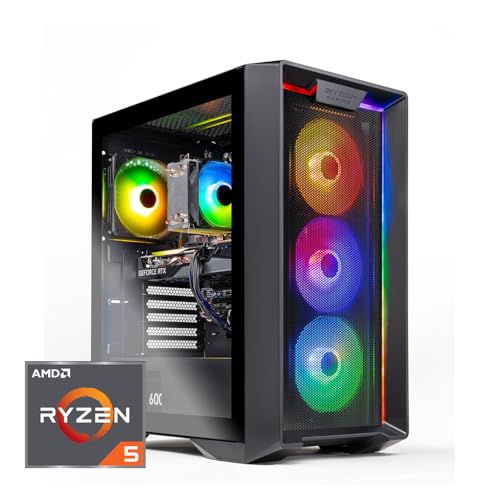
- Best fit for a tight spot (arrives finished, least case-opening): Skytech Nebula Gaming PC — Check on Amazon
- ZOTAC MEK AI-Enhanced Gaming PC — Check on Amazon
- CyberPowerPC Gamer Xtreme VR Gaming PC (GXiVR8060A24) — Check on Amazon
- iBUYPOWER SlateMesh Gaming PC (SlateMeshA5N4601) — Check on Amazon
- STGAubron Gaming PC (ABR1722) — Check on Amazon
See 1 more Amazon option
- MXZ Gaming PC (sale-watch only; the largest install here) — Check on Amazon
Read the full guide ↓
Disclosure: As an Amazon Associate, reviewstook.com earns from qualifying purchases. Links to Amazon on this page are affiliate links; they cost you nothing extra. Listing details such as price and availability change often, so check the current Amazon listing before you buy.
Start with the fact this whole guide is built around: at $800, a prebuilt gaming PC is a tower. None of the six machines below is a mini PC, none is a small-form-factor build, and none of them tucks behind a monitor or disappears into a drawer. If your room problem is “there is no surface left at all,” no pick here solves it, and the honest move is to look at a mini PC instead. But most small-space problems are not that absolute. They sound like this: the only free spot is a corner of a desk, a shelf, or a stretch of floor beside the TV stand; the case has to breathe in that spot without cooking itself; the cables have to reach without crossing the room; and once the machine is installed, you really do not want to drag it out and open it again. That is the problem this guide grades. Every pick below is judged first as an installation — where it can live, how much air it needs, how its cables fall, and how often you will have to open the case in its first year — and only then as a gaming PC.
One discipline runs through everything that follows, and it is worth stating before any pick is named. The listings for these six machines do not publish case dimensions, weights or noise figures that we could verify, so this guide prints none — not one measurement, for any pick. Where a rival guide states a case volume for one of these models, that figure did not come from the listing material verified for this guide, and we will not borrow it. Instead, each machine is graded by its form-factor class and by the installation facts its listing does document: what storage is fitted on day one, whether the power supply is named, how many fans move its air, and what homework its paperwork leaves you. Where a measurement genuinely decides your purchase, the five-step checklist below tells you exactly which number to take from the live listing before you order. Measure from the listing, never from a review — including this one.
Mounting gets the same treatment, because it is the first question small-space buyers ask. No pick in this guide documents a VESA bracket or any other mount in its verified listing material, so no pick here is claimed as mountable — not one. Plan on a surface: a desk corner, a shelf that can carry a tower, or the floor. If a machine that hangs behind a display is the whole point of your purchase, that is a mini PC’s job, and the checklist section explains how to shop for one instead. What these six towers offer a small room is different: honest 1080p gaming, in a box whose placement you can plan properly, with options spanning budget to mid-range tiers within this budget. Check price on Amazon for the current figure before you order. Our top pick for a tight spot is the Skytech Nebula, because it arrives finished — the joint-largest storage fitted and the power supply named in print — which means the fewest reasons to pull it out of its corner and open it during its first year.
In this guide
Quick Picks
Short on time, or comparing several options at once? Each row below names a small-space situation and the prebuilt that fits it, with a link to the listing.
| Your situation | Pick | Why it fits the space | Link |
|---|---|---|---|
| Tight spot, install it once and leave it | Skytech Nebula | 1TB fitted and a named 650W Gold PSU — the fewest reasons to open the case in year one | Check on Amazon |
| Small room, small budget | ZOTAC MEK AI-Enhanced Gaming PC | A budget-tier pick with a named PSU — check price on Amazon; any savings can fund the stand, shelf or second drive | Check on Amazon |
| Strongest spec for the corner, bought on sale | CyberPowerPC Gamer Xtreme VR (GXiVR8060A24) | RTX 4060 and 1TB fitted, so no early storage opening; check price on Amazon, especially when it is on sale | Check on Amazon |
| Keeping it for years, upgrades planned | iBUYPOWER SlateMesh (SlateMeshA5N4601) | The only AM5 machine here — you will open it by choice over its life, on your schedule | Check on Amazon |
| Cheapest corner install, homework accepted | STGAubron Gaming PC (ABR1722) | A budget-tier option — check price on Amazon — but its listing contradicts itself on storage, so verify on arrival | Check on Amazon |
| Floor space is genuinely not the problem | MXZ Gaming PC | A documented full-size case with six fans — the biggest install here; sale-watch only, so check price on Amazon and buy only when it fits this budget | Check on Amazon |
How These Picks Were Chosen
The budget was applied as a ceiling. The two RTX 4060 towers are premium-tier picks within this guide and make the most sense when they are on sale — check price on Amazon before you order, and note that at full price they belong to a higher tier. The RTX 3050 towers are the budget to mid-range options here and sit more comfortably within this budget — again, check price on Amazon for the current figure. The MXZ is included only under a sale-watch label, because it usually sits in a higher tier; its review tells you to buy it only when the price you check on Amazon fits this budget. Prices move often, so this guide does not print fixed product prices — use the live Amazon listing as the source of truth.
On top of that sat the installation grading, which is what makes this guide different from a general under-$800 roundup. Each machine was scored on five placement questions. First, its form-factor class: all six are towers, so the real question is whether the listing documents anything that separates one tower’s footprint from another’s — and, as the intro states, none publishes verified dimensions, so no pick was credited with a size it does not document. Second, whether it arrives finished: a machine with 1TB fitted does not need its case opened for a second drive in its first months, while a 500GB machine schedules that opening from day one. Third, whether the power supply is named in print: a published PSU means no delivery-day case opening just to read a label, and a plannable upgrade path; an unpublished one is homework. Fourth, its air obligation: how the case breathes, and what happens to that breathing when the tower is pushed into a corner or a cabinet — the sealed-cabinet refusal in this guide applies to all six, without exception. Fifth, its cable story: every pick here is a tower with its power supply inside the case, so there is no external brick to house — the placement question is the wall socket’s position and how the power and display cables drop, which the checklist turns into a step you do before ordering.
We did not use these PCs ourselves. We read the maker listings, specification pages and published warranty terms, and compared processors, graphics cards, memory, storage and power-supply disclosure, and then re-read the same material asking only the installation questions above. Two filters from the general guide still applied. Every pick ships with Windows installed and networking on board, because a prebuilt that needs an operating system purchase has failed at its one job. And the builder should publish warranty terms you can read before buying — which is why the smaller brands here carry explicit homework in their reviews. One last honesty note, carried over from the general guide because small-space buyers deserve it too: stepping from $700 to $800 buys no resolution jump. Both tiers are 1080p tiers. What the extra money buys is a newer graphics card class on sale days and, on the best picks here, a machine that arrives more finished — which, in a small room, is worth more than it sounds.
The 6 Best Prebuilt Gaming PCs for Small Spaces Under $800
Skytech Nebula Gaming PC
Who it suits: Small-space buyers who want to install a tower once — in a desk corner, on a shelf, beside the TV — and then not think about its placement again for a year.
The Nebula earns the top spot on this angle for a reason that has nothing to do with its graphics card: it is the most finished machine in the guide on the day it arrives. Skytech fits a 1TB NVMe SSD, the joint-largest storage here, so the second-drive installation that smaller-storage machines schedule for their first months simply is not on your calendar. Just as important for a tight install, Skytech prints the power supply in the specification: a 650W Gold unit, named with its wattage and efficiency rating. That one line removes the delivery-day case opening the unpublished-PSU machines below ask for, and it means a future graphics card decision can be planned from the listing rather than from a torch-lit look inside the case. In a small room, every avoided opening is an avoided afternoon of dragging a tower out of a corner, working around its cables, and re-seating it — so the pick that needs the fewest openings wins this guide, and the Nebula needs the fewest.
As a gaming PC it is the honest everyday machine of the set: a Ryzen 5 5600 with an RTX 3050 6GB, 16GB of DDR4 3200 memory, Wi-Fi and Windows 11 Home, check price on Amazon; it is a mid-range option within this budget at ordinary prices, with no sale-watching required. The placement grading is tower-class throughout: no dimensions are published in the verified listing material, so plan a surface with open air on every side the case breathes from, and take the case’s measurements from the live listing at Step 1 of the checklist before you commit the spot. No mounting of any kind is documented for this machine — it stands, it does not hang. Skytech publishes a one-year parts-and-labor warranty with lifetime technical support, per the maker’s published terms, and lists the graphics card as brand may vary, which is common in this category: the card will be an RTX 3050 6GB, with the board partner decided at build time.
- Arrives finished: 1TB fitted and the PSU named in print — the least case-opening in the guide.
- Positioned within this budget without relying on a sale — check price on Amazon — so the install can happen on your schedule.
- Parts and labor covered for a year, with lifetime technical support, per the maker’s published terms.
Honest limitation: The AM4 platform is finished, so there is no drop-in CPU upgrade path, the graphics card brand varies by build, and no case dimensions or mounting are documented — the fit check happens on the live listing, at Step 1.
Choose it if your spot is tight and you want the install to be a one-time event. Skip it if a long upgrade runway matters more than a finished arrival — that is the iBUYPOWER below.

ZOTAC MEK AI-Enhanced Gaming PC
Who it suits: Buyers whose room and budget are both small — the money this machine does not cost is what pays for the shelf, the stand or the second drive that makes a tight install work.
The MEK’s small-space case starts with arithmetic. It is the budget-tier complete pick in this guide — check price on Amazon — and in a small room, any unspent budget is an installation feature, because placement problems are usually solved with furniture: a sturdier shelf, a floor stand that lifts the tower off carpet, a cable channel. The machine itself repeats the Nebula’s best paperwork trick at a lower tier: the power supply is a named 650W 80+ Gold unit, the joint-best PSU disclosure in the guide, so there is no label-reading case opening on delivery day and a future card can be planned from print. Networking is Wi-Fi 6E, the best wireless standard among these six picks, which matters more in small spaces than it first appears — one less cable to route is one less cable crossing the room, and if your spot sits far from the router, this is the pick whose wireless copes best. ZOTAC is also a known quantity, a graphics card manufacturer’s own gaming line rather than an anonymous storefront brand.
The installation debit is storage. The 500GB NVMe SSD fills fast at modern game sizes, so unlike the Nebula, this machine does schedule an early opening: plan for a second drive, and plan the placement so the case can slide out and open without unplugging the whole desk. Treat that as a known appointment rather than a surprise and it costs little. The second debit is a documentation gap you close before ordering, not after: the listing material we reviewed did not headline the RTX 3050’s video memory figure, so this guide does not assert one — RTX 3050 cards exist in more than one memory configuration, and the difference matters for texture-heavy games. Confirm the VRAM on the live listing; it takes ten seconds. On dimensions and mounting, the discipline is the same as every pick here: none are documented in the verified material, so the case is graded by its tower class, stands on a surface, and gets measured from the live listing at Step 1.
- A budget-tier pick and the guide’s best value — check price on Amazon — with room in the budget left for the install itself.
- A 650W 80+ Gold PSU named in print, and Wi-Fi 6E — both rare in this tier.
- From a maker known for graphics cards, not an anonymous storefront name.
Honest limitation: 500GB of storage schedules an early second-drive opening, the CPU sits on a finished platform, and the listing does not headline the graphics card’s VRAM — verify it live before you order.
Choose it if you want a properly specified machine and the budget left over to place it well. Skip it if a ten-second VRAM check on the live listing is more homework than you will do, or if you would rather wait for a 4060 sale.

CyberPowerPC Gamer Xtreme VR Gaming PC (GXiVR8060A24)
Who it suits: Buyers with one good corner and a sale alert set — the strongest specification in the guide, in a tower that asks for exactly one piece of delivery-day homework.
As a gaming PC this is the headline hardware of the set: an Intel Core i5-13400F with a GeForce RTX 4060 8GB, 16GB of DDR5 and a 1TB PCIe Gen4 SSD — the modern memory standard and the joint-largest, fastest storage here — with Windows 11 Home installed and Wi-Fi ready. For the small-space grading, the 1TB drive is the load-bearing line: like the Nebula, this machine arrives with its storage finished, so no second-drive opening is scheduled in its first months, and the tower can go into its corner and stay there. It makes the most sense for this guide when it is on sale — check price on Amazon before you order — and that condition shapes the install too: this is a machine you buy when a sale lands, so measure your spot and run the checklist while you wait, and the placement is ready the day you order.
The one piece of homework is the power supply. The listing material for this model does not publish the PSU’s wattage — the single most upgrade-relevant number in the box — so if a future graphics card is part of your plan, budget one delivery-day look inside the case to read the label, and do it before the tower goes into a spot that is awkward to extract it from. CyberPowerPC also reuses model names across configurations, so confirm on the live listing that the machine in your cart is the i5-13400F / RTX 4060 / DDR5 build described here; a configuration check is easier at the cart than at the door. The maker’s published warranty terms put parts coverage at one year, and the terms also state the standard prebuilt fine print: the warranty covers the system as shipped, and parts added afterward are not covered by it — worth knowing before the second-drive plan, though this machine’s 1TB makes that plan unlikely. No dimensions, weight or mounting are documented in the verified material, so it is graded as the tower it is: a surface, open air, and measurements taken from the live listing.
- RTX 4060 8GB with DDR5 and a 1TB Gen4 SSD — no weak line in the specification.
- 1TB fitted means no early storage opening; the tower settles into its spot.
- A premium-tier pick in this guide — check price on Amazon, especially when it is on sale.
Honest limitation: Its value depends on a sale — check price on Amazon before you buy — the listing does not publish the PSU wattage (one label-reading opening if you plan upgrades), and the maker’s published parts warranty runs one year.
Choose it if you check price on Amazon, find it on sale within this budget, and want the strongest specification here under a single warranty. Skip it if it is sitting at full price — then it belongs to a higher-tier guide — or if you refuse all delivery-day homework on principle.
iBUYPOWER SlateMesh Gaming PC (SlateMeshA5N4601)
Who it suits: Buyers placing a tower for the long term — the only machine here you are meant to open again over the years, so its spot should be chosen for access, not just for fit.
This is the only AM5 machine in the guide, and that changes how you should place it. Its Ryzen 5 7600 sits on AMD’s current socket, the platform AMD is still releasing processors for, so a CPU upgrade years from now is a drop-in part rather than a new platform; every other pick here sits on a finished platform. A machine with a future inside it deserves a spot you can work in — a desk corner you can slide it out of, a floor position with room behind it — rather than the tightest hole it physically fits. The rest of the specification is modern and coherent: an RTX 4060 8GB, 16GB of DDR5 at 5200MHz, Windows 11 Home, and a bundled RGB keyboard and mouse, so the box is complete on delivery day. Check price on Amazon before you order — it is a premium-tier pick here and makes the most sense when it is on sale.
The support story is the strongest in this guide. iBUYPOWER’s published standard desktop warranty pairs three years of labor coverage with parts coverage that runs from one to three years depending on when the system was invoiced, alongside lifetime technical support — read the terms that apply to Amazon purchases on the maker’s warranty page before ordering. The installation debits are two scheduled openings. The 500GB SSD is the smallest in this guide and fills quickly at modern game sizes, so a second drive is an early appointment. And the sources we verified do not confirm whether the 16GB of memory is one stick or two, which affects dual-channel performance — check the live listing, and if it is a single stick, a matched second stick is a cheap, worthwhile first upgrade (covered by its own warranty, not iBUYPOWER’s). Neither opening is a flaw; both are reasons to place this tower where opening it is easy. Dimensions and mounting follow the guide’s discipline: none documented, tower class, surface placement, measurements from the live listing at Step 1.
- AM5 underneath: the one pick whose processor can be swapped for a future chip years from now.
- RTX 4060 and DDR5 memory, with a keyboard and mouse bundled in the box.
- Published standard warranty carrying three years of labor coverage — the strongest paperwork here.
Honest limitation: The 500GB SSD is the guide’s smallest and the memory stick configuration is unconfirmed, so two early openings are likely — place it for access. Check price on Amazon, as its value in this budget depends on a sale.
Choose it if you keep PCs for a long time and can give it a workable spot. Skip it if your only space is a sealed nook you never want to revisit, or the sale is not running.

STGAubron Gaming PC (ABR1722)
Who it suits: Bargain hunters with a small room and a tape measure — comfortable verifying a listing twice in exchange for a budget-tier option in this guide.
On paper this is the familiar entry recipe: a Ryzen 5 5500, an RTX 3050 6GB, 16GB of DDR4 memory, Wi-Fi 6 and Bluetooth 5.2, and Windows 11 Home installed. Its budget-tier positioning is the attraction — check price on Amazon — which makes it, on an ordinary day, one of the more affordable ways into a complete discrete-graphics gaming PC. For a small-space buyer that cheapness has a specific use: like the ZOTAC, it leaves budget for the furniture and cable work that makes a tight install comfortable rather than crammed. The wireless is genuinely on board, so the only cables the spot must handle are power and display.
The installation homework is the heaviest in the guide, and it is why this pick sits fifth. The listing copy for this model contradicts itself about storage: the headline specification says a 512GB SSD, while quoted listing bullet text elsewhere describes a 1TB drive. This guide follows the headline figure — assume 512GB — which means a second drive is a likely early opening, and the advice is to verify the storage size on the live listing before ordering and again on the machine when it arrives, while the return window is wide open. The listing material also does not publish the power supply wattage, the memory speed or the SSD interface in the sources we verified, so treat those as unknowns: an unpublished PSU means one label-reading opening before any future graphics card plan, exactly as with the CyberPowerPC. None of this makes the machine bad — it makes it a verify-then-buy pick whose placement should allow easy extraction until the checks are done. Dimensions and mounting are undocumented in the verified material, as with every pick here, so it is graded by tower class and measured from the live listing. If you would rather let the paperwork do the work, the Skytech and the ZOTAC above are the picks built for you.
- A budget-tier option — among the more affordable complete RTX 3050 machines here, with budget left for the install; check price on Amazon.
- Wi-Fi 6 and Bluetooth 5.2 fitted, with Windows 11 Home installed.
- The complete entry recipe: a 5500, an RTX 3050 6GB and 16GB of memory.
Honest limitation: The listing contradicts itself on storage size (512GB headline, 1TB in quoted bullet text) and the PSU wattage is unpublished — verify both on the live listing and on arrival, and expect a second-drive opening.
Choose it if you check price on Amazon, find it within this budget, and will verify the configuration before settling it into its spot. Skip it if you want named-PSU certainty and a finished arrival.

MXZ Gaming PC
Who it suits: Patient deal-watchers whose room problem is budget, not floor space — and nobody whose spot is genuinely tight. This pick comes with two rules, and the rules are the review.
The first rule is placement honesty. The listing documents a full-size case — the only pick in this guide whose case class is stated in its own material — fitted with six RGB fans, the widest air obligation of the six: a case that moves that much air needs open space on every side it breathes from, and it is the worst candidate here for a cramped corner, a shelf with a low ceiling, or any enclosed furniture. Where the other five picks are towers of unstated size that you measure at Step 1, this one announces itself as the big install in advance. If your room can give it floor space and air, it rewards you; if it cannot, no price makes it fit, and the honest answer is one of the machines above. No mounting is documented, as with every pick, and no dimensions beyond that full-size class are published in the verified material — measure from the live listing like the rest.
The second rule is price. The machine itself is easy to like: a Ryzen 5 5500 with an RTX 4060, 16GB of DDR4 3200 memory, a 1TB NVMe SSD — storage finished on arrival, at least — and Windows 11 Pro, the only Pro license in this guide. It usually sits in a premium tier above this budget and only fits here when it is on sale, so check price on Amazon and buy only when the live price fits this budget. MXZ is also the smallest builder in this guide, with the hardest whole-system warranty terms to pin down before purchase, so the practical protection is Amazon’s return window and the seller’s responsiveness — do the configuration checks on day one, while that window is wide open. One platform note: the Ryzen 5 5500’s PCIe 3.0 connectivity costs the RTX 4060’s eight-lane link a few percent in some games versus a PCIe 4.0 platform. When it is on sale within this budget, configuration confirmed, this is a legitimate bargain for a room with space. When it is not on sale, walk past it.
- An RTX 4060, Windows 11 Pro and 1TB of storage — a strong spec on the days the price dips.
- Sale-watch only — check price on Amazon and buy only when it fits this budget.
- Six RGB fans and a full-size case with room to work in — if your room has room for it.
Honest limitation: It is the largest install in the guide by its own listing’s description, it usually sits above this budget and is only an under-$800 pick when it is on sale — check price on Amazon — the small builder’s warranty terms are the least documented here, and the 5500’s PCIe 3.0 link costs the 4060 a few percent in some games.
Choose it if you check price on Amazon and catch it on sale within this budget, your spot is floor space with open air, and you confirm the configuration live. Skip it if your space is genuinely tight, or the live price sits above this budget.

Comparison Table
| Product | CPU / GPU | Memory / Storage | Installation verdict | Link |
|---|---|---|---|---|
| Skytech Nebula | Ryzen 5 5600 / RTX 3050 6GB | 16GB DDR4 / 1TB SSD | Arrives finished — 1TB fitted, PSU named; least opening | Check on Amazon |
| ZOTAC MEK AI-Enhanced Gaming PC | Ryzen 5 5500 / RTX 3050 | 16GB DDR4 / 500GB SSD | PSU named; one scheduled second-drive opening | Check on Amazon |
| CyberPowerPC Gamer Xtreme VR (GXiVR8060A24) | i5-13400F / RTX 4060 8GB | 16GB DDR5 / 1TB Gen4 SSD | 1TB fitted; one label-reading opening (PSU unpublished) | Check on Amazon |
| iBUYPOWER SlateMesh (SlateMeshA5N4601) | Ryzen 5 7600 (AM5) / RTX 4060 8GB | 16GB DDR5 / 500GB SSD | Place for access — upgrades and two early openings | Check on Amazon |
| STGAubron Gaming PC (ABR1722) | Ryzen 5 5500 / RTX 3050 6GB | 16GB DDR4 / 512GB SSD (headline) | Verify storage twice; expect a second-drive opening | Check on Amazon |
| MXZ Gaming PC | Ryzen 5 5500 / RTX 4060 | 16GB DDR4 / 1TB SSD | Full-size case, six fans — floor space and open air only | Check on Amazon |
Measure Before You Buy: The Five-Step Checklist
Every disappointment in this category follows the same script: the tower arrives, the spot almost fits, and the machine spends its life wedged somewhere it cannot breathe. These five steps, done in this order before you order, prevent that script. They take twenty minutes and one tape measure.
Step 1 — Measure the spot. Measure the exact place the tower will live: the shelf’s width, depth and headroom, the desk corner’s usable depth, the floor area beside the stand. Then take the case’s measurements from the live listing of the machine you are buying — not from a review, not from a forum post, and not from this guide, which deliberately prints no dimensions because the verified listing material for these six machines does not publish them. If the listing’s figures and your tape disagree with the plan, believe the tape. A tower that fits with no room to spare has not fit; it has been stored.
Step 2 — Check the ventilation clearance. A gaming tower is a heater with a job: it pulls cool air in and pushes warm air out, and it needs open space on every side where the case breathes. Look at your measured spot and ask where the air goes. Against a wall on the exhaust side, under a shelf that traps the rising heat, or inside furniture with a door — each of those is a refusal, not a compromise. This guide’s rule is absolute and applies to all six picks: do not install any of these machines in a sealed cabinet. A discrete-graphics tower in a closed box recirculates its own exhaust until it throttles or worse, and no pick here is exempt — not the entry-class RTX 3050 machines, and certainly not the six-fan MXZ. If the only spot is cabinet-shaped, the cabinet needs an open back and open front at minimum, and the honest alternative is a low-power mini PC, which is a different guide.
Step 3 — Give the power its address. These are tower PCs: the power supply lives inside the case, so there is no external brick to house, hide or ventilate — one small mercy of the format. (On the Skytech and the ZOTAC the internal supply is even named in print, a 650W Gold unit; on the others its wattage is unpublished, which is an upgrade-planning question, not a placement one.) The placement question is the wall socket. Where is it relative to the spot? The power cord has to reach it without running taut across a walkway, and the tower’s rear — where the cord, the display cable and most connections live — needs enough room behind it that cables bend rather than kink. If the socket is on the wrong wall, solve that now with a properly rated extension solution or a different spot, not on delivery day with a daisy chain.
Step 4 — Walk the cable drop. Stand at the spot and trace every cable’s route in your head: power down to the socket, display cable up or across to the monitor or TV, an Ethernet run if you game competitively and can manage one, and the keyboard, mouse and headset leads if the desk is not where the tower is. Cables that drop straight down behind furniture behave; cables that cross a room at ankle height get kicked, rolled over by chair casters and unplugged at the worst moment. In a small room the cable plan is half the installation, and it is free to design before the box arrives and annoying to redesign after. Note that the wireless picks here — all six carry Wi-Fi, the ZOTAC at Wi-Fi 6E — can delete the Ethernet run entirely if your router is kind, which is one reason networking was graded in the reviews.
Step 5 — Then order, and verify on arrival. Only now buy — after you check price on Amazon for your chosen pick, with its deal rule in view (the CyberPowerPC and iBUYPOWER make the most sense on sale, and the MXZ only when its live price fits this budget). When the tower arrives, before it goes into the spot for good: confirm the configuration matches the listing (processor, graphics card, memory, storage size — the STGAubron’s own copy disagrees with itself, so look), confirm the storage size in Windows, and run a long gaming session in the open before the machine takes its final position, so any heat or shutdown problem shows itself while the tower is still easy to reach and the return window is wide open. Then install it, route the cables as planned at Step 4, and keep the box until the first weeks have passed.
How to Choose a Prebuilt Gaming PC for a Small Space Under $800
- Grade the arrival, not just the spec sheet. In a tight spot, the best machine is the one that needs the least from you after delivery: storage fitted, power supply named, configuration unambiguous. That is why the Nebula tops this guide despite an entry-class graphics card.
- Count the openings you are scheduling. Every 500GB pick books a second-drive installation; every unpublished PSU books a label-reading; the STGAubron books a storage investigation. Add them up before you choose your spot — and if the total is more than zero, place the tower somewhere it can come out again.
- Refuse the sealed cabinet, for every pick. No tower in this guide — and no discrete-graphics tower anywhere — belongs in closed furniture. Open air on the breathing sides is a requirement, not a preference, and Step 2 of the checklist is where you enforce it.
- Never take a case size from a review. These listings do not publish verified dimensions, so this guide prints none. The live listing plus your tape measure is the only fit check that counts, and it is Step 1 for a reason.
- Decide whether you are buying on a sale or on a schedule. The RTX 4060 picks are better machines when they are on sale and worse buys at full price — check price on Amazon — and a small-space install rewards patience: measure and plan while you wait for a sale.
- Weigh the platform if the tower is staying for years. The iBUYPOWER sits on AM5, a socket still accepting new processors as drop-in upgrades; the AM4 and finished Intel platforms in this guide offer no such path. A long-term tower earns a workable spot, not the tightest hole.
- Use wireless to delete cables. All six picks carry Wi-Fi, and the ZOTAC’s Wi-Fi 6E is the strongest here. In a small room, every cable you do not have to route is placement freedom you get back.
- Spend the savings on the install. The ZOTAC and STGAubron leave real money under the ceiling. A stand that lifts a tower off carpet, a shelf that actually carries it, a cable channel — those purchases make a small-space setup good more reliably than a spec-sheet line does.
Common Buying Mistakes
- Sealing a gaming tower in a cabinet. It is the most expensive mistake in this category: the machine recirculates its own heat, throttles, and ages fast. The refusal in this guide has no exceptions and no “just for a while.”
- Trusting a case dimension from anywhere but the live listing. These six listings do not publish verified measurements; a figure copied from another model or another guide is how a tower ends up an inch too tall for its shelf — measure the spot, then read the listing, then order.
- Assuming a tower can hang behind the monitor. No pick here documents any mounting, VESA or otherwise. If the plan needs a bracket, the plan needs a mini PC.
- Wedging the tower into its spot before the arrival checks. Configuration, storage size and a full-load heat test happen while the machine is reachable and returnable — not after it has been cabled into a corner.
- Paying full price for a sale-priced machine. The 4060 picks are premium-tier machines that make sense in this budget when they are on sale — check price on Amazon; buying at full price can overpay compared with waiting for a sale.
- Buying the MXZ when it is not on sale — or for a tight spot at any price. It usually sits above this budget — check price on Amazon — and its own listing describes a full-size case with six fans. It is a floor-space machine for deal-watchers, full stop.
- Forgetting the rear of the case. The power cord, display cable and most ports live at the back; a spot measured only for the case’s body, with no room for the cable drop, fails on delivery day.
- Throwing the box away on day one. Returns and warranty repairs are easier and cheaper with the original packaging, and the first month is when you are most likely to need either.
Final Recommendation
- Most small-space buyers: Skytech Nebula — the finished arrival, installed once.
- Small room, small budget: ZOTAC MEK, with the VRAM checked on the live listing.
- Strongest corner install, on sale: CyberPowerPC Gamer Xtreme VR — check price on Amazon, especially when it is on sale.
- Long-term owners: iBUYPOWER SlateMesh, placed for access, for AM5 and the three-year labor warranty.
- Verified bargain hunters: STGAubron ABR1722, storage checked twice.
- Floor space to spare, patience to match: MXZ, only when on sale within this budget — check price on Amazon.
Our top two for small-space buyers at this budget are the Skytech Nebula, because a tight install rewards the machine that arrives finished — 1TB fitted, power supply in print, nothing to open — and the ZOTAC MEK, because it pairs the same named-PSU honesty with a budget-tier position, leaving budget for the furniture and cable work that decide whether a small setup feels crammed or considered. Buyers who can wait for a sale should hold the CyberPowerPC as the performance option: its 1TB drive keeps it settled in its corner, and its one homework item, the unpublished PSU, is a ten-minute label read before the tower takes its final position. Shoppers whose space problem is really a budget problem should also see Best Prebuilt Gaming PC For Small Spaces Under $500 and Best Prebuilt Gaming PC For Small Spaces Under $700, and those with room to stretch will find roomier machines in Best Prebuilt Gaming PC For Small Spaces Under $1200. Whatever you choose: run the five steps in order — measure the spot, check the clearance, give the power its address, walk the cable drop, then order — and check the live price before you do.
Frequently Asked Questions
Can I put one of these towers in a TV cabinet or a closed desk cupboard?
No — and this guide does not soften that answer for any pick. A discrete-graphics gaming tower exhausts hot air that a sealed space hands straight back to its intakes, so the machine runs hotter, louder and slower, and stays that way. Furniture with an open front and open back is the minimum; a proper surface with open air on the breathing sides is the right answer. If the cabinet is non-negotiable, the machine has to change, not the physics: a low-power mini PC is built for that life in a way no tower here is.
How big are these cases? Will one fit my shelf?
The verified listing material for these six machines does not publish case dimensions, so this guide prints none rather than borrow figures from other models or other guides. The fit check that counts is the one in Step 1 of the checklist: measure your shelf or corner, read the case measurements on the live listing of the exact machine you are buying, and leave breathing room beyond the bare fit. If a listing will not tell you the size, treat that as a reason to choose a pick whose maker documents its box — or to measure on arrival inside the return window before committing the spot.
Can I mount one of these behind my monitor or on a wall?
Not on anything these listings document. No pick in this guide lists a VESA bracket or any other mounting provision in its verified material, so every machine here is planned as a standing tower on a desk, a shelf or the floor. Behind-monitor mounting is a mini PC feature; if that is the installation you need, shop that category instead of adapting a tower to a job it does not claim to do.
Which pick needs the least work after it arrives?
The Skytech Nebula. It fits the joint-largest storage here, so no second drive is scheduled; its power supply is named in the specification, so no label-reading opening is needed; and it does not depend on catching a sale to fit this budget — check price on Amazon. The ZOTAC MEK is next — named PSU, but a 500GB drive that books one early opening. At the other end, the STGAubron asks for the most verification, and the iBUYPOWER asks for the most access over its life, which is a virtue if you plan upgrades and a chore if you do not.
Why are the RTX 4060 picks listed above $800 right now?
Because they are premium-tier machines that fit this under-$800 budget mainly when they are on sale. Both the CyberPowerPC and the iBUYPOWER make sense here when you check price on Amazon and find them on sale within this budget, and the MXZ qualifies only when it is on sale within this budget as well. Prebuilt pricing in this tier swings with component costs and sale events, so check the live price on Amazon in each case — and the placement planning in the checklist is worth doing while you wait for a sale.
What should I check when the PC arrives, before it goes into its spot?
Four things, inside the return window and while the tower is still easy to reach: that the configuration matches the listing (CPU, GPU, memory, storage size — one listing in this guide contradicts itself on storage, so look), that the memory is running in dual channel if it is two sticks, that Wi-Fi and every port work, and that the machine survives a long gaming session in the open without shutting down or cooking itself. Only then give it the corner, the shelf or the floor position you measured, route the cables as planned, and keep the box until the first weeks have passed.
- Best Prebuilt Gaming PC Under $800
- Best Prebuilt Gaming PC Under $700
- Best Prebuilt Gaming PC Under $500
- Best Prebuilt Gaming PC Under $1200
- Best Prebuilt Gaming PC For Small Spaces Under $400
- Best Prebuilt Gaming PC For Small Spaces Under $500
- Best Prebuilt Gaming PC For Small Spaces Under $700
- Best Prebuilt Gaming PC For Small Spaces Under $1200
- Best Prebuilt Gaming PC For Beginners Under $800
- Best Prebuilt Gaming PC For Streaming Under $800
- Best Prebuilt Gaming PC For 1440p Gaming Under $800
- Best Budget Gaming PC Under $800
- Best Gaming PC Under $800
- Best Gaming PC Build Under $800


