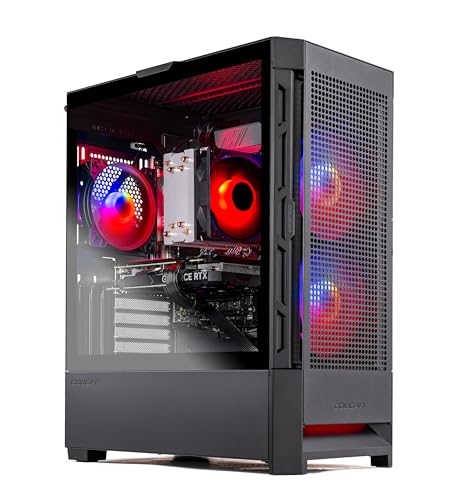
Where to buy
Check the latest price, availability and delivery on Amazon. Orders are placed on Amazon. We may earn a commission from qualifying purchases.
- Best first gaming PC for most beginners: Skytech Blaze4 Mini, Ryzen 7 5700, RTX 4060 Ti — Check on Amazon
- Thermaltake LCGS Quartz i1460, RTX 5060 — Check on Amazon
- CyberPowerPC Gamer Xtreme VR, RTX 4060, DDR5 (GXiVR8060A24) — Check on Amazon
- CyberPowerPC Gamer Xtreme VR, RTX 4060 Ti 16GB (GXiVR8040A14) — Check on Amazon
See 2 more Amazon options
- Skytech Archangel, RTX 4060, 32GB DDR5, 2TB SSD — Check on Amazon
- Skytech Nebula, Ryzen 5 5600X, RTX 4060 Ti — Check on Amazon
Read the full guide ↓
Disclosure: As an Amazon Associate, reviewstook.com earns from qualifying purchases. Links to Amazon on this page are affiliate links; they cost you nothing extra. Listing details such as price and availability change often, so check the current Amazon listing before you buy.
Buying your first gaming PC is confusing for a simple reason: the listings are written for people who already own one. Every title is a string of model numbers, every seller promises “ultra” performance, and the one number you actually understand — the price — swings by hundreds of dollars from week to week. This guide is written for the person standing at the start of that process with up to $1,200 to spend. It explains every technical term before it uses it, tells you plainly what this money can and cannot do, and is honest about the strangest fact in this category: you may not need to spend the full $1,200 at all. Two of the six machines below sit at the lower end of this budget, and for a first PC on a standard monitor, one of those may genuinely be the right buy, leaving more of the budget for a screen and games.
So here is the honest core, before any product names. A budget of $1,200 buys a proper gaming PC with a real, separate graphics card — the component that does most of the work in games. Every machine in this guide is built around NVIDIA’s GeForce RTX 4060, RTX 4060 Ti or the newer RTX 5060. In plain terms, that means smooth gaming at 1080p (the resolution of a standard HD monitor) at high quality settings, very fast performance in popular online games, and a reasonable go at 1440p (a sharper resolution) when a helper technology called upscaling is switched on. What $1,200 does not buy: comfortable gaming at 4K resolution, every setting in every brand-new game pushed to its maximum, or silence — these are air-cooled boxes with fans, and you will hear them working under load. It also does not buy a screen, which is a separate purchase we budget for further down.
Prices on ready-made gaming PCs move a lot between sales. That is why this guide does not print fixed prices for the machines below — check the current price on Amazon for each pick before you decide. Your job as a first-time buyer is not to find the perfect PC — it is to pick a good machine that fits your budget and your monitor on the day you happen to shop.
New to This? The Jargon, in Plain English
Keep this section open while you read the reviews. Every term below is used in the listings you will see, and none of them is as complicated as it sounds.
- CPU (the processor). The computer’s general-purpose brain — it runs Windows, your browser, and the non-visual parts of games. Names like Ryzen 7 5700 or Core i5-14400F are just model numbers; a higher tier generally means more cores (parallel workers) and a longer useful life. For gaming at this budget, any CPU in this guide is strong enough; the graphics card matters more.
- GPU (the graphics card). A separate circuit board whose only job is drawing the game world. This is the single most important part in a gaming PC, and the part you should spend your money on first. In this guide the cards are the GeForce RTX 4060, RTX 4060 Ti and RTX 5060.
- VRAM (video memory). Memory that lives on the graphics card and holds the images the card is drawing. Most cards here have 8GB; one has 16GB. More VRAM mainly matters in the newest games at their highest texture (surface detail) settings. You cannot add VRAM later — it is fixed to the card — which is why it gets so much attention in the reviews.
- RAM (system memory). The computer’s short-term workspace, separate from the graphics card’s VRAM. 16GB is the standard amount and is fine for gaming plus a browser and chat apps. 32GB gives heavy multitaskers and streamers more breathing room. RAM is one of the easiest parts to add later.
- SSD vs HDD (storage). Where your games and files live permanently. An SSD is fast electronic storage — games load quickly and Windows feels snappy. An HDD is an older spinning disk: cheaper per gigabyte but much slower. Every machine in this guide uses an SSD. The size (1TB or 2TB) decides how many large modern games fit at once.
- Integrated vs discrete graphics. “Integrated” graphics are a small graphics unit built into the CPU — fine for office work and very light games, not enough for serious gaming. A “discrete” graphics card is the separate, powerful board described above. Every pick in this guide has a discrete card; that is what separates a gaming PC from an office PC wearing gaming clothes.
- Refresh rate (Hz). How many times per second your monitor can show a new picture. A basic monitor is 60Hz or 75Hz; gaming monitors run at 144Hz and up, which looks noticeably smoother in fast games. The catch: a faster PC only shows its advantage on a faster monitor — a powerful PC plugged into a 60Hz screen is partly wasted, which is why this guide keeps talking about monitors.
- Resolution (1080p, 1440p, 4K). How many dots make up the picture. 1080p is standard HD; 1440p is sharper and asks more of the graphics card; 4K is sharpest and asks far more than this budget can give.
- Upscaling (DLSS and frame generation). Clever software that lets the graphics card draw the game at a lower resolution, then stretch it intelligently to fill your screen, so games run faster than they otherwise would. NVIDIA’s version is called DLSS. The newest cards also offer “frame generation”, which inserts extra software-created frames to make motion look smoother; it does not make the game respond faster to your mouse, and it only works in games that support it.
- PSU (power supply). The box inside the PC that converts wall power for all the parts. A named unit with a wattage and an efficiency rating (such as “650W Gold”) is a good sign; a listing that hides the power supply entirely is hiding the cheapest part in the machine.
- Prebuilt. A complete PC assembled by a company, with Windows installed — what this guide covers. The alternative is building your own from parts, which can save money but is a weekend project with a learning curve.
- Renewed / refurbished. A used machine that has been checked, cleaned and resold, usually for less. Listings at lower budgets are full of renewed office PCs, and they can be good value — but none of the six machines in this guide is renewed. All six are new, which for a first PC means a full manufacturer warranty and no previous owner’s wear.
In this guide
Quick Picks
Short on time? Each row names a type of first-time buyer and the machine that fits them, with the reason in one line.
| Buyer type | Pick | Why it stands out | Link |
|---|---|---|---|
| Best first PC for most beginners | Skytech Blaze4 Mini, RTX 4060 Ti | The strongest graphics card here in a lower-priced package in this guide — check price on Amazon | Check on Amazon |
| Best if you want the newest technology | Thermaltake LCGS Quartz i1460, RTX 5060 | Current-generation card with the latest upscaling features — check the current price on Amazon | Check on Amazon |
| Best if you want to spend less | CyberPowerPC Gamer Xtreme VR (GXiVR8060A24) | A lower-priced option on a modern platform — keep the change for a monitor — check price on Amazon | Check on Amazon |
| Best for keeping the PC longest | CyberPowerPC Gamer Xtreme VR (GXiVR8040A14) | Double the graphics memory of the others — check price on Amazon | Check on Amazon |
| Best if you hate running out of space | Skytech Archangel | Double the memory and double the storage of the typical pick | Check on Amazon |
| Best if you can wait for a sale | Skytech Nebula, RTX 4060 Ti | Strong value when its current price sits at the lower end of this budget — check the current price on Amazon before you buy | Check on Amazon |
How These Picks Were Chosen
Every machine below is a real, current Amazon listing. Because ready-made PC prices change often, this guide does not print fixed prices — check the current price on Amazon for each pick and compare it against your overall budget before you decide. If a pick’s current price would push your total setup over budget on the day you shop, the beginner-friendly move is not to stretch — pick a different machine from this list that leaves room for the monitor and other essentials you still need.
The picks were ranked with a beginner’s priorities, which are not quite an enthusiast’s. First, the graphics card, because it decides your game settings more than anything else — but second, and almost as important, forgiveness: a named power supply rather than a mystery one, enough storage that you are not deleting games in month two, and no part so unusual that finding help online becomes a research project. Third came the platform — the combination of processor socket and memory type (called DDR4 or DDR5) that decides whether the machine can be upgraded in a few years or is finished as it stands.
We did not use these machines ourselves. We read the manufacturers’ listings, model pages and specification records, and compared the things a buyer receives and cannot easily change later: graphics card and its memory, processor, memory type and amount, storage, and the power supply. Where a listing is vague — a couple of these do not name their power supply, for example — the review says so instead of filling the gap with a guess. And one filter applied to everything: no machine earned its place through decoration. Coloured lighting and glass panels are harmless fun, but at a fixed budget every dollar spent on looks is a dollar not spent on the parts in the glossary above.
The 6 Best Budget Gaming PCs for Beginners Under $1,200
Skytech Blaze4 Mini — Ryzen 7 5700, GeForce RTX 4060 Ti (ST-BLAZE4MINI-1266-B-AM)
Who it suits: The beginner who wants the simple answer. If a friend who knows PCs were choosing your first machine on value alone, this is the one they would point at.
Start with what explains this pick: it pairs a GeForce RTX 4060 Ti — tied for the fastest graphics card in this guide — with an eight-core Ryzen 7 5700 processor, 16GB of memory, a 1TB SSD and a named 650W Gold-rated power supply, while sitting at the lower end of this budget range. Check the current price on Amazon. In practice that means high settings at 1080p across the popular catalogue, headroom for a high-refresh monitor later, and more of your overall budget left for a screen, a headset and games. One normal quirk of this brand: Skytech notes the graphics card’s manufacturer brand may vary between units. That sounds alarming and is not — the card model and its 8GB of video memory are what you are promised, and those are what decide performance.
Now the trade-off, in the plainest terms we can put it. This machine’s foundations — its processor socket, called AM4, and its DDR4 memory — are a finished generation. The machine is fast today and will stay useful for years, but when you eventually want a much faster processor, you will be replacing the machine rather than upgrading that part. Its small “Mini” case is the other compromise: it fits anywhere, but its tight interior makes later tinkering less pleasant, and a future graphics card would need its length checked against the case before ordering. Neither point matters much if your plan is “buy a good PC, play games for four or five years, then buy the next one” — which is most people’s actual plan.
- The fastest graphics card tier in this guide in a lower-priced package — check price on Amazon.
- A named 650W Gold power supply — the part cheap PCs most often cut corners on, done properly here.
- Small case that fits on or under almost any desk.
Honest limitation: Its platform cannot take a future processor upgrade, and the small case limits future graphics card size. Check the current price on Amazon before you buy, and compare it with the picks below if it sits near the top of this budget.
Choose it if you want the most gaming power per dollar today and expect to replace the whole PC when it eventually feels old. Skip it if you already know you are the tinkering type who wants to upgrade parts one by one over the years — start with a DDR5 machine instead.

Thermaltake LCGS Quartz i1460 — Intel Core i5-14400F, GeForce RTX 5060 (S2QT-B760-560-LCS)
Who it suits: The beginner who plans to keep this PC a long time and likes the idea of owning the newest technology rather than the previous generation at a discount.
The Quartz is the only machine here built around a current-generation graphics card, the GeForce RTX 5060 — check the current price on Amazon. Its processor, a ten-core Intel Core i5-14400F, is modern and more than strong enough for this class of card. The storage is the standard 1TB fast SSD, and coverage of this configuration reports a 600W Gold-rated power supply. The new card’s headline feature is the latest DLSS upscaling, including frame generation, which creates extra frames to make motion look smoother on fast monitors. Two honest footnotes come with it: the generated frames do not make the game respond any faster to your inputs, so competitive players should not treat the feature as free performance — and it only exists in supporting games, not everywhere.
The compromises are about its foundations rather than its speed. The memory is 16GB of DDR4 — the older type — on an Intel platform that is itself in its final generation, so like the Blaze4 Mini above, this is a machine to enjoy as it is rather than a skeleton for future processor swaps. Judged purely on today’s performance for the money, the Blaze4 Mini’s card is roughly its match as a lower-priced option; what the Quartz buys is the newest card generation, its features, and a newer processor.
- The only current-generation graphics card in the guide, with the newest upscaling and frame-generation features.
- Sits in the upper part of this budget range — check the current price on Amazon and leave room for a monitor or games.
- A modern ten-core processor that will not hold the graphics card back.
Honest limitation: Older DDR4 memory on a final-generation platform limits future upgrades, and its signature feature — frame generation — smooths how games look without making them respond faster, and only in games that support it.
Choose it if you play story-driven games on a fast monitor and want the newest feature set to grow into. Skip it if you mostly play competitive online games, where the cheaper 4060 Ti machines earn their keep the straightforward way.

CyberPowerPC Gamer Xtreme VR — Intel Core i5-13400F, GeForce RTX 4060 (GXiVR8060A24)
Who it suits: The cautious beginner — first PC, ordinary monitor, not yet sure this hobby will take over the desk. This is the pick that lets you find out for the least money while giving nothing important up.
Two facts make this machine. The first is its position in this budget: it sits at the lower end of the range in this guide — check the current price on Amazon. The second is what that price is standing on. Unlike most cheap gaming PCs, this one is built on the current DDR5 memory platform, with a Core i5-13400F processor, 16GB of DDR5 memory and a fast 1TB SSD — foundations of the modern kind, which can accept a faster processor and more memory in a few years’ time. The graphics card is the RTX 4060, one step below the Ti models above. Translated honestly, that step down is modest at 1080p — a little less detail headroom in the newest games — and on a standard 60Hz or 75Hz monitor it is no visible difference at all, because the screen itself is the limit.
Which raises the question this pick exists to ask: what is the money you do not spend on the tower for? Kept in your pocket, it can help cover a good 144Hz monitor — the single upgrade that improves every game more noticeably than a stronger graphics card behind a basic screen. Or it is a second drive next year, or a shelf of games, or money simply not spent. A first PC bought this way also lowers the stakes: if PC gaming turns out not to be your thing, you have spent less learning that than you would on a pick at the top of this budget. One caution: if its current price climbs close to the Blaze4 Mini’s, the value gap narrows, because the Blaze4 Mini’s stronger card comes into reach — so check the current price on Amazon for both before you decide.
- A lower-priced option in this guide — check price on Amazon.
- Modern DDR5 foundations where rivals in this part of the range still use the older platform — upgrades stay possible.
- Lets you keep more of the budget for the monitor, which a first setup usually needs more.
Honest limitation: The RTX 4060’s 8GB of graphics memory is the first ceiling you will meet in brand-new games at their highest detail settings, and if its current price sits close to the Blaze4 Mini’s, consider stretching to the Blaze4 Mini instead.
Choose it if your monitor is a standard 60–75Hz screen, your games are online titles or slightly older releases, or this is a toe in the water. Skip it if you already own a fast gaming monitor and want to play this year’s biggest releases at high settings from day one.
CyberPowerPC Gamer Xtreme VR — Intel Core i7-13700F, GeForce RTX 4060 Ti 16GB (GXiVR8040A14)
Who it suits: The beginner who already knows they love big, new, single-player games — and wants the one specification that can never be upgraded later bought generously from the start.
Remember from the glossary that VRAM — the graphics card’s own memory — is fixed forever: you cannot add more without replacing the whole card, the most expensive part in the box. Every other card in this guide has 8GB. This machine’s RTX 4060 Ti has 16GB, double the amount, alongside the strongest processor in the guide, a Core i7-13700F, 16GB of DDR5 memory and a 1TB SSD. Check the current price on Amazon. What the extra memory buys a beginner is time: today’s games fit comfortably in 8GB at sensible settings, but each year’s biggest releases ask for more, and the day an 8GB card starts forcing detail down is the day this machine’s premium starts paying for itself. If you keep a PC for four or five years and play each year’s releases, this is the pick designed for you.
And now the condition, which is not fine print — it is the whole deal. This pick only makes sense in this guide if its current price fits inside your $1,200 budget with room for the rest of your setup. Check the current price on Amazon: if it fits, it may be the smartest buy in the guide for a heavy-games player; if it would push you over budget, it is not a worse machine, it is simply not one this guide can recommend for this budget. In that case, buy the Blaze4 Mini or the Quartz and feel no regret. Note too what the premium does not include: memory and storage are the standard 16GB and 1TB, so a big game library will still outgrow it before the graphics card does — the next pick exists for exactly that person.
- 16GB of graphics memory — double every other pick — the longest-lasting single specification in the guide.
- The strongest processor here, with spare capacity for streaming or background apps later.
- When its current price fits comfortably inside this budget, the value case is genuinely strong — check the current price on Amazon.
Honest limitation: Its current price can sit near or above the top of this budget, so only choose it when the live price fits your $1,200 budget — and its ordinary 16GB of memory and 1TB of storage are unremarkable at this level.
Choose it if its current price fits inside your $1,200 budget and you play the newest big releases you want to keep looking good for years. Skip it if the live price would push you over budget, or your games are online titles that will never use the extra graphics memory.

Skytech Archangel — Intel Core i5-14400F, GeForce RTX 4060, 32GB DDR5, 2TB SSD (ST-ARCH4-1247-W-AM)
Who it suits: The beginner whose problem is not speed but stuff — a big library of games, a stream running alongside, a browser with dozens of tabs — and who would rather pay once than upgrade soon.
Most PCs in this class give you 16GB of memory and a 1TB drive. Many owners end up buying a second drive or a memory kit within a year or two; the Archangel simply starts where they end up: 32GB of DDR5 memory and a 2TB SSD, wrapped around a current Core i5-14400F processor, an RTX 4060 graphics card and a named 650W Gold power supply. It sits at the top end of this budget range — check the current price on Amazon. Modern games are large — a handful of big releases can fill 1TB — and 2TB removes the uninstall-to-install shuffle that puts newcomers off. As with its Skytech siblings, the card’s manufacturer brand may vary; the model and memory are the promise.
The trade is equally clear, and hiding it would be a disservice: the graphics card is the RTX 4060, one tier below the Ti machines. If your only question is “which PC plays games fastest today per dollar?”, the honest answer is the Blaze4 Mini, and you should buy that and add storage later. The Archangel answers a different question — “which PC will ask the least of me?” — and for a first-time owner who streams, multitasks, or simply never wants to open the case, that is a perfectly good question to ask.
- Double the memory (32GB) and double the storage (2TB) of the typical pick — the two upgrades beginners most often end up buying, already done.
- Named 650W Gold power supply and a current-generation processor.
- When its current price sits lower in this budget range, it becomes an easier recommendation — check the current price on Amazon.
Honest limitation: You are paying for room to breathe, not for speed — the graphics card is a tier below the Ti picks, and at the top of this budget the value depends entirely on you genuinely needing the capacity.
Choose it if you keep lots of games installed, stream, or run many apps at once. Skip it if you play one or two games at a time and would rather have the faster card — the Blaze4 Mini plus a future drive is your route.

Skytech Nebula — AMD Ryzen 5 5600X, GeForce RTX 4060 Ti (ST-NEBULA-0762-B-AM)
Who it suits: The beginner in no hurry — someone happy to set a price alert, wait a few weeks, and let a sale do the negotiating.
As a machine, the Nebula is easy to explain: an RTX 4060 Ti graphics card, a Ryzen 5 5600X processor that remains perfectly capable for gaming, 16GB of memory, a 1TB SSD and a named 600W Gold power supply, in a roomy full-size case. When its current price sits at the lower end of this budget, it matches the Blaze4 Mini’s graphics card in a roomier box, and becomes one of the best buys here — check the current price on Amazon. There is, however, a catch large enough to build the whole review around: its current price can also sit near the top of this range, where you would be paying top money for an older DDR4-based platform while newer machines in this guide offer a more modern foundation.
So treat the Nebula as your training exercise in the one skill that saves PC buyers more money than any other: deciding your budget before you shop. If its current price sits at the lower end of this budget, buy with confidence; if it sits near the top of the range, close the tab and take the Blaze4 Mini or the Quartz instead. As with the other Skytech machines, the graphics card’s brand may vary between units while the model and 8GB of memory stay as promised.
- A fast 4060 Ti graphics card and a named 600W Gold power supply in an easy-to-open full-size case.
- At the lower end of this budget, among the best value in this guide — check the current price on Amazon.
- A balanced specification with no hidden weak point at the right price.
Honest limitation: At the top end of this budget it is poor value on an older platform. This is the most price-sensitive pick in the guide, and checking the current price before you buy matters more here than with any other pick.
Choose it if its current price sits at the lower end of this budget and you like the idea of a roomy case for later tinkering. Skip it if it is sitting near the top of this budget when you check.

Comparison Table
| Product | Graphics card / memory | Foundations | Best for | Link |
|---|---|---|---|---|
| Skytech Blaze4 Mini | RTX 4060 Ti / 8GB | Ryzen 7 5700, DDR4 | Most gaming power for the money | Check on Amazon |
| Thermaltake LCGS Quartz i1460 | RTX 5060 / 8GB | i5-14400F, DDR4 | Newest technology | Check on Amazon |
| CyberPowerPC GXiVR8060A24 | RTX 4060 / 8GB | i5-13400F, DDR5 | Spending less on a modern platform | Check on Amazon |
| CyberPowerPC GXiVR8040A14 | RTX 4060 Ti / 16GB | i7-13700F, DDR5 | Keeping the PC longest | Check on Amazon |
| Skytech Archangel | RTX 4060 / 8GB | i5-14400F, DDR5, 32GB, 2TB | Big libraries and multitasking without upgrading | Check on Amazon |
| Skytech Nebula | RTX 4060 Ti / 8GB | Ryzen 5 5600X, DDR4 | Top value only at the lower end of this budget | Check on Amazon |
Your First Hour: Setting Up, Step by Step
Every machine in this guide arrives with Windows installed and ready. Setup is an hour of simple steps, and two of them are famous beginner traps this walkthrough exists to save you from.
- Step 1 — Unbox and remove the packing inside the case. Prebuilt PCs often ship with protective foam or an inflatable pack inside the case, through the glass side panel, to protect the graphics card in transit. It must come out before first use — running the PC with packing inside blocks airflow. The maker’s quick-start sheet shows how the panel opens; it is a two-minute job. Keep the box until you are sure everything works.
- Step 2 — Connect the monitor to the graphics card, not the motherboard. This is the most common first-PC mistake in existence. The back of the PC has two clusters of sockets: a vertical group belonging to the motherboard, and a horizontal row lower down belonging to the graphics card. Plug your monitor cable (HDMI or DisplayPort) into the graphics card’s row. Plugged into the motherboard instead, the PC will still show a picture on many models — but your expensive graphics card sits idle while a much weaker built-in unit does the work, and games run terribly for no obvious reason.
- Step 3 — Power, keyboard, mouse, internet. Connect the power cable, switch on the small switch on the back of the power supply if there is one, then press the case’s power button. Connect your keyboard and mouse, and plug in an Ethernet cable if you can — wired is faster and steadier than Wi-Fi for the large downloads coming next, though every pick here also has Wi-Fi.
- Step 4 — Let Windows finish, then update everything. The first boot walks you through creating an account; accept the defaults. Once you reach the desktop, run Windows Update (Settings, then Windows Update) and restart as many times as it asks — a new PC typically has months of updates queued. Then update the graphics driver through the NVIDIA app: the driver is the software that most affects game performance, and keeping it current is the one maintenance habit worth forming.
- Step 5 — Set your monitor to its real refresh rate. If you own a 144Hz monitor, Windows often leaves it running at 60Hz until told otherwise, silently wasting the smoothness you paid for. Go to Settings, Display, Advanced display, and select the highest refresh rate listed.
- Step 6 — Install a game store and one free game. Steam is the standard storefront; the Epic Games Store and the Xbox app are the other common ones. Install one, claim a free game or download a free-to-play title, and use it as your test run. In the game’s settings menu, set the resolution to your monitor’s (1920×1080 for a 1080p screen) and pick the High preset rather than Ultra — on this class of PC, High looks nearly identical and runs far more smoothly. If the game offers DLSS in its graphics settings, set it to Quality.
What Else You Will Spend
The PC itself is not the whole purchase, and a beginner’s budget should be honest about that from the start. None of the machines in this guide includes a monitor — the tower is the product. Here is the rest of a first setup, in the order it matters.
- A monitor, if you do not own one. This is the big one, and it is also where leftover budget does the most visible good. A 1080p monitor with a 144Hz refresh rate is the natural partner for every pick here; a basic 60Hz screen will work, but it caps how smooth games can look no matter which PC you buy. If your total budget including a screen is $1,200, the honest build is one of the lower-priced picks in this guide plus the monitor.
- Keyboard, mouse and headset. Check the listing’s “what’s in the box” section for your chosen model, since bundles vary — anything included will be serviceable starter gear, and all of it can be upgraded later, one piece at a time.
- Games. The PC arrives empty of games — but the biggest online titles are free to play, and the major stores run deep sales constantly. Budget a little for your first purchases rather than assuming the spending ends at checkout.
- Small practicalities. A power strip with surge protection, and somewhere for the tower to sit with open air around its vents — not inside a closed cabinet.
None of these costs is inside any pick’s price in this guide. The encouraging flip side: everything on this list is a one-time or occasional cost, and the peripherals will outlive this PC and serve the next one.
Upgrades, in Plain Terms
Sooner or later every first-time owner asks what can be improved later. The honest answer differs by part, and by machine — and a beginner guide should never promise an upgrade the hardware does not actually allow.
- Storage: yes, easily, on all six. Adding a second SSD when the first fills is the most common upgrade in PC ownership and the easiest — it is the upgrade the Archangel’s 2TB drive simply postpones. This is the one to plan on.
- Memory (RAM): yes. Moving from 16GB to 32GB is a simple, well-documented job on machines of this type, and the Archangel already starts there. Just match the type your machine uses — DDR4 and DDR5 are different, physically incompatible sticks, and your machine’s reviews above say which it takes.
- The processor: only on the DDR5 machines. The two CyberPowerPC picks and the Archangel stand on the current DDR5 platform, which keeps a genuine processor-upgrade path open in a few years. The Blaze4 Mini, Quartz and Nebula stand on finished platforms: their processors are strong, but a major processor upgrade there means replacing the motherboard and memory too — in practice, replacing the machine.
- The graphics card: possible, with two checks. A future card swap is the classic mid-life upgrade, and it depends on two things the reviews flagged where they matter: physical room (the Blaze4 Mini’s small case means checking a new card’s length before ordering) and power. The Blaze4 Mini and Archangel name 650W Gold power supplies and the Quartz and Nebula name 600W Gold units — sensible headroom for cards in this class. The two CyberPowerPC listings do not name their power supply in the material we reviewed, so check the live listing or the unit inside the case before planning a card upgrade around them.
- What you cannot upgrade: the graphics card’s memory. VRAM is part of the card. That is why the 16GB CyberPowerPC pick exists, and why “I’ll add more VRAM later” is the one plan in PC gaming that does not exist.
How to Choose Your First Budget Gaming PC
- Start from your monitor, not from the PC. A 60–75Hz screen points you to the lower-priced picks; a 144Hz screen (or one you plan to buy) is what justifies spending toward $1,200. The display decides how much PC you can actually see.
- Spend on the graphics card first. It decides your game settings more than any other part. Between two machines at similar money, the one with the stronger card — or the same card with more of its memory — is usually the better gaming buy.
- Decide whether you are an upgrader or a replacer. Upgraders should buy a DDR5 machine and accept a slightly weaker card today. Replacers should buy the strongest card per dollar today and ignore the platform entirely. Both are respectable strategies; mixing them up is the expensive one.
- Count the space, not just the speed. Modern games are huge. A 1TB drive fills faster than new owners expect, and a machine with 2TB (or a cheap plan to add a drive) saves a real annoyance, not a theoretical one.
- Set your budget limit before you open the listing. Prices in this category change often, and the same machine can represent strong value at the lower end of this budget and poor value at the top. Your limit, decided in advance, is what protects you.
- Ignore the decoration in the price. Lighting and glass are fine, but they are the last thing a fixed budget should fund. If a listing leads with looks and buries the graphics card model or the power supply, it is telling you its priorities — believe it.
Common Beginner Mistakes
- Plugging the monitor into the motherboard instead of the graphics card — the classic. The PC works, games run terribly, and the actual fix takes ten seconds. See step 2 of the setup walkthrough.
- Leaving the shipping packing inside the case. It is there to protect the graphics card in transit and blocks airflow in use. Out it comes, before the first boot.
- Spending the whole budget on the tower and feeding it a basic 60Hz monitor. The screen caps what you can see; a cheaper PC plus a 144Hz monitor is the better first setup for the same total.
- Paying a top-of-budget price for a machine whose value depends on sitting lower in the range. The 16GB CyberPowerPC and the Nebula can be strong buys at the lower end of this budget; the same boxes near the top of the range are a different proposition. The machine did not change — its position in the budget did.
- Comparing listing titles instead of specifications. Two cards share the “4060 Ti” name with different amounts of memory; the model number and spec table are the truth, the adjectives are not.
- Forgetting the refresh-rate setting. A 144Hz monitor left at 60Hz in Windows settings is a silent waste of money. One menu, once, fixes it forever.
Final Recommendation
- Best first PC for most beginners: Skytech Blaze4 Mini — the strongest graphics card here in a lower-priced package — check price on Amazon.
- Best for the newest technology: Thermaltake LCGS Quartz i1460 — current-generation card and features — check the current price on Amazon.
- Best for spending less: CyberPowerPC GXiVR8060A24 — modern DDR5 foundations at the lower end of this budget — check price on Amazon.
- Best for keeping the PC longest: CyberPowerPC GXiVR8040A14 — double the graphics memory, but only when its current price fits your $1,200 budget.
- Best for big libraries: Skytech Archangel — 32GB of memory and 2TB of storage — check the current price on Amazon.
- Best for patient shoppers: Skytech Nebula — strong value at the lower end of this budget, a skip near the top of the range.
If you want one answer: buy the Blaze4 Mini — check the current price on Amazon first — plug the monitor into the graphics card, set the refresh rate, and play. If you would rather start on the modern platform with an upgrade path, the CyberPowerPC GXiVR8060A24 is the thoughtful alternative — and if you also need a screen, its savings buy the monitor this class of PC deserves. Readers whose budget is genuinely smaller will find the same approach applied at Best Budget Gaming PC Under $800 and Best Budget Gaming PC Under $500, and those who can stretch further can see what the next step actually adds at Best Budget Gaming PC Under $1500. Whichever you choose, decide your budget limit first, check the live listing against it, and remember that at this budget value for money matters as much as a fast card.
Frequently Asked Questions
Is $1,200 a sensible budget for a first gaming PC?
Yes — it is the point where a first PC stops feeling like a compromise. It buys a real graphics card of the current or previous generation, comfortable 1080p gaming at high settings, and enough headroom to last several years. It is also more than a beginner strictly needs: if your monitor is a standard one and your games are popular online titles, the lower-priced picks here will serve you just as well, and the difference is better spent on a screen.
Do I need to build my own PC to get good value?
No. Building your own can save money and teaches you the machine, but a prebuilt like these arrives assembled, with Windows installed and one warranty covering the whole box — for a first PC, that simplicity is worth a modest premium.
What games will these PCs actually play?
The popular online titles — competitive shooters, sports games, battle royales — are exactly what this class of machine is best at, and they will run at high settings at 1080p. Big single-player releases also run well at 1080p on high settings, with the newest and heaviest titles sometimes asking you to use upscaling (DLSS, in the glossary) or step one or two settings down from maximum. What they will not do is 4K gaming or maximum settings with all the cinematic extras in every new release — that is a different budget.
Why does this guide not print one firm price for each PC?
Because ready-made PC prices genuinely move that much — the machines here can move between the lower and upper ends of this budget, and some can drift above the $1,200 line. A single printed price would be wrong most of the time. Check the current price on Amazon for each pick and compare it with your overall budget.
Should I buy a renewed or refurbished PC instead and save money?
Renewed office PCs are the standard trick at much lower budgets, and they can be fine for light gaming — but they come with older parts, weaker graphics and a shorter warranty, and sorting the good listings from the bad is genuinely hard for a first-time buyer. All six picks here are new. If your budget shrinks, the guides at Best Budget Gaming PC Under $400 explain the renewed route honestly, including its traps.
Can these PCs handle 1440p, or streaming, or a small desk?
1440p: yes, as a stretch — the 4060 Ti and RTX 5060 machines manage it in many games with upscaling helping, and there is a dedicated shortlist at Best Budget Gaming PC For 1440p Gaming Under $1200. Streaming while you play asks more of the processor and memory, which is what the 16GB-graphics-memory CyberPowerPC and the 32GB Archangel are built for; see Best Budget Gaming PC For Streaming Under $1200. And if the PC has to fit a tight space, the Blaze4 Mini is a compact case by design, with more options at Best Budget Gaming PC For Small Spaces Under $1200.
- Best Budget Gaming PC Under $800
- Best Budget Gaming PC Under $1500
- Best Budget Gaming PC Under $2500
- Best Budget Gaming PC For Streaming Under $1200
- Best Budget Gaming PC For Small Spaces Under $1200
- Best Budget Gaming PC For 1440p Gaming Under $1200
- Best Gaming PC For Beginners Under $1200
- Best Prebuilt Gaming PC Under $1200
- Best Gaming PC Under $1200


