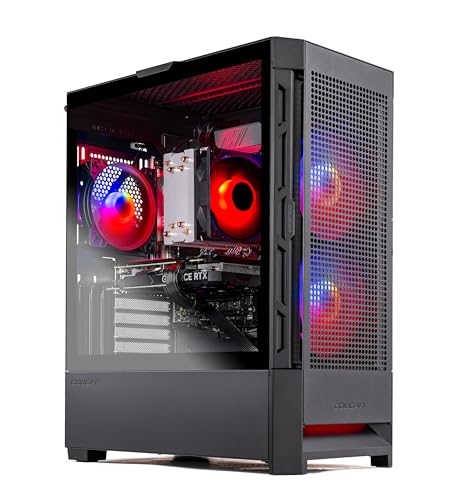
Where to buy
Check the latest price, availability and delivery on Amazon. Orders are placed on Amazon. We may earn a commission from qualifying purchases.
- Smallest case in this guide: Skytech Blaze4 Mini, Ryzen 7 5700, RTX 4060 Ti — Check on Amazon
- Thermaltake LCGS Quartz i1460, RTX 5060 — Check on Amazon
- CyberPowerPC Gamer Xtreme VR, RTX 4060, DDR5 (GXiVR8060A24) — Check on Amazon
- CyberPowerPC Gamer Xtreme VR, RTX 4060 Ti 16GB (GXiVR8040A14) — Check on Amazon
See 2 more Amazon options
- Skytech Archangel, RTX 4060, 32GB DDR5, 2TB SSD — Check on Amazon
- Skytech Nebula, Ryzen 5 5600X, RTX 4060 Ti — Check on Amazon
Read the full guide ↓
Disclosure: As an Amazon Associate, reviewstook.com earns from qualifying purchases. Links to Amazon on this page are affiliate links; they cost you nothing extra. Listing details such as price and availability change often, so check the current Amazon listing before you buy.
Start with the honest fact that shapes everything below: at $1,200, there is no genuinely small gaming PC in this guide. Every machine here is a tower. None of them is a mini PC, none of them mounts behind a monitor, and none of them will disappear into a shelf the way a palm-sized box does. If your space problem is that serious, this is the wrong shortlist and the right move is a different guide — the mini PC and small-form-factor shortlists linked at the end start from machines a fraction of these sizes. What this guide can honestly do is narrower and still useful: among full gaming towers that deliver real performance for this budget, some take meaningfully less of your room than others, some are far easier to live with in a tight corner, and some will punish you every time you need to plug something in. That is the grading used here.
Two words in the keyword deserve untangling before any pick is judged. “Budget” at $1,200 does not mean cheap; it means value discipline — the most gaming performance for the money in the four-figure band, with nothing spent on decoration that could have bought VRAM, memory or storage. And “small spaces” does not shrink these machines; it changes which of their traits matter. In a large room, a tower’s footprint is a rounding error. In a studio apartment, a dorm room, a box-room office or a living room where the PC shares a TV stand, the footprint is the desk, the heat is the room’s heat, the fan exhaust has nowhere to go, and the rear panel — where every cable lives — may be pressed against a wall. So this variant re-grades the same six verified machines from our base guide on the things that actually differ between towers in a small space: chassis class, where the machine can physically go, how its cables enter and leave, how much clear air its cooling needs, and how painful the inevitable upgrade afternoon will be inside each case.
One discipline note, stated now so nothing later surprises you: our base research documents no exact dimensions, weights, VESA patterns or noise figures for any of these six machines, so this guide claims none. Sizes are graded by chassis class — compact mini-tower, standard mid-tower, full-size tower — using the case descriptions in the verified listings, and where a measurement would decide your purchase, the guide says so and sends you to the live listing’s specification table. Any guide that prints a neat millimetre footprint for all six of these is inventing at least some of them. What can be graded honestly from the documented record is which case is the compact one, which is the full-size one, which interiors are roomy and which are tight — and that, plus placement and airflow judgement, is what the reviews below do.
In this guide
Quick Picks
Short on time? Each row names a space situation and the machine that fits it best. Prices change often, so use the link in each row to check price on Amazon before you decide.
| Space situation | Pick | Why it stands out | Link |
|---|---|---|---|
| Smallest footprint in this guide | Skytech Blaze4 Mini, RTX 4060 Ti | The compact mini-tower of the set, with strong 4060 Ti performance — check price on Amazon | Check on Amazon |
| Best current-generation tower | Thermaltake LCGS Quartz i1460, RTX 5060 | Newest GPU in the guide with DLSS 4 — check the current price on Amazon | Check on Amazon |
| Best value, standard tower | CyberPowerPC Gamer Xtreme VR (GXiVR8060A24) | RTX 4060 on a DDR5 platform positioned toward the lower end of this budget — check price on Amazon | Check on Amazon |
| Best VRAM for the budget | CyberPowerPC Gamer Xtreme VR (GXiVR8040A14) | RTX 4060 Ti 16GB plus a Core i7 — check price on Amazon and confirm it still fits the under-$1,200 budget before you buy | Check on Amazon |
| Best for a shared living space | Skytech Archangel | 32GB DDR5 and a 2TB SSD in a white case that looks at home outside a gaming den | Check on Amazon |
| Easiest case to work inside | Skytech Nebula, RTX 4060 Ti | Full-size case with easy access — check price on Amazon; best value when it sits toward the lower end of this budget band | Check on Amazon |
How These Picks Were Chosen
Every machine below is a real Amazon listing carried over from our base guide for this budget. This guide prints no fixed price for any pick, because prebuilt prices change often and a printed figure would go out of date quickly. Instead, each review describes where a machine sits in this band — toward the lower end, in the middle, or toward the top — and sends you to the live listing to check price on Amazon and confirm it still fits the budget on the day you shop. If the current price on Amazon no longer fits this budget, waiting or choosing a different pick is the correct budget move, and in a small space it is doubly correct — a tower you overpaid for is a tower you resent in a room you cannot escape it in.
The performance ranking is inherited from the base guide and it is performance for the budget, applied in a fixed order: the graphics card first, because at 1080p and 1440p it decides most of what you see; the platform second, because a DDR5 motherboard keeps a CPU upgrade path open while a DDR4 platform is finished; and the supporting parts third — RAM capacity, SSD capacity, and whether the power supply is a named unit with headroom or a mystery part. Onto that ranking, this variant lays a second, spatial grading. Each machine is assessed on five things. Chassis class: compact mini-tower, mid-tower or full-size tower, per the verified listing descriptions. Placement options: whether the case can plausibly live on a desk, beside it, or only on the floor. Cable reality: towers route display, power and peripherals from the rear panel, so rear clearance and cable bend room are part of the footprint whether listings admit it or not. Air: every machine here is actively cooled and exhausts real heat, so each is graded on how much open space its vents need and how badly it will behave in the enclosed spots small rooms tempt you to use. And service access: in a small space you will work on the machine where it lives, so an interior that fights you costs more than it does in a house with a workbench.
We did not use these machines ourselves, and we did not measure them. We read the maker listings, model pages and specification records behind the base guide, and compared GPU model and VRAM, CPU, RAM type and capacity, storage, power supply ratings and case class. Where the record is vague — and it is vaguest exactly where a small-space buyer wants certainty, on dimensions — the review says so instead of guessing. One more filter from the base guide survives intact: no machine earned its place by spending the budget on decoration. RGB lighting and tempered glass are pleasant, and in a shared living space a good-looking case genuinely matters more than it does in a spare room — but they rank below VRAM, memory and storage every time, and a machine that charges for looks while shipping a small drive did not make this list.
What “Small” Honestly Means When Every Pick Is a Tower
The word “Mini” appears in exactly one product name below, and it deserves suspicion rather than trust. In prebuilt naming, “mini” describes a case that is smaller than the same brand’s standard towers — a relative claim, not a measurement. The Blaze4 Mini is genuinely the compact case of this set, and its maker describes a mini case that suits small desks; it is still a tower containing a full desktop graphics card, a desktop power supply and desktop cooling, and it will occupy a tower’s worth of your desk or floor, merely a somewhat smaller tower’s worth. At the other end, the Nebula’s full-size case is the roomiest here and the easiest to work inside — virtues bought with the largest footprint in the guide. Between those poles sit four mid-towers that differ less in size than in what their size costs you: where the rear panel can face, how the glass side panel constrains which side of the desk the machine can sit on, and how much of your room’s limited air the cooling gets to use.
There is one piece of genuine good news for small spaces in this entire category, and it is worth stating plainly: none of these six machines has an external power brick. Every pick runs a standard internal desktop power supply — the documented units are named 600W to 650W 80 Plus Gold supplies on the Skytech and Thermaltake machines — so the brick-placement problem that haunts mini PCs simply does not exist here. What replaces it is the tower itself: the box is the brick, several times over, and it needs a home with the same deliberateness. A tower on the floor beside a desk is a legitimate small-space answer — it frees the entire desk surface — provided the floor spot has airflow, is safe from kicked feet and spilled drinks, and is close enough that your cables reach without strain. A tower on the desk is also legitimate if the desk is deep enough that the case’s rear cables are not bent against the wall. What is not legitimate, and what the mistakes section returns to, is a tower sealed into a closed TV-unit cabinet or a wardrobe: actively cooled gaming hardware in an unventilated box will thermal-throttle, get loud trying not to, and cook slowly. Small-space PC ownership is mostly the discipline of giving a warm box moving air.
Cable geography deserves its own paragraph because listings never mention it and small rooms never forgive it. On every tower here, the cables that matter — mains power, display, Ethernet if you wire it — leave from the rear panel, and the graphics card’s display outputs sit on that same rear face. That means the true depth of any of these machines is the case depth plus the bend radius of a display cable plus the length of the connectors themselves; a tower pushed flush to a wall is a tower whose cables are being crushed at right angles. The one documented port layout in this set underlines the point: the 16GB CyberPowerPC’s graphics card offers one HDMI and two DisplayPort outputs, so a two-monitor small desk will be running at least one DisplayPort cable, with its thicker connector, out of that rear panel. Plan the cable drop before the machine arrives — where the cables fall and whether the rear can keep a hand’s width of open air behind it — and the placement questions below answer themselves.
Measure Before You Buy: The Small-Space Checklist
Do these five steps in order, with a tape measure, before any tower goes into a cart. They take ten minutes, and they prevent the most common small-space failure: a PC that fits the spot but not the spot plus its cables, its heat and its own side panel.
- Step 1 — Measure the space, not the product photo. Record the usable width, depth and height of the exact desk zone, floor patch or TV-stand bay, minus what already lives there. Then take the candidate case’s exact dimensions from the live Amazon listing’s specification table — our research documents none, and the listing is the only honest source — and check the case against your numbers by class: the compact mini-tower first if the spot is tight, the full-size tower only if the spot is generous.
- Step 2 — Reserve ventilation clearance. Every machine here pulls air in and pushes heated air out through case vents and fans. Leave open air on the vented faces — never seal a tower in a closed cabinet, never wedge it between a wall and furniture on both sides, and treat a glass side panel pressed near a wall as a cooling problem as well as a viewing one. If the only available spot is enclosed, the honest answer is a low-power mini PC from the guides linked below, not a gaming tower.
- Step 3 — Give the power run a home. There is no brick to place, but there is a mains cable, a surge strip and usually a monitor cable joining it. Decide where the strip lives — off the floor if the room floods its sockets with chargers, reachable because you will use the switch — and confirm the tower’s spot is within a cable’s comfortable reach of it. A tower placed first and powered as an afterthought ends up on an extension lead across a doorway.
- Step 4 — Walk the cable drop. Count what must reach the rear panel: power, one or two display cables, Ethernet if wired, and any USB that cannot live on the front panel. Add the connectors’ length and a gentle bend to the case depth from Step 1, check the total against the wall, and decide which way the cables fall — down behind a desk is best; across a walkway or a radiator is not. If the rear cannot keep clear air and cable room, turn the machine or move it before it arrives, not after.
- Step 5 — Then, and only then, order. With the spot measured, the air reserved, the power homed and the cable path walked, the remaining checks are the buying ones from the base guide: confirm the exact model number on the listing matches the review, check the current price on Amazon and confirm it fits the under-$1,200 budget for your pick, and only then spend the money.
The 6 Best Budget Gaming PCs for Small Spaces Under $1,200
Skytech Blaze4 Mini — Ryzen 7 5700, GeForce RTX 4060 Ti (ST-BLAZE4MINI-1266-B-AM)
Who it suits: The small-space buyer who wants the strongest graphics card in this guide inside the smallest case in this guide, and who accepts a cramped interior and a finished platform as the trade for that combination.
The performance case is inherited from the base guide: a GeForce RTX 4060 Ti — the fastest GPU tier here alongside its 16GB sibling — in the compact case of the set. Check price on Amazon to confirm where it sits in this budget band on the day you shop. The Ryzen 7 5700’s eight cores are plenty for gaming and light streaming, the 1TB SSD matches the guide norm, and the 650W 80 Plus Gold power supply is a named, sensibly sized internal unit — which, for this variant’s purposes, also means no brick hunting for a home. Judged purely as a gaming machine for the budget, it leads the list. Judged as furniture, it also leads the list, and that double lead is why it opens this guide.
The case is the point. Skytech builds this model in a compact mini case that the base research describes as desk-friendly and suited to small desks and living-room setups — the only chassis in the set whose listing makes smallness part of the product. In class terms it is a compact mini-tower: still a tower, still floor-or-desk furniture, but the one pick here a genuinely tight desk should audition first. The trade is written into the same sentence of the record: this is the tightest working space in the guide. A RAM or SSD swap is fine; a future graphics card must be length-checked against the case before ordering, and the whole upgrade afternoon happens in less elbow room than any sibling offers. Heat follows the same logic — a compact case moving a 4060 Ti’s worth of warm air has less slack than a big box, so the clearance rules in the checklist matter most for this pick: open air at the vents, no cabinet, no wall-hugging. Place it well and it is the easiest machine here to live with in a small room; seal it in and it will be the loudest about its mistake.
- Compact mini case — the smallest chassis class in this guide, made for small desks.
- RTX 4060 Ti performance positioned as strong value in this budget band — check the current price on Amazon.
- Internal 650W Gold power supply — no external brick to place.
Honest limitation: The mini case is the tightest working space in the guide, the AM4/DDR4 platform is a dead end for CPU upgrades, and no exact dimensions are documented — confirm the case measurements on the live listing against your spot before ordering.
Choose it if your desk or floor patch is the constraint and you want maximum frame rate for the budget inside it. Skip it if you expect to fit a large future graphics card or work inside the case often — the roomier Nebula below trades footprint for exactly that ease.

Thermaltake LCGS Quartz i1460 — Intel Core i5-14400F, GeForce RTX 5060 (S2QT-B760-560-LCS)
Who it suits: The buyer in a small, shared space who wants the newest graphics technology in the guide — DLSS 4 with multi frame generation — in a presentable tower that can sit in a living room without apology.
The RTX 5060 is the only current-generation graphics card in this set. Check the current price on Amazon for the Quartz i1460 and confirm it fits this budget before you buy. In raw rendering the 5060 sits close to the 4060 Ti machines; its addition is DLSS 4 multi frame generation, which in supported titles multiplies displayed frame rates on a high-refresh monitor in a way the 40-series cards cannot. Judge it honestly, as the base guide does: frame generation raises perceived smoothness, it does not lower input latency like rendered frames do, and it exists only in games that support it. Underneath, a ten-core Core i5-14400F will not bottleneck this GPU class, the 1TB NVMe drive matches the norm, and the 600W 80 Plus Gold power supply reported for this configuration is an internal unit adequate for the card with modest headroom.
Spatially, the Quartz is a standard mid-tower proposition — Thermaltake’s LCGS line is built as showcase hardware, with the glass-and-lighting presentation that cuts both ways in a small shared room. In its favour: a tidy, current-generation tower is the easiest kind of gaming PC to leave visible in a living space. Against it: a mid-tower footprint is a mid-tower footprint, and the glass presentation dictates placement — the machine wants its side visible, which usually means desk-top or a stand, which in a small room is prime real estate a plainer box could have surrendered to the floor. Its 16GB of DDR4 sits on an LGA1700 board in that socket’s final generation, so the interior you are making room for is a finished platform: buy it for the GPU generation and its fit for a shared room, not for an upgrade story. Give its rear panel the cable room every tower needs and its vents open air, and it is a civilised housemate.
- Only RTX 50-series machine in the guide — DLSS 4 multi frame generation in supported titles.
- Positioned within this budget band — check the current price on Amazon before you buy.
- Showcase mid-tower presentation suits a shared living space better than a den-only design.
Honest limitation: A full mid-tower footprint with a glass side that wants desk or stand placement, on a final-generation DDR4 platform — and frame generation is a smoothness feature, not a latency feature.
Choose it if the PC will live visibly in a shared room and your games support frame generation. Skip it if every centimetre counts — the Blaze4 Mini’s compact case is the smaller answer — or if you play competitive titles where rendered frames are the only currency.

CyberPowerPC Gamer Xtreme VR — Intel Core i5-13400F, GeForce RTX 4060 (GXiVR8060A24)
Who it suits: The buyer whose small space argues for spending less, not more: the one who chooses a machine positioned toward the lower end of this budget and puts what remains toward the monitor, the desk or the room itself.
This is the base guide’s lower-band DDR5 pick, and in a small-space variant its logic sharpens. It is positioned toward the lower end of this budget — check price on Amazon to confirm its current position in the band — and unlike cheaper-feeling machines it is built on DDR5: a Core i5-13400F, 16GB of DDR5 and a 1TB PCIe Gen4 SSD behind an RTX 4060. The 4060 is one tier below the Ti, a difference that is modest at 1080p high settings and invisible in esports titles on a 60–75Hz monitor. What the lower positioning buys a small-space owner is concrete: budget left unspent can go toward a 144Hz monitor that improves every game more visibly than the GPU tier would, or a better desk, or simply money not converted into a larger object in a small room. The DDR5 platform also keeps a genuine CPU and RAM upgrade path open, which matters spatially too — a machine that can grow in place is a machine you do not have to replace, store or sell from a one-room flat.
As an object, it is a standard CyberPowerPC mid-tower: no compact claims, no documented dimensions in our research, and the usual tower requirements — rear clearance for the display and power cables, open air at the vents, and a decision made in advance about desk versus floor. It asks nothing exotic and offers nothing exotic; its spatial virtue is entirely economic. One caution carries over in price-free form: its value case is strongest when its current price on Amazon sits toward the lower end of this budget band. Priced toward the top of the band, the value gap over the Blaze4 Mini narrows sharply — at which point the smaller case and faster GPU of the Skytech make it the better small-space buy anyway. Checked that way, it can be the most room-friendly purchase here, because the smallest gaming PC is partly the one that leaves budget for the room.
- Positioned toward the lower end of this budget band — check price on Amazon.
- DDR5 platform at a lower-band position — the machine can be upgraded in place later.
- Leaves more of the budget for a monitor or the room, where it often does more good.
Honest limitation: A standard mid-tower with no compact-case claims, an 8GB-VRAM RTX 4060 that is the first ceiling you will feel in newer games, and a value case that depends on its current price on Amazon sitting toward the lower end of this budget rather than the top.
Choose it if your monitor is 60–75Hz, your games are esports or older titles, or the room needs the leftover budget more than the GPU tier. Skip it if you already own a high-refresh monitor and play the newest releases at high settings — that is what the 4060 Ti picks are for.
CyberPowerPC Gamer Xtreme VR — Intel Core i7-13700F, GeForce RTX 4060 Ti 16GB (GXiVR8040A14)
Who it suits: The long-keeper in a small space: the buyer who cannot easily swap machines in and out of a tight setup, and who therefore wants the one specification that cannot be upgraded later — VRAM — bought as well as this guide can buy it.
VRAM is soldered to the graphics card, and the card is the most expensive part to replace, so the 8GB cards in this guide carry a quiet expiry date in newer games at high texture settings. This CyberPowerPC is the answer: an RTX 4060 Ti with 16GB of VRAM — double every other pick — with the strongest CPU in the guide, a Core i7-13700F, plus 16GB of DDR5 and a 1TB NVMe SSD. Check the current price on Amazon and confirm it still fits the under-$1,200 budget before you buy. For a small-space owner the longevity argument has a physical edge: every machine replacement in a tight room is a day of unplugging, extracting, re-cabling and disposing, so a PC that stays comfortable in year four instead of year two saves space-churn as well as money. The documented display outputs — one HDMI and two DisplayPort on the graphics card — also suit the small multi-monitor desk, with the caveat from this guide’s cable section: those connectors all live on the rear panel, and DisplayPort cables are the thick ones, so budget the bend room behind the case.
The honesty this pick demands is about fit with the budget, and it is unchanged in spirit from the base guide. Its current price on Amazon can move above this budget between sale events. When it fits the under-$1,200 budget it is arguably the best value here for a heavy-games player; when it does not fit, it is not in this guide at all, and no amount of VRAM justifies pretending otherwise. The rule stands in price-free form: buy only when the current price on Amazon fits this budget; if the live listing sits above the budget, buy the Blaze4 Mini or the Thermaltake instead. Note too what the specification does not add — system RAM and storage match the guide norm at 16GB and 1TB, so the capacity-hungry should look at the Archangel below. As furniture it is another standard CyberPowerPC mid-tower with no documented dimensions in our research; grade it as a full-size housemate bought for its insides, and confirm its measurements on the live listing before committing your floor patch.
- 16GB of VRAM is twice what any other pick carries — the GPU specification most likely to still matter in five years.
- The Core i7-13700F outmuscles every other CPU in this guide, with cores to spare for streaming and background work.
- Documented 1× HDMI and 2× DisplayPort outputs suit a two-monitor small desk.
Honest limitation: Its current price on Amazon can move above this budget between sales — check price on Amazon before you buy — and it is a standard mid-tower with no compact claims, so the longevity is bought at a full footprint.
Choose it if its current price on Amazon fits the under-$1,200 budget, you play demanding new releases at high textures, and want to postpone the whole replacement-and-recabling day for as long as possible. Skip it if the listing sits over the budget on the day you shop, or your library is esports titles that will never use the extra memory.

Skytech Archangel — Intel Core i5-14400F, GeForce RTX 4060, 32GB DDR5, 2TB SSD (ST-ARCH4-1247-W-AM)
Who it suits: The buyer whose PC lives in a shared room — a living room, a studio, a family space — where the machine has to look like it belongs and hold a whole library without external drives colonising the shelves.
The Archangel’s specification is the capacity play from the base guide: 32GB of DDR5-5600 and a 2TB SSD — double the guide norm on both — around a Core i5-14400F and an RTX 4060, with a named 650W Gold internal power supply. It sits in the upper part of this budget band — check the current price on Amazon to confirm its current position. The small-space reading of that specification is about what is not in the room: no external drive enclosure on the desk because the 2TB SSD swallows the library, no near-certain RAM-and-storage upgrade afternoon in year two because the capacity arrived installed, matched and under one warranty. In a home with no spare room to work in, avoiding opening the case is a spatial feature, not a convenience.
The white case completes the argument. This is the one pick designed to sit in a light, shared interior without reading as a black gaming monolith, and in a studio or living room that is a real virtue — it can live in the open rather than demanding concealment it would suffocate in. The trade is the one the base guide states plainly: the graphics card is the RTX 4060, not the Ti, so the emphasis went to capacity rather than frame rate, and a pure performance-for-the-budget buyer should take the Blaze4 Mini and add storage later. Its value depends entirely on you actually needing the RAM and storage; positioned lower in the band that case strengthens, and positioned at the top it rests on genuinely needing the capacity. As a tower it is a standard mid-tower footprint with no documented dimensions in our research — confirm measurements on the live listing — and it needs the same rear clearance and open air as every pick here.
- Double capacity on both memory and storage, so no external drives and no early upgrade day.
- White case designed to sit in a shared living space rather than a gaming den.
- A current Core i5-14400F, fed by a named 650W Gold power supply.
Honest limitation: You are paying for capacity, not speed — the RTX 4060 is a tier below the Ti machines — in a standard mid-tower footprint, and at the top of the band the value rests on genuinely needing the memory and storage.
Choose it if the PC lives in a shared room, you stream or multitask heavily, and you keep a large installed library. Skip it if you play one or two games at a time and would rather have the faster GPU in the smaller case — that is the Blaze4 Mini.

Skytech Nebula — AMD Ryzen 5 5600X, GeForce RTX 4060 Ti (ST-NEBULA-0762-B-AM)
Who it suits: The patient buyer with the largest space problem of a different kind — not a small desk, but no workspace at all — who values the easiest case in the guide to open, service and upgrade where it stands.
The hardware is easy to like: an RTX 4060 Ti, a Ryzen 5 5600X that remains a capable gaming CPU, 16GB of DDR4-3200, a 1TB NVMe SSD and a named 600W Gold internal power supply. The base guide describes a full-size case with easy access, and that is this pick’s whole spatial identity. It is the biggest footprint in the guide — graded honestly as such — and in exchange it offers the roomiest interior: the machine for the owner who will actually swap a GPU in three years, add drives, and clean fans, and who would rather do all of that in a case with elbow room than in the Blaze4 Mini’s tight box. In a small home, that serviceability has to be weighed against the standing cost: this tower will occupy the most desk or floor of any pick here, every day, to save you effort on a few afternoons. For most small-space buyers that trade fails. For the upgrader with a corner that can spare the room, it is the only pick that makes sense.
Then the value discipline, which is this pick’s second identity. Its position in this budget band varies a lot, and that position decides whether it makes sense. Positioned toward the lower end of the band, it matches the Blaze4 Mini’s GPU tier with a far roomier case and becomes competitive. Positioned toward the top of the band, you are paying top-of-band money for an end-of-life DDR4 platform while the newer Thermaltake competes in the same band; that is poor value in any room. Check the current price on Amazon: lower in the band strengthens its case; near the top, the correct decision is to close the tab. Skytech’s note that the GPU brand may vary applies here as with its siblings — the GPU model and 8GB of VRAM are the contracted specification, not the badge on the cooler. If its current position in the band is right on the day, buy it for the case. Just measure the corner first: of the six, this is the one that will not forgive an optimistic tape measure.
- Full-size case with easy access — the roomiest interior and the easiest upgrades in the guide.
- RTX 4060 Ti with a named 600W Gold PSU.
- Value is strongest when its current price sits toward the lower end of this budget band — check price on Amazon.
Honest limitation: The largest footprint in the guide on an end-of-life DDR4 platform, and value that varies a lot with its current price on Amazon — check price before you buy — the most timing-dependent pick here.
Choose it if its current price on Amazon sits toward the lower end of this budget, you have a corner that genuinely fits a full-size tower, and plan to upgrade inside it for years. Skip it if space is actually tight — for most small rooms this is the answer to a different question.

Comparison Table
| Product | GPU / VRAM | Case class | Best use | Link |
|---|---|---|---|---|
| Skytech Blaze4 Mini | RTX 4060 Ti / 8GB | Compact mini-tower — smallest here | Maximum frame rate for the budget in the least room — check price on Amazon | Check on Amazon |
| Thermaltake LCGS Quartz i1460 | RTX 5060 / 8GB | Mid-tower, showcase glass | Newest GPU features for a shared room — check the current price on Amazon | Check on Amazon |
| CyberPowerPC GXiVR8060A24 | RTX 4060 / 8GB | Mid-tower | Lower-band DDR5 value that leaves more of the budget for the room — check price on Amazon | Check on Amazon |
| CyberPowerPC GXiVR8040A14 | RTX 4060 Ti / 16GB | Mid-tower | VRAM longevity — fewest replacements — check price on Amazon | Check on Amazon |
| Skytech Archangel | RTX 4060 / 8GB | Mid-tower, white | RAM and storage capacity for a shared living space | Check on Amazon |
| Skytech Nebula | RTX 4060 Ti / 8GB | Full-size tower — largest here | Easiest case to service — check price on Amazon | Check on Amazon |
How to Choose a Budget Gaming PC for a Small Space
- Measure the spot before you shortlist. Take the usable width, depth and height of the desk zone, floor patch or stand bay, then read each candidate’s exact dimensions off its live listing — our research documents none, and class labels are not measurements. A case that fits on paper but leaves no room for its own rear cables does not fit.
- Grade by class, honestly. In this guide the classes run compact mini-tower (Blaze4 Mini), mid-tower (four picks) and full-size tower (Nebula). If the room is genuinely tight, start at the compact end and only move up for a reason you can name — VRAM, capacity or service access.
- Budget depth for cables, not just the case. Every tower here connects at the rear. Add connector length and a gentle cable bend to the case depth, and check the total against the wall. The 16GB CyberPowerPC’s documented one HDMI and two DisplayPort outputs mean at least one thick DisplayPort cable in a dual-monitor setup.
- Refuse the cabinet. All six machines are actively cooled and exhaust real heat. Open-backed shelves and open floor or desk spots are fine; closed TV cabinets, wardrobes and sealed cubbies are not, whatever they do for the room’s looks. If enclosed storage is non-negotiable, buy a low-power mini PC instead — see the linked guides.
- Count the objects the PC brings with it. There are no power bricks in this guide — every supply is internal — but there is a surge strip, display cables and possibly an external drive if you under-buy storage. The Archangel’s 2TB SSD is partly a spatial purchase: capacity inside the case is clutter that never reaches the desk.
- Match service access to your workspace. If you will upgrade in place, a roomy case (Nebula) earns its footprint; if you will never open the machine, a tight compact case (Blaze4 Mini) costs you nothing. Do not pay standing room for afternoons you will never spend.
- Check the current price before the measuring tape goes away. Check price on Amazon for every pick and confirm it fits the under-$1,200 budget and sits sensibly in the band — lower for the DDR5 CyberPowerPC and the Nebula, and within budget at all for the 16GB CyberPowerPC. A tower that no longer fits the budget is a worse deal taking up the same room.
- Spend the saving on the space. Picks positioned lower in this budget band leave more of the budget unspent. In a small room that remaining budget often does more as a monitor arm, a better desk or a 144Hz display than as a GPU tier — the correct small-space build is a system, not a tower.
Common Buying Mistakes
- Trusting the word “Mini” in a product name. It means smaller than that brand’s other towers, not small — check the case class and then the listing’s actual dimensions.
- Measuring the case and forgetting the cables. Rear connectors and cable bend radius add real depth; a tower flush against a wall is crushing its own display cable.
- Hiding the tower in a closed cabinet to reclaim the room. Actively cooled gaming hardware in an unventilated box throttles, gets loud and ages fast. Open air is not optional décor advice.
- Putting a glass showcase tower where its vented side faces a wall. Placement is dictated by vents and panels, not by which side looks best in the listing photo.
- Buying the full-size case “for upgrades” in a room that cannot spare it. The Nebula’s easy access is real, but it charges rent in floor space every day for afternoons that may never come.
- Under-buying storage and colonising the desk. A 1TB drive that fills becomes an external enclosure, a cable and a brick-adjacent object on the exact desk you were protecting.
- Ignoring the replacement cycle. In a tight setup, every swap is an unplugging and re-cabling operation — the 16GB-VRAM pick’s longevity is worth more in a small room than in a big one.
- Judging value without checking the current price. The same large Nebula box can be strong value positioned low in this budget band or poor value positioned at the top. Check price on Amazon before you buy.
Final Recommendation
- Smallest footprint, best value: Skytech Blaze4 Mini — the compact case with 4060 Ti performance — check price on Amazon.
- Best for a shared living space: Thermaltake LCGS Quartz i1460 for current-generation features, or the white Skytech Archangel for capacity and looks.
- Best for the room’s budget: CyberPowerPC GXiVR8060A24 — DDR5 platform positioned toward the lower end of the budget, leaving more for the monitor and the desk — check price on Amazon.
- Best for fewest replacements: CyberPowerPC GXiVR8040A14 — 16GB of VRAM — check price on Amazon and confirm it fits the under-$1,200 budget.
- Best for in-place upgraders: Skytech Nebula — the roomy full-size case, best value when its current price sits toward the lower end of the band — check price on Amazon — and only if the corner truly fits it.
For most small-space buyers the answer is the Blaze4 Mini: it is the one machine here that treats your floor plan as a specification, pairing the guide’s joint-fastest GPU tier with the compact case this variant exists to find. If the machine will live in a shared room and be seen all day, the Archangel’s white case and double capacity make the mid-tower footprint easiest to forgive. And if your honest measurement says no tower fits at all, believe it — start again from Best Mini Gaming PC For Small Spaces Under $1200 or Best Small Form Factor Gaming PC Under $1200, where small is a measurement rather than a marketing word. Readers whose space is fine but whose budget is the question should compare Best Budget Gaming PC Under $1200 for the pure value ranking, and anyone whose room is small but whose budget is smaller still will find the same spatial grading applied at Best Budget Gaming PC For Small Spaces Under $800. Measure first, check the current price on Amazon for your pick, and let either one talk you out of the wrong tower.
Frequently Asked Questions
Is any PC in this guide actually small?
Not by mini-PC standards. All six are towers; the Blaze4 Mini’s compact mini-tower case is the smallest here and the Nebula’s full-size case is the largest, with four mid-towers between. If you need a machine that mounts behind a monitor or fits a shallow shelf, none of these qualifies — the mini PC and small-form-factor guides linked in the final recommendation are the right starting point.
Can I put one of these towers inside a TV cabinet or wardrobe?
No — not while it is gaming. Every pick is actively cooled and exhausts heated air; a closed cabinet traps that air, the machine throttles and gets louder, and the heat ages the parts. An open-backed bay with clear space at the vents is the minimum. If enclosed storage is the only option, a low-power mini PC is the honest purchase.
Do any of these PCs have a power brick to hide?
No. All six use internal desktop power supplies — the documented units include named 600W to 650W 80 Plus Gold supplies — so there is no brick, but the tower itself is the large object to place, and its mains cable and surge strip still need a planned home.
Can any of these mount on a VESA bracket behind my monitor?
None of the six documents a VESA mount in our research, and towers of these classes are not monitor-mounted machines — treat the answer as no. If VESA mounting is a requirement, start from the mini PC guides instead.
How much room do the cables need behind the tower?
More than the listings suggest. Display, power and network cables all leave from the rear panel, and the connectors plus a safe bend add meaningful depth beyond the case itself — the 16GB CyberPowerPC’s documented layout (one HDMI, two DisplayPort) means a dual-monitor desk will run a thick DisplayPort cable back there. Measure case depth plus cable room against your wall before ordering, using the exact case dimensions from the live listing.
Which pick is best if I will upgrade the PC in the room it lives in?
The Skytech Nebula, if its full-size footprint genuinely fits — it has the roomiest, easiest-access case in the guide. The Blaze4 Mini is the opposite trade: the smallest case and the tightest working space, fine for a RAM or SSD swap but restrictive for a future graphics card, whose length must be checked first. The DDR5 machines sit between: their platforms accept CPU and RAM upgrades the DDR4 picks cannot, whatever the case size.
Why does this guide say to check price on Amazon instead of printing one price?
Because prebuilt prices change often between sale events, so any single printed figure would go out of date quickly and mislead more often than it informed. This guide therefore prints no static price for any pick. Check the current price on Amazon for the pick you want and confirm it fits the under-$1,200 budget before you buy; if it does not fit on the day you shop, waiting or choosing a different pick is the correct move.
- Best Budget Gaming PC Under $1200
- Best Budget Gaming PC Under $800
- Best Budget Gaming PC Under $1500
- Best Budget Gaming PC For Beginners Under $1200
- Best Budget Gaming PC For Streaming Under $1200
- Best Budget Gaming PC For 1440p Gaming Under $1200
- Best Mini Gaming PC For Small Spaces Under $1200
- Best Small Form Factor Gaming PC Under $1200
- Best Compact Gaming PC Under $1200


