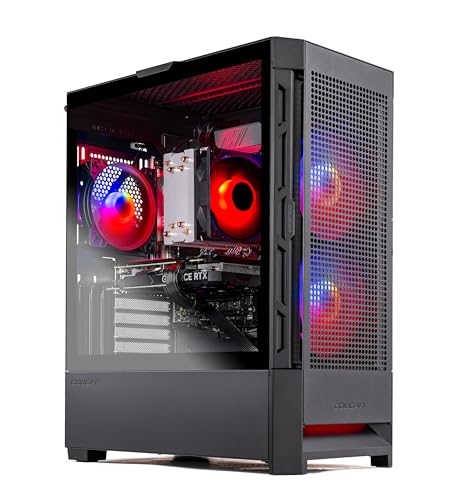
Where to buy
Check the latest price, availability and delivery on Amazon. Orders are placed on Amazon. We may earn a commission from qualifying purchases.
- Best streaming value overall: Skytech Blaze4 Mini, Ryzen 7 5700, RTX 4060 Ti — Check on Amazon
- CyberPowerPC Gamer Xtreme VR, RTX 4060 Ti 16GB, Core i7 (GXiVR8040A14) — Check on Amazon
- Thermaltake LCGS Quartz i1460, RTX 5060 — Check on Amazon
- Skytech Archangel, RTX 4060, 32GB DDR5, 2TB SSD — Check on Amazon
See 2 more Amazon options
- CyberPowerPC Gamer Xtreme VR, RTX 4060, DDR5 (GXiVR8060A24) — Check on Amazon
- Skytech Nebula, Ryzen 5 5600X, RTX 4060 Ti — Check on Amazon
Read the full guide ↓
Disclosure: As an Amazon Associate, reviewstook.com earns from qualifying purchases. Links to Amazon on this page are affiliate links; they cost you nothing extra. Listing details such as price and availability change often, so check the current Amazon listing before you buy.
Streaming changes what a budget gaming PC has to be. A machine that only plays games spends its whole budget on the game. A machine that plays games live, in front of an audience, spends it on four jobs at once: rendering the game, encoding the video, running OBS and a browser full of chat and alerts, and writing a local recording to disk while it does all three. At $1,200 that four-way split is genuinely affordable for the first time in the budget band — every machine in this guide carries a current NVIDIA graphics card with a dedicated hardware encoder, which is the single component that decides whether one-PC streaming feels effortless or feels like a fight. This guide is ranked for that job: encoder first, then the CPU, memory and storage headroom that keep a stream stable while the game is busy.
Here is the workflow this budget honestly buys, stated before any product names. One machine, game and stream together, at 1080p60: that is a real, sustainable setup on every pick below, because the encoding is done by a fixed-function block on the graphics card rather than by the processor running your game. On Twitch the standard target is around 6,000 kbps with constant bitrate, which is well inside what these encoders produce cleanly. On YouTube you have more room — higher bitrates, 1440p stream output, and AV1 live encoding, which every card in this guide supports on the encode side. What this budget does not buy is a second dedicated streaming PC, a 4K60 broadcast rig, or the capture hardware for a console setup — the kit section near the end covers that reality honestly. If your plan is “play on this machine and stream from this machine,” you are in the right guide.
The six machines below were not chosen for streaming from scratch. They are the six verified listings from our base guide to budget gaming PCs under $1,200, re-ranked and re-examined for the streaming job — the same graphics cards, the same verified listings, judged by different questions. Where the base guide asked “how many frames it delivers,” this one asks “what happens to the stream when the game gets heavy, the browser is open, and the recording has been running for three hours.” Two of the six sit toward the lower end of this budget band and still stream properly, because the encoder does not care what the tower cost. Two others only make sense while their current price sits inside this budget, and that condition is printed as plainly here as it was there.
In this guide
Quick Picks
Short on time, or comparing several options at once? Each row below names a streaming buyer type and the machine that serves it best, with a link to the listing.
| Streamer type | Pick | Why it stands out for streaming | Link |
|---|---|---|---|
| Best streaming value overall | Skytech Blaze4 Mini, RTX 4060 Ti | 4060 Ti NVENC encoder with AV1, eight CPU cores — check price on Amazon | Check on Amazon |
| Best for heavy multitask streaming | CyberPowerPC Gamer Xtreme VR (GXiVR8040A14) | Core i7 plus RTX 4060 Ti 16GB — the most game-plus-stream headroom here — check price on Amazon | Check on Amazon |
| Best current-generation encoder | Thermaltake LCGS Quartz i1460, RTX 5060 | Newest-generation NVENC with AV1 encode — check price on Amazon | Check on Amazon |
| Best for recording and big libraries | Skytech Archangel | 32GB of RAM for the streaming stack and a 2TB SSD that swallows local recordings | Check on Amazon |
| Best for stopping at $800 | CyberPowerPC Gamer Xtreme VR (GXiVR8060A24) | RTX 4060 NVENC on a DDR5 platform — check price on Amazon — the stream works, and it leaves room in the budget for kit | Check on Amazon |
| Best only at its low price | Skytech Nebula, RTX 4060 Ti | Same encoder class as the top pick — check price on Amazon — its position in the band moves a lot, so check the current price carefully | Check on Amazon |
How These Picks Were Chosen
Every machine below is a real Amazon listing carried over from the base guide. Prices change often, so this guide does not print a fixed price for any pick — use the links to check the current price on Amazon before you order. Prebuilt pricing in this band moves between sale events, and some of these six cross above the $1,200 ceiling between deals. The reviews therefore describe where each machine sits in the band and state the condition under which each machine stops being a sensible buy. Check the live listing before you order; if a pick currently sits outside this budget, wait or choose a different pick.
The ranking order is the streaming order. First, the encoder. All six machines use an NVIDIA GeForce RTX 40-series or 50-series card, and every one of those cards carries a single dedicated NVENC encoder block with AV1 encode support. Single is the honest word: none of these cards has the dual-encoder setup of the flagship models, and no review below pretends otherwise. For a 1080p60 stream — and for a 1440p YouTube stream — one modern NVENC block is not a compromise; it encodes the outgoing video on its own silicon while the rest of the card renders your game, which is exactly why one-PC streaming at this budget works at all. The RTX 5060 machine carries the newest encoder generation in the set; the 40-series machines carry the generation before it. Both generations encode AV1, which matters for YouTube live and for efficient local recordings, and both handle Twitch’s H.264 standard without effort.
Second, simultaneous load — the part of streaming that spec sheets never mention. While you stream, your PC is running the game, OBS with its scenes and sources, a browser with chat, dashboards and alerts, voice chat, and usually a local recording. That stack is graded in every review below: processor cores to share the work, system RAM to hold it all (16GB is workable, 32GB is comfortable), and storage that can absorb hours of recorded footage without filling the drive your games live on. Third, the platform and the fine print, carried over intact from the base guide: DDR5 machines keep a CPU upgrade path open, DDR4 machines are finished platforms bought for what they offer today, and every condition and listing caveat documented there applies here unchanged.
One discipline note, because streaming guides are where it usually collapses. None of the six processors in this guide has integrated graphics — the Intel chips are F-suffix parts and the AMD chips are non-G models — so none of these machines has a second, integrated encoder to fall back on or to offload a recording to. The NVIDIA card’s NVENC block is the only hardware encoder in each box. That is not a weakness in practice, because NVENC is the encoder you would choose anyway, but it means the graphics card choice in this guide is the encoder choice, with no backup hiding in the spec sheet. We did not use these machines ourselves; the grading above is built from the makers’ listings, model pages and specification records, read through the streaming questions this guide exists to answer.
The 6 Best Budget Gaming PCs for Streaming Under $1,200
Skytech Blaze4 Mini — Ryzen 7 5700, GeForce RTX 4060 Ti (ST-BLAZE4MINI-1266-B-AM)
Who it suits: The streamer who wants the strongest encoder-and-GPU combination in this guide positioned lowest in the band for its tier, and is happy to let the graphics card do the encoding while an eight-core processor handles everything else.
For streaming, this machine’s arithmetic is the same arithmetic that topped the base guide, with one extra term. The GeForce RTX 4060 Ti brings a single Ada-generation NVENC encoder with AV1 encode support, and that block is what your audience actually watches: it turns your gameplay into the outgoing stream on dedicated silicon, at a small fixed cost, while the rest of the card renders the game. Set OBS to the NVENC encoder and the stream effectively stops competing with the game for resources. Behind it, the Ryzen 7 5700’s eight cores divide the remaining work — the game itself, OBS’s scene compositing, the browser, voice chat — without the juggling a four- or six-core chip would face when a busy scene change lands mid-fight. Check the current price on Amazon — this model has typically sat toward the lower end of the band for its tier. No other pick in this guide gives you this encoder class, this GPU tier and this core count at that position in the budget.
The streaming-specific compromises are about capacity and tomorrow, not about tonight’s broadcast. The 1TB SSD is the class norm, and it is the first thing a recording habit eats: local recordings at stream quality accumulate quietly, and a streamer who records every session for clips and VODs will be managing that drive within the year. The 16GB of DDR4 memory holds the game-plus-stream stack adequately, with the browser as the variable that decides how much headroom is left. The platform is DDR4 on AMD’s AM4 socket, at the end of its upgrade road, and the compact mini case that makes the machine desk-friendly also limits the length of any future graphics card — check a replacement card’s length against the case before ordering one. Skytech’s note that the GPU brand may vary applies to this listing as it does to its siblings; the GPU model, its 8GB of VRAM and the encoder are the contracted specification, the badge on the cooler is not. The named 650W Gold power supply is a genuine plus at this end of the budget, where unbranded units are common.
- RTX 4060 Ti NVENC encoder with AV1 encode — the stream runs on dedicated silicon, not on your game’s processor budget.
- Eight-core Ryzen 7 5700 gives the game, OBS and browser room to coexist.
- Typically the lowest-positioned 4060 Ti machine in this guide for its tier — check price on Amazon.
Honest limitation: A single NVENC block, like every pick here — it cannot split into a separate stream encoder and recording encoder the way flagship dual-encoder cards can — and the AM4/DDR4 platform plus mini case limit future upgrades.
Choose it if you stream the games you play on the same machine at 1080p60 and want the strongest encoder-and-GPU combination in the guide. Skip it if you record everything and multitask heavily enough to need the Archangel’s memory and storage, or you plan mid-life CPU upgrades.

CyberPowerPC Gamer Xtreme VR — Intel Core i7-13700F, GeForce RTX 4060 Ti 16GB (GXiVR8040A14)
Who it suits: The streamer whose sessions are the heaviest in this guide — demanding new games, a busy OBS scene stack, chat and dashboards open, a recording running — and who wants the most simultaneous-load headroom $1,200 can buy, only while its current price keeps it inside this budget.
Two specifications put this CyberPowerPC second here and first for its buyer. The Core i7-13700F is the strongest processor in the guide, and streaming is the workload that notices: when the game is using what it needs, there are still cores left for OBS compositing, browser sources, voice processing and everything else a live session piles on. The RTX 4060 Ti beside it is the 16GB version — double the VRAM of every other pick — which matters to a streamer in a specific way: streaming setups run games at high texture settings for the audience’s benefit, and VRAM pressure that a solo player would fix by lowering a setting shows up on stream as stutter your viewers see before you do. The encoder itself is the same single Ada NVENC block with AV1 encode as the Blaze4 Mini’s; what this machine adds is room around it. Check the current price on Amazon before judging it — its position in the band varies.
Now the rule, printed as plainly as the base guide printed it, because this is the most price-sensitive pick in the set. This same configuration also appears outside this budget entirely at times. Buy it only while its current price sits at or under the $1,200 budget. Above that ceiling it is not a worse machine, it is simply not this guide’s machine, and the Blaze4 Mini delivers the same encoder while sitting lower in the band. Note also what the premium does not include: system memory and storage match the guide norm at 16GB of DDR5 and a 1TB NVMe SSD, so the recording-heavy streamer will still outgrow the drive, and this listing does not headline a power-supply wattage — confirm the unit on the live listing before you plan any future graphics card swap around it. The DDR5 platform underneath it all keeps a genuine CPU upgrade path open, which none of the DDR4 picks can claim.
- Strongest CPU in the guide — the most headroom for game, OBS, browser and recording at once.
- 16GB of VRAM, double every other pick, for high textures that stay smooth on stream.
- Same single-NVENC, AV1-capable encoder class as the top pick, on a DDR5 platform.
Honest limitation: A price-conditional pick, full stop — it crosses above the $1,200 budget between sales — and 16GB of system RAM and a 1TB SSD are merely average for a machine bought for multitasking.
Choose it if its current price sits at or below the $1,200 budget and your streams run demanding games with a full overlay stack. Skip it if the current price is above the ceiling, or your streaming is lighter — the Blaze4 Mini’s encoder is identical and its place in the band is not conditional.

Thermaltake LCGS Quartz i1460 — Intel Core i5-14400F, GeForce RTX 5060 (S2QT-B760-560-LCS)
Who it suits: The streamer who wants the newest encoder generation in the guide and a current Intel platform, and who plays the supported single-player titles where the RTX 5060’s frame generation is a real feature rather than a box claim.
The RTX 5060 is the only current-generation graphics card in this guide, and for streaming its headline is the encoder: the newest-generation NVENC block in this set, a single encoder like every other pick, with AV1 encode support for YouTube live and efficient local recordings, and the cleanest H.264 output of the six for Twitch’s roughly 6,000 kbps standard. Thermaltake’s Quartz i1460 sits in the middle of this budget band — check the current price on Amazon — which can leave room unspent inside the $1,200 budget. The Core i5-14400F is a modern ten-core processor that will not bottleneck this GPU class in games and leaves adequate room for the streaming stack. The 600W 80 Plus Gold power supply reported for this configuration is adequate for this card with modest headroom.
The 5060’s other headline needs the honest treatment this guide gives it everywhere. DLSS 4 multi frame generation, in supported titles, multiplies the frame rate your monitor displays — and for a streamer the distinction matters twice over. Frame generation raises the smoothness of the picture on your own high-refresh screen; it does not reduce input latency the way genuinely rendered frames do, and your outgoing stream is still a 60-frame-per-second encode of the result, so your audience sees a clean 1080p60 broadcast either way. Judge this machine as your viewers will judge it — on its encoder and its rendered performance — and treat frame generation as a private bonus for your own display in the games that support it. The platform caveat matches the base guide’s: 16GB of DDR4 on a final-generation Intel socket, so the memory cannot follow you to a future build and the CPU path ends with this socket’s remaining chips. Against that, its position in the band and the encoder generation do the arguing.
- Newest-generation single NVENC encoder in the guide, with AV1 encode for YouTube and recordings.
- Current-generation streaming hardware positioned mid-band, with budget left over — check price on Amazon.
- Modern ten-core Core i5-14400F keeps the game and the streaming stack fed.
Honest limitation: Frame generation is a smoothness feature for your monitor, not a latency feature and not a stream-quality feature — competitive players and their audiences should judge this machine on rendered frames and encoder output alone.
Choose it if you want the newest encoder, stream to YouTube where AV1 live is available, and play supported titles on a high-refresh monitor. Skip it if you want double VRAM or double system RAM instead — that money went to the CyberPowerPC above and the Archangel below.

Skytech Archangel — Intel Core i5-14400F, GeForce RTX 4060, 32GB DDR5, 2TB SSD (ST-ARCH4-1247-W-AM)
Who it suits: The streamer who records everything — full sessions saved for VODs, clips and edits — and runs the full background stack of browser dashboards, chat, voice and music while the game is live.
Ask streamers what actually ends their sessions early and the answer is rarely the encoder. It is the recording that filled the drive, the browser that ate the memory, the game that had to be uninstalled to make room for an update. The Archangel is specced directly at that list: 32GB of DDR5-5600 — double every other pick in this guide — and a 2TB SSD, also double the norm, around a Core i5-14400F and an RTX 4060 whose single NVENC block with AV1 encode handles the broadcast itself exactly as well as the same card does anywhere. The simultaneous-load grading is where this machine wins: game, OBS, a browser with the dashboard and chat, voice chat and a local recording all run at once, and the Archangel is the one pick here that never asks you to close anything first. It sits at the top of this budget band — check the current price on Amazon — and when it sits lower in the band, the capacity argument becomes even stronger. The named 650W Gold power supply matches the guide’s better picks.
The trade is printed in the base guide and stays printed here: the graphics card is the RTX 4060, one tier below the Ti machines. For streaming specifically, that trade is gentler than it looks — the encoder generation is the same, so your broadcast quality at 1080p60 is the same; what you give up is rendered headroom in the heaviest games at high settings, which you will feel in your own picture before your audience notices anything. A streamer whose games are esports titles or older releases will never feel it at all. A streamer playing each year’s most demanding release at maximum settings should take the 16GB CyberPowerPC above instead and add storage later. The white case and RGB are decoration; the specification underneath them is the practical one in this guide.
- 32GB of DDR5 — the streaming stack, the browser and the game, all open at once.
- 2TB SSD absorbs local recordings and a real game library without drive management mid-season.
- Same single-NVENC AV1-capable encoder class as the other 40-series picks, with a named 650W Gold PSU.
Honest limitation: You are paying for capacity, not GPU tier — the RTX 4060 renders a step below the Ti picks, and at the top of the budget the value depends on actually needing the memory and storage.
Choose it if you record every session, keep a large installed library and multitask through your streams. Skip it if you play one game at a time and rarely record — the Blaze4 Mini’s faster card is the better spend.

CyberPowerPC Gamer Xtreme VR — Intel Core i5-13400F, GeForce RTX 4060 (GXiVR8060A24)
Who it suits: The new streamer with a $1,200 ceiling who does not need to spend it — the encoder in this machine does the same job as the encoder in machines positioned higher in the band, and the savings buy the microphone and monitor that an audience notices more.
Streaming is where the base guide’s stop-at-$800 argument gets stronger, not weaker. The RTX 4060 in this CyberPowerPC carries the same single Ada NVENC encoder with AV1 encode support as the 4060 Ti machines above it. Your stream does not know what the tower cost: at Twitch’s roughly 6,000 kbps or a YouTube 1080p60 feed, the encoded output of this card is effectively the output of the dearer cards, because they share the encoder generation. What the one-tier step down actually costs is rendered headroom in demanding games — real, but modest at 1080p, and invisible in esports titles. This configuration has typically been the lowest-positioned entry point in the guide — check the current price on Amazon — and it is built on DDR5 with a Core i5-13400F, 16GB of DDR5 memory and a 1TB PCIe Gen4 SSD — the newest memory platform in this budget class, with a CPU and RAM upgrade path the DDR4 picks do not have.
Now spend the difference the way a streamer’s audience would vote for. The headroom left against the top of this budget is, first, the microphone the kit section below puts ahead of every other accessory — the single upgrade viewers rate most. It is a 144Hz monitor, which improves your own play more than a GPU tier does. It is a second SSD when the recordings pile up. A streaming setup is a chain, and this machine is the strongest argument in the guide that the PC link of that chain saturates early: once the encoder is a modern NVENC block, extra money inside the tower buys rendered frames, while the same money outside it buys sound, light and picture quality your audience can actually perceive. The caveats are the base guide’s own: the RTX 4060’s 8GB of VRAM is the ceiling you will feel first in newer games at high texture settings, its lower position in the band is not guaranteed — when its current price climbs toward the top of the band, the gap over the Blaze4 Mini narrows sharply — and this listing does not headline a power-supply wattage, so read the unit on the live listing before planning upgrades around it.
- Same NVENC encoder generation as the Ti machines — broadcast quality does not drop at this position in the band.
- Lowest-positioned pick in the guide, on a DDR5 platform — check price on Amazon.
- Leaves headroom in the $1,200 budget for the microphone, monitor and storage a stream actually needs.
Honest limitation: The RTX 4060’s 8GB of VRAM and one-tier-lower rendering are the real ceiling in the newest games at high textures, and its position low in the band is not guaranteed — check the current price on Amazon.
Choose it if you are starting out, stream esports or moderately demanding games, and would rather fund the whole desk than the fastest tower. Skip it if you play the newest releases at high settings on stream and keep machines for years — the 16GB CyberPowerPC exists for that.
Skytech Nebula — AMD Ryzen 5 5600X, GeForce RTX 4060 Ti (ST-NEBULA-0762-B-AM)
Who it suits: The patient streamer — someone willing to watch the current price rather than buy today, because when it sits low in the band this machine matches the top pick’s encoder and GPU tier, and when it sits near the top of the band it should not be bought at all.
The Nebula’s streaming hardware is easy to state. Its RTX 4060 Ti carries the same single Ada NVENC encoder with AV1 encode support as the Blaze4 Mini’s card, so the broadcast side of this machine is top-of-guide class. The Ryzen 5 5600X is the lightest processor in the set for simultaneous load — six cores to divide between the game, OBS and the browser — and the honest streaming note is that NVENC is precisely what makes that workable: because the encoding sits on the graphics card, the processor’s smaller budget goes to the game and the apps, and a 1080p60 stream runs without the CPU encoding fallback that would expose the core count. The rest of the specification is balanced: 16GB of DDR4-3200, a 1TB NVMe SSD and a named 600W Gold power supply, in a full-size case with easy access for the storage upgrade a recording habit eventually demands. When its current price sits at the low end of the band, this guide would rank the Nebula near the top — check price on Amazon.
The problem is the same problem the base guide documented, and it decides this pick’s position. The Nebula often sits high in this budget band, and at times above it. High in the band you are paying 4060 Ti money for an end-of-life DDR4 platform while the newer-generation Thermaltake sits at a similar or lower position with a newer encoder — poor value for a streamer, full stop. So the rule is the base guide’s rule, unchanged: set your line before you shop. Only consider the Nebula while its current price sits low in the band, where it is competitive; anywhere near the top of the band, close the tab and buy the Blaze4 Mini or the Thermaltake. Skytech’s note that the GPU brand may vary applies here as with its siblings — the GPU model, 8GB of VRAM and the encoder are the contracted spec, not the cooler badge.
- RTX 4060 Ti NVENC encoder with AV1 — the same broadcast hardware as the top pick.
- At the low end of the band it is top-tier streaming value — check price on Amazon.
- Named 600W Gold PSU and a roomy, easy-access case for later storage upgrades.
Honest limitation: The fewest processor cores in the guide for simultaneous load, on a dead-end DDR4 platform — and its usual position high in the band makes it poor value on most days. This is the most timing-dependent pick here.
Choose it if its current price sits low in the band and you want Ti-class encoding in an easy-to-service tower. Skip it if the listing is sitting up near the top of the band — the Thermaltake and the 16GB CyberPowerPC spend that money better.

Comparison Table
| Product | Encoder | Streaming strength | Price check | Link |
|---|---|---|---|---|
| Skytech Blaze4 Mini | RTX 4060 Ti — single NVENC, AV1 encode | Strongest encoder value in the band; eight cores for the stack | Lower end of the band for its tier — check price on Amazon | Check on Amazon |
| CyberPowerPC GXiVR8040A14 | RTX 4060 Ti 16GB — single NVENC, AV1 encode | Most simultaneous-load headroom; 16GB VRAM | Only inside the $1,200 budget — check price on Amazon | Check on Amazon |
| Thermaltake LCGS Quartz i1460 | RTX 5060 — single NVENC, newest generation, AV1 encode | Newest encoder; current-generation platform | Mid-band — check price on Amazon | Check on Amazon |
| Skytech Archangel | RTX 4060 — single NVENC, AV1 encode | 32GB RAM and 2TB SSD for recording and multitasking | Top of the band — check price on Amazon | Check on Amazon |
| CyberPowerPC GXiVR8060A24 | RTX 4060 — single NVENC, AV1 encode | Same encoder generation at the lowest position in the band | Lowest position in the band — check price on Amazon | Check on Amazon |
| Skytech Nebula | RTX 4060 Ti — single NVENC, AV1 encode | Ti-class encoding, only low in the band | Varies widely — check price on Amazon | Check on Amazon |
Set Up OBS Once, Correctly
Every machine in this guide streams through the same piece of software and the same five decisions. Make them once, in this order, and most “my stream lags” problems never happen. First, the encoder: in OBS, choose the NVIDIA NVENC encoder for both the stream and, if you record at the same time, the recording. On all six picks this is the hardware encoder on the graphics card — the F-suffix Intel chips and non-G AMD chips in these machines have no integrated graphics encoder to select, and the software x264 encoder would spend the processor cores your game needs. NVENC is not the fallback on these machines; it is the design. Second, bitrate and keyframes: for Twitch, use constant bitrate (CBR) at around 6,000 kbps with a 2-second keyframe interval, which is the platform’s standard shape. For YouTube you can push the bitrate higher, stream at 1440p to benefit from its better processing, and use the AV1 encoder these cards support where YouTube offers it. Third, output resolution: a 1080p canvas downscaled cleanly beats a struggling higher one — these are 1080p60 streaming machines, and saying so is a specification, not an apology.
Fourth, learn the three counters in OBS’s Stats window, because each one accuses a different part of your setup and each has a different fix. Frames missed due to rendering lag means the graphics card is saturated compositing your scenes — cap the game’s frame rate, lower its settings a notch, or simplify the scene; the game is taking the GPU time OBS needs. Frames skipped due to encoding lag means the encoder itself is overloaded — drop the NVENC quality preset a step or reduce the output resolution; on a single-encoder card that is also recording at high quality, lowering the recording quality is the usual release valve. Dropped frames, the network counter, are never the PC’s fault and no upgrade fixes them — they mean the connection to the ingest server is losing data, and the fixes are a lower bitrate, a different server, or a cable. Which is the fifth decision: stream on wired Ethernet, always. Every pick in this guide ships with Wi-Fi, and Wi-Fi is fine for everything except the one job where a two-second interference spike becomes a visible freeze for every viewer at once. Run the cable. It is the cheapest stream-quality upgrade that exists, and it is not inside any pick’s price — it is a cable.
What $1,200 Does Not Include: The Streaming Kit
A streaming setup is the PC plus a short list of kit, and none of that kit is included with any pick in this guide — no pick includes a microphone, a light, a camera or a capture device, and this guide states no accessory prices because the underlying research documents none. Buy in this order, because it is the order your audience perceives. The microphone comes first, by a wide margin: viewers forgive a soft picture for hours and a bad microphone for about a minute, and a modest dedicated microphone on a boom or stand, close to your mouth, is the largest quality jump in the entire setup. Lighting comes second — a single soft light aimed at your face does more for a webcam picture than a camera upgrade does, because small sensors are starved for light, not resolution. The webcam itself comes third, and for many streamers a decent one is a later purchase entirely; a face camera is optional in a way a microphone is not.
The capture card is the item to buy last and, for this guide’s reader, probably never. A capture card exists to bring an external source — a games console, a second PC, a camera — into OBS. If you play and stream on the same machine, which is the workflow every pick in this guide is graded for, you need no capture card at all, and buying one “for streaming” is the most common wasted purchase new streamers make. Buy one only when a console actually enters the setup. Finally, leave a line in the budget for the unglamorous remainder: the Ethernet cable from the OBS section, a headset you can wear for three hours, and storage growth when the recordings accumulate. None of it is included with the towers above, and a budget that pretends otherwise is how a plan built around this budget quietly overruns it.
How to Choose a Budget Gaming PC for Streaming Under $1,200
- Start with the encoder, not the frame rate. Every pick here encodes on a single modern NVENC block with AV1 support, so your broadcast quality is settled by the tier, not the individual machine. What you are actually choosing between is the headroom around that encoder — cores, memory, VRAM and storage.
- Count your simultaneous load honestly. Game plus OBS plus a browser plus voice plus a recording is the real workload. Light versions of that stack run on any pick; the heavy version is what the Core i7 CyberPowerPC and the 32GB Archangel exist for.
- Decide whether you record, before you decide the drive. Stream-only buyers are fine on 1TB. Record-everything buyers should either start with the Archangel’s 2TB or budget a second drive from day one — recordings fill drives on a schedule, not by surprise.
- Match the platform to your horizon. The DDR5 picks (both CyberPowerPC machines, the Archangel) can grow a faster CPU later. The DDR4 picks are finished platforms bought for what they offer today — legitimate low in the band, poor value at a premium.
- Respect the price conditions as part of the specification. The 16GB CyberPowerPC is a buy only while it sits inside the $1,200 budget and a skip above it; the Nebula is a buy only low in the band and a skip near the top. A streamer who waits for the right current price effectively gets a tier more PC for the same money.
- Spend the savings where the audience lives. If the lower-positioned CyberPowerPC covers your games, the headroom it leaves buys the microphone, light and monitor that viewers and you will notice every minute — the tower’s extra tier buys frames only you can see.
- Plan the cable run with the purchase. Wired Ethernet is a streaming requirement, not an accessory. If the router is two rooms away, that fact belongs in the buying decision, not in the first dropped-frames investigation.
Common Buying Mistakes
- Buying a second PC “for the stream” at this budget. A single modern NVENC encoder makes the dedicated streaming PC unnecessary for 1080p60; the money does more good as headroom in the one machine — or as kit.
- Encoding on the CPU because a forum said x264 looks better. At Twitch bitrates the difference is small, and on these machines x264 spends the cores the game and OBS need. NVENC is the correct default on every pick here.
- Assuming a dual encoder you do not have. These are single-NVENC cards. They stream and record at once perfectly well, but a guide or listing implying flagship dual-encoder behaviour at this level is describing a different card.
- Streaming over Wi-Fi because the listing advertises Wi-Fi prominently. It is for convenience, not for broadcast. One interference spike is a freeze for every viewer.
- Buying the capture card first. PC-only streamers need no capture card at all; it is console equipment, and the microphone you skipped to buy it is the thing your audience wanted.
- Buying the Nebula while it sits high in the band, or the 16GB CyberPowerPC while it sits above the budget ceiling, because the specification looked right. Both picks are their price conditions; ignore the condition and the value case inverts.
- Recording everything to the same 1TB drive as the game library, then discovering the collision mid-season. Storage for recordings is a planned line item, not an emergency.
- Judging the RTX 5060 by frame-generation numbers. Your viewers receive a 60-frame-per-second encode; frame generation smooths your own monitor. Buy it for its encoder generation and rendered performance.
Final Recommendation
- Best streaming value overall: Skytech Blaze4 Mini — 4060 Ti encoder class and eight cores, positioned low in the band for its tier — check price on Amazon.
- Best for heavy multitask streaming: CyberPowerPC GXiVR8040A14 — the strongest CPU and double VRAM, but only while it sits inside the $1,200 budget.
- Best current-generation encoder: Thermaltake LCGS Quartz i1460 — the newest NVENC generation with AV1, positioned mid-band — check price on Amazon.
- Best for recording-heavy streamers: Skytech Archangel — 32GB of RAM and 2TB of storage, ideally when it sits lower in the band.
- Best reason to stop at $800: CyberPowerPC GXiVR8060A24 — the same encoder generation, positioned lowest in the band, with the headroom funding the kit.
- Best for patient shoppers: Skytech Nebula — buy it only when its current price sits low in the band, never near the top.
Our top two for streamers are the Blaze4 Mini, for the simple arithmetic of the guide’s best encoder-and-GPU tier positioned low in the band, and the Thermaltake Quartz i1460, for the newest encoder generation on a modern processor at a mid-band position that leaves kit money unspent. The Skytech Blaze4 Mini is the machine most one-PC streamers should buy: set OBS to NVENC, wire the Ethernet cable, and the streaming side of your setup simply stops being a problem. The Thermaltake LCGS Quartz i1460 is the pick if you stream to YouTube, want AV1 live on the newest encoder silicon, and play the supported titles where its frame generation earns its place on your own screen. If your ceiling is really the ceiling and your games are lighter, Best Budget Gaming PC For Streaming Under $800 shows how far the encoder-first logic stretches downward, and Best Budget Gaming PC For Streaming Under $1500 shows what the next step up actually adds. New to all of this? Best Budget Gaming PC For Beginners Under $1200 covers the same budget from the first-PC angle. Check the current price on Amazon for the pick you choose, confirm it still sits inside this budget, and spend what you save on the microphone.
Frequently Asked Questions
Can one PC really play games and stream them at this budget?
Yes — that is the normal setup at this level, and the reason is the encoder. Every pick in this guide encodes the outgoing video on a dedicated NVENC block on the graphics card, so the processor and the rest of the card are left to run the game. A 1080p60 stream to Twitch at around 6,000 kbps, or to YouTube at higher bitrates, is a sustainable everyday workload on all six machines, with the heavier multitask headroom concentrated in the Core i7 CyberPowerPC and the 32GB Archangel.
Do I need a capture card with any of these PCs?
Not for PC gaming. A capture card imports an external source — a console, a second PC, a camera. If the game runs on the same machine as OBS, which is the workflow this guide grades, there is nothing to capture. Buy a capture card when a console joins the setup, and not before; the microphone is the earlier purchase for almost every streamer.
Should I stream with NVENC or x264 on these machines?
NVENC, on all six. The hardware encoder produces clean output at Twitch bitrates without spending processor cores, and none of these machines has an integrated-graphics encoder as an alternative — the NVIDIA card is the only hardware encoder in each box. x264 on its slower presets can edge ahead in still-frame comparisons at low bitrates, but it does so by taking the cores your game, OBS and browser are using, which is the wrong trade on a one-PC setup.
Is AV1 streaming worth using at this level?
Where your platform offers it, yes. Every card in this guide encodes AV1, which delivers the same picture at lower bitrates — useful for YouTube live, which accepts AV1, and for compact local recordings. Twitch’s standard remains H.264 at around 6,000 kbps for most streamers, and these encoders handle that just as well, so AV1 is an advantage on one platform rather than a requirement on either.
How much storage does streaming actually use?
The stream itself uses none — it leaves by the network. The recordings are what fill drives: a streamer saving full sessions for VODs and clips will work through a 1TB drive that also holds a game library faster than a non-streamer expects. That is why the Archangel’s 2TB drive is a streaming feature in this guide, and why 1TB buyers who record should treat a second drive as a planned purchase rather than a surprise.
Why does this guide ask me to check the price on Amazon instead of printing one?
Because prices in this band will not sit still — they move between sale events, and some picks spend part of the year above the $1,200 budget line altogether. Any single figure printed here would mislead more often than it helped, and displayed prices also need to stay current. Instead, each review describes where a machine sits in the band, so you can hold the live listing up against this budget and read a price outside it as what it is: a reason to wait. The base shortlist this guide re-ranks is Best Budget Gaming PC Under $1200.
- Best Budget Gaming PC Under $1200
- Best Budget Gaming PC For Streaming Under $800
- Best Budget Gaming PC For Streaming Under $1500
- Best Budget Gaming PC For Beginners Under $1200
- Best Budget Gaming PC For Small Spaces Under $1200
- Best Streaming PC Under $1200
- Best Gaming PC Under $1200
- Best Prebuilt Gaming PC Under $1200


