Where to buy
Check the latest price, availability and delivery on Amazon. Orders are placed on Amazon. We may earn a commission from qualifying purchases.
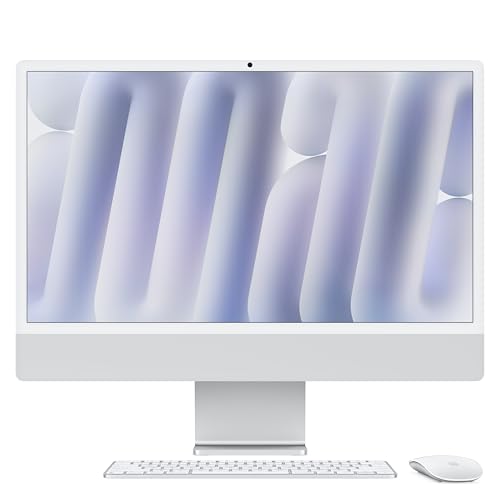
- Best overall for streaming under $1500: Apple 2024 iMac with M4 Chip, 16GB Unified Memory, 256GB SSD — Silver — Check on Amazon
- Dell 27 All-in-One ec27250, Core 7 150U, GeForce MX570A, 32GB DDR5, 1TB SSD — Check on Amazon
- HP OmniStudio X 27-cs0010, Core Ultra 7 155H, 16GB RAM, 1TB SSD — Check on Amazon
- HP 27-cr0012, Ryzen 7 7730U, 32GB RAM, 1TB SSD — Check on Amazon
See 2 more Amazon options
- Lenovo IdeaCentre 27, Core i7-13620H, 32GB RAM, 2TB SSD (seller-upgraded listing) — Check on Amazon
- Dell Inspiron 7710 All-in-One, Core i7-1255U, GeForce MX550, 32GB RAM, 1TB SSD — Check on Amazon
Read the full guide ↓
Disclosure: As an Amazon Associate, reviewstook.com earns from qualifying purchases. Links to Amazon on this page are affiliate links; they cost you nothing extra. Listing details such as price and availability change often, so check the current Amazon listing before you buy.
Streaming from an all-in-one starts with one honest sentence: none of the six machines in this guide is a gaming PC, and streaming does not change that. Every pick here runs on integrated graphics or an entry-level laptop GPU, so the games these machines can play and broadcast at the same time are light ones — esports titles at reduced settings, indie games, older releases, retro and emulation. What an all-in-one genuinely does well for a streamer is everything around the game: it is a complete broadcast desk in a single object. The camera, microphone and speakers a streamer would otherwise buy separately are built in, the screen is large and colour-accurate enough to double as your confidence monitor, and the whole setup is one power cable on a desk that still looks like a desk. Add console streaming — a console does the gaming, a capture card feeds the picture, the all-in-one runs OBS, your overlays and your chat — and the format makes even more sense, because that workload asks for a steady encoder and a tidy desk, not a gaming GPU.
The second thing to understand before the picks is that a stream is two workloads wearing one coat. The game renders frames; the encoder compresses those frames into the video your audience sees, sixty times a second, without pausing. On a gaming tower those jobs live on separate, powerful hardware. On an all-in-one they share a laptop-class processor, its integrated graphics and a modest pool of memory — which is why this guide grades every pick on its encoder first and its game performance second. The good news is that every Intel and Apple chip in this guide carries a dedicated hardware encoder block, and hardware encoding is the whole trick: it compresses the stream on silicon that is not busy rendering your game or running your browser. The realistic ceiling is a clean 1080p30 or 720p60 broadcast of a light game, desktop content or a console feed. Twitch’s practical ceiling of roughly 6,000 kbps CBR sits well inside what these encoders produce — the constraint is never the format, it is the shared hardware underneath it.
The third thing is the base guide’s warning about this price tier, and it matters twice as much to streamers: Amazon’s premium all-in-one shelf is three markets in one. There are factory configurations — the iMac, the Dell EC27250, the HP OmniStudio X — sold as the maker built them. There are seller-upgraded listings, where a marketplace seller opens the seal, fits memory and storage beyond the maker’s factory maximums, and provides the warranty personally; the Lenovo below is one. And there are older premium models, like the 2022 Dell Inspiron 7710, arriving through marketplace and renewed stock. A streamer whose machine is also their job should care about that distinction more than most buyers: a warranty that depends on a marketplace seller is a different risk when a dead machine means a dark channel. This guide flags the seller type on every pick, and for every pick it asks you to check the current price on Amazon rather than relying on any earlier listing position.
In this guide
Quick Picks
Short on time, or comparing several options at once? Each row below names a streaming buyer type and the product that suits it, with a link to the listing.
| Buyer type | Pick | Why it stands out for streaming | Link |
|---|---|---|---|
| Best overall for streaming | Apple 2024 iMac with M4, 16GB, 256GB — Silver | Hardware encoding built into the M4, the sharpest screen here as your preview monitor, silent under load | Check on Amazon |
| Best Windows streaming pick | Dell 27 All-in-One ec27250, MX570A, 32GB, 1TB | Quick Sync encodes while the MX570A renders the game — the two jobs on separate silicon, plus 32GB of headroom | Check on Amazon |
| Strongest integrated encoder | HP OmniStudio X 27-cs0010, Ultra 7 155H, 16GB, 1TB | The newest generation of Intel Quick Sync in the fastest Windows chip here — check the current price on Amazon before you buy | Check on Amazon |
| Best value streaming desk | HP 27-cr0012, Ryzen 7 7730U, 32GB, 1TB | Sits lower in this budget tier, so the headroom left over can fund the microphone, light and capture card — check price on Amazon | Check on Amazon |
| Most recording room | Lenovo IdeaCentre 27, i7-13620H, 32GB, 2TB | A 10-core chip that can even CPU-encode as a fallback, and 2TB for local recordings — seller-upgraded, so check the seller | Check on Amazon |
| Best older-model bargain | Dell Inspiron 7710, i7-1255U, MX550, 32GB, 1TB | Quick Sync plus a discrete MX550 for the game side, available through marketplace stock — check price on Amazon | Check on Amazon |
How These Picks Were Chosen
The six machines are exactly the six verified picks of the base guide to all-in-ones under $1,500, with the same ASINs and the same seller-type flags — nothing new has been added. No price is stated for any pick here; check the current price on Amazon for each one. What changes here is the grading. Each machine was re-scored for a streamer’s simultaneous workload: a game or capture feed rendering, OBS compositing scenes and encoding, a browser holding chat, alerts and a dashboard, and a local recording if you keep one. That means the encoder each chip actually carries was graded from its documented silicon — Intel’s Quick Sync hardware encoder on the Intel machines, the hardware video encoder built into Apple’s M4, AMD’s integrated encoder on the one Ryzen pick — and the entry-level NVIDIA MX chips in the two Dells were graded as what the base guide documented them to be: graphics accelerators for the game side of the desk, not streaming hardware in themselves. Memory and storage were graded as streaming specifications, because they are: memory is what the game, OBS and browser split between them, and storage is where your recordings live.
The budget was applied the way the base guide applied it. A pick belongs here if it sits within this guide’s budget tier — as a factory configuration, or, in two flagged cases, as a seller-upgraded listing or an older model whose position in the tier can vary. Where a pick’s position in the tier can vary, the review says so plainly and tells you to check the current price on Amazon and buy only when that current price sits within this guide’s budget, rather than presenting any earlier position as today’s price. We did not use these machines ourselves; the streaming judgements are drawn from the documented hardware — encoder blocks, core counts, memory configurations — and from how OBS and the platforms actually behave on hardware of this class, stated as class behaviour rather than invented benchmarks. No pick is credited with a frame rate, and no pick is called a gaming machine, because none is.
The Encoder Is the Streaming Spec
On a gaming tower, streaming advice starts with NVENC, the dedicated encoder on NVIDIA’s gaming cards, which broadcasts your game and records a high-quality local copy at the same time without touching the hardware that renders either. No machine in this guide has that luxury, so the encoder map here is different — and simpler than most buyers fear. Every Intel processor in this guide, from the Dell EC27250’s Core 7 150U to the Lenovo’s Core i7-13620H, carries Intel Quick Sync, a hardware H.264 encoder built into the integrated graphics. In OBS you select it once, and from then on the stream is compressed by a block of silicon that sits idle during gaming — your game keeps the CPU cores and what graphics power exists, the encoder keeps the broadcast. Apple’s M4 does the same job with the hardware video encoder built into the chip, which OBS on macOS uses in the same set-and-forget way. The one AMD pick, the HP 27-cr0012, encodes through the hardware encoder in its Radeon integrated graphics: it works, it is the correct setting, and its picture at Twitch bitrates is a little softer than Quick Sync’s — a difference your viewers will not spot in a light game, stated here so the grading is honest.
What this means in practice: do not let OBS default to software x264 encoding on any of these machines. Software encoding spends CPU cores — the same cores your game, your browser and OBS’s own compositing are already sharing — and on a U-series laptop chip it is the single most reliable way to produce a stuttering stream from hardware that was capable of a smooth one. The one partial exception is the Lenovo, whose 10-core H-series processor has enough threads to run a light x264 preset as a fallback; treat that as a spare tyre, not the plan. The workflow this guide assumes is defined here so every review grades the same thing: you play a light game locally at 1080p or below, or you feed a console through a capture card; OBS outputs 1080p30 for talk and desktop content or 720p60 for motion-heavy games; you broadcast at CBR with two-second keyframes, at or under Twitch’s roughly 6,000 kbps practical ceiling. YouTube streamers can push higher bitrates, but the live output class of these machines is the same, and 4K streaming belongs to a platform and hardware tier several budgets above this one.
The 6 Best All-in-One PCs for Streaming Under $1500
Apple 2024 iMac with M4 Chip, 16GB Unified Memory, 256GB SSD — Silver
Who it suits: Streamers whose content is talk, desktop work, creative process, podcasts-with-video or light games, who want the quietest, sharpest, simplest streaming desk in this guide — and whose software life works on macOS.
For a certain kind of streamer, this is the most pleasant machine here to broadcast from. The M4 carries a hardware video encoder in the chip itself, and OBS on macOS hands the stream to it: the broadcast is compressed by dedicated silicon while the 8-core CPU and 8-core GPU handle your content, so a talk stream, a screen-share stream or a light game runs without the fan noise that leaks into microphones — the iMac stays effectively silent at this workload, which no fan-cooled Windows pick here can promise. The 24-inch 4.5K Retina display doubles as the best preview monitor in the guide: your overlays, your camera framing and your colour are shown to you at a sharpness the 1080p machines cannot match, and since you will stare at that preview for every hour you stream, it is a working advantage, not a luxury. The built-in camera and microphone array are the most broadcast-ready in the set — good enough that the iMac is the one pick where a starter can reasonably stream a talk show on the built-in hardware while saving for a proper microphone.
The simultaneous-load grading is where the conditions live. The 16GB of unified memory is shared between the CPU, the graphics and the encoder’s workspace, and it is fixed forever: a light game, OBS and a browser full of chat and dashboards fit, but they fit without margin, and a heavy browser habit will be the first thing to feel it. The 256GB SSD is the harder ceiling. A high-bitrate local recording runs to roughly 20GB an hour; a month of long streams recorded locally will fill this drive, so the iMac streaming setup assumes recordings go to an external SSD or the cloud — costed in the kit section below, never inside this pick’s price. The entry configuration’s two ports also matter at a streaming desk: a capture card, a microphone and an external drive are three plugs for two sockets, so a hub joins the shopping list. On price, check the current price on Amazon before you buy: this configuration sits in the upper part of this budget tier, so confirm the live listing still sits within this guide’s budget before ordering.
- Hardware encoding in the M4 itself: the stream never competes with your content for CPU cores.
- Silent under streaming loads, and the 4.5K screen is the best preview monitor here.
- Check the current price on Amazon before ordering, and confirm it still sits within this guide’s budget.
Honest limitation: 256GB of fixed storage fills fast with local recordings, 16GB of unified memory is shared by everything at once, and the entry model has two ports — a streaming desk built on this machine needs an external drive and a hub planned from day one.
Choose it if your stream is talk, desktop or light games and you value silence and screen quality. Skip it if you need Windows streaming software, local recording space, or ports to spare — the Dell below is your machine.

Dell 27 All-in-One ec27250 — Core 7 150U, GeForce MX570A, 32GB DDR5, 1TB SSD
Who it suits: Windows streamers who want to play and broadcast a light game from the same machine, with the cleanest division of labour any pick here offers and a factory warranty behind it.
This is the Windows streaming pick, and the reason is architectural. A stream from one machine asks two different chips to work at once, and this Dell is the only pick that can give each job its own silicon in both directions: the GeForce MX570A — an entry-level discrete GPU, graded in the base guide as a genuine accelerator for creative apps and light games, and graded here exactly the same way — renders the game, while the Core 7 150U’s integrated Intel graphics carry Quick Sync, the hardware encoder OBS uses for the broadcast. The game does not steal from the encoder; the encoder does not steal from the game. Around that split sits the headroom the rest of the set keeps running out of: 32GB of DDR5 memory means the game, OBS, a browser with chat and dashboards, and a recording buffer coexist without negotiation, and the 1TB SSD holds a serious archive of local recordings before anything needs deleting. For a streamer, that combination — separate silicon for the two jobs, memory to spare, room to record — is worth more than any single specification in the guide.
It is also the safest purchase here for someone whose machine is their job: a numbered factory Dell configuration (model DEC27250-7277WHT-PUS) sold with Dell Onsite Service named in the listing — check the current price on Amazon before you buy. Two cautions from the base guide carry over at full size. The EC27250 family is sold in near-identical configurations that sit in very different positions in the tier — sibling listings are different machines — so match the model number and the 32GB / 1TB / MX570A specification before paying, and check the current price on Amazon for the exact configuration you matched. And calibrate the graphics honestly: the MX570A plays older, esports and indie games at modest settings, which defines the gaming half of your stream; modern AAA titles are beyond it at any setting, streamed or not. The 27-inch 1080p touchscreen is softer than the iMac’s Retina panel as a preview monitor, the one axis where this otherwise complete package gives ground.
- The only pick where the game and the encoder get separate silicon both ways: MX570A renders, Quick Sync broadcasts.
- 32GB DDR5 and 1TB SSD — the simultaneous-load headroom this guide keeps asking for.
- A numbered factory Dell build with onsite service in the listing — check price on Amazon.
Honest limitation: The MX570A is entry-level graphics, so the games you can play and stream together are light ones; and the 1080p screen is a noticeably softer preview monitor than the iMac’s.
Choose it if you stream light games from the PC itself on Windows and want a factory warranty. Skip it if your content is console-based (the cheaper HP below plus a capture card serves you as well) or if display sharpness outranks everything.

HP OmniStudio X 27-cs0010 — Core Ultra 7 155H, 16GB RAM, 1TB SSD
Who it suits: Talk, presentation and creative-process streamers on Windows who want the strongest integrated encoder in the guide and HP’s flagship on-camera design — and who will check the current price on Amazon and only buy it inside this guide’s budget.
The OmniStudio X carries the newest Intel silicon in this guide, and for streaming that matters in one specific place: the Core Ultra 7 155H’s Intel Arc integrated graphics hold the current generation of Quick Sync, the most capable hardware encoder on the Windows side of this list. Paired with the fastest Windows processor here, it makes this the smoothest pure-broadcast machine in the set for content that does not ask the graphics to render a demanding game at the same time — talk formats, presentations, software demos, art and music production streams, where the encoder and the compositing are the whole workload and the 155H handles both with room to spare. HP designed this line for people who appear on camera all day, and its built-in camera setup was a design priority rather than a checklist item. The 27-inch touchscreen and 1TB SSD complete a specification that launched as HP’s premium answer to the iMac.
Then the two conditions, neither negotiable. The first is memory: 16GB is the tightest simultaneous-load budget among the Windows picks with 1TB drives, and streaming is a memory workload — OBS, a browser stack, your content application and the operating system will use most of it on a long broadcast, leaving little margin for the heavy creative apps this machine otherwise invites. It streams beautifully; it streams and does everything else at once less comfortably than the 32GB picks. The second condition is about position in the tier. This model’s position can vary, and it does not always sit inside this guide’s budget. It is a recommendation only when the current price on Amazon sits within this guide’s budget — check the current price on Amazon before you buy. Above that line the correct move is the Dell above, which also doubles the memory.
- Current-generation Quick Sync in the fastest Windows chip here — the strongest integrated encoder in the guide.
- Flagship HP design built for people who present on camera, with a 27-inch touchscreen and 1TB SSD.
- Check the current price on Amazon — buy it only when that price sits within this guide’s budget.
Honest limitation: 16GB of memory is a real ceiling under a full streaming stack, and its current price on Amazon does not always sit inside this budget — this pick expires the moment it drifts above the budget.
Choose it if the current price on Amazon sits within this guide’s budget and your stream is talk, presentation or creative work. Skip it if the price has drifted up, or if you play and stream from the same machine and need the Dell’s memory and discrete GPU.

HP 27-cr0012 — Ryzen 7 7730U, 32GB RAM, 1TB SSD
Who it suits: Streamers who would rather spend the budget across the whole desk — a capable machine plus the microphone, light and capture card that actually decide how a stream looks and sounds — and console streamers especially.
Most other picks in this guide sit toward the top of this budget tier. This factory HP sits lower in the tier — check the current price on Amazon — and the headroom it leaves inside the same overall budget is, for most starting streamers, worth more than the specification differences above it — because audiences forgive an integrated encoder long before they forgive a bad microphone. The machine itself grades better for streaming than its workhorse reputation suggests. The Ryzen 7 7730U is a proper 8-core processor, so the simultaneous stack — OBS, chat browser, dashboards, a light game or a capture feed — has real cores to live on; 32GB of memory matches the guide’s best; and the 1TB SSD gives recordings a home. Encoding runs through the hardware encoder in its Radeon integrated graphics: set OBS to it and the broadcast is handled, with the honest grading from this guide’s encoder section — AMD’s integrated encoder produces a slightly softer picture than Intel’s Quick Sync at Twitch bitrates, a difference that matters in fast motion and barely registers in talk, desktop or indie content.
The fit is best of all for the console streamer. When a PlayStation, Xbox or Switch does the gaming and a capture card (covered in the kit section below, not included with this machine) delivers the picture, the all-in-one’s job is encoding, overlays and chat — and this machine does that job with the same memory and storage as picks that sit higher in this tier. The base guide’s trade-offs stand unchanged: the graphics are integrated Radeon, so PC gaming you play and stream locally stays in casual territory; the 27-inch display is a non-touch 1080p panel on a tilt-only stand; and the built-in camera is a calls camera, perfectly serviceable and not a reason to buy — budget for the external webcam in the kit section if your face is your format. One more discipline from the base guide: HP’s cr-series shelf is crowded with seller-upgraded variants showing bigger numbers at higher prices, and this recommendation is for the factory 27-cr0012 configuration — check the current price on Amazon for that exact configuration. If the listing in front of you shows different specifications, it is a different offer.
- Sits lower in this tier — check price on Amazon — and leaves real headroom for the streaming kit itself.
- 8-core Ryzen 7 with 32GB RAM and 1TB SSD: the simultaneous stack has room to breathe.
- Factory HP configuration, and the natural console-streaming desk in this guide.
Honest limitation: AMD’s integrated encoder is a touch softer than Quick Sync at Twitch bitrates, the camera is call-grade rather than stream-grade, and there is no touchscreen or height adjustment.
Choose it if you stream a console through a capture card, or your PC content is talk and light games, and you want budget left for audio. Skip it if you play-and-stream demanding PC games from the same machine — no pick here truly does that, and the Dell comes closest.

Lenovo IdeaCentre 27 — Core i7-13620H, 32GB RAM, 2TB SSD (Seller-Upgraded)
Who it suits: Streamers who record everything locally, keep long archives, and want the strongest CPU in the guide — and who will do the seller homework this listing demands before trusting it with a channel.
On documented hardware, this is the most capable streaming engine in the guide. The Core i7-13620H is a 10-core H-series processor — performance-laptop silicon, not appliance silicon — and it gives this pick two encoding routes no other machine here can match: Quick Sync on its Intel integrated graphics for the broadcast, handled the same set-and-forget way as the other Intel picks, and enough CPU threads to run a light software-encoding job as a genuine fallback rather than a theory. The 32GB of DDR5 memory matches the guide’s best simultaneous-load headroom, and the 2TB SSD is in a class of its own for the recording habit: at roughly 20GB an hour for high-bitrate local records, this drive holds about a hundred hours before you think about deleting anything, where the iMac’s 256GB holds about twelve. For a streamer building a VOD library, clipping locally or editing highlights from local files, that storage is a workflow, not a number. The 27-inch touchscreen, wireless keyboard and mouse, and bundled 8-in-1 hub round out the biggest specification on the page.
Now the flag, at the same size the base guide gave it, because for a streamer it cuts deeper. Lenovo’s factory specification for this family caps storage at 1TB, so a 2TB machine did not leave the factory this way: a marketplace seller opened it, fitted the drive and likely the memory, and the warranty behind your streaming machine is that seller’s promise, not Lenovo’s. This guide states no price for this exact listing — check the current price on Amazon, and buy only when that current price sits well within this guide’s budget, understood as compensation for the warranty difference. Before ordering: read the seller’s storefront feedback rather than the product reviews, confirm in the listing text who provides the warranty and for how long, and on arrival verify the fitted memory and drive in Windows settings against what you paid for. A streamer should weigh one extra factor the base buyer does not: downtime. If this machine fails mid-season, your repair route is a marketplace conversation, not a maker’s service network — weigh that risk honestly — on hardware alone, this is the most capable machine in this tier.
- 10-core i7-13620H: Quick Sync for the broadcast and the only real CPU-encoding fallback in the guide.
- 2TB SSD and 32GB DDR5 — the recording archive and memory headroom nothing else here matches.
- Check the current price on Amazon and buy only when it sits within this guide’s budget, after checking the seller and the warranty terms in the listing.
Honest limitation: The specification outruns what Lenovo’s factory builds, because a marketplace seller upgraded it — so support and warranty are the seller’s to honour, and this guide states no price for it — check the current price on Amazon before ordering.
Choose it if local recording and archive space drive your workflow and you will do the seller checks. Skip it if your channel cannot tolerate a seller-warranty repair route — the factory Dell is the alternative with a maker’s service behind it.

Dell Inspiron 7710 All-in-One — Core i7-1255U, GeForce MX550, 32GB RAM, 1TB SSD
Who it suits: Bargain-hunting streamers who want the Dell EC27250’s two-chip streaming arrangement — discrete GPU for the game, Quick Sync for the broadcast — at a lower position in this tier, and who are comfortable buying a 2022 model through marketplace or renewed channels.
The streaming logic of this pick mirrors the newer Dell’s, one generation older and sitting lower in this tier. The Core i7-1255U’s integrated Intel graphics carry Quick Sync, so OBS encodes the broadcast on hardware silicon; the GeForce MX550 with 2GB of GDDR6 — the second discrete GPU in this guide, a step below the MX570A and graded with the same honesty: an entry-level laptop chip for creative acceleration and light gaming — renders what you play. Around that split, the specification still reads like this tier: 32GB of memory for the simultaneous stack, a 1TB SSD for recordings, a 27-inch Full HD touchscreen with the narrow borders of a premium-era design, and Windows 11 Pro. Check the current price on Amazon: through marketplace stock it sits lower in this tier, which makes it an accessible route in the guide to the separate-silicon arrangement, with headroom left over for the microphone and capture card in the kit section.
The condition is the model year, and for a streamer it deserves the base guide’s full warning. This is a 2022 machine; Dell’s own channel has moved to the EC27250, so the 7710 now arrives through marketplace sellers and renewed stock, and your experience depends on which you get. A sealed or manufacturer-refurbished unit with a stated warranty is a bargain; a vaguely graded “refurbished” unit from a thin-feedback seller is a lottery ticket — and a streamer’s machine failing is not an inconvenience, it is cancelled broadcasts. The original Dell listing described onsite hardware service, but that was Dell’s offer when Dell sold it; do not assume it transfers to a third-party sale in 2026. Read the condition grade, the returns window and the warranty line as carefully as the specification, prefer sellers who state all three plainly, and treat any listing that will not say who stands behind the machine as a listing to skip. Judged that way, this is the value streaming pick: last generation’s flagship arrangement sitting lower in this tier.
- Quick Sync encodes while the MX550 renders — the two-chip streaming split at a lower position in this tier; check price on Amazon.
- 32GB RAM and 1TB SSD in a premium 27-inch touchscreen design — check the current price on Amazon.
- Windows 11 Pro and Wi-Fi 6E — though you will stream it wired, per the setup section below.
Honest limitation: A 2022 model sold mainly through marketplace and renewed channels, so condition and warranty vary by seller and Dell’s original service terms may not apply — the risk lands harder when the machine is your broadcast studio.
Choose it if you will verify the seller, condition grade and warranty before ordering, and your games are light. Skip it if a current model and the maker’s own warranty matter more than the saving — that is the EC27250 above.
Comparison Table
| Product | Display | Processor | Memory / Storage | Streaming encoder | Price signal | Link |
|---|---|---|---|---|---|---|
| Apple iMac M4 (2024), Silver | 24″ 4.5K Retina | Apple M4, 8-core CPU | 16GB / 256GB | Hardware encoder built into the M4 | Check price on Amazon | Check on Amazon |
| Dell 27 All-in-One ec27250 | 27″ FHD touch | Intel Core 7 150U | 32GB DDR5 / 1TB | Intel Quick Sync (MX570A renders the game) | Check price on Amazon | Check on Amazon |
| HP OmniStudio X 27-cs0010 | 27″ FHD touch | Intel Core Ultra 7 155H | 16GB / 1TB | Intel Quick Sync (current generation) | Check price on Amazon; buy only within this guide’s budget | Check on Amazon |
| HP 27-cr0012 | 27″ FHD | AMD Ryzen 7 7730U | 32GB DDR4 / 1TB | AMD integrated hardware encoder | Check price on Amazon | Check on Amazon |
| Lenovo IdeaCentre 27 (seller-upgraded) | 27″ FHD touch | Intel Core i7-13620H | 32GB DDR5 / 2TB | Intel Quick Sync, plus real CPU-encoding headroom | Check price on Amazon; buy only within this guide’s budget | Check on Amazon |
| Dell Inspiron 7710 (2022) | 27″ FHD touch | Intel Core i7-1255U | 32GB DDR4 / 1TB | Intel Quick Sync (MX550 renders the game) | Check price on Amazon | Check on Amazon |
How to Choose an All-in-One PC for Streaming Under $1500
- Decide what the machine plays — or whether it plays at all. If a console does the gaming and the all-in-one runs OBS, overlays and chat, encoder quality and memory are the whole purchase, and the HP 27-cr0012 plus a capture card is the smartest money here. If the PC itself must play and broadcast, you are in light-game territory on every pick, and the two Dells’ split arrangement — discrete GPU rendering, Quick Sync encoding — is the architecture to buy.
- Encoder first, always hardware. Every pick here has a hardware encoder; your job is simply to use it. In OBS, select Quick Sync on the Intel machines, the Apple hardware encoder on the iMac, or the AMD hardware encoder on the HP 27-cr0012 — never the software x264 default on a U-series chip.
- Treat 32GB of memory as the streaming target. A stream is a game plus OBS plus a browser stack, all at once. Four of the six picks carry 32GB; the two 16GB picks (iMac, OmniStudio X) stream well but multitask with less margin, and neither can ever be upgraded.
- Plan recording storage before your first stream. High-bitrate local recordings run to roughly 20GB an hour. The Lenovo’s 2TB is an archive; the 1TB picks hold a season; the iMac’s 256GB is a couple of weeks — buy the external drive with the machine, not after the drive-full warning ends a stream.
- Grade the built-in camera and microphone as starter gear. All six picks include a camera and microphone good enough for calls and a first talk stream. The moment your format depends on your face and voice — which is most formats — a dedicated microphone outranks every other upgrade, and it is not inside any pick’s price.
- Identify the seller type before the specification. Factory configuration, seller-upgraded, or older marketplace stock: the warranty line and the seller’s name tell you which purchase you are making, and a streamer’s downtime costs more than a casual buyer’s.
- Check the current price, not the listing history. The OmniStudio X is a pick only while its current price on Amazon sits within this guide’s budget, and every pick here can move within its tier. Check the current price on Amazon for each pick, hold your budget line, and let the listings come to you.
Set Up OBS Once, Correctly
Every machine in this guide can produce a clean, professional-looking stream with the same one-time setup, because the settings that matter are about routing work to the right silicon, not about power. In OBS, open Settings, then Output, and set the encoder to the hardware option your machine offers: Quick Sync H.264 on the four Intel picks, the Apple hardware encoder on the iMac, the AMD hardware encoder on the HP 27-cr0012. Set rate control to CBR — constant bitrate is what Twitch expects — and set the keyframe interval to two seconds, which the platform requires for a stream that viewers can join cleanly. For bitrate, 6,000 kbps is Twitch’s practical ceiling, not a target: a talk or desktop stream looks identical at 3,500 to 4,500 kbps and drops fewer frames getting there, and a light-game stream at 720p60 is usually happier at 5,000 to 6,000. Choose your output resolution by content, not by your screen: 1080p30 for talk, desktop and creative work, 720p60 for anything with fast motion, because a smooth 720p stream beats a stuttering 1080p one in every viewer’s eyes. Record locally at a higher quality setting on the same hardware encoder if you keep VODs — the encoder block handles the second job far better than your CPU would.
Then learn the three counters in OBS’s Stats window, because each one names a different problem with a different fix. Rendering lag means the graphics side missed its deadline compositing your scenes — on these integrated machines the fix is to cap your game’s frame rate, lower the game’s resolution or settings, and keep the OBS preview from competing with the game for the same integrated GPU. Encoding lag means the encoder itself fell behind — confirm you are actually on the hardware encoder (this counter is how software x264 announces itself on a U-series chip), and if it persists, drop the output to 720p before you touch anything else. Dropped frames in the network column are never the computer’s fault: they are the connection, and the fix is the oldest one in streaming — run an Ethernet cable to the machine. All-in-ones get placed where Wi-Fi is convenient and cables are ugly, which is exactly backwards for a broadcast desk; a flat cable along a skirting board is the cheapest quality upgrade in this entire guide. Test all of it with a private or test stream before your first real one, watch the counters while you play, and adjust once — that is the whole discipline.
What $1,500 Does Not Include
Buying the computer is only the first part of a streaming desk, and a streaming desk has a second shopping list that sits outside the computer itself. Budget for it separately, in this order. A dedicated USB microphone comes first — an entry-level dedicated microphone is the single largest quality jump a new streamer can make, because every built-in all-in-one microphone is a calls microphone, and audiences judge audio before video. A simple light — a desk lamp with a diffuser or an entry key light — does more for your picture than any camera upgrade, because every camera in this guide, built-in or external, looks better lit. An external webcam is the third step and only if your format is face-forward: the built-in cameras here start you off, and the iMac’s and OmniStudio X’s are genuinely presentable. A capture card from a name-brand maker is required only for console streaming — PC and talk streamers should not buy one at all; check the current price on Amazon if you need one. Add a second screen for chat if you want one — an inexpensive monitor, an old tablet or your phone all work, and on the two-port iMac a USB hub joins the list the day you own a capture card, a microphone and an external drive at once. Finally, the Ethernet cable: the simplest item on this list, and worth more than everything else on it combined. Kit spend alongside the computer is real — which is why the HP 27-cr0012, sitting lower in this tier and leaving headroom inside the same overall budget, is a strategy and not just a saving.
Common Mistakes to Avoid
- Leaving OBS on software x264 encoding. On a U-series all-in-one this spends the cores your game and browser need, and it is the most common cause of a stream that stutters on hardware that should be smooth. Hardware encoder, always.
- Streaming over Wi-Fi because the desk looks cleaner. Dropped frames are a connection problem, and no setting fixes them. Wire the machine.
- Expecting to stream modern AAA games from the machine itself. Integrated and MX-class graphics define the catalogue: esports, indie, older and casual titles, or a console through a capture card. Listings that imply otherwise are describing marketing.
- Paying over this guide’s budget for the OmniStudio X. It is a pick only while its current price on Amazon sits within this guide’s budget, however the listing is framed — check the current price on Amazon before ordering.
- Mistaking the Lenovo’s seller warranty for Lenovo’s. If the specification exceeds the maker’s factory maximums, the maker did not build it that way — check who actually stands behind it before your channel depends on it.
- Recording high-bitrate local copies to a nearly full drive. Twenty gigabytes an hour is the arithmetic; the iMac’s 256GB and any pick’s drive will end a stream for you if you ignore it.
- Upgrading the camera before the microphone. Viewers leave bad audio in seconds and tolerate modest video for hours. Mic first, light second, camera third.
Final Recommendation
For most streamers, the Apple iMac with M4 is the best all-in-one streaming desk under $1,500: hardware encoding that never touches your content’s resources, silence under load, the sharpest preview screen in the category — check the current price on Amazon before ordering, and provided your recordings live on an external drive and your software life fits macOS. Windows streamers who play and broadcast from the same machine should start with the Dell 27 All-in-One ec27250, where the MX570A renders, Quick Sync encodes, 32GB of memory holds the whole stack, and Dell’s own service stands behind it — check the current price on Amazon. The OmniStudio X is the talk-streamer’s flagship whenever its current price on Amazon sits within this guide’s budget; the HP 27-cr0012 is the value play that leaves headroom for the microphone and capture card from the same overall budget; the Lenovo rewards seller-checking record-keepers with the biggest engine and archive here; and the older Dell 7710 delivers the two-chip arrangement at a lower position in this tier to buyers who verify their seller. Buy the encoder, wire the desk, put the microphone first — in that order.
FAQ
Can you actually stream from an all-in-one PC?
Yes — for the content these machines suit. Talk, desktop, creative-process and podcast formats stream beautifully from every pick here, light games stream well, and a console fed through a capture card streams as well as your encoder settings allow. What an all-in-one cannot do is play and broadcast a modern AAA game from its own hardware; that workload needs a gaming tower.
Which encoder should I use in OBS on these machines?
The hardware one your chip provides: Quick Sync on the Intel picks, the Apple hardware encoder on the iMac, the AMD hardware encoder on the HP 27-cr0012. Hardware encoding compresses the stream on silicon that is not rendering your game or running your browser. Avoid software x264 on the U-series machines — it spends the cores everything else needs. The Lenovo’s 10-core H-series chip is the only pick with a realistic software-encoding fallback.
Do I need a capture card to stream from an all-in-one?
Only if you stream a console. A capture card takes the console’s picture and hands it to the all-in-one, which runs OBS, your overlays and the broadcast. If you stream PC games, talk or desktop content, no capture card is involved — and a capture card, when you do need one, is a separate purchase on top of the computer either way; check the current price on Amazon.
Is 16GB of RAM enough for streaming?
For a talk or desktop stream with a modest browser stack, yes — the iMac and OmniStudio X both manage it. For playing and streaming a game with chat, dashboards and recording running, it is the tightest budget in this guide, and it can never be upgraded on either machine. Streamers who multitask heavily should take one of the 32GB picks.
Why not buy a $1,500 gaming tower for streaming instead?
For pure streaming performance, you should — a tower at this money has a dedicated gaming-card encoder that broadcasts and records simultaneously, plus the GPU to play modern games. The all-in-one buys a different list: the camera, microphone, speakers and a colour-matched large screen built in, one cable on a clean desk, and silence. Buy it for the integration, knowing the gaming ceiling, and it will not disappoint you.
Can I record my streams locally as well as broadcast?
Yes — the same hardware encoder can write a higher-quality local copy while you broadcast, which is the standard way to keep clean footage for edits and uploads. Budget the storage honestly: roughly 20GB an hour at high bitrates, which makes the Lenovo’s 2TB an archive, the 1TB picks comfortable, and an external drive a day-one purchase alongside the iMac’s 256GB.
Keep comparing
- Best All In One PC Under $1500
- Best All In One PC For Streaming Under $1200
- Best All In One PC For Streaming Under $800
- Best All In One PC For Streaming Under $2500
- Best Streaming PC Under $1500
- Best Gaming PC For Streaming Under $1500
- Best All In One PC For Beginners Under $1500
- Best Mini PC Under $1500


