Where to buy
Check the latest price, availability and delivery on Amazon. Orders are placed on Amazon. We may earn a commission from qualifying purchases.
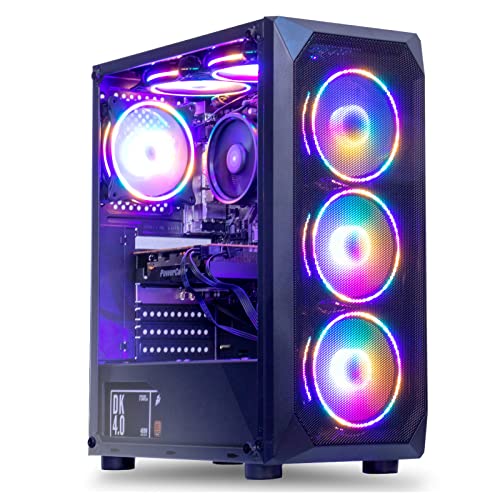
- Best overall for streaming at this budget: MXZ Gaming Desktop, Ryzen 5 5500, GTX 1660 Super 6GB, 16GB DDR4, 500GB NVMe SSD — Check on Amazon
- Beelink SER5 MAX Mini PC, Ryzen 7 7735HS, Radeon 680M, 24GB LPDDR5, 500GB SSD — Check on Amazon
- GMKtec NucBox M6 Ultra Mini PC, Ryzen 5 7640HS, Radeon 760M, 16GB DDR5, 512GB SSD — Check on Amazon
- STGAubron Gaming PC, Ryzen 5 5500, Radeon RX 580 8GB, 16GB DDR4, 512GB SSD — Check on Amazon
See 2 more Amazon options
- GMKtec M5 Plus Mini PC, Ryzen 7 5825U, 32GB RAM, 1TB SSD — Check on Amazon
- ACEMAGICIAN AM06 Pro Mini PC, Ryzen 7 5800U, 16GB RAM, 512GB SSD — Check on Amazon
Read the full guide ↓
Disclosure: As an Amazon Associate, reviewstook.com earns from qualifying purchases. Links to Amazon on this page are affiliate links; they cost you nothing extra. Listing details such as price and availability change often, so check the current Amazon listing before you buy.
Start with the two sentences that decide whether this guide can help you. First: nobody streams in 4K at this budget, and almost nobody streams in 4K at any budget. Live platforms, not PCs, set that ceiling — Twitch’s standard broadcast is 1080p60 at around 6,000 kbps, and even on YouTube, which accepts higher bitrates, 1440p streams and AV1 live encoding, a 4K live broadcast is the exception rather than the norm. The “4K” in this keyword honestly describes your screen — the 4K TV or monitor the PC sits under — not the resolution your viewers receive. Second: at $500, the realistic deliverable is a clean 1080p60 stream (or a very comfortable 720p one) of light, esports and indie games, played locally at modest settings while the same machine encodes and uploads. That is a genuinely useful machine for a starting streamer. It is not a machine that plays a modern AAA release and broadcasts it beautifully at the same time, and any listing implying otherwise is selling you the badge, not the broadcast.
Streaming also changes what “good hardware” means, and this guide grades accordingly: encoder first. When you play and stream from one PC, three jobs compete for the same silicon — the game renders, the encoder compresses every frame into the bitrate your platform allows, and OBS composites your camera, alerts and browser sources on top. A dedicated hardware encoder block does the second job almost for free; an encoder that shares silicon with the game itself taxes every frame twice. That is why the ranking below is not the ranking you would get from a pure gaming guide at this price. The one tower with a modern NVIDIA encoder leads, the strongest integrated graphics follow with an asterisk, and two honest Vega-era minis close the list as light-duty and second-PC options. Every pick is also graded on the simultaneous load — CPU cores left over for chat and apps, memory headroom, and storage for local recordings — because a stream that stutters when a browser source fires is a failed stream however good the game looks on your own screen.
The six picks are the same verified families that anchor our general guide to Best 4K Gaming PC Under $500: two towers with real discrete graphics cards and four Ryzen mini PCs, re-graded here purely as broadcast machines. Two of the six are sale-dependent — their prices cross above $500 in some weeks — and each review says so in plain words. If your ambition is a heavier game catalogue, a second encoding workload, or a 1440p YouTube stream, the honest step-ups are Best 4K Gaming PC For Streaming Under $700 and Best 4K Gaming PC For Streaming Under $1200, and the dedicated category is covered in Best Streaming PC Under $500. This guide is for the buyer whose $500 is real and whose first channel starts now.
In this guide
Quick Picks
Short on time, or comparing several options at once? Each row below names a streaming job and the machine that suits it, with a link to the listing.
| Streaming job | Pick | Why it stands out | Link |
|---|---|---|---|
| Best overall for streaming | MXZ Gaming Desktop, Ryzen 5 5500, GTX 1660 Super | Turing NVENC encodes on its own silicon — the game and the stream stop fighting | Check on Amazon |
| Best mini PC for streaming | Beelink SER5 MAX, Ryzen 7 7735HS, Radeon 680M | Strongest integrated graphics here, with 24GB of fast memory feeding game and encoder | Check on Amazon |
| Best modern encoder | GMKtec NucBox M6 Ultra, Ryzen 5 7640HS, Radeon 760M | Newest AMD media engine in the guide, dual 2.5GbE for a wired stream, USB4 options | Check on Amazon |
| Best platform to grow into | STGAubron Gaming PC, Ryzen 5 5500, RX 580 8GB | A standard tower whose dated encoder is a placeholder — a modern GPU swap fixes streaming properly | Check on Amazon |
| Best second-PC / light-duty pick | GMKtec M5 Plus, Ryzen 7 5825U, 32GB RAM, 1TB SSD | 32GB of RAM and dual LAN: happiest encoding light games or another machine’s feed | Check on Amazon |
| Cheapest way on air | ACEMAGICIAN AM06 Pro, Ryzen 7 5800U | Budget-tier entry in the guide; light games, cloud titles and retro streams only | Check on Amazon |
How These Picks Were Chosen
The budget was applied as a ceiling, with the same documented exception pattern as the base guide: prices in this corner of Amazon swing weekly with coupons and Prime pricing, so check the price on Amazon for each pick before you judge it against the budget — and where a pick is only in-budget on sale, the review says so explicitly. The six machines are reused from the verified base research for this price tier; nothing new has been added, and no specification has been upgraded in the retelling.
What changed is the grading. We did not use these machines ourselves. We read the maker listings and specification pages and re-ranked the set on the four things that decide a one-PC stream: the encoder hardware and which silicon it shares; the CPU cores and threads left over once the game takes its share; the memory configuration, because an integrated GPU borrows system RAM and streaming adds OBS, a browser and chat to the same pool; and the network connection, because a stream is an upload and Wi-Fi is where cheap setups go to drop frames. Graphics power still matters — it decides which games you can play at all while encoding — but at this budget it is graded as a streaming input, not as the headline. Listings that hide behind a bare “Core i7” with no generation attached were treated with the same suspicion as in the base guide, and the STGAubron review carries the strongest version of that warning.
The Encoder Is the Streaming Spec
Every graphics chip contains a fixed-function video encoder: a small block of silicon whose only job is turning rendered frames into a compressed stream. It is the single most important streaming component you are buying, and it never appears in a listing headline. Three encoder families appear in this guide, and they are not equals. NVIDIA’s NVENC, in the Turing generation fitted to the GTX 1660 Super, is the benchmark at Twitch bitrates: at the roughly 6,000 kbps Twitch allows, its H.264 output holds detail in motion visibly better than older encoders, and because it is dedicated silicon, encoding costs the game almost nothing. AMD’s VCN encoders, built into the Ryzen integrated graphics below, are competent and improving by generation — the RDNA 3 media engine in the 760M is the newest here and adds AV1 encoding, which matters for YouTube — but they live inside the same chip that is rendering your game, so the encode and the render draw on one power and thermal budget. The oldest encoders here, the Vega-generation blocks in the two cheapest minis and the Polaris encoder in the RX 580, work, but their H.264 output at Twitch bitrates is visibly softer in fast motion, and the RX 580’s driver support is now legacy — a fact that matters more each year.
Two platform facts frame everything. Twitch’s standard ingest is around 6,000 kbps CBR at up to 1080p60; pushing more bitrate at it without partner transcoding arrangements does not buy quality, it buys buffering for viewers on slower connections. YouTube is the more generous platform — higher bitrates, 1440p live streams that also unlock better processing for 1080p uploads, and AV1 live encoding — which is why the 760M’s AV1 support earns the M6 Ultra its “best modern encoder” row despite its mid-pack gaming power. And 4K itself? A 4K live stream would need several times Twitch’s standard bitrate before it looked like anything, which is why the resolution in this keyword belongs to your monitor. Play at 1080p, broadcast at 1080p60, and let the 4K panel do what it is good at: a sharp desktop for OBS, chat and everything around the game.
The 6 Best 4K-Screen PCs for Streaming Under $500
MXZ Gaming Desktop — Ryzen 5 5500, GTX 1660 Super 6GB, 16GB DDR4, 500GB NVMe SSD
Who it suits: The starting streamer who wants one machine that plays and broadcasts properly at the same time — the only pick here whose encoder never touches the game’s resources.
The GTX 1660 Super’s streaming virtue is invisible in a gaming guide: its Turing NVENC encoder. Note the generation — this is the full Turing encoder, not the older Volta block fitted to the base GTX 1650, and at Twitch’s roughly 6,000 kbps it produces the cleanest H.264 picture any hardware in this guide can send. Because NVENC is dedicated silicon, the simultaneous-load maths that haunts every other pick barely applies: the game renders on the GPU’s main cores, the stream encodes on the encoder block, and the six-core Ryzen 5 5500 is left with genuine headroom for OBS compositing, a browser, chat and alerts. The honest gaming band from the base guide carries over — 1080p at medium-to-high settings in modern titles, esports at high frame rates, lighter games at 1440p — and a streamer’s correct configuration is the middle of that band: render at 1080p, cap the frame rate a little below the maximum, and the broadcast stays smooth because neither the game nor the encoder is at its limit. On your 4K screen, OBS and the game sit side by side in a sharp desktop; the viewers get 1080p60, which is what Twitch would have given them from a machine costing three times as much.
The limitations are the card’s age and the listing’s behaviour. There is no AV1 encoding — that is RTX 40-series and newer territory — and no DLSS, so upscaling is FSR-class. The 6GB of VRAM is a shared pool: the game, OBS’s composited sources and any browser hardware acceleration all draw on it, so texture settings that fit solo play can overflow once a busy scene is running; medium textures are the streaming setting. And the price only fits this guide on sale. It is a sale-dependent pick, full stop — check the price on Amazon, and when it sits at or under $500 it is the strongest streaming recommendation in this guide; above that line the smarter move is patience or the next tier. The listing’s own bullets also disagree on SSD size (a “1T” line against 500GB in the title and spec table); the base research uses 500GB, and you should verify the exact configuration on the live listing before paying.
- Turing NVENC — the best Twitch-bitrate encoder in this guide, on dedicated silicon.
- Six-core CPU left genuinely free for OBS, chat and browser sources.
- A standard tower: a future GPU swap upgrades game and encoder together.
Honest limitation: No AV1 encode, 6GB of VRAM shared with OBS, and the price is only in this guide when the listing is on sale.
Choose it if you catch it at or under $500 and streaming is the point of the purchase. Skip it if the live price sits well above $500, or you need a silent mini for the living room.

Beelink SER5 MAX Mini PC — Ryzen 7 7735HS, Radeon 680M, 24GB LPDDR5, 500GB SSD
Who it suits: The living-room streamer: a silent box behind the 4K TV that plays light games and broadcasts them credibly, with the strongest integrated graphics under $500.
The Radeon 680M — twelve RDNA 2 compute units — is the fastest integrated GPU in this guide, and its VCN encoder handles H.264 and HEVC competently. The catch is structural and this review will not hide it: on an integrated chip, the encoder and the game share one piece of silicon, one memory pool and one thermal envelope. Beelink’s configuration is the best possible answer to that problem — 24GB of fast dual-channel LPDDR5 feeding the iGPU, because integrated graphics borrow system memory and its bandwidth — but the physics remain: a game that saturates the 680M leaves the encoder competing for the same resources, and the fix is the streamer’s usual discipline of capping frame rates and choosing settings a notch below the solo-play maximum. Within that discipline, the honest streaming band is real: esports titles, older AAA games and indies at 1080p, encoded at 1080p60 for Twitch or sent to YouTube, where this chip’s HEVC encoding is also usable. What it does not have is AV1 encoding — the RDNA 2 media engine predates it — so YouTube’s AV1 live path is closed to this pick. Pricing for this configuration moves with deals, so treat it as the second sale-aware pick in the guide: check the price on Amazon — in-budget on deal days, above the line at other times.
The fixed-for-life caveat from the base guide applies at full size: the 24GB of RAM is soldered LPDDR5. It is generous and well chosen, but it is what you will have forever — storage, via the M.2 slots, is the only internal upgrade, and there is no graphics upgrade path at all. For a streamer that matters in one specific way: if your channel grows into heavier games, this box does not grow with you; it retires to the second-PC role described in the M5 Plus review below, a job its quiet manners suit well.
- Radeon 680M — the strongest integrated graphics and encoder pairing in the guide.
- 24GB of fast dual-channel memory is exactly what a shared game-plus-encode load needs.
- Quiet, tiny and triple-4K-display capable — a natural living-room broadcast box.
Honest limitation: Encoder and game share one chip; no AV1 encoding; soldered RAM and no GPU upgrade path, ever.
Choose it if your catalogue is esports, older and indie games and the machine lives by the TV. Skip it if you plan to stream modern AAA releases, or to upgrade your way upward — buy the tower.

GMKtec NucBox M6 Ultra Mini PC — Ryzen 5 7640HS, Radeon 760M, 16GB DDR5, 512GB SSD
Who it suits: The forward-looking streamer — especially a YouTube-first one — who wants the newest encoder technology under $500 and a wired connection built in.
The 760M’s media engine is the newest AMD encoder block in this guide: RDNA 3-generation VCN, with H.264 and HEVC joined by AV1 encoding. AV1 deserves one precise sentence, because it is the only future-facing encoder feature any pick here offers: Twitch still runs on H.264, so AV1 does nothing there today, but YouTube accepts AV1 live streams and its higher bitrates and 1440p ingest flatter every encoder — if your channel is YouTube-first, this is the most modern broadcast silicon in the guide. The gaming side is the honest band from the base research: the eight RDNA 3 compute units land close to the 680M in real games despite the smaller count, so expect strong 1080p in esports and older titles and low-settings-plus-FSR in recent ones — with the same shared-silicon discipline as the Beelink, because the encoder still lives inside the chip rendering your game. Two supporting features matter more to a streamer than to a gamer: dual 2.5GbE LAN ports make the wired-Ethernet rule effortless, and USB4 keeps an external-GPU dock open as a later, extra-cost route to genuinely heavier streaming. Check the price on Amazon for this 16GB configuration; a 32GB variant of the same listing family sits in a higher tier, so confirm the exact configuration in the cart — the under-$500 claim belongs to the 16GB machine.
The limitations mirror the Beelink’s with one swap. Sixteen gigabytes of DDR5 is the tightest memory pool among the minis here, and a one-PC stream spends memory in four places at once — game, iGPU frame buffer, OBS and browser — so heavy multitasking while live is this pick’s weak point; the 512GB SSD also fills quickly once local recordings join the game library. Against that, the platform is a generation newer than everything else in the guide, and its encoder will age the slowest.
- Newest encoder here: RDNA 3 VCN with AV1 encoding for YouTube live.
- Dual 2.5GbE LAN — the wired-stream rule satisfied out of the box.
- USB4 leaves an external-GPU future open; Zen 4 CPU and DDR5 throughout.
Honest limitation: Shared-silicon encoding like every iGPU, the guide’s tightest RAM pool at 16GB, and a pricier 32GB variant hiding in the same listing family.
Choose it if you stream to YouTube, value the modern platform, and keep your live multitasking modest. Skip it if you want maximum integrated gaming value today — the SER5 MAX edges it — or run many apps while live.

STGAubron Gaming PC — Ryzen 5 5500, Radeon RX 580 8GB, 16GB DDR4, 512GB SSD
Who it suits: The staged buyer who needs a working tower now and understands that its streaming story is the upgrade, not the card it ships with.
Grade the RX 580’s encoder plainly, because this review’s honesty depends on it: the Polaris-generation encoder is the weakest modern-relevant block in this guide. At Twitch’s roughly 6,000 kbps, its H.264 output is visibly softer in fast motion than NVENC’s — grass, rain and fast pans smear where the MXZ’s stream stays legible — and the card’s driver support is now legacy, which means encoder and game fixes alike have stopped arriving. For slow-paced games, retro content and just-chatting formats, it broadcasts acceptably; for fast esports, viewers will see the difference. What you are really buying, exactly as the base guide framed it, is the tower around the card: a six-core Ryzen 5 5500 that will not bottleneck a future mid-range GPU, 16GB of DDR4, a 512GB SSD, 8GB of VRAM that still helps older titles at higher texture settings, and a standard case with a PCIe slot. The day a modern graphics card goes into that slot, this becomes a proper streaming PC — encoder included — which is more than any mini in this guide can ever promise. STGAubron’s RX 580 towers sit in the budget tier — check the price on Amazon for this exact listing, since configurations in this family vary.
The caveats are the longest in this guide because this brand demands them. One warning outranks the rest with this brand: the same near-identical listing title covers many different builds — other CPUs, other cards, other drives — so the configuration printed on the live page is the product, whatever the headline says. Screenshot your order. Verify power-supply headroom on the live listing before counting on that future GPU swap. And accept the timeline honestly: until the swap, you are streaming with the guide’s softest encoder, and no setting in OBS changes that.
- The least expensive way into a standard Ryzen 5 tower you can upgrade later.
- The future GPU swap upgrades gaming and encoding in one purchase.
- 8GB of VRAM still serves older titles at higher texture settings.
Honest limitation: The softest encoder here at Twitch bitrates, on legacy drivers; the good streaming PC is a later purchase away, and the exact variant must be verified.
Choose it if your plan is explicitly staged — tower now, graphics card later — and your current content is slow-paced. Skip it if you want the best finished streaming machine today; that is the MXZ.

GMKtec M5 Plus Mini PC — Ryzen 7 5825U, Radeon Graphics (Vega 8), 32GB RAM, 1TB SSD
Who it suits: The streamer whose games are light — or who wants a cheap, quiet dedicated encoding box beside a console or a main PC.
Reframe this pick and it makes sense; grade it as a one-PC gaming streamer and it does not. Its Vega-generation integrated graphics are the weakest gaming hardware among the minis here, and its encoder is of the same older generation: playing a modern game and encoding it on this chip at the same time is beyond it, full stop. What it can do is genuinely useful. Light local streaming — indies, retro and emulation content, older esports at modest settings — works, because the eight-core Ryzen 7 5825U and a full 32GB of dual-channel DDR4 leave OBS, chat and browser sources all the room they want; memory pressure, the silent stream-killer on 16GB minis, simply does not occur here. Its second honest role is as a dedicated streaming PC: feed it a console or another computer through a capture card (covered in the kit section below and bought separately), and it encodes that external picture without rendering a game at all — the job its CPU cores, dual 2.5GbE LAN ports and 1TB SSD suit best. The base research puts the value beyond argument: this is a budget-tier pick that stays reliably under budget — check the price on Amazon — unlike the two sale-dependent picks at the top of this guide.
The limitation is the graphics line, and it is absolute: local gaming means esports and older titles at 1080p low-to-medium, indie games happily, and modern AAA only via cloud streaming. If your channel is built on current releases played locally, no configuration of this box fixes that; buy the MXZ or the Beelink. One administrative caution: closely related configurations circulate under this model family’s titles, so check that the live page actually says 32GB and 1TB before you pay.
- 32GB of RAM — the only pick where streaming multitasking never touches the memory ceiling.
- Dual 2.5GbE LAN and 1TB storage: the natural dedicated streaming/recording box.
- Budget-tier pricing — check the price on Amazon; the rare pick that stays under budget.
Honest limitation: Weakest local gaming and oldest encoder generation among the minis; modern games played and streamed on this one chip are out.
Choose it if your content is light, or you are building a two-machine or console-capture setup cheaply. Skip it if one PC must play and broadcast current games — it cannot, and this guide will not pretend otherwise.

ACEMAGICIAN AM06 Pro Mini PC — Ryzen 7 5800U, Radeon RX Vega 8, 16GB RAM, 512GB SSD
Who it suits: The absolute-budget starter: a first streaming box for light games, retro content and cloud titles, bought at the lowest prices in this guide.
The AM06 Pro sits at the budget end of this guide — check the price on Amazon — and at that tier the streaming proposition is narrow but real. The eight-core Ryzen 7 5800U keeps OBS, a browser and chat comfortable; the Vega 8 graphics and their encoder handle esports and indie games at 1080p low-to-medium settings with a 1080p60 (or safer 720p60) broadcast of slow-to-medium-paced content; and cloud gaming services, which render elsewhere, turn it into a presentable front end for bigger titles, limited by your connection rather than the chip. Dual LAN ports make the wired rule easy, and the 2.5-inch expansion bay is a cheap answer to recording storage. Set expectations at exactly that level and the machine is fair value for a first channel finding its feet.
Its ceiling is the joint-lowest in the guide, shared with the M5 Plus: the oldest graphics architecture here, an encoder of the same Vega generation, and 16GB of memory that a game, OBS and a browser divide between them. Fast-paced modern games played and streamed locally are not a settings problem on this box; they are a category error. Two standing budget-brand cautions from the base guide’s research apply: support from value mini PC brands is thinner than from the big names. Buy it as the cheapest honest way on air — not as a machine that will grow.
- Lowest-priced tier in the guide — check the price on Amazon.
- Eight-core CPU and dual LAN keep the streaming side of the desk comfortable.
- 2.5-inch bay gives recordings somewhere cheap to live.
Honest limitation: Oldest graphics and encoder here; local play-plus-stream is light titles only, and modern games mean the cloud or another machine.
Choose it if the budget is truly hard and your content is light, retro or cloud-based. Skip it if you can reach the Beelink or the MXZ on sale — the encoder gap is the whole story.

Comparison Table
| Product | Encoder | Honest streaming level | Link |
|---|---|---|---|
| MXZ Gaming Desktop (Ryzen 5 5500) | GTX 1660 Super — Turing NVENC, dedicated | 1080p60 Twitch streams of 1080p play; the guide’s benchmark picture | Check on Amazon |
| Beelink SER5 MAX (Ryzen 7 7735HS) | Radeon 680M — RDNA 2 VCN, shared with game | 1080p60 streams of esports/older/indie play, with frame-rate discipline | Check on Amazon |
| GMKtec NucBox M6 Ultra (Ryzen 5 7640HS) | Radeon 760M — RDNA 3 VCN, AV1 encode, shared | 1080p60 streams; the YouTube/AV1-ready pick, tightest on RAM | Check on Amazon |
| STGAubron Gaming PC (Ryzen 5 5500) | RX 580 — Polaris encoder, legacy drivers | Acceptable for slow-paced content; a platform for a future encoder-grade GPU | Check on Amazon |
| GMKtec M5 Plus (Ryzen 7 5825U) | Vega 8 — older VCN generation, shared | Light local streams; best as a dedicated encode/recording box | Check on Amazon |
| ACEMAGICIAN AM06 Pro (Ryzen 7 5800U) | Radeon RX Vega 8 — older VCN generation, shared | Light, retro and cloud streams at the lowest entry price | Check on Amazon |
Set Up OBS Once, Correctly
Every pick in this guide can be ruined by default settings and most can be saved by ten deliberate ones. Work through this list once, in order, before your first public stream. Pick the hardware encoder, never x264. On the MXZ that means NVENC; on every AMD pick it means the AMD hardware H.264 encoder — except on the M6 Ultra streaming to YouTube, where its AV1 encoder is the modern choice. CPU encoding on these processors while a game runs is how dropped frames happen. Use CBR and a 2-second keyframe interval — both are platform requirements in practice, and “auto” keyframes are a common cause of rejected or degraded ingests. Set the bitrate to the platform, not to your hopes: around 6,000 kbps for Twitch at 1080p60; YouTube accepts substantially more and rewards it, and its 1440p output option makes a 1080p canvas look better after processing. Match the canvas to the play: base and output resolution both at 1080p. Setting a 4K output canvas because your monitor is 4K quadruples the compositing and scaling work for a stream no platform will show at that size. Wire the Ethernet cable. A stream is a sustained upload; Wi-Fi jitter drops frames that no encoder setting can recover, and every pick here has a proper LAN port — several have two. Cap the game’s frame rate a little below its maximum and prefer medium textures: on shared-silicon minis this is the difference between a stable broadcast and a slideshow, and on the MXZ it protects the 6GB VRAM pool that OBS also drinks from. Record locally at higher quality than you stream if you cut videos from your sessions — a 40–50 Mbps local recording runs to roughly 20GB an hour, which is why the 1TB M5 Plus and the AM06 Pro’s expansion bay earn mentions in a streaming guide. Finally, read OBS’s three counters after every session — dropped frames (network), skipped frames (rendering) and lagged frames (encoding) each name a different problem with a different fix, and guessing wastes more evenings than any hardware limit in this guide.
What $500 Does Not Include
The PC is the smaller half of a first streaming budget, and pretending otherwise is how $500 setups end up sounding like a laptop microphone in a tiled kitchen. Cost these separately — none of them is inside any pick’s price above. A microphone comes first, before any other accessory: viewers forgive soft video and leave bad audio, and a competent USB microphone sits in the budget-to-mid-range tier. A webcam is next if your format shows your face — a budget-to-mid-range model buys a clean 1080p camera, and at Twitch’s bitrates it will look better than your game does. A second screen — any spare monitor or TV — is the quality-of-life purchase: chat, OBS and alerts live there instead of alt-tabbing over your game, and on the 16GB minis it is worth remembering that every window still shares one memory pool. A capture card — a mid-range accessory — is only for console streamers or two-PC setups like the M5 Plus arrangement above; a one-PC beginner does not need one at all. Add an Ethernet cable if your router is not already within reach. Realistically the broadcast kit adds meaningfully to the PC over your first months — microphone first, the rest as the channel proves it deserves them.
How to Choose a Streaming PC Under $500
- Grade the encoder before the graphics card. A dedicated NVENC block beats a faster GPU with an old encoder for one-PC streaming. At this budget that ordering puts the MXZ first and the RX 580 tower last as shipped.
- Decide your platform. Twitch means H.264 at ~6,000 kbps and favours the MXZ. YouTube’s higher bitrates, 1440p ingest and AV1 live path are the M6 Ultra’s home ground.
- Count the simultaneous load, not the solo spec. Game + encoder + OBS + browser + chat. Six or eight real cores and 24–32GB of RAM stream more calmly than a faster chip starved of either.
- On integrated graphics, memory is a streaming spec. The iGPU, its encoder and your apps share one pool and its bandwidth. Dual-channel, larger and faster RAM (the Beelink’s 24GB LPDDR5) is a broadcast feature, not a luxury.
- Wire it. Sustained upload over Wi-Fi is the most common cause of dropped frames in cheap setups. Every pick here has LAN; use it, and prefer the dual-LAN minis if your desk layout is awkward.
- Match the machine to the catalogue. Esports, indies, retro and cloud: any pick, honestly graded above. Current AAA played locally and broadcast: only the MXZ attempts it, at disciplined settings — heavier ambitions belong to Best 4K Gaming PC For Streaming Under $1200.
- Price-check like a local. Two picks cross the $500 line between sales. Buy on the dip, and verify the exact configuration — RAM, SSD, CPU and card variant — in the cart, because this market stacks variants under one title.
- Keep the second-PC door in mind. A cheap mini that disappoints as a gaming streamer (the M5 Plus pattern) often retires into an excellent dedicated encode box. That second life is real value when you upgrade.
Common Buying Mistakes
- Believing a “4K streaming PC” headline that promises everything under budget. The stream your viewers receive is 1080p60 at best on any platform; 4K is your monitor, not your broadcast.
- Buying on game benchmarks alone. A card can top a gaming chart and still carry an encoder that smears at Twitch bitrates — the RX 580 is this guide’s standing example.
- Encoding on the CPU because it “looks better” in a forum post. On these processors, x264 while gaming is dropped frames; the hardware encoder exists precisely for this job.
- Setting a 4K output canvas in OBS. It multiplies compositing work and changes nothing your viewers see.
- Streaming over Wi-Fi because the desk is far from the router. Run the cable; it is the cheapest frame-rate upgrade in streaming.
- Maxing the game’s settings because it runs fine solo. Streaming headroom is a separate budget — cap the frame rate and leave the encoder and compositor room to breathe.
- Paying the non-sale price for a sale-dependent pick, or checking out the wrong variant of a stacked listing. Both mistakes are this market’s speciality; the reviews above flag exactly where each applies.
- Spending on a capture card for a one-PC setup. It solves a problem you do not have; the microphone you skipped was the one you did.
Final Recommendation
- Most streamers at this budget: MXZ Gaming Desktop (GTX 1660 Super) — bought on sale at or under $500; the only dedicated encoder here.
- Living-room and small-desk streaming: Beelink SER5 MAX (Radeon 680M).
- YouTube-first and future-facing: GMKtec NucBox M6 Ultra (AV1 encode, dual LAN).
- The staged plan: STGAubron Gaming PC (RX 580 tower).
- Dedicated encode box / lightest duty: GMKtec M5 Plus (32GB / 1TB).
- Cheapest way on air: ACEMAGICIAN AM06 Pro.
The short version: streaming at $500 is an encoder purchase wearing a gaming PC’s clothes. The MXZ is the only pick whose encoder is dedicated silicon, and that single fact outweighs every other specification in this guide for a one-PC Twitch setup — buy it on sale and set it up once, correctly. If the machine must disappear behind a 4K TV, the Beelink SER5 MAX is the better citizen, and if your channel lives on YouTube the M6 Ultra’s AV1 encoder is the most modern tool here. Buyers whose real target is heavier games, a 1440p YouTube stream or dual-encoder headroom should read Best 4K Gaming PC For Streaming Under $700 next, compare the broader category in Best Streaming PC Under $500 and Best 1440p Gaming PC For Streaming Under $500, and keep the general-purpose view in Best 4K Gaming PC Under $1200. Whatever you choose, verify the live price and the exact configuration before you pay, wire the Ethernet cable on day one, and test a full stream inside the return window.
Frequently Asked Questions
Can I actually stream from a PC under $500?
Yes — a clean 1080p60 stream of esports, indie, retro and older games is a realistic deliverable from the stronger picks here, and the MXZ does it with its encoder to spare. What $500 does not buy is a modern AAA release played at high settings and broadcast beautifully from the same machine; that workload is what the higher tiers of this series exist for.
Why does the encoder matter more than the graphics card?
Because the stream is a second, simultaneous job. A dedicated encoder block (NVENC in the MXZ) compresses your broadcast on its own silicon while the game uses the rest of the card. Encoders that share silicon with the game — every integrated GPU here — split one power and memory budget two ways, and older encoder generations also produce a visibly softer picture at the roughly 6,000 kbps Twitch allows.
Will my viewers see a 4K stream?
No, and at higher budgets they mostly would not either. Twitch’s standard broadcast is 1080p60 at around 6,000 kbps; YouTube accepts higher bitrates, 1440p streams and AV1 live encoding, but 4K live remains rare and bitrate-hungry. The 4K in this guide is your display — valuable for a sharp OBS desktop and 4K video — not the resolution of your broadcast.
Twitch or YouTube — does the platform change the pick?
It can. Twitch is an H.264 platform at ~6,000 kbps, which plays to the MXZ’s NVENC strength. YouTube’s higher bitrates flatter every encoder, and its AV1 live support is usable by exactly one pick here, the M6 Ultra. If you are undecided, buy the encoder quality (MXZ) — it transfers to both platforms.
Mini PC or tower for a first streaming setup?
The tower if streaming performance leads: the MXZ’s dedicated encoder and future GPU swaps are decisive. A mini if the machine lives with a TV, your games are light, or you are planning a two-PC future in which today’s mini becomes the encode box — the M5 Plus is bought with exactly that second life in mind.
What should I buy after the PC itself?
A microphone first, then a webcam if your format needs one, then a second screen for chat and OBS. A capture card is only for console or two-PC setups. And an Ethernet cable before all of them if you do not already have one — it costs almost nothing and fixes the most common streaming fault there is.
Can one of these minis work as a dedicated streaming PC?
Yes — that is the M5 Plus’s best role. With a capture card bringing in a console or gaming PC’s picture, its eight cores, 32GB of RAM and dual LAN ports encode and upload without rendering a game, which is a far lighter job than one-PC streaming. The AM06 Pro can do the same work at the lowest prices here, with less headroom.


