Where to buy
Check the latest price, availability and delivery on Amazon. Orders are placed on Amazon. We may earn a commission from qualifying purchases.
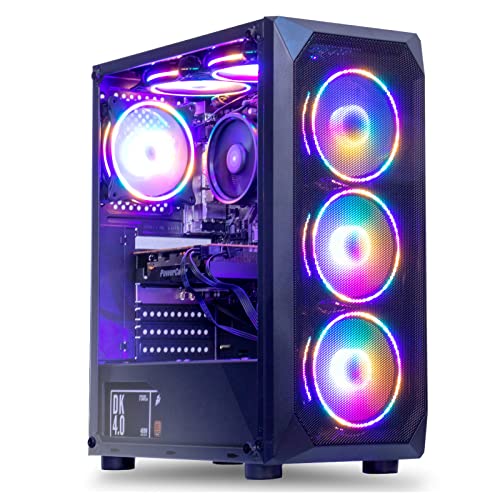
- Best overall for a beginner at this budget: MXZ Gaming Desktop, Ryzen 5 5500, GTX 1660 Super 6GB, 16GB DDR4, 500GB NVMe SSD — Check on Amazon
- Beelink SER5 MAX Mini PC, Ryzen 7 7735HS, Radeon 680M, 24GB LPDDR5, 500GB SSD — Check on Amazon
- GMKtec NucBox M6 Ultra Mini PC, Ryzen 5 7640HS, Radeon 760M, 16GB DDR5, 512GB SSD — Check on Amazon
- STGAubron Gaming PC, Ryzen 5 5500, Radeon RX 580 8GB, 16GB DDR4, 512GB SSD — Check on Amazon
See 2 more Amazon options
- GMKtec M5 Plus Mini PC, Ryzen 7 5825U, 32GB RAM, 1TB SSD — Check on Amazon
- ACEMAGICIAN AM06 Pro Mini PC, Ryzen 7 5800U, 16GB RAM, 512GB SSD — Check on Amazon
Read the full guide ↓
Disclosure: As an Amazon Associate, reviewstook.com earns from qualifying purchases. Links to Amazon on this page are affiliate links; they cost you nothing extra. Listing details such as price and availability change often, so check the current Amazon listing before you buy.
If this is your first gaming PC and you typed “4K” into a search box because your TV or monitor says 4K on it, this guide was written for you — and it starts with the one fact that will save you money and frustration: no PC under $500 plays modern games at true, native 4K. Not one in this guide, not one anywhere else. That is not a reason to close the tab. It is the reason this guide exists, because once you understand what “4K” honestly means at this budget, $500 turns out to buy a genuinely enjoyable first PC — just not the one the marketing headlines describe.
Here is the honest version. Every machine below can show a 4K picture — a pin-sharp desktop, 4K films and streaming shows. What none of them can do is draw a demanding modern game at full 4K while it plays. Instead, they draw games at 1080p or a little higher, and then stretch that picture intelligently to fill your 4K screen. That technique is called upscaling, and from a couch or a normal desk distance it looks far better than it sounds. Add cloud gaming services, which draw the game on a server somewhere else and stream it to you, and even a modest mini PC can present big-screen play its own chips could never produce. Buy with those expectations and you will be happy for years; buy expecting native 4K ultra settings and you will be arranging a return within the week — through no fault of the PC.
The six picks are the real, verified options under the line: two proper towers with their own graphics cards, and four small Ryzen mini PCs whose graphics are built into the processor. Two of the six only fit the budget on sale, and each review says so in plain words — check price on Amazon before you order, because those two drift. If native 4K gaming is truly the goal, the honest budget for a ready-made PC that does it comfortably starts around $1,200 — and the final section points you to the tiers that get there, so you can decide whether to start small now or save up first.
First, the Words: A Plain-English Glossary
PC listings are written in shorthand that assumes you already know it. You do not need much of it — just these few ideas, and every review below will make sense.
- Resolution and pixels. A screen picture is a grid of tiny dots called pixels. “1080p” means a grid 1920 across by 1080 down — about 2.1 million pixels. “4K” means 3840 across by 2160 down — about 8.3 million pixels, roughly four times as many. Every extra pixel is extra drawing work for the PC, every single frame, dozens of times per second. That multiplication is the whole story of this guide: 4K is about four times harder than 1080p, not a little harder.
- CPU (the processor). The PC’s general brain — it runs Windows, your browser, the game’s logic, everything that is not drawing the picture. Names like “Ryzen 5 5500” or “Ryzen 7 7735HS” describe families and generations; for gaming at this budget, the CPU is rarely the deciding part.
- GPU (the graphics processor). The specialist chip that draws the game picture. This is the part that decides what resolution and settings you can play at, and it is what this whole guide is really about. When a listing shouts about the CPU and whispers about graphics, be suspicious.
- Discrete vs integrated graphics. A discrete GPU is a separate graphics card plugged into a tower — it has its own memory and does nothing but draw. Integrated graphics are a smaller graphics chip built into the CPU, common in mini PCs and laptops; they borrow the PC’s ordinary memory and are weaker, but cheap, quiet and tiny. Two picks below have discrete cards; four have integrated graphics.
- VRAM (video memory). The graphics chip’s own private memory, where it keeps the textures — the surfaces and detail of the game world. More VRAM lets a game use sharper textures. A card with 6GB, like the GTX 1660 Super below, will run out of room in some recent games before it runs out of drawing power; that is a real limit, and the reviews name it where it applies. Integrated graphics have no VRAM of their own — they share the PC’s main RAM, which is why RAM matters so much on the mini PCs.
- Render resolution vs display resolution. The most useful idea in this guide. Display resolution is what your screen shows — 4K, if your screen is 4K. Render resolution is what the PC actually draws before showing it. A game can render at 1080p and display on a 4K screen, with the gap filled by upscaling: the picture is a little softer than true 4K, but the PC only did a quarter of the work. Almost all “4K gaming” at this budget is really 1080p rendering on a 4K display — fine, as long as you know it before you pay.
- Upscaling (FSR, DLSS, in-game scaling). The software trick that stretches a lower-resolution render up to fill your screen, using smart guesswork to keep it looking sharp. FSR is AMD’s version and works on every machine in this guide. DLSS is NVIDIA’s version and only works on NVIDIA’s newer RTX cards — notably, it does not work on the GTX 1660 Super below, despite the NVIDIA badge. Many games also have a built-in “resolution scale” slider that does a plainer version of the same job.
- RAM and storage. RAM (16GB is the comfortable minimum for gaming) is the PC’s short-term workspace; storage (the SSD, 500GB–1TB here) is where games live permanently. Modern games can take 50–150GB each, so storage fills faster than beginners expect.
- Refresh rate (Hz). How many times per second your screen redraws; a 60Hz screen shows up to 60 frames per second. It only helps if Windows is actually set to use it — new PCs often arrive set lower, which is why the setup walkthrough includes changing it.
In this guide
Quick Picks
Short on time, or comparing several options at once? Each row below names a buyer type and the machine that suits it, with a link to the listing.
| Buyer type | Pick | Why it stands out | Link |
|---|---|---|---|
| Best first PC for most beginners | MXZ Gaming Desktop, Ryzen 5 5500, GTX 1660 Super | The only pick with a proper graphics card strong enough to render above 1080p — and a tower you can upgrade later | Check on Amazon |
| Best mini PC for gaming | Beelink SER5 MAX, Ryzen 7 7735HS, Radeon 680M | The strongest built-in graphics in the guide, fed by a generous 24GB of fast memory | Check on Amazon |
| Best for future options | GMKtec NucBox M6 Ultra, Ryzen 5 7640HS, Radeon 760M | The newest parts in the guide, plus a USB4 socket that can connect an external graphics card later | Check on Amazon |
| Best cheap tower to grow into | STGAubron Gaming PC, Ryzen 5 5500, RX 580 8GB | A standard tower at the lowest tower price — buy it as a starting platform, upgrade the card later | Check on Amazon |
| Best memory and storage value | GMKtec M5 Plus, Ryzen 7 5825U, 32GB RAM, 1TB SSD | Twice the memory and storage of most rivals, comfortably under budget | Check on Amazon |
| Best low-price media and cloud box | ACEMAGICIAN AM06 Pro, Ryzen 7 5800U | The lowest prices in the guide, with three 4K screen outputs for films, desktop and streamed games | Check on Amazon |
How These Picks Were Chosen
We applied the $500 as a ceiling the way a beginner experiences it: if a machine regularly sits at or under the $500 ceiling, it qualifies — but where a pick only fits the budget on sale, the review says so in plain words, so nobody gets a surprise at checkout; check price on Amazon on the day you buy. Anything whose “4K” claim fell apart on inspection — listings using a 4K badge on hardware that cannot really game at all — was left out. What survived is ranked the way gaming outcomes are actually decided: the graphics hardware first, its memory second, and everything else after that.
We did not use these machines ourselves. We read the makers’ listings and specification pages and compared the graphics chips, memory setups, storage, screen outputs and upgrade paths. Two beginner-relevant checks shaped the list. First, for the mini PCs, memory configuration is quietly a gaming specification: because integrated graphics borrow the PC’s RAM, a mini with 24GB or 32GB of dual-channel memory games noticeably better than the same chip starved by a single small stick — so we favored generous, dual-channel setups. Second, for the towers, we weighted the future: a standard case with a graphics slot is the difference between “upgrade one part next year” and “start again from zero,” and for a first PC that difference is worth real money.
One test sat above all the others: does the machine’s “4K” mean displaying 4K or rendering 4K? Displaying is easy and every pick does it well. Rendering is the expensive part, so each review grades its machine on the honest scale a beginner can use: what it actually renders, what it reaches by upscaling, and what it should not be asked to attempt.
The 6 Best First “4K” Gaming PCs Under $500
MXZ Gaming Desktop — Ryzen 5 5500, GTX 1660 Super 6GB, 16GB DDR4, 500GB NVMe SSD
Who it suits: The beginner who wants the most real game-drawing power this budget can reach, in a normal tower that can grow with them — and who understands its “4K” is the smart upscaled kind, not the native kind.
Start with why this machine tops the guide: it is one of only two picks with a discrete graphics card, and its GTX 1660 Super is the strongest card that shows up in complete PCs at this price. In plain terms, that card genuinely renders games. At 1080p it plays modern titles at medium-to-high settings and fast-paced esports games very smoothly. At 1440p it handles older and lighter games at their real resolution. And on a 4K screen, its sensible mode is the one this guide keeps describing: render at 1080p or 1440p, let FSR or the game’s own scaling stretch the picture to fill the panel. Around the card sits a sensible supporting cast: a six-core Ryzen 5 5500 processor, 16GB of memory, a 500GB NVMe SSD, Windows 11 Pro already installed, and a conventional tower case with — the important part — a graphics slot waiting for a future upgrade.
Two limitations deserve plain words. The first is the card’s age and toolkit. The GTX 1660 Super is a 2019 design: it has no DLSS (NVIDIA kept that for its RTX cards) and no ray-tracing hardware, so its upscaling is the FSR kind, and its 6GB of video memory fills up in some recent games, forcing texture settings down at any resolution. Native 4K would exhaust its memory and its power at the same time, which is why this guide never asks it to try. The second limitation is the price’s behavior: this listing sits comfortably under budget on sale, and above the ceiling at other times — check price on Amazon before you assume it qualifies today. It is a sale-dependent pick, full stop. One more listing quirk to know before ordering: the page’s own bullets disagree about storage in one line (mentioning “1T” where the title and specification table say 500GB) — the 500GB figure is the consistent one, and the mistakes section’s rule, “check the exact configuration on the live page,” exists precisely because of listings like this.
- A real graphics card — the only pick with genuine rendering headroom above 1080p.
- Balanced, beginner-friendly platform: six-core CPU, 16GB RAM, fast SSD, Windows included.
- A normal tower, so the single most valuable future upgrade — a better graphics card — simply slots in.
Honest limitation: No native 4K gaming and no DLSS, 6GB of video memory is a real ceiling in newer games, and the price only fits this guide when the listing is on sale.
Choose it if you can catch it at or under $500 and want the strongest start plus a clear upgrade path. Skip it if the live price is well above $500 today, or you want a tiny, quiet box for the TV instead of a tower on the desk.

Beelink SER5 MAX Mini PC — Ryzen 7 7735HS, Radeon 680M, 24GB LPDDR5, 500GB SSD
Who it suits: The beginner whose PC will live with a 4K TV, or on a small desk, and who wants the best gaming that built-in graphics can do — a quiet little box that plays honestly at 1080p and upscales to fill the big screen.
The headline here is the Radeon 680M, the graphics built into the Ryzen 7 7735HS processor. It is the strongest integrated graphics in this guide by a clear margin — the same class of chip that powers popular handheld gaming PCs. Beelink also feeds it properly: 24GB of fast dual-channel LPDDR5 memory. Remember from the glossary that integrated graphics borrow the PC’s RAM, so that generous, fast memory is a gaming feature, not a luxury. In practice, this is a genuine 1080p gaming chip: esports titles at high settings, older big games at medium, recent releases at low settings with FSR helping. On a 4K television the right setup is exactly that — render at 1080p, let the game or the TV upscale — alongside flawless 4K video and a desktop that can span three 4K displays. On price, treat it as the guide’s second sale-aware pick: check price on Amazon, because it sits in budget on deal days and above the ceiling at other times.
The compromises are the standard mini PC ones, plus one specific to this model. That 24GB of memory is soldered — permanently attached — so it is generous but fixed forever; storage, through the internal M.2 slots, is the only upgrade inside the box. There is no graphics upgrade path at all: when the 680M eventually stops being enough, the whole PC is replaced rather than improved. And nothing about its strength changes the central fact: it renders games at 1080p-class resolutions. Its 4K talents are output, video and upscaling — real talents, honestly labeled.
- The Radeon 680M is the most powerful built-in graphics chip of the six picks.
- 24GB of fast dual-channel memory, exactly what built-in graphics need to perform.
- Tiny and quiet, with three 4K display outputs — an ideal TV or small-desk citizen.
Honest limitation: The memory can never be upgraded and there is no graphics upgrade path; the price drifts above the budget ceiling between deals.
Choose it if you want the best small-box gaming under $500 and your expectations are set at 1080p-plus-upscaling. Skip it if you already know you will want a stronger graphics card later — start with a tower instead.

GMKtec NucBox M6 Ultra Mini PC — Ryzen 5 7640HS, Radeon 760M, 16GB DDR5, 512GB SSD
Who it suits: The beginner thinking one step ahead: a mini PC built from the newest parts in the guide, with one special socket that keeps a genuine — if extra-cost — road to real 4K open later.
The M6 Ultra’s processor is a generation newer than the Beelink’s: a six-core Ryzen 5 7640HS (Zen 4, up to 5.0GHz) with Radeon 760M graphics. The 760M has fewer graphics units than the 680M but a newer design and faster DDR5 memory behind it, and in real games the two land close together. Set expectations exactly as you would for the Beelink: strong 1080p in esports and older titles, low settings plus FSR in recent ones, an upscaled picture on the 4K screen, and perfect 4K video. The verified configuration is 16GB of DDR5 memory and a 512GB NVMe SSD, with two internal drive slots, two fast 2.5GbE network ports, WiFi 6E, Windows 11 Pro, and outputs for three 4K displays — in a box about five inches square. Check price on Amazon for this 16GB configuration. One warning matters: a 32GB version exists in the same listing family and sits in a considerably higher tier — so confirm the configuration in your cart is the 16GB one.
What separates this pick is a socket on the back: USB4. That connection can attach an external graphics dock — a desktop graphics card in its own little enclosure — which is the only way any mini PC in this guide ever renders true native 4K. Be clear-eyed about it: the dock and card cost real money later, and none of that is counted in this guide’s $500. It is an option the other minis simply do not offer, not a promise. The honest limitations are the 760M’s 1080p-class ceiling (the newer name does not make it the faster gaming chip in most titles), a modest 512GB of storage in an era of very large game installs, and the same no-internal-graphics-upgrade rule as every mini PC.
- Newest platform in the guide: current-generation CPU and graphics, DDR5 memory.
- USB4 socket allows an external graphics card later — a real route toward native 4K.
- Two fast network ports, WiFi 6E and two drive slots in a five-inch box.
Honest limitation: Gaming performance is 1080p-class, 512GB fills quickly, and the 32GB variant breaks the budget — check which configuration is in your cart.
Choose it if you value the modern platform and the external-graphics option over the Beelink’s extra memory. Skip it if you want the most built-in gaming performance per dollar today — the SER5 MAX edges it.

STGAubron Gaming PC — Ryzen 5 5500, Radeon RX 580 8GB, 16GB DDR4, 512GB SSD
Who it suits: The beginner on a staged plan: a working gaming tower for the least money now, bought mainly as a platform — with the intention of fitting a proper graphics card later, when the budget allows.
Read this pick the right way round, because it is the one beginners most often misunderstand. The RX 580 graphics card is from 2017, and this review will not dress it up: it is a decent 1080p card for older and lighter games, it helpfully carries 8GB of video memory, and at 1440p or 4K rendering in modern titles it is simply out of its depth — its 4K role is the desktop, video, and gentle experiments with old games. What you are really buying is the tower around it: the same six-core Ryzen 5 5500 as the MXZ, which will not hold back a future mid-range card, 16GB of memory, a 512GB SSD, and a standard case with a graphics slot and — verify this on the live listing — a power supply with some headroom. STGAubron’s RX 580 towers are budget-tier towers in Amazon deal coverage and undercut the MXZ — check price on Amazon — while asking you to accept an older card and a lesser-known system builder.
The caveats are the longest in this guide because this brand requires them. STGAubron sells many different configurations under near-identical titles — different processors, cards and storage — so the exact configuration written on the live page, not the headline, is what you are buying; take a screenshot of your order confirmation. The RX 580’s age also means its driver software is on legacy support (updates are rare) and it draws a lot of power for the performance it gives. And the upgrade story, while real, is not free: a genuine 4K-class graphics card later costs more than this entire PC does today. The purchase only works as a deliberate two-step plan: an inexpensive tower and honest 1080p today, a real graphics card when funds allow. Buy it because a headline promised 4K and the disappointment will arrive within the week.
- The cheapest route to a standard, upgradeable Ryzen 5 tower in this guide.
- 8GB of video memory helps older games run at higher texture settings.
- Real 1080p gaming today in esports and back-catalogue titles.
Honest limitation: A 2017 graphics card on legacy drivers; the real 4K upgrade costs extra later, and the exact variant must be verified on the live listing before you pay.
Choose it if you are deliberately buying in stages — the tower this year, the graphics card in a later one. Skip it if you want the best finished machine today; that is the MXZ, or one of the mini PCs.

GMKtec M5 Plus Mini PC — Ryzen 7 5825U, Radeon Graphics (Vega 8), 32GB RAM, 1TB SSD
Who it suits: The beginner whose honest priorities are films, desktop space and value first, with light gaming on the side — and who would rather have double the memory and storage than the fastest built-in graphics.
On paper, this is the value champion of the six. It is a budget-tier pick that sits reliably, comfortably under budget — sometimes lower still with a clipped Prime coupon — unlike the two sale-dependent picks above; check price on Amazon. The specification is unusually complete: a Ryzen 7 5825U processor, 32GB of dual-channel DDR4 memory, a full 1TB NVMe SSD with a second slot for more, two fast 2.5GbE network ports, WiFi 6E, Windows 11 Pro, and outputs for three 4K displays. As a 4K living-room and home-office machine — streaming video, a huge sharp desktop, a front end for cloud gaming — it is arguably the most complete box in this guide, and its generous memory and storage are exactly what the stronger-graphics minis economize on.
The trade is printed on the graphics line: the 5825U’s integrated graphics are the older Vega design, a clear step below the 680M and 760M in the Beelink and the M6 Ultra. Gaming here means esports and older titles at 1080p on low-to-medium settings, indie games happily, and modern big releases only through cloud streaming or aggressive upscaling. If local gaming is your first priority, this is the wrong pick and this guide says so plainly. If gaming is third on your list behind media and desktop work, its value is hard to argue with. One housekeeping note: titles in this model family have appeared with closely related configurations, so confirm the 32GB memory and 1TB storage on the live page before paying.
- 32GB of memory and a 1TB SSD — double the typical mini PC specification at this price.
- Comfortably under the ceiling, with headroom to spare against the budget.
- Three 4K outputs and two fast network ports — a complete media and office hub.
Honest limitation: The oldest-style integrated graphics among the mini PCs here; local gaming is light-duty only.
Choose it if 4K media, desktop space and cloud gaming matter more to you than local game-rendering power. Skip it if you plan to game locally every night — step up to the 680M or 760M picks.

ACEMAGICIAN AM06 Pro Mini PC — Ryzen 7 5800U, Radeon RX Vega 8, 16GB RAM, 512GB SSD
Who it suits: The beginner who wants the cheapest honest entry: a first PC for a 4K screen that covers video, cloud gaming and light local play, at the lowest prices in this guide.
There is a reason the AM06 Pro keeps appearing in budget roundups. Check price on Amazon: its page has shown the lowest prices in this guide, with an even lower Prime price displayed at times — and the hardware is a coherent light-duty package: an eight-core Ryzen 7 5800U, Radeon RX Vega 8 graphics, 16GB of dual-channel DDR4 memory, a 512GB NVMe SSD plus a 2.5-inch bay for cheap extra storage, dual network ports, WiFi 6, and three 4K outputs across HDMI, DisplayPort and USB-C. Bolted behind a 4K TV it is a genuinely good media PC and cloud-gaming terminal, and locally it plays the esports and indie catalogues at 1080p on low-to-medium settings.
Where it ranks for gaming is just as unambiguous: last of the six. The Vega 8 is the oldest graphics design in the guide; recent big games are a cloud-streaming conversation rather than a local one, and upscaling from very low internal resolutions to a 4K panel shows its seams on a large TV. Two standing cautions for value mini PC brands apply: after-sales support is thinner than from the big names, and the standard half-hour of hygiene for this class — run a security scan, and consider a clean Windows install — is worth doing on arrival. At its budget-tier asking price, though, the expectations game is fair: nobody here is pretending this renders 4K, and as the cheapest respectable driver for a 4K screen, it earns its place.
- The lowest prices in the guide, with an even lower Prime price at times.
- Three 4K display outputs and a 2.5-inch bay for inexpensive storage expansion.
- An eight-core processor keeps everyday desktop and media work feeling quick.
Honest limitation: The oldest graphics architecture here — local gaming means light titles only, and modern games mean the cloud.
Choose it if what your 4K screen needs is an affordable, quiet little driver for films and streamed games. Skip it if local gaming performance is the point of the purchase — the gap up to the 680M pick is the whole story.

Comparison Table
| Product | Graphics | What it honestly renders | Link |
|---|---|---|---|
| MXZ Gaming Desktop (Ryzen 5 5500) | GTX 1660 Super 6GB, discrete card | 1080p medium–high, lighter games at 1440p; upscaled on a 4K screen | Check on Amazon |
| Beelink SER5 MAX (Ryzen 7 7735HS) | Radeon 680M, integrated | 1080p esports and older games; FSR upscaling to the 4K panel | Check on Amazon |
| GMKtec NucBox M6 Ultra (Ryzen 5 7640HS) | Radeon 760M, integrated | 1080p class; USB4 external-graphics path to real 4K later | Check on Amazon |
| STGAubron Gaming PC (Ryzen 5 5500) | RX 580 8GB, discrete card (2017) | 1080p older and esports titles; a platform to upgrade, not a 4K card | Check on Amazon |
| GMKtec M5 Plus (Ryzen 7 5825U) | Radeon Vega-class, integrated | Light 1080p; best at 4K video, desktop work and cloud gaming | Check on Amazon |
| ACEMAGICIAN AM06 Pro (Ryzen 7 5800U) | Radeon RX Vega 8, integrated | Light 1080p; the cheapest 4K media and cloud front end | Check on Amazon |
Your First Evening: Setting Up, Step by Step
Every pick arrives as a working PC with Windows installed, so your first evening is about connecting things correctly and changing a few settings that are often wrong by default. Work through this list in order.
- 1. Check the box against your order before anything else. Compare the delivered machine with the configuration you paid for — processor, memory, storage. This matters most for the STGAubron and GMKtec picks, whose listings host several similar variants. If the box is wrong, you want to know tonight, inside the return window, not next month.
- 2. Plug the screen cable into the right socket. This is the single most common beginner mistake. On the two towers, the monitor cable must go into the graphics card’s sockets — the horizontal row lower down the back — not the similar-looking sockets up near the other ports, which belong to the motherboard. Plug into the motherboard on a tower and games run terribly for no obvious reason. On the mini PCs there is only one set of sockets, so any of them is correct.
- 3. Connect with a cable if you possibly can. An Ethernet cable from the PC to your router beats WiFi for gaming and is close to essential for cloud gaming. If the PC lives with a TV and the router is in another room, WiFi will do — all six picks have it — but a cable is the cheapest performance upgrade in this entire guide.
- 4. Let Windows finish its first updates, then restart. A new PC will spend its first half hour downloading updates. Let it, and restart when it asks — even if it asks twice.
- 5. Set your screen’s refresh rate. Right-click the desktop, open Display settings, then Advanced display, and choose the highest refresh rate your screen offers (60Hz on most 4K screens). PCs frequently arrive set lower, which makes everything — even moving windows — feel sluggish.
- 6. Update the graphics driver. The driver is the software that talks to the graphics chip, and the one in the box is often old. For the MXZ, install NVIDIA’s app from NVIDIA’s site; for everything else, AMD’s Adrenalin software from AMD’s site. Both are free, both take ten minutes, and both can noticeably improve game performance and stability.
- 7. Set your first game up the honest way. Install one game you know well. Set its resolution to 1080p, its quality preset to Medium, and turn on FSR if it offers it. That is the intended starting point for every machine in this guide on a 4K screen — smooth first, prettier later, one setting at a time. If a game offers a “resolution scale” slider instead, 75–85% is the same idea.
- 8. Run the return-window tests. In the first few days, try your most demanding game, a 4K streaming show, every USB port, the WiFi and the sound. The time to discover a fault is while Amazon’s return path is wide open.
What the Whole Setup Really Costs
The PC’s price is not the setup’s price, and beginners deserve the full arithmetic before they order. Everything in this section is deliberately costed separately — none of it is hidden inside any pick’s price above, and none of the picks should be judged as if it were.
- A screen, if you do not already have one. If you are gaming on a 4K TV you own, this costs nothing extra — one reason this budget works at all. A new 4K monitor for a desk typically costs more than some of the PCs in this guide; a good 1080p or 1440p monitor costs less and honestly matches what these machines render. You can buy the 4K screen later, when the PC catches up.
- Keyboard and mouse. None of the picks’ listings should be assumed to include them. A perfectly serviceable wired set is inexpensive; a basic gaming mouse costs a little more. Budget a modest amount and upgrade later if the hobby sticks.
- Windows. Good news: every pick in this guide ships with Windows 11 (Pro on most) already installed and activated, so this line costs nothing extra here. It is only on the list because some PCs elsewhere in this market ship without it — one more reason the configuration check in step 1 matters.
- The small stuff. An Ethernet cable if your router is reachable, possibly a longer HDMI or DisplayPort cable for a TV setup, and a power strip. Individually trivial, collectively worth expecting.
Add it up honestly and a from-scratch desk setup around a PC in this budget tier can end up costing noticeably more than the PC alone once a monitor and peripherals join it — while a TV-based setup around the same PC can cost almost nothing extra. Neither is a catch; both are just the true shape of the purchase, known in advance.
How to Choose Your First “4K” PC Under $500
- Decide which “4K” you mean before you shop. 4K video and a sharp 4K desktop: any pick here, today, with no compromises. 4K-shaped gaming through upscaling: the MXZ tower or the 680M/760M mini PCs. True native 4K gaming: not at this budget — see the last item on this list.
- Rank the graphics first, always. A discrete card, then the strongest integrated graphics (680M/760M class), then older Vega integrated graphics. Processor core counts, case lights and fan counts decide almost nothing about how games will run.
- On a mini PC, memory is a gaming specification. Integrated graphics borrow the PC’s RAM, so more of it, in dual channel, directly raises game performance. The Beelink’s 24GB and the M5 Plus’s 32GB are gaming features; a 16GB single-stick setup would be a hidden downgrade.
- Learn the upscaling vocabulary before you buy. FSR works on everything in this guide. DLSS works on none of it — not even the NVIDIA tower, because its GTX card predates the feature. A “4K” picture produced from a 1080p render is the honest best case at this price, and at living-room distance it looks good.
- Treat cloud gaming as a real feature of a cheap PC. A streamed game is rendered on a server, so a budget mini PC with a wired connection can present high-resolution play that no local hardware in this tier can match. Budget for the subscription and the Ethernet cable.
- Check the screen outputs, not the marketing. You want HDMI or DisplayPort that carries 4K at 60Hz, for smooth desktop and video. All six picks drive 4K displays; the minis drive up to three at once.
- Price-check like a local. Two of the six picks drift above $500 between promotions. Set a price alert, buy on the dip, and verify the exact configuration — memory, storage, processor variant — in the cart, because this market stacks multiple variants under one listing title.
- Match storage to your library. Modern games run 50–150GB each. A 512GB SSD holds a handful of big titles; the M5 Plus’s 1TB, or a tower’s easy second drive later, is worth real money if your library is large.
- If you will upgrade, buy the upgradeable thing. A standard tower (MXZ or STGAubron) accepts a future 4K-class graphics card; a mini PC, with the M6 Ultra’s USB4 exception, does not. Do not pay mini PC prices for a tower’s ambitions, or vice versa.
- Know the real 4K budget. Comfortable native 4K in modern titles starts around the $1,200 ready-made tier and gets genuinely good above it. If native 4K is the dream, the rational $500 purchase is the one that stays useful later — as a media box, a second PC, or an upgradeable tower — and this series covers those higher tiers directly.
Beginner Mistakes That Cause Most Returns
- Believing a “$499 4K gaming PC” headline. At this price, “4K” describes the output signal or the video playback — never native game rendering in modern titles. Trust the rendering grading in the reviews above, not the headline.
- Plugging the monitor into the wrong socket. On a tower, the cable belongs in the graphics card’s row of sockets, low on the back — not the motherboard’s sockets above. It is the most common first-PC error and it makes a good PC feel broken.
- Judging by the processor’s name. A “Ryzen 7” with old Vega graphics plays games far worse than a Ryzen 5 with a discrete card. The graphics line is the gaming line; read that first on every listing.
- Ignoring video memory. The GTX 1660 Super’s 6GB caps texture settings in newer games, and integrated graphics share the PC’s RAM — so a small or slow memory setup quietly caps them too.
- Paying the non-sale price for a sale-dependent pick. If the MXZ or the Beelink is sitting well above $500 today, waiting for the dip or stepping up a tier beats overpaying.
- Buying the wrong variant. Listings in this market stack several processors, memory sizes and drives under one title. The configuration in your cart is the product — check it before you pay, and again when the box arrives.
- Expecting DLSS on hardware that cannot run it. Neither the GTX 16-series nor AMD’s integrated graphics offer DLSS. Plan around FSR and in-game scaling, which everything here does support.
- Setting the game to 4K “because the screen is 4K.” That asks these machines for four times the work and gets a slideshow. Render at 1080p, upscale to the screen, and enjoy the smooth version of the same game.
- Filling a 512GB SSD in the first weekend. Game sizes are the specification nobody reads. Count your library before choosing storage, and uninstall ruthlessly.
- Skipping the return-window tests. Run your hardest game, a 4K show, and every port in the first days, while returning is easy — especially with value-brand towers and mini PCs.
Your Upgrade Path, in Plain Terms
A first PC is not a life sentence. Here is what “upgrading later” actually means for each kind of pick, in the order a beginner would sensibly do it.
If you bought a tower (MXZ or STGAubron), your path is the classic one, and it is the reason towers anchor this guide. First, when a game you love feels cramped, add storage — a second SSD is cheap and takes minutes. Second, and this is the big one, replace the graphics card: a modern mid-range card is the entire distance between this guide and true native 4K, and both towers were chosen because they can accept one. Before buying a card, check the power supply’s wattage on the live listing or inside the case, because a stronger card needs a stronger supply. Third, memory: 16GB is enough today, and 32GB is a cheap comfort upgrade when the time comes. The processor you start with will serve through all of that.
If you bought a mini PC, the path is shorter and mostly external. Storage first, where your model has a second slot or a 2.5-inch bay (the M5 Plus and AM06 Pro do). An Ethernet cable today, if you skipped it — it improves local and cloud gaming alike for almost nothing. The M6 Ultra has one extra door: its USB4 socket accepts an external graphics dock, a genuine route to native 4K, priced like the desktop card it contains. For the other minis there is honestly no graphics upgrade — and that is fine, because their second life is built in: when a stronger PC arrives, a mini retires to the TV as the media and cloud box it already excels at being.
Final Recommendation
- Most beginners: MXZ Gaming Desktop (GTX 1660 Super) — bought on sale at or under $500.
- Best small-box gaming: Beelink SER5 MAX (Radeon 680M).
- Best future options: GMKtec NucBox M6 Ultra (USB4 external-graphics path).
- The staged upgrade plan: STGAubron Gaming PC (RX 580 tower).
- Media, desktop and sheer value: GMKtec M5 Plus (32GB / 1TB).
- Cheapest honest entry: ACEMAGICIAN AM06 Pro.
The top two split by room. For a desk, where game-rendering power matters most, the MXZ tower is the strongest start this budget reaches and the only pick whose graphics slot points at a genuine 4K future: Check on Amazon. For a 4K television, the Beelink SER5 MAX is the better citizen — silent, invisible behind the screen, flawless at 4K video, and the strongest honest 1080p gaming of any small box here: Check on Amazon.If your dream is truly native 4K and this guide has persuaded you to save instead, the same series maps the way up: the general guide to Best 4K Gaming PC Under $500 grades this tier without the beginner framing, Best 4K Gaming PC Under $700 is where stronger discrete cards enter, and Best 4K Gaming PC Under $1200 is roughly where native 4K begins. If your room is the constraint rather than your budget, see Best 4K Gaming PC For Small Spaces Under $500; if your friends are all streaming, Best 4K Gaming PC For Streaming Under $500 grades this budget by that job instead. Whatever you choose, verify the live price and exact configuration before you pay, follow the first-evening walkthrough, and test everything inside the return window.
Frequently Asked Questions
I am a beginner. Can I really buy a 4K gaming PC for under $500?
You can buy a very good first PC for under $500 — just not a native-4K one. Rendering modern games at 3840 × 2160 takes a graphics card that alone costs roughly this entire budget. What the money really gets you is a machine that displays 4K and plays 4K video, renders games well at 1080p with some light 1440p, stretches that picture up to your 4K panel, and fronts cloud gaming services at high resolution. Bought for those jobs, it is a good purchase; bought for native 4K, it cannot satisfy anyone, and any listing claiming otherwise is using the word loosely.
What do “render resolution” and “display resolution” actually mean for me?
Your screen displays 4K — about 8.3 million pixels. Your PC, at this budget, renders games at 1080p — about 2.1 million — and software stretches that picture up to fill the screen. Rendering fewer pixels is how a modest PC keeps games smooth; upscaling is how the result still looks good on a big screen. Almost every “4K gaming” experience under $500 works exactly this way, and from a couch it is genuinely convincing.
What budget does buy real native 4K gaming?
As a rule of thumb for ready-made PCs, comfortable native 4K in modern titles — high settings at smooth frame rates — begins around the $1,200 tier and improves from there, driven almost entirely by the graphics card. In between, the $700–$800 tiers buy excellent native 1440p, which upscales to a 4K screen so cleanly that many players stop noticing the difference from the couch.
Mini PC or tower for a first PC — which should I choose?
Choose the tower if local gaming power and future upgrades lead your list: its graphics card is faster today and replaceable tomorrow, and the walkthrough above covers the one extra thing to get right (the monitor cable goes in the card’s sockets). Choose a mini PC if the machine lives with a TV, if size and quiet matter, or if your gaming leans on esports, older titles and the cloud. The one hybrid is the M6 Ultra, whose USB4 socket allows an external graphics dock later — at extra cost this guide does not hide.
Why is a graphics card from 2017 in this guide?
Because the STGAubron tower is bought for its platform, not its card: a Ryzen 5 5500 tower with a working discrete GPU at the lowest entry price, ready to accept a modern graphics card later. The RX 580 itself is graded honestly throughout — a 1080p card for older games, on legacy drivers — and beginners who want a finished machine instead are pointed to the MXZ.
Can these PCs actually use my 4K TV or monitor properly?
Yes, without qualification. All six output a 4K picture at 60Hz or better and decode 4K streaming video in hardware; the mini PCs can run three 4K screens simultaneously. Films, shows and a sharp desktop are where the “4K PC” label is fully true at $500 — and for media-first beginners they may be the only senses that matter.
What should I buy first when I am ready to upgrade?
Tower owners: storage when cramped, then the graphics card — the whole distance to native 4K (check the power supply’s wattage first). Mini PC owners: storage if your model has the slot or bay, and an Ethernet cable today; M6 Ultra owners can add an external graphics dock via USB4. For other minis, the upgrade is your next PC — this one retires to the TV.


