Where to buy
Check the latest price, availability and delivery on Amazon. Orders are placed on Amazon. We may earn a commission from qualifying purchases.
- Best overall for a 4K screen: ZER-LON Gaming PC, Ryzen 5 5500, RTX 4060 8GB — Check on Amazon
- STGAubron Gaming PC, Ryzen 5 5500, RTX 3060 12GB — Check on Amazon
- GMKtec K6 Mini PC, Ryzen 7 7840HS, Radeon 780M — Check on Amazon
- LXZ Gaming PC, Ryzen 5 5500, RTX 3050 8GB, 32GB RAM — Check on Amazon
See 2 more Amazon options
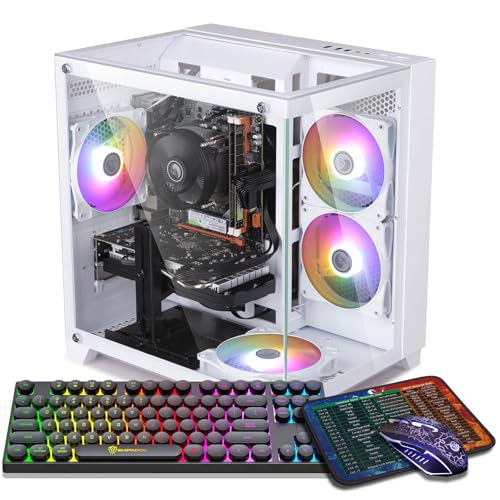
- STGAubron Gaming PC, Ryzen 5 5500, RTX 3050 6GB, White — Check on Amazon
- ZOTAC MEK Gaming PC, Ryzen 5 5500, RTX 3050, 650W Gold PSU — Check on Amazon
Read the full guide ↓
Disclosure: As an Amazon Associate, reviewstook.com earns from qualifying purchases. Links to Amazon on this page are affiliate links; they cost you nothing extra. Listing details such as price and availability change often, so check the current Amazon listing before you buy.
Start with the sentence most guides for this search refuse to write: seven hundred dollars does not buy a native 4K gaming PC. Not a compromised one, not a clever one — none. A 4K frame contains 8,294,400 pixels, exactly four times a 1080p frame and about 2.25 times a 1440p frame, and rendering modern games natively at that pixel count, at high or ultra settings, is work that graphics cards costing close to this entire budget struggle with on their own. Any listing, video or guide that promises you native 4K ultra under $700 is selling you the headline and hoping you never open the settings menu. So this guide answers the search you actually made — you own, or are about to own, a 4K monitor or a 4K TV, and you have $700 — with the honest version of the question: which sub-$700 PC puts the most convincing picture on a 4K screen?
The answer runs through upscaling, and upscaling in 2026 is not the blurry compromise it was five years ago. When an RTX card renders a game at 2560×1440 and DLSS reconstructs it to a 3840×2160 output — DLSS Quality mode at 4K — the result on a TV across the room, and on most monitors at a normal viewing distance, is remarkably close to native, sometimes cleaner in motion thanks to the anti-aliasing baked into the reconstruction. Drop to DLSS Balanced (an internal render of about 2227×1253) or Performance (1920×1080 internally) and the image softens, but the game stays fluid in titles where native 4K would be a slideshow. AMD’s FSR does the same job on Radeon hardware, including the integrated Radeon 780M in one pick below. In other words: the realistic recipe at this budget is a PC that is genuinely strong at 1440p — or, for lighter games, at 1080p — wearing a 4K output as its final step. Every pick in this guide was chosen against that recipe, and each review states plainly what that machine renders internally, what it outputs, and which settings survive the trip.
That framing produces a clear hierarchy. At the top sit two real 1440p-class discrete GPUs: the RTX 4060 8GB, whose DLSS 3 Frame Generation makes it the strongest 4K-output card this budget can touch, and the RTX 3060 12GB, whose unusually generous VRAM buffer is a genuine asset when 4K texture pools get heavy. Below them, the strongest integrated graphics you can buy — the Radeon 780M in a mini PC — offers a completely different bargain: render at 1080p or below, upscale with FSR, and get a silent, tiny living-room box that also drives the TV’s desktop at a crisp native 4K. And at the floor, three RTX 3050 towers handle the esports-and-older-games version of this job for the least money, each with a different strength — memory, positioning in the tier, or power supply. This is deliberately a buy at or under $700 list: check the current price on Amazon for each pick before you buy, and if a listing is sitting above $700 on the day you shop, the correct move is to wait or step up a tier — not to overpay and call it a 4K PC anyway.
In this guide
Quick Picks
Short on time, or comparing several options at once? Each row below names a buyer type and the product that suits it, with a link to the listing.
| Buyer type | Pick | Why it stands out | Link |
|---|---|---|---|
| Best overall for a 4K screen | ZER-LON Gaming PC, RTX 4060 8GB | DLSS 3 Frame Generation — the strongest upscaling toolkit under $700 | Check on Amazon |
| Best for 4K textures | STGAubron Gaming PC, RTX 3060 12GB | 12GB of VRAM holds high texture pools that choke 8GB cards | Check on Amazon |
| Best for a 4K TV / living room | GMKtec K6 Mini PC, Radeon 780M | Tiny, quiet iGPU box; native 4K desktop, FSR-upscaled games | Check on Amazon |
| Best memory headroom | LXZ Gaming PC, RTX 3050 8GB, 32GB RAM | 32GB of system RAM and the 8GB version of the 3050 | Check on Amazon |
| Best budget floor | STGAubron Gaming PC, RTX 3050 6GB, White | Positioned at the lower end of this budget — the most affordable honest route onto a 4K screen; check price on Amazon | Check on Amazon |
| Best power supply / upgrade base | ZOTAC MEK Gaming PC, RTX 3050 | 650W 80+ Gold PSU from a known graphics brand | Check on Amazon |
How These Picks Were Chosen
The budget was applied as a ceiling, and then a second, harder filter was applied on top of it: could this machine produce a picture worth putting on a 4K display? That filter excluded a great deal of what Amazon sells under $700. Towers built around the GTX 1660 Super, the RX 580, or older cards with no modern upscaling support can be fine 1080p machines, but at 4K output they have nowhere to go — no DLSS, no frame generation, and FSR support that amounts to a soft blur over a struggling render. Integrated graphics older than the Radeon 780M failed the same test from the other side: a Vega-class iGPU can light up a 4K desktop, but asking it to upscale a modern game to 4K produces an image a 1080p monitor would have shown better. What survived is a short, honest list: two generations of RTX cards with real DLSS, the best integrated GPU AMD sells, and nothing that needed a fantasy to justify its place.
We did not use these PCs ourselves. We read the maker listings and specification pages and compared the things that decide this specific job: the GPU and — just as important at 4K — its VRAM capacity, the upscaling generation it supports (DLSS 3 with Frame Generation is a different tool from DLSS 2, and both are different from FSR on an iGPU), the CPU behind it, system memory, storage, and the power supply a future GPU upgrade would inherit. On VRAM, a note that runs against the usual ranking: at a 4K output resolution, texture memory matters more than it does at 1080p, because games allocate texture pools and render targets for the output size even when the internal render is lower. That is why the older RTX 3060 with 12GB earns its high placing here despite being a generation behind — in texture-heavy games it can hold settings that force 8GB cards to drop texture quality, which is the one downgrade that stays visible even through upscaling.
Prices in this class change often, so check the current price on Amazon for each pick before you buy. The RTX 4060 tower is frankly labelled a reach pick within this tier, while the RTX 3050 6GB tower sits toward the lower end of the budget. Treat anything sitting far above the $700 line as a different, worse deal than the one reviewed. Finally, a platform note shared by five of the six picks: they are built on AMD’s AM4 platform around the Ryzen 5 5500, a capable six-core chip that will not hold back any GPU in this guide, but a dead-end socket — there is no next-generation CPU upgrade without a new motherboard. The mini PC, by nature, upgrades its RAM and storage only. Buy any of these for what it is on day one, plus a GPU swap where the case and PSU allow it, and the expectations will match the machine.
The 6 Best PCs for Gaming on a 4K Screen Under $700
ZER-LON Gaming PC, Ryzen 5 5500, RTX 4060 8GB, 16GB DDR4, 1TB NVMe SSD
Who it suits: The buyer with a 4K monitor or TV who wants the most convincing upscaled picture this budget can produce — and is willing to check the current price on Amazon and wait for it to sit within this budget.
The RTX 4060 is the reason this machine tops a guide about 4K on a $700 budget, and the reason is not raw rendering power — at native resolutions the 4060 is a strong 1080p and capable 1440p card, nothing more exotic than that. The reason is its toolkit. DLSS Super Resolution on the 4060 is the current, sharp generation of NVIDIA’s upscaling, and at a 4K output it has room to work: Quality mode renders internally at 2560×1440, which this card handles well in most modern games at high settings, and reconstructs an image that holds up impressively on a 4K panel. Balanced mode, rendering around 2227×1253, is the fallback for heavier titles. And the 4060 alone in this guide adds DLSS 3 Frame Generation, which inserts AI-generated frames to lift perceived smoothness in supported games — a feature that earns its keep precisely in this scenario, where the base frame rate at a 1440p internal render might sit in the 40s and 50s and frame generation carries the output into visibly smoother territory. Use it with eyes open: frame generation adds a measure of latency and works best starting from a playable base rate, which is why the honest recipe is DLSS Quality first, frame generation second, and Performance mode — a 1080p internal render — reserved for the heaviest releases.
Around the card, the specification is the sensible one for the class: a Ryzen 5 5500 six-core processor that will not bottleneck a 4060, 16GB of DDR4, a 1TB NVMe SSD, WiFi 5, four RGB fans and Windows 11 Home in a white tower. Nothing there is lavish, and two limits deserve naming. The 8GB of VRAM is the ceiling on this machine’s 4K ambitions: in the most texture-hungry recent games, even with an internal render at 1440p, you may need to drop textures from ultra to high to stay inside the buffer — the one compromise upscaling cannot hide, and the reason the 12GB card below exists in this guide. And positioning in the tier is the second limit. This configuration sits at the top end of this budget class — check price on Amazon before you buy. When it sits at or under $700 it is the best 4K-output machine in this article; when it is priced well above this tier it is a different conversation, against different rivals.
- RTX 4060 8GB — DLSS Super Resolution plus DLSS 3 Frame Generation, unique in this guide.
- The strongest internal-render performance here: a genuine 1440p card feeding the 4K output.
- Balanced platform: Ryzen 5 5500, 16GB DDR4, 1TB NVMe SSD, Windows 11 Home.
Honest limitation: 8GB of VRAM caps texture settings in the heaviest games, and it does not always sit within this budget — check the current price on Amazon and buy it only when it fits the $700 tier, full stop.
Choose it if your 4K screen is a monitor you sit close to, where reconstruction quality matters most, and you can wait for the right price. Skip it if the listing is above $700 today, or you play texture-heavy games and refuse to touch the texture setting — the next pick was chosen for you.

STGAubron Gaming PC, Ryzen 5 5500, RTX 3060 12GB, 16GB DDR4, 1TB SSD
Who it suits: Players of texture-heavy games — open worlds, modded titles, big RPGs — who would rather keep textures high and let the render resolution flex than the other way round.
Every other discrete card in this guide carries 8GB of VRAM or less. This one carries 12GB, and at a 4K output resolution that difference stops being a specification-table footnote and becomes the experience. Games allocate their texture pools and several of their render targets against the output resolution, so a PC driving a 4K screen feels VRAM pressure that the same PC on a 1080p monitor never meets — and the classic symptom is not a low frame rate but stutter, pop-in and textures that resolve late or never fully resolve at all. The RTX 3060 12GB was always the odd, generous exception in its generation, and here that generosity is the whole argument: you can hold high textures in games where the 4060 above must concede them, and in a still scene — the vista, the city street, the armored character in the inventory screen — high textures at a reconstructed 4K are most of what “looking 4K” actually means.
The trade is equally clear, and this review will not blur it. The 3060 is a generation older: its raw rendering is a step behind the 4060, its DLSS is the earlier Super Resolution without Frame Generation, and its ray tracing is best treated as an occasional garnish rather than a setting you build around. The realistic recipe is DLSS Quality or Balanced from a 1440p-class internal render at medium-to-high settings — rasterized lighting, ray tracing off or low — which in most of the last several years of games looks excellent on a 4K screen and runs smoothly. The platform around the card is generous for the class: the same Ryzen 5 5500, 16GB of DDR4, a full 1TB SSD, WiFi 6 and Bluetooth 5.2, four RGB fans, and an RGB keyboard and mouse in the box, with a one-year warranty stated in the listing data. On positioning, it sits at the top end of this budget tier — check price on Amazon before you buy, because the same discipline applies: this is the right machine at or under $700, and an overpay above it.
- 12GB of GDDR6 VRAM — the only pick that holds high 4K texture pools without flinching.
- DLSS Super Resolution upscaling from a genuine 1440p-class render.
- Complete package: 1TB SSD, WiFi 6, Bluetooth 5.2, RGB keyboard and mouse included.
Honest limitation: No Frame Generation and weaker ray tracing than the 4060; in raw frame rate it is the slower card, and it only makes sense at or under this $700 budget.
Choose it if your library is open worlds and RPGs, you sit close enough to see texture detail, and stutter bothers you more than a slightly lower frame rate. Skip it if you want frame generation, play competitive games where frames beat textures, or the listing is sitting well above this budget tier.

GMKtec K6 Mini PC, Ryzen 7 7840HS, Radeon 780M, 32GB DDR5, 1TB SSD
Who it suits: The living-room buyer — a 4K TV, a controller, a media shelf — who wants one tiny, quiet box for the desktop, streaming apps and upscaled gaming, and has no interest in a glowing tower next to the television.
This is the strong-iGPU route onto a 4K screen, and it starts by separating two jobs the towers blur together. Job one is displaying 4K, and the K6 does it natively and effortlessly: the Radeon 780M drives a 3840×2160 desktop, video and interface without breaking stride, over HDMI, DisplayPort or USB-C, with triple-display support in the listing — so on the TV, everything that is not a game looks exactly as sharp as the panel allows. Job two is rendering games, and here honesty sets the terms. The 780M — twelve RDNA 3 compute units integrated into the Ryzen 7 7840HS — is the strongest integrated graphics in this guide by a wide margin, roughly a 1080p gaming solution: esports and older games at native 1080p with good settings, modern AAA at 1080p low-to-medium, in both cases with FSR upscaling carrying the result to the 4K output. FSR Quality at 4K renders internally at 2560×1440, which is beyond this iGPU in heavy games; the working modes here are FSR Balanced and Performance — internal renders around 1080p and below — and on a TV at couch distance, in motion, that is a far better picture than the specification suggests, while on a close monitor it will look soft. Know which seat you will be sitting in.
As a computer, the K6 is in some ways the best-specified pick in this guide: an eight-core Ryzen 7 7840HS that outmuscles the Ryzen 5 5500 in the towers, a full 32GB of dual-channel DDR5 — which matters doubly here, because the iGPU shares system memory and bandwidth, and dual-channel DDR5 is what lets a 780M breathe — a 1TB PCIe 4.0 SSD with a second slot, dual 2.5GbE LAN, WiFi 6E, Bluetooth 5.2, USB4 and Windows 11 Pro, in a box roughly four inches square. It sits comfortably within this budget tier — check price on Amazon before you buy. The limits are the nature of the form: there is no discrete GPU and never will be inside this chassis, thermals in a tiny box mean sustained loads run the fan, and support comes from a smaller brand than the tower makers. What you get in exchange is the only pick that disappears into a TV stand — and for the enormous library of games that are not this year’s heaviest releases, it puts a genuinely enjoyable, sharp-interfaced picture on a 4K TV for the least fuss in this article.
- Radeon 780M — the strongest integrated graphics here; native 4K desktop, FSR-upscaled gaming.
- Best CPU and memory in the guide: 8-core 7840HS, 32GB dual-channel DDR5, 1TB PCIe 4.0 SSD.
- Four-inch footprint, USB4, dual 2.5GbE, WiFi 6E — a real living-room and desk computer.
Honest limitation: Gaming renders at 1080p or below and upscales — modern AAA at a close monitor will look soft, and there is no GPU upgrade path inside the box.
Choose it if the screen is a TV, the seat is a couch, and your library leans esports, indies, older AAA and emulation-friendly titles. Skip it if you want high-settings modern games or sit close to a 4K monitor — a discrete card above is the honest tool for that.

LXZ Gaming PC, Ryzen 5 5500, RTX 3050 8GB, 32GB DDR4, 1TB NVMe SSD, White
Who it suits: The multitasker — game on the 4K screen, browser, chat and a stream running alongside — who keeps hitting the limits of 16GB machines and wants memory headroom more than raw GPU tier.
The RTX 3050 is a 1080p-class card, and this guide will not pretend otherwise: driving a 4K output with it means the internal render lives at 1080p, DLSS Performance or Balanced does the reconstruction, and settings in modern games sit at low-to-medium. Within that honest envelope, this particular 3050 tower is specified more thoughtfully than most. It carries the 8GB version of the card rather than the cut-down 6GB — a distinction that matters at 4K output, where the extra buffer is the difference between holding medium textures through an upscaled frame and watching them thrash — and it pairs the card with 32GB of DDR4 system memory, double every other tower here. That RAM does not add a single frame to the render, and this review will not claim it does. What it does is remove the other kind of stutter: the hitch when a game, a browser with twenty tabs, Discord and a recording tool together exceed 16GB and the system starts paging to disk. On a machine whose whole job is feeding a big screen while other things happen on it, that smoothness is real, and it is this pick’s identity.
The rest of the build follows the class pattern: Ryzen 5 5500, a 1TB NVMe SSD, and a white tower presentation. Two cautions come with this listing specifically, and both were visible in its own listing family. First, the wider LXZ line also includes a lower 6GB/16GB configuration — do not mistake that lower configuration for this 32GB machine, and do not accept the lower configuration in the cart while paying for this one. Second, this listing family’s pages mix variant information, so the discipline that applies to every pick in this guide applies twice here: on the live listing, confirm the style name reads RTX 3050 8GB and 32GB of RAM before you pay, because Amazon’s variant pages are where careful buyers most often get a slightly different computer than the one they reviewed. Verified that way, this is the 3050 pick for people whose bottleneck is everything around the game rather than the game itself — and its DLSS support, as a genuine RTX card, keeps its upscaling a generation ahead of the FSR-only alternatives in its tier.
- The 8GB RTX 3050 — the VRAM-safer version of the card for a 4K output.
- 32GB of DDR4 — double the system memory of the other towers in this guide.
- DLSS upscaling on board; 1TB NVMe SSD and a clean white tower.
Honest limitation: The GPU is still a 1080p-class card — the memory headroom smooths the system around the game, not the render inside it, and the listing’s variants must be checked carefully.
Choose it if you multitask heavily, keep games plus stream and browser open together, and want the 3050 tier without the 6GB compromise. Skip it if gaming is all the machine will ever do — spending aimed at a 3060 or 4060 within this tier buys frames instead of headroom.

STGAubron Gaming PC, Ryzen 5 5500, RTX 3050 6GB, 16GB DDR4, 1TB SSD, White
Who it suits: The budget-first buyer whose 4K screen mostly plays esports, older games and lighter titles — and who would rather spend less than buy GPU tier they will never use.
This is the floor of the guide, positioned like it: it sits toward the lower end of this budget tier — check price on Amazon before you buy. What the money buys is a complete, modern tower — Ryzen 5 5500, 16GB of DDR4, a 1TB SSD, WiFi 6, six RGB fans, and an RGB keyboard and mouse in the box, in white — built around the 6GB version of the RTX 3050. The review’s job is to be exact about what that card does on a 4K screen. Its home territory is the games most people actually log the most hours in: competitive and lighter titles render at 1080p — many of them at high settings, some esports games higher still — and DLSS or the game’s own scaler presents them at 4K, where at TV distance the result is clean and the frame rates are the highest in this guide relative to expectations, because these are the games a 3050 was built for. Older AAA at 1080p medium, upscaled, is the second territory, and a comfortable one.
The boundary is modern, heavy AAA, and it is a hard one. Six gigabytes of VRAM is the tightest buffer in this guide, and at a 4K output the texture pressure described in the How Chosen section arrives early: expect low textures in the newest releases, internal renders at or below 1080p, and settings menus that need ten honest minutes before a big game feels right. None of that makes this a bad purchase — it makes it a scoped one. The buyer who knows their library is League, Valorant, Fortnite on performance settings, Rocket League, Minecraft, a backlog of pre-2022 AAA and indie games is buying exactly enough computer, with a real RTX card, a real upgradeable tower case and money left over — possibly for the monitor arm, the controller, or the second SSD the 1TB will eventually ask for. The buyer who wants this year’s flagship releases on the big screen should hear this guide clearly: save toward the higher tier and buy the 3060 or the 4060 within this budget instead. The most expensive PC is the one bought twice, and this pick is a bargain only for the library it can actually serve.
- Positioned toward the lower end of this budget — check price on Amazon.
- Complete white tower: 1TB SSD, WiFi 6, six RGB fans, keyboard and mouse included.
- A genuine RTX card with DLSS — esports and older games upscale to 4K convincingly.
Honest limitation: 6GB of VRAM and a 1080p-class GPU: modern AAA means low textures and sub-1080p internal renders — the tightest ceiling in this guide.
Choose it if your hours go to esports, older and lighter games, and you want the most affordable honest route onto a 4K screen. Skip it if you buy new AAA releases at launch — this is the one pick that will make you re-shop within a year.

ZOTAC MEK Gaming PC, Ryzen 5 5500, RTX 3050, 16GB DDR4, 500GB NVMe SSD
Who it suits: The buyer thinking past this purchase — someone who wants a sound tower from a known graphics brand today, and a power supply that lets them drop in a much stronger GPU later.
ZOTAC is a name this category does not usually offer in this tier: a long-established graphics-card maker selling a complete PC, and the specification shows a builder’s priorities in one place the no-name towers rarely match — the power supply. This MEK carries a 650W 80+ Gold PSU, where rivals in the class routinely ship unnamed 500–600W units with no stated efficiency rating. At today’s RTX 3050 the difference is invisible. The day you upgrade — and a tower bought for a 4K screen is a tower that will eventually want a 1440p-or-better card — the Gold-rated 650W unit is the difference between a GPU swap and a GPU-plus-PSU-plus-rewire project. In a guide whose honest message is “your next upgrade is where native 4K lives,” the machine that makes that upgrade cheapest has a real claim on your money, and it is this one.
For today, the terms are the 3050 terms stated in the two reviews above, and they are not softened here: a 1080p-class render, DLSS upscaling to the 4K output, low-to-medium settings in modern games, and comfortable esports and older titles — with one deliberate omission in this review that mirrors the listing itself. ZOTAC’s listing data does not make the card’s VRAM figure as plain as its rivals do, and the MEK line’s specification material points to the 6GB version of the 3050; this guide does not print a VRAM number it could not verify from the listing, and you should confirm it on the live page before buying, budgeting your expectations for the tighter buffer if that is what you find. The rest of the specification is the leanest here in one respect: storage is 500GB rather than 1TB, against 16GB of DDR4, the Ryzen 5 5500 and WiFi 6E — the fastest wireless in this guide — under Windows 11 Home. Five hundred gigabytes fills quickly with modern game installs, so plan for a 1TB or 2TB second drive in the budget. On positioning, it sits within this budget tier — check price on Amazon before you buy. The familiar rule applies: at or under $700, with the VRAM confirmed, it is the upgrade-minded buyer’s pick; above the line, it is not.
- 650W 80+ Gold power supply — the only PSU in this guide ready for a serious GPU upgrade.
- Built by ZOTAC, an established graphics brand, with WiFi 6E on board.
- Standard tower platform: the cheapest route from this guide to a future native-4K card.
Honest limitation: Today’s GPU is the same 1080p-class 3050 as the cheaper picks, storage is only 500GB, and the card’s VRAM figure must be confirmed on the live listing.
Choose it if you already know a GPU upgrade is in your future and want the PSU and the brand behind you when you do it. Skip it if you will never open the case — the STGAubron above gives you the same class of gaming today for less, with twice the storage.

Comparison Table
| Product | GPU | VRAM | Best use on a 4K screen | Link |
|---|---|---|---|---|
| ZER-LON Gaming PC | RTX 4060 | 8GB | DLSS Quality from 1440p + Frame Generation | Check on Amazon |
| STGAubron Gaming PC (3060) | RTX 3060 | 12GB | High textures, DLSS Quality/Balanced | Check on Amazon |
| GMKtec K6 Mini PC | Radeon 780M (integrated) | Shared DDR5 | Native 4K desktop, FSR from 1080p on a TV | Check on Amazon |
| LXZ Gaming PC | RTX 3050 | 8GB | DLSS from 1080p, heavy multitasking (32GB RAM) | Check on Amazon |
| STGAubron Gaming PC (3050) | RTX 3050 | 6GB | Esports and older games, lower end of the tier | Check on Amazon |
| ZOTAC MEK Gaming PC | RTX 3050 | Confirm on listing | Upgrade base — 650W Gold PSU | Check on Amazon |
How to Choose a PC for a 4K Screen Under $700
- Decide what “4K” means in your room first. A 4K TV at couch distance forgives an upscaled image completely; a 27–32 inch 4K monitor at arm’s length shows every softness. TV buyers can honestly shop the whole list, including the mini PC. Monitor buyers should start at the two DLSS picks at the top.
- Learn the render-resolution ladder. At a 4K output, DLSS/FSR Quality renders at 2560×1440, Balanced at about 2227×1253 with DLSS (about 2259×1271 with FSR), Performance at 1920×1080 and Ultra Performance at 1280×720. When you choose a quality mode you are choosing which of those your GPU actually has to render — judge every PC in this guide by the rung it can hold in your games, not by the output number on the box.
- Match the GPU to the rung. RTX 4060: Quality in most games, Balanced in the heaviest. RTX 3060: Quality/Balanced with better texture headroom. RTX 3050 and the 780M: Performance — a 1080p render — is the working mode for modern titles, with Quality reserved for lighter ones.
- Count VRAM for the output, not the render. Texture pools scale with the 4K output even when the 3D render is lower. That is why 12GB and 8GB cards sit above 6GB cards here, and why texture quality is the first setting to lower when a game stutters on a 6GB or 8GB card at 4K.
- Know your upscaling generation. DLSS on RTX cards is the sharpest option and the 4060 adds Frame Generation, which needs a playable base frame rate — think of it as a smoother, not a rescuer. FSR works on everything including the Radeon iGPU, and its Balanced/Performance modes at TV distance are far better than their reputation.
- Check the display connection, not just the panel. For a 4K TV, confirm the PC and the TV’s HDMI port agree on 4K at 60Hz at minimum (HDMI 2.0 class or better), and enable the TV’s game mode and the enhanced/4K HDMI format setting — many “my PC looks blurry on my TV” problems are a TV input setting, not the PC. Chroma subsampling on a misconfigured input will make desktop text look broken on any machine in this guide.
- Set ray tracing expectations to zero, then be pleasantly surprised. At this budget, ray tracing belongs off in heavy games on every pick, with the 4060 able to sample light ray-traced effects in lighter titles using DLSS. Rasterized lighting at high settings, upscaled well, looks better than ray tracing at settings the card cannot hold.
- Check the current price, not an old one. Prices in this class change often. Check price on Amazon for every pick here and compare it against the $700 budget before you decide; several picks also sit above that line at times. Patience and a fresh check are worth more than any single specification difference in this article.
What Settings Are Actually Realistic at 4K Output?
Because the honest core of this guide is the gap between output and render, it deserves its own plain summary. Esports and competitive games — the titles designed to run on everything — are the best case: several can render natively at or near 4K on the 4060 and 3060 at reduced settings, and all six picks upscale them to 4K with high frame rates to spare. Older AAA and remasters are the comfortable middle: DLSS/FSR Quality from a 1440p render on the top two cards, Performance from 1080p on the rest, at medium-to-high settings that look entirely at home on a 4K TV. Current heavy AAA is where the budget speaks: the 4060 with DLSS Balanced plus Frame Generation at medium-high settings, the 3060 at Balanced with textures held high, and the 3050s and the 780M at Performance with settings curated downward — textures first on the small-VRAM cards, shadows and volumetrics first everywhere. And native 4K ultra in current releases appears nowhere in that list, because at $700 it appears nowhere in reality either. A guide that told you otherwise would be asking for your money under false pretences; a PC bought with the table above in mind will not disappoint you, because it was never promised a job it cannot do.
Common Buying Mistakes
- Believing a listing that says “4K gaming PC” at this price means native 4K rendering. It means the machine can output 4K — every pick here can — which is a statement about the cable, not the frame rate.
- Judging upscaling by its worst screenshot. Pause a Performance-mode frame and it is soft; play the game in motion on a TV and the same mode is the difference between playable and not. Judge it the way you will actually use it.
- Buying the 6GB card for this year’s AAA releases because it cost less. VRAM is the one limit at 4K output that no setting fully escapes — textures are the image.
- Ignoring frame generation’s terms. It smooths a playable base rate; it does not rescue a 25 fps render, and in fast competitive games its added latency is a reason to turn it off, not on.
- Plugging the PC into the wrong TV input settings — leaving the TV’s HDMI port in its standard format or game mode off, then blaming the PC for blur and lag that a menu setting caused.
- Overpaying above this tier. The two best picks in this guide do not always sit within the $700 budget. Paying well above that line is paying flagship money for a budget machine — check the current price on Amazon first.
- Skipping the variant check in the cart. This category’s Amazon pages mix configurations — RAM, VRAM and storage change between tiles that look identical. Read the style name on the live listing before you pay.
- Forgetting the upgrade math. If native 4K is your real destination, a tower with a 650W Gold PSU and a standard case is a down payment on it; a sealed mini PC, however charming, is a finished purchase.
Final Recommendation
- Most buyers with a 4K screen: ZER-LON Gaming PC, RTX 4060 — bought at or under $700.
- Texture-heavy games, close viewing: STGAubron Gaming PC, RTX 3060 12GB.
- 4K TV in the living room: GMKtec K6 Mini PC, Radeon 780M.
- Heavy multitasking alongside the game: LXZ Gaming PC, RTX 3050 8GB, 32GB RAM.
- Lowest honest price, esports library: STGAubron Gaming PC, RTX 3050 6GB.
- Planning a future GPU upgrade: ZOTAC MEK Gaming PC.
Our top two are the two machines that render at 1440p-class internally, because at a 4K output that internal render is the picture. The ZER-LON’s RTX 4060 brings the best upscaling and the only frame generation in the guide — when it sits within this budget it is the closest thing to a 4K gaming PC that $700 can honestly mean. The STGAubron’s RTX 3060 12GB trades a generation of features for the VRAM that keeps textures — the most visible part of a 4K image — at full quality. If your screen is a TV and your library is lighter, the GMKtec K6 is the pick we would put in our own living room; if your library is esports, the white STGAubron 3050 does the job at the lower end of this tier; and if you already know this purchase is a stepping stone, the ZOTAC’s power supply is the stone that holds. Buyers whose real target is higher should also see Best 4K Gaming PC Under $800, those who want this same honesty applied at 1440p natively should see Best 1440p Gaming PC Under $700, and everyone should start from Best Gaming PC Under $700 for the wider field. Set the TV input correctly, pick the DLSS or FSR mode your card can hold, lower textures before you lower resolution — and check price on Amazon before you order.
Frequently Asked Questions
Can a PC under $700 really play games at 4K?
At 4K output, yes — every pick in this guide drives a 4K display and upscales its render to fill it, and lighter and older games look and play genuinely well that way. At native 4K rendering in modern games, no: that requires a graphics card that costs a large fraction of this entire budget on its own. The honest product at $700 is a strong 1440p or 1080p render, intelligently upscaled — which on a TV is most of the experience, and on a close monitor is a good one with known limits.
DLSS Quality, Balanced or Performance — which should I use at 4K?
Start at Quality, which renders at 1440p internally, and step down only when the frame rate asks you to. Quality is the mode where upscaling is closest to native. Balanced (about a 1253p render) is the heavy-game setting for the RTX 4060 and 3060. Performance renders at 1080p and is the working mode for the RTX 3050 picks and the Radeon 780M — softer on a monitor, perfectly serviceable on a TV. Ultra Performance (720p internal) is an emergency measure for the heaviest releases, not a default.
Why does an older RTX 3060 rank above newer cards here?
Because of its 12GB of VRAM. Games size their texture pools for the 4K output resolution even when the 3D render is upscaled from lower, so VRAM pressure at 4K is real, and its symptoms — stutter and late-loading textures — are more visible than a modest frame-rate difference. The 3060 gives up Frame Generation and raw speed to the 4060, which is why it ranks second rather than first, but for texture-heavy games it holds settings the 8GB cards cannot.
Is an integrated-graphics mini PC a joke on a 4K TV?
No — it is two different answers. For the desktop, video and interface, the Radeon 780M in the GMKtec K6 displays native 4K perfectly, better than a tower doing the same job, in a box that vanishes beside the TV. For games, it renders at 1080p or below and upscales with FSR: excellent for esports, indies and older games at couch distance, out of its depth in current AAA at close range. If your seat is a couch and your library is light, it is not a compromise pick — it is the appropriate one.
What would it actually cost to game at native 4K?
As a rule of the current market, native 4K at high settings in modern games starts with a graphics card in the class above everything in this guide, inside a PC that typically totals well beyond this budget, and ultra settings with ray tracing go further still. That is precisely why this guide is built on upscaling: DLSS and FSR exist to close most of that gap for a fraction of the money, and at $700 they are not a shortcut — they are the correct technology for the budget.
Should I buy now or wait?
For the top two picks, check price on Amazon first and buy only when the current price sits within this $700 budget — patience can matter in this tier. The GMKtec K6 and the white STGAubron 3050 sit toward the more affordable end of this budget class, so buying either when you find it in stock and within the budget is reasonable. In all cases, confirm the exact configuration — GPU, VRAM, RAM and storage — on the live listing before paying, because this category’s variant pages are where mistakes happen.
Can I upgrade one of these to native 4K later?
The towers, yes, to different degrees: all five are standard enough to accept a stronger graphics card, and the ZOTAC MEK’s 650W 80+ Gold power supply makes it the only one ready for a serious card without a PSU swap as well. The shared caveat is the AM4 platform — a future CPU upgrade beyond its generation means a new motherboard and memory too. The GMKtec mini PC upgrades its RAM and SSD only; its graphics are the chip it was born with, which is the trade for its size and silence.


