Where to buy
Check the latest price, availability and delivery on Amazon. Orders are placed on Amazon. We may earn a commission from qualifying purchases.
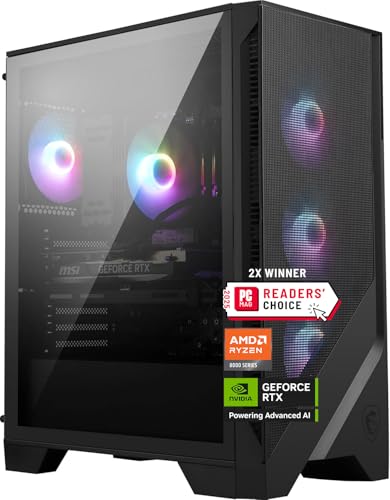
- Best overall for 1440p: MSI Codex Z2 Gaming Desktop, Ryzen 7 8700F, RTX 5070, 32GB DDR5, 2TB SSD — Check on Amazon
- Skytech Omega Gaming PC, Ryzen 7 7800X3D, RTX 4070 Super, 32GB DDR5, 1TB NVMe — Check on Amazon
- iBUYPOWER Slate 8 MESH Gaming PC, Intel Core i7-14700F, RTX 4070 Super, 2TB NVMe — Check on Amazon
- Thermaltake LCGS View i4770 Gaming Desktop, Intel Core i7-14700KF, RTX 4070, 32GB DDR5 — Check on Amazon
See 2 more Amazon options
- Skytech Omega Gaming PC, Ryzen 7 7700X, RTX 4070 Super, 32GB DDR5, 1TB NVMe, White — Check on Amazon
- ASUS ROG Strix G15DS Gaming Desktop, Ryzen 7 7700X, RTX 4070, 16GB DDR5, 1TB SSD — Check on Amazon
Read the full guide ↓
Disclosure: As an Amazon Associate, reviewstook.com earns from qualifying purchases. Links to Amazon on this page are affiliate links; they cost you nothing extra. Listing details such as price and availability change often, so check the current Amazon listing before you buy.
Most “1440p gaming PC” searches are really two searches wearing one coat. The first is a buyer asking whether a machine can put a playable picture on a 2560×1440 monitor at all — and at lower budgets the honest answer involves upscaling, reduced settings and careful wording. The second search, the one this guide answers, is a buyer asking which machine treats 1440p as its home resolution: native rendering as the default, high settings as the starting point, and a high-refresh panel fed properly rather than apologetically. At $1,500, that second search finally has real answers. The six machines below are built around the RTX 5070 and RTX 4070 Super — the two graphics cards that define this resolution — plus two RTX 4070 machines whose supporting specifications earn them a place. Every one of them plays most current games natively at 1440p; the differences — and the whole point of this guide — are in the margins: which titles still ask for help, which kind each card offers, and how much headroom remains when the next heavy release lands.
One condition runs through everything that follows, because prebuilt prices at this tier are volatile in a way cheaper tiers are not. Several of these listings sit well above this budget for much of the year and only come within reach during sales and clearances. Check the current price on Amazon for each pick before deciding. The recommendation is conditional: it applies when the live listing in front of you sits within the under-$1,500 budget. If the current price has drifted well above the budget, the correct purchase is patience — or the tier below — never enthusiasm. Below: the definitions this guide grades by, the quick picks, the method, six reviews graded title class by title class, a comparison table, a 1440p-specific checklist, an honest account of where this budget’s promise ends, the mistakes that waste money here, and the questions buyers ask first.
Native, Upscaled and Generated: Three Different Promises
1440p marketing mixes three technically different things into one phrase, and a buyer who cannot separate them cannot grade a single machine in this guide. So, precisely. A 1440p display has 2560×1440 pixels — 3,686,400 pixels in total, roughly 3.69 million, which is about 78 percent more than the 2.07 million pixels of a 1080p screen. Native 1440p means the graphics card renders every one of those 3.69 million pixels itself, every frame. It is the most expensive way to fill the panel and the sharpest, and it is what the grades in this guide treat as the gold standard.
Upscaled 1440p means the card renders fewer pixels and an algorithm reconstructs the rest. In DLSS Quality mode — the setting this guide treats as the standard tool at this resolution — a game outputting 1440p is actually rendered internally at about 1707×960, roughly 1.64 million pixels or 44 percent of the native count, then rebuilt to 2560×1440 by NVIDIA’s AI model using motion data and previous frames. DLSS Performance mode goes further, rendering at 1280×720. The honest summary: DLSS Quality at 1440p is very good — close enough to native that most players cannot separate them in motion — and it is not native. It buys frame rate by spending pixel count, and in heavy games it is the difference between high settings held and abandoned. AMD’s FSR does the same job in software on any card; DLSS, on the RTX cards in every pick here, is generally cleaner.
Frame generation is the third thing, and it is neither of the above. It inserts AI-interpolated frames between conventionally rendered ones, so a game rendered at 70 frames per second can be displayed at 140. The picture moves more smoothly; the card has not rendered any faster, and input latency reflects the rendered rate, not the displayed one. Frame generation is a smoothness multiplier applied on top of rendering power — it cannot rescue a card that renders too slowly, and it consumes some VRAM and GPU headroom to run. NVIDIA’s DLSS 3 frame generation, on the RTX 4070-class cards here, inserts one generated frame per rendered frame. DLSS 4’s multi frame generation, exclusive to the RTX 50-series card in the MSI below, can insert up to three. That distinction is the MSI’s headline differentiator, and this guide grades it as what it is: a genuine advantage for feeding very fast monitors, layered over rendering performance that still has to be earned the ordinary way.
With those definitions fixed, every pick below is graded against four title classes. Competitive and esports titles — the lightest class, where high frame rates matter most. Lighter and well-optimised AAA games — the bulk of a modern library. Current heavy AAA releases — the class where settings discipline and DLSS Quality earn their keep. And path-traced, everything-maxed workloads — the class this budget does not honestly cover at native resolution.
In this guide
Quick Picks
Short on time, or comparing several options at once? Each row below names a buyer type and the machine that suits it, with a link to the listing.
| Buyer type | Pick | Its 1440p story | Link |
|---|---|---|---|
| Best overall for 1440p | MSI Codex Z2, Ryzen 7 8700F, RTX 5070 | Newest card, DLSS 4 multi frame generation, 32GB and 2TB around it | Check on Amazon |
| Best for high-refresh esports | Skytech Omega, Ryzen 7 7800X3D, RTX 4070 Super | The generation’s benchmark gaming CPU feeding a 4070 Super | Check on Amazon |
| Best storage and creator lean | iBUYPOWER Slate 8 MESH, i7-14700F, RTX 4070 Super | Native-high 1440p card with 2TB and twenty cores alongside | Check on Amazon |
| Best Intel all-rounder | Thermaltake LCGS View i4770, i7-14700KF, RTX 4070 | Unlocked 20-core CPU and the guide’s fastest published memory | Check on Amazon |
| Best value | Skytech Omega, Ryzen 7 7700X, RTX 4070 Super, White | The value route to a 4070 Super — check price on Amazon | Check on Amazon |
| Best big-brand support | ASUS ROG Strix G15DS, Ryzen 7 7700X, RTX 4070 | ASUS design and support behind a native-1440p RTX 4070 | Check on Amazon |
How These Picks Were Chosen
Every machine below is a real Amazon listing, sold in the United States, selected to fit this guide’s under-$1,500 budget. Because prices at this tier move often, check price on Amazon to confirm the current price before you buy. A machine positioned well above this budget was excluded, however strong its specification.
We did not use these machines ourselves. We read the maker listings, specification pages and price histories, and graded what decides 1440p performance, in this order. First, the graphics card and its memory: every pick carries 12GB of VRAM, because texture quality at 1440p is a memory question before it is a speed question, and 12GB is the capacity that holds ultra textures at this resolution today. Second, the upscaling and frame-generation stack each card brings — DLSS 4 with multi frame generation on the RTX 5070, DLSS 3 on the 4070-class cards — graded as a genuine feature difference, not a slogan. Third, the processor, which matters most where frame rates are CPU-limited: competitive titles at high refresh rates, simulation and strategy. Fourth, system memory and storage — 32GB of DDR5 is this tier’s correct specification, and the two 16GB picks are included for specific compensating strengths with the shortfall named in their reviews. Fifth, the platform details: a published power-supply specification counts in a pick’s favour, because the PSU decides whether a future graphics-card upgrade is a swap or a rebuild.
One filter sits over all of it, and it is specific to this keyword: a machine only belongs here if 1440p is its native working resolution, not its marketing aspiration. Cards a clear step below the RTX 4070 were excluded even when the rest of the specification was strong, because recommending upscaling-dependent hardware at $1,500 would answer the first of the two searches in the introduction — the wrong one.
The 6 Best 1440p Gaming PCs for 1440p Gaming Under $1,500
MSI Codex Z2 Gaming Desktop, Ryzen 7 8700F, RTX 5070, 32GB DDR5, 2TB SSD
Who it suits: The buyer who wants the longest 1440p runway in this guide — the newest graphics architecture, the newest frame-generation technology, and nothing else on the specification sheet left to upgrade.
Graded purely as a 1440p machine, the Codex Z2 leads because its RTX 5070 is the only current-generation card here. The Blackwell card carries 12GB of GDDR7 memory — faster memory than the GDDR6X in the 4070-class picks, feeding the same 12GB capacity that holds ultra textures at this resolution — and it renders native 1440p at high-to-ultra settings across the lighter and heavy AAA classes with the least negotiation of any pick in this guide. In competitive titles it is comfortably a high-refresh card. Where it separates itself is the third promise from our definitions section: DLSS 4 multi frame generation can insert up to three AI-generated frames per rendered frame, against one on the DLSS 3 cards below. On a 240Hz 1440p monitor, in a game that renders at a healthy native rate, that is a real and visible smoothness advantage — provided it is understood correctly. Multi frame generation multiplies a frame rate the card has already earned; it does not manufacture rendering power, and its latency reflects the underlying rendered rate. A buyer who treats it as a substitute for GPU strength will be disappointed in exactly the heaviest titles; treated as a high-refresh bonus on top of the tier’s strongest native renderer, it is a delight.
The supporting specification matches the card. The Ryzen 7 8700F — eight cores, sixteen threads, boosting to 5.0 GHz per MSI’s listing — is a strong gaming processor, 32GB of DDR5 is the tier’s correct memory capacity, and the 2TB NVMe SSD is the storage size that survives a modern library of hundred-gigabyte installs. Cooling is an ARGB air cooler with four system fans, and Windows 11 Home is preinstalled. Pricing and availability for this pick can vary, so check the current price on Amazon before deciding. When it sits within this budget, it is the most complete 1440p package here. Two honest notes complete the picture: the listing does not publish the power supply’s wattage — check the live specification table if a future GPU upgrade matters to you — and in purely CPU-limited esports at extreme refresh rates, the 7800X3D in the next pick is the stronger processor. Neither changes the verdict for the majority of 1440p buyers.
- RTX 5070 with 12GB GDDR7 and DLSS 4 — the newest rendering and upscaling stack in this guide.
- Multi frame generation: up to three generated frames per rendered frame, for very fast 1440p panels.
- 32GB DDR5 and 2TB NVMe as standard — the capacities this tier should ship with.
Honest limitation: Its pricing is among the most variable here and its PSU wattage is unpublished, so check price on Amazon and confirm the live specification before buying.
Choose it if you own or are buying a high-refresh 1440p monitor and want the newest card with the longest upgrade runway. Skip it if the current price sits well above this budget and you need to buy today — compare the iBUYPOWER below, and check price on Amazon for both.

Skytech Omega Gaming PC, Ryzen 7 7800X3D, RTX 4070 Super, 32GB DDR5, 1TB NVMe
Who it suits: High-refresh players — owners of 165Hz and 240Hz 1440p monitors playing competitive, simulation or strategy titles, where the processor decides the frame rate as often as the card does.
Through the 1440p lens, this machine’s story is about which class of game limits which component. Its RTX 4070 Super — 12GB of GDDR6X, DLSS 3 with frame generation — is a native-high 1440p card: ultra settings across the lighter AAA class, and high settings held in current heavy releases with DLSS Quality as the standard tool. That is the same graphics story as two other picks here. What no other pick matches is the processor behind it. The Ryzen 7 7800X3D, whose stacked 3D V-Cache made it the benchmark gaming CPU of its generation, exists for the games where the card is waiting on the CPU: competitive shooters at 240Hz, flight and racing simulation, large-map strategy, any title whose frame rate is set by the processor feeding frames rather than the card shading pixels. At 1440p those titles are more common than buyers expect, because raising the resolution does not raise the CPU’s workload — the simulation still runs at the same rate whether the panel is 1080p or 1440p. For a high-refresh player, that makes the X3D the difference between a fast monitor being fed and being decorative.
The rest of the specification is the correct supporting cast: 32GB of DDR5 memory, a 1TB Gen4 NVMe SSD, Windows 11 Home, and a published 750W Gold power supply — a specification detail not every maker in this guide manages, and one that keeps a future graphics-card swap simple. Check the current price on Amazon before deciding. The honest comparison follows: its own sibling further down, built around the same graphics card, sits in a more value-oriented position in this guide, and in GPU-bound single-player gaming the two are near-identical at 1440p. The X3D earns its place in one pattern of play — CPU-limited titles, at high refresh rates, over years. If that pattern is yours, this is the strongest gaming-first machine here; if not, the value is better kept or spent on the monitor.
- Ryzen 7 7800X3D: the defining gaming CPU of its generation, for CPU-limited high-refresh 1440p.
- RTX 4070 Super 12GB: native-high 1440p with DLSS 3 frame generation in reserve.
- Published 750W Gold PSU and 32GB DDR5 — the supporting specification done properly.
Honest limitation: It sits at the premium end of this budget, storage is 1TB rather than 2TB, and the X3D premium returns little in GPU-bound single-player games.
Choose it if your monitor runs at 165Hz or faster and your library leans competitive, simulation or strategy. Skip it if your gaming is story-led and graphics-bound — the 7700X Omega below pairs the same card in a more value-oriented package — check price on Amazon for both.

iBUYPOWER Slate 8 MESH Gaming PC, Intel Core i7-14700F, RTX 4070 Super, 2TB NVMe
Who it suits: Buyers whose desk splits between 1440p gaming and heavier work — streaming, editing, rendering — and who want the guide’s deepest storage behind the same premium graphics card.
The graphics story here is identical to the Omega above, and it is a good one: an RTX 4070 Super with 12GB of GDDR6X is a native-high 1440p card, holding ultra in the lighter AAA class and high settings in current heavy releases with DLSS Quality doing quiet work, plus DLSS 3 frame generation for high-refresh panels. What differentiates the Slate 8 MESH is everything the 1440p picture does not show. Its Intel Core i7-14700F is a twenty-core processor — eight performance cores and twelve efficiency cores — which makes it the multitasking equal of the Thermaltake below and the natural pick for a streamer whose encoding, chat and capture stack runs beside the game. Its 2TB NVMe SSD doubles the storage of most of this guide, a practical mercy when single installs pass 100GB. The mesh-fronted case, tower air cooler, Wi-Fi, Windows 11 Home and included keyboard and mouse complete a well-rounded premium pick here — check price on Amazon for current availability.
The limitation is in the memory line, and it deserves precise statement because it is a system-memory issue, not a graphics one: the Slate ships 16GB of DDR5-5200, supplied as two 8GB sticks. The card’s 12GB of VRAM — the memory that holds 1440p textures — is unaffected and entirely sufficient. The constraint is everything around the game: a browser, Discord, capture software and the game itself can crowd 16GB, and because both slots are occupied, upgrading later means replacing the kit rather than adding a stick. At this budget 32GB is the specification this guide treats as standard, and four other picks ship it. The fair reading is a deliberate trade: iBUYPOWER spent the money on double storage and twenty cores instead of double memory. For a work-leaning or storage-hungry buyer that trade can be right, and a 32GB DDR5 kit is a cheaper later upgrade than a 2TB drive would have been.
- RTX 4070 Super 12GB: the same native-high 1440p rendering as the guide’s gaming-first picks.
- 2TB NVMe SSD and a twenty-core i7-14700F — storage and multitasking strength in one box.
- Keyboard and mouse included — check price on Amazon.
Honest limitation: 16GB of system memory in two 8GB sticks, where this tier should ship 32GB — budget for a memory kit if you stream or multitask heavily.
Choose it if storage, streaming or work performance matter alongside frame rates, or you need a machine buyable at budget today. Skip it if you are a pure gamer who will never use the extra cores — the 32GB machines serve you better from day one.

Thermaltake LCGS View i4770 Gaming Desktop, Intel Core i7-14700KF, RTX 4070, 32GB DDR5
Who it suits: Intel loyalists who value the strongest supporting specification — the guide’s fastest published memory and an unlocked twenty-core processor — and are comfortable checking the current price on Amazon before buying.
Thermaltake is a case and cooling company first, and the LCGS View i4770 reads like it. Its graphics card is the plain RTX 4070, one step below the Super cards in three picks here, and graded through the 1440p lens that step is real but bounded: the 4070’s 12GB of GDDR6X holds the same ultra textures as its Super sibling, native rendering carries the competitive and lighter AAA classes without discussion, and in current heavy releases the card leans on DLSS Quality more often and concedes a few settings more readily. DLSS 3 frame generation is present for high-refresh panels. What the machine gives back is the strongest platform around any card in this guide: an unlocked Intel Core i7-14700KF — twenty cores, the full-fat version of the silicon rather than a locked variant — and 32GB of DDR5 at 5600MT/s, the fastest memory speed any pick here publishes, feeding a 1TB NVMe SSD, with Wi-Fi and Windows 11. For buyers who stream, tune or run heavy background workloads beside their games, that processor-and-memory combination is the most capable work-and-play foundation in the guide.
Availability for this pick can vary, so check the current price on Amazon and judge it against this budget before deciding. The recommendation carries the same discipline as the MSI at the top: consider it when the current price sits within this budget. Buyers who need an Intel machine right away will want to compare the iBUYPOWER above, which brings the stronger Super card besides. Buyers who compare patiently get a cooling-led brand, an unlocked chip and the fastest memory here — a combination that ages well even if its graphics card is a half-step behind.
- Unlocked i7-14700KF: twenty cores, the strongest Intel work-and-play CPU in this guide.
- 32GB of DDR5 at 5600MT/s — the fastest published memory specification here.
- RTX 4070 12GB: native 1440p across most classes, DLSS Quality as its heavy-title tool.
Honest limitation: The card is the plain RTX 4070 rather than the Super, and its position within this budget can vary — check the current price on Amazon before deciding.
Choose it if you prefer Intel, value fast memory and a cooling-led brand, and can time the purchase. Skip it if the current price sits well above this budget — at that level it belongs to a different guide entirely.

Skytech Omega Gaming PC, Ryzen 7 7700X, RTX 4070 Super, 32GB DDR5, 1TB NVMe, White
Who it suits: Value hunters who want this tier’s defining 1440p specification — 4070 Super, 32GB, a named Gold PSU — for the least money, and would rather keep the change for the monitor.
Skytech sells this Omega in the same white case with the same RTX 4070 Super, changing one part: the processor is a Ryzen 7 7700X — eight cores, 4.5 GHz base and 5.4 GHz boost per Skytech’s listing — instead of the X3D chip fitted above. Graded through the 1440p lens, that substitution costs far less than buyers fear. Most single-player gaming at 1440p is GPU-bound: the card renders 3.69 million pixels per frame and finishes long after the processor has done its work, so in the lighter and heavy AAA classes the two Omegas deliver effectively the same experience — native-high settings, ultra textures on the same 12GB of GDDR6X, DLSS Quality and frame generation in reserve. Everything else that matters carries over too: 32GB of DDR5 memory, a 1TB Gen4 NVMe SSD, a published 750W Gold power supply, Wi-Fi and Windows 11 Home. And its value positioning is a strength in this guide: it sits toward the value end of this tier, for a machine that gives up nothing on the graphics card, nothing on memory and nothing on the power supply — check price on Amazon.
The honest limitations are precise. Storage is 1TB, so a large library eventually means adding a second drive — a simple job in this case and platform. The white finish is a taste decision that shows dust more readily than black. The X3D gap is real where it exists: in CPU-limited competitive and simulation titles at very high refresh rates, this machine’s processor will cap frame rates its sibling would not, and no setting changes that. And like every listing here, its price can move, so check the current price on Amazon. When it sits within this budget, this remains one of the smartest-value picks in the guide and a strong 1440p choice outright.
- Value-oriented positioning in this tier — check price on Amazon.
- Nothing else is cut: the 4070 Super, 32GB of DDR5 and the 750W Gold PSU all carry over from the X3D build.
- Ryzen 7 7700X at 5.4 GHz boost: more CPU than GPU-bound 1440p gaming asks for.
Honest limitation: 1TB of storage, a white case that will not suit every desk, and a processor that trails its X3D sibling specifically in CPU-limited high-refresh titles.
Choose it if your gaming is mostly single-player and graphics-led and you want the tier’s specification for the least money. Skip it if competitive or simulation titles at 240Hz are your main pattern — that is precisely the gap the X3D version charges for.
ASUS ROG Strix G15DS Gaming Desktop, Ryzen 7 7700X, RTX 4070, 16GB DDR5, 1TB SSD
Who it suits: Buyers who price the badge and the backup as part of the product — ASUS engineering, ASUS support channels and a chassis designed to be carried and kept.
The ROG Strix G15DS pairs a Ryzen 7 7700X with an ASUS Dual-fan RTX 4070, and its 1440p grading matches the Thermaltake’s card exactly: 12GB of VRAM holding ultra textures, native rendering across the competitive and lighter AAA classes, and DLSS Quality as the working tool in current heavy releases, with DLSS 3 frame generation available for high-refresh panels. What ASUS adds is the large-manufacturer layer: a multi-zone chassis that separates the processor and graphics card from the power supply and storage for cooler running, widened vents, Aura Sync lighting behind a glass panel, a headphone hook, and a built-in carry handle rated by ASUS for up to 20 kilograms — genuinely useful for students and anyone who moves a machine between home, dorm and LAN events. It is sold on Amazon, including through Amazon marketplace sellers — which is itself a buying instruction: check the current price on Amazon, check who the seller is on the live listing, and that the warranty terms are the ones you expect, before ordering.
The limitation is the weakest memory specification in this guide, and at 1440p it deserves exact framing. The machine ships 16GB of DDR5 at 4800MT/s — the slowest memory speed published here — as system memory. That does not touch the card’s 12GB of VRAM or today’s texture quality; it constrains the world around the game, and it points the wrong way over a four-to-five-year ownership life as games, launchers and capture tools grow heavier. Every other serious pick in this guide ships 32GB, and a buyer keeping this machine should treat a memory upgrade as a planned cost, not a possibility. Weighed fairly: you are paying this budget for ASUS design, thermals and support, and accepting the memory shortfall as the price of the badge. Buyers who value exactly those things will find the trade rational. Buyers focused purely on specification value will not, and the value pick above exists for them.
- Multi-zone airflow chassis, glass side panel and Aura Sync lighting, designed the ROG way.
- Built-in carry handle rated to 20 kg and a headphone hook — touches no rival here matches.
- Backed by the largest support network of any brand in this guide, with the resale strength to match.
Honest limitation: 16GB of DDR5-4800 is the weakest memory specification here, and it has been sold via Amazon marketplace sellers rather than Amazon itself — check price on Amazon, and verify the seller and warranty on the live listing.
Choose it if brand support, thermals and design matter more than specification-per-dollar, and you will upgrade the memory in time. Skip it if 32GB in the box is non-negotiable — four other picks here ship it as standard.

Comparison Table
| Product | Graphics card | Processor | Memory / Storage | 1440p verdict | Link |
|---|---|---|---|---|---|
| MSI Codex Z2 | RTX 5070 12GB GDDR7 | Ryzen 7 8700F | 32GB DDR5 / 2TB SSD | Strongest native renderer; DLSS 4 multi frame generation | Check on Amazon |
| Skytech Omega (7800X3D) | RTX 4070 Super 12GB | Ryzen 7 7800X3D | 32GB DDR5 / 1TB SSD | Native-high; the CPU-limited esports specialist | Check on Amazon |
| iBUYPOWER Slate 8 MESH | RTX 4070 Super 12GB | Intel Core i7-14700F | 16GB DDR5 / 2TB SSD | Native-high; streaming and storage alongside | Check on Amazon |
| Thermaltake LCGS View i4770 | RTX 4070 12GB | Intel Core i7-14700KF | 32GB DDR5-5600 / 1TB SSD | Native in most classes; DLSS Quality in the heaviest | Check on Amazon |
| Skytech Omega (7700X) | RTX 4070 Super 12GB | Ryzen 7 7700X | 32GB DDR5 / 1TB SSD | Native-high; the value route to the tier’s card | Check on Amazon |
| ASUS ROG Strix G15DS | RTX 4070 12GB | Ryzen 7 7700X | 16GB DDR5-4800 / 1TB SSD | Native in most classes; brand and design first | Check on Amazon |
How to Choose a PC for 1440p Gaming Under $1,500
- Grade the card by title class, not by headline. Ask what the machine does in the games you actually play. Competitive titles: every pick here renders natively at high refresh. Lighter AAA: every pick renders natively at high settings. Current heavy AAA: the 4070 Super and 5070 picks hold high natively with DLSS Quality in reserve; the plain 4070 picks use DLSS Quality as a working tool. If a listing cannot answer by class, it is marketing, not specification.
- Treat 12GB of VRAM as the 1440p floor. Texture quality at this resolution is a memory question. All six picks carry 12GB, which holds ultra textures today; a cheaper machine with 8GB will be negotiating texture settings within its ownership life. Do not trade VRAM away for a faster-sounding processor.
- Use DLSS Quality as the default, not the defeat. At 1440p, DLSS Quality renders about 1707×960 internally and reconstructs to the full panel — visually close to native in motion, and worth a large block of frame rate. Refusing it on principle means paying for performance and declining to collect it. Save native-only purity for the titles where your card holds it comfortably anyway.
- Count frame generation as smoothness, never as power. Generated frames are interpolated, not rendered: they raise the displayed rate without lowering the card’s workload per real frame, and input latency follows the rendered rate. DLSS 4 multi frame generation on the RTX 5070 is a genuine high-refresh bonus — buy it as that, not as a substitute for a strong renderer.
- Match the processor to the limit you actually hit. At 1440p most single-player gaming is GPU-bound, and any strong eight-core chip here suffices. CPU-limited patterns — competitive play at 240Hz, simulation, strategy — are where the 7800X3D specifically earns its premium. Streaming and creation reward raw core count instead: the twenty-core Intel picks.
- Make 32GB your system-memory standard. That is the capacity a four-to-five-year ownership life actually demands. Accept 16GB only for a specific compensating strength — double storage, brand support — and check the configuration as well as the capacity: two 8GB sticks fill both slots, so the upgrade replaces the kit.
- Count the live price as part of the specification. Check the current price on Amazon for every pick. Several listings in this tier can sit well above this budget. If the current price sits well above the budget, you are no longer looking at this guide’s recommendation — wait, compare alternatives, or buy the tier below properly. Readers stepping down should see Best 1440p Gaming PC For 1440p Gaming Under $1200.
- Pair the machine with the monitor honestly. These PCs exist to feed 1440p panels at 144Hz and above. Behind a 1080p or 60Hz display, most of what this budget buys is invisible. If your combined budget is fixed, a cheaper PC with a good 1440p 165Hz monitor is the better gaming purchase.
- Get the power supply’s specification before you buy. A published wattage and efficiency rating — like the 750W Gold units in the Skytech picks — tell you a future graphics card is a swap. A listing that hides the PSU is asking you to gamble on the most upgrade-critical part in the case; where a pick’s wattage is unpublished, check the live listing’s specification table.
- Verify the seller as well as the spec. The same model can be sold by Amazon, by the manufacturer or by a marketplace seller, with different delivery and warranty handling. The ASUS pick here has been sold through marketplace sellers; at this budget, that line of the listing deserves the ten seconds it takes to read.
Where the $1,500 1440p Promise Ends
Honesty about a tier means naming its ceiling as precisely as its floor, so here is what this budget does not buy. It does not buy locked native ultra settings in the heaviest current releases — the path-traced, everything-maxed class from our definitions. In those titles, even the RTX 5070 at the top of this guide asks for judgment: DLSS Quality engaged, ray-tracing levels chosen rather than maximised, frame generation smoothing what native rendering earns. That is not a failure of these machines; it is the current shape of game development, which targets hardware above any single tier. It also does not buy 4K headroom in any serious sense. These cards upscale to a 4K display respectably — DLSS from a 1440p-class render is a legitimate way to fill a television — but native 4K with settings held is a different, more expensive promise, and 4K-panel buyers should read Best 4K Gaming PC Under $1500 with realistic expectations or save for the tier above.
That tier is $2,500, and the step is worth describing accurately so nobody buys this guide’s machines expecting it. At $2,500 the graphics cards move to the RTX 5070 Ti class and above, with 16GB of VRAM becoming the norm — the combination that converts the heaviest class from negotiated to comfortable, holds native ultra as a default rather than an achievement, and leaves genuine headroom for a 4K panel later. Readers who know their library lives in that heaviest class should compare Best 1440p Gaming PC For 1440p Gaming Under $2500 before spending anything here. For everyone else — the large majority of 1440p players — $1,500 is where the resolution stops being a compromise. The step above buys the extremes; this step buys the resolution itself, properly.
Common Buying Mistakes
- Paying a drifted price. Several machines here can sit well above this budget for much of the year. Buying one well above budget because it appeared in an under-$1,500 guide is the most expensive mistake at this tier — check the current price on Amazon, every time.
- Counting generated frames as rendered frames. A card displaying 140fps through frame generation may be rendering 70. Judge a machine by its native and DLSS Quality performance; treat generation as a bonus layered on top.
- Refusing upscaling on principle. DLSS Quality at 1440p is close to visually free and buys the headroom that holds high settings in heavy titles. Declining it means voluntarily playing a worse-looking or slower game on hardware you paid full price for.
- Buying for a monitor you do not own. A premium 1440p machine behind a 1080p 60Hz screen wastes most of its advantage — budget the panel into the same decision.
- Paying a processor premium for GPU-bound gaming. A halo CPU behind the same card adds little in single-player titles; the two Omegas in this guide exist to make that comparison visible before you spend it.
- Accepting 16GB of system memory without noticing — or its configuration. Two 8GB sticks fill both slots, so the inevitable upgrade replaces the whole kit. Read the specification table, not the headline.
- Skipping the power-supply question. An unpublished PSU specification is a risk accepted on the most upgrade-critical component in the case. Prefer listings that name wattage and efficiency, and check the live listing where they do not.
- Assuming the seller is Amazon. At this tier the same model can be listed by Amazon, the maker or a marketplace seller with different warranty handling — the ASUS pick here has been seen through marketplace sellers.
- Judging 1440p by a screenshot. Upscaling quality is a motion phenomenon; a paused, magnified frame comparison overstates differences that are invisible at play distance and speed. Grade by class and by play, not by pixel-peeping.
Final Recommendation
- Most 1440p buyers: MSI Codex Z2, Ryzen 7 8700F, RTX 5070.
- High-refresh competitive and simulation players: Skytech Omega, Ryzen 7 7800X3D, RTX 4070 Super.
- Best value: the white Skytech Omega (Ryzen 7 7700X, RTX 4070 Super).
- For storage, streaming and work: iBUYPOWER Slate 8 MESH (i7-14700F, RTX 4070 Super, 2TB).
- Patient Intel buyers: Thermaltake LCGS View i4770 (i7-14700KF, RTX 4070).
- Brand support first: ASUS ROG Strix G15DS (Ryzen 7 7700X, RTX 4070).
Our top two for 1440p gaming at this budget are the MSI Codex Z2, for the newest graphics card, the DLSS 4 stack and the only specification sheet here with nothing left to upgrade on day one, and the Skytech Omega in its 7700X form, for delivering the tier’s defining graphics card and full 32GB specification in the guide’s most value-oriented package — check price on Amazon. Between them they cover the two shapes this search usually takes: the buyer who wants the longest-lived 1440p machine, and the buyer who wants the smartest spend. The 7800X3D Omega is the specialist’s upgrade for CPU-limited high-refresh play; the iBUYPOWER is the working machine with storage to spare; the Thermaltake rewards a patient Intel buyer; and the ASUS serves the buyer for whom the badge and the backup are part of the product. Shoppers weighing the neighbouring tiers should also see Best 1440p Gaming PC Under $1500 for the general guide, Best 1440p Gaming PC For Streaming Under $1500 if the desk splits between play and broadcast, and Best 1440p Gaming PC For Beginners Under $1500 for a plainer-language walkthrough of the same budget. Whatever you choose: confirm the graphics card and its 12GB of memory, count the system memory and its configuration, check whether the power supply is published, verify the seller — and confirm the live price is at or under $1,500 before this guide’s promise applies to the listing in front of you.
Frequently Asked Questions
What does “for 1440p gaming” actually require from a PC?
A graphics card that renders 2560×1440 — about 3.69 million pixels per frame, roughly 78 percent more than 1080p — at the settings and frame rates you expect. At this budget that means an RTX 5070 or RTX 4070 Super for native rendering as the default, 12GB of VRAM to hold ultra textures, and DLSS upscaling in reserve for the heaviest titles. Cheaper machines can fill a 1440p screen by upscaling from a lower render resolution; that is a different and weaker promise, and this guide was written to separate the two.
Is DLSS Quality at 1440p really as good as native?
Close, with an honest gap. DLSS Quality renders internally at about 1707×960 — 44 percent of the native pixel count — and reconstructs the rest using motion data and prior frames. In motion, at normal viewing distance, most players cannot reliably separate it from native rendering, and it buys a large block of frame rate. In still, magnified comparisons a native image is cleaner. The working rule in this guide: native where your card holds it, DLSS Quality as the standard tool where it does not, and no shame attached to either.
Does frame generation make a weaker card into a stronger one?
No. Frame generation interpolates additional frames between rendered ones, so the displayed rate rises while the card’s rendering workload per real frame is unchanged — and input latency follows the rendered rate. DLSS 4 multi frame generation on the RTX 5070 in the MSI can insert up to three generated frames per rendered frame, which is a genuine smoothness advantage on very fast monitors. But it multiplies a frame rate the card has already earned; it cannot rescue a card that renders too slowly in the first place.
RTX 5070 or RTX 4070 Super for 1440p — which should I choose?
They are close in raw native 1440p performance, which is why both headline this guide. The RTX 5070 in the MSI is the newer Blackwell card with GDDR7 memory and DLSS 4 multi frame generation, and it arrives with 32GB of RAM and 2TB of storage — the better long-term package — check the current price on Amazon. Against that, the 4070 Super machines each bring something of their own — an X3D processor nothing else here matches for gaming, twenty Intel cores with a 2TB drive, or the guide’s value-oriented positioning. Choose by the whole machine and the current price on Amazon, not the card alone.
Can these PCs handle a 240Hz 1440p monitor?
In the classes where 240Hz is realistic, yes. Competitive and esports titles render natively at very high frame rates on every pick here, with the 7800X3D Omega strongest where the processor sets the ceiling, and the MSI’s multi frame generation adds displayed smoothness on top. Heavy single-player AAA games will not run at 240Hz natively on any machine at this budget — there, the monitor’s value is its variable-refresh smoothness across a wide range, not its maximum number.
Why is the price higher than $1,500 when I click through?
Because prebuilt prices at this tier move constantly, and several of these listings can sit well above this budget for much of the year. Check the current price on Amazon for each pick. Read the budget as a condition, not a description: when the current price sits far above it, the guide’s advice is to wait — or to buy the $1,200 tier properly — rather than overpay.
When is the $2,500 tier worth it instead?
When your library lives in the heaviest class — path-traced, everything-maxed releases you want at native ultra without negotiation — or when a 4K panel is part of the plan. That tier brings RTX 5070 Ti-class cards and 16GB of VRAM, which convert the heaviest class from managed to comfortable and leave real 4K headroom. For competitive, well-optimised and sensibly-set heavy gaming at 1440p, it buys extremes most players never use; this tier buys the resolution itself.
- Best 1440p Gaming PC Under $1200
- Best 1440p Gaming PC Under $2500
- Best 1440p Gaming PC For 1440p Gaming Under $1200
- Best 1440p Gaming PC For 1440p Gaming Under $2500
- Best 1440p Gaming PC For Streaming Under $1500
- Best 1440p Gaming PC For Beginners Under $1500
- Best 1440p Gaming PC For Small Spaces Under $1500
- Best Gaming PC Under $1500
- Best 4K Gaming PC Under $1500
- Best Prebuilt Gaming PC Under $1500


