Where to buy
Check the latest price, availability and delivery on Amazon. Orders are placed on Amazon. We may earn a commission from qualifying purchases.
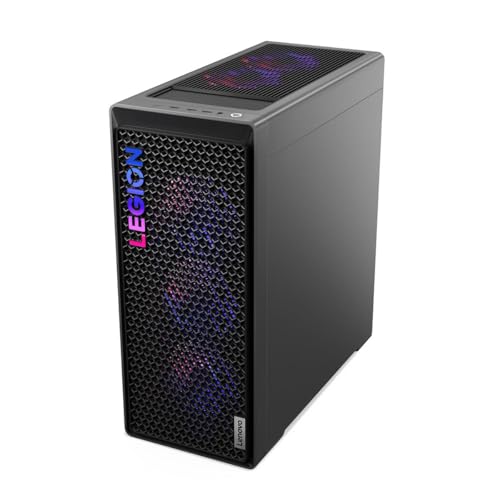
- Best 1440p ceiling: Lenovo Legion T7 34IAS10, Core Ultra 7 265KF, RTX 5080 — Check on Amazon
- Skytech King 95, Ryzen 7 9800X3D, RTX 5070 Ti — Check on Amazon
- CyberPowerPC Gamer Supreme SLC8480A9, Ryzen 7 9800X3D, RTX 5070 Ti — Check on Amazon
- iBUYPOWER Y40 PRO, Ryzen 9 7900X, RTX 5070 Ti — Check on Amazon
See 2 more Amazon options
- CyberPowerPC Gamer Supreme SLC8480A3, Ryzen 7 7800X3D, RTX 4070 Ti Super — Check on Amazon
- CyberPowerPC Gamer Xtreme GXiVR8760A4, Core i7-14700KF, RTX 4070 Super — Check on Amazon
Read the full guide ↓
Disclosure: As an Amazon Associate, reviewstook.com earns from qualifying purchases. Links to Amazon on this page are affiliate links; they cost you nothing extra. Listing details such as price and availability change often, so check the current Amazon listing before you buy.
There are two different purchases hiding inside the phrase “1440p gaming PC,” and at a $2,500 budget the difference between them is the whole decision. The first purchase is a machine that displays 1440p — it outputs a 2560×1440 signal to your monitor, and the desktop, the menus and the HUD all look sharp. The second purchase is a machine that renders 1440p — it actually computes every one of those pixels, in the game, at the settings you chose, at the frame rate your panel can show. The second one, done without compromise, is what this budget is for. This guide grades on nothing else — not streaming, not desk footprint, not general suitability — only what each of these six PCs genuinely does at 2560×1440, title class by title class, and how much headroom each one keeps in reserve for the resolution above.
Graded that way, this tier separates into three honest bands. At the top sits a single RTX 5080 machine — a card built for 4K that treats native 1440p ultra as its easy mode — which is graded here as this tier’s ceiling option; check price on Amazon to confirm its current position in this budget tier before you buy. Below it, three RTX 5070 Ti machines lock native 1440p high settings down as a default rather than an achievement: esports at full panel refresh, demanding single-player games at high-to-ultra raster settings, upscaling kept in the drawer for the heaviest ray-traced scenes rather than used as the daily driver. At the base of the tier, two previous-generation machines — an RTX 4070 Ti Super and an RTX 4070 Super — deliver native 1440p high with a measure of settings discipline, and they split on the specification that decides how long that grade holds: 16GB of VRAM against 12GB. A dedicated section below ranks all six on the question buyers at this budget eventually ask — what happens when the next monitor is a 4K one — and answers it plainly: at this budget, 4K means upscaled 4K on every machine here.
In this guide
Quick Picks
Each row grades the machine on its 1440p work first. Check price on Amazon for the current figure on each pick — prices change often, so confirm the live listing before you buy.
| 1440p role | Pick | Its 1440p grade in one line | Link |
|---|---|---|---|
| 1440p ultra, no ceiling | Lenovo Legion T7 34IAS10 (90Y6003KUS) | RTX 5080: native ultra and path tracing at 1440p, real 4K headroom — check price on Amazon | Check on Amazon |
| Native 1440p at max refresh | Skytech King 95, Ryzen 7 9800X3D, RTX 5070 Ti | The X3D CPU holds minimums where 240Hz and 360Hz panels are won or lost | Check on Amazon |
| Native 1440p, storage done right | CyberPowerPC Gamer Supreme SLC8480A9 | Same locked native-1440p grade as the King 95, with a 2TB drive under it | Check on Amazon |
| Native 1440p plus production cores | iBUYPOWER Y40 PRO, Ryzen 9 7900X, RTX 5070 Ti | Identical GPU grade; the 12-core CPU trades a little gaming minimum for creation speed | Check on Amazon |
| Native-high with discipline, 16GB | CyberPowerPC Gamer Supreme SLC8480A3 | 4070 Ti Super: near-flagship native 1440p and the five-year VRAM figure — check price on Amazon | Check on Amazon |
| Native-high with discipline, 12GB | CyberPowerPC Gamer Xtreme GXiVR8760A4 | 4070 Super: native-high today, upscaling sooner in heavy titles, as a lower-tier option | Check on Amazon |
How These Picks Were Chosen
The selection starts where the general guide for this budget starts: every machine below is a real US Amazon listing in this guide’s Under $2,500 tier — check price on Amazon to confirm the current figure before you buy, because prices in this tier change often. One pick is a previous-generation configuration that is clearing out, and the reviews note where a listing’s published details are incomplete. This variant changes the grading, never the underlying specifications or evidence.
What this variant adds is a single-lens grading method, applied in the same order to all six machines. First, native rendering: what does the machine compute at the full 2560×1440, per title class — competitive titles, mainstream AAA, and the heaviest ray-traced releases — before any software help is switched on? Second, upscaling reserve: when native stops being enough, how good is the fallback — which DLSS generation the card carries, whether multi-frame generation exists, and how much VRAM is left to hold textures while it works? Third, the panel test: every grade assumes a 1440p 240Hz panel as the reference display, since these frame rates only exist if a monitor can show them. Fourth, longevity at this resolution specifically: VRAM capacity graded as a years-at-1440p figure, and platform life graded by whether the CPU socket has a future. We did not use these PCs ourselves; the grades are built from maker listings and published specifications, and where a listing hides a specification — one pick here declines to publish its power supply wattage — the review names the gap instead of filling it.
Native, Upscaled, Generated: Three Different Things Called 1440p
Most confusion in this market lives in three terms that marketing uses interchangeably and this guide does not. Native 1440p means the game renders at the panel’s full resolution: 2560 × 1440 = 3,686,400 pixels per frame, roughly 3.69 million — about 78% more pixels than 1080p’s 2.07 million, which is why stepping up a resolution costs far more performance than the modest-sounding name change suggests. Every texture, shadow and lighting effect is computed at that full count.
Upscaled 1440p means the game renders at a lower internal resolution and an AI or algorithmic upscaler reconstructs the 2560×1440 output. The reference numbers matter, so here they are precisely: DLSS Quality mode at a 1440p output renders internally at 1707×960 — about 44% of the native pixel count — and reconstructs the rest from temporal data. DLSS Balanced renders near 1485×836, and Performance renders at 1280×720, a quarter of the native pixels. Modern upscaling is genuinely good — a DLSS Quality image at 1440p is frequently hard to distinguish from native in motion — but it is not free and it is not identical: fine detail in foliage, fences and hair is where reconstruction guesses, and the guesses occasionally show. In this guide’s grading, upscaling is a reserve and a tool, not the headline: a machine that needs DLSS Performance to hold its frame rate at 1440p is graded as an upscaled-1440p machine, however its listing describes it.
Generated frames are a third thing again. Frame generation interpolates additional frames between rendered ones, raising the number your monitor displays without the game computing more of them. DLSS 3 generates one extra frame; the 50-series cards in this guide add DLSS 4 multi-frame generation, which can insert up to three. The displayed rate climbs, sometimes dramatically, but the rendered rate — the one that decides input latency and how the game feels under the mouse — does not. This guide treats frame generation as a smoothness bonus layered on top of a native or upscaled base that must already be healthy, never as rendering power in itself, and the distinction decides at least one grade below: the previous-generation picks cannot multi-generate at any price, which is a real gap at 240Hz and an irrelevant one at 144Hz.
With those definitions fixed, the grading language used in every review is consistent. Locked native means the machine renders full 2560×1440 at high settings across title classes with upscaling kept in reserve. Native-high with discipline means native rendering is the default in most titles, but the heaviest releases ask for a settings step down or DLSS Quality. 1440p ultra is reserved for the one machine here that adds native ray tracing and path tracing to locked native and still has a resolution of headroom above it.
The 6 Best PCs for 1440p Gaming Under $2,500
Lenovo Legion T7 34IAS10, Core Ultra 7 265KF, RTX 5080 (90Y6003KUS) — the 1440p ceiling
Who it suits: The 1440p buyer who wants the resolution finished as a question — native ultra settings, native ray tracing, the highest-refresh panels fed properly — and who wants a 4K-class card under this ceiling.
Through this guide’s lens, the Legion’s grade is the simple one: it is the only machine here for which native 1440p is not a target but a floor. The RTX 5080’s 16GB of GDDR7 renders the full 3.69 million pixels at ultra settings across title classes, and the workloads that push every other pick in this guide toward upscaling — full ray tracing, path tracing in the handful of titles that offer it — run here at native resolution as settings rather than stunts. Esports titles reach the frame rates a 360Hz 1440p panel exists to display; demanding single-player games hold 240Hz-class rates with DLSS Quality and multi-frame generation layered on an already-healthy native base — the order those tools are meant to be used in. The supporting specification is an OEM flagship’s: a Core Ultra 7 265KF running up to 5.5GHz, 32GB of DDR5 at 5600MHz, a 1TB SSD, Windows 11 Pro, Wi-Fi 6 and Bluetooth, in the Storm Gray Legion T7 tower at about 39.7 pounds, with an 850W power supply in the model’s published specification. The Intel CPU is not the gaming-minimums champion of this guide — the X3D machines below hold an edge there — but behind a 5080 at 1440p the card, not the processor, sets the ceiling in all but the most CPU-bound competitive scenes.
Check price on Amazon before you treat this as an Under $2,500 pick — the live listing is the only figure that counts. When it fits this guide’s budget tier, it is the strongest 1440p purchase in the guide and the only one with genuine headroom above the resolution. If the live price puts it in a higher tier, consider the 5070 Ti picks below instead, which at 1440p surrender less than the tier gap might suggest. Two shorter notes belong to the grade: storage is 1TB where most of this tier gives 2TB, and the OEM chassis’s proprietary layouts make motherboard-level work less straightforward than in the boutique towers below.
- RTX 5080 16GB GDDR7 — native 1440p ultra and native path tracing; the only pick graded “1440p ultra” outright.
- RTX 5080 in this guide’s Under $2,500 tier — check price on Amazon to confirm it currently fits the budget.
- Core Ultra 7 265KF to 5.5GHz, 32GB DDR5-5600, Windows 11 Pro, 850W-class power supply per the model specification.
Honest limitation: Its live price needs checking against this guide’s budget tier before you buy — check price on Amazon. Storage is 1TB, and the OEM layout constrains motherboard-level upgrades.
Choose it if you check price on Amazon, it fits the Under $2,500 budget, and your panel is — or will become — a 240Hz or 360Hz 1440p display. Skip it if the live price puts it above this tier, or your monitor is 144Hz: the 5070 Ti machines below deliver the same visible 1440p on that panel.

Skytech King 95, Ryzen 7 9800X3D, RTX 5070 Ti — locked native 1440p at maximum refresh
Who it suits: The high-refresh player — 240Hz or 360Hz 1440p panel, competitive library — whose limiting factor at this resolution is frame-time consistency, and who wants native rendering as the default rather than the aspiration.
The King 95’s 1440p grade is locked native, and the reason is a pairing rather than a single part. The RTX 5070 Ti renders full 2560×1440 at high-to-ultra raster settings across mainstream titles, with 16GB of GDDR7 holding texture budgets that will stay comfortable at this resolution for years, and DLSS 4 multi-frame generation in reserve for the heaviest ray-traced scenes. What elevates the machine from capable to correct for high refresh is the Ryzen 7 9800X3D beside the card: eight cores with stacked 3D V-Cache, 4.7GHz base and 5.2GHz boost, and a documented talent for exactly the failure mode high-refresh 1440p exposes — minimum frame rates sagging in CPU-bound scenes while the GPU waits. At 144Hz that talent is a luxury; at 240Hz and above it is the difference between a panel fed and a panel wasted. The published supporting cast matches the intent: 32GB of DDR5-5600, a 360mm ARGB liquid cooler, a named 850W Gold ATX 3.0 power supply, Wi-Fi and Windows 11. This configuration — model ST-KING95-1671-W-AM — is a premium-tier option in this guide; check price on Amazon to confirm the current figure and that it fits the budget before you buy.
Two cautions from the research carry into this grade unchanged. King 95 is a case family, not a single configuration: near-identical listings circulate with different memory speeds and drive sizes — a 2TB, DDR5-6000 variant of this same CPU-GPU pairing exists alongside this 1TB, DDR5-5600 one — so the model number, checked character by character, is the product you are grading. Skytech also notes the graphics card brand may vary, standard for system integrators: an RTX 5070 Ti is guaranteed, a specific partner board is not. The 1TB drive is the specification that reads a tier low, and at 1440p it fills with the same large installs as everywhere else in this guide; a second NVMe drive is the first upgrade to plan. None of it moves the grade. For a 240Hz-plus panel, this is the strongest native-1440p pairing that lives under the ceiling as a matter of routine rather than promotion.
- Ryzen 7 9800X3D — the minimum-frame-rate specialist that high-refresh 1440p actually rewards.
- RTX 5070 Ti 16GB GDDR7 — locked native high settings, DLSS 4 multi-frame generation held in reserve.
- Published supporting cast: 360mm AIO, 850W Gold ATX 3.0, 32GB DDR5-5600 — check price on Amazon.
Honest limitation: The 1TB SSD is small for the tier, and the King 95 family’s near-identical variants demand a letter-by-letter model check.
Choose it if your panel runs at 240Hz or beyond and your library is competitive or high-refresh. Skip it if your gaming is single-player and cinematic at 144Hz — the value pick further down delivers most of that experience as a lower-tier alternative.

CyberPowerPC Gamer Supreme, Ryzen 7 9800X3D, RTX 5070 Ti (SLC8480A9) — the same native grade, with 2TB under it
Who it suits: The buyer who wants the King 95’s exact native-1440p grade — same CPU, same card — and refuses to start a flagship-tier machine on a 1TB drive.
Pixels first, because that is this variant’s rule: on rendering, this machine is the King 95’s twin. The Ryzen 7 9800X3D and RTX 5070 Ti 16GB pairing decides frame rates identically — locked native 1440p at high settings, minimums held by the same V-Cache, DLSS 4 multi-frame generation in the same reserve role. What differs is everything the frame rate sits on top of. CyberPowerPC fits a 2TB PCIe 4.0 SSD, double the Skytech configuration’s storage, on an AMD B850-chipset platform, with 32GB of DDR5 and the Gamer Supreme line’s liquid cooling, Wi-Fi readiness and Windows 11 Home. At this resolution the 2TB figure is not a rendering specification, but it is a 1440p ownership specification: the titles that justify this tier ship at 80 to 150GB apiece, and the difference between a 1TB and 2TB start is roughly a year of not deleting games to make room for games. The model number to verify at checkout is SLC8480A9.
The gaps in this listing are omissions, and they are graded as such rather than papered over. The material verified for this configuration does not publish the power supply’s wattage — at this tier, the one specification a buyer most needs named, because an undersized or low-quality unit is the classic prebuilt corner cut — and it states memory capacity without memory speed. Both are confirmable on the live listing or the maker’s configurator page, and both should be confirmed before money moves. For price, check price on Amazon on the live listing for SLC8480A9 and compare it with the King 95 above on the day you buy; the rendering grade is identical, so this one’s 2TB drive is a legitimate tiebreaker in its favor.
- The flagship pairing — 9800X3D and RTX 5070 Ti 16GB — at the same locked native-1440p grade as the King 95.
- 2TB PCIe 4.0 SSD and an AMD B850 platform: the storage this tier should start with.
- 32GB DDR5 in CyberPowerPC’s liquid-cooled Gamer Supreme series; one clear model number to verify.
Honest limitation: The listing does not publish power supply wattage or memory speed in the verified material — confirm both live before buying — and check price on Amazon against the budget tier and the King 95 before you decide.
Choose it if its live price lands at or under the Skytech’s and you want the storage question settled on day one. Skip it if the power supply cannot be confirmed as a quality 750W-or-better unit — that answer matters more than the badge on the case.

iBUYPOWER Y40 PRO, Ryzen 9 7900X, RTX 5070 Ti (Y40BA9N57T01) — the same GPU grade, bought with production cores
Who it suits: The player whose 1440p sessions share the machine with streaming, editing or other core-hungry work, and who wants the GPU grade of the picks above without giving the second job a second-class processor.
The graphics grade is identical to the two machines above it, because the graphics card is: the RTX 5070 Ti’s 16GB of GDDR7 renders locked native 1440p at high settings, holds the same texture headroom, and keeps DLSS 4 multi-frame generation in the same reserve. Nothing about the rendered image changes. What changes is the processor’s split of talents. The Ryzen 9 7900X brings twelve cores where the X3D picks bring eight plus cache, and at 1440p that trade runs in a specific direction: in pure gaming, the 7900X concedes a little to the 9800X3D, most measurably in minimum frame rates in CPU-bound scenes — the exact metric the King 95 was chosen to maximize. In everything around the gaming, the cores repay the concession: OBS compositing and encode support while a stream runs, export and scrub performance in video editors, compile and render jobs, the general multitasking load of a machine that works between sessions. The rest of the specification is complete and published: 32GB of DDR5 RGB at 5200MHz — the slowest memory kit in this guide, a small and real difference — a 2TB NVMe SSD, Wi-Fi readiness, Windows 11 Home, and a keyboard and mouse in the box, in iBUYPOWER’s panoramic-glass Y40 case. For this configuration, model Y40BA9N57T01, check price on Amazon before you buy — it is a premium-tier option in this guide, and the live listing is the figure that counts.
Graded purely as a gaming tower, this machine is the third-best rendering purchase in its own guide, and the review should not pretend otherwise: a buyer who will only ever game is paying for cores that will idle while conceding minimums they would have felt. The Y40’s glass-forward case also prioritizes the view over the raw airflow of mesh-front designs, though the shipped cooling handles the shipped components. The recommendation survives because most real buyers at $2,500 are not pure gamers, and for that buyer the GPU grade is undiminished while the second job stops being an apology. Know which buyer you are before choosing; the rendered pixels are the same either way, and everything else is not.
- RTX 5070 Ti 16GB — the identical locked native-1440p GPU grade as the X3D picks.
- 12-core Ryzen 9 7900X for the streaming, editing and multitasking life around the gaming.
- 32GB DDR5, 2TB NVMe, keyboard and mouse included — check price on Amazon.
Honest limitation: It concedes some gaming minimum frame rates to the 9800X3D machines, and its DDR5-5200 kit is the slowest memory here; as a games-only purchase it is out-graded by both picks above it.
Choose it if the PC streams, edits, renders or earns money between gaming sessions. Skip it if it will only ever run games — the picks one and two rows up deliver better minimums for pure gaming.

CyberPowerPC Gamer Supreme, Ryzen 7 7800X3D, RTX 4070 Ti Super (SLC8480A3) — native-high with discipline, and the five-year VRAM figure
Who it suits: The value-literate buyer who reads generations correctly: last generation’s flagship pairing, graded on what it renders rather than when it launched, as a previous-generation value option in this guide.
Start with what this machine renders, because the generation labels undersell it. The RTX 4070 Ti Super carries 16GB of GDDR6X — the same capacity as every 5070 Ti in this guide — and at 2560×1440 it renders native high settings across mainstream titles, native ultra in many, with ray tracing that stays a settings choice rather than a sacrifice in all but the most extreme path-traced scenes. Its DLSS is generation 3: Quality upscaling from the same 1707×960 internal render, plus single-frame generation — genuinely useful, and honestly short of the 50-series’ multi-frame generation, which is the one rendering feature this pick cannot buy at any price. Behind the card, the Ryzen 7 7800X3D is the 9800X3D’s predecessor and remains within a few percent of it in most gaming workloads, holding the same class of minimum frame rates. Around both: 32GB of DDR5, a 2TB PCIe Gen4 SSD, liquid cooling in the Gamer Supreme case, Wi-Fi readiness and Windows 11 Home. The VRAM framing deserves its own sentence, because it is this pick’s quiet strength: at 1440p, 16GB is the five-year answer — texture budgets at this resolution grow slowly enough that this capacity should not be the reason the machine gets replaced — and this is a value-tier machine in the guide that carries it.
This is a previous-generation configuration in clearance, so stock can be limited — check price on Amazon and confirm availability on the live listing before you plan around it. As a value-tier option in this guide, it should be compared against whatever the 5070 Ti machines offer that week; if its live position no longer sits below the newer cards as a value option, their case strengthens. Verify the model number, SLC8480A3, and grade the purchase by the live listing — the same instruction this guide gives for every pick.
- 7800X3D plus RTX 4070 Ti Super 16GB — native 1440p high, within a few percent of the new flagship pairing in most titles.
- 16GB of VRAM as a value-tier option — the five-year answer at 1440p; check price on Amazon.
- 32GB DDR5, 2TB Gen4 SSD, liquid cooling — check price on Amazon.
Honest limitation: No DLSS 4 multi-frame generation and a step behind in ray tracing; as a clearing previous-generation model, its stock can be limited, so confirm availability live.
Choose it if you check price on Amazon and it fits this budget tier as a value option. Skip it if multi-frame generation is a feature you are specifically buying, or its live price competes directly with the 5070 Ti machines.

CyberPowerPC Gamer Xtreme, Core i7-14700KF, RTX 4070 Super (GXiVR8760A4) — native-high today, and the three-year VRAM answer
Who it suits: The whole-setup buyer — tower, 240Hz 1440p monitor and peripherals out of one envelope — and the hybrid user who wants 20 cores of productivity muscle as a lower-tier option in this guide.
The rendering grade first: the RTX 4070 Super was its generation’s 1440p sweet-spot card, and the grade it earns here is native-high with discipline. Rasterized gaming renders at the full 2560×1440 at high settings, feeding a 240Hz panel in competitive titles and a 144Hz panel in demanding ones; DLSS 3 frame generation rides on top; ray tracing stays playable at native resolution with sensible settings. The discipline the grade names has a specific address, and it is the memory figure: 12GB of VRAM. At today’s 1440p texture loads, 12GB is adequate — this is not a warning about the present. It is a statement about the slope. The heaviest current titles already negotiate texture settings against 12GB at this resolution, and the direction of travel is one-way, which is why this guide frames 12GB as the three-year answer against the 16GB five-year answer carried by every other pick here: not a defect, a horizon, to be taken knowingly as a shorter horizon. The processor is the pick’s second argument: Intel’s Core i7-14700KF brings 20 cores — eight performance, twelve efficiency — making this, like the Y40 PRO, a real hybrid machine for streaming and core-hungry work. The remainder is complete rather than trimmed: 32GB of DDR5, a 2TB PCIe Gen4 SSD, liquid cooling, Wi-Fi readiness and Windows 11 Home. Check price on Amazon for the current figure before you buy.
The remaining limits are platform facts. The 14700KF trails the X3D chips in gaming minimums and efficiency, and its socket is at the end of its road, so a future CPU upgrade means a motherboard as well — where the AM5 picks in this guide keep a processor future open. Judged head-to-head as a pure gaming tower against the SLC8480A3 above, this machine can lose on rendering terms: that pick carries a strong gaming CPU, a stronger card and more VRAM. Its case rests on the 20 cores and on its position as a lower-tier whole-setup option. Check both listings on Amazon on the day you buy.
- RTX 4070 Super — native 1440p high with DLSS 3 frame generation — check price on Amazon.
- 20-core Core i7-14700KF — genuine streaming and productivity muscle as a lower-tier option in this guide.
- 32GB DDR5 and a 2TB Gen4 SSD — a whole-setup option when the same budget also has to cover the monitor.
Honest limitation: The 12GB of VRAM is the tightest longevity figure in this guide — the three-year answer at 1440p — and the Intel platform has no CPU upgrade path without a new motherboard.
Choose it if the budget also has to buy the monitor, or the machine splits its life between gaming and core-hungry work. Skip it if the tower is the whole purchase and years-at-1440p is the priority — every pick above it carries the 16GB answer.
Comparison Table
| Product | GPU / VRAM | CPU | 1440p grade | Link |
|---|---|---|---|---|
| Lenovo Legion T7 34IAS10 | RTX 5080 / 16GB | Core Ultra 7 265KF | Ultra — native everything, 4K headroom | Check on Amazon |
| Skytech King 95 | RTX 5070 Ti / 16GB | Ryzen 7 9800X3D | Locked native high, max refresh | Check on Amazon |
| CyberPowerPC Gamer Supreme SLC8480A9 | RTX 5070 Ti / 16GB | Ryzen 7 9800X3D | Locked native high, 2TB storage | Check on Amazon |
| iBUYPOWER Y40 PRO | RTX 5070 Ti / 16GB | Ryzen 9 7900X, 12-core | Locked native high, production cores | Check on Amazon |
| CyberPowerPC Gamer Supreme SLC8480A3 | RTX 4070 Ti Super / 16GB | Ryzen 7 7800X3D | Native-high with discipline, five-year VRAM | Check on Amazon |
| CyberPowerPC Gamer Xtreme GXiVR8760A4 | RTX 4070 Super / 12GB | Core i7-14700KF, 20-core | Native-high with discipline, three-year VRAM | Check on Amazon |
The 4K Question: Ranking All Six on Upgrade Headroom
Every buyer at this budget eventually asks it, usually in the monitor aisle: if the next display is a 4K one, which of these machines comes along? Native 4K means rendering 3840×2160 — 8.29 million pixels, two and a quarter times the 1440p count. No machine in this guide is a native-4K ultra machine: native 4K at ultra settings with ray tracing is the RTX 5090’s territory, and complete 5090 systems live far above this budget. What this budget buys toward 4K is upscaled 4K — the game rendering internally at 1440p-class resolutions (which is precisely DLSS Performance-to-Quality territory at a 4K output) and reconstructing the rest. Graded honestly on that definition, upscaled 4K from these cards is genuinely good — it is the way most 4K gaming on Earth is actually done — and the six picks separate clearly.
First, by a distance: the Legion T7. The RTX 5080 is a 4K card on loan to a 1440p guide. It renders upscaled 4K at high settings with ray tracing as its home workload, pushes native 4K in lighter and older titles, and its 16GB of VRAM is sized for 4K texture budgets. If a 4K monitor is a stated plan rather than a daydream, this pick is the only one here bought with that future already covered. Second, together: the three RTX 5070 Ti machines. The King 95, the SLC8480A9 and the Y40 PRO share a card, so they share a 4K grade: upscaled 4K at high settings is a realistic daily mode, DLSS 4 multi-frame generation multiplies the result on a high-refresh 4K panel, and 16GB of VRAM holds the texture line. Their order among themselves is decided by everything except 4K — the X3D pair for gaming minimums, the Y40 for production. Third: the SLC8480A3. The 4070 Ti Super’s 16GB is the same five-year figure at 4K as at 1440p, and its upscaling is the same DLSS Quality; what it lacks against the 5070 Ti is multi-frame generation and a step of ray-tracing pace, which at 4K — where generated frames do the most work — is the difference that matters most. Fourth: the Gamer Xtreme. The 4070 Super upscales to 4K competently in mainstream titles, but its 12GB is the wall the whole upgrade runs into: 4K texture budgets are where 12GB stops being a horizon and becomes a settings menu. As a 4K stepping stone it is the weakest here, exactly as its three-year framing at 1440p predicted.
Buy for the panel you own: all six of these machines are 1440p purchases, graded above on 1440p work. If the 4K step is a plan with a date on it, the Legion is the only pick that makes the step a monitor purchase instead of a second PC purchase — and buyers whose 4K intent is serious today should be reading Best 4K Gaming PC Under $2500 alongside this guide, where the same budget is graded on the higher resolution from the start.
How to Choose a PC for 1440p Gaming Under $2,500
- Grade the render, not the output. Every PC in this guide — and every budget mini PC — can output a 1440p signal. What this budget buys is native rendering at that resolution. Ask of any listing: what renders the full 3.69 million pixels, in which titles, at what settings?
- Match the machine to the panel’s refresh rate. On a 144Hz 1440p monitor, the two discipline picks deliver most of what this tier shows. The locked-native and ultra grades only become visible at 240Hz and above. Buying the tower grade without the panel grade is the tier’s most expensive half-purchase.
- Make 16GB of VRAM the default and 12GB the exception. Five of six picks carry 16GB, graded here as the five-year answer at 1440p. A 12GB card is a legitimate purchase as a lower-tier option taken knowingly for the shorter horizon, and a poor one positioned as a flagship-tier option.
- Keep upscaling in its place. DLSS Quality is a reserve and a ray-tracing tool on a healthy native base. If a machine needs DLSS Performance — a 1280×720 internal render — to hold its frame rate in your titles, it is an upscaled-1440p machine regardless of its badge, and it should be graded like one.
- Choose the CPU by the metric you will feel. High-refresh gaming feels minimum frame rates, and that is the X3D chips’ documented specialty. Production work feels core counts, and that is the 7900X’s and 14700KF’s. The rendered average looks similar on a chart; the lived experience does not.
- Verify the exact model number. King 95, Gamer Supreme and Legion T7 are families spanning generations and hundreds of dollars. ST-KING95-1671-W-AM, SLC8480A9, 90Y6003KUS — the model number is the product, and it should match character by character between this guide, the listing title and the specification table.
- Read the power supply line. Expect a named 750W to 850W unit, 80 Plus Gold, ATX 3.0 for 50-series cards. One pick in this guide does not publish its wattage; confirming it on the live listing is not optional homework, it is part of the purchase.
- Start with 2TB, or budget the second drive. The titles that justify native 1440p ship at 80 to 150GB. Two of these six machines start at 1TB; either choose a 2TB configuration or confirm a free M.2 slot and plan for the second drive in the setup.
Common Buying Mistakes
- Believing “1440p gaming PC” on a listing means native 1440p rendering. Output is free; rendering is the product. The cheapest machines in this keyword’s search results upscale from 1080p-class renders or below.
- Pairing a locked-native or ultra-grade tower with a 144Hz — or 60Hz — panel, then concluding the tier is a scam. The panel caps the purchase; grade both halves of the setup.
- Counting generated frames as rendered frames. Multi-frame generation can show 240 frames a second built on a far lower rendered rate; the feel under the mouse follows the rendered rate, not the displayed one.
- Buying without checking the live price. The same Legion model can sit in different budget tiers depending on the current listing, so check price on Amazon before you treat it as an Under $2,500 pick.
- Taking the 12GB card as if it were a 16GB flagship option. At this budget the VRAM figure is the longevity figure; a shorter horizon should be chosen knowingly as a lower-tier option.
- Skipping the unpublished specification. An unnamed power supply in a machine at this tier is a question the seller is asking you to answer yourself — answer it before checkout, not after the first shutdown under load.
Final Recommendation
- The standing native-1440p purchase: Skytech King 95 — locked native high settings and the minimums a 240Hz panel needs.
- If it fits the budget live: Lenovo Legion T7 — check price on Amazon; when it sits in the Under $2,500 tier it out-grades everything here and covers the 4K step.
- The same grade with storage settled: CyberPowerPC Gamer Supreme SLC8480A9, once its power supply is confirmed.
- Native 1440p plus a working life: iBUYPOWER Y40 PRO — check price on Amazon before you buy.
- The value grade: CyberPowerPC Gamer Supreme SLC8480A3 — five-year VRAM as a value-tier option; check price on Amazon.
- The whole-setup allocation: CyberPowerPC Gamer Xtreme GXiVR8760A4, as a lower-tier option when the same budget also has to cover the monitor.
Graded on 1440p alone, this tier resolves into a short story. The King 95 is the purchase most buyers should make: the 9800X3D and 5070 Ti pairing renders native 1440p as a locked default, holds the minimums high-refresh panels exist for, as a locked default. The Legion T7 is the exception that can outrank it when its live price fits this tier — a 4K-class card in a 1440p guide — and checking price on Amazon before you buy is part of the recommendation, not a hedge against it. Below them, the SLC8480A3 makes the generation argument honestly: as a value-tier option it delivers the large majority of the native-1440p experience with the same 16GB longevity figure. Buyers stepping down should compare Best 1440p Gaming PC Under $1500, where native 1440p begins in earnest; buyers stepping up to the next tier should compare Best 1440p Gaming PC Under $3000; and buyers whose real question is the higher resolution itself should start at Best 4K Gaming PC Under $2500. Whatever the tier: verify the model number, confirm the power supply, and grade the render — never the badge.
Frequently Asked Questions
What is the difference between native and upscaled 1440p?
Native 1440p renders every pixel of the 2560×1440 frame — 3.69 million of them — inside the game. Upscaled 1440p renders fewer and reconstructs the rest: DLSS Quality, the best mode, renders internally at 1707×960, about 44% of the native count, and rebuilds the output from temporal data. The upscaled image is genuinely close in motion, but native is the sharper and more honest grade, which is why this guide grades native first and treats upscaling as the reserve.
Which of these PCs is best for a 240Hz or 360Hz 1440p monitor?
The Skytech King 95, with the Legion T7 above it when its live price fits this tier. High-refresh 1440p is decided by minimum frame rates in CPU-bound scenes, and the King 95’s 9800X3D is the specialist part for exactly that metric, behind a 5070 Ti that renders the resolution natively. On a 144Hz panel, by contrast, the value picks in this guide deliver most of the same visible experience — the panel, not the tower, becomes the limit.
Is 12GB of VRAM enough for 1440p?
Today, yes — the 4070 Super pick renders native 1440p at high settings without the figure being its present problem. The question is the horizon. This guide frames 12GB as the three-year answer and 16GB as the five-year answer at this resolution, because texture budgets grow in one direction and the heaviest current titles already negotiate against 12GB. Buy the shorter horizon knowingly as a lower-tier option — not accidentally as a flagship-tier purchase.
Can any of these PCs actually game at 4K?
At upscaled 4K, yes — that is the honest version of the claim. The Legion’s RTX 5080 makes upscaled 4K at high settings its home workload and renders native 4K in lighter titles; the 5070 Ti machines run upscaled 4K well; the 4070 Ti Super follows; the 4070 Super runs into its 12GB wall first. None of the six is a native-4K ultra machine — that grade belongs to the RTX 5090 tier, far above this budget — and any listing implying otherwise for a sub-$2,500 PC is selling the output signal, not the render.
Does frame generation count toward a 1440p grade?
As a bonus, not as the base. Frame generation interpolates displayed frames between rendered ones; it raises the number the monitor shows without raising the rendered rate that decides input feel. This guide credits the 50-series picks’ multi-frame generation as smoothness layered on a healthy native base, but no machine here was graded as a native-1440p PC on generated frames.
Why should I check the live price on every pick?
Because prices in this tier change often, and the live Amazon listing is the only figure that should grade your purchase. For every pick in this guide, check price on Amazon, confirm the exact model number, and confirm the specifications that matter — especially power supply wattage and memory speed where a listing leaves them unpublished — before you buy.


