Where to buy
Check the latest price, availability and delivery on Amazon. Orders are placed on Amazon. We may earn a commission from qualifying purchases.
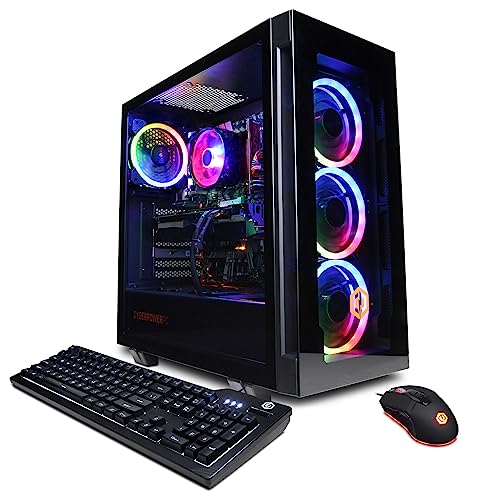
- Best 1440p longevity pick: CyberPowerPC Gamer Xtreme VR, Intel Core i7-13700F, GeForce RTX 4060 Ti 16GB — Check on Amazon
- Thermaltake LCGS Quartz i1460, Intel Core i5-14400F, GeForce RTX 5060 — Check on Amazon
- Skytech Archangel, Intel Core i5-14400F, GeForce RTX 4060, 32GB DDR5, 2TB SSD — Check on Amazon
- Skytech Nebula, AMD Ryzen 5 5600X, GeForce RTX 4060 Ti — Check on Amazon
See 2 more Amazon options
- CyberPowerPC Gamer Xtreme VR, Intel Core i5-13400F, GeForce RTX 4060 — Check on Amazon
- Skytech Blaze4 Mini, AMD Ryzen 7 5700, GeForce RTX 4060 Ti — Check on Amazon
Read the full guide ↓
Disclosure: As an Amazon Associate, reviewstook.com earns from qualifying purchases. Links to Amazon on this page are affiliate links; they cost you nothing extra. Listing details such as price and availability change often, so check the current Amazon listing before you buy.
This keyword sounds like a contradiction, so let us deal with it head-on. You searched for a 1080p gaming PC, but you want it for 1440p gaming — and at most budgets that search would be a dead end, because the graphics cards in cheaper 1080p machines genuinely cannot drive a 2560×1440 screen at settings worth looking at. At $1,200, the situation changes. This is the first tier where the machines sold as high-end 1080p PCs carry graphics hardware — RTX 4060 Ti-class cards, and in one case a 16GB version of that card — that crosses the line into real 1440p capability. Not pretend 1440p, not a slideshow at minimum settings, but native 1440p in competitive titles and credible 1440p in demanding ones, provided you understand which kind of 1440p each machine delivers. That distinction — native rendering versus upscaled rendering, and which games fall on which side of it — is the entire subject of this guide.
Here is the honest framing before any product names. Under $1,200 is the entry tier for real 1440p, not the comfort tier. Every machine below can put a genuinely good picture on a 1440p monitor today: esports and competitive games at native resolution with high refresh rates, older and lighter AAA titles at native resolution with sensible settings, and current heavy releases at native resolution with discipline — or at upscaled 1440p via DLSS, which looks close enough that most players stop caring. What this budget does not buy is the right to set every slider to ultra in every new release and never think again. That experience exists, but it lives a tier up, in the graphics-card class covered by Best 1440p Gaming PC Under $1500. If your expectations match what this tier actually delivers, though, $1,200 is where 1440p stops being an aspiration and starts being a setup — and the six machines below, all verified Amazon listings at or below the ceiling, deliver it in six genuinely different ways.
One more piece of honesty, because it decides whether this guide is even for you. All six picks are graded here as 1440p machines, but they were chosen from the strongest end of the 1080p market, and two of them qualify for 1440p only with help from upscaling. If you do not own a 1440p monitor yet and are splitting a budget between screen and PC, read the reviews with that split in mind: one pick below sits low enough in this tier to leave real room in the $1,200 budget for the monitor itself, and that combination — a humbler PC driving a good 1440p panel — will look better than a stronger PC still feeding a 1080p screen. Resolution you cannot display is not resolution you own.
In this guide
Quick Picks
Short on time, or comparing several options at once? Each row below names a 1440p buyer type and the product that suits it, with a link to the listing.
| Buyer type | Pick | Why it stands out at 1440p | Link |
|---|---|---|---|
| Best 1440p longevity | CyberPowerPC Gamer Xtreme VR (i7-13700F, RTX 4060 Ti 16GB) | 16GB of VRAM — textures stay at high settings at 1440p years longer | Check on Amazon |
| Best upscaling technology | Thermaltake LCGS Quartz i1460 (i5-14400F, RTX 5060) | DLSS 4 with multi frame generation — the strongest upscaled-1440p toolkit here | Check on Amazon |
| Best for big libraries at 1440p | Skytech Archangel (i5-14400F, RTX 4060, 32GB, 2TB) | 32GB of RAM and 2TB of storage behind an entry-level 1440p GPU | Check on Amazon |
| Best native-1440p frame rate per dollar | Skytech Nebula (Ryzen 5 5600X, RTX 4060 Ti) | 4060 Ti raster performance that often lands far under budget | Check on Amazon |
| Best leaves money for the monitor | CyberPowerPC Gamer Xtreme VR (i5-13400F, RTX 4060) | Priced low enough to help fund the 1440p panel out of the same budget | Check on Amazon |
| Best compact 1440p option | Skytech Blaze4 Mini (Ryzen 7 5700, RTX 4060 Ti) | Full 4060 Ti 1440p capability in the smallest case here | Check on Amazon |
How These Picks Were Chosen
The six machines are the verified listings from the top of the $1,200 1080p market, re-graded here against a different and harder standard: what each one actually does at 2560×1440. The budget was applied as a ceiling, not a target — every product below is a real Amazon listing chosen to fit at or below the $1,200 ceiling in the United States. Prebuilt pricing swings hard between deal events, so do not hold any guide to a hard number — check the live price on Amazon before you buy. Two machines occasionally list above the ceiling between sales; both are flagged in their reviews, and both carry an explicit rule: buy them at or under $1,200, or do not buy them out of this guide at all. Anything that only ever existed above the ceiling was excluded.
We did not use these products ourselves. We read the maker listings and specification pages and compared the parts that decide 1440p performance, in the order they decide it. First, the graphics card and its memory: 1440p asks a GPU to shade roughly 78 percent more pixels than 1080p, and it asks the card’s memory to hold larger textures and frame buffers while doing it — which is why this guide treats VRAM capacity as a headline spec rather than a footnote. Second, upscaling support: whether the card offers current-generation DLSS, and in the newest case frame generation, because upscaling is the difference between “1440p with compromises” and “1440p that feels native” in heavy titles. Third, the processor, which matters less at 1440p than at 1080p — the GPU becomes the bottleneck as resolution rises — but still sets minimum frame rates in competitive titles. System memory, storage, and power supply quality were compared last, as longevity factors.
The grading language used throughout is deliberate, and it is defined in the next section: a pick is described as a native 1440p machine for a class of games only where its GPU can render every pixel of the 1440p frame at settings worth using, and as an upscaling 1440p machine where the honest route to a good 1440p picture is rendering internally at a lower resolution and letting DLSS reconstruct the rest. Every pick below gets both grades — one for competitive and lighter titles, one for demanding AAA releases — because a single blended verdict is exactly how 1440p buyers get misled at this budget.
Native 1440p vs Upscaled 1440p: The Definitions That Decide This Guide
Start with the arithmetic, because everything else follows from it. A 1080p frame is 1920×1080 — about 2.07 million pixels. A 1440p frame is 2560×1440 — about 3.69 million pixels. Moving from one to the other is not a small step; it is roughly 78 percent more pixels for the graphics card to shade, light and texture, every single frame. A GPU that cruises at 1080p can be brought to its knees at 1440p without anything being wrong with it, and a GPU that handles 1440p well is, by definition, a substantially stronger piece of hardware. This is why the cheaper 1080p tiers cannot follow you here, and why this tier — where 4060 Ti-class cards appear — is the first one that can.
Native 1440p means the game renders all 3.69 million pixels itself, at the settings you selected, and the monitor displays exactly what was rendered. It is the sharpest, most artefact-free version of the picture, and the most expensive in GPU terms. Upscaled 1440p means the game renders internally at a lower resolution and an algorithm reconstructs a 1440p image from it. With NVIDIA’s DLSS in its Quality mode, a 1440p output is rendered internally at about 1707×960 — slightly below 1080p — and rebuilt using motion data and machine-learned detail. Balanced mode renders lower still, around 1485×836, and Performance mode renders at 1280×720. The honest summary: DLSS Quality at 1440p looks remarkably close to native to most players in motion, clearly better than a plain 1080p image on the same screen, and it costs roughly the GPU effort of a 1080p render. Balanced and Performance trade progressively more sharpness for frame rate. Frame generation is a separate technology, not upscaling: it inserts algorithmically created frames between rendered ones to raise the displayed frame rate, which smooths motion but does not add real rendered detail or reduce input latency the way a genuinely higher frame rate does. The RTX 5060 pick in this guide supports the newest multi-frame version of it; treat it as a smoothness bonus in supported titles, never as a substitute for rendering power.
VRAM — the graphics card’s own memory — is the quiet third term in this. At 1440p, texture data and frame buffers are larger than at 1080p, and modern AAA titles at high texture settings can press against an 8GB card’s capacity, at which point the symptom is not a lower average frame rate but stutter and forced texture reductions. A 16GB card does not make today’s games dramatically faster than the same GPU with 8GB; what it does is remove the ceiling, so the texture settings you choose this year are still the ones you can choose in three years. That is why the 16GB pick tops this guide despite sharing its GPU name with two 8GB picks below: at 1440p specifically, the memory difference is the longevity difference.
Finally, the title classes used in every review. Competitive and esports titles are built to run fast on modest hardware; at this tier they are native-1440p, high-refresh games on every pick here. Lighter and older AAA titles — the big releases of a few years ago, well-optimised ports, most indie and AA games — are native-1440p games on the 4060 Ti picks with sensible settings, and upscaling games on the plain 4060 picks. Current heavy AAA releases are where the tier’s limits live: native 1440p is available on the stronger picks if you practise settings discipline — textures protected, the heaviest ray-tracing and shadow options trimmed — while DLSS Quality is the route most players will actually prefer, because it buys high settings and smooth frame rates simultaneously. No pick in this guide runs current heavy AAA at native 1440p with every slider at maximum, and any guide that implies otherwise at $1,200 is selling you something.
The 6 Best 1080p Gaming PCs for 1440p Gaming Under $1,200
CyberPowerPC Gamer Xtreme VR — Intel Core i7-13700F, GeForce RTX 4060 Ti 16GB (GXiVR8040A14)
Who it suits: 1440p buyers who intend to keep the machine for five years or more, and anyone upgrading to a 1440p monitor now who does not want the graphics card’s memory to be the first thing that ages out.
Two versions of the RTX 4060 Ti exist, and the difference between them is the single most important fact in this guide. This CyberPowerPC carries the 16GB version. The GPU silicon is the same as the 8GB card’s, so in today’s games, at today’s settings, the two run close together — and then the 1440p reality arrives. At 2560×1440, high and ultra texture settings in modern AAA titles consume graphics memory at a rate that already makes 8GB cards negotiate: textures quietly reduced, occasional stutter as data swaps in and out. The 16GB card does not negotiate. It holds the textures you selected, at the resolution you bought the monitor for, and it will keep holding them as texture budgets grow over the machine’s life. For competitive titles, none of this matters — everything here runs them at native 1440p at high refresh rates — but for the AAA library you will accumulate over five years, this is the pick whose 1440p picture degrades last.
The supporting hardware is built for the same horizon. The Core i7-13700F’s sixteen cores — eight performance, eight efficiency — are more processor than 1440p gaming strictly needs today, since the GPU does the heavy lifting at this resolution, but they keep minimum frame rates stable in CPU-heavy scenes and give streamers and multitaskers real headroom. Around them sit 16GB of DDR5 memory, a 1TB NVMe SSD, Wi-Fi and Windows 11 Home. The pricing needs the guide’s standing warning, stated plainly: this model’s price swings with Amazon deal events, and it earns its place in a $1,200 guide only when the live listing sits at or under the ceiling — check the price on Amazon before you buy. If the live listing is above $1,200 when you check, the correct move is to wait for the next event or take the Thermaltake below — not to quietly raise the budget.
- RTX 4060 Ti with 16GB of VRAM — the only pick whose texture ceiling at 1440p is years away.
- Native 1440p in competitive and lighter titles; native AAA with settings discipline, DLSS when you prefer smoothness.
- Core i7-13700F with 16 cores keeps frame-rate minimums stable and covers streaming on the side.
- Current DDR5 platform, 1TB NVMe storage and Windows 11 Home round out the specification.
Honest limitation: Its price can drift above the $1,200 ceiling between sales, and its 16GB of system RAM is merely adequate next to the Archangel’s 32GB — the VRAM is future-proofed, the system memory is not.
Choose it if you are buying a 1440p monitor and a PC for the long term in one decision, and the live price is at or under the ceiling. Skip it if the live listing sits above the ceiling today, or you replace PCs every two to three years — a shorter horizon never collects the 16GB dividend.

Thermaltake LCGS Quartz i1460 — Intel Core i5-14400F, GeForce RTX 5060
Who it suits: Buyers whose 1440p plan leans on modern upscaling — who play current releases, value the newest DLSS feature set, and want a price comfortably inside the budget.
If the CyberPowerPC above is the native-rendering argument, the Quartz i1460 is the upscaling argument, and at 1440p it is a genuinely strong one. Its GeForce RTX 5060 is the newest graphics generation in this guide, bringing NVIDIA’s Blackwell architecture and DLSS 4 with multi frame generation. In practice, that toolkit changes what “1440p capable” means for a card of this class: DLSS Quality upscaling lets demanding titles render internally near 1080p effort while presenting a 1440p image that holds up well in motion, and multi frame generation — in the titles that support it — raises displayed frame rates into the range where a high-refresh 1440p monitor stops being decorative. For the player whose library is current AAA releases, this is arguably the most fluent 1440p experience in the guide, purchased with algorithms rather than raw rendering muscle.
The rest of the machine is sensible and honestly priced. A 10-core Core i5-14400F, 16GB of Thermaltake’s own ToughRam DDR4 at 3600MHz with RGB, a 1TB NVMe M.2 drive, Wi-Fi and Windows 11, in a case from a maker whose main business is cases and cooling, with a 600W 80 Plus Gold power supply documented in coverage of this configuration. Its pricing is the friendliest here: it typically sits inside the ceiling with real room to spare — check the price on Amazon to see where it stands today. The trade to understand is the same one this guide keeps returning to: the RTX 5060 carries 8GB of VRAM, so in native rendering its texture ceiling at 1440p arrives sooner than the 16GB CyberPowerPC’s, and its platform uses DDR4 rather than DDR5. You are buying the best upscaling toolkit at the tier, at a fair price, with a known long-term limit — a good bargain, made with open eyes.
- RTX 5060 with DLSS 4 multi frame generation — the strongest upscaled-1440p toolkit in this guide.
- Competitive titles run native at 1440p; heavy titles run their best via DLSS Quality.
- Core i5-14400F 10-core processor is well matched to a GPU-bound 1440p workload.
- Among the most comfortable pricing under the ceiling here — check the price on Amazon.
Honest limitation: 8GB of VRAM caps native-render texture settings at 1440p sooner than the 16GB pick, frame generation only helps in supported titles, and the DDR4 platform is a generation behind on memory.
Choose it if your library is current releases and you are happy letting DLSS do the heavy lifting at 1440p. Skip it if you specifically want maximum native-rendering longevity — that is the 16GB CyberPowerPC above, bought on its deal cycle.

Skytech Archangel — Intel Core i5-14400F, GeForce RTX 4060, 32GB DDR5, 2TB SSD
Who it suits: Players moving to 1440p whose PC is also their everything machine — large game libraries, heavy multitasking, recording and light editing — and who would rather have storage and memory solved than GPU headroom maximised.
Grade the Archangel’s graphics card honestly first, because everything else about this machine is generous. The RTX 4060 8GB is the entry-level 1440p GPU in this guide: competitive titles run at native 1440p without complaint, lighter AAA titles run natively with sensible settings, and current heavy releases are DLSS Quality games — good-looking, smooth, and upscaled rather than native. If your 1440p ambition is primarily native rendering, this is not your pick, and the two 4060 Ti machines bracket it in this list precisely to make that clear. What the Archangel does instead is eliminate the two compromises almost every other listing at this budget makes quietly: it carries 32GB of DDR5 at 5600MHz — double the system memory of every other pick here — and a 2TB SSD, double the storage, at a moment when individual games routinely claim over 100GB each.
Those numbers change daily life at 1440p more than spec-sheet comparisons suggest. A 2TB drive holds a real library of large modern titles without the delete-and-redownload rotation; 32GB of memory means the browser, Discord, recording software and the game coexist without negotiation, which matters more, not less, when the GPU is working at 1440p. The Core i5-14400F and a 650W Gold power supply round out a platform with sensible upgrade room. This listing’s price tends to sit near the top of this guide’s range, dipping during deal events, so patient buyers who check the price on Amazon have repeatedly picked up the memory-and-storage machine at a mid-tier level. Judge it as the guide’s completeness pick: the 1440p GPU is the modest part, and everything around it is the best here.
- 32GB of DDR5 memory and a 2TB SSD — double both, versus every other pick in this guide.
- RTX 4060 handles native 1440p in competitive and lighter titles; DLSS Quality covers heavy releases.
- 650W Gold power supply leaves genuine room for a future graphics card upgrade.
- Pricing rewards patience — it dips during deal events, so check the price on Amazon.
Honest limitation: The RTX 4060 8GB is the weakest 1440p GPU among these picks — native-rendering ambition in current AAA titles belongs to the 4060 Ti machines, and its 8GB memory shares their texture ceiling.
Choose it if storage pain and multitasking are your real problems and upscaled 1440p in heavy games is an acceptable trade. Skip it if native 1440p frame rate is the whole point of the purchase — spend on a 4060 Ti pick instead.

Skytech Nebula — AMD Ryzen 5 5600X, GeForce RTX 4060 Ti
Who it suits: Pure gamers — no streaming ambitions, no editing — who want the most native-1440p rendering performance their money can buy and are willing to buy on a discount cycle.
The Nebula is the raster-performance argument in its purest form. Its RTX 4060 Ti is the full rendering tier above the plain 4060 picks: at 1440p that translates directly into native resolution in a wider band of titles — competitive games at high refresh, lighter and older AAA at high settings, and current releases natively with the settings discipline this guide describes, or via DLSS Quality when you would rather have the frame rate. The Ryzen 5 5600X behind it is a 6-core processor that spent years as the default gaming recommendation; at 1440p, where the GPU sets the pace, it is not the limitation in any title class this guide grades. Sixteen gigabytes of DDR4 at 3200MHz, a 1TB NVMe SSD and a 600W Gold power supply complete a specification with nothing wasted on non-gaming decoration.
Its pricing is the other half of its case. This listing has spent much of its life at or below this guide’s ceiling, sometimes dramatically below it — but it has also drifted well above budget between deal events. The discipline required is the mirror image of that generosity, and the rule from the top of this guide applies without exception: check the price on Amazon, buy it only at or under $1,200, and walk away when it sits above the ceiling. The platform compromises are the familiar dated kind: AM4 and DDR4 are finished generations with no meaningful processor upgrade path, and the card’s 8GB of memory carries the same 1440p texture ceiling as every 8GB pick here. On a three-to-four-year horizon — the way most people actually own gaming PCs — neither matters as much as the rendering power per dollar, which is this machine’s whole identity.
- RTX 4060 Ti native-1440p performance on a focused, all-gaming platform.
- Pricing swings widely on a deep discount cycle — check the price on Amazon and buy on the dips.
- Ryzen 5 5600X is a proven gaming CPU that does not bottleneck a 1440p GPU workload.
- 600W Gold power supply and 1TB NVMe storage cover the fundamentals properly.
Honest limitation: The AM4/DDR4 platform is end-of-life with no real upgrade path, the 8GB VRAM sets the usual texture ceiling, and the listing’s price can drift far above the ceiling — buy only at or under $1,200.
Choose it if native-1440p frame rate per dollar is the whole decision and the live price sits in its under-budget range. Skip it if you keep PCs for five-plus years and want the 16GB card’s texture headroom or a live upgrade path.

CyberPowerPC Gamer Xtreme VR — Intel Core i5-13400F, GeForce RTX 4060 (GXiVR8060A24)
Who it suits: Buyers splitting a total budget between the PC and a 1440p monitor, and first-time 1440p upgraders who want a modern platform they can grow rather than a finished specification.
Every other pick in this guide assumes the monitor is already handled. This one is for the reader whose $1,200 has to cover the screen too — and its position at the lower end of this tier makes that arithmetic real. As one of the more affordable picks here, it leaves real room in the budget for a good 1440p high-refresh monitor, which is the single most visible upgrade in the entire setup. A stronger PC feeding your old 1080p panel shows you nothing new; this PC feeding a 1440p panel changes every game you own. That is the correct order of operations, and this guide would rather say so than pretend the most expensive tower is the best answer for a buyer who still needs the screen.
The machine itself is an honest entry point to 1440p rather than a disguised powerhouse. The RTX 4060 8GB shares the Archangel’s grading exactly: native 1440p in competitive titles, native with sensible settings in lighter AAA, DLSS Quality for current heavy releases, and the 8GB texture ceiling in the long view. The 10-core Core i5-13400F, 16GB of DDR5 memory and a 1TB PCIe Gen4 SSD put it on the modern platform the AM4 picks cannot offer, with Wi-Fi and Windows 11 Home included. What you gain over the Archangel is price and platform currency; what you give up is its memory and storage generosity. For a first serious 1440p setup — monitor included, upgrades to come — that exchange is frequently the smartest one in this guide.
- Lower-end pricing that helps fund the 1440p monitor out of the same $1,200 total — check the price on Amazon.
- Modern DDR5 platform: the easiest foundation here to grow with later upgrades.
- RTX 4060 covers native 1440p in competitive and lighter titles, DLSS Quality beyond that.
- 1TB Gen4 NVMe SSD and Windows 11 Home: complete and ready to play.
Honest limitation: The RTX 4060 8GB is an entry-level 1440p card — heavy current titles are upscaling games on it, and its texture ceiling arrives sooner than any 4060 Ti pick’s.
Choose it if the budget must stretch to the monitor, or you prefer a lower entry price on a current platform. Skip it if the monitor is already bought and the full $1,200 is PC money — then the headroom picks above use it better.
Skytech Blaze4 Mini — AMD Ryzen 7 5700, GeForce RTX 4060 Ti
Who it suits: Desk-space-limited players — small rooms, dorms, living-room setups — who are moving to 1440p and refuse to accept small-PC performance as the price of a small-PC footprint.
Compact gaming PCs usually extract their size tax from the graphics card, which at 1440p is exactly the wrong place to pay it. The Blaze4 Mini’s listing is notable because the tax is hard to find: its RTX 4060 Ti is the same rendering tier as the Nebula’s, delivering the same 1440p grades — native in competitive and lighter titles, native-with-discipline or DLSS Quality in current heavy releases — from the smallest case in this guide. Behind it, the Ryzen 7 5700’s eight cores give this machine the multitasking and light-streaming depth the 6-core Nebula lacks, alongside 16GB of DDR4 at 3200MHz, a 1TB SSD and a 650W Gold power supply that is generous for the format, with Wi-Fi and Windows 11 Home. Its pricing is another quiet advantage: it has repeatedly sat at the lower end of this tier, undercutting full-size towers here while matching their graphics card outright — check the price on Amazon.
The mini format’s two eternal conditions still apply, and a fair review states them at any resolution. Airflow in a small case is physics, not engineering failure: expect fan noise under sustained 1440p load to be more present than in a big tower, since the GPU works harder at this resolution and the case has less air to work with. And a future graphics card upgrade becomes a shopping exercise in card length and thickness as well as wattage — worth knowing at 1440p, where your next card is the upgrade that matters most. The AM4/DDR4 end-of-platform caveat from the Nebula applies here too, as does the 8GB texture ceiling. Within those conditions, this is the pick for the player whose PC shares a desk with textbooks or sits beside a TV: full 4060 Ti 1440p capability, in a box that does not dominate the room.
- RTX 4060 Ti 1440p performance in a mini case — the compact pick that does not downsize the GPU.
- Eight Ryzen 7 5700 cores give it multitasking and light-streaming depth the 6-core picks cannot match.
- A 650W Gold power supply — generous for a mini case — and pricing that sits at the lower end of this tier.
- Full-size 1440p grades: native in lighter titles, DLSS Quality in heavy ones.
Honest limitation: A mini case runs louder under sustained load and constrains future GPU upgrades by physical size; the AM4 platform has no processor upgrade path, and 8GB of VRAM sets the usual ceiling.
Choose it if space is a hard constraint but 1440p performance is not negotiable. Skip it if your desk has room for a full tower and you expect to swap in a larger graphics card mid-life — the bigger cases above swallow that upgrade without a tape measure.

Comparison Table
| Product | GPU / VRAM | CPU | RAM / Storage | 1440p verdict | Link |
|---|---|---|---|---|---|
| CyberPowerPC Gamer Xtreme VR (GXiVR8040A14) | RTX 4060 Ti / 16GB | Core i7-13700F | 16GB DDR5 / 1TB | Native in most titles; textures stay high for years | Check on Amazon |
| Thermaltake LCGS Quartz i1460 | RTX 5060 / 8GB | Core i5-14400F | 16GB DDR4 / 1TB | Best upscaled 1440p — DLSS 4 and frame generation | Check on Amazon |
| Skytech Archangel | RTX 4060 / 8GB | Core i5-14400F | 32GB DDR5 / 2TB | Native in lighter titles; DLSS for heavy ones | Check on Amazon |
| Skytech Nebula | RTX 4060 Ti / 8GB | Ryzen 5 5600X | 16GB DDR4 / 1TB | Strongest native rendering per dollar, on discount | Check on Amazon |
| CyberPowerPC Gamer Xtreme VR (GXiVR8060A24) | RTX 4060 / 8GB | Core i5-13400F | 16GB DDR5 / 1TB | Entry 1440p that leaves budget for the monitor | Check on Amazon |
| Skytech Blaze4 Mini | RTX 4060 Ti / 8GB | Ryzen 7 5700 | 16GB DDR4 / 1TB | Full 4060 Ti 1440p grades in a mini case | Check on Amazon |
How to Choose a PC for 1440p Gaming Under $1,200
- Decide whether you are a native or an upscaling buyer first. If you want games rendered at full 2560×1440 wherever possible, shop the 4060 Ti picks and accept settings discipline in heavy titles. If you are comfortable with DLSS Quality — most players are, in motion — the whole list opens up, and the RTX 5060’s newer toolkit becomes a first-rank option.
- Read VRAM before GPU tier names. At 1440p the difference between an 8GB and a 16GB card is the difference between protecting texture settings for years and negotiating them down title by title. If two machines cost the same and you keep PCs a long time, take the memory.
- Grade by your actual library, not the hardest game you can name. Competitive and lighter titles are native-1440p games on every pick here. Only a library dominated by current heavy AAA releases pushes you toward the top picks — or toward the next budget tier.
- Budget the monitor as part of the system. A 1440p PC behind a 1080p screen is a 1080p PC. If the panel is not already on your desk, the pick that leaves money for it may be the best 1440p purchase in this guide.
- Treat frame generation as a bonus, never a foundation. Multi frame generation raises displayed frame rates in supported titles; it does not add rendered detail or reduce latency like real rendering does. Buy rendering power and memory first, features second.
- Decide your ownership horizon honestly. Three to four years: buy rendering performance per dollar (the Nebula pattern). Five-plus years: buy headroom — VRAM, platform generation, power supply quality (the 16GB CyberPowerPC pattern).
- Check the power supply by name and rating. At 1440p your most likely mid-life upgrade is a stronger graphics card, and a stated wattage with an 80 Plus Gold rating tells you whether that upgrade is a drop-in or a rebuild. An unstated PSU is a question to ask before ordering.
- Treat the ceiling as a ceiling across time. Two picks in this guide cycle above $1,200 between deal events and return below it during them. When a machine dips under the ceiling during a deal event, that dip is the moment to buy — set a price alert and do not let a between-sales price redefine your budget.
- Match case size to the room and the upgrade plan. Mini cases solve real space problems and impose real ones: noise under sustained load and physical limits on the future graphics card that 1440p ownership makes likely. Buy compact on purpose.
- Keep the packaging until the second week. Verify the graphics card model and its memory against the listing, run your most demanding game at 1440p, watch temperatures and noise, and only then recycle the box. Prebuilt verification is a first-week job.
What Locked High-Settings 1440p Actually Costs
It is worth naming precisely what this tier does not do, because the gap between this guide and the next one is specific rather than vague. At under $1,200, 1440p means: competitive titles native and fast, most of the back catalogue native at high settings, and current heavy releases handled by one of two honest compromises — settings discipline at native resolution, or DLSS Quality upscaling with settings left high. What it does not mean is the set-and-forget experience: every new release at native 1440p, texture and ray-tracing sliders at maximum, frame rates high enough for a 165Hz or 240Hz panel, sustained for years. That experience is a graphics-card class above everything in this guide, and it is priced accordingly.
If that description matches what you actually want — if “1440p gaming” in your head means ultra settings as a default rather than a negotiation — the honest move is not to stretch one of these listings past its ceiling or to expect upscaling to be something it is not. It is to step up a tier, where the stronger GPUs in Best 1440p Gaming PC Under $1500 are chosen for exactly that job, or to browse the dedicated 1440p range starting at Best 1440p Gaming PC Under $1200 with this tier’s compromises understood as the entry price. Equally, if the description of this tier sounds like plenty — and for the large majority of libraries, it is — then stepping up a tier buys insurance against a problem you may never have. Know which buyer you are before the listings decide for you.
Common Buying Mistakes
- Buying a “1440p-capable” PC without checking whether that means native rendering or upscaling — the two experiences differ most exactly in the heavy titles buyers care about.
- Comparing graphics cards by tier name alone and missing the memory: an 8GB and a 16GB card with similar names age completely differently at 1440p, where texture budgets are larger.
- Spending the whole budget on the tower and keeping a 1080p monitor, then concluding 1440p looks no different. A PC can only show what its panel can display, so fund the panel like the core component it is.
- Paying the between-sales price on a deal-cycle listing. Machines in this guide have documented price swings between deal events; buying at the top of the swing is a self-inflicted price increase.
- Letting a frame-generation headline outrank fundamentals. Features help in supported games; VRAM, rendering power and storage help in all of them.
- Assuming a bigger monitor resolution is free. The step from 1080p to 1440p is roughly 78 percent more pixels per frame — hardware that was comfortable at one is merely adequate at the other.
- Ignoring the power supply because it is not in the headline, then discovering your 1440p-driven GPU upgrade needs a new one. Wattage and rating decide whether the upgrade is a drop-in or a rebuild.
- Settling for 16GB of RAM and a 1TB drive without checking the market first — a listing in this very guide doubles both at the same ceiling.
- Choosing a mini case for looks, then discovering its noise under sustained 1440p load and its physical limits on the larger graphics card you now want. Compact is a commitment, not just a dimension.
- Skipping the first-week check: parts verified against the listing, the heaviest game run at 1440p, temperatures and every port tested. A mismatch found in week one is a straightforward return; found in month three, it is an argument.
Final Recommendation
- Most 1440p buyers keeping the PC long-term: CyberPowerPC Gamer Xtreme VR (i7-13700F, RTX 4060 Ti 16GB) — bought at its deal price.
- Current releases via the best upscaling: Thermaltake LCGS Quartz i1460.
- Big libraries and multitasking: Skytech Archangel.
- Maximum native rendering per dollar: Skytech Nebula.
- Budget must include the 1440p monitor: CyberPowerPC Gamer Xtreme VR (i5-13400F, RTX 4060).
- Small spaces, full 1440p performance: Skytech Blaze4 Mini.
Our top two at this budget are the CyberPowerPC Gamer Xtreme VR with the 16GB RTX 4060 Ti, for the buyer making one long-term decision — monitor and PC together — who wants textures at 1440p to stop being a negotiation, and the Thermaltake Quartz i1460, for the buyer whose library is current releases and who is happy to let the newest DLSS toolkit carry the resolution. Between them they cover the two honest shapes 1440p takes under $1,200: native headroom, and upscaled fluency. If rendering power per dollar is the whole game, the Nebula on its discount cycle is unbeatable; if the PC doubles as your everything machine, the Archangel’s memory and storage are the smarter allocation; if the screen still needs buying, the i5 CyberPowerPC is the pick that makes the whole setup possible; and if the desk is small, the Blaze4 Mini gives up nothing that matters. Shoppers who decide native rendering at maximum settings is non-negotiable should step up to Best 1440p Gaming PC Under $1500, and those still weighing the resolution itself should compare against Best 1080p Gaming PC Under $1200, where these same machines are graded purely as 1080p systems. Check which kind of 1440p you are buying, check the live price on Amazon against this guide’s ceiling, and check the parts again when the box arrives.
Frequently Asked Questions
Can a 1080p gaming PC really run 1440p?
At this budget, yes — because the strongest “1080p” machines under $1,200 carry RTX 4060 Ti-class graphics cards, which are genuine entry-level 1440p hardware. Competitive titles run natively at high refresh rates, lighter titles run natively at high settings, and current heavy releases run natively with settings discipline or smoothly via DLSS upscaling. At lower budgets the answer changes: below this tier, 1440p claims deserve the scepticism this guide applies to upscaling-only machines.
What is the difference between native and upscaled 1440p?
Native 1440p means the game renders all 3.69 million pixels of the 2560×1440 frame itself. Upscaled 1440p — DLSS in Quality mode, for example — renders internally at a lower resolution, around 1707×960, and reconstructs the 1440p image algorithmically. In motion, DLSS Quality looks close to native for most players and far better than a plain 1080p image on the same screen, at roughly the GPU cost of a 1080p render. Balanced and Performance modes render lower still and trade more sharpness for frame rate.
Is 8GB of VRAM enough for 1440p, or do I need 16GB?
For today’s 1440p gaming, 8GB works — with texture adjustments in the heaviest titles, and with DLSS reducing the pressure further. For a machine you intend to keep four or more years, 16GB is the safer buy, because texture budgets grow and 1440p consumes memory faster than 1080p does. That is the main reason the 16GB CyberPowerPC tops this guide; judge by your replacement cycle, not by fear.
Which matters more at 1440p, the CPU or the GPU?
The GPU, more decisively than at 1080p. Raising the resolution loads the graphics card with roughly 78 percent more pixels per frame, so the GPU sets both your settings and your frame rate in most titles, while the processor’s role narrows to keeping minimum frame rates stable in competitive and CPU-heavy games. Every processor in this guide clears that bar; the differences that matter here are graphics card tier, VRAM and upscaling support.
Should I buy a cheaper PC here and put the savings toward a 1440p monitor?
If you do not already own a 1440p monitor, that is often the best allocation in this guide. The i5-13400F CyberPowerPC sits low enough in this tier to leave real room in the budget for a good 1440p high-refresh panel, and a complete setup at that combination will look better than a stronger PC still driving a 1080p screen. Resolution you cannot display is not resolution you own.
When should I skip this tier and buy a $1,500 1440p PC instead?
When your expectation is native 1440p at high or maximum settings in current AAA releases as a default, sustained over years — that is a stronger graphics-card class than anything under $1,200, and no amount of settings discipline or upscaling fully substitutes for it. The step-up tier exists for exactly that buyer; this tier exists for everyone whose library and habits fit its honest compromises.
What should I check when the PC arrives?
Verify the graphics card model and its memory capacity, CPU, RAM and drive size against the listing before discarding packaging; then run your most demanding game at 1440p with your chosen settings, watch temperatures and fan noise, and test every USB and display output. Anything that does not match is a conversation to have with the seller that same week, while returns are still simple.
- Best 1080p Gaming PC Under $1200
- Best 1080p Gaming PC Under $800
- Best 1080p Gaming PC For 1440p Gaming Under $1500
- Best 1080p Gaming PC For Beginners Under $1200
- Best 1080p Gaming PC For Streaming Under $1200
- Best 1440p Gaming PC Under $1200
- Best 1440p Gaming PC Under $1500
- Best Gaming PC Under $1200
- Best Prebuilt Gaming PC Under $1200


