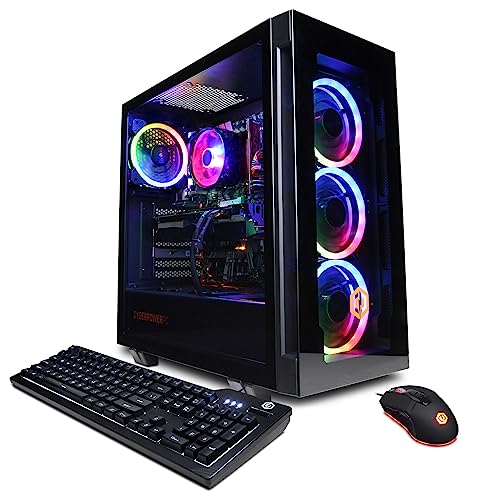
Where to buy
Check the latest price, availability and delivery on Amazon. Orders are placed on Amazon. We may earn a commission from qualifying purchases.
- Best first PC for most beginners: CyberPowerPC Gamer Xtreme VR, Intel Core i7-13700F, GeForce RTX 4060 Ti 16GB — Check on Amazon
- Thermaltake LCGS Quartz i1460, Intel Core i5-14400F, GeForce RTX 5060 — Check on Amazon
- Skytech Archangel, Intel Core i5-14400F, GeForce RTX 4060, 32GB DDR5, 2TB SSD — Check on Amazon
- Skytech Nebula, AMD Ryzen 5 5600X, GeForce RTX 4060 Ti — Check on Amazon
See 2 more Amazon options
- CyberPowerPC Gamer Xtreme VR, Intel Core i5-13400F, GeForce RTX 4060 — Check on Amazon
- Skytech Blaze4 Mini, AMD Ryzen 7 5700, GeForce RTX 4060 Ti — Check on Amazon
Read the full guide ↓
Disclosure: As an Amazon Associate, reviewstook.com earns from qualifying purchases. Links to Amazon on this page are affiliate links; they cost you nothing extra. Listing details such as price and availability change often, so check the Amazon listing before you buy.
Buying your first gaming PC is mostly an exercise in not knowing what the words mean. Listings throw around graphics card memory, core counts, refresh rates and acronyms like DLSS, and every seller writes as if you already know which numbers matter. This guide is written for the person who does not — yet. It explains the jargon in plain English as it goes, tells you what happens between clicking “buy” and playing your first game, and walks through the six prebuilt machines under $1,200 that make the most sense for a first-time owner. Every PC here arrives assembled, with Windows installed — nothing to build, no parts to fit together, no tools beyond opening a box and plugging in cables.
One honest point belongs at the very start, because sellers will not make it for you: $1,200 is more than a beginner strictly needs to spend to play games at 1080p, the resolution of a standard full-HD monitor. Every machine in this guide can do considerably more than basic 1080p play. What the extra money buys is headroom — smoother motion on a fast monitor, higher settings that stay high for years instead of months, and room to grow into the hobby without replacing the whole computer. Whether that headroom is worth paying for depends on your monitor and how long you plan to keep the PC, and this guide answers that question directly in its own section below. If you are working with a plain 60Hz screen and a casual game library, we will tell you plainly that a cheaper machine plus a better monitor is the smarter first purchase.
In this guide
Quick Picks
Each row names a kind of beginner and the machine that fits them, with a link to the listing.
| Beginner type | Pick | Why it stands out | Link |
|---|---|---|---|
| Best first PC for most beginners | CyberPowerPC Gamer Xtreme VR (i7-13700F, RTX 4060 Ti 16GB) | Double the graphics memory of most rivals — the fewest settings worries for the longest time | Check on Amazon |
| Best if you want the newest graphics features | Thermaltake LCGS Quartz i1460 (i5-14400F, RTX 5060) | Current-generation graphics with the latest upscaling, seen comfortably under budget | Check on Amazon |
| Best if you hate deleting games | Skytech Archangel (i5-14400F, RTX 4060, 32GB, 2TB) | Double the memory and double the storage of a typical machine at this price | Check on Amazon |
| Best for competitive games, bought on a discount | Skytech Nebula (Ryzen 5 5600X, RTX 4060 Ti) | A stronger graphics card than most at this price, with a history of deep discounts | Check on Amazon |
| Best “spend less, learn the hobby” pick | CyberPowerPC Gamer Xtreme VR (i5-13400F, RTX 4060) | Priced well under the ceiling, leaving money for the monitor and games | Check on Amazon |
| Best for a small desk or dorm room | Skytech Blaze4 Mini (Ryzen 7 5700, RTX 4060 Ti) | Full-strength gaming in a mini case that fits where a tower cannot | Check on Amazon |
How These Picks Were Chosen
The budget worked as a ceiling, not a target. Every machine below is a real Amazon listing that sells at, or has repeatedly been seen at or below, $1,200 in the United States. Prebuilt prices move a lot — the same tower can cost noticeably more this week than last — so where a price drifts, the reviews describe how the listing’s price behaves rather than pretending a single number is permanent. Two machines here sometimes list above $1,200 between sales; both are flagged where they appear, both earn their place at the prices they regularly return to, and in both cases the advice is the same: buy at the recurring price, not the inflated one.
We did not use these products ourselves. We read the makers’ listings and specification pages and compared the parts that decide how a first PC feels: the graphics card and its memory, the processor, the system memory, the storage, and the power supply. Because this guide is for beginners, two extra filters sat on top. The first is a simplicity filter — every pick is a complete, standard-parts machine from an established prebuilt brand, the kind with a support line and a warranty process, rather than an obscure listing you would have to troubleshoot alone. The second is an honesty filter about the budget itself: where spending less would serve a new player just as well, the review says so and names the cheaper direction, instead of inventing a reason to use the whole $1,200.
One more thing about reading any listing, including these: on some prebuilt listings the exact brand of a part can vary from unit to unit — Skytech states this openly — while the part’s model and capacity are what you are actually buying. An RTX 4060 Ti with 16GB of memory is the promise; which partner brand made that card is not, and does not change how it plays. Judge listings by the promised model numbers, and check them against what arrives, as the setup section below explains.
New to Gaming PCs? The Words in This Guide, in Plain English
Prebuilt. A computer that arrives fully assembled and ready to switch on, with Windows already installed. Everything in this guide is a prebuilt. The alternative — buying parts and building your own — is a hobby in itself, and skipping it is a perfectly respectable choice the first time.
GPU (graphics card). The part that draws your games — the single biggest influence on how good they look and how smoothly they run, and the part listings lead with: names like RTX 4060, RTX 4060 Ti and RTX 5060, where a bigger number generally means a newer or stronger card and “Ti” marks a stronger version.
VRAM (graphics memory). Memory on the graphics card itself, holding the textures — the surfaces and detail — of the world on screen. Cards here carry 8GB or 16GB. At 1080p, 8GB plays today’s games well; 16GB keeps playing tomorrow’s games at high texture settings without compromise. It is the most beginner-proof spec in this guide: you never think about it until the day you run out.
CPU (processor). The part that runs the game itself — its world, physics and logic — while the GPU draws it. Processors are described by cores, roughly parallel workers; more cores help when games get busy and when you run other apps at the same time. At 1080p the CPU matters more than beginners expect, because frame rates climb until the processor is the limit.
RAM (system memory). The computer’s short-term workspace, separate from the graphics card’s memory. 16GB is the comfortable standard for gaming in this guide; 32GB is for people who keep many things open at once. Unlike storage, RAM forgets everything when the power goes off.
SSD (storage). Where your games and files live permanently. All six picks use fast NVMe SSDs, which is why these machines start in seconds and load games quickly. Size is what to watch: modern games can each take 100GB or more, so 1TB holds a modest library and 2TB a generous one.
Resolution and refresh rate. Resolution is how many pixels your monitor shows; 1080p (1920×1080) is the standard this guide targets. Refresh rate, measured in Hz, is how many new images the monitor can show per second: 60Hz is the basic office standard, while gaming monitors run at 144Hz, 165Hz or 240Hz and make motion visibly smoother — but only if the PC can produce frames that fast.
FPS (frames per second). How many images the PC produces each second. Around 60 FPS feels smooth to most players; competitive players chase 144 and above to match a fast monitor. Frames beyond what the monitor can show are simply never displayed — the reason this guide keeps asking what screen you own.
DLSS. NVIDIA software, built into these graphics cards, that renders a game at a lower internal resolution and reconstructs a sharp image, giving higher frame rates at the same visual quality. Newer versions add frame generation, inserting extra frames between real ones in supported games. In plain terms: a settings-menu feature that makes games run faster.
PSU (power supply). The box inside the PC that feeds power to everything else, described by watts and an efficiency rating such as 80 Plus Gold. You will never interact with it, but its size decides whether a future graphics card upgrade is a simple swap or a bigger job.
The 6 Best 1080p Gaming PCs Under $1,200 for Beginners
CyberPowerPC Gamer Xtreme VR — Intel Core i7-13700F, GeForce RTX 4060 Ti 16GB (GXiVR8040A14)
Who it suits: The first-time buyer who wants to make one decision and then not think about hardware again for years — and anyone whose PC will also handle streaming, recording or homework-and-work duties alongside games.
If you take one idea from this guide, let it be this: the beginner-friendly spec is not the fastest one, it is the one that stays out of your way the longest. That is what this CyberPowerPC is built around. Its graphics card is an RTX 4060 Ti with 16GB of graphics memory — twice what most cards at this price carry — and graphics memory is the resource games consume more of every year as their textures get richer. With 8GB, a day eventually comes when a new game asks you to lower texture settings; with 16GB, that day is pushed years away, and a beginner never has to learn the settings menu out of necessity. The processor backs it up with 16 cores, which at 1080p keeps frame rates steady in busy scenes and leaves capacity for Discord, a browser and recording software to run beside the game. Around those anchors: 16GB of DDR5 system memory, a 1TB NVMe SSD, and Windows 11 Home installed. Its display outputs — one HDMI and two DisplayPort — cover one monitor now and make adding a second later a cable, not a project.
The price needs a beginner’s warning attached, because this listing plays the prebuilt market’s favorite trick: it drops inside this guide’s budget during Amazon deal events, and it climbs back above the ceiling in between. Both prices are “real”; only one belongs in this guide. If the listing is at or under $1,200 when you check the price on Amazon, this is the easiest recommendation in the roundup. If it is up at its higher level, do not stretch — wait for the next deal event or take the Thermaltake below, which lives safely under the ceiling. Learning to buy prebuilts on their cycle, rather than at whatever price shows on the day you happen to look, is worth more than any single spec in this article.
- 16GB of graphics memory — double most rivals — so texture settings stay high for years without you managing them.
- 16-core processor keeps games smooth at 1080p and handles streaming, recording and everyday apps at the same time.
- Modern DDR5 memory platform, 1TB fast storage, and three display outputs for a future second monitor.
Honest limitation: The price crosses above $1,200 between sales, so it is only the right buy on its deal cycle; and its 16GB of system memory is ordinary next to the Archangel’s 32GB below, so very heavy multitaskers may add more later.
Choose it if you want the longest quiet life from a first PC and the live price is at or under the budget. Skip it if the listing is sitting at its high price today, or your monitor is a basic 60Hz screen — in that case you would be paying for frames your display cannot show.

Thermaltake LCGS Quartz i1460 — Intel Core i5-14400F, GeForce RTX 5060
Who it suits: Beginners who like the idea of buying the current generation — the newest graphics features, from a brand whose main business is PC cases and cooling — at a price that leaves money spare.
The Quartz i1460 is the “buy the new one” option, and for a first PC that instinct is mostly sound. Its RTX 5060 is from NVIDIA’s current generation, which brings the latest DLSS, including multi frame generation: in games that support it, the card inserts extra generated frames to make motion smoother on a fast monitor. For a beginner, the practical translation is the newest bag of tricks for making demanding games run well, kept current by ordinary driver updates. The rest of the specification is calm and complete: a 10-core Intel Core i5-14400F, 16GB of Thermaltake’s own ToughRam DDR4 memory at 3600MHz with RGB lighting, a 1TB NVMe SSD, Wi-Fi, and Windows 11. Coverage of this configuration documents a 600W 80 Plus Gold power supply — a properly rated unit from a company that sells power supplies for a living. Best of all for a first purchase, its price behaves: it sits genuinely inside the budget rather than visiting it — check the live price on Amazon before you buy.
The trade-off is the mirror image of the CyberPowerPC above. The RTX 5060 carries 8GB of graphics memory, so while its features are newer, its texture ceiling will arrive sooner — think of it as the better five-year feature bet rather than the better seven-year hardware bet. Its system memory is also the older DDR4 type rather than DDR5, which matters little today and simply marks it as built for value rather than for the longest possible upgrade runway. Neither point should scare a beginner off; both are exactly the kind of thing to know before, not after, the box arrives.
- Current-generation RTX 5060 with DLSS 4 and multi frame generation in supported games — the newest tricks in this guide.
- Priced comfortably inside the budget, so money survives for a monitor and a few games — check the price on Amazon.
- Documented 600W 80 Plus Gold power supply and a case from a maker known for cases and cooling.
Honest limitation: 8GB of graphics memory is the long-term ceiling here, and the DDR4 platform is the older memory generation — this is the current-features pick, not the maximum-longevity pick.
Choose it if you want the newest graphics generation at a price that stays honestly under budget. Skip it if you plan to keep the same PC for six or more years and would rather have the 16GB graphics memory of the CyberPowerPC above.

Skytech Archangel — Intel Core i5-14400F, GeForce RTX 4060, 32GB DDR5, 2TB SSD
Who it suits: The beginner whose new PC is also the household’s everything computer — games plus school or office work, a big media library, and a browser that never closes — and anyone who already knows they hate deleting things.
Ask experienced PC owners what they upgraded first and two answers dominate: more memory, and a bigger drive. The Archangel simply starts there. Its 32GB of DDR5 memory at 5600MHz, with RGB lighting, is double every other pick in this roundup, so the game, the browser with thirty tabs, the chat apps and the homework document can all stay open at once. Its 2TB SSD is likewise double the usual size — at modern game sizes, roughly the difference between keeping eight big titles installed and keeping sixteen, which for a beginner means the end of the delete-something-to-play-something ritual. The gaming hardware is an Intel Core i5-14400F with an RTX 4060 graphics card, powered by a 650W Gold power supply, with Wi-Fi and Windows 11 Home. Its price cycles around the top of this guide’s range, and buyers who catch its cycle at the right moment have repeatedly bought the roomy machine at a mid-range price — check the live price on Amazon.
Be clear-eyed about the exchange, because Skytech made a deliberate one: money that could have bought a stronger graphics card went into memory and storage instead. The RTX 4060 is a genuinely good 1080p card — high settings in most games, fast frame rates in competitive titles — but it is a step below the 4060 Ti machines here, and its 8GB of graphics memory carries the same long-term texture caveat. If your games are mostly competitive or older titles and your real daily friction is storage and multitasking, this allocation feels smarter every week. If you mainly play the newest big releases at maximum settings, a 4060 Ti pick spends the same money where you will feel it more.
- 32GB of system memory — double the rest of this guide — for games plus everything else you keep open.
- 2TB of storage ends the install-delete shuffle that frustrates new owners most.
- 650W Gold power supply leaves reasonable room for a stronger graphics card down the road.
Honest limitation: The RTX 4060 8GB is the weakest graphics card among the top picks here, so players chasing maximum frame rates in the newest titles should take a 4060 Ti machine instead.
Choose it if your PC will live a double life of games and everything else, and storage pain is the pain you know. Skip it if every dollar needs to become game performance — the Nebula below converts the same money into a faster graphics card.

Skytech Nebula — AMD Ryzen 5 5600X, GeForce RTX 4060 Ti
Who it suits: The beginner who mainly plays games — especially competitive ones — does not plan to stream or edit, and is happy to time the purchase to a discount.
The Nebula is the straightforward performance buy, built from one of the most proven pairings in recent PC gaming: AMD’s Ryzen 5 5600X processor and an RTX 4060 Ti graphics card. In plain terms, a graphics card a full step above the plain 4060 in most machines near this price, matched with a processor that spent years as the default choice for gaming builds. At 1080p the result is high settings with frame rates that keep a 144Hz or faster monitor properly fed in a wide range of titles. The supporting parts are the sensible basics: 16GB of DDR4 memory at 3200MHz, a 1TB NVMe SSD, a 600W Gold power supply, and Windows 11 Home. Its price history is the other half of its appeal: it has spent much of its life at or under this guide’s ceiling, and its best deal days far below it — check the live price on Amazon.
The caveats are about time rather than today. That price history includes stretches above $1,200, so this is a buy-at-the-right-moment listing — under the ceiling, arguably the most performance per dollar here; above it, walk away and wait. The platform is also a finished generation: the AM4 socket and DDR4 memory have no meaningful processor upgrade path left, so when this machine eventually feels old, the sensible move is a new machine rather than a new chip. For a beginner expecting three or four years of play before moving on — the most common ownership pattern there is — that hardly matters. For someone hoping to upgrade piece by piece for a decade, the DDR5 machines above are the better foundation.
- RTX 4060 Ti performance on a proven gaming platform, with nothing spent on extras you may not need.
- A history of dipping well under the ceiling — patience has repeatedly been rewarded on this listing.
- 600W Gold power supply and 1TB NVMe storage cover the fundamentals properly.
Honest limitation: The AM4 and DDR4 platform is end-of-line with no real upgrade path, and the price has also been seen above $1,200 — buy it at or under the ceiling, never above.
Choose it if game performance per dollar is the whole decision and the live price is in its under-budget range. Skip it if you like the idea of upgrading the processor in a few years — that door is closed on this platform.

CyberPowerPC Gamer Xtreme VR — Intel Core i5-13400F, GeForce RTX 4060 (GXiVR8060A24)
Who it suits: The beginner who wants a modern, proper gaming PC but would rather keep a few hundred dollars back for the monitor, headset and games that make the setup complete.
Every beginner guide needs its “you do not have to spend it all” pick, and this is it. This CyberPowerPC pairs a 10-core Intel Core i5-13400F with an RTX 4060, 16GB of DDR5 memory and a 1TB PCIe Gen4 SSD, with Wi-Fi and Windows 11 Home — and it is priced a clear tier below this guide’s ceiling; check the live price on Amazon. At 1080p that is not a hardship version of the machines above: competitive games will run at the fast frame rates a high-refresh monitor wants, and big single-player titles will run at high settings, with DLSS in supported games when one is unusually demanding. For a first-time owner, the unspent money is not a footnote — it is the difference between a PC connected to a leftover 60Hz office monitor and one connected to the 144Hz gaming monitor that actually shows what it can do.
What you give up versus the picks above is ceiling, not day-one experience. The RTX 4060’s 8GB of graphics memory and lower tier mean the heaviest future games will ask for settings adjustments sooner, and the processor has less spare capacity for streaming alongside gaming than its 16-core sibling at the top of this guide. What you gain is the platform and the price: DDR5 memory and a recent Intel generation make this an easy machine to grow — memory, storage and eventually the graphics card all upgrade without replacing the foundation. For many first-time buyers, that combination is not the budget option. It is simply the right one.
- Modern DDR5 gaming at a price from the tier below, leaving real money for a monitor — check the price on Amazon.
- 10-core processor handles 1080p gaming and everyday multitasking without strain.
- 1TB Gen4 SSD and Windows 11 included: unbox, plug in, play — nothing else required to start.
Honest limitation: The RTX 4060 8GB sets a lower long-term ceiling than the 4060 Ti and 16GB picks, so maximum settings in future big releases will need adjusting sooner.
Choose it if the PC is one part of a setup you are buying all at once, and the monitor still needs funding. Skip it if the $1,200 is a fixed, PC-only budget with the monitor already owned — then the headroom picks above put the money to better work.
Skytech Blaze4 Mini — AMD Ryzen 7 5700, GeForce RTX 4060 Ti
Who it suits: Beginners short on space — a small bedroom, a dorm desk, a shared living room — who still want the real gaming experience rather than a shrunken version of it.
Small PCs usually come with an asterisk: weaker parts, chosen because they fit. The Blaze4 Mini is the rare listing where the asterisk is hard to find. Inside the compact case are an 8-core AMD Ryzen 7 5700 processor, an RTX 4060 Ti graphics card — the same tier as the full-size Nebula above — 16GB of DDR4 memory at 3200MHz, a 1TB SSD and a 650W Gold power supply, with Wi-Fi and Windows 11 Home. The extra cores over the Nebula give it more breathing room if you later try streaming or keep many apps open while you play. Its pricing has repeatedly landed well under this guide’s ceiling — at the prices it has actually been seen at, the small machine undercuts several full-size towers here while matching their graphics card outright.
A beginner should still know the two standing rules of small PCs. First, air has less room to move in a compact case, so expect to hear the fans more under a heavy game than from a big tower — normal physics, not a fault, but worth knowing if the PC will sit beside a bed or a TV. Second, a future graphics card upgrade means shopping by physical size as well as power, because not every card fits a mini case. The Nebula’s platform note applies here too: AM4 and DDR4 are finished generations. None of that changes the core fact — for a small desk, this is full-strength 1080p gaming with no performance apology.
- RTX 4060 Ti performance in a mini case — compact without the usual graphics downgrade.
- 8-core processor adds multitasking and streaming headroom the 6-core picks lack.
- 650W Gold power supply is generous for the size; pricing has repeatedly landed well under the ceiling.
Honest limitation: A mini case is more audible under load and limits future graphics cards by physical size, and the AM4 platform has no processor upgrade path.
Choose it if desk space is a hard limit but performance is not negotiable. Skip it if you have room for a tower and imagine upgrading the graphics card mid-life — the full-size picks make that simpler.

Comparison Table
| Product | GPU / VRAM | CPU | RAM / Storage | Best for a beginner who… | Link |
|---|---|---|---|---|---|
| CyberPowerPC Gamer Xtreme VR (GXiVR8040A14) | RTX 4060 Ti / 16GB | Core i7-13700F | 16GB DDR5 / 1TB | Wants one decision that lasts for years | Check on Amazon |
| Thermaltake LCGS Quartz i1460 | RTX 5060 / 8GB | Core i5-14400F | 16GB DDR4 / 1TB | Wants the newest graphics features under budget | Check on Amazon |
| Skytech Archangel | RTX 4060 / 8GB | Core i5-14400F | 32GB DDR5 / 2TB | Keeps everything open and hates deleting games | Check on Amazon |
| Skytech Nebula | RTX 4060 Ti / 8GB | Ryzen 5 5600X | 16GB DDR4 / 1TB | Wants maximum game performance per dollar | Check on Amazon |
| CyberPowerPC Gamer Xtreme VR (GXiVR8060A24) | RTX 4060 / 8GB | Core i5-13400F | 16GB DDR5 / 1TB | Would rather save money for the monitor | Check on Amazon |
| Skytech Blaze4 Mini | RTX 4060 Ti / 8GB | Ryzen 7 5700 | 16GB DDR4 / 1TB | Has a small desk but big expectations | Check on Amazon |
What Arrives in the Box, and Your First Evening With It
A prebuilt gaming PC arrives as a finished computer: the tower itself, a power cable, and the paperwork, with Windows already installed. What it does not include matters just as much to plan around. A monitor is not in the box. A keyboard and mouse may or may not be bundled depending on the listing, so read the “what’s in the box” part of the listing before ordering and budget for them if absent. Games are not included either — you will download them from services like Steam or the Xbox app, which is why a decent internet connection and some patience on the first night are part of the deal.
Setup, in the order that actually works:
- Unbox on a table and keep everything. Keep the box and packaging at least until the return window has passed. If anything is wrong, returns with the original packaging are painless; without it, they are a negotiation.
- Look inside before you plug anything in. Prebuilts are commonly shipped with protective packing material inside the case to keep parts safe in transit. If yours has it, remove it before switching on — this is the single most common first-PC mistake, and the machine will overheat with it left in place.
- Plug the monitor into the graphics card, not the motherboard. On the back of the tower there are two clusters of ports. The display cable — HDMI or DisplayPort — must go into the graphics card’s ports, which sit lower and run horizontally, not the motherboard’s ports up near the USB sockets. Plugging into the wrong set is the classic beginner error: the PC works, but games run on weak built-in graphics and feel broken. Every review above that lists display outputs is telling you where the right sockets are.
- Power, keyboard, mouse, internet. Connect the power cable, your peripherals, and either an Ethernet cable or the Wi-Fi details during setup. Every pick in this guide includes Windows 11, so first switch-on is a guided setup — language, account, updates — not a technical procedure.
- Let it update, then update the graphics driver. Windows will want updates on day one; let it finish. Then open the graphics software that comes with NVIDIA cards and install the latest driver it offers. Drivers are free, arrive regularly, and are the closest thing PCs have to free performance.
- Check that what arrived is what you ordered. In Windows settings you can see the processor, memory and storage; the graphics card shows in the NVIDIA software. Compare them with the listing while the return window is wide open. This takes five minutes and is the difference between an easy exchange and an argument.
- Install one game and play. One game running well confirms the whole chain — hardware, drivers, monitor settings — before the library grows.
About warranty and returns, in plain terms: a purchase on Amazon comes with Amazon’s return process if something is wrong out of the box, and the PC itself carries the maker’s warranty for faults after that — the exact terms are on the listing and in the box, and they are worth ten minutes in the first week rather than during a crisis in month eight. Anything that seems wrong in the first days — strange noises, crashes, parts that do not match the listing — should be raised immediately, while every option is still open. Problems reported early are exchanges; problems reported late are repairs.
Settings to Pick in Your First Games
These machines are strong enough that a beginner can accept sensible defaults and play happily — but a few settings are worth knowing by name, because each is a common reason a new PC “feels wrong” when nothing is actually broken.
- Set your monitor’s refresh rate in Windows. A 144Hz monitor connected to a new PC often still runs at 60Hz until you tell Windows otherwise, in the display settings under advanced display. Until you change it, you are seeing the 60Hz picture no matter how powerful the PC is. This is the highest-value click in this entire guide.
- Start games at High, not Ultra. In most games the visual difference between High and Ultra is small and the frame-rate cost is large. High is where these machines are happiest; turn individual settings up later if you are curious, one at a time.
- Turn on DLSS where a game offers it. In the game’s graphics settings, look for DLSS and set it to Quality. On these NVIDIA cards it raises frame rates substantially at 1080p with little visible cost, and on the Thermaltake’s RTX 5060 the newest version adds frame generation in supported titles for even smoother motion on fast monitors.
- Match the frame rate to the screen. If frame rates swing wildly and motion feels uneven, capping the frame rate slightly below the monitor’s maximum in the game settings often feels smoother than letting it roam. Smooth and steady beats high and jumpy.
- Use the cable the monitor deserves. DisplayPort is the safe default for high-refresh monitors; older HDMI cables and ports can quietly limit refresh rates. If your fast monitor will not offer its fast modes, the cable is the first suspect.
How to Choose Your First 1080p Gaming PC Under $1,200
- Answer the monitor question first. If you own or are buying a 144Hz or faster 1080p monitor, this budget makes sense. If your screen is 60Hz and staying that way, spend less on the PC — Best 1080p Gaming PC For Beginners Under $800 covers machines that look identical on that screen — and put the difference toward the monitor.
- Decide how long “first” lasts. A three-year introduction to the hobby: buy performance per dollar. A five-plus-year commitment: graphics memory and a current platform matter more than any frame-rate figure, and the top pick’s 16GB card is the point.
- Buy the annoyance you actually have. Hate closing apps? That is memory. Hate deleting games? That is storage. Hate waiting? That is everything here, honestly. The Archangel exists because for many households the daily frictions are not frame rates at all.
- Let price cycles decide between near-equals. Several picks here swing noticeably in price between sales. When two machines both suit you, the one at its low price is the right one, and the one at its high price is a “wait.”
- Check the whole setup budget, not just the PC. Monitor, keyboard, mouse, headset and the first games are real costs. The i5 CyberPowerPC’s lower-tier pricing earns its place in this guide precisely because a complete setup beats a flagship tower plugged into leftovers.
- Keep the first upgrade in mind, not on the invoice. A year or two in, the natural first upgrades are more system memory on the 16GB machines and a second SSD — both easy, both cheap relative to the PC. You only need a machine, like all six here, that accepts them.
Is the Headroom Worth It for a Beginner? An Honest Answer
These machines are stronger than 1080p strictly requires, and a beginner deserves to know what the surplus does and does not do before paying for it. What it does: it feeds a high-refresh monitor the frame rates that make fast games feel fast — a real, visible, notice-it-in-the-first-minute difference. It keeps settings at high for years instead of months, because graphics memory and processor headroom age slowly. And it leaves doors open — a 1440p monitor later, streaming, recording, heavier games — without a second purchase.
What it does not do: it does not improve the picture on a 60Hz monitor by one pixel, because frames the screen cannot show might as well not exist. It does not make a casual library of older or lighter games any more fun than a much cheaper machine makes them. A beginner who discovers they mostly play two undemanding games has simply prepaid for capacity they never use. So the honest rule is this: the headroom is worth it if you have, or are about to buy, a fast monitor, or if you are confident this PC serves you for five years. It is not worth it as a default. If neither sounds like you, start with Best 1080p Gaming PC Under $1200 for the full picture of the tier, and spend the difference on the screen and the games — the parts of the setup you will actually look at.
Common Beginner Mistakes
- Plugging the monitor into the motherboard’s ports instead of the graphics card’s, then concluding the new PC is slow. It is the most common first-PC error and the easiest to fix: move the cable to the graphics card’s sockets.
- Leaving the shipping packing inside the case and switching on. Check inside first; the packing is there for the truck, not for you.
- Never setting the monitor’s refresh rate in Windows, so a 144Hz screen quietly runs at 60Hz for months.
- Buying at the top of a price cycle. Listings in this guide have documented price swings; the same machine bought a fortnight later can cost meaningfully less.
- Throwing the box away in week one. Keep the packaging until the return window closes and the parts have been checked against the listing.
- Spending the entire budget on the tower and connecting it to an old 60Hz monitor, an uncomfortable mouse and no headset — an unbalanced setup that hides the PC you paid for.
- Maxing every game setting to Ultra on day one and blaming the PC for the frame rate. High is the smart default; Ultra is a screenshot mode on most titles.
- Ignoring the first-week checks. Parts verified, temperatures sane, every port tested — in week one these are a five-minute job and a free exchange if something is off.
Final Recommendation
- Most beginners: CyberPowerPC Gamer Xtreme VR (i7-13700F, RTX 4060 Ti 16GB) — bought at its deal price, it is the set-and-forget first PC.
- Newest features, honestly under budget: Thermaltake LCGS Quartz i1460.
- Households and multitaskers: Skytech Archangel.
- Pure gaming value on a discount: Skytech Nebula.
- Saving money for the whole setup: CyberPowerPC Gamer Xtreme VR (i5-13400F, RTX 4060).
- Small desks and dorms: Skytech Blaze4 Mini.
For a first gaming PC at this budget, the choice comes down to two shapes. The CyberPowerPC with the 16GB RTX 4060 Ti is the longevity answer: the most graphics memory in this guide and a specification a beginner can stop thinking about for years — provided you buy it on its deal cycle, not at its between-sales price. The Thermaltake Quartz i1460 is the currency answer: the newest graphics generation with the latest DLSS, priced comfortably inside the budget with money left over. Around those two, the Archangel is the right call when the PC is the household’s everything machine, the Nebula when every dollar must become frame rate and you can time the purchase, the i5 CyberPowerPC when the monitor still needs buying, and the Blaze4 Mini when the room decides the shape. Beginners who conclude the honest answer is a smaller first step should look at Best 1080p Gaming PC For Beginners Under $800 and Best 1080p Gaming PC For Beginners Under $1500 to see the tier from both directions. Whichever you choose: check the live price on Amazon, plug the monitor into the graphics card, set the refresh rate, and keep the box until week two.
Frequently Asked Questions
Do I have to build or assemble anything?
No. Every PC in this guide is a prebuilt: it arrives assembled with Windows 11 installed. Your job is to unbox it, remove any internal shipping packing, plug in the power, monitor, keyboard and mouse, and follow the on-screen setup. No tools, no loose parts, no technical knowledge required.
Is $1,200 too much for a first gaming PC?
It is more than the minimum, and whether it is too much depends on your monitor and your horizon. With a 144Hz or faster 1080p monitor, or a plan to keep the PC five years or more, the headroom here is genuinely used and worth paying for. With a basic 60Hz screen and a light game library, it is not — a cheaper machine looks identical, and the savings belong in a better monitor.
What else do I need to buy besides the PC?
A monitor, if you do not have one — ideally a 144Hz or faster 1080p model to match these machines. A keyboard and mouse, if the listing does not bundle them; check the listing’s box contents before ordering. After that, only games, which you download from stores like Steam. A headset is a comfort upgrade, not a requirement.
What is the first thing I should do when it arrives?
Three things, in order: remove any packing material from inside the case, plug the monitor cable into the graphics card’s ports rather than the motherboard’s, and set your monitor’s refresh rate in Windows display settings. Then let Windows and the graphics driver update, check the parts against the listing, and play something.
How long will a first PC at this price last?
Realistically four to six years of high-setting 1080p play, and longer for competitive and older titles. The picks with 16GB of graphics memory and current platforms sit at the long end of that range; the 8GB cards will ask for texture adjustments in heavy new games sooner, which is a settings change, not a breakdown.
What if something is wrong with it out of the box?
Act in the first days, not the first month. Contact the seller through Amazon while the return window is open — a faulty or misdescribed machine is an exchange at that point. Keep the box and packaging until the window closes and the parts are verified against the listing; after the window, the maker’s warranty is the route for faults, with terms set out in the box.
Can I upgrade it later, or am I locked in?
You are not locked in. These are standard-parts machines: adding system memory or a second SSD later is a normal, inexpensive step, and the DDR5-based picks also leave a straightforward path to a stronger graphics card in time. The two AM4-based picks — the Nebula and the Blaze4 Mini — accept memory and storage upgrades just as easily, but their processor platform is finished, so treat those as machines to enjoy as they are.
- Best 1080p Gaming PC For Beginners Under $1200
- Best 1080p Gaming PC Under $1200
- Best 1080p Gaming PC For Beginners Under $800
- Best 1080p Gaming PC For Beginners Under $1500
- Best 1080p Gaming PC Under $800
- Best 1080p Gaming PC For Streaming Under $1200
- Best 1440p Gaming PC Under $1200
- Best Gaming PC Under $1200
- Best Prebuilt Gaming PC Under $1200
- Best Entry Level Gaming PC Under $1200


