Where to buy
Check the latest price, availability and delivery on Amazon. Orders are placed on Amazon. We may earn a commission from qualifying purchases.
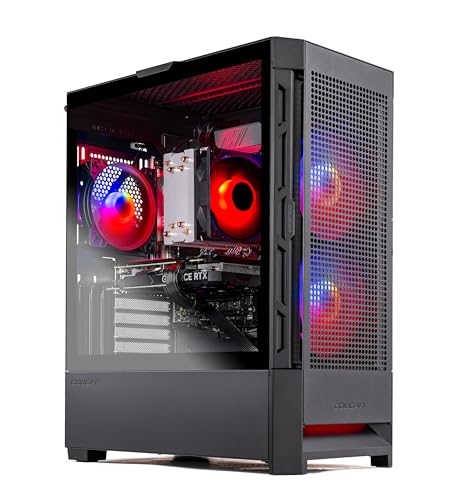
- Best first serious PC: Skytech Blaze4 Mini, Ryzen 7 5700, RTX 4060 Ti — Check on Amazon
- Thermaltake LCGS Quartz i1460, Core i5-14400F, RTX 5060 — Check on Amazon
- CyberPowerPC Gamer Xtreme VR GXiVR8060A24, Core i5-13400F, RTX 4060 — Check on Amazon
- CyberPowerPC Gamer Xtreme VR GXiVR8040A14, Core i7-13700F, RTX 4060 Ti 16GB — Check on Amazon
See 2 more Amazon options
- Skytech Archangel, Core i5-14400F, RTX 4060, 32GB RAM, 2TB SSD — Check on Amazon
- Skytech Nebula, Ryzen 5 5600X, RTX 4060 Ti — Check on Amazon
Read the full guide ↓
Disclosure: As an Amazon Associate, reviewstook.com earns from qualifying purchases. Links to Amazon on this page are affiliate links; they cost you nothing extra. Listing details such as price and availability change often, so check the current Amazon listing before you buy.
Start with the honest problem in this search: $1,200 is not entry-level money. Entry level is the $400–$800 territory of first towers, hand-me-down GPUs and 1080p at sensible settings. Twelve hundred dollars is mid-range money — roughly two games consoles — and a guide that pretends otherwise would steer you wrong in both directions at once. So this guide is written for the buyer the keyword actually describes in 2026: someone graduating from a console, or buying their first serious PC after outgrowing a laptop or a borrowed machine, who has set a ceiling of $1,200 and wants to know what that ceiling genuinely buys, what it wastes, and — just as important — who should close this page and spend $800 instead. If that is you, the short answer is that $1,200 done well buys a machine that plays everything current at 1080p without apology, opens the door to 1440p, and stays relevant for years. Done badly, it buys the same $800 machine wearing a more expensive case.
What the step up from $800 actually purchases is specific, and this guide will keep returning to it. At $800 the graphics card is an RTX 4060 or below and 1440p is a stretch goal handled by upscaling. At $1,200 the card steps up a class — RTX 4060 Ti, or the current-generation RTX 5060 — memory and storage stop being compromises you must fix later (two picks below ship 32GB of RAM or a 16GB graphics card), and 1440p becomes a real native resolution for a large share of current games rather than a marketing line. The picks below are the six Amazon listings we would put in front of a console graduate spending this money for the first time: a compact 4060 Ti machine that often lands in the lower part of this tier, a current-generation RTX 5060 build, the DDR5 machine that proves you may not need the whole budget, a 16GB-VRAM build for buyers who hate the idea of upgrading, a 32GB/2TB build that needs nothing added, and a second 4060 Ti option whose value depends entirely on the price you find on the day. Prebuilt pricing moves a lot between sale events, so check the price on Amazon for each pick before you buy, and judge each one against the budget in this guide’s title.
In this guide
Quick Picks
Short on time, or comparing several options at once? Each row below names a buyer type and the product that suits it, with a link to the listing.
| Buyer type | Pick | Why it stands out | Link |
|---|---|---|---|
| Best first serious PC | Skytech Blaze4 Mini, Ryzen 7 5700, RTX 4060 Ti | A 4060 Ti in a compact case — check price on Amazon | Check on Amazon |
| Best current-generation pick | Thermaltake LCGS Quartz i1460, RTX 5060 | Newest GPU generation and the longest driver-support runway | Check on Amazon |
| Best reason to spend less | CyberPowerPC GXiVR8060A24, RTX 4060, DDR5 | Most of this guide’s performance for lower-tier money — check price on Amazon | Check on Amazon |
| Best for upgrade-avoiders | CyberPowerPC GXiVR8040A14, RTX 4060 Ti 16GB | Double the graphics memory of every other pick — check price on Amazon | Check on Amazon |
| Best nothing-to-add build | Skytech Archangel, 32GB RAM, 2TB SSD | The memory and storage upgrades are already done | Check on Amazon |
| Best second 4060 Ti option | Skytech Nebula, Ryzen 5 5600X, RTX 4060 Ti | Same GPU class as the top pick — check price on Amazon before judging its value | Check on Amazon |
How These Picks Were Chosen
The budget was applied as a ceiling, not a target. Every product below is a real Amazon listing in this budget tier — but pricing moves constantly, so check the price on Amazon before you buy and judge each pick against the $1,200 ceiling rather than assuming a sale price is the everyday price. Anything whose graphics card belonged to the $800 tier while asking this tier’s money was excluded, however polished the case, because the entire point of this budget is the step up in GPU class: RTX 4060 Ti or RTX 5060 territory, or an RTX 4060 paired with something else that genuinely compensates, such as double memory and storage.
We did not use these products ourselves. We read the maker listings and specification pages and compared graphics cards, processors, memory type and capacity, storage, power supplies and case formats, favoring listings that publish their numbers in full. Because this guide is aimed at first-time buyers rather than veterans, two beginner-weighted filters sat on top of the raw specifications. The first is the nothing-to-fix filter: a first PC should not need a RAM stick or a second drive installed in its first month, so configurations that ship complete — 16GB of memory as a floor, 1TB of storage as a floor — scored ahead of faster-on-paper machines that arrive half-finished. The second is the runway filter: how long the platform underneath the graphics card remains supportable. Memory type is the tell. DDR5 machines can take faster, larger memory kits for years; the DDR4 machines below are built on AMD’s AM4 platform, which is finished — excellent value today, a dead end for processor upgrades tomorrow — and each affected review says so in plain terms.
One more honesty rule shaped the ranking: graphics technology claims were read the way a beginner should read them. DLSS and frame generation are upscaling and frame-interpolation technologies. They make supported games smoother and are a genuine reason to prefer a newer card, but they are not native performance, multi frame generation does not reduce input latency, and support varies by title. Where a pick’s appeal leans on those features, the review says exactly that, so nobody buys a specification-sheet promise expecting it to apply to every game they own.
The 6 Best Entry Level Gaming PCs Under $1200
Skytech Blaze4 Mini — Ryzen 7 5700, RTX 4060 Ti 8GB, 16GB DDR4, 1TB SSD
Who it suits: The console graduate who wants the strongest graphics card this budget’s sale prices can reach, in a case that fits a desk or a TV stand rather than dominating it.
This is the pick that justifies the whole guide. The RTX 4060 Ti is the card that separates this tier from the $800 one — a clear class above the plain 4060, strong enough that 1080p stops being a negotiation and 1440p becomes a real option in a large share of current games, with DLSS upscaling extending its reach further in supported titles. Skytech pairs it with a Ryzen 7 5700, 16GB of DDR4 memory, a 1TB SSD and a 650W Gold-rated power supply, in a compact mini case that suits the living-room and small-desk setups many first-time buyers actually have. When its live price sits in the lower part of this tier, it is lower-tier money for the tier above’s graphics card, and the best value in the guide by a wide margin; when it sits near the top of the budget, it is merely a fair machine for the money, and the Thermaltake below becomes the smarter buy — so check the price on Amazon before deciding between them.
The compromises are platform compromises, and a first-time buyer should understand them before rather than after. The Ryzen 7 5700 runs on AMD’s AM4 platform with DDR4 memory: proven, fast enough that the graphics card is the limit in nearly every game, and finished. There is no meaningful processor upgrade path inside this case — when this machine eventually feels slow, the honest fix is a new graphics card first and a platform replacement later, not a drop-in CPU swap. The 8GB of graphics memory is the second ceiling: fine at 1080p today and workable at 1440p with sensible settings, but it is the specification most likely to age first, which is precisely the problem the 16GB CyberPowerPC further down exists to solve. Skytech listings also note that the graphics card brand may vary between units; the model and memory are the contracted specification, the badge on the cooler is not. None of this dents the recommendation at the right price. If the live price looks low for this tier, buy it and stop shopping. If it is sitting near the top of the budget, read the next two reviews first.
- RTX 4060 Ti — the GPU class this budget exists to reach — in a compact case.
- Strong graphics power for the money when its live price is in the lower part of this tier — check price on Amazon.
- 650W Gold power supply and 1TB SSD: the supporting parts are not cut corners.
Honest limitation: The AM4/DDR4 platform is a dead end for CPU upgrades, and 8GB of graphics memory is the spec most likely to age first; the value case also depends on catching it at a good live price, so check the price on Amazon first.
Choose it if the live price is in the lower part of this tier and you want maximum graphics power for a first PC. Skip it if it is sitting near the top of the budget on the day you buy — the RTX 5060 build below is the better purchase then.

Thermaltake LCGS Quartz i1460 — Core i5-14400F, RTX 5060 8GB, 16GB DDR4, 1TB NVMe SSD
Who it suits: The beginner who plans to keep their first PC a long time and would rather own the current graphics generation than last generation’s step up.
Every other pick in this guide runs a 40-series graphics card. This one runs the RTX 5060, the current generation’s entry point, and for a first-time buyer that difference is less about today’s frame rates — the 5060 and the 4060 Ti trade blows depending on the game — than about the years ahead: the longest driver-support runway, the newest feature set, and DLSS 4 with multi frame generation in supported titles. Thermaltake builds it around an Intel Core i5-14400F with 16GB of DDR4 3600 memory, a 1TB NVMe drive and a 600W Gold-rated supply, and it is typically positioned squarely inside this budget without needing a sale event to get there, which makes it the most dependable recommendation in the guide. A beginner can buy this machine on an ordinary Tuesday — check the price on Amazon first — and have paid a fair price, and that is worth more than it sounds in a category where half the listings are only sensible during promotions.
The honest qualifications are about what the new generation does and does not do. Multi frame generation generates additional frames between rendered ones; in supported games the motion looks smoother, but it does not reduce input latency the way genuinely higher native performance does, and the games where it works are a subset of any real library. Buy this card for its native performance and treat the generated frames as a bonus in the titles that support them. The platform is also a halfway house: Intel’s LGA1700 socket with DDR4 memory is a mature, stable base with some processor headroom, but it is not the DDR5 future either, and 16GB of system memory is the floor this guide accepts, not a luxury. Finally, 8GB of graphics memory applies here too — the current generation did not fix that at this price. What it fixed is time: of the six machines here, this is the one whose graphics card will be receiving new-driver attention the longest, and for a buyer who intends to skip the next upgrade cycle entirely, that is the argument.
- RTX 5060: the only current-generation graphics card in this guide.
- Priced inside this budget tier on ordinary days, without depending on a sale event — check price on Amazon.
- DLSS 4 and multi frame generation in supported titles, on top of solid native 1080p and entry 1440p performance.
Honest limitation: Frame generation is not native performance and does not cut input lag; the DDR4 platform and 8GB of graphics memory are the same ceilings as the cheaper picks.
Choose it if you are buying at full price on a normal day and value the longest support runway. Skip it if the Blaze4 Mini above is priced low for this tier — then last generation’s faster card is the better deal.

CyberPowerPC Gamer Xtreme VR GXiVR8060A24 — Core i5-13400F, RTX 4060 8GB, 16GB DDR5, 1TB SSD
Who it suits: The beginner this guide most wants to protect: the one who does not actually need to spend $1,200, and would be better served by a good $800 machine and the money still in their pocket.
Every guide in this series needs a pick that argues against its own budget, and this is it. The GXiVR8060A24 pairs an RTX 4060 with a Core i5-13400F, 16GB of DDR5 memory and a 1TB PCIe Gen4 SSD, and it is positioned as a lower-tier, budget-friendly option on Amazon — check the price on Amazon. Read that specification slowly, because it contains the lesson of this entire tier: the graphics card is one class below the 4060 Ti picks, but the platform is newer than theirs — DDR5 memory on Intel’s LGA1700 socket, where the two Skytechs below and beside it still run DDR4. At 1080p, which is where a first PC paired with a first monitor will actually live, this machine plays the current catalogue properly: high settings in most titles, upscaling available everywhere it matters, nothing about the experience that announces itself as budget. The money it leaves unspent compared with the top of this budget can go toward the 1440p monitor that would make a pricier card meaningful, or the second drive, or simply stay saved toward the graphics upgrade this platform can actually accept later.
Its limitation is the mirror of its virtue. The RTX 4060 is the ceiling of the $800 tier, not the promise of this one: at 1440p it leans on DLSS upscaling rather than native rendering in demanding games, and its 8GB of graphics memory will set texture choices in the heaviest titles sooner than a 4060 Ti would. If you already own a 1440p high-refresh monitor, this is the wrong pick and the two reviews above are yours. There is also a discipline point: this listing’s value lives in its live price. When it is priced as a budget-tier machine it is the smartest money in the guide; if its price climbs close to the top of this budget it has become a bad version of the Thermaltake, and the correct response is to buy that instead — so check the price on Amazon before ordering. A first-time buyer should take the general rule with them — at this end of the market, the same money buys either last tier’s card on a new platform or this tier’s card on an old one, and for a 1080p beginner the new platform is usually the wiser half of the trade.
- A lower-tier price for much of this guide’s performance — check price on Amazon.
- DDR5 memory and an LGA1700 processor: the newest platform among the value picks.
- RTX 4060 handles 1080p properly, with DLSS for heavier titles.
Honest limitation: One GPU class below the 4060 Ti picks; 1440p means upscaling in demanding games, and 8GB of graphics memory sets texture limits sooner.
Choose it if you game at 1080p and would rather keep the savings for a monitor, games or other gear. Skip it if you already own a 1440p display — spend the budget on the card that feeds it.
CyberPowerPC Gamer Xtreme VR GXiVR8040A14 — Core i7-13700F, RTX 4060 Ti 16GB, 16GB DDR5, 1TB NVMe SSD
Who it suits: The first-time buyer who hates the entire idea of upgrading and wants the graphics-memory ceiling — the spec most likely to date a machine like this — pushed as far away as this budget allows.
One number explains this machine: 16GB. Every other pick in this guide carries 8GB of graphics memory, and that figure is the quiet limit behind most “my new PC struggles with this game” stories at this tier — not raw speed, but textures and settings trimmed to fit a small frame buffer. This CyberPowerPC pairs the RTX 4060 Ti with double the memory, a strong Core i7-13700F, 16GB of DDR5 system memory and a 1TB NVMe drive. The card is not faster than the Blaze4 Mini’s in most games today; it is built to stay comfortable longer, in heavier titles, at 1440p, with texture settings left where the developers put them. For a beginner whose honest self-assessment is “I will not open this case for five years,” that longevity is a rational thing to buy, and it belongs in this budget tier when priced accordingly — check the price on Amazon.
The catch is entirely about pricing: when this listing drifts above this budget, it is outside the argument. This is a deal-dependent pick, and the review refuses to soften that. When it is priced inside this budget it is arguably the smartest purchase in the guide for a keep-it-forever buyer. When it is priced above the ceiling, it is a machine trading on one specification while the RTX 5060 build above offers a newer generation for less — so check the price on Amazon first. The DDR5 platform is the modern one, the processor is the strongest in the guide, and neither fact rescues the value at the wrong price. First-time buyers should also hear the counter-argument fairly: most games a beginner actually plays in their first two years — the back catalogue, the multiplayer staples, the indie library — will never trouble 8GB of graphics memory at 1080p, so the 16GB premium is insurance against a future library, not a present-tense improvement. Buy it on sale, for the insurance, with open eyes.
- RTX 4060 Ti with 16GB of graphics memory — double every other pick in this guide.
- Core i7-13700F is the strongest processor here, on a DDR5 platform.
- Inside this budget when priced as a deal — check price on Amazon.
Honest limitation: Deal-dependent: when priced above this tier it leaves this budget entirely, and the 16GB advantage is future insurance that many beginners’ libraries will not cash in for years.
Choose it if you catch it priced inside this budget and intend to keep the machine a long time without upgrades. Skip it if it is priced above this budget on the day you buy — wait, or take the Thermaltake.

Skytech Archangel — Core i5-14400F, RTX 4060 8GB, 32GB DDR5, 2TB SSD
Who it suits: The beginner whose real fear is not frame rates but friction — running out of storage by spring, or being told their first upgrade is due within the year.
Most guides rank by graphics card and stop there. This machine exists for the buyers that ranking underserves. Its RTX 4060 is the same card as the CyberPowerPC two reviews up, but everything around it is doubled: 32GB of DDR5 memory where the guide’s floor is 16, and a 2TB SSD where the floor is 1TB. Those are not decorative numbers for a first-time owner. Modern game installs are enormous, a 1TB drive shared with Windows and a growing library fills faster than any beginner expects, and memory is the upgrade new owners are most often talked into first. The Archangel simply removes both errands: unbox it, install your library, and the next hardware decision is years away. It runs on a 650W Gold power supply with a Core i5-14400F, and it is positioned at the premium end of this budget tier — check the price on Amazon — which means that even on an ordinary day it belongs in this guide, and on a good day it is priced like the tier below.
The trade is stated in its own Quick Pick row and deserves repeating: you are spending the step-up money on capacity instead of graphics class. Against the Blaze4 Mini at the same money, this machine’s RTX 4060 will run a demanding game a settings-notch lower and lean harder on upscaling at 1440p, and no amount of system memory changes that — the graphics card is the ceiling of a gaming PC, and 32GB of RAM does not lift it. The 8GB graphics-memory limit applies in full. So the choice is genuinely about the owner. If your library is multiplayer staples, older titles and indies — the realistic first-PC library — the 4060 is already sufficient and the doubled memory and storage will make your daily life with the machine measurably easier. If your ambition is this year’s biggest releases at 1440p, buy the graphics card instead and accept the future drive purchase. Neither answer is wrong; buying this machine while expecting the other one’s graphics would be.
- 32GB DDR5 and a 2TB SSD — the two most common first upgrades, already done.
- On sale days the capacity build can drop toward lower-tier money — check price on Amazon.
- 650W Gold power supply leaves sensible headroom for a future graphics card.
Honest limitation: The step-up money buys capacity, not graphics class — the RTX 4060 and its 8GB of memory are $800-tier hardware, and 1440p in demanding games means upscaling.
Choose it if your library is big, your patience for upgrades is zero, and 1080p is your resolution. Skip it if headline games at 1440p are the point of the purchase — buy the 4060 Ti picks instead.

Skytech Nebula — Ryzen 5 5600X, RTX 4060 Ti 8GB, 16GB DDR4, 1TB NVMe SSD
Who it suits: The patient beginner — the one willing to watch a price rather than buy on a date, who wants the 4060 Ti class and will wait for this listing’s low to come back around.
On specification, this is the Blaze4 Mini’s closest relative in the guide: the same RTX 4060 Ti 8GB graphics card, 16GB of memory, a 1TB NVMe drive and a 600W Gold power supply, built around AMD’s Ryzen 5 5600X. That processor is a six-core part a step below the top pick’s eight-core 5700, a difference that matters to streamers and heavy multitaskers more than to gaming itself, where the graphics card remains the limit in nearly every title. As a machine, then, the Nebula is entirely respectable — the same tier of 1080p performance and the same entry to 1440p, in a full-size case with ordinary room to work in later. The reason it sits last in this guide is not the hardware. It is the pricing, which is the most volatile of the six: this listing swings widely between sale events and ordinary days — check the price on Amazon before judging it.
That volatility turns this review into a lesson every first-time PC buyer should learn before spending four figures anywhere: in the prebuilt market, when you buy is a specification. When priced low for this tier, this machine is a bargain that rivals the top pick. Priced in the middle of the tier, it is a defensible but unexciting purchase. Priced above this budget, it is simply the wrong machine at the wrong price, and no specification on its page changes that. The AM4 platform caveat applies exactly as it does to the Blaze4 Mini — DDR4 memory, no processor upgrade path worth the name — and the 8GB graphics-memory ceiling is the same. Our instruction is therefore unusually blunt: set a walk-away limit before you open the listing. If the live price is low for this tier, buy it without regret. If it sits mid-tier, buy it only if the Blaze4 Mini is out of stock or priced high. If it is above this budget, close the tab — the budget in this guide’s title is a promise, and this listing at that price breaks it.
- RTX 4060 Ti class performance at a budget-friendly tier position when on sale — check price on Amazon.
- Full-size case and a 600W Gold supply: an ordinary, workable first tower.
- The clearest illustration in the guide that timing is part of the specification.
Honest limitation: The most price-volatile pick here, on the same finished AM4/DDR4 platform as the top pick, with a six-core processor that gives ground to the 5700.
Choose it if it is priced low for this tier when you shop — check the price on Amazon. Skip it if it is near or above this budget — then the Thermaltake and the 16GB CyberPowerPC are better machines for the money.

Comparison Table
| Product | Graphics card | Best use | Link |
|---|---|---|---|
| Skytech Blaze4 Mini | RTX 4060 Ti 8GB | Strongest GPU-per-dollar when caught near its low | Check on Amazon |
| Thermaltake LCGS Quartz i1460 | RTX 5060 8GB | Current generation at a fair everyday price | Check on Amazon |
| CyberPowerPC GXiVR8060A24 | RTX 4060 8GB | Proof you may not need the whole $1,200 | Check on Amazon |
| CyberPowerPC GXiVR8040A14 | RTX 4060 Ti 16GB | Graphics-memory longevity, on deal days | Check on Amazon |
| Skytech Archangel | RTX 4060 8GB | 32GB RAM and 2TB storage, nothing to add | Check on Amazon |
| Skytech Nebula | RTX 4060 Ti 8GB | 4060 Ti value for patient price-watchers | Check on Amazon |
How to Choose an Entry Level Gaming PC Under $1200
- Decide your resolution before your budget. A 1080p monitor needs the $800 tier of graphics card; a 1440p monitor is what justifies this one. Buying a $1,200 PC for a 1080p 60Hz screen spends hundreds of dollars producing frames the display cannot show.
- Read the graphics card first, and its memory second. The card sets what the machine can play; its memory — 8GB versus 16GB at this tier — sets how long it keeps playing new releases at full texture settings. Everything else on the listing is supporting cast.
- Treat upscaling claims as a bonus, not the base. DLSS and frame generation improve supported games, sometimes dramatically. They do not apply everywhere, and frame generation does not reduce input lag. Judge the card on its native performance and let the features be upside.
- Check the platform’s future, not just its speed. DDR5 machines can grow; DDR4/AM4 machines are finished platforms sold at honest discounts. Either can be right — but pay finished-platform prices for finished platforms.
- Apply the nothing-to-fix test. At this budget a first PC should arrive with at least 16GB of memory and 1TB of storage. A faster card paired with 8GB of RAM or a 500GB drive is a project, not a purchase, and beginners should not be sold projects.
- Set a walk-away limit for every listing you consider. Prebuilt prices swing a lot. Some picks in this guide are only good purchases when priced low for the tier; write your limit down before the sale banners start negotiating with you, and check the price on Amazon.
- Count the whole desk, not just the tower. If the $1,200 leaves nothing for a monitor, keyboard and a desk that fits, the $800 machine plus peripherals is the better gaming setup — and the honest beginner purchase.
- Match the machine to your library, not your aspirations. Multiplayer staples and a back catalogue run beautifully on the cheaper picks. This year’s flagship releases at 1440p are what the top of the budget is for. Buy for the games on your list today.
What the Step From $800 to $1,200 Actually Buys
Beginners reasonably ask whether the step up in budget is real or just the same PC in a taller case, and at this tier the answer is genuinely mixed — which is why this guide contains a pick arguing you should not spend it. The real purchases are three. First, a graphics-card class: the move from RTX 4060 to 4060 Ti or RTX 5060 is the difference between 1440p as an upscaling exercise and 1440p as a native resolution in much of the current catalogue, and between high and ultra settings at 1080p in the heaviest games. Second, headroom in the specifications that age: a 16GB graphics card, or 32GB of system memory and 2TB of storage, removes the upgrades that $800 machines schedule for their second year. Third, time: the current-generation card’s driver support runs years longer than a finished platform’s.
What the step does not buy is equally definite. It does not buy a different category of experience at 1080p — the $800 machine plays the same games, at settings a notch lower, and a beginner coming from a console will find both machines revelatory. It does not buy ray tracing as a headline feature; at this class, ray-traced effects remain a settings-menu compromise everywhere. And it does not buy out of the market’s basic discipline: a machine in this tier bought when priced above its budget is a worse purchase than a lower-tier machine bought at a good price. Spend the step up on GPU class, memory headroom or generation — in that order — and it is real. Spend it on case lighting and a brand badge, and it is the most expensive decoration in the room.
Who Should Not Spend $1,200 on a First PC
This guide’s most useful section may be the one that talks you out of it. Do not spend $1,200 if your display is a 1080p television or a 60–75Hz monitor you intend to keep: the cheaper tier already saturates that screen, and the correct purchase is an $800 machine plus, eventually, the monitor that would justify more. Do not spend it if the tower consumes the entire budget and the keyboard, mouse, headset and desk are still on the list — a complete lower-budget setup outperforms a top-of-budget tower driven through a laptop’s leftovers. Do not spend it if your library is esports titles, older games and indies; those run at their best on hardware two tiers down, and the unspent money is better held for the day a game you actually want demands more. And do not spend it as a hedge against a hobby you are not yet sure you have. The console graduate who plays nightly already knows their answer. The curious beginner should enter at $800 or below — see Best Entry Level Gaming PC Under $800 — discover what they actually play, and let that knowledge, rather than a listing page, set the next budget. The machines in this guide will still be here, and their successors will be better.
Common Buying Mistakes
- Believing the words “entry level” at a $1,200 price. This is mid-range money; judge the machine by mid-range standards and refuse $800-tier graphics cards inside it.
- Buying the tower and forgetting the desk: no budget left for the monitor, peripherals or chair the setup actually requires.
- Paying a high price for a listing that is only a bargain when priced low. Volatile picks like the Nebula and the 16GB CyberPowerPC are only bargains on their good days.
- Reading frame-generation marketing as native performance, then wondering why unsupported games and input feel do not match the advertisement.
- Choosing a finished DDR4 platform at DDR5 prices. The discount is the compensation for the dead end; if there is no discount, there is no deal.
- Fixating on the processor. At this tier the graphics card is the limit in nearly every game; an i7 badge beside a weak card is money spent where it does not show.
- Ignoring graphics memory until a new release forces texture settings down. If you keep machines for years, 8GB versus 16GB is the specification that decides when that day comes.
- Assuming a first PC must be bought at the top of the budget “to be safe.” Safety is a complete setup at the resolution you own — not headroom for a monitor you may never buy.
Final Recommendation
- Most first-time buyers at this ceiling: Skytech Blaze4 Mini, when it is priced near its low.
- Buying today at full price: Thermaltake LCGS Quartz i1460.
- Sensible beginners at 1080p: CyberPowerPC GXiVR8060A24 — and keep the change.
- Keep-it-for-years buyers: CyberPowerPC GXiVR8040A14 when priced inside this budget — check price on Amazon.
- Big libraries, zero patience for upgrades: Skytech Archangel.
- Patient price-watchers: Skytech Nebula when priced low for this tier.
Our top two for a first serious PC at this ceiling are the Blaze4 Mini, for the most graphics card this money reaches when its price behaves, and the Thermaltake Quartz, for the current generation at a fair price on any day of the year. Between them they cover the two honest ways to spend $1,200: maximum performance per dollar with timing, or modern longevity without it. But the recommendation this guide most wants a beginner to hear is the third one: if your screen is 1080p and your library is the usual first-PC mix, the CyberPowerPC at $800-tier money is not the compromise choice — it is the correct one, and the guides to Best Budget Gaming PC Under $1200 and Best Entry Level Gaming PC Under $1500 will still be there when a 1440p monitor gives you a reason to climb. Decide the resolution first, set a walk-away price for the listing you choose, and check the live price before you order.
Frequently Asked Questions
Is $1,200 really “entry level” for a gaming PC?
No — and this guide says so rather than playing along. Entry level is roughly $400–$800. At $1,200 you are buying mid-range hardware: a graphics-card class above the entry tier, entry to native 1440p, and configurations with the memory and storage upgrades already done. The keyword survives because many buyers graduating from consoles set their first-PC ceiling here, and they deserve a guide that treats the money honestly rather than one that sells them an $800 machine at a $1,200 price.
What does the step from $800 to $1,200 actually get me?
Three things, when it is spent well: a stronger graphics card (RTX 4060 Ti or RTX 5060 instead of RTX 4060), headroom in the specs that age (16GB of graphics memory, or 32GB of RAM and 2TB of storage), and, in the RTX 5060’s case, the current generation’s longer driver support. At 1080p the experience is a settings notch, not a transformation. At 1440p it is the difference between upscaling and native rendering in much of the catalogue — which is why your monitor, not the listings, should decide whether to spend it. Readers weighing that jump can compare this tier with Best Budget Gaming PC Under $800.
I am coming from a console. Will I notice the difference?
Yes, in the ways that matter to most graduates: higher and more consistent frame rates than a console’s performance modes in many titles, the back catalogue of decades of PC games, mods, and settings you control instead of presets you accept. What you will not get is a machine that outclasses a console by the price ratio — a console is subsidized hardware sold near cost, and a $1,200 PC is not two consoles’ worth of gaming. Buy the PC for the library, the flexibility and the upgrade path, and the performance will satisfy you. Buy it expecting the price to translate linearly, and it will not.
Should a beginner build instead of buying prebuilt?
Building teaches you the machine and can save money when parts are bought patiently, and the upgrade confidence it builds is real. But a first-time buyer should weigh it honestly: a prebuilt arrives working, with one warranty and one throat to choke, and at this tier the price gap between prebuilt and self-built is often smaller than the component lists suggest once Windows and assembly time are counted. If the project appeals to you, build — it is a genuinely good hobby entry. If what you want is to play games this weekend, the prebuilts in this guide are a legitimate purchase, not a failure of character. Beginners who do buy prebuilt may also find Best Entry Level Gaming PC For Beginners Under $1200 useful.
How long will a $1,200 PC stay relevant?
Realistically four to six years as a competent gaming machine, with the graphics card’s memory setting the terms. The 16GB pick is built to sit at the long end of that range; the 8GB cards will meet texture and resolution compromises in new releases sooner, and will live their later years at 1080p with upscaling — which is a respectable retirement, not a failure. The DDR5 machines can accept memory and storage growth along the way; the AM4 machines’ honest upgrade is a graphics card, once, before the platform itself is replaced.
Do I need a new monitor to justify this budget?
Not necessarily — but your monitor decides what the budget buys you. On a 1080p 60Hz display, everything above the $800 tier is largely invisible, and the smart purchase is the cheaper machine. On a 1080p high-refresh display, the stronger cards show up as frame rate. On a 1440p display, this tier is where native rendering begins. If a monitor upgrade is in your near future anyway, sequence it first or together; a graphics card cannot display frames your screen cannot show, and beginners comparing compact options for a desk setup can also see Best Entry Level Gaming PC For Small Spaces Under $1200.
- Best Entry Level Gaming PC Under $1200
- Best Entry Level Gaming PC Under $800
- Best Entry Level Gaming PC Under $1500
- Best Entry Level Gaming PC For Beginners Under $1200
- Best Entry Level Gaming PC For Streaming Under $1200
- Best Entry Level Gaming PC For 1440p Gaming Under $1200
- Best Budget Gaming PC Under $1200
- Best 1080p Gaming PC Under $1200
- Best Prebuilt Gaming PC Under $1200


