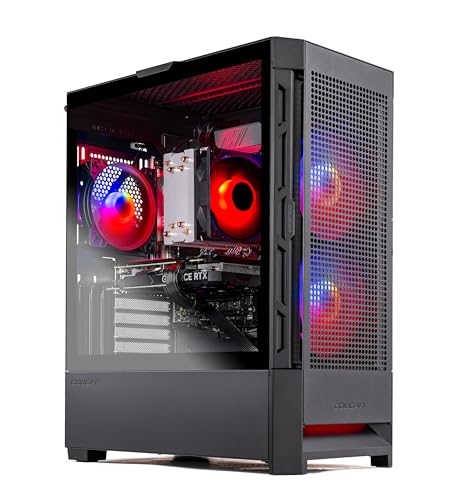
Where to buy
Check the latest price, availability and delivery on Amazon. Orders are placed on Amazon. We may earn a commission from qualifying purchases.
- Best fit for a tight desk: Skytech Blaze4 Mini, Ryzen 7 5700, RTX 4060 Ti — Check on Amazon
- Thermaltake LCGS Quartz i1460, Core i5-14400F, RTX 5060 — Check on Amazon
- CyberPowerPC Gamer Xtreme VR GXiVR8060A24, Core i5-13400F, RTX 4060 — Check on Amazon
- CyberPowerPC Gamer Xtreme VR GXiVR8040A14, Core i7-13700F, RTX 4060 Ti 16GB — Check on Amazon
See 2 more Amazon options
- Skytech Archangel, Core i5-14400F, RTX 4060, 32GB RAM, 2TB SSD — Check on Amazon
- Skytech Nebula, Ryzen 5 5600X, RTX 4060 Ti — Check on Amazon
Read the full guide ↓
Disclosure: As an Amazon Associate, reviewstook.com earns from qualifying purchases. Links to Amazon on this page are affiliate links; they cost you nothing extra. Listing details such as price and availability change often, so check the current Amazon listing before you buy.
Start with the fact that decides everything in this guide: at $1,200, “entry level” gaming PCs are towers. Not mostly towers, not towers with a few exceptions — every one of the six machines below is a desktop tower with an internal power supply, and the smallest is small only by tower standards. There is no mini PC in this set, nothing that hides behind a monitor, and nothing that mounts to the back of one. If your room genuinely has no floor bay, no desk corner and no shelf that a tower can occupy, this is the wrong guide and the honest move is to look at Best Compact Gaming PC For Small Spaces Under $1200 or Best Mini Gaming PC For Small Spaces Under $1200 instead. But if your space problem is the more common one — a small desk, a shared room, a bedroom corner that has to hold a workstation and a gaming setup in the same few feet — then a tower is a perfectly workable answer, provided you choose it as furniture first and as a computer second. That is what this guide does.
So the grading here is different from a normal performance guide. The graphics cards still matter — this budget exists to buy the step up from an RTX 4060 to a 4060 Ti or the current-generation RTX 5060, and every pick delivers that step or compensates for missing it. But each machine is also graded as an installation: how much room the case really takes once cables bend out of its back, where its heat goes in a room with little air to spare, how audible it will be at the distance a small room forces you to sit from it, and whether its specification means opening, moving or replacing it sooner than a small room would like. One pick is a genuinely compact case that can live on a desk or TV stand. The other five are standard towers, and they are graded honestly as such: the question for each is not “is it small?” but “what does placing it cost you, and is the hardware worth that cost?”
Two things this set does not ask of your space are worth naming up front, because mini-PC guides ask both. First, there are no power bricks: all six machines carry their power supply inside the case, so the “second box” problem — a hot adapter that needs its own ventilated address on the floor or shelf — simply does not exist here. The space cost is concentrated in one object, and this guide grades that object honestly. Second, no pick in this set documents a VESA mount or any wall/monitor mounting option, so none is claimed anywhere below; every plan for them starts with a surface or the floor. Prices move often on prebuilt listings, so this guide does not print fixed prices — check price on Amazon for the current figure on each pick, and each review states the point at which that pick stops making sense.
In this guide
Quick Picks
Short on time, or comparing several options at once? Each row below names a space situation and the product that suits it, with a link to the listing.
| Space situation | Pick | Why it stands out | Link |
|---|---|---|---|
| Smallest footprint in this guide | Skytech Blaze4 Mini, Ryzen 7 5700, RTX 4060 Ti | The one compact-class case here, with the strongest value GPU when it is on sale | Check on Amazon |
| Place it once, keep it for years | Thermaltake LCGS Quartz i1460, RTX 5060 | Current-generation card and the longest support runway, at a fair any-day price | Check on Amazon |
| Tower money kept in reserve | CyberPowerPC GXiVR8060A24, RTX 4060, DDR5 | A full tower that leaves budget for the desk and screen around it — check price on Amazon | Check on Amazon |
| The tower you move least | CyberPowerPC GXiVR8040A14, RTX 4060 Ti 16GB | Double the graphics memory of every other pick pushes the replacement day furthest away | Check on Amazon |
| Nothing to open, nothing to add | Skytech Archangel, 32GB RAM, 2TB SSD | The memory and storage upgrades are already done, so the case stays where you put it | Check on Amazon |
| Full-size tower, patient buyer | Skytech Nebula, Ryzen 5 5600X, RTX 4060 Ti | A standard tower whose value depends on catching it on sale — check price on Amazon | Check on Amazon |
How These Picks Were Chosen
The starting pool was the same as our main guide to this budget: real Amazon listings at or under $1,200 whose graphics hardware justifies the step up from the $800 tier — an RTX 4060 Ti or RTX 5060, or an RTX 4060 compensated by something real, such as double memory and storage. Listings that put an $800-tier card in a $1,200 tower were excluded however good they looked in a photograph, because a small room cannot afford to spend its one tower-sized space on the wrong hardware. The budget was applied as a ceiling, not a target, and two picks spend much of the year above the price that makes them worth buying, so every review tells you to check the live price on Amazon and states when to walk away.
On top of that pool, this guide applied the small-spaces grading. Form factor was judged by class, honestly labelled: one compact mini-tower, five standard towers. Where the research behind this guide documents no chassis dimensions — and for this set it documents none we can stand behind — no measurements are printed below, and each review instead tells you what class of space the machine needs and directs you to the live listing’s specification table for the exact figures before you order. That restraint is deliberate: a made-up dimension is worse than none, because a small-space buyer plans a real shelf or desk bay around the number. Mounting was treated the same way. No pick documents a VESA pattern or bracket, so mounting is claimed for none of them, and the plan for every pick is a surface, a floor bay or a desk corner.
We did not use these products ourselves. We read the maker listings and specification pages and compared graphics cards, processors, memory, storage and power supplies, then re-read each listing for what it says — and does not say — about the physical machine. Noise is graded qualitatively, by form-factor class and seating distance, because the research documents no measured sound figures for these towers and this guide does not invent any. Port placement is discussed only where the listing research documents it; where front-versus-rear layout is not documented, the review says so and sends you to the listing photographs, because in a small room the difference between a front USB port and one buried at the back of a floor tower is a daily, practical thing, and a guess printed here would mislead exactly the reader who can least afford it.
The Space Around the Tower
A tower’s footprint is not the rectangle printed on its box, and in a small room the difference matters. The first hidden cost is depth: every display cable, power lead and peripheral plug exits the rear of the case, and cables need room to bend. A tower pushed flush against a wall is a tower whose cables are being crushed and whose rear exhaust is blowing into a pocket of its own hot air. When you measure a spot for any machine below, measure for the case plus the cable bend behind it — that combined figure, not the chassis depth alone, is the installation’s real depth.
The second hidden cost is heat, and small rooms feel it twice: once at the machine, which needs clearance around its intakes and exhausts to avoid recycling its own warm air, and once at the person, because a gaming tower under load is a small space heater and a small room has little air to absorb it. The placement rule that follows is absolute in this guide: no tower in this set belongs in a sealed cabinet, a closed TV-stand cubby or a cupboard with the door shut, however tidy that would look. Open-backed shelving, an open desk corner and the floor beside a desk are all workable; a closed box is not, for any of the six. If your only available spot is enclosed, the correct purchase is a smaller class of machine entirely, not a tower and a hope.
The third cost is noise, graded here by distance because that is what a small room actually controls. A tower on the desk sits roughly an arm’s length from your ears and its fans are part of the room’s sound; the same tower on the floor under the desk is further away, partly screened by the desk itself, and noticeably easier to live with during quiet scenes and late sessions in a shared room. None of the six listings documents a measured noise figure we can rely on, so no decibel numbers appear in this guide — but the placement advice does: in a small room, plan for the floor or a low shelf first and the desktop second, and treat any tower’s fan character as something to judge from owner reports on the live listing rather than from anything printed here.
Against those three costs, credit this set with the one installation virtue towers hold over the mini PCs elsewhere in this series: there is nothing else to place. The supply is inside the case — no external brick needing a ventilated home of its own, no dock, no second object at all. One machine, one power lead, one spot to plan. In a genuinely tight setup that simplicity has real value, and it is part of why a tower remains a rational answer to a small room even though it is never the smallest one.
The 6 Best Entry Level Gaming PCs for Small Spaces Under $1200
Skytech Blaze4 Mini — Ryzen 7 5700, RTX 4060 Ti 8GB, 16GB DDR4, 1TB SSD
Who it suits: The small-space buyer who wants this budget’s strongest value graphics card in the only case in this guide that was designed to be compact.
This is the natural top pick for a tight room, and the reason is in its name — with a qualification this guide will state once and mean every time: “Mini” here describes a compact mini-tower, a case built to sit on a desk or a TV stand rather than dominate a floor bay, and not a mini PC. It will not hide behind your monitor and it does not mount to anything. What it does is shrink the tower footprint to the smallest class in this guide while losing nothing that matters inside: an RTX 4060 Ti — the card class this budget exists to reach, a clear step above the plain 4060, strong at 1080p and a genuine native-1440p option in much of the current catalogue — paired with a Ryzen 7 5700, 16GB of DDR4 memory, a 1TB SSD and a 650W Gold-rated internal power supply. Because the supply is internal, the whole installation is one compact box and one power lead: it can share a small desk’s surface with the monitor in a way none of the standard towers below honestly can, and on a TV stand it reads as a console-class object rather than office furniture. This listing’s price swings widely between sale events — check price on Amazon before you judge it. When it is discounted, it is the best purchase in this guide by a wide margin; at its everyday price, the Thermaltake below becomes the smarter buy.
The compromises are the platform’s, and a small-space buyer should weigh one of them as a space fact, not just a specification. The Ryzen 7 5700 sits on AMD’s finished AM4 platform with DDR4 memory: fast enough that the graphics card is the limit in nearly every game, but with no meaningful processor upgrade path inside the case. In a room where you have planned carefully around one machine, a platform with no future asks you to plan again sooner — first a graphics card, eventually a replacement — and the 8GB of graphics memory is the specification most likely to start that clock. Skytech also notes the graphics card brand may vary between units; the model and memory are the contracted spec, the badge is not. At the right price none of that dents the recommendation. When it is on sale, this is the pick for a small room. At full price, read on.
- The only compact-class case in the guide, with the tier’s strongest value graphics card inside it.
- Internal 650W Gold supply: one box, one power lead, nothing else to place.
- Frequently discounted on Amazon — entry-tier money for the tier above’s GPU when it is on sale; check price on Amazon.
Honest limitation: “Mini” is a tower class, not a mini PC — it still needs a surface and rear cable clearance; the AM4/DDR4 platform is a dead end, and 8GB of graphics memory is the spec most likely to age first.
Choose it if your space fits one compact tower and you catch it on sale — check price on Amazon. Skip it if the price on the day is the full one — at that money the RTX 5060 build below is the better purchase.

Thermaltake LCGS Quartz i1460 — Core i5-14400F, RTX 5060 8GB, 16GB DDR4, 1TB NVMe SSD
Who it suits: The buyer with room for exactly one standard tower, who intends to place it once and not think about replacing it for as long as possible.
In a small room, longevity is a space feature, and this is the longevity pick. Every other machine here runs a 40-series graphics card; the Quartz runs the RTX 5060, the current generation’s entry point, which for a first tower matters less for today’s frame rates — the 5060 and 4060 Ti trade blows depending on the game — than for the years ahead: the longest driver-support runway of the six, the newest feature set, and DLSS 4 with multi frame generation in supported titles. Thermaltake builds it around a Core i5-14400F with 16GB of DDR4 3600 memory, a 1TB NVMe drive and a 600W Gold-rated internal supply, in a full-size tower that needs a proper home — a desk corner, an open shelf bay or the floor beside the desk, with clearance behind it for cables and exhaust. Its price tends to stay comparatively steady without needing a sale event to get there — check price on Amazon — which makes it the most dependable recommendation in the guide: the tower you buy on an ordinary day, place once, and keep.
The qualifications mirror the main guide’s. Multi frame generation interpolates additional frames between rendered ones; motion looks smoother in supported games, but it does not reduce input latency the way genuinely higher native performance does, and it applies to a subset of any real library — buy the card for its native performance and treat generated frames as a bonus. The platform is a halfway house: Intel’s LGA1700 socket with DDR4 memory is mature and stable with some processor headroom, but it is not the DDR5 future, and 16GB of system memory is this guide’s floor rather than a luxury. The 8GB graphics-memory ceiling applies here too. As an installation, plan it as furniture: a standard tower in every sense, one power lead, and an honest space cost of a permanent, well-ventilated tower-sized spot — which its support runway does the most to justify.
- RTX 5060: the only current-generation graphics card in this guide, and the longest runway.
- Priced steadily on ordinary days, with no sale event required — check price on Amazon.
- A standard tower with an internal supply — one object, one power lead, placed once.
Honest limitation: A full-size tower footprint with no compact-case relief; frame generation is not native performance and does not cut input lag, and the DDR4 platform and 8GB of graphics memory are the same ceilings as the cheaper picks.
Choose it if you have one tower-sized spot and want the machine that fills it for the longest time. Skip it if the Blaze4 Mini above is near its low and your spot is a desktop — the compact case is the better use of a small surface.

CyberPowerPC Gamer Xtreme VR GXiVR8060A24 — Core i5-13400F, RTX 4060 8GB, 16GB DDR5, 1TB SSD
Who it suits: The small-space buyer whose real constraint is the whole setup, not the tower — the one who needs money left over for the desk, the screen and the chair the room also has to hold.
Every guide in this series carries a pick that argues against its own budget, and in a small room that argument gets stronger, because space and money are usually short together. This CyberPowerPC pairs an RTX 4060 with a Core i5-13400F, 16GB of DDR5 memory and a 1TB PCIe Gen4 SSD, and it typically sits well below this guide’s ceiling on Amazon — check price on Amazon. The specification contains the tier’s central trade in one line: the graphics card is one class below the 4060 Ti picks, but the platform is newer than theirs — DDR5 memory on Intel’s LGA1700 socket, where the Skytechs still run DDR4. Physically it is a standard tower and this guide will not pretend otherwise: it needs the same desk corner or floor bay as the Thermaltake above, with the same rear clearance. What it buys a small room is not a smaller machine but a smaller total project — the money it leaves unspent funds the monitor that makes any of these PCs worthwhile, or the desk that gives the tower a proper home, and at 1080p, where a first PC on a first monitor actually lives, it plays the current catalogue properly.
Its limitation is the mirror of its virtue. The RTX 4060 is the $800 tier’s ceiling: at 1440p it leans on DLSS upscaling rather than native rendering in demanding games, and its 8GB of graphics memory will set texture choices in the heaviest titles sooner than a 4060 Ti would. If your room already holds a 1440p high-refresh monitor, this is the wrong pick and the two reviews above are yours. Two documentation notes belong in a placement guide: the research behind this guide publishes no power-supply wattage for this machine, so no upgrade promise is made here — read the fitted supply’s label before planning a future card — and its front-versus-rear port layout is likewise undocumented, so check the listing photographs if front-panel access matters to your setup. Finally, the discipline point: while it stays well under this guide’s ceiling, this is the smartest money in the guide; if its price drifts up toward the top of the budget, it becomes a bad version of the Thermaltake, and the correct response is to buy that instead — check price on Amazon before you commit.
- The value pick of the set — leaves real budget for the desk and display a small room also needs; check price on Amazon.
- DDR5 memory on an LGA1700 processor — the most modern platform among the value picks.
- A standard tower with an internal supply; no second object to place.
Honest limitation: One GPU class below the 4060 Ti picks, in a full-size tower — the saving is money, not space; 1440p means upscaling in demanding games, and the unpublished PSU wattage means no graphics upgrade should be planned blind.
Choose it if you game at 1080p and the room needs the savings spent around the PC. Skip it if a 1440p display is already in the room — that screen deserves the stronger card the budget can buy.
CyberPowerPC Gamer Xtreme VR GXiVR8040A14 — Core i7-13700F, RTX 4060 Ti 16GB, 16GB DDR5, 1TB NVMe SSD
Who it suits: The buyer who has one good spot for a tower and wants the machine in it to stay current the longest — the one who hates the idea of re-planning the room around a replacement.
One number explains this machine: 16GB. Every other pick carries 8GB of graphics memory, and that figure is the quiet limit behind most “my PC struggles with this new game” stories at this tier — textures and settings trimmed to fit a small frame buffer. This CyberPowerPC pairs the RTX 4060 Ti with double the memory, a Core i7-13700F — the strongest processor in this guide — 16GB of DDR5 system memory and a 1TB NVMe drive, in a standard tower with an internal supply. In raw speed today it is no quicker than the Blaze4 Mini’s card in most games; what the memory buys is comfort over time — heavier titles, 1440p, texture settings left where the developers put them, for longer. Graded as an installation, that longevity is the point: a small room organised around one tower benefits most from the tower that postpones its own replacement, and this is that tower. When it is on deal on Amazon, it lands inside this budget with room to spare — check price on Amazon. It is also the one pick whose rear connections the listing research documents in full — one HDMI and two DisplayPort outputs on the graphics card — so its cable drop, three display leads at most, can be planned exactly rather than guessed.
The catch is entirely about its pricing outside deal periods: above this guide’s ceiling, it is outside this budget and outside the argument. This is a deal-only pick and the review refuses to soften it. On deal, it is arguably the smartest purchase in the guide for a keep-it-forever buyer; at full price, it is a machine trading on one specification while the RTX 5060 build offers a newer generation for less. As with its sibling above, no power-supply wattage is published in the research behind this guide, so plan no future graphics upgrade until you have read the fitted supply’s label. And the counter-argument deserves a fair hearing: most games a first-PC owner actually plays in their first two years — the back catalogue, the multiplayer staples, the indie library — will never trouble 8GB of graphics memory at 1080p, so the 16GB premium is insurance against a future library, not a present-tense improvement. Buy it when the deal is live, for that insurance, knowing exactly what it is.
- RTX 4060 Ti with 16GB of graphics memory — double every other pick, and the longest stay in one spot.
- The strongest processor in the guide, a Core i7-13700F, on the modern DDR5 platform.
- A deal-dependent pick — check price on Amazon; documented rear outputs (1× HDMI, 2× DisplayPort) make the cable plan exact.
Honest limitation: Deal-dependent — outside deal periods it leaves this budget entirely — and the 16GB advantage is future insurance that many libraries will not cash in for years; the tower itself is standard-sized.
Choose it if you catch it on deal, within this guide’s budget, and want the tower you re-place least — check price on Amazon. Skip it if the day’s price is above this budget — either wait for the deal to return or take the Thermaltake.

Skytech Archangel — Core i5-14400F, RTX 4060 8GB, 32GB DDR5, 2TB SSD
Who it suits: The small-space buyer whose tower spot is awkward to reach — behind the desk, in the corner bay — and who therefore wants a machine that never needs opening, adding to or hauling out.
Most guides rank by graphics card and stop there; this machine exists for the buyer that ranking underserves, and a tight room sharpens its case. Its RTX 4060 is the same card as the CyberPowerPC two reviews up, but everything around it is doubled: 32GB of DDR5 memory where this guide’s floor is 16, and a 2TB SSD where the floor is 1TB. Those numbers are installation facts as much as specifications. The two errands new owners are most often sent on — a second memory stick, a second drive, the tower pulled out of its bay and opened on the floor — are simply removed: unbox it, place it, install your library, and the next hardware decision is years away. It runs on a 650W Gold internal supply with a Core i5-14400F, in a standard tower that needs the usual desk corner or floor bay with rear clearance. Its pricing usually sits inside this guide on an ordinary day, and on a good day it drops toward the tier below — check price on Amazon.
The trade is stated in its Quick Pick row and deserves repeating: the step-up money here buys capacity instead of graphics class. Against the Blaze4 Mini at the same money, this machine’s RTX 4060 will run a demanding game a settings notch lower and lean harder on upscaling at 1440p, and no amount of system memory changes that — the graphics card is a gaming PC’s ceiling, and 32GB of RAM does not lift it. The 8GB graphics-memory limit applies in full. So the choice is about the owner and the room together. If your library is multiplayer staples, older titles and indies — the realistic first-PC library — the 4060 is already sufficient, and a machine that never asks to be moved will make daily life in a small room measurably easier. If this year’s biggest releases at 1440p are the ambition instead, the graphics card is the purchase and the extra drive can wait. Either choice can be right; the only wrong one is buying this machine while expecting the other one’s graphics.
- 32GB DDR5 and a 2TB SSD — the two most common first upgrades, already done, so the case stays closed and placed.
- Sale days pull this capacity build down toward entry-tier money — check price on Amazon.
- 650W Gold internal supply leaves sensible headroom for one future graphics card.
Honest limitation: The step-up money buys capacity, not graphics class — the RTX 4060 and its 8GB of memory are entry-tier hardware in a full-size tower, and 1440p in demanding games means upscaling.
Choose it if your tower spot is hard to reach, your library is big, and 1080p is your resolution. Skip it if this year’s headline games at 1440p are why you are buying — the 4060 Ti picks exist for that.

Skytech Nebula — Ryzen 5 5600X, RTX 4060 Ti 8GB, 16GB DDR4, 1TB NVMe SSD
Who it suits: The patient buyer with a full-size tower spot already planned — a floor bay or a deep desk — who wants the 4060 Ti class and will wait for this listing’s low to come back around.
On specification this is the Blaze4 Mini’s closest relative: the same RTX 4060 Ti 8GB graphics card, 16GB of memory, a 1TB NVMe drive and a 600W Gold internal supply, built around AMD’s Ryzen 5 5600X — a six-core part a step below the top pick’s eight-core 5700, a difference that matters to streamers and heavy multitaskers more than to gaming itself, where the graphics card remains the limit in nearly every title. The physical difference is the one this guide cares about: where the Blaze4 wears a compact case, the Nebula is a full-size tower, an ordinary roomy case with space to work in later. If your spot is a floor bay, that size costs you nothing and the working room is a small virtue. If your spot is a desktop, it costs you the surface — read the first review again. The reason the Nebula sits last here is not its hardware or its size; it is its price history, the most volatile of the six — this listing swings from deep discounts to well above this guide’s ceiling between sale events, so check price on Amazon before judging it.
That spread turns this review into the lesson every first-time buyer should learn before spending four figures anywhere: in the prebuilt market, when you buy is a specification. On a deep discount, this machine rivals the top pick. Around its everyday price it is a defensible purchase and an unexciting one. Well above this guide’s ceiling, no line on its specification page rescues it — that is the wrong machine at the wrong price, full stop. The AM4 caveat from the first review applies here unchanged — DDR4 memory, no processor upgrade path worth the name — and the 8GB graphics-memory ceiling is identical. So the advice is blunt: decide your walk-away point before you open the listing. When it is heavily discounted, buy without regret. Near its everyday price, buy only when the Blaze4 Mini is out of stock or sitting at full price. Above this guide’s budget, close the tab: the figure in this guide’s title is a promise, and at that price this listing breaks it.
- RTX 4060 Ti class performance, at its best on Amazon sale days — check price on Amazon.
- Full-size case and a 600W Gold supply: the easiest tower here to work inside later.
- This guide’s clearest proof that timing is part of the specification.
Honest limitation: The most price-volatile pick here, in the guide’s largest case class, on the same finished AM4/DDR4 platform as the top pick, with a six-core processor that gives ground to the 5700.
Choose it if your planned spot is a floor bay and it is heavily discounted when you shop — check price on Amazon. Skip it if it is near or above this guide’s budget, or if your only spot is a desktop — at that price, or on that surface, other picks serve you better.

Comparison Table
| Product | Graphics card | Space verdict | Link |
|---|---|---|---|
| Skytech Blaze4 Mini | RTX 4060 Ti 8GB | Compact mini-tower — the only pick that shares a desk with the monitor | Check on Amazon |
| Thermaltake LCGS Quartz i1460 | RTX 5060 8GB | Standard tower, placed once — the longest support runway justifies the permanent spot | Check on Amazon |
| CyberPowerPC GXiVR8060A24 | RTX 4060 8GB | Standard tower — the saving is money for the room around it, not footprint | Check on Amazon |
| CyberPowerPC GXiVR8040A14 | RTX 4060 Ti 16GB | Standard tower you re-place least — graphics memory pushes replacement furthest away | Check on Amazon |
| Skytech Archangel | RTX 4060 8GB | Standard tower that never needs opening — capacity upgrades already done | Check on Amazon |
| Skytech Nebula | RTX 4060 Ti 8GB | Full-size tower — a floor-bay pick, bought only at its low | Check on Amazon |
How to Choose an Entry Level Gaming PC for a Small Space
Work through these five steps in order, with a tape measure before a credit card. The order is the point: each step rules out placements the next one cannot fix.
- Step 1 — Measure the spot. Decide where a tower can actually live: a desk corner, an open shelf bay, or the floor beside or under the desk. Measure its width, height and depth, then subtract the room the cables behind the case will need to bend — the installed depth is the case plus that bend, not the case alone. Take the exact chassis dimensions for any pick from its live Amazon listing’s specification table and compare them against your measured spot, not against the class labels used in this guide. If no spot survives this step, stop here: a compact or mini PC from the guides linked in this article’s introduction is the right purchase, not a tower.
- Step 2 — Reserve ventilation clearance. Around the measured footprint, keep open air on the sides the case breathes through and behind its exhaust, and refuse enclosed placements outright: no sealed cabinet, no closed TV-stand cubby, no cupboard. In a small room, also think about where the heat goes after it leaves the case — a tower exhausting into a curtained corner or at the bed is placed wrong even if it fits.
- Step 3 — Give the power supply its address. This set makes the step simple: all six machines carry the supply inside the case, so there is no external brick to house — but the tower still needs a reachable wall outlet within its power lead’s length, and its supply intake needs air, which is one more reason a tower wedged into a sealed floor bay is a mistake. Plan the outlet now, not on delivery day; if the spot needs a surge strip, the strip needs its own place in the plan.
- Step 4 — Walk the cable drop. Trace every cable from the case to where it lands: display lead to the monitor (from the graphics card’s rear outputs — the 16GB CyberPowerPC documents one HDMI and two DisplayPort; check the listing photographs for the others), power lead to the outlet, Ethernet if you run wired — and in a small room, wired is worth planning for — plus keyboard, mouse and headset. Cables that cross a walkway or drape across the desk are a daily tax; a spot that keeps the drop short and behind furniture is worth more than a slightly faster machine in a spot that does not.
- Step 5 — Then order, and verify on arrival. Only now choose the pick, applying this guide’s price discipline as strictly as the measurements — check price on Amazon for each pick before you order. When the machine arrives, before it goes into its spot, verify the delivered configuration against the model number on the box and in Settings — graphics card model and memory, system memory, storage — because a tower installed into a planned bay is one you will not want to pull out again, and the return window is when a wrong configuration gets caught.
Common Buying Mistakes
- Believing the word “Mini” on a tower means a mini PC. The Blaze4 Mini is the smallest case here and it still needs a surface, clearance and a cable plan.
- Measuring the case and forgetting the cables. The installed depth is chassis plus rear bend; a tower flush to the wall is a tower crushing its leads and recycling its own exhaust.
- Putting a tower in a closed cabinet or TV-stand cubby because it looks tidy. Every pick in this guide refuses that placement; heat makes it a slow failure, not a storage solution.
- Assuming any of these machines can mount behind a monitor. No pick documents a VESA mount or bracket; if your plan needs one, you need a different class of PC.
- Spending the whole budget on the tower and leaving nothing for the desk and screen. In a small room the setup is the purchase — the value CyberPowerPC plus a proper desk beats a top-of-budget tower on the floor of a room it does not fit.
- Paying full freight for a listing whose reputation rests on its low. The Nebula and the 16GB CyberPowerPC are only bargains on their good days, whatever the room size.
- Placing a tower on the desk beside your ears without thinking about sound, then blaming the machine. Floor and low-shelf placements exist in the plan for a reason; distance is the cheapest quiet.
- Choosing a finished DDR4 platform at DDR5 prices. The discount is the compensation for the dead end — and in a small room, a platform you must replace sooner is a room you must re-plan sooner.
Final Recommendation
- Smallest spot, strongest value: Skytech Blaze4 Mini, when it is on sale — check price on Amazon.
- One tower spot, longest tenancy: Thermaltake LCGS Quartz i1460.
- Room needs the savings more than the tower does: CyberPowerPC GXiVR8060A24 — and keep the change.
- The tower you re-place least: CyberPowerPC GXiVR8040A14, when it is on deal — check price on Amazon.
- Hard-to-reach spot, zero errands: Skytech Archangel.
- Floor bay planned, patience available: Skytech Nebula, when it is heavily discounted — check price on Amazon.
Our top two for a small room at this ceiling are the Blaze4 Mini, because it is the only pick that reduces the space problem itself — a compact case with the tier’s best value graphics card inside it — and the Thermaltake Quartz, because if a standard tower is going to occupy a permanent spot in a small room, it should be the one with the longest support runway and a fair price on any day of the year. Between them they cover the two honest ways to fit this budget into a tight space: shrink the machine, or make the machine earn its footprint for the most years. Whichever you choose, run the five steps first — measure the spot, reserve the clearance, place the power, walk the cables, then order — and check the live price before you commit. Readers whose measurements rule towers out entirely should step sideways to Best Entry Level Gaming PC Under $1200 for the full performance picture at this budget, or down to Best Entry Level Gaming PC For Small Spaces Under $800 if the room and the budget are both smaller than this guide assumes.
Frequently Asked Questions
Can any of these PCs mount behind a monitor or on a wall?
No — and this guide claims no mount for any pick, because none of the six listings documents a VESA pattern, bracket or wall-mount option. These are towers: they stand on a desk, a shelf or the floor. If your space plan depends on a machine disappearing behind the display, you are shopping in the wrong category; the mini PC guides in this series, starting with Best Mini Gaming PC For Small Spaces Under $1200, cover machines built for exactly that.
How much room does a tower actually need?
More than its chassis: the case, plus room behind it for cables to bend without being crushed, plus open air around its intakes and exhausts. The research behind this guide does not document chassis dimensions for these six listings, so no measurements are printed here — take the exact figures from the live listing’s specification table, add the cable bend, and compare that total against your measured spot before ordering. The five-step routine in the How to Choose section walks the whole check in order.
Is the Blaze4 Mini a mini PC?
No. It is a compact mini-tower — the smallest case class in this guide, designed for a desk or TV stand — with a full internal power supply and a desktop RTX 4060 Ti inside. It will not mount behind a monitor and it is not in the sub-litre world of true mini PCs, but on a small desk it is the only pick here that can share the surface with the screen without apology. Buyers comparing it against genuinely small machines can see it in the wider context of Best Compact Gaming PC Under $1200.
Can I put one of these towers inside a TV stand or cabinet?
Only if the furniture is open — an open-backed, open-front bay with air moving through it. A sealed cabinet or a cubby with a closed door is refused for all six picks in this guide: a gaming tower under load exhausts real heat, and a closed box returns that heat to the machine’s own intakes. If enclosed furniture is your only spot, the honest purchase is a smaller class of machine, or different furniture — not a tower and a hope.
Is a tower a mistake in a small room?
Not by itself. A tower concentrates everything — power supply included — in one object with one power lead, which is genuinely simpler to place than a mini PC plus its external brick and any dock. The mistake is buying the tower without measuring: no spot with clearance, cables crushed against the wall, the whole budget spent before the desk and monitor are accounted for. Measured first, a tower is a rational small-room answer; the buyers who regret it are the ones who treated it as a specification purchase instead of a furniture purchase. If your ceiling is flexible, Best Entry Level Gaming PC For Small Spaces Under $1500 covers the next step up in the same placement terms.
Which pick will I have to move or replace soonest?
On the evidence in this guide, the machines built on AMD’s finished AM4 platform — the Blaze4 Mini and the Nebula — have the shortest runway: no processor upgrade path, and 8GB of graphics memory as the ceiling that ages first. The 16GB CyberPowerPC sits at the other end, with its graphics memory bought specifically to postpone that day, and the RTX 5060 Thermaltake holds the longest driver-support runway. In a small room, that ordering matters as much as the performance ordering: every replacement is a re-plan of the same few square feet.
- Best Entry Level Gaming PC Under $1200
- Best Entry Level Gaming PC Under $800
- Best Entry Level Gaming PC Under $1500
- Best Entry Level Gaming PC For Beginners Under $1200
- Best Entry Level Gaming PC For Streaming Under $1200
- Best Entry Level Gaming PC For 1440p Gaming Under $1200
- Best Entry Level Gaming PC For Small Spaces Under $800
- Best Entry Level Gaming PC For Small Spaces Under $1500
- Best Compact Gaming PC For Small Spaces Under $1200
- Best Budget Gaming PC Under $1200
- Best Prebuilt Gaming PC Under $1200


