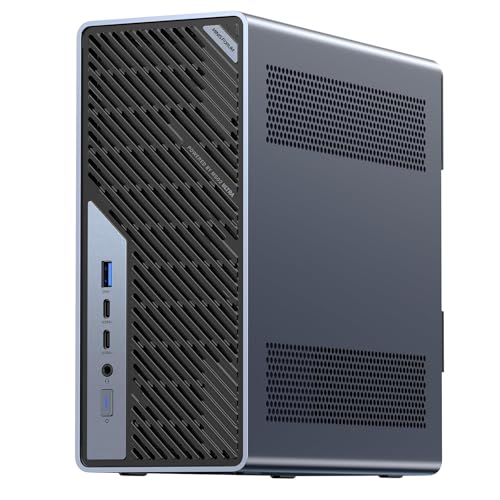
Where to buy
Check the latest price, availability and delivery on Amazon. Orders are placed on Amazon. We may earn a commission from qualifying purchases.
- Best overall workstation: Minisforum MS-02 Ultra, Core Ultra 9 285HX, ECC to 256GB, PCIe 5.0 x16, Dual 25GbE — Check on Amazon
- Lenovo Legion Tower 7i Gen 10, Core Ultra 9 285K, RTX 5080, 32GB, 2TB — Check on Amazon
- GMKtec EVO-X2, Ryzen AI Max+ 395, 64GB Unified Memory, Radeon 8060S — Check on Amazon
- Alienware Aurora ACT1250, Core Ultra 9 285, RTX 5080, 32GB, 1TB — Check on Amazon
- iBUYPOWER Y40 PRO, Ryzen 9 7900X, RTX 5070 Ti, 32GB, 2TB — Check on Amazon
See 1 more Amazon option
- Minisforum MS-A2, Ryzen 9 HX 16-Core, PCIe x16 Slot, Dual 10G SFP+, RAM to 96GB — Check on Amazon
Read the full guide ↓
Disclosure: As an Amazon Associate, reviewstook.com earns from qualifying purchases. Links to Amazon on this page are affiliate links; they cost you nothing extra. Listing details such as price and availability change often, so check the current Amazon listing before you buy.
Three thousand dollars is the first budget where the word “workstation” stops being pure marketing for some machines — and stays marketing for others. A real workstation is not defined by a fast benchmark screenshot. It is defined by what happens on hour six of a render, hour ten of a compile farm run, or week three of a simulation: sustained multi-core throughput that does not sag as the chassis heats up, memory that can grow past 32GB and, on the right platform, ECC memory that corrects its own errors, expansion slots and fast networking that let the machine join a storage server or a second GPU, and a warranty and driver story a business can rely on. Judged by those standards, this guide contains two genuine workstation platforms, one AI-focused mini PC with a memory architecture no tower here can match, and three gaming towers that we grade honestly as render nodes — powerful, fast, and not certified workstations no matter what their listings imply.
Two ceiling facts belong up front. First, there is no RTX 5090 system anywhere near this budget: complete 5090 machines sit well above this tier on Amazon, so any listing hinting at 5090-class performance at this budget is selling you a lesser card under a bigger headline. The RTX 5080 towers in this guide sit at the top of this budget tier — check the current price on Amazon for each one and confirm it fits under the $3,000 ceiling before you buy. Second, the memory ceiling of the moment sits just above this budget: mini PCs with 128GB of unified memory (the Strix Halo class) launched in a lower tier in late 2025 but have since been repriced by the component shortage to well above this budget, so they appear here as a landmark to measure against, not as picks. What $3,000 genuinely buys is a 24-core CPU, up to 256GB of ECC memory on the one platform that supports it, 25-gigabit networking, a PCIe 5.0 slot, or a 16GB GPU that renders and trains — if you choose which of those matters before you spend.
For most professionals we would start with the Minisforum MS-02 Ultra, the only machine here built like a workstation from the motherboard out, or the Lenovo Legion Tower 7i if your work is measured in GPU render hours. Below are the quick picks, detailed reviews of all six machines, a comparison table, a guide to reading workstation specifications honestly, the mistakes that waste money at this tier, and the questions professionals ask before committing a work machine.
In this guide
Quick Picks
Short on time, or comparing several options at once? Each row below names a workload and the machine that suits it, with a link to the listing.
| Workload | Pick | Why it stands out | Link |
|---|---|---|---|
| Best overall workstation | Minisforum MS-02 Ultra | ECC memory to 256GB, PCIe 5.0 x16 slot, dual 25GbE, 24-core 285HX | Check on Amazon |
| Best CPU + GPU throughput | Lenovo Legion Tower 7i Gen 10 | 24-core 285K plus RTX 5080 16GB in one tower | Check on Amazon |
| Best for local AI and LLMs | GMKtec EVO-X2 64GB | 64GB unified memory the GPU can address most of | Check on Amazon |
| Best GPU render node (deal only) | Alienware Aurora ACT1250 | RTX 5080 with a 1000W Platinum PSU — check price on Amazon | Check on Amazon |
| Best value production tower | iBUYPOWER Y40 PRO | 12-core 7900X and RTX 5070 Ti — check price on Amazon | Check on Amazon |
| Best expandable platform | Minisforum MS-A2 | Real PCIe x16 slot and dual 10G SFP+ in 1.78 litres | Check on Amazon |
How These Picks Were Chosen
The budget was applied as a ceiling for a complete, working machine: every pick is a real Amazon listing positioned at or under the $3,000 ceiling in the United States — check the current price on Amazon before you buy, because pricing in this tier moves often. Three of the six picks sit at the top of the tier, and we would rather tell you plainly to verify their live price than pretend pricing in this category is fixed.
We did not use these machines ourselves. We read maker listings, specification pages and independent review coverage, and judged each machine on workstation criteria rather than gaming criteria: sustained multi-core throughput (core counts and the cooling and power delivery to hold them), memory ceiling and whether ECC is genuinely supported by the platform — not merely compatible-sounding — the expansion story (PCIe slots and their electrical width, storage positions, networking speed), and GPU compute value for rendering, encoding and local AI. Where a listing contradicts itself, and one below does, the review reports the contradiction instead of resolving it in the seller’s favour.
Two honesty rules shaped the list. The first is the certification rule: none of these machines carries ISV certification for professional CAD and engineering software — the driver validation that firms running SolidWorks, CATIA or certified Siemens NX seats actually buy. That certification lives in the named workstation lines (Lenovo ThinkStation, HP Z, Dell Precision), which are the correct route for certified-seat work and are named in this guide as that alternative, without product links, because we could not verify in-budget Amazon listings for them to our standard. The second rule is the naming rule: the three gaming towers are graded as render nodes throughout. A gaming tower with a 5080 is an excellent render node. It is not a workstation in the contractual sense, and the difference matters exactly when something breaks mid-project.
The 6 Best Workstation PCs Under $3,000
Minisforum MS-02 Ultra — Core Ultra 9 285HX, ECC to 256GB, PCIe 5.0 x16, Dual 25GbE
Who it suits: Professionals whose bottleneck is memory, expansion or networking rather than raw GPU power — virtualisation hosts, homelab and small-studio servers, developers running container fleets, and anyone who has ever watched a job die at 32GB and sworn never again.
This is the only machine in the guide designed as a workstation before it was designed as a product. The Core Ultra 9 285HX brings 24 cores and 24 threads at up to 5.5GHz, and around it Minisforum built the platform features that define the class: four DDR5 SO-DIMM slots accepting up to 256GB of memory with ECC support on this chip, a PCIe 5.0 x16 expansion slot that takes a low-profile dual-slot card, four M.2 2280 storage positions (two on the board, two carried on the networking card), and a network stack no tower in this guide approaches — dual 25GbE SFP+ on an Intel E810 controller, plus 10GbE and 2.5GbE, with Wi-Fi 7 behind that. Two USB4 ports run at the 80Gbps V2 speed with a third at 40Gbps, the listing specifies four video outputs, and an internal 350W power supply keeps the desk free of bricks. All of it sits in a chassis of about 4.8 litres.
The workstation reading of those numbers: ECC memory is the difference between a three-day simulation you trust and one you re-run to check; 25-gigabit networking is the difference between editing media off a NAS and copying it locally first; and the PCIe slot is a future — a low-profile GPU for compute or display duties, a capture card, a further network card — that sealed machines simply do not have. Check the current price on Amazon — it sits in the lower part of this tier, remarkably, among the more affordable machines in this guide: the platform costs less than the gaming towers because none of the budget went to a gaming GPU.
That is also its honest limitation, and it is a real one. As shipped, graphics are integrated Intel graphics: fine for displays, light CAD viewing and encode-assist duties, but this is not a GPU render box until you spend more. The PCIe slot’s low-profile, dual-slot envelope and the 350W supply cap what can be added — think efficient low-profile cards, not a flagship GPU — and the 32GB fitted as standard is a starting point, not the destination; the machine earns its place when you budget the ECC upgrade. Buy it as a platform, budgeted with the memory you actually need.
- The only ECC platform in the guide: four SO-DIMM slots, up to 256GB.
- Dual 25GbE SFP+ plus 10GbE and 2.5GbE — server-class networking.
- PCIe 5.0 x16 slot and four M.2 positions in a 4.8-litre chassis.
Honest limitation: Integrated graphics as shipped and a 350W ceiling on what the slot can become; the 32GB standard memory is a starting configuration, not a workstation finish.
Choose it if your work is memory-, VM- or network-bound and you want the platform professionals actually mean by “workstation”. Skip it if your living is GPU rendering — the towers below carry the card you need already fitted.

Lenovo Legion Tower 7i Gen 10 — Core Ultra 9 285K, RTX 5080, 32GB, 2TB
Who it suits: Creators and engineers who need maximum combined throughput — long CPU renders, GPU renders, heavy compiles and large media projects — from one tower, bought from a major brand with a national support network behind it.
On paper this is the most complete single tower here. The Core Ultra 9 285K is a genuine 24-core part (Intel’s specification, up to 5.6GHz boost in the listing’s description), and it is paired with the RTX 5080 16GB — the strongest GPU compute card in this guide, with 16GB of VRAM for render scenes and AI workloads that simply will not fit in 8GB. The supporting cast is the professional one: a 360mm liquid cooler for sustained loads, an 850W power supply, a 2TB SSD, Wi-Fi 6E, 2.5-gigabit Ethernet and Thunderbolt 4, with keyboard and mouse in the box and Windows 11 Home installed. Check the current price on Amazon, and match the exact configuration at checkout — Lenovo’s own store positions comparable configurations in a higher tier, so confirm this listing fits this budget before you buy.
Graded as a workstation rather than a gaming rig, two things stand out. The sustained-load story is credible: a 24-core desktop chip under a 360mm cooler with an 850W supply is built to hold clocks through a render queue in a way the mini PCs cannot match without a GPU at all. And the brand story matters to businesses: Lenovo’s support infrastructure is the closest thing in this guide to the certified-workstation route, even though this Legion itself is a gaming line and carries no ISV certification.
The honest limitation is printed in the listing itself: the memory maximum is stated as 32GB. For a machine with this much CPU and GPU, that ceiling is the compromise — video editors with large timelines, VM users and simulation work will hit it, and there is no ECC at any price on this platform. Treat it as a very fast 32GB render and creation tower, not as a memory-expandable workstation, and it is honestly specified. Buy it for throughput, not for growth.
- 24-core 285K plus RTX 5080 16GB — the guide’s strongest CPU + GPU pairing.
- 360mm liquid cooling and an 850W PSU support sustained loads.
- Major-brand support network; Thunderbolt 4 and 2.5GbE fitted.
Honest limitation: The listing states a 32GB memory maximum, with no ECC option — a hard ceiling for memory-heavy professional work.
Choose it if your work is render- and compile-throughput on projects that fit in 32GB. Skip it if your memory needs grow year on year — the MS-02 Ultra’s platform is the growth path.

GMKtec EVO-X2 — Ryzen AI Max+ 395, 64GB Unified Memory, Radeon 8060S
Who it suits: Anyone running large language models, AI-assisted development or memory-hungry creative work locally — the workload where how much memory the GPU can reach matters more than how fast the CPU is.
The EVO-X2 is built around AMD’s Ryzen AI Max+ 395: 16 cores and 32 threads, and a Radeon 8060S integrated GPU with 40 compute units that shares the machine’s memory rather than sitting behind a small VRAM wall. This 64GB configuration carries 64GB of LPDDR5X-8000 — soldered, fast, and unified, with AMD’s variable graphics memory guidance allowing the graphics side to address up to 48GB of the pool. In practical terms that is the local-AI proposition no discrete card in this guide can offer at any price here: a 16GB RTX 5080 is a far faster GPU, but a model that needs 40GB of memory does not fit on it at all, and fits here. Add a 1TB PCIe 4.0 SSD, USB4, Wi-Fi 7 and quad-display support per the listing, and the machine is a small, quiet AI workstation — check the current price on Amazon.
The professional framing matters, because this is not a gaming mini wearing a workstation badge: the 8060S does genuine GPU compute and media work, the 16 Zen 5 cores handle compile and productivity loads properly, and the unified memory pool is a real architectural advantage for inference, large-context development work and big in-memory datasets.
The honest limitations are architectural too. The memory is soldered: 64GB is what this machine will ever have, and the 128GB versions of this chip class — the ones that launched in a lower tier in late 2025 — now sit well above this budget after shortage repricing, which is why they are a landmark in this guide rather than picks. There is no ECC, no PCIe slot and no path to a discrete GPU. Buy the EVO-X2 when your workload is memory-capacity-bound today; do not buy it as a platform to grow.
- 64GB unified memory, up to ~48GB addressable by the GPU — unique in this guide.
- 16-core Zen 5 CPU with a 40-CU integrated GPU for compute and media.
- Positioned in the middle of this tier — check price on Amazon.
Honest limitation: Memory is soldered at 64GB forever, with no ECC, no expansion slot and no discrete-GPU path.
Choose it if local AI, large models or in-memory workloads are the job. Skip it if you need CUDA-ecosystem GPU rendering — that work belongs on the NVIDIA towers.

Alienware Aurora ACT1250 — Core Ultra 9 285, RTX 5080, 32GB, 1TB (Deal Only)
Who it suits: GPU-render and 3D professionals who want the strongest render card in the guide with the strongest power supply behind it, and who are willing to buy on a deal cycle rather than on a schedule.
Graded as a render node, the Aurora’s specification is serious: a Core Ultra 9 285, an RTX 5080 16GB, 32GB of DDR5, a 1TB SSD, liquid cooling and — the detail renderers should notice — a 1000W Platinum-rated power supply, the most headroom in this guide, feeding a clear-panel chassis from the industry’s largest PC maker. Check the current price on Amazon — Dell-direct comparable configurations sit in a higher tier. When its Amazon price fits under this guide’s $3,000 ceiling, it is a rational professional purchase: 5080-class GPU compute, a big-brand warranty route, and power delivery that will not be the bottleneck.
Two pieces of diligence are part of this recommendation, because the listing earns them. Amazon’s own product information for this machine contradicts itself — describing the Ultra 9 285 as a 20-core part where Intel’s specification is 24 cores, and describing the liquid cooling as both fitted and optional. Trust Intel’s specification for the chip, and confirm the cooling configuration with the seller before ordering; the review reports the contradiction rather than laundering it into a clean spec sheet. Second, Alienware’s proprietary platform is the trade behind the brand: motherboard and case standards are Dell’s own, which makes some future upgrades a Dell-shaped problem, and there is no ECC path.
At a price above this guide’s budget, the Legion above is the better buy; when the Aurora fits under the ceiling, the comparison reverses. That is the whole recommendation — a price-conditional render node with the best PSU in the guide.
- RTX 5080 16GB behind a 1000W Platinum PSU — the guide’s most headroom.
- Check the current price on Amazon and confirm it fits this budget.
- Big-brand warranty and support route.
Honest limitation: Pricing that moves with deal cycles, a proprietary platform with no ECC path, and a listing that contradicts itself on core count and cooling — verify both before ordering.
Choose it if its live price fits this budget and GPU rendering is the workload. Skip it if its live price sits above this budget, or you need memory expandability and standard parts.

iBUYPOWER Y40 PRO — Ryzen 9 7900X, RTX 5070 Ti, 32GB, 2TB
Who it suits: Working creators — video editors, 3D generalists, streamers who produce — who need a balanced production tower now, at a price that leaves budget for the monitor, storage and software the job also needs.
The Y40 PRO is the value centre of this guide, and its specification reads like a production checklist: a 12-core Ryzen 9 7900X — the multi-core profile editing, encoding and compile work actually uses, rather than a gaming-tuned part — an RTX 5070 Ti with 16GB of VRAM for GPU rendering and AI-assisted tools, 32GB of DDR5 in a proper two-stick configuration, and a 2TB NVMe SSD, with keyboard and mouse included and a 1-year manufacturer warranty. Check the current price on Amazon — it is positioned in the lower part of this tier and undercuts the 5080 towers while giving up less render performance than that tier gap suggests — the 5070 Ti is the same 16GB memory class, one tier down.
Graded on workstation criteria, the balance is the point. Twelve cores hold sustained all-core loads for renders and exports; the GPU covers CUDA-ecosystem work; 2TB of fast storage is the first tier in this guide where project files stop being a juggling act. It is a gaming-branded tower — no ISV certification, no ECC — and the review does not pretend otherwise.
The honest limitation is a documentation gap rather than a component: the PSU wattage is not headlined in the verified listing material, and for a work machine that figure matters — confirm it on the live listing before purchase rather than assuming. Note also that the Y40 PRO name covers a different 7800X3D configuration under another listing; this review is only for the 7900X machine linked here. Verify the model, confirm the PSU, and this is the guide’s easiest value recommendation.
- 12-core 7900X plus 16GB RTX 5070 Ti — balanced production specification.
- 32GB in two sticks and 2TB of storage, keyboard and mouse included.
- Positioned below the 5080 towers in this tier — check price on Amazon.
Honest limitation: PSU wattage is not published in the verified listing material — confirm before buying; gaming platform, so no ECC or ISV certification.
Choose it if you want a complete production tower with money left for the rest of the desk. Skip it if your renders are long enough that the 5080’s extra GPU tier pays for itself.

Minisforum MS-A2 — Ryzen 9 HX 16-Core, PCIe x16 Slot, Dual 10G SFP+, RAM to 96GB
Who it suits: Homelab professionals, network-heavy workflows and small studios that want a real expansion slot and 10-gigabit networking in a machine the size of a hardback book — and who are comfortable treating a PC as a platform.
The MS-A2 is the MS-02 Ultra’s smaller sibling in spirit: a 16-core, 32-thread Zen 5 processor (the family runs to 5.4GHz), two DDR5-5600 SO-DIMM slots accepting up to 96GB, three M.2/U.2 storage positions, and — the feature that earns its place in a workstation guide — a genuine PCIe x16 slot (PCIe 4.0, x8 electrical) in a 1.78-litre chassis. Networking is dual 10G SFP+ on an Intel X710 controller plus dual 2.5GbE, with Wi-Fi 6E, and displays run from HDMI and two USB-C outputs. The family spans barebone and configured styles honestly: check the current price on Amazon for the exact style you are considering — either way, it is positioned in the lower part of this tier and is among the more affordable routes in this guide to a slotted, fast-networked platform.
The workstation case is the same platform argument as the MS-02, one tier down: the slot takes a low-profile GPU, a capture card or further networking; 96GB is a real memory ceiling for VM and container work; 10-gigabit SFP+ talks directly to proper network storage. Independent review coverage of this machine adds the texture a spec sheet hides — it is audible under sustained load, idles relatively thirsty, and airflow around the PCIe area is limited, which caps how hard a slot card should be pushed. Workstation buyers should hear that from us rather than discover it.
The honest limitations follow from the size: graphics as shipped are a basic Radeon 610M, so any GPU ambition goes through the slot and its power and airflow envelope; there is no ECC support here (that is the MS-02’s step-up); and the listing family mixes barebone and configured styles, so confirm the exact configuration on the live page — the link here is the family’s configured listing, and barebone and configured styles must not be confused.
- A real PCIe x16 slot (x8 electrical) and dual 10G SFP+ in 1.78 litres.
- Memory to 96GB across two SO-DIMM slots; three storage positions.
- Barebone and configured styles available — check price on Amazon for each.
Honest limitation: Basic integrated graphics as shipped, audible under load per independent reviews, no ECC — and barebone vs configured styles must be confirmed on the live listing.
Choose it if expansion and networking per dollar — and per litre — are the priorities. Skip it if you need ECC (step up to the MS-02 Ultra) or a fitted discrete GPU.

Comparison Table
| Machine | CPU | GPU | Memory ceiling | Expansion / networking | Link |
|---|---|---|---|---|---|
| Minisforum MS-02 Ultra | Core Ultra 9 285HX, 24-core | Integrated (slot for low-profile card) | 256GB, ECC supported | PCIe 5.0 x16, dual 25GbE + 10GbE | Check on Amazon |
| Lenovo Legion Tower 7i Gen 10 | Core Ultra 9 285K, 24-core | RTX 5080 16GB | 32GB (listing maximum) | Thunderbolt 4, 2.5GbE | Check on Amazon |
| GMKtec EVO-X2 64GB | Ryzen AI Max+ 395, 16-core | Radeon 8060S integrated | 64GB unified, soldered | USB4, no slot | Check on Amazon |
| Alienware Aurora ACT1250 | Core Ultra 9 285, 24-core | RTX 5080 16GB | 32GB fitted | Proprietary platform, 1000W PSU | Check on Amazon |
| iBUYPOWER Y40 PRO | Ryzen 9 7900X, 12-core | RTX 5070 Ti 16GB | 32GB fitted | Standard tower parts | Check on Amazon |
| Minisforum MS-A2 | Ryzen 9 HX, 16-core | Radeon 610M (slot for a card) | 96GB, two slots | PCIe x16 (x8 electrical), dual 10G SFP+ | Check on Amazon |
How to Choose a Workstation PC Under $3,000
- Name your bottleneck before your budget. Workstation money spent on the wrong resource is wasted completely. Memory-bound work (VMs, big datasets, huge timelines) points at the MS-02 Ultra or EVO-X2; GPU-bound work (rendering, AI image and video tools) points at the 5080 and 5070 Ti towers; network- and expansion-bound work points at the two Minisforum platforms. One sentence about your slowest hour is worth more than any benchmark.
- Read the memory ceiling, not the memory fitted. Every machine here ships with 32GB or 64GB; what differs is the future. The ceilings in this guide run from a hard 32GB (the Legion, per its own listing) through a soldered 64GB (EVO-X2) and 96GB (MS-A2) to 256GB with ECC (MS-02 Ultra). Buy the ceiling your next three years need, not the configuration this quarter prefers.
- Treat ECC as a platform feature, not a checkbox. ECC only exists where the CPU, board and memory all support it — in this guide, that is the MS-02 Ultra alone. If your work is long, unattended and expensive to re-run (simulations, financial models, overnight renders that must be right), ECC is a genuine reason to choose that platform. If your work is interactive, it is a feature you will never notice, and the towers are better buys.
- Grade gaming towers as render nodes, honestly. The Legion, Aurora and Y40 PRO are excellent machines whose GPUs and CPUs do professional work daily in studios everywhere. What they lack is certification and, in the Aurora’s case, standard parts. Price them as render nodes — performance per dollar — and let the platform machines win on platform criteria.
- Check the slot’s fine print. “PCIe x16” describes the connector, not the wiring: the MS-A2’s slot is x8 electrical, and the MS-02’s takes low-profile dual-slot cards under a 350W supply. Both are genuinely useful; neither will host a flagship GPU. Read width, profile and power before planning an upgrade around a slot.
- Networking is a workstation feature. If your projects live on a NAS, the jump from 2.5GbE to 10GbE or 25GbE changes how the machine feels every day — files open in place instead of copying locally. The two Minisforum machines are the only picks here that treat networking as a first-class specification.
- Respect the pricing structure on 5080 towers. Both 5080 towers in this guide sit at the top of this tier: check the current price on Amazon for each, and note that Lenovo’s own store positions comparable Legion configurations higher. If the live price is above this budget when you buy, the correct move is the Y40 PRO or patience — not stretching beyond the ceiling this guide is built around.
- Budget the whole workstation. A work machine is also its monitor, its backup storage, its warranty term and its software seats. The Y40 PRO, positioned lower in this tier, leaves meaningful room in the budget for those; the 5080 towers, at the top of the tier, leave far less. For many professionals the cheaper tower plus a proper backup and display is the better workstation purchase.
- If your employer or client requires certification, stop here. ISV-certified drivers and validated configurations are a contractual feature of the ThinkStation, HP Z and Dell Precision lines. No machine in this guide substitutes for them, and buying one hoping nobody checks is the most expensive mistake in this category.
What the Word “Workstation” Actually Buys at $3,000
It is worth being precise about the ladder, because listings blur it deliberately. At the bottom, “workstation” is a sticker: a gaming tower with a strong GPU, sold to professionals on performance alone. That describes three of our six picks, and we recommend them — as render nodes, priced on throughput. In the middle sits the prosumer platform: machines like the MS-A2 and EVO-X2 that add genuine workstation traits — expansion slots, fast networking, huge memory — without certification or, in the EVO-X2’s case, any upgrade path at all. At the top of this budget, the MS-02 Ultra adds the trait that most separates the class: ECC memory support with a 256GB ceiling, on a platform with server-grade networking and a PCIe 5.0 slot.
Above this budget sits the landmark that explains where the market is going. Mini PCs built on AMD’s Strix Halo platform with 128GB of unified memory launched in late 2025 in a lower tier — a positioning that would have made them this guide’s headline — and the component shortage has since repriced them well above this budget. If your work is local AI at the largest model sizes, that class, not anything here, is the machine you are describing, and the honest advice is to budget for it or wait for memory prices to normalise rather than compromise within this budget. The 64GB EVO-X2 in this guide is the same architecture at the capacity this budget can honestly buy.
And beside all of it stands the certified route: Lenovo’s ThinkStation, HP’s Z and Dell’s Precision lines, sold on validated drivers, ISV certification lists and enterprise support contracts. They are rarely the performance-per-dollar winners, and that is not what they sell. If a client’s contract, an employer’s IT policy or a software vendor’s support terms require certification, those lines are the answer and this guide is not — we name them without links because we could not verify in-budget listings for them to the standard every pick here met.
Common Buying Mistakes
- Buying a gaming tower for certified-seat work. If the contract says ISV-certified, no GPU benchmark settles the question — buy from the certified lines.
- Paying over this budget for a machine positioned at the top of the tier. Both 5080 towers here are recommendations when their live price fits under the ceiling; above that ceiling the value argument inverts.
- Reading “32GB” as a starting point on a machine whose listing states 32GB as the maximum. The Legion’s ceiling is printed in its own listing — believe it.
- Assuming ECC from a workstation badge. In this guide exactly one platform supports it; the rest do not, whatever the category page implies.
- Planning a flagship GPU upgrade around a mini PC’s slot. Low-profile envelopes, x8 wiring and 350W supplies are real constraints — useful slots, honestly described, but not tower slots.
- Chasing the 128GB Strix Halo machines at last year’s positioning in your head. They launched in a lower tier and now sit well above this budget; expecting one within this budget produces a compromise purchase.
- Hunting RTX 5090 performance within this budget. Complete 5090 systems sit well above this tier; listings that blur this are selling a 5080 or less under a bigger headline.
- Ignoring the listing’s own contradictions. The Aurora’s listing disagrees with itself on core count and cooling — verify with the seller, and treat a listing that cannot count its cores as a reason to document everything at delivery.
- Spending the whole $3,000 on the box. Backup, warranty, display and software are part of a workstation; the value picks exist so the budget can cover them.
Final Recommendation
- Most professionals: Minisforum MS-02 Ultra — the only true workstation platform here, positioned in the lower part of this tier — check price on Amazon.
- Maximum throughput in one tower: Lenovo Legion Tower 7i Gen 10 — check the current price on Amazon and confirm it fits this budget.
- Local AI and large models: GMKtec EVO-X2 64GB — memory capacity the discrete cards cannot match.
- GPU rendering on a deal: Alienware Aurora ACT1250, when its live price fits under this budget — check price on Amazon.
- Balanced production on a budget: iBUYPOWER Y40 PRO — confirm the PSU wattage, then buy with confidence.
- Expansion per litre: Minisforum MS-A2, configured or barebone, with the slot and 10G networking as the point.
Our top two for professional buyers at this budget are the MS-02 Ultra, for everyone whose work is bounded by memory, expansion or networking, and the Legion Tower 7i, for everyone whose work is bounded by render and compile throughput. Between them they cover the two honest shapes of this search: a platform you grow into, and a tower that is fast on the day it arrives. If your work is local AI, the EVO-X2’s unified memory is the third answer, and if the budget must also furnish the desk, the Y40 PRO is the pick that leaves the money to do it. Buyers whose real ceiling is lower should also see Best Workstation PC Under $2500 and Best Workstation PC Under $1500, and anyone whose “workstation” will in truth spend its evenings gaming should start with Best Gaming PC Under $3000 instead. Verify the live price and the exact configuration before you order — at $3,000, that homework is the difference between a workstation and an expensive misunderstanding.
Frequently Asked Questions
What makes a PC a workstation rather than a gaming PC?
Four things, in descending order of importance to professionals: memory capacity and ECC support for long, trusted runs; expansion and networking (PCIe slots, 10GbE or faster) that let the machine join professional infrastructure; sustained multi-core performance under cooling and power delivery built for hours, not minutes; and a support and driver story — up to full ISV certification on the named workstation lines. A gaming tower can have the third in full and none of the rest, which is why this guide grades its three towers as render nodes rather than workstations.
Is there an RTX 5090 workstation under $3,000?
No. Complete RTX 5090 systems on Amazon sit well above this budget, and professional buyers should treat any listing in this tier that gestures at 5090 performance as a 5080 or 5070 Ti machine under a bigger headline. At this budget the realistic GPU ceiling is an RTX 5080 bought on a deal, or a 5070 Ti bought any day — both with 16GB of VRAM, which for most render and AI work is the specification that actually binds.
Do I need ECC memory?
Only if your work is long, unattended and expensive to repeat: overnight simulations, large renders that must be bit-correct, financial or scientific computation, big in-memory datasets. ECC corrects the silent memory errors that otherwise surface as a corrupted result days later. Interactive work — editing, design, development, gaming-adjacent creation — gains nothing you can feel. In this guide the MS-02 Ultra is the only ECC platform; choose it if the description of your work matches the first sentence.
Why are the 128GB mini PCs not in this guide?
Because the shortage moved them. Strix Halo mini PCs with 128GB of unified memory launched in a lower tier in late 2025 and now sit well above this budget, which puts them outside an honest under-$3,000 guide. The 64GB EVO-X2 is the same architecture at the capacity this budget reaches. If 128GB of unified memory is the actual requirement — the largest local models, the biggest in-memory datasets — budget for that class directly rather than compromising here.
Should I buy a certified workstation instead?
If certification is required — by a client contract, an employer’s IT policy, or a software vendor whose support you rely on — yes, and only then is the premium automatically justified: look at Lenovo ThinkStation, HP Z and Dell Precision configurations. If it is not required, the machines in this guide deliver more raw throughput and platform per dollar, and the honest trade is certification and enterprise support for performance and price. Know which side of that line your work sits on before spending.
Gaming tower or workstation platform — which lasts longer?
They age differently. The towers’ GPUs will feel old first, but their standard parts (the Legion and Y40 PRO especially) accept new cards, memory within their ceilings and storage for years. The MS-02 Ultra’s CPU will age, but its 256GB ECC ceiling, PCIe slot and 25GbE networking stay relevant long after — platforms age slower than components. The EVO-X2 is the exception: soldered memory makes it a fixed-capability machine, bought for what it is today. Match the ageing profile to how you actually replace equipment.
- Best Workstation PC Under $3000
- Best Workstation PC Under $2500
- Best Workstation PC For Streaming Under $3000
- Best Workstation PC For Beginners Under $3000
- Best Workstation PC For Small Spaces Under $3000
- Best Workstation PC For 1440p Gaming Under $3000
- Best Mini PC Under $3000
- Best Home Office PC Under $3000
- Best Prebuilt Gaming PC Under $3000
- Best High End Gaming PC Under $2000


