Where to buy
Check the latest price, availability and delivery on Amazon. Orders are placed on Amazon. We may earn a commission from qualifying purchases.
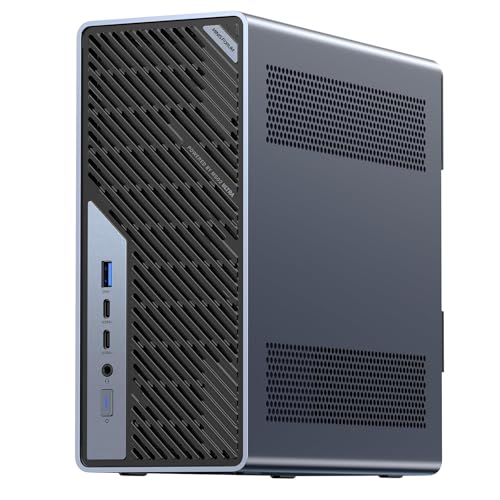
- Best streaming workstation overall: Minisforum MS-02 Ultra Mini Workstation, Core Ultra 9 285HX, 32GB, 1TB — Check on Amazon
- GMKtec EVO-X2, Ryzen AI Max+ 395, 64GB Unified Memory, 1TB — Check on Amazon
- Skytech King 95, Ryzen 7 9800X3D, RTX 5070 Ti, 32GB, 1TB — Check on Amazon
- iBUYPOWER Y40 PRO, Ryzen 9 7900X, RTX 5070 Ti, 32GB, 2TB — Check on Amazon
See 2 more Amazon options
- Lenovo Legion T7, Core Ultra 7 265KF, RTX 5080, 32GB, 1TB — Check on Amazon
- Apple Mac mini M4 Pro, 24GB Unified Memory, 512GB — Check on Amazon
Read the full guide ↓
Disclosure: As an Amazon Associate, reviewstook.com earns from qualifying purchases. Links to Amazon on this page are affiliate links; they cost you nothing extra. Listing details such as price and availability change often, so check the current Amazon listing before you buy.
A workstation that streams is really two machines sharing one power supply. By day it compiles, renders, edits or runs the model. On stream, it has to keep doing that work — the application your audience came to watch — while a second, unforgiving job runs beside it: capturing, compositing and encoding the picture and pushing it out at a constant bitrate, live, with no pause button. This guide is for the people whose broadcast is their work — the developer streaming a build, the artist streaming a sculpt, the editor streaming a grade — and here the encoder is graded as the workstation specification it is.
So the workflow needs defining before any product does. One machine runs the workload, OBS and the chat together. On Twitch, the practical standard is a constant-bitrate stream at around 6,000 kbps with two-second keyframes, in H.264 — the one codec every viewer’s device decodes. On YouTube you can push considerably higher bitrates, send a 1440p feed, and — where the hardware supports it — encode in AV1, which holds detail at a given bitrate better than H.264. Live 4K streaming remains platform-limited: the services, not these machines, are the bottleneck. Everything here is graded against that workflow: which encoder block encodes, whether a second encoder can record locally while the first broadcasts, how much CPU is left over, what the wired networking is, and whether the machine is quiet enough to sit near a microphone.
The honesty note from the base guide carries over unchanged. Three of the six picks are gaming towers, graded here as broadcast-capable render nodes: superb graphics cards and encoders, no ECC memory, no ISV-certified drivers, no workstation support contract. One pick is a genuine platform workstation — ECC support, a 256GB memory ceiling, 25-gigabit networking — that happens to carry a serviceable hardware encoder. One is a unified-memory mini built for local AI. One is a Mac. Certification still lives in the HP Z and Lenovo ThinkStation lines above this budget, and if a client contract requires it, that requirement outranks everything below. What $2,500 buys is capability: a machine whose day job and broadcast job stop competing for the same silicon.
In this guide
Quick Picks
Each row below names a streaming workload and the machine that suits it, with a link to the listing.
| Streamer type | Pick | Why it stands out | Link |
|---|---|---|---|
| Best streaming workstation overall | Minisforum MS-02 Ultra, Core Ultra 9 285HX, 32GB, 1TB | Quick Sync encodes while 24 cores work; ECC, dual 25GbE, capture-card slot | Check on Amazon |
| Best for AI and big-scene streams | GMKtec EVO-X2, Ryzen AI Max+ 395, 64GB, 1TB | 64GB unified memory, an AV1-capable AMD encoder, 16 cores for software encoding | Check on Amazon |
| Best stream-plus-record tower | Skytech King 95, Ryzen 7 9800X3D, RTX 5070 Ti | Two NVENC encoders — one broadcasts, one records — published 850W Gold PSU | Check on Amazon |
| Best all-round broadcast tower | iBUYPOWER Y40 PRO, Ryzen 9 7900X, RTX 5070 Ti | Dual NVENC, 12 cores of headroom, 2TB for recordings — check price on Amazon | Check on Amazon |
| Strongest GPU — check price carefully | Lenovo Legion T7, Core Ultra 7 265KF, RTX 5080 | RTX 5080 with dual NVENC and AV1 — in this guide only while its live price fits the budget; check the current price on Amazon | Check on Amazon |
| Best quiet media streamer | Apple Mac mini M4 Pro, 24GB, 512GB | Hardware media engines and near-silence beside the microphone; no AV1 encode | Check on Amazon |
How These Picks Were Chosen
The budget was applied as a ceiling for the whole machine, as in the base guide: every product below is a real Amazon listing positioned within the $2,500 budget in the United States — check price on Amazon for the current figure before you buy, because live prices move. Two picks sit near the top of the band and can move in and out of it, and both say so wherever they appear: the Legion T7 normally belongs to the under-$3,000 guide and earns its place here only while its live price fits, and the King 95 sits close to the ceiling, so confirm its current price on Amazon before ordering.
On top of the base guide’s workstation filters, this variant applies five streaming tests. First, the encoder: is there a dedicated hardware block, which generation is it, and does it encode AV1 or only H.264 and HEVC? Every encoder claim derives from the documented silicon of the base set — no encoder is upgraded, doubled or invented in the retelling. Second, the second encoder: only some machines can record a clean local copy while broadcasting without taxing the CPU. Third, leftover CPU: OBS scenes, chat bots and the workload all eat cores, so core count is graded as broadcast headroom. Fourth, the wire: a port speed is claimed only where the base research documents one. Fifth, noise: a workstation beside a microphone is a different purchase from one under a desk, so fan behaviour is graded as a broadcast specification.
We did not use these machines ourselves, or benchmark anyone’s stream. We read the maker listings, specification pages and reviewer coverage documented in the base guide, and re-graded its six verified machines against the workflow above. Where the base research does not document a streaming-relevant fact — an Ethernet speed, a power supply wattage — this guide says so rather than filling the gap, because a purchase made on an invented specification fails live, in public.
The Encoder Map: What Each Machine Actually Broadcasts With
Everything else in this guide hangs on this section. An encoder is the silicon block that turns your screen into the stream. Software encoding (x264) does the job on the CPU and competes with your workload for cores. Hardware encoders — NVIDIA’s NVENC, Intel’s Quick Sync, AMD’s VCN media engine, Apple’s media engines — do it on dedicated silicon and leave the machine free to work. Generation matters as much as existence: newer blocks hold fine detail — foliage, particles, small text, fast camera moves — visibly better at Twitch’s roughly 6,000 kbps, and the newest add AV1, the codec YouTube rewards with cleaner high-bitrate and 1440p ingest.
The two RTX 5070 Ti towers (King 95, Y40 PRO) and the RTX 5080 Legion T7 carry two ninth-generation NVENC encoders each, with AV1 encode. That is the strongest broadcast silicon in this guide, twice over: one encoder carries the live stream while the second records a high-bitrate local copy for later editing and upload — the stream-plus-record split that defines professional single-PC streaming. For Twitch they encode H.264 at the platform standard; for YouTube they can send AV1. On these three machines the encoder question is simply settled.
The GMKtec EVO-X2’s Radeon 8060S carries AMD’s RDNA 3.5 VCN media engine, with AV1 encode. It is the only non-NVIDIA pick here that can feed YouTube an AV1 stream, and its H.264 output is a current-generation hardware encode. The honest grading, stated once and applied throughout: at Twitch’s constrained bitrate, AMD’s H.264 holds fine detail a step behind NVENC’s — the gap shows in fast, texture-heavy scenes, not in a code editor, slide deck or sculpting viewport, which is most of what this machine will ever broadcast. Its 16 cores also make software x264 a genuine fallback, something no other non-tower pick can claim.
The Minisforum MS-02 Ultra encodes through Intel Quick Sync on its Core Ultra 9 285HX’s integrated graphics. Quick Sync is a mature, dedicated hardware block: it produces a clean H.264 or HEVC stream while all 24 cores stay on the workstation load — precisely the division of labour this machine is bought for. Two limits are stated plainly: we credit its integrated block with H.264 and HEVC encode and claim no AV1 encode for it. And out of the box there is no discrete GPU, so the content side is integrated graphics: a superb machine for streaming work — coding, data, creative applications, a camera-led show — that becomes a game-streaming machine only once a low-profile card goes into its PCIe slot.
The Lenovo Legion T7’s processor, the Core Ultra 7 265KF, carries no Quick Sync at all. The F suffix means no functional integrated graphics, so there is no Intel encoder hiding in reserve. It does not matter here, because the RTX 5080’s dual NVENC does all the encoding this machine will ever need; if the graphics card is ever removed, this tower has no hardware encoder left.
The Mac mini M4 Pro encodes through Apple’s media engines: hardware H.264, HEVC and ProRes, with AV1 handled as decode only. For Twitch, that is everything required — a clean H.264 stream from fixed-function silicon while the 12 CPU cores run the edit, the mix or the build. For YouTube it sends H.264 or HEVC at higher bitrates; what it cannot do is encode AV1, and this guide does not pretend otherwise. If your YouTube strategy depends on AV1 ingest, buy an NVIDIA tower or the EVO-X2 instead.
One line summarises the map: AV1 encode lives on exactly four picks — the three NVIDIA towers and the EVO-X2; dual-encoder stream-plus-record on exactly three — the NVIDIA towers; Quick Sync on exactly one — the MS-02 Ultra. No pick is credited with an encoder its documented silicon does not carry.
The 6 Best Workstation PCs for Streaming Under $2,500
Minisforum MS-02 Ultra Mini Workstation — Core Ultra 9 285HX, 32GB, 1TB
Who it suits: Professionals whose stream is their work itself — developers, data engineers, homelab and virtualization streamers, technical educators — and anyone who wants the broadcast encoded by a dedicated block while a serious workstation platform does the rest.
Graded as a streaming workstation, the MS-02 Ultra’s argument is a division of labour no other pick matches. The Core Ultra 9 285HX brings 24 cores and 24 threads up to 5.5GHz for the workload — compiles, VM stacks, long compute — while Intel Quick Sync on the integrated graphics carries the encode as a separate, fixed job. Your stream never steals a core from your build, and your build never starves the encoder. Four DDR5 SO-DIMM slots take memory to 256GB, with ECC support — the error-correcting kind, claimed for this machine only in this guide, because its documentation supports it. Storage starts at 1TB across four M.2 2280 positions, two on the board and two on the networking card.
The networking is where this pick quietly laps the field for broadcast use. Dual 25GbE SFP+ on an Intel E810 controller, plus 10GbE and 2.5GbE copper, is shared-storage class connectivity: the machine can pull media from network storage at internal-drive speeds while it uploads a stream, and the 2.5GbE copper port is the documented wired path for the broadcast. The PCIe 5.0 x16 slot does double streaming duty — it accepts the low-profile graphics card that would turn this into a game-streaming box, and equally an internal capture card, the cleanest route to streaming a console or a second PC through this machine. Four video outputs are specified in the maker’s listing copy. It runs Windows 11 Pro behind an internal 350W power supply — check price on Amazon for the current figure before you buy.
The limitations are the base guide’s, plus one broadcast-specific note. Out of the box there is no discrete GPU: GPU rendering waits for the card you add later, capped by the low-profile format and the 350W supply, and reviewer coverage notes the CPU’s power limit steps down with a discrete card installed — so grade it as a work-streaming machine today and a modest game-streaming machine after an upgrade. Owner reports describe Linux and Proxmox driver and passthrough quirks; Windows and Hyper-V are the smoother path. And the power supply fan is audible under sustained load, so keep the microphone close and the gain low, and the fan stays out of the broadcast. Even so, nothing else at this budget offers ECC, a 256GB ceiling, 25-gigabit networking, a Gen 5 slot and a hardware encoder in one box.
- Quick Sync encode leaves all 24 cores on the workload.
- Dual 25GbE SFP+ plus 10GbE and 2.5GbE — the strongest documented wired networking here.
- PCIe 5.0 x16 slot takes a low-profile GPU or an internal capture card.
- ECC memory support across four slots, up to 256GB — this guide’s only ECC claim.
Honest limitation: Integrated graphics out of the box, so game streaming waits for a low-profile card inside a 350W ceiling; no AV1 encode is credited to its Quick Sync block; and the power supply fan is audible under sustained load, which a nearby microphone will hear.
Choose it if your broadcast is your workstation work — code, data, VMs, creative apps — and you want the encode handled by dedicated silicon on a real platform. Skip it if your stream is primarily gameplay from day one — start with a tower below, whose graphics card and dual encoders are already installed.

GMKtec EVO-X2 — Ryzen AI Max+ 395, 64GB Unified Memory, 1TB
Who it suits: AI developers, researchers and technical artists who stream the work only this machine can hold — large local models, oversized scenes — and who want an AV1-capable hardware encoder without buying a gaming tower.
The EVO-X2’s streaming case starts from its defining specification: 64GB of LPDDR5X memory, soldered and shared between the Ryzen AI Max+ 395’s 16 cores and its Radeon 8060S graphics. AMD’s guidance for the platform lets the graphics engine address up to 48GB of that pool. For a streamer, that means the thing being broadcast — the large local model, the scene file that refuses to load into a 16GB graphics card — actually runs on the same desk as OBS, in one box, with memory to spare for browser and chat. No other pick here can make that claim. Check the current price on Amazon before you buy.
The encoder is AMD’s RDNA 3.5 VCN block inside the 8060S. It encodes AV1 in hardware — the only non-NVIDIA route in this guide to YouTube’s AV1 ingest, with its cleaner 1440p and high-bitrate presentation — and H.264 and HEVC for Twitch and everywhere else. The grading caveat from the encoder map applies in full: at Twitch’s roughly 6,000 kbps, AMD’s H.264 holds fine detail a step behind NVENC in fast, texture-dense scenes. A model-loading screen, code editor, sculpting viewport and slide-driven talk are not those scenes; a streamed first-person game is. 16 cores and 32 threads up to 5.1GHz also give x264 real headroom alongside a workload — the guide’s best non-tower software fallback. Around the core: a 1TB PCIe 4.0 SSD, Wi-Fi 7, USB4, a quad-display listing spec, and 2.5GbE-class wired networking.
The limitations follow from the architecture. Soldered memory means 64GB is the lifetime specification — no upgrade path, ever — and the 128GB configuration of this same machine sits in a higher price band, outside this budget entirely, which is why it is discussed here rather than linked. There is no PCIe slot, so an internal capture card is not an option: console sources arrive over USB capture or not at all. The single 1TB drive is the guide’s joint-smallest, and local recordings will fill it on a schedule — fast external or network storage is a planned companion. And integrated graphics, however well fed with memory, remain integrated graphics: for pure rendering throughput and high-frame-rate game streaming, the discrete towers below finish faster.
- 64GB unified pool; graphics can address up to 48GB — streams models no 16GB card can load.
- RDNA 3.5 VCN encoder with hardware AV1 — the only non-NVIDIA AV1 route here.
- 16 cores / 32 threads make software x264 a genuine fallback, not a compromise.
- Quad-display listing spec and 2.5GbE-class wired networking.
Honest limitation: The memory is soldered — 64GB forever — there is no PCIe slot for an internal capture card, the 1TB drive fills quickly with recordings, and AMD’s H.264 at Twitch bitrates trails NVENC in fine detail.
Choose it if your stream is local AI or oversized creative work and you want AV1 encode without a tower. Skip it if your broadcast is fast-moving gameplay judged on H.264 detail — the NVIDIA towers encode that picture better — or if you need internal expansion.

Skytech King 95 — Ryzen 7 9800X3D, RTX 5070 Ti, 32GB, 1TB
Who it suits: 3D artists, motion designers and editor-streamers whose broadcast is GPU work — renders, viewports, gameplay-adjacent creative streams — and who want to record a clean local copy of every stream without thinking about it.
Graded as a streaming machine, the King 95’s headline is its encoder count. The RTX 5070 Ti carries two ninth-generation NVENC encoders with AV1 support, and that second block is the professional feature: one broadcasts to Twitch in H.264, or to YouTube in AV1, while the second records a high-bitrate local master for editing and clipping. Neither job touches the CPU or the other’s quality. The card behind the encoders — 16GB of GDDR7 and current-generation CUDA compute — is also the content engine for Blender Cycles, Octane, Redshift and DaVinci Resolve’s GPU effects: the hardest-working resident GPU here after the Legion’s higher-tier 5080. Skytech names what most builders hide: an 850W Gold ATX 3 power supply, printed in the listing, alongside 32GB of DDR5-5600 and a 360mm liquid cooler. This configuration sits near the top of the budget, so check price on Amazon and confirm the live figure still fits before you order.
The processor deserves the same honest paragraph the base guide gave it, reframed for broadcast. The Ryzen 7 9800X3D is an eight-core chip whose large cache is famous among gamers. Streaming here does not need its cores for encoding — NVENC sees to that — so eight strong cores run OBS, the creative application and the chat comfortably. But a streamer whose workload is CPU rendering or heavy compilation should read the Y40 PRO review below first: twelve cores beat eight in this budget, and OBS headroom is part of that arithmetic. The celebrated cache does little for render queues or encode work.
The remaining limitations are the render-node class limitations, restated for this audience: a consumer platform, so no ECC memory and no certified professional driver program; Windows 11 Home rather than Pro; a graphics card brand that may vary under Skytech’s listing note, so the contracted spec is the 5070 Ti model, its 16GB and its dual NVENC — not a specific board partner; and a name covering a family of configurations, so the model number — ST-KING95-1671-W-AM — is the thing to match at checkout. The base research does not document a wired Ethernet speed for this pick, so none is claimed: run the broadcast on a cable regardless. Storage is the joint-smallest here at 1TB; internal expansion makes the fix cheap.
- Two NVENC encoders with AV1 — broadcast and local record run simultaneously.
- RTX 5070 Ti 16GB — the strongest resident GPU compute under the ceiling.
- Published 850W Gold ATX 3 PSU and 360mm liquid cooling.
- Standard tower platform: RAM, storage and GPU all upgrade in place.
Honest limitation: A gaming platform graded as a broadcast node — no ECC, no ISV certification, Windows 11 Home, an eight-core CPU whose famous cache does little for render or compile loads, and a position near the top of this budget, so the live price needs checking on Amazon before you buy.
Choose it if GPU work dominates your stream and the stream-plus-record split is how you work. Skip it if your loads are CPU-bound — the twelve-core pick below is the better use of this budget — or if checking the current price on Amazon shows it has moved outside this budget.

iBUYPOWER Y40 PRO — Ryzen 9 7900X, RTX 5070 Ti, 32GB, 2TB
Who it suits: Developers, video professionals and generalist freelancers who stream mixed work — compiling in the morning, rendering in the afternoon, broadcasting throughout — and who time their purchases carefully.
If the King 95 is the encoder-first tower, the Y40 PRO is the headroom-first one — for mixed professional streaming, possibly the smarter purchase. Its RTX 5070 Ti brings the same dual ninth-generation NVENC with AV1. What changes is everything around the card. The Ryzen 9 7900X brings twelve cores and twenty-four threads, half again the King 95’s count, and cores are the currency OBS spends — complex scenes, browser sources, chat bots and the workload all draw from the same pool, and this is the deepest pool among the towers. Storage doubles the other towers: a 2TB NVMe drive, sized for archiving a high-bitrate local master of every session. Memory is 32GB of DDR5, and a keyboard and mouse are in the box. Check price on Amazon for the current figure before you buy.
Balance has a cost, and here the cost is documentation. The verified listing material for this model does not publish a power supply wattage, and we do not invent one. For a machine bought to work and broadcast for years, and to accept a future graphics card, the PSU is a specification to confirm with the seller before ordering; this review makes that a condition rather than a footnote. The base research likewise documents no wired Ethernet speed for this pick, so none is claimed — the broadcast still goes on a cable. The class limits are shared with the other towers: no ECC, no certified drivers, Windows 11 Home.
Within those terms, the Y40 PRO is the all-rounder with a broadcast habit. A developer who compiles all morning and renders all afternoon, an editor whose timeline work is half CPU effects and half GPU, a freelancer whose next contract — and next stream format — is unknowable: all are better served by twelve cores, the dual-encoder card and double storage than by any single-axis maximum here. It also tends to leave headroom in the budget for the microphone, the lighting and the backup drive a streaming budget honestly includes — check the current price on Amazon to see how much room is left.
- Dual NVENC with AV1 — the same stream-plus-record split as the King 95.
- 12-core / 24-thread Ryzen 9 7900X — the deepest OBS headroom of the towers.
- 2TB NVMe storage — double the other towers, sized for local stream masters.
- Often leaves the most headroom in this budget among the towers — check price on Amazon.
Honest limitation: No PSU wattage is published in the listing material — get it confirmed by the seller before buying a machine you intend to upgrade — and the platform carries the usual render-node limits: no ECC, no certified drivers, Windows 11 Home.
Choose it if your work and your stream both mix CPU and GPU loads, and you check the current price on Amazon before ordering. Skip it if unpublished internals are a deal-breaker for a work purchase — the King 95 above documents its power supply in full.

Lenovo Legion T7 — Core Ultra 7 265KF, RTX 5080, 32GB, 1TB
Who it suits: GPU-bound streamers — render artists, AI tinkerers, high-end gameplay broadcasters — who can wait until its live price falls within this budget and want the strongest graphics card and encoder set this budget can be stretched to cover.
This pick comes with a condition attached, and the condition is its live price. The Legion T7 normally sits in our under-$3,000 guide. It earns its place here only while its current price on Amazon falls within this budget, and while it does, the machine offers something nothing else here can: an RTX 5080 with 16GB of GDDR7 — a full tier above the 5070 Ti towers — carrying the same dual ninth-generation NVENC with AV1 encode, driven by Intel’s Core Ultra 7 265KF, a 20-core processor. For a streamer, that combination is the ceiling of this guide: the fastest content engine here, two hardware encoders for the broadcast-plus-record split, AV1 for YouTube, and twenty cores of headroom for OBS. The rest of the configuration is 32GB of DDR5-5600, a 1TB SSD and Windows 11 Pro — the only tower here shipping the professional operating system — with an 850W power supply in the model’s published specification.
Two streaming-specific facts belong in this review. The first is the processor’s suffix: the 265KF is an F-suffix chip, meaning no integrated graphics and therefore no Quick Sync encoder in reserve. It costs nothing today, because the 5080’s NVENC pair does everything; it matters only on the day the graphics card is out of the machine, when this tower has no hardware encoder at all. The second is timing. Live prices move: the listing can climb back to a figure that breaks this budget, and a buyer who needs a machine this week while it sits above the ceiling is shopping in the wrong guide. The rule stands as printed in the buy box and the quick picks: at or under $2,500, this is arguably the strongest streaming tower here; above it, an excellent machine that belongs to a different budget.
Its grading is the render-node grading, class limitations intact: a consumer Intel platform without ECC memory, GeForce rather than certified professional drivers, and gaming-tower support rather than a workstation service contract. Storage is 1TB, the joint-smallest in the guide, in a chassis with room to add more — worth doing early if every stream gets a local master. The base research documents no wired Ethernet speed for this pick, so none is claimed; the broadcast goes on a cable regardless. None of that diminishes what it offers while its live price fits this budget, but it defines the buyer: one who values throughput over platform guarantees and treats the live price as a discipline.
- RTX 5080 16GB with dual NVENC and AV1 — the strongest GPU and encoder set here, only while its live price fits this budget; check price on Amazon.
- 20-core Core Ultra 7 265KF and Windows 11 Pro.
- 850W PSU in the model’s published specification.
Honest limitation: It sits in this budget only while its live price does — check the current price on Amazon; at its usual higher-band positioning it belongs to the under-$3,000 guide — its F-suffix processor carries no Quick Sync fallback encoder, and it carries the render-node class limits: no ECC, no ISV certification.
Choose it if GPU throughput is your bottleneck and the live price sits at or under $2,500. Skip it if checking the current price on Amazon shows it outside this budget, or your purchase cannot wait for it to return.

Apple Mac mini M4 Pro — 24GB Unified Memory, 512GB
Who it suits: Video editors, audio producers, photographers and Apple-ecosystem creators who stream their craft — edits, mixes, retouching sessions, Apple-platform development — and who want the quietest machine in the guide beside the microphone.
Every other machine here is a Windows PC — for a large class of media work, simply the wrong shortlist. The Mac mini with M4 Pro is a 12-core CPU (eight performance, four efficiency) with a 16-core GPU, 273GB/s of memory bandwidth and dedicated media engines: hardware encode for H.264, HEVC and ProRes, with AV1 handled in hardware on the decode side. For a streamer: OBS here encodes its Twitch stream in H.264 on fixed-function silicon, without troubling the cores running Final Cut, Logic, Lightroom or the build. It does all of it in a near-silent box that disappears behind a monitor — itself a specification, within microphone range. Of the six picks, this is the one whose fan noise you will never apologise for on air. Apple’s own specification gives this model up to three displays, across three Thunderbolt 5 ports and HDMI at the rear — the only display count we state for a mini, because the maker publishes it. Check the current price on Amazon before you buy; this configuration sits comfortably in the lower part of this budget.
The encoder limitation must be met head-on, because it decides this pick for YouTube-focused streamers. The M4 Pro’s media engines do not encode AV1 — decode-only on this silicon — so a YouTube stream from this machine goes up in H.264 or HEVC at the platform’s higher bitrates, which YouTube accepts perfectly well; but the AV1 ingest route and its quality-per-bitrate advantage belong to the NVIDIA towers and the EVO-X2. If your channel strategy is built on AV1, this is the wrong pick however quiet it is. Twitch streamers give up nothing: the platform’s standard is H.264, and this machine’s H.264 is hardware-born.
The remaining limitations are Apple’s standing ones, and they are absolute. Memory and storage are fixed at purchase: 24GB and 512GB are the lifetime specification of this configuration, and the 512GB drive is tight for media work and tighter still for a machine archiving stream recordings — fast external storage is a planned companion purchase, and memory-bound buyers should check the 48GB configuration and its current price on Amazon before ordering this one. It runs macOS only, which excludes Windows-only professional software outright, and some streaming tooling remains Windows-first — check your exact stack before committing. Its GPU is not a CUDA device: Blender and AI workflows built on NVIDIA compute belong on the towers above.
- Hardware H.264, HEVC and ProRes media engines — the stream encodes off the CPU.
- Near-silent in a monitor-shadow footprint — the microphone-friendly pick.
- Up to three displays per Apple’s published specification; Thunderbolt 5 throughout.
- Sits well within this budget — check price on Amazon.
Honest limitation: No AV1 encode — AV1 is decode-only on this silicon — memory and storage are sealed at purchase (24GB and 512GB forever), it runs macOS only, and there is no CUDA for NVIDIA-based render or AI pipelines.
Choose it if your work and your stream live in Apple’s ecosystem and quiet matters. Skip it if your YouTube strategy needs AV1 encode, you need Windows software or CUDA, or any prospect of upgrading memory later matters to you.

Comparison Table
| Product | Encoder | Best streaming use | Link |
|---|---|---|---|
| Minisforum MS-02 Ultra, 285HX, 32GB, 1TB | Intel Quick Sync (H.264/HEVC) | Work streams on an ECC platform; 25GbE networking; capture card via PCIe slot | Check on Amazon |
| GMKtec EVO-X2, AI Max+ 395, 64GB, 1TB | AMD VCN, RDNA 3.5 (H.264/HEVC/AV1) | Local AI and big-scene streams; AV1 to YouTube; x264 fallback on 16 cores | Check on Amazon |
| Skytech King 95, 9800X3D, RTX 5070 Ti | 2× NVENC, 9th gen (H.264/HEVC/AV1) | Stream-plus-record GPU work from a steady position within this budget | Check on Amazon |
| iBUYPOWER Y40 PRO, 7900X, RTX 5070 Ti | 2× NVENC, 9th gen (H.264/HEVC/AV1) | Mixed CPU + GPU streaming with 2TB for local masters and budget headroom | Check on Amazon |
| Lenovo Legion T7, 265KF, RTX 5080 | 2× NVENC, 9th gen (H.264/HEVC/AV1) | Maximum GPU and encoder power when its live price fits this budget; no Quick Sync reserve | Check on Amazon |
| Apple Mac mini M4 Pro, 24GB, 512GB | Apple media engines (H.264/HEVC/ProRes; AV1 decode only) | Quiet media streaming in Apple’s ecosystem | Check on Amazon |
Setting Up OBS on These Machines
Hardware decides what is possible; OBS settings decide what viewers actually see. The configuration below is the working baseline these picks were graded against.
Encoder assignment, pick by pick. On the King 95, Y40 PRO and Legion T7, set the stream encoder to NVENC H.264 for Twitch, or NVENC AV1 for YouTube, and the recording encoder to the second NVENC block at a high local bitrate, so broadcast and master are independent jobs. On the EVO-X2, use the AMD hardware encoder: AV1 for YouTube, H.264 for Twitch, with software x264 reserved for scenes where you can spare the cores. On the MS-02 Ultra, use Quick Sync H.264 (or HEVC where the platform accepts it) and leave the 24 cores alone — that restraint is the machine’s entire design. On the Mac mini, use the Apple hardware encoder for H.264; do not select an AV1 option expecting hardware speed, because the encode engine for it is not there.
Bitrate and keyframes. For Twitch, run constant bitrate — CBR — at around 6,000 kbps with a two-second keyframe interval; that pairing is what the platform’s ingest and transcoding pipeline are built around, and straying from CBR is the most common self-inflicted wound in amateur setups. For YouTube, the ceiling is yours to choose: send a higher bitrate, send 1440p if your workflow renders it, and use AV1 on the four picks that encode it. Live 4K remains platform-limited.
The three lag counters, and what each one is telling you. OBS reports three distinct kinds of loss, and confusing them wastes evenings. Rendering lag means the graphics processor was too busy drawing your workload or game to composite the OBS scene on time; the fix is headroom — cap the application’s frame rate, lower its render load, or simplify the scene. Encoding lag means the chosen encoder could not keep up; the fix is to move the job to the hardware block graded for your pick, or step the preset one notch faster. Dropped frames (network) mean the upload path failed, and no encoder setting repairs them: the fix is the wire, below. Read the counter before reaching for a remedy; each lag has exactly one honest cure.
The wired rule. Stream on a cable. Wi-Fi variance that a video call forgives will saw a constant-bitrate broadcast into dropped-frame segments, and every pick here is graded on the assumption of Ethernet. Where this guide’s research documents a port, the speed is stated: the MS-02 Ultra offers 2.5GbE copper alongside its 10GbE and dual 25GbE SFP+ — plug the broadcast into the copper port and keep the SFP+ pair for storage traffic — and the EVO-X2 documents 2.5GbE-class wired networking. For the three towers and the Mac mini, the base research does not document a wired port speed, so none is claimed here: run the cable, and read the speed off the live listing when you buy.
Costing the Rest of the Streaming Desk — Without Inventing Prices
The machine is most of a streaming workstation’s budget, but not all of it, and this section names the remaining kit without pricing any of it — peripheral prices are not part of this guide’s verified research. The order below is the order streamers actually spend in. Microphone first. Audio is the half of a broadcast viewers judge harshest and forgive least; a modest microphone placed close, with the gain low, keeps workstation fan noise out of your stream. Lighting and camera second, if your format puts you on screen: light decides the picture more than the camera does. A second or third monitor third: chat, OBS preview and stream health need somewhere to live that is not the screen you are broadcasting; every pick here documents multi-display capability. The capture card last, and only for its one job: capturing a source that is not this PC — a game console, a camera used as a capture source, or a second machine. Every pick here streams its own screen with no capture card at all; the MS-02 Ultra’s PCIe slot offers the internal version.
How to Choose a Streaming Workstation PC Under $2,500
- Name the platform before the machine. Twitch’s standard is H.264 at around 6,000 kbps CBR, which every pick here produces in hardware. YouTube rewards higher bitrates, 1440p and AV1 — and AV1 encode exists on exactly four of these six machines.
- Decide whether you record while you stream. The stream-plus-record split — one encoder broadcasting, one recording a high-bitrate local master — is the professional habit this tier enables, and it belongs to the three dual-NVENC towers. If you edit, clip or archive every session, that split is worth more than a tier of graphics card.
- Match the content engine to the content. GPU rendering and gameplay want the towers’ discrete cards; oversized AI models want the EVO-X2’s 64GB pool; platform work — VMs, storage, long compute — wants the MS-02 Ultra; Apple-native media wants the Mac. The encoder follows the content, not the reverse.
- Count leftover cores, not just total cores. OBS, chat tooling and the workload share the CPU. The Y40 PRO’s twelve cores and the EVO-X2’s sixteen are broadcast headroom; the King 95’s eight suffice precisely because its encoders never ask them for help.
- Grade the wire as part of the machine. A constant-bitrate stream on Wi-Fi is a dropped-frame schedule. Where a wired speed is documented it is stated in the reviews; where it is not, the cable is still mandatory.
- Put the microphone in the noise budget. Sustained-load volume is a broadcast specification. The Mac mini is near-silent; the MS-02 Ultra’s power supply fan is audible under load; the towers cool hard when they render hard.
- Demand published internals on a work purchase. A named power supply wattage defines whether the next GPU upgrade — and its next-generation encoders — is a swap or a rebuild. Where a listing does not publish it, confirm it with the seller first.
- Respect price discipline at this tier. Two picks sit near the top of the band, so treat the walk-away figure as part of the product: check the current price on Amazon, and if the live price breaks the budget, switch picks or step up a guide rather than stretching.
- Budget the second purchase with the first. Four of six picks ship a single terabyte, and local stream masters are large files. The platform pick wants a low-profile GPU later; the Mac wants external storage.
Common Buying Mistakes
- Streaming on Wi-Fi because the router is fast. Speed is not stability; a CBR broadcast needs the wire.
- Assuming every Intel machine has a Quick Sync encoder in reserve. The Legion T7’s 265KF is an F-suffix chip with no integrated graphics and no Quick Sync — its NVENC pair is the whole story.
- Buying the Mac mini for an AV1 streaming strategy. Its media engines encode H.264, HEVC and ProRes superbly; AV1 is decode-only. AV1 ingest lives on the NVIDIA towers and the EVO-X2.
- Treating a temporary low live price as permanent. The Legion T7 normally belongs to a higher budget band and only visits this one while its live price fits; ordering without checking the current price on Amazon first is the most expensive mistake on this page.
- Letting the workload saturate the GPU and blaming the encoder. Rendering lag is a headroom problem — cap the frame rate and simplify the scene before touching encoder settings.
- Software-encoding on a machine whose hardware encoder is idle. x264 has its place — the EVO-X2’s sixteen cores make it a real option — but on the towers the CPU should be working, not encoding.
- Recording local masters to the same nearly-full 1TB drive. Four of six picks ship a terabyte; a month of high-bitrate recordings is a storage plan.
- Ignoring the unpublished specification. An unpublished power supply wattage is a pre-purchase question — resolve it before ordering, not at the first GPU upgrade.
Final Recommendation
- Most streaming professionals: Minisforum MS-02 Ultra.
- AI and oversized-model streams: GMKtec EVO-X2 64GB.
- Stream-plus-record GPU work within this budget: Skytech King 95.
- Mixed CPU + GPU streaming with budget headroom: iBUYPOWER Y40 PRO.
- Maximum GPU and encoder power, only while its live price fits: Lenovo Legion T7.
- Quiet media streaming in Apple’s ecosystem: Mac mini M4 Pro.
Our top two at this budget are the MS-02 Ultra — the only pick designed like infrastructure that also broadcasts — and the EVO-X2, for the class of work bounded by memory rather than speed, which gains an AV1 hardware encoder and sixteen cores of streaming headroom. If your broadcast is GPU work, the King 95 is the tower to stream from, the Y40 PRO is the balanced alternative that tends to leave the most budget headroom, and the Legion T7 is the splurge that only makes sense while its live price fits this budget. Media professionals in Apple’s world should take the Mac mini and enjoy the headroom it leaves in the budget, AV1 aside. Lighter streams are covered in Best Workstation PC For Streaming Under $1500 and the base guide at Best Workstation PC Under $2500; the Legion in its usual higher band is covered in Best Workstation PC Under $3000. Confirm the exact configuration and the live price before you order.
Frequently Asked Questions
Can one PC really do the work and stream it at the same time?
Yes — that is the premise this tier finally makes comfortable. The trick is division of labour: a hardware encoder (NVENC, Quick Sync, VCN or Apple’s media engines) turns the screen into the stream on dedicated silicon, while the CPU and GPU run the workload. Failures happen when one resource does both jobs — software encoding on a busy CPU, or a saturated GPU compositing the broadcast — and the OBS section’s lag counters tell you which one it is.
Which pick should I choose for Twitch, and which for YouTube?
For Twitch, all six qualify — every encoder here produces the platform’s H.264 standard in hardware — so choose on content, noise and platform traits. For YouTube, higher bitrates are open to everyone, but AV1 ingest narrows the field to the three NVIDIA towers and the EVO-X2. The Mac mini and the MS-02 Ultra stream to YouTube in H.264 or HEVC, which the platform accepts; they simply do not take the AV1 route.
Does the Legion T7 have a Quick Sync encoder as a backup?
No. Its Core Ultra 7 265KF is an F-suffix processor: no integrated graphics, no Quick Sync. The machine does not need one — its RTX 5080 carries two NVENC encoders — but there is no Intel encoder in reserve, and if the graphics card is ever out of the machine, it has no hardware encoder at all.
What does the second NVENC encoder actually get me?
A simultaneous, independent local recording. One encoder broadcasts at platform bitrate; the second records a high-bitrate master to your drive for editing, clips and re-upload — without touching the CPU or degrading the stream. On the King 95, Y40 PRO and Legion T7 that split is free. On single-encoder picks, recording means capturing the stream’s own compressed output, or spending CPU cores.
Why does this guide insist on a wired connection?
Because a live stream is a constant-bitrate promise and Wi-Fi keeps its promises statistically, not continuously. OBS’s network dropped-frame counter measures exactly this failure, and no encoder upgrade repairs it. Every pick here is graded assuming Ethernet; where a port speed is documented the reviews state it, and where it is not, the cable is still the rule and the speed is a live-listing check.
Should I buy the Legion T7 if its live price is above this budget?
Not from this guide. At its usual positioning it is an under-$3,000 machine, and it is covered there. Here it belongs only while checking the current price on Amazon shows it within this budget; that walk-away discipline is part of the recommendation. If its live price sits above the budget and the need is current, the King 95 delivers the same dual-encoder service from a steadier position within this band.
- Best Workstation PC Under $2500
- Best Workstation PC For Streaming Under $1500
- Best Workstation PC For Streaming Under $3000
- Best Workstation PC For Beginners Under $2500
- Best Workstation PC For Small Spaces Under $2500
- Best Workstation PC For 1440p Gaming Under $2500
- Best Streaming PC Under $2500
- Best Mini PC Under $2500
- Best Gaming PC Under $2500
- Best Prebuilt Gaming PC Under $2500


