Where to buy
Check the latest price, availability and delivery on Amazon. Orders are placed on Amazon. We may earn a commission from qualifying purchases.
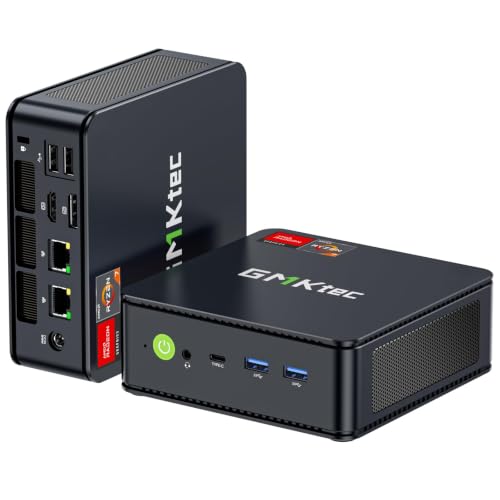
- Best overall workstation under $400: GMKtec M5 Plus Mini PC, Ryzen 7 5825U, 32GB RAM, 1TB SSD — Check on Amazon
- Beelink SER5 MAX Mini PC, Ryzen 7 5800H, 16GB RAM, 500GB SSD — Check on Amazon
- KAMRUI E3B Mini PC, Ryzen 5 7430U, 32GB RAM, 512GB SSD — Check on Amazon
- Dell OptiPlex 7060 SFF Desktop, Core i5-8500, 16GB RAM, 512GB SSD (Renewed) — Check on Amazon
See 2 more Amazon options
- BOSGAME P4 Mini PC, Ryzen 7 5700U, 32GB RAM, 1TB SSD — Check on Amazon
- MeLE Quieter4C Mini PC, Intel N150, 8GB RAM, 256GB SSD, Fanless — Check on Amazon
Read the full guide ↓
Disclosure: As an Amazon Associate, reviewstook.com earns from qualifying purchases. Links to Amazon on this page are affiliate links; they cost you nothing extra. Listing details such as price and availability change often, so check the current Amazon listing before you buy.
“Workstation” is the most abused word in budget computing, so let us define it honestly before a single product is named. A true professional workstation — the kind an engineering firm buys — runs a Xeon or Threadripper Pro processor, error-correcting ECC memory, and a certified professional graphics card whose drivers are validated by the makers of SolidWorks, AutoCAD and other professional software. None of that exists under $400. Not used, not renewed, not on the luckiest sale day of the year. If a listing at this price uses the word “workstation” to imply otherwise, it is marketing, and you should read the rest of that listing with suspicion.
What $400 genuinely buys is something still very useful: a work-first computer with real multi-core muscle, enough memory for heavy multitasking, room to grow, and outputs for a proper multi-monitor desk. The honest category looks like this. Strong mini PCs built on eight-core Ryzen processors with 32GB of memory you can later double to 64GB. A renewed corporate desktop from Dell’s business line, built to be opened, serviced and upgraded, with a spare expansion slot no mini can offer. And one fanless box for the worker whose real requirement is silence. These machines compile code, run virtual machines and containers, edit photos, cut 1080p video, drive two or three monitors of spreadsheets and documents, and handle light CAD — hobbyist Fusion 360, SketchUp, 2D drafting — without complaint. That is a real workload, and it is the workload this guide is built around.
Two limits apply to every pick below, and we will not bury them. First, there is no ECC memory anywhere in this guide: none of these platforms documents ECC support, so if your work genuinely requires error-corrected memory — long scientific computations, financial models where a silent bit error is a real risk — this budget cannot serve you and no honest guide should pretend otherwise. Second, every pick uses integrated graphics. There is no certified professional GPU here, no ISV-validated driver, and the one machine that can accept a graphics card later can only take a low-power one. Within those limits, this is the strongest work hardware $400 buys. Below are the quick picks, detailed reviews of all six machines, a comparison table, a frank section on what the workstation label does and does not mean at this price, the mistakes that waste money here, and the questions work buyers ask most.
In this guide
Quick Picks
Short on time, or comparing several options at once? Each row below names a type of worker and the machine that suits them, with a link to the listing.
| Buyer type | Pick | Why it stands out | Link |
|---|---|---|---|
| Best overall workstation | GMKtec M5 Plus, Ryzen 7 5825U, 32GB, 1TB | Eight cores, 32GB socketed to 64GB, 1TB storage, three 4K outputs | Check on Amazon |
| Best sustained CPU power | Beelink SER5 MAX, Ryzen 7 5800H, 16GB, 500GB | Eight cores at a 54W power budget — the strongest sustained multi-core here | Check on Amazon |
| Best value | KAMRUI E3B, Ryzen 5 7430U, 32GB, 512GB | 32GB dual-channel memory and two SSD slots at the lowest price in the guide | Check on Amazon |
| Best expansion path | Dell OptiPlex 7060 SFF (Renewed), i5-8500, 16GB, 512GB | The only pick with a PCIe slot — the only one that can ever take a graphics card | Check on Amazon |
| Best storage and networking | BOSGAME P4, Ryzen 7 5700U, 32GB, 1TB | 1TB fitted plus dual 2.5GbE networking for server and NAS-adjacent duties | Check on Amazon |
| Best silent workstation | MeLE Quieter4C, Intel N150, 8GB, 256GB | Fanless and silent, sips power, drives three 4K displays — for light duties only | Check on Amazon |
How These Picks Were Chosen
The budget was applied as a ceiling for a complete, working computer: every pick below is a real Amazon listing positioned within the $400 budget in the United States — check the live price on Amazon, since listing prices change often. Barebone kits with no memory, storage or operating system were excluded however strong the processor, because a workstation you cannot switch on and use is not a workstation at any price.
We did not use these machines ourselves. We read the maker listings, specification pages and platform documentation, and compared the things that decide whether a computer can work for a living: core and thread counts, the power budget the processor is allowed to sustain, how much memory is fitted and — just as important — whether that memory sits in sockets you can upgrade or is soldered down forever, storage capacity and spare slots, and the physical display outputs a multi-monitor desk actually needs. On that last point we counted ports, not promises: a pick earns a three-monitor claim only where its listing documents three display outputs.
Two workstation-specific filters sat on top of that. The first is the growth filter: professional work expands to fill hardware, so we favored machines whose memory doubles to 64GB and whose storage can grow, over sealed boxes that are finished the day they arrive. The second is the honesty filter on professional features. ECC memory and ISV-certified graphics are real things with real value, and precisely because they matter, we checked for them rather than assuming them — none of the six machines below documents ECC support, and none carries a certified professional GPU, so this guide says so openly instead of letting the word “workstation” smuggle those implications in. What these machines offer instead is documented: core counts, memory ceilings, port sets and prices, all verifiable on the listings themselves.
The 6 Best Workstation PCs Under $400
GMKtec M5 Plus Mini PC — Ryzen 7 5825U, 32GB RAM, 1TB SSD
Who it suits: The professional who wants the most complete work machine in this guide out of the box — developers, analysts, photo editors and heavy multitaskers who would rather spend their time working than upgrading.
Start with the specification, because it is the most balanced in this guide. The Ryzen 7 5825U brings eight cores and sixteen threads, the joint-highest core count here, and it arrives with 32GB of DDR4 memory fitted as two 16GB sticks — which matters twice over. First, 32GB is the point where professional multitasking stops being a negotiation: an IDE, a local development stack, a browser carrying dozens of tabs, a chat client and a spreadsheet suite can all stay open at once. Second, the memory is socketed, and the platform takes 64GB, so the day your workload outgrows 32GB the fix is a pair of replacement sticks, not a replacement computer. Storage follows the same pattern: a 1TB NVMe SSD fitted, with a second M.2 slot documented and headroom the listing puts at 4TB in total.
The desk setup is equally complete. The listing documents triple 4K display output across HDMI, DisplayPort and USB-C, which covers the standard professional arrangement — code or canvas in the middle, reference and communication on the sides — without adapters doing heroic work. Dual 2.5GbE network ports are unusual at this price and genuinely useful for work: one link to your network and one to a NAS or a direct-attached second machine moves project files at two and a half times gigabit speed. Windows 11 Pro is fitted, which professionals should note — it brings BitLocker encryption, Remote Desktop hosting and domain features the Home edition omits. The integrated Radeon graphics are the honest ceiling of the whole package: fine for photo editing, 1080p video timelines, multi-monitor productivity and light CAD, not a substitute for a discrete card on heavy 3D work. Check the current price on Amazon before you order — this is the strongest machine in this guide, and it sits within the budget tier this guide covers.
- Eight cores and sixteen threads with 32GB fitted — the guide’s most complete starting specification.
- Socketed memory expandable to 64GB and a second M.2 slot: this machine grows with your workload.
- Triple 4K outputs and dual 2.5GbE ports — a proper multi-monitor, fast-network desk setup.
Honest limitation: Integrated graphics only, with no way to add a card — heavy 3D, GPU rendering and certified CAD work are beyond it, permanently.
Choose it if you want the strongest all-round work specification here and your graphics needs are 2D, photographic or light 3D. Skip it if your software needs a discrete or certified GPU — only the Dell below leaves that door open, and only partway.

Beelink SER5 MAX Mini PC — Ryzen 7 5800H, 16GB RAM, 500GB SSD
Who it suits: Workers whose bottleneck is sustained processor throughput — long code compiles, data jobs, software builds and batch processing that hold every core busy for minutes at a time.
The SER5 MAX is built around the Ryzen 7 5800H, an eight-core, sixteen-thread processor from AMD’s higher-power mobile line, and the detail that matters for work is its 54W power budget. Most mini PCs in this guide use U-series chips tuned for efficiency, which sprint well and then ease off under a long load. An H-series chip at 54W is allowed to keep working at full effort, which is exactly the profile of a workstation load: a compile, an export, a test suite or a data transformation is not a two-second burst, and the machine that holds its speed through minute ten finishes the day’s work sooner. For CPU-bound professional tasks, this is the strongest engine in the guide.
The rest of the specification is a deliberate trade you should make with your eyes open. It arrives with 16GB of memory and a 500GB SSD — half the M5 Plus’s fitted capacity on both counts — but the chassis is built to be opened: the listing documents memory expansion to 64GB and storage swaps up to 2TB, so the machine is a strong base rather than a finished article. Display output covers a three-monitor desk via HDMI, DisplayPort and USB-C, Windows 11 Pro is fitted, and the box itself is small enough to disappear behind a monitor at under five inches square. The integrated Radeon graphics share the guide-wide ceiling: fine for 2D and light 3D, not a rendering card. Check the current price on Amazon — and keep some budget headroom in mind for the second memory stick or the larger SSD that turns this from the strongest processor here into a complete workstation.
- Eight cores at a sustained 54W — the best multi-core endurance in this guide for compiles and batch work.
- Memory expandable to 64GB and storage to 2TB: the specification is a starting point, not a ceiling.
- Triple display output and Windows 11 Pro in a box that hides behind a monitor.
Honest limitation: It arrives with 16GB of RAM and 500GB of storage — plan on an upgrade sooner than with the 32GB picks, and budget for it.
Choose it if your work is CPU-bound and sustained, and you are comfortable opening a case to finish the specification yourself. Skip it if you want 32GB and 1TB fitted from day one — that is the M5 Plus above.

KAMRUI E3B Mini PC — Ryzen 5 7430U, 32GB RAM, 512GB SSD
Who it suits: The value-conscious professional — the developer, writer, analyst or student-engineer who needs real memory headroom and a three-monitor desk, and would rather not spend the whole $400 getting them.
The E3B’s argument is value. Check the current price on Amazon — it is positioned as a budget-tier pick in this guide, and it fits 32GB of memory in a dual-channel pair — the same capacity as the guide’s best overall pick, at the lowest price tier in the guide. For the browser-heavy, VM-light, many-applications-open pattern of most professional work, memory capacity is the specification you feel every hour, and this machine refuses to make you choose between capacity and budget. The Ryzen 5 7430U behind it is a six-core, twelve-thread processor: two cores fewer than the leaders here, which shows in long all-core jobs, and does not show at all in the office, coding and light-editing work most people actually do all day.
The platform details reward a closer look. The listing’s own specification table documents two M.2 2280 slots — one NVMe, one SATA-only — so a second drive for projects, backups or a scratch disk is a real option, and memory tops out at 64GB for the same reason. Display output is documented precisely: HDMI 2.0, DisplayPort 1.4 and USB-C, three 4K outputs at 60Hz, which is the full three-monitor desk with no asterisks. Windows 11 Pro is confirmed in the listing’s product information. A VESA mount and an HDMI cable are in the box, so the machine can bolt behind a monitor and vanish — a genuinely professional touch in a small office. Two cautions belong here. A 16GB version of this machine exists under a different listing, so confirm the 32GB configuration is what lands in your cart. And reviewers of this model have noted the fan becomes audible under sustained heavy load; it is not the pick for a silent studio, a point the last machine in this guide exists to answer.
- 32GB of dual-channel memory at the lowest price in the guide — capacity where it matters most.
- Two M.2 slots and a 64GB memory ceiling: room to grow on both axes.
- Three documented 4K outputs, Windows 11 Pro, and a VESA mount in the box.
Honest limitation: Six cores rather than eight, and the fan is audible under sustained load — heavy all-core work and silent rooms are both better served elsewhere in this guide.
Choose it if memory headroom per dollar is your priority and your workloads are the everyday professional mix. Skip it if your day is long compiles and renders — the eight-core picks earn their premium there.
Dell OptiPlex 7060 SFF Desktop (Renewed) — Core i5-8500, 16GB RAM, 512GB SSD
Who it suits: The professional who values serviceability and a future graphics upgrade over raw specification — and anyone whose workplace already runs on Dell’s business hardware and support patterns.
Every other machine in this guide is a sealed mini. This one is a corporate small-form-factor desktop, and that difference is its entire case. Dell’s own specification for the OptiPlex 7060 SFF documents a PCIe x16 slot and a second open-ended slot inside — the only expansion slots in this guide, and therefore the only route any of these machines has to a graphics card. The honesty matters here: the power supply is 200W and the chassis is under four inches wide, so the cards that fit are low-profile, bus-powered models only. That will never make this a rendering rig. But for a worker whose light CAD or multi-monitor needs might outgrow integrated graphics, a modest low-profile card added later is a real upgrade path, and no mini PC at any price in this guide can offer one.
As it stands, the machine is a sound office workstation. The Core i5-8500 is a six-core processor from Intel’s 8th generation — the generation floor of Microsoft’s Windows 11 supported list, which is why this renewed unit runs Windows 11 Pro legitimately while cheaper 6th- and 7th-generation renewed stock cannot. Memory is 16GB of DDR4 and storage a 512GB SSD, both serviceable in a chassis designed for IT departments to open. Display output needs one careful sentence: the platform carries two DisplayPort outputs as standard, with a third video port fitted only as a factory option, so this guide guarantees two monitors — check the exact unit if you need three. A keyboard and mouse are included in the listing, a small completeness the minis do not match. The renewed ledger applies in full: check the current price on Amazon, and note the protection behind it is the Amazon Renewed guarantee — a program floor of 90 days — rather than a manufacturer’s warranty. That is the trade, stated plainly: a budget-tier entry point and the only upgrade slot in the guide, in exchange for used hardware and a shorter safety net.
- The only pick with PCIe expansion — a low-profile graphics card later is a genuine option.
- A business chassis built to be opened and serviced, with standard parts throughout.
- Budget-tier renewed option — check the current price on Amazon — with keyboard and mouse included and Windows 11 Pro on a supported processor.
Honest limitation: Only two monitors are guaranteed, the 200W supply caps any future GPU at low-profile bus-powered cards, and renewed cover is a 90-day program guarantee, not a factory warranty.
Choose it if expandability and serviceability matter more to you than fitted specification, or a future low-profile GPU is plausibly on your roadmap. Skip it if you want a new machine with a full warranty and 32GB fitted — the minis above are yours.
BOSGAME P4 Mini PC — Ryzen 7 5700U, 32GB RAM, 1TB SSD
Who it suits: The professional whose work lives on storage and networks — large project libraries, local archives, a home lab, or a desk machine that doubles as the household’s always-on server.
The P4 matches the guide’s leaders on the headline numbers — an eight-core, sixteen-thread Ryzen 7 5700U, 32GB of memory and a full 1TB SSD — and then adds the specification that earns its place: dual 2.5GbE network ports. For a workstation that spends its life moving big files, that second fast port is not a spec-sheet ornament. It is a direct high-speed link to a NAS, a dedicated connection for a workgroup, or the foundation of a small home lab where this box hosts virtual machines, containers and file services alongside its day job. The 5700U is an efficiency-tuned chip, so in a sustained all-core sprint it yields a little to the SER5 MAX’s higher-power processor; in exchange it does its work quietly and coolly, which suits a machine that may never switch off.
Three 4K displays are documented across HDMI, DisplayPort and USB-C, Windows 11 Pro is in the listing title, and Wi-Fi 6E and Bluetooth 5.2 cover the wireless side. Check the current price on Amazon — on paper, it is positioned as a budget-tier route here to eight cores, 32GB and a terabyte together. One verification habit is required: this listing family has also been sold in a 5825U variant under a near-identical title, so confirm the configuration on the live listing before ordering and again on the box when it arrives. That is a two-minute check, and it is the only asterisk on the strongest storage-and-networking value in the guide.
- Eight cores, 32GB and 1TB together at the lowest combined price in the guide.
- Dual 2.5GbE ports — the pick for NAS work, home labs and always-on server duties.
- Triple 4K output and Windows 11 Pro, in an efficiency-tuned machine that runs cool and quiet.
Honest limitation: The U-series processor trails the 54W SER5 MAX under sustained all-core load, and the listing family has carried a different processor variant — verify the configuration.
Choose it if storage capacity and fast dual networking define your work, or the machine will double as a home server. Skip it if your work is sustained CPU throughput above all — that is the SER5 MAX’s brief.

MeLE Quieter4C Mini PC — Intel N150, 8GB RAM, 256GB SSD, Fanless
Who it suits: The worker whose requirement is silence itself — a recording-adjacent desk, a clinic or consultation room, a reception workstation, a bedroom office — doing genuinely light work.
This pick needs its framing stated before its virtues, because it is the weakest computer in this guide by a wide margin and it knows it. The Intel N150 is a four-core efficiency processor, the fitted 8GB of memory is soldered LPDDR5 that can never be upgraded, and storage is 256GB. Heavy multitasking, big compiles, serious editing: not this machine, and this guide will not pretend otherwise. What the Quieter4C does, nothing else here can do at all. It is fanless — passively cooled by design, per the manufacturer and confirmed across independent reviews — so it makes no noise, ever, while drawing power in the low teens of watts under load. In a room where a fan is a genuine problem, that is not a compromise feature; it is the whole purchase.
Within its light-duty brief, the specification is more capable than the headline suggests. The platform documents three 4K display outputs at 60Hz across dual HDMI and USB-C, so a three-monitor desk of documents, terminals, web applications and communication tools is entirely realistic — the classic always-on workstation pattern of dashboards, inboxes and reference screens asks almost nothing of a processor. Windows 11 Pro is fitted, Wi-Fi 6 and gigabit Ethernet cover connectivity, and the chassis — barely five inches by three — mounts behind a monitor and disappears. Check the current price on Amazon before you order. Buy it as what it is: a silent appliance for light professional duties that will run for years without a sound. The moment your workload grows teeth, the honest answer is one of the Ryzen machines above, not a bigger version of this one — there isn’t one.
- Fanless and completely silent, drawing low-teens watts — the only pick for noise-sensitive rooms.
- Three 4K outputs and Windows 11 Pro for a multi-monitor desk of light applications.
- Tiny, VESA-mountable, and built to run always-on for years.
Honest limitation: Four efficiency cores, 8GB of soldered memory that can never grow, and 256GB of storage — this is a light-duty appliance, not a workstation for heavy loads.
Choose it if silence is a hard requirement and your work is documents, terminals, web apps and dashboards. Skip it if you compile, edit, render or multitask heavily — every other pick in this guide outmuscles it several times over.

Comparison Table
| Product | Processor | Memory | Best use | Link |
|---|---|---|---|---|
| GMKtec M5 Plus | Ryzen 7 5825U, 8 cores | 32GB, socketed to 64GB | The complete workstation, fitted and finished | Check on Amazon |
| Beelink SER5 MAX | Ryzen 7 5800H, 8 cores, 54W | 16GB, upgradable to 64GB | Sustained CPU work: compiles and batch jobs | Check on Amazon |
| KAMRUI E3B | Ryzen 5 7430U, 6 cores | 32GB, upgradable to 64GB | Maximum memory headroom per dollar | Check on Amazon |
| Dell OptiPlex 7060 SFF (Renewed) | Core i5-8500, 6 cores | 16GB, serviceable chassis | Expansion and serviceability; a GPU later | Check on Amazon |
| BOSGAME P4 | Ryzen 7 5700U, 8 cores | 32GB, 1TB fitted | Storage, dual fast networking, home lab | Check on Amazon |
| MeLE Quieter4C | Intel N150, 4 cores | 8GB, soldered — fixed forever | Silent, always-on, light duties only | Check on Amazon |
How to Choose a Workstation PC Under $400
- Count cores for your actual bottleneck. Compiles, exports, data jobs and virtual machines scale with cores and threads: the eight-core Ryzen picks are the serious end of this guide. Document-and-browser work does not scale the same way, and for that pattern memory matters more than two extra cores.
- Buy memory headroom, not just memory. 32GB fitted is the comfortable professional standard at this price. Just as important is the ceiling behind it: four of the six picks take 64GB later. The one soldered 8GB machine is a deliberate exception for silent light duty — never buy soldered memory as a main workstation.
- Check the power class, not just the processor name. An H-series chip at 54W sustains its speed through long jobs; U-series chips are tuned for efficiency and ease off. For bursty office work the difference is invisible. For a ten-minute compile, it is the whole story.
- Count physical display outputs. A professional desk runs two or three monitors. Five picks here document three outputs; the renewed Dell guarantees two, with a third only if the factory fitted the optional port. Adapters cannot create outputs the machine does not have.
- Decide whether a graphics card is in your future. If it might be, only the Dell’s PCIe slot keeps that future alive — and only for low-profile, bus-powered cards under its 200W supply. Every mini in this guide is integrated graphics forever.
- Weigh storage as a working tool. Project libraries, local datasets and VM images eat space. A fitted 1TB, or a documented second M.2 slot, is worth more to a working machine than a headline processor one tier up.
- Price the network if files are your job. Dual 2.5GbE ports — on the M5 Plus and the P4 — move data to a NAS or second machine at two and a half times gigabit speed. For media and data work that is a daily, felt difference.
- Do the renewed arithmetic honestly. The Dell costs less and expands more, and its cover is a 90-day program guarantee instead of a manufacturer’s warranty. For a work machine your income touches, decide in advance whether that trade is acceptable — and keep backups either way.
- Match the Windows edition to the job. Every pick here ships Windows 11 Pro, which adds BitLocker, Remote Desktop hosting and management features. If you are comparing against a cheaper Home-edition machine elsewhere, that difference is part of the price.
What “Workstation” Honestly Means at $400
Three professional features define a true workstation, and a buyer at this budget deserves each one addressed head-on rather than glossed. The first is ECC memory — memory that detects and corrects the single-bit errors that occur, rarely but inevitably, in any large pool of RAM. For a workstation running a weekend-long simulation or holding a financial model, that correction is the difference between a right answer and a silently wrong one. None of the six machines in this guide documents ECC support, so none is claimed to have it. If your work needs ECC, the honest advice is to save toward a platform that lists it in its specification — it will cost more than $400, and any listing suggesting otherwise at this price should be verified line by line.
The second is certified graphics. Professional CAD and engineering software is tested and supported against specific professional GPUs and their drivers — the ISV certification system — and that guarantee is a large part of what a real workstation’s price buys. Every machine here uses integrated graphics: capable Radeon graphics on the Ryzen picks, Intel UHD graphics on the Dell and the fanless box. These run Fusion 360 for hobbyist and light professional work, SketchUp, 2D CAD, photo editing and 1080p video timelines perfectly respectably. They are not certified for professional SolidWorks or AutoCAD pipelines, they will not be supported as such by the software makers, and heavy 3D assemblies will test their limits. The Dell’s expansion slot is the only partial answer in the guide, and it leads to modest low-profile cards, not professional ones.
The third is processor class. There is no Xeon, no Threadripper, no sixteen-core anything under $400 — the ceiling here is eight mainstream cores, and for the work most people actually do, that ceiling is higher than it sounds. Modern eight-core processors compile real codebases, run several virtual machines, edit real photos and cut real video. What they will not do is match a workstation-class chip through a day of heavy rendering or simulation. Know which side of that line your workload sits on, and this budget either serves you genuinely well or tells you, honestly and early, to spend more.
Memory: The Upgrade That Decides How Long It Lasts
If one specification decides whether a $400 workstation is still working for you in four years, it is not the processor — it is whether the memory can grow. Professional workloads inflate relentlessly: browsers get heavier, development stacks get bigger, datasets grow. A machine fitted with 32GB in sockets that accept 64GB meets that future with an inexpensive pair of sticks. A machine with its memory soldered to the board meets it with a credit card and a replacement computer.
That is why this guide is organized the way it is. The M5 Plus and BOSGAME P4 arrive with 32GB and room to double. The KAMRUI E3B arrives with 32GB in dual channel — the configuration that also feeds the integrated graphics properly — and the same 64GB ceiling. The SER5 MAX arrives with 16GB but documents its path to 64GB, which is precisely why its lower fitted capacity is a plan rather than a flaw. The renewed Dell sits in a serviceable business chassis where memory and storage are parts an IT department expects to touch. And the MeLE is the exception that proves the rule: 8GB, soldered, forever — acceptable only because its job is silent and light, and stated in its review at full size so nobody buys it by mistake. When you compare any machine outside this guide, ask the memory question first: how much is fitted, and how much can it become?
Common Buying Mistakes
- Believing the word “workstation” on a listing implies ECC memory or certified graphics. At this price it implies neither — check the specification for both, every time.
- Buying soldered memory in a main work machine. 8GB or 16GB that can never grow turns a three-year computer into an eighteen-month one.
- Judging by processor name alone and missing the power class — a U-series chip and an H-series chip with similar names behave very differently through a long compile.
- Assuming a mini PC can take a graphics card later. It cannot; the graphics it ships with are the graphics it dies with. Only a slotted desktop offers that path, and here it is a narrow one.
- Counting monitors from a headline instead of the port list. “Supports triple display” should trace to three physical outputs — and on the renewed Dell, only two are guaranteed.
- Skipping the configuration check on delivery. Listing families at this price ship in variants — a different processor or half the memory under a near-identical title. Two minutes in the system settings protects the whole purchase.
- Buying renewed for income-critical work without a backup plan. The 90-day guarantee is a floor, not a service contract; keep your files backed up and know what you would work on if it failed.
- Paying for cores your work cannot use while starving the memory it can. For most professional patterns, 32GB with six cores beats 16GB with eight.
Final Recommendation
- Most professionals: GMKtec M5 Plus.
- Sustained CPU work — compiles, builds, batch jobs: Beelink SER5 MAX.
- Tightest budget, real headroom: KAMRUI E3B.
- Expansion, serviceability, a GPU someday: Dell OptiPlex 7060 SFF (Renewed).
- Storage, fast networking, home lab: BOSGAME P4.
- Silence above all, light duties: MeLE Quieter4C.
Our top two for work at this budget are the GMKtec M5 Plus, the most complete workstation here — eight cores, 32GB that grows to 64GB, a terabyte of storage, three 4K outputs and dual fast networking — and the Beelink SER5 MAX, whose 54W eight-core processor is the strongest sustained engine in the guide for anyone whose day is measured in compile times. Between them they cover the two shapes this search usually takes: the finished machine, and the strong base you complete yourself. If the budget is the binding constraint, the KAMRUI E3B’s 32GB configuration is the value pick of the guide; if a graphics card or a serviceable chassis is on your roadmap, the renewed Dell is the only door that opens that way; and if the machine must never make a sound, the little MeLE is honest about exactly what it is. Workers with more room should also see Best Workstation PC Under $500 and the broader desk picture in Best Home Office PC Under $400. Count the ports, check the memory ceiling, verify the configuration when the box arrives, and check the live price before you order.
Frequently Asked Questions
Can you really buy a workstation PC for under $400?
You can buy a genuinely capable work computer — eight cores, 32GB of upgradeable memory, a terabyte of storage and three monitor outputs — but not a workstation in the professional-certification sense. There is no ECC memory, no ISV-certified graphics card and no Xeon or Threadripper processor at this price, from any seller. Read this guide as the strongest honest version of the category: machines for professional workloads that do not require certified hardware.
Does any PC in this guide have ECC memory?
No. None of the six platforms documents ECC support, so this guide claims it for none of them. If your work involves long computations or data where a silent memory error would matter, you need a platform whose specification lists ECC explicitly — that search starts above this budget.
Can these PCs run CAD software?
Light CAD, yes: Fusion 360 for hobbyist and light professional work, SketchUp, and 2D drafting run respectably on the Ryzen picks’ integrated graphics. Professional pipelines are a different matter — none of these machines carries an ISV-certified GPU or driver, so software makers will not support them as certified workstations, and large complex assemblies will strain integrated graphics. The renewed Dell is the only pick that can add a graphics card later, and its 200W supply limits that to low-profile, bus-powered models.
How much RAM does a workstation under $400 need?
32GB is the comfortable professional standard at this price, and four of the six picks either ship with it or — in the SER5 MAX’s case — trade fitted capacity for the strongest processor while documenting the path to 64GB. Treat the ceiling as seriously as the fitted amount: a 32GB machine that stops at 32GB and one that grows to 64GB are different purchases. The fanless pick’s soldered 8GB suits only the light duties it is recommended for.
Is a renewed business desktop a sensible workstation?
It is a sensible trade made openly. The Dell costs less than the new minis, sits in a serviceable chassis, and is the only machine here that can accept a graphics card later. In exchange you accept used hardware and the Amazon Renewed guarantee — a 90-day program floor — instead of a manufacturer’s warranty. For a second machine, a home lab or a budget-first setup it is excellent value; for the one computer your income depends on, weigh the shorter safety net and keep backups regardless.
Which of these is best for programming?
The SER5 MAX if your builds are long and all-core — its 54W processor sustains speed through compiles — and the M5 Plus if your day is an IDE, containers, a local stack and forty browser tabs at once, where its fitted 32GB tells. The KAMRUI E3B is the value route to the same pattern. All three run Linux happily alongside or instead of the fitted Windows 11 Pro, though you should confirm your exact tooling as you would on any new machine.
Can I connect three monitors to every pick?
To five of the six, yes — the minis document three display outputs each, and the reviews name the ports. The renewed Dell is the exception: its platform carries two DisplayPort outputs as standard and a third only where the factory fitted an optional port, so it is a guaranteed two-monitor machine. Check the exact unit if three screens are essential.


