Where to buy
Check the latest price, availability and delivery on Amazon. Orders are placed on Amazon. We may earn a commission from qualifying purchases.
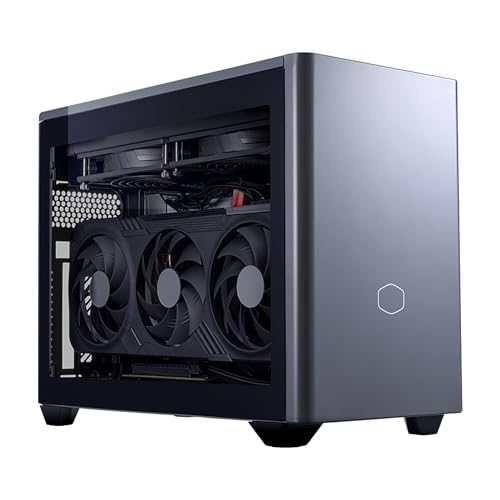
- Best small form factor gaming PC for streaming: Cooler Master NR2 Pro, Ryzen 7 9800X3D, desktop RTX 5070 Ti 16GB, dual NVENC, 32GB, 2TB, 18.25L — Check on Amazon
- ASUS ROG NUC (2025), Core Ultra 9 275HX, RTX 5070 Laptop GPU, NVENC with AV1, 32GB, 1TB, ~3L — Check on Amazon
- MINISFORUM AtomMan G7 Ti, Core i9-14900HX, RTX 4070 Laptop GPU, Ada NVENC with AV1, 32GB, 1TB, ~2.55L — Check on Amazon
- ASUS ROG G22CH, Core i7-13700KF, desktop RTX 4070 12GB, dual NVENC, 32GB, 1TB, ~10.7L — Check on Amazon
- MINISFORUM AtomMan G7 Pro, Core i9-14900HX, RTX 5070 Laptop GPU, NVENC with AV1, slim vertical mini chassis — Check on Amazon
- MINISFORUM AtomMan G7 Pt, Ryzen 9 7945HX, Radeon RX 7600M XT, RDNA3 VCN with AV1, 32GB, 1TB, ~2.7L — Check on Amazon
Read the full guide ↓
Disclosure: As an Amazon Associate, reviewstook.com earns from qualifying purchases. Links to Amazon on this page are affiliate links; they cost you nothing extra. Listing details such as price and availability change often, so check the current Amazon listing before you buy.
Streaming from one machine means asking it to do three jobs at once: render your game, encode the broadcast, and keep chat, alerts and a browser from stealing either. On a small form factor PC there is a fourth job hiding underneath — getting rid of the heat all of that makes, inside a box with a fraction of a tower’s air volume. So this guide grades the six verified small machines under $3,000 the way a streamer actually loads them: encoder first. The workflow we are grading against is the standard one-PC setup. On Twitch that means roughly 6,000 kbps at constant bitrate with two-second keyframes, in H.264. On YouTube it means higher bitrates are welcome, 1440p output earns better processing, and AV1 encoding is accepted where the hardware documents it — and in this tier, unusually, every pick’s silicon can encode AV1 somewhere. What separates these six is not whether they can stream. It is how much of the game survives the streaming.
Two honesty rules from the base guide carry over unchanged, because streaming makes both of them sharper. First, laptop GPUs are named in full, with their memory: an RTX 5070 Laptop GPU carries 8GB where the desktop card carries 12GB, and when a GPU renders a game and feeds an encoder at once, that ceiling arrives sooner than it does for a player who is only playing. Second, encoder claims are made only from the silicon each base guide documented — an NVENC generation, an AMD VCN generation, a Quick Sync generation — never from what a listing’s marketing implies. Where a pick has no second encoder to fall back on, or the softest encoder at Twitch’s bitrate, the review says so plainly. Check the current price on Amazon for every pick, and the category ceiling is the one the base guide verified: there is no small form factor desktop RTX 5080 anywhere near $3,000, so the strongest streaming hardware in a genuinely small box is what follows.
In this guide
Quick Picks
Short on time, or comparing several options at once? Each row below names a streamer type and the machine that suits it, with a link to the listing.
| Streamer type | Pick | Why it stands out | Link |
|---|---|---|---|
| Best for streaming, full stop | Cooler Master NR2 Pro, desktop RTX 5070 Ti | Two 9th-generation NVENC encoders and a desktop GPU — the game and the stream stop competing | Check on Amazon |
| Best tiny streaming box | ASUS ROG NUC (2025), RTX 5070 Laptop GPU | Blackwell NVENC with AV1 plus a Quick Sync spare encoder, in about 3 liters — check price on Amazon, and buy from ASUS’s own storefront | Check on Amazon |
| Best value streamer | MINISFORUM AtomMan G7 Ti, RTX 4070 Laptop GPU | Ada NVENC with AV1 encode in ~2.55 liters, in the configured style — check price on Amazon | Check on Amazon |
| Best living-room stream box | ASUS ROG G22CH, desktop RTX 4070 | Dual Ada NVENC and a desktop card in a ~10.7L console-style case — but no Quick Sync fallback | Check on Amazon |
| Newest silicon, smallest footprint | MINISFORUM AtomMan G7 Pro, RTX 5070 Laptop GPU | Current-generation NVENC with AV1 and a Quick Sync reserve — mind the barebone listing trap | Check on Amazon |
| Best CPU for software encoding | MINISFORUM AtomMan G7 Pt, RX 7600M XT | RDNA3 VCN does AV1 for YouTube; 16 real cores make x264 a genuine plan B for Twitch | Check on Amazon |
How These Picks Were Chosen
The six machines are exactly the six verified picks of the base small form factor guide — same ASINs, re-graded for a different job. What changed is the order and the questions. A gaming guide asks how a machine renders; this guide asks what is left of the machine once OBS is running. Every pick was graded encoder-first: which hardware encoder its documented silicon carries, which generation it is, whether it encodes AV1, whether a second encoder exists to split work across, and how much graphics headroom remains for the game afterward. Only then did the base guide’s own grading — volume in liters, laptop-versus-desktop GPU naming, the size premium against towers — get applied on top.
The encoder map below is derived strictly from the hardware the base research documented for each pick. NVIDIA’s RTX 50-series silicon carries NVENC with AV1 encode; the desktop RTX 5070 Ti in the NR2 Pro carries two 9th-generation NVENC encoders, which matters more for streaming than any other single specification here, because two encoders let a broadcast and a recording run without queueing behind one block. The desktop RTX 4070 in the G22CH carries two 8th-generation Ada NVENC encoders, also with AV1. The laptop RTX 4070 and RTX 5070 parts in the Minisforum and ASUS minis carry their generations’ NVENC with AV1 encode as well — credited here as NVENC with AV1, with no encoder count claimed for the laptop chips, because the base research did not document one. AMD’s RDNA3 VCN in the G7 Pt’s RX 7600M XT encodes AV1 for YouTube, while its H.264 output at Twitch’s bitrate is, honestly, the softest in this guide. Intel Quick Sync appears as a reserve encoder on the Core Ultra 9 275HX and the two Core i9-14900HX machines; on the G22CH’s Core i7-13700KF it does not appear at all, because the F suffix means there is no integrated graphics in that chip — the desktop 4070’s NVENC is the only hardware encoder in that box.
For pricing, check the current price on Amazon for every pick, and keep the buying cautions from the base guide: buy the ROG NUC from ASUS’s own storefront rather than a third-party seller on the same listing, and take the three Minisforum machines only with the configured style confirmed on listings that also sell barebone versions. We did not stream on these machines ourselves; the grading applies each chip’s documented encoder capabilities to the standard one-PC workflow above, and qualitative judgements — encoder quality at a fixed bitrate, fan noise near a microphone — are phrased as the established behavior of that encoder family, not measurements of these exact units.
The 6 Best Small Form Factor Gaming PCs for Streaming Under $3,000
Cooler Master NR2 Pro — Ryzen 7 9800X3D, Desktop RTX 5070 Ti 16GB, Dual NVENC, 18.25L
Who it suits: The streamer who wants the one-PC workflow to stop being a compromise — full game settings, a clean encode, and headroom left over — and accepts the largest box in this guide to get it.
Every other machine here asks its graphics card to share. This one barely has to. The NR2 Pro is a real mini-ITX desktop in an 18.25-liter NR200P Max chassis, built around a Ryzen 7 9800X3D and a Gigabyte RTX 5070 Ti that is the genuine desktop card: 16GB of memory, socketed, replaceable. For streaming, the decisive specification is the one gaming guides bury: the desktop 5070 Ti carries two 9th-generation NVENC encoders, with AV1 encode. In practice the broadcast encode — Twitch’s 6,000 kbps H.264 today, a 1440p AV1 feed to YouTube, a local recording alongside either — runs on dedicated silicon with a second encoder in reserve, while the GPU’s rendering muscle and all 16GB of memory stay pointed at the game. The 9800X3D, meanwhile, is the strongest gaming CPU in this guide, and OBS, chat, a browser and alerts are exactly the background load a chip like that shrugs off. There is even a third, minor encoder — the Ryzen chip’s small integrated Radeon graphics, H.264 and HEVC only, no AV1 — an emergency fallback worth knowing about and nothing more.
Check the current price on Amazon before anything else, because where this machine sits inside the under-$3,000 budget is its whole problem. When it sits comfortably inside that budget, it is the best streaming PC in this guide by a clear margin. When it pushes past the budget, it is not in the guide at all. Two ownership notes from roundup coverage of this exact system matter more to streamers than to anyone: fan noise is reasonable rather than silent — in a small room, a placement problem you solve with distance and a dynamic mic, not a dealbreaker — and early units included a dead front USB-C port and a GPU riser cable that needed reseating after shipping, so test every port during the return window, because a streamer’s front panel works for a living. The rest of the build supports the role: 32GB of DDR5-6000, a 2TB Gen4 SSD for games plus recordings, an 850W SFX Gold PSU, and standard parts throughout — the only machine here whose streaming career can be extended with a future GPU swap.
- Two 9th-generation NVENC encoders with AV1 — stream, record and game without encoder contention.
- A desktop RTX 5070 Ti 16GB and a 9800X3D: the most rendering and CPU headroom in the guide.
- Standard mini-ITX parts — the only pick whose graphics, storage and cooling can all evolve.
Honest limitation: Its price can move enough to push it outside this budget — check price on Amazon — at 18.25 liters it is the biggest box here, and its cooling is audible enough that microphone placement is part of the purchase.
Choose it if streaming is the machine’s first job and it fits the budget when you check price on Amazon. Skip it if it sits outside the budget when you check, or if the box must disappear into furniture — that is what the picks below are for.
ASUS ROG NUC (2025) — Core Ultra 9 275HX, RTX 5070 Laptop GPU, NVENC with AV1, ~3L
Who it suits: The streamer with no desk to spare who still wants a modern encoder, a second encoder in reserve, and a machine that can hide behind the monitor it feeds.
Start with the name, as this guide always does: the RTX 5070 Laptop GPU is a mobile part with 8GB of GDDR7, soldered, where the desktop RTX 5070 carries 12GB. For pure gaming that gap is the review. For streaming, the laptop card brings what spec-sheet critics skip: Blackwell-generation NVENC with AV1 encode — the current NVIDIA encoder — which produces the cleanest H.264 picture at Twitch’s 6,000 kbps of any encoder family and hands YouTube a native AV1 feed at 1440p. And this is the one mini here with a genuine second hardware encoder: the Core Ultra 9 275HX’s integrated Quick Sync. That pairing is a streamer’s flexibility — run the broadcast on NVENC and a local recording on Quick Sync, or park the encode on Quick Sync for a lightweight game and leave the laptop GPU entirely to rendering. In a chassis of roughly three liters, with dual Thunderbolt 4, six USB-A ports, dual HDMI plus DisplayPort and Ethernet — wired networking being a streaming requirement, not a luxury — it is a remarkably complete broadcast box.
The conditions from the base guide stand at full strength. Buy the 32GB/1TB configuration from ASUS’s own storefront — check price on Amazon — rather than from a third-party seller on this same listing asking a markup, so the pick is conditional in the strictest sense: from ASUS, or not at all. Owner sentiment is divided, with dead-on-arrival and failing-unit reports alongside the praise — for a streamer not an abstract risk, since a machine that dies in week two takes the channel’s schedule with it — so stress-test hard inside the return window. The 330W external adapter is part of the real footprint, competing for the same power strip and cable run as everything else in a streaming corner. And the honest ceiling: 8GB of graphics memory is the first wall this machine hits as games grow, and no encoder quality compensates for a game that has run out of VRAM — streamers playing the newest releases at 1440p should read the G7 Ti’s review and this one’s together, then look honestly at the NR2 Pro.
- Current-generation NVENC with AV1 encode, plus a Quick Sync second encoder for split duties.
- About 3 liters with Ethernet, dual Thunderbolt 4 and six USB-A — a full streaming I/O set.
- 32GB of memory gives OBS, game and browser room to coexist without swapping.
Honest limitation: The 8GB soldered laptop GPU caps the machine’s gaming future, the pick is only sane bought from ASUS’s own storefront — check the current price on Amazon — and early-unit reliability reports demand a hard stress test on arrival.
Choose it if space is the binding constraint and you can buy from ASUS’s own storefront. Skip it if the listing in front of you is a third-party markup, or if your game library is already pressing against 8GB of VRAM.

MINISFORUM AtomMan G7 Ti — Core i9-14900HX, RTX 4070 Laptop GPU (140W), Ada NVENC with AV1, ~2.55L
Who it suits: Most streamers reading this guide — the one-PC workflow done properly, in the smallest box here, at under half the budget.
The G7 Ti’s streaming case rests on its GPU’s full name: an RTX 4070 Laptop GPU, 8GB of GDDR6, but run at the part’s full 140W power limit rather than the detuned settings many laptops ship. The encoder is Ada-generation NVENC with AV1 encode — one generation behind the NR2 Pro’s Blackwell block, and at Twitch’s 6,000 kbps H.264 the visible gap between Ada and Blackwell NVENC is small — both are dedicated encoders working far below their ceilings; what the viewer sees is dominated by the game’s render load, where the full-power laptop 4070 is an honest 1080p-high-refresh and 1440p-with-upscaling renderer. For YouTube, the AV1 encode is the modern route: send 1440p, let the platform’s better processing tier do its work, and the stream looks a class above its bitrate. Beside the GPU sits the same Core i9-14900HX 24-core processor as the G7 Pro, whose Quick Sync encoder serves as the reserve — the recording-versus-broadcast split from the NUC’s review works here too, with H.264 and HEVC from the Intel side and AV1 reserved to the NVIDIA encoder, since this chip’s Quick Sync generation does not encode AV1. Thirty-two gigabytes of DDR5 in two SO-DIMM slots, a 1TB SSD with a second PCIe 4.0 M.2 slot free, and WiFi 7 round out a specification that reads like it was assembled by someone who runs OBS.
Its position in this tier is the argument: the configured 32GB/1TB machine sits in the lower part of this budget, well under the guide’s ceiling — check price on Amazon — and what it leaves of the budget is not abstract: it is the microphone, lighting and second monitor from the kit section below, bought without a second decision. The discipline from the base guide applies unchanged: this ASIN is a shared listing family with barebone styles sitting beside the configured one, and a barebone G7 Ti is a box with no memory, no storage and no Windows, so confirm the configured “32+1T” style on the live listing before paying. The honest limitations are the fixed 8GB — the same ceiling as the NUC, in a machine positioned lower in the tier — and a small, densely cooled chassis whose fans are audible in a quiet room at full combined load; a box a meter or two from the microphone handles it, a box beside the mic does not. Judged as a streaming appliance rather than a gaming flagship, this is the guide’s center of gravity, and the final recommendation says so.
- Ada NVENC with AV1 encode, run at the laptop 4070’s full 140W — Twitch-clean and YouTube-modern.
- A Quick Sync reserve encoder and 24 CPU cores for OBS, chat and everything else.
- Positioned in the lower part of this budget in its configured style — check price on Amazon — leaving budget for the microphone and lights that viewers actually notice.
Honest limitation: The 8GB laptop GPU is a lifetime ceiling with no upgrade path, the shared listing puts a barebone style one careless click away, and full-load fan noise needs distance from the microphone.
Choose it if you want the complete one-PC streaming setup for the least total money. Skip it if your games already need more than 8GB of VRAM, or desktop-class graphics are the point — that is the NR2 Pro’s job.

ASUS ROG G22CH — Core i7-13700KF, Desktop RTX 4070 12GB, Dual NVENC, ~10.7L
Who it suits: The living-room streamer — a console-shaped box under the TV whose broadcast hardware is a genuine desktop card.
The G22CH is the middle path: roughly 10.7 liters, shaped for media furniture, with a desktop RTX 4070 and its full 12GB of memory inside — not the 8GB laptop part in the two Minisforum picks. For streaming, the desktop 4070’s encoder block is the strong version of its generation: two 8th-generation Ada NVENC encoders with AV1 encode, so a Twitch H.264 broadcast and a high-bitrate local recording can run side by side, and YouTube gets its 1440p AV1 feed from the same silicon that renders the game at 1440p natively. The 12GB of memory is the quiet advantage over the laptop picks: at 1440p, with OBS’s scene rendering drawing on the same GPU, headroom is what keeps a heavy game’s stream smooth where a full 8GB card starts to stutter. The published specification helps too: ASUS states the 600W Gold power supply’s wattage, a small virtue several listings in this batch skip.
Now the caveat this guide’s encoder-first grading exists to catch: the Core i7-13700KF’s F suffix means the chip has no integrated graphics, so there is no Quick Sync in this machine at all. The desktop 4070’s dual NVENC is good enough that most streamers will never miss the reserve — but the fallback the NUC and the G7 machines offer, parking an encode on the CPU’s graphics while the GPU renders, does not exist here, and a buyer comparing spec sheets should know the absence is deliberate silicon, not a setting. Positioned in the middle of this tier — check the current price on Amazon — the machine is a genuinely tidy streaming purchase; the step up over the G7 Ti buys desktop memory and encoder depth that only 1440p streamers will actually use. The generation is previous, the interior limits future graphics swaps to cards that physically fit, and 1TB fills quickly once local recordings join the game library — for a streamer who archives VODs locally, a second drive is closer to a requirement than an upgrade.
- Desktop RTX 4070 with dual Ada NVENC and AV1 — broadcast and recording simultaneously, at 1440p.
- 12GB of graphics memory: real headroom over every laptop pick when game and OBS share the GPU.
- Console-style ~10.7L case and a published 600W Gold PSU from a major brand.
Honest limitation: The 13700KF has no integrated graphics, so there is no Quick Sync fallback encoder — NVENC carries everything — and its value depends on checking the current price on Amazon against the rest of this tier.
Choose it if the stream comes from the living room and 1440p is the working resolution. Skip it if its current price no longer fits its place in this tier when you check on Amazon, or if a second, independent encoder is part of your workflow plan.

MINISFORUM AtomMan G7 Pro — Core i9-14900HX, RTX 5070 Laptop GPU, NVENC with AV1, Slim Vertical Mini Chassis
Who it suits: The streamer who wants the newest encoder generation in the smallest upright footprint — and who reads listings carefully before paying.
On silicon alone, this pick’s streaming résumé is excellent. The RTX 5070 Laptop GPU — 8GB, mobile, named in full as always — carries Blackwell-generation NVENC with AV1 encode, the same encoder family as the ROG NUC’s, which means Twitch’s H.264 at 6,000 kbps comes out as clean as this guide’s hardware can make it, and YouTube can be fed 1440p AV1 natively. The Core i9-14900HX beside it contributes the reserve: Quick Sync for H.264 and HEVC duties — a recording, a second output — while its generation’s honest limit is that AV1 encode belongs to the NVIDIA side only. Memory and storage are socketed where the NUC’s are soldered: two DDR5 SO-DIMM slots to 96GB and two M.2 2280 slots, so the machine’s streaming life can grow — a bigger recording drive, more RAM for a heavier production — even though its graphics never will. The chassis is the slim vertical G7 format, a book-sized tower of a few liters cooled by six heat pipes and dual fans, with HDMI 2.1, USB4 and WiFi 7; confirm the Ethernet port on the live listing’s specification before purchase, since streaming runs wired.
Then the trap, which the base guide flagged as the most important paragraph in its review and which this guide repeats at the same size: the Amazon listing for this ASIN is titled as the barebone version — “Barebone Version Without Storage/OS” — while some marketplace mirrors describe a configured unit. Minisforum sells both a configured 32GB/1TB machine and a barebone style on this listing family — check price on Amazon for the style you are actually buying — and the barebone’s apparent saving is an illusion: a DDR5 SO-DIMM kit alone is a major purchase during the current memory spike, before an SSD and a Windows license. A streamer who orders the wrong style does not get a cheaper PC; they get a delayed first broadcast and a parts bill. So the rule is procedural: confirm the configured style on the live listing, or work out the cost of completing a barebone honestly and compare. Ranked below the G7 Ti despite newer silicon for exactly this reason — the Ti’s configured style is the straightforward purchase, the Pro’s recommendation is conditional on a listing check — it is the pick for buyers willing to do the verification the listing demands.
- Blackwell NVENC with AV1 encode plus a Quick Sync reserve — the newest encoder pairing in a mini.
- Socketed memory to 96GB and dual M.2 slots give the production room to grow.
- Slim vertical chassis with USB4, HDMI 2.1 and WiFi 7 takes almost no desk.
Honest limitation: The ASIN is titled as the barebone version while mirrors describe configured units — the style-selector trap is live on this exact listing, and completing a barebone at spike memory prices can cost more than the configured machine — check the current price on Amazon for both styles.
Choose it if you have confirmed the configured style, or you already own the RAM and SSD a barebone needs. Skip it if you cannot tell which version you are buying — at this money, that uncertainty is the answer.

MINISFORUM AtomMan G7 Pt — Ryzen 9 7945HX, Radeon RX 7600M XT, RDNA3 VCN with AV1, ~2.7L
Who it suits: The creator whose machine edits, renders and encodes video as a second job — and the one streamer in this guide for whom CPU encoding is a real strategy rather than a mistake.
The G7 Pt inverts the streaming formula. Its graphics are the modest part: a Radeon RX 7600M XT, AMD’s mobile part with 8GB of GDDR6 at up to 120W, where the desktop RX 7600 XT carries 16GB. Its encoder is AMD’s RDNA3 VCN, and the grading splits by platform, honestly. For YouTube, this pick is genuinely well equipped: RDNA3 VCN encodes AV1, so the modern 1440p AV1 workflow the NVIDIA picks use is available here too, and AMD’s AV1 output is respectable. For Twitch, the same encoder’s H.264 at 6,000 kbps is the softest picture in this guide in fast motion — a well-documented trait of AMD’s hardware H.264 at low bitrates, and the reason encoder-first grading puts this machine last for a Twitch-first reader despite everything else it does well. The everything-else is considerable: a Ryzen 9 7945HX, a true 16-core, 32-thread desktop-class CPU, in a chassis of about 2.7 liters. Sixteen real cores change the OBS conversation — where every other pick must use its hardware encoder because its CPU is busy being a game engine’s partner, this machine can run a software x264 encode at sensible presets on spare cores for Twitch while the VCN handles a YouTube AV1 feed or a recording, a dual-platform arrangement no other pick here can honestly offer. It is a workload to tune, not a default to assume, and the OBS section below explains where the limits sit.
Its position in the tier reframes the compromise: the configured 32GB/1TB machine is the lowest-positioned complete pick in the guide — check price on Amazon — and MINISFORUM’s own store also lists the same configuration, alongside a barebone style on the shared listing family. The shared-listing discipline applies: confirm the configured style before ordering. Around the headline parts sit 32GB of DDR5 in two SO-DIMM slots to 96GB, one PCIe 5.0 and one PCIe 4.0 M.2 slot, and the first AMD Advantage certification its maker claims for a mini PC. For a gaming-first streamer this is the wrong end of the guide — the G7 Ti sits higher in the tier and encodes Twitch the way Twitch viewers expect. For the creator who streams gameplay twice a week and renders video five days a week, the balance reverses: the CPU is the production tool, the stream is the side job, and this is the only pick positioned like it understands that.
- RDNA3 VCN encodes AV1 — the full YouTube 1440p workflow is available on the AMD pick too.
- Sixteen desktop-class cores make x264 software encoding a legitimate Twitch strategy, unique here.
- Positioned lowest in this tier in its configured style — check price on Amazon — by a wide margin.
Honest limitation: AMD’s hardware H.264 at Twitch’s 6,000 kbps is the softest encode in this guide, and the RX 7600M XT is a mobile 8GB part — the weakest gaming graphics here — on a listing family that mixes barebone and configured styles.
Choose it if your workload is CPU-first, YouTube-first, or both. Skip it if Twitch is your main stage and gaming is the first job — the G7 Ti serves that reader better, positioned higher in the tier.

Comparison Table
| Product | Volume | Graphics (named in full) | Streaming encoder | Price | Link |
|---|---|---|---|---|---|
| Cooler Master NR2 Pro | 18.25L | Desktop RTX 5070 Ti, 16GB, replaceable | Dual 9th-gen NVENC, AV1 encode | Check price on Amazon | Check on Amazon |
| ASUS ROG NUC (2025) | ~3L | RTX 5070 Laptop GPU, 8GB, soldered | Blackwell NVENC, AV1 encode + Quick Sync reserve | Check the current price on Amazon — buy from ASUS’s storefront | Check on Amazon |
| MINISFORUM AtomMan G7 Ti | ~2.55L | RTX 4070 Laptop GPU, 8GB, full 140W | Ada NVENC, AV1 encode + Quick Sync reserve | Check price on Amazon — configured style | Check on Amazon |
| ASUS ROG G22CH | ~10.7L | Desktop RTX 4070, 12GB | Dual 8th-gen Ada NVENC, AV1 encode; no Quick Sync | Check the current price on Amazon | Check on Amazon |
| MINISFORUM AtomMan G7 Pro | Slim vertical, a few liters | RTX 5070 Laptop GPU, 8GB | Blackwell NVENC, AV1 encode + Quick Sync reserve | Check price on Amazon — confirm configured vs barebone style | Check on Amazon |
| MINISFORUM AtomMan G7 Pt | ~2.7L | Radeon RX 7600M XT (mobile), 8GB | RDNA3 VCN, AV1 encode; 16-core x264 option | Check price on Amazon — configured style | Check on Amazon |
Setting Up OBS on These Machines
Whichever pick you buy, the encoder decision is made in one OBS settings page, by the same logic on all six. Use the hardware encoder, always: NVENC on the five NVIDIA machines, the AMD hardware encoder on the G7 Pt — or, on the G7 Pt alone, a deliberate x264 software encode, because its 16 cores are the one CPU here with genuine headroom for it. On the dual-NVENC machines (the NR2 Pro and the G22CH) a simultaneous local recording can run on the same GPU without troubling the broadcast; on the NUC, the G7 Ti and the G7 Pro, the reserve pattern is broadcast on NVENC and recording on Quick Sync. For Twitch, set constant bitrate at about 6,000 kbps with a two-second keyframe interval — those are platform expectations, not preferences. For YouTube, send 1440p where the pick’s encoder and your upload allow it, use AV1 where the platform accepts it from your account, and give it more bitrate than Twitch permits; the platform’s processing rewards both.
Then learn the three counters in OBS’s stats window, because every “my stream lags” is one of three different failures wearing the same symptom. Rendering lag means the GPU is overloaded: OBS composites your scene on the same graphics card that renders the game, and when the game takes everything, frames are missed before encoding even starts. The fixes: cap the game’s frame rate below its uncapped maximum, lower render resolution or settings a notch, keep the OBS preview modest — on the 8GB laptop-GPU picks this counter is the one to watch first. Encoding lag means the encoder itself cannot keep up: rare on the hardware encoders here, but it appears when a software encode is asked for too much, which is why the G7 Pt’s x264 plan should start at a fast preset and earn its way slower while someone watches the counter. The fix is a faster preset or the hardware encoder. Dropped frames are the network: the encode is fine and the upload is not. No setting in this guide fixes WiFi congestion, which is why the rule is absolute — stream on wired Ethernet. Every pick here lives in a small box that tempts you to hide it anywhere; hide it within cable reach of the router, or run the cable. A stream that drops frames on an expensive machine over wireless has a cable problem, and it is the most common one in small-space setups.
What Else a Streaming Setup Costs
The PC is the largest line in a streaming budget, not the only one, and this section deliberately names the rest without prices: accessory prices move, vary by country and taste, and inventing them helps no one. Buy in this order. A microphone comes first, before any camera: viewers forgive a soft picture for hours and a bad microphone for about a minute, and in a small room the microphone also solves the fan-noise question raised in several reviews, because a dynamic microphone placed close to your mouth hears you far more than it hears the PC across the room. Headphones follow — any closed pair that keeps game audio out of the microphone. Lighting comes before the camera upgrade: a modest key light on an ordinary camera outperforms an expensive camera in a dim room, and small spaces make lighting easier, not harder, because the walls are close enough to bounce from. A second monitor is the working streamer’s quiet essential — chat, alerts and the OBS stats counters from the section above need somewhere to live that is not the game screen. And the capture card: for the workflow this guide grades — game and broadcast on one PC — it does nothing at all. It earns its place only when a console joins the setup and the PC becomes the broadcast machine for a separate games machine: console-only, in the costing sense, and the most common wasted purchase new streamers make. Readers speccing a dedicated broadcast or console setup should start from Best Streaming PC Under $3000 rather than stretching this guide past its job.
How to Choose a Small Form Factor Gaming PC for Streaming Under $3,000
- Pick your platform before your PC. Twitch-first means H.264 at ~6,000 kbps, where NVIDIA’s NVENC holds a real quality edge and the AMD pick drops to last. YouTube-first means 1440p and AV1, where every pick here can encode the modern codec and the ranking compresses.
- Count encoders, not just GPUs. Two NVENC encoders (NR2 Pro, G22CH) or NVENC plus a Quick Sync reserve (NUC, G7 Ti, G7 Pro) let broadcast and recording split up. A single encoder asked to do everything is the small-machine bottleneck nobody lists.
- Read every GPU name to the end. “RTX 5070” in a mini almost always means the Laptop GPU with 8GB; the desktop card has 12GB and the desktop 5070 Ti has 16GB. Streaming loads memory harder than playing does — the encoder, the scene and the game all live there.
- Check the CPU for a fallback — and for a trap. The G22CH’s 13700KF has no integrated graphics, so no Quick Sync exists in that box. The G7 Pt’s 16 cores invert the rule and make software encoding a strategy. Know which machine you are buying.
- Confirm configured versus barebone before anything else. On the shared Minisforum listings the barebone style sits beside the configured one, and at current memory prices completing a barebone can cost more than the configured machine — and delays your first stream by days.
- Check the live price and seller before you buy. The NR2 Pro’s price can move it outside this budget, and the ROG NUC’s listing has hosted third-party markups against ASUS’s own storefront. Check the current price on Amazon, confirm the seller, and let a machine that no longer fits the budget be a machine you skip.
- Plan the wired connection with the furniture. Small boxes invite wireless thinking; streaming forbids it. Measure the Ethernet run when you measure the shelf, and count the external power brick — the NUC’s is 330W — in the space and the power strip.
- Budget the microphone before the flagship. Choosing a lower-positioned pick such as the G7 Ti over the top of this budget leaves room for the entire kit section above. Viewers hear your microphone every second and your encoder only when it fails.
- Stress-test inside the return window. Stream a demanding game for an evening in week one, watch all three OBS counters, check every port, and keep the packaging until the machine has survived real broadcasts.
Common Buying Mistakes
- Streaming over WiFi because the box is small enough to hide anywhere. Dropped frames are a network failure, not a PC failure, and wired Ethernet is the cheapest upgrade in this entire guide.
- Buying a capture card for a one-PC setup. It does nothing when the game and OBS share a machine; it is for console sources only.
- Reading “RTX 5070” on a mini PC listing and pricing it as the desktop card. The laptop GPU has 8GB against 12GB, and streaming spends that memory faster than gaming alone does.
- Assuming every Intel chip has Quick Sync. The G22CH’s 13700KF is an F-suffix part with no integrated graphics at all — its NVENC carries the whole broadcast.
- Ordering a barebone style by mistake on a shared listing family, then discovering that RAM, an SSD and Windows at spike prices can cost more than the configured machine — and that the first stream waits for a parts delivery.
- Buying the NR2 Pro without checking where its current price sits. The same system can fit this budget or push past it; only the version that fits the budget belongs in this guide — check price on Amazon.
- Paying a reseller’s markup on a brand’s own listing — the ROG NUC’s page has carried third-party markups against ASUS’s own storefront. The seller’s name matters as much as the price — check the current price on Amazon.
- Judging a stream’s quality by the game’s frame rate. A game can run beautifully while rendering lag starves OBS; the three counters in the stats window, not the game’s overlay, tell you how the broadcast is doing.
- Spending the whole $3,000 on the PC and streaming through a headset microphone. The audience hears the microphone, not the budget.
Final Recommendation
- Best streaming machine, when it fits the budget: Cooler Master NR2 Pro — dual 9th-gen NVENC, a desktop 5070 Ti and a 9800X3D. Check price on Amazon.
- Most streamers: MINISFORUM AtomMan G7 Ti — the complete one-PC workflow positioned low in this tier, with room left in the budget for a microphone and lights. Check price on Amazon.
- Smallest desk, modern encoders: ASUS ROG NUC (2025), from ASUS’s storefront only — check the current price on Amazon.
- Living-room broadcasts at 1440p: ASUS ROG G22CH — check price on Amazon.
- Newest silicon, verified listing: MINISFORUM AtomMan G7 Pro, with the configured style confirmed before payment.
- Creator workloads, YouTube-first: MINISFORUM AtomMan G7 Pt — 16 cores that work between streams.
Our top two are the Cooler Master NR2 Pro, because it is the only machine here where the one-PC streaming workflow stops asking for compromises — two current NVENC encoders, a desktop GPU with memory to spare, and standard parts when the channel outgrows it — provided it fits the budget when you check price on Amazon, and the ASUS ROG NUC (2025), because it compresses nearly the same encoder story into about three liters for rooms that genuinely demand it, provided it is bought from ASUS’s own storefront. Between them sits the machine most readers should actually order, the G7 Ti, which pairs the previous generation’s encoder with the same dual-encoder flexibility in the lower part of this budget. The G22CH serves the living room, the G7 Pro serves the careful listing-reader who wants the newest silicon, and the G7 Pt serves the creator whose CPU is a production tool. Readers whose streaming ambitions are smaller than this tier should start with Best Small Form Factor Gaming PC Under $1500, readers building a stream around a mini at a lower price should see Best Mini PC For Streaming Under $3000, and readers who conclude the tower was the answer all along should see Best Gaming PC Under $3000. Wire the Ethernet, confirm configured versus barebone, and check the current price on Amazon on the live listing before you order.
Frequently Asked Questions
Can one small PC really game and stream at the same time?
Yes — that is the workflow every pick here was graded on. The hardware encoder is the reason: NVENC, Quick Sync and AMD’s VCN encode the broadcast on dedicated silicon, so the game’s rendering keeps the GPU’s main muscle. What one small PC cannot do is ignore the shared limits — graphics memory, heat and your upload connection — which is why this guide grades headroom rather than checkboxes.
Is AV1 encoding worth having for streaming?
For YouTube, yes: AV1 at 1440p is the modern route to the platform’s best processing, and every pick in this guide can encode it. For Twitch, the working standard remains H.264 at about 6,000 kbps, where the encoder’s H.264 quality is what your viewers see — where NVIDIA’s NVENC leads this guide and the AMD pick’s VCN is graded softest in fast motion.
Why does the G22CH’s CPU matter to streamers?
Because the Core i7-13700KF’s F suffix means no integrated graphics, and therefore no Intel Quick Sync encoder exists in that machine. Its desktop RTX 4070 carries two NVENC encoders, which covers broadcast-plus-recording for most people — but the split-duty fallback the NUC and G7 machines offer, parking an encode on the CPU’s graphics, is not available, and no setting can add it.
Should I use software (x264) encoding instead of the hardware encoder?
On five of these six machines, no: their CPUs are fully employed partnering the game, and the hardware encoders are better at this bitrate anyway. The exception is the G7 Pt, whose 16 desktop-class cores leave genuine headroom — there, a carefully preset x264 encode for Twitch, started fast and watched against OBS’s encoding-lag counter, is a legitimate strategy, and the only one in this guide.
Do I need a capture card with any of these PCs?
Not for PC games played on the same machine — OBS captures those directly, and a card adds cost and a failure point while doing nothing. A capture card becomes necessary only when the game source is a separate device, typically a console, with the PC acting as the broadcast machine.
Why is a lower-positioned machine recommended in a $3,000 streaming guide?
Because streaming quality is a chain, and the PC is only its first link. The G7 Ti’s Ada NVENC with AV1 covers the platform requirements completely; what it leaves of this budget buys the microphone, lighting and second monitor that viewers perceive directly. A flagship PC streamed through a headset mic looks and sounds worse than the G7 Ti with a proper kit — the balance simply follows the audience’s experience.
How much do prices move on these machines?
Prices move enough to change which pick fits this budget, routinely — a machine can sit inside the tier or push past it, and a listing can carry a third-party markup against the maker’s own storefront. So check the current price on Amazon for every pick, and let the live listing — seller, style and configuration checked — be the number you act on.
- Best Small Form Factor Gaming PC Under $2500
- Best Small Form Factor Gaming PC For 1440p Gaming Under $3000
- Best Small Form Factor Gaming PC For Beginners Under $3000
- Best Small Form Factor Gaming PC For Small Spaces Under $3000
- Best Streaming PC Under $1500
- Best Compact Gaming PC Under $3000
- Best Mini Gaming PC Under $3000


