Where to buy
Check the latest price, availability and delivery on Amazon. Orders are placed on Amazon. We may earn a commission from qualifying purchases.
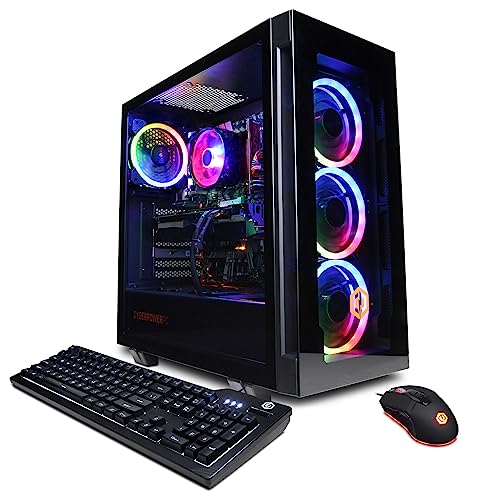
- The only true 1440p machine here (a tower, not a mini): CyberPowerPC Gamer Xtreme VR, i7-13700F, RTX 4060 Ti 16GB — Check on Amazon
- Best mini for 1440p: Minisforum AtomMan G7 Pt, Ryzen 9 7945HX, Radeon RX 7600M XT, 32GB, 1TB — Check on Amazon
- Beelink SER9 Pro, Ryzen AI 9 HX 370, Radeon 890M, 32GB, 1TB — Check on Amazon
- Minisforum UM890 Pro, Ryzen 9 8945HS, Radeon 780M, 32GB, 1TB, OCuLink — Check on Amazon
See 2 more Amazon options
- GMKtec NucBox K8 Plus, Ryzen 7 8845HS, Radeon 780M, 32GB, 1TB, OCuLink — Check on Amazon
- Minisforum UM880 Plus Barebone, Ryzen 7 8845HS, no RAM/SSD/OS — Check on Amazon
Read the full guide ↓
Disclosure: As an Amazon Associate, reviewstook.com earns from qualifying purchases. Links to Amazon on this page are affiliate links; they cost you nothing extra. Listing details such as price and availability change often, so check the current Amazon listing before you buy.
Every machine in this guide can put a 1440p picture on your monitor. Only one of them can honestly render your games at 1440p — and it is not a mini PC. That distinction, between displaying a resolution and rendering it, is the whole subject of this page, because it is exactly where mini gaming marketing gets slippery. A 1440p monitor shows 2,560 × 1,440 pixels. Your desktop, your text and your videos can fill every one of them natively from any pick below. A game is different: the graphics hardware has to draw each frame somewhere, and if it draws that frame at 1920 × 1080 and stretches it up to fill the panel, you are looking at a 1080p render wearing a 1440p frame. There is nothing shameful in that — upscaling is how integrated graphics survive on a big panel — but know which of the two you are buying before the money moves.
So here is the census, up front. The CyberPowerPC tower at the end of the list carries a desktop RTX 4060 Ti with 16GB of video memory, and it is a genuine 1440p graphics card: it renders modern games at the panel’s full resolution, with DLSS in reserve when a title gets heavy. It is also a full mid-tower, included as the benchmark, and on this angle it wins outright — that is the honest headline, not a footnote. Among the actual minis, the Minisforum AtomMan G7 Pt is the one real contender: its Radeon RX 7600M XT is a discrete GPU, and reviewers place it at selective native 1440p in less demanding titles. Read its name precisely, though — the M means mobile, a laptop-class chip with 8GB of memory at 120 watts, not the desktop card its name resembles. The remaining four picks run integrated graphics — Radeon 890M and 780M — and their 1440p story is the upscale story: a native 1440p desktop, games rendered at 1080p, and upscaling bridging the gap. Graded honestly, that is still a good experience. Graded as “1440p gaming” without the asterisk, it is how people end up disappointed in a machine that never lied about its silicon — only about its resolution.
In this guide
Quick Picks
Short on time, or comparing several options at once? Each row names a buyer type and the machine that suits it, with a link to the listing. The “1440p route” column is the honest part: it says how each machine actually fills a 1440p panel.
| Buyer type | Pick | Its 1440p route | Link |
|---|---|---|---|
| True native 1440p | CyberPowerPC Gamer Xtreme VR (tower, not a mini) | Desktop RTX 4060 Ti 16GB renders at full 1440p; DLSS as headroom | Check on Amazon |
| Best mini for 1440p | Minisforum AtomMan G7 Pt | Mobile RX 7600M XT: selective native 1440p, upscaling beyond that | Check on Amazon |
| Best integrated upscale route | Beelink SER9 Pro | Radeon 890M: native 1440p desktop, games rendered at 1080p and upscaled | Check on Amazon |
| Upscale now, native later | Minisforum UM890 Pro | 780M upscaling today; OCuLink dock is the documented path to a real 1440p card | Check on Amazon |
| Best value upscale route | GMKtec NucBox K8 Plus (32GB/1TB) | Same 780M story as the UM890 Pro, positioned as the value option in this group — check price on Amazon | Check on Amazon |
| Builders with parts owned | Minisforum UM880 Plus Barebone | Renders nothing as shipped; once completed, the same 780M upscale route | Check on Amazon |
Rendering 1440p Is Not Displaying 1440p
Two different jobs hide inside the phrase “1440p gaming,” and separating them makes every review below easier to judge. The first job is display: getting a 2,560 × 1,440 image onto the panel. Desktop windows, text, photos and streamed video all do this natively and cheaply, and every machine in this guide — down to the barebone once it is completed — handles it without strain. If your day is spreadsheets, documents and video on a 1440p monitor, all six picks are “1440p machines” and the cheapest honest one wins. The second job is rendering: a game engine drawing each frame at some internal resolution, many times a second, under your control. That is the expensive job, and it is where these six machines split into three classes.
Class one renders at the panel’s native resolution. In this guide that class has a single member, and it is the tower: a desktop RTX 4060 Ti with 16GB of memory draws modern games at full 1440p, and when a demanding title needs relief it has DLSS, NVIDIA’s upscaling, which renders internally at a lower resolution and reconstructs the 1440p output. The published DLSS scaling for a 1440p output applies to that one RTX machine and to nothing else on this page: DLSS Quality renders internally at roughly 1707 × 960, Balanced at roughly 1485 × 836, and Performance at roughly 1280 × 720. Note what those numbers say — even the tower’s best upscaling mode is not rendering at 1440p, and its Performance mode is, in render terms, a 720p-class image. Upscaling reconstructs pixels convincingly; it does not manufacture the ones the renderer skipped. Class two renders selectively at native resolution: the G7 Pt’s mobile GPU handles 1440p rendering in lighter and older titles, then drops to a 1080p render with upscaling when games get heavy. Class three — the four integrated-graphics minis — renders games at 1080p as its normal mode and upscales to the panel. That is a legitimate, often enjoyable way to play; it is simply not native 1440p, and this guide will not call it that.
Two more mechanics matter. The first is scaling arithmetic: 1080p to 1440p is a 1.33× stretch per axis, a non-integer scale, so an upscaled image is inherently a reconstruction rather than a clean multiplication — modern upscalers handle it well, but fine detail and text-like edges in games are where the difference from a native render shows. The second is frame generation. It synthesizes extra frames between rendered ones to make motion look smoother on a high-refresh panel. It is a display-side smoothing technique: it does not raise the render resolution by a single pixel, it does not reduce input latency the way a genuinely higher frame rate does, and in this guide it is never counted as 1440p capability. A machine that renders at 1080p and generates frames is a 1080p renderer with smooth motion — grade it as exactly that.
How These Picks Were Chosen
The six machines are the verified set from our base guide to mini gaming PCs under $1,200 — same products, same listings — re-ranked here purely on 1440p criteria. That re-ranking moves the tower benchmark to the top, and the reason is this angle’s single question: what actually renders the game? On that question the tower’s desktop card has no rival in the set, and pretending otherwise to protect the category would be exactly the grading this guide exists to avoid. The tower is labelled “not a mini PC” everywhere it appears, including the buy box. Among the minis, the order follows the same logic downward: a discrete mobile GPU that renders some games natively beats integrated graphics that never do; the strongest integrated graphics beat the next tier down; and a documented future path to a real card counts for something.
The budget was applied as a ceiling on the machine as you would actually use it. Complete systems had to fit within this guide’s budget, and because mini PC prices swing with the current memory shortage, check price on Amazon for every pick before you buy and treat any listing that sits above the budget as a reason to wait. The tower is in budget only when its live price falls within the budget, and its review says so. The one barebone kit is assessed the honest way: its review counts the memory, storage and operating system it lacks before admiring the kit on its own. No new product, price or specification has been introduced for this angle; the grading interprets the same verified hardware behind the base guide.
Three filters did the grading. The first is the render filter, applied in descending order: native 1440p rendering of modern games; selective native rendering in lighter titles; a 1080p render with competent upscaling; and, last, a credible documented route to a real graphics card later. The second filter is memory: at 1440p output, textures are loaded for the higher resolution even when the render underneath is upscaled, so graphics memory is a binding constraint — the tower’s 16GB, the G7 Pt’s 8GB, and the integrated machines’ shared system memory are graded as the budgets they are. The third filter is the exit: what happens when the graphics stop being enough. Socketed memory and a spare drive slot buy time; an OCuLink port buys a second life at a price this guide itemizes; soldered memory with no OCuLink buys neither, and one excellent pick below is exactly that machine. Finally, what is not here: Minisforum’s AtomMan G7 Ti, with an RTX 4070 Laptop GPU, is the mini many 1440p shoppers actually want, and it is excluded on price alone — it sits in a premium tier above this budget, both as a barebone and configured. It anchors the higher-budget guides, including Best Mini Gaming PC For 1440p Gaming Under $1500, and readers who can stretch will find the native-1440p mini conversation continues there.
The 6 Best Mini Gaming PCs for 1440p Gaming Under $1,200
The Benchmark: CyberPowerPC Gamer Xtreme VR — i7-13700F, RTX 4060 Ti 16GB (Not a Mini PC)
Who it suits: The 1440p buyer whose room fits a mid-tower and whose priority is the rendered image itself. On this angle, this is the control group that wins.
Start with the only unqualified sentence in this guide: this machine renders modern games at native 1440p. Its RTX 4060 Ti is a desktop graphics card with 16GB of video memory, and that memory figure matters as much as the chip — at 1440p output, games load textures intended for the higher resolution, and 16GB is the budget that keeps those textures resident instead of swapping. When a title is heavy enough that even this card prefers help, DLSS is the help, and it is the genuine article: Quality mode renders internally around 1707 × 960 and reconstructs the 1440p frame, Balanced around 1485 × 836, Performance around 1280 × 720 — a ladder you descend knowingly, per game, rather than a ceiling imposed by the hardware. Compare that freedom with every mini below, where the upscaling is not a choice but the only mode. Around the card sit a Core i7-13700F, 16GB of DDR5 and a 1TB NVMe drive in a standard tower with standard, replaceable parts — when this GPU ages, you unbolt it and fit a faster one, an exit no mini in this guide can offer at any price.
The price is the one condition, and it is a firm one. Check price on Amazon for this configuration (model GXiVR8040A14) before you buy — the rule is to buy it only when the live price falls within this guide’s budget. When it sits within budget it competes directly with every complete mini below while out-rendering all of them; when its live price sits above the budget it is simply a machine from a higher tier that wandered into this guide, and the honest move is to wait, or to shop it against the wider 1440p field instead — see Best Gaming PC For 1440p Gaming Under $1200. Nothing about the tower is small or mountable, and none of that is disguised here: it is in a mini guide because “mini” is a feature with a price, and at 1440p the price is the render itself.
- The only native-1440p renderer in the guide — a desktop RTX 4060 Ti with 16GB of VRAM for 1440p texture loads.
- DLSS in reserve, with Quality/Balanced/Performance as a per-game choice rather than a permanent condition.
- Standard parts throughout: the graphics card, memory and storage all upgrade on your schedule.
Honest limitation: It is a full mid-tower — no mounting, no disappearing behind a monitor — and it belongs in this budget only when its live price falls within it; check price on Amazon before ordering.
Choose it if native 1440p rendering is the point of the purchase and the space exists. Skip it if the space genuinely does not — that is what the five minis below are for, and each of their reviews states plainly what its 1440p compromise is.

Minisforum AtomMan G7 Pt — Ryzen 9 7945HX, Radeon RX 7600M XT, 32GB, 1TB
Who it suits: The mini buyer who games first and wants real discrete-GPU rendering — some of it genuinely at 1440p — from a box that still sits on a shelf.
The G7 Pt is the only mini here with a discrete graphics processor, and on this angle that fact does all the work. The chip is a Radeon RX 7600M XT, and the name must be read carefully: the M marks a mobile, laptop-class GPU with 8GB of memory, run at 120 watts in this machine. It is not the desktop card its name echoes and should never be graded as one. Graded against its actual class, reviewers who measured the G7 Pt place it at strong 1080p gaming with selective native 1440p — lighter, older and esports titles rendered at the panel’s full resolution, and demanding modern games stepping down to a 1080p render that AMD’s FSR upscaling then carries to the panel. That two-mode behaviour is the honest summary: a mini that sometimes renders 1440p sits a full class above everything below it on this page, and a full class below the tower, which renders 1440p by default. The 8GB of graphics memory is the binding constraint in the native mode — 1440p texture loads are heavier, and settings discipline is what keeps native rendering viable in the titles that support it.
The supporting hardware is desktop-replacement grade: a 16-core Ryzen 9 7945HX, 32GB of DDR5 in sockets (upgradable to 96GB), a 1TB SSD with both PCIe 5.0 and PCIe 4.0 slots in the chassis, and switchable 65W and 85W CPU modes. Check price on Amazon for this 32GB/1TB configuration — it is positioned as a premium mini inside this budget rather than as a budget option. The physical honesty matters as much as the silicon: Notebookcheck measured the body at 269 × 155 × 64 mm without its stand, about 2.7 litres — console-sized, two to three times the volume of the integrated minis below — and it draws from a 300W external power brick weighing 874 grams, which is part of the installation wherever it hides. Under full gaming load it is the most audible mini here. None of that disqualifies it; it is what a discrete GPU and sixteen cores cost in this form factor. But picture it accurately: not a palm-sized box that vanishes, a small console with a substantial brick that happens to be the only mini on this page with a native-1440p mode.
- A real discrete GPU — the only one in any mini here — with a selective native-1440p mode in lighter titles.
- A 16-core desktop-class CPU, DDR5 in sockets to 96GB, and one PCIe 5.0 plus one PCIe 4.0 storage slot.
- Premium-tier mini positioning — check price on Amazon and confirm it still sits within this budget before ordering.
Honest limitation: The GPU is mobile-class with 8GB of memory — native 1440p is selective, not general, and demanding titles are a 1080p render upscaled; the large external brick and console-class size are part of the deal.
Choose it if you want the strongest 1440p story a mini can tell at this budget and can house a console-sized box. Skip it if you need native 1440p across modern titles — only the tower does that — or if the machine must disappear behind a monitor.

Beelink SER9 Pro — Ryzen AI 9 HX 370, Radeon 890M, 32GB, 1TB
Who it suits: Buyers who want the sharpest possible 1440p desktop from the smallest serious mini, and whose gaming is honestly a 1080p-render proposition.
Grade this machine in two halves, because it earns two different verdicts. As a display machine it is flawless for this angle: the SER9 Pro drives a 1440p panel natively for desktop work, text and video, from a case measuring 135.5 × 135.5 × 44.7 mm — about 0.82 litres, the smallest in this guide — and it is relatively quiet under load by mini PC standards. As a rendering machine, the verdict is the integrated-graphics one. Its Radeon 890M is the strongest integrated graphics here, a clear step above the 780M machines below, fed by 32GB of fast LPDDR5X memory and a Ryzen AI 9 HX 370 — and the reviewer consensus is consistent that this is a 1080p gaming machine: comfortable in esports and older titles, playable in modern ones at low-to-medium settings with upscaling working. Pointed at a 1440p monitor, that means the game renders at 1080p and FSR upscaling bridges to the panel. The result is genuinely pleasant — the 890M is the best upscaler’s source in this set, because a stronger render makes a better reconstruction — but it is a reconstruction, and on a large 1440p panel the difference from the G7 Pt’s native mode in lighter titles is visible to anyone who looks for it.
The structural warning from the base guide matters doubly on this angle, because it caps the 1440p story permanently. The memory is soldered LPDDR5X — fast, and never upgradable — and there is no OCuLink port, so the docked-desktop-card escape route the two Minisforum picks below enjoy does not exist here. The 1440p experience you buy is the 1440p experience you keep, for the life of the machine. Pricing needs the same discipline: check price on Amazon for this 32GB/1TB configuration, buy only when the live price sits within this guide’s budget, and treat any listing above the budget as a reason to wait. One documentation wrinkle to check before ordering: Beelink’s listing copy has claimed dual M.2 storage slots while at least one detailed review lists a single M.2 2280 slot, so confirm the slot count on the live listing if a second drive is part of your plan. Bought as a finished answer — a tiny, quiet machine for a 1440p desk whose games render at 1080p — it is superb. Bought as a stepping stone to native 1440p, it is a dead end, and its review is where you should learn that.
- Radeon 890M — the strongest integrated graphics in the guide — in the smallest case here, ~0.82L.
- A native 1440p desktop with 32GB of fast memory and a 1TB SSD as the standard configuration.
- Relatively quiet under load, with dimensions suited to behind-monitor mounting.
Honest limitation: Games render at 1080p and upscale — there is no native-1440p gaming mode — and soldered memory with no OCuLink fixes that ceiling forever; storage-slot documentation conflicts between the listing and reviews.
Choose it if your 1440p need is a crisp desktop plus good-looking upscaled gaming in the smallest, quietest form. Skip it if native 1440p rendering matters to you now or might later — the G7 Pt renders some of it today, and the UM890 Pro below can grow into all of it.
Minisforum UM890 Pro — Ryzen 9 8945HS, Radeon 780M, 32GB, 1TB
Who it suits: The patient 1440p buyer: upscaled gaming today, with the one documented route in a mini to genuine native 1440p tomorrow.
Today’s verdict first. The UM890 Pro’s own graphics are the Radeon 780M, a step below the SER9 Pro’s 890M, and this review will not pretend otherwise: pointed at a 1440p panel, it renders games at 1080p and upscales, with esports and older titles its comfort zone and modern titles asking for reduced settings. As a display machine it is fully native — a sharp 1440p desktop — and as a physical object it is the most civilized pick here: a case of 130 × 127 × 66.6 mm (about 1.1 litres), a bare-unit weight of 709 grams in Notebookcheck’s measurements, cooling reviewers praised as whisper-quiet, and a VESA mount. Around the graphics sit a Ryzen 9 8945HS, 32GB of DDR5 in two sockets (to 96GB), two M.2 PCIe 4.0 slots, dual 2.5GbE and two USB4 ports. Pricing has swung hard in the memory shortage, so check price on Amazon for this configuration and confirm it still sits within this guide’s budget before you order.
The reason this machine outranks its own graphics is the native OCuLink port, because on this angle OCuLink is not an abstract upgrade — it is the only way any mini in this guide reaches native 1440p rendering of modern games. Here is its invoice, itemized the way the sales pages do not. The port is only a connector: add an OCuLink dock (such as Minisforum’s DEG1 — check price on Amazon), add a power supply, because the DEG1 includes none, and add the desktop graphics card itself, such as a desktop RTX 4060. Dock, power supply and card add a substantial extra cost on top of the machine, putting the docked system well above this guide’s budget and above the tower at the top of this guide bought outright — and that comparison must be made before the dock is admired. What the money buys is the arrangement: a silent 1.1-litre mini on the desk for work and upscaled play, and tower-class native 1440p when the dock comes out. If that two-mode life is not specifically what you want, the arithmetic says buy the tower today and skip the intermediate step entirely.
- Native OCuLink — the only documented path from any mini here to a real 1440p graphics card.
- Whisper-quiet cooling in reviewer testing, in a ~1.1L VESA-mountable case.
- Socketed memory to 96GB and dual M.2 slots, so the machine grows in every other respect too.
Honest limitation: Its own 780M graphics trail the SER9 Pro’s 890M, so today’s upscaled image is a step behind; the OCuLink route to native 1440p costs tower money plus a dock by the time every part is counted.
Choose it if you want a quiet mini on a 1440p desk now and a genuine native-1440p future you can buy in stages. Skip it if you will never buy the dock — the SER9 Pro is the better sealed machine — or if you want native rendering this week, which is the tower’s job.

GMKtec NucBox K8 Plus — Ryzen 7 8845HS, Radeon 780M, 32GB, 1TB
Who it suits: Value hunters who want the UM890 Pro’s formula — 780M upscaling today, OCuLink tomorrow — at GMKtec prices, and who buy on price history rather than impulse.
The 1440p story is the familiar one for this silicon, told without decoration. The K8 Plus’s Radeon 780M renders games at 1080p and upscales to a 1440p panel; its desktop output is native 1440p; and its native OCuLink port — running at PCIe 4.0 x4, with the maker’s caveat that it is not hot-pluggable, so the dock connects before boot rather than mid-session — offers the same staged route to a real graphics card as the UM890 Pro above, at the same dock-plus-PSU-plus-card invoice. The rest of the specification matches that formula closely: a Ryzen 7 8845HS, 32GB of DDR5 across two sockets (to 96GB), two M.2 PCIe 4.0 slots, dual USB4, and dual 2.5GbE networking on Intel controllers, in a case of about 132 × 127 × 58 mm by the maker’s stated dimensions — roughly 1.0 litre. Nothing in that list changes the render verdict; the 780M is a known quantity, a capable 1080p integrated GPU whose upscaled image on a 1440p screen is good and identifiably not native.
What makes this pick is its value positioning. The complete 32GB/1TB version is the budget-tier route to this guide’s upscale-plus-OCuLink formula, undercutting the UM890 Pro tier while matching its graphics class and upgrade path — check price on Amazon, as pricing swings with the current memory shortage. When the live gap to the UM890 Pro narrows, the Minisforum’s quieter cooling and finish plausibly earn the difference. The advice is therefore mechanical: buy it as the value pick when its live price clearly sits in the budget tier, and treat any shortage-driven spike as a reason to wait rather than as the machine’s normal positioning. One check matters at order time: GMKtec also sells a barebone kit in the same family, and the complete 32GB/1TB version reviewed here is the one to receive — confirm that is what the listing describes.
- 780M upscaling plus native OCuLink — the full two-stage 1440p formula, in the guide’s value tier.
- Two 2.5GbE ports on Intel controllers and two USB4 ports, in a case of roughly a litre.
- Socketed memory to 96GB and dual M.2 slots, like the pricier Minisforum above.
Honest limitation: Shortage-driven pricing can erase the value argument — check price on Amazon first — the OCuLink port is not hot-pluggable, and the 780M’s upscaled output is a step behind the SER9 Pro’s 890M today.
Choose it if its live price clearly sits in the value tier — check price on Amazon; at that positioning, this angle’s value pick by a distance. Skip it if its live price has spiked into premium territory and you need a machine this week; the UM890 Pro prices its premium more predictably.

Minisforum UM880 Plus Barebone — Ryzen 7 8845HS, No RAM, No SSD, No OS
Who it suits: Builders with DDR5 and a spare NVMe drive already on the shelf — the one buyer for whom this kit is a discount rather than a trap.
On this angle the UM880 Plus has a unique distinction: as shipped, it renders nothing at any resolution. The listing title must be read the way a contract lawyer would — “Without RAM / SSD / OS” — because the kit price alone buys an 8845HS motherboard with Radeon 780M graphics in a case of about 130 × 127 × 50 to 55 mm (published dimensions differ by a few millimetres between sources; roughly 0.85 litres), with two DDR5 SO-DIMM sockets, two M.2 slots, and OCuLink provided through an adapter board rather than a native port. It does not buy a computer. Once completed, its 1440p story is precisely the K8 Plus story above — a 780M rendering at 1080p, upscaling to the panel, with an OCuLink path (via that adapter board) to a real card later. The question this pick asks is never about resolution; it is about arithmetic.
And the arithmetic is the cautionary tale of the barebone category: once a new 32GB DDR5 kit and a 1TB NVMe drive are added, a kit completed entirely from new parts can cost more in total than buying the complete version of the same machine, especially while memory sits in a shortage market. Check price on Amazon for the kit and every part needed before assuming the barebone route saves money. So the honest use case is narrow and genuine: you already own the parts. A DDR5 kit left from a laptop upgrade, an NVMe pulled from a retired machine, a transferable Windows licence — with those on the shelf, this becomes a 780M mini for the kit price alone, well under every complete machine here, adapter-board OCuLink included. Without them, it is the most expensive route on this page to the same upscaled image the K8 Plus sells finished. Know which buyer you are before the box arrives; if you are pricing parts new, add them honestly and compare the total against the complete machines above before ordering anything.
- The cheapest route to a 780M mini in this guide — if the memory and storage are already yours.
- Two SO-DIMM sockets and two M.2 slots: you choose the capacities, not a configurator.
- OCuLink via adapter board, keeping the staged route to native 1440p open.
Honest limitation: Completed entirely with new parts it can cost more than the complete version — the kit price is not a computer price — and its OCuLink is an adapter-board arrangement rather than a native port.
Choose it if you own compatible DDR5 and storage, or you specifically want to spec the machine yourself. Skip it if every part would be bought new — the finished machines above reach the same 1440p compromise for less money and no second order.

Comparison Table
| Product | Graphics | Native 1440p rendering? | Its 1440p route | Link |
|---|---|---|---|---|
| CyberPowerPC Gamer Xtreme VR (not a mini) | RTX 4060 Ti desktop, 16GB | Yes — modern games, as the default mode | Native render; DLSS Quality/Balanced/Performance in reserve | Check on Amazon |
| Minisforum AtomMan G7 Pt | RX 7600M XT mobile, 8GB, 120W | Selective — lighter and older titles | Native in light titles; 1080p render + FSR upscale in demanding ones | Check on Amazon |
| Beelink SER9 Pro | Radeon 890M integrated | No | Native 1440p desktop; games at 1080p + FSR upscale; ceiling fixed (no OCuLink) | Check on Amazon |
| Minisforum UM890 Pro | Radeon 780M integrated + OCuLink | Not today — yes, docked | 1080p + FSR upscale now; native via a desktop card in an OCuLink dock later | Check on Amazon |
| GMKtec NucBox K8 Plus | Radeon 780M integrated + OCuLink | Not today — yes, docked | Same two-stage route as the UM890 Pro, in a lower value tier | Check on Amazon |
| Minisforum UM880 Plus Barebone | Radeon 780M integrated + OCuLink via adapter | Not today — yes, docked, once completed | Renders nothing as shipped; the 780M upscale route once built | Check on Amazon |
Pairing a 1440p Monitor With These Machines
A monitor pairing is two decisions wearing one price tag: the panel’s resolution, which every pick here can display, and its refresh rate, which only rendering power can feed. On resolution, a 1440p panel is the right partner for all six machines as a display — the desktop is native and sharp on each — and it is the ceiling worth buying: a 4K panel asks every game render to upscale across a much wider gap (roughly four times the 1080p workload), which flatters none of the hardware on this page, the tower included. On refresh rate, be colder. A high-refresh 1440p panel earns its premium only where the renderer can push frame rates to match, which in this guide means the tower across modern titles and the G7 Pt in the lighter ones. For the four integrated minis, whose games render at 1080p, a high-refresh panel still shows smoother motion in esports titles and a nicer desktop — but you are buying headroom the silicon mostly cannot use for gaming, and a good 1440p panel at a standard refresh rate is usually the smarter allocation of the same money.
On the physical connection, work only from what is documented — and notice how much is not. The research behind this guide documents USB4 on three complete minis: the SER9 Pro’s listing specifies USB4, and the UM890 Pro and K8 Plus each document two USB4 ports, any of which carries a display signal to a compatible monitor or dock. For the G7 Pt, the UM880 Plus and the tower, the research does not enumerate display outputs — port counts and per-port refresh ceilings vary by configuration — so confirm the exact port mix on the live listing before ordering, and treat any guide quoting you a port count for these machines from memory as guessing. Two setup habits apply whichever pick you buy. First, after connecting, set the panel’s actual refresh rate in your operating system’s display settings: systems routinely default to a lower rate than the panel supports, and a high-refresh monitor left at its default is the most common free performance left on the table. Second, if you are pairing an integrated mini with a 1440p panel, set your games to render at 1080p and let the upscaler bridge to the panel, rather than asking the game to render at a resolution the hardware cannot sustain — the upscaled result looks better than a struggling native render, and it is the arrangement these machines were graded on.
How to Choose a Mini Gaming PC for 1440p Gaming Under $1,200
- Ask the render question first. For every machine you consider, ask where the game is drawn, not what the monitor shows. Native 1440p, selective native, and 1080p-plus-upscale are three different products sold under one phrase; this guide’s comparison table grades all six picks on exactly that line.
- Match the machine to the panel you own or will actually buy. A 1440p high-refresh monitor is a reason to buy the tower or, for lighter libraries, the G7 Pt. A standard-refresh 1440p panel pairs happily with any pick. A 1080p panel changes the whole calculation — at that point the minis’ native mode is 1080p and the SER9 Pro becomes the purest pick here.
- Read the GPU name like a lawyer. An “M” or “Laptop” in a graphics name means a mobile chip: lower wattage, less memory, a different performance class from the desktop card it resembles. The G7 Pt’s RX 7600M XT is a good mobile GPU — buy it as one, and judge it against laptop GPUs and integrated graphics, never against the desktop name it borrows.
- Count graphics memory as a 1440p budget. Textures load for the output resolution even when the render is upscaled. The tower’s 16GB, the G7 Pt’s 8GB and the integrated machines’ shared system memory are three different ceilings, and they bind hardest exactly at 1440p.
- Do not count frame generation as resolution. Generated frames smooth motion on a high-refresh panel; they do not raise the render resolution or cut input latency like real frames. A 1080p renderer with frame generation is a 1080p renderer with smooth motion.
- Price the exit, not just the entrance. If native 1440p might matter to you in two years, buy a machine with a door: OCuLink on the UM890 Pro or K8 Plus, once you have priced the dock, power supply and card in full. The SER9 Pro has no door — soldered memory, no OCuLink — and is excellent precisely for buyers who will never want one.
- Do the OCuLink invoice in full before admiring it. Price the dock, a power supply the dock excludes, and the card itself (for example a new desktop RTX 4060) — check price on Amazon for each part — then compare the all-in docked total with the tower bought outright. Treat OCuLink as a layout decision, never as a way to save money.
- Never price a barebone as a computer. Price in memory, storage and an operating system at live prices before you compare anything. Completing the UM880 Plus kit entirely from new parts can cost more than the same machine bought complete.
- Buy on price history, not on today’s price. This category swings sharply with the memory market, and every pick here — the K8 Plus, the SER9 Pro and the tower included — has moved between budget and premium positioning as supply shifted. Check price on Amazon and check the recent price history; a pick sitting above its usual range is one to wait on.
- Confirm the configuration and the ports on the live listing. Mini listings run several memory and storage variants under one page, documentation occasionally disagrees with itself — the SER9 Pro’s storage-slot count differs between its listing copy and reviews — and display outputs are not enumerated for every pick here. Check the exact configuration, slot count and port mix before ordering.
Common Buying Mistakes
- Believing “drives a 1440p monitor” means “renders games at 1440p” — the central misunderstanding this entire guide exists to correct.
- Reading a mobile GPU’s name as a desktop card’s promise, and expecting desktop 1440p performance from a 120W laptop chip with 8GB of memory.
- Buying an integrated-graphics mini for native 1440p gaming and discovering the upscale ceiling after the return window closes.
- Paying for a high-refresh 1440p panel to pair with a machine whose games render at 1080p — headroom the silicon cannot use.
- Counting frame generation as 1440p capability, when it changes motion smoothness and nothing about the render.
- Assuming a mini’s graphics can be upgraded later when the machine has soldered memory and no OCuLink: the ceiling was fixed at checkout.
- Budgeting OCuLink as a dock price and forgetting the excluded power supply and the desktop card itself.
- Treating a barebone kit price as a computer price, then paying shortage prices for the parts that complete it.
- Paying a memory-shortage spike instead of waiting for pricing to return to a pick’s usual range.
- Skipping the configuration check on a multi-variant listing and receiving the 16GB version of a machine reviewed at 32GB.
Final Recommendation
- Native 1440p, full stop: CyberPowerPC Gamer Xtreme VR — the benchmark tower, bought only within this budget; check price on Amazon.
- The most 1440p a mini can render: Minisforum AtomMan G7 Pt — selective native rendering, honestly labelled mobile silicon.
- Sharpest 1440p desktop, upscaled games: Beelink SER9 Pro.
- Upscale now, native later: Minisforum UM890 Pro.
- Best value, at the right price: GMKtec NucBox K8 Plus complete.
- For builders holding spare parts: Minisforum UM880 Plus Barebone.
Our top two for this search frame the choice honestly. The tower is the only machine here that does the thing the keyword literally asks for — rendering modern games at 1440p — and if your room fits it and its live price sits within this budget, it is the correct purchase, full stop. The G7 Pt is the answer when the machine must be small: the only mini with a discrete GPU, rendering lighter titles natively at 1440p and upscaling the rest, in a console-sized body — check price on Amazon. Below them, the SER9 Pro is the purest mini — a native 1440p desktop and the best upscaled image from integrated graphics, in 0.82 litres — while the UM890 Pro and K8 Plus trade a step of today’s image for the OCuLink door to tomorrow’s native rendering, and the UM880 Plus serves the one buyer with parts already owned. Readers speccing purely for a small room should also see Best Mini Gaming PC For Small Spaces Under $1200; first-time buyers will find the hand-holding in Best Mini Gaming PC For Beginners Under $1200; and anyone building a streaming setup around a 1440p panel should compare Best Mini Gaming PC For Streaming Under $1200. Decide your resolution before your machine, read the GPU’s full name including its wattage, and check price on Amazon before you order.
Frequently Asked Questions
Is DLSS Quality actually rendering at 1440p?
No — and this is worth answering plainly, because it is the most common misunderstanding in upscaling marketing. On the one machine in this guide with DLSS, the tower’s RTX 4060 Ti, DLSS Quality with a 1440p output renders the game internally at roughly 1707 × 960 and reconstructs the 1440p frame from that render. Balanced renders around 1485 × 836, and Performance around 1280 × 720 — a 720p-class render, however good the reconstruction looks. The output on your panel is 1440p in every case; the render underneath it is not. That is not a criticism of DLSS, which is excellent technology — it is simply what the words mean, and it is why this guide grades machines on render resolution rather than output resolution.
Can the integrated-graphics minis play games on a 1440p monitor?
Yes — with the mechanism named. The SER9 Pro’s 890M and the 780M in the UM890 Pro, K8 Plus and completed UM880 Plus all display a native 1440p desktop, and for games they render at 1080p and upscale to the panel with FSR. Esports and older titles look genuinely good played this way; modern titles at reduced settings are playable and visibly softer than a native render. What none of them does is render modern games natively at 1440p — that capability in this guide belongs to the tower generally and to the G7 Pt selectively.
Is the G7 Pt’s RX 7600M XT the same as a desktop RX 7600 XT?
No. The M denotes a mobile chip: in the G7 Pt it runs at 120W with 8GB of memory, and it performs in the laptop class, not the desktop one. It is the strongest graphics in any mini here and a genuine step above integrated graphics — reviewers place it at strong 1080p with selective native 1440p — but it should be judged against laptop GPUs, not against the desktop cards its name resembles.
Should I buy a high-refresh 1440p monitor for one of the minis?
Only with your eyes open. The tower can feed a high-refresh 1440p panel across modern titles, and the G7 Pt can in lighter ones. The integrated minis render games at 1080p, so a high-refresh panel buys you smoother esports and desktop motion but headroom the silicon cannot use for most gaming — for those picks, a good standard-refresh 1440p panel is usually the smarter spend. Whichever panel you buy, set its real refresh rate in your display settings after connecting; systems routinely default below it.
What about 4K gaming on these machines?
It is the wrong target for everything on this page. A 4K output asks roughly four times the rendering work of 1080p; the minis would be upscaling from their 1080p renders across a wide and visible gap, and even the tower’s card is a 1440p card that treats 4K as an upscaling exercise rather than a native mode. All six machines can display a 4K desktop for work and video. For gaming at this budget, 1440p output is the ceiling.
Is OCuLink worth it for 1440p?
It is the only route by which a mini in this guide reaches native 1440p rendering of modern games, and it works — on the UM890 Pro and K8 Plus natively, on the UM880 Plus via its adapter board. It is not cheap: the dock, a power supply the dock does not include, and a desktop card together put the docked total well beyond the tower’s outright price — check price on Amazon for each part before committing. It is worth it when the two-mode arrangement — small silent mini daily, docked native 1440p for demanding titles — is specifically what you want, and not as a savings strategy.
Why is a tower in a mini PC guide at all?
Because on this angle the tower is the honest answer to the keyword, and a guide that hid that would be selling a category instead of advising. “Mini” is a feature with a price, and at 1440p the price is the render: the minis give up native rendering in exchange for size, silence and mounting options that matter in small flats, shared rooms, TV stands and dorms. Buy the mini with the compromise named, or buy the tower with a clear conscience — the only wrong purchase under $1,200 is one made believing the two are the same product. Readers who want the broader tower field for this resolution should start with Best 1440p Gaming PC Under $1200.
- Best Mini Gaming PC Under $1200
- Best Mini Gaming PC Under $800
- Best Mini Gaming PC Under $700
- Best Mini Gaming PC For Streaming Under $1200
- Best Barebones Mini PC Under $1200
- Best Mini PC Under $1200
- Best Small Form Factor Gaming PC Under $1200
- Best Prebuilt Gaming PC Under $1200
- Best Gaming PC Under $1200
- Best Compact Gaming PC Under $1200


