Where to buy
Check the latest price, availability and delivery on Amazon. Orders are placed on Amazon. We may earn a commission from qualifying purchases.
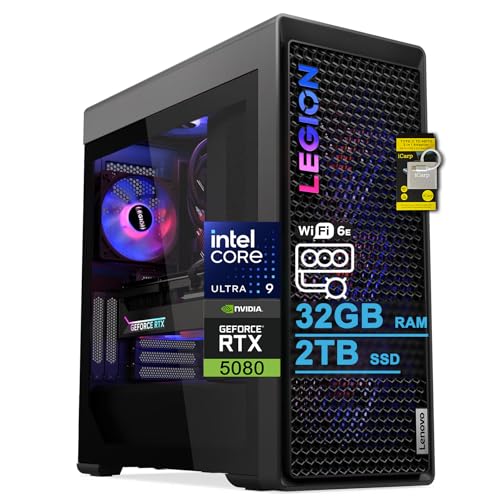
- Best for streaming from a working office: Lenovo Legion Tower 7i Gen 10, Core Ultra 9 285K, RTX 5080, 32GB RAM, 2TB SSD — Check on Amazon
- iBUYPOWER Y40 PRO, Ryzen 9 7900X, RTX 5070 Ti, 32GB RAM, 2TB SSD — Check on Amazon
- CLX Set, Ryzen 7 9800X3D, RTX 5080, 32GB RAM expandable to 256GB, 2TB SSD — Check on Amazon
- Alienware Aurora ACT1250, Core Ultra 9 285, RTX 5080, 32GB RAM, 1TB SSD — Check on Amazon
See 2 more Amazon options
- Skytech King 95, Ryzen 7 9800X3D, RTX 5070 Ti, 32GB RAM, 1TB SSD — Check on Amazon
- ZOTAC MEK Gaming PC, Ryzen 7 9700X, RTX 5070 Ti, 32GB RAM, Windows 11 Pro — Check on Amazon
Read the full guide ↓
Disclosure: As an Amazon Associate, reviewstook.com earns from qualifying purchases. Links to Amazon on this page are affiliate links; they cost you nothing extra. Listing details such as price and availability change often, so check the current Amazon listing before you buy.
Start with what streaming actually asks of a computer, because at this budget the answer is not what most buyers expect. A live broadcast is a second workload running beside the first: your game, your editing timeline or your screen share renders on one side, while an encoder compresses the picture in real time on the other — on Twitch, conventionally around 6,000 kbps at a constant bitrate for a 1080p60 stream; on YouTube, at higher bitrates, with 1440p streams and AV1 ingest available; Twitch’s own route to AV1 runs through its Enhanced Broadcasting programme. Streaming in 4K, by contrast, is limited by the platforms rather than by anything you can buy. The encoder is the component that decides whether that second workload touches the first, which is why this guide grades encoder-first — and why its headline finding is a tie. Every one of the six machines below carries an RTX 5080 or RTX 5070 Ti, and both cards carry two current-generation NVENC encoder blocks with AV1 encoding. The broadcast hardware is identical across the whole guide. What separates these machines for a streamer working from a home office is everything around the encoder: processor cores for the supporting cast of OBS scenes, browsers, chat and voice apps; storage for the recordings that pile up beside the live show; networking you can run a cable to; and the price conditions attached to each listing.
One more piece of honesty before the picks, because it shapes who should keep reading. Three thousand dollars is flagship money, and a home office stream does not need flagship money to look professional — the encoder in a far cheaper machine produces the same broadcast standards. What this tier buys a streamer is simultaneity and headroom: a demanding game or a heavy editing timeline rendered at full quality while the stream and a high-quality local recording run on separate encoder blocks, a 24-core processor absorbing everything else you throw at it, and terabytes of room for the archive. If your stream is talk, desktop and light games, the machines in Best Home Office PC Under $800 will broadcast indistinguishably, and the difference belongs in microphones, lighting and monitors. If your office produces the content — games, edited video, 3D, development — and the stream is how the work is shown or sold, the six towers below are the honest shortlist, re-judged here purely as streaming machines.
In this guide
Quick Picks
Short on time, or comparing several options at once? Each row below names a streaming buyer type and the machine that suits it, with a link to the listing.
| Buyer type | Pick | Why it stands out | Link |
|---|---|---|---|
| Best for streaming from a working office | Lenovo Legion Tower 7i Gen 10 | Dual NVENC + AV1, a 24-core processor for everything around the stream, 2TB for recordings and documented 2.5Gb Ethernet | Check on Amazon |
| Best value — funds the streaming kit too | iBUYPOWER Y40 PRO | Dual NVENC + AV1 and 2TB storage, positioned lower in this tier so more of the overall budget can go to microphone and lighting — check price on Amazon | Check on Amazon |
| Best for a growing channel and archive | CLX Set | RTX 5080 encoding, 2TB fitted and a 256GB memory ceiling — only when the current price fits this guide’s budget; check price on Amazon | Check on Amazon |
| Best premium brand and support | Alienware Aurora ACT1250 | 24 cores and dual NVENC + AV1 in a premium package — check price on Amazon — with only 1TB for recordings | Check on Amazon |
| Best work by day, stream by night | Skytech King 95 | Dual NVENC + AV1 and a published 850W Gold ATX 3 power supply — check price on Amazon | Check on Amazon |
| Best office-first specification | ZOTAC MEK Gaming PC | Dual NVENC + AV1, Windows 11 Pro in the box and documented outputs for a four-monitor desk | Check on Amazon |
How These Picks Were Chosen
The grading in this guide runs encoder-first, because that is the order streaming itself imposes. The first question is what hardware compresses the broadcast: a dedicated encoder block working in NVENC, Quick Sync or an AMD media engine, so the processor and graphics card are left to render. The second question is simultaneous load — what is left over for the game or timeline, the browser dashboards, the chat and voice applications and the local recording once the stream is running. The third is the unglamorous infrastructure a stream depends on daily: recording storage, a wired network path, and enough memory that nothing in the supporting cast starts swapping mid-show. Only after those come the office criteria this price tier is usually bought on — cores, connectivity, Windows edition and serviceability over a decade.
Applied to this set, the first question produces the tie described above, and it is worth being precise about it. The RTX 5080 and RTX 5070 Ti each carry two ninth-generation NVENC blocks plus AV1 encoding: one block can carry the live stream while the second records a high-quality local copy, independently, on every pick in this guide. No pick here has a better or worse broadcast encoder than another, and any guide that ranks these six machines by their streaming picture is inventing a difference. Two refinements complete the encoder map. The two Intel machines — the Legion’s Core Ultra 9 285K and the Alienware’s Core Ultra 9 285 — also carry Intel integrated graphics whose Quick Sync encoder exists as a reserve: a third, separate path you could hand a recording or a second stream to. We credit it as a reserve only, and claim no AV1 for it. The four AMD machines document no such second encoder, and we make no encoder claim of any kind for their processors’ integrated graphics. Software x264 encoding is treated throughout as an emergency fallback, not a plan — even on the 24-core machines, the hardware blocks do this job better and leave the cores free. One correction from our own earlier guides is carried deliberately: a desktop RTX 3050 or 3060 uses an older Ampere-generation NVENC with no AV1 encoding at all — AV1 encoding begins with the RTX 40 series. Neither card is in this set, but the distinction is why the encoder generation, not the brand, is what we grade.
The remaining filters are the ones this batch applies everywhere. The budget is a ceiling, not a target: every machine below is a real Amazon listing in the United States that belongs in this under-$3,000 tier, and where a pick belongs here only when its current price fits the budget, the review says so plainly — check the current price on Amazon before you buy, because pricing in this category moves often. We did not use these machines ourselves; specifications and caveats are taken from the verified listing research behind our sibling guides, and anything that research does not document — one power supply wattage below — is named as a gap rather than filled in. No star ratings or review counts are quoted anywhere, because those numbers change faster than any guide can follow.
The 6 Best Home Office PCs for Streaming Under $3,000
Lenovo Legion Tower 7i Gen 10 — Core Ultra 9 285K, RTX 5080, 32GB RAM, 2TB SSD
Who it suits: The professional whose stream is one workload among several heavy ones — an editor streaming a cutting session, a developer broadcasting builds and gameplay, a creator whose game, capture, chat and recording all run at once on one tower.
Since the encoder is a tie, this machine wins on what surrounds it. The Core Ultra 9 285K is a 24-core processor (the listing quotes up to 5.6 GHz), and cores are what simultaneous load spends: the game or timeline, OBS with its scenes and browser sources, the stream dashboard, voice chat, a music app, and the background exports an office produces. On an eight-core machine that pile-up is a negotiation; on 24 cores it is simply absorbed, leaving the two NVENC blocks to carry the broadcast and the local recording independently, exactly as they are designed to. The RTX 5080’s 16GB of graphics memory is texture and timeline insurance shared between the render and everything feeding the encode pipeline. Storage is 2TB — the size a recording habit actually needs, because a streamer who records every session for editing and clips consumes disk in a way a pure live streamer never sees. Networking is the best documented in this guide: 2.5-gigabit Ethernet for the wired connection a serious stream should run on, Wi-Fi 6E beside it, and Thunderbolt 4 for docks and fast external drives. A 360mm liquid cooler keeps the 24-core chip quiet through long sessions, which matters more in a streaming room than in any other office — the microphone hears the machine. Keyboard and mouse are included. Check the current price on Amazon before you buy. The 285K’s integrated graphics also provide the Quick Sync reserve described in How Chosen — a genuine third encoder path for a recording or a vertical second stream, claimed as a reserve and nothing more.
Two limitations carry over from the office research and both matter more, not less, to a streamer. The listing states the memory maximum as 32GB — the machine ships with 32GB, and per that listing text, that is the ceiling. Thirty-two gigabytes is comfortable headroom today, but a decade plan built on growing browser sources, bigger projects and heavier multitasking should verify that figure on the live listing before ordering. And it ships with Windows 11 Home, so professionals needing BitLocker or Remote Desktop hosting will budget for the Pro upgrade. Neither point is hidden; at this tier, both deserve reading before the purchase.
- Two NVENC blocks plus AV1, with the 285K’s Quick Sync held in reserve — the deepest encoder bench in this guide.
- 24 cores for the supporting cast: game or timeline, OBS, dashboards, chat and recording at once.
- 2TB of storage and documented 2.5Gb Ethernet — the recording archive and the wired stream path, both fitted.
Honest limitation: The listing caps memory at the 32GB it ships with, and Windows 11 Home — not Pro — is in the box.
Choose it if your stream shares the machine with genuinely heavy work and you want the most simultaneous-load headroom here. Skip it if a 64GB memory future is non-negotiable, or your stream is light enough that the Y40 PRO below does the same broadcast from a lower position in this tier.

iBUYPOWER Y40 PRO — Ryzen 9 7900X, RTX 5070 Ti, 32GB RAM, 2TB SSD
Who it suits: The streamer who understands that the audience hears the microphone and sees the lighting, not the tower — and would rather fund the whole broadcast than win a specification contest.
The broadcast hardware here is identical to the flagship above: the RTX 5070 Ti carries the same two NVENC blocks and AV1 encoding, so the live stream and the local recording run independently, and the picture your audience receives is the same picture. What changes is the supporting cast and its position in this tier. The Ryzen 9 7900X is a 12-core processor built for sustained multi-threaded work — half the Legion’s core count, and still far more simultaneous-load headroom than a game-plus-stream workload can use, with OBS, dashboards and voice applications comfortably housed. Storage matches the flagship at 2TB, which for a recording streamer is worth more than cores beyond twelve. Its position in this tier is the argument: it sits well below the flagships in this guide — check price on Amazon — and the kit-costing section below exists to point out that the headroom it leaves in an overall streaming-desk budget is what can fund the microphone, the lighting and the webcam that actually determine how professional a home office stream looks and sounds. A flagship tower feeding a laptop-grade microphone is the classic misallocation of this entire category; this pick is the correction. A keyboard and mouse come in the box, and the warranty is a stated one-year manufacturer term.
The limitation is a documentation gap this guide will not paper over: the power supply wattage is not published in the verified listing material. For a streamer, the PSU matters less as an upgrade question and more as a stability question — a tower expected to run a game, an encode and a recording for six hours straight should have a power supply you can identify, so confirm the wattage and rating on the live listing or with iBUYPOWER before buying, and treat a vague answer as a reason to choose a pick below that publishes its figure. One naming caution: the Y40 PRO name also covers a different configuration built around a 7800X3D under a separate listing, so match the Ryzen 9 7900X specification and the model number Y40BA9N57T01, not just the name, when you order.
- The same dual NVENC + AV1 broadcast hardware as the flagship picks in this guide.
- 12 cores and 2TB: simultaneous-load headroom and recording room, both covered.
- Positioned lower in this tier — the headroom it leaves can fund the microphone and lighting that audiences actually perceive; check price on Amazon.
Honest limitation: The power supply wattage is not published in the verified listing material — confirm it before buying.
Choose it if you want the flagship broadcast with a rational total budget for the whole streaming desk. Skip it if the unpublished PSU is a deal-breaker and you cannot get it confirmed — the CLX and Skytech below publish theirs.

CLX Set — Ryzen 7 9800X3D, RTX 5080, 32GB RAM (Expandable to 256GB), 2TB SSD
Who it suits: The streamer planning in years — a channel and a recording archive that will grow, on a machine whose memory ceiling will not be the reason it gets replaced.
The streaming fundamentals are flagship class: an RTX 5080 carrying the stream and the recording on its two NVENC blocks with AV1 available, 2TB of storage fitted for the archive, an 850W Gold power supply confirmed in the manufacturer’s specification material, and a 360mm liquid cooler keeping long sessions quiet in a room with a microphone in it. The specification that lifts this machine above its rivals for a growing operation is memory: the motherboard carries four slots rated to 256GB. It ships with 32GB of DDR5-5600, which is ample today, but a streamer-editor’s machine accumulates loads over years — bigger projects, more browser sources, virtual machines, an archive being indexed while a stream runs — and this is the only pick here that can grow into that future without a platform change. CLX is a boutique builder using standard parts, so the machine can be serviced and upgraded like a self-build over that same long life. The processor deserves one honest sentence: the Ryzen 7 9800X3D is a gaming-specialist chip, and as a streaming processor it works as what it also is — a strong eight-core chip — with its famous cache serving the game being streamed rather than the stream itself. Eight cores plus hardware encoding is a perfectly sound broadcast arrangement; it simply offers less supporting-cast headroom than the 12- and 24-core picks above.
The caution is pricing, and it is substantial. This listing’s price can move widely, so it belongs in this guide only when the current price on Amazon fits within the under-$3,000 budget, however good the hardware is. Treat the current price as the first specification to check: when it fits the budget, this is a shrewd decade purchase for a growing channel; when it sits above the budget, it is the guide’s easiest mistake — check price on Amazon before you buy.
- RTX 5080 dual NVENC + AV1 encoding and 2TB fitted for the recording archive.
- Four memory slots rated to 256GB — the only true growth path in this guide.
- Published 850W Gold power supply and standard-parts boutique construction.
Honest limitation: The listing’s price can swing widely — it is a pick only when the current price fits this guide’s budget; check price on Amazon.
Choose it if memory growth and a long archive are your plan and the current price on Amazon fits this guide’s budget. Skip it if the current price sits above the budget, or your operation will never outgrow 32GB — the Legion and Y40 PRO serve you today within this tier.

Alienware Aurora ACT1250 — Core Ultra 9 285, RTX 5080, 32GB RAM, 1TB SSD
Who it suits: The streamer whose office is also a client-facing room — who wants flagship broadcast hardware, a premium finish and a global support brand behind the desk, and accepts the trade-offs that come with them.
The streaming core is the strongest pairing in the guide on paper: a Core Ultra 9 285 — a 24-core processor by Intel’s specification — beside an RTX 5080 whose two NVENC blocks carry stream and recording independently with AV1, while the processor absorbs the game, the scenes and the supporting applications without negotiation. Like the Legion, this Intel machine also holds a Quick Sync reserve encoder in its integrated graphics, claimed as a reserve only. The power supply is a 1000W Platinum-rated unit, the strongest and most efficient here, and a 240mm liquid cooler handles the processor. The package is the product: a polished case with a clear panel, and Dell’s support network behind it. Check the current price on Amazon before you buy — that check defines the buying rule for this pick. When the current price fits within this guide’s under-$3,000 budget, it competes with everything here; when it sits above that budget, it does not belong in this tier.
For a streamer specifically, one limitation outranks the standing Alienware caveats: storage is 1TB, the thinnest in this guide. A recording habit — full sessions kept for editing, clips and archives — fills a terabyte faster than any other workload in this batch, so consider this machine as the tower plus the second drive it will need, and judge its overall fit for your budget accordingly. The remaining trade-offs are the familiar ones: the motherboard and power supply use Dell’s proprietary formats, so long-term self-service means Dell parts rather than standard ones; and the Amazon listing contradicts itself in places — the processor is described with two different core counts in different sections, and the liquid cooling is described both as fitted and as an option — so verify the exact configuration on the live page before ordering and keep screenshots of what you bought.
- 24 cores plus dual NVENC + AV1, with a Quick Sync reserve — flagship simultaneous-load capacity.
- 1000W Platinum power supply and a premium, client-presentable package.
- Premium positioning in this tier — competitive only when the current price fits this guide’s budget; check price on Amazon.
Honest limitation: Only 1TB of storage for a recording workload, proprietary Dell formats, and pricing that can sit over this guide’s ceiling — check price on Amazon.
Choose it if brand, finish and support matter, the current price fits this guide’s budget, and you budget the second drive from day one. Skip it if you record everything and want the archive fitted at purchase — the three picks above all ship 2TB.

Skytech King 95 — Ryzen 7 9800X3D, RTX 5070 Ti, 32GB RAM, 1TB SSD
Who it suits: The hybrid this keyword often describes in practice — a professional desk from nine to five that becomes the household’s gaming and streaming rig after hours, with one tower justifying itself at both jobs.
The broadcast arrangement is the guide’s standard flagship one: the RTX 5070 Ti’s two NVENC blocks split the live stream and the local recording, with AV1 available, and the 9800X3D — a strong eight-core processor whose celebrated cache serves the game on screen — handles OBS and the supporting applications alongside. The fundamentals underneath are the best published in this guide: an 850W Gold power supply built to the ATX 3 standard, stated plainly in the listing, and a 360mm liquid cooler that keeps sustained sessions quiet enough for a microphone in the same room. That published power supply is a streamer’s detail as much as an upgrader’s: long broadcasts are sustained loads, and a properly specified PSU is the difference between a machine that runs six-hour sessions without drama and one that becomes a troubleshooting hobby. Memory is 32GB of DDR5-5600. Check the current price on Amazon. It is positioned below the flagships in this guide while giving up nothing in the encoding hardware or the build fundamentals, which makes it the easiest after-hours purchase in this guide to defend.
Two cautions, both carried at full size. Storage is 1TB, and the recording math from the Alienware review applies identically: a streamer who keeps sessions will fill it, so treat a second drive as a scheduled purchase and consider the machine accordingly — tower plus drive, not tower alone. And the listing itself states that the graphics card brand may vary; near-identical King 95 variants also exist under other listings, so match the model number ST-KING95-1671-W-AM before ordering, and confirm the delivered card is the RTX 5070 Ti the broadcast plan assumes.
- Dual NVENC + AV1 encoding with a published 850W Gold ATX 3 power supply — sustained-session fundamentals done right.
- 360mm liquid cooling: quiet under the long loads a broadcast imposes.
- Positioned below the guide’s flagships in this tier — check price on Amazon.
Honest limitation: 1TB of storage against a recording habit, and the graphics card brand may vary by listing.
Choose it if one tower must do a professional day, flagship gaming and streaming at night. Skip it if the machine will never game and recording room matters most — the Y40 PRO gives you 2TB and 12 cores from a similar position in this tier.

ZOTAC MEK Gaming PC — Ryzen 7 9700X, RTX 5070 Ti, 32GB RAM, Windows 11 Pro
Who it suits: The office-first professional adding a stream to serious work — who needs the professional Windows features in the box and a specification with nothing hidden, and whose broadcast is talk, desktop and their own projects rather than demanding games.
The streaming hardware matches the guide’s standard: the RTX 5070 Ti’s two NVENC blocks and AV1 encoding carry stream and recording independently, and for the talk/desktop/capture-fed formats this buyer runs, that is the whole requirement met at flagship level. The office specification around it is the most transparent here. It ships with Windows 11 Pro — the only pick in this guide that does — bringing BitLocker encryption for a machine holding client data and the ability to host Remote Desktop sessions into your own desk. Memory is 32GB of DDR5-6000, the fastest speed published in this guide. The graphics card’s outputs are documented in the specification — one HDMI 2.1b and three DisplayPort 2.1b — which is a four-monitor desk driven from the card: for a streamer, that is a production desk of game screen, OBS screen and chat screen with room to spare, and it is the only multi-monitor claim in this guide we can make from published outputs rather than assumption. A 750W 80+ Gold power supply is stated plainly, with Wi-Fi 6E and Bluetooth 5.3. Check the current price on Amazon. It sits at the lower end of this guide’s tier, for a complete and fully published work machine.
The limitations are ceilings. The Ryzen 7 9700X is an eight-core processor — excellent and efficient, but the supporting-cast headroom is the guide’s tightest alongside the other eight-core picks, and a streamer who also renders, compiles or runs virtual machines beside the broadcast will feel the difference against the 12- and 24-core machines above. Storage is 1TB, carrying the same recording caveat as the Alienware and King 95: allow for the second drive in your overall budget if you keep your sessions. And the 750W power supply, while correct and honestly published for the fitted card, leaves the least headroom for a future flagship graphics card of any pick here. None of this touches the broadcast itself; it defines the buyer — serious office work with a professional stream attached, rather than a streaming operation that also does office work.
- Dual NVENC + AV1 encoding, with Windows 11 Pro — the only pick here with the professional edition in the box.
- Documented graphics outputs (HDMI 2.1b + 3× DisplayPort 2.1b) for a four-monitor production desk.
- Lower-end positioning in this guide’s tier, with every specification published — check price on Amazon.
Honest limitation: Eight cores is the tightest simultaneous-load headroom here, 1TB fills under a recording habit, and 750W leaves the least future graphics headroom.
Choose it if you need Windows 11 Pro and a transparent, work-first specification with a flagship encoder attached. Skip it if your stream shares the machine with heavy renders or many virtual machines — the Legion and Y40 PRO exist for that load.

Comparison Table
| Product | Processor / Graphics | Best use | Link |
|---|---|---|---|
| Lenovo Legion Tower 7i Gen 10 | Ultra 9 285K (24-core) / RTX 5080 | The deepest streaming bench: cores, 2TB and wired networking | Check on Amazon |
| iBUYPOWER Y40 PRO | Ryzen 9 7900X (12-core) / RTX 5070 Ti | Flagship broadcast that leaves the kit funded | Check on Amazon |
| CLX Set | Ryzen 7 9800X3D / RTX 5080 | Memory growth to 256GB for a growing channel — only when the current price fits this guide’s budget | Check on Amazon |
| Alienware Aurora ACT1250 | Ultra 9 285 (24-core) / RTX 5080 | Premium brand and support, plus a planned second drive | Check on Amazon |
| Skytech King 95 | Ryzen 7 9800X3D / RTX 5070 Ti | Professional days, gaming and streaming nights | Check on Amazon |
| ZOTAC MEK Gaming PC | Ryzen 7 9700X / RTX 5070 Ti | Windows 11 Pro and a fully published work specification | Check on Amazon |
Setting Up OBS on Any of These Machines
Whichever pick you buy, the encoder configuration is the same, because the encoder is the same. In OBS, select the NVIDIA NVENC encoder for the stream — on every machine in this guide it is one of two independent blocks, so assign the second block to the recording: stream on one, record a high-quality local copy on the other, and neither touches the other’s capacity. Run the stream at a constant bitrate (CBR) of around 6,000 kbps for a 1080p60 Twitch broadcast, with a two-second keyframe interval, which the platforms expect. On YouTube you can push the bitrate higher and stream at 1440p; AV1 output is available on all six machines for the platforms and programmes that accept it, including Twitch’s Enhanced Broadcasting. Keep the Intel machines’ Quick Sync in reserve — it is a sensible home for a recording or a vertical-format second stream, not a replacement for the NVENC blocks. Do not encode in x264 on any of these machines except as a diagnostic fallback; the hardware exists precisely so the processor stays free.
When a stream misbehaves, OBS tells you which of three counters is failing, and each has its own fix. Rendering lag means the graphics card is saturated by the game or timeline and OBS cannot composite its scenes: cap the game’s frame rate, lower its settings, or move the recording to the second encoder block so compositing gets room. Encoding lag means the encoder itself is overloaded: check that stream and recording are genuinely on separate blocks, step the recording quality down a preset, and confirm you have not accidentally set an x264 profile. Network lag — dropped frames with the other two counters clean — is almost never the computer: it is the connection. Which produces the rule this guide applies to all six picks without exception: stream over wired Ethernet, not Wi-Fi. The Legion documents 2.5-gigabit Ethernet in its specification; for the other picks, whose listings document Wi-Fi rather than a wired specification, run the cable anyway and verify the port on the live listing before ordering if your desk plan depends on it. A flagship encoder behind a congested wireless link produces a worse broadcast than a modest machine on a wire. Finally, rehearse: run a full-load test stream — game or timeline, recording on, every scene and browser source live — for a full hour inside the return window. Every fault in the three counters shows up in rehearsal at no cost; the same fault in a live show costs an audience.
How to Choose a Home Office PC for Streaming Under $3,000
- Grade the workload around the stream, not the stream. The encoder is identical on all six machines. What differs is simultaneous load: count your cores against your pile-up — game plus OBS plus dashboards plus recording is comfortable on eight cores, roomy on twelve, and effortless on twenty-four.
- Buy recording storage as a streaming specification. If you keep your sessions, 2TB fitted (Legion, Y40 PRO, CLX) is the honest starting point. On the 1TB picks, consider the machine as tower plus the second drive it will need, as part of your own overall budget rather than as part of the pick itself.
- Check the memory ceiling, not just the memory. Everything here ships with 32GB. The CLX can grow to 256GB across four slots; the Legion’s listing states 32GB as its maximum. A growing channel is bought on ceilings.
- Demand a published power supply. Long broadcasts are sustained loads. Most picks publish theirs (850W Gold, 1000W Platinum, 750W Gold); the Y40 PRO does not, and it is worth shortlisting only once you have confirmed the figure yourself.
- Check the current price before you judge any pick. The Alienware and the CLX belong in this guide only when the current price on Amazon fits within the under-$3,000 budget. Set your budget limit before you shop.
- Plan the wired connection before the machine arrives. Ethernet cable, a port on the router, and a desk layout that reaches both. The stream’s network counter does not care how much the tower cost.
- Read the Windows edition. Windows 11 Home is what five of the six ship with. If your office needs BitLocker or Remote Desktop hosting, choose the ZOTAC with Pro in the box or budget the upgrade — before the client data lands on the drive, not after.
- Match the model number, not the name. The King 95 and Y40 PRO names both cover multiple configurations. The model number in each review is the machine the research verified; a familiar name on a different configuration is a different purchase — and in the King 95’s case, the listing itself warns the card brand may vary.
- Do not pay for an encoder you already have. If you are cross-shopping older or cheaper guides, remember the generation rule: AV1 encoding and the current NVENC arrive with the RTX 40 series and later. A desktop RTX 3050 or 3060 encodes in an older NVENC generation with no AV1 at all, whatever a listing headline implies.
What the Rest of the Streaming Kit Costs You
The tower is the part of a stream the audience never sees or hears. Everything in this section is a separate purchase, to be considered as machine plus kit in your own overall budget, and the honest ordering matters more than the amounts. Buy in this order. First, the microphone: audio quality is the single largest difference between an amateur and a professional-sounding broadcast, and it is where the headroom the Y40 PRO leaves compared with the flagships should go before anything else. Second, lighting: a simple, consistent light on your face does more for the picture than any camera upgrade, and it makes whatever camera you already own look deliberate. Third, the webcam — only after the light, because a modest camera in good light outperforms a flagship camera in a dim room every time. Fourth, and only for console streamers, a capture card: it is how a console’s picture reaches any of these PCs, and it is a console-only purchase — a PC streamer capturing their own machine needs nothing of the kind, and no pick should ever be read as including one. The towers in this guide will hold up their end of the broadcast for a decade; the kit is what the audience actually judges, and it is bought once, in that order.
Common Buying Mistakes
- Ranking these six machines by their streaming picture. The encoder is identical across the guide; anyone selling you a difference there is selling you a story. Rank them by cores, storage, ceilings and price conditions.
- Feeding a flagship tower with a bargain microphone. The audience hears the microphone and sees the lighting. A lower-positioned machine in this tier plus a funded kit out-streams a flagship machine plus leftovers, every broadcast.
- Streaming over Wi-Fi because the desk is tidier. Dropped frames are a network counter, not a computer fault, and no specification in this guide fixes a congested wireless link. Run the cable.
- Buying the CLX when its current price sits above this guide’s budget because a lower price appeared in a guide. The current price on Amazon is the only price that counts; above the budget, this pick does not belong in this tier.
- Forgetting the recording archive until the drive is full. A 1TB pick and a daily recording habit meet within months. Buy the 2TB machines, or schedule the second drive with the purchase.
- Encoding in x264 because a tutorial said so. On these machines the hardware blocks are faster, cleaner and free — x264 spends the cores your game and your supporting applications need.
- Assuming any RTX card encodes AV1. Desktop RTX 3050 and 3060 cards are an older NVENC generation with no AV1 encoding; the capability starts at the RTX 40 series. Check the generation, not the brand.
- Skipping the rehearsal. An hour of full-load test streaming inside the return window finds the rendering, encoding and network faults while they are still free to fix.
Final Recommendation
- Most streamers who genuinely need this tier: Lenovo Legion Tower 7i Gen 10.
- Best value — flagship broadcast, funded kit: iBUYPOWER Y40 PRO.
- A growing channel and archive: CLX Set, only when the current price fits this guide’s budget.
- Premium brand, finish and support: Alienware Aurora ACT1250, only when the current price fits this guide’s budget and with a second drive budgeted.
- Work by day, game and stream by night: Skytech King 95.
- Windows 11 Pro and a work-first specification: ZOTAC MEK Gaming PC.
Our top two for streaming from a home office at this budget are the Legion Tower 7i, because its 24 cores, 2TB of storage and documented 2.5-gigabit Ethernet make it the most complete simultaneous-load machine here, and the iBUYPOWER Y40 PRO, because it delivers the identical broadcast hardware from a lower position in this tier that leaves room in the overall budget for the microphone and lighting — which is where audiences actually live. The CLX is the specialist purchase for a growing archive, strictly when its current price fits the budget; the King 95 is the honest hybrid; the ZOTAC is the rational office-first choice with Pro in the box; and the Alienware is the premium object, bought with open eyes about its storage and formats. Streamers whose show is talk and desktop rather than heavy production should take the same research one tier down — see Best Home Office PC For Streaming Under $2500 — and pure office users who arrived here by keyword should start with Best Home Office PC Under $3000 instead. Whichever tower you choose: wire it, rehearse it for an hour before your first real show, and check the current price on Amazon to confirm it fits this guide’s budget before you buy.
Frequently Asked Questions
Which of these machines produces the best-looking stream?
None of them — and that is the most useful answer in this guide. All six carry RTX 5080 or RTX 5070 Ti graphics with two current-generation NVENC blocks and AV1 encoding, so the broadcast itself is identical. The differences are in what surrounds the encoder: cores for simultaneous load, storage for recordings, memory ceilings and price conditions. Choose on those.
Can I stream and record at the same time on these PCs?
Yes — that is precisely what the dual encoder blocks are for. Assign one NVENC block to the live stream and the second to a high-quality local recording in OBS, and the two run independently. On the two Intel machines, the Legion and the Alienware, the integrated Quick Sync encoder is also available as a reserve path for an additional recording; we claim no AV1 for it, and the main arrangement does not need it.
Do I need a $3,000 PC to stream from a home office?
For talk, desktop, calls and light games, no — the encoder standards are the same far below this tier, and our Best Streaming PC Under $3000 and office guides cover cheaper machines that broadcast identically. This tier earns its money when the stream shares the machine with heavy production — demanding games, editing timelines, 3D, development — or when the whole operation, archive included, is planned in years.
Is AV1 worth caring about for a home office stream?
It is the current direction of travel: YouTube accepts AV1 ingest and higher-bitrate 1440p streams, and Twitch’s route runs through Enhanced Broadcasting. All six machines here encode AV1 in hardware. What AV1 is not is universal across graphics history — desktop RTX 3050 and 3060 cards, for example, have no AV1 encoding at all — so check the card generation whenever you cross-shop outside this guide.
Why does this guide insist on wired Ethernet?
Because dropped frames from a congested wireless link are the most common streaming fault and the only one no purchase in this guide can fix. The Legion documents 2.5-gigabit Ethernet; the other listings document Wi-Fi, so run a cable, and if your desk plan depends on a specific wired port, verify it on the live listing before ordering. Rehearse on the wire you intend to broadcast on.
Can these machines run a multi-monitor streaming desk?
Where outputs are documented, concretely: the ZOTAC’s graphics card publishes one HDMI 2.1b and three DisplayPort 2.1b outputs — a four-display production desk from the card — and the Legion documents Thunderbolt 4 for dock-driven setups. For the other picks, the verified listings do not publish a full output count, so check the live listing’s photographs and specification before assuming your three-screen layout connects as planned. Our Best Gaming PC For Streaming Under $3000 guide covers gaming-first alternatives if the desk grows further.
- Best Home Office PC Under $3000
- Best Home Office PC For Streaming Under $2500
- Best Home Office PC Under $2500
- Best Home Office PC Under $1500
- Best Home Office PC Under $800
- Best Streaming PC Under $3000
- Best Gaming PC For Streaming Under $3000
- Best Workstation PC Under $3000
- Best Home Office PC For Beginners Under $3000
- Best Home Office PC For Small Spaces Under $3000
- Best Mini PC Under $3000


