Where to buy
Check the latest price, availability and delivery on Amazon. Orders are placed on Amazon. We may earn a commission from qualifying purchases.
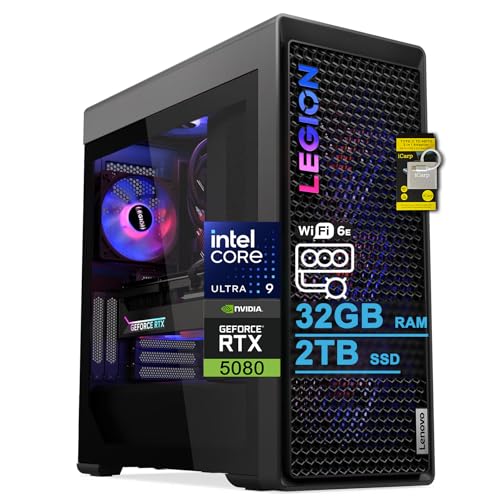
- Tidiest installation in the guide: Lenovo Legion Tower 7i Gen 10, Core Ultra 9 285K, RTX 5080, 32GB RAM, 2TB SSD — Check on Amazon
- ZOTAC MEK Gaming PC, Ryzen 7 9700X, RTX 5070 Ti, 32GB RAM, Windows 11 Pro — Check on Amazon
- iBUYPOWER Y40 PRO, Ryzen 9 7900X, RTX 5070 Ti, 32GB RAM, 2TB SSD — Check on Amazon
- Skytech King 95, Ryzen 7 9800X3D, RTX 5070 Ti, 32GB RAM, 1TB SSD — Check on Amazon
See 2 more Amazon options
- CLX Set, Ryzen 7 9800X3D, RTX 5080, 32GB RAM expandable to 256GB, 2TB SSD — Check on Amazon
- Alienware Aurora ACT1250, Core Ultra 9 285, RTX 5080, 32GB RAM, 1TB SSD — Check on Amazon
Read the full guide ↓
Disclosure: As an Amazon Associate, reviewstook.com earns from qualifying purchases. Links to Amazon on this page are affiliate links; they cost you nothing extra. Listing details such as price and availability change often, so check the current Amazon listing before you buy.
Start with the sentence nobody selling you a $3,000 computer wants in the first paragraph: not one machine in this guide is small. Every pick below is a full-size tower — the kind of case that goes on the floor beside a desk or claims a serious slab of the desk itself — because at this budget, that is what the money buys. There is no mini PC in this set, nothing that mounts behind a monitor, and no case here that a tape measure would describe kindly. If your room genuinely cannot absorb a tower, this guide is the wrong shelf: the machines in Best Home Office PC For Small Spaces Under $800 and Best Mini PC Under $3000 solve the size problem by actually being smaller, and no amount of clever placement turns a flagship tower into one of them.
So what is a small-spaces guide doing at $3,000 at all? It is answering the question that remains once the tower is a given: given that a full-size case is coming into a small room, which of these six machines installs with the least collateral damage? That turns out to be a real contest with real differences. One pick can run a whole desk down a single Thunderbolt cable. One publishes every graphics output, so you can plan the cable drop to the centimetre before it ships. One leaves enough change from the budget to buy the stand, the cable channel and the monitor arm that make a tower livable in a tight room. And one — the prettiest object here — is built in proprietary formats that make it the hardest machine in the set to service, adapt or work around once it is in place. Size is fixed at this tier; installation quality is not, and installation quality is what this guide grades.
One more piece of honesty before the picks, carried over from our base guide because it does not stop being true at any angle: $3,000 is not home-office money in the ordinary sense. Documents, email, spreadsheets and video calls were fully served several tiers down, and a tower bought for that work alone is an expensive ornament wherever you put it. The buyers this set serves are the professionals whose work earns money on the machine — editors, developers, data workers, designers — plus the deliberate buy-once shoppers who intend to keep one computer for a decade. If that is not you, the kindest thing this page can do is point you at Best Home Office PC Under $800 and a room that stays exactly as spacious as it is now.
In this guide
Quick Picks
Short on time, or comparing several options at once? Each row below names the installation situation and the machine that handles it best, with a link to the listing.
| Your situation | Pick | Why it installs best | Link |
|---|---|---|---|
| Tidiest desk — fewest cables in the room | Lenovo Legion Tower 7i Gen 10 | Thunderbolt 4 runs the desk through one dock cable, and 2TB of storage keeps external drives off the desk | Check on Amazon |
| You want to plan every cable before ordering | ZOTAC MEK Gaming PC | The only pick publishing all its graphics outputs — one HDMI and three DisplayPorts — plus Windows 11 Pro | Check on Amazon |
| Budget left over for the stand and cable channel | iBUYPOWER Y40 PRO | Positioned well below the flagships in this tier with 2TB fitted — check the current price on Amazon; the headroom can help fund the furniture that makes a tower fit | Check on Amazon |
| Published parts you can verify on delivery day | Skytech King 95 | A named 850W Gold ATX 3 power supply and a 360mm cooler whose exhaust you can plan around | Check on Amazon |
| Memory growth without a second machine | CLX Set | Four RAM slots rated to 256GB and 2TB of storage — check price on Amazon and only consider it when it sits within budget | Check on Amazon |
| The tower itself is the room’s furniture | Alienware Aurora ACT1250 | The one genuinely styled object here — bought for looks and support; check price on Amazon and only consider it when it sits within budget | Check on Amazon |
How These Picks Were Chosen
The six machines are exactly the verified set from our base guide to the Best Home Office PC Under $3000 — same listings — re-judged here on a single axis: what each one demands from a small room. Nothing was added to the set and nothing was re-researched; the specifications and caveats are the base guide’s documented facts, and where the base guide recorded a gap, this guide records the same gap rather than filling it in.
The grading starts with a confession about measurements. The verified research behind this set documents no case dimensions, volumes, weights or mounting options for any of the six picks — so this guide prints none. You will not find a litre figure or a centimetre in the reviews below, because inventing tidy numbers for six towers would be fiction, and the honest version is more useful anyway: all six are full-size towers of the same broad class, and the differences that decide a small-room installation are not in their footprints. They are in four documented things. First, the cable drop: how many cables the machine forces across your desk and floor, which is set by its documented outputs — one pick publishes all four of its graphics outputs, one offers Thunderbolt 4 for a one-cable dock run, and the rest leave their port counts partly to the live listing. Second, the exhaust: four picks document liquid radiators (360mm on three of them, 240mm on one), and a radiator is an installation fact — it fixes where the machine’s heat leaves the case, which decides where the case can stand. Third, the power supply: five picks publish theirs, and a published supply means the machine arrives as a known object; the one unpublished supply schedules a case-opening on delivery day before you can even plan a future upgrade. Fourth, what else lands on the desk: the three 2TB picks keep project libraries inside the case, while the three 1TB picks make an external drive — one more box, one more cable — a near-certainty for buyers with large libraries.
Two rules governed every judgement. The sealed-cabinet refusal applies to all six picks without exception: a tower of this class, with a flagship graphics card and a power supply rated between 750W and 1000W where published, moves a great deal of heat under sustained work, and a closed cabinet, a sealed alcove or a desk with no air path behind it is not a placement — it is a slow warranty claim. And one caution from the base guide carries over untouched: pricing on some of these machines varies, so check the current price on Amazon before judging them — a small room does not make an over-budget tower a better idea.
Measure Before You Buy: The Five-Step Checklist
Do these five steps in order, with a tape measure and the live listing open, before any tower in this guide is ordered. They take twenty minutes and they are the difference between an installation and an argument with a delivery box.
- Step 1 — Measure the spot. Decide where the tower will actually live — floor beside the desk, floor under it, or on the desk itself — and measure that space, not the room. Then take the case dimensions from the live listing of the pick you are buying (this guide prints none, deliberately, because the verified research documents none) and check the case against your measured space with room to spare on every side. If the listing’s figures leave you guessing, that is information: the picks below whose makers publish the most are the ones whose installations can be planned, and the rest must be measured on arrival inside the return window.
- Step 2 — Ventilation clearance. Whatever the spot, it needs an air path: open space at the intake side and an unobstructed route for exhaust to leave and disperse into the room. For the four liquid-cooled picks, identify where the radiator sits in the case from the listing photographs and keep that face clear of walls, curtains and cabinet backs. A sealed cabinet fails this step for every pick in the guide — if your only available spot is enclosed, stop here and buy a smaller class of machine instead.
- Step 3 — Give the power supply an address. Unusually for a small-spaces guide, no pick here has an external power brick: all six machines run internal power supplies, so there is no brick to house, hide or trip over. The “address” step becomes simpler and stricter — the tower itself must stand within its power cord’s reach of a wall socket, without the cord crossing a walkway under tension, and the socket run should not share a strained multi-way adapter with the rest of the desk. Plan the socket before the case arrives, because a full-size tower is not something you shuffle around afterwards looking for one.
- Step 4 — Trace the cable drop. Count what will run from the tower to the desk: display cables (one per monitor, from the graphics card’s outputs — count them on the live listing, or from the documented outputs where a pick publishes them), the Ethernet run if you wire the machine as you should, USB to the desk, and audio. The Legion’s Thunderbolt 4 collapses most of this into a single dock cable, which is why it tops this guide; every other pick asks you to route the full bundle, so decide the path — along the wall, through a cable channel, under the desk — before the machine is standing in the way of it.
- Step 5 — Then order, and verify on arrival. Only now place the order — and treat delivery day as the second half of the installation. Check the delivered configuration against the model number you ordered (two picks in this guide share their names with different configurations under other listings), read the power supply label on the one pick that does not publish it, confirm the graphics card brand on the pick whose listing says it may vary, and measure the case against your Step 1 space while the return window is wide open. A tower that fails any of this goes back in its box, not into a corner you will resent for a decade.
The 6 Best Home Office PCs for Small Spaces Under $3,000
Lenovo Legion Tower 7i Gen 10 — Core Ultra 9 285K, RTX 5080, 32GB RAM, 2TB SSD
Who it suits: The professional in a small room whose desk is already full — multiple monitors, a dock, peripherals — and who needs the tower to add as little cabling and clutter as possible to a workspace that has none to spare.
On hardware this is the base guide’s top pick, and the specification needs no re-arguing: a 24-core Core Ultra 9 285K, an RTX 5080, 32GB of memory, 2TB of SSD storage, an 850W power supply, Wi-Fi 6E and a keyboard and mouse in the box. What earns it first place here, specifically, is Thunderbolt 4. In a small room, the scarcest resource is not floor area — it is the desk surface and the cable spaghetti behind it. Thunderbolt 4 lets this tower sit on the floor, out of the way, while a single cable runs up to a dock on the desk carrying the monitors and peripherals; the machine’s physical presence shrinks to one tower in one corner and one cable on the desk. No other pick in the set documents the same trick. The 2TB of internal storage pulls in the same direction: project libraries live inside the case, so there is no external drive claiming desk space and adding its own cable to the pile. And the documented 360mm liquid cooler is a genuine installation fact — it fixes the machine’s exhaust at the radiator, so you can plan which face of the case needs open air and place the tower accordingly, rather than discovering its hot side by furniture arrangement. Check the current price on Amazon — it sits near the top of this budget tier.
The limitations are the base guide’s, unchanged. The listing states the memory maximum as the 32GB the machine ships with — read that line on the live listing before ordering, because a buyer whose decade plan includes 64GB should not discover the ceiling after the tower is installed. It ships with Windows 11 Home, so BitLocker and Remote Desktop hosting are an upgrade away. And for all its cable discipline, it remains a full-size tower: the Legion makes a tower installation tidy, it does not make it small.
- Thunderbolt 4: the set’s only documented one-cable dock run — the tower lives on the floor, the desk stays clear.
- 2TB of storage inside the case: no external drive on the desk.
- 360mm radiator documented, so the exhaust face can be planned before it arrives.
Honest limitation: The listing caps memory at the 32GB it ships with, Windows 11 Home is in the box — and it is still a full-size tower that needs a floor spot with open air.
Choose it if your small room’s real problem is cables and desk clutter, and your work justifies the flagship hardware. Skip it if 64GB of memory is in your future, or the room cannot give a tower an open-air floor spot at all — no pick here can help with that.

ZOTAC MEK Gaming PC — Ryzen 7 9700X, RTX 5070 Ti, 32GB RAM, Windows 11 Pro
Who it suits: The planner — the buyer with a fixed desk, a fixed monitor count and no appetite for surprises — who wants to know exactly what arrives and exactly which cables it will need before spending anything.
Installation rewards information, and this is the most documented machine in the guide. Its graphics card’s outputs are published in the specification — one HDMI 2.1b and three DisplayPort 2.1b — which means a three- or four-monitor desk can be cabled entirely from the card, and the whole drop can be measured, bought and routed before the tower ships. Its power supply is published too: 750W, 80+ Gold. Around those certainties sits the most office-correct specification in the set: it is the only pick shipping Windows 11 Pro, with the BitLocker encryption and Remote Desktop hosting a working office actually uses; its 32GB of memory runs at DDR5-6000, the fastest speed published here; and Wi-Fi 6E and Bluetooth 5.3 are stated plainly. Its positioning helps the plan as well — it sits below the flagships in this tier, so check price on Amazon; the headroom can help fund the monitor arms and cable management a small desk needs. What the verified research does not document for this pick is its cooling arrangement or any case figure, so its exhaust is graded by class: a tower with a 750W supply and a flagship-class card needs the same open air as the rest, planned generically rather than to a named radiator.
The ceilings are the honest cost. The Ryzen 7 9700X is an eight-core processor in a set where rivals field twelve and twenty-four cores — heavy compile and render queues finish sooner elsewhere. Storage is 1TB, so a buyer with a large project library should expect an external drive on the desk, with its cable, as part of this installation. And the 750W supply, correct for the fitted card, leaves the least headroom for a future flagship graphics card of any pick here.
- Every graphics output published (HDMI 2.1b + 3× DisplayPort 2.1b): the only fully plannable cable drop in the guide.
- Windows 11 Pro in the box — the office-correct operating system, unique in this set.
- Published 750W Gold power supply; nothing about the installation needs guessing.
Honest limitation: Eight cores is the fewest among the serious picks here, 1TB of storage invites an external drive onto the desk, and its cooling is not documented — plan its airflow by class.
Choose it if you want the installation with no unknowns and the professional Windows edition. Skip it if your income depends on render or compile throughput, or your library will not fit in 1TB and the desk cannot take another box.

iBUYPOWER Y40 PRO — Ryzen 9 7900X, RTX 5070 Ti, 32GB RAM, 2TB SSD
Who it suits: The buyer whose small room needs money spent on it, not just in it — the one who would rather have a very good tower plus a proper stand, a cable channel and a monitor arm than a flagship tower standing in a rat’s nest.
The small-spaces argument for this machine is about headroom within the tier. Its hardware is near-flagship — a 12-core Ryzen 9 7900X built for sustained multi-threaded work, an RTX 5070 Ti, 32GB of DDR5 memory and 2TB of NVMe storage — and it is positioned well below the flagships in this guide; check the current price on Amazon. That positioning can leave room in the overall budget for the floor stand that gets the tower off a cramped desk, the cable channel that makes the drop disappear, and the monitor arm that gives the desk back. In a small space, that furniture is not an accessory to the installation — it is the installation, and this is the pick best placed to leave headroom for it. The 2TB of storage keeps the desk clear of external drives, keyboard and mouse are in the box, and the warranty is a published one-year manufacturer term.
The catch is a documentation gap the base guide refused to paper over, and it matters more in this guide than in that one: the power supply wattage is not published in the verified listing material. You cannot fully plan a decade installation around an unknown supply — it decides whether a future graphics card is a drop-in or a rebuild — so delivery day for this pick includes opening the case and reading the label, inside the return window, before the machine takes its final place. Confirm the figure on the live listing or with iBUYPOWER before buying if you can. One more arrival check: the Y40 PRO name also covers a different 7800X3D configuration under a separate listing, so match the Ryzen 9 7900X specification, not just the name, when the box arrives.
- Positioned well below the flagships in this tier: the pick best placed to leave headroom for the stand, channel and arm the room needs — check price on Amazon.
- 2TB of storage fitted — nothing extra lands on the desk.
- 12-core Ryzen 9 and RTX 5070 Ti: near-flagship work hardware positioned in the middle of this tier.
Honest limitation: The power supply wattage is unpublished, so this installation cannot be fully planned until you have read the label on the delivered machine.
Choose it if you want flagship-class work power and a properly fitted room for the same total money. Skip it if an unpublished PSU is a deal-breaker you cannot get confirmed — the ZOTAC above and the Skytech below publish theirs.

Skytech King 95 — Ryzen 7 9800X3D, RTX 5070 Ti, 32GB RAM, 1TB SSD
Who it suits: The hybrid worker in a small room — a serious machine through the working day and the household’s gaming rig after hours — who wants one tower, installed once, with nothing about its fundamentals left vague.
What this pick offers an installer is published fundamentals. Its power supply is named and properly specified — 850W Gold, ATX 3 standard — which is the figure that decides whether a graphics card change in year five is an afternoon or an ordeal, and here you know it before the box ships. Its cooling is documented too: a 360mm liquid cooler, which fixes the exhaust at the radiator and lets you plan the tower’s placement around a known hot face rather than a mystery. The rest of the specification is the base guide’s: a Ryzen 7 9800X3D, an RTX 5070 Ti, 32GB of DDR5-5600 memory and 1TB of Gen4 NVMe storage — check the current price on Amazon; it is positioned below the guide’s flagships, which in a small room can leave headroom for stand-and-channel additions on top of a complete machine. Judged purely as an object to live with, it asks for one floor spot with open air at the radiator and repays it with a decade of not thinking about the installation again.
The honesty notes are two. The processor’s fame is a gaming fame: its cache design accelerates games, and office and creation software mostly cannot use it — as a work chip it is a strong eight-core processor, no more, and the Legion’s 24 cores or the Y40 PRO’s twelve will clear heavy work queues in a different league for similar money. And two arrival checks are part of this installation: the listing states the graphics card brand may vary, and near-identical King 95 variants exist under other listings at other prices — so verify the model number (ST-KING95-1671-W-AM) and the delivered card against your order before the tower takes its place. Storage is 1TB, so large libraries will still add an external drive to the desk.
- Published 850W Gold ATX 3 power supply: the upgrade future is known before it arrives.
- Documented 360mm liquid cooler — plan the placement around a known exhaust.
- Positioned below the flagships in this tier: flagship fundamentals without the flagship positioning — check price on Amazon.
Honest limitation: The gaming-specialist processor’s premium buys pure office work little, the graphics card brand may vary, and 1TB of storage will push big libraries onto an external drive.
Choose it if one tower must work all day and game all night, installed once and forgotten. Skip it if the machine will never game — the same money buys more work cores in the Legion or the Y40 PRO.

CLX Set — Ryzen 7 9800X3D, RTX 5080, 32GB RAM (Expandable to 256GB), 2TB SSD
Who it suits: The buyer in a small room whose constraint is not just space but count — one machine, in one spot, that must never need a second machine beside it because its memory ran out.
The installation case for the CLX is a ceiling. Its motherboard carries four memory slots rated to 256GB, against 32GB shipped — the only pick in this guide that can grow from an office machine into a memory-heavy workstation in place, on the same floor spot, without a platform change. For data work, virtual machines and research projects that grow over a decade, that is a small-spaces virtue as much as a performance one: growth happens inside the case you already placed. The rest of the build supports the same one-and-done logic — an RTX 5080, 2TB of NVMe storage so no external drive joins the desk, an 850W Gold power supply confirmed in the manufacturer’s specification material, a documented 360mm liquid cooler whose exhaust face can be planned, and standard-parts boutique construction that can be serviced like a self-build when the decade demands it.
The cautions are substantial and unchanged from the base guide. Pricing on this listing has varied widely, so check the current price on Amazon before judging it. It is a pick in this guide only when it sits within the $3,000 budget — above that budget it is not eligible at all, and a small room does not soften that. And the processor argument cuts the other way from the memory one: the 9800X3D is a gaming-specialist chip whose premium buys creation work almost nothing, so the honest reason to install this tower is the memory ceiling and the 5080, bought when it sits within budget — not the famous processor.
- Four RAM slots rated to 256GB: the only pick that grows in place instead of being replaced.
- 2TB of storage and a published 850W Gold power supply — a complete, self-contained installation.
- Documented 360mm liquid cooling; standard-parts construction, serviceable like a self-build.
Honest limitation: Pricing on this listing has varied widely — it is a pick only when the current price sits within budget — and the gaming processor’s premium buys creation work little.
Choose it if memory growth is your decade plan, you check the current price on Amazon and it sits within budget, and one tower must do everything. Skip it if the current price sits above budget, or your memory needs will never pass 64GB — the Legion installs tidier today.

Alienware Aurora ACT1250 — Core Ultra 9 285, RTX 5080, 32GB RAM, 1TB SSD
Who it suits: The buyer whose small room is also a client-facing room, where the tower will be seen all day — and who would rather have one beautiful, warrantied object in it than a marginally more practical black box.
There is a real small-spaces argument for this machine, and it is aesthetic: in a room too small to hide a tower, the tower becomes furniture, and this is the only pick designed as an object — a polished case with a clear panel, from the one global brand in the set, backed by that brand’s support network. The hardware underneath the styling is flagship: a Core Ultra 9 285, an RTX 5080, 32GB of memory and a 1000W Platinum-rated power supply — the strongest PSU in the guide, with real headroom. A 240mm liquid cooler is documented, so its exhaust can be planned like the radiator picks above. The buying rule is the base guide’s and it is strict: check the current price on Amazon — it is competitive only when it sits within this guide’s $3,000 budget, and simply over the ceiling when it does not.
Why, then, does the best-looking installation finish last in a small-spaces guide? Because a small room punishes inflexibility, and this is the least flexible machine here. Its motherboard and power supply use Dell’s proprietary formats, so the decade of small adaptations a tight room eventually demands — a different supply, a board-level repair, parts swapped to fit a changed setup — routes through Dell rather than the standard-parts shelf. Storage is 1TB, the thinnest in the guide, which on a machine aimed at large project libraries makes the external drive on the desk close to inevitable. And the listing contradicts itself in places — the processor is described with two different core counts in different sections, and the liquid cooling is described both as fitted and as an option — so the delivered configuration must be verified against the live page and your order screenshots on arrival. Buy it as furniture with a support contract, when its current price sits within budget, and it earns its room; buy it as a flexible decade platform and the room will eventually argue.
- The one styled object in the set — in a room where the tower is visible, that is a genuine feature.
- 1000W Platinum power supply and a documented 240mm liquid cooler.
- Check price on Amazon — it competes in this guide only when it sits within budget.
Honest limitation: Proprietary Dell motherboard and PSU formats limit long-term self-service and adaptation, storage is only 1TB, and it should only be considered when its current price sits within this guide’s budget.
Choose it if the tower will be on display, brand and support matter, and its current price sits within budget. Skip it if you plan to service and adapt the machine yourself for a decade — the standard-parts picks above serve that plan better.

Comparison Table
| Product | Processor / Graphics | Installation profile | Link |
|---|---|---|---|
| Lenovo Legion Tower 7i Gen 10 | Ultra 9 285K (24-core) / RTX 5080 | Thunderbolt 4 one-cable desk run; 2TB inside the case; 360mm radiator exhaust to plan around | Check on Amazon |
| ZOTAC MEK Gaming PC | Ryzen 7 9700X / RTX 5070 Ti | All four graphics outputs published; Windows 11 Pro; 1TB means an external drive is likely | Check on Amazon |
| iBUYPOWER Y40 PRO | Ryzen 9 7900X (12-core) / RTX 5070 Ti | Cheapest route to a fitted room; 2TB fitted; power supply label must be read on delivery day | Check on Amazon |
| Skytech King 95 | Ryzen 7 9800X3D / RTX 5070 Ti | Published 850W Gold ATX 3 supply; 360mm cooler; delivered card brand must be verified | Check on Amazon |
| CLX Set | Ryzen 7 9800X3D / RTX 5080 | Grows to 256GB of memory in place; 2TB fitted; check price on Amazon — a pick only when within budget | Check on Amazon |
| Alienware Aurora ACT1250 | Ultra 9 285 (24-core) / RTX 5080 | The display piece; proprietary formats; 1TB; check price on Amazon — in budget only when the current price sits within it | Check on Amazon |
How to Choose a Home Office PC for a Small Space Under $3,000
- Admit the tower first. Every pick here is a full-size tower. If your measured spot cannot take one with open air around it, the correct move is not a different pick from this page — it is a different class of machine, from our Best Small Form Factor Gaming PC Under $3000 or mini PC guides.
- Count cables, not centimetres. At this tier the footprint is a constant and the cable drop is the variable. One documented Thunderbolt 4 port (the Legion) can replace a bundle of display and USB runs with a single dock cable; one fully published output set (the ZOTAC) lets you plan the rest exactly.
- Plan the exhaust, not just the spot. Four picks document liquid radiators — 360mm on the Legion, CLX and King 95, 240mm on the Alienware. A radiator decides which face of the case runs hot; place that face into open room air, never against a wall, curtain or cabinet back.
- Refuse the sealed cabinet, for all six. These are 750W-to-1000W-class machines where the supply is published. A closed cabinet or sealed alcove starves every one of them; if the only available spot is enclosed, the spot is wrong, not the machine.
- Keep storage inside the case. The three 2TB picks (Legion, Y40 PRO, CLX) hold a working library internally. The three 1TB picks will likely add an external drive — one more box and one more cable on a desk that has neither to spare. Price that into the comparison.
- Prefer published power supplies. Five picks state their wattage and rating, which makes the installation a known object. The Y40 PRO does not publish its supply — it is worth considering once you have read the delivered label, and not before you have planned that check.
- Let the headroom furnish the room. The Y40 PRO is positioned well below the flagships in this tier, which can leave room for a floor stand, a cable channel and a monitor arm. In a small space, that furniture improves the installation more than the flagship’s extra specification tier does.
- Check the current price before you judge. Both the Alienware and the CLX belong in this guide only when their current price on Amazon sits within the $3,000 budget. Fix that budget limit before you start shopping, and walk away when a listing sits above it.
- Verify on arrival, inside the return window. Two picks share their names with other configurations, one pick’s graphics card brand may vary, and one listing contradicts itself about its own processor. The model number — and for the King 95, ST-KING95-1671-W-AM — is the machine the research verified; check the delivered tower against it before it takes its place.
- Weigh proprietary formats against your decade. The Alienware’s Dell-format motherboard and power supply are fine while Dell’s support is your plan; they are a liability the first time a small room demands an adaptation Dell does not sell. Pick with the decade in mind: if you are not the kind of owner who will lean on Dell’s support, do not buy the format that requires it.
Heat in a Small Room: The Part Nobody Mentions
A tower of this class is also a heater, and in a small room that is an installation specification, not a footnote. Under sustained creation work — exports, renders, compiles — a machine with a flagship graphics card converts most of the power it draws into heat that ends up in the room, and a small room warms noticeably faster than a large one. Liquid cooling does not change that total; a radiator relocates heat from the chip to the case’s edge efficiently and quietly, which is why the radiator picks can be placed deliberately — exhaust face into the room’s air path, away from where you sit if the room is very small. What no cooling system in this guide does is make the heat disappear, and no sealed cabinet survives it. Buyers in genuinely tiny, poorly ventilated rooms should weigh this honestly: it is one more reason the professionals who need this tier are its right buyers, and everyone else is better served — and more comfortable — by the smaller machines in Best Home Office PC For Small Spaces Under $1500.
Common Buying Mistakes
- Ordering a $3,000 tower for a room that was never measured. The five-step checklist exists because “it will probably fit somewhere” is how towers end up in sealed cabinets.
- Putting any of these machines in a closed cabinet or sealed alcove. Every pick in this guide is refused that placement; the heat has nowhere to go and the machine pays for it.
- Judging smallness by the product photograph. None of these listings’ research documents a case figure we can print, and all six are full-size towers regardless of how compact the render looks.
- Buying the CLX when its current price sits above budget because a guide described it favourably. Pricing on this listing has varied widely, so check the current price on Amazon — the only price that counts is the one on the page today.
- Starving the room to feed the tower: a flagship PC on the floor in a cable rat’s nest is a worse workplace than the Y40 PRO on a stand with its drop routed through a channel.
- Forgetting the external drive. A 1TB pick plus a large library equals another box on the desk — count it when you compare against the 2TB picks.
- Accepting an unpublished power supply without a delivery-day plan. If the maker will not state the wattage, read the label when it arrives, inside the return window — or choose a pick that publishes it.
- Matching the name instead of the model number. The King 95 and Y40 PRO names both cover multiple configurations at different prices; a familiar name on a different configuration is a different purchase.
- Assuming “workstation money” means a small workstation. These are powerful consumer towers in full-size cases; buyers who need genuinely compact professional hardware should be reading our Best Workstation PC Under $3000 guide instead.
Final Recommendation
- Tidiest installation overall: Lenovo Legion Tower 7i Gen 10.
- The fully plannable desk, with Windows 11 Pro: ZOTAC MEK Gaming PC.
- Best value — tower plus a fitted room: iBUYPOWER Y40 PRO.
- Published fundamentals, work by day and gaming by night: Skytech King 95.
- Memory growth without a second machine: CLX Set — check price on Amazon, and only when it sits within budget.
- The tower as furniture: Alienware Aurora ACT1250 — check price on Amazon, and only when it sits within budget.
Our top two for a small room at this budget are the Legion Tower 7i, because Thunderbolt 4 and 2TB of internal storage remove more cables and boxes from a tight desk than anything else here while the 24-core hardware does the guide’s heaviest work, and the ZOTAC MEK, because a fully published specification — every graphics output, the power supply, Windows 11 Pro — is the installation with no surprises in it. The Y40 PRO is the rational whole-room purchase, leaving headroom that can help fund its own stand and cable channel; the King 95 is the honest hybrid with published fundamentals; the CLX is the specialist for memory growth, strictly when its current price sits within budget; and the Alienware is the display piece, bought for looks and support with open eyes about its proprietary formats. And if the measuring step told you the room simply cannot take a tower, believe it: the same research one class down — see Best Home Office PC For Small Spaces Under $2500 — covers machines that solve the problem by being smaller, which no placement trick in this guide can honestly promise. Check the current price on Amazon for each pick and confirm it sits within budget, run the five steps, verify the model number on delivery day, and then install once.
Frequently Asked Questions
Is any PC in this guide actually small?
No — and the guide says so in its first paragraph rather than burying it. All six picks are full-size towers. What differs between them is installation quality: how many cables they force across the desk, whether their exhaust can be planned, whether their power supply is published, and whether their storage keeps external drives off the desk. If you need a machine that is small in itself, look at the mini PC and small-form-factor guides linked from this page instead.
Why doesn’t this guide print case dimensions?
Because the verified research behind this set does not document dimensions, volumes or weights for any of the six picks, and this batch does not invent specifications. The five-step checklist therefore sends you to the live listing for the case figures of the pick you are buying, and treats measuring them against your spot — before ordering, and again on arrival inside the return window — as a required step rather than an optional one.
Can I put one of these towers in a closed cabinet or media unit?
No. Every pick in this guide is refused a sealed placement: these are high-wattage machines with flagship graphics cards, and several carry liquid radiators that must exhaust into open room air. A closed cabinet starves the intake and traps the exhaust. If an enclosed unit is your only spot, buy a smaller, cooler class of machine — that is a placement problem no pick here can solve.
Do any of these PCs have an external power brick to hide?
None of them. All six run internal power supplies, so there is no brick to house — the placement question is simply whether the tower stands within its cord’s reach of a wall socket without a strained run across a walkway. That is Step 3 of the checklist, and it is the easiest step in this guide.
Which pick is best for a multi-monitor desk in a small room?
Two, by different routes. The ZOTAC publishes its graphics outputs — one HDMI 2.1b and three DisplayPort 2.1b — so a four-monitor desk can be cabled entirely from the card and planned to the centimetre. The Legion documents Thunderbolt 4, which lets a dock drive the desk over a single cable run from a floor-standing tower. For the other picks, the verified listings do not publish a full output count, so check the live listing’s port photographs before assuming your monitor count will connect as planned.
Should I buy one of these, or a smaller PC plus better furniture?
For most home offices, the smaller PC plus furniture is the better room: a strong machine from a lower tier, a monitor arm, a stand and proper cable management will improve more working hours than any specification in this guide. Choose a tower from this page only when the workload itself — the exports, builds and renders — needs the flagship hardware, and your measured spot can give it open air. Our base guide, the Best Home Office PC Under $3000, makes the full budget case; this one assumes you have already made it.
- Best Home Office PC Under $3000
- Best Home Office PC Under $2500
- Best Home Office PC Under $1500
- Best Home Office PC Under $800
- Best Home Office PC For Small Spaces Under $2500
- Best Home Office PC For Small Spaces Under $1500
- Best Home Office PC For Small Spaces Under $800
- Best Small Form Factor Gaming PC Under $3000
- Best Mini PC Under $3000
- Best Workstation PC Under $3000
- Best Gaming PC Under $3000
- Best Home Office PC For Beginners Under $3000
- Best Home Office PC For Streaming Under $3000


