Where to buy
Check the latest price, availability and delivery on Amazon. Orders are placed on Amazon. We may earn a commission from qualifying purchases.
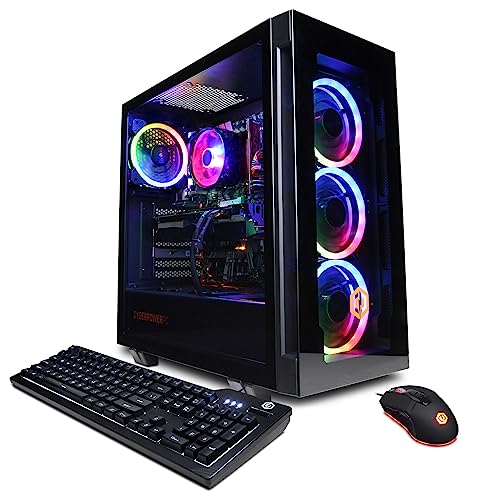
- Best streaming pick when its deal is live: CyberPowerPC Gamer Xtreme VR, i7-13700F / RTX 4060 Ti 16GB
- Best for the game-plus-stream multitask: Skytech Archangel, i5-14400F / RTX 4060 / 32GB DDR5 / 2TB
- Best build for a streamer: ZOTAC Gaming GeForce RTX 5060 Twin Edge OC, 8GB GDDR7 — the graphics card at the heart of the Intel DDR4 build below
- Best current-generation prebuilt: Thermaltake LCGS Quartz i1460, i5-14400F / RTX 5060
See 2 more Amazon options
- Best value streaming machine: Skytech Blaze4 Mini, Ryzen 7 5700 / RTX 4060 Ti
- Best staged streaming platform: AMD Ryzen 7 8700G with Radeon 780M graphics — the processor the AM5 starter build below is built around
Read the full guide ↓
Disclosure: As an Amazon Associate, reviewstook.com earns from qualifying purchases. Links to Amazon on this page are affiliate links; they cost you nothing extra. Listing details such as price and availability change often, so check the current Amazon listing before you buy.
A streaming PC has two jobs where a gaming PC has one, and this guide grades both: the game renders on your monitor — at 1440p on most of these machines — while OBS captures it, downscales the broadcast to 1080p60, and pushes it out at a constant bitrate. On Twitch that means roughly 6,000 kbps CBR with a two-second keyframe interval, the platform’s long-standing practical ceiling for most channels. On YouTube the ceiling sits higher: bigger bitrates are accepted, 1440p streams are a real option, and AV1 live encoding is supported, while Twitch’s AV1 path still runs through its Enhanced Broadcasting programme rather than the standard ingest. Four things decide whether a machine does this well: a hardware encoder that takes the broadcast off the processor’s plate, enough graphics memory for the game and the capture pipeline to share, enough system memory for the game plus OBS plus the browser, chat and voice apps that surround a real stream, and a wired network connection. Everything below is ranked on those four things first and on raw gaming pace second, because a stream that drops frames is a worse failure than a game running at slightly lower settings.
Two market facts shape the six picks before any of them is named. The first is the encoder map, and it is simpler than the marketing suggests: every discrete graphics card in this guide — RTX 5060, RTX 4060 Ti in both its forms, RTX 4060 — carries a single NVENC encoder with AV1 encode support. None of them carries two. Dual-encoder cards live a class above this budget, so picks win or lose on the memory, storage and processor wrapped around an effectively tied encoder. Just as important is what is absent: there is no Intel Quick Sync anywhere in this guide. Every Intel processor below wears an F suffix, which means no integrated graphics and no second encoder hiding in the CPU, the Ryzen 7 5700 in the Blaze4 Mini has no integrated graphics at all, and the one AMD APU build encodes through its integrated graphics because that is all it has until a card is added. The second fact is the November 2026 memory market: 32GB DDR5 kits have become markedly more expensive than they were historically, which is why two of these six routes are self-builds and four are prebuilts whose makers stocked memory before the spike. For a streamer that trade cuts deeper than for a pure gamer, because system memory is a streaming specification, and the reviews grade it so.
In this guide
Quick Picks
Short on time, or comparing several routes at once? Each row names a streaming buyer type and the route that suits it, with a link to the anchor listing.
| Buyer type | Pick | Why it stands out for streaming | Link |
|---|---|---|---|
| Best encoder headroom | CyberPowerPC Gamer Xtreme VR (prebuilt) | The only 16GB graphics card here — the game and the encode pipeline stop fighting over memory; check price on Amazon — worth it when it sits within this budget | Check on Amazon |
| Best simultaneous load | Skytech Archangel (prebuilt) | 32GB of system memory and 2TB of storage for game, OBS, browser and recordings at once | Check on Amazon |
| Best build for a streamer | Intel DDR4 build: Core i5-12400F + RTX 5060 | The newest-generation NVENC in a machine you spec yourself, with a documented memory upgrade path | Check on Amazon |
| Best current-gen prebuilt | Thermaltake LCGS Quartz i1460 | RTX 5060 encoder in a finished machine — check price on Amazon | Check on Amazon |
| Best value | Skytech Blaze4 Mini (prebuilt) | NVENC plus AV1 in a value-tier machine — check price on Amazon; any saving versus pricier picks can fund the microphone this guide tells you to buy first | Check on Amazon |
| Best staged platform | AM5 starter build: Ryzen 7 8700G | A real streaming platform today for talk and desktop shows; the graphics card — and its encoder — arrives later | Check on Amazon |
How These Picks Were Chosen
The grading starts at the encoder and works outward. Each route was asked four questions in order. What encodes the broadcast — a dedicated NVENC block, an integrated encoder sharing silicon with the game, or the processor itself? What shares memory with that encoder while it works — because OBS compositing, browser sources and the game all draw on the same graphics and system memory the stream does? What does the machine cost as a complete, working system, with a Windows license counted in every self-build? And does its current price still sit inside this budget — check price on Amazon before you buy, because the recommendation only applies while it does? Routes that failed the first question, or whose totals needed memory at unpayable prices, did not make the six.
Simultaneous load is graded as a specification, not a vibe. A streaming session is the game, OBS with its scenes and browser sources, a chat window, a voice app and often a local recording, all resident for hours. Sixteen gigabytes of system memory — the configuration of four of these six picks — runs that session, but it runs it with the least slack, so each of those reviews says so and describes the fix where one exists. Graphics memory gets the same treatment: on an 8GB card, the game’s textures and the encode-and-composite pipeline share one pool, and the single 16GB card in this guide is ranked first largely because it doubles that pool. Storage is graded against the recording habit streamers actually have: a 1TB drive fills faster than buyers expect, and the one 2TB pick earns credit for postponing that problem. We did not build or stream on these systems ourselves; every part below comes from real Amazon listings verified through retailer and deal coverage from November 2026 or the weeks just before.
The Encoder Map: One NVENC Each, and No Safety Net
NVENC is NVIDIA’s dedicated encoding block: it turns the captured picture into the broadcast without asking the processor cores the game is using, which is why it is the difference between a stream that costs a few percent of performance and one that costs a visible chunk. The five discrete cards in this guide each carry exactly one NVENC block of their generation — the RTX 5060’s is the newest design, the RTX 4060 Ti and RTX 4060 carry the previous generation’s — and every one of them also encodes AV1. Treat that as a tie with different futures: for a Twitch broadcast today, all five send the same H.264 picture at the same 6,000 kbps; the AV1 support matters for YouTube now and for Twitch’s AV1 rollout next.
Two clarifications, because this is where streaming guides most often mislead. First, frame generation is not an encoder feature. The RTX 5060 and 4060-class cards can interpolate extra frames for your monitor, and that can make your own play feel smoother, but the broadcast is built from the game’s rendered frames — generated frames are a display-side polish, not stream quality, and they appear nowhere in these rankings. Second, software encoding on the processor — x264 in OBS — is an emergency fallback on every machine here, not a plan: on six- and eight-core processors it competes directly with the game, and on the ten- and sixteen-core Intel picks it is merely a less bad emergency. The one partial exception is the AM5 starter build, whose review tells the story honestly: as delivered it has no discrete card at all, so its Radeon 780M integrated encoder — a modern block with current codec support including AV1 — handles talk, desktop and light-game streams while sharing the chip and the memory bandwidth with whatever it is encoding. That is the hardest working arrangement in this guide, and the review grades it as such.
Why This Guide Is Half Prebuilts: The Memory Problem, Translated for Streamers
Our standing advice for a new build is AM5, and for a streamer the case is stronger still — a current socket with room to grow into the 32GB a streaming session genuinely uses. November 2026 is the wrong month to act on it. A 32GB DDR5-6000 kit is now a premium-priced component for builders, well above its long-run historical level. Storage has climbed with it — a 1TB NVMe drive is also far pricier than in calmer years — and the RTX 5060 also sits above its launch positioning at spot. Total the conventional AM5 streaming build at current prices and it lands well outside this budget including Windows, and even at more favourable pricing for the card and memory it would still sit above the ceiling. It would only close inside this budget as a rain check — several documented components at once (a Ryzen 5 7600X, a B650 board, a 16GB DDR5 kit and the RTX 5060 all at sharply lower prices) plus a transferred Windows license, which demands more patience than most of this month’s buyers have.
So this guide does for streaming what our build guide did for gaming: two builds that genuinely close today, and four prebuilts that beat building on price because their makers bought memory earlier. The concession matters more here, not less. The single most streaming-relevant specification in the whole guide — 32GB of system memory — is the one thing a builder cannot currently buy at a sane price, and the one prebuilt that ships it does so at exactly this budget’s ceiling.
The 6 Best Gaming PC Builds for Streaming Under $1200
1. CyberPowerPC Gamer Xtreme VR (GXiVR8040A14) — The 16GB Card
Who it suits: Streamers who play texture-heavy games at 1440p and record locally while they broadcast — the buyers for whom graphics memory, not encoder count, is the real streaming bottleneck.
Every discrete card in this guide encodes through a single NVENC block with AV1 support, so the encoder itself does not separate this machine from the pack. Its graphics memory does. This is an RTX 4060 Ti with 16GB where every rival carries 8GB, and for a streamer that difference is working headroom, not a spec-sheet ornament: the game loads its textures into the same pool that OBS composites scenes from and the encoder reads frames out of, and at native 1440p the 8GB cards are already managing texture settings in the heaviest current releases before a stream enters the picture. Sixteen gigabytes lets the game keep its settings and the broadcast keep its compositor at once. Around the card sit a Core i7-13700F — the most processor cores in this guide, which matters for the supporting cast of browser sources, chat and voice apps that run beside the game — 16GB of DDR5 and a 1TB NVMe drive. Check price on Amazon before you judge this pick, because its value depends on where it sits when you look: when it falls inside this budget it is the strongest streaming configuration under $1,200; when it sits above the budget it is outside this guide’s scope entirely and this guide does not recommend it at that level.
The catches are stated as conditions. System memory is 16GB where the Archangel below offers 32GB, and for a long session with a browser-heavy OBS setup that is the tighter of the two memory pools in this machine — check the delivered memory configuration on the listing and in the machine on arrival, and treat a matching-stick upgrade as a planned fix rather than a surprise. CyberPowerPC’s component brands for parts like the power supply can vary by production run, so the current listing specification is the one to read before ordering, and the 13700F’s F suffix means what it means throughout this guide: no Quick Sync, and the NVENC block is the only encoder.
- The only 16GB graphics card in this guide — texture and compositing headroom the 8GB cards cannot match while streaming.
- Sixteen processor cores: the most simultaneous-load headroom here for the apps around the game.
- A single NVENC with AV1 — the same encoder arrangement as every discrete pick, so nothing is traded away to get the memory.
Honest limitation: Deal-conditional in the hardest sense — away from a price inside this budget it loses its value case — and its 16GB of system memory is the minimum this guide accepts for streaming, not a luxury.
Choose it if its current price — check price on Amazon — sits inside this budget and you stream the games that eat graphics memory. Skip it if it is sitting at a price above this budget, or if your stream’s weight is in browser sources and multitasking rather than in the game — the Archangel below is built for that load instead.

2. Skytech Archangel — The Simultaneous-Load Pick
Who it suits: Streamers whose broadcast is a production — multiple scenes, browser overlays, chat, music, a recording running — and who have noticed that their current machine’s problem is never the encoder; it is everything else open at once.
The Archangel’s encoder is deliberately not its headline: its RTX 4060 carries the same single NVENC block with AV1 support as the other Ada-generation cards here, a step behind the 4060 Ti and RTX 5060 machines in raw game rendering. What this machine sells a streamer is capacity. Check price on Amazon, and for its price in the premium tier of this budget it ships 32GB of DDR5-5600 and a 2TB SSD alongside a Core i5-14400F and a 650W Gold power supply. Put those two capacities in streaming terms. The 32GB is the difference between a session that runs the game, OBS, a browser full of dashboard and chat tabs, a voice app and a local recording with room to breathe, and one that starts closing things by hour two — and it is a configuration no self-build in this guide can currently assemble, because the memory kit alone is now a premium-priced part for builders. The 2TB drive is the recording archive: high-quality local recordings are the files streamers actually fill drives with, and this is the only pick that does not make a second drive a near-term errand. Skytech builds with standard parts, so the graphics card remains a normal future upgrade on that 650W supply.
This machine lives near the top of this budget rather than far under it, so the pick applies only while its current price sits inside the budget and not above it — check price on Amazon before you buy. The 14400F is an F-suffix part — no Quick Sync, no integrated fallback output — and the RTX 4060’s game rendering is the honest trade being made: at 1440p it is a capable card with DLSS support, but the frames-per-dollar crown in this guide belongs to the Blaze4 Mini below. Judged as what it is — the broadcast is not the compromise here; the game’s settings ceiling is — it has no rival in the six for the multitasking streamer.
- 32GB of system memory: the streaming session’s whole supporting cast fits at once, at a price builders cannot currently match.
- 2TB of storage — the only pick sized for a record-everything habit from day one.
- The encoder is the tied single NVENC with AV1; nothing about the broadcast itself is downgraded to buy the capacity.
Honest limitation: It sits exactly at the budget ceiling, its RTX 4060 is the slowest discrete card among the prebuilts here, and the Intel platform underneath it is a finished one.
Choose it if your stream’s bottleneck is everything around the game. Skip it if you play and stream one demanding game and little else — the 16GB card above or the value pick below spends the money where you will feel it.

3. The Intel DDR4 Build — Core i5-12400F + RTX 5060
Who it suits: Streamers who want to choose their encoder’s generation themselves, build the machine around it, and keep a documented path to fix this build’s one streaming compromise later.
The parts list: Intel Core i5-12400F, available from marketplace sellers and Amazon directly — check price on Amazon; MSI PRO B760-P WiFi DDR4 motherboard; 16GB (2×8GB) DDR4-3200 kit; ZOTAC RTX 5060 Twin Edge OC — check price on Amazon, because this build’s value depends heavily on what the card costs when you buy; 1TB Gen3 NVMe drive; MSI MAG A750GL 750W Gold power supply; Montech AIR 100 ARGB case; Windows 11 Home OEM license. The streaming case for building it is the card: the RTX 5060’s NVENC is the newest encoder generation in this guide, with AV1 encode for YouTube and the longest driver-support runway, and the build wraps it in a 750W ATX 3.1 power supply — deliberately overspecced — so the day a dual-encoder card class fits your budget, it drops into this machine without a second purchase. Whether the complete list closes inside this budget depends above all on the RTX 5060’s current price, and the review does not hide that gap: this build makes sense when the card is priced favourably, and is a wait when the card sits at a premium spot price.
The streaming compromise is the memory, and the build is honest about its own fix. Sixteen gigabytes runs a stream, but it is the tightest system-memory configuration among the serious picks here, shared between the game and everything OBS drags along. The board has four memory slots, a 32GB DDR4 kit is the documented later step, and the honest sequence is to build with 16GB now and treat the memory step as a later upgrade rather than a launch-day necessity. The 12400F’s six cores are the fewest among the Intel picks, which is precisely why the encoder matters: with NVENC carrying the broadcast, six cores run the game and the supporting cast adequately; ask this processor to software-encode as well and it will not, which is the encoder section’s x264 warning written for this exact machine. And the F suffix closes the loop: no Quick Sync, monitor into the card.
- The newest-generation NVENC with AV1, in the only from-scratch build that closes under budget at prices that exist this week.
- A 750W ATX 3.1 power supply and standard case: the future dual-encoder card is a drop-in, not a rebuild.
- Four memory slots turn the build’s one streaming weakness into a documented later step.
Honest limitation: The total only closes under $1,200 with Windows included when the graphics card is bought at a favourable price, 16GB is a streaming compromise until upgraded, and LGA1700 with DDR4 is a finished platform — the next processor means a new board and memory.
Choose it if you want to build now, pick your encoder generation, and time one graphics card purchase. Skip it if you need 32GB on day one — that is the Archangel this year — or if the card is sitting at a premium spot price, where the prebuilts win outright.

4. Thermaltake LCGS Quartz i1460 — The Current-Generation Prebuilt
Who it suits: Streamers who want the newest encoder generation in a machine that needs no assembly, no parts timing and no compromises negotiated line by line.
Inside the Quartz sit a Core i5-14400F and an RTX 5060 8GB, backed by 16GB of DDR4-3600, a 1TB NVMe drive and a 600W 80 Plus Gold power supply; check price on Amazon — it is a mid-to-upper tier option inside this budget, below its higher list pricing. In streaming terms it is the prebuilt mirror of the Intel build above: the same newest-generation NVENC with AV1 encode, the same ten-core-class Intel platform, assembled, with Windows installed and one warranty to call. The comparison cuts both ways and the review makes it honestly — the self-build can undercut this machine when its card is timed well and carries a stronger 750W power supply with a documented memory path, while the Quartz asks for no timing at all and has generally stayed inside this budget, which the build at premium card prices cannot claim. Its ten cores are a step up from the build’s six for the supporting cast around a stream, and Thermaltake’s LCGS line uses standard components, so the machine’s later life — a memory step, a second drive, eventually a card — is ordinary rather than proprietary.
Its limits are this tier’s limits. Sixteen gigabytes of system memory is the streaming minimum this guide accepts, the 8GB frame buffer is the ceiling the encoder section describes, and the DDR4 platform is finished. The 14400F brings the standing F-suffix note — no Quick Sync reserve encoder, no integrated output — so the NVENC block is the whole encoding story. At a favourable current price the Quartz can undercut the self-build’s realistic all-in cost while matching its encoder exactly — check price on Amazon; at list price the build wins its crown back, so the current price is the pick.
- Current-generation NVENC with AV1 in a finished machine — the encoder of pick three with none of the assembly.
- A named 600W Gold power supply, a specification many prebuilts at this price leave vague.
- Its pricing has generally stayed inside the budget — among the calmer options in the guide.
Honest limitation: The DDR4 platform is finished, 16GB of memory and 8GB of graphics memory are this tier’s ceilings rather than headroom, and at list price the self-build above is the better buy.
Choose it if you want the newest encoder without building, when its current price sits favourably inside this budget. Skip it if it is at list price and you are willing to build — or if graphics memory matters more than encoder generation, in which case the CyberPowerPC at its deal is your pick.

5. Skytech Blaze4 Mini — The Value Streaming Machine
Who it suits: New streamers whose budget has to cover the whole desk — machine, microphone, lighting — and who would rather arrive at a complete setup than at the strongest possible PC and a laptop mic.
The Blaze4 Mini pairs a Ryzen 7 5700 with an RTX 4060 Ti 8GB, 16GB of DDR4, a 1TB SSD, a 650W Gold power supply and Windows 11 Home, and it is positioned as the value-tier option in this set — check price on Amazon. For a streamer the saving is the argument: at a favourable deal price it can cost meaningfully less than the Intel build above — before that build adds its Windows license — while carrying a graphics card a step above the build’s in raw rendering, with the same single-NVENC-plus-AV1 encoder arrangement as every discrete pick in this guide. The money it does not spend is exactly the money the kit section at the end of this guide spends, in the order it spends it: microphone first, then light, then camera — and this is the only pick priced to fix both the PC and the kit in one budget. Skytech builds with standard parts, so memory, storage and the card itself can all be replaced with ordinary components as the channel grows.
Between deal events this model’s price drifts upward, where the argument narrows to convenience; treat a price well inside this budget as the buy signal and a price near the top of the budget as the walk-away line. The Ryzen 7 5700’s eight cores are genuinely useful for the supporting cast, but the chip has no integrated graphics at all — there is no fallback output and no second encoder of any kind, so the monitor goes into the graphics card and the NVENC block is, again, the whole story. Sixteen gigabytes of DDR4 and the finished AM4 platform are the same compromise the Intel build makes: a known-good streaming configuration at a favourable price, not a foundation for a decade of upgrades.
- NVENC plus AV1 in a value-tier machine — check price on Amazon for the cheapest route in this guide to a proper hardware-encoded stream.
- The saving against every other route is the microphone-and-lighting budget, which matters more to a new channel than any spec here.
- Standard-parts construction: the machine grows with ordinary components instead of being replaced.
Honest limitation: The value case lives at its deal price; near the top of this budget it is merely competitive, the 5700 offers no integrated-graphics fallback of any kind, and the AM4/DDR4 platform has no processor upgrade path that matters.
Choose it if you catch it at a favourable deal price well inside this budget and the whole streaming desk has to come out of this budget. Skip it if the price is at its average and your kit is already bought — the Quartz or the Intel build is the better use of the same money that week.

6. The AM5 Starter Build — Ryzen 7 8700G, Encoder Card Later
Who it suits: Talk, podcast, desktop and console streamers who want the current AMD platform under a working broadcast today, and gamers willing to let the discrete card — and serious game streaming — wait for a saner market.
The parts list: Ryzen 7 8700G — check price on Amazon; MSI PRO B650-P WiFi — check price on Amazon; 16GB (2×8GB) DDR5-6000; Crucial P310 1TB Gen4 NVMe; the same MSI MAG A750GL 750W Gold power supply; the Montech AIR 100 ARGB case; and a Windows 11 Home OEM license. The total can close inside this budget with Windows included — the only AM5 machine in this guide that closes under budget at prices payable today, achieved precisely because the graphics card line reads zero. What encodes in this machine is the Radeon 780M integrated in the 8700G: a modern integrated encoder that handles current codecs including AV1, and for a talk show, a desktop presentation, a podcast with cameras, or a console fed through a capture card, it does the job without touching the eight strong Zen 4 cores. What it is not is a one-box game-streaming solution for heavy titles: the same silicon renders the game and encodes the broadcast while both drink from the same 16GB memory pool, which is the hardest working arrangement in this guide, and the gaming itself is honestly 1080p in esports, older and lighter current titles at reduced settings — not a 1440p claim by any definition.
So this pick is a platform purchase with a streaming present, bought for the day the slot fills. The empty PCIe slot and that 750W power supply make the future graphics card — and with it, a proper NVENC or equivalent discrete encoder — a ten-minute drop-in. The fine print is real: the boxed cooler situation has shifted, with the listing advertising a Wraith Spire while a 2026 buyer report documents current boxes shipping the smaller Wraith Stealth instead, so check the box on delivery; the dual-channel memory kit is a requirement, not a preference, because integrated graphics and the encoder both run on system memory bandwidth, and single-channel memory measurably slows the very graphics you bought the chip for; and the staged route costs more in the end — add an RTX 5060 later and the lifetime total rises beyond every prebuilt above. For the talk-format streamer who may never need the card, none of that is a flaw. For the game streamer, it is the price of the platform, stated before you pay it.
- A real AM5 platform streaming talk and desktop formats today, with Windows included and inside this budget.
- The eight Zen 4 cores stay relevant long after the graphics card arrives — and keep software encoding survivable as an emergency.
- The empty slot and 750W supply make the discrete encoder a drop-in upgrade, not a new machine.
Honest limitation: Until the card arrives, game streaming is limited to light titles at 1080p with the encoder sharing the chip and memory it is broadcasting from, and the staged route’s lifetime cost exceeds every prebuilt in this guide.
Choose it if your stream is talk, desktop or console today and the platform is the purchase. Skip it if you want to stream demanding PC games this month — buy the Blaze4 Mini or the CyberPowerPC instead and broadcast tonight.
Comparison Table
| Route | Type | Encoder | Memory / Storage | Price | Link |
|---|---|---|---|---|---|
| CyberPowerPC GXiVR8040A14 | Prebuilt | Single NVENC + AV1 (4060 Ti 16GB) | 16GB DDR5 / 1TB | Check price on Amazon | Check on Amazon |
| Skytech Archangel | Prebuilt | Single NVENC + AV1 (RTX 4060) | 32GB DDR5 / 2TB | Check price on Amazon | Check on Amazon |
| Intel DDR4 build (i5-12400F) | Self-build | Single NVENC + AV1, newest generation (RTX 5060) | 16GB DDR4 / 1TB | Check price on Amazon — total depends on the card’s current price, Windows included | See review 3 |
| Thermaltake LCGS Quartz i1460 | Prebuilt | Single NVENC + AV1, newest generation (RTX 5060) | 16GB DDR4 / 1TB | Check price on Amazon | Check on Amazon |
| Skytech Blaze4 Mini | Prebuilt | Single NVENC + AV1 (4060 Ti 8GB) | 16GB DDR4 / 1TB | Check price on Amazon | Check on Amazon |
| AM5 starter build (Ryzen 7 8700G) | Self-build | Integrated Radeon 780M encoder (discrete encoder arrives with a future card) | 16GB DDR5 / 1TB | Inside this budget, Windows included — check parts prices on Amazon | See review 6 |
Setting Up OBS on Any of These Machines
In OBS, set the encoder to NVENC H.264 for Twitch — that is the ingest the platform is built around — at 1080p60 output, constant bitrate at 6,000 kbps, and a keyframe interval of two seconds, which Twitch’s ingest expects and which costs nothing to give it. For YouTube, the same NVENC block can send AV1 at the higher bitrates YouTube accepts, and a 1440p output is a legitimate choice there; the cards render most games at 1440p natively on your own monitor while the stream goes out at whatever resolution you set — the two numbers are allowed to differ. Record locally at a higher quality setting on the same encoder while you stream if your format needs clips or uploads — the NVENC block handles the broadcast and the recording together without asking the processor — and put the recordings on the fastest drive you have, which is the moment the Archangel’s 2TB stops sounding like a luxury. On the AM5 starter build, the same OBS layout applies with the integrated encoder selected for talk and desktop formats, with the expectations its review sets.
When a stream stutters, OBS tells you which of three counters is responsible, and each has a different fix that no amount of the other two will substitute for. Rendering lag means the game has saturated the graphics card and OBS cannot get its compositing done: cap the game’s frame rate below its uncapped maximum, lower the heaviest settings, and remember that on the 8GB cards the shared memory pool is part of this story. Encoding lag means the encoder itself is overloaded — on these machines that almost always traces to OBS being set to x264 software encoding by default or by accident, so confirm NVENC is selected, and do not stack extra encode jobs on a single block. Network lag — dropped frames in the stats window — is neither of those: it is the connection, and the fix is the rule this guide applies to all six picks without exception: stream on wired Ethernet, never on Wi-Fi, however good the Wi-Fi is, because a stream is six megabits a second, every second, for hours, and wireless variance is exactly what constant bitrate cannot absorb. If the wired upload genuinely cannot hold 6,000 kbps, lower the bitrate before you lower anything else. Finally, rehearse: run a private or unlisted test stream for an hour with your real game, your real scenes and your real recording running, inside the machine’s return window, and read the OBS stats afterwards. Every weakness graded in these reviews announces itself in that hour rather than in front of an audience.
The Rest of the Streaming Desk: What the PC Budget Does Not Include
No price in this guide includes a single piece of streaming kit, deliberately: the machines above are priced as machines, and the kit below is bought in its own order, with its own money — most naturally out of any saving from choosing a value-tier pick such as the Blaze4 Mini. The order matters more than the items. Buy the microphone first. Viewers judge a channel by its voice before its picture, a mediocre camera with clean audio reads as professional, and the reverse never does; any decent USB or XLR microphone, positioned close, is the single largest quality jump a new streamer can buy. Buy light second: a simple, soft light source aimed at your face does more for the image than a camera upgrade two tiers up, because cameras mostly fail in the dark rather than at their resolution. Buy the webcam third, once the light exists to feed it. And buy a capture card only if a console is part of your format — a one-PC setup captures itself and needs no card at all, so for PC-only streamers that line item is not deferred, it is deleted. What this section will not do is put prices on any of it: kit prices move like everything else this year, none of it was verified for this guide, and a number invented here would be worth exactly what it cost you to read.
How to Choose a Streaming Build Under $1200
- Start at the encoder, then stop worrying about it. Every discrete card in this guide carries one NVENC block with AV1 encode, and none carries two. Once that is known, the encoder stops being the decision and memory, storage and price become it — anyone selling you a machine at this budget on the strength of a second encoder, or a Quick Sync its F-suffix processor does not have, is selling fiction.
- Grade system memory as a streaming spec. The game is the smallest part of a stream’s memory footprint once OBS, browser sources, chat and voice are resident. Sixteen gigabytes works, graded as the minimum throughout this guide; 32GB is the comfort configuration, and in November 2026 it is a prebuilt configuration, because the memory kit alone is now a premium-priced part for builders.
- Weigh graphics memory against your games, not your bitrate. The stream itself is light; the game is not. On an 8GB card at 1440p, textures and the capture pipeline share a pool that heavy titles already squeeze — the 16GB pick exists for exactly that collision, and it does not buy one extra frame today.
- Total the whole machine before comparing anything. Processor, board, memory, storage, power supply, case and a Windows license for builds; the sticker for prebuilts, which includes the license. A build quoted without its operating system is missing a real cost, and at this budget that omission decides comparisons.
- Match the pick to the load you actually run. One demanding game and a simple overlay points at the 16GB card or the value pick; a production with browser sources and a recording habit points at the 32GB machine; talk and console formats point at the staged build.
- Use walk-away prices, not hope. Check price on Amazon for every pick before you buy: the Intel build only while the RTX 5060 is priced favourably, the 16GB CyberPowerPC only while it sits inside this budget, the Blaze4 Mini only at a favourable deal price, and the Archangel only while it stays inside this budget. Above that line, the pick is a different product at a different price and this guide does not recommend it.
- Wire the machine before you judge it. Every route here streams on Ethernet. If your desk cannot reach a cable, solve that first — no pick in this guide can encode its way around a wireless dropped frame.
- Keep the packaging until the second week. A streaming machine’s failures — a memory configuration other than the one ordered, a cooler other than the one advertised, a power supply brand swapped by a production run — announce themselves in the first days, and the one-hour rehearsal stream belongs inside that window.
Common Buying Mistakes
- Believing a listing that credits an F-suffix Intel processor with Quick Sync. The F means the integrated graphics — and the encoder — are not there. Every Intel pick in this guide is an F part; the NVENC block is the encoder, full stop.
- Counting frame generation as stream quality. Generated frames smooth your own monitor; the broadcast is built from rendered frames, and no viewer’s picture improves because your card interpolates.
- Setting OBS to x264 because a forum post praised software encoding. On the processors in this guide that choice takes cores directly from the game. NVENC exists on these cards precisely so the processor never has to.
- Streaming on Wi-Fi because the speed test looked fast. A speed test is a sprint; a stream is six megabits sustained for hours. Dropped frames are a connection verdict, not a PC verdict.
- Buying the microphone last. The natural instinct is to spend the whole budget on the PC and stream through a headset mic; the audience experiences the opposite priority. The value pick in this guide is priced to leave the kit money over.
- Paying the CyberPowerPC’s non-deal price for its 16GB card. At a price above this budget the headroom is real and the value is gone; the pick is this machine only when it sits inside the budget, not the product name.
- Speccing the APU build with a single memory stick to save money. Integrated graphics and the integrated encoder both run on memory bandwidth; single-channel memory slows the exact hardware the build exists for.
- Assuming the boxed cooler in the listing is the cooler in the box. Current 8700G boxes have been documented shipping the smaller Wraith Stealth despite the listing’s Wraith Spire claim — check yours on delivery, while returns are easy.
Final Recommendation
- Best streaming configuration, at its deal price: CyberPowerPC GXiVR8040A14 — the 16GB card is the headroom a 1440p streamer actually runs out of.
- Best for the full multitasking production: Skytech Archangel, while it sits inside this budget — check price on Amazon.
- Builders who want the newest encoder: The Intel DDR4 build, with the graphics card timed to a favourable price.
- Current-gen encoder, zero assembly: Thermaltake LCGS Quartz i1460 when its price sits favourably inside this budget.
- Whole-desk value: Skytech Blaze4 Mini at a favourable deal price, with the saving spent on the microphone first.
- Talk, desktop and console streamers on a platform: The AM5 starter build around the Ryzen 7 8700G.
Our top two for streamers are the CyberPowerPC when it sits inside this budget — Check on Amazon — because it is the only machine here whose graphics memory survives contact with a heavy game and a broadcast at once, and the Skytech Archangel — Check on Amazon — because it is the only one whose system memory and storage are sized for the whole production rather than the game alone. Between them they state this budget’s streaming truth from both sides: the encoder is a tie, so the winner is whichever memory pool your stream actually empties. Readers whose format is talk or console rather than PC gaming should weigh the staged AM5 build seriously, builders working to a smaller number should see Best Gaming PC Build For Streaming Under $800, and those with room to stretch will find the encoder tie finally breaks at Best Gaming PC Build For Streaming Under $1500. Wire the Ethernet, rehearse for an hour inside the return window, and check the live listing before you order — in this market the homework is worth doing carefully.
Frequently Asked Questions
Do I need two encoders to stream and record at the same time?
Not on these machines. A single NVENC block streams the broadcast and records a high-quality local copy concurrently; what dual encoders buy a class above this budget is more exotic independence between jobs, not the ability to do both. The constraint that actually bites first at $1,200 is memory — graphics memory on the 8GB cards, system memory in a 16GB machine with a heavy OBS setup — which is why the top two picks here are a 16GB card and a 32GB system.
Is AV1 worth choosing a machine for?
As future-proofing and for YouTube, yes; as a reason to pay more tonight, no. Every discrete card in this guide already encodes AV1, so the question answers itself inside this budget — you get it either way. What AV1 does not do yet is improve a standard Twitch broadcast, whose ingest remains H.264 at roughly 6,000 kbps; Twitch’s AV1 path runs through Enhanced Broadcasting. Buy AV1 as the free inclusion it is here, and let memory and price make the actual decision.
Why is there no Intel Quick Sync in this guide?
Because none of these processors has it. Quick Sync lives in Intel’s integrated graphics, and every Intel chip in the six picks — the i5-12400F, the i7-13700F, both i5-14400F machines — is an F-suffix part with the integrated graphics removed. The Ryzen 7 5700 has no integrated graphics either, and the 8700G build’s encoder is AMD’s integrated block. Any guide or listing that gives one of these machines a Quick Sync reserve encoder is describing hardware that is not in the box.
Can the 8700G build really stream?
Yes, within the limits its review states at full size. Its integrated Radeon 780M encoder handles talk shows, desktop and presentation formats, podcasts and console feeds through a capture card without drama, and light games at 1080p. Demanding PC games are where the arrangement stops being honest: one chip is rendering the game and encoding it while sharing a 16GB memory pool between the two jobs. That is why the build is sold here as a platform with a streaming present — and why its empty slot and 750W supply matter.
Is 16GB of RAM enough for streaming?
Enough, and graded as the floor rather than a comfort throughout this guide. A game plus OBS plus a browser and voice apps fits in 16GB, with the least slack of any configuration here; long sessions with browser-heavy scenes are where it tightens. The fixes are the ones the reviews describe: the Archangel’s 32GB as shipped, the Intel build’s documented 32GB DDR4 step into its free slots, or discipline about what stays open.
Should I wait for the AM5 build to become affordable instead?
Waiting is legitimate for the conventional AM5 build specifically, with documented triggers: a 32GB DDR5-6000 kit back at a much lower price and an RTX 5060 near its launch positioning would reopen it. But forecasts through the end of 2026 point up rather than down, and the prebuilt deals here exist because integrators hold memory bought earlier — when that stock turns over, their prices follow the same market. If the channel starts this season, the staged 8700G build is the honest way to own the platform now; see also Best Gaming PC Build Under $1200 for the full platform math, and Best Streaming PC Under $1200 for finished machines specced for streaming alone.
- Best Gaming PC Build Under $1200
- Best Gaming PC Build Under $800
- Best Gaming PC Build Under $1500
- Best Gaming PC Build For Beginners Under $1200
- Best Gaming PC Build For Small Spaces Under $1200
- Best Gaming PC Build For 1440p Gaming Under $1200
- Best Gaming PC Build For Streaming Under $800
- Best Gaming PC Build For Streaming Under $1500
- Best Gaming PC Under $1200
- Best Prebuilt Gaming PC Under $1200
- Best Budget Gaming PC Under $1200
- Best Streaming PC Under $1200


