Where to buy
Check the latest price, availability and delivery on Amazon. Orders are placed on Amazon. We may earn a commission from qualifying purchases.
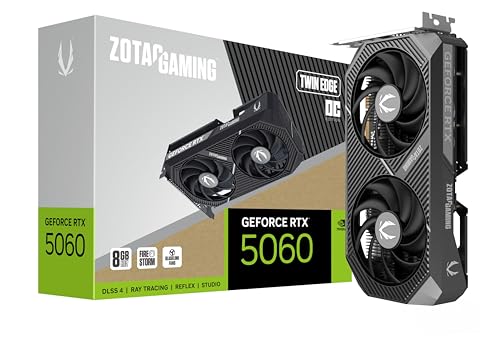
- Best build to assemble yourself: ZOTAC Gaming GeForce RTX 5060 Twin Edge OC, 8GB GDDR7 — the graphics card at the centre of the Intel build
- Best value overall (a ready-made PC, honestly labelled): Skytech Blaze4 Mini, Ryzen 7 5700 / RTX 4060 Ti
- Most graphics memory for the money: CyberPowerPC Gamer Xtreme VR, i7-13700F / RTX 4060 Ti 16GB
- Newest parts in a finished PC: Thermaltake LCGS Quartz i1460, i5-14400F / RTX 5060
See 2 more Amazon options
- The generous-memory route: Skytech Archangel, i5-14400F / RTX 4060 / 32GB DDR5 / 2TB
- Best build-in-two-stages: AMD Ryzen 7 8700G with Radeon 780M graphics — the chip the starter build is built around
Read the full guide ↓
Disclosure: As an Amazon Associate, reviewstook.com earns from qualifying purchases. Links to Amazon on this page are affiliate links; they cost you nothing extra. Listing details such as price and availability change often, so check the current Amazon listing before you buy.
If this is your first gaming PC, welcome — and first, an honest confession about the word “build” in this guide’s title. In a normal year, $1,200 is where building beats buying ready-made: better parts for the same money, and you learn how your machine works along the way. This is not a normal year. Memory — the part called RAM — has shot up in price because the factories that make it are busy supplying AI data centres. A 32GB DDR5 memory kit, the standard starting point for a modern build, has climbed far above its long-run pricing on Amazon, and mainstream kits sit higher still. Graphics cards have climbed too: the RTX 5060 now sells well above its launch pricing. So this guide does the sums in plain sight: two of the six best ways to spend $1,200 are genuine do-it-yourself builds, and four are ready-made PCs whose makers bought their memory before prices jumped. Every build total includes every part plus a Windows licence, every ready-made is labelled as one, and rather than print prices that go stale, each pick points you to the live Amazon listing to check price on Amazon before you buy.
One idea is worth learning before the picks, because it decides whether this budget fits your screen. The graphics cards in the five full-strength picks — RTX 5060, RTX 4060 Ti in 8GB and 16GB versions, RTX 4060 — are the entry point to what is called native 1440p: games actually drawn at 2560×1440 pixels at high settings. Software tricks named DLSS and FSR add headroom by drawing the game slightly smaller and rebuilding it up — DLSS Quality at a 1440p output really draws about 1707×960 internally — and frame generation can smooth motion, though it never makes the PC respond faster to your mouse. None of that makes this a 4K class: at 3840×2160 these cards lean hard on those tricks, and the 8GB cards run short of graphics memory in the heaviest new games at 1440p, which is why the 16GB pick below earns its place. Own a 1080p monitor? Everything here is more than enough. Shopping for a first 1440p screen alongside the PC? This is your tier.
In this guide
Quick Picks
Short on time, or comparing several routes at once? Each row names a buyer type and the route that suits it, with a link to the anchor listing.
| Buyer type | Pick | Why it stands out | Link |
|---|---|---|---|
| Best build to order today | Intel DDR4 build: Core i5-12400F + RTX 5060 | Every part in stock at sane prices; full total, Windows included, fits when the card is timed well | Check on Amazon |
| Best value overall | Skytech Blaze4 Mini (ready-made) | RTX 4060 Ti performance at deal pricing that undercuts any matching parts list — check price on Amazon | Check on Amazon |
| Best for keeping games for years | CyberPowerPC Gamer Xtreme VR (ready-made) | The only 16GB graphics card in this guide, a pick when its deal pricing is live — check price on Amazon | Check on Amazon |
| Best current-generation ready-made | Thermaltake LCGS Quartz i1460 | RTX 5060 and a named 600W Gold power supply, verified inside this budget — check price on Amazon | Check on Amazon |
| Best memory and storage route | Skytech Archangel (ready-made) | 32GB DDR5 and a 2TB drive right at this budget’s ceiling — the memory alone is the expensive line for a builder this year | Check on Amazon |
| Best build in two stages | AM5 starter build: Ryzen 7 8700G | A current AMD platform today, with the graphics card added later when prices cool | Check on Amazon |
How These Picks Were Chosen
The budget was applied to the whole machine, never to a headline part. For the two self-builds, each review adds up every line — processor, motherboard, memory, storage, power supply, case, and a Windows 11 Home OEM licence — because a build that only fits the budget by forgetting the operating system does not fit the budget. Where a route only fits the budget when a key part is bought on deal rather than at a price spike, the review says so in plain words and names the exact part to watch. For the ready-made PCs, the price is the whole machine with Windows installed, which is their advantage this year.
We did not assemble these systems ourselves. Every part and PC named here is a real Amazon listing checked through price-tracking records and deal coverage from November 2026 or the weeks just before — check the live price on Amazon, because listings change often. Two filters shaped the final six. The first is memory honesty: any route whose total depended on a 32GB DDR5 kit at a price nobody can currently pay was rejected or reframed, which is why the obvious modern build appears below as an explanation with price triggers instead of a pick. The second is upgrade honesty: a pick earns its place only if its next upgrade is an ordinary part you can buy and fit yourself, and the reviews say plainly where a platform has no future processor path.
The Words, Translated: A Beginner’s Glossary
PC shopping runs on abbreviations. Here are the twelve that matter for this guide, in plain English.
- Processor (CPU). The machine’s general-purpose brain: it runs Windows, feeds the graphics card, and handles everything that is not drawing the picture. Names like Core i5-12400F or Ryzen 7 8700G are model numbers — just match them exactly when checking a delivery.
- Graphics card (GPU). The part that draws the game. In every full-strength pick here it is a separate card slotting into the motherboard, and it matters more for gaming than any other part. Its own memory (8GB or 16GB) is called VRAM.
- Integrated graphics. A small graphics chip built into some processors, fine for Windows, video and light games. One pick here — the Ryzen 7 8700G build — deliberately starts life this way. Processors whose names end in F (12400F, 13700F, 14400F) have no integrated graphics at all — a fact that matters on setup night.
- Motherboard and socket. The big circuit board everything plugs into. Its socket — AM5 (current AMD), AM4 (older AMD), LGA1700 (recent Intel) — decides which processors and memory type the machine can ever use, and so quietly decides your upgrade future. A finished platform means no newer processors will be made for that socket; the machine works for years regardless.
- Memory (RAM). The PC’s short-term workspace, measured in gigabytes. 16GB is the workable minimum for gaming today; 32GB is comfortable. It is also the part whose price has exploded this year — the reason this guide looks the way it does.
- DDR4 and DDR5. Two generations of RAM, physically different and not interchangeable. DDR5 is the current standard; DDR4 is the older, cheaper one several picks here use on purpose.
- Storage (SSD). Where Windows and your games live permanently, measured in gigabytes or terabytes (1TB ≈ 1,000GB). Every pick here uses a fast SSD type called NVMe, and modern games are huge, so 1TB fills fast.
- Power supply (PSU). The box that converts wall power into what the parts need, rated in watts (600W, 650W, 750W here) and efficiency grades (Gold is a good one). A named, generously sized PSU is what makes a future card swap possible.
- Case. The tower everything sits in. Beyond looks, it decides airflow and whether standard parts fit later.
- Windows licence. The operating system is not free on a self-build. Both builds here include an OEM licence in their totals; the ready-mades include Windows in their price. Forgetting this line is the classic beginner budgeting error.
- Self-build, ready-made, barebone, renewed. A self-build is parts you assemble; a ready-made (or prebuilt) arrives assembled with one warranty; a barebone is a half-finished kit needing your own memory, storage and Windows; renewed means refurbished second-hand. For this guide’s six picks, plainly: none is barebone, none is renewed, none has memory soldered in place — and the only built-in graphics is the 8700G’s, integrated into its processor by design.
- Upscaling and frame generation. Upscaling (NVIDIA’s DLSS, AMD’s FSR) draws the game smaller and rebuilds it to fill your screen, trading a little sharpness for a lot of speed. Frame generation inserts extra software-made frames to smooth motion; it does not reduce the delay between mouse and screen, so it is polish, never a substitute for real rendering power.
Why the Obvious Modern Build Is Not a Pick
Ask any experienced builder what to assemble in 2026 and they will say AM5, AMD’s current platform — and on the merits they are right. The Ryzen 5 7600X has been tracked at fair prices on Amazon through November 2026, and good B650 motherboards sell at fair prices too, for a socket AMD keeps supplying. The trouble is one line further down the list: the 32GB of DDR5 memory that platform wants starts far above its long-run tracked average for the cheapest kits in stock, and mainstream kits sit higher still. Storage has climbed too — a 1TB drive that was cheap in calmer years is a steep line now. Add it up at today’s prices — processor, board, memory, graphics card, drive, power supply, case and Windows — and the honest total lands well over this budget. Even at tracked averages for card and memory, it stays over.
So that build is a rain check, not a pick, and here are its triggers. It fits under $1,200 — barely — only if several documented deal lows happen at once: the 7600X on deal, a B650 board at a recorded deal low, a 16GB DDR5 kit at the floor US trackers show for the category, and the RTX 5060 at its tracked low, alongside the drive, power supply, case and a Windows licence transferred free from a retired PC. A real parts list — and it demands patience, price alerts and an old licence. Want AM5 today without the treasure hunt? Pick six below puts the same socket under a working PC now, card slot empty for a saner season. Everyone else should build on the older memory standard or buy ready-made.
The 6 Best Gaming PC Builds Under $1200, Explained for Beginners
1. The Intel Build You Assemble Yourself — Core i5-12400F + RTX 5060
Who it suits: A first-time builder who wants to order every part this week at prices that actually exist, and accepts an older platform in exchange for the strongest graphics card a from-scratch build can carry at this budget.
Here is the complete shopping list: the Intel Core i5-12400F processor — check price on Amazon — a basic cooler included in its box. An MSI PRO B760-P WiFi DDR4 motherboard, a mid-range board. A 16GB (2×8GB) DDR4-3200 memory kit, a budget-tier kit. The ZOTAC RTX 5060 Twin Edge OC graphics card — check price on Amazon — the one line whose price swings this whole build. A 1TB NVMe drive, a mid-range drive. An MSI MAG A750GL power supply — 750W, Gold-rated, with the modern connector newer cards want — a mid-range unit. A Montech AIR 100 ARGB case, a budget-tier case. And a Windows 11 Home OEM licence. Add it up with the graphics card bought at a good deal price and the whole machine fits the budget, Windows included; at a spiked price for the card it does not. That gap is the single most important sentence in this review: this build is a buy when the RTX 5060 is on a genuine deal, and a wait when it is sitting high. One part, timed well or badly, decides everything.
What you end up with is a six-core Intel processor and a current-generation NVIDIA card that handles native 1440p gaming as defined at the top of this guide, with DLSS and frame generation as headroom rather than crutches, and 8GB of graphics memory as its ceiling in the heaviest titles. Two choices are deliberately generous. The 750W power supply is more than this machine needs today, on purpose: it and the standard case will survive into your next build. And the motherboard has four memory slots, so the obvious later upgrade — a 32GB DDR4 kit, a mid-range later purchase — drops in without a rebuild. One setup fact belongs here rather than in small print: the 12400F’s F means no integrated graphics at all, so the monitor cable must go into the graphics card — the motherboard’s port will show a black screen, and that is expected, not a fault.
- Every part verified in stock at real, checkable prices — no line of the total depends on a memory kit nobody can buy.
- The oversized 750W Gold power supply and standard case carry forward into your next build.
- Four memory slots make the 32GB upgrade a drop-in job later.
Honest limitation: The LGA1700/DDR4 platform is finished — a future processor upgrade means a new motherboard and memory too — and the under-budget total only holds, Windows included, when the card is bought on deal instead of at a price spike.
Choose it if you genuinely want to build, with parts you picked, and you can time one graphics-card purchase. Skip it if you want 32GB and a current platform on day one — this year, that combination is a ready-made PC, below.

2. Skytech Blaze4 Mini — The Ready-Made PC That Beats Every Parts List
Who it suits: Anyone whose real goal is playing games this month rather than assembling a project — including beginners who intended to build until they saw the parts prices.
This guide owes you this concession early. The Blaze4 Mini pairs a Ryzen 7 5700 processor with an RTX 4060 Ti 8GB graphics card, 16GB of DDR4 memory, a 1TB drive, a 650W Gold power supply and Windows 11 Home already installed, and price tracking has recorded it at genuine deal lows well under this budget — check price on Amazon. At a deal low it costs noticeably less than the hardware-only total of the Intel build above, while including the Windows licence that build pays for separately, and its card is a step stronger than the build’s RTX 5060. Skytech builds from standard parts, too, so the memory, storage and graphics card can all be replaced with ordinary components later.
The discipline this pick asks for is price. Between deal events it drifts back toward its usual level, where the argument shrinks to convenience rather than value — still a fair PC, no longer a bargain. The 16GB of memory and the older AM4 platform are the same finished-platform compromise as the Intel build, reached from the other direction. Hold out for its deal pricing and walk away near its usual level: by simple arithmetic this is the strongest purchase in the guide.
- RTX 4060 Ti performance at deal pricing — less than the sum of its own parts, bought separately; check price on Amazon.
- Windows 11 Home included, assembled, and covered as one machine under one warranty.
- Standard-parts construction: memory, storage and card all replaceable later.
Honest limitation: The bargain exists only at the deal price; near its usual level it is merely competitive, and the AM4/DDR4 platform has no processor upgrade path that matters.
Choose it if it is at a deal price — check price on Amazon — and maximum gaming per dollar is the goal. Skip it if it is at its usual level and you enjoy building — the Intel build above is the better use of the same money that week.

3. CyberPowerPC Gamer Xtreme VR (GXiVR8040A14) — The 16GB Card
Who it suits: Beginners planning to keep the same games — and the same PC — for years, especially players who mod their games, where graphics memory quietly decides whether an ageing machine still looks right.
Start with the number that defines this machine: 16GB of graphics memory, double the 8GB every other card in this guide carries. It pairs that RTX 4060 Ti 16GB with a Core i7-13700F processor, 16GB of DDR5 memory and a 1TB drive, and deal coverage has recorded it inside this budget when its deal pricing is live, against pricing well above budget away from deals — check price on Amazon. The 16GB is the entire argument, and it is a good one: at native 1440p the 8GB cards here already need their texture settings managed in the heaviest current releases, and that pressure only grows over a machine’s life. The chip itself is the same 4060 Ti as the 8GB version, so this pick does not buy more speed today — it buys the settings headroom that keeps the speed it has looking right in three years.
The conditions are strict. Away from its deal price this machine sits above this guide’s budget entirely, so it is a pick only when the deal is live. Its system memory is 16GB where the Archangel below offers 32GB. And CyberPowerPC does not publish a fixed power-supply specification for this model — the brand can vary by production run — which is why this guide promises no future graphics-card swap inside it: if that day comes, the first job is reading the label on the unit actually fitted. Buy the deal, check the delivered specification against the listing, and this is the longest-lived graphics configuration under $1,200.
- The guide’s sole 16GB graphics card — the pick that ages slowest at 1440p.
- The Core i7-13700F is the strongest processor here for gaming plus streaming or editing.
- A DDR5 platform, unlike the DDR4 machines around it.
Honest limitation: Deal-conditional in the hardest sense: away from its deal pricing it sits above budget, and 16GB of system memory is the minimum this guide accepts, not a luxury.
Choose it if the deal is live — check price on Amazon — and keeping texture quality high for years is the priority. Skip it if the price has drifted back up — wait for the deal, or take the Blaze4 Mini’s instead.

4. Thermaltake LCGS Quartz i1460 — Current-Generation, Zero Assembly
Who it suits: Beginners who want the newest graphics features — DLSS 4 with multi frame generation — in a finished machine, without timing a parts list or opening a case.
The Quartz pairs a Core i5-14400F with an RTX 5060 8GB, 16GB of DDR4-3600 memory, a 1TB drive and a 600W 80 Plus Gold power supply, and it has been seen inside this budget in deal coverage, against higher list pricing — check price on Amazon. Read it as the ready-made mirror of the Intel build: nearly the same processor class, the identical graphics card, assembled, Windows installed, one warranty to call. The comparison cuts both ways — the self-build can undercut it when its card is timed well and carries a stronger 750W supply, while the Quartz asks for no timing at all and has stayed inside this budget at every verified check.
Two checks before ordering. Frame generation smooths high-refresh play but does not reduce input delay and works only in supported games — value the card first on its native rendering, honest 1440p-class performance with an 8GB ceiling. And because this model cycles through deal pricing, the gap between its deal pricing and its list price is real money for impatience: on deal it undercuts the self-build’s all-in cost; at list, the build wins back its crown.
- Current-generation RTX 5060 with DLSS 4, in a machine needing no assembly or part-timing.
- A named 600W Gold power supply — a spec many ready-mades at this price leave vague, and what keeps a future card swap simple.
- Every verified check of this model landed inside the budget.
Honest limitation: The DDR4 platform is finished, the 8GB graphics memory is this tier’s ceiling, and at list price the self-build above is the better buy.
Choose it if you want current-generation features in a finished PC near its deal pricing — check price on Amazon. Skip it if it has climbed to list price and you are willing to build — or if graphics memory matters more than features, in which case the CyberPowerPC above is your pick.

5. Skytech Archangel — The Generous-Memory Route
Who it suits: Beginners who know they multitask — a game, a browser full of tabs, a chat app, maybe a stream — or who refuse to buy a 16GB machine in 2026, having noticed what 32GB costs a builder this year.
Price tracking puts the Archangel right at this budget’s ceiling, with genuine deal lows recorded well under it — check price on Amazon — for a Core i5-14400F, an RTX 4060 8GB, 32GB of DDR5-5600, a 2TB drive and a 650W Gold power supply. The specification to stare at is the memory: 32GB of DDR5 is exactly the configuration the “obvious build” section of this guide could not assemble under budget, because the kit alone is the expensive line on today’s Amazon. Skytech is plainly working from memory bought under older pricing, selling the precise thing builders cannot currently buy — headroom — at exactly this guide’s ceiling, with double everyone else’s storage thrown in. The RTX 4060 trails the 4060 Ti and 5060 cards above it in raw pace, though at 1440p it remains capable with DLSS support — and for the multitasking buyer, trading a little pace for double the memory and storage is the right compromise.
The ceiling discipline applies in full: this budget’s ceiling is its last dollar, so this pick counts only at or below that line — and its pricing history says it lives near the line. The Intel platform is a finished one, like the other Intel machines here. Read it as a purchase of capacity — 32GB and 2TB today, in a working machine, at a price no parts list currently matches — and nothing else here rivals it. Read it purely on frames per dollar and the Blaze4 Mini beats it by hundreds.
- 32GB DDR5 and 2TB of storage — precisely the two capacities a builder cannot currently afford to assemble.
- Genuine deal lows are recorded for it, making it a real bargain when the deal cycle turns — check price on Amazon.
- The named 650W Gold power supply leaves real room for a future card.
Honest limitation: It sits exactly at the budget ceiling, its RTX 4060 is the slowest discrete card among the ready-mades here, and the Intel platform is a finished one.
Choose it if running out of memory and storage is the problem you actually have. Skip it if frames per dollar is the whole question — the Blaze4 Mini wins that argument outright.

6. The AM5 Starter Build — Ryzen 7 8700G Now, Graphics Card Later
Who it suits: A patient first-time builder who wants the current AMD platform under a working, game-playing PC today, and is willing to let the graphics card wait for a saner market.
The complete list: the Ryzen 7 8700G — check price on Amazon; the MSI PRO B650-P WiFi motherboard — check price on Amazon; a 16GB (2×8GB) DDR5-6000 memory kit, a mid-range kit; a Crucial P310 1TB Gen4 drive, a mid-range drive; the same MSI MAG A750GL 750W Gold power supply as the Intel build; the Montech AIR 100 ARGB case, a budget-tier case; and a Windows 11 Home OEM licence. The total fits under the budget with Windows included — the only AM5 machine in this guide that closes under budget at prices you can pay today, precisely because the graphics-card line reads zero. What you get for that zero is the Radeon 780M graphics built into the 8700G, the strongest integrated graphics AMD sells: genuinely playable 1080p in esports, older and lighter current games at reduced settings, and not a 1440p solution by any honest definition. The eight processor cores are full-strength desktop cores that will not hold back the mid-range card you add later.
The fine print is real. First, the boxed cooler situation has shifted: the listing advertises a Wraith Spire, while a 2026 buyer report documents current boxes — part number 100-100001236SBX — shipping with the smaller Wraith Stealth instead. The Stealth is adequate for this 65W chip; check which cooler is in your box on delivery day. Second, integrated graphics borrow the machine’s system memory and its speed, so the two-stick dual-channel kit in the list is a requirement, not a preference — a single stick would measurably slow the very graphics you bought this chip for — and 16GB shared between Windows and graphics is tight, so this build wants a memory upgrade the day DDR5 prices allow. Third, the staged path costs more in the end: add an RTX 5060 later at whatever it costs then and the lifetime total ends up beyond every ready-made in this guide. What the extra money buys is the platform itself — an AM5 socket with years of processors ahead of it, chosen part by part. For the buyer who values exactly that, this is the one honest way to start it under $1,200 this year.
- A genuine AM5 platform — B650 board, DDR5, current socket — in a working PC inside the budget, Windows included.
- The 8700G’s eight cores stay relevant long after the graphics card arrives.
- The empty slot and 750W power supply make the future card a ten-minute drop-in.
Honest limitation: Until the graphics card arrives this is a 1080p integrated-graphics machine, and the staged route’s lifetime cost exceeds every ready-made PC in this guide.
Choose it if the platform is the purchase and the graphics card can wait a season. Skip it if 1440p gaming is a this-month requirement — the Blaze4 Mini or the CyberPowerPC will give it to you now.

Comparison Table
| Route | Type | Graphics | Memory / Storage | Price note | Link |
|---|---|---|---|---|---|
| Intel build (i5-12400F) | Self-build | RTX 5060 8GB | 16GB DDR4 / 1TB | Fits the budget when the card is bought on deal, Windows included — check price on Amazon | See review 1 |
| Skytech Blaze4 Mini | Ready-made | RTX 4060 Ti 8GB | 16GB DDR4 / 1TB | Deal lows recorded well under budget — check price on Amazon | Check on Amazon |
| CyberPowerPC GXiVR8040A14 | Ready-made | RTX 4060 Ti 16GB | 16GB DDR5 / 1TB | A pick only when its deal pricing is live — check price on Amazon | Check on Amazon |
| Thermaltake LCGS Quartz i1460 | Ready-made | RTX 5060 8GB | 16GB DDR4 / 1TB | Verified inside the budget — check price on Amazon | Check on Amazon |
| Skytech Archangel | Ready-made | RTX 4060 8GB | 32GB DDR5 / 2TB | Sits at the budget ceiling, with deal lows below it — check price on Amazon | Check on Amazon |
| AM5 starter build (Ryzen 7 8700G) | Self-build | Radeon 780M integrated | 16GB DDR5 / 1TB | Fits the budget, Windows included — check price on Amazon | See review 6 |
Your First Evening: A Step-by-Step Setup Walkthrough
Whether your machine arrives in one box or seven, the first evening follows the same shape. Work through these steps in order — steps 4, 9 and 10 are where beginners lose the most time.
- If you bought a ready-made PC, skip to step 3. Builders, assembly comes first, in this order: unpack everything and check each part against your order. Fit the processor into the motherboard’s socket, then its cooler. Click the two memory sticks into the slots the board’s manual names for a pair — on both builds here that pairing is required, not optional. Screw the motherboard into the case, fit the power supply, mount the storage drive, then — Intel build only — slot the graphics card into the long top slot until it clicks; the AM5 starter build deliberately leaves that slot empty. Connect the power cables last, and force nothing: every connector is keyed to fit only one way.
- Do a ten-second parts check before power. Builders: confirm the memory sticks are fully seated, both clips closed — an almost-seated stick is the top cause of a first build that will not start. Ready-made buyers: open nothing, but keep the packaging.
- Place the machine where air can move. On or under the desk, vents unobstructed — never inside a closed cabinet, which turns a gaming PC into a slow, loud one.
- Connect the monitor to the right port — this is the step that matters most. On every pick with a separate graphics card (reviews 1–5), the monitor cable goes into the graphics card’s sockets, low on the back of the case — never into the motherboard’s video port up near the USB sockets. This is not a preference. The processors in picks 1, 3, 4 and 5 have names ending in F, meaning they contain no graphics of their own at all, and pick 2’s Ryzen 7 5700 has none either: plug into the motherboard on those machines and you get a black screen with no fallback picture, on a perfectly healthy PC. The one exception is the AM5 starter build (review 6), which starts on integrated graphics, so its cable correctly goes into the motherboard’s port — and moves to the card’s ports the day a card is added.
- Add peripherals and wired internet. Keyboard and mouse into any USB ports. Then plug in an Ethernet cable if one can reach: for updates, drivers and a first game library, wired internet is faster and far less troublesome than Wi-Fi.
- Power on and complete the Windows setup. Builders install Windows from the licence in their parts list; ready-made buyers follow the on-screen first-run questions. Create your account, connect, and let the machine finish.
- Run Windows Update — all of it, repeatedly. Settings, Windows Update, check, install, restart, and check again until it reports you are up to date. A new machine is usually months of updates behind, and half of “my new PC feels broken” is an unfinished update queue.
- Install the graphics driver. Download the current NVIDIA driver for the RTX picks, or the AMD driver for the 8700G build, from the maker’s own site; without it, games run poorly. Install, and restart once more.
- Set your monitor’s real refresh rate. Almost every gaming monitor displays at 60Hz until told otherwise, no matter what the box promised. In Windows display settings, choose the screen’s advertised rate (144Hz or whatever you bought). Skip this and you game for months at half the smoothness you paid for.
- Verify you received the configuration you ordered. Open Task Manager’s Performance tab and the Windows Settings system page, and check the processor name, memory total and graphics card name against your order and the model number on the listing — GXiVR8040A14 for the CyberPowerPC, for example. AM5 starter builders should also note which cooler was in the 8700G’s box (see review 6). Anything that does not match is a five-minute message to the seller now, while returns are effortless.
- Install a game store and one game. Steam is the usual first stop; the Epic Games Store and Xbox app are the others. Download one game you know well, play twenty minutes, and confirm the machine sounds and feels right. Evening done.
What Else You Will Spend
The $1,200 buys the machine, not the whole desk — and each extra below is kept honestly outside the picks’ prices, never folded into them. First and largest: a monitor. The five discrete-card picks are built for a 1440p screen; pairing one with an old 1080p office monitor wastes the very thing you paid for, while the AM5 starter build is content on 1080p until its graphics card arrives. No monitor prices are quoted here — none were part of this guide’s verified research — but the screen is the next purchase, ahead of everything else. Keyboard and mouse come next if you do not own them — no route here was verified with peripherals in the box.
Then there are the catches attached to specific picks, each kept the honest way — machine plus fix, never hidden inside the headline. The Intel build’s planned memory step is a 32GB DDR4 kit, a later-month purchase that lifts its lifetime spend above its launch total. The AM5 starter build’s whole design is a deferred fix: a graphics card bought later, plus eventually more DDR5, carries its lifetime total well past its launch total — stated in its review, not discovered later. The CyberPowerPC’s catch is timing rather than parts: bought away from its deal it is simply an over-budget machine. And every 1TB pick should expect a second drive one day, because modern game libraries outgrow a terabyte faster than beginners believe.
Upgrades, in Plain Terms
Here is the honest upgrade map. The upgrade that matters is the graphics-card swap, and it is promised only where this guide’s research documents both a named power supply with headroom and a standard case — the two facts that make the swap a ten-minute job instead of a gamble. On that test, five of the six routes qualify: the Intel build (750W Gold, standard case), the AM5 starter build (same 750W supply, an empty slot waiting by design), the Blaze4 Mini (650W Gold, standard parts), the Thermaltake Quartz (600W Gold, published) and the Skytech Archangel (650W Gold). The one route with no swap promised is the CyberPowerPC: its power supply’s brand and wattage are unpublished and can vary by production run, so nobody can honestly guarantee a future card until you read the label on the unit inside your actual machine. Memory and storage upgrades are simpler: both builds and all four ready-mades use standard, replaceable memory and drives — nothing here is soldered — with the Intel build’s four slots making its 32GB step the easiest of all. What cannot be upgraded is the platform: the AM4, LGA1700 and DDR4 machines will never take a future-generation processor.
How to Choose a Gaming PC Build Under $1200
- Add up the entire machine before falling for any single part. Processor, board, memory, storage, power supply, case and a Windows licence all count. Right now the memory line is where budgets go to die: with 32GB DDR5 kits far above their long-run pricing, any parts list quoting last year’s RAM price is quoting a machine that does not exist.
- Start from the screen you own. This tier’s cards draw 1440p natively at high settings in most games, with upscaling as headroom — DLSS Quality at a 1440p output really renders about 1707×960 internally, Performance about 1280×720, and at a 4K output roughly 2560×1440 and 1920×1080. A 1080p display makes the cheaper routes here surplus; a 4K display is beyond any honest $1,200 route’s native reach.
- Treat graphics memory as a lifespan decision. The guide’s lone 16GB card wins the texture settings of 2028, not today’s speed charts; an 8GB card means accepting a settings compromise in the heaviest titles.
- Pick a platform knowingly. AM5 is the only socket here with new processors still coming, and reaching it this year means a staged build or a deal hunt. The DDR4 routes are finished platforms — not the same as broken ones: they are how the working machines here got under budget.
- Buy more power supply than today needs. The 750W Gold unit in both builds is a mid-range part that survives into whatever you build next; a cheap, weak unit is this budget’s classic false economy.
- Give the ready-made a fair hearing. Integrators are selling memory bought before the spike, so a finished PC can undercut your parts list — the Blaze4 Mini does, by a clear margin before Windows is even counted.
- Shop by walk-away discipline, not by hope. Each deal-conditional pick depends on its deal: the RTX 5060 bought on deal for the build, the Blaze4 Mini at its deal low, the 16GB CyberPowerPC only at its deal pricing, the Archangel only at or under the budget ceiling. If the live listing fits, buy; if it has drifted up, wait.
- Keep every box until the second week. Faults announce themselves in the first days, and returns without packaging are a miserable errand.
Common Buying Mistakes
- Planning a build around a 32GB DDR5 kit at its historical price. Mainstream kits sat far cheaper across their tracking history and are steep today; a plan drawn at the old number is well short before it starts.
- Leaving the Windows licence out of a build total, then comparing the result against ready-mades that include one. The missing licence cost quietly decides comparisons at this budget.
- Paying a spiked price for the RTX 5060 inside a build whose whole case rests on buying that card on deal.
- Plugging the monitor into the motherboard on a machine with a graphics card — the classic first-evening black screen, and a guaranteed one on the F-processor picks, which carry no integrated graphics to fall back on.
- Mistaking frame generation for rendering power. It smooths motion in supported titles; it neither lowers input delay nor turns an 8GB 1440p card into a 4K card.
- Buying an 8GB card for a five-year 1440p plan without facing its memory ceiling — or the mirror error, paying the 16GB card’s full non-deal price for headroom that only makes sense at its deal pricing.
- Speccing one memory stick for the 8700G build to save a few dollars. Integrated graphics feed on system-memory bandwidth, so single-channel memory measurably slows the very graphics the chip was bought for.
- Trusting the listing’s cooler line over the box’s contents. The 8700G advertises a Wraith Spire, yet current boxes have been documented shipping the smaller Wraith Stealth — check on delivery day, while returns are easy.
- Confusing “finished platform” with “worthless”, or “current platform” with “cheap”. The DDR4 routes are a deliberate, priced trade; AM5 is the right socket at a temporarily wrong price.
Final Recommendation
- Most buyers, best value: The Skytech Blaze4 Mini, bought at its deal low — check price on Amazon.
- Beginners who want to build and order today: The Intel DDR4 build — with the graphics card timed to its tracked average.
- Players keeping a 1440p machine for years: The CyberPowerPC GXiVR8040A14, strictly at its deal price — check price on Amazon.
- Current-generation features, zero assembly: Thermaltake LCGS Quartz i1460 near its deal pricing — check price on Amazon.
- Capacity-first buyers: Skytech Archangel at or under the budget ceiling — check price on Amazon.
- Platform-first builders: The AM5 starter build centred on the Ryzen 7 8700G.
Our top two at this budget are the Blaze4 Mini — its deal pricing for RTX 4060 Ti performance is arithmetic no parts list currently answers — and the Intel DDR4 build, the one from-scratch machine whose every line can be verified at a real price this week. Together they state this year’s truth from both sides: ready-mades win on price, builds win on control, and the right answer depends on which you are actually shopping for. First-timers starting smaller should see Best Gaming PC Build Under $800; those with room to stretch will find the ceiling lifts at Best Gaming PC Build Under $1500; and anyone skipping assembly entirely should compare the finished machines in Best Gaming PC For Beginners Under $1200. Add up every line, hold every deal pick to its walk-away discipline, and check the live listing before ordering — in this market the homework is not a formality; it is the difference between a bargain and an overpay.
Frequently Asked Questions
I have never built a PC. Is the Intel build realistic for a complete beginner?
Yes, with one condition: time the graphics card. The assembly itself is an evening’s work with a screwdriver — modern parts are keyed to fit only one way, the processor’s box includes its cooler, and the walkthrough above follows the exact order. The difficulty is not mechanical, it is financial: the under-budget total needs the RTX 5060 bought on deal rather than at a price spike. If the card is sitting high and your patience is short, the Blaze4 Mini is the same class of machine with assembly already done.
Can you really get a gaming PC under $1,200 in 2026?
Yes — but not the one you would have specced two years ago. DDR4-platform builds close under budget at verified prices, and an AM5 build closes if it starts life as an integrated-graphics machine. The conventional AM5 build with 32GB of DDR5 and a separate card totals well over budget both at tracked averages and at today’s prices, because memory and graphics cards have climbed while processors and boards stayed fair.
Why is RAM so expensive right now, and when will it come back down?
Memory makers have shifted production toward AI data-centre demand, and tracker data shows the result plainly: 32GB DDR5-6000 kits that sat far cheaper across their tracking history are now steep, with forecasts through late 2026 pointing at further rises rather than relief. Nobody honest can date the turnaround. The practical responses are this guide’s: build on DDR4, start AM5 with 16GB and integrated graphics, or buy a ready-made whose maker stocked memory earlier.
My screen is black and the fans are spinning. What did I do wrong?
Almost certainly the monitor cable. On every pick here with a separate graphics card, the cable must go into the card’s sockets, low on the back of the case — and the F-suffix processors in picks 1, 3, 4 and 5, plus pick 2’s Ryzen 7 5700, have no integrated graphics at all, so the motherboard’s port can never show a picture on those machines. Move the cable to the card and the “fault” disappears. The exception: the 8700G starter build is supposed to use the motherboard’s port until its card arrives.
Is 16GB of graphics memory worth paying for here?
At the CyberPowerPC’s deal pricing, yes, for a 1440p player keeping the machine for years: the 16GB RTX 4060 Ti renders at the same speed as the 8GB card today but holds texture quality as games grow. At its full non-deal pricing, no — that premium buys headroom with money that would fund a faster card class in a normal market.
Is the 8700G starter build a real gaming PC or just a placeholder?
Both, stated plainly. Its Radeon 780M is the strongest integrated graphics of its kind and plays esports, older and lighter titles at 1080p without apology; it is not a 1440p or heavyweight solution. The build around it — B650 board, DDR5 memory, 750W power supply, real case — is a complete desktop that does everything except high-end gaming today, and becomes one the day a card drops into its empty slot.
Should I just wait for prices to fall instead of buying anything here?
Waiting is legitimate for the conventional AM5 build specifically; its triggers: a 32GB DDR5 kit back near its long-run pricing and an RTX 5060 near its tracked low would reopen it. But forecasts through the end of 2026 point up, not down, and the ready-made deals here exist because integrators hold older stock — when that stock turns over, their prices follow the same market. If you need the machine this season, the deal in front of you beats the forecast.
- Best Gaming PC Build Under $1200
- Best Gaming PC Build Under $800
- Best Gaming PC Build Under $1500
- Best Gaming PC Build For Streaming Under $1200
- Best Gaming PC Build For Small Spaces Under $1200
- Best Gaming PC Build For 1440p Gaming Under $1200
- Best Gaming PC Under $1200
- Best Prebuilt Gaming PC Under $1200
- Best Budget Gaming PC Under $1200
- Best Gaming PC For Beginners Under $1200


