Where to buy
Check the latest price, availability and delivery on Amazon. Orders are placed on Amazon. We may earn a commission from qualifying purchases.
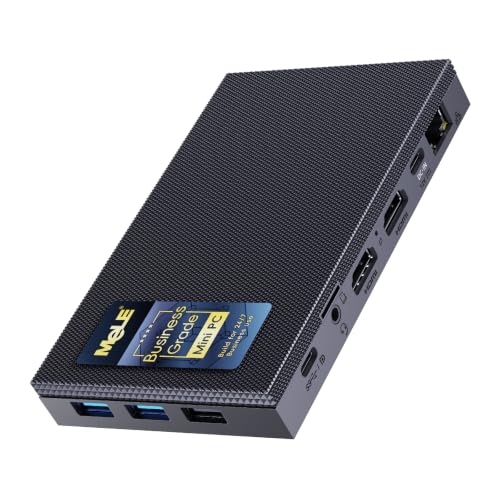
- Best overall fanless mini PC: MeLE Quieter4C Fanless Mini PC, Intel N150, 16GB RAM, 512GB Storage, Windows 11 Pro — Check on Amazon
- MINIX NEO Z300-0dB Fanless Mini PC, Intel i3-N300, 16GB RAM, 512GB SSD — Check on Amazon
- HISTTON Fanless Industrial Mini PC, Core i7-10810U, 32GB RAM, 512GB SSD — Check on Amazon
- Protectli Vault Pro VP2430 Fanless Mini PC, Intel N150, 4x 2.5GbE Ports — Check on Amazon
See 2 more Amazon options
- ZOTAC ZBOX CI337 Nano Fanless Silent Mini PC, Intel N100, Barebone — Check on Amazon
- MeLE PCG02 Fanless PC Stick, Intel N100, 8GB RAM, 128GB, Windows 11 Pro — Check on Amazon
Read the full guide ↓
Disclosure: As an Amazon Associate, reviewstook.com earns from qualifying purchases. Links to Amazon on this page are affiliate links; they cost you nothing extra. Listing details such as price and availability change often, so check the current Amazon listing before you buy.
If this is your first mini PC, start with the sentence most listings hope you never read: a fanless mini PC is not a small gaming PC with the fan removed. It is a different kind of computer — a low-power processor sealed against a finned metal case, built to run in complete silence while it handles everyday work. There is no spinning fan anywhere inside, which means there is nothing to hum, whine or wear out. What you give up for that silence is raw speed. Every machine in this guide draws its pictures with graphics built into the processor, and every one of them is honestly a light-gaming machine: older games, indie games, emulation and esports titles at gentle settings, plus games streamed from a cloud service or another computer. Modern big-budget games are beyond all of them, and no amount of money changes that: a powerful graphics chip makes more heat than a silent metal case can shed.
Your budget makes that point sharper. Twelve hundred dollars is generous for a gaming tower; for a fanless mini PC it is more money than the category knows what to do with. Passive cooling only works on frugal processors — Intel’s N100, N150 and eight-core i3-N300, and the 15-watt laptop-class chips inside industrial boxes — and frugal processors are cheap. A complete, ready-to-use fanless desktop sits in the budget-to-mid-range tier. Even the most expensive machine we could verify as a sensible buy — a premium-tier industrial model — spends its premium on memory and industrial ports wrapped around a laptop processor from 2019, not speed. So this guide is written for a beginner: it explains the handful of words that actually decide your purchase, walks you through your first evening with the machine, and then tells you to keep most of your $1,200. Silence does not get more silent as the price climbs.
What a fanless mini PC is brilliant at is the quiet work around gaming: a bedroom or studio desk PC, a living-room media box playing 4K video, a home server that sips power around the clock, a firewall guarding the house network. If playing the newest games is the main job, your money belongs in a fanned machine — start with Best Mini Gaming PC Under $1200 and come back here when silence is the priority. If silence is the priority, read on: quick picks, a plain-English glossary, full reviews of all six machines, a first-evening setup walkthrough, and straight answers to the questions everyone asks.
In this guide
Quick Picks
Short on time, or comparing several options at once? Each row below names a buyer type and the product that suits it, with a link to the listing.
| Buyer type | Pick | Why it stands out | Link |
|---|---|---|---|
| Best overall | MeLE Quieter4C, N150, 16GB/512GB | The complete silent desktop for a first-timer: three 4K screens, USB-C power, VESA mount — check price on Amazon | Check on Amazon |
| Most processor, still silent | MINIX NEO Z300-0dB, i3-N300, 16GB/512GB | Eight cores — the most thinking power in a consumer fanless box — with fast 2.5G networking — check price on Amazon | Check on Amazon |
| The ceiling, shown honestly | HISTTON Fanless Industrial PC, i7-10810U, 32GB/512GB | 32GB of memory and two network ports in a finned metal case — proof of where the money stops helping; check price on Amazon | Check on Amazon |
| Best for a home network project | Protectli Vault Pro VP2430, N150 | Four fast network ports and appliance-grade support, built to run for years — check price on Amazon | Check on Amazon |
| Cheapest way in, some assembly | ZOTAC ZBOX CI337 Nano, N100 | A brand-name fanless barebone — you add memory and storage — check price on Amazon before parts | Check on Amazon |
| Smallest and simplest | MeLE PCG02 PC Stick, N100, 8GB/128GB | A whole Windows 11 Pro PC in a 130g stick that plugs straight into a TV — check price on Amazon | Check on Amazon |
How These Picks Were Chosen
The first test was the word “fanless” itself, and we applied it the strict way. A machine only counts if the manufacturer — not the marketplace headline — documents that it is cooled passively, with no fan at all. A few best-selling firewall boxes sold as fanless turn out, in the maker’s own material or in independent teardowns, to hide a small helper fan inside; reviewers have measured one such fan at 39 to 41 dBA. Those boxes may be decent routers, but they are not fanless, so they are not recommended here. The same test removed every mini PC whose selling point is merely a “quiet fan,” and every gaming mini PC, because a machine with a fan is a different product.
The second test was proof. Every pick below is a real Amazon listing whose model and specifications were cross-checked against manufacturer pages and specification databases. Prices in this small market drift, and barebone prices swing with the cost of memory, so this guide does not print fixed prices — check the current price on the Amazon listing before you buy. Two picks are barebones, meaning they arrive without some or all of the memory, storage and operating system; their reviews say plainly what is missing and that finishing them adds to the cost, rather than letting a small sticker price do dishonesty. We read the makers’ listings, datasheets and specification pages — we did not use these machines ourselves — and compared processor class, memory type, upgrade paths, ports, display support and stated thermal behaviour; where a maker’s claims stretch, the review says so.
The third test was your budget, treated as information rather than a target. Nothing here was picked to fill $1,200. The six machines run from the budget tier to a single premium industrial model because that is where the verified category actually lives: below that range you meet no-name boxes with cooling claims nobody can check, and above it you are paying industrial markups for bigger configurations of the same frugal chips. If your real budget is smaller — and after reading this guide it probably should be — the same shortlist logic applies at Best Fanless Mini PC Under $500 and Best Fanless Mini PC Under $700.
New to Mini PCs? The Words That Actually Matter
Listings are written in shorthand. These thirteen terms cover nearly everything on the pages you are about to shop, in the order a beginner meets them.
- Fanless (passive cooling). The processor presses against the metal case, and the finned case gives the heat to the room air. No fan, no noise, no moving parts. The trade is fixed: only low-heat processors can live this way, which is why every chip in this guide is a modest one.
- Processor (CPU) and cores. The part that does the thinking. Cores are parallel workers: more cores means more jobs handled at once without slowing down. The processors here — Intel N100, N150, the eight-core i3-N300, and an older 15-watt Core i7 — are efficiency designs. They feel quick at everyday work and are nobody’s idea of a powerhouse.
- Integrated graphics, and “shared memory.” Most PCs draw the picture with a separate graphics card. These machines use a small graphics section built into the processor itself. It has no memory of its own, so it borrows some of the main memory — that is “shared memory” — and its picture-drawing strength is a fraction of a gaming card’s. Video, desktops and light games: yes. Heavy modern games: no.
- Graphics card (GPU). A separate, powerful picture-drawing chip, the heart of every gaming PC. No fanless mini PC has one, and none of the six picks below can ever accept one — there is no slot for it and no way to cool it. If a listing in this category hints at gaming-card performance, it is not a fanless machine.
- Memory (RAM). The computer’s short-term workspace, measured in gigabytes. More workspace means more apps and browser tabs open at once. For a beginner: 8GB is the floor and feels it, 16GB is comfortable, 32GB is generous headroom you may never use.
- Soldered versus slotted memory. Slotted memory is a small stick plugged into a socket — you can replace it or fit a bigger one later. Soldered memory is chips fixed permanently to the board: what you buy is what you keep, forever. In this guide the PC stick’s 8GB is soldered, while the Quieter4C, the HISTTON, the Protectli and the ZOTAC all use slots.
- Storage: SSD, NVMe and eMMC. Where your files live when the power is off. An SSD is a fast chip-based drive; NVMe is the fastest common kind, fitted in a slot you can usually swap later. eMMC is cheaper flash storage soldered in place — slower, smaller, and not replaceable. The PC stick’s 128GB is eMMC, and the Protectli carries a small eMMC chip just to boot from alongside its proper SSD slot.
- Barebone. A computer sold unfinished: the box and processor are there, but you supply some or all of the memory, storage and operating system, and fit them yourself. The ZOTAC pick is a full barebone, and the cheapest Protectli configurations are too. A barebone’s price is a down payment, not a computer.
- New versus renewed. “Renewed” or “refurbished” means second-hand equipment cleaned up and resold. Every pick in this guide is sold new. If you shop beyond it and meet a renewed listing, that word — not the discount — is the first thing to weigh.
- Power brick. The plug-pack on the power cable that turns wall power into what the machine sips. These PCs use so little electricity that some, including both MeLE picks, can run from a USB-C PD charger of the kind sold for laptops — the Quieter4C asks for at least 36 watts. The brick warms up in use and needs air around it, just like the PC does.
- Resolution. How many dots make the picture. 1080p is the familiar HD count; 4K is four times as many. Every pick here can display a crisp 4K desktop and play 4K video. Drawing a 4K game is a far heavier job — that difference is the whole gaming story in this category.
- Refresh rate. How many times per second the screen redraws, measured in hertz (Hz). A faster screen looks smoother, but Windows often leaves a new monitor at 60Hz until you tell it otherwise — the setup walkthrough below includes that two-minute fix.
- Upscaling. A trick for lighter graphics: the game is drawn at a lower resolution, then stretched intelligently to fill your screen, trading a little sharpness for a lot of smoothness. On integrated graphics it is the difference between playable and not in many titles. One name to file away: DLSS is NVIDIA-only technology, and since none of these machines contains an NVIDIA chip, any fanless listing boasting about it is boasting about a different computer.
Why $1,200 Is More Than This Category Can Spend
It is worth one short section to prove the overspending warning, because beginners reasonably assume a bigger budget buys a better class of machine. Follow the range upward: the most expensive pick here, the premium-tier HISTTON, wraps 32GB of memory around a six-core laptop processor from 2019, and the same family is offered in an even higher-tier configuration with more memory and storage — not a faster computer in any way you would notice, because the processor class is identical and the case can only shed so much heat. Meanwhile complete consumer fanless desktops sit in the budget-to-mid-range tier, a cheaper version of the leading pick’s chassis sits lower still, and credible barebones start at the budget end. There is no rung at $1,200, because a processor strong enough to justify $1,200 would cook itself inside a sealed case. Spend what the job needs — for most beginners a mainstream mid-range machine — and keep the rest.
The 6 Best Fanless Mini PCs Under $1,200 for Beginners
MeLE Quieter4C Fanless Mini PC — Intel N150, 16GB RAM, 512GB Storage
Who it suits: A first-time buyer who wants the silent PC finished — unbox it, plug it in, and have a complete Windows desktop that never makes a sound.
The Quieter4C pairs Intel’s N150 processor — four cores, running up to 3.6GHz, sipping single-digit watts — with 16GB of memory in a proper slot and 512GB of storage, and it arrives with Windows 11 Pro installed and ready. For a beginner the connections are the luxury: two HDMI sockets plus a full-function USB-C port can run three 4K screens at once, there is a wired gigabit Ethernet port for a fast, steady internet connection, Wi-Fi 5 and Bluetooth 5.1, and a VESA mount in the box so the little slab — 5.2 by 3.2 by 0.7 inches — can hide on the back of a monitor. It can even take power through USB-C from a suitable charger, keeping a desk down to very few cables. Touches like switching itself back on after a power cut mark it out as a machine designed to be left alone. Check its current price on Amazon before you buy. If your workload is lighter — one screen, media and browsing — the same chassis also comes in a lower-tier N100 version with 8GB of memory and 128GB of storage — hunt for that version instead.
Its limits are the honest limits of the whole category. Four efficiency cores are plenty for documents, browsing, video and light photo work, and the built-in video hardware is genuinely good at playing and converting video; they are not built for heavy creative software or long, flat-out jobs, where the processor slows to the speed the silent case can cool. MeLE itself states the case surface can reach 55 to 70 degrees Celsius under load — normal, and within the safety standard the maker cites, but it means this PC lives in open air, never sealed in a cupboard.
- Completely silent with no moving parts — the reference silent desktop, ready to run.
- Three 4K screens, USB-C power and a VESA mount make the tidiest desk in this guide.
- Slotted memory and a spare drive slot mean it can grow a little with you.
Honest limitation: An efficiency processor in a case that gets properly warm under load — it needs open air, and sustained heavy work settles to the speed physics allows.
Choose it if you want the finished article: a silent, complete, warranted desktop for everyday work and media. Skip it if your main work is rendering, heavy compiling or modern gaming — that work needs a fan, and no fanless box pretends otherwise for long.

MINIX NEO Z300-0dB Fanless Mini PC — Intel i3-N300, 16GB RAM, 512GB SSD
Who it suits: A beginner whose quiet PC will be busy — lots of apps at once, a home server doing several jobs, or a desk that never really rests — and who wants the most processor silence can hold.
The headline here is the chip. The Intel i3-N300 has eight cores, twice as many as the N100 and N150 machines, running up to 3.8GHz, and in a fanless consumer box that is as much processor as currently exists. Eight workers do not make any single job dramatically faster, but they make the machine feel unhurried when jobs pile up: a media server streaming to the TV while it backs up the family photos, home-server programs running side by side, a browser with a day’s worth of tabs. MINIX — an established mini PC brand — fits 16GB of memory and a 512GB PCIe SSD, installs Windows 11 Pro, and adds connections a beginner will grow into: a 2.5-gigabit Ethernet port for fast transfers around the house, two 4K screens over HDMI and USB-C, and a VESA mount. The “0dB” in the name is a literal description of its noise output, and the maker rates it for running around the clock. Check its current price on Amazon — it sits in a similar mid-range tier to the Quieter4C above, with twice the cores.
The balance notes are short but real. Eight efficiency cores are still efficiency cores: each one is modest, the integrated graphics are the same class as everything else here, and gaming stays light no matter how the cores multiply. MINIX warns in its own listing that the top cover can become warm under load — the case is doing its job — and long, all-core workloads settle to what the metal can dissipate, so this machine shines at juggling rather than at marathons. Its memory is DDR4 rather than the newer DDR5, a fair trade in this tier. None of that changes the verdict: this is the current answer to “how much computer can I buy with no fan at all,” at a mid-range price tier.
- Eight-core processor — the most multitasking headroom in a verified consumer fanless PC.
- Fast 2.5-gigabit networking and a proper SSD, ready to use out of the box.
- Rated by its maker for continuous, around-the-clock running.
Honest limitation: The extra cores buy juggling room, not gaming or workstation power, and the warm cover under load is the cooling system working as designed.
Choose it if your silent PC will run home-server duties and a busy desktop at the same time. Skip it if your work is one heavy program at a time, or you need graphics beyond the integrated kind.

HISTTON Fanless Industrial Mini PC — Core i7-10810U, 32GB RAM, 512GB SSD
Who it suits: The beginner who arrived wondering what the top of a $1,200 fanless budget buys — and the smaller number of buyers who truly need lots of memory, two wired networks and an industrial case that can live in dust and neglect.
This pick is in the guide as documented evidence. It is an industrial computer: a finned aluminium case with no fan, inside which an Intel Core i7-10810U — six cores, twelve threads, boosting to 4.9GHz — works alongside 32GB of memory (the slots accept up to 64GB), a 512GB NVMe SSD, two gigabit Ethernet ports, three screen outputs across two HDMI sockets and a DisplayPort, and Windows 11 Pro. It measures about 8.1 by 4.9 by 2.1 inches and sits at the premium top of this guide’s range — check its current price on Amazon. On paper that is the strongest fanless specification in this guide, and for short, bursty jobs its six cores are indeed the quickest here. As a silent controller PC in a harsh room, it is a legitimate, well-specified product.
Now the part a beginner most needs to hear. That Core i7 is a 15-watt laptop processor from 2019. Its built-in graphics are older than the graphics in the mid-range machines above, its Bluetooth is the dated 4.2 kind, and inside a sealed case its six cores cannot hold their headline speeds through long jobs — they slow to what the fins can shed. What the premium price mostly buys is 32GB of memory, an industrial port layout and an industrial price list. The same seller offers a 16GB member of this family in a lower tier, and the 64GB configuration mentioned earlier sits in a tier above your whole budget — for the same class of chip. If you genuinely need the memory and the ports, buy it with open eyes and it will serve you well.
- 32GB of memory and two wired network ports — capacity no consumer fanless box matches.
- The strongest short-burst processor in this guide, in a case built for rough rooms.
- Memory slots accept up to 64GB if a real workload ever demands it.
Honest limitation: A 2019 laptop chip with dated graphics and wireless — the price buys memory and ports, not modern speed.
Choose it if you need 32GB of memory, dual wired networks or industrial connections in total silence. Skip it if you are a typical beginner — you would be paying a steep premium for capacity you will not use.

Protectli Vault Pro VP2430 Fanless Mini PC — Intel N150, 4x 2.5GbE
Who it suits: A beginner with a project: the home firewall, router or small home-lab machine that sits in a cupboard, guards the network and is expected to run silently for years.
Protectli does not build desktops; it builds network appliances, and the difference shows in the details. Inside the finned, fanless case — the maker’s own documentation describes the machine as “Fanless and Silent” — an Intel N150 quad-core processor works beside four Intel 2.5-gigabit Ethernet ports, so one box can take the internet in and feed several networks out. There is a DDR5 memory slot the maker has tested with sticks up to 64GB, a slot for a proper NVMe SSD, and a small 32GB eMMC chip that a lightweight system can boot from. The grown-up touches are the kind consumer brands skip: an optional open-source coreboot firmware, a security module, a console port for headless fixing, a VESA mount in the box, and assembly in the USA, Canada or Germany with a real support organisation behind the product. Check its current price on Amazon — it starts in the budget tier, depending on configuration.
The warnings here are about configuration, not quality. Amazon sells this model in several configurations under one listing family, and the cheaper ones are barebone — the memory and SSD are yours to choose and fit — so read the exact configuration you are buying before comparing its price with the complete desktops above. The little eMMC chip will happily boot a firewall system but is no substitute for a real SSD if you build a general-purpose machine. A newer revision, the VP2430e, leaves the eMMC out entirely, so check which revision a listing describes. As a network appliance it has no rival in this guide; as a family desktop, the Quieter4C is the kinder buy.
- Four fast Intel network ports — purpose-built for firewall and home-lab duty.
- Documented, supported hardware from a specialist maker, with open firmware available.
- A memory slot tested to 64GB gives a small appliance unusual growing room.
Honest limitation: The lower-priced configurations are barebone, so the true cost includes memory and storage you fit yourself — and the layout is specialised for networking, not desk life.
Choose it if the fanless PC’s job is routing, firewalling or always-on home-lab services. Skip it if you want a ready-to-run desktop — buy the Quieter4C and keep the change.

ZOTAC ZBOX CI337 Nano Fanless Mini PC — Intel N100, Barebone
Who it suits: A beginner who likes the idea of one small, satisfying building job — or who already has a spare memory stick and SSD on the shelf — and wants a genuine brand-name silent PC for the least money.
ZOTAC has built passively cooled nano PCs longer than almost anyone, and the CI337 Nano is its current starting point. The box itself, about 5 by 5 by 2.2 inches, carries an Intel N100 quad-core processor, and the connection list is generous for the size: two HDMI sockets, a DisplayPort and USB-C can drive three 4K screens; there are two gigabit Ethernet ports, Wi-Fi 6, Bluetooth 5.2, four USB ports and a VESA mount. It is the lowest-priced entry point in this guide — check its current price on Amazon — and the catch is printed in its own name: barebone. The box contains no memory, no storage and no operating system. You fit one DDR5 memory stick (the board accepts up to 16GB), an M.2 SSD or a 2.5-inch drive in the spare bay, and the operating system of your choice. Costed honestly at today’s memory prices — memory kits spiked in price during late 2026, though this board needs a smaller single stick — a finished CI337 lands in the mid-range tier once the parts are counted, depending on when you buy them.
For a beginner the trade is simple to state. If you have never fitted a memory stick, this is one of the gentlest first builds in computing — a couple of screws, two parts that only fit one way — but it is a build, and the sticker price is a down payment rather than a computer. Two traps deserve bold type. First, this board takes DDR5 memory: a spare DDR4 stick from an older machine will not fit, whatever one retailer’s question-and-answer page claims — ZOTAC’s own specification says DDR5, and the specification is right. Second, the M.2 slot runs at a reduced PCIe 3.0 x1 speed, so a premium SSD will not stretch its legs here; a mid-range drive is the sensible pairing. ZOTAC’s warranty and support stand behind the box, which separates it from the no-name barebones at similar prices.
- The lowest entry price of any verified fanless pick — check price on Amazon, before parts.
- Two network ports, Wi-Fi 6 and three-screen support despite the tiny size.
- You choose the memory and storage, so nothing inside is a mystery.
Honest limitation: Barebone means barebone — no memory, no storage, no operating system — and at spike-era parts prices the finished cost can approach a complete machine’s.
Choose it if you have DDR5 and an SSD waiting, or you want the small project of fitting them. Skip it if you want to unbox a working computer today — the complete picks above are simpler and no dearer once parts are counted.

MeLE PCG02 Fanless PC Stick — Intel N100, 8GB RAM, 128GB Storage
Who it suits: A beginner who wants the computer to disappear — plugged into the back of a TV or monitor for media, a kitchen screen, a spare-room desk or signage — with the simplest setup in this entire guide.
The PCG02 is a complete Windows 11 Pro PC in a stick 137.5 by 53 by 16.3 millimetres and 130 grams, with a built-in HDMI plug that goes straight into the back of a display. There is no box to place and almost no cable to manage: inside are an Intel N100 quad-core processor, 8GB of memory and 128GB of high-endurance storage, and around the edges a full-function USB-C port that can drive a second 4K screen and accept power, a full-size USB port, a gigabit Ethernet socket — a wired connection a stick this size has no business offering — Wi-Fi 5, Bluetooth 5.1 and a microSD slot that takes cards up to 1TB for extra file room. The business-grade habits of its bigger MeLE siblings are all here: it can wake on a schedule, wake over the network and switch itself back on after a power cut — built to run screens unattended for years. Check its current price on Amazon — it sits in the budget-to-mid-range tier. As a media front-end or second PC behind the television, nothing else here vanishes as completely.
Its limits are the shape itself. Eight gigabytes of memory and 128GB of storage are enough for media, browsing and appliance jobs and not much more, and both are fixed: the memory is soldered and the storage is eMMC rather than a swappable SSD, so this machine can never grow — the microSD slot is the only expansion it will ever have. MeLE states the surface can reach 55 to 70 degrees Celsius under load, normal for a passively cooled stick and within the safety standard cited, but a stick tucked behind a hot television inside a closed cabinet is living its hardest life, so give it air where you can. Buy it as the invisible appliance it is and it is excellent; buy it hoping for a shrunken desktop and the Quieter4C exists precisely for you.
- A whole Windows 11 Pro PC in a 130g stick — the most discreet option here by far.
- Wired Ethernet, a second-screen USB-C port and unattended-running features.
- Storage specified for high-endurance, around-the-clock commercial duty.
Honest limitation: A fixed 8GB/128GB specification on soldered parts — an appliance for life, with no upgrade path at all.
Choose it if the PC must vanish behind a screen and the work is media, signage or light duties. Skip it if you need memory, storage or connections beyond the basics — every other pick here offers more.

Comparison Table
| Product | Processor | Best use | Link |
|---|---|---|---|
| MeLE Quieter4C, 16GB/512GB | Intel N150, 4-core | The complete silent desktop, ready to run | Check on Amazon |
| MINIX NEO Z300-0dB, 16GB/512GB | Intel i3-N300, 8-core | Most processor in a consumer fanless box | Check on Amazon |
| HISTTON Fanless Industrial PC, 32GB/512GB | Core i7-10810U, 6-core | Maximum memory and industrial ports in silence | Check on Amazon |
| Protectli Vault Pro VP2430 | Intel N150, 4-core | Firewall, router and 24/7 lab appliance | Check on Amazon |
| ZOTAC ZBOX CI337 Nano | Intel N100, 4-core | Cheapest brand-name fanless barebone | Check on Amazon |
| MeLE PCG02 PC Stick, 8GB/128GB | Intel N100, 4-core | Invisible media and signage PC behind a screen | Check on Amazon |
Your First Evening: Setting Up, Step by Step
For the four complete machines — the Quieter4C, the MINIX, the HISTTON and the PC stick — this is the whole job, in order. If you chose a barebone (the ZOTAC, or a barebone Protectli configuration), do the fitting job first: memory stick and SSD into their slots, following the maker’s manual, then install your operating system, and rejoin at step one.
- Choose the spot before you open the box. This is the one rule fanless ownership turns on: the case is the heatsink, so it needs open air around its fins on every side. On top of a desk, mounted behind a monitor with its included VESA plate, on an open shelf — all good. Inside a sealed cabinet, a closed drawer or a pile of paperwork — never. The PC stick plugs into the back of the screen and asks only that the screen is not entombed in a closed unit.
- Give the power brick an address too. The brick warms up in use. Set it on a hard surface with air around it — not under cushions, rugs or a nest of cables. If your pick takes USB-C power (both MeLE machines can), make sure the charger meets the stated minimum wattage; the Quieter4C asks for at least 36 watts.
- Connect the screen. One cable, from the machine’s HDMI or USB-C socket to the monitor or TV. A beginner note that saves real confusion: gaming towers have a separate graphics card with its own sockets, and plugging into the wrong ones is a classic first-night mistake — these machines have no graphics card, so every display socket on the box is the right one. The PC stick skips the cable entirely; its plug goes straight into the TV.
- Add keyboard, mouse and wired internet. Plug in the peripherals, and if the machine sits anywhere near your router, run an Ethernet cable too. Every pick here has a wired port, and a wired connection makes the evening’s downloads — updates, drivers, your first games — faster and steadier than Wi-Fi.
- Switch on and let Windows settle. The complete machines boot into the Windows 11 setup: language, account, network. Take your time; none of it can be broken by reading it.
- Run Windows Update — all of it, repeatedly. Update, restart when asked, then check again until it reports nothing left. Then fetch the Intel graphics driver from Intel’s site; the driver is the piece of software that most affects how smoothly games and video run on integrated graphics, and the one in the box is rarely the newest.
- Set your monitor’s real refresh rate. Windows frequently leaves a fast monitor idling at 60Hz. Open Settings, then System, Display, Advanced display, and choose the highest refresh rate your screen offers. Two minutes, and a screen you paid for is running at full speed.
- Check that the machine you received is the machine you ordered. Open Settings, then System, About, and compare the processor, memory and storage against the listing. This step matters most where one listing family sells several configurations — the Protectli’s versions, and the HISTTON’s near-identical siblings. If the model number or the specification does not match, that is a returns conversation, and it is far easier on night one than in month two.
- Install a game store and set your expectations kindly. Install Steam or your store of choice, point its library at the internal drive, and start with the games these machines love: indie titles, older favourites, emulation, esports at modest settings, or a cloud gaming service that renders the game elsewhere and streams it back — a job these video-decoding chips are built for. A modern blockbuster will tell you honestly that it belongs on a different computer.
What Else You Will Spend
No pick in this guide includes a screen, a keyboard or a mouse, and nothing in the reviews pretends otherwise. The honest extras, in order. First, a monitor, unless the machine is headed for a TV you already own — the screen is the biggest extra and the one you will look at for years, so it outranks everything else here. Second, a keyboard and mouse if you do not already own a set; none of these listings bundles them, so treat them as their own small purchase. Third, the completion bill, which applies only to the barebones: the ZOTAC’s finished cost already counts its memory and storage, so read it as machine-plus-fix rather than comparing its barebone sticker against complete PCs — and remember no operating system price is included anywhere in this guide, because none was verified. Fourth, small comforts that can wait: a larger SSD for a slotted machine once your library grows, or a microSD card for the stick. You will not find accessory prices here, because the research behind this guide verified machines, not peripherals — and the leftover from your $1,200 covers all of it comfortably.
Upgrades, in Plain Terms
Beginners are often sold computers on the promise of future upgrades, so here is exactly what can and cannot change inside these six machines, with no sales language. Memory and storage are the friendly upgrades, and only where slots exist. The Quieter4C’s memory stick can be swapped for a larger one and its M.2 slot accepts a bigger drive, with a microSD card as easy extra room; the HISTTON’s slots go up to 64GB; the Protectli was built to be opened: its DDR5 slot is maker-tested to 64GB and its SSD slot is yours to fill. The ZOTAC starts empty by design, so your first “upgrade” is simply finishing it — up to 16GB of DDR5 and the drive of your choice. The PC stick is the opposite pole: soldered memory, fixed eMMC storage, nothing to swap, ever, beyond a microSD card. And the upgrade that does not exist is graphics. There is no slot for a graphics card and no cooling to spare for one, so the gaming ceiling described earlier is permanent. If a machine’s job might grow into heavier gaming later, that is a reason to buy a different kind of computer now — the platform a PC is built on decides its future, and this platform’s future is quieter, not faster.
How to Choose, as a Beginner
- Start from the job, not the budget. Silent desk PC, media box, home server, firewall, invisible screen-stick: the six picks divide along those lines, and your job picks the machine faster than any spec sheet.
- Buy complete unless you fancy the project. A barebone is a fine adventure and a poor surprise. If the words “fit your own memory” do not sound like fun, they are a warning, and the complete machines cost no more once parts are counted.
- Sixteen gigabytes is the comfortable memory line. Eight works for media and appliance jobs — the stick proves it — but a desktop you will live in deserves 16GB, and it deserves it in a slot if the machine might ever need more.
- Treat heat as a placement decision. Makers state case temperatures of 55 to 70 degrees Celsius under load. Open air, fins uncovered, out of sealed furniture: follow that and a fanless PC is among the most reliable computers made, because nothing inside it moves.
- Count the connections your room actually needs. Screens first — one, two or three — then wired networking speed, then USB. The processors in this category are variations on a theme; the ports are where the picks truly differ.
- Keep the change. The correct beginner spend here is a mainstream mid-range machine, finished. A $1,200 budget is permission, not instructions, and the best fanless purchase leaves most of it unspent.
Common Buying Mistakes
- Spending the whole $1,200 because it is there. Beyond the mainstream consumer machines, extra money buys memory and ports around the same frugal processors — and at the very top of the range, one configuration in this guide’s research buys nothing else at all.
- Trusting the word “fanless” in a marketplace title. Some best-selling “fanless” boxes contain a small helper fan; one popular line’s fan has been measured at 39 to 41 dBA. Check the manufacturer’s own documentation, as this guide did.
- Buying a fanless PC to play modern games. Integrated graphics in a sealed, low-power box plays light and older titles. Modern blockbusters need a graphics card, and a graphics card needs a fan.
- Sealing the machine in a cabinet or drawer. The case sheds heat from its surfaces; starve it of air and you have built a small oven, then blamed the processor for slowing down inside it.
- Comparing a barebone’s sticker price with complete machines. Memory and storage at current prices can carry the cheapest pick here from a budget barebone up to the cost of a complete mid-range machine once finished.
- Ordering DDR4 parts for the DDR5 ZOTAC. One retailer’s answer page gets this wrong; ZOTAC’s specification does not. Memory type is printed on the maker’s spec sheet — believe that one.
- Reading a Core i7 badge as modern speed. The i7 in the dearest pick here is a 15-watt laptop chip from 2019 with graphics older than the entry-level ZOTAC’s chip carries. In this category, the year matters more than the badge.
- Buying the soldered 8GB stick as a growing desktop. It is a wonderful appliance and a permanent specification. If the job will grow, buy slots.
Final Recommendation
- Most beginners: MeLE Quieter4C, N150, 16GB/512GB.
- Busy desks and home servers: MINIX NEO Z300-0dB.
- Maximum memory and industrial ports: HISTTON Fanless Industrial PC, 32GB.
- Firewall and home-lab projects: Protectli Vault Pro VP2430.
- Tightest budget, parts on hand: ZOTAC ZBOX CI337 Nano.
- Invisible media and signage: MeLE PCG02 PC Stick.
Our top two are the MeLE Quieter4C — the finished silent desktop that asks nothing of a beginner but a power outlet and open air — and the MINIX NEO Z300-0dB, which trades a little polish for twice the cores in a slightly lower price tier. Between them they cover most of what a fanless mini PC is for: a silent desk, a tireless home server, a media hub that never announces itself. The Protectli is the specialist’s pick for network projects, the HISTTON stands as documented proof of where the money stops helping, the ZOTAC is the value route for anyone with parts on the shelf, and the PCG02 disappears behind a screen like nothing else here. What none of them needs is your whole $1,200: the best outcome for this search is a mainstream mid-range machine and the rest of the budget still in your pocket. Beginners working to a smaller figure can run the same thinking at Best Fanless Mini PC Under $800 or start smaller still with Best Fanless Mini PC For Beginners Under $500.
Frequently Asked Questions
I have $1,200 to spend. Why is every recommendation cheaper than that?
Because the category’s ceiling is set by heat, not by price. A sealed case can shed the warmth of a 6-to-15-watt processor and no more — so complete fanless machines cluster in the budget-to-mid-range tiers, and the only way to spend more is industrial configurations like the premium pick here, or its even higher-tier sibling, where the money buys memory, storage and ports around the same class of chip. Spending the whole budget buys a more expensive computer, not a faster or quieter one.
Is a fanless mini PC really completely silent?
A genuinely fanless one, yes. With no fan and no spinning drive there is no mechanism inside that can make a sound, which is why the verification step matters: some products marketed as fanless contain a small auxiliary fan. Check the claim in the manufacturer’s own specifications — as this guide did for every pick — rather than trusting a marketplace title.
Can I actually play games on one of these?
Light ones, happily. Expect retro emulation, indie games, older titles and esports games at modest settings from the integrated graphics — and one modern loophole: cloud gaming services render the game on a distant server and stream it back as video, and decoding video is something these chips are built to be good at, so streamed games play as well as your internet connection allows. Modern blockbusters rendered locally are beyond every pick here, permanently. If gaming is the main event, look at Best Mini PC Under $1200 and the fanned mini gaming guides; if your evenings split between a console and media everywhere else, a fanless box is the perfect second machine — and the streaming angle is covered at Best Fanless Mini PC For Streaming Under $1200.
Will it overheat? The cases get hot, apparently.
They run warm by design — makers state surface temperatures of 55 to 70 degrees Celsius under load, within the safety standards they cite — and they protect themselves by easing off speed under long, heavy loads rather than failing. Your one job is placement: open air, fins unobstructed, no sealed cabinets, no hot rooms. Given air, a fanless PC is among the most reliable computer forms there is, because nothing in it moves. Readers short on space should also see Best Fanless Mini PC For Small Spaces Under $1200 for placement-first picks.
I am a beginner. Is a barebone a mistake?
Only if it is a surprise. Fitting a memory stick and an SSD is a couple of screws and two parts that fit one way round — one of the gentlest first builds in computing — and the ZOTAC review above is honest that the finished result costs what a complete mid-range machine costs once parts are counted. But if you want a working computer the evening it arrives, buy a complete machine: at current parts prices it costs no more, and Windows is already installed. Price the whole build, never the box.
Can I upgrade it later when I know more?
Memory and storage, yes — where slots exist: the Quieter4C, HISTTON, Protectli and ZOTAC all let you swap or add those parts, and the upgrades section above lists each machine’s room to grow. Graphics, never: there is no slot and no cooling to spare, in any fanless mini PC, at any price. And the PC stick is fixed as delivered — buy it as an appliance, not as a starter desktop.


