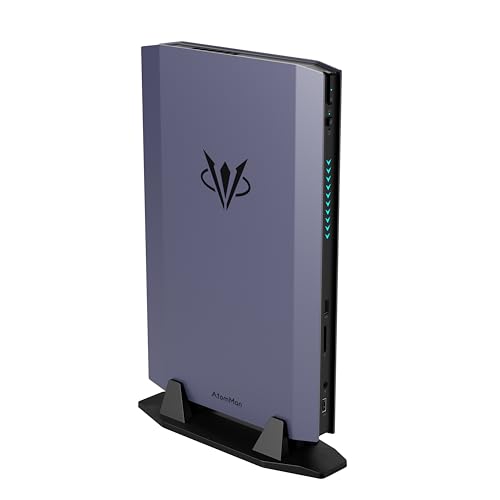
Where to buy
Check the latest price, availability and delivery on Amazon. Orders are placed on Amazon. We may earn a commission from qualifying purchases. Every product below is a barebones kit: the price buys the case, board, processor and cooler only — no RAM, no SSD and no operating system unless a review says otherwise, so budget for those parts before comparing any price here with a complete mini PC.
- Best overall barebones kit for streaming: AtomMan G7 Ti Mini PC, Core i9-14900HX, RTX 4070 — Check on Amazon
- AtomMan G7 Pt Mini PC, Ryzen 9 7945HX, RX 7600M XT — Check on Amazon
- MINISFORUM MS-A2 Mini Workstation, Ryzen 9 9955HX, Barebone — Check on Amazon
- MINISFORUM MS-01 Mini Workstation Barebone, Core i9-13900H — Check on Amazon
- MINISFORUM UM890 Pro Mini PC, Ryzen 9 8945HS, Barebone Version — Check on Amazon
See 1 more Amazon option
- GMKtec Nucbox K8 Plus Mini PC, Ryzen 7 8845HS (Without RAM/SSD/OS) — Check on Amazon
Read the full guide ↓
Disclosure: As an Amazon Associate, reviewstook.com earns from qualifying purchases. Links to Amazon on this page are affiliate links; they cost you nothing extra. Listing details such as price and availability change often, so check the current Amazon listing before you buy.
A streaming PC is judged by a component most listings never headline: the encoder. The processor renders your game or your desktop, but a separate block of silicon — the hardware encoder — is what turns those frames into the stream your viewers actually watch, for hours at a time. Buy the wrong encoder and no amount of CPU cores rescues the picture; buy the right one and the encode costs you almost nothing while you play. And $1,500 is the first barebones budget where the encoder menu gets genuinely interesting: one kit carries NVIDIA’s NVENC inside a laptop RTX 4070, three carry AMD’s current VCN encoder with AV1 support, one carries Intel’s Quick Sync, and one pairs a weak integrated encoder with sixteen CPU cores strong enough to do the job in software instead.
Two honest warnings before any pick. First, the kit price is never the price. Every kit below ships with no RAM, no SSD and no operating system, and every total in this guide is a completed total — kit plus the memory, storage and OS it needs — anchored to the manufacturer’s configured version of the same box, exactly as the base guide itemised them. Second, a finished PC is still not a finished stream: no microphone, camera or light is included with any of these mini PCs, and a console stream needs a capture card on top. That kit is real money, costed in its own section below, and never hidden inside a pick’s price. What the $1,500 buys here is the machine; the broadcast is a separate line in the budget, and this guide keeps the two apart throughout.
The realistic workflow also needs defining before the picks, because “streaming” covers very different loads. The demanding version — playing a modern game on the same machine that encodes the stream — is honestly available on the two discrete-GPU kits, and only there. The lighter versions — talk and desktop streams, creative work, a console fed through a capture card so the PC only has to encode — are available on all six, and for those the workstation kits are not consolation prizes but arguably the right tools. Output expectations follow the platforms, not the marketing: Twitch’s standard ceiling is around 6,000 kbps CBR, which makes 1080p60 the practical target for talk, desktop and capture work, and 720p60 or 1080p30 the honest target when an integrated GPU renders and encodes at once.
In this guide
Quick Picks
Short on time? Each row names a streaming job and the kit that suits it. Remember that every price is the empty kit — the completion cost is in each review.
| Streaming job | Pick | Why it stands out | Link |
|---|---|---|---|
| Best for game streaming on one machine | AtomMan G7 Ti (Core i9-14900HX, RTX 4070) | NVENC encodes while the GPU plays — the only kit here built for both jobs at once | Check on Amazon |
| Best value discrete-GPU streamer | AtomMan G7 Pt (Ryzen 9 7945HX, RX 7600M XT) | Sixteen cores plus an AV1-capable AMD encoder, with headroom left after completion — check price on Amazon | Check on Amazon |
| Best CPU-encoding and capture workstation | MINISFORUM MS-A2 (Ryzen 9 9955HX) | 16 Zen 5 cores for software encoding, dual 10G networking, a PCIe slot for later | Check on Amazon |
| Best Quick Sync capture and transcode box | MINISFORUM MS-01 (Core i9-13900H) | Quick Sync encoding, dual 10GbE and triple storage in a litre and a half | Check on Amazon |
| Best compact streamer, eGPU later | MINISFORUM UM890 Pro (Ryzen 9 8945HS) | 780M with AV1 encode today, an OCuLink port for a discrete GPU tomorrow | Check on Amazon |
| Best tinkerer’s APU streamer | GMKtec Nucbox K8 Plus (Ryzen 7 8845HS) | An unambiguous barebone listing with dual Intel 2.5G LAN and OCuLink | Check on Amazon |
How These Picks Were Chosen
The first filter was the encoder, because for a streamer it outranks every other specification. Each kit’s encoder was graded strictly from the silicon the base guide documented: the GPU or integrated graphics named in the listing, and the encoder that silicon is known to carry — nothing invented, nothing upgraded. The full grading is in the encoder section below; the short version is that NVENC leads, current AMD VCN follows with an honest softness at Twitch bitrates, Quick Sync is the efficiency pick, and the MS-A2’s integrated encoder is the oldest here — it earns its place on CPU cores and a PCIe slot instead.
The second filter was the completion filter, applied exactly as the base guide applied it: a kit earned its place only if a realistic completion — kit, sensible RAM, a 1TB-class NVMe drive and an operating system — could land within this budget — check price on Amazon to confirm the current total, with the completion logic stated openly in the review. Where completion only works if you already own parts, the review says so. That filter is also why the newest discrete-GPU barebone is absent: the AtomMan G7 Pro, with a laptop RTX 5070, is positioned by its maker as a premium barebone above this budget tier — above the whole budget before a single stick of RAM — so it is excluded, and its positioning marks this category’s current ceiling.
The third filter was simultaneous load, the test that separates streaming machines from gaming machines. A streamer rarely runs one program: the game, OBS, a browser full of chat and dashboard tabs, and often a local recording all run at once, on the same memory. Kits were graded on how that stack fits — core counts for the software side, dedicated encoder blocks so the encode does not steal rendering power, and memory ceilings, because a single small RAM stick strangles an integrated GPU that shares its memory with everything else. The fourth filter is permanence: the CPU, and where fitted the discrete GPU and its encoder, is soldered and can never be upgraded. RAM and storage are the only variables you will ever control, so the encoder you buy today is the encoder you stream on for the machine’s life.
The Encoder Is the Streaming Spec
Every frame you broadcast is compressed twice in spirit: once by the platform’s bitrate ceiling and once by your encoder’s skill at working inside it. Twitch’s standard ceiling is around 6,000 kbps with constant bitrate and a two-second keyframe interval, and at that budget the encoder’s efficiency is the picture quality. Here is each encoder family in this guide, graded from the documented silicon and nothing else.
NVENC (AtomMan G7 Ti). NVIDIA’s dedicated encoder block sits inside the RTX 4070 laptop GPU, separate from the cores rendering your game, which is the whole point: the game keeps its GPU, the stream keeps its encoder, and neither slows the other. This generation of NVENC also encodes AV1, the newer codec that produces a cleaner picture at the same bitrate where platforms accept it — YouTube’s AV1 live paths are where that pays today, with Twitch’s AV1 arriving through its enhanced broadcasting programme rather than as a standard ingest. For a one-machine game streamer, this is the encoder to beat, and nothing else in this guide beats it.
AMD VCN (AtomMan G7 Pt, UM890 Pro, K8 Plus). AMD’s Video Core Next encoder in the RX 7600M XT and the Radeon 780M is the current RDNA 3 generation, and it does encode AV1 — an important correction to the older AMD story, because the previous RDNA 2 generation’s VCN has no AV1 encode at all. In H.264 at Twitch bitrates, VCN output is honestly graded as softer than NVENC’s on fast motion: grass, rain and confetti effects smear sooner. At 720p60, or on talk and desktop content where the picture barely moves, the gap largely disappears. VCN is a good encoder with a known weakness at one specific job, and this guide grades it exactly that way.
Quick Sync (MINISFORUM MS-01). Intel’s encoder inside the Iris Xe graphics of the Core i9-13900H is the veteran here. It encodes H.264 and HEVC with very little power and almost no CPU cost — why media-server builders choose Intel silicon for transcoding — and handles a capture-card or talk workload without drama. It does not encode AV1; that claim belongs to newer Intel graphics generations, not this one. For a console-capture or desktop stream at 1080p, Quick Sync is entirely sufficient; for playing a demanding game on the same box, the Iris Xe’s rendering, not its encoder, is the limit.
Software x264 (MINISFORUM MS-A2’s real plan). Encoding on the CPU with OBS’s x264 encoder is the oldest route of all, and normally a fallback for weak hardware. Sixteen Zen 5 cores invert that logic: the MS-A2 has CPU enough to software-encode a clean 1080p stream at sensible presets while a capture card feeds it a console. What it cannot do is render a modern game at the same time — its Radeon 610M is a display engine with the set’s oldest encoder, RDNA 2-generation VCN with no AV1 encode. The MS-A2 is a streaming workstation, and graded as one it is formidable; graded as a game console it would fail, so this guide does not grade it as one.
The 6 Best Barebones Mini PCs for Streaming Under $1,500
AtomMan G7 Ti Mini PC — Core i9-14900HX, RTX 4070
Who it suits: Streamers who want to play and broadcast from one small machine, at the highest quality this budget allows, and who already own — or can cheaply source — DDR5 SO-DIMMs and an NVMe drive.
For streaming, the G7 Ti’s specification reads like it was written for the job. The RTX 4070 laptop GPU runs at up to 140W — the high-power variant of the chip, not the throttled version found in thin laptops — and renders the game, while its NVENC block encodes the stream independently, with AV1 available where a platform accepts it. Behind both sits a Core i9-14900HX with 24 cores, which absorbs OBS’s scene compositing, your browser, chat bots and a simultaneous local recording without touching the game’s resources. DLSS support lowers the GPU’s rendering load in supported games, which is headroom the encoder never has to fight for. In simultaneous-load terms this is the only kit in the guide where 1080p60 game streaming is the comfortable default rather than an aspiration: game on the GPU, encode on NVENC, everything else on a pile of spare cores. Two DDR5-5600 SO-DIMM slots (up to 96GB) and two M.2 PCIe 4.0 slots give the completion real freedom — fit a matched memory pair and a 1TB-class drive, and use the second slot later for a dedicated recording drive, because high-bitrate local records eat roughly 20GB an hour.
The arithmetic is the base guide’s, unchanged, and it is tight. PC Gamer’s review showed the barebone and the factory 32GB/1TB configuration priced close together — a narrow gap that your RAM, SSD and Windows licence must together fit inside, which is realistically true only when parts come from a drawer you already own. Completed carefully, the machine lands right at the top of this budget — check price on Amazon for the current barebone and configured listings before you decide. One listing discipline matters here: the pinned Amazon listing is the G7 Ti listing family, where the barebone is sold alongside configured styles — confirm the style selector says the barebone configuration before you pay, because clicking the wrong style is the most common way buyers in this category end up owning the wrong thing. And the permanence rule applies at full strength: the 4070 and its encoder are soldered, so when this GPU ages out, the whole machine does.
- NVENC with AV1 encode, independent of the GPU rendering your game — the strongest streaming arrangement in this guide.
- 24-core Core i9-14900HX leaves OBS, browser and a local recording with cores to spare.
- Two SO-DIMM slots (up to 96GB) and two M.2 slots — room for a dedicated recording drive.
Honest limitation: The barebone saving over the configured version is only narrow at the prices reviewers recorded, so with all-new parts the configured machine is usually the better buy — and in performance mode the dual fans are working hard and audible, which your microphone will hear: the standing tax on this much power in a slim chassis.
Choose it if one-machine game streaming at full quality is the goal and your parts drawer covers the thin completion gap. Skip it if every component would be bought new — in that case the configured version, or the G7 Pt below, is where your money belongs.

AtomMan G7 Pt Mini PC — Ryzen 9 7945HX, RX 7600M XT
Who it suits: Streamers who want a discrete GPU and a current-generation encoder with genuine money left in the budget after completing the build — the value end of premium.
The G7 Pt pairs sixteen full Zen 4 cores with a discrete Radeon RX 7600M XT running at up to 120W with 8GB of GDDR6. For streaming, the division of labour mirrors the G7 Ti’s: the GPU renders, AMD’s VCN encoder — RDNA 3 generation, with AV1 encode — broadcasts, and sixteen cores handle OBS, chat and recording without strain. The honest grading against its NVIDIA rival is in the encoder section above: at Twitch’s roughly 6,000 kbps, VCN’s H.264 picture is softer than NVENC’s on fast-moving games, and there is no DLSS — upscaling on this machine means FSR. At 1080p60 for talk, desktop and most game content, and at 720p60 for the fastest titles, this is a genuinely capable one-box streamer, and its physical mode switch — 65W balanced, 85W performance on the CPU — doubles as a noise switch when the machine shares a room with your microphone: balanced for talk, performance for games. The barebone ships with no memory, no storage and no OS; two DDR5 SO-DIMM slots accept up to 96GB, and the board accepts PCIe 5.0 NVMe, though a mid-range PCIe 4.0 drive is the cooler, saner choice in this chassis.
The completion maths is the friendliest of the discrete-GPU kits, exactly as the base guide recorded it. The barebone is positioned below its configured 32GB/1TB version, and reviewers estimated a modest cost to complete the barebone with 32GB of DDR5, a 1TB drive and a Windows key — a finished machine comfortably inside this budget with room to step up to 64GB or a 2TB recording drive if your parts prices behave. Check price on Amazon for both the barebone and configured versions on the day you buy. That headroom is what a barebones purchase is supposed to buy, and for a streamer it converts directly into archive space and memory the stream stack will use every single session.
- Sixteen Zen 4 cores plus a 120W discrete GPU — real one-machine streaming, not a compromise.
- RDNA 3 VCN encoder with AV1 encode, current-generation on both codecs that matter.
- A value-positioned barebone and a modest completion cost keep genuine upgrade headroom inside the budget — check price on Amazon.
Honest limitation: The encoder is the softer of the two discrete options at Twitch bitrates, and the GPU’s 8GB of VRAM is the first ceiling you will meet in newer games — no path past either, because the GPU is soldered. Fan noise under sustained load from a 120W GPU in a 2.6-litre box is a fact to plan microphone placement around.
Choose it if you want the best ratio of streaming power to total completed cost in this guide. Skip it if NVENC’s picture quality at low bitrates or DLSS matters to you — that is the G7 Ti’s department.

MINISFORUM MS-A2 Mini Workstation — Ryzen 9 9955HX, Barebone
Who it suits: Console streamers, talk and desktop broadcasters, and homelab builders who want sixteen Zen 5 cores, server-grade networking and a PCIe slot — and who understand this machine encodes with its CPU, not its graphics.
Read this pick correctly and it is one of the strongest streaming machines in the guide; read it wrong and it is the most disappointing. The MS-A2’s integrated Radeon 610M graphics exist to put a picture on a monitor, and their encoder is the oldest here: RDNA 2-generation VCN, H.264 and HEVC, no AV1 encode. What the MS-A2 offers instead is the most CPU in this guide — a Ryzen 9 9955HX with 16 Zen 5 cores and 32 threads — and that changes the streaming method rather than the streaming quality. Feed it a console through a capture card, or run a talk, desktop or creative stream, and OBS’s x264 software encoder on sixteen modern cores produces a clean 1080p picture at sensible presets while barely disturbing the machine’s other work — which can include your stream’s bots and a media server on the same box, because the platform around the CPU is a workstation’s: dual 10-gigabit SFP+ ports, dual 2.5-gigabit Ethernet, three M.2 storage positions with U.2 support, and a physical PCIe x16 slot (PCIe 4.0 x8 electrical) where a low-profile GPU can go later if your workflow grows into one. The wired-networking rule that every streamer should live by is not merely satisfied here; with 10-gigabit ports it is satisfied at a level most desktops cannot match.
The completion arithmetic is the base guide’s most generous. On Amazon the 9955HX barebone is positioned well below Minisforum’s configured 32GB/1TB version of the same box — check price on Amazon for both: finish the barebone for less than the difference in parts and you are ahead, and builders with a RAM kit on the shelf will be far ahead. Two cautions carry over at full size. The pinned ASIN is the Amazon MS-A2 listing family, whose indexed style is a configured variant — the 9955HX barebone is a distinct style of that family, so confirm the barebone style and the 9955HX processor on the live listing before ordering. And reviewers found load noise audible and idle power draw relatively high for the class — the expected cost of a 100W-class HX processor in a 1.78-litre box, and relevant if the machine will sit within microphone range. The barebone ships with no RAM, no SSD and no OS; two DDR5-5600 SO-DIMM slots accept up to 96GB, and for a software-encoding workload that memory should be a matched pair, full stop.
- 16 Zen 5 cores make software x264 encoding a genuine first-choice method, not a fallback.
- Dual 10G SFP+ plus dual 2.5G Ethernet — the best wired networking in this guide, and streaming is a wired job.
- Barebone positioned well below the configured version — real completion headroom, plus a PCIe slot for a future encoder GPU. Check price on Amazon.
Honest limitation: The integrated encoder is the weakest here and has no AV1 encode, and the integrated graphics cannot render modern games — this machine streams what a capture card or a desktop shows it. The PCIe slot’s modest airflow also suits low-power cards, not gaming flagships, if you upgrade it later.
Choose it if your stream is console, talk, desktop or creative work and you value CPU and networking over graphics. Skip it if you want to play PC games on the streaming machine itself — both AtomMan kits above out-gun it completely.

MINISFORUM MS-01 Mini Workstation Barebone — Core i9-13900H
Who it suits: Console and desktop streamers, media-server builders and homelab users who want Quick Sync encoding, 10-gigabit networking and triple storage in Intel form — the capture-and-broadcast box, not the gaming rig.
The MS-01 defined the workstation-mini-PC category, and its streaming case rests on one block of silicon: Quick Sync, the Intel encoder inside the Core i9-13900H’s Iris Xe graphics. Quick Sync encodes H.264 and HEVC at very low cost in power and CPU, which is why the same silicon is the transcoding pick for media servers — and why this box can take a console feed from a capture card, or carry a talk and desktop stream, for hours without its fans or its 14 cores ever becoming the story. It does not encode AV1, and this guide does not pretend otherwise; at Twitch’s standard bitrates, where H.264 is the working codec anyway, that absence costs a working streamer nothing today. The platform around the encoder is the base guide’s formula: two 10GbE SFP+ and two 2.5G Ethernet ports, three M.2 slots with U.2 support — recording archives are this machine’s home turf — a PCIe 4.0 x16 slot (electrically x8), two DDR5 SO-DIMM slots for up to 96GB, and dual USB4, in about a litre and a half. The barebone listing ships with no RAM and no SSD; CPU choice is locked in at purchase, with Core i5-12600H and Core i9-12900H variants below the 13900H, so confirm the listing you order is the i9 if Quick Sync headroom and vPro are what you are paying for.
Check price on Amazon for the i9-13900H barebone and for the configured i9 machine at 32GB and 1TB — treat the configured version as the anchor your parts spend has to beat, and the barebone’s lower positioning leaves meaningful headroom to do it. One review caveat from the base guide belongs in the open, and it matters more for streamers than for anyone: Notebookcheck’s early MS-01 test unit suffered unpredictable crashes under sustained load testing, with the maker planning a replacement unit. That was a launch review sample, not a verdict on current production — but a crash mid-stream ends a broadcast, so stress-test your own unit hard inside the return window. As a gaming machine this is, like the MS-A2, an integrated-graphics box: the Iris Xe renders light and older games, and its encoder is far stronger than its rendering. Buy it for the encoder, the ports and the slot.
- Quick Sync encoding: the low-cost, low-heat way to broadcast a capture card or desktop at 1080p.
- Dual 10GbE SFP+, dual 2.5G, three M.2/U.2 positions — a recording archive and a network in one small box.
- The i9 barebone’s lower positioning leaves meaningful headroom against the configured machine’s price — check price on Amazon.
Honest limitation: No AV1 encode and integrated graphics only, so PC gaming on this box is light-duty — and the early review-unit instability means your own unit must prove itself under sustained load before you trust it with a live broadcast.
Choose it if your stream arrives by capture card or desktop and your homelab is Intel-shaped. Skip it if you want more CPU cores per dollar for software encoding; the MS-A2’s 9955HX is the stronger compute buy.
MINISFORUM UM890 Pro Mini PC, Barebone Version — Ryzen 9 8945HS
Who it suits: Streamers who want a compact, quiet machine that handles talk, desktop and lighter game streams today — and keeps an OCuLink door open to a discrete GPU, and a discrete encoder, tomorrow.
The UM890 Pro pairs a Ryzen 9 8945HS with Radeon 780M integrated graphics, and the streaming grading starts with its encoder: the 780M is RDNA 3, so its VCN encoder is current-generation and does encode AV1 — the good AMD story. The constraint is sharing: the same 780M renders your game and encodes your stream out of the same system memory, so simultaneous load is this pick’s defining negotiation. Talk, desktop and creative streams at 1080p60 are comfortable. Game streams are honest at 720p60, or 1080p30 for slower titles, with OBS’s overlays and a browser sharing the memory pool — which is why the completion advice for this kit is specific: fit 32GB as a matched pair, because an integrated GPU starved of dual-channel bandwidth loses both rendering and encoding headroom at once. The chassis helps the broadcast in a way spec sheets miss: reviewers praised this machine’s quiet cooling, and a quiet PC is a streaming feature when the microphone is a metre away. Around the APU sit dual USB4, dual 2.5G Ethernet and the guide’s best future-proofing port — a dedicated OCuLink connector, which later accepts an external GPU dock and hands the machine a discrete GPU and encoder without spending an M.2 slot. The barebone version ships with no RAM, no SSD and no OS; two DDR5-5600 SO-DIMM slots take up to 96GB and two M.2 PCIe 4.0 slots take your drives.
The price story is the base guide’s most instructive, unchanged. Check price on Amazon for the barebone version. The configured 32GB/1TB version has climbed from its launch-era positioning, a climb price trackers attribute to the ongoing memory and NAND shortage. If you own DDR5 and an NVMe drive, the barebone kit plus your parts completes a machine that costs substantially more in factory form; if you must buy memory new at shortage prices, the gap narrows sharply, so price both routes on the day you buy. One listing caution: the dedicated barebone listing is a separate product page from the configured family, so confirm the page you order from is the barebone version before paying. Either way a completed UM890 Pro lands far under this $1,500 ceiling — which is precisely its role here: the staged streaming build, competent on integrated graphics now, discrete-class later.
- RDNA 3 VCN encoder with AV1 encode — current-generation broadcasting from an integrated GPU.
- Dedicated OCuLink port: the cleanest route in this guide to a future discrete GPU and encoder.
- Reviewer-praised quiet cooling, and a barebone positioned as the most affordable kit here — check price on Amazon.
Honest limitation: Game and encoder share one integrated GPU and one memory pool, so game streaming tops out at 720p60 or 1080p30 with the settings honest — the discrete-encoder fix is the OCuLink dock, a second purchase with its own enclosure cost.
Choose it if your stream is talk, desktop or lighter games now, with a staged eGPU upgrade planned. Skip it if you want full-quality game streaming on day one — the G7 Pt does that for less total money.

GMKtec Nucbox K8 Plus Mini PC (Without RAM/SSD/OS) — Ryzen 7 8845HS
Who it suits: Tinkerers who want an explicitly barebones listing — no ambiguity about what is in the box — with the same 780M encoder as the UM890 Pro, dual Intel networking and a dual-fan chassis.
GMKtec sells the K8 Plus the way barebones should be sold: as a dedicated Amazon listing whose title says “Without RAM/SSD/OS” in so many words, which removes the style-selector roulette entirely. The streaming silicon matches its UM890 Pro rival exactly — a Ryzen 7 8845HS with Radeon 780M graphics, so the same RDNA 3 VCN encoder with AV1 encode, and the same simultaneous-load grading: talk and desktop at 1080p60 without strain, game streams honest at 720p60 or 1080p30, a matched 32GB memory pair treated as part of the streaming specification rather than an upgrade. Where the K8 Plus argues its own case is connectivity and cooling: dual 2.5GbE LAN on Intel i226V controllers — the wired foundation a stream should sit on — dual USB4, HDMI 2.1 and DisplayPort outputs, an OCuLink port offering the same staged eGPU-and-encoder upgrade as its rival, and a dual-fan chassis with a 65W performance mode. Two DDR5 SO-DIMM slots and dual M.2 PCIe 4.0 slots (retailer spec pages put the ceilings at up to 128GB of RAM and 8TB of storage across the slots) wait for your parts.
Completion discipline matters more here than kit price, and the base guide’s rule is this review’s core advice, unchanged: the K8 Plus’s configured sibling has swung wildly on Amazon between deep-discount and much higher pricing. Against a deeply discounted finished machine, almost no barebone-plus-new-parts combination wins; against its higher pricing, the barebone with parts from your shelf wins easily. The base guide deliberately makes no hard claim for the barebone listing’s own price, and neither does this one: check price on Amazon for the configured listing first, and take the barebone only when the maths that day favours it — or when the point is choosing your own RAM capacity, SSD and operating system, which is a perfectly good reason this guide respects. Fan noise in the 65W performance mode is the standing caveat for microphone work; the balanced behaviour is the streaming mode, with performance reserved for off-air gaming.
- The same AV1-capable 780M encoder as the UM890 Pro, in a listing that cannot be misread.
- Dual Intel i226V 2.5G LAN — the wired foundation streaming wants, done properly.
- OCuLink and dual-fan cooling: a staged path to a discrete encoder, and the thermals to run the APU hard meanwhile.
Honest limitation: The configured version is sometimes deeply discounted, at which point the barebone route only makes sense with parts already owned — and like its rival, game and encoder share the integrated GPU until an eGPU arrives.
Choose it if GMKtec’s version of the OCuLink APU platform appeals and speccing your own memory and storage is half the fun. Skip it if the day you shop happens to be one of the configured version’s deep-discount days.

Comparison Table
| Product | CPU / GPU | Encoder for streaming | Price | Best streaming use | Link |
|---|---|---|---|---|---|
| AtomMan G7 Ti | i9-14900HX / RTX 4070 Laptop 140W | NVENC, with AV1 encode | Check price on Amazon | One-machine game streaming at 1080p60 | Check on Amazon |
| AtomMan G7 Pt | Ryzen 9 7945HX / RX 7600M XT 120W | AMD VCN (RDNA 3), with AV1 encode | Check price on Amazon | Value discrete-GPU game streaming | Check on Amazon |
| MINISFORUM MS-A2 | Ryzen 9 9955HX / Radeon 610M + PCIe slot | x264 on 16 CPU cores; iGPU encoder has no AV1 | Check price on Amazon | Console capture, talk and desktop, software encoding | Check on Amazon |
| MINISFORUM MS-01 | i9-13900H / Iris Xe + PCIe slot | Quick Sync (H.264/HEVC, no AV1 encode) | Check price on Amazon | Capture-card and transcode workhorse | Check on Amazon |
| MINISFORUM UM890 Pro | Ryzen 9 8945HS / Radeon 780M, OCuLink | AMD VCN (RDNA 3), with AV1 encode | Check price on Amazon | Talk/desktop and lighter game streams, eGPU later | Check on Amazon |
| GMKtec Nucbox K8 Plus | Ryzen 7 8845HS / Radeon 780M, OCuLink | AMD VCN (RDNA 3), with AV1 encode | Check price on Amazon | Tinkerer’s APU streamer, dual Intel LAN | Check on Amazon |
Set Up OBS Once, Correctly
Whichever kit you complete, the same OBS discipline applies, and most of it is decided by the encoder you bought. In OBS’s output settings, select the hardware encoder that matches your pick — NVENC on the G7 Ti, the AMD hardware encoder on the G7 Pt, UM890 Pro and K8 Plus, Quick Sync on the MS-01, and x264 on the MS-A2, where the sixteen cores are the encoder. Never leave a machine with a working hardware encoder set to software encoding by default, and never ask the MS-A2’s integrated graphics to do a job its CPU does better. Use constant bitrate — CBR — at or below the platform’s ceiling, around 6,000 kbps for Twitch’s standard ingest, with a two-second keyframe interval; those are the settings the platform’s transcoding expects.
Then learn the three counters in OBS’s Stats window, because each names a different failure with a different fix. Frames missed due to rendering lag mean the GPU could not composite your scene in time — on the integrated kits, drop the output to 720p60 or simplify scenes; on the discrete kits it usually means the game is taking the whole GPU and the canvas should shrink. Frames skipped due to encoding lag mean the encoder is saturated — lower the output resolution or frame rate, or ease one preset step; on the MS-A2, ease the x264 preset rather than buying anything. Dropped frames are neither: they are the network, and the fix is not in OBS at all. Which brings up the rule that outranks every setting in this section: stream on a wire. Every kit in this guide has at least 2.5-gigabit wired Ethernet and two of them have 10-gigabit ports — run the cable, and let dropped frames be a problem other streamers have. Finally, record locally at a higher quality setting than the stream while you broadcast — the encoder blocks here can carry a simultaneous recording — and budget the drive space for it: roughly 20GB an hour at high bitrates, which is why the reviews above keep pointing at second M.2 slots and 2TB drives.
What $1,500 Does Not Include: The Broadcast Kit
A completed barebone is a computer. A stream also needs the equipment your viewers actually hear and see, and none of it is inside any price quoted above. Budget for it separately, in this order. First, a microphone — a competent budget to mid-range USB microphone does more for a stream’s perceived quality than any encoder upgrade in this guide, because viewers forgive a soft picture long before they forgive bad audio. Second, light: a simple panel or key light is the difference between a camera that looks broadcast and one that looks like a security feed. Third, a webcam — none of these mini PCs has a camera, so face-cam streamers need one, full stop. Fourth, and only for console streamers, a capture card: it is the input that makes the MS-A2 and MS-01 workflows possible, and PC gamers should not buy one at all. Add a run of Ethernet cable — inexpensive, and worth more than everything else on this list on a bad network day. Totalled honestly, the kit adds a meaningful extra cost on top of the completed PC, console streamers at the higher end.
How to Choose a Barebones Mini PC for Streaming Under $1,500
- Choose the encoder before the processor. The encoder decides your picture quality every minute of every stream, and it is soldered for life. NVENC for one-machine gaming, current AMD VCN for value, Quick Sync for capture work, sixteen CPU cores for software encoding — pick your method first and the kit follows.
- Match the kit to where the picture comes from. A game rendered on the same machine needs a discrete GPU (G7 Ti, G7 Pt). A console through a capture card needs only a good encoder and a wire (MS-01, MS-A2). Talk and desktop sit in between, where the APU kits live.
- Do the completion maths first. Add the kit to the real price of your RAM, your SSD and your OS, then set that total beside the configured version of the same machine, priced the same day. If your build does not win on price or specification, the finished PC is the right buy.
- Fit memory as a matched pair, and fit enough of it. The stream stack — game, OBS, browser, recording — shares memory with everything. Thirty-two gigabytes as two matched sticks is the streaming specification for the integrated kits, whose GPUs drink from the same pool; a single stick halves the bandwidth they live on.
- Plan the recording drive. Local recordings at high bitrate consume roughly 20GB an hour. A second M.2 slot or a 2TB drive is not hoarding; it is an archive policy, and running out of space mid-stream is an unforced error.
- Wire it, whatever you buy. Every kit here has serious wired Ethernet and streaming over Wi-Fi wastes it. Cable the machine before the first broadcast, not after the first dropped-frame disaster.
- Respect the noise budget. A 120–140W kit in performance mode is audible to a microphone in the same room; balanced modes and sensible placement are part of the streaming specification.
- Re-price the parts on the day you order. Memory and SSD prices are moving too fast for last month’s comparison to mean anything. Treat the configured-versus-barebone verdict as perishable — good for days, not months.
Common Buying Mistakes
- Comparing a barebone kit’s price against finished PCs and calling the difference a saving, without adding RAM, storage and an OS licence — then discovering the broadcast kit is not in the budget either.
- Paying for the G7 Ti barebone and then buying every part new, when the configured version costs only a little more — that kit exists for people who already own the parts.
- Expecting the MS-A2 or MS-01 to render PC games for a stream on their integrated graphics — the 610M and Iris Xe are display engines; their streaming value is encoding and capture, not rendering.
- Assuming every AMD encoder is the same: the RDNA 2-generation VCN in the MS-A2’s 610M has no AV1 encode, while the RDNA 3 VCN in the 780M and 7600M XT does. Generation is the whole difference.
- Leaving OBS on its default encoder or default rate control — the hardware encoder you paid for, CBR, and a two-second keyframe interval are three deliberate choices, not defaults to inherit.
- Streaming over Wi-Fi because the desk is near the router. Near is not wired, and dropped frames are a network diagnosis, not an encoder one.
- Fitting a single RAM stick in an integrated-graphics kit and halving the bandwidth the game and the encoder share.
- Sealing a 120–140W machine in a cabinet and blaming the fans on air; small chassis need open air, and your microphone is keeping score.
- Skipping the stress test. A barebones build is your assembly — run memory, storage and a full-load OBS test stream, unlisted, inside every return window, before the machine ever carries a live audience.
Final Recommendation
- Most game streamers: AtomMan G7 Pt — discrete graphics, an AV1-capable encoder, and a completion that leaves headroom in the budget — check price on Amazon.
- Maximum one-machine quality, parts on hand: AtomMan G7 Ti — NVENC is the best streaming encoder here, full stop.
- Console, talk and desktop broadcasting: MINISFORUM MS-A2 for software encoding on sixteen cores, or the MS-01 for Quick Sync efficiency.
- Staged build, compact and quiet: MINISFORUM UM890 Pro barebone, with an OCuLink eGPU — and its discrete encoder — as stage two.
- Tinkerers who want a listing that says exactly what is in the box: GMKtec Nucbox K8 Plus.
Our top two for streamers are the AtomMan G7 Ti, because NVENC encoding a stream while a 140W RTX 4070 renders the game is the strongest one-box arrangement this budget buys, and the AtomMan G7 Pt, because it delivers the same division of labour — discrete GPU, current-generation AV1-capable encoder, sixteen cores — for a completion that leaves real money for the broadcast kit — check price on Amazon for the current total. The workstation kits are not runners-up so much as different tools: a console streamer with a capture card will get more from the MS-01’s Quick Sync or the MS-A2’s cores and 10-gigabit ports than from any gaming specification. Whichever kit you choose, run the configured-versus-barebone comparison on the day you order, fit memory as a matched pair, and wire the Ethernet. Readers building their first streaming setup may also want Best Barebones Mini PC For Beginners Under $1500, those short on desk space should see Best Barebones Mini PC For Small Spaces Under $1500, and anyone comparing against finished machines can start with Best Streaming PC Under $1500.
Frequently Asked Questions
What exactly does a barebones mini PC include — and what is missing?
Inside the box you get the case, the board, the processor — plus a discrete GPU on the two AtomMan kits — the cooling, the power supply and the wireless card, all assembled and working. Missing from every pick here are the same three things: memory, storage and an operating system. Completing one means seating DDR5 SO-DIMM sticks and an M.2 NVMe drive, a screwdriver job of about ten minutes, then installing the OS yourself. For streaming, remember the second list: microphone, light, webcam and, for console work, a capture card are also missing, and they are costed separately in this guide because they are never in the kit price.
Which encoder is best for streaming: NVENC, AMD VCN or Quick Sync?
For playing a game and streaming it from the same machine, NVENC — it is a dedicated block that leaves the GPU’s rendering alone and, in the RTX 4070 here, encodes AV1 as well as H.264. AMD’s current RDNA 3 VCN also encodes AV1 and is entirely capable, but its H.264 picture at Twitch’s roughly 6,000 kbps is softer on fast motion. Quick Sync is the efficiency champion for capture-card, talk and transcoding work. The generation matters more than the brand: the older RDNA 2 VCN in the MS-A2’s integrated graphics has no AV1 encode at all, which is why that machine streams with its sixteen CPU cores instead.
Can a barebones mini PC really stream games at 1080p60?
Two of these can, with the right expectations. The G7 Ti pairs a 140W RTX 4070 laptop GPU with NVENC, so the game and the encode run on separate hardware and 1080p60 is the comfortable target. The G7 Pt’s RX 7600M XT and VCN encoder do the same job with a slightly softer picture at Twitch bitrates. The APU kits stream talk and desktop at 1080p60 happily, but a game rendered and encoded on the same integrated GPU is honest at 720p60 or 1080p30. The workstation kits stream consoles and desktops, not games they render themselves.
How much does it really cost to complete a barebones streaming PC under $1,500?
There is no single figure, so each review in this guide measures its kit against the manufacturer’s configured version of the same hardware. Reviewers put the G7 Pt’s completion at a modest amount over its kit price — check price on Amazon — while the G7 Ti’s factory-built twin costs only a little more than the kit — a ceiling on what finishing it yourself should ever cost. The workstation kits leave meaningful room between kit and configured prices, and the APU kits complete far under the ceiling. Then add the broadcast kit — microphone first, then light, webcam and a capture card if you stream consoles — which no seller will mention and every streamer pays.
Can I upgrade the encoder later?
Not the one inside the machine: in every mini PC here the processor and any discrete GPU are soldered, and the encoder is part of that silicon. The genuine upgrade paths are the ones this guide keeps pointing at — an external GPU over OCuLink on the UM890 Pro and K8 Plus, which brings a discrete encoder with it, or a low-profile card in the PCIe slot of the MS-A2 and MS-01. Buy the encoder you will still want in four years, because inside the box, it is the encoder you will have.
How loud will a high-power barebones mini PC be on stream?
Expect to hear it under gaming or rendering load: more than 100W of silicon in under three litres needs moving air, and reviewers commented on fan noise at full tilt for both AtomMan kits and the MS-A2. Your microphone hears the room your viewers cannot see, so treat placement and power mode as audio decisions: balanced modes for talk work, and gain set so the room stays under the voice. The APU kits are the quietest of the six, and the MS-01’s Quick Sync route runs its encoder at very low power, which is its own kind of quiet.
- Best Barebones Mini PC Under $1500
- Best Barebones Mini PC Under $1200
- Best Barebones Mini PC Under $2500
- Best Barebones Mini PC For 1440p Gaming Under $1500
- Best Barebones Mini PC For Beginners Under $1500
- Best Barebones Mini PC For Small Spaces Under $1500
- Best Streaming PC Under $1500
- Best Mini PC Under $1500
- Best Mini Gaming PC Under $1500
- Best Small Form Factor Gaming PC Under $1500


