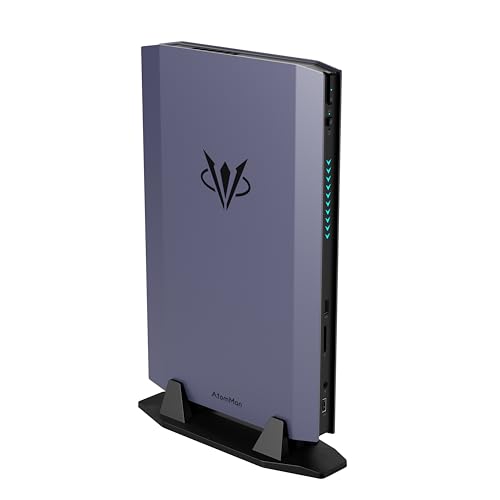
Where to buy
Check the latest price, availability and delivery on Amazon. Orders are placed on Amazon. We may earn a commission from qualifying purchases.
- Best overall barebones gaming kit: AtomMan G7 Ti Mini PC, Core i9-14900HX, RTX 4070 — Check on Amazon
- AtomMan G7 Pt Mini PC, Ryzen 9 7945HX, RX 7600M XT — Check on Amazon
- MINISFORUM MS-A2 Mini Workstation, Ryzen 9 9955HX, Barebone — Check on Amazon
- MINISFORUM MS-01 Mini Workstation Barebone, Core i9-13900H — Check on Amazon
- MINISFORUM UM890 Pro Mini PC, Ryzen 9 8945HS, Barebone Version — Check on Amazon
See 1 more Amazon option
- GMKtec Nucbox K8 Plus Mini PC, Ryzen 7 8845HS (Without RAM/SSD/OS) — Check on Amazon
Read the full guide ↓
Disclosure: As an Amazon Associate, reviewstook.com earns from qualifying purchases. Links to Amazon on this page are affiliate links; they cost you nothing extra. Listing details such as price and availability change often, so check the current Amazon listing before you buy.
Fifteen hundred dollars is the budget where a barebones mini PC stops being a compromise and starts being a strategy. At lower tiers, barebones means accepting whatever integrated graphics the kit ships with and congratulating yourself for saving the cost of a RAM kit. At $1,500 the menu changes completely. This is the tier where the kits include discrete graphics — a laptop RTX 4070 in the AtomMan G7 Ti, a Radeon RX 7600M XT in the AtomMan G7 Pt — or workstation platforms with sixteen CPU cores, dual 10-gigabit networking and a real PCIe slot, in boxes smaller than a shoebox. You are no longer buying a weaker machine and finishing it yourself. You are buying the exact machine you want, minus the three components — memory, storage and an operating system — that manufacturers most like to overcharge for and that enthusiasts most like to choose themselves.
But this tier also demands the most honesty of any barebones budget, so here it is up front. First: the kit price is never the price. Every pick below is judged on its total cost to complete — kit plus the RAM, SSD and Windows license it needs to become a working PC — and for each one we show you the arithmetic against the manufacturer’s own configured version of the same box, because that comparison is the only honest test of whether barebones saves you anything. Second: the newest discrete-GPU barebone of all, the AtomMan G7 Pro with a laptop RTX 5070, has been listed by its maker as a premium barebone — above this entire budget before you buy a single stick of RAM. It is excluded, and its existence tells you where the ceiling of this category currently sits. Third: memory and SSD prices have been volatile, and several configured mini PCs that were positioned much lower a year or so ago have since climbed sharply. In a market like that, a barebones kit is a hedge as much as a saving: it lets you reuse parts you own, wait out a price spike, or fit exactly the capacity you need instead of the capacity a product manager chose.
Below are the quick picks, detailed reviews of all six kits, a comparison table, a section that does the total-cost maths in the open, notes on heat and noise — the two things that genuinely limit small chassis at this power level — the mistakes that waste money in this category, and the questions buyers ask before committing to a box with no memory in it.
In this guide
Quick Picks
Short on time, or comparing several options at once? Each row below names a buyer type and the kit that suits it, with a link to the listing.
| Buyer type | Pick | Why it stands out | Link |
|---|---|---|---|
| Best overall for gaming | AtomMan G7 Ti (Core i9-14900HX, RTX 4070) | The strongest discrete GPU in any barebones mini PC near this budget | Check on Amazon |
| Best value discrete-GPU kit | AtomMan G7 Pt (Ryzen 9 7945HX, RX 7600M XT) | Sixteen Zen 4 cores and a 120W Radeon — check price on Amazon | Check on Amazon |
| Most CPU cores | MINISFORUM MS-A2 (Ryzen 9 9955HX) | 16 Zen 5 cores, dual 10G SFP+, PCIe x16 slot — check price on Amazon | Check on Amazon |
| Best homelab / workstation kit | MINISFORUM MS-01 (Core i9-13900H) | Dual 10GbE SFP+, three M.2 slots and a PCIe slot in 1.5 litres | Check on Amazon |
| Best compact all-rounder | MINISFORUM UM890 Pro (Ryzen 9 8945HS) | The most affordable barebone route in this guide, with OCuLink for a future eGPU — check price on Amazon | Check on Amazon |
| Best for tinkerers on a leash | GMKtec Nucbox K8 Plus (Ryzen 7 8845HS) | A true no-RAM/no-SSD/no-OS listing with OCuLink and dual 2.5G LAN | Check on Amazon |
How These Picks Were Chosen
The budget was applied to the finished machine, not the box. A kit earned its place only if a realistic completion — the kit, a sensible RAM capacity, a 1TB-class NVMe drive and an operating system — could land at or under $1,500, and every review states that total-cost-to-complete openly, anchored wherever possible to the manufacturer’s configured version of the same hardware. Where a kit’s completion only works if you already own parts, the review says so in plain language rather than letting the headline kit price do quiet dishonesty. Anything whose barebone price alone consumed the budget — the RTX 5070 AtomMan G7 Pro being the clearest case — was excluded, however impressive the hardware.
We did not use these machines ourselves. We read the maker listings, specification pages and independent reviews, and compared CPU and GPU silicon, memory and storage ceilings, slot counts, networking and cooling design. Two filters mattered more at this tier than any benchmark. The first is the completion filter: what exactly is missing, what does it cost to add, and does the manufacturer’s configured SKU — which shows you precisely what the maker charges for those same parts — leave the barebone looking smart or silly? The second is the permanence filter: in every mini PC here the CPU, and where fitted the discrete GPU, is soldered and can never be upgraded. RAM and storage are the only variables you will ever control, so a kit earns a premium price only when its soldered silicon is strong enough to deserve a five-year life.
A note on the market these kits are selling into: memory and NAND prices have risen sharply, and trackers have recorded configured mini PCs climbing sharply as a result — one pick below was a much lower-priced configured machine not long ago and has since climbed sharply on Amazon in the same configuration. That volatility cuts both ways. It makes barebones kits more attractive if you own DDR5 and an NVMe drive already, and less attractive if you must buy both at spike prices, when the manufacturer’s configured version — built from parts bought in bulk — can undercut your self-build. Every review below tells you which side of that line its kit falls on.
The 6 Best Barebones Mini PCs Under $1,500
AtomMan G7 Ti Mini PC — Core i9-14900HX, RTX 4070
Who it suits: Gamers who want the most graphics power that exists in a barebones mini PC and already own — or can cheaply source — DDR5 SO-DIMMs and an NVMe drive.
The G7 Ti is best understood as a gaming laptop with the screen, keyboard and battery removed and the savings handed to you. The silicon is the full-fat mobile stack: a Core i9-14900HX with 24 cores (8 performance, 16 efficiency) boosting to 5.8GHz, and an NVIDIA RTX 4070 laptop GPU with 8GB of GDDR6 running at up to 140W — the high-power variant of that chip, not the throttled 35W version that appears in thin laptops and makes cross-shopping so treacherous. Reviewers who tested the configured machine placed its natural habitat at 1440p, which is a sentence you almost never get to write about a mini PC. The chassis is a slim vertical slab with dual fans, two DDR5-5600 SO-DIMM slots supporting up to 96GB, two M.2 PCIe 4.0 slots, Wi-Fi 7 and an HDMI 2.1 output alongside USB4. As a barebone it arrives with no RAM, no SSD and no operating system; everything else, including that 140W GPU, is already soldered in and working.
Now the arithmetic, because this kit lives or dies by it. Check the barebone price on Amazon and compare it with the factory 32GB/1TB configuration on the same day. The gap between them is the entire game: your RAM, SSD and Windows licence must together cost less than that gap — realistically true only if the RAM or the drive comes out of a parts drawer — or the configured machine is the better buy and this guide will not pretend otherwise. Completed carefully, a G7 Ti lands right at the top of this budget, under $1,500. What you get for finishing it yourself is choice: 64GB instead of 32GB, a faster or larger SSD, a Linux install with no licence cost at all. What you do not get, ever, is a GPU upgrade — the 4070 is soldered, and when it ages out, the whole machine does.
- RTX 4070 laptop GPU at up to 140W — the real high-power variant, with DLSS for 1440p play.
- 24-core Core i9-14900HX is desktop-replacement CPU power; it will not bottleneck the GPU.
- Two SO-DIMM slots (up to 96GB DDR5-5600) and two M.2 slots give the completion real freedom.
Honest limitation: The barebone saving over the configured version is slim, so this kit makes financial sense mainly for buyers reusing parts — and in its performance mode the dual fans are working hard and audible, the standing tax on this much power in a slim chassis.
Choose it if you want maximum mini-PC gaming performance and have RAM or storage on the shelf. Skip it if you would be buying every component new — take the configured version instead, or the G7 Pt below.

AtomMan G7 Pt Mini PC — Ryzen 9 7945HX, RX 7600M XT
Who it suits: Gamers and creators who want discrete-GPU performance with genuine money left in the budget after completing the build — the value end of premium.
If the G7 Ti is the ceiling of this category, the G7 Pt is its sweet spot. Inside is AMD’s Ryzen 9 7945HX — sixteen full Zen 4 cores boosting to 5.4GHz, silicon shared with desktop-replacement gaming laptops — paired with a discrete Radeon RX 7600M XT running at up to 120W with 8GB of GDDR6. It was billed as the first mini PC with AMD Advantage certification, and independent reviews found it a strong 1080p machine that can reach into 1440p with sensible settings. The barebone version ships with no memory, no storage and no OS. You add DDR5 SO-DIMMs (two slots, up to 96GB), an M.2 drive — the board accepts PCIe 5.0 NVMe — and the operating system of your choice. A physical mode switch toggles the CPU between a 65W balanced profile and an 85W performance profile, which is also, in practice, a noise switch: balanced for the desk, performance for the game, fan volume to match.
The completion maths here is the friendliest of the discrete-GPU kits. Check the barebone price on Amazon and compare it with the configured 32GB/1TB version on the same day. Completing a barebone with 32GB of DDR5, a 1TB M.2 drive and a Windows key can still leave a finished G7 Pt comfortably inside this budget, with room to step up to 64GB of RAM or a 2TB drive and still land under $1,500 if your parts prices behave. That headroom is exactly what a barebones purchase is supposed to buy. The cautions are the category’s usual ones: CPU and GPU are soldered permanently, the external power supply is a substantial brick, and a 120W GPU in a 2.6-litre box means fan noise under sustained load is a fact to plan around, not a defect to be surprised by.
- Sixteen Zen 4 cores plus a 120W RX 7600M XT — genuine discrete graphics, not an iGPU apology.
- Check price on Amazon; a realistic completion leaves upgrade headroom in budget.
- PCIe 5.0 NVMe support and up to 96GB of DDR5 give the build a long runway.
Honest limitation: The RX 7600M XT’s 8GB of VRAM is the first ceiling you will meet at 1440p in newer games, and there is no path past it — the GPU is soldered. Radeon also lacks DLSS, so upscaling means FSR.
Choose it if you want the best ratio of gaming power to total completed cost in this guide. Skip it if ray tracing performance or DLSS matters to you — that is the G7 Ti’s department.

MINISFORUM MS-A2 Mini Workstation — Ryzen 9 9955HX, Barebone
Who it suits: Homelab builders, virtualisation hosts and CPU-bound professionals who want sixteen Zen 5 cores and server-grade networking, and who will add graphics only if and when they need it.
The MS-A2 is not a gaming PC, and this guide will not dress it up as one. Its integrated Radeon 610M graphics exist to put a picture on a monitor. What the MS-A2 offers instead is the most CPU you can buy in a barebones mini PC: a Ryzen 9 9955HX with 16 Zen 5 cores and 32 threads boosting to 5.4GHz, in a 1.78-litre aluminium chassis with dual 10-gigabit SFP+ ports, dual 2.5-gigabit Ethernet, three M.2 storage positions (including U.2 support) and — the feature that separates it from every appliance-style mini PC — a physical PCIe x16 slot running at PCIe 4.0 x8, with lane-splitting support. That slot is where a low-profile GPU, a fast NIC or an HBA goes, and it turns the MS-A2 from a small PC into a small platform. The barebone ships with no RAM, no SSD and no OS: two DDR5-5600 SO-DIMM slots accept up to 96GB.
Check the 9955HX barebone price on Amazon and compare it with Minisforum’s own configured 32GB/1TB version of the same box — so, as with every pick here, the configured price is your completion anchor: finish the barebone for less than the gap between the two and you are ahead, and most builders with a RAM kit on the shelf will be far ahead. The gaming honesty, stated plainly: completed within this budget, the MS-A2 is a CPU monster with display-output graphics. A low-profile discrete GPU in the PCIe slot is a legitimate later step, but it is extra money beyond the completion figures above, and the slot’s modest airflow — noted by reviewers — suits low-power cards, not gaming flagships. Reviewers also found load noise audible and idle power draw relatively high for the class, the expected cost of a 100W-class HX processor in a small box. Buy it for cores, ports and the slot, and it has no rival here. Buy it hoping it is secretly a gaming rig, and you will be disappointed on day one.
- 16 Zen 5 cores / 32 threads — the strongest CPU in this guide, full stop.
- Dual 10G SFP+ plus dual 2.5G Ethernet and a PCIe x16 (x8) slot: a platform, not an appliance.
- Check price on Amazon against the configured version — real completion headroom.
Honest limitation: Radeon 610M integrated graphics only — gaming beyond light and older titles requires a low-profile GPU in the PCIe slot at extra cost, and the slot’s airflow limits how much GPU that can be.
Choose it if your workload is CPU, virtual machines, storage or networking. Skip it if gaming is the point — both AtomMan kits above out-gun it completely.

MINISFORUM MS-01 Mini Workstation Barebone — Core i9-13900H
Who it suits: Homelab and edge-server builders who want the MS-A2’s formula — 10-gigabit networking, a PCIe slot, triple storage — in Intel form, with Quick Sync for media workloads.
The MS-01 is the machine that defined this workstation-mini-PC category, and the barebone version remains the connoisseur’s way to buy it. The top CPU option is Intel’s Core i9-13900H, a 14-core, 20-thread chip boosting to 5.4GHz with vPro support and an Iris Xe integrated GPU whose Quick Sync transcoding is the reason media-server builders choose Intel silicon. Around it: two 10GbE SFP+ ports and two 2.5G Ethernet ports, three M.2 2280/22110 slots with U.2 support, a PCIe 4.0 x16 slot (electrically x8) for a low-profile card, two DDR5 SO-DIMM slots for up to 96GB, and dual USB4 — all in a box of about a litre and a half. The barebone listing ships with no RAM and no SSD; CPU choice is the one decision locked in at purchase, with Core i5-12600H and Core i9-12900H variants below the 13900H.
Check the i9-13900H barebone price on Amazon and compare it with the configured i9 machine with 32GB and 1TB on Amazon — again, treat that configured figure as the anchor your parts spend has to beat, and this kit leaves generous headroom to do it. One review caveat belongs in the open: Notebookcheck’s early MS-01 test unit suffered unpredictable crashes under sustained load testing, and the maker planned a replacement unit; that was a review sample at launch, not a verdict on current production, but buyers running this box as an always-on server should stress-test their own unit inside the return window. Thermals follow the category pattern — a 45W-base HX-class chip working hard in a small chassis makes fan noise, and the PCIe slot area is not a wind tunnel. As a gaming machine it is, like the MS-A2, an integrated-graphics box until you add a low-profile card; buy it for the network ports and the slot.
- Dual 10GbE SFP+, dual 2.5G, three M.2/U.2 positions and a PCIe slot — server features, mini footprint.
- Core i9-13900H with Quick Sync: the transcoding and virtualisation pick.
- Check price on Amazon for the i9 barebone — it leaves generous headroom before you match the configured price.
Honest limitation: Iris Xe integrated graphics only, and early review testing reported instability under sustained load — verify your unit under stress before trusting it with always-on duties.
Choose it if your homelab is Intel-shaped — Quick Sync, vPro, 10G networking. Skip it if you want more CPU cores per dollar; the MS-A2’s 9955HX is the stronger compute buy.
MINISFORUM UM890 Pro Mini PC, Barebone Version — Ryzen 9 8945HS
Who it suits: Buyers who want a premium APU platform — strong integrated graphics today, an OCuLink port for a discrete eGPU tomorrow — at the lowest kit price in this guide.
Not every premium barebone needs a discrete GPU soldered in. The UM890 Pro pairs AMD’s Ryzen 9 8945HS — eight Zen 4 cores boosting to 5.2GHz — with Radeon 780M integrated graphics, the strongest iGPU generation in widespread mini-PC use and a credible 1080p low-to-medium gaming engine with FSR. The chassis is a five-inch square that reviewers praised for quiet cooling, and the port selection is the best in this guide for future graphics plans: alongside dual USB4 and dual 2.5G Ethernet there is a dedicated OCuLink port, the low-latency way to attach an external GPU dock later without spending an M.2 slot. The barebone version ships with no RAM, no SSD and no OS. Two DDR5-5600 SO-DIMM slots take up to 96GB, and two M.2 PCIe 4.0 slots take your drives. Minisforum lets the chip run at up to 70W, at the top of its class, which buys sustained performance at the cost of fan presence under load.
The price story here is the most instructive in the guide. Check the barebone price on Amazon — it sits in the budget-to-mid-range tier of this guide — and compare it with the configured 32GB/1TB version, whose price has climbed sharply, a climb that price trackers attribute to the ongoing memory and NAND shortage. That spread is the barebones argument in one product: if you own DDR5 and an NVMe drive, the kit plus your parts completes a machine that costs far more in factory form. If you must buy memory new at shortage prices, the gap narrows sharply, and the honest move is to price both routes on the day you buy. Either way, a completed UM890 Pro lands far under this $1,500 ceiling — which is precisely its role here: the premium platform for buyers whose budget then stretches to the OCuLink eGPU dock that turns it into a two-stage gaming build.
- Check price on Amazon — the cheapest route into a flagship APU platform.
- Dedicated OCuLink port plus dual USB4: the best external-GPU runway in this guide.
- Radeon 780M plays modern games at 1080p low–medium with FSR while you save for the dock.
Honest limitation: Integrated graphics are integrated graphics — the 780M is not a 1440p engine, and the eGPU that fixes that is a second purchase with its own enclosure cost.
Choose it if you like a staged build: superb compact PC now, discrete graphics via OCuLink later. Skip it if you want discrete-GPU gaming on day one — the G7 Pt does that for less total money.

GMKtec Nucbox K8 Plus Mini PC (Without RAM/SSD/OS) — Ryzen 7 8845HS
Who it suits: Tinkerers who want an explicitly barebones listing — no ambiguity about what is in the box — with OCuLink, dual Intel 2.5G networking and a dual-fan chassis.
GMKtec sells the K8 Plus the way barebones should be sold: as a dedicated Amazon listing whose title says “Without RAM/SSD/OS” in so many words. What you do get is a Ryzen 7 8845HS — eight Zen 4 cores to 5.1GHz — with Radeon 780M graphics, in a dual-fan chassis with an OCuLink port for an external GPU, dual USB4, HDMI 2.1 and DisplayPort outputs, and dual 2.5GbE LAN on Intel i226V controllers, a detail network-minded buyers specifically look for. Two DDR5 SO-DIMM slots and dual M.2 PCIe 4.0 slots (retailer spec pages put the ceilings at up to 128GB of RAM and 8TB of storage across the slots) wait for your parts, and the chip can be run in a 65W performance mode. It is, in layout and intent, the UM890 Pro’s closest rival: same APU class, same iGPU, same eGPU escape hatch, from the other big mini-PC maker.
Completion discipline matters more here than kit price, because the K8 Plus’s configured sibling has swung wildly on Amazon, from deep-discount lows to much higher regular pricing for the 32GB/1TB version. Against a deep-discount price for the finished machine, almost no barebone-plus-new-parts combination wins; against its regular configured price, the barebone with parts from your shelf wins easily. So the rule for this pick is simple and we will state it as the review’s core advice: check the configured listing’s live price first, and only take the barebone when the maths that day favours it — or when the point is not saving money at all but choosing your own RAM capacity, SSD and operating system, which is a perfectly good reason that this guide respects. Fan noise in the 65W mode and the absence of any discrete GPU are the standing caveats, shared with its UM890 Pro rival.
- A dedicated barebone listing that says “Without RAM/SSD/OS” in the title — no variant roulette.
- OCuLink, dual USB4 and dual Intel i226V 2.5G LAN: connectivity that punches above its class.
- Dual-fan cooling and a 65W performance mode for the 8845HS.
Honest limitation: The configured version is sometimes deeply discounted, at which point the barebone route only makes sense with parts already owned — check the finished machine’s price before you commit.
Choose it if you want GMKtec’s take on the OCuLink APU platform and enjoy speccing your own memory and storage. Skip it if a configured K8 Plus is on one of its deep discounts the day you shop.

Comparison Table
| Product | CPU / GPU | Kit price | Best use | Link |
|---|---|---|---|---|
| AtomMan G7 Ti | i9-14900HX / RTX 4070 Laptop 140W | Check price on Amazon | Maximum mini-PC gaming, 1440p | Check on Amazon |
| AtomMan G7 Pt | Ryzen 9 7945HX / RX 7600M XT 120W | Check price on Amazon | Value discrete-GPU gaming | Check on Amazon |
| MINISFORUM MS-A2 | Ryzen 9 9955HX / Radeon 610M + PCIe slot | Check price on Amazon | CPU compute, homelab, 10G networking | Check on Amazon |
| MINISFORUM MS-01 | i9-13900H / Iris Xe + PCIe slot | Check price on Amazon | Intel homelab, Quick Sync, 10G | Check on Amazon |
| MINISFORUM UM890 Pro | Ryzen 9 8945HS / Radeon 780M, OCuLink | Check price on Amazon | Compact all-rounder, staged eGPU build | Check on Amazon |
| GMKtec Nucbox K8 Plus | Ryzen 7 8845HS / Radeon 780M, OCuLink | Check price on Amazon | Tinkerer’s APU platform, dual Intel LAN | Check on Amazon |
The Total-Cost-to-Complete Maths, Done in the Open
Every barebones listing on the internet hopes you will compare its price against finished PCs. Refuse. The only comparison that matters is kit-plus-parts against the configured version of the same box, and this tier’s numbers show why. The G7 Ti’s barebone sits only just below its configured self — a narrow gap your RAM, SSD and OS must fit inside for the kit to win on price. The G7 Pt’s gap is healthier, with a modest completion cost leaving you ahead and with change. The MS-A2 inverts the pattern entirely: a wide gap between barebone and configured versions that rewards anyone with parts on hand and still rewards careful new-parts buyers. The UM890 Pro shows the market’s mood swings — its configured price has climbed sharply while its barebone has stayed in a lower tier — meaning the same kit can be the smart buy one month and the silly buy in a different month, depending on memory prices that week.
So build your own table before you order. Write down the kit price, the exact RAM kit and SSD you intend to fit, and the operating system cost — zero if you run Linux or hold a transferable licence, real money if you need a fresh Windows key. Add them. Then open the configured listing for the same machine and write that number beside yours. If your total is not clearly lower, or the difference does not buy you a meaningfully better specification — more RAM, a bigger or faster SSD — the barebone is a hobby, not a saving, and there is no shame in buying the finished machine. Where barebones genuinely wins at this tier is the parts drawer: DDR5 SO-DIMMs and NVMe drives left from a laptop upgrade are worth their full retail price in this maths, and they are sitting in a remarkable number of enthusiasts’ drawers.
Heat and Noise: The Standing Tax on Small Chassis
Physics does not care about your budget. The two AtomMan kits dissipate the heat of a 140W or 120W GPU plus a high-power HX processor through dual fans in slim enclosures, and both offer performance modes that trade fan speed for clock speed — expect audible fans under sustained gaming load, and expect the balanced modes to be the desk-friendly settings. The workstation kits concentrate a 100W-class or 45W-base processor in under two litres; reviewers found the MS-A2’s load noise audible and its idle draw relatively high, and PCIe slots in both Minisforum workstations have limited airflow, which is why they suit low-profile, low-power cards rather than gaming GPUs that need to breathe. The APU kits are the quietest route — the UM890 Pro’s cooling drew specific praise in reviews — but pushing an 8845HS or 8945HS to its 65–70W performance mode still spins fans up in a quiet room.
Plan for it rather than complaining about it. Put the machine where air can reach it — not sealed in a cabinet, not stacked under a monitor stand that traps the exhaust. Use the balanced power profile for work and reserve performance mode for games. And remember that in a barebones build you choose one thermal variable yourself: a mid-range NVMe drive runs cooler than a flagship PCIe 5.0 drive, and in a small chassis with limited airflow that choice is worth real degrees. None of this is a reason to avoid the category; it is the known, manageable price of desktop-class silicon in a box the size of a hardback book.
How to Choose a Barebones Mini PC Under $1,500
- Do the completion maths first. Kit + your actual RAM + your actual SSD + OS, against the configured version of the same machine, priced the same day. If the kit does not win on price or specification, buy the finished PC.
- Buy the soldered silicon, not the slots. CPU and GPU can never be changed in any of these machines. RAM and storage are the only upgrades that exist, so the processor and graphics you choose today are the machine’s permanent ceiling.
- Match the kit to the graphics plan. Discrete GPU built in (G7 Ti, G7 Pt) for gaming now; OCuLink (UM890 Pro, K8 Plus) for a staged eGPU build; PCIe slot (MS-A2, MS-01) for a low-profile card, NIC or storage controller in a workstation.
- Respect the VRAM ceiling. Both discrete-GPU kits carry 8GB of VRAM. That is a good 1080p and workable 1440p budget with upscaling; it is not a 4K gaming specification, and no RAM upgrade changes it.
- Check memory type before reusing parts. Every kit here takes DDR5 SO-DIMMs — laptop-style sticks, not desktop DIMMs, and not DDR4. Parts-drawer RAM only counts if it is the right format and generation.
- Count the M.2 slots, not just the headline. Two slots (AtomMan kits, UM890 Pro, K8 Plus) let you add a second drive later; the workstation kits’ three positions plus U.2 support are a different storage league entirely.
- Decide the operating system before checkout. No kit here includes one. Linux costs nothing; a Windows licence is a real line item in the completion maths and forgetting it is the classic way a “saving” evaporates.
- Price the parts the same day as the kit. Memory and SSD prices are moving fast enough that last month’s comparison is fiction. The configured-versus-barebone verdict expires within days, not months.
Common Buying Mistakes
- Comparing a barebone kit’s price against finished PCs and calling the difference a saving, without adding RAM, storage and an OS licence.
- Buying the G7 Ti barebone with all-new parts when its configured version costs only a little more — the kit is for parts owners.
- Assuming a PCIe slot in a mini workstation means full gaming-GPU upgrades; the slot is x8 electrical, low-profile and modestly cooled.
- Expecting the MS-A2 or MS-01 to game on their integrated graphics — the 610M and Iris Xe are display engines, not gaming GPUs.
- Reaching for the RTX 5070 AtomMan G7 Pro and discovering its barebone price alone is above this budget at the maker’s store — outside this budget before parts.
- Fitting a single RAM stick and halving memory bandwidth — integrated graphics feel this immediately. Always buy SO-DIMMs as a matched pair.
- Forgetting that DDR5 SO-DIMM is the only memory these kits accept; the DDR4 kit in your drawer is not a completion part.
- Sealing a 120–140W machine in a cabinet and blaming the fans; small chassis need open air the way desktops need a PSU.
- Skipping the stress test. A barebones build is your assembly — run memory and storage tests in the first days, inside every return window.
Final Recommendation
- Most gamers: AtomMan G7 Pt — discrete graphics, sixteen cores, and a completion that lands comfortably inside the budget.
- Maximum performance, parts on hand: AtomMan G7 Ti.
- CPU compute and homelab: MINISFORUM MS-A2 (AMD cores) or MS-01 (Intel, Quick Sync, vPro).
- Staged build, compact and quiet: MINISFORUM UM890 Pro barebone, with an OCuLink eGPU as stage two.
- Tinkerers who want an unambiguous barebone listing: GMKtec Nucbox K8 Plus.
Our top two at this budget are the AtomMan G7 Pt, because it is the one discrete-GPU kit whose completion maths works even for buyers purchasing parts new, and the MINISFORUM MS-A2, because its sixteen-core Zen 5 platform with dual 10-gigabit networking and a PCIe slot is the strongest barebones value in the category — check price on Amazon — provided you understand it is a workstation, not a game console. The G7 Ti is the performance king and the right buy precisely when its thin completion gap does not apply to you because your parts are already paid for. Whichever kit you choose, run the configured-versus-barebone comparison on the day you order, fit memory as a matched pair, and check the live price before you buy — at this tier, that ten minutes of arithmetic is worth more than any single specification. Readers speccing a step down should also see Best Barebones Mini PC Under $1200, and those with room to spend can compare Best Barebones Mini PC Under $2500.
Frequently Asked Questions
What exactly does a barebones mini PC include — and what is missing?
The chassis, motherboard, CPU (and discrete GPU where fitted), cooling, power supply and wireless card are included and working. What is missing, on every pick in this guide, is RAM, storage and an operating system. You fit DDR5 SO-DIMM memory and an M.2 NVMe drive — typically a ten-minute job with a screwdriver — install your OS, and the machine is complete. Nothing needs soldering and no other components are required.
How much does it really cost to complete a barebones mini PC under $1,500?
It depends on the kit, which is why each review anchors to the configured version of the same machine. Check each kit’s price on Amazon and compare it with its configured twin on the same day. The G7 Ti’s configured twin costs only a little more than its kit, capping what sensible completion should cost. The workstation kits leave a much wider gap between kit and configured prices. Your real figure is the price of the specific RAM kit, SSD and OS licence in your cart on the day you order — memory prices are volatile enough that no guide can quote it for you honestly.
Can a barebones mini PC really play games at 1440p?
Two of these can, with the right expectations. The AtomMan G7 Ti’s 140W RTX 4070 laptop GPU is a genuine 1440p part with DLSS, and reviewers rated the machine at that resolution. The G7 Pt’s RX 7600M XT handles 1080p at high settings and reaches into 1440p with FSR and adjusted settings. Both carry 8GB of VRAM, which is the binding constraint in newer titles. The APU kits game at 1080p on integrated graphics, and the two workstation kits do not game meaningfully at all until a GPU is added.
Why is there no RTX 5070 barebones kit in this guide?
Because of its price, not its performance. The AtomMan G7 Pro, the RTX 5070 sibling of the G7 Ti, has been listed by Minisforum at a premium price for the barebone alone — above the entire budget of this guide before memory, storage or an operating system. When a 5070-class barebone kit falls under $1,500 it will belong here; today, the verified ceiling of this category at this budget is the RTX 4070 and RX 7600M XT.
Is a barebones kit still worth it during the memory price spike?
Sometimes — and the spike is exactly why you must do the maths per product. Rising DDR5 and NAND prices push configured machines up too (one pick’s configured version has climbed sharply), so a barebone completed with parts you already own can save a substantial amount. But if you are buying memory and storage new at spike prices, the manufacturer’s configured version — built from bulk-bought parts — can be cheaper than your self-completion. Compare both, same day, every time.
Can I upgrade the CPU or GPU in these machines later?
No. In every mini PC in this guide the processor is soldered to the board, and where a discrete GPU is fitted, it is soldered too. Your upgrade paths are memory (to the stated ceiling), storage (extra M.2 slots where fitted), an external GPU over OCuLink on the UM890 Pro and K8 Plus, or a low-profile card in the PCIe slot of the MS-A2 and MS-01. Buy the silicon you will still want in four years, because it is the silicon you will have.
How loud will a high-power barebones mini PC be?
Under gaming or rendering load, audible — that is the physics of 100W-plus of silicon in under three litres, and both AtomMan kits and the MS-A2 drew reviewer comments about fan noise at full tilt. Balanced power modes are far quieter and cost little performance for everyday work, the APU kits are the quietest of the six, and placement matters: open air on a desk is a different acoustic experience from a sealed cabinet, in both directions.
- Best Barebones Mini PC Under $1200
- Best Barebones Mini PC Under $2500
- Best Barebones Mini PC For 1440p Gaming Under $1500
- Best Barebones Mini PC For Beginners Under $1500
- Best Barebones Mini PC For Small Spaces Under $1500
- Best Barebones Mini PC For Streaming Under $1500
- Best Mini PC Under $1500
- Best Mini Gaming PC Under $1500
- Best Small Form Factor Gaming PC Under $1500


