Where to buy
Check the latest price, availability and delivery on Amazon. Orders are placed on Amazon. We may earn a commission from qualifying purchases.
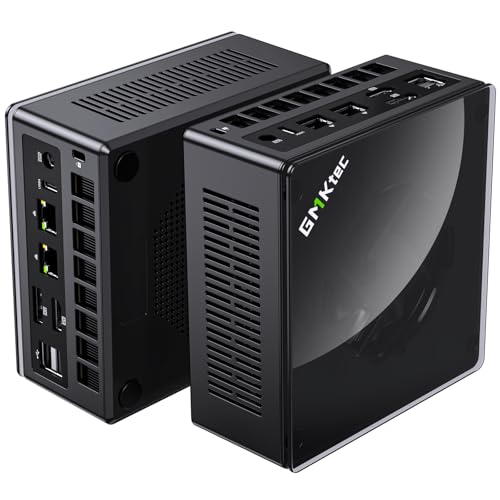
- Best overall barebone for 1440p: GMKtec NucBox K8 Plus Barebone, Ryzen 7 8845HS (No RAM/SSD/OS) — Check on Amazon
- Minisforum UM890 Pro Barebone, Ryzen 9 8945HS — Check on Amazon
- Minisforum UM880 Plus Barebone, Ryzen 7 8845HS — Check on Amazon
- Minisforum UM870 Slim Barebone, Ryzen 7 8745H — Check on Amazon
- Minisforum UM790 Pro Barebones, Ryzen 9 7940HS — Check on Amazon
See 1 more Amazon option
- Minisforum MS-A1 Barebone, AM5 Socket (No CPU/RAM/SSD/OS) — Check on Amazon
Read the full guide ↓
Disclosure: As an Amazon Associate, reviewstook.com earns from qualifying purchases. Links to Amazon on this page are affiliate links; they cost you nothing extra. Listing details such as price and availability change often, so check the current Amazon listing before you buy.
Start with the sentence most guides bury: no barebones mini PC under $700 plays demanding games natively at 1440p. Not one of the six kits below, not at any kit price in this bracket. Every pick in this guide renders games on AMD’s Radeon 780M integrated graphics, and the 780M is a superb 1080p chip that becomes a strained one when you ask it to shade 3.7 million pixels per frame in a modern title. If a listing or a video tells you a mini PC in this class is a “1440p gaming machine” without using the word upscaling, it is selling you the monitor resolution, not the rendering resolution.
So what does “for 1440p gaming” honestly mean at this budget? The realistic path: the game renders at 1080p — or at an internal resolution around 1707×960 in an upscaler’s quality mode — and AMD’s FSR upscaling reconstructs a 1440p image from that smaller frame. On a good 780M implementation with fast dual-channel memory behind it, the result on a 27-inch 1440p monitor is genuinely hard to distinguish from native rendering in motion, and it is the standard way this entire hardware class is used. Older games, lighter indie titles and esports games can often run at native 1440p outright, because their rendering loads are a fraction of a modern AAA title’s. And there is exactly one door to true native 1440p in demanding games from a box this size: an external desktop graphics card on an OCuLink dock, which three of these six kits support and three do not. That door is a second purchase, costed separately below — never hidden inside a kit’s price.
Two more honesty items before the picks, because they shape everything after. First, there is no DLSS in this guide. DLSS is NVIDIA technology and exists only on discrete GeForce cards; no kit here contains one, and AMD’s FSR and driver-level RSR are the upscaling tools these machines actually have. (For reference, DLSS Quality at a 1440p output renders at roughly 1707×960 internally and DLSS Performance at roughly 1280×720 — the same internal-resolution arithmetic FSR uses, relevant only if an NVIDIA eGPU enters your plans later.) Second, a barebone is not a finished PC. Each kit below is a case, a board and a processor with no RAM, no SSD and no operating system, and the memory you add is not an accessory — on an integrated-graphics machine, system RAM is the GPU’s memory and its bandwidth ceiling at once. The kits here sit at different points within this budget bracket; the finished machines cost more once memory, storage and an operating system are added, and this guide keeps that completion step visible, kit by kit.
In this guide
Quick Picks
In a hurry? The table below pairs each kind of 1440p buyer with the kit built for them, and links straight to the listing.
| Buyer type | Pick | Why it stands out | Link |
|---|---|---|---|
| Best overall for 1440p | GMKtec NucBox K8 Plus Barebone | 780M plus a native OCuLink port — the cleanest eGPU route to native 1440p later | Check on Amazon |
| Best build and sustained loads | Minisforum UM890 Pro Barebone | Fastest CPU here, OCuLink, flagship cooling for long upscaled sessions | Check on Amazon |
| Best value with an eGPU door | Minisforum UM880 Plus Barebone | Same 8845HS platform at a lower point in this bracket, OCuLink via adapter board | Check on Amazon |
| Cheapest upscaled-1440p box | Minisforum UM870 Slim Barebone | Full 780M in a slim kit at the lower end of this bracket — integrated graphics for life | Check on Amazon |
| Strongest integrated-only pick | Minisforum UM790 Pro Barebones | 780M at its highest clock (2.8GHz) — best raw upscaling performer, no eGPU port | Check on Amazon |
| Best for true DIY builders | Minisforum MS-A1 Barebone | Socketed AM5 platform — you choose the CPU that carries the 780M | Check on Amazon |
How These Picks Were Chosen
The budget was applied to the kit, because that is what the search promises — but the grading was done at 1440p, because that is what this version of the search asks for. Every product below is a real Amazon listing for a barebone positioned at or below the $700 budget for the kit, and every review states two things honestly: what finishing the kit involves, and what its graphics can and cannot do at a 1440p output. Kits built around last-generation Vega or 680M graphics positioned as if they were 780M-class options were excluded, as was anything that proved to be a complete PC wearing a barebones keyword.
We did not use these kits ourselves. We read the maker listings, specification pages and long-running price tracking for each ASIN, and compared processors, graphics, memory and storage expansion, display outputs, networking and cooling design. Three filters did most of the work. The first is the graphics filter: the Radeon 780M is the floor for credible upscaled 1440p, because it is the integrated GPU with the compute and the modern RDNA 3 architecture behind AMD’s current FSR upscaling — all six picks clear it, five with the chip soldered in, one by letting you socket the desktop 8700G that carries it. There is no RDNA 2 pick in this guide and no Intel pick, so there is no weaker upscaling generation and no XeSS to grade; the whole set works with the same FSR toolkit, and the differences are clock speed, memory support and expansion. The second filter is the memory filter: the 780M borrows its bandwidth from system RAM, and upscaling asks that borrowed bandwidth to feed both the render and the reconstruction, so a kit only earns its place with two DDR5 SO-DIMM slots for dual-channel memory. The third filter is the upgrade filter: which kits leave a real road to native 1440p — a native OCuLink port, OCuLink through an adapter board, or no high-bandwidth GPU connection at all. That single distinction splits this guide in half, and the reviews grade it as heavily as the silicon.
One structural warning before the reviews begin. Five kits here are sealed propositions: the processor is soldered to the board at the factory, and your only real decisions are how much memory and storage to feed it. The sixth — Minisforum’s MS-A1 — inverts that arrangement entirely, arriving as an empty AM5 socket into which the CPU, too, is a purchase you specify and pay for separately. That openness is the platform’s genuine appeal and its genuine cost, and its review treats it as both instead of letting an empty shell masquerade as a finished machine.
How 1440p Actually Works on These Machines
Because the whole guide turns on it, here is the rendering arithmetic in one place. A 1440p frame holds about 78% more pixels than a 1080p frame, and integrated graphics feel every one of them. When a 780M machine drives a 1440p monitor in a demanding game, the sensible configuration is to render at a lower internal resolution and let the upscaler rebuild the output. FSR’s Quality mode at a 1440p output renders internally at roughly 1707×960; its Performance mode renders at 1280×720 and leans much harder on reconstruction, which shows in fast motion and fine detail. Rendering at a flat 1080p and upscaling to 1440p sits between those two points and is where most owners of this hardware class land. AMD also offers RSR, a driver-level version of the same idea that works in games with no built-in upscaler at all — cruder than in-game FSR, but it means almost any title can be presented at 1440p from a smaller render. What none of this does is create detail the GPU never drew: upscaled 1440p from a healthy internal resolution looks sharp and plays fast, and it is not the same image as native 1440p in still scenes, hair, foliage or fine text. This guide treats that trade as worth making at this budget — and calls it a trade.
The second half of the arithmetic is memory. The 780M has no dedicated VRAM; it carves its frame buffer out of your system RAM and reads textures through the same dual-channel DDR5 bus the CPU uses. Fit a single memory stick and you halve that bus, and the upscaler cannot reconstruct frames the GPU was too bandwidth-starved to render in the first place. This is why every review below treats a matched pair of DDR5-5600 sticks — 32GB as two 16GB modules is the reference configuration — as part of the machine rather than an upgrade. It is also why completion cost is not fine print: the memory a 1440p-upscaling build needs is currently the most expensive part of finishing these kits — in one documented case below, it makes the maker’s complete version cheaper than the barebone plus new parts.
Finally, the native route. An OCuLink port is a cabled PCIe 4.0 x4 connection — roughly 64Gbps, about double a USB4 link’s usable graphics bandwidth — running to an external dock holding a desktop graphics card. Fit a card of genuine 1440p class and the same small box renders natively at 1440p, with DLSS available too if the card is NVIDIA. That is a real transformation, and it is also a real second budget: a dock and a desktop card together are a substantial purchase beyond any kit in this guide, which is why no review counts an eGPU toward a pick’s cost or its out-of-the-box ability. The kits are graded on the door being present and honest — native port, adapter board, or absent.
The 6 Best Barebones Mini PCs for 1440p Gaming Under $700
GMKtec NucBox K8 Plus Barebone (Ryzen 7 8845HS, No RAM/SSD/OS)
Who it suits: The 1440p buyer who wants the strongest upscaled experience today and the cleanest route to native 1440p tomorrow — this is the kit that treats an external GPU as a plan rather than a hope.
The K8 Plus builds its case around a port most mini PCs still treat as exotic. Alongside the standard kit — a Ryzen 7 8845HS with eight Zen 4 cores boosting to 5.1GHz and Radeon 780M graphics, two DDR5-5600 SO-DIMM slots good for up to 96GB, and two M.2 PCIe 4.0 SSD slots — GMKtec fits a native OCuLink port on the case: a direct PCIe 4.0 x4 link, roughly 64Gbps, to an external graphics dock. For this guide’s purposes that port is the headline, because it makes the K8 Plus the only kind of machine whose 1440p story has two chapters. Chapter one is the 780M itself: render at 1080p or at FSR Quality’s internal resolution near 1707×960, upscale to your 1440p panel, and demanding games become comfortable while lighter and older titles run at or near native. Chapter two, whenever the budget allows, is a desktop card on the dock rendering 1440p natively — with DLSS in reach if the card is NVIDIA, since the integrated AMD silicon in this guide offers FSR and RSR only. GMKtec states plainly that OCuLink is not hot-pluggable here, so the dock connects with the power off; that is a routine, not a defect. Around the headline, the connectivity is the best in this guide: two USB4 ports, HDMI 2.1 and DisplayPort outputs for up to four displays, and dual 2.5-gigabit Ethernet on Intel controllers.
The money paragraph, as promised in every review here. Check the current price on Amazon for this barebone, which sits well inside the $700 line for the kit alone. Finishing it means a matched dual-channel DDR5 pair — non-negotiable on a machine whose GPU lives on system bandwidth — an NVMe drive, and an operating system the listing does not include. Bought new, a 32GB kit and a 1TB SSD add a substantial amount, which can land a finished K8 Plus close to GMKtec’s own complete 32GB/1TB version of the same machine. The barebone therefore wins in specific, common situations: your RAM and SSD are already bought, you want more memory or a faster drive than the factory fits, or the eGPU plan makes the factory configuration irrelevant. And keep the dock cost separate in your head: the dock and card that unlock native 1440p are a substantial purchase of their own, on top of whichever version of this machine you buy.
- Native OCuLink port — a true PCIe x4 path to a desktop GPU, not a USB compromise.
- Full 780M upscaling platform: FSR in-game, RSR at driver level, dual-channel DDR5 to feed both.
- Two 2.5G Ethernet ports, twin USB4 and outputs for four displays — nothing else in this guide connects to more.
Honest limitation: Out of the box this is an upscaled-1440p machine like every other pick; native 1440p waits on an eGPU purchase that is a substantial additional cost, and with all-new parts the complete version is often the rational buy.
Choose it if your 1440p plan includes a desktop GPU dock now or later, or your parts drawer makes the kit the whole purchase. Skip it if you will never dock a card and are buying every part new — check the complete version first.

Minisforum UM890 Pro Barebone (Ryzen 9 8945HS, No RAM/SSD/OS)
Who it suits: Buyers who want the premium platform — the fastest processor in the guide, serious cooling for long sessions, and an OCuLink port — and who are completing it with parts they already own or have budgeted with open eyes.
Start with what the premium does not buy, because at 1440p it matters: frames. The UM890 Pro’s Ryzen 9 8945HS boosts to 5.2GHz across eight Zen 4 cores, a step above the 8845HS in the K8 Plus and UM880 Plus, but its graphics are the same Radeon 780M, so its upscaled-1440p rendering is the same class as theirs — 1080p-class internal resolutions rebuilt to 1440p by FSR, with the CPU headroom helping in simulation-heavy and poorly threaded titles rather than in pixel throughput. What the premium does buy is everything around that render. Minisforum’s flagship cold-plate cooling is built for sustained loads, which is precisely the load profile of a long upscaled gaming session at a fixed power budget; the port selection matches the K8 Plus blow for blow, with an OCuLink port for a future dock, dual 2.5-gigabit LAN, dual USB4, and HDMI and DisplayPort outputs for four screens; and memory and storage follow the flagship pattern of two DDR5 SO-DIMM slots up to 96GB and M.2 PCIe 4.0 storage. As a platform for a 1440p desk that also does other work, it is the most complete box here.
Its positioning is the mirror image of the memory market. Check the current price on Amazon for this barebone, which sits at the upper end of this bracket, while the complete UM890 Pro’s 32GB/1TB listing sits well above this bracket after the memory shortage dragged complete-machine pricing upward. That spread is the argument for this kit: the expensive part of the complete machine is its RAM and SSD, and a buyer who already holds a 32GB kit and a 1TB drive converts this shell into the flagship for the cost of the shell alone. A buyer purchasing those parts new hands most of the advantage back and adds an OS license on top, at which point the finished total approaches the complete machine’s level. Neither half of that sentence cancels the other. Know which buyer you are before you order, and the UM890 Pro is either the smartest purchase in this guide or an expensive way to arrive where the complete box already sits.
- Ryzen 9 8945HS — the fastest CPU here, with the same 780M graphics as the 8845HS kits.
- OCuLink port, dual 2.5G LAN, dual USB4 and four display outputs.
- Flagship cooling designed for sustained loads — the right profile for long gaming sessions.
Honest limitation: The most expensive kit in the guide, and the premium buys build, cooling and connectivity rather than 1440p rendering power — the graphics silicon is identical to kits positioned lower in this bracket.
Choose it if you want the best-built 780M platform with an eGPU door and will use the cooling or dual LAN. Skip it if upscaled 1440p is the whole job — cheaper kits render the same image.
Minisforum UM880 Plus Barebone (Ryzen 7 8845HS, No RAM/SSD/OS)
Who it suits: Parts-drawer builders who want the modern 8845HS platform at the lowest kit positioning — including the completion-cost lesson this kit is known for, which appears below and should be read before any purchase.
On silicon, the UM880 Plus matches the K8 Plus exactly: a Ryzen 7 8845HS, eight Zen 4 cores to 5.1GHz, Radeon 780M graphics with the full RDNA 3 feature set behind FSR upscaling. For a 1440p desk that means the same rendering recipe as the guide’s top pick — internal resolutions in the 1080p class, FSR Quality or a flat 1080p render rebuilt to a 1440p output, native 1440p reserved for lighter titles — delivered in Minisforum’s compact metal case with two DDR5 SO-DIMM slots to 96GB, M.2 PCIe 4.0 storage, HDMI, DisplayPort and USB4 outputs, a 2.5-gigabit LAN port and Wi-Fi 6E. It also reaches an external GPU, with one design distinction this guide keeps exact because the comparison depends on it: on the UM880 Plus, OCuLink arrives through an internal adapter board rather than a native case port like the K8 Plus’s, so enabling it is a small internal project and can trade against internal expansion. The dock itself, and the desktop card in it, remain a separate, substantial decision, exactly as with every eGPU route in this guide. Check the current price on Amazon for this barebone — it is positioned as the lowest-entry option here for a full 8845HS platform, at the lower end of this bracket.
Now the completion picture, because this machine illustrates the most instructive lesson in the category. Survey work pricing Amazon listings found the pattern: adding a new 32GB DDR5 kit and a 1TB NVMe drive to this barebone could bring the finished build above the complete UM880 Plus with the same memory and storage, because new retail memory was where the money went. Read correctly, that is not an indictment of the kit; it is a sorting mechanism. With parts already owned, this kit — check price on Amazon — buys an 8845HS platform that complete-box buyers are paying far more to obtain, and the upscaled-1440p experience is identical to the guide’s most expensive picks. With parts bought new in a memory shortage, the factory’s bulk-priced RAM can beat your retail RAM and the complete box can win. Both statements belong in this review because both are true.
- The complete 8845HS / 780M specification at the keenest kit positioning of any current Minisforum model here.
- An eGPU door exists via adapter board — present, real, and planned-around rather than hidden.
- Memory headroom to 96GB across two SO-DIMM slots, plus USB4, 2.5G Ethernet and Wi-Fi 6E.
Honest limitation: The documented case where the complete version can undercut the finished barebone build when parts are bought new — and the adapter-board OCuLink route is less convenient than a native port.
Choose it if your DDR5 and SSD are already paid for and the eGPU door matters. Skip it if they are not — check the current price on Amazon for the complete UM880 Plus as well before deciding.

Minisforum UM870 Slim Barebone (Ryzen 7 8745H, No RAM/SSD/OS)
Who it suits: Buyers who want a credible, lower-cost seat at the upscaled-1440p table — a slim, quiet desk box whose plan begins and ends with integrated graphics, honestly accepted.
The UM870 Slim’s processor reads like a compromise and, for gaming, mostly is not. The Ryzen 7 8745H keeps the components that decide this guide — eight Zen 4 cores and sixteen threads boosting to 4.9GHz and the complete Radeon 780M graphics chip — and sheds the ones that do not, principally the AI engine, which no game and no upscaler uses. So the 1440p recipe is the same as every other pick’s: render in the 1080p class, let FSR rebuild the 1440p output, enjoy native 1440p in the lighter parts of your library. In exchange for that small spec-sheet surrender, this is positioned at the lower end of this bracket among kits here from a major maker — check price on Amazon. The slim case provides HDMI 2.1, DisplayPort and USB4 outputs, a single 2.5-gigabit LAN port, four USB ports, Wi-Fi 6E and Bluetooth 5.3, plus an auto-power-on feature that suits a box living behind a monitor. Memory and storage are yours to supply, as everywhere in this guide: DDR5 SO-DIMMs, an M.2 2280 PCIe 4.0 SSD, and an operating system.
What the lower price removes should be stated as plainly as the guide states it anywhere, because for a 1440p buyer it is the decision. There is no OCuLink port. The 780M is this machine’s graphics ceiling for its entire life, with USB4 docks — slower for graphics, and pricier — as the only external GPU route. There is one LAN port rather than two, and the slim chassis leaves less cooling and expansion headroom than the flagship designs above it. If your plan is a dual-channel 32GB kit, a 1TB drive and years of upscaled 1440p at a tidy desk, none of that touches you. If there is any chance you will want native 1440p from this box later, all of it does, and the K8 Plus or UM880 Plus is the correct purchase today. Finish the usual total before ordering, too: complete UM870 Slim configurations share the marketplace, and on a good day for them they close much of this barebone’s advantage.
- The entire Radeon 780M upscaling specification at a low entry positioning for a major maker in this bracket.
- A slim enclosure carrying HDMI 2.1, DisplayPort and USB4 video, with Wi-Fi 6E on board.
- Auto power on — handy for VESA-mounted and always-on duty between gaming sessions.
Honest limitation: No OCuLink: the graphics you start with are the graphics you keep, so its 1440p is upscaled 1440p permanently, and the 8745H drops the AI engine some buyers may want for local AI work.
Choose it if integrated graphics, a small footprint and the lowest entry price describe the whole plan. Skip it if native 1440p via a dock is anywhere in your future.

Minisforum UM790 Pro Barebones (Ryzen 9 7940HS, No RAM/SSD/OS)
Who it suits: Owners of DDR5 and NVMe parts who intend to stay on integrated graphics and want the strongest version of that experience — and who are patient enough to buy this listing at the right point in its unusually variable pricing cycle.
Every other pick’s 1440p argument runs through expansion. This one’s runs through clock speed. The UM790 Pro’s Ryzen 9 7940HS — eight Zen 4 cores boosting to 5.2GHz — drives its Radeon 780M at up to 2.8GHz, the highest graphics clock in this guide, and on a chip whose entire job here is rendering frames to be upscaled, that clock is the one spec that translates directly into headroom: the same FSR recipe as the other picks, executed by the fastest integrated GPU of the set, with the most room to hold an internal 1080p-class render steady in demanding scenes. The platform around it remains thoroughly modern: two DDR5-5600 SO-DIMM slots up to 64GB, two M.2 2280 PCIe 4.0 slots with RAID support, two HDMI 2.1 ports and two USB4 ports driving four displays, Wi-Fi 6E, Bluetooth 5.3 and a 2.5-gigabit LAN port, in a slim aluminium case with a VESA mount in the box. Feed it matched DDR5-5600 sticks — the 2.8GHz of graphics still eats system bandwidth like every other pick — and it is the best integrated-only upscaled-1440p machine here.
Two disciplines govern this pick, and both are non-negotiable. The first is the ceiling: there is no OCuLink, so like the UM870 Slim, this machine’s 1440p is upscaled for life — graded here as a deliberate, defensible choice rather than a flaw, but a buyer sketching an eGPU future should buy a different kit. The second is timing. This listing’s pricing is unusually volatile, moving widely over time for the identical box. So the rule is stricter here than anywhere else in the guide: when it sits at the lower end of its range, it is a strong flagship option for a parts owner; when it drifts toward the upper end, the newer UM880 Plus and UM890 Pro — with eGPU doors this model lacks — are better purchases at similar positioning. Let the live comparison — check the current price on Amazon — not the Ryzen 9 badge, decide.
- 780M at its highest clock (2.8GHz): the strongest raw upscaling performer on integrated graphics alone.
- Twin M.2 slots with RAID support, and twin HDMI alongside twin USB4 for a four-screen desk.
- Proven, well-documented platform with a deep owner community and a VESA mount included.
Honest limitation: No OCuLink caps its 1440p at upscaled permanently, and its pricing is the most volatile here, so timing is part of the product.
Choose it if you catch it when its current price on Amazon sits at the lower end of its range, your parts are ready, and integrated graphics is the whole plan. Skip it if its live positioning has drifted toward the upper end, or a dock is in your future.

Minisforum MS-A1 Barebone (AM5 Socket, No CPU/RAM/SSD/OS)
Who it suits: Committed self-builders, for whom a missing processor reads as a specification choice rather than a gap. If that sentence does not describe you, treat what follows as a cautionary notice — it is written as one.
The other five kits in this guide are finished computers awaiting memory. This one is a chassis awaiting nearly everything. Inside the MS-A1’s mini-workstation case sits an AM5 motherboard with an empty processor socket, room for four M.2 NVMe drives — a storage ceiling none of the soldered kits approach — two DDR5 SO-DIMM slots supporting up to 96GB, a pair of 2.5-gigabit Ethernet ports, Wi-Fi 6E, and display outputs across HDMI, DisplayPort and USB-C. Its listing is positioned as the lowest headline entry in the guide — check price on Amazon — and by far the most misleading, because no finished MS-A1 exists anywhere near the kit alone. Turning it into an upscaled-1440p gaming machine starts with the processor the listing itself points to: AMD’s Ryzen 7 8700G, a desktop APU carrying the same Radeon 780M as every other pick, which means the identical FSR recipe, the identical internal resolutions and the identical honesty about native rendering — delivered from the only socket in this guide that will later accept a different chip. Budget for dual-channel DDR5, storage and an operating system on top of that, inside a chassis that holds processor power to roughly 100W, and a from-scratch 8700G build finishes comfortably beyond the $700 ceiling once parts bought new are included. Two absences deserve explicit statement: this review claims no OCuLink for the MS-A1, so no dock-based path to native 1440p is promised on its behalf, and no finished-build total is quoted for it at all beyond that direction.
Why include it, then? Because for one particular owner the economics flip completely. A builder holding an AM5 processor from another project, or DDR5 left over from a desktop refresh, or a workload that genuinely exploits four SSD slots and a swappable CPU — a games-playing homelab, a workstation that happens to be small — obtains a platform with no equivalent elsewhere in this guide, at a shell positioning that undercuts every soldered rival. It is also the sole pick whose performance ceiling is negotiable after purchase: the 8700G build of today can become a faster socketed build tomorrow inside the same box. That flexibility is uncommon and valuable. It is not, however, economical, and nobody should mistake an empty enclosure for a finished computer, or for one that fits this budget once completed, unless the costly components are already sitting in the house.
- An AM5 socket: the one replaceable processor in this guide, and with it the one graphics ceiling that can move.
- Four M.2 NVMe slots backed by twin 2.5G Ethernet — storage and networking no rival here matches.
- The lowest-positioned shell in the guide, aimed squarely at builders whose components are already bought.
Honest limitation: There is no processor in the box at all, and a 780M build finished with new parts sails past the $700 budget — frequently by a wide margin — which disqualifies it as a straightforward budget gaming purchase.
Choose it if AM5 components already sit on your shelf, or a CPU-swappable platform serves projects beyond this one. Skip it if you are beginning with empty hands — each soldered kit above reaches a finished machine for less.

Comparison Table
| Product | Processor / Graphics | 1440p route | Link |
|---|---|---|---|
| GMKtec NucBox K8 Plus Barebone | Ryzen 7 8845HS / Radeon 780M, native OCuLink | Upscaled now; native later via desktop GPU dock | Check on Amazon |
| Minisforum UM890 Pro Barebone | Ryzen 9 8945HS / Radeon 780M, OCuLink port | Upscaled now; native later via desktop GPU dock | Check on Amazon |
| Minisforum UM880 Plus Barebone | Ryzen 7 8845HS / Radeon 780M, OCuLink via adapter | Upscaled now; native later via dock, after an internal adapter step | Check on Amazon |
| Minisforum UM870 Slim Barebone | Ryzen 7 8745H / Radeon 780M, no OCuLink | Upscaled permanently; USB4 dock is the only external route | Check on Amazon |
| Minisforum UM790 Pro Barebones | Ryzen 9 7940HS / Radeon 780M at 2.8GHz | Upscaled permanently — at the highest iGPU clock here | Check on Amazon |
| Minisforum MS-A1 Barebone | AM5 socket, no CPU included / 4× M.2 | Upscaled via a socketed 8700G you supply; ceiling moves with the CPU | Check on Amazon |
How to Choose a Barebones Mini PC for 1440p Gaming Under $700
- Decide which 1440p you are buying: upscaled or native-later. Every kit here upscales on day one. Only the K8 Plus, UM890 Pro and UM880 Plus can grow into native 1440p through an OCuLink dock. If native rendering is a genuine goal rather than a daydream, that filter decides the shortlist before price does.
- Total the finished machine before admiring the kit. Write down four items — the kit, a matched dual-channel DDR5 set, an NVMe drive, an operating system — total them using current prices, and set the sum beside the complete version of the identical machine checked the same day. The lower total for the specification you genuinely want is the correct purchase; the barebone label confers no discount by itself.
- Memory goes in as a matched pair, without exception. This GPU owns no memory; it rents bandwidth from your RAM, and upscaling charges that rent twice — once to draw the frame, once to rebuild it at 1440p. Two channels populated is the gap between the 780M performing as advertised and performing as a rumour. Two 16GB sticks will out-game a lone 32GB stick every time.
- Set the internal resolution deliberately. FSR Quality (an internal render near 1707×960 at a 1440p output) is the sharpness-first setting; a flat 1080p render upscaled is the balanced default; FSR Performance (1280×720 internal) is the last resort for the heaviest titles, and its softness in motion is the honest price. RSR covers games with no built-in upscaler.
- Keep the dock budget separate and real. An OCuLink dock plus a desktop card of true 1440p class is a substantial second purchase beyond any kit in this guide. A kit with the port is a plan, not a discount — and a kit without the port cannot be given one later (the UM880 Plus’s adapter board is part of that model’s design, not an accessory).
- Audit your spares before you audit listings. The barebone equation only favours you when the missing components are already paid for because you bought them long ago. Laptop DDR5 SO-DIMMs and a leftover NVMe drive convert a shell in this bracket into a flagship-class platform; buying both new converts it back into an ordinary, sometimes losing, proposition.
- Let the second job break the tie. Seldom will one of these boxes only ever game. Twin 2.5G Ethernet (K8 Plus, UM890 Pro, MS-A1) flatters homelab and NAS work; four M.2 bays (MS-A1) flatter storage builds; the UM870 Slim’s auto power-on flatters an always-available box behind a television. With graphics silicon this uniform, the secondary role is the rational decider.
- Budget the operating system like hardware, because here it is. Not one kit in this guide ships Windows. Linux costs nothing and handles a Steam library admirably; a retail Windows licence costs real money; and the words “no OS” in a listing title should be read literally, never hopefully.
- Pay the live price, not the statistic. Stock-driven swings define this market, and the UM790 Pro’s pricing moves widely over time for the identical box. A kit hovering far above the lower end of its range is an argument for patience, or for whichever rival happens to be positioned lower this week — check the current price on Amazon before deciding.
The Real Total: What Finishing a Barebone Actually Costs
One worked example in principle, because this category deserves exactly that and rarely gets it. Survey work pricing Amazon listings recorded the pattern for the Minisforum UM880 Plus: costed with a fresh 32GB DDR5 set and a 1TB NVMe drive — the factory configuration, and the dual-channel arrangement a 1440p-upscaling build depends on — the self-built total could exceed the factory’s complete version with identical chip, memory and storage. Assembling it yourself could therefore cost extra, and the explanation sat in the memory market surrounding the machine, not in the machine itself. That is why no kit in this guide is described by its kit price alone as a finished gaming PC. It is a platform — an excellent one — and the sentence continues past the comma.
Reverse the buyer’s circumstances and the identical comparison reverses its verdict. Already own the 32GB set and the drive, and the UM880 Plus route costs little more than the kit itself — check price on Amazon — for hardware that complete-box shoppers pay substantially more to obtain; the K8 Plus and UM890 Pro repeat the pattern at their own points in this bracket. Nothing complete under $700 presently matches that value, for a structural reason: no complete mini PC under $700 ships this processor class alongside this much memory, because memory is exactly the component the market has made dear — and the barebone buyer who already holds it declines to pay that toll a second time. The economics of the entire keyword compress into that observation. Barebones do not cheapen computers. They excuse you from re-purchasing the parts that have become expensive.
One more total belongs on this page: the native-1440p total — kit, completion parts, then a dock and a desktop graphics card on top, a substantial amount beyond the finished machine, whichever kit you chose. Priced honestly, a barebone-plus-eGPU path to native 1440p is a staged purchase, not a single purchase inside this $700 budget: an upscaled-1440p machine now, a native-1440p machine when the second stage is funded. Buyers who need native 1440p on day one, in one payment, should compare against the machines in Best 1440p Gaming PC Under $700 and accept the larger box that budget demands. Buyers happy to stage it are exactly who the OCuLink kits above exist for.
Common Buying Mistakes
- Reading “1440p gaming” in a headline as native 1440p rendering. Where integrated graphics are concerned, the phrase describes an output resolution achieved by upscaling. Ask what internal resolution a claim rests on — or note that it never offers one.
- Mistaking the kit’s price for the computer’s price. It remains the costliest error available in this category, which is why the finished-build total appears in review after review above.
- Fitting a single memory stick with plans to pair it later. On a machine whose GPU and upscaler both feed from system bandwidth, that “temporary” arrangement quietly throttles the graphics for its entire duration.
- Believing an OCuLink port can be retrofitted to a kit born without one. It cannot be. Neither the UM870 Slim nor the UM790 Pro will ever grow the port, and the UM880 Plus’s adapter exists because that model was designed around it.
- Waiting for DLSS on AMD integrated graphics. DLSS belongs to discrete NVIDIA hardware alone; these machines upscale through FSR and RSR, and DLSS only enters the story behind an NVIDIA card in a dock.
- Paying a Ryzen 9 tariff for frame rates. The 8945HS and 7940HS share their Radeon 780M with the 8845HS kits, so the rendering gap is marginal even where the invoice gap is not.
- Remembering the operating system only when the box reaches the desk. “No OS” obliges you to source Windows or Linux yourself, licence fees and installation time included in the true total.
- Purchasing the MS-A1 as though it were an inexpensive gaming PC. It is an inexpensive platform; the processor that turns it into a gaming PC is a further, substantial transaction.
- Neglecting the complete-version comparison. During a memory shortage, a factory can effectively sell you RAM inside a finished machine for less than retailers charge for it in a blister pack — compare both listings on the day, every time.
Final Recommendation
- Most buyers aiming at 1440p: GMKtec NucBox K8 Plus Barebone.
- Best build, cooling and networking: Minisforum UM890 Pro Barebone.
- Lower-cost platform with an eGPU door: Minisforum UM880 Plus Barebone.
- Lower-cost upscaled-1440p box: Minisforum UM870 Slim Barebone.
- Strongest integrated-only pick, bought when its live pricing sits at the lower end of its range: Minisforum UM790 Pro Barebones.
- CPU-swappable DIY platform: Minisforum MS-A1 Barebone.
Our top two are the K8 Plus, for the native OCuLink port that gives its upscaled 1440p a native future, and the UM880 Plus, for putting the same 8845HS platform — and the same eGPU door, by the adapter route — at the lowest kit positioning in the guide. Between them they cover the two honest reasons to buy a barebone for a 1440p desk: building toward a dock, and refusing to re-buy expensive memory you already own. If the plan is integrated graphics in the smallest case at lower cost, the UM870 Slim is the quiet achiever; if you want the flagship shell and cooling for long sessions, the UM890 Pro earns its premium in build rather than frames; the UM790 Pro is the connoisseur’s pick for the purest integrated experience, when its live pricing sits at the lower end of its range only; and the MS-A1 is the platform for builders whose projects outgrow soldered chips. However you lean, complete the finished-build calculation against the complete versions before committing, glance at the tighter-budget options in Best Barebones Mini PC Under $500 when your spares shelf is well stocked, and consider stepping up to Best Barebones Mini PC Under $800 when it is bare — given the cost of parts bought new, many from-scratch builds truthfully belong to that tier once completed.
Frequently Asked Questions
Can a barebones mini PC really game at 1440p?
Yes — with the word upscaled attached. The Radeon 780M in every pick renders demanding games at internal resolutions in the 1080p class and uses FSR to present them at 1440p, which looks sharp in motion and plays at comfortable frame rates. Lighter, older and esports titles can often run at native 1440p. Demanding games rendered natively at 1440p require a discrete GPU — in this form factor, that means an external dock on the kits that support one.
Is upscaled 1440p noticeably worse than native 1440p?
In motion, at a normal viewing distance, good upscaling from a healthy internal resolution is hard to tell apart from native rendering — that is why the entire hardware class is used this way. In still scenes, fine detail like foliage, hair and small text gives the game away: the upscaler reconstructs a convincing image, not the identical one. FSR Quality (internal render near 1707×960) stays closest to native; FSR Performance (1280×720 internal) trades the most sharpness for speed.
Why is there no DLSS in this guide?
Because DLSS is NVIDIA technology and runs only on discrete GeForce graphics cards, and no kit here contains one — all six picks use AMD’s Radeon 780M, which upscales with FSR in games that support it and RSR at the driver level in games that do not. DLSS becomes available only if you attach an NVIDIA desktop card through an eGPU dock, on the kits that offer that connection.
What do I still need to buy after a barebone arrives?
Memory, storage and an operating system — plus, in the MS-A1’s case, the processor itself. What the kit provides is the enclosure, the board, the power delivery and, on the five soldered models, the CPU with its cooling, all awaiting the components that make it a computer. Nothing boots until those gaps are filled, which is precisely why each review above keeps the finished-machine step alongside the kit.
How much memory do these machines need, and does the layout matter?
Layout matters here as much as capacity, because the GPU and the upscaler both draw from the same memory pool the CPU uses. The reference configuration is 32GB arranged as two matched 16GB DDR5-5600 SO-DIMMs, which keeps both channels populated at full bandwidth. Run a lone stick — or an unmatched pair — and the graphics slow measurably, whatever the total capacity on paper.
Which of these kits can take an external GPU dock?
The connection involved is OCuLink: a cable carrying a PCIe 4.0 x4 link at roughly 64Gbps between the mini PC and a dock, which is why it surrenders so much less performance than a USB4 equivalent. Within this guide, GMKtec’s K8 Plus and Minisforum’s UM890 Pro expose it as a proper port, the UM880 Plus reaches it through an internal adapter board, and neither the UM870 Slim nor the UM790 Pro offers it in any form. One handling note applies to all of them: the link is not hot-pluggable, so docks are connected while the machine is powered down.
Does building a barebone actually save money over the complete version?
Solely when the parts are already yours. Survey work on this category found that a UM880 Plus barebone completed with a fresh 32GB DDR5 set and a 1TB SSD could cost more in total than the factory machine of identical specification, once new memory was bought at retail. Repeat the exercise with the memory and drive already sitting on your shelf and the same build costs little more than the kit itself — check price on Amazon — undercutting that comparison. Your spares drawer, not the listing, decides which of those outcomes you get.
If the MS-A1 needs the most parts, why is its kit positioned lowest?
Because the box contains the least: no processor whatsoever. The kit — check the current price on Amazon — purchases a socket, four drive bays and a workstation enclosure — a foundation rather than a nearly-complete PC. Socket an 8700G and it draws level with the other picks’ graphics while adding the guide’s only replaceable CPU; sourced entirely new, though, its finished build is the most expensive route on this page. The value concentrates in the hands of builders who already hold AM5-era components.
- Best Barebones Mini PC Under $500
- Best Barebones Mini PC Under $800
- Best Barebones Mini PC For 1440p Gaming Under $500
- Best Barebones Mini PC For 1440p Gaming Under $800
- Best Barebones Mini PC For Beginners Under $700
- Best Barebones Mini PC For Small Spaces Under $700
- Best Barebones Mini PC For Streaming Under $700
- Best Mini PC Under $700
- Best Mini Gaming PC Under $700


