Where to buy
Check the latest price, availability and delivery on Amazon. Orders are placed on Amazon. We may earn a commission from qualifying purchases.
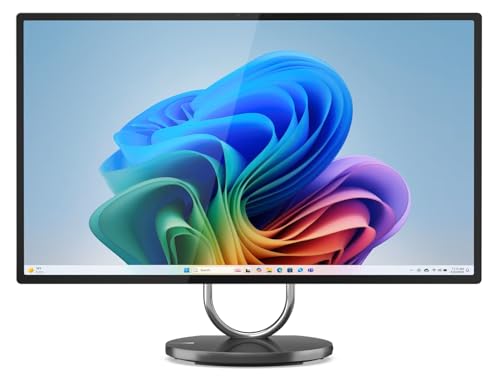
- Best big-screen pick for a small desk: Lenovo Yoga AIO 32i, Core Ultra 7 258V, RTX 4050, 32GB, 1TB — Check on Amazon
- HP OmniStudio X 32, Core Ultra 7 258V, 32GB, 1TB — Check on Amazon
- Apple iMac 24-inch, M4, 24GB Unified Memory, 512GB SSD — Check on Amazon
- Dell 27 All-in-One, Core 7 150U, MX570A, 64GB, 4TB SSD — Check on Amazon
See 2 more Amazon options
- Lenovo Yoga AIO 27, Core Ultra 7 255H, 16GB, 1TB — Check on Amazon
- HP OmniStudio X 32, Core Ultra 7 258V, 32GB, 1TB, Windows 11 Pro — Check on Amazon
Read the full guide ↓
Disclosure: As an Amazon Associate, reviewstook.com earns from qualifying purchases. Links to Amazon on this page are affiliate links; they cost you nothing extra. Listing details such as price and availability change often, so check the current Amazon listing before you buy.
An all-in-one is already the small-space answer to a desktop computer: the screen, the processor, the speakers and the webcam live in a single unit, the keyboard and mouse are wireless, and the whole setup runs off one power cable. There is no tower to park on the floor, no monitor arm to buy, no cable bundle snaking between boxes. So when the budget is $2,500 and the room is small, the honest question is not whether an all-in-one fits — it is which all-in-one fits your particular desk, because the six machines in this guide fall into three very different size classes, and the differences between them are exactly what a small room feels.
At the top sit two 31.5-inch 4K flagships from Lenovo and HP. They are magnificent desks’ worth of screen, and they ask for a real desk in return: depth enough that a screen that wide sits at a comfortable viewing distance, and width enough that the panel does not crowd out everything else you own. In the middle is the 27-inch class — a Lenovo with the most flexible stand in this guide and a Dell that trades sharpness for an enormous amount of memory and storage. At the small end, Apple’s 24-inch iMac is the slightest unit here, the one that drops onto a kitchen counter, a student desk or a narrow console table and still looks deliberate. Same budget, same one-cable idea, three different footprints. This guide grades the picks on that basis first — screen class, stand behaviour, what stays built in and what quietly reappears on your desk as an extra box — and on the usual flagship questions second.
Two ground rules before the picks. First, dimensions: manufacturers and listings are inconsistent about publishing exact measurements, and a stand’s footprint is not the same number as a screen’s width, so this guide grades by documented screen size and stand type and points you to the live listing’s specification block for the exact figures before you order — the measure-before-you-buy checklist further down turns that into a five-minute routine. Second, the market itself: the verified flagship all-in-one band on Amazon sits inside this budget for a manufacturer-configured machine, and above this budget the listings turn into reseller bundles with inflated memory and storage numbers. Every pick below sits inside the real band, and every reseller or third-party listing is flagged where it applies. Check price on Amazon for each pick, as listing prices change often.
In this guide
Quick Picks
Short on time, or comparing several options at once? Each row below names a buyer type and the product that suits it, with a link to the listing.
| Buyer type | Pick | Why it stands out | Link |
|---|---|---|---|
| Best big screen for a small desk | Lenovo Yoga AIO 32i, Ultra 7 258V, RTX 4050 | 31.5-inch 4K plus the only discrete GPU here, on a one-cable footprint | Check on Amazon |
| Best stand for a fixed-height desk | HP OmniStudio X 32, Ultra 7 258V, 32GB | Height-adjustable 31.5-inch 4K panel — no riser box eating desk space | Check on Amazon |
| Smallest footprint in this guide | Apple iMac 24-inch, M4, 24GB, 512GB | 24-inch 4.5K Retina in the slimmest unit here; one cable, nothing else | Check on Amazon |
| Best for zero external drives | Dell 27 All-in-One, 64GB, 4TB SSD | 4TB inside the machine means the archive never colonises the desk | Check on Amazon |
| Best stand for a narrow desk | Lenovo Yoga AIO 27, Ultra 7 255H | 27-inch QHD screen that lifts, swivels and pivots into portrait | Check on Amazon |
| Best for Windows 11 Pro buyers | HP OmniStudio X 32, Windows 11 Pro | HP’s height-adjustable 4K flagship in its business-OS listing | Check on Amazon |
How These Picks Were Chosen
The budget was applied as a ceiling for the whole machine, and every pick is a real Amazon.com listing in this budget tier — check price on Amazon for the current figure. At this tier several listings are sold by third parties rather than by Amazon or the manufacturer, so the seller matters as much as the specification. One pick, the Windows 11 Pro listing of the HP OmniStudio X 32, deserves particular care: buy only when its live price on Amazon sits within this budget and close to the Home listing of the same machine.
On top of the usual flagship filters — panel quality, processor class, memory and whether it can ever be upgraded, storage, graphics, webcam, and who actually sells and warranties the machine — this variant applies a small-space grading pass. Screen class comes first: 31.5 inches, 27 inches and 24 inches are different furniture decisions, not just different specifications. Stand behaviour comes second, because in a small room the stand decides where the screen can sit: a height-adjustable stand removes the need for a riser, a rotating stand lets a screen turn toward a second seat or pivot upright for documents, and a tilt-only stand means the desk and chair have to adapt instead. Third is what stays off the desk: wireless keyboards and mice are included across this guide, webcams and speakers are built in, and the picks are marked down where a thin port selection or a small internal drive predictably brings a hub or an external SSD back onto the surface you were trying to clear. Exact dimensions, weights and mount specifications are not graded, because the verified sources behind this guide do not publish them consistently — measure from the live listing, using the checklist below.
We did not use these machines ourselves. The grading rests on manufacturer listings, specification pages and Amazon listing data. Two reality filters from the base research still apply in full: memory is soldered or on-package in nearly every design here, so the capacity you buy is the capacity you retire with; and an all-in-one is not a gaming rig at any price — only one pick in this guide has a discrete graphics card, and the reviews say exactly how far it goes rather than letting a 4K screen imply 4K gaming.
The 6 Best All-in-One PCs for Small Spaces Under $2,500
Lenovo Yoga AIO 32i, Core Ultra 7 258V, RTX 4050, 32GB, 1TB
Who it suits: Small-room buyers whose desk is genuinely deep enough for a 31.5-inch screen — and who want the one machine in this guide with a real graphics card behind it.
Start with the space question, because this pick asks the most of a room. A 31.5-inch panel is a wide object: on a shallow desk it sits close, and close is where a screen this size stops being immersive and starts being fatiguing. Give it a proper desk, though, and the Yoga AIO 32i is the strongest argument in this guide — everything else about it is engineered to keep the rest of the desk empty. The keyboard and mouse are wireless. The webcam is a 5MP IR unit built into the frame. The stand’s base carries a 15W wireless charging pad, so the phone charger and its cable leave the desk entirely. One power cable runs the whole arrangement. For a small room that doubles as an office, that tidiness is not cosmetic; it is the difference between a desk that resets to clear in seconds and one that never does.
Behind the panel sits the component no other pick here offers: an NVIDIA GeForce RTX 4050 laptop GPU with 6GB of GDDR6, alongside Intel’s Core Ultra 7 258V, 32GB of LPDDR5X memory and a 1TB PCIe Gen4 SSD. The honest gaming version is modern titles at 1080p with DLSS, esports games well beyond that, and older AAA releases at the panel’s native resolution with settings discipline — it will not drive its own 4K screen at 4K in demanding games. What the GPU genuinely changes is creative work: accelerated filters and exports, workable 3D and CAD previews, and the removal of the hard ceiling every integrated-graphics pick lives under. The screen itself is a 31.5-inch 4K UHD IPS panel with wide colour coverage aimed at creative work, on a tilting metal stand, with Wi-Fi 7, Thunderbolt 4 and Windows 11 Pro completing the specification. Check price on Amazon for this flagship model, which sits inside this budget tier.
- An RTX 4050 6GB — the guide’s sole discrete GPU — for creative acceleration and honest, modest gaming.
- Wireless charging in the stand base, a 5MP IR webcam and wireless peripherals: the emptiest big-screen desk here.
- 31.5-inch 4K UHD IPS display with 32GB of memory, a 1TB Gen4 SSD, Thunderbolt 4 and Windows 11 Pro.
Honest limitation: The stand only tilts, so screen height is set by your desk and chair, not by the machine; the 32GB of memory is on-package and can never be upgraded; and the standard warranty on this listing family is a one-year mail-in term.
Choose it if your desk has the depth for 31.5 inches and you want creative headroom and light gaming without adding a single extra box to the room. Skip it if your desk is shallow — the 27-inch picks below will serve you better — or if gaming is the priority, because a tower at this money is in a different league.

HP OmniStudio X 32, Core Ultra 7 258V, 32GB, 1TB
Who it suits: Home-office buyers in small rooms whose desk height is fixed — and who would rather the stand adjust than add furniture to make the screen fit.
The small-space case for this HP is a single feature most all-in-ones skip: a height-adjustable stand. In a large office you solve a low screen with a riser or a monitor arm; in a small room both are extra objects competing for the same surface, and the arm needs a clamp edge the desk may not have. The OmniStudio X 32 simply lifts. Its 31.5-inch 4K UHD IPS panel is also the brightest in this guide at a rated 550 nits, with HDR 600 support and 95% DCI-P3 coverage — brightness that earns its keep in the small, window-facing rooms where desks often end up. A 5MP IR camera with HP’s Poly Camera Pro tuning is built in, the peripherals are wireless, and there is an HDMI input, which matters more in a small home than anywhere: when the computer inside eventually ages, the panel can serve a laptop or console as a plain monitor, so the big screen never becomes a second object to store or replace.
The computing side mirrors the Lenovo’s platform with one deliberate difference. The same Core Ultra 7 258V, 32GB of memory and 1TB SSD are here, but graphics are Intel’s Arc 140V integrated chip — genuinely capable for office work, media, photo editing and light or older games, and not a creative-acceleration or gaming part the way the RTX 4050 is. Check price on Amazon for this premium-tier configuration. The seller caveat is part of the review: this configuration’s Amazon listing has been third-party only at recent checks, so the name in the “sold by” line is a reseller rather than HP or Amazon. Before paying, check that name, the seller’s history, the return window and who honours the warranty.
- 550-nit 4K IPS panel with HDR 600 and 95% DCI-P3 — the brightest screen here, on a stand that adjusts for height.
- HDMI input gives the 31.5-inch screen a second life as a monitor, so it never becomes stored clutter.
- Core Ultra 7 258V with 32GB of memory, 1TB SSD, Wi-Fi 7 and a 5MP IR camera, all behind one cable.
Honest limitation: Integrated Arc graphics only, memory that cannot be upgraded, the same 31.5-inch desk-depth requirement as the Lenovo — and a third-party seller, so the warranty path runs through them.
Choose it if the screen and the ergonomics are the purchase and your work is documents, media and photos. Skip it if video editing or gaming matters — the Lenovo above exists for that — or if a purchase this size from a third-party seller bothers you.

Apple iMac 24-inch, M4, 24GB Unified Memory, 512GB SSD
Who it suits: Anyone whose “desk” is a kitchen counter, a narrow console, a student room or a corner — the smallest physical commitment in this guide.
If the room is the constraint, this is the pick that respects it most. The iMac’s 24-inch class is a different furniture category from the 31.5-inch flagships: it lands on surfaces the big panels would dominate, sits at a natural viewing distance on shallow desks, and its single slim unit with one power cable is the purest form of the all-in-one idea. The 24-inch 4.5K Retina display (4,480 × 2,520) is smaller than the flagships’ panels but sharper per inch, at 500 nits with P3 wide colour, and the 12MP Center Stage camera is the best webcam in this guide by a wide margin — no external camera, no extra cable, no small box perched on the frame. This configuration — Apple model MD2U4LL/A, in Pink, with identical hardware sold in six other colours — pairs the full 10-core M4 chip with 24GB of unified memory and a 512GB SSD, and is sold on Amazon by Apple itself — check price on Amazon.
The small-space debits are specific, and they are about what creeps back. Ports are Thunderbolt/USB 4 only, so a desk with wired legacy peripherals grows a hub. The 512GB SSD is half the flagships’ storage, and since neither memory nor storage can ever be changed, a growing photo or video library predictably ends in an external drive sitting beside the machine — budget for it from day one rather than discovering it in year two. The stand tilts but does not adjust for height, which on a low counter or a tall desk is a real ergonomic limit. And gaming means Apple’s native and cloud catalogues: the M4’s graphics are strong, the library is the constraint. Bought with those eyes open, the iMac remains the all-in-one that asks the least of its owner — and of its room.
- The smallest footprint class here: a 24-inch 4.5K Retina screen in one slim unit with a single power cable.
- 12MP Center Stage camera, Touch ID Magic Keyboard and silent operation — nothing extra to place or plug in.
- Sold by Apple on Amazon — check price on Amazon for this premium-tier configuration.
Honest limitation: The smallest screen here, 512GB of fixed storage that invites an external drive onto the desk, Thunderbolt-only ports that invite a hub, and a tilt-only stand.
Choose it if space is the first constraint and you live in Apple’s ecosystem, or simply want the machine that asks the least of a small room. Skip it if your software is Windows-only, your work wants a bigger panel, or your files are counted in terabytes.
Dell 27 All-in-One, Core 7 150U, MX570A, 64GB, 4TB SSD
Who it suits: Small-room hoarders — the buyer whose current desk is ringed with external drives, and who wants the archive inside the machine instead.
Every guide to small spaces talks about the computer’s footprint and forgets the footprint of its storage. This Dell’s argument is that it deletes the second one. The specification line reads like a listing detective’s puzzle: a 27-inch Full HD touchscreen at 100Hz, Intel’s Core 7 150U, an NVIDIA GeForce MX570A graphics chip — and then 64GB of DDR5 memory and a 4TB SSD, double and quadruple the flagship norms in this guide. Four terabytes inside the unit is a media archive, a photo library and a virtual-machine habit that never touches the desk surface; 64GB of memory holds the enormous browser sessions and memory-hungry editors that make lesser machines swap. A 5MP webcam is built in, the keyboard and mouse are wireless, Wi-Fi 6E and Windows 11 Pro are standard — check price on Amazon for this premium-tier configuration.
The caveats are the review, as they are with every marketplace configuration. That 64GB/4TB pairing is a reseller upgrade: Dell’s own factory specification for this model line tops out at 32GB, so a third-party seller opened the machine, fitted the larger parts, and is your effective warranty counterparty for them. It is a common and legitimate Amazon practice, but flagship money demands the checks — who the seller is, how long they have sold, exactly what their warranty covers. The underlying hardware also deserves clear eyes. The Core 7 150U is an efficiency-class laptop processor, not a performance part, and the MX570A is an entry-level graphics chip: fine for the screen, video and light creative work, not a gaming or rendering GPU. And at 27 inches, Full HD (1,920 × 1,080) is visibly the softest panel in this guide — you are trading pixel density for capacity. In a small room, where you sit closer to the screen, that trade deserves more thought, not less.
- 64GB of memory and a 4TB SSD — the only pick that keeps a serious archive entirely off the desk.
- 27-inch 100Hz touchscreen, 5MP webcam, MX570A graphics, wireless peripherals and Windows 11 Pro.
- A premium-tier configuration inside this budget — check price on Amazon.
Honest limitation: A reseller-upgraded marketplace configuration — vet the seller and warranty — built on an efficiency-class CPU, an entry GPU, and the least sharp panel here.
Choose it if capacity is your bottleneck and external drives are your current desk problem. Skip it if a factory build with a manufacturer’s warranty matters more than capacity, or if you want 4K sharpness or strong single-core speed.

Lenovo Yoga AIO 27, Core Ultra 7 255H, 16GB, 1TB
Who it suits: Narrow-desk buyers — especially anyone who reads, writes or codes in long documents — who want flagship ergonomics without flagship money.
This is the small-space specialist of the guide, and the reason is its stand. The Yoga AIO 27’s 27-inch QHD (2,560 × 1,440) IPS panel runs at 120Hz — the only high-refresh screen in this guide — at 400 nits with 99% sRGB coverage, and it sits on a stand that tilts, swivels, lifts and pivots the screen into portrait. Each of those motions solves a small-room problem. Swivel turns the screen toward a second chair without moving the base. Lift replaces a riser. Portrait is the quiet winner on a narrow desk: a document-shaped screen asks for less horizontal room than a landscape one, and writers, coders and anyone who reads PDFs all day will use it weekly. An HDMI input lets the panel moonlight as a monitor for a laptop or console, extending the purchase’s life. Inside, Intel’s Core Ultra 7 255H is a genuinely performance-class laptop processor — in raw CPU terms arguably the strongest chip in this guide — with 16GB of LPDDR5X memory and a 1TB SSD. Check price on Amazon — this is the value-tier pick in this guide, with pricing that varies by seller.
The compromises are deliberate and should be bought knowingly. Sixteen gigabytes is below the flagship memory standard, and because the LPDDR5X is soldered it is permanent — comfortable for office work, browsing, media and moderate creative projects for years, but the ceiling a heavy multitasker will eventually feel. Graphics are Intel’s integrated Arc, so gaming means esports and older titles at sensible settings, and the webcam and speakers, while good, do not match the 32-inch flagship’s presentation kit. The value case survives all of it: most of the flagship experience — the screen size most desks actually fit, the best stand in the guide, a top-tier processor — at a value tier well below the flagships, leaving room in the budget for the chair, the lamp or the software the small room actually needs.
- A stand that tilts, swivels, lifts and pivots to portrait — the most adaptable screen placement here.
- 27-inch QHD IPS at 120Hz, a performance-class Core Ultra 7 255H, 1TB SSD and HDMI input.
- A value-tier family that leaves room in the budget for the rest of the setup — check price on Amazon.
Honest limitation: The memory is the compromise: 16GB, soldered in place and permanent — and integrated graphics set the ceiling for gaming and GPU-accelerated work.
Choose it if your desk is narrow, your work is document-heavy, and you would rather save money than chase the last specification. Skip it if your workload will want 32GB of memory — buy the 32i at the top of this guide instead.

HP OmniStudio X 32, Core Ultra 7 258V, 32GB, 1TB, Windows 11 Pro
Who it suits: Business buyers and remote workers whose employer requires Windows 11 Pro — and whose small home office needs the height-adjustable flagship screen.
The hardware here is identical to the second pick in this guide: HP’s OmniStudio X 32 with its 31.5-inch 4K UHD IPS panel at 550 nits with HDR 600 and 95% DCI-P3, the Core Ultra 7 258V, 32GB of memory, a 1TB SSD, Intel Arc 140V graphics, Wi-Fi 7, the 5MP IR camera, the HDMI input and the height-adjustable stand. The small-space virtues carry over unchanged — the stand that lifts instead of demanding a riser, the panel bright enough for a window-facing corner desk, the HDMI input that gives the screen a second life as a monitor. What this listing changes is the operating system: Windows 11 Pro instead of Home, which is what lets a machine join a workplace domain or Entra ID, encrypt its drive with BitLocker under company policy, host Remote Desktop sessions and be managed by an employer’s IT tools. For a machine bought for work, Home is often simply not an option, and upgrading later costs money and an afternoon.
Two disciplines apply, and both are about the transaction rather than the machine. First, price: check price on Amazon for this specific Pro listing before deciding. Buy only when its live price sits within this budget and within a sensible margin of the Home listing, since the hardware is identical and the operating system is the only difference; if the Pro listing is priced well above the Home listing on the day you shop, buy the Home machine and budget for Microsoft’s own Pro upgrade. Second, the seller: availability for this listing also runs through third parties at times, so the live page’s sold-by line, warranty terms and return window all need reading before you pay. The panel, stand and silicon are flagship-grade; the purchase deserves the same care as the specification sheet.
- The 550-nit 4K flagship panel and stand, delivered with Windows 11 Pro: BitLocker, Remote Desktop hosting and domain management included.
- The height-adjustable stand and HDMI input that make the Home listing so easy to place carry over in full.
- Identical hardware to the Home listing: Ultra 7 258V, 32GB, 1TB, Arc 140V, Wi-Fi 7.
Honest limitation: Nothing here is faster than the Home listing — the premium buys an operating-system edition — and the deal lives or dies on the live price on Amazon on the day you buy.
Choose it if Pro is a condition of your employment and this is the screen you want it on. Skip it if Home is enough — the second pick in this guide is this identical hardware in its personal listing.

Comparison Table
| Product | Display | Processor / Graphics | Memory / Storage | Link |
|---|---|---|---|---|
| Lenovo Yoga AIO 32i | 31.5-inch 4K UHD IPS | Core Ultra 7 258V / RTX 4050 6GB | 32GB / 1TB | Check on Amazon |
| HP OmniStudio X 32 (Home) | 31.5-inch 4K IPS, 550 nits | Core Ultra 7 258V / Arc 140V | 32GB / 1TB | Check on Amazon |
| Apple iMac 24-inch M4 | 24-inch 4.5K Retina, 500 nits | Apple M4 10-core / 10-core GPU | 24GB / 512GB | Check on Amazon |
| Dell 27 All-in-One (upgraded) | 27-inch FHD touch, 100Hz | Core 7 150U / MX570A | 64GB / 4TB | Check on Amazon |
| Lenovo Yoga AIO 27 | 27-inch QHD IPS, 120Hz | Core Ultra 7 255H / Intel Arc | 16GB / 1TB | Check on Amazon |
| HP OmniStudio X 32 (Pro) | 31.5-inch 4K IPS, 550 nits | Core Ultra 7 258V / Arc 140V | 32GB / 1TB | Check on Amazon |
Measure Before You Buy: The Small-Space Checklist
An all-in-one removes the tower from the space equation, but the screen is still a physical object with a stand, a viewing distance and a cable. Five steps, in order, before any order:
- 1. Measure the desk depth first. Depth, not width, is the dimension that decides screen size. A 31.5-inch panel wants a deep desk so it can sit at a comfortable arm’s-length-plus viewing distance; on a shallow desk the 24-inch iMac or a 27-inch pick will feel better at the end of a working day than the flagship you have to sit too close to. If the screen will share the surface with paperwork, measure what remains after the keyboard, not before.
- 2. Match screen class to the spot. 31.5 inches for a dedicated desk against a wall. 27 inches for the standard home-office desk — the class most rooms actually fit. 24 inches for counters, consoles, student desks and corners. Measure the width of the alcove or the gap between shelves as well; a wide panel in a narrow nook leaves no room for the lamp, the speaker or the notebook.
- 3. Tape the stand’s footprint. Pull the exact stand dimensions from the live listing’s specification block — they vary by model and are not interchangeable — then mark the footprint on the desk with painter’s tape and live with it for a day. You will learn more from the tape than from any photograph: whether the keyboard still fits in front, whether the mug has a home, whether the base eats the only flat space your phone had.
- 4. Walk the cable drop. One power cable is the promise, but it still has to reach a socket. Trace the route from the back of the unit to the outlet: does it cross a walkway, dangle over a radiator, or demand a power strip that itself needs a home? Check where the socket sits relative to the desk before the machine arrives, not after.
- 5. Count what will join it. Then order. List the honest extras your setup will add — a hub for a port-poor machine, an external drive for a 512GB pick, a riser for a tilt-only stand at the wrong height — and confirm the desk has a planned place for each. An all-in-one keeps a small desk clear only if the accessories were part of the plan.
How to Choose an All-in-One PC for a Small Space
- Buy the screen class your desk can hold, not the biggest the budget allows. The display is the one component you can never change, and in a small room its size is a furniture decision before it is a specification. A 27-inch screen you sit at comfortably beats a 31.5-inch screen you sit too close to, every working day.
- Let the stand do the ergonomics. Most all-in-one stands only tilt. In a small room, a height-adjustable stand (the HP flagships) or a full-motion one (the Yoga AIO 27) is worth real money, because the alternatives — a riser, an arm — are extra objects on a surface that has none to spare.
- Treat 32GB of memory as the flagship standard. Nearly every design here solders its memory or builds it into the processor package, which makes the number you choose the number you retire with. 32GB is the buy-once figure; the iMac’s 24GB is workable thanks to Apple’s memory efficiency; the Yoga 27’s 16GB is the value compromise — take it knowingly, not accidentally.
- Count the boxes that come back. Every pick includes its display, webcam, speakers and wireless keyboard and mouse. What differs is the sequel: Thunderbolt-only ports invite a hub, a 512GB drive invites an external SSD, and a capacity-first pick like the Dell exists precisely to keep those boxes off the desk. Grade the whole arrangement, not the unit alone.
- Check who is selling it — every time. At this tier, listings split between manufacturer-sold (Apple), Amazon-sold, and third-party or reseller-upgraded configurations (the Dell, and the HP listings at times). A reseller upgrade can be good value, but the seller’s history and warranty terms become part of the product. Read them.
- Think about the screen’s second life. The HP flagships and the Yoga AIO 27 have HDMI input, so when the computer inside ages out, the panel can serve a laptop, a console or a mini PC. The iMac and the Yoga 32i cannot do this trick — and in a small home, a screen that retires with its computer is also a storage problem. On a six-year horizon the feature quietly extends the purchase.
- Match the operating system to the job. Windows 11 Pro is a requirement, not a luxury, for many workplaces — BitLocker policy, domain join, Remote Desktop hosting. If your employer has any say in this machine, confirm the requirement before a Home listing saves you money you will only spend again on the upgrade.
- Do not pay for capacity theatre. Above this budget, Amazon’s all-in-one listings inflate quickly into reseller bundles — the same mainstream machines with 64GB and 8TB priced well beyond this budget. Extra memory and SSD space are cheap parts; they do not turn a midrange all-in-one into a flagship. Buy the platform — screen, chip, stand — first and capacity second.
- Keep the box and the receipt. A flagship all-in-one ships as one large, fragile unit, and in a small home the packaging itself takes space — keep it anyway until you are sure the panel is perfect. Dead pixels and backlight flaws are exactly what the first week’s return window is for, and reboxing a 31.5-inch screen without its foam is a project.
When an All-in-One Is the Wrong Kind of Small
There is one buyer for whom this entire category is the wrong answer, and a small room does not change it: the buyer who wants gaming power. An all-in-one spends its budget on the screen, so only one pick here has a discrete GPU at all, and it is a laptop part. If games are the point, the genuinely small alternative is a compact tower or mini PC paired with a monitor — more objects on the desk, more cables, but a real graphics card and parts you can upgrade. That trade, named plainly in both directions, is what Best Mini Gaming PC Under $2500, Best Small Form Factor Gaming PC Under $2500 and Best Compact Gaming PC Under $2500 exist to price out; Best Mini PC Under $2500 covers the smallest non-gaming boxes. Choose the all-in-one when the desk and the screen are the purchase. Choose the small tower when the graphics card is. Confusing the two is how a $2,500 machine ends up disappointing someone in a small room.
Common Buying Mistakes
- Buying a 31.5-inch flagship for a shallow desk. The panel fits on the surface and fails at the seating distance — measure depth before screen size seduces you.
- Measuring the screen and forgetting the stand. The base, not the panel, is what shares the desk with your keyboard, and stand footprints differ by model; tape it out first.
- Believing “one cable” means one cable forever. A port-poor machine grows a hub, a small drive grows an external SSD, and a phone still charges somewhere — plan where each lives.
- Sealing the unit into a closed cabinet or tight alcove. All-in-ones vent through their bodies; a screen that cannot breathe runs hot and loud. Leave the back and top breathing room, and never rest one on carpeted shelving or soft furnishings.
- Handing over flagship money for a reseller’s capacity upgrade before reading the seller’s history or asking who warranties the parts they fitted.
- Saving money with the 16GB model on a machine you plan to keep for six years. Soldered memory makes the compromise permanent — when the ceiling starts to pinch, no upgrade appointment fixes it.
- Ignoring what happens when the computer ages out. Picks without HDMI input retire as complete units; in a small home, disposal and storage are part of the purchase.
- Judging flagship listings by their review counts. Review volume at this tier is thin across the board; judge on manufacturer specifications, panel data and seller quality instead.
Final Recommendation
- Most small-desk buyers with a deep desk: Lenovo Yoga AIO 32i.
- Best screen and stand, no riser needed: HP OmniStudio X 32 (Home).
- Tightest spaces: Apple iMac 24-inch M4, 24GB, 512GB.
- No external drives on the desk: Dell 27 All-in-One, 64GB, 4TB — from a vetted seller.
- Narrow desks and long documents: Lenovo Yoga AIO 27.
- Windows 11 Pro required by work: HP OmniStudio X 32 (Pro).
The small-space logic of this guide resolves into three answers. If your desk has the depth, the Yoga AIO 32i is the machine with no hard ceiling — big 4K screen, 32GB of memory, the only real graphics card here, a charging pad that clears the phone off the desk — check price on Amazon — and the OmniStudio X 32 is the better pure desk instrument when graphics do not matter, because its brighter panel and height-adjustable stand solve the two problems small rooms actually have. If the desk does not have the depth, the honest flagship move is down a class: the Yoga AIO 27’s rotating QHD screen for a narrow desk, or the iMac for the smallest surfaces of all. Shoppers working with less money should start with Best All In One PC Under $1500, first-time buyers comparing the whole category should read Best All In One PC Under $2500 alongside this guide, and anyone planning to present or stream from the same small desk should see Best All In One PC For Streaming Under $2500. Whichever you choose, tape the footprint and walk the cable route before you order — in a small room, those two lines are part of the product.
Frequently Asked Questions
Will a 31.5-inch all-in-one fit on a small desk?
It will stand on most desks; the real question is whether you can sit far enough from it. A 31.5-inch 4K panel wants a deep desk so the screen sits at a comfortable viewing distance with the keyboard in front of it. On a shallow desk — a console table, a narrow study nook — a 27-inch pick or the 24-inch iMac will feel better over a full working day, even though the flagship is the “better” machine on paper. Measure your desk’s depth, tape the stand’s footprint from the live listing’s specifications, and let those two numbers decide.
How is an all-in-one smaller than a mini PC with a monitor?
In object count rather than in screen size. A mini PC setup is three things — the box, the monitor and its stand, plus speakers or a webcam if the monitor lacks them — joined by several cables and at least two power supplies. An all-in-one is one unit, one power cable, with the camera and speakers built in and wireless peripherals in the box. The screen itself takes the same wall of space either way; what the all-in-one removes is everything around it. The trade is that the mini PC’s parts can be upgraded or replaced separately, and the all-in-one’s cannot.
Can I wall-mount one of these all-in-ones?
Mount support varies by model and is not documented consistently across the listings behind this guide, so treat it as a live-listing check rather than an assumption: confirm the exact model’s mount specification on the manufacturer’s page before planning a wall installation, and if a listing does not state it, assume the stand is the placement. What is documented here is stand behaviour — height adjustment on the HP flagships, full motion including portrait on the Yoga AIO 27, tilt only on the iMac and the Yoga 32i — and for most small desks, the right stand solves the problem the mount was meant to.
Can an all-in-one go inside a cabinet or tight alcove?
Not happily. These machines cool themselves through vents in the body, and a closed cabinet traps that heat, which costs performance and shortens component life. An open-backed alcove with clear space above and behind the unit is workable; a sealed cupboard is not, whatever the tape measure says. If the only spot in the room is enclosed, a mini PC with a separately placed monitor gives you more freedom to put the hot part where air moves.
What happens to the screen when the computer inside gets old?
It depends on one feature: HDMI input. The HP OmniStudio X models and the Yoga AIO 27 can become monitors for a future laptop, console or mini PC, so the screen keeps working after the computer retires — in a small home, that also means no dead unit to store. The Yoga 32i and the iMac have no such input, so the whole unit retires together; the iMac’s strong resale value softens that considerably. Long-keepers should weight the HDMI-input picks accordingly.
Is the iMac’s 512GB enough for a small-space setup?
For documents, browsing, media streaming and a moderate photo library, yes — and its efficiency is part of why the iMac suits small spaces. For a growing video library or a large local photo archive, it fills, and because the storage can never be upgraded internally, the fix is an external drive or cloud storage. That is a desk-space cost as much as a money cost, so plan its place from day one rather than letting it arrive as clutter in year two. The Dell in this guide exists for buyers who would rather pay to never think about this.


