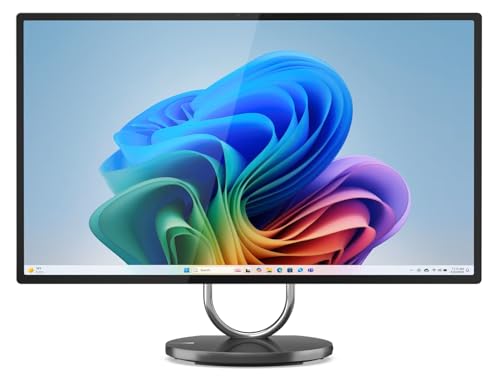
Where to buy
Check the latest price, availability and delivery on Amazon. Orders are placed on Amazon. We may earn a commission from qualifying purchases.
- Best overall under $2,500: Lenovo Yoga AIO 32i, Core Ultra 7 258V, RTX 4050, 32GB, 1TB — Check on Amazon
- HP OmniStudio X 32, Core Ultra 7 258V, 32GB, 1TB — Check on Amazon
- Apple iMac 24-inch, M4, 24GB Unified Memory, 512GB SSD — Check on Amazon
- Dell 27 All-in-One, Core 7 150U, MX570A, 64GB, 4TB SSD — Check on Amazon
See 2 more Amazon options
- Lenovo Yoga AIO 27, Core Ultra 7 255H, 16GB, 1TB — Check on Amazon
- HP OmniStudio X 32, Core Ultra 7 258V, 32GB, 1TB, Windows 11 Pro — Check on Amazon
Read the full guide ↓
Disclosure: As an Amazon Associate, reviewstook.com earns from qualifying purchases. Links to Amazon on this page are affiliate links; they cost you nothing extra. Listing details such as price and availability change often, so check the current Amazon listing before you buy.
If this is your first computer purchase in a while — or your first ever — an all-in-one is the gentlest place to start, and this guide assumes nothing. An all-in-one PC is a complete computer built inside a screen. There is no separate tower box humming under the desk, no bundle of cables to untangle: you set the screen on the desk, plug in one power cord, and the wireless keyboard and mouse in the box do the rest. Everything in this guide is that kind of machine, at the top of the price range, under a $2,500 ceiling.
Before the picks, the one honest warning that matters more than any specification. Two thousand five hundred dollars sounds like gaming money, and in a traditional tower PC it is. In an all-in-one it is not, and no listing headline should talk you out of understanding why. To fit behind a slim screen, these machines use laptop parts. Five of the six picks below have no separate graphics card at all: their graphics are built into the processor, perfectly good for everyday work, photos, video and light games, and genuinely limited for modern big-budget games. Exactly one pick, the Lenovo Yoga AIO 32i, carries a real graphics card — a laptop card that plays modern games at 1080p rather than at its own screen’s 4K resolution. What $2,500 in an all-in-one actually buys is a superb screen, generous memory and storage, a good camera for video calls, and a desk with almost nothing on it. If that trade sounds right, this tier is excellent. If gaming is the main event, the same money in a tower is a different league, and this guide will point you that way without any hard feelings.
One more surprise for newcomers: there is no long line of flagship all-in-ones waiting between $2,000 and $2,500. The real band is short — two big 31.5-inch 4K Windows machines from Lenovo and HP, Apple’s iMac in a stepped-up configuration, one very capacious Dell sold through marketplace sellers, and a smaller Lenovo that delivers most of the flagship experience for far less. Push past the top of this band and Amazon’s listings mostly stop being manufacturer configurations and become “upgraded” reseller bundles with inflated numbers at inflated prices. This guide stays inside the genuine band, tells you exactly who is selling each machine, and explains every technical term it uses, starting with the glossary below.
New to This? Six Terms That Explain the Whole Guide
- All-in-one (AIO). A computer whose processor, memory and storage live inside the display: one box, one power cable, nothing on the floor. The catch is built in — sealed into a slim screen, the parts are laptop parts, and most of them can never be swapped or upgraded.
- Integrated vs. discrete graphics. Graphics is the part of the computer that draws games and video. Integrated graphics are built into the processor and share its memory — fine for everyday use, films, photo editing and light games. A discrete (dedicated) graphics card is a separate component with its own memory, and it is what serious gaming and heavy creative work need. In this guide, only the Lenovo Yoga AIO 32i has one, and the Dell’s MX570A is an entry-level chip that sits far closer to integrated graphics in spirit.
- Memory (RAM). The computer’s short-term workspace, measured in gigabytes (GB). More memory means more programs, browser tabs and photos open at once without slowdowns. The beginner rule for this tier: 32GB is the comfortable buy-once amount, 24GB is workable, and 16GB is a compromise you should choose knowingly. It matters extra here because of the next term.
- Soldered memory. In almost every all-in-one, the memory chips are permanently attached at the factory. There is no slot, no upgrade, no second chance: the amount you buy is the amount you will still have in six years. That single fact drives more of this guide’s advice than any other.
- Storage (SSD). Where your files, photos and games permanently live, also measured in GB — 1,000GB is written as 1TB. Modern games and photo libraries are large, so 512GB fills sooner than beginners expect, 1TB is the sensible flagship standard, and the Dell’s 4TB is hoarder-grade. Internal storage here is effectively fixed too, though an external drive can always be plugged in later.
- Resolution. How many dots make up the picture. Full HD is 1,920 × 1,080, QHD (sometimes called 1440p) is 2,560 × 1,440, 4K is 3,840 × 2,160, and the iMac’s 4.5K sits between the last two. More dots mean crisper text and more room on screen. Note the trap this whole category sets: a 4K screen does not mean 4K gaming — showing a sharp desktop and playing a demanding game at that resolution are very different workloads.
In this guide
Quick Picks
Short on time, or comparing several options at once? Each row below names a buyer type and the product that suits it, with a link to the listing.
| Buyer type | Pick | Why it stands out | Link |
|---|---|---|---|
| Best overall under $2,500 | Lenovo Yoga AIO 32i, Ultra 7 258V, RTX 4050 | The only real graphics card in this guide, behind a 31.5-inch 4K screen | Check on Amazon |
| Best big Windows screen | HP OmniStudio X 32, Ultra 7 258V, 32GB | 550-nit 4K panel, HDR 600, and a stand that adjusts for height | Check on Amazon |
| Best for Apple households | Apple iMac 24-inch, M4, 24GB, 512GB | 4.5K Retina display, sold by Apple itself, silent and simple | Check on Amazon |
| Best for memory and storage | Dell 27 All-in-One, 64GB, 4TB SSD | Double the memory and four times the storage of the flagships — marketplace listing | Check on Amazon |
| Best value flagship | Lenovo Yoga AIO 27, Ultra 7 255H | 27-inch QHD 120Hz screen on a fully adjustable stand — check price on Amazon | Check on Amazon |
| Best for Windows 11 Pro buyers | HP OmniStudio X 32, Windows 11 Pro | HP’s 4K flagship in the listing that ships with the business edition of Windows | Check on Amazon |
How These Picks Were Chosen
Every pick is a real Amazon.com listing that fits this guide’s under-$2,500 brief in the United States. Prices at this level move around — several of these machines are sold by third parties rather than by Amazon or their maker — so this guide does not print a fixed price for any pick: check price on Amazon on the live listing before you buy. That applies to the Windows 11 Pro listing of the HP OmniStudio X as well; the rule there is simply to buy only when its live price sits under the guide’s ceiling and close to the Home listing of the same machine.
We did not use these machines ourselves. We read the manufacturers’ listings and specification pages and the Amazon listing data, and compared what decides whether a flagship all-in-one earns its money: the screen (size, resolution, brightness, color), the processor, how much memory it has and whether that memory can ever grow, storage, graphics, the webcam, the stand, and — easy for beginners to miss — who actually sells the machine and stands behind its warranty. That last check matters most at exactly this price. Some picks are sold by their manufacturer on Amazon; others are marketplace listings, including configurations a reseller has upgraded beyond anything the factory offers. Each review says which is which, in plain language, because the name in the “sold by” line is part of what you are buying.
Two filters shaped the final list. The first is the memory filter: since memory in these machines is soldered in place, the amount fitted at purchase is a lifetime decision, so 32GB is treated as the flagship standard and any pick shipping with less is flagged. The second is the gaming filter, applied because this guide sits in a gaming-PC category: integrated graphics are described as integrated graphics, the one genuine graphics card is described precisely, and no 4K screen is allowed to imply 4K gaming it cannot deliver.
The 6 Best All-in-One PCs Under $2,500
Lenovo Yoga AIO 32i, Core Ultra 7 258V, RTX 4050, 32GB, 1TB
Who it suits: First-time buyers who want one Windows machine that can do a bit of everything — work, photos and video, and some real gaming — behind the biggest screen in this guide.
Start with the part that makes this machine different from everything else here: a separate graphics card, an NVIDIA GeForce RTX 4050 with its own 6GB of graphics memory. In plain terms, that card is what lets a computer do visually heavy work quickly — photo and video editors use it to apply effects and export films without crawling, design and 3D programs use it to keep previews smooth, and games use it most of all. The honest beginner translation: modern games at 1080p (one step below this screen’s 4K), using a helper technology called DLSS that renders the game slightly lower and cleverly sharpens it back up; less demanding online games at higher settings; older games at the screen’s full resolution. It will not play demanding modern games in 4K on its own 4K screen — nothing here can, and any listing hinting otherwise is selling you the screen’s specification as if it were the graphics card’s.
Around that card, Lenovo builds a properly flagship machine: the Core Ultra 7 258V processor, a generous 32GB of memory, and a 1TB SSD — the sensible flagship amounts, with no beginner traps. The screen is a 31.5-inch 4K panel, big enough for two documents side by side, on a tilting metal stand that looks like furniture rather than office equipment. The base hides a small wireless charging pad for a phone, the webcam is a sharp 5MP unit that supports signing in with your face, ports include fast Thunderbolt 4 connections, a wireless keyboard and mouse are in the box, and it runs Windows 11 Pro, the business edition explained in the last review below. Check price on Amazon for the current listing before you buy. The listing is relatively new, so buyer reviews are still thin; judge it by Lenovo’s specifications and reputation rather than review volume.
- The only discrete graphics card in this guide — an RTX 4050 that makes creative work and genuine gaming possible.
- A 31.5-inch 4K screen with 32GB of memory and a 1TB SSD — the full flagship specification, no weak line.
- Beginner-friendly extras done right: face sign-in webcam, phone charging in the base, wireless keyboard and mouse included.
Honest limitation: The 32GB of memory is built into the processor package and can never be increased, the graphics card is a laptop part that games at 1080p rather than 4K, and the standard warranty on this listing family is a one-year mail-in term — the machine goes away by courier if it needs repair.
Choose it if you want the one all-in-one here with no hard ceiling: big screen, full memory, a real graphics card, for work and play alike. Skip it if gaming is your main reason for buying — a tower at this price is dramatically stronger — or if you are sure you will need more than 32GB of memory someday.

HP OmniStudio X 32, Core Ultra 7 258V, 32GB, 1TB
Who it suits: Beginners whose desk faces bright windows, whose days are documents, email, photos and video calls, and who want the finest big screen in this guide without needing a graphics card.
This HP’s whole argument is the display, so here it is in beginner terms. The screen measures 31.5 inches and shows a 4K picture, and its rated brightness — 550 nits, the highest here, the iMac included — decides whether a screen stays readable in a sunlit room or washes out into a mirror. It covers 95% of the DCI-P3 color range and supports HDR 600, so photos and films show richer, more accurate color than a basic panel can manage. Two touches extend its value: the stand raises and lowers as well as tilting, a rarity your neck will appreciate daily, and an HDMI input lets the screen live on as a monitor for a laptop or console when the computer inside feels old. The camera is a 5MP unit with HP’s video-call tuning, so you will look properly lit on calls without buying anything extra.
Inside, it uses the same Core Ultra 7 258V processor as the Lenovo above, with 32GB of memory and a 1TB SSD, but its graphics are the integrated Intel Arc 140V type — built into the processor, with no separate card. For a beginner, the practical meaning is simple: everything ordinary flies, photo editing is comfortable, and light or older games are fine, but this is not a machine for modern gaming or heavy video work. Check price on Amazon for the current listing before you buy. Now the part to read twice: at recent checks this configuration’s listing was sold by a third party, not by HP or Amazon. That can be entirely legitimate, but at this price it means three quick checks before paying — the seller’s name and feedback history, the return window, and who honors the warranty.
- The brightest, most color-complete screen in this guide — 550 nits, HDR 600, 95% DCI-P3 — readable in any room.
- A height-adjustable stand and an HDMI input that lets the display outlive the computer inside it.
- Full flagship basics: Core Ultra 7 258V, 32GB of memory, 1TB SSD, Wi-Fi 7 and a 5MP camera for calls.
Honest limitation: Integrated graphics only, so gaming and GPU-heavy creative work are off the menu; the memory cannot be upgraded; and the listing is third-party sold, which puts the warranty path through the seller rather than HP directly.
Choose it if the screen is the purchase — you read, write, browse and call all day and want the best view in the category. Skip it if you want to game or edit video seriously (that is the Lenovo above), or if buying from a third-party seller at this price makes you uncomfortable.

Apple iMac 24-inch, M4, 24GB Unified Memory, 512GB SSD
Who it suits: iPhone owners, Apple households, and any beginner who wants the computer that asks the least of them — no setup fuss, no fan noise, no surprises.
The iMac plays by different rules, starting with who sells it: Apple itself lists this machine on Amazon at a stable price, which makes it the calmest purchase in this guide. This configuration (Apple’s model MD2U4LL/A, in Pink here, with identical hardware in several other colors) combines Apple’s M4 chip — processor and graphics in one efficient piece of silicon — with 24GB of what Apple calls unified memory and a 512GB SSD. Check price on Amazon for the current listing before you buy. The screen is 24 inches with a 4.5K Retina picture — smaller than the two 31.5-inch panels above, but sharper inch for inch, bright at 500 nits with rich P3 color. Its 12MP camera is the best in this guide by a distance, automatically keeping you framed on video calls, and the included keyboard unlocks the machine with your fingerprint.
For a beginner, the iMac’s real product is the absence of friction. It is silent in normal use, wakes instantly, and — if you own an iPhone — works with it in ways no spec list captures: calls on the desk, copy on the phone and paste on the Mac, files dropped between them with a flick. The compromises are equally concrete. Twenty-four inches is noticeably less elbow room than 31.5 when two documents sit side by side. The 512GB of storage is half what the Windows flagships offer, and neither it nor the memory can ever be changed — plan on an external drive or cloud storage for large libraries. The stand tilts but does not rise or fall; connections are Thunderbolt/USB 4 only, so older plugs need adapters; and gaming means Apple’s growing but still limited Mac library plus cloud services — the M4’s graphics are strong, but many big games are never released for Mac. Buy the iMac as the best appliance in this guide, not as the most computer for the money.
- 4.5K Retina display, 500 nits, and the best webcam here — a 12MP camera that keeps you centered on calls.
- Silent, instant, and seamless with an iPhone; fingerprint sign-in on the included keyboard.
- Sold by Apple on Amazon — check price on Amazon for the current listing.
Honest limitation: The smallest screen in this guide, half the flagship storage at 512GB, no way to upgrade anything, a tilt-only stand, and a games library limited by macOS rather than by the hardware.
Choose it if your phone is an iPhone, your software exists on Mac, and you value calm, quiet simplicity over screen size. Skip it if you need Windows programs, a very large screen, or terabytes of built-in storage.

Dell 27 All-in-One, Core 7 150U, MX570A, 64GB, 4TB SSD
Who it suits: Beginners who keep everything — years of photos, huge browser sessions, dozens of programs open at once — and whose first question about any computer is how much it can hold.
Two numbers define this Dell, and they are double and quadruple the flagship norms: 64GB of memory and a 4TB SSD. In everyday language, 64GB means the machine almost never slows down from having too much open — big photo editors, virtual machines, a hundred browser tabs — and 4TB means a media library lives on the machine itself, not on a shelf of external drives. The rest of the specification is more modest, and a beginner should understand the trade. The screen is 27 inches at Full HD (1,920 × 1,080) with touch and a smooth 100Hz refresh — pleasant, but visibly less sharp than the 4K panels above: the same picture, spread over a large area with fewer dots. The Core 7 150U processor is an efficiency-class laptop chip, built for cool, quiet running rather than speed, and the MX570A graphics chip is an entry-level part: fine for the screen, video and light creative tasks, not a gaming or rendering engine. Check price on Amazon for the current listing before you buy.
Then the caveat, which for this pick is not fine print but the heart of the review. This is a marketplace listing for an upgraded configuration: Dell’s own factory specification for this model line stops at 32GB of memory, so a reseller has bought the machine, opened it, fitted the larger memory and SSD, and is selling the result. That is a common and legitimate way to buy on Amazon — but it changes who you are really buying from: the reseller, not Dell, is your first port of call if the upgraded parts fail. Before paying flagship money, check the seller’s name, how long they have sold on Amazon, their feedback, and exactly what their warranty promises. If those answers look solid, this is the capacity pick of the guide. If they look thin, walk away: no amount of storage is worth an unanswerable warranty on a machine at this tier.
- 64GB of memory and a 4TB SSD — room for everything, for years, with no external drives required.
- 27-inch touchscreen at a smooth 100Hz, with a 5MP webcam, Wi-Fi 6E and Windows 11 Pro.
- Check price on Amazon for the current listing, and vet the marketplace seller before you buy.
Honest limitation: A reseller-upgraded marketplace configuration, so the seller and their warranty need vetting; beneath the capacity sit an efficiency-class processor, an entry-level graphics chip, and the least sharp screen in this guide.
Choose it if running out of room is your real problem and you are comfortable checking out a marketplace seller carefully. Skip it if you want a factory-built machine with a straightforward manufacturer warranty, a crisp 4K screen, or strong processor performance.

Lenovo Yoga AIO 27, Core Ultra 7 255H, 16GB, 1TB
Who it suits: Beginners who want the flagship feeling — big, smooth screen, strong processor, a stand that moves any way you like — and would rather keep a large part of the budget in their pocket.
A guide with a $2,500 ceiling is not obliged to spend it, and this smaller Lenovo is the proof. Its screen is 27 inches at QHD (2,560 × 1,440) — sharper than Full HD, gentler than 4K — refreshing at 120Hz, twice the standard rate, so scrolling and motion look noticeably smoother. Brightness is a rated 400 nits with 99% sRGB color coverage, so photos look honest. The stand is the most talented in this guide: it tilts, swivels, lifts, and rotates the screen upright into portrait — genuinely useful for anyone who reads long documents, writes or codes. The Core Ultra 7 255H processor is performance-class — arguably the strongest chip in this guide — paired with a 1TB SSD. Check price on Amazon for the current listing, as the seller and the live price vary.
There is one compromise, and it is the mirror image of the Dell’s: where the Dell overshoots on memory and undershoots on screen, this Lenovo undershoots on memory. It ships with 16GB, and because that memory is soldered in place, 16GB is what it will have forever. For the things most beginners actually do — browsing, documents, email, streaming, photo organization, moderate creative projects — 16GB remains comfortable for years; it becomes a ceiling only for heavy multitaskers and demanding creative workloads. Graphics are Intel’s integrated type, so gaming means online and older games at sensible settings. Weighed whole, though, the value is hard to argue with: the screen size most desks actually fit, the best stand, a top-tier processor, with comfortable headroom left in the budget.
- 27-inch QHD screen at 120Hz on a stand that tilts, swivels, lifts and turns to portrait.
- A performance-class Core Ultra 7 255H processor and a 1TB SSD, plus an HDMI input for the screen’s second life.
- The flagship experience well below the top of this tier — check price on Amazon.
Honest limitation: 16GB of soldered memory is below the flagship standard and can never be raised, and integrated graphics limit gaming and GPU-heavy work.
Choose it if you want the smart-money flagship: big smooth screen, strong processor, best ergonomics, money left over. Skip it if you already know your workload will want 32GB of memory — buy the Yoga AIO 32i at the top of this guide instead.

HP OmniStudio X 32, Core Ultra 7 258V, 32GB, 1TB, Windows 11 Pro
Who it suits: Beginners buying for work — a home office, a small business, or an employer with rules — who need the business edition of Windows on the best big screen in this guide.
This pick is the same machine as the second entry in the guide, in a different Amazon listing. Same 31.5-inch 4K screen at 550 nits with HDR 600 and wide color, same Core Ultra 7 258V processor, same 32GB of memory and 1TB SSD, same integrated Intel Arc graphics, same height-adjustable stand and HDMI input. The single difference is the version of Windows it arrives with: Pro instead of Home. Pro is the edition that lets a computer join a workplace’s managed network, encrypt its drive with BitLocker under company policy, accept Remote Desktop connections, and be looked after by an employer’s IT tools. If your employer has any say over this machine, Home is often simply not permitted — and fixing that later means buying an upgrade and spending an afternoon applying it. In that situation, this listing is not a duplicate of the pick above; it is the version of HP’s flagship you are actually allowed to buy.
Two disciplines come with it. The first is price. This guide quotes no fixed price for this specific listing, so check price on Amazon before you buy. The rule is strict and simple: buy it only when its live Amazon price sits at or under this guide’s $2,500 ceiling and within a sensible distance of the Home listing, because the hardware is identical and the operating system is the only thing you are paying extra for. If the gap is large on the day you shop, the smarter route is the Home machine plus Microsoft’s own upgrade to Pro. The second discipline is the seller check, shared with the Home listing: availability for this configuration runs through third-party sellers at times, so confirm the sold-by name, the warranty terms and the return window on the live page before ordering. The screen, stand and insides are flagship-grade; give the transaction the same care you would give the specification sheet.
- HP’s 550-nit 4K flagship with Windows 11 Pro — drive encryption, Remote Desktop and business management ready from day one.
- Hardware identical to the Home listing: Ultra 7 258V, 32GB, 1TB, integrated Arc graphics, height-adjustable stand.
- The HDMI input lets the big screen serve a work laptop as well as the computer inside it.
Honest limitation: You are paying for an edition of Windows, not for more hardware — and with no fixed price quoted for this listing, its value depends entirely on the live price on the day you buy.
Choose it if your work requires Windows 11 Pro and you want it on the best big Windows screen here. Skip it if Home covers your needs — the second pick in this guide is the same machine, for personal use.

Comparison Table
| Product | Display | Processor / Graphics | Memory / Storage | Link |
|---|---|---|---|---|
| Lenovo Yoga AIO 32i | 31.5-inch 4K UHD IPS | Core Ultra 7 258V / RTX 4050 6GB | 32GB / 1TB | Check on Amazon |
| HP OmniStudio X 32 (Home) | 31.5-inch 4K IPS, 550 nits | Core Ultra 7 258V / Arc 140V | 32GB / 1TB | Check on Amazon |
| Apple iMac 24-inch M4 | 24-inch 4.5K Retina, 500 nits | Apple M4 10-core / 10-core GPU | 24GB / 512GB | Check on Amazon |
| Dell 27 All-in-One (upgraded) | 27-inch FHD touch, 100Hz | Core 7 150U / MX570A | 64GB / 4TB | Check on Amazon |
| Lenovo Yoga AIO 27 | 27-inch QHD IPS, 120Hz | Core Ultra 7 255H / Intel Arc | 16GB / 1TB | Check on Amazon |
| HP OmniStudio X 32 (Pro) | 31.5-inch 4K IPS, 550 nits | Core Ultra 7 258V / Arc 140V | 32GB / 1TB | Check on Amazon |
Your First Evening: Setting Up, Step by Step
An all-in-one is the easiest computer in the world to set up, and a first evening of about an hour — much of it waiting — is all it takes. Keep the box and its foam inserts until the first week is over and you are certain the screen is perfect; reboxing a 31.5-inch display without its packaging is miserable, and the return window is exactly for the flaws you can only spot at home.
- Unbox and plug in. Set the screen on the desk, connect the single power cable, and switch on the wireless keyboard and mouse from the box. If a tiny USB receiver came with them, plug it into the back of the machine. That is the entire physical setup.
- Answer the welcome questions. The machine will ask for your language, your region and your home Wi-Fi password. Then sign in — with a Microsoft account on the Windows machines, or an Apple ID on the iMac. This account is what ties your files, settings and purchases to you, so use one you will keep.
- Let it update — fully. New computers almost always have system updates waiting, sometimes large ones. Leave the machine plugged in and connected until Windows Update or macOS reports nothing left to install — the step beginners skip and later regret.
- Check you received what you paid for. Open the settings screen that lists the processor, memory and storage, and compare the numbers with your order — 32GB and 1TB, for example. This matters most for marketplace purchases like the Dell, where a reseller fitted the parts: if the screen says anything different from the listing, that is a return, not a shrug. In the same week, check the display for dead pixels or uneven backlighting on plain white and black screens.
- Make the text comfortable. On the 4K screens, text may look tiny at first. Both Windows and macOS offer a display scaling setting that enlarges text and icons while keeping them sharp — set it once, somewhere in the 125–150% range for most eyes, and forget it.
- Add your programs and, if you like, your games. Install your browser and the programs you use. For games, the shops are apps themselves: Steam and the Xbox app on Windows, the App Store and Steam on Mac. Download one free game first and see how it runs before spending anything — on every pick except the Lenovo Yoga AIO 32i, keep expectations at light and older titles, as the reviews describe.
How to Choose an All-in-One PC Under $2,500
- Start with the screen, because it never changes. Every other part of a normal computer can be swapped; an all-in-one’s display is with you for the machine’s whole life. At this level the real choice is between a huge 31.5-inch 4K panel (Lenovo 32i, both HPs), a smaller but sharper 24-inch 4.5K (iMac), a smooth 27-inch QHD (Yoga 27), and a big Full HD touchscreen (Dell) that only makes sense if capacity matters more to you than sharpness.
- Buy the memory you will need in year five. It is soldered in and cannot grow. Treat 32GB as the standard at this price, 24GB in the iMac as workable, and 16GB in the Yoga 27 as a deliberate value trade — fine if your work is ordinary, limiting if it is not.
- Be clear-eyed about gaming. Only the Yoga AIO 32i has a real graphics card, and it plays modern games at 1080p, not 4K. The other picks handle light, older and online games. If gaming is the point of the purchase, stop here and buy a tower instead; this guide’s job is to make sure nobody spends $2,500 discovering that.
- Read the “sold by” line before the specification sheet. Apple sells the iMac itself. Other listings here are third-party sold, and the Dell is a reseller-upgraded configuration Dell never built in that form. A reseller machine can be a good buy, but the seller’s history, return terms and warranty become part of the product. Check all three, every time.
- Compare whole desks, not boxes. Each pick includes its screen, webcam, and a wireless keyboard and mouse. Set against a tower plus a separate 4K monitor plus those same extras, the all-in-one’s price is closer than it first looks.
- Match the Windows edition to the job. Home is fine for home. Pro is a requirement for many workplaces — drive encryption under policy, joining a managed network, accepting Remote Desktop connections. If an employer has any claim on the machine, settle this before ordering, not after.
- Do not pay extra for capacity theater. Beyond this guide’s band, the same mainstream machines reappear wearing 64GB and 8TB badges at far higher prices. Memory and storage are the cheapest parts in any computer; they do not turn a midrange machine into a flagship. Spend on the platform — screen, processor, build — first.
What the Sticker Price Leaves Out
Good news first: an all-in-one’s headline price is closer to a complete price than any other kind of computer. The screen, webcam, speakers, and a wireless keyboard and mouse are all in the box, so there is no monitor to add and no peripheral run to make. What remains outside the sticker is smaller, but a beginner should still see it coming. None of the following is ever included in a pick’s price in this guide.
Software and subscriptions come first: office suites, creative programs and cloud storage plans are rented by the month or year these days, and they cost the same whichever machine you buy. Storage is the second item, and it applies unevenly. The Dell’s 4TB and the flagships’ 1TB will carry most households for years, but the iMac’s 512GB fills quickly with photo and video libraries — and since it can never be enlarged inside the machine, an external drive or a cloud plan is a near-certain companion purchase for it. Third, ergonomics: if a tilt-only stand leaves the screen at the wrong height for your chair, a simple riser is the fix. Fourth: if you buy a Windows 11 Home machine and later discover your employer requires Pro, Microsoft’s upgrade is a paid step — why the Pro listing in this guide exists, and why its rule is to buy it only when its price sits close to the Home version’s.
Finally, notice what this section is really protecting you from: the temptation to spend the whole $2,500 because it is there. The Yoga AIO 27 delivers most of the flagship experience well below the top of this tier, leaving comfortable headroom for everything above — or for nothing at all. One more machine deserves a mention without being a pick: Lenovo’s OLED Yoga AIO i Aura Edition is a premium-tier model with a 4K OLED screen, but its availability on Amazon comes and goes too inconsistently to build a recommendation on. If you find it in stock within this tier, it is a legitimate rival to the flagships here; if not, the six picks above are the band as it honestly exists.
What You Can and Cannot Upgrade Later
Beginners often assume a computer can grow the way a house can — a room added here, a part swapped there. All-in-ones mostly cannot, and it is kinder to learn that now than in year three. Here is the plain version, pick by pick and part by part.
Memory: no. In the two Lenovos and the iMac, the memory is soldered or built into the processor package itself. In the HP flagships it is effectively fixed as well. There is no slot waiting empty and no upgrade path — which is why this guide keeps returning to one piece of advice: buy the memory your future self needs. 32GB is the buy-once answer at this tier.
Internal storage: effectively no. In some Windows all-in-ones a technician can reach the SSD, but it is rarely a user job, and opening a machine — especially a reseller-upgraded one like the Dell — can muddy its warranty. Treat the fitted storage as permanent too. The consolation is that external storage is painless: a plug-in SSD over the fast USB or Thunderbolt connections here is nearly as quick as the internal drive for photos, video and game libraries, and it works with every pick, iMac included.
Graphics: no, ever. The graphics a pick ships with are the graphics it retires with — there is no way to add a card to an all-in-one — which is the deepest reason the Yoga AIO 32i’s RTX 4050 matters if you care about games or GPU-accelerated creative work.
What you can improve: the things around the machine. A better keyboard or mouse, an external SSD, a second screen for the models with the right outputs, a stand riser — and, for the HP flagships and the Yoga 27, an eventual second career as a monitor thanks to their HDMI inputs. Plan the purchase as a sealed, finished appliance with excellent accessories, and it will never disappoint you.
Common Buying Mistakes
- Expecting a $2,500 all-in-one to game like a $2,500 gaming PC. It will not: laptop processors throughout, exactly one laptop graphics card in this guide, integrated graphics everywhere else. You are buying a screen and a tidy desk, and at that job these machines excel.
- Paying flagship money for a reseller’s upgraded configuration without checking who the seller is and who warranties the parts they fitted. The Dell in this guide is a fair deal from a solid seller and a poor one from a flaky one — the listing alone cannot tell you which.
- Saving money with 16GB of soldered memory on a machine meant to last six years. The saving is real and so is the ceiling, and unlike a tower, there is no later fix.
- Choosing by screen size alone. A 31.5-inch 4K panel and a 27-inch Full HD panel share a category and almost nothing else; resolution and brightness decide how the screen actually looks.
- Buying Windows 11 Home for a machine an employer’s policy requires to run Pro — or paying a large premium for a Pro listing when the Home version plus Microsoft’s own upgrade would have cost less.
- Forgetting the iMac’s storage arithmetic. 512GB disappears into photo and video libraries, and there is no internal fix; plan the external drive or cloud plan from day one.
- Judging a new flagship listing by its buyer reviews. Several of these listings are fresh enough that reviews are thin; the manufacturer’s specification sheet and the seller’s record are the sturdier evidence.
Final Recommendation
- Most buyers at this budget: Lenovo Yoga AIO 32i.
- Best screen and stand, no graphics card needed: HP OmniStudio X 32 (Home).
- Apple households: Apple iMac 24-inch M4, 24GB, 512GB.
- Maximum memory and storage: Dell 27 All-in-One, 64GB, 4TB — from a vetted seller.
- Best value: Lenovo Yoga AIO 27.
- Work-mandated Windows 11 Pro: HP OmniStudio X 32 (Pro).
If you are new to all of this and want one answer: the Yoga AIO 32i is the machine with no hard ceiling — big 4K screen, full 32GB of memory, the only real graphics card here, Windows 11 Pro — check price on Amazon. The OmniStudio X 32 is the better pure desk instrument when gaming does not matter, thanks to its brighter panel and adjustable stand. The iMac answers a different question — the Apple question — completely, with the least effort asked of its owner. And do not overlook the Yoga 27: most of the flagship experience well below the top of this tier. If your budget is smaller than this tier, start with Best All In One PC Under $1500; for the next step up, see Best All In One PC Under $3000. For a flagship destined for a small room, Best All In One PC For Small Spaces Under $2500 is the companion guide, and if presenting or streaming from the desk is part of the plan, look at Best All In One PC For Streaming Under $2500. Whichever you choose, check the sold-by line and the live price before you order — at this level, those two lines are part of the product.
Frequently Asked Questions
I have never bought an all-in-one before. Which pick is the safest choice?
For a Windows buyer, the Lenovo Yoga AIO 32i: it has no weak line — big screen, full memory, the only graphics card, comfortably within this tier — so there is no specification you will regret in year three. For an iPhone household, the iMac is the safest pair of hands in computing: sold by Apple, silent, and almost impossible to set up wrong. Beginners who want to spend less should take the Yoga AIO 27 and its one known compromise, 16GB of memory, with eyes open.
Can I actually play games on these machines?
On one of them, genuinely. The Yoga AIO 32i’s RTX 4050 plays modern games at 1080p using DLSS, and lighter online games at higher settings — a real, if modest, gaming machine. The iMac plays the games released for Mac, plus cloud gaming services, well. The HP models and the Yoga 27, with integrated Intel graphics, are for light and older games at sensible settings, and the Dell’s entry-level chip is in that same modest territory. And no, a $2,500 all-in-one does not game like a $2,500 tower, because a tower spends its money on a full-size graphics card while an all-in-one spends it on the screen. If gaming ever becomes the priority, buy the tower — and if you want this tier’s full technical treatment without the beginner framing, the base guide is Best All In One PC Under $2500.
How much memory and storage do I really need?
For a machine meant to last five or six years: 32GB of memory and 1TB of storage is the comfortable answer, and it is what the two 31.5-inch flagships provide. The iMac’s 24GB works well in practice because Apple’s design uses memory efficiently, but its 512GB of storage is the tightest fit here — keen photographers should plan an external drive. The Yoga 27’s 16GB suits ordinary use for years. The Dell’s 64GB and 4TB exceed almost everyone’s needs, which is precisely its appeal to the few who have them.
Can I add more memory or storage later if I run short?
Memory, no — it is soldered in on the Lenovos and the iMac and effectively fixed in the HPs, so the amount you buy is permanent. Internal storage, treat as no as well: reaching it is a technician’s job at best, and opening a reseller-built machine can complicate its warranty. What you can always add is an external SSD, which plugs into every pick here and is the standard fix for a filling drive. Buy the memory for year five, not for this month.
Some of these are sold by third parties. Is that risky?
It is a normal Amazon channel, but it changes what you must check. Manufacturers sell some configurations themselves — Apple does — while other listings, including ones upgraded beyond the factory specification like the Dell’s 64GB and 4TB, come from resellers who bought, modified and resold the machine. The purchase can be perfectly good; the safeguard is homework. Before paying, read the seller’s name in the “sold by” line, their feedback history, the return window, and who provides the warranty. If those answers are solid, proceed; if any is vague, choose a different pick.
Mac or Windows — how do I decide?
By your software and your phone, not by the specification table. If your work depends on Windows programs, or an employer manages your machine, buy the Lenovo or HP. If your household runs on iPhones, your programs exist on Mac, and you value silence, simplicity and strong resale value, buy the iMac and accept its smaller screen and storage. Both ecosystems are fully capable for everyday work; buying against the one you already live in is the only real mistake.
What happens years from now, when the computer inside starts to feel old?
That depends on a single socket. The two HP flagships and the Yoga AIO 27 have an HDMI input, so their screens can become monitors for a future laptop or small PC, stretching the purchase’s life by years. The Yoga 32i and the iMac lack that input, so when their computers age out, the whole unit retires — softened in the iMac’s case by resale values that hold up unusually well. If you keep computers a long time, give the HDMI-input picks extra credit.


