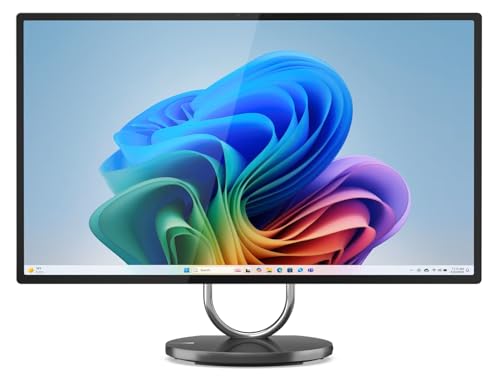
Where to buy
Check the latest price, availability and delivery on Amazon. Orders are placed on Amazon. We may earn a commission from qualifying purchases.
- Best overall under $2,500: Lenovo Yoga AIO 32i, Core Ultra 7 258V, RTX 4050, 32GB, 1TB — Check on Amazon
- HP OmniStudio X 32, Core Ultra 7 258V, 32GB, 1TB — Check on Amazon
- Apple iMac 24-inch, M4, 24GB Unified Memory, 512GB SSD — Check on Amazon
- Dell 27 All-in-One, Core 7 150U, MX570A, 64GB, 4TB SSD — Check on Amazon
See 2 more Amazon options
- Lenovo Yoga AIO 27, Core Ultra 7 255H, 16GB, 1TB — Check on Amazon
- HP OmniStudio X 32, Core Ultra 7 258V, 32GB, 1TB, Windows 11 Pro — Check on Amazon
Read the full guide ↓
Disclosure: As an Amazon Associate, reviewstook.com earns from qualifying purchases. Links to Amazon on this page are affiliate links; they cost you nothing extra. Listing details such as price and availability change often, so check the current Amazon listing before you buy.
Two thousand five hundred dollars is flagship money for an all-in-one, and the first thing to know about this tier is how thin it actually is. There is no long bench of premium all-in-ones waiting in this flagship band on Amazon. What genuinely lives in this band is a short list: two 31.5-inch 4K Windows flagships from HP and Lenovo, a fully loaded 27-inch Dell sold through marketplace listings, and Apple’s iMac in its higher memory and storage configurations. Above this guide’s ceiling, Amazon’s all-in-one listings mostly stop being manufacturer configurations at all and turn into reseller “upgraded” bundles — the same HP OmniStudio X, for example, appears in a premium-priced bundle with 64GB of memory and an 8TB SSD — where the extra money buys capacity you may not need from a seller you have to vet. This guide stays with the real flagship band and says plainly where it ends.
The second honesty note is about what “flagship” means in an all-in-one. You are not buying tower performance. Every machine here runs laptop-class processors, because that is what fits behind a slim screen, and only one pick in this guide — the Lenovo Yoga AIO 32i — carries a discrete graphics card, an RTX 4050 laptop GPU. What the money buys instead is the screen and the desk: 31.5-inch 4K panels with real brightness and color coverage, 32GB of memory as standard, 1TB or larger SSDs, proper webcams, wireless keyboards and mice in the box, and a setup that goes from cardboard to working desktop in minutes with exactly one power cable. Judged as a computer-plus-display-plus-peripherals package, a flagship all-in-one at this tier is a rational purchase. Judged purely on frames per dollar against a tower and a separate monitor, it never will be, and no review should pretend otherwise.
Our order of business below: the Yoga AIO 32i takes the top spot because it is the only machine here that pairs a 31.5-inch 4K screen with a real GPU, 32GB of memory and Windows 11 Pro — check the price on Amazon. The HP OmniStudio X 32 counters with the brightest panel in the class and the better stand. The iMac is the pick for anyone already living in Apple’s ecosystem, and the one machine here whose manufacturer sells it on Amazon directly. The Dell is the capacity monster — 64GB and 4TB — with a marketplace caveat attached. The smaller Yoga AIO 27 is the value play that sits well under the ceiling, and the second OmniStudio X listing is the Windows 11 Pro route to HP’s flagship. Below are the quick picks, detailed reviews of all six, a comparison table, a buying checklist for this tier, the mistakes that waste money at $2,500, and the questions flagship all-in-one buyers ask most.
In this guide
Quick Picks
Short on time, or comparing several options at once? Each row below names a buyer type and the product that suits it, with a link to the listing.
| Buyer type | Pick | Why it stands out | Link |
|---|---|---|---|
| Best overall under $2,500 | Lenovo Yoga AIO 32i, Ultra 7 258V, RTX 4050 | The only discrete GPU in this guide, on a 31.5-inch 4K screen | Check on Amazon |
| Best big Windows screen | HP OmniStudio X 32, Ultra 7 258V, 32GB | 550-nit 4K IPS panel, HDR 600, height-adjustable stand | Check on Amazon |
| Best for Apple households | Apple iMac 24-inch, M4, 24GB, 512GB | 4.5K Retina display, sold by Apple on Amazon, silent and simple | Check on Amazon |
| Best for memory and storage | Dell 27 All-in-One, 64GB, 4TB SSD | More RAM and storage than anything else here — marketplace listing | Check on Amazon |
| Best value flagship | Lenovo Yoga AIO 27, Ultra 7 255H | 27-inch QHD 120Hz rotating screen well under this guide’s ceiling | Check on Amazon |
| Best for Windows 11 Pro buyers | HP OmniStudio X 32, Windows 11 Pro | HP’s 4K flagship in its Pro-OS listing for work and business use | Check on Amazon |
How These Picks Were Chosen
The budget was applied as a ceiling for the whole machine, and every pick below is a real Amazon.com listing in the United States. Flagship all-in-one prices move constantly, because several of these listings are sold by third parties rather than by Amazon or the manufacturer, so check the price on Amazon for each pick before you buy. For the Windows 11 Pro listing of the HP OmniStudio X, the guidance is simply to buy it only when the live price is at or under this budget and competitive with the Home listing above it.
We did not use these machines ourselves. We read the manufacturer listings, specification pages and Amazon listing data, and compared the things that decide whether a flagship all-in-one earns its price: panel size, resolution, brightness and color coverage; processor class; memory capacity and whether it can ever be upgraded; storage; graphics, integrated or discrete; webcam and microphone quality for the video-call era; stand ergonomics; and who actually sells and warranties the machine. That last filter matters more at $2,500 than at any lower tier. Two of the six picks are manufacturer-channel listings with clean warranty stories. Others are marketplace or reseller listings — including “upgraded” configurations the manufacturer never sold in that form — and each review says so where it applies, because a 64GB Dell that Dell itself never configured is a different purchase from a 32GB HP that HP did.
Two reality filters sat on top of everything. The first is the soldered filter: at this tier, memory is soldered or on-package in almost every design, so the capacity you buy is the capacity you retire with, and this guide treats 32GB as the flagship standard and names the picks that ship with less. The second is the gaming filter, because this list of keywords lives in a gaming-PC category: an all-in-one is not a gaming rig, integrated graphics are integrated graphics at any price, and where a pick can genuinely game — one can, modestly — the review says exactly how far that goes instead of letting a 4K screen imply 4K gaming.
The 6 Best All-in-One PCs Under $2,500
Lenovo Yoga AIO 32i, Core Ultra 7 258V, RTX 4050, 32GB, 1TB
Who it suits: Creators, professionals and households who want the biggest, best Windows screen in this guide and the only real graphics card — photo and video work, light 3D, and casual gaming included.
Start with the component no other pick here has: an NVIDIA GeForce RTX 4050 laptop GPU with 6GB of GDDR6. In a category built on integrated graphics, that one line changes what the machine can do. GPU-accelerated filters and exports in photo and video editors run properly instead of adequately, 3D and CAD previews are workable, and gaming — the honest version — means modern titles at 1080p with DLSS, esports games well beyond that, and older AAA at the native panel resolution with settings discipline. It will not drive its own 4K screen at 4K in demanding games, and this guide will not claim otherwise; what it does is remove the hard ceiling that every other pick here lives under. Lenovo pairs the GPU with Intel’s Core Ultra 7 258V, a 32GB pool of LPDDR5X memory that lives on the processor package, and a 1TB PCIe Gen4 SSD.
The screen it all sits behind is a 31.5-inch 4K UHD IPS panel — 3,840 × 2,160, wide color coverage aimed at creative work, on a tilting metal stand with a design that reads as furniture rather than office equipment. The base hides a 15W wireless charging pad for your phone, the webcam is a 5MP IR unit for Windows Hello, connectivity runs to Wi-Fi 7 and Thunderbolt 4, and Lenovo includes the wireless keyboard and mouse. Windows 11 Pro is installed, which matters for business buyers. Check the price on Amazon for this model — it is a premium flagship listing that sits inside this budget.
- The only discrete GPU in this guide — RTX 4050 6GB for creative acceleration and real, if modest, gaming.
- 31.5-inch 4K UHD IPS display with 32GB of memory and a 1TB Gen4 SSD as standard.
- Wireless phone charging in the base, 5MP IR webcam, Thunderbolt 4 and Windows 11 Pro.
Honest limitation: The 32GB of memory is on-package and can never be upgraded, the RTX 4050 is a laptop part that games at 1080p rather than at the panel’s 4K, and the standard warranty on this listing family is a one-year mail-in term.
Choose it if you want one Windows machine that does creative work, office work and some gaming behind a single big 4K screen. Skip it if gaming is the priority — a tower at this money is in a different league — or if you need more than 32GB of memory over the machine’s life.

HP OmniStudio X 32, Core Ultra 7 258V, 32GB, 1TB
Who it suits: Home-office professionals and media-first buyers who want the brightest, most color-capable big screen in this guide and do not need a discrete GPU.
The OmniStudio X 32’s argument is its panel, and it is a strong one: 31.5 inches of 4K UHD IPS at a rated 550 nits — brighter than anything else here, the iMac included — with HDR 600 support and 95% DCI-P3 coverage. For a desk that faces windows, for photo work, and for simply reading text all day, that brightness and size combination is the best in this guide. The stand is height-adjustable, which almost no all-in-one bothers with, and there is an HDMI input, so the screen can double as a monitor for a laptop or console after the PC inside it ages — a quiet longevity feature worth real money in a machine whose computer cannot be separated from its display. A 5MP IR camera with HP’s Poly Camera Pro tuning handles video calls properly.
Inside, this listing runs the same Core Ultra 7 258V as the Lenovo, with 32GB of memory, a 1TB SSD and Intel’s Arc 140V integrated graphics. That GPU is the dividing line between the two 32-inch flagships: the Arc 140V is genuinely capable for office work, media, photo editing and light or older games, but it is not a creative-acceleration or gaming part the way the RTX 4050 is. In exchange, the HP buys the better screen and stand at a premium flagship price — check the price on Amazon. The seller caveat matters here: this configuration’s Amazon listing has been third-party only at recent checks, meaning the name in the “sold by” line is a reseller, not HP or Amazon. That is not automatically a problem, but at flagship money it means checking the seller’s rating, the return window and who honors the warranty before you pay.
- 550-nit 4K IPS panel with HDR 600 and 95% DCI-P3 — the brightest, most color-complete screen here.
- Height-adjustable stand and an HDMI input that lets the display outlive the PC inside it.
- Core Ultra 7 258V with 32GB of memory, 1TB SSD, Wi-Fi 7 and a 5MP IR camera.
Honest limitation: Integrated Arc graphics only — no discrete GPU at this price in HP’s line — the memory is not upgradeable, and the Amazon listing is third-party sold, so the warranty path runs through the seller.
Choose it if the screen is the purchase and your work is documents, media and photos rather than GPU-heavy projects. Skip it if you edit video seriously or game — that is the Lenovo above — or if a third-party seller at this price makes you uneasy.

Apple iMac 24-inch, M4, 24GB Unified Memory, 512GB SSD
Who it suits: Apple households, iPhone owners, and anyone who values silence, simplicity and resale value over screen size and ports.
The iMac is the odd one out in this guide in the best way: it is the only pick sold on Amazon by its own manufacturer. This configuration — Apple model MD2U4LL/A, in Pink, with the same hardware sold in six other colors — pairs the M4 chip in its full 10-core CPU and 10-core GPU form with 24GB of unified memory and a 512GB SSD. Check the price on Amazon — through Apple and Apple retailers, this is one of the more accessible routes in this guide to a genuinely flagship all-in-one experience. The 24-inch 4.5K Retina display (4,480 × 2,520) is smaller than the 31.5-inch panels above it but sharper per inch, at 500 nits with P3 wide color, and the 12MP Center Stage camera is the best webcam here by a wide margin.
What the iMac does better than every Windows pick is disappear. It is silent in normal use, it wakes instantly, the included Magic Keyboard has Touch ID, and macOS plus an iPhone is an ecosystem argument no specification table captures — calls, messages, AirDrop, Universal Clipboard. What it does worse is equally concrete. Twenty-four inches is twenty-four inches: side-by-side documents feel tighter than on the big panels. The 512GB SSD is half the storage of the Windows flagships at similar money, and neither memory nor storage can ever be changed. Ports are Thunderbolt/USB 4 only, the stand tilts but does not adjust for height, and gaming means Apple’s growing but still limited Mac library plus cloud services — the M4’s GPU is strong, the catalog is the constraint. Buy the iMac as the best appliance in this guide, not as the most computer.
- 4.5K Retina display at 500 nits with P3 color, and the best webcam in this guide (12MP Center Stage).
- M4 performance with 24GB of unified memory in a silent, one-cable design; Magic Keyboard with Touch ID included.
- Sold by Apple on Amazon — check the price on Amazon.
Honest limitation: The smallest screen here, half the flagship storage at 512GB, zero upgradeability, a tilt-only stand, and a gaming library limited by macOS rather than by the hardware.
Choose it if you are in Apple’s ecosystem, or you want the all-in-one that asks the least of its owner for the next six years. Skip it if you need Windows software, a big screen, or internal storage measured in terabytes.

Dell 27 All-in-One, Core 7 150U, MX570A, 64GB, 4TB SSD
Who it suits: Heavy multitaskers, virtual-machine and photo-library hoarders, and anyone whose first question about a computer is how much memory and storage it can hold.
Read the specification line the way a listing detective would: a 27-inch Full HD touchscreen, Intel’s Core 7 150U processor, an NVIDIA GeForce MX570A graphics chip, and then the two numbers that dwarf everything else in this guide — 64GB of DDR5 memory and a 4TB SSD. That capacity pairing is the entire argument. Sixty-four gigabytes is double the flagship standard, enough for virtual machines, enormous browser sessions, big photo libraries held in memory-hungry editors, and years of accumulated multitasking without the machine ever swapping. Four terabytes is four times the storage of the 32-inch flagships, enough to keep a media archive on the machine instead of on a shelf of external drives. The panel is a 100Hz touchscreen at 1,920 × 1,080, there is a 5MP webcam, Wi-Fi 6E, Windows 11 Pro, and a wireless keyboard and mouse in the box. This is a premium-tier marketplace listing inside this budget — check the price on Amazon.
Now the caveats, and at this tier they are the review. This is a marketplace listing, and 64GB/4TB is an upgraded configuration: Dell’s own factory specification for this model line tops out at 32GB, so a reseller has opened the machine, fitted larger parts, and become your effective warranty counterparty for them. That is a common, legitimate Amazon practice, but it means checking who the seller is, how long they have sold on Amazon, and exactly what their warranty covers before paying flagship money. The hardware underneath the capacity also deserves clear eyes: the Core 7 150U is an efficiency-class laptop processor, not a performance part, and the MX570A is an entry-level graphics chip — fine for driving the screen, video and light creative work, not a gaming or rendering GPU. And at 27 inches, Full HD is noticeably softer than the 4K panels above; you are trading pixel density for capacity. Buy this Dell for the memory and storage, with your eyes open about who is selling it.
- 64GB of DDR5 memory and a 4TB SSD — double and quadruple the flagship norms in this guide.
- 27-inch 100Hz touchscreen, 5MP webcam, MX570A graphics and Windows 11 Pro.
- Premium-tier marketplace listing — check the price on Amazon.
Honest limitation: A reseller-upgraded marketplace configuration — vet the seller and warranty — built on an efficiency-class CPU, an entry GPU, and a Full HD panel that is the least sharp here.
Choose it if capacity is your bottleneck and you are comfortable buying an upgraded configuration from a rated marketplace seller. Skip it if you want a factory configuration with a manufacturer warranty, a 4K screen, or strong single-core performance.

Lenovo Yoga AIO 27, Core Ultra 7 255H, 16GB, 1TB
Who it suits: Buyers who want a flagship experience — big QHD screen, current processor, real ergonomics — and would rather stay well under the budget than chase the last specification.
Not every pick in a $2,500 guide has to cost $2,500, and the Yoga AIO 27 is the proof. Its 27-inch QHD (2,560 × 1,440) IPS panel runs at 120Hz — the only high-refresh screen here besides the flagships’ bigger sibling — at 400 nits with 99% sRGB coverage, and it sits on the most talented stand in this guide: the screen tilts, swivels, lifts, and pivots into portrait, which writers, coders and anyone who reads long documents will use weekly. An HDMI input lets it moonlight as a monitor for a laptop or console. Inside is Intel’s Core Ultra 7 255H, a genuinely performance-class laptop processor — in raw CPU terms, arguably the strongest chip in this guide — with 16GB of LPDDR5X memory and a 1TB SSD. This is a mid-range-priced member of the flagship family, with the live price depending on seller and week — check the price on Amazon.
The compromises are the mirror image of the Dell’s: where the Dell overshoots on capacity and undershoots on screen, the Yoga undershoots on memory. Sixteen gigabytes is the one specification here that is not flagship-grade, and because the LPDDR5X is soldered, it is permanent — fine for office work, browsing, media and moderate creative projects for years, but the ceiling a heavy multitasker will eventually feel. Graphics are Intel’s integrated Arc, so the gaming story is esports and older titles at sensible settings, and the webcam and speakers, while good, do not match the 32-inch flagship’s presentation kit. None of that changes the value math: this is most of the flagship experience — the screen size most desks actually fit, the best stand, a top-tier CPU — well under this guide’s ceiling, with budget left over for software, a printer, or a very good chair.
- 27-inch QHD IPS at 120Hz on a stand that tilts, swivels, lifts and pivots to portrait.
- Core Ultra 7 255H performance-class processor with a 1TB SSD and HDMI input.
- Priced well under this guide’s ceiling — check the price on Amazon.
Honest limitation: 16GB of soldered memory is below flagship standard and can never be raised, and integrated graphics cap gaming and GPU-accelerated work.
Choose it if you want the smart-money flagship: big high-refresh screen, strong CPU, best ergonomics, budget left over. Skip it if you know your workload will want 32GB of memory — buy the 32i above instead.

HP OmniStudio X 32, Core Ultra 7 258V, 32GB, 1TB, Windows 11 Pro
Who it suits: Business buyers, remote workers on company policies, and professionals who need Windows 11 Pro on HP’s flagship screen — BitLocker, Remote Desktop, domain and policy management included.
This pick is the same flagship hardware as the second entry in this guide — the OmniStudio X 32, with its 31.5-inch 4K UHD IPS panel at 550 nits with HDR 600 and 95% DCI-P3, the Core Ultra 7 258V, 32GB of memory, a 1TB SSD, Intel Arc 140V graphics, Wi-Fi 7, HDMI input and the height-adjustable stand — in the Amazon listing that ships with Windows 11 Pro instead of Home. That single difference decides real purchases. Windows 11 Pro is what lets a machine join a workplace domain or Entra ID, encrypt its drive with BitLocker under company policy, host Remote Desktop sessions, and be managed by an employer’s IT tools; for a machine bought for work, or bought by an employer, Home is often simply not an option, and upgrading later costs money and an afternoon. If that is your situation, this listing is not a duplicate of the pick above — it is the version of the flagship you are actually allowed to buy.
Two disciplines apply. First, price: check the price on Amazon for this specific Pro listing — the rule is to buy it only when its live Amazon price sits at or under this budget and within a sensible margin of the Home listing, since the hardware is identical and the operating system is the only difference. If the Pro listing is priced well above the Home listing on the day you shop, buy the Home machine and budget for Microsoft’s own Pro upgrade instead. Second, seller: like the Home configuration, this listing’s availability runs through third-party sellers at times, so confirm the sold-by name, the warranty terms and the return window on the live page. The panel, stand and silicon are flagship-grade; the transaction deserves the same care as the specification sheet.
- HP’s 550-nit 4K flagship with Windows 11 Pro — BitLocker, Remote Desktop and business management ready.
- Identical hardware to the Home listing: Ultra 7 258V, 32GB, 1TB, Arc 140V, height-adjustable stand.
- HDMI input lets the 31.5-inch screen serve a work laptop as well as the PC inside it.
Honest limitation: You are paying for an operating-system edition, not more hardware — and its value depends entirely on the live price on the day you buy.
Choose it if your work requires Windows 11 Pro and you want it on the best big Windows screen in this guide. Skip it if Home covers your needs — the second pick in this guide is the same machine for personal use.

Comparison Table
| Product | Display | Processor / Graphics | Memory / Storage | Link |
|---|---|---|---|---|
| Lenovo Yoga AIO 32i | 31.5-inch 4K UHD IPS | Core Ultra 7 258V / RTX 4050 6GB | 32GB / 1TB | Check on Amazon |
| HP OmniStudio X 32 (Home) | 31.5-inch 4K IPS, 550 nits | Core Ultra 7 258V / Arc 140V | 32GB / 1TB | Check on Amazon |
| Apple iMac 24-inch M4 | 24-inch 4.5K Retina, 500 nits | Apple M4 10-core / 10-core GPU | 24GB / 512GB | Check on Amazon |
| Dell 27 All-in-One (upgraded) | 27-inch FHD touch, 100Hz | Core 7 150U / MX570A | 64GB / 4TB | Check on Amazon |
| Lenovo Yoga AIO 27 | 27-inch QHD IPS, 120Hz | Core Ultra 7 255H / Intel Arc | 16GB / 1TB | Check on Amazon |
| HP OmniStudio X 32 (Pro) | 31.5-inch 4K IPS, 550 nits | Core Ultra 7 258V / Arc 140V | 32GB / 1TB | Check on Amazon |
How to Choose an All-in-One PC Under $2,500
- Buy the screen first. In an all-in-one, the display is the one component you can never change, and you will look at it for the machine’s whole life. At this tier that means 4K at 31.5 inches (HP, Lenovo 32i), 4.5K at 24 inches (iMac), or a high-refresh QHD at 27 inches (Yoga 27). A Full HD panel at flagship money, like the Dell’s, only makes sense when capacity is worth more to you than sharpness.
- Treat 32GB of memory as the flagship standard. Memory is soldered or on-package in nearly every design here, so it is a lifetime decision. 32GB is the correct buy-once number; 24GB (iMac) is workable thanks to Apple’s memory efficiency; 16GB (Yoga 27) is the value compromise — take it knowingly, not accidentally.
- Decide what graphics honesty means for you. Only the Yoga AIO 32i has a discrete GPU. Integrated graphics from Intel and Apple are excellent for office, media and photo work and genuinely limited for gaming and 3D. If GPU work matters, there is one pick in this guide; if it does not, do not pay a premium imagining otherwise.
- Check who is selling it — every time. At this tier, Amazon listings split between manufacturer-sold (Apple), Amazon-sold, and third-party or reseller-upgraded configurations (the Dell, and the HP listings at times). A reseller upgrade can be good value, but the seller’s rating, history and warranty terms become part of the product. Read them.
- Price the whole desk, not the box. Every pick includes its display, webcam and wireless keyboard and mouse. Compared against a tower plus a 4K monitor plus peripherals, a flagship all-in-one is closer than the sticker suggests — and it returns desk space and cable sanity that a tower never will.
- Think about the screen’s second life. The HP flagships and the Yoga 27 have HDMI input, so when the computer inside ages out, the panel can serve a laptop, a console or a mini PC. The iMac and Yoga 32i cannot do this trick. On a six-year horizon, that feature quietly extends the purchase.
- Match the operating system to the job. Windows 11 Pro is a requirement, not a luxury, for many workplaces (BitLocker policy, domain join, Remote Desktop hosting). If your employer has any say in this machine, check before you buy the Home version of anything.
- Do not pay for capacity theater. Above this budget, Amazon’s all-in-one listings inflate quickly into premium-priced reseller bundles — 64GB and 8TB versions of mainstream machines. Extra RAM and SSD space are cheap parts; they do not turn a midrange all-in-one into a flagship. Buy the platform (screen, chip, build) first and capacity second.
- Plan the ergonomics. Most all-in-one stands only tilt. If you work long hours, the height-adjustable HP stand or the Yoga 27’s full-motion stand are worth real weight in the decision — or budget for a riser, because the screen height is fixed by the furniture otherwise.
- Keep the box and the receipt. Flagship all-in-ones ship as one large, fragile unit. Keep the packaging until you are sure the panel is perfect — dead pixels and backlight flaws are exactly what the first week’s return window is for, and reboxing a 31.5-inch screen without its foam is a project.
What $2,500 Actually Buys in an All-in-One — and Where the Band Ends
Shoppers reasonably ask why this guide, given a $2,500 ceiling, contains value picks well under the ceiling alongside premium flagships. The answer is the shape of the market. The flagship all-in-one band on Amazon is compressed: the best Windows machines — the 31.5-inch 4K HP and Lenovo — sit at the top of the band, with the live price depending on seller and week; the iMac’s worthwhile configurations sit below them; and near the top of the budget there is a gap where manufacturer configurations largely stop. What fills the space beyond it is not a better class of all-in-one but the same machines in reseller dress — bigger memory and SSD numbers at premium prices well above this budget — plus a handful of special editions that drift in and out of stock. Lenovo’s OLED Yoga AIO i Aura Edition, for example, has been listed on Amazon with a 4K OLED 165Hz panel, but its listing availability is inconsistent enough that we would not anchor a guide to it; if you find it in stock within this budget, it belongs in this conversation.
So the honest way to spend $2,500 here is not to insist on spending $2,500. It is to buy the best platform your work needs — screen, processor class, 32GB of memory, a seller you can trust — and let the total land where it lands. For most buyers that is the Yoga AIO 32i or the OmniStudio X 32. For Apple households it is the iMac, with money left over. For value hunters it is the Yoga 27, with a lot left over. The budget’s job at this tier is to remove compromise from the screen and the memory, not to be exhausted.
Common Buying Mistakes
- Assuming a $2,500 all-in-one games like a $2,500 gaming PC. It does not: laptop processors, one laptop RTX 4050 in this entire guide, and integrated graphics everywhere else. Buy an all-in-one for the desk and the screen.
- Paying flagship money for a reseller’s capacity upgrade without checking who the seller is or who warranties the upgraded parts.
- Buying 16GB of soldered memory to save money on a machine you plan to keep for six years. The saving is real; so is the ceiling, and it cannot be lifted later.
- Choosing by screen size alone. A 31.5-inch 4K panel and a 27-inch Full HD panel are different products that happen to share a category; resolution and brightness matter as much as inches.
- Ignoring the stand. A tilt-only stand at the wrong height costs you posture every day; check the ergonomics, or the price of a riser, before you order.
- Buying Windows 11 Home for a machine your employer’s policies require to run Pro — or paying a large premium for a Pro listing when the Home version plus Microsoft’s upgrade would cost less.
- Forgetting the iMac’s storage math: 512GB fills fast with photo and video libraries, and there is no internal upgrade path — budget for external or cloud storage from day one.
Final Recommendation
- Most buyers at this budget: Lenovo Yoga AIO 32i.
- Best screen and stand, no GPU needed: HP OmniStudio X 32 (Home).
- Apple households: Apple iMac 24-inch M4, 24GB, 512GB.
- Maximum memory and storage: Dell 27 All-in-One, 64GB, 4TB — from a vetted seller.
- Best value: Lenovo Yoga AIO 27.
- Work-mandated Windows 11 Pro: HP OmniStudio X 32 (Pro).
Our top two at this budget are the Yoga AIO 32i, because it is the only machine here with no hard ceiling — big 4K screen, 32GB, a real GPU, Pro operating system — check the price on Amazon — and the OmniStudio X 32, because its brighter panel, HDR support and height-adjustable stand make it the better pure home-office instrument when graphics do not matter. The iMac is the right answer for a different question — the Apple question — and answers it completely. Shoppers who do not need the 32-inch class should look hard at the Yoga 27 and keep the change, and shoppers whose budgets are smaller still should see Best All In One PC Under $1500 before they stretch. If your work is split between a desk machine and presenting or streaming from it, Best All In One PC For Streaming Under $2500 is the companion guide, and if the flagship is destined for a compact room, start with Best All In One PC For Small Spaces Under $2500. Check the sold-by line and the live price before you order — at this tier, those two lines are part of the product.
Frequently Asked Questions
Is a $2,500 all-in-one worth it over a $1,500 one?
It is worth it for specific, nameable things: a 31.5-inch 4K panel instead of a 27-inch QHD or FHD one, 32GB of memory instead of 16GB, a discrete GPU in the Lenovo’s case, better webcams, stands and brightness. It is not worth it as a general performance jump — the processors are the same laptop-class parts. Buy the tier for the screen and the memory, or save the money; our under-$1,500 guide exists precisely because the mid-tier is strong.
Can any of these all-in-ones actually game?
One, modestly. The Yoga AIO 32i’s RTX 4050 laptop GPU plays modern games at 1080p with DLSS and esports titles at high frame rates, which makes it a legitimate casual-gaming machine — though not a 4K gaming machine despite its 4K screen, a distinction Best All In One PC For 1440p Gaming Under $2500 explores from the other side. The iMac plays Apple’s native and cloud catalog well. The Intel integrated graphics in the HP and smaller Lenovo picks handle esports and older games at sensible settings. For serious gaming at this money, buy a tower.
Why do some of these listings come from third-party sellers instead of the manufacturer?
Because Amazon’s flagship all-in-one supply is partly a reseller market. Manufacturers sell some configurations directly (Apple does; HP and Lenovo do for some models), while other listings — including upgraded configurations with more memory or storage than the factory offers — come from resellers who buy, modify and resell machines. It is a legitimate channel, but the seller becomes part of the purchase: check their rating, sales history, return terms and who provides the warranty, especially on any listing whose specification exceeds the manufacturer’s own maximum.
Can I upgrade the memory or storage later?
Assume no for memory: it is soldered or on-package in the Lenovo and Apple picks and effectively fixed in the HP flagships. Storage is sometimes serviceable in Windows all-in-ones but rarely user-friendly, and opening a reseller-sealed machine can complicate its warranty. The correct strategy at this tier is to buy the memory and storage you will need in year five, which is why this guide weights 32GB and 1TB as the flagship baseline.
iMac or a Windows flagship — how do I decide?
By software and ecosystem, not by specifications. If your work lives in Windows applications, your employer manages Windows machines, or you want the big 31.5-inch screens and the one real GPU, buy the Lenovo or HP. If your household runs on iPhones, your software exists on macOS, and you value silence, simplicity and resale value, buy the iMac and accept its smaller screen and storage. Neither answer is wrong; buying against your ecosystem is.
What happens when the computer inside an all-in-one gets old?
The screen’s fate depends on one feature: HDMI input. The HP OmniStudio X models and the Yoga AIO 27 can become monitors for a future laptop or mini PC, extending the purchase’s useful life by years. The Yoga 32i and the iMac cannot — when their computers age out, the whole unit retires (the iMac’s strong resale value softens that considerably). If you keep machines a long time, weight the HDMI-input picks accordingly.
Is 24GB of memory in the iMac a problem?
For the iMac’s audience, generally no. Apple’s unified memory architecture uses RAM efficiently, and 24GB handles heavy browsing, office work, photo editing and moderate video projects without complaint. It is less headroom than the 32GB Windows flagships offer, and professionals with very large timelines or virtual machines should notice the difference — but as a household and professional-mainstream configuration, 24GB is a reasonable specification, not a corner cut.


