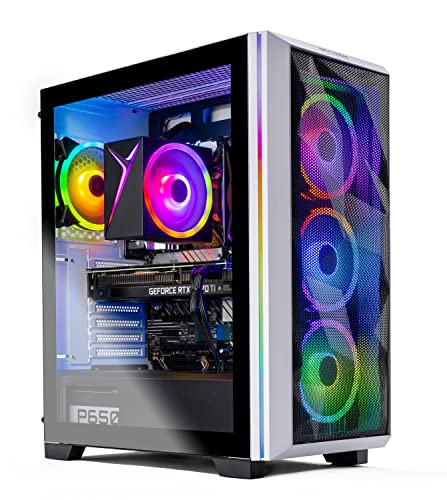
Where to buy
Check the latest price, availability and delivery on Amazon. Orders are placed on Amazon. We may earn a commission from qualifying purchases.
- Best overall for entry 4K in a tight room: Skytech Chronos Gaming PC, Ryzen 7 5700X, RTX 4070 Ti 12GB — Check on Amazon
- HOENGAGER Gaming PC, Intel Core i7-12700F, RTX 4070 12GB, 32GB DDR4 — Check on Amazon
- CYBERPOWERPC Gamer Xtreme VR, Intel Core i7-13700F, RTX 4060 Ti 16GB — Check on Amazon
- Thermaltake LCGS Quartz i1460, Intel Core i5-14400F, RTX 5060 — Check on Amazon
See 2 more Amazon options
- CYBERPOWERPC Gamer Master, AMD Ryzen 7 8700F, RTX 4060 Ti 8GB — Check on Amazon
- iBUYPOWER Scale, AMD Ryzen 5 7600, RTX 4060 Ti 8GB — Check on Amazon
Read the full guide ↓
Disclosure: As an Amazon Associate, reviewstook.com earns from qualifying purchases. Links to Amazon on this page are affiliate links; they cost you nothing extra. Listing details such as price and availability change often, so check the current Amazon listing before you buy.
Start with the fact this entire guide hangs on: not one of the six machines below is small. Every pick is a full-size gaming tower. No mini PC, no small-form-factor build, no console-sized box appears anywhere in it — because at $1,200, the hardware that makes entry-level 4K gaming real (RTX 4060 Ti, RTX 4070 and, on a deal day, RTX 4070 Ti graphics cards, plus the power supplies and cooling they demand) is sold in towers, and a guide pretending otherwise would be lying in its opening paragraph. So at this budget, “small spaces” is not a product category. It is a placement problem: tower-shaped performance to buy, a not-tower-shaped amount of room to put it in. What follows treats that problem head-on: which tower earns its footprint best, where each can live, and how to measure your space before money moves.
The usual failure in this category is not buying the wrong PC. It is buying the right PC for a space it does not fit: the tower too deep for the alcove, the glass case exiled to a closed cabinet where it slowly cooks, the machine parked on carpet with its bottom intake breathing lint. None of those show up in a benchmark; all are measurement problems, avoidable with a tape measure and ten honest minutes. So placement is graded here the way other guides grade frame rates — by class and documented fact. Where a listing specifies something that decides where a machine can live (a glass case, a radiator, a white finish, three display outputs, peripherals in the box), the review uses it. Where the sources publish no dimensions — and for most of these towers they do not — this guide prints none: no invented litre counts, no guessed weights, no made-up noise figures. Instead, the How to Choose section turns the live listing’s own specification block into your measuring instrument, the only dimension source true for the exact unit arriving at your door.
The 4K side needs the same brevity and the same honesty. At $1,200, 4K gaming means 4K output with DLSS upscaling doing the heavy lifting — rendering internally at a lower resolution, reconstructing a convincing 4K image — at medium-high settings. Native 4K ultra belongs to graphics cards costing close to this whole budget alone. And the price discipline carries over untouched, because a small room changes nothing about what a machine costs: check the price on Amazon for every pick, and treat the $1,200 ceiling as a hard line — a machine belongs here only while its live listing sits at or under it, and every review flags picks whose pricing wanders above that line. Measure first, check the live price second, order third.
In this guide
Quick Picks
Short on time, or comparing several options at once? Each row below names a buyer type and the product that suits it, with a link to the listing.
| Buyer type | Pick | Why it stands out | Link |
|---|---|---|---|
| Best overall for entry 4K in a tight room | Skytech Chronos, Ryzen 7 5700X, RTX 4070 Ti 12GB | The strongest GPU here earns its tower footprint best — check price on Amazon; it fits this budget only at the ceiling | Check on Amazon |
| Best balanced 4K build | HOENGAGER, Intel Core i7-12700F, RTX 4070 12GB, 32GB DDR4 | 4070-class power and double RAM in a glass showcase case — buy only at or under the ceiling | Check on Amazon |
| Best for texture headroom | CYBERPOWERPC Gamer Xtreme VR, i7-13700F, RTX 4060 Ti 16GB | 16GB of VRAM and three display outputs for a monitor-plus-TV corner | Check on Amazon |
| Best new-generation features | Thermaltake LCGS Quartz i1460, i5-14400F, RTX 5060 | Current-generation GPU in a clean white build that looks right beside a TV — check price on Amazon | Check on Amazon |
| Best AM5 value | CYBERPOWERPC Gamer Master, Ryzen 7 8700F, RTX 4060 Ti 8GB | Modern AM5 platform at a budget-friendly tier — check price on Amazon; one footprint, years of upgrades | Check on Amazon |
| Best everyday price | iBUYPOWER Scale, Ryzen 5 7600, RTX 4060 Ti 8GB | An everyday mid-range pick that fits this budget without deal-hunting — check price on Amazon; keyboard and mouse included | Check on Amazon |
How These Picks Were Chosen
The performance filter is inherited from the base guide unchanged, because the room does not alter what 4K demands. Every card here is an NVIDIA RTX part with DLSS, since at $1,200 upscaling is the mechanism the whole tier stands on: render internally around a 1440p-class workload, reconstruct the 4K image. VRAM was weighed as a headline specification — at 4K output, texture data runs out before rendering power does, so 8GB cards are graded as upscaling machines that must manage textures in the heaviest titles, 12GB counts as the comfortable working minimum, and 16GB as headroom whose benefit is stability, not speed. Around the card, each machine had to be a real PC: a modern multi-core CPU, a 1TB NVMe SSD, at least 16GB of system RAM — and where a listing trims a verifiable corner, the review names it; one pick below ships its 16GB as a single stick, and its review flags the remedy.
On top of that sat a placement filter, deliberately narrow because it runs on documented facts only. A pick could earn placement credit solely for things its listing actually specifies: a tempered-glass case demanding a protected, out-of-traffic position; a 240mm radiator needing moving air across it; a white finish that advertises dust and asks for a visible, reachable home; three display outputs letting one tower feed a desk monitor and a 4K TV; a keyboard and mouse in the box, two fewer devices fighting over a small desk. The research records no case dimensions, volumes, weights or noise figures for these six towers, so the comparison table grades placement by class — cooling architecture, case material, output count — and the buying routine sends you to the one place the true numbers live: the product-information block of the live listing for the exact unit you are about to buy. That is a refusal to invent the numbers your purchase depends on.
The budget was enforced as a hard ceiling, exactly as in the base guide. A machine qualifies only while its live Amazon price sits at or under $1,200. Prices here swing widely between deal events, so no printed figure could stay true for long; instead, every pick points you at the live listing to check price on Amazon, and where pricing wanders far above the ceiling, the review frames the pick as wait-for-a-better-day or walk away. We did not use these machines ourselves, and no frame-rate number appears here, because none was measured; performance is described by GPU tier, VRAM and settings class, which is what the evidence supports.
The 6 Best 4K Gaming PCs for Small Spaces Under $1,200
Skytech Chronos Gaming PC — Ryzen 7 5700X, RTX 4070 Ti 12GB
Who it suits: The space-poor buyer who can surrender exactly one tower footprint and wants the most genuine 4K that footprint can hold — and who will wait for a deal price to get it.
The spatial logic is this pick’s whole case. If the room accommodates one tower, the only question that matters is what the tower contains — and the Chronos contains the strongest graphics card here by a full class: an RTX 4070 Ti with 12GB of GDDR6X, comfortably clear of the RTX 4070 below and roughly a tier and a half beyond the 4060 Ti machines. Where the 4060 Ti picks plan around DLSS Balanced and medium-high settings, the Chronos holds DLSS Quality in demanding titles, keeps textures high on its 12GB, and in lighter or older games renders at or near native resolution — the sole pick here where the word “native” belongs at all. On a 4K TV at 60Hz, how most entry-4K gaming in a small room actually happens, nothing else fills the panel as convincingly from the same rectangle of floor.
The supporting parts are a generation older and entirely adequate: an eight-core Ryzen 7 5700X on AM4, 16GB of DDR4 3200, a 1TB NVMe SSD and a 750W Gold power supply — headroom rather than a bare-minimum unit, which matters in a warm room, since a supply cruising below its limit runs cooler and quieter than one straining at it. At 4K the processor is not the bottleneck; AM4’s honest cost is tomorrow, not today, because the socket has no next CPU generation coming. Skytech’s listing adds that the graphics card brand may vary: model and memory are the specification, board partner is not. Grade the Chronos as the guide’s heat leader by class — a 4070 Ti tower is the warmest thing here under load — so it takes your best-ventilated position: open air at intake and exhaust, off carpet, out of any cabinet.
Then the price, stated without softening. The Chronos is really a premium-tier machine that occasionally drops into this guide’s budget — and it leads this guide only while it is down here. Check price on Amazon: if the live listing sits at or under the $1,200 ceiling, it is the strongest buy in the guide; if it has climbed back toward its premium tier, it does not belong here at all. In a small room the discipline doubles, because you spend scarce space alongside scarce money; tower room given to this machine at a premium price is the worst trade in the guide. Set an alert; buy only when the live price fits the ceiling, and otherwise hand the footprint to a machine below.
- RTX 4070 Ti 12GB — the strongest GPU in this guide; the most 4K performance per unit of surrendered floor.
- 12GB of VRAM — high textures at 4K output stay high, where 8GB cards must turn them down.
- 750W Gold power supply — headroom that also runs cooler and quieter in a warm small room.
Honest limitation: It belongs in this guide only when its live price drops to the ceiling — it usually sits in a premium tier above this budget; the AM4/DDR4 platform is a dead end for future CPU upgrades, and as the hottest-running class here it demands the best-ventilated spot in the room.
Choose it if the live price fits the ceiling and you have one well-ventilated tower spot to give. Skip it if the live price has climbed back to premium tier, or your only available spot is enclosed — at that price, and in that spot, this is the wrong guide’s answer.

HOENGAGER Gaming PC — Intel Core i7-12700F, RTX 4070 12GB, 32GB DDR4
Who it suits: Buyers whose small room doubles as their showcase — who want balanced entry 4K in a glass case built to be looked at, and have somewhere it can be looked at safely.
The RTX 4070 is where honest 4K begins for most players, in the formula’s most comfortable form: 12GB of GDDR6X, DLSS Quality as the default rather than the stretch, high textures the memory can genuinely hold, medium-high to high settings in current releases, and native or near-native rendering across the huge back catalogue predating today’s hardware-hungry generation. Around the card sits the most grown-up build in the guide: a twelve-core Core i7-12700F (eight performance cores, four efficiency), 32GB of DDR4 3200 — twice the memory of most rivals here, a tangible benefit when the same small desk hosts a browser, chat and recording software beside the game — a 1TB M.2 PCIe SSD, and Windows 11 Pro. None of it renders a frame faster at 4K, where the GPU rules; all of it makes a better daily computer in the one room where the computer must do everything.
Its placement story is written in its materials, which the listing documents plainly: a tempered-glass RGB case and a 240mm AIO liquid cooler. Read both as placement instructions. Glass is furniture, and in a small room furniture placement is a safety decision before an aesthetic one — a visible, protected position, out of the traffic path where chair legs and vacuum cleaners travel, never wedged into a shelving unit’s last slot. The radiator carries the second instruction: liquid cooling moves the CPU’s heat to a radiator needing moving air across it, so a tower shoved flush to a wall or sealed in a cabinet defeats the exact hardware you paid for. The documented Wi-Fi and Bluetooth are the quiet spatial win — where the router lives elsewhere, wireless removes the longest, ugliest cable run from the placement equation, though a wired connection stays better for competitive play when a run is feasible.
The caveat is verification discipline, printed so you can apply it yourself: this review makes no price claim for the HOENGAGER at all — check price on Amazon, because only the live figure counts. It earns its place on specification — the balanced RTX 4070 build the category needs — with a condition bolted on: buy only when the live listing shows it at or under $1,200, a line RTX 4070 prebuilts have historically traded on both sides of. At or under the ceiling, it is arguably the most sensible purchase here, and the only one whose case rewards the visibility a small room imposes anyway. Above it, wait for the Chronos to drop to the ceiling or take the 16GB CyberPowerPC below instead.
- RTX 4070 12GB — entry 4K in its comfortable form: DLSS Quality, high textures, no drama.
- 32GB of DDR4 — double the RAM of most rivals here, for the game-plus-everything-else desk.
- Tempered-glass case and 240mm AIO — a showcase build whose materials dictate a protected, ventilated position.
- Wi-Fi and Bluetooth documented — no forced Ethernet run dictating where the tower must sit.
Honest limitation: The pick is conditional on price: excellent at or under the $1,200 ceiling — check price on Amazon — and out of scope above it. The glass case is also the most fragile placement in the guide — it cannot take the knocks a traffic-path corner delivers.
Choose it if the live price is at or under $1,200 and you have a visible, protected, ventilated spot worthy of a glass case. Skip it if the listing sits above the ceiling on the day you shop, or the only space going is a floor corner in the walkway — do not stretch for it in either sense.

CYBERPOWERPC Gamer Xtreme VR (GXiVR8040A14) — Intel Core i7-13700F, RTX 4060 Ti 16GB
Who it suits: The texture-first 4K player working a single corner — one tower that must feed both a desk monitor and a 4K TV, playing the big open-world titles where VRAM, not raw speed, runs out first.
The specification trades in an unusual direction. NVIDIA sells the RTX 4060 Ti in two memory sizes under one name — 8GB, and the 16GB version fitted here — with identical rendering speed. At 1080p the extra memory is close to decoration; at 4K output it becomes functional, because texture packs and sprawling open worlds can overflow 8GB even while the GPU renders internally at an upscaled resolution. Overflow arrives as stutter, late-popping textures and settings quietly turning themselves down. The 16GB card does not have that failure mode at this tier, so its settings budget can go where a 4K screen shows it off — textures — with effects held at medium-high and DLSS doing the rest. Just do not mistake the trade for speed: in raw rendering this machine sits with the other 4060 Ti picks and behind both 12GB cards, running the same DLSS Balanced-or-Quality method. The money buys fidelity and smoothness inside that method, not a faster one.
For a small room, the decisive documented feature sits on the back panel: one HDMI and two DisplayPort outputs. Three display outputs are a spatial feature, not spec-sheet garnish. The classic small-room arrangement is one PC serving two screens — a desk monitor for work and ordinary play, the 4K TV across the room for the games that deserve it — and a tower driving both at once deletes the alternative: a second device competing for the room’s surfaces and sockets. Place it for that job, in the corner from which both screens are reachable, and walk the cable runs before the tower lands. The build backs the role up: a sixteen-core Core i7-13700F, 16GB of DDR5 on a B760 platform, a 1TB PCIe Gen4 NVMe SSD. One detail the listing material left unconfirmed is whether that memory is a single stick or a pair — check the live listing before ordering, because dual-channel matters, and if it arrives as one stick, the second is the cheapest upgrade in PC gaming.
Price-wise, the machine straddles the ceiling and gets the Chronos treatment: its live price moves around this guide’s budget, so check price on Amazon and buy only while it sits at or under the ceiling. At or under the ceiling it is a strong, distinctive buy — the texture-headroom pick, and the one-machine answer to a two-screen room. Above the ceiling it competes with machines a class up, and the recommendation does not follow it there.
- 16GB of VRAM, the most here — texture headroom that deletes the 8GB stutter-and-pop-in failure mode.
- One HDMI plus two DisplayPort outputs — one tower honestly serving a desk monitor and a 4K TV.
- i7-13700F with sixteen cores and a DDR5 platform — nothing else in the box limits the card.
Honest limitation: The 16GB buys headroom, not speed — raw rendering is 4060 Ti class, so 4K still means DLSS and medium-high settings; the system RAM’s stick configuration is unconfirmed, and the pick only fits this budget when its live price sits at or under the ceiling — check price on Amazon.
Choose it if your games are texture-heavy, your room runs two screens from one corner, and you catch it while its live price fits the ceiling. Skip it if you value maximum frame rates over texture fidelity — the 12GB cards render faster — or if its live price has climbed above the ceiling.

Thermaltake LCGS Quartz i1460 — Intel Core i5-14400F, RTX 5060 8GB
Who it suits: The features-first buyer whose tower will live visibly beside the TV — who wants the current generation’s upscaling in the one build here designed to be looked at — and check price on Amazon, because it typically sits comfortably inside this budget.
Everything else in this guide runs an RTX 40-series card. The Quartz runs an RTX 5060, the current generation’s entry model, and its 4K case rests on features rather than muscle — in raw rendering it belongs in the 4060-class conversation, not secretly above the 4060 Ti picks. What the newer silicon adds is the most advanced version of the technology this tier leans on: the latest DLSS upscaling plus multi frame generation, which synthesises extra frames between rendered ones. Layered over a healthy base frame rate in supported titles, that is a genuine 4K tool, because 4K is where rendered frames cost the most. Asked to substitute for a base rate that is not there, it manufactures a smoothness that feels wrong — hence the ordering governing every 8GB card here: settings first, upscaling second, frame generation last. The capacity ceiling is 8GB of GDDR7: fast memory, small pool, and in the heaviest titles at 4K output the same texture reductions the 8GB 4060 Ti machines need; no generation badge rewrites that arithmetic.
Its placement identity is its finish, and in a small room the white case cuts both ways. In its favour: a tower in a small room cannot hide, so a machine built to sit visibly beside a 4K TV — clean white panels, RGB memory glowing behind them — stops being an appliance you apologise for and becomes part of the room. Against it: white advertises dust that black cases forgive, and a visible tower collects that dust exactly where you can see it, so this pick commits you to a duster on a schedule and a spot you can reach all the way around. Place it like furniture — visible, ventilated, reachable — not in the dark corner where its looks are wasted and its dust goes unseen until it is insulation. The supporting specification is tidy, with one deliberate step back: a ten-core Core i5-14400F that will not limit this card at 4K, a 1TB NVMe M.2 SSD, and 16GB of Thermaltake’s ToughRam DDR4 at 3600MHz on a B760 platform, where the CyberPowerPC machines below offer DDR5. With the graphics card carrying the load, that gap is small in today’s games; it counts more as a statement about the platform’s future, since DDR4 and this socket are both at the end of their lines.
Pricing is the friendliest thing about it. It lives in the comfortable middle of this budget rather than straining at the ceiling, so buying it rarely takes alert-watching or expired-deal archaeology: the best-looking tower in the guide is also among the easiest to buy sanely. Check price on Amazon, buy it for its features and looks, and set expectations to the 8GB class it belongs to.
- RTX 5060 — current-generation silicon carrying the newest DLSS and multi frame generation here.
- White showcase build — the one pick designed to live visibly beside a TV; budget it a visible, reachable, dustable spot.
- Comfortably mid-budget pricing — check price on Amazon; no alert-watching heroics needed.
Honest limitation: 8GB of VRAM caps it at the upscaling class — DLSS plus medium-high settings and texture discipline at 4K, frame generation as a top-up rather than a foundation; the DDR4 platform has no upgrade future, and the white finish shows every week of dust you skip.
Choose it if you want the newest features at a comfortable mid-budget price — check price on Amazon — and your tower will live on display. Skip it if texture-heavy 4K gaming is your main use — the 16GB CyberPowerPC above exists for you — or if the machine will live somewhere you cannot reach to clean it.

CYBERPOWERPC Gamer Master (GMA2900A) — AMD Ryzen 7 8700F, RTX 4060 Ti 8GB
Who it suits: The value-and-future buyer in a small room — someone who can surrender a tower footprint exactly once and wants that single footprint to stay useful through years of upgrades.
Strip the pitch down and the Gamer Master is the familiar 8GB 4060 Ti recipe — DLSS Quality or Balanced at 4K output, medium-high settings, textures managed rather than maxed in the titles that punish 8GB — served at a budget-friendly price — check price on Amazon — and on its longest-lived platform. That recipe is a perfectly enjoyable way to play on a 4K TV, bought with open eyes. What CyberPowerPC wraps around the card is an eight-core Ryzen 7 8700F on AMD’s AM5 socket, a B650 chipset, 16GB of DDR5 and a 1TB PCIe Gen4 NVMe SSD. In a big room, an upgrade runway is a convenience; in a small room it is a spatial strategy. AM5 is the platform AMD is still building on, so when a future graphics card turns this into a genuinely stronger 4K machine, the upgrade happens inside the footprint you already surrendered — new card, same rectangle of floor, no second tower, no furniture negotiation. The AM4 Chronos and the DDR4 machines cannot promise that; their upgrades arrive as a replacement tower, and a replacement tower in a small room is a logistics event.
The price completes the case: among these six, the Gamer Master sits in the friendliest tier — check price on Amazon — and bought from Amazon it can leave room in the budget for placing it properly: longer cables, a second SSD, a 32GB DDR5 kit. One warning travels with the bargain: marketplace sellers list the same model far higher, so the seller’s name and the cart total are part of the purchase; a markup from an unfamiliar seller is not the machine improving.
The weaknesses are its class’s, plus the discipline its pricing demands. The 8GB ceiling is permanent for this card. The 8700F’s eight cores do not out-game the i7s above it; its virtue is the socket beneath it. And nothing in its listing documentation singles out its case, cooling layout or outputs, so its placement grade is honestly plain: a standard tower, owed standard clearances, kept off carpet and out of cabinets, earning its spot on platform and price rather than packaging. Accept those three things and this is the most future-proof purchase in the guide — and in a one-tower room, future-proof is the entire argument.
- The friendliest price tier in this guide — check price on Amazon, and buy from Amazon itself rather than a marked-up marketplace seller.
- AM5 platform with DDR5 and a B650 board — upgrades happen inside the same footprint for years.
- Ryzen 7 8700F (eight cores) and a Gen4 SSD — nothing in the box embarrasses the card.
Honest limitation: The 8GB of VRAM defines its 4K life permanently — DLSS and texture discipline, forever; and marketplace sellers list it far above the Amazon listing’s price, so the seller matters as much as the price.
Choose it if you want entry 4K now with a real upgrade path later, at a genuinely budget-friendly price — check price on Amazon — in the only tower spot you have. Skip it if upgrades are not your habit and day-one 4K is the whole point — the 12GB cards do that job.

iBUYPOWER Scale (SCA5N46T01) — AMD Ryzen 5 7600, RTX 4060 Ti 8GB
Who it suits: The buyer with the smallest desk in this guide’s audience — who wants the simplest transaction, the fewest extra boxes and cables, and a tower whose price has never needed a deal event to fit the budget.
What sets the Scale apart is how its price behaves: it is the everyday pick of this guide, a mid-range machine whose live price fits this budget without waiting for a deal event — check price on Amazon. No alerts, no expired-deal archaeology, no seller roulette; it is simply an honestly priced gaming PC. The specification for the money is properly modern: a six-core Ryzen 5 7600 on AM5 — the same one-footprint-forever upgrade logic as the Gamer Master above — an RTX 4060 Ti 8GB, a 1TB NVMe SSD, Wi-Fi and Windows 11 Home. Its 4K method is the familiar 8GB one: DLSS carrying the load, medium-high settings, textures set with the memory limit in mind — a satisfying experience on a 4K TV, especially across the decade-deep library this card class handles at 4K without strain.
Its spatial virtue is subtraction. A keyboard and mouse ride in the box, backed by a one-year manufacturer warranty — and in a small room, what is in the box is a placement feature. Every peripheral you do not buy separately needs no cable route across a small desk, no corner of the surface, no packaging stored in a room with no storage. The Scale arrives as one tower and one modest accessory box, and setup is finished. Weigh that against how desks actually shrink: a tower, then a keyboard box, a mouse box, a headset stand, a controller dock — clutter by accretion. When the desk is also the dining table, the machine bringing its own peripherals is the pick that respects the surface it lives on.
Then the flaw, which the listing states in its own title: the 16GB of DDR5-5200 ships as one stick — 16×1. Single-channel memory taxes exactly the moments you feel most, the minimum frame rates in CPU-sensitive scenes. The remedy is the cheapest in this guide: a second matching 16GB stick, restoring dual-channel and lifting the machine to 32GB in the same motion — spatially free, because it happens inside the case you already placed. Budget for it from the start — a matching stick is among the cheapest upgrades in PC gaming — and the Scale keeps its value crown. Its six cores are the fewest here — ample for 4K gaming, where the GPU leads, but the least headroom for heavy streaming alongside. Bought with the stick, it answers the guide’s simplest question: what do I buy today, at a normal price, with the least extra stuff, to play on my 4K TV?
- An everyday mid-range price that fits the ceiling without deal-hunting — check price on Amazon.
- Keyboard and mouse included — the fewest extra boxes, cables and desk claimants in this guide.
- AM5 and DDR5 platform with a six-core Ryzen 5 7600 — upgrades stay inside the same footprint.
Honest limitation: The 16GB arrives as one stick (16×1), so memory runs single-channel until the second stick lands — budget for it on day one; and 8GB of VRAM sets the same 4K settings ceiling as the other 4060 Ti picks.
Choose it if you want entry 4K at a normal, everyday price inside this budget — check price on Amazon — with peripherals handled, and you will add the second RAM stick. Skip it if opening the case is a hard no — the 32GB HOENGAGER at the ceiling is your pick instead, price permitting.

Comparison Table
| Product | GPU / VRAM | CPU / RAM / Storage | Small-space verdict | Link |
|---|---|---|---|---|
| Skytech Chronos | RTX 4070 Ti / 12GB | Ryzen 7 5700X / 16GB DDR4 / 1TB | Most 4K per footprint — only when the live price fits the ceiling; give it the room’s best-ventilated spot | Check on Amazon |
| HOENGAGER Gaming PC | RTX 4070 / 12GB | i7-12700F / 32GB DDR4 / 1TB | Glass showcase case + 240mm AIO — protected, visible, ventilated placement only | Check on Amazon |
| CYBERPOWERPC Gamer Xtreme VR 16GB | RTX 4060 Ti / 16GB | i7-13700F / 16GB DDR5 / 1TB Gen4 | Three display outputs — one tower for desk monitor and 4K TV | Check on Amazon |
| Thermaltake LCGS Quartz i1460 | RTX 5060 / 8GB | i5-14400F / 16GB DDR4 / 1TB | White TV-side build — visible and reachable, or the dust wins | Check on Amazon |
| CYBERPOWERPC Gamer Master | RTX 4060 Ti / 8GB | Ryzen 7 8700F / 16GB DDR5 / 1TB Gen4 | Budget-friendly price, AM5 runway — one footprint that upgrades for years | Check on Amazon |
| iBUYPOWER Scale | RTX 4060 Ti / 8GB | Ryzen 5 7600 / 16GB DDR5 (1 stick) / 1TB | Keyboard + mouse in the box — least extra clutter on a small desk | Check on Amazon |
How to Choose a 4K Gaming PC for a Small Space Under $1,200
Placement first, product second — that ordering is this entire guide in one line. Run the measuring routine before falling for any pick above, because the routine decides which picks are even eligible for your room.
- Step 1 — Measure the spot, not the room. Fix the exact position the tower will occupy and measure its width, depth and height. Then open the live Amazon listing for the machine you are considering and find its dimensions in the product-information block — for that exact model, the only dimension source this guide trusts, because it describes the unit that will actually arrive. If those numbers do not fit your spot with room to spare, the machine is not a pick for your room, whatever its graphics card.
- Step 2 — Add clearance before comparing. A listing’s size is the size of the box, not of the installation. Budget working clearance on every side that breathes: room ahead of intakes, room behind and above exhausts, space at the back to plug and unplug cables. A tower that fits with zero clearance fits on paper and suffocates in practice; if your spot only works with the case flush to walls on three sides, it does not work.
- Step 3 — Tape the footprint. Mark the candidate’s outline on the floor or desk with painter’s tape — listing dimensions plus your clearance — and live with the tape for a day. Walk past it, sit at the desk, open the door, pull out the chair. Tape is free and return shipping is not, and the rectangle that annoys you as tape will not improve as a humming tower.
- Step 4 — Walk the cable run. From the taped outline, trace every cable the setup needs: power to a socket, display to the monitor or TV, Ethernet if you are wiring it. Measure the longest run against the cables you own or will buy. The Gamer Xtreme VR’s three outputs only help a two-screen room if both screens are reachable from one corner; the HOENGAGER’s Wi-Fi only frees you from the Ethernet run if your wireless is genuinely strong where the tower will sit. Cable runs discovered after delivery are how towers end up in bad spots for years.
- Step 5 — Then, and only then, order. With a verified spot, spend the remaining decision on the machine itself: price discipline (the Chronos and the 16GB CyberPowerPC only when their live prices drop to the ceiling, the HOENGAGER only at or under $1,200 — check price on Amazon for each), the seller check on marketplace listings, and the memory-configuration check — the iBUYPOWER’s 16×1 single stick is stated in its own listing title, and the Gamer Xtreme VR’s stick arrangement should be confirmed live.
- Rank VRAM alongside the GPU name. At 4K the ladder runs 16GB for texture headroom, 12GB as the comfortable working minimum, 8GB as the upscaling-only class. A slower card carrying more memory and a faster card carrying less are genuinely different machines at this resolution — the 16GB CyberPowerPC and the 4070 Ti prove it from opposite ends.
- Grade the case as furniture, because it is. Glass wants a protected, visible position and punishes traffic-path corners. White wants visibility and reachability, and punishes neglect with visible dust. A plain tower wants only air. Buy the case your room can actually host, not the one in the prettiest render.
Heat and Noise: The Two Small-Room Taxes
Every gaming tower pays two taxes that large rooms absorb and small rooms collect. The first is heat: under load, a tower converts most of the electricity it draws into heat and pours it into the room, and the classes here pour at different rates — ordered by graphics-card class, the RTX 4070 Ti machine runs warmest, the RTX 4070 machine next, and the 4060 Ti and RTX 5060 machines are the coolest of the six, a real point in the cheaper picks’ favour in a small bedroom in summer. The heat cannot be repealed, but recycling it is optional: a tower in a cabinet or corner pocket breathes its own exhaust back in and spins its fans harder to compensate.
The second tax is noise, and it obeys a simpler law than any specification: distance. Fan noise falls with every step between case and ears, which makes floor placement at the far side of the desk the cheapest noise reduction in this guide — it costs nothing. A tower on the desk beside the monitor sits at ear height and arm’s length, the worst acoustic seat in the room; under the desk it gains distance plus a desk’s worth of muffling. A tower in a closed cabinet gains quiet at the price of the heat problem above — which is why the cabinet is the one placement this guide forbids outright for every pick. Take the open, distant, ventilated spot; in a small room it is the only free upgrade there is.
When a Tower Is the Wrong Answer
Everything above assumes your room can host a tower placed properly. Some rooms cannot, and spotting that before ordering is worth more than any pick in this guide. If your measured spot fails the clearance test in every position you can offer — if the only rectangles available sit inside closed furniture, on a shelf at head height, or in a corner where the tower blocks the door, the radiator or the window — then this guide’s category is the wrong category for your room, and no deal price fixes geometry. Going genuinely small costs something, stated plainly: compact and mini machines at this budget surrender GPU class, VRAM or upgrade headroom next to the towers above, and none matches the Chronos at its deal price. What they return is a machine that fits the room you actually have — placed properly, breathing properly — which beats a stronger tower suffocating in a cabinet across three years of ownership.
If that is your situation, spend the same budget in the guides built for it: Best Mini Gaming PC Under $1200 for the smallest gaming-capable boxes, Best Small Form Factor Gaming PC Under $1200 for compact cases that still take real graphics cards, Best Compact Gaming PC Under $1200 for the middle ground between tower and mini, and Best Mini PC Under $1200 for desk-and-shelf machines where gaming is one job among several. And if the room can host a tower but your ambitions are native rather than upscaled 4K, the honest signpost points upward instead: Best 4K Gaming PC Under $1500. Measure first — the right category is the one your tape outline votes for.
Common Buying Mistakes
- Ordering the tower first and measuring afterwards. The listing’s dimension block and a tape measure cost ten minutes; a return costs a week, a restocking argument, and a room that still has no PC in it.
- Putting the tower inside a closed cabinet or TV unit. The door muffles the fans and traps the heat, so the machine runs hotter, forces its fans harder through the gaps, and ages faster. It is the worst placement in this guide — for every pick, at every price.
- Placing the tower on carpet. Bottom intakes and power-supply vents breathe through the floor of the case; pile and dust starve them. A board, a stand or a hard floor costs almost nothing and is not optional.
- Buying a deal-dependent machine at its everyday price. The Chronos at its usual premium-tier price, and the 16GB CyberPowerPC while its live price sits above the ceiling, are worse purchases than the same listings bought when their prices drop into this budget — paid for, in a small room, in space as well as money.
- Shopping by GPU name alone and ignoring VRAM. An 8GB card and a 16GB card sharing a name are different 4K machines; at this resolution, capacity is a performance feature.
- Cranking textures to ultra on an 8GB card, then blaming the PC for stutter. The stutter is VRAM exhaustion — predictable, and cured by a settings slider rather than a return label.
- Leaving a single-stick memory setup unfixed. The iBUYPOWER’s 16×1 is printed in its own listing; the second stick is cheap, fits inside the case you already placed, and single-channel memory taxes every game until it arrives.
- Wedging a glass case into the traffic path. The HOENGAGER’s tempered glass is a showcase material, not a structural one; chair legs and vacuum cleaners do not care how good the lighting looks.
- Paying a third-party seller’s markup for a model Amazon itself sells for less. Check who is selling, not just what is being sold — and check price on Amazon itself before paying anyone’s markup.
Final Recommendation
- Most genuine 4K per footprint, if the deal appears: Skytech Chronos, RTX 4070 Ti — only when its live price drops to the $1,200 ceiling, and only in a ventilated open spot.
- Balanced buyers with a showcase spot: HOENGAGER, RTX 4070 with 32GB — only at or under $1,200 on the live listing.
- Texture-heavy libraries, two-screen rooms: CYBERPOWERPC Gamer Xtreme VR 16GB — when its live price fits the ceiling; check price on Amazon.
- Newest features, TV-side looks, comfortable mid-budget pricing: Thermaltake LCGS Quartz i1460, RTX 5060.
- Cheapest route with an upgrade future: CYBERPOWERPC Gamer Master on AM5.
- Simplest purchase, least clutter: iBUYPOWER Scale — plus one matching RAM stick.
For most small rooms, our top two are the HOENGAGER, when its live price sits at or under the ceiling — the balanced RTX 4070 and 32GB specification is entry 4K done sensibly, and its glass case is the rare tower that improves the room it takes space from — and the iBUYPOWER Scale with its second stick added: the honest everyday route onto a 4K TV at an everyday in-budget price, with the fewest extra boxes competing for your surfaces. Deal hunters holding a well-ventilated spot should wait for the Chronos to drop to the ceiling, a class above everything here; texture-first players in two-screen rooms, for the 16GB CyberPowerPC when its live price fits the ceiling. Readers whose tape measure votes against every tower should start with Best Small Form Factor Gaming PC Under $1200; readers chasing native rather than upscaled 4K should step up to Best 4K Gaming PC Under $1500 or down a resolution to Best 1440p Gaming PC Under $1200, a superb experience at this money with no asterisks. Measure the spot, add the clearance, tape the footprint, walk the cables, check the live price on Amazon against the ceiling — and the tower you surrender space to will earn it.
Frequently Asked Questions
How much clearance does a gaming tower actually need?
Enough that every intake draws cool room air and every exhaust leaves without being re-inhaled — in practice, open space on the breathing sides rather than flush contact with walls or furniture, and never an enclosed cabinet. Exact geometry varies by case, which is why the routine here is empirical: take the dimensions from the live listing’s product-information block, add clearance, tape the total outline, and reject any spot where the tape only fits with the case sealed against surfaces on three sides.
Can I put the tower inside my TV unit to keep the room tidy?
That is the one placement this guide forbids outright. A closed cabinet traps exhausted heat, so the machine breathes its own hot air, its fans work harder and louder through the gaps, and components age faster — both small-room taxes collected simultaneously. If tidiness is the priority, a white or glass showcase build placed visibly, like the Thermaltake or the HOENGAGER, is the honest version of tidy: a tower you are meant to see, standing in the open air it needs.
Should I just buy the Chronos at its everyday price?
No. At its usual premium-tier price it exits this guide’s category altogether, and at that budget the correct comparison set holds stronger, newer machines. In a small room the point doubles: the purchase costs a footprint as well as money. Set an alert; meanwhile, the HOENGAGER at the ceiling or the Scale at its everyday price puts you on a 4K TV now.
Is 16GB of system RAM enough — and does one stick versus two matter?
The capacity is enough for gaming at this tier; the configuration is the catch. One 16GB stick runs single-channel and shaves performance in exactly the minimum-frame-rate moments you feel. The iBUYPOWER Scale ships that way and says so in its listing — and the matching second stick fixes the channel and upgrades you to 32GB in one step, at zero spatial cost, because the work happens inside the case you already placed.
- Best 4K Gaming PC Under $1200
- Best 4K Gaming PC Under $1500
- Best 4K Gaming PC Under $800
- Best Mini Gaming PC Under $1200
- Best Small Form Factor Gaming PC Under $1200
- Best Compact Gaming PC Under $1200
- Best 4K Gaming PC For Streaming Under $1200
- Best Gaming PC Under $1200
- Best Prebuilt Gaming PC Under $1200


