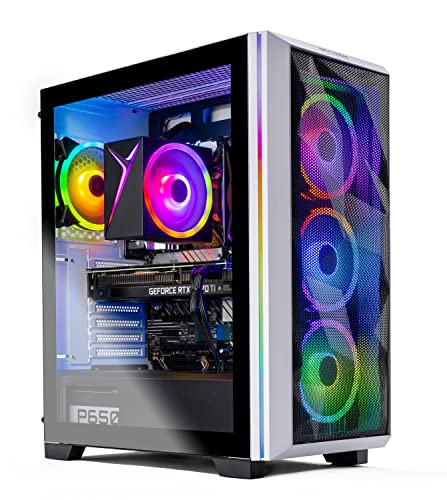
Where to buy
Check the latest price, availability and delivery on Amazon. Orders are placed on Amazon. We may earn a commission from qualifying purchases.
- Best 1440p performance: Skytech Chronos Gaming PC, Ryzen 7 5700X, RTX 4070 Ti 12GB — Check on Amazon
- HOENGAGER Gaming PC, Intel Core i7-12700F, RTX 4070 12GB, 32GB DDR4 — Check on Amazon
- CYBERPOWERPC Gamer Xtreme VR, Intel Core i7-13700F, RTX 4060 Ti 16GB — Check on Amazon
- Thermaltake LCGS Quartz i1460, Intel Core i5-14400F, RTX 5060 — Check on Amazon
See 2 more Amazon options
- CYBERPOWERPC Gamer Master, AMD Ryzen 7 8700F, RTX 4060 Ti 8GB — Check on Amazon
- iBUYPOWER Scale, AMD Ryzen 5 7600, RTX 4060 Ti 8GB — Check on Amazon
Read the full guide ↓
Disclosure: As an Amazon Associate, reviewstook.com earns from qualifying purchases. Links to Amazon on this page are affiliate links; they cost you nothing extra. Listing details such as price and availability change often, so check the current Amazon listing before you buy.
This keyword contains its own contradiction, and this guide starts by resolving it honestly. A PC bought “for 1440p gaming” does not need to be a 4K machine — 2560×1440 is roughly 3.7 million pixels, well under half the 8.3 million in a 3840×2160 frame — yet the six machines gathered here are the same ones that anchor the $1,200 end of the 4K category. Read in the other direction, that is good news. Graphics cards in the RTX 4070 Ti, RTX 4070 and RTX 4060 Ti class, which reach 4K only by leaning on DLSS upscaling, are genuine native-1440p hardware: they render the full 1440p frame themselves, at high settings, and keep upscaling in reserve as headroom rather than necessity. So this variant of the guide grades every pick down a resolution from the 4K framing — what it renders natively at 1440p, how much settings and frame-rate headroom sits above that, and whether DLSS needs to be switched on at all. The 4K question still gets an honest answer, because many readers own or are eyeing a 4K panel: every machine here will drive one happily for desktop work, video and lighter games, and can game on it through DLSS — but 1440p is the resolution these PCs actually render demanding games at, and pretending otherwise would be the one dishonest sentence in this guide.
One piece of discipline carries over unchanged from the 4K guide, because the listings are the same listings. Prices at this tier move violently between deal events. Two of the six machines belong in a $1,200 guide only at their deal pricing, one is recommended strictly on a live-price condition, and every review below explains when its pick stops making sense. The hardware is graded for 1440p; the buying rules are not softened by the friendlier resolution.
In this guide
Quick Picks
Short on time, or comparing several options at once? Each row below names a buyer type and the machine that suits it, with a link to the listing.
| Buyer type | Pick | Why it stands out | Link |
|---|---|---|---|
| Best 1440p performance | Skytech Chronos, Ryzen 7 5700X, RTX 4070 Ti 12GB | The strongest GPU here — native 1440p at high-to-ultra settings with headroom to spare, when it is at its deal price | Check on Amazon |
| Best balanced native 1440p build | HOENGAGER, Intel Core i7-12700F, RTX 4070 12GB, 32GB DDR4 | RTX 4070-class native 1440p with double the RAM of most rivals — buy only at or under the ceiling | Check on Amazon |
| Best for texture headroom at 1440p | CYBERPOWERPC Gamer Xtreme VR, i7-13700F, RTX 4060 Ti 16GB | 16GB of VRAM — the most in this guide — so 1440p textures never have to be negotiated down | Check on Amazon |
| Best new-generation features | Thermaltake LCGS Quartz i1460, i5-14400F, RTX 5060 | Current-generation GPU with the newest DLSS and frame generation — check price on Amazon | Check on Amazon |
| Best AM5 value | CYBERPOWERPC Gamer Master, Ryzen 7 8700F, RTX 4060 Ti 8GB | Modern AM5 platform and DDR5 — among the best value in this guide | Check on Amazon |
| Best everyday price | iBUYPOWER Scale, Ryzen 5 7600, RTX 4060 Ti 8GB | Everyday pricing that fits this guide’s budget — with one RAM caveat to fix | Check on Amazon |
How These Picks Were Chosen
The budget was applied as a hard ceiling, defined the only way that survives contact with prebuilt pricing: a machine qualifies if it belongs at or under $1,200 on Amazon. Where a machine’s typical price lives far above its deal price, the review says so in plain language and frames the pick as buy-at-the-deal or do not buy at all — two of the six are exactly that kind of pick. One more is included on specification with no price claimed, conditioned on the live listing sitting at or under the ceiling when you check it. No price in this guide is stated as a hard fact about today: listings swing sharply between deal events, so the reviews describe each pick’s price position in qualitative terms and send you to the live listing to check price on Amazon — the number that actually matters is the one showing today.
The performance filter, though, was rebuilt for 1440p rather than borrowed from the 4K guide, and the order of priorities flips. At 4K, upscaling support is the load-bearing wall and raw rendering is the thing you compromise on; at 1440p it is the reverse. The first question asked of every pick was whether its GPU renders 2560×1440 natively, at high settings, in current games — and every card here clears that bar, which is precisely why this price tier is the sweet spot for the resolution. The second question was VRAM, weighed at 1440p’s gentler arithmetic: texture data still grows with resolution, so 8GB cards remain the discipline class in the heaviest titles, 12GB is comfortable, and 16GB removes the question entirely — but the penalties for falling short are smaller and rarer than at 4K. The third was headroom: what the machine has left over for high-refresh 1440p monitors, for tomorrow’s heavier games, and for the day its owner plugs in a 4K screen. DLSS was treated as that headroom — a tool for higher frame rates and for 4K-panel owners — rather than as the mechanism the purchase depends on. The rest of the machine still had to be a real PC: a modern multi-core CPU, an NVMe SSD of at least 1TB in every pick, and at least 16GB of system RAM, with any verified corner-cutting — one pick below ships its 16GB as a single stick — named in its review with the fix factored into the advice.
We did not use these machines ourselves. We read the maker listings and specification pages and compared GPU model and VRAM, CPU, memory capacity and configuration, storage, power supply where a listing publishes it, and platform. Performance is therefore described by tier, resolution and settings class rather than by frame-rate numbers — no FPS figure appears anywhere in this guide, because none was measured. What can be stated with confidence is the structure of the category: an RTX 4070 Ti out-renders an RTX 4070, which out-renders an RTX 4060 Ti; a native 1440p frame asks roughly 44% of the pixel work of a native 4K frame; and DLSS Quality at 1440p output renders internally at about 1707×960 — which is why, on hardware of this class, most players at this resolution will leave DLSS off in all but the heaviest games.
The 6 Best 4K Gaming PCs for 1440p Gaming Under $1,200
Skytech Chronos Gaming PC — Ryzen 7 5700X, RTX 4070 Ti 12GB
Who it suits: The 1440p player who wants the settings sliders maxed and a high-refresh monitor fed properly — and who has the patience to wait for its deal price.
At 1440p, the RTX 4070 Ti changes roles. In the 4K guide this card is the one machine that can gesture at native rendering; down at 2560×1440 it is simply more GPU than the resolution strictly needs, and that surplus is the luxury this pick sells. Current demanding titles run natively at high to ultra settings, ray tracing stops being an automatic no, and DLSS becomes an optional frame-rate tool for high-refresh panels instead of a lifeline — in many games you will leave it off entirely, because the card renders the real frame fast enough without help. Its 12GB of GDDR6X, a working minimum that needs managing at 4K output, is a comfortable fit at 1440p: high textures sit well inside it, and the texture compromises the 8GB picks below must make in the heaviest games are not this machine’s problem. If your monitor is a 1440p high-refresh model, this is the only pick in the guide with rendering headroom genuinely matched to it across the whole current catalogue, rather than in lighter titles only.
The supporting hardware is a generation behind the card, and at 1440p that deserves a slightly more careful sentence than it does at 4K. The Ryzen 7 5700X is an eight-core AM4 processor backed by 16GB of DDR4 3200, a 1TB NVMe SSD and a 750W Gold power supply. Lower resolutions shift the balance of work toward the CPU — the graphics card finishes each frame sooner and asks for the next one more often — so an older platform is nearer to mattering here than it is at 4K. It does not hold this card back in any way that changes the recommendation; the honest cost of AM4 remains the upgrade path, not today’s performance, because the socket has no future CPU generation and a platform swap is the only way up. Skytech’s listing also notes that the graphics card brand may vary: the 4070 Ti model and its 12GB are the specification you are buying, the board partner is not guaranteed.
The price is the catch, stated without softening, exactly as in the 4K guide. This listing usually sits in a higher price tier and only drops into this guide’s budget during deal events, so the Chronos is not really an everyday pick at this ceiling; it is a higher-tier machine that occasionally visits this budget, and it is the best 1440p pick in this guide only during the visit. Set a price alert, check price on Amazon before you buy, and if the live listing is sitting in its usual higher tier, walk past it to the machines below — at that level the comparison set changes completely, and so does the right answer.
- RTX 4070 Ti 12GB — the strongest GPU in this guide; native 1440p at high-to-ultra settings.
- 12GB of VRAM is a comfortable fit at 1440p — no texture negotiating in heavy titles.
- A 750W Gold PSU — sized with real headroom for this card rather than the minimum that would boot it.
Honest limitation: The deal price is the whole story: at its usual higher-tier pricing it does not belong in a $1,200 guide at all, and the AM4/DDR4 platform underneath it offers no CPU upgrade path.
Choose it if you catch it within this guide’s budget and want the most 1440p headroom the ceiling can buy. Skip it if the listing is hovering in its usual higher tier — different money, different guide.

HOENGAGER Gaming PC — Intel Core i7-12700F, RTX 4070 12GB, 32GB DDR4
Who it suits: Buyers who want the balanced version of native 1440p — a 12GB card, a twelve-core CPU and double the usual RAM — from a listing they are prepared to price-check carefully.
The RTX 4070 is arguably the natural 1440p card of its generation, and this build is its most sensible expression in the guide. It renders 2560×1440 natively at high settings in current titles, holds ultra in a good share of them, and treats DLSS Quality the way it should be treated at this resolution: as an optional boost for high-refresh play or the heaviest ray-traced scenes, not as a requirement for a presentable picture. Its 12GB of GDDR6X covers high textures at 1440p with room to spare, so the settings conversation is about effects and frame rates rather than about which compromise the memory forces on you. Step down from the Chronos and you give up the top slice of headroom; what you keep is the complete native-1440p experience with nothing held back by the hardware.
What sets this build apart is everything surrounding the card. The Core i7-12700F is a twelve-core processor (eight performance plus four efficiency cores) — genuinely useful at 1440p, where the CPU’s share of the work rises as the GPU’s per-frame cost falls — and the memory is 32GB of DDR4 3200, double what most machines here carry, which suits the player who keeps a browser, chat and recording software running beside the game. Storage is a 1TB M.2 PCIe SSD. The listing rounds the build out with a 240mm AIO liquid cooler, an RGB tempered-glass case, Wi-Fi and Bluetooth, and Windows 11 Pro. None of that renders a frame faster; all of it makes a better daily computer, and a 12GB card paired with 32GB of system memory is a genuinely uncommon combination at this budget.
The caveat is verification discipline, stated plainly so you can apply it: during this guide’s research, no reliable Amazon price for this listing could be verified, so this review makes no price claim for the HOENGAGER at all. The machine is included on specification — the balanced RTX 4070 build this category needs — with one condition attached: buy it only when the live listing shows it at or under $1,200. RTX 4070 prebuilts have historically sold on both sides of that line. If it sits at the ceiling or below, it is arguably the most sensible purchase in this guide. Above it, act on the Chronos at its deal price or the 16GB CyberPowerPC below instead.
- RTX 4070 12GB — native 1440p at high settings, with DLSS as optional headroom.
- 32GB of DDR4 — twice the memory of most rivals, built for gaming with everything else still open.
- A twelve-core i7-12700F, 240mm liquid cooling and Windows 11 Pro complete a specification with no obvious corner cut.
Honest limitation: No reliable price could be verified for this listing, so the recommendation carries its condition openly: superb at or under $1,200, outside this guide’s remit above it.
Choose it if the live listing sits at or under $1,200 and the balanced 32GB specification is what you came for. Skip it if the listing has drifted above the ceiling when you shop — stretching for it breaks the maths of the whole guide.

CYBERPOWERPC Gamer Xtreme VR (GXiVR8040A14) — Intel Core i7-13700F, RTX 4060 Ti 16GB
Who it suits: The texture-first 1440p player — someone whose games are the big open-world and cinematic titles, and who would rather have memory certainty than the last slice of raw rendering speed.
This specification is the guide’s most interesting, because it trades in the opposite direction to the others. The RTX 4060 Ti exists in two versions with the same name and the same rendering speed, differing only in memory: 8GB, and the 16GB fitted here. At 4K output that extra memory is what keeps high textures possible at all; at 1440p it changes the question from “possible” to “never asked.” High-resolution texture packs and the heaviest open-world games can still push an 8GB card past its limit at 1440p in the worst cases, and when VRAM runs out the symptom is not a graceful slowdown — it is stutter, texture pop-in and settings that quietly downgrade themselves. The 16GB card simply does not have that failure mode at this resolution. Textures go to high and stay there, and your settings budget gets spent on the effects sliders instead.
Be just as clear about the limit of that trade: 16GB does not add rendering speed, and the 4060 Ti underneath is the same chip as in the 8GB picks. Frame for frame in raw rendering, this machine sits with the other 4060 Ti picks below and behind the two 12GB cards above — at native 1440p that means high settings in current titles, with DLSS Quality held in reserve for the heaviest releases and for high-refresh ambitions rather than as an everyday necessity. What you are buying is smoothness and texture fidelity within that class. The rest of the build supports it well: a sixteen-core Core i7-13700F that will not hold the card back at any resolution, 16GB of DDR5 on a B760 platform, a 1TB PCIe Gen4 NVMe SSD, and the listing’s one HDMI and two DisplayPort outputs, which suits the dual-monitor setups 1440p players commonly run. One detail could not be confirmed from the listing material — whether the 16GB of system RAM is one stick or two — so check the live listing’s memory configuration before ordering, because dual-channel matters and a second stick is the cheapest upgrade in PC gaming if it arrives as one.
On price, this machine straddles the line, and the review treats it the way the Chronos was treated. Its pricing straddles the ceiling: it appears inside this guide’s budget during deal events and above it at other times. Inside the budget it is a strong, distinctive buy — the texture-certainty pick at a fair price. Above the ceiling it has left this guide’s territory and is competing a class up. The same rule as the top pick applies: check price on Amazon, and treat the recommendation as belonging to the in-budget pricing, not to the listing in general.
- 16GB of VRAM — the most in this guide; high textures at 1440p with no stutter-and-pop-in failure mode.
- A sixteen-core i7-13700F on a DDR5 platform — nothing else in the box holds the card back.
- 1TB PCIe Gen4 SSD and three display outputs suit a dual-monitor 1440p desk.
Honest limitation: The 16GB buys headroom, not speed — raw rendering is 4060 Ti class, so the heaviest titles at 1440p still lean on DLSS for high-refresh rates; and it belongs in this guide only when its live price sits inside the budget.
Choose it if your library is texture-heavy and the live price sits inside this guide’s budget. Skip it if you want maximum frame rates above texture certainty — the 12GB cards render faster — or if it is sitting above the ceiling.

Thermaltake LCGS Quartz i1460 — Intel Core i5-14400F, RTX 5060 8GB
Who it suits: The features-first buyer — someone who values the newest upscaling and frame-generation technology, presented in a clean white build — check price on Amazon before you buy.
The Quartz is the only pick here not built on an RTX 40-series card. The Quartz carries an RTX 5060, the current generation’s entry card, and its 1440p argument is made of features layered over honest mid-class muscle — on raw rendering it belongs to the 4060-class conversation, not secretly above the 4060 Ti picks. Natively, it plays the current catalogue at 1440p with medium-high to high settings, and its generation’s contribution is what happens next: the latest DLSS upscaling and multi frame generation, which inserts generated frames between rendered ones. At 1440p that pairing is a high-refresh tool — used on top of a healthy native base frame rate, in supported titles, it pushes displayed smoothness toward what fast panels can show. Asked to substitute for a base rate that does not exist, it manufactures a smoothness that feels wrong — so the order of operations for every 8GB card here stays fixed: settings first, then upscaling, then frame generation.
The surrounding specification is tidy, with one deliberate step backwards. The Core i5-14400F is a ten-core processor that will not limit this card at 1440p; storage is a 1TB NVMe M.2 SSD; and the memory is 16GB of Thermaltake’s ToughRam DDR4 at 3600MHz — DDR4 on a B760 platform, where the CyberPowerPC machines below offer DDR5. In games today that difference is small; it matters more as a statement about the platform’s future, since DDR4 memory and this socket are the end of their lines. The white Quartz case is the aesthetic pick of the guide, if the machine will live visibly on the desk. Pricing is this pick’s friendliest trait: it is a mid-range pick for this guide whose deal pricing regularly sits comfortably inside the ceiling, making it one of only two machines here whose ordinary deal life is lived entirely under the ceiling — check price on Amazon to see where it sits today.
Its VRAM is the ceiling on its ambition: 8GB of GDDR7. The memory is fast; the capacity is the constraint. At 1440p that constraint is gentler than at 4K — most current titles fit, and only the heaviest texture loads ask for a step down — but it does not disappear, and no generation badge changes the arithmetic. Buy the Quartz for its features, its price and its looks, with your texture expectations set to the 8GB class it belongs to.
- An RTX 5060 from the current generation — the most recent DLSS and multi frame generation available here.
- Deal pricing regularly sits comfortably inside the budget — no heroic deal-hunting needed; check price on Amazon.
- Clean white build with RGB DDR4 — the pick that looks right on a 1440p desk.
Honest limitation: 8GB of VRAM keeps it in the discipline class — the heaviest titles at 1440p will still ask for texture restraint, with frame generation as a top-up, never a foundation; the DDR4 platform has no upgrade future.
Choose it if the newest feature set and comfortable in-budget pricing are what you are shopping for. Skip it if texture-heavy gaming is your main use — the 16GB CyberPowerPC above exists for you.

CYBERPOWERPC Gamer Master (GMA2900A) — AMD Ryzen 7 8700F, RTX 4060 Ti 8GB
Who it suits: The value-and-future buyer — strong value for this guide, on the platform with the most years left in it.
The Gamer Master’s 1440p story is the standard 8GB 4060 Ti story, told at the best price and on the best platform. The card renders the current catalogue natively at 1440p with high settings in most titles, reaching for DLSS Quality in the heaviest releases and managing textures rather than maxing them in the games that punish 8GB. That is a complete, enjoyable way to play at this resolution — provided you buy it knowing that is the deal, which is why this guide keeps repeating it. What the CyberPowerPC adds around the card is the Ryzen 7 8700F, an eight-core processor on AMD’s AM5 socket with a B650 chipset and 16GB of DDR5, plus a 1TB PCIe Gen4 NVMe SSD. AM5 is the platform AMD is still building on: years from now, when a future GPU upgrade turns this into a stronger machine — for higher-refresh 1440p, or for a serious attempt at 4K — the CPU socket, memory type and board will still accept modern parts in a way the AM4 Chronos and the DDR4 machines cannot match.
Price position is the other half of its case: it is one of the best-value picks in this guide on Amazon, though you should check price on Amazon before you buy. The warning that travels with it: marketplace sellers also list this model far higher, so the seller and the cart total are part of the purchase. Bought from Amazon at its deal pricing, it can leave headroom against the ceiling: room in the budget for a 32GB DDR5 kit, or the larger SSD a growing library eventually demands.
Its weaknesses are the honest ones of its class, plus one of its own: its pricing demands discipline. The 8GB VRAM ceiling is real and permanent for this card, at 1440p as at 4K. The 8700F’s eight cores do not out-game the i7s above it; what you are buying is the socket underneath it. And a machine priced by deal events gets bought on the category’s timetable, not yours. Accept those three things, and no dollar in this guide buys more future.
- Among the best value in this guide — check price on Amazon before you buy.
- AM5, DDR5 and a B650 board — a longer upgrade runway than any other pick here.
- An eight-core Ryzen 7 8700F and a Gen4 SSD — the supporting cast never embarrasses the card.
Honest limitation: The 8GB of VRAM defines its texture life permanently — high settings with discipline in the heaviest titles; and marketplace sellers list it far above its Amazon deal prices, so the seller matters.
Choose it if you want native 1440p now with a real upgrade path later, without stretching the budget. Skip it if you will never upgrade and simply want the best 1440p on day one — that is the 12GB cards’ job.

iBUYPOWER Scale (SCA5N46T01) — AMD Ryzen 5 7600, RTX 4060 Ti 8GB
Who it suits: The buyer who wants the guide’s simplest purchase — an AM5 machine that fits the budget at its ordinary pricing, no deal event required — and who will spend ten minutes and a little money fixing its one flaw.
The Scale’s distinction is pricing behaviour. It is the only machine here whose ordinary pricing fits comfortably under the $1,200 ceiling. No price alerts, no digging through expired deals, no gambling on sellers: it is an everyday in-budget gaming PC — check price on Amazon to confirm where it sits today. For that money the specification is properly modern: an AM5 platform with a six-core Ryzen 5 7600, an RTX 4060 Ti 8GB, a 1TB NVMe SSD, Wi-Fi and Windows 11 Home, with a keyboard, a mouse and a one-year manufacturer warranty in the box. Its 1440p performance is the familiar 4060 Ti pattern — native rendering at high settings across most of the current catalogue, DLSS Quality for the heaviest titles and for high-refresh play, textures set with the 8GB limit in mind — and across the vast library of games from the last decade, this class of card handles 1440p with ease.
Now the flaw, which the listing states about itself: its 16GB of DDR5-5200 arrives on one stick — 16×1, printed in the listing’s own title. Single-channel memory costs real performance in CPU-sensitive moments and minimum frame rates, and at 1440p those moments arrive more often than at 4K, because the GPU finishes frames sooner and leans harder on the CPU and memory to keep up. The fix is the cheapest in this guide: add a second matching 16GB stick, restoring dual-channel and taking the machine to 32GB in the same step. Budget for it from the start — a second stick is a modest addition that keeps the finished machine comfortably inside this guide’s budget — and the Scale’s value claim survives the addition intact. Its six cores are the fewest here: sufficient for 1440p gaming, where the GPU still leads, but the least headroom for heavy streaming on the side. Bought with the stick, this is the recommendation for the buyer asking the simplest question: what do I buy today, at a normal price, for my 1440p monitor?
- Everyday pricing that stays inside the budget — no deal event required.
- An AM5/DDR5 platform and a six-core Ryzen 5 7600 — modern exactly where the future will ask questions.
- Keyboard and mouse included, with a one-year warranty behind them.
Honest limitation: The 16GB ships as a single stick (16×1) — single-channel memory until you add the second stick, which you should budget for on day one; and 8GB of VRAM sets the same texture ceiling as the other 4060 Ti picks.
Choose it if you want native 1440p at a normal, everyday sub-$1,200 price and will add the second RAM stick. Skip it if opening the case for any reason is a dealbreaker — the 32GB HOENGAGER at the ceiling is your pick instead, price permitting.

Comparison Table
| Product | GPU / VRAM | CPU / RAM / Storage | Best use | Link |
|---|---|---|---|---|
| Skytech Chronos | RTX 4070 Ti / 12GB | Ryzen 7 5700X / 16GB DDR4 / 1TB | Most 1440p headroom here — at its deal price only | Check on Amazon |
| HOENGAGER Gaming PC | RTX 4070 / 12GB | i7-12700F / 32GB DDR4 / 1TB | Balanced native 1440p with double RAM — at/under $1,200 only | Check on Amazon |
| CYBERPOWERPC Gamer Xtreme VR 16GB | RTX 4060 Ti / 16GB | i7-13700F / 16GB DDR5 / 1TB Gen4 | Texture certainty at 1440p | Check on Amazon |
| Thermaltake LCGS Quartz i1460 | RTX 5060 / 8GB | i5-14400F / 16GB DDR4 / 1TB | Newest DLSS / frame generation, in-budget pricing | Check on Amazon |
| CYBERPOWERPC Gamer Master | RTX 4060 Ti / 8GB | Ryzen 7 8700F / 16GB DDR5 / 1TB Gen4 | Strong value, AM5 future | Check on Amazon |
| iBUYPOWER Scale | RTX 4060 Ti / 8GB | Ryzen 5 7600 / 16GB DDR5 (1 stick) / 1TB | Everyday sub-$1,200 price, add a RAM stick | Check on Amazon |
How to Choose a 4K-Class Gaming PC for 1440p Gaming Under $1,200
- Grade the card at 1440p, not at 4K. The listings here are marketed on their 4K credentials, but your resolution asks a different question: does the GPU render 2560×1440 natively, at high settings, in the games you play? Every pick here does — the differences are in headroom, textures and price behaviour, and those are what the reviews grade.
- Know when DLSS is actually needed at 1440p. On the 4070 Ti and 4070 picks: rarely — it is a high-refresh luxury. On the 4060 Ti and 5060 picks: in the heaviest current titles, and whenever you chase a high-refresh panel’s full rate. Remember what the modes mean here: DLSS Quality at 1440p output renders internally at about 1707×960, so switching it on is a deliberate trade of internal resolution for frame rate — take it when the trade is worth it, not by default.
- Rank VRAM for this resolution honestly. The ladder at 1440p: 16GB removes texture management from your life, 12GB is comfortable in everything current, 8GB is workable with discipline in the heaviest titles. The gap between tiers is real but narrower than at 4K — do not overpay for memory you will not use, and do not under-buy it if open-world games are your library.
- Answer the 4K-panel question before you buy. If your screen is 1440p, these machines are native-resolution PCs and this guide’s grading is the whole story. If your screen is 4K, understand the arrangement: desktop, video and lighter games run at native 4K beautifully, while demanding games run through DLSS — Quality mode at 4K output renders internally at roughly 2560×1440, which is to say these PCs game at 1440p-class rendering and let the upscaler present it on your panel. That looks good on a TV at distance. It is not native 4K gaming, and if native 4K is the actual requirement, the honest move is up a tier, not into this guide.
- Apply deal-price discipline ruthlessly. Two of the six picks earn their place only at their deal pricing. Check price on Amazon for each pick, and when the live price sits outside this guide’s budget, either wait or choose a different pick. Overpaying a deal machine up to its usual higher tier is the single most expensive mistake in this category.
- Check the RAM configuration, not just the capacity. 16GB as one stick runs single-channel and costs smoothness in exactly the CPU-sensitive moments 1440p produces more of. The iBUYPOWER states its 16×1 openly in its own title; on any machine, confirm a 2×8 layout or budget the second stick — no cheaper performance upgrade exists.
- Match the machine to your monitor’s refresh rate. A 1440p 60–75Hz panel is easily fed by every pick here. A 1440p high-refresh panel is a harder target that rewards the 12GB cards and DLSS headroom; if that is your screen, weight the Chronos and HOENGAGER heavily, or accept DLSS as a regular tool on the 4060 Ti picks.
- Weigh the platform’s future against the price you actually pay. The AM5/DDR5 machines (both CyberPowerPC picks and the iBUYPOWER) will accept tomorrow’s CPUs and GPUs gracefully. The AM4 and DDR4 machines (Chronos, HOENGAGER, Thermaltake) sit on finished platforms — a fair trade where the GPU or the price compensates, as their reviews set out.
- Verify the seller on marketplace listings. One model can appear from Amazon itself and from third-party sellers at very different prices. Every price position described in this guide refers to Amazon itself; an unfamiliar seller’s markup is not an improvement to the machine.
- Keep the packaging through the first weeks. Run your heaviest game at your real settings, watch for the VRAM symptoms on 8GB cards — stutter and texture pop-in — and confirm the machine behaves as its tier promises while returns are still simple.
Native 1440p, Upscaled 4K — What the Words Actually Mean
Two resolutions appear on every listing in this category, and the honest way to read them is as two different jobs. The display resolution is what your screen shows: 2560×1440, about 3.7 million pixels, or 3840×2160, about 8.3 million — roughly 2.25 times as many. The render resolution is what the graphics card actually draws before the image is presented. When the two match, rendering is native. When they do not, an upscaler bridges the gap: DLSS Quality at 1440p output renders internally at about 1707×960; DLSS Quality at 4K output renders at roughly 2560×1440; DLSS Performance at 4K output renders at about 1920×1080. Read those three numbers together and the whole category explains itself. A machine that renders natively at 1440p — every pick in this guide — can also present a convincing 4K picture, because DLSS Quality at 4K output is, internally, that same 1440p-class workload reconstructed upward. What it cannot do is render 8.3 million pixels natively in demanding games; that remains the work of graphics cards costing close to this entire budget on their own. Frame generation sits one layer further out, inserting synthesized frames between rendered ones — rewarding a healthy base rate, punishing a poor one, and changing nothing about which resolution the card truly renders.
Common Buying Mistakes
- Reading “4K gaming PC” on a listing as a promise about your 1440p experience — or the reverse. The marketing name describes the hardest thing the machine can approximate, not the resolution it renders best. Grade it at your resolution.
- Buying a deal-price machine at its everyday price. At its usual higher-tier pricing the Chronos is a worse purchase than the same listing at its deal pricing — and the 16GB CyberPowerPC above the ceiling is a worse one than itself inside the budget.
- Leaving DLSS on out of habit at 1440p. On the stronger picks here it trades away internal resolution you did not need to trade. Native first; upscale when a specific game gives you a reason.
- Shopping by GPU name alone and ignoring VRAM. An 8GB card and a 16GB card with the same name are different machines; at 1440p the difference shows up as texture discipline versus texture certainty.
- Maxing textures on an 8GB card and blaming the PC for the stutter that follows. The stutter is VRAM exhaustion — predictable, and fixed by a settings slider rather than a return label.
- Asking frame generation to rescue a low base frame rate. Generated frames can only multiply what exists; under a healthy base they add artefacts and latency where smoothness was promised.
- Leaving a single-stick RAM configuration unfixed. The iBUYPOWER’s 16×1 is stated in its own listing; the second stick is cheap, and single-channel memory quietly taxes every game — at 1440p, more than at 4K.
- Assuming a 4K monitor obliges you to game at 4K. These PCs will run a 4K desktop all day and game on it through DLSS; choosing 1440p rendering on a 4K panel is a legitimate, often better-looking-per-frame decision, not a failure.
- Paying a third-party seller’s markup on a model Amazon itself discounts regularly. Check who is selling before you check anything else.
Final Recommendation
- Most 1440p headroom, if the deal appears: Skytech Chronos, RTX 4070 Ti — only when it drops into this guide’s budget.
- Balanced buyers: the HOENGAGER’s RTX 4070 and 32GB — provided the live listing is at or under $1,200.
- Texture-heavy libraries: the 16GB CYBERPOWERPC Gamer Xtreme VR — bought at its in-budget deal pricing.
- Newest features at comfortable in-budget pricing: the Thermaltake LCGS Quartz i1460 and its RTX 5060.
- Strong value, longest future: the CYBERPOWERPC Gamer Master on AM5.
- Simplest everyday purchase: the iBUYPOWER Scale, with one matching RAM stick added.
Our top two for most 1440p buyers are the HOENGAGER, when its live price sits at or under the ceiling — the balanced RTX 4070 and 32GB specification is what native 1440p looks like when it is done sensibly — and the iBUYPOWER Scale with its second RAM stick added, the honest everyday route to a 1440p monitor at an everyday price that fits this guide’s budget. Deal hunters should hold out for the Chronos when it drops into budget — a class above everything else here — and texture-first players for the 16GB CyberPowerPC at its in-budget deal pricing. If a 4K screen is in your life, the companion framing of these same machines lives in Best 4K Gaming PC Under $1200, and if your ambitions turn out to be genuinely native 4K rather than upscaled, the honest signposts step up to Best 4K Gaming PC Under $1500 and Best 4K Gaming PC Under $2500. Readers speccing purely for this resolution should also compare Best 1440p Gaming PC Under $1200, where the same money is spent without the 4K brief at all. Set your render resolution before your settings, your textures before your effects, check price on Amazon for every pick before you buy, and a $1,200 PC will give you a native 1440p picture with headroom to grow.
Frequently Asked Questions
Why buy a “4K” PC for 1440p gaming at all?
Because of where the value sits at this budget. The cards that approximate 4K through upscaling — RTX 4060 Ti, 4070 and 4070 Ti class hardware — render 1440p natively with headroom, so the $1,200 shelf of the 4K category doubles as a strong shelf of native-1440p machines. You are not paying for resolution you will not use; you are buying the tier whose compromises all live one resolution above yours.
Do I need DLSS switched on at 1440p with these PCs?
Usually not, and on the two 12GB picks, rarely. DLSS Quality at 1440p output renders internally at about 1707×960, which is a real trade of internal resolution for frame rate. On the 4060 Ti and RTX 5060 picks it earns its place in the heaviest current titles and in high-refresh play; everywhere else in this guide, native rendering is the default recommendation and upscaling is the reserve.
What happens if I plug one of these into a 4K monitor?
Three things, all of them fine. The desktop, browsing and video run at native 4K and look exactly as sharp as the panel allows. Lighter and older games render at native 4K on the stronger picks. Demanding games run through DLSS — Quality mode at 4K output renders internally at roughly 2560×1440, Performance at about 1920×1080 — so the picture on screen is a reconstruction of 1440p-class or 1080p-class rendering. It looks good, especially on a TV at viewing distance; it is not native 4K gaming, and this guide will not call it that.
How much VRAM do I need for 1440p gaming?
Treat 12GB as comfortable for high textures in everything current, 16GB as certainty that removes the question entirely, and 8GB as workable with texture discipline in the heaviest titles. The stakes are lower than at 4K output, where texture data grows with the frame — which is why an 8GB pick can be an sensible 1440p purchase here while remaining an upscaling-only proposition in the 4K guide.
Is the Chronos worth buying at its normal price, or should I wait?
Wait. At its usual higher-tier pricing it has left this guide’s category, and that money compares against stronger, newer machines instead. The recommendation travels with its in-budget deal pricing and nowhere else. Set an alert, and in the meantime the HOENGAGER at the ceiling or the Scale at its everyday price will put you on a 1440p monitor now.
Does it matter that one pick ships 16GB of RAM on a single stick?
16GB is enough capacity for gaming at this tier, but configuration matters: a single 16GB stick runs single-channel and costs performance in exactly the minimum-frame-rate moments you feel — and 1440p produces more of those moments than 4K, because the GPU leans harder on the CPU and memory. The iBUYPOWER Scale ships exactly that way and says so in its own listing; one matching stick restores dual-channel and takes you to 32GB in the same move, which is why its review factors the stick into the purchase.
When should I skip this tier and buy a real 4K PC instead?
When native 4K rendering — no upscaling doing the heavy lifting — is the actual requirement, and your screen is a 4K monitor you sit close to rather than a TV across the room. That requirement starts above this budget: Best 4K Gaming PC Under $1500 is the first honest step, and Best 1440p Gaming PC Under $1500 is the alternative if you would rather spend the extra money on 1440p headroom that lasts for years. If upscaled 4K on a TV or native 1440p on a monitor describes your real setup, the machines above already answer it.


