Where to buy
Check the latest price, availability and delivery on Amazon. Orders are placed on Amazon. We may earn a commission from qualifying purchases.
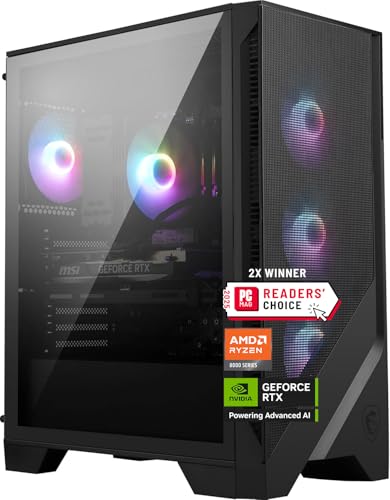
- Best overall: MSI Codex Z2 Gaming Desktop, Ryzen 7 8700F, RTX 5070, 32GB DDR5, 2TB SSD — Check on Amazon
- Skytech Omega Gaming PC, Ryzen 7 7800X3D, RTX 4070 Super, 32GB DDR5, 1TB NVMe — Check on Amazon
- iBUYPOWER Slate 8 MESH Gaming PC, Intel Core i7-14700F, RTX 4070 Super, 2TB NVMe — Check on Amazon
- Thermaltake LCGS View i4770 Gaming Desktop, Intel Core i7-14700KF, RTX 4070, 32GB DDR5 — Check on Amazon
See 2 more Amazon options
- Skytech Omega Gaming PC, Ryzen 7 7700X, RTX 4070 Super, 32GB DDR5, 1TB NVMe, White — Check on Amazon
- ASUS ROG Strix G15DS Gaming Desktop, Ryzen 7 7700X, RTX 4070, 16GB DDR5, 1TB SSD — Check on Amazon
Read the full guide ↓
Disclosure: As an Amazon Associate, reviewstook.com earns from qualifying purchases. Links to Amazon on this page are affiliate links; they cost you nothing extra. Listing details such as price and availability change often, so check the current Amazon listing before you buy.
Start with the sentence most guides for this search would rather bury: at $1,500, there is no genuinely small 1440p gaming PC in this guide, because at this budget the honest answer is a tower. Every machine below is a full-size desktop that will occupy a corner of your floor or a serious slice of your desk. None of them tucks behind a monitor, none of them lives on a bookshelf, and none of them was designed with a studio apartment in mind. What “small spaces” means at this price is not a smaller product category — it is a placement problem, and this guide treats it as one. Each of the six machines is graded on how it lives in a small room: the footprint it claims, the clearance its fans and vents need to breathe, the heat its graphics card dumps into the air around you, the noise you will hear at the distance a small room forces on you, and the placement traps — glass panels in walkways, mesh fronts pushed flush against walls, towers sealed inside TV cabinets — that small rooms set for big hardware.
If your space is a hard constraint rather than a preference — if a tower physically does not fit, full stop — the honest route is a different set of guides: Best Mini Gaming PC Under $1500, Best Small Form Factor Gaming PC Under $1500 and Best Compact Gaming PC Under $1500 cover machines a fraction of these towers’ size, with the different trades that size demands. But if a tower fits and the question is which $1,500 tower fits best — which breathes easiest in a tight corner, which can actually be carried between home and dorm, which one’s saving can fund the desk it stands on — that is the question this guide answers, machine by machine.
One rule from the standard guide carries over unchanged: check the current price on Amazon before you judge any pick. Prices at this tier change often, so a pick only counts when the live listing in front of you fits this $1,500 budget. Below: the quick picks, placement-graded reviews of all six, a comparison table with space notes, a measure-before-you-buy checklist, the mistakes small rooms punish hardest, and an FAQ.
In this guide
Quick Picks
Short on time, or comparing several options at once? Each row below names a buyer type and the machine that suits it, with a link to the listing.
| Buyer type | Pick | Why it stands out | Link |
|---|---|---|---|
| Best overall | MSI Codex Z2, Ryzen 7 8700F, RTX 5070 | Newest GPU, 32GB RAM, 2TB storage — a four-fan tower needing front and rear room | Check on Amazon |
| Best for high-refresh 1440p | Skytech Omega, Ryzen 7 7800X3D, RTX 4070 Super | The benchmark gaming CPU of its generation, in a white case that shows dust | Check on Amazon |
| Best storage and creator lean | iBUYPOWER Slate 8 MESH, i7-14700F, RTX 4070 Super | 2TB NVMe and a 20-core CPU — and a mesh front that must never sit flush against a wall | Check on Amazon |
| Best Intel all-rounder | Thermaltake LCGS View i4770, i7-14700KF, RTX 4070 | Unlocked 20-core CPU from a cooling brand, in a glass-sided case that wants a protected spot | Check on Amazon |
| Best value | Skytech Omega, Ryzen 7 7700X, RTX 4070 Super, White | Positioned as the value option in this tier — check price on Amazon; any saving can fund the setup around it | Check on Amazon |
| Best big-brand support | ASUS ROG Strix G15DS, Ryzen 7 7700X, RTX 4070 | ASUS support — and a carry handle rated to 20 kg, the only pick designed to be moved | Check on Amazon |
How These Picks Were Chosen
The performance bar is the one the standard $1,500 guide set, because a small room is no reason to accept a weaker machine. Every pick is a real Amazon listing, sold in the United States, selected for this $1,500 budget — check price on Amazon to confirm the live listing still fits the budget before you buy. The graphics-card bar stayed high: an RTX 5070, an RTX 4070 Super, or an RTX 4070 where the rest of the specification compensates. Memory was held to the tier’s standard — 32GB of DDR5 — and the two picks shipping 16GB are included for specific strengths, with the shortfall named in their reviews rather than smoothed over. Because prices at this level change often, the reviews do not print a fixed price: check the current price on Amazon for each pick. A pick’s recommendation applies only when its live price fits this $1,500 budget.
On top of that, each machine was graded for placement using only facts its verified listing material documents — and one discipline is worth stating plainly, because it shapes every review below. The verified sources for these six listings do not publish a full set of case dimensions, so this guide prints no measurements it cannot stand behind. Where a pick’s exact width, depth and height matter — and in a small room they always matter — the reviews tell you to take them from the live listing’s specification table and measure your spot against them; the checklist near the end walks through exactly how. What the sources do document is graded at full weight: case formats and front-panel designs, fan layouts, glass panels, published power-supply ratings, bundled extras, and one rare feature — a rated carry handle. Noise and heat are treated qualitatively, ordered by the documented graphics-card tier and cooling design, because no listing here publishes a verified noise figure and this guide will not invent one.
We did not use these machines ourselves. We read the maker listings, specification pages and price histories, and compared first the parts that decide 1440p performance — graphics card, processor, memory, storage, power supply, cooling — then the parts that decide whether a tower and a small room can live together. Machines that do not belong in this budget tier were excluded however good they might be; genuinely small machines belong to the mini and SFF guides linked above.
The Honest Part: None of These Machines Is Small
One section on the gap between this search and this market, because small-space buyers are the ones most often misled by it. Product names at this tier are full of words that sound like size claims — and none of them are. A tower called “Mesh” is describing its front panel, not its footprint. A case with “View” in the name is describing what you can see through its glass, not how little room it takes. Every machine in this guide is a conventional tower built around full-size parts, and each one will ask for roughly the same territory: a rectangle of floor beside the desk, or a stretch of desk deep enough to hold the case, the monitor and your keyboard. If the spot you have measured cannot offer that territory plus breathing room, the machine does not fit — whatever the product name implies.
That is a sorting rule, and it cuts both ways. If the tape measure says a tower fits, you gain something real for the space it takes: this GPU class — RTX 5070 and 4070 Super — is exactly the class that makes 1440p stop being a negotiation, with ultra settings, usable ray tracing and high-refresh headroom. The mini and small-form-factor machines in Best Mini PC Under $1500 and the SFF guide make the opposite trade deliberately: a fraction of the volume, in exchange for the thermal and pricing compromises that small enclosures impose. The mistake is only in making one trade while believing you made the other — buying a tower for a shelf it will never fit, or a mini for performance its enclosure cannot cool. Measure first, then choose which guide you are actually shopping from.
Within the tower choice, the differences between these six are real. A mesh-fronted case and a glass-sided case ask for different spots. A white case in a dusty room is a cleaning commitment a black one is not. A machine with a rated carry handle can commute between a dorm and a family home; the others are two-handed, plan-the-route moves. And the money matters spatially too: the value pick below is positioned lower in this tier, so it is the one most likely to leave part of this budget unspent — in a small room, that is the monitor arm that frees the desk or the shelf that lifts the tower off the floor. Small-space buying is systems buying: PC, spot and furniture are one purchase, and this guide grades them that way.
Heat and Noise: The Invisible Footprint
A tower takes up more room than its case measurements suggest, because it also occupies the room thermally and acoustically. Start with heat. The graphics cards in this guide — RTX 5070, RTX 4070 Super, RTX 4070 — are tower-class parts, and under a sustained gaming load a machine like these converts most of the power it draws into heat that ends up in your room. In a small bedroom or studio, a long session will warm the air noticeably, and the effect is strongest exactly where small-room gamers sit: close to the machine, in the path of its exhaust. A tower exhausting toward open room, its intake fed by cooler air, lives better than one sealed behind a desk recycling its own output. None of this argues for a weaker PC — it argues for choosing the spot as carefully as the specification.
No listing in this guide publishes a verified noise rating, so this guide grades the structure of each machine’s cooling rather than quoting numbers nobody measured: how many fans it runs, where its air comes from, and what its panels are made of. The MSI below moves air with four system fans — three intake, one exhaust — behind an air cooler. The iBUYPOWER breathes through a mesh front, which is good for temperatures and makes the front an open grille: it must stay unobstructed, and no solid panel stands between you and fan sound. The ASUS separates its hot components into zones with widened vents on all sides — excellent for cooling, and a placement rule in itself, since a case vented on every side wants clearance on every side. And distance remains the cheapest noise control ever sold: a tower on the floor at the far side of the desk is meaningfully quieter at your ear than the same tower beside your monitor.
One trap deserves naming, because small rooms make it tempting: the closed cabinet. A tower slid into a TV unit, a wardrobe or a closed desk cubby may disappear visually, but a gaming PC under load in a sealed box is breathing its own exhaust within minutes — temperatures climb, and fans spin harder and louder to compensate. If the only spot in your room is inside closed furniture, that is the tape measure ruling towers out again — and the mini PC guides linked earlier are the honest next click.
The 6 Best 1440p Gaming PCs Under $1,500 for Small Spaces
MSI Codex Z2 Gaming Desktop, Ryzen 7 8700F, RTX 5070, 32GB DDR5, 2TB SSD
Who it suits: The buyer whose small room has one proper tower spot — a floor corner or a deep desk — and who wants the newest, fullest specification to put in it.
The Codex Z2 leads on specification: it is the only machine here built around NVIDIA’s current-generation RTX 5070, a Blackwell card with 12GB of GDDR7 memory and DLSS 4 — at 1440p, ultra settings, ray tracing that stays on, and frame generation to feed a high-refresh monitor. Around the card sit an eight-core, sixteen-thread Ryzen 7 8700F boosting to 5.0 GHz per MSI’s listing, 32GB of DDR5, and a 2TB NVMe SSD that swallows a library of 100GB-plus installs without an external drive colonising the desk. Graded as furniture, it is a conventional tower with a documented airflow plan: an ARGB air cooler and four system fans, three intake and one exhaust. That layout writes its own placement rule — the front needs open air to feed three fans, and the rear needs somewhere for the exhaust to go that is not the back of a bookcase. Give it a floor corner with both ends breathing and it asks for nothing else; its exact dimensions are not in the material we verified, so take width, depth and height from the live listing’s specification table and tape the footprint out before you commit.
Check price on Amazon before you judge this pick: it sits at the top end of this tier, so only treat it as an under-$1,500 option when the live listing fits this budget. When it does, it is the most complete tower here; if the live price sits above the budget, walk away and consider the picks below. One gap matters for planners — the listing does not publish the power supply’s wattage, which you will want before any future graphics-card upgrade. Check the live specification table, and treat an unpublished PSU as a question to answer, not a detail to assume.
- The only current-generation card here: RTX 5070, GDDR7 memory, DLSS 4.
- 32GB DDR5 and a 2TB NVMe SSD: nothing to upgrade, nothing to plug in externally.
- Documented four-fan layout — three intake, one exhaust — with a clear placement rule.
Honest limitation: Its position at the top of this tier means you need to check the current price on Amazon and confirm it fits this budget before ordering, and the PSU wattage is not published — this is a tower you time your purchase for, and measure for, rather than an impulse buy.
Choose it if you have one good tower spot with front and rear clearance and want the longest-lived specification in it. Skip it if check price on Amazon and the live listing does not fit this $1,500 budget — look at the other picks in this tier instead.

Skytech Omega Gaming PC, Ryzen 7 7800X3D, RTX 4070 Super, 32GB DDR5, 1TB NVMe
Who it suits: The high-refresh player — 1440p at 165Hz and above — whose small room can give a tower a permanent floor spot and a regular dusting.
This Omega pairs an RTX 4070 Super with the Ryzen 7 7800X3D, the processor whose stacked 3D V-Cache made it the benchmark gaming CPU of its generation, and still the chip that decides frame rates in CPU-limited titles: competitive shooters, simulation and large strategy games. If your monitor runs at 165Hz or faster, that chip is the difference between the panel being fed and being wasted. The rest of the sheet is the correct supporting cast — the 4070 Super’s 12GB of GDDR6X with DLSS 3 and frame generation, 32GB of DDR5 RGB memory, a 1TB Gen4 NVMe SSD, Windows 11 Home, and a published 750W Gold power supply — a specification several rivals here decline to state, and one that makes a future graphics-card swap a plan rather than a gamble. As a piece of furniture it wears Skytech’s white Omega case. In a small room that cuts both ways: a white tower visually lightens a tight corner where a black slab would loom, but white shows dust more readily than black, and a tower on a bedroom floor collects it — budget two minutes a month with a cloth, or choose the colour with your eyes open.
This pick sits at the top end of this tier — check price on Amazon and confirm it fits this $1,500 budget before you buy. Whether the X3D premium earns its place over its own sibling below — same graphics card, positioned lower in this tier — depends on your games: for high-refresh competitive and simulation play, yes; for single-player, graphics-led gaming, the frames are the same and the difference is better spent on the room. Storage is the other plain note: 1TB, where two picks here offer double.
- Ryzen 7 7800X3D — the defining gaming CPU of its generation, here at the budget ceiling.
- RTX 4070 Super 12GB with a published 750W Gold PSU and 32GB of DDR5.
- White case lightens a small corner visually — and shows the dust it collects there.
Honest limitation: It sits at the top end of this tier — check the current price on Amazon — storage is 1TB rather than 2TB, and the white finish is a cleaning commitment in a floor placement.
Choose it if you run a 165Hz-plus 1440p monitor, play CPU-demanding titles, and can give a tower a permanent, dusted floor spot. Skip it if your gaming is story-led — the 7700X Omega below delivers the same graphics card in a lower position in this tier.

iBUYPOWER Slate 8 MESH Gaming PC, Intel Core i7-14700F, RTX 4070 Super, 2TB NVMe
Who it suits: The buyer whose one desk splits its day between gaming and heavier work — streaming, editing, rendering — and who wants the fewest possible extra boxes in the room.
The Slate 8 MESH is this guide’s workhorse, and its placement story is written into its name. The case is mesh-fronted, with RGB fans behind the grille and a tower air cooler inside: it breathes through its face. Thermally that is a virtue — few designs feed a graphics card cooler air — but in a small room it creates the single most common placement error in this guide, which is pushing the tower back until its front sits flush against a wall or the inside of a cubby, and quietly strangling the intake. This machine needs its front open to the room: a floor spot beside the desk with the grille facing out, or a desk deep enough that the case front is not buried behind the monitor. Get that one decision right and the rest of its small-space ledger is unusually kind. The 2TB NVMe SSD doubles most rivals’ storage, so there is no external drive colonising the desk; a gaming keyboard and mouse are included in the box, so the setup arrives complete in one carton; and the twenty-core i7-14700F (eight performance cores, twelve efficiency) is a multitasking strength genuinely useful when encoding, chat and capture run beside the game. Check price on Amazon for this pick — it is positioned as a premium option within this tier.
The honest limitation is memory. The Slate ships 16GB of DDR5-5200 as two 8GB sticks, where this tier’s standard is 32GB — and because both slots are occupied, upgrading later means replacing the kit rather than adding to it. The fair reading is an open trade: double storage and twenty cores instead of double memory. For a work-leaning desk it can be the right one — a 32GB kit is a cheaper later upgrade than the 2TB drive would have been — but a pure gamer should know the Omegas and the MSI hand them 32GB today. The listing also does not publish the PSU’s wattage; check the live specification table if a future GPU swap is in your plan.
- 2TB NVMe SSD and keyboard plus mouse in the box — the fewest extra boxes of any pick.
- Twenty-core i7-14700F: the streaming and content-creation strength of this guide.
- Mesh-front airflow that runs cool — provided the front is left open to the room.
Honest limitation: 16GB of RAM in two 8GB sticks where the tier standard is 32GB, and a mesh front that punishes the most natural small-room placement — flush against a wall.
Choose it if your desk works as well as plays, storage matters, and you can give the grille an open front. Skip it if your only tower spot is a closed cubby or a wall-hugging corner — this is the pick that suffers most there.

Thermaltake LCGS View i4770 Gaming Desktop, Intel Core i7-14700KF, RTX 4070, 32GB DDR5
Who it suits: The Intel loyalist who can time a purchase to a sale — and who has a protected, out-of-traffic spot for a glass-sided tower.
Thermaltake is a case and cooling company first, and the LCGS View i4770 reads like it: the specification pairs an unlocked Intel Core i7-14700KF — twenty cores, the full-fat version of the 14700 family — with an RTX 4070 12GB, 32GB of DDR5 at 5600MT/s, and a 1TB NVMe SSD, with Wi-Fi and Windows 11. At 1440p the plain 4070 sits one step below the Super cards elsewhere in this guide and still holds ultra settings in most current games with DLSS quality mode doing its quiet work. The placement grade turns on the case: this is a glass-sided design, built to be looked at. In a small room, glass writes rules — the tower belongs out of walkways, out of the swing of a desk chair, out of the arc of a door, in the corner where feet, bags and vacuum cleaners do not travel. A glass panel is not fragile in normal use, but a small room multiplies the knocks a case takes: choose its spot the way you would place a monitor, not a filing cabinet. The compensation is real: a cooling specialist’s thermal design is exactly what you want in a case whose show side does not breathe.
Check the current price on Amazon for this pick before you judge it: it is positioned at the top end of this tier, so only treat it as an under-$1,500 option when the live listing fits this budget. The discipline matches the MSI’s, only stricter: buy only when the live price fits the ceiling of this budget. If you need an Intel machine and this live price does not fit, the iBUYPOWER above is the other Intel option in this tier to compare — check price on Amazon for that pick as well.
- An unlocked twenty-core i7-14700KF — as much Intel work-and-play muscle as this guide offers.
- DDR5 at 5600MT/s — no other pick here publishes a faster memory speed.
- Built by a case and cooling specialist — the thermal design is the brand’s home ground.
Honest limitation: The graphics card is the plain RTX 4070 rather than the Super, the glass side demands a protected spot a small room may not have, and its position at the top of this tier means you must check the current price on Amazon and confirm it fits this budget before ordering.
Choose it if you prefer Intel, value fast memory, can time the purchase, and have a corner where glass is safe. Skip it if check price on Amazon and the live listing does not fit this $1,500 budget, or if your only tower spot sits in a walkway.

Skytech Omega Gaming PC, Ryzen 7 7700X, RTX 4070 Super, 32GB DDR5, 1TB NVMe, White
Who it suits: The value hunter in a small room — the buyer who would rather spend the saving on the setup around the PC than on a halo processor inside it.
Under the same white Omega case as its X3D sibling sits the same RTX 4070 Super — the single change is the processor, a Ryzen 7 7700X: eight cores, 4.5 GHz base and 5.4 GHz boost per Skytech’s listing. Everything else that defines the tier carries over untouched: 32GB of DDR5 RGB memory, a 1TB Gen4 NVMe SSD, a published 750W Gold power supply, Wi-Fi and Windows 11 Home. And its position in this tier is what makes it the value pick: it sits lower in this tier than its X3D sibling, for a machine that gives up nothing on the graphics card, nothing on memory and nothing on the power supply. In GPU-bound games — most single-player gaming at 1440p — the frame-rate gap to its X3D sibling is small, because at this resolution the graphics card does the deciding. That is what makes this the small-space value pick beyond the spec sheet: its lower position in this tier is more likely to leave part of this $1,500 budget unspent, and in a small room money is spatial — a monitor arm that frees the desk surface, a stand that gives the tower a proper home off the carpet. The tower you can place well beats the badly placed tower with a faster CPU inside it.
The limitations are its sibling’s, plus one of its own. Storage is 1TB, so a large library eventually means adding a second drive — a simple job in a standard tower case, which this is. The white finish shows dust more readily than black; on a small bedroom’s floor, keep a cloth nearby. Check price on Amazon before you buy: like the other picks here, its live price can change, so judge it against this $1,500 budget — when it fits the budget, this remains a strong buy and the best-value option in the guide.
- Positioned lower in this tier than its X3D sibling — check price on Amazon.
- Same RTX 4070 Super, 32GB DDR5 and published 750W Gold PSU as the X3D version.
- The saving is spatial: it can fund the arm, shelf or stand the small setup needs.
Honest limitation: 1TB of storage and a white case that shows dust on a bedroom floor — check the current price on Amazon and confirm it fits this budget before ordering.
Choose it if you want the tier’s defining specification for the least money and your gaming is mostly single-player. Skip it if you play CPU-limited competitive or simulation titles at very high refresh rates — that gap is exactly what the X3D version charges for.
ASUS ROG Strix G15DS Gaming Desktop, Ryzen 7 7700X, RTX 4070, 16GB DDR5, 1TB SSD
Who it suits: The mover — students, shared houses, anyone whose PC lives in two places — and buyers who put real value on the biggest support network in this guide.
Every other pick here assumes the tower stays where you put it. The ROG Strix G15DS is designed around the opposite assumption — for a small-space buyer, that makes it quietly unique. ASUS builds in a carry handle rated by the maker for up to 20 kilograms — a genuinely useful piece of engineering for anyone carrying a machine between home and dorm, between rooms, or to a friend’s place for the weekend — plus a headphone hook in the chassis, so one more object stays off a small desk. The thermal design is equally deliberate: a multi-zone chassis that separates the processor and graphics card from the power supply and storage for cooler running, with widened vents on all sides. That is a placement rule as much as a feature — a case vented on every side wants clearance on every side, so this is not the tower to wedge into the one gap between bookshelf and wall. Aura Sync lighting sits behind a glass side panel, which earns the same caution as the Thermaltake’s: a protected spot, out of the traffic lanes of a small room. The specification beneath the design is a Ryzen 7 7700X with an ASUS Dual-fan RTX 4070 12GB and 1TB of PCIe SSD storage under Windows 11 Home. Check price on Amazon for this pick, and check who the seller is on the live listing — it has been offered through marketplace sellers — and that the warranty terms are the ones you expect, before ordering.
The limitation is memory, and it is the weakest specification in this guide: 16GB of DDR5 at 4800, the slowest speed published here, where the tier’s standard is 32GB. For gaming alone today 16GB still works; the honest problem is trajectory — games, launchers, browsers and capture tools are not getting lighter, and a buyer keeping this machine for four or five years should treat a memory upgrade as a planned cost, not a possibility. Weighed fairly: you are paying for ASUS design, thermals, portability and support, and accepting the memory as the price of the badge. For a buyer who moves their machine, that can be the most rational trade in this guide; for one counting gigabytes from a fixed desk, the value pick above exists.
- Built-in carry handle rated to 20 kg — the only pick designed to be carried, not just placed.
- Multi-zone airflow chassis with widened vents on all sides, and a headphone hook.
- The largest brand in the guide stands behind it — support reach and resale value included.
Honest limitation: 16GB of DDR5-4800 is the weakest memory specification here, the all-sides venting forbids tight gaps, and it has been sold via Amazon marketplace sellers — verify the seller and warranty on the live listing.
Choose it if your PC travels, brand support matters, and you will upgrade the memory in time. Skip it if 32GB in the box on day one is non-negotiable — four rivals here ship it as standard.

Comparison Table
| Product | Graphics card | Processor | Memory / Storage | Space notes | Link |
|---|---|---|---|---|---|
| MSI Codex Z2 | RTX 5070 12GB GDDR7 | Ryzen 7 8700F | 32GB DDR5 / 2TB SSD | Four-fan tower — keep front intake and rear exhaust clear | Check on Amazon |
| Skytech Omega (7800X3D) | RTX 4070 Super 12GB | Ryzen 7 7800X3D | 32GB DDR5 / 1TB SSD | White tower — shows dust; published 750W Gold PSU | Check on Amazon |
| iBUYPOWER Slate 8 MESH | RTX 4070 Super 12GB | Intel Core i7-14700F | 16GB DDR5 / 2TB SSD | Mesh front — never push it flush against a wall | Check on Amazon |
| Thermaltake LCGS View i4770 | RTX 4070 12GB | Intel Core i7-14700KF | 32GB DDR5-5600 / 1TB SSD | Glass-sided tower — protected, out-of-traffic spot only | Check on Amazon |
| Skytech Omega (7700X) | RTX 4070 Super 12GB | Ryzen 7 7700X | 32GB DDR5 / 1TB SSD | White case shows dust — the saving funds the setup around it | Check on Amazon |
| ASUS ROG Strix G15DS | RTX 4070 12GB | Ryzen 7 7700X | 16GB DDR5-4800 / 1TB SSD | Carry handle rated 20 kg; vents on all sides — clearance all round | Check on Amazon |
How to Choose a 1440p Gaming PC Under $1,500 for a Small Space
- Measure the spot before you shortlist the machine. Tape the footprint on the floor or desk, clearance included, and only then compare it with the dimensions in the live listing’s specification table. In a small room, the spot is a specification.
- Check the current price on Amazon as a specification in itself. Every pick here was selected for this $1,500 budget. If the live price in front of you does not fit this budget, you are no longer looking at this guide’s recommendation; check the other picks in this tier or the tier below.
- Hold the graphics-card line. A small room is no excuse for a weaker card: at this budget it should be an RTX 5070 or RTX 4070 Super, with a plain RTX 4070 acceptable only where the rest of the specification compensates. The heat and footprint of a tower are the same whether the card inside is strong or weak — take the strong one.
- Match the case to the spot, not the other way round. Mesh fronts need open air in front of them. Glass sides need protection from traffic. A case vented on all sides needs clearance on all sides. Read each review’s placement grade against the actual corner you have.
- Decide desk or floor with your ears and your carpet in mind. The floor puts distance between you and the fans — free quiet — and a hard floor or low stand beats deep carpet for bottom airflow; a floor tower in a bedroom also collects dust, more visibly on the two white cases here. A desk saves the dust and the bending, and costs surface you may not have.
- Make 32GB your memory standard — and check the configuration. Two of these picks ship 16GB for stated reasons; if you accept that trade, plan for the upgrade. And read how the memory is arranged: the iBUYPOWER’s two 8GB sticks fill both slots, so its upgrade replaces the kit.
- Get the power supply’s rating in writing before you pay. The two Skytech Omegas publish a 750W Gold unit — a future graphics card in those is a swap. Where a listing hides the PSU, as four of these do, check the live specification table and count the unknown as a cost.
- Count storage in game installs, not gigabytes. Once Windows and the launchers have taken their cut, 1TB means room for roughly eight to ten big modern installs. In a small setup, the 2TB picks also spare you an external drive living on the desk.
- Verify the seller as well as the spec. The same model can be sold by Amazon, the maker or a marketplace seller, with different warranty handling — the ASUS pick here has been seen through marketplace sellers. Ten seconds on the seller line is part of the purchase.
- Pair the machine with the monitor honestly. Machines like these are built for 1440p panels running at 144Hz and beyond. If the budget for machine, monitor and furniture is truly fixed, a $1,200 PC placed well behind a good 1440p screen is a better small-room purchase than a $1,500 PC squeezed behind an old 1080p panel.
Measure Before You Buy: The Small-Space Checklist
- Get the real dimensions. Open the live Amazon listing and find the case width, depth and height in its specification table. The verified sources behind this guide do not publish a complete dimension set for these six listings, so the listing itself is the authority — never work from a render, a review of a different configuration, or a guess.
- Tape the footprint. Mark the case’s rectangle on your floor or desk with painter’s tape, then live with it for a day: the tape will tell you whether the tower sits in a walkway, a door swing or a chair’s roll path before the machine does.
- Add the breathing room. Extend the taped area on the sides the case breathes through — the front for the mesh-fronted iBUYPOWER, the rear for every tower’s exhaust, all sides for the ASUS with its widened vents. A footprint that only fits the case itself does not fit the case.
- Plan the cables, not just the box. Power, display and Ethernet cables need bend room behind the machine, and the surge protector needs a home. In a small room, the cable plan is the difference between a setup that looks deliberate and one that looks stored.
- Measure the route in. Towers arrive in large cartons — check the doorway, the hallway turn and the stairs. The ASUS, with its rated carry handle, is the one pick designed for exactly this.
- Test in the first week, in the real spot. Run your most demanding game with the tower where it will live, and check temperatures, noise at your chair, and whether the memory and drive match the listing. A prebuilt’s return window is the cheapest quality control you will ever get — use it while it is open, and keep the packaging until it closes.
Common Buying Mistakes
- Sealing a tower inside closed furniture. A gaming PC in a TV cabinet or desk cubby breathes its own exhaust within minutes and runs hotter and louder. If the only spot is inside a closed cabinet, a tower is the wrong purchase — take the mini PC guides instead.
- Pushing a mesh-fronted case flush against a wall. The iBUYPOWER in this guide intakes through its face; a wall-hugging placement quietly strangles it. Front-breathing cases need their front in open room air.
- Placing a glass-sided tower in a traffic lane. Small rooms multiply knocks. The Thermaltake and ASUS glass panels belong in protected corners, out of chair swing and door arcs — decide the spot before the machine arrives, not after the first bump.
- Paying above this budget. Buying a machine at a live price above this budget because it appeared in an under-$1,500 guide is the most expensive mistake at this tier — check price on Amazon, every time.
- Assuming the seller is Amazon. The ASUS pick has been seen via marketplace sellers, with warranty handling that can differ. For a purchase in this tier, the seller line deserves the ten seconds it takes to read.
- Accepting 16GB of memory without noticing. At this budget 32GB is the standard. If a pick ships 16GB, it should be a deliberate trade you chose — storage in one case here, design and portability in the other — not a surprise discovered in Task Manager.
- Buying a tower when the space rules it out. Enthusiasm is not a measurement. If the tape test fails, the honest purchase is a smaller machine from the mini or SFF guides, not a tower stored sideways in hope.
- Judging noise on the out-of-box fan curve. Most prebuilts ship set to perform, not to whisper. Check for a balanced or quiet profile in the maker’s software before concluding a machine is loud.
Final Recommendation
- Most buyers: MSI Codex Z2, Ryzen 7 8700F, RTX 5070 — the fullest specification, in the one good tower spot you have.
- For high-refresh competitive play: Skytech Omega, Ryzen 7 7800X3D, RTX 4070 Super.
- Best value: Skytech Omega, Ryzen 7 7700X, RTX 4070 Super, White — and the saving funds the setup around it.
- Storage, streaming and work: iBUYPOWER Slate 8 MESH, i7-14700F, RTX 4070 Super, 2TB — with its mesh front left open to the room.
- Intel loyalists who can time a sale: Thermaltake LCGS View i4770, i7-14700KF, RTX 4070 — in a protected corner.
- The mover, and brand support first: ASUS ROG Strix G15DS, Ryzen 7 7700X, RTX 4070.
Our top two are the MSI Codex Z2, for the newest graphics card and the only specification sheet here with nothing left to upgrade on day one, and the Skytech Omega in its 7700X form, for delivering the tier’s defining specification in the value position in this tier — positioned to help leave room in the budget for the furniture decisions a small room demands. The 7800X3D Omega is the high-refresh specialist; the iBUYPOWER is the working machine with storage to spare, provided its grille can breathe; the Thermaltake rewards a patient Intel buyer with a safe corner; and the ASUS is the one machine here that treats moving as a feature rather than an event. Shoppers whose space rules towers out entirely should go straight to Best Mini Gaming PC Under $1500 and Best Small Form Factor Gaming PC Under $1500; shoppers working to a tighter budget should see Best 1440p Gaming PC Under $1200; and those whose desk splits between play and broadcast can compare Best 1440p Gaming PC For Streaming Under $1500. Whatever you choose: measure the spot, confirm the graphics card, count the memory, verify the seller — and confirm the live price is at or under $1,500 before this guide’s promise applies to the listing in front of you.
Frequently Asked Questions
Is there a truly small 1440p gaming PC under $1,500?
Not in this guide: the machines that verifiably sell at this budget with this graphics-card class are towers. Genuinely small machines live in Best Mini Gaming PC Under $1500, Best Small Form Factor Gaming PC Under $1500 and Best Compact Gaming PC Under $1500. If a tape measure has ruled out a tower, shop there.
Can I put one of these towers inside a TV cabinet or closed shelf?
No — not while it is gaming. A tower under load in a closed box recirculates its own exhaust, temperatures climb, and the fans work harder and louder. Every pick here needs open air on its intake and exhaust sides. An open-backed shelf with generous clearance is a different matter; a door that shuts is the line.
Desk or floor — which is better in a small room?
Each buys something. The floor gives the fans distance from your ears — free quiet — and frees the whole desk, but a floor tower collects dust (faster, and more visibly, in the two white cases here) and deep carpet is poor footing for bottom airflow, so use a hard surface or a low stand. The desk keeps the machine cleaner and the ports reachable, at the cost of surface and with fan sound closer to your head. In most small rooms, the floor beside the desk — hard surface, exhaust aimed at open room — is the better compromise.
How much clearance does a tower actually need?
As a rule of thumb: on every breathing side, enough room to slide your hand between case and surface without touching either — more in front of a mesh-fronted case like the iBUYPOWER’s, and on all sides for the ASUS, whose vents are widened on every face. The taped-footprint test above is the practical version: if the extended tape outline does not fit your spot, the machine does not fit.
Will a tower like this heat up a small bedroom?
Under a long, demanding session, yes, noticeably — a machine of this graphics-card class converts most of the power it draws into room heat, and a small room has less air to absorb it. Placement helps: exhaust aimed at open room rather than a sealed corner. It is a comfort consideration, not a defect, and it applies to every tower in this guide.
Which of these is easiest to move between home and dorm?
The ASUS ROG Strix G15DS, and it is not close: it is the only pick with a carry handle, rated by ASUS for up to 20 kilograms, and the only one whose design assumes travel. The others are conventional towers — movable, certainly, but as two-handed, plan-the-route events. If the machine will commute every term, that handle is a specification, not a garnish. Remember its trade: 16GB of memory where the tier standard is 32GB.
Why is the price above $1,500 when I click through?
Because prebuilt prices at this tier move constantly, and a live listing can sit above this budget when you click through. Each pick here was selected for this $1,500 budget — check the current price on Amazon for the pick you want. The recommendation is conditional on the live price fitting this budget: when it does not, the right moves are patience — or the $1,200 tier — never overpaying.
Does the white case on the Skytech picks need special care?
Only honesty about dust. White shows it more readily than black, and a tower living on a bedroom floor gathers it steadily. A wipe of the panels and a check of the intake area every few weeks keeps it looking like the reason you chose white. If you know you will never do that, the same money in a darker case will forgive you more.
- Best 1440p Gaming PC Under $1500
- Best 1440p Gaming PC Under $1200
- Best 1440p Gaming PC Under $2500
- Best 1440p Gaming PC For Streaming Under $1500
- Best 1440p Gaming PC For Beginners Under $1500
- Best Mini Gaming PC Under $1500
- Best Small Form Factor Gaming PC Under $1500
- Best Compact Gaming PC Under $1500
- Best Gaming PC Under $1500
- Best Prebuilt Gaming PC Under $1500


