Where to buy
Check the latest price, availability and delivery on Amazon. Orders are placed on Amazon. We may earn a commission from qualifying purchases.
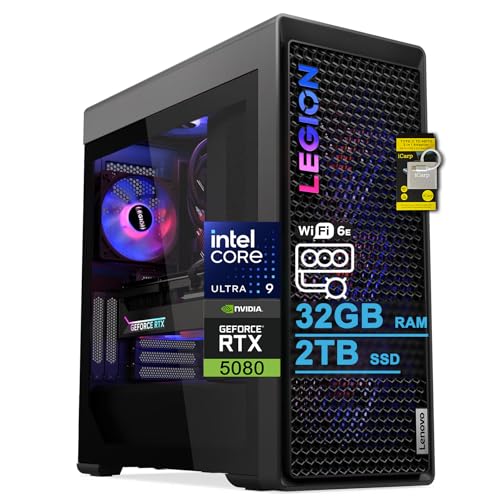
- Best overall for streaming under $3,000: Lenovo Legion Tower 7i Gen 10, Core Ultra 9 285K, RTX 5080 — Check on Amazon
- CLX Set Gaming PC, Ryzen 7 9800X3D, RTX 5080 — Check on Amazon
- Skytech King 95, Ryzen 7 9800X3D, RTX 5070 Ti — Check on Amazon
- Acer Nitro 60 N60-181-UR26, Ryzen 9 7900, RTX 5070 Ti — Check on Amazon
See 2 more Amazon options
- iBUYPOWER Y40 PRO, Ryzen 9 7900X, RTX 5070 Ti — Check on Amazon
- ZOTAC MEK Gaming PC, Ryzen 7 9700X, RTX 5070 Ti — Check on Amazon
Read the full guide ↓
Disclosure: As an Amazon Associate, reviewstook.com earns from qualifying purchases. Links to Amazon on this page are affiliate links; they cost you nothing extra. Listing details such as price and availability change often, so check the current Amazon listing before you buy.
A streaming PC has a harder job than a gaming PC, and it is worth being precise about what that job is before spending $3,000 on it. A gaming PC renders a game. A streaming PC renders the game, encodes a live broadcast of it at the same moment, and — if you work the way most growing channels do — records a second, much higher-quality copy of the session locally for editing and upload afterwards. Three workloads, one machine, no dropped frames allowed in any of them. That is what this budget actually buys at 1080p: not the resolution, which a far cheaper tower handles easily, but the headroom to run all three jobs at once without negotiation, on a 240 Hz or 360 Hz monitor, for years. If you only game, this guide is more computer than you need and the plain Best 1080p Gaming PC Under $3000 coverage is the honest place to shop. If your desk is a studio — game on one screen, OBS and chat on another, a recording spooling to disk the whole time — this is your tier, and this guide grades the six verified machines in it on streaming criteria first and gaming criteria second.
Two ceiling facts shape everything below, and both are about honesty rather than hardware. The first is that the phrase “4K streaming PC” is mostly a marketing shape. What leaves your house is governed by what the platforms accept, not by what your PC can encode: Twitch’s standard ingest is built around roughly 6,000 kbps of H.264, which is a 1080p60 ceiling in practice, and its higher-resolution HEVC path runs through Enhanced Broadcasting for Affiliates and Partners. YouTube is the generous one — its own encoder guidance runs to about 12 Mbps for 1080p60 and roughly 35 Mbps in AV1 or HEVC for 4K60 — so a so-called 4K streaming PC is, in practice, a 4K YouTube PC, and the machines here are bought for 1080p (or 1440p) broadcasting plus a pristine local 4K record, not for beaming 4K to every platform. The second fact is the market ceiling: there is no RTX 5090 system anywhere near $3,000, and most RTX 5080 towers sit above this ceiling. The two 5080 systems in this guide are the exceptions worth checking in this tier — check the current price on Amazon before assuming one still fits — and the tier’s resident card is the RTX 5070 Ti. That turns out to be fine for streamers, for a reason the next sections explain: both cards carry the same dual-encoder hardware, and the encoder — not the GPU’s gaming muscle — is the streaming spec.
In this guide
Quick Picks
Short on time, or comparing several options at once? Each row below names a streamer type and the system that suits it, with a link to the listing.
| Streamer type | Pick | Why it stands out | Link |
|---|---|---|---|
| Best overall for streaming | Lenovo Legion Tower 7i Gen 10, Ultra 9 285K, RTX 5080 | Dual-encoder RTX 5080 plus a 24-core CPU for the editing work after the stream, from a big brand | Check on Amazon |
| Best for play-and-broadcast | CLX Set, Ryzen 7 9800X3D, RTX 5080 | The strongest gaming CPU in this guide with the same dual-encoder 5080 — check the current price on Amazon | Check on Amazon |
| Best X3D streaming value | Skytech King 95, Ryzen 7 9800X3D, RTX 5070 Ti | X3D frame consistency and dual NVENC in a lower position in this tier, with 850W Gold power published | Check on Amazon |
| Best for streaming plus creation | Acer Nitro 60 N60-181-UR26, Ryzen 9 7900, RTX 5070 Ti | 12 cores and 2TB of storage for footage-heavy channels, from a mainstream brand | Check on Amazon |
| Best for streaming and upgrading | iBUYPOWER Y40 PRO, Ryzen 9 7900X, RTX 5070 Ti | 12-core AM5 platform in a standard-layout case, with keyboard and mouse in the box | Check on Amazon |
| Best for spending less | ZOTAC MEK, Ryzen 7 9700X, RTX 5070 Ti | The same dual-encoder GPU class in the lowest position in this tier, with Windows 11 Pro and Wi-Fi 6E — check price on Amazon | Check on Amazon |
How These Picks Were Chosen
The budget was applied as a hard ceiling for this tier: every system below is a real Amazon listing selected to fit the under-$3,000 tier in the United States — check the current price on Amazon for each pick before you buy, because a listing’s position in this tier can move. Two picks — both RTX 5080 systems — sit right at the top of the tier and are the most price-sensitive here; if one is above $3,000 by the time you shop, nothing about the machine changed, only about its position relative to the ceiling. The product set is the verified under-$3,000 set from our base research on this budget; what is new here is the grading, which is streaming-first throughout.
The first streaming filter is the encoder. Every pick carries either an RTX 5080 or an RTX 5070 Ti, and NVIDIA’s published specifications give both cards two NVENC encoder units with AV1 encode support. That matters more to a streamer than the gaming gap between the cards: two encoder units means the live broadcast and the local recording can each have dedicated hardware, instead of one encoder timesharing both jobs. The second filter is the CPU philosophy, and this guide refuses to pick a single winner, because the right answer depends on your week. AMD’s 9800X3D is the play-and-broadcast chip — its stacked cache serves the game while the GPU’s encoders do the broadcasting, so the CPU barely works. Intel’s 24-core 285K and the 12-core Ryzen 9 parts are the production chips — they earn their keep after the stream ends, in editing timelines, exports, thumbnail renders and heavy multitasking. The third filter is storage, because streaming eats disk in a way gaming does not: a high-bitrate local record at 100 Mbps writes roughly 45GB per hour, so the 2TB systems were weighted ahead of the 1TB ones for recording-heavy channels, and the 1TB reviews say what adding a drive involves. On top of those sit the usual checks — 32GB of memory as the floor for game plus OBS plus browser, a power supply named in the listing where the listing names one (and an explicit note where it does not), and cooling that can sustain all three workloads for a long session.
We did not use these systems ourselves. We read the maker listings and specification pages and compared encoder hardware, processors, memory, storage, power supplies, cooling and connectivity. No frame-rate benchmark figures are claimed anywhere in this guide, because no per-system benchmark source was verified for these exact listings; the streaming judgements rest on the encoder specifications, core counts and platform facts, which are documented in the sources file published with this guide.
Two Encoders, Two Jobs
The single most useful streaming fact about this tier is that every graphics card in it — the RTX 5080 in the top two picks and the RTX 5070 Ti in the other four — carries two NVENC encoder units, per NVIDIA’s published specifications, and both generations of the card encode AV1 as well as H.264 and HEVC. On a single-encoder card, a streamer who broadcasts live and records locally at the same time is asking one piece of hardware to do two jobs at two different quality levels: the stream wants a tightly capped bitrate the platform will accept, while the local record wants a generous bitrate that survives editing and re-upload. The usual compromises are to record at stream quality (soft footage for your edited videos), to let the CPU software-encode the record (cores stolen from the game), or to skip the local record and download the platform’s compressed VOD (the worst footage of all). A dual-encoder card dissolves the problem. Encoder one runs the live broadcast. Encoder two runs the local record at a quality setting of your choosing — up to a full 4K master of a session you are broadcasting at 1080p. The game, rendered by the rest of the GPU, notices neither.
AV1 deserves its own sentence, because it is the tier’s second streaming dividend. AV1 encoding delivers visibly cleaner pictures than H.264 at the same bitrate, and YouTube accepts AV1 live ingest today, which is where these machines’ best-looking streams will happen. On Twitch, the higher-quality path is Enhanced Broadcasting with HEVC — again something these cards’ encoders handle in hardware. The practical summary: at this budget, encoding quality stops being a hardware negotiation entirely. Whatever the platforms will take, these six machines can produce, with hardware to spare — which is exactly why the remaining differences between the picks are about processors, storage and position in this tier rather than about the stream itself.
The Platform Ceiling: Why “4K Streaming” Means YouTube
Streamers shopping this tier often arrive with a 4K ambition, so let us settle what the platforms will actually accept, in round numbers from the platforms’ own published guidance. Twitch’s standard ingest is built around roughly 6,000 kbps of H.264 — enough for a clean 1080p60 broadcast, not for 1440p or 4K. Its Enhanced Broadcasting programme raises the ceiling for Affiliates and Partners, with HEVC streams around 7,500 kbps at 1080p and roughly 9,000 kbps at 1440p. YouTube is substantially more generous: its encoder guidance runs to about 12 Mbps in AV1 or HEVC for 1080p60, and around 35 Mbps in AV1 or HEVC (50 Mbps in H.264) for 4K60. So the honest description of any “4K streaming PC” — including the six below — is a 4K YouTube PC that also streams superbly everywhere else at the resolutions those platforms support. None of that is a limitation of these machines: their encoders could produce a 4K stream all day. It is a limitation of the pipes, and it is why this guide grades the picks on the 1080p broadcast you will actually send, the 1440p headroom YouTube and Enhanced Broadcasting open up, and the 4K local record that becomes your edited content — the three outputs a serious channel really produces.
One more platform reality belongs in a buying guide: your own upload connection is part of the machine. A stable wired Ethernet connection matters more to stream quality than any component in this guide — every pick has Ethernet, the Lenovo’s is 2.5-gigabit, and streaming over Wi-Fi on a $3,000 PC is the most expensive way to drop frames ever devised. Budget for the cable run if your desk is far from the router; it is the cheapest performance part in the whole setup.
The 6 Best 1080p Gaming PCs for Streaming Under $3,000
Lenovo Legion Tower 7i Gen 10 — Core Ultra 9 285K, RTX 5080, 32GB DDR5, 2TB SSD
Who it suits: Streamers who are also producers — the channel is a small content business, and the same machine that broadcasts on Friday edits, renders and uploads on Saturday.
The Legion Tower 7i is the most complete streaming workstation in this guide, and the reason is the pairing rather than any single part. The RTX 5080 brings the dual NVENC encoders and AV1 support described above, so the broadcast and the local 4K record each get dedicated hardware. The Intel Core Ultra 9 285K brings 24 cores, and cores are what the rest of a streamer’s week consumes: OBS scenes stacked with browser sources, a Discord call, a chat bot, and then — after the broadcast — the editing timeline, the export queue and the thumbnail render. On an 8-core gaming chip those background jobs queue politely; on this machine they simply run. Around that pairing Lenovo fits 32GB of DDR5, a 2TB SSD — the right size when local records write tens of gigabytes an evening — a 360mm liquid cooler, an 850W power supply named in the listing, and the best connectivity here: Wi-Fi 6E, 2.5-gigabit Ethernet for a properly wired stream, Thunderbolt 4, and keyboard and mouse in the box. Check the current price on Amazon for this 5080 tower in this tier, and note that the big-brand warranty standing behind it is part of what this pick offers.
The trade is gaming specialization. In purely CPU-limited esports titles, the X3D systems below are the frame-rate specialists — their cache serves the game directly, while the 285K’s extra cores serve everything except the game. If your broadcast is competitive shooters on a 360 Hz monitor and you rarely edit, the CLX is aimed at you. If your channel mixes play with production, this is the balance to buy. One configuration note from the listing: memory is stated with a 32GB maximum, so treat the fitted 32GB as the machine’s final memory configuration rather than a waypoint to 64GB.
- RTX 5080 dual NVENC with AV1 — broadcast and 4K local record on separate encoder hardware.
- 24-core 285K: the production CPU of the guide — editing, exports and multitasking without queues.
- 2TB SSD, 2.5Gb Ethernet, 360mm liquid cooling and an 850W PSU named in the listing.
Honest limitation: Its position in this budget depends on the live listing, its all-rounder CPU is a step behind the X3D pair for pure esports frame consistency, and the stated 32GB memory maximum closes one upgrade path.
Choose it if your PC broadcasts and produces, and you want a big brand behind both jobs. Skip it if your stream is competitive-only and you seldom edit — the CLX below spends the same money on your actual bottleneck — or the listing has drifted well above $3,000 when you check.

CLX Set Gaming PC — Ryzen 7 9800X3D, RTX 5080, 32GB DDR5, 2TB NVMe SSD
Who it suits: Competitive streamers — ranked shooters on a 240 Hz or 360 Hz monitor, broadcasting the matches they play, where the game’s frame times are the product.
For the play-and-broadcast streamer, this is the purest build in the guide. The Ryzen 7 9800X3D is the processor high-refresh players ask for by name: eight cores with AMD’s 3D V-Cache, a design that keeps game data beside the cores and produces the high, even frame rates a fast monitor exists to show. The streaming insight is what that leaves behind. Because the RTX 5080’s two NVENC encoders handle the broadcast and the local record entirely in hardware, the CPU’s whole job is the game — and no chip in this guide does that one job better. CLX pairs them with 32GB of DDR5 RGB memory, a 2TB NVMe SSD for the library plus the recordings folder, a 360mm all-in-one liquid cooler, Wi-Fi and Windows 11 Home in the Set’s panoramic case. Check the current price on Amazon before treating this combination as in-budget — its place in this tier depends on the live listing.
The honest caveats are about breadth, not streaming. Eight cores is the smallest count here, and while NVENC makes that irrelevant to the broadcast itself, a production-heavy week — editing long timelines, rendering exports while streaming, running a VTuber rig with heavy scenes — will feel the ceiling sooner than on the 12- and 24-core systems. CLX is also a boutique US builder: you get a standard-parts machine any shop can service, in exchange for support through a smaller company than Lenovo’s network. And the price warning applies at full strength: if the live listing sits above this budget when you check, treat it as an over-budget option rather than an under-$3,000 pick.
- 9800X3D plus RTX 5080: the best gaming CPU here, with dual-encoder hardware for stream and record.
- 2TB NVMe storage and a 360mm AIO — the recording folder and long sessions are both provided for.
- Built from standard parts by a US boutique builder — check price on Amazon for its current position in this tier.
Honest limitation: Its under-$3,000 status depends entirely on the live price on Amazon, eight cores is the guide’s smallest count for production work, and boutique support is a smaller operation than a big brand’s.
Choose it if competitive play is the channel and the current price on Amazon fits this budget. Skip it if the live listing is above this budget, or your week is production-first — the Lenovo above trades a little game specialization for a lot of cores.

Skytech King 95 — Ryzen 7 9800X3D, RTX 5070 Ti, 32GB DDR5, 1TB Gen4 SSD
Who it suits: Esports streamers who want the X3D-and-dual-encoder combination in a lower position in this tier — and who would rather keep part of the budget for the microphone, camera and lighting that no PC includes.
The King 95 is where this guide’s central streaming argument lands: for broadcasting, the RTX 5070 Ti gives up almost nothing to the 5080. NVIDIA’s specifications give both cards two NVENC encoders with AV1, so the simultaneous stream-plus-record workflow that defines this tier works identically here — and the 5070 Ti’s 16GB of GDDR7 is the same memory capacity as the flagship card’s. What the King 95 does with the savings is keep the other half of the streaming equation at full strength: the same Ryzen 7 9800X3D as the CLX, 32GB of DDR5-5600 RGB memory, an 850W Gold ATX 3 power supply and a 360mm ARGB liquid cooler, all named in the listing. Check the current price on Amazon — it sits in a lower position in this tier than the 5080 systems, without depending on the same top-of-tier positioning. For a Valorant, Counter-Strike, Apex or Fortnite channel, this is the configuration a builder would spec with their own money: the game gets the best CPU in the guide, the broadcast gets dedicated encoder hardware, and the leftover budget buys the audio and lighting gear that viewers actually judge a stream by.
Two limitations are printed in its own spec sheet, and both matter more to streamers than to pure gamers. Storage is 1TB — half the drive of the systems above — and local recordings are the hungriest files a streamer makes: at high bitrates an evening’s 4K masters can run past a hundred gigabytes, so a second NVMe drive is a near-certain addition; it is an easy addition in a standard case like this, but budget for it from day one. Second, Skytech notes the graphics card brand may vary: the GPU model is guaranteed, the specific partner card is not, which matters if a particular cooler design is part of your plan. Neither point is hidden, and neither breaks the value case — but a recording-heavy channel that wants 2TB fitted from the factory should look at the Lenovo, CLX or Acer.
- Dual NVENC and AV1 from the 5070 Ti — the full simultaneous stream-and-record workflow in a lower tier position.
- 9800X3D frame consistency for the game; 850W Gold ATX 3 PSU and 360mm AIO named in the listing.
- Lower position in this tier for an X3D system — check price on Amazon; no other X3D system here sits as comfortably inside the ceiling.
Honest limitation: 1TB of storage is the joint-smallest in this guide and recordings will outgrow it fastest, and the exact graphics card brand varies by build.
Choose it if you stream competitive titles and want the tier’s workflow well inside this budget. Skip it if you archive weeks of footage on the machine, or you want the 5080’s extra gaming longevity and the CLX currently fits this budget on Amazon.

Acer Nitro 60 N60-181-UR26 — Ryzen 9 7900, RTX 5070 Ti, 32GB DDR5, 2TB SSD
Who it suits: Streamers whose channels run on volume — long sessions, big VOD archives, coursework or a small business on the same desk — who want a mainstream brand and cores to spare.
The Nitro 60 is the workhorse pick. Acer builds it around a 12-core Ryzen 9 7900 and an RTX 5070 Ti — listed at 1,406 AI TOPS, with the DLSS 4 feature set and the same dual NVENC encoders as every card in this guide — plus 32GB of DDR5 and a 2TB PCIe 4.0 SSD. For streaming, the shape is right in the ways that compound: twelve cores absorb the game, OBS, browser sources and background apps without the prioritization games an 8-core chip can force during a busy scene; the dual encoders split broadcast and record; and 2TB is the storage size that survives a season of local recordings before the archive conversation starts. It sits near the top of this tier among our picks — check the current price on Amazon before you buy, because confirming that it still fits under the ceiling is the key check for this pick.
The Nitro line is Acer’s value-oriented gaming range, and expectations should follow. The case and presentation are mainstream rather than showcase, the listing is thinner on power-supply and cooling detail than the boutique systems here — buyers planning a future GPU upgrade should confirm the PSU specification on the live listing before ordering — and Ethernet is gigabit rather than the Lenovo’s 2.5-gigabit, which matters only if your network and your recording transfers can use more. Its CPU also favors breadth over esports specialization: it will not match an X3D chip’s minimum frame rates in CPU-limited shooters, though at 1080p the 5070 Ti keeps every game in this discussion firmly in high-refresh territory while the stream runs.
- 12-core Ryzen 9 7900 — headroom for the game, the broadcast and everything running beside them.
- 2TB PCIe 4.0 SSD fitted as standard — the recording archive has somewhere to live.
- Top-of-tier positioning in this guide — check the current price on Amazon before ordering.
Honest limitation: It can sit close to the $3,000 ceiling, its listing leaves PSU detail unpublished, and gigabit Ethernet and a productivity-tilted CPU mark it as the all-rounder rather than the specialist.
Choose it if your channel produces a lot of footage and the current price on Amazon fits this tier comfortably. Skip it if pure competitive frame consistency is the brief, or its live price sits at the very top of this tier — the Y40 PRO below covers similar ground in a lower position in the tier.

iBUYPOWER Y40 PRO — Ryzen 9 7900X, RTX 5070 Ti, 32GB DDR5, 2TB NVMe SSD
Who it suits: Streamers planning to grow into the machine — a standard-layout AM5 system whose parts can be upgraded in place as the channel’s demands change.
The Y40 PRO (model Y40BA9N57T01) pairs a 12-core Ryzen 9 7900X with an RTX 5070 Ti 16GB, 32GB of DDR5 RGB memory at 5200 MHz, a 2TB NVMe SSD and Windows 11 Home, in the panoramic HYTE Y40 case, with a keyboard and mouse in the box and a one-year manufacturer warranty stated on the listing. Check the current price on Amazon for its position in this tier. As a streaming machine it covers the whole workflow without a weak line: the dual NVENC encoders split broadcast and record, the twelve cores run the game alongside OBS, chat and browser sources with room to spare, and 2TB holds the library and the VOD folder together. The longer case is ownership. A standard ATX layout on AMD’s AM5 platform — a socket AMD has committed to across multiple processor generations — means the upgrades a growing channel eventually wants, an X3D processor or a bigger graphics card, are drop-in jobs rather than a new PC, and the showcase case is the one your audience sees on camera.
The compromises are in the finer print. The memory runs at 5200 MHz, the slowest kit here; with a non-X3D processor that can cost a little frame-rate consistency in CPU-limited titles, and it is the first thing a performance-minded owner might swap. The listing does not headline its power supply, so confirm wattage on the live page if a flagship GPU upgrade is part of the plan. And like the Acer, this is a 12-core all-rounder: excellent at doing everything at once, a step behind the X3D pair at the single job of feeding a 360 Hz monitor in a shooter while the stream runs. Buy it for breadth, camera presence and longevity.
- Standard ATX layout on AM5 — no system here is easier to upgrade in place.
- 12 cores and dual NVENC for the full stream-plus-record workflow; 2TB storage; keyboard and mouse included.
- Mid-tier positioning in this guide — check price on Amazon.
Honest limitation: Its DDR5-5200 kit is the slowest memory in this guide, the listing never headlines a power supply, and a competitive specialist will take an X3D chip over its twelve cores.
Choose it if you stream a varied schedule and plan to upgrade in place over several years. Skip it if competitive 1080p frame consistency while broadcasting is the whole brief — that is the King 95 above.

ZOTAC MEK Gaming PC — Ryzen 7 9700X, RTX 5070 Ti, 32GB DDR5, 1TB NVMe SSD
Who it suits: Streamers who want this tier’s encoder hardware and a clean, professional specification — and would rather keep part of the budget for the microphone, camera, lighting and second monitor that actually complete a stream setup.
The MEK is the guide’s exercise in spending less without leaving the streaming tier. ZOTAC — a graphics card maker building its own systems — fits an RTX 5070 Ti 16GB GDDR7 with the same dual NVENC encoders and AV1 support as the 5080 picks, a Ryzen 7 9700X boosting to 5.5 GHz, 32GB of DDR5-6000, a 1TB NVMe SSD and a 750W 80+ Gold power supply, with Wi-Fi 6E, Bluetooth 5.3, four display outputs (HDMI 2.1b and three DisplayPort 2.1b — game monitor, OBS monitor and a spare, all provided for) and Windows 11 Pro, a genuinely useful edition upgrade for remote access and drive encryption on a work machine. Check the current price on Amazon — it is the lowest-positioned entry point in this guide by a wide margin, and the specification is notably tidy: joint-fastest memory here, a PSU whose wattage and certification are printed rather than implied, and a named ZOTAC GAMING graphics card rather than a brand lottery.
What its lower position in this tier gives up is CPU headroom and storage. The 9700X is an excellent conventional 8-core processor, and because the encoders live on the GPU it broadcasts beautifully — but a heavy OBS scene, a VTuber rig and a CPU-taxing game at once will lean on it harder than on the 12- and 24-core systems, and it has no X3D cache for CPU-limited esports titles. The 1TB drive matches the King 95 as the smallest here, with the same recordings arithmetic applying. One documentation wrinkle deserves a mention: ZOTAC’s own secondary materials contradict themselves in places — the Windows edition and the output list among them — so the Amazon listing, whose headline specification is the one cited throughout this review, is the page to trust at checkout. Judged fairly, this is the pick for the streamer who agrees the tier is about the workflow, buys the whole workflow, and keeps the change for the rest of the studio.
- Lowest-positioned way into this guide by a wide margin — check price on Amazon.
- Dual NVENC with AV1, DDR5-6000, a named 750W 80+ Gold PSU, Wi-Fi 6E and Windows 11 Pro.
- Four display outputs — the multi-monitor streaming desk is fully provided for.
Honest limitation: 1TB of storage, the least CPU headroom here for heavy scenes and production work, and some inconsistency in the maker’s secondary documentation — trust the Amazon listing.
Choose it if you want the tier’s streaming workflow with money left for the rest of the setup. Skip it if you will spend the full budget anyway — the X3D and 24-core systems convert it into headroom you will feel.

Comparison Table
| Product | CPU | GPU / Encoders | Memory / Storage | Price | Link |
|---|---|---|---|---|---|
| Lenovo Legion Tower 7i Gen 10 | Core Ultra 9 285K, 24-core | RTX 5080 16GB / dual NVENC, AV1 | 32GB DDR5 / 2TB SSD | Check price on Amazon | Check on Amazon |
| CLX Set | Ryzen 7 9800X3D | RTX 5080 16GB / dual NVENC, AV1 | 32GB DDR5 / 2TB NVMe | Check price on Amazon | Check on Amazon |
| Skytech King 95 | Ryzen 7 9800X3D | RTX 5070 Ti 16GB / dual NVENC, AV1 | 32GB DDR5-5600 / 1TB Gen4 | Check price on Amazon | Check on Amazon |
| Acer Nitro 60 N60-181-UR26 | Ryzen 9 7900, 12-core | RTX 5070 Ti 16GB / dual NVENC, AV1 | 32GB DDR5 / 2TB PCIe 4.0 | Check price on Amazon | Check on Amazon |
| iBUYPOWER Y40 PRO | Ryzen 9 7900X, 12-core | RTX 5070 Ti 16GB / dual NVENC, AV1 | 32GB DDR5-5200 / 2TB NVMe | Check price on Amazon | Check on Amazon |
| ZOTAC MEK | Ryzen 7 9700X | RTX 5070 Ti 16GB / dual NVENC, AV1 | 32GB DDR5-6000 / 1TB NVMe | Check price on Amazon | Check on Amazon |
How to Choose a 1080p Streaming PC Under $3,000
- Buy the encoder first. The streaming spec is the encoder hardware, and at this tier it is simple: the RTX 5080 and RTX 5070 Ti both carry dual NVENC with AV1, so every pick here can broadcast and record locally at full quality at the same time. Do not pay a premium for a gaming tier above the encoder tier your workflow uses.
- Split the CPU decision by your week. Play-and-broadcast only? The 9800X3D’s cache serves the game while the GPU encodes — the CLX and King 95. Editing, exports and production after the stream? Core counts earn their money — the Lenovo’s 24 cores or the 12-core Acer and iBUYPOWER. Choose by the work you actually do most weeks.
- Stream at the resolution the platform takes. Your broadcast is 1080p60 on Twitch’s standard ingest and up to 1440p through Enhanced Broadcasting; YouTube takes more, including 4K. A second, higher-resolution canvas in OBS for the local record is where the extra GPU goes — not into a 4K broadcast nobody can receive.
- Size storage for recordings, not games. A high-bitrate local record writes roughly 45GB an hour at 100 Mbps. A channel recording nightly fills 1TB in a couple of months of masters; either buy a 2TB pick or budget a second NVMe drive with the 1TB systems from day one.
- Wire the stream. Ethernet, always. Every pick has it; the Lenovo’s 2.5-gigabit port is the nicest version. A long cable run is the cheapest stream-quality upgrade in this entire guide.
- The RTX 5080 sits at the top of this tier. Both 5080 systems in this guide are positioned right at the ceiling — check the current price on Amazon for each. If the live price has climbed over $3,000, the 5070 Ti systems deliver the identical streaming workflow in a lower position in this tier — the encoder does not know the difference.
- Insist on a named power supply. Wattage and certification printed in the listing — 850W in the Lenovo and King 95, 750W Gold in the ZOTAC — is what makes a future GPU upgrade a plan instead of a gamble. Where a listing is silent, as with the Acer and iBUYPOWER, confirm on the live page before ordering.
- Keep frame generation out of ranked broadcasts. DLSS and multi frame generation smooth single-player games, but generated frames add latency and can look smeared on a compressed stream. Competitive broadcasting wants native frames; save the AI frames for the story games and the local record.
- Verify the exact configuration at checkout. Boutique listings sell near-identical titles with different CPUs, drives and memory speeds, and one pick here notes the GPU brand may vary. The ASIN on this page is the configuration reviewed; a different configuration at checkout is a different machine.
- Budget the studio, not just the tower. None of these picks includes a microphone, camera, lighting or second monitor — the gear viewers actually judge. The ZOTAC and King 95 exist in this guide partly so the full desk can land inside a sane total.
What Is Not in the Box
Every pick in this guide is a tower (two picks add a basic keyboard and mouse). A working stream needs more, and it is better to plan for it now than to discover it on your first broadcast. A decent USB microphone is the first purchase — the well-regarded entry tier is the place to start, and audio is the quality viewers notice most. A 1080p webcam is the next piece, with lighting — even one inexpensive panel — doing more for the picture than a camera upgrade does. A second monitor for OBS, chat and alerts is close to mandatory for a single-PC setup; any serviceable 1080p screen works, including the one you already own. A capture card, for the usual external models, is needed only if you stream console games — PC gameplay on a single-PC setup needs no capture hardware at all. Altogether, allow a meaningful additional part of your overall budget on top of the tower for a complete desk, less if you already own pieces of it. None of that is included in any pick in this guide, and any guide implying otherwise is doing arithmetic you should distrust.
Common Buying Mistakes
- Shopping for a “4K streaming PC” for Twitch. The platform’s standard ingest is a 1080p60 pipe; the 4K output of these machines belongs on YouTube and in your local recordings.
- CPU-encoding the stream with x264 on an 8-core gaming chip while gaming. That is what the dual NVENC encoders are for — software encoding is the fallback, not the plan.
- Streaming over Wi-Fi because the tower was expensive. Upload stability is a cable, and dropped frames do not care what the PC cost.
- Recording local masters to a 1TB drive and discovering the arithmetic mid-season. At high bitrates, recordings are the largest files you own; plan the second drive.
- Assuming a top-of-tier machine still fits without checking. Both 5080 picks sit right at this ceiling — check the current price on Amazon, because the live listing decides whether they belong in your cart.
- Chasing an RTX 5090 at this budget. Nothing verified with that card comes within sight of $3,000, and a listing suggesting one does is pointing at a cheaper configuration in its dropdown menu.
- Judging a streaming PC by its gaming benchmarks alone. The broadcast, the record and the production work are the job; encoder hardware, core counts and storage are the spec sheet that matters.
- Spending the whole budget on the tower and nothing on the microphone. Viewers forgive a soft picture long before they forgive bad audio.
- Trusting a near-identical listing title. The same case ships with three different processors across this market; the ASIN and the spec lines, not the family name, are the machine.
Final Recommendation
- Most streamers at this budget: Lenovo Legion Tower 7i Gen 10.
- Competitive play-and-broadcast, when it fits the budget: CLX Set, Ryzen 7 9800X3D, RTX 5080.
- The full workflow well inside the budget: Skytech King 95.
- Streaming plus content production: Acer Nitro 60 N60-181-UR26.
- Streaming and long-term upgrading: iBUYPOWER Y40 PRO.
- The full tier in the lowest position here: ZOTAC MEK.
Our top two split the streamer brief exactly in half. The Lenovo Legion Tower 7i is the best all-round streaming machine: a dual-encoder RTX 5080 — check the current price on Amazon — a 24-core processor that broadcasts and then edits without compromise, 2TB of storage for the recordings, and a big brand standing behind it. The CLX Set is the best pure play-and-broadcast machine: the same encoder hardware, with the specification spent instead on the 9800X3D pairing that competitive play rewards most, and the same need to confirm it fits this budget on the live listing. If neither is sitting under $3,000 when you shop, the Skytech King 95 is the standing recommendation — the identical dual-encoder workflow and X3D consistency in a lower position in this tier — and the ZOTAC MEK is the value conscience of the guide, positioned lowest here and leaving more of the budget for the studio gear. Streamers whose needs are honestly smaller should compare Best Streaming PC Under $3000 and Best 1080p Gaming PC For Streaming Under $2500, and buyers who do not broadcast at all will find the same hardware graded on gaming alone in Best 1080p Gaming PC Under $3000. Whichever you choose, spend two minutes on the live listing before you spend anything else: at this tier a listing’s position relative to the budget can move, and the configuration in the cart is the only one that counts.
Frequently Asked Questions
Is a $3,000 PC overkill for streaming at 1080p?
For gaming alone at 1080p, yes — and our base guide says so. For streaming, the arithmetic changes: the machine is rendering the game, encoding the broadcast and recording a high-quality local copy simultaneously, and this tier is where all three jobs stop competing for hardware. If you broadcast occasionally and never record locally, a system from Best 1080p Gaming PC For Streaming Under $2500 or Best Streaming PC Under $1500 will serve you honestly for far less.
Can these PCs stream in 4K?
The hardware can encode 4K all day; the platforms decide what you may send. YouTube accepts high-bitrate 4K60 live ingest, including AV1, so a 4K YouTube stream is genuinely possible. Twitch’s standard ingest is a 1080p60 pipe, with higher resolutions only through Enhanced Broadcasting for Affiliates and Partners. In practice, “4K streaming PC” means a 4K YouTube PC — plus a 4K local record everywhere else, which is where most channels’ 4K content actually comes from.
What does dual NVENC actually do for a streamer?
It gives the broadcast and the local recording separate encoder hardware. Without it, one encoder timeshares both jobs and you compromise — record at stream quality, software-encode the record on CPU cores the game wants, or skip the local copy. With two encoders, the stream goes out at the platform’s bitrate while a full-quality master records beside it, and the game notices neither. Both the RTX 5080 and RTX 5070 Ti in this guide have dual NVENC with AV1, which is why the cheaper card is not a streaming downgrade.
9800X3D or a 12- or 24-core CPU for streaming?
It depends on whether the stream is the whole job. If you play and broadcast, the encoders do the broadcasting and the 9800X3D’s cache does the gaming — the CLX and King 95 are built exactly so. If you also edit, render, run heavy OBS scenes or multitask hard, cores earn their keep the moment the broadcast ends: the Lenovo’s 24-core 285K is the production pick, and the 12-core Acer and iBUYPOWER sit between the two philosophies.
How much storage does a streaming PC need?
More than a gaming PC. A high-bitrate local record writes roughly 45GB per hour at 100 Mbps, so a nightly streamer can fill a 1TB drive with masters in a couple of months. The 2TB picks — Lenovo, CLX, Acer, iBUYPOWER — are sized for a season of footage; with the 1TB King 95 or ZOTAC, budget a second NVMe drive early. Archiving older masters to an external drive or NAS is the other half of the discipline.
Do I need a capture card with one of these PCs?
Not for PC games — a single-PC setup captures its own gameplay in software, and these machines have encoder headroom to spare. A capture card is only for bringing a console’s picture into the PC, and it is a separate purchase that no pick in this guide includes.
Will these PCs handle a 1440p stream or a future 1440p monitor?
Yes. Every system here is a strong 1440p gaming machine in its own right — see Best 1080p Gaming PC For 1440p Gaming Under $3000 — and YouTube plus Twitch’s Enhanced Broadcasting both open 1440p paths that these encoders feed comfortably. Nothing in this guide is a 1080p-only purchase; the resolution in the title is your current broadcast canvas, not the machine’s ceiling.


