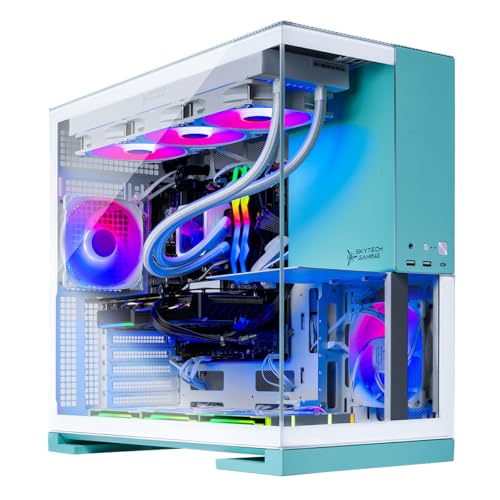
Where to buy
Check the latest price, availability and delivery on Amazon. Orders are placed on Amazon. We may earn a commission from qualifying purchases.
- Best value tower for a small room: Skytech Gaming Aqua, Ryzen 7 9800X3D, RTX 5070 Ti 16GB, 2TB SSD — Check on Amazon
- Skytech Gaming Rampage, Ryzen 7 7800X3D, RTX 5070 Ti 16GB — Check on Amazon
- CyberPowerPC Gamer Supreme Liquid Cool, Ryzen 7 7800X3D, RTX 4070 Ti Super 16GB — Check on Amazon
- STORMCRAFT Falcon, Ryzen 7 7800X3D, Radeon RX 9070 XT 16GB — Check on Amazon
See 2 more Amazon options
- MSI Aegis ZS2, Ryzen 9 7900X, RTX 4070 Super 12GB — Check on Amazon
- MXZ Gaming PC, Ryzen 7 7800X3D, RTX 4070 Super 12GB, 16GB DDR5 — Check on Amazon
Read the full guide ↓
Disclosure: As an Amazon Associate, reviewstook.com earns from qualifying purchases. Links to Amazon on this page are affiliate links; they cost you nothing extra. Listing details such as price and availability change often, so check the current Amazon listing before you buy.
Start with the sentence this search deserves: at $2,500, “small spaces” is a placement problem, not a product category. Every machine in this guide is a full-size gaming tower. None of them is a mini PC, none mounts behind a monitor, and none disappears into a TV stand the way a console does. That is what the top of the prebuilt market looks like: systems carrying RTX 5070 Ti and 4070-class graphics cards, 360mm liquid coolers and 850W power supplies are built into towers because the hardware needs the room — for the radiator, for the graphics card, for air to move. If your space is genuinely tiny — a dorm desk, a studio corner, a shelf — the honest route is a different guide entirely, and we link to the small-form-factor and mini-PC guides further down. This guide exists for the more common reader: someone with a small room and a real budget, who is going to buy a tower anyway and needs to know which of the six fastest machines under $2,500 will be the least painful to live next to.
So the grading here is different from our performance guide to the same six machines. Raw speed still matters — a slow PC is a bad buy at any size — but each pick is also graded on how livable it is in a small room: how much desk or floor its form factor really claims, where its cooling needs clearance, how much heat its hardware class pours into a small space, how its fans behave at desk distance, and how much cable bulk arrives with it. One discipline runs through everything below: the research behind this guide documents specifications, prices and cooling types, but not an exact measured footprint for any of these six towers, and listings in this category change case revisions without changing names. Rather than invent dimensions, we grade by documented form-factor class — the tower size implied by a 360mm radiator or a multi-fan air array — and tell you plainly, in the buying checklist, to take the exact width, depth and height from the live listing and measure your space against them. A tape measure is a more reliable reviewer than a product photo, because product photos are shot to make towers look smaller than they are.
The second honesty note is about price, inherited from the base research: this band is volatile. Two picks — the Skytech Aqua and the STORMCRAFT Falcon — sit at or above the ceiling on list pricing and belong here only because they regularly sell below it; a third, the CyberPowerPC, is a machine to buy when it is on sale rather than at its everyday level. Prices in this band move constantly, so check the live listing before you buy: if a machine’s current price is over $2,500, it has left this budget, whatever its merits. Below: the quick picks, full reviews, a comparison table, a measure-first checklist, and the mistakes that strand tower buyers in small rooms.
In this guide
Quick Picks
Short on time, or comparing several options at once? Each row below names a small-space situation and the machine that suits it, with a link to the listing.
| Your situation | Pick | Why it stands out | Link |
|---|---|---|---|
| Best value tower for a small room | Skytech Gaming Rampage, Ryzen 7 7800X3D, RTX 5070 Ti | Top-tier graphics with real headroom under the ceiling — the saving buys the desk and cable room the tower needs | Check on Amazon |
| Most performance, if you have the floor space | Skytech Gaming Aqua, Ryzen 7 9800X3D, RTX 5070 Ti | The fastest processor class here and 2TB storage — a showpiece tower that wants to be seen and sits right at the ceiling — check price on Amazon | Check on Amazon |
| Lowest spend, liquid-cooled | CyberPowerPC Gamer Supreme Liquid Cool, RTX 4070 Ti Super | 16GB flagship-class GPU and 2TB storage at the guide’s lowest sale tier — check price on Amazon | Check on Amazon |
| Radeon alternative | STORMCRAFT Falcon, Ryzen 7 7800X3D, RX 9070 XT | 16GB of fast raster performance in a liquid-cooled tower — buy it on sale, not at list | Check on Amazon |
| Fewest extra boxes to store | MSI Aegis ZS2, Ryzen 9 7900X, RTX 4070 Super | Keyboard and mouse included in the box, liquid cooling, twelve cores for a second job | Check on Amazon |
| Cheapest way in — measure it first | MXZ Gaming PC, Ryzen 7 7800X3D, RTX 4070 Super | The esports processor at the lowest price tier here, cooled by six RGB fans — with one memory catch | Check on Amazon |
How These Picks Were Chosen
The six machines are the verified set from our research into this budget: real Amazon listings, each seen selling at or below $2,500 in the United States, with specifications taken from the listings and maker pages rather than roundup summaries. Machines that only ever sold above the ceiling were excluded however strong they were — RTX 5080 prebuilts start above this budget, and at least one major brand’s RTX 5070 Ti tower was listed well above this budget. Where a pick only fits this budget when it is discounted, the review says so in plain language.
On top of that performance filter, this variant applies a placement filter, and it is worth being exact about what it can and cannot grade. It can grade form-factor class: five of the six picks are liquid-cooled towers, three of them documented with 360mm radiators — a full tower built around a large radiator at its front or top face, and that face needs open air, not a wall or a cabinet side. It can grade cooling architecture: a liquid-cooled machine concentrates its exhaust at the radiator, while the one air-cooled pick, the MXZ, breathes through a six-fan array, so more of its faces need clearance. It can grade heat class from the hardware itself — a 5070 Ti system under load converts most of the power it draws into heat in your room. And it can grade the clutter that arrives with the machine: one pick ships its keyboard and mouse in the box, and all six need cable room behind them that buyers consistently forget to budget.
What this filter cannot do is print you a footprint. No exact dimensions for these six towers were documented in the underlying research, case revisions change under unchanged model names, and a dimension copied from the wrong revision is worse than none — it is how a tower ends up an inch too deep for the alcove it was bought for. So the comparison table grades placement qualitatively, and the How to Choose section turns the live listing’s specification block into a measuring exercise: width, depth, height, plus the clearance and cable room the photos never show. Treat your own tape measure as the final review. The honesty filter about configuration variance applies here too: several makers state that the graphics card brand and minor components may vary, which matters for placement as well as performance, because a longer or taller card variant changes the case it ships in. Check the live specification block before you measure.
The 6 Best 1080p Gaming PCs for Small Spaces Under $2,500
Skytech Gaming Aqua — Ryzen 7 9800X3D, RTX 5070 Ti 16GB, 2TB SSD
Who it suits: The buyer with one good floor position or a deep desk end, who wants the strongest specification in this guide and is honest that the tower will be a visible piece of furniture in the room.
On performance, this is the ceiling of the guide: a Ryzen 7 9800X3D — eight cores, 4.7GHz base and boost to 5.2GHz per the listing — paired with an RTX 5070 Ti carrying 16GB of GDDR7, 32GB of DDR5 at 6000 speed, a 2TB Gen4 NVMe SSD, an 850W Gold ATX 3 power supply and a 360mm ARGB liquid cooler. At 1080p that processor is the point: Full HD frame rates are set by how fast the CPU can prepare frames, and the 9800X3D is the fastest gaming-processor class in this guide, which is what feeds a 240Hz or faster monitor. Nothing in the supporting specification is the part you upgrade next year, and the 2TB drive matters in a small room more than buyers expect — it postpones the day you are adding storage and re-cabling a cramped setup.
As a piece of furniture, be clear-eyed about what the specification implies. A 360mm radiator means a full-size tower case with a large cooling face that must breathe: placed on the floor beside a desk with open air at its front and top, it is a well-behaved machine; wedged into a closed cabinet or pushed flush against a wall, its cooling works against you and its noise will tell you so. The ARGB lighting is designed to be looked at, which creates the temptation to give it desk space it does not need — resist: floor placement keeps the desk for the monitor and peripherals, and the lighting reads perfectly well from there. Its heat class is the highest here alongside the other 5070 Ti towers, which argues for the best-ventilated position in the room rather than the corner nearest the bed. Take the case’s exact dimensions from the live listing before ordering — Skytech states the graphics card brand may vary, and card variants are one reason case revisions differ.
Price is this pick’s clearest catch: discounted, it sits right at the ceiling; at list, its pricing runs above the budget, and it has drifted higher still during component-price surges. It belongs in this guide at its deal price only — check price on Amazon before you commit.
- Ryzen 7 9800X3D and RTX 5070 Ti 16GB — the fastest pairing in this guide for high-refresh 1080p.
- 2TB Gen4 SSD and 32GB DDR5-6000 — the storage and memory that keep a cramped setup closed for years.
- 360mm liquid cooling — exhaust concentrated at the radiator, which makes placement predictable.
Honest limitation: It is a full-size showpiece tower that only fits this budget when it is discounted — its list pricing sits above the ceiling — and the graphics card brand may vary per the listing.
Choose it if you have one good floor position with open air and want the complete flagship specification. Skip it if the live price is over $2,500, or your only available position is an enclosed cabinet — the Rampage below delivers the same graphics tier for far less.

Skytech Gaming Rampage — Ryzen 7 7800X3D, RTX 5070 Ti 16GB, 1TB SSD
Who it suits: The small-room buyer who wants the modern graphics tier and an X3D processor, and would rather spend the money saved versus the Aqua on the desk, monitor position and cable management that make a tower livable in a small space.
The Rampage is the same idea as the Aqua with the money taken out of the right places. The processor steps back a generation to the Ryzen 7 7800X3D — 4.2GHz base, boost to 5.0GHz, and still one of the finest gaming processors made, with the same 3D V-Cache design that wins CPU-limited resolutions. The graphics card does not step back: the same RTX 5070 Ti tier with 16GB of GDDR7, the same DLSS 4 feature set, and the same ability to grow into a 1440p monitor later. The savings live in the supporting cast — 32GB of DDR5 at 5600 instead of 6000, a 1TB Gen4 SSD instead of 2TB — while the parts that decide placement and longevity were kept: an 850W Gold ATX 3 power supply and a 360mm ARGB liquid cooler. For a games-only machine in a small room, that trade is the correct one, because the difference between the two Skytech towers is invisible from the chair and the saving is very visible in the room.
Placement-wise it is the Aqua’s sibling: a full tower built around a 360mm radiator, happiest on the floor beside the desk with its cooling faces unobstructed, and equally unhappy in a sealed cabinet. Its heat class is the same 5070 Ti class, so the advice is identical — the best-ventilated position you have, the radiator face off the wall, cable room behind it rather than the case forced flush. Where it beats the Aqua for this variant’s reader is arithmetic: this exact configuration sells well inside the budget on Amazon, comfortably below flagship money — check price on Amazon to see where it sits today. That headroom is a larger desk or a monitor arm that frees the surface the tower would otherwise share — either improves a small room more than a processor generation does. The standing caveats apply: the graphics card brand may vary per the listing, and 1TB fills faster than new buyers expect, so a second SSD belongs in the long-term plan.
- RTX 5070 Ti 16GB with a Ryzen 7 7800X3D — the modern high-refresh pairing at a mid-guide price — check price on Amazon.
- 850W Gold ATX 3 PSU and 360mm liquid cooling retained — the placement-relevant hardware was not cut.
- The saving versus the Aqua funds the desk and positioning a tower in a small room actually needs.
Honest limitation: The 1TB SSD is the tightest storage in the top half of this guide, and it is the same full-tower footprint class as the Aqua — the saving is money, not space.
Choose it if you want 5070 Ti performance in a small room at the lowest price tier in this guide. Skip it if your game library will overwhelm 1TB quickly and you would rather pay for 2TB now — the CyberPowerPC and MSI picks below carry it.

CyberPowerPC Gamer Supreme Liquid Cool (SLC8480A3) — Ryzen 7 7800X3D, RTX 4070 Ti Super 16GB, 2TB SSD
Who it suits: The buyer whose small room comes with a small remaining budget — who needs the tower, the desk position and the monitor to all fit the finances, and who is willing to buy on sale to do it.
This is the value spoiler of the guide. The specification pairs the Ryzen 7 7800X3D with an RTX 4070 Ti Super — the previous generation’s flagship-adjacent card, and importantly a 16GB one — plus 32GB of DDR5 and a 2TB PCIe Gen4 SSD. At 1080p that card is far beyond need, and at 1440p it remains a serious tier, so the performance-per-dollar here is the best in the guide. The series name carries the placement-relevant fact: this is a liquid-cooled machine, so its exhaust behaviour is the predictable radiator pattern, rather than a multi-fan air array breathing from several faces. Our research does not document the radiator size for this model, and we will not guess it — confirm it, and the case dimensions, in the live listing’s specification block.
The price framing must stay honest: this is a sale-driven pick, whose appeal rests on the deep discounts it periodically carries on Amazon rather than on its everyday pricing — check price on Amazon to see which level it is at today. Read the pick as the guide’s deal target: when it is on sale, it is the strongest value here; at full price near the ceiling, the Rampage’s newer graphics tier argues for itself instead. For the small-space reader the attraction is the combination — flagship-class graphics memory, the joint-largest storage in the guide, liquid cooling, the lowest price tier — because it leaves the most money for the room itself. One caution for the whole CyberPowerPC range: builds can vary minor components by production run, so verify the delivered specification against the listing inside the return window.
- RTX 4070 Ti Super 16GB and 2TB SSD — flagship-class memory and storage at a sale price tier well inside the budget — check price on Amazon.
- Liquid cooling, as the series name states — concentrated exhaust, predictable placement.
- Ryzen 7 7800X3D — the same esports processor class as the guide’s newer picks.
Honest limitation: Its value rests on catching it on sale rather than at its everyday price, and the radiator size is not documented in our research — confirm both on the live listing.
Choose it if you catch it on sale and you want the most hardware per dollar in this guide. Skip it if the listing has drifted to ceiling money — at that point the Rampage’s 5070 Ti is the better buy.

STORMCRAFT Falcon — Ryzen 7 7800X3D, Radeon RX 9070 XT 16GB, 1TB SSD
Who it suits: The raster-performance buyer in a small room who wants 16GB of graphics memory without the NVIDIA price premium, and who has the patience to buy this tower at a sale price rather than its list price.
The Falcon is the guide’s Radeon expression of the same formula: a Ryzen 7 7800X3D feeding a Radeon RX 9070 XT with 16GB of GDDR6, backed by 32GB of DDR5 RGB memory at 6000 speed, a 1TB Gen4 NVMe SSD, an 850W Gold ATX 3 power supply and a 360mm liquid cooler. The 9070 XT is a genuinely fast raster graphics card, and for the player whose games do not lean on NVIDIA’s feature set it delivers this guide’s frames-per-dollar challenge to the 5070 Ti picks. The supporting specification is complete in the ways that matter for a machine you will live beside for years.
For placement it is, again, a full liquid-cooled tower with a 360mm radiator: the same floor-beside-the-desk advice, the same clearance discipline, the same heat class as the other flagship-tier towers. There is no smaller Falcon hiding in the range, so the small-space decision is the one the whole guide poses — is the performance worth a full tower’s claim on the room? The price is where this pick demands discipline. Its list pricing sits exactly at the ceiling, while the same model family has sold for noticeably less at Newegg. Buy it on sale — check price on Amazon — where it undercuts the 5070 Ti towers; do not buy it at list, where it merely matches them while giving up the NVIDIA feature set. The money saved is also the money that solves the placement — the wider desk, the floor position with clearance.
- RX 9070 XT 16GB — flagship-class raster performance and memory without the NVIDIA premium.
- 360mm liquid cooling and an 850W Gold ATX 3 PSU — the full supporting specification.
- A wide gap between its sale pricing and its at-ceiling list price — the deal gap is the largest in the guide.
Honest limitation: It is a deal-price pick: at list it costs 5070 Ti money, and its 1TB SSD matches the Rampage’s tightest storage.
Choose it if you catch it on sale and your games are raster-first. Skip it if the live price is at list — the Rampage gives you the newer NVIDIA tier at the same money.

MSI Aegis ZS2 (B7NUE-853US) — Ryzen 9 7900X, RTX 4070 Super 12GB, 2TB SSD
Who it suits: The small-room buyer whose PC also has a second job — streaming, editing, compiling — and who values the one pick in this guide that arrives with its keyboard and mouse already in the box.
The Aegis ZS2 is the deliberate exception to the guide’s processor pattern. Instead of an X3D chip it carries a Ryzen 9 7900X — twelve cores and twenty-four threads, up to 5.6GHz — trading a little CPU-limited 1080p frame rate for a great deal of multi-core work capacity. The graphics card is an RTX 4070 Super with 12GB of GDDR6X, a strong 1080p and 1440p tier; around them sit 32GB of DDR5 at 5600 speed, a 2TB M.2 NVMe SSD, liquid cooling, an 80+ Gold power supply and WiFi 6E. For pure gaming the X3D picks are faster at this resolution; for a machine that also renders, encodes or compiles on the same desk, this is the balanced one.
Its small-space virtues are unglamorous and real. The listing includes a keyboard and mouse in the box, which in a small room is not a freebie but a logistics saving: two fewer boxes to buy and store, and a setup that works the evening it arrives. Liquid cooling keeps its exhaust behaviour in the predictable radiator pattern — our research does not document the radiator size for this model, so confirm it, and the case dimensions, on the live listing rather than assuming the 360mm pattern of the Skytech and STORMCRAFT picks. The twelve-core processor means the heat class stays high even outside games, since editing and compiling loads warm a small room just as gaming does; position it for airflow, not for hiding. On price, it sits in the upper-middle tier of this guide on Amazon — check price on Amazon — and the same configuration has also appeared at a warehouse retailer, where it was out of stock at the time of research.
- Ryzen 9 7900X twelve cores — the pick for a desk that works as well as plays.
- Keyboard and mouse included — the only pick that arrives as a complete, storable setup.
- 2TB SSD and liquid cooling, with the most thoroughly documented specification in the guide.
Honest limitation: The RTX 4070 Super’s 12GB and the non-X3D processor make it a step behind the 5070 Ti picks for pure high-refresh gaming, and its radiator size is not documented in our research.
Choose it if the machine has a second job and you want the fewest extra purchases in a small room. Skip it if it is purely a games machine — the X3D picks are faster at 1080p for the same or less money.

MXZ Gaming PC — Ryzen 7 7800X3D, RTX 4070 Super 12GB, 16GB DDR5
Who it suits: The focused esports buyer with the tightest budget in this guide, who will measure carefully, accept one planned upgrade, and trade the liquid-cooled pattern for a lower price.
The MXZ is the guide’s proof of how far the price falls when a specification accepts one unfinished item. The core pairing is remarkable at its price: a Ryzen 7 7800X3D — the same esports processor class as the Rampage and Falcon — with an RTX 4070 Super carrying 12GB, on a B650 platform with DDR5 memory at 6000 speed, a 1TB NVMe SSD and Windows 11 Pro. It sits in the lowest price tier in this guide — check price on Amazon. The unfinished item is memory: 16GB where every other pick ships 32GB. For a single competitive title that is still workable, which is why the pick exists; for a machine in this budget class expected to serve for years it is an upgrade waiting to happen, and the honest way to judge this machine’s cost is its price plus the memory kit you will eventually fit.
Its placement profile is the different one in the guide. Where the other five picks are liquid-cooled, the MXZ is documented with six RGB fans — an air-cooled array. In a small room that cuts both ways. Air cooling has no radiator face to keep clear, but six fans means intake and exhaust spread across more of the case, so the clearance rule applies to more faces — and a fan array is the arrangement most likely to make itself heard at desk distance during a long session. We make no decibel claims, because none are documented, but expect the most audible pick in the guide and prefer the floor position. The RGB fans also mark it as a machine designed to be seen, which tempts desk placement; the performance does not care where it sits, and your desk should win. Measure from the live listing, as with every pick here.
- Ryzen 7 7800X3D with an RTX 4070 Super at the lowest entry price tier in the guide — check price on Amazon.
- DDR5-6000 platform and Windows 11 Pro — the foundations are current-generation.
- Six-fan air cooling — no radiator, but more faces that need clearance.
Honest limitation: 16GB of RAM where all five rivals ship 32GB — price in the upgrade — and its six-fan air array is the placement profile most likely to be heard at desk distance.
Choose it if you play competitive titles, want the X3D class at the lowest price, and accept the memory upgrade as a planned cost. Skip it if you want a finished specification out of the box — every other pick here ships complete.

Comparison Table
The placement column grades only what the research documents — form-factor class and cooling architecture. No exact dimensions were documented for any pick, so measure the live listing before you buy.
| Pick | Processor | Graphics | Memory / Storage | Cooling (as documented) | Small-space note | Link |
|---|---|---|---|---|---|---|
| Skytech Gaming Aqua | Ryzen 7 9800X3D | RTX 5070 Ti 16GB | 32GB DDR5-6000 / 2TB | 360mm ARGB liquid | Showpiece tower — floor position with the radiator face clear; deal-price only | Check on Amazon |
| Skytech Gaming Rampage | Ryzen 7 7800X3D | RTX 5070 Ti 16GB | 32GB DDR5-5600 / 1TB | 360mm ARGB liquid | Same tower class as the Aqua, noticeably cheaper — the saving funds the setup | Check on Amazon |
| CyberPowerPC Gamer Supreme Liquid Cool | Ryzen 7 7800X3D | RTX 4070 Ti Super 16GB | 32GB DDR5 / 2TB | Liquid (radiator size not documented) | Lowest price tier in the guide — a sale-driven pick, so confirm the live listing | Check on Amazon |
| STORMCRAFT Falcon | Ryzen 7 7800X3D | RX 9070 XT 16GB | 32GB DDR5-6000 / 1TB | 360mm liquid | Full tower with list pricing at the ceiling — only buy it on sale | Check on Amazon |
| MSI Aegis ZS2 | Ryzen 9 7900X (12-core) | RTX 4070 Super 12GB | 32GB DDR5-5600 / 2TB | Liquid (radiator size not documented) | Keyboard and mouse in the box — the fewest extra parcels and boxes | Check on Amazon |
| MXZ Gaming PC | Ryzen 7 7800X3D | RTX 4070 Super 12GB | 16GB DDR5-6000 / 1TB | Air — six RGB fans | Cheapest pick; more faces need clearance, and 16GB RAM is a planned upgrade | Check on Amazon |
How to Choose a 1080p Gaming PC for Small Spaces Under $2,500
Measure the space before you measure the machines. Take the width, depth and height of the exact position the tower will occupy — the floor bay beside the desk, the desk end, the alcove — and write the numbers down. Then, for any pick you are serious about, open the live Amazon listing and find the case dimensions in its specification block. Those listing figures are the only dimensions this guide will send you to, because they are the ones attached to the configuration you are actually buying; case revisions change under the same model name, and a figure copied from a review of a different revision is how towers arrive an inch too deep. If the listing’s dimensions plus the clearance below do not fit your measured space with room to spare, the machine does not fit, whatever its frame rates.
Add the invisible inches. A tower’s listed depth is the case, not the installation. Behind it, cables need room to bend without being forced; at its cooling faces, a radiator or fan intake pushed against a wall is a machine cooling itself with its own exhaust. As a working rule, leave a hand’s width of open air at every intake and exhaust face and several inches behind the case, and treat a fully enclosed cabinet as unsuitable for any pick here unless its back is open and its door stays open in use. If your measured space cannot provide that air, a tower is the wrong form factor for it — the smaller guides linked below exist for exactly that room.
Decide floor versus desk deliberately. Desk placement spends your scarcest surface on a box and puts fan noise at ear distance; it suits only a deep desk. Floor placement beside the desk is the default recommendation for all six picks: it keeps the desk for the monitor and keyboard, and puts distance between the cooling and your ears. Two cautions follow. A tower on carpet can smother a bottom intake, so give it a board or stand if your floor is soft. And an under-desk knee-hole with closed sides is a cabinet by another name.
Budget the room’s heat, not just the PC. Every pick here is a high-power system; under a gaming load, most of the electricity it draws becomes heat in your room. In a small bedroom that is a genuine comfort factor across a long evening, and it argues for the position with the room’s best airflow — not the deadest corner. The dedicated heat and noise section below covers this in full.
Match the pick to the room’s second job. If the desk is also a work desk, the MSI’s twelve cores and included peripherals simplify the whole setup. If the machine is purely for competitive play, the MXZ’s low price tier or the Rampage’s balance leaves money for the monitor arm and desk that make the space work. If the tower must earn its furniture claim with a complete specification and no planned upgrades, the Aqua — at its deal price — and the 2TB CyberPowerPC are the finished articles. And if your measurements keep failing, accept the verdict early: the same money buys genuinely small machines in Best Small Form Factor Gaming PC Under $2500 and Best Mini Gaming PC Under $2500, and a PC that fits the room beats a faster one that fights it.
The Honest Alternative: Truly Small Machines at the Same Money
The same budget that buys these six towers also reaches the top of the genuinely small categories: the machines in Best Small Form Factor Gaming PC Under $2500 are built into cases a fraction of a tower’s size, and the mini PCs in Best Mini PC Under $2500 can sit on a shelf or behind a monitor. If your room’s problem is truly square inches, those guides — and Best Compact Gaming PC Under $2500 — are where your money belongs, and no review in this guide should talk you out of them.
The trade is real in both directions. Truly small machines give up things towers take for granted: the largest graphics cards do not fit their cases, cooling runs closer to its limits, power supplies shrink, and upgrading later usually means replacing rather than adding. The six towers in this guide are the performance-first set — the full 5070 Ti and 16GB graphics tiers, 850W-class power supplies, liquid cooling with headroom — bought at the price of a furniture-sized claim on your room. Neither side is correct in the abstract. The correct answer is the one your tape measure and your game library agree on: measure first, then decide which guide you are shopping in.
Heat and Noise: Living Next to a Tower in a Small Room
Two qualities decide whether a fast PC is pleasant to live beside, and neither appears on a specification sheet: the heat it sheds and the sound it makes doing it. On heat, the physics are unavoidable and worth planning around. A gaming tower under load turns most of its power draw into warm air, and the flagship hardware in this guide sits in the warmest class of consumer PCs. In a small room that warm air has nowhere to dilute; a long session can leave a small bedroom noticeably stuffier than a large one with the same machine. The mitigations are placement and airflow, not purchase: the ventilated position over the enclosed one, the door ajar over the door shut. Buyers in genuinely hot rooms should also weigh the 4070 Super picks, whose hardware class runs a step cooler than the flagship tier, as a comfort decision as much as a performance one.
On noise, this guide makes no decibel claims, because the underlying research documents none — be wary of any guide that quotes a precise noise figure for a prebuilt tower it has not measured in the configuration you are buying. What can be graded honestly is architecture. The five liquid-cooled picks concentrate their cooling at a radiator, generally fewer, larger fans moving the air; the MXZ’s six-fan array spreads the work across more, smaller fans and more case faces. At desk distance, fan count and placement distance are what you will actually perceive, which is why the floor position recurs throughout this guide: a metre of distance and a desk edge between you and the case is the cheapest noise reduction at any budget. What no placement fixes is a starved intake — a tower against a wall works harder and louder for the same temperatures.
Common Buying Mistakes
- Judging a tower’s size from product photos. Listing images are shot to flatter; the case that looks compact beside a rendered desk is a full tower on your floor. Measure the live listing’s specification block against your space.
- Ordering before measuring at all. The most common small-space failure is not buying the wrong PC — it is buying the right PC for a position that is two inches too shallow, and discovering it on delivery day.
- Closing the cabinet door. A tower in a sealed TV stand or cupboard recirculates its own exhaust, runs hotter and louder, and ages faster. If the furniture has no open back and no airflow, it is not a PC position.
- Forgetting the cables in the depth budget. The case depth in the listing excludes the bend room its power and display cables need behind it; a tower forced flush to the wall is a tower with strained cables and a blocked rear exhaust.
- Paying list price for the deal picks. The Aqua and the Falcon belong in this guide at their sale prices, not at list prices at or above the ceiling. At list money, the Rampage is the better purchase.
- Assuming the name tells you the size. This category sells “mini” towers that are nothing of the kind; conversely, the MXZ in this guide makes no size claim at all and is still a full tower. The specification block is the only honest label.
- Spending the whole budget on the tower and nothing on the room. At this level the desk position, monitor arm and cable management are part of the product — the Rampage’s saving over the Aqua buys exactly those things.
- Skipping the delivered-specification check. Makers state that graphics card brands and minor components may vary; verify what arrived against the listing inside the return window — doubly so when the case revision decides whether the machine fits its measured home.
Final Recommendation
- Most small-room buyers at this budget: Skytech Gaming Rampage.
- Maximum performance, if the floor position is genuinely good: Skytech Gaming Aqua.
- Lowest spend with flagship-class hardware: CyberPowerPC Gamer Supreme Liquid Cool.
- Radeon and raster-first players: STORMCRAFT Falcon.
- Gaming plus a second job, fewest extra boxes: MSI Aegis ZS2.
- Focused esports on the tightest budget: MXZ Gaming PC.
Our top two for a small room are the Skytech Gaming Rampage, because RTX 5070 Ti performance with an X3D processor at a mid-guide price leaves real headroom under the ceiling — money a small room actually needs spent on it: the desk, the position, the cable run — and the Skytech Gaming Aqua, for the buyer whose one good floor position can do justice to the complete flagship specification, provided its live price is its deal price and not the list price above the ceiling. The CyberPowerPC is the value spoiler with 2TB and a 16GB card at a sale price, the Falcon the frames-per-dollar spoiler when its price behaves, the MSI the right answer the moment the machine has a second job, and the MXZ the esports shortcut with one memory upgrade priced in. Readers whose measurements say no tower fits should not force one — step across to the genuinely small machines in the guides linked below, or down to Best 1080p Gaming PC For Small Spaces Under $1500, where the footprints shrink with the budget. Measure the space, check the live listing’s dimensions, check the live price — in a small room, that homework is the whole purchase.
Frequently Asked Questions
Is any PC in this guide actually small?
No — and the guide says so in its first paragraph rather than burying it. All six picks are full-size gaming towers, because at $2,500 the prebuilt market’s performance hardware lives in tower cases. They are graded here on how livable each tower is in a small room: footprint class, cooling clearance, heat, noise architecture and arriving clutter. If you need a machine that is small in itself, start with Best Small Form Factor Gaming PC Under $2500 or the mini-PC guides instead.
Why doesn’t this guide print exact dimensions for each tower?
Because the research behind it does not document verified dimensions for these six listings, and case revisions change under unchanged model names — a precise figure copied from the wrong revision is worse than none. The dimensions that matter are the ones in the live Amazon listing’s specification block for the configuration you are buying. Take those, add clearance for cooling faces and cable room behind the case, and measure your space against the total before ordering.
How much clearance does a gaming tower need?
As a working rule, a hand’s width of open air at every intake and exhaust face, and several inches behind the case for cables to bend without force. Liquid-cooled picks concentrate exhaust at the radiator, so that face matters most; the air-cooled MXZ breathes through six fans, so more of its faces count. A tower in a fully enclosed cabinet or pushed flush against a wall is cooling itself with its own exhaust — hotter, louder and shorter-lived.
Will a $2,500 tower heat up a small bedroom?
Noticeably, during long sessions, yes — that is physics rather than a flaw in any particular pick. A flagship-class system under gaming load turns most of its power draw into heat, and a small room has little air to dilute it. Placement in the room’s best airflow, a door or window you can open, and choosing the 4070 Super tier over the flagship tier if your room already runs hot are the honest mitigations.
Can I put one of these towers inside a TV stand or cabinet?
Only if the compartment has an open back, real airflow, and a door that stays open while you play — at which point it is a shelf, not a cabinet. Sealed furniture is the classic small-space mistake with a machine of this power class: temperatures climb, fans work harder and louder, and the hardware ages faster. If enclosed furniture is your only position, a genuinely small machine from the SFF or mini guides is the right purchase, not a tower.
Which pick is easiest to live with in a small room?
For most readers, the Rampage: the flagship graphics tier at a mid-guide price, with the saving available for the desk and positioning that decide how the room feels. The MSI Aegis ZS2 is the easiest arrival — keyboard and mouse in the box, 2TB of storage, liquid cooling — and the CyberPowerPC is the easiest on the budget when it is on sale. The Aqua is the best machine and the most demanding piece of furniture; buy it when the room can take it.
Why are some of these PCs sometimes listed above $2,500?
Because prebuilt prices move with component costs, memory most of all, and list prices sit above the deal prices these machines actually trade at. The Aqua’s deal pricing sits just under the ceiling against a list price above it, and the Falcon’s list pricing touches the ceiling while it sells for less elsewhere. The rule is strict: a machine is a sub-$2,500 pick only at a sub-$2,500 live price, so check the listing and let the stable mid-priced picks catch you in a surge week.
What else should I budget for beyond the PC?
The monitor this hardware assumes — a high-refresh 1080p panel — if you do not already own one, plus the placement itself: a desk or floor position with clearance, possibly a monitor arm to free the surface, and cable management for a corner that has to stay livable. First-time buyers at this level may want the walkthrough in Best 1080p Gaming PC For Beginners Under $2500, and readers building a stream setup around the tower should see Best 1080p Gaming PC For Streaming Under $2500.


