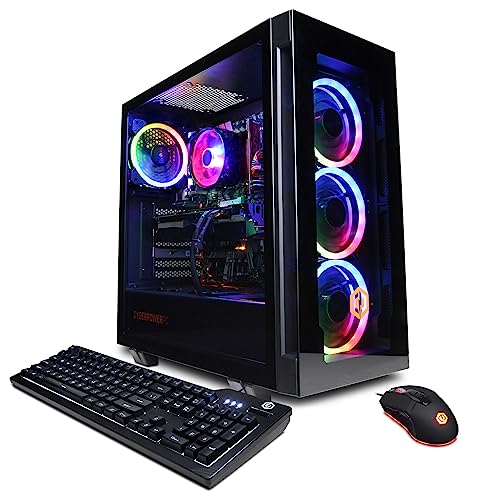
Where to buy
Check the latest price, availability and delivery on Amazon. Orders are placed on Amazon. We may earn a commission from qualifying purchases.
- Best native 1440p high end gaming PC under $1,200: CYBERPOWERPC Gamer Xtreme VR, Intel Core i7-13700F, GeForce RTX 4060 Ti 16GB — Check on Amazon
- Skytech Chronos Gaming PC, AMD Ryzen 7 5700X, GeForce RTX 4070 Ti 12GB — Check on Amazon
- HOENGAGER Gaming PC, Intel Core i7-12700F, GeForce RTX 4070 12GB, 32GB DDR4 — Check on Amazon
- iBUYPOWER Scale Gaming PC, AMD Ryzen 5 7600, GeForce RTX 4060 Ti 8GB — Check on Amazon
See 2 more Amazon options
- Thermaltake LCGS Quartz i1460, Intel Core i5-14400F, GeForce RTX 5060 8GB — Check on Amazon
- CYBERPOWERPC Gamer Master, AMD Ryzen 7 8700F, GeForce RTX 4060 Ti 8GB — Check on Amazon
Read the full guide ↓
Disclosure: As an Amazon Associate, reviewstook.com earns from qualifying purchases. Links to Amazon on this page are affiliate links; they cost you nothing extra. Listing details such as price and availability change often, so check the current Amazon listing before you buy.
A 1440p monitor is the easiest upgrade in gaming to buy and the easiest one to waste. The panel itself asks for nothing exotic — plug it in and Windows will happily light up all 2560×1440 pixels — but the picture on those pixels is only as sharp as the resolution your PC actually renders the game at. A machine can drive a 1440p display while rendering every frame at 1080p and stretching the result, and plenty of cheaper PCs do exactly that while wearing a “1440p ready” badge. This guide exists to separate the two claims. Every machine below was graded on one question first: does its graphics card render games natively at 2560×1440, at settings worth having, or does it lean on upscaling to get there? Both answers can be the right purchase — modern upscaling is good — but they are different purchases, and at $1,200 you are entitled to know which one you are making.
The encouraging news is that $1,200 is the first rung of the ladder where the honest answer is usually “natively.” The six picks span three graphics tiers. At the top sit two cards from the RTX 4070 family — a 4070 Ti in the Skytech Chronos and a plain 4070 in the HOENGAGER — and both render 1440p natively with room to spare. Below them, four machines run RTX 4060 Ti-class cards or the current-generation RTX 5060, and those split by memory: the 16GB 4060 Ti in the CyberPowerPC Gamer Xtreme VR holds native 1440p the longest because its textures never run out of room, while the 8GB cards render natively in most current games and reach for upscaling in the heaviest. What $1,200 still does not buy is the tier above — the RTX 4070 Super class and the 5070 Ti class — and each review below says plainly what that step would add. First, though, the distinction the whole guide hangs on.
In this guide
Quick Picks
Short on time, or comparing several options at once? Each row below names a buyer type and the PC that suits it, with a link to the listing.
| Buyer type | Pick | 1440p verdict | Link |
|---|---|---|---|
| Best overall for 1440p | CYBERPOWERPC Gamer Xtreme VR, i7-13700F, RTX 4060 Ti 16GB | Native 1440p — 16GB of VRAM keeps textures at full settings longest | Check on Amazon |
| Fastest 1440p card, on deal | Skytech Chronos, Ryzen 7 5700X, RTX 4070 Ti 12GB | Native 1440p outright — check price on Amazon and buy only when the live price fits this budget | Check on Amazon |
| Native 1440p plus memory | HOENGAGER, i7-12700F, RTX 4070 12GB, 32GB DDR4 | Native 1440p with reserve — only if the live price is under $1,200 | Check on Amazon |
| Best upgrade path | iBUYPOWER Scale, Ryzen 5 7600, RTX 4060 Ti 8GB | Native in most games; upscaled in the heaviest — AM5 platform | Check on Amazon |
| Newest upscaling generation | Thermaltake LCGS Quartz i1460, i5-14400F, RTX 5060 8GB | Native in most games; latest DLSS for the rest | Check on Amazon |
| Best eight-core AM5 value | CYBERPOWERPC Gamer Master, Ryzen 7 8700F, RTX 4060 Ti 8GB | Native in most games; upscaled in the heaviest — check price on Amazon | Check on Amazon |
How These Picks Were Chosen
Every candidate was audited as a rendering machine before anything else about it was considered. The audit starts with the graphics card’s tier and its memory capacity, because at 1440p those two facts decide almost everything: the tier sets how fast a full 2560×1440 frame can be drawn, and the VRAM sets whether the textures filling that frame can stay at their highest settings while it is drawn. Cards below the RTX 4060 Ti class were excluded outright — below that class, native 1440p in current games stops being a description and becomes a hope. On top of the rendering audit sat the usual checks: CPU core count and pace, whether the platform underneath still has future chips to upgrade to or is finished, memory capacity and layout, and the power supply’s wattage and rating where the maker publishes them. We did not benchmark these systems ourselves; performance is described by tier and resolution, as the verified specifications support, and no frame-rate figures are claimed.
The budget was enforced as a ceiling, and two picks need their terms stated before their reviews. The Skytech Chronos belongs in this guide only when its live Amazon price fits the under-$1,200 budget — check price on Amazon before treating it as a pick here, because at a higher live price it becomes a different purchase from a higher tier, and its review treats it that way throughout. The HOENGAGER’s listing was verified specification by specification, but this guide claims no price for it at all: it qualifies only if the live listing in front of you sits at or under $1,200. For the remaining picks, check the live price on Amazon as well, and hold the same walk-away discipline if a listing has moved above the ceiling when you shop. Finally, each pick was graded against the tier above as well as the budget below, and the gap is named wherever it matters.
Rendering 1440p vs Displaying 1440p: The Distinction This Guide Grades
Start with the arithmetic. A 1080p frame is 1920×1080 — about 2.07 million pixels. A 1440p frame is 2560×1440 — about 3.69 million pixels, roughly 78 percent more work for the graphics card on every single frame. Displaying that frame costs almost nothing: any modern card, and most integrated graphics, can output a 2560×1440 desktop without breaking stride. Rendering a game at that resolution is where the money goes, and it is the only sense in which “a 1440p PC” means anything. When a listing says a machine is 1440p capable, the question to ask is which of the two it means — and the answer usually hides in the gap between the monitor the bundle shows and the card the specification lists.
Upscaling lives in that gap, and it deserves a fair description rather than a suspicious one. DLSS, the upscaler on every card in this guide, renders the game at a lower internal resolution and reconstructs a 1440p output from it, using the card’s Tensor cores. NVIDIA publishes the internal resolutions, and at a 1440p output they are these: Quality mode renders internally at about 1707×960, Balanced at about 1485×836, and Performance at 1280×720 — which is to say, Performance mode at a 1440p output is rendering fewer pixels than a native 1080p frame. Quality mode is the honest middle ground: its reconstruction is close enough to native that most players cannot separate them in motion, and every pick in this guide can treat it as headroom rather than a crutch. The discipline this guide applies is labelling. A pick that holds native 1440p at high settings is graded Native. A pick that needs Quality mode in demanding games is graded as rendering upscaled there, however good the result looks. And a pick whose only route to a 1440p screen is Performance mode would not be in this guide at all — that is a 1080p machine with a marketing department. FSR, AMD’s upscaler, also runs on every card here in titles that offer it; no internal-resolution figures for it are documented in this guide’s research, so it is credited generically and no figures are printed for it.
One consequence of the arithmetic is worth carrying into the reviews: VRAM pressure scales with rendering resolution, not with the badge on the box. Textures are stored at the size they are drawn, so a game comfortable in 8GB at 1080p can press hard against the same 8GB rendered at 1440p. That is why two machines with near-identical raw speed — the 16GB and 8GB versions of the same 4060 Ti — earn different 1440p grades over a long ownership even when they tie today.
The 6 Best High End Gaming PCs for 1440p Gaming Under $1,200
CYBERPOWERPC Gamer Xtreme VR — Intel Core i7-13700F, GeForce RTX 4060 Ti 16GB (GXiVR8040A14)
Who it suits: The 1440p buyer who wants one machine that renders natively now and keeps rendering natively as games grow heavier — the balanced pick, with the memory headroom this resolution rewards.
1440p verdict: Native. The RTX 4060 Ti draws a full 2560×1440 frame at high settings in most current games without asking DLSS for help, and this is the 16GB version of the card — the specification that decides how long that sentence stays true. The 8GB and 16GB 4060 Ti cards render at near-identical speed while memory lasts; the difference appears in the games whose texture packs, drawn at 1440p sizes, no longer fit in 8GB, where the smaller card starts trading texture quality and smoothness for survival. Sixteen gigabytes removes that negotiation entirely, which is why it tops a 1440p guide despite not carrying the fastest GPU in it. When a genuinely demanding title does ask for assistance, DLSS Quality — rendering internally around 1707×960 and reconstructing — is available as headroom rather than necessity — exactly the relationship a buyer at this budget should have with upscaling.
The supporting hardware is the strongest all-round set in the guide. The Intel Core i7-13700F brings sixteen cores — eight performance, eight efficiency — which matters at 1440p less for the game itself, where the card leads, than for everything around it: streaming the session, editing the capture, running the busy desktop behind the match. Memory is 16GB of DDR5, storage a 1TB PCIe Gen4 NVMe SSD, the board a B760, with Wi-Fi and Windows 11 Home. The display outputs are the one port set verified in this guide’s research — one HDMI and two DisplayPorts — covering the standard 1440p arrangement of a main gaming panel plus a second screen with no adapters; confirm them on the live listing before ordering, since integrators revise builds under the same model name. Check the price on Amazon before ordering: the instruction is to buy only when the live price sits at or under $1,200, and to treat a listing above that ceiling as a signpost toward the tier above rather than a price worth paying for this machine.
- RTX 4060 Ti with 16GB of VRAM — double the texture headroom of the 8GB cards, and the tier’s best 1440p longevity buy.
- Native 1440p at high settings in most current games, with DLSS Quality held in reserve instead of spent daily.
- i7-13700F’s sixteen cores are the guide’s strongest support act for streaming and editing alongside play.
- Verified outputs of one HDMI and two DisplayPorts suit a 1440p main panel plus a second screen.
Honest limitation: Its live price can move above the ceiling — check price on Amazon before you buy — and the memory’s stick layout (one stick or two) could not be confirmed from the listing material; a single stick would run in single channel and cost real performance in CPU-limited games, so check it live and budget a second stick if needed.
Choose it if you want the most complete native-1440p machine at this budget and can time the purchase to when its live price fits. Skip it if the listing is sitting above the $1,200 ceiling when you shop — that money belongs to the tier above.

Skytech Chronos Gaming PC — AMD Ryzen 7 5700X, GeForce RTX 4070 Ti 12GB
Who it suits: The patient deal-watcher who wants the strongest 1440p rendering this budget has ever touched — and is willing to wait for the one price at which this machine belongs here.
1440p verdict: Native, outright. The RTX 4070 Ti is a graphics card from the tier above this guide, and at 1440p it does not negotiate. It renders the full 2560×1440 frame natively at high settings in demanding games where the 4060 Ti-class cards below are already weighing texture cuts, and in lighter titles it has the pace to feed high-refresh 1440p monitors — the pairing where a fast panel finally gets frames worth its refresh rate. Its 12GB of GDDR6X memory sits between the 8GB cards and the 16GB CyberPowerPC: enough headroom for high textures at this resolution today, with less margin for the heaviest packs of the next few years. It is also the only pick with a credible second act at 4K — not native 4K, which no $1,200 machine honestly offers, but DLSS upscaling to a 4K display from a substantial internal render; at 4K output, DLSS Quality renders internally at 2560×1440, meaning this card can render a native 1440p frame and upscale from there. Skytech builds the card around a Ryzen 7 5700X eight-core processor, 16GB of DDR4-3200 memory, a 1TB NVMe SSD and a 750W Gold power supply in the white Chronos case.
Everything about this pick is conditional on price, and the condition is strict. Check price on Amazon before anything else: this machine belongs in this guide only when the live price fits the under-$1,200 budget. When it does, it is the best 1440p value in this guide by a distance. When the live price sits well above that ceiling, it is a higher-tier machine wearing this guide’s recommendation, and the correct purchase at that level is a newer platform from the tier above. So the discipline is the review: set an alert, buy only when the live price fits the budget, and walk away from everything else without regret. The platform underneath the card asks for the same clear eyes — the 5700X sits on AMD’s finished AM4 socket with DDR4 memory, so there is no future CPU to drop in, though the 750W Gold supply leaves genuine room for a later graphics card. Skytech’s listing also notes the graphics card brand may vary: the 4070 Ti model and its 12GB are the contracted facts, the board partner is not. Buyers who accept those terms, and catch the price, get rendering power this budget has no business containing.
- RTX 4070 Ti 12GB — the fastest card in this guide, rendering native 1440p with settings and refresh headroom.
- The only pick that can upscale to 4K from a native-1440p internal render via DLSS Quality.
- 750W Gold power supply leaves room for a future graphics card on the finished platform.
- When its live price fits this budget, unmatched graphics value anywhere in the $1,200 class.
Honest limitation: A live price that fits this budget is an event, not the norm — check price on Amazon and expect the listing to sit higher much of the time — and the AM4/DDR4 platform is finished, so the CPU path is closed from the day it arrives.
Choose it if waiting is free for you and you will buy only when the live price fits the under-$1,200 budget. Skip it if you are buying this week at whatever it costs, or you want a platform that accepts future processors.

HOENGAGER Gaming PC — Intel Core i7-12700F, GeForce RTX 4070 12GB, 32GB DDR4
Who it suits: The multitasker — streamer, editor, twenty-tabs-open player — who wants genuine 4070-class native 1440p and the system memory to run a working desktop behind the game.
1440p verdict: Native. The plain GeForce RTX 4070 is a clear step above the 4060 Ti class in raw rendering pace, and at 2560×1440 that step shows up as settings held rather than settings weighed: high presets in demanding current games, rendered at full resolution, with DLSS Quality available as reserve for the heaviest releases rather than as a daily requirement. Its 12GB of VRAM matches the Chronos’s card for texture headroom at this resolution — comfortable now, less cushioned than the 16GB pick over a long ownership. What separates this machine from every other pick here is not the card but the memory beside it: 32GB of DDR4-3200 system RAM, double the standard fitment in this guide. At 1440p the game itself rarely needs it; the life around the game does. A stream with browser sources, a capture and chat running, an editor with a timeline open behind the session — on 16GB machines those loads are juggled, on this one they are simply present. The rest of the build supports the theme: a twelve-core Intel Core i7-12700F (eight performance cores, four efficiency), a 1TB M.2 PCIe SSD, a 240mm liquid cooler, an RGB tempered-glass case, and Windows 11 Pro, a real plus for anyone whose gaming PC is also the work PC.
The condition on this pick is the strictest in the guide, and it is about evidence rather than price movement. The listing’s specifications were verified in full during research, but no reliable Amazon price for it could be captured — so this guide claims no price for it, anywhere, and the pick qualifies only if the live listing in front of you is priced at or under $1,200. RTX 4070 systems have commonly listed well above that line; if this one is sitting in the tier above when you check, it belongs to that conversation instead, where newer platforms compete for the same money. The platform caveat matches the Chronos’s: the 12700F rides Intel’s finished LGA1700 socket with DDR4 memory, so judge the machine as a complete, finished specification — which, at the right price, is precisely its appeal. The graphics card brand is not specified in the listing material, so the contracted facts to verify live are the 4070 model, its 12GB, and the 32GB memory fitment. Find it under the ceiling and it is arguably the best-balanced 1440p specification in this guide; whether it is sitting there is for the live listing to say.
- RTX 4070 12GB renders native 1440p at high settings with upscaling held in reserve.
- 32GB of system memory as standard — double every other pick — for streaming and editing loads.
- 240mm liquid cooling and Windows 11 Pro fitted where rivals ship air cooling and Home.
- Twelve-core CPU keeps the desktop behind the game responsive under multitasking weight.
Honest limitation: No verified price could be captured for this listing, so it belongs in this guide only while the live price is at or under $1,200 — and the LGA1700/DDR4 platform is finished, with no CPU upgrade path.
Choose it if the live listing is under the ceiling and your sessions involve more than the game. Skip it if it is priced into the tier above, or you never multitask enough to use the memory.

iBUYPOWER Scale Gaming PC — AMD Ryzen 5 7600, GeForce RTX 4060 Ti 8GB (SCA5N46T01)
Who it suits: The long-horizon buyer — someone choosing the platform that will still accept new processors in three years, and accepting today’s honest 1440p grade as the price of that future.
1440p verdict: Native in most games; upscaled in the heaviest. The RTX 4060 Ti in its 8GB form renders the same silicon pace as the 16GB card at the top of this guide, and in the majority of current games it draws native 2560×1440 at high settings without assistance. The split verdict comes from memory, not speed: in the heaviest current titles, with texture packs at full size, 8GB is where the ceiling lives, and the honest responses are a texture setting stepped down or DLSS Quality engaged — rendering around 1707×960 internally and reconstructing a result most players cannot tell from native in motion. That is a reasonable trade, openly labelled, and it is the same trade every 8GB pick in this guide makes. Around the card, the Scale’s argument is structural: the Ryzen 5 7600 is a six-core chip on AMD’s AM5 socket with DDR5 memory, the only platform in this guide still mid-life, with future Ryzen generations able to drop into the same board. Storage is a 1TB NVMe SSD, with Wi-Fi readiness, Windows 11 Home, a keyboard and mouse in the box, and a one-year manufacturer warranty.
Two facts complete the picture, one a virtue and one a homework assignment. The virtue is straightforward buying: check price on Amazon, and as long as the live listing fits the under-$1,200 budget, no deal timing or walk-away discipline is required to buy it correctly. The homework is stated openly in the listing and repeated here at full size: the 16GB of DDR5-5200 memory is a single stick, running in single-channel mode, which costs measurable performance in CPU-limited games. A second matching stick is the cheapest meaningful upgrade in this guide and should be budgeted from day one; fitted, it makes the Scale the configuration it should have shipped as. For the 1440p buyer, this is the pick whose rendering grade can improve over time, because the platform underneath it can — no other pick here is built for a five-year keep-and-refresh plan.
- AM5 platform with DDR5 — the only pick whose CPU upgrade path is still open.
- Native 1440p in most current games from the tier-standard 4060 Ti.
- Check price on Amazon — a straightforward buy when the live price fits the budget, with no deal-hunting needed.
- Keyboard, mouse and a one-year manufacturer warranty included in the box.
Honest limitation: The 8GB card needs texture discipline or DLSS Quality in the heaviest 1440p titles, and the single-stick memory layout costs real performance until a second stick is fitted.
Choose it if you value a live platform and a straightforward purchase. Skip it if you will never open the case — buy a finished specification instead of a promising one.

Thermaltake LCGS Quartz i1460 — Intel Core i5-14400F, GeForce RTX 5060 8GB
Who it suits: The day-one player — the reader whose library is this year’s releases, whose monitor is high-refresh, and who wants the current generation of upscaling technology working from the first evening.
1440p verdict: Native in most games; the newest upscaling for the rest. The RTX 5060 is the only current-generation card in this guide, and its raw rendering pace sits in the same class as the 4060 Ti — the two trade blows, with the Ti often ahead — so its native 1440p grade matches the other 8GB picks: full-resolution rendering at high settings in most current games, with texture discipline in the heaviest. What the new generation adds is not pace but machinery. Its DLSS generation includes multi frame generation in supported titles, which inserts generated frames between rendered ones to multiply the displayed frame rate. Graded honestly for a 1440p buyer, that feature is presentation, not rendering: it makes motion on a high-refresh panel look smoother, and it does not reduce input latency the way genuinely rendered frames do, so competitive players should weigh this card on its rendered pace and treat the generated frames as polish. In supported single-player titles, though, it is a capability no 40-series card in this guide can be updated to match, and the supported list grows with every major release. The build around the card is a ten-core Intel Core i5-14400F, 16GB of Thermaltake’s own ToughRam DDR4-3600, a 1TB NVMe SSD and a 600W Gold power supply, in a white liquid-cooled showcase case — the best-looking machine here.
Check price on Amazon before ordering, and buy only when the live price fits the under-$1,200 budget. The compromises are platform-shaped and mirror the Scale’s virtues: the 14400F sits on Intel’s finished LGA1700 socket, and the memory is DDR4 on a generation that has moved to DDR5, so neither the processor path nor the memory standard has a next step. Buy the Quartz as a finished purchase — the current feature set, with the live price checked first — and it rewards exactly the reader it is aimed at.
- RTX 5060 — the guide’s only current-generation card, carrying the latest DLSS with multi frame generation.
- Native 1440p in most current games at 4060 Ti-class rendered pace.
- Check price on Amazon and buy when the live price fits the under-$1,200 budget.
- White liquid-cooled showcase build with Thermaltake’s own ToughRam memory fitted.
Honest limitation: Multi frame generation smooths presentation without cutting input latency, the 8GB of VRAM carries the same 1440p texture caveat as the other 8GB picks, and the LGA1700/DDR4 platform is finished.
Choose it if you play current releases on a high-refresh 1440p panel and value the newest feature set. Skip it if you grade purely on rendered pace or VRAM — the 16GB CyberPowerPC spends its budget on those instead.

CYBERPOWERPC Gamer Master — AMD Ryzen 7 8700F, GeForce RTX 4060 Ti 8GB (GMA2900A)
Who it suits: The value-minded upgrader — eight current-generation cores on the live AMD platform, as a value-focused AM5 route in this guide, with the same honest 1440p grade as its platform sibling.
1440p verdict: Native in most games; upscaled in the heaviest. The graphics half of this machine is the tier standard: an RTX 4060 Ti with 8GB, rendering native 2560×1440 at high settings across most current games, and reaching for a texture step-down or DLSS Quality in the heaviest titles, where the internal render around 1707×960 reconstructs to a result that holds up well in motion. That grade is no consolation prize — it is the standard 1440p experience of this price class — but read it next to the 16GB pick at the top of the guide, whose identical silicon pace comes with twice the texture headroom. What the Gamer Master changes is the processor trade on the same open platform: a Ryzen 7 8700F with eight Zen 4 cores against the Scale’s six, on the AM5 socket with DDR5 memory and a B650 board, so the CPU upgrade path stays open for years. At 1440p the graphics card leads and the extra cores rarely show in the game itself; they show in the compile, the render, the stream and the crowded desktop behind it. Storage is a 1TB PCIe Gen4 NVMe SSD, with Wi-Fi and Windows 11 Home — check price on Amazon before ordering.
Two caveats travel with this pick from the sibling research, and both are checks rather than warnings. The first is the processor’s letter: the F in 8700F means no integrated graphics, so the chip cannot drive a display by itself. In daily 1440p life that is invisible — the 4060 Ti does all the display work — but it removes the fallback picture if the card is ever removed or fails, and there is no integrated encoder to lean on. Buyers who want that safety net should take the Scale instead. The second is family drift: CyberPowerPC now sells Gamer Master variants with RTX 5060 Ti cards in higher tiers under different listings, so the badge alone does not identify this machine. The ASIN linked here is the verified 4060 Ti configuration; before ordering, confirm on the live listing that the specification in front of you reads 8700F, 4060 Ti and DDR5, and treat marketplace listings that do not match the verified specification with suspicion. Checks done, this is an honest, value-focused route onto the platform with a future — eight cores, current socket, tier-standard 1440p rendering.
- Eight Zen 4 cores on AM5 — the strongest multitasking processor on the upgradeable platform here.
- A value-focused way onto AM5 in this guide — check price on Amazon before ordering.
- Native 1440p in most current games from the tier-standard 4060 Ti.
- DDR5 memory on a B650 board keeps the multi-year upgrade path open.
Honest limitation: The 8700F has no integrated graphics — no display fallback if the card is out — and the model family now includes pricier 5060 Ti variants on other listings, so the exact configuration must be confirmed live.
Choose it if eight AM5 cores on a value-focused AM5 route outweigh the missing integrated graphics. Skip it if you want a display fallback, or the listing in front of you is a marketplace markup rather than an Amazon-sold price.

Comparison Table
| Product | Graphics card | 1440p verdict | Link |
|---|---|---|---|
| CYBERPOWERPC Gamer Xtreme VR (GXiVR8040A14) | RTX 4060 Ti 16GB | Native — VRAM headroom holds full textures longest | Check on Amazon |
| Skytech Chronos | RTX 4070 Ti 12GB | Native outright — fastest card; check price on Amazon and buy only when it fits this budget | Check on Amazon |
| HOENGAGER | RTX 4070 12GB | Native with reserve — plus 32GB of system memory | Check on Amazon |
| iBUYPOWER Scale (SCA5N46T01) | RTX 4060 Ti 8GB | Native in most; upscaled in the heaviest — AM5 platform | Check on Amazon |
| Thermaltake LCGS Quartz i1460 | RTX 5060 8GB | Native in most; newest DLSS generation for the rest | Check on Amazon |
| CYBERPOWERPC Gamer Master (GMA2900A) | RTX 4060 Ti 8GB | Native in most; upscaled in the heaviest — eight AM5 cores | Check on Amazon |
Pairing These PCs With a 1440p Monitor
The monitor is half of a 1440p purchase, and the pairing rules are simpler than the marketing suggests. First, the panel’s resolution is the target, not the achievement: any of these machines will light a 2560×1440 screen, and the verdicts above describe what they render into it. Second, match the panel’s refresh rate to the card’s honest territory. The Chronos’s 4070 Ti is the pick that can feed a high-refresh 1440p monitor natively in lighter titles; the 4060 Ti-class picks pair most honestly with mainstream 1440p panels, native in most games and on DLSS Quality where a title runs heavy; the Quartz’s generated frames are a presentation match for high-refresh panels in supported single-player games, not a substitute for rendered pace in competitive ones. Third, check the physical connection before the machine arrives. The one output set verified in this guide’s research is the Gamer Xtreme VR’s — one HDMI and two DisplayPorts, enough for a 1440p main panel and a second screen without adapters. For the other five picks, no port list was part of the verified material, so no port counts or per-port refresh ceilings are claimed for them: read the live listing’s output specification, confirm it carries the connection your monitor needs, and verify any refresh figure it attaches to a port against the monitor’s own manual. Finally, if your current screen is a 1080p 60Hz panel, price the monitor into the decision honestly — a cheaper PC from Best High End Gaming PC For 1440p Gaming Under $1000 plus a good 1440p display will out-game any machine in this guide still feeding an old screen.
How to Choose a High End Gaming PC for 1440p Gaming Under $1,200
- Ask the rendering question first. “1440p capable” can mean the machine outputs a 1440p signal or renders games at 1440p. Only the second is a gaming claim. Every pick here renders natively in most current games; that is this tier’s entry ticket, and any cheaper machine should be asked the same question before its price impresses you.
- Grade VRAM as a lifespan, not a benchmark. At 1440p, textures are drawn at 1440p sizes, so memory fills faster than at 1080p. Sixteen gigabytes (the Gamer Xtreme) outlasts 12GB (the 4070-class picks), which outlasts 8GB — not in today’s speed, but in how many years of full texture settings each keeps.
- Use DLSS modes by their internal resolutions. At a 1440p output, Quality renders about 1707×960 internally and reconstructs convincingly; Balanced renders about 1485×836; Performance renders 1280×720 — fewer pixels than native 1080p. Quality is headroom; Performance as a daily setting means you bought a 1080p renderer with a good upscaler.
- Separate generated frames from rendered frames. The RTX 5060’s multi frame generation multiplies displayed frames without reducing input latency. It is a presentation feature for supported single-player titles. Competitive players should grade every card here, the Quartz included, on rendered pace alone.
- Choose between a machine and a platform. AM5 (Scale, Gamer Master) accepts future processors; AM4 and LGA1700 (the rest) are finished. A stronger card on a finished platform (the Chronos) and a standard card on a live one are both rational purchases — for different owners with different habits.
- Check the memory layout, not just the capacity. Sixteen gigabytes as two sticks runs in dual channel; as one stick — the Scale as shipped — it leaves performance on the table in CPU-limited games. Where the listing does not state the layout, as with the Gamer Xtreme, verify before ordering and budget the second stick.
- Hold a walk-away price for every straddling pick. The Chronos when its live price fits this budget and the Chronos well above it are different purchases sharing a name; the Gamer Xtreme is this guide’s top pick when its live price fits the budget, and a listing above the ceiling is an argument for the tier above. Check price on Amazon, and decide your walk-away number before the deal event, not during it.
- Confirm the exact configuration on the live listing. Integrators revise components under the same model name, and families drift — Gamer Master now covers RTX 5060 Ti variants above this budget on separate listings. The contracted facts are the GPU model, its VRAM, the CPU and the memory type — verify all four against the listing in front of you.
- Count the display outputs against your desk. The Gamer Xtreme’s verified two DisplayPorts plus HDMI covers a 1440p panel plus a second screen without adapters; for any other pick, read the live listing’s port list before the machine arrives, not after.
Common Buying Mistakes
- Believing the monitor makes the resolution. A 1440p panel fed a 1080p render shows a soft 1080p picture at a 1440p size. The card’s rendering grade — not the screen on the desk — is the purchase.
- Paying the Chronos’s higher live price because a guide listed it under $1,200. It belongs in this budget only when the live price fits the under-$1,200 ceiling. Check price on Amazon, not the headline.
- Treating DLSS Performance as 1440p. At a 1440p output it renders 1280×720 internally. If a machine needs Performance mode everywhere, it is a 1080p machine with good software, whatever the badge says.
- Reading generated frames as real performance. Multi frame generation smooths what you see; it does not lower input latency. Grading the RTX 5060 on its headline frame rates rather than its rendered pace overpays for presentation.
- Assuming the 8GB and 16GB RTX 4060 Ti are the same purchase because their names nearly are. The speed is similar today; the 1440p texture headroom is not, and the gap compounds with every year of new releases.
- Ignoring the memory layout. A single 16GB stick in single-channel mode costs real performance in CPU-limited games; the fix is the cheapest in this guide, but only for buyers who know to make it.
- Buying a Gamer Master by badge. The family now includes RTX 5060 Ti models above this budget on separate listings — confirm the ASIN and the specification, not the name on the case.
- Forgetting that “F” processors drive no displays. The 8700F and the Intel F-chips have no integrated graphics; the card does all display work, and there is no fallback picture if it is removed.
- Spending every dollar on the tower and keeping a 1080p 60Hz monitor. At that point the cheaper PC plus a 1440p screen is the better gaming purchase by a wide margin.
Final Recommendation
- Most 1440p buyers at this budget: CYBERPOWERPC Gamer Xtreme VR (RTX 4060 Ti 16GB).
- Patient deal-watchers: Skytech Chronos — only when the live price fits this budget; check price on Amazon.
- Multitaskers and streamers: HOENGAGER, if the live price is at or under $1,200.
- Upgraders who dislike deal-hunting: iBUYPOWER Scale, plus a second memory stick.
- Current-generation features: Thermaltake LCGS Quartz i1460.
- Eight AM5 cores, value route: CYBERPOWERPC Gamer Master.
Our top two for 1440p gaming at this budget are the Gamer Xtreme VR, for the combination no rival matches — native rendering from the 16GB card, the sixteen-core processor behind it, and the balanced specification around them — and the iBUYPOWER Scale, for the buyer whose five-year plan outweighs this month’s specification sheet. Between them they cover the tier’s two honest shapes: the most complete finished 1440p machine, and the platform with the longest future. The Chronos is the exception that proves the tier’s rule — the strongest rendering here, available only to buyers patient enough to wait for its price to come to them. Readers whose budget is firm but smaller should start from Best Gaming PC For 1440p Gaming Under $1200 and the wider view in Best 1440p Gaming PC Under $1200, and those who conclude they want the tier above should step directly to Best High End Gaming PC Under $1500. Check the live price, confirm the configuration, hold your walk-away number — at $1,200, that discipline is the difference between rendering 1440p and merely displaying it.
Frequently Asked Questions
What makes a PC a genuine 1440p gaming PC rather than just 1440p capable?
Rendering, not output. A genuine 1440p gaming PC draws each frame at the full 2560×1440 — about 3.69 million pixels, roughly 78 percent more work per frame than 1080p — at settings worth having. A merely capable one outputs a 1440p signal while rendering at a lower resolution and upscaling. Every pick in this guide renders natively in most current games; the verdicts in each review say exactly where upscaling takes over.
Is DLSS Quality at 1440p basically the same as native?
Close enough that most players cannot separate them in motion, and the numbers explain why: at a 1440p output, DLSS Quality renders internally at about 1707×960 and reconstructs the rest. Balanced (about 1485×836 internal) is a further step down, and Performance (1280×720 internal) is rendering below 1080p — fine as an occasional rescue, dishonest as a machine’s permanent address.
Does the 16GB RTX 4060 Ti render 1440p faster than the 8GB version?
Barely, today — the two cards are near-identical in raw speed while memory lasts. The 16GB card’s advantage is capacity: at 1440p, texture packs are stored at full size, a growing list of current games presses against 8GB, and running out costs stutter and forced texture reductions. Over a long ownership the 16GB version keeps its settings; that is a lifespan difference, not a speed one.
Can any of these PCs game at 4K?
As an upscaling exercise, the Chronos most credibly: its 4070 Ti can render at 2560×1440 internally and let DLSS Quality reconstruct a 4K output from that substantial base. Native 4K at high settings is not what any $1,200 machine is built for, and this guide will not pretend otherwise — that is a higher tier’s home ground, reachable via Best High End Gaming PC Under $1500 as the first step up. Buy these machines for 1440p, where they are genuinely strong.
Should I wait for the Skytech Chronos to drop into this budget?
Only if waiting costs you nothing. Check price on Amazon: its live price fits this budget only around deal events, not as the machine’s normal state. If you need a 1440p PC this month, buy the Gamer Xtreme or the Scale when their live prices fit the budget. If your current machine still serves, set the alert and let the price come to you.
Why does one pick carry no price?
The HOENGAGER’s listing was verified in full during research — specifications, configuration, memory — but no reliable Amazon price could be captured for it, and this guide does not invent prices. Its specification, an RTX 4070 with 32GB of system memory, is exactly what this search asks for, so it is included with a condition instead of a number: it qualifies only while the live listing is at or under $1,200, and its review says so wherever the pick appears.
AM5 or a stronger card on a finished platform for 1440p?
It depends on your upgrade habits, stated bluntly. If you have never opened a PC case and never will, buy the strongest finished specification — the Gamer Xtreme, or the Chronos on deal. If you keep machines for years and upgrade in stages, AM5’s open processor path (Scale, Gamer Master) is worth more than a small specification deficit today, because the expensive parts — the board and the DDR5 memory — are already bought. For the broader budget picture, compare Best Gaming PC Under $1200 and Best High End Gaming PC Under $1200.
- Best High End Gaming PC For 1440p Gaming Under $1000
- Best High End Gaming PC Under $1000
- Best High End Gaming PC Under $1500
- Best High End Gaming PC Under $1200
- Best High End Gaming PC For Beginners Under $1200
- Best High End Gaming PC For Streaming Under $1200
- Best High End Gaming PC For Small Spaces Under $1200
- Best Prebuilt Gaming PC Under $1200


