Where to buy
Check the latest price, availability and delivery on Amazon. Orders are placed on Amazon. We may earn a commission from qualifying purchases.
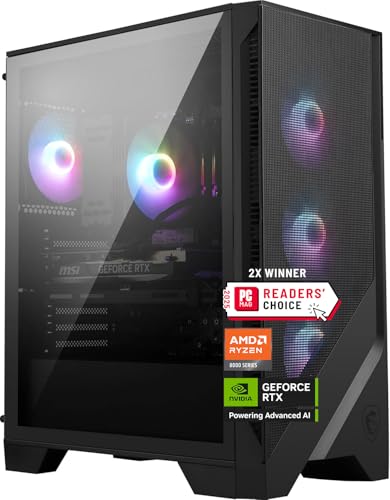
- Best overall: MSI Codex Z2 Gaming Desktop, Ryzen 7 8700F, RTX 5070, 32GB DDR5, 2TB SSD — Check on Amazon
- Skytech Omega Gaming PC, Ryzen 7 7800X3D, RTX 4070 Super, 32GB DDR5, 1TB NVMe — Check on Amazon
- iBUYPOWER Slate 8 MESH Gaming PC, Intel Core i7-14700F, RTX 4070 Super, 2TB NVMe — Check on Amazon
- Thermaltake LCGS View i4770 Gaming Desktop, Intel Core i7-14700KF, RTX 4070, 32GB DDR5 — Check on Amazon
See 2 more Amazon options
- Skytech Omega Gaming PC, Ryzen 7 7700X, RTX 4070 Super, 32GB DDR5, 1TB NVMe, White — Check on Amazon
- ASUS ROG Strix G15DS Gaming Desktop, Ryzen 7 7700X, RTX 4070, 16GB DDR5, 1TB SSD — Check on Amazon
Read the full guide ↓
Disclosure: As an Amazon Associate, reviewstook.com earns from qualifying purchases. Links to Amazon on this page are affiliate links; they cost you nothing extra. Listing details such as price and availability change often, so check the current Amazon listing before you buy.
“High end” is the most abused phrase in gaming PC listings, so let us define it before spending your money. A genuinely high-end graphics card in the current generation is one that plays demanding games at native 2560×1440 — every pixel rendered, no upscaling tricks — at the high refresh rates a 1440p gaming monitor is built for, with ray tracing on and settings near the top of the menu. By that standard, most machines sold under $1,500 are not high end at all: they carry RTX 4060-class cards that reach 1440p only by leaning on DLSS upscaling, which is a fine technology and a different promise. This guide exists because $1,500 is the first budget where the real thing shows up. Every pick below carries an RTX 4070 Super or an RTX 5070 — cards with the raster power and the 12GB of VRAM to run 1440p natively — or, in two cases, the plain RTX 4070 that sits one rung below them. That is what the money buys here, and it is a genuine threshold: step down to $1,200 and you are shopping a class lower; step up and the cards in this guide are what you are stepping up from.
The honesty note matters more at this tier than any other, because availability within this budget comes and goes in a way budget tiers do not. Machines in this guide move in and out of this budget, so check the current price on Amazon before you decide — every recommendation applies when the live listing fits the under-$1,500 budget, and the check takes ten seconds. The second honesty note is about the ceiling. Nothing in this guide is an RTX 4070 Ti Super machine, because no verified prebuilt with that card belongs in this tier — the Ti Super and the RTX 5070 Ti live in the $2,500 tier, and the final section of this guide describes that gap so you can decide whether it is worth climbing. Below: the quick picks, how they were chosen, six detailed reviews, a comparison table, a buying checklist, the mistakes to avoid at this tier, and the questions high-end shoppers actually ask.
In this guide
Quick Picks
Short on time, or comparing several options at once? Each row below names a buyer type and the machine that suits it, with a link to the listing.
| Buyer type | Pick | Why it stands out | Link |
|---|---|---|---|
| Best overall | MSI Codex Z2, Ryzen 7 8700F, RTX 5070, 32GB, 2TB | Current-generation GPU, 32GB of memory and the biggest SSD in the guide | Check on Amazon |
| Best gaming CPU | Skytech Omega, Ryzen 7 7800X3D, RTX 4070 Super, 32GB, 1TB | The 3D V-Cache chip competitive players ask for by name, with a published 750W Gold PSU | Check on Amazon |
| Best for gaming plus work | iBUYPOWER Slate 8 MESH, i7-14700F, RTX 4070 Super, 2TB | Twenty-core Intel hybrid CPU and 2TB of storage — with a 16GB memory catch, named in the review | Check on Amazon |
| Best showpiece build | Thermaltake LCGS View i4770, i7-14700KF, RTX 4070, 32GB | Liquid-cooled glass showcase tower with the fastest memory spec in the guide | Check on Amazon |
| Best value alternative | Skytech Omega, Ryzen 7 7700X, RTX 4070 Super, 32GB, 1TB, White | Full 4070 Super specification in the white chassis — check price on Amazon | Check on Amazon |
| Best brand-name alternative | ASUS ROG Strix G15DS, Ryzen 7 7700X, RTX 4070, 16GB, 1TB | A major maker’s engineered chassis and support network — with a 16GB catch of its own | Check on Amazon |
How These Picks Were Chosen
The GPU bar came first, and it was absolute. To be called a high-end pick at $1,500, a machine had to carry an RTX 4070 Super, an RTX 5070, or — for the two value and brand-name slots — a plain RTX 4070. RTX 4060 and 4060 Ti machines were excluded however polished the rest of the build, because at native 1440p they are a different product wearing this guide’s title. That single filter is why this list is short and why some famous budget names are absent: the high-end line is a graphics line, and it is drawn at the card.
The budget was applied as a ceiling, not as a hope. Every pick below was selected for this tier on its published specification — GPU, CPU, memory and storage as documented by the maker — and you should confirm it still fits the budget by checking the current price on Amazon before ordering. Where a machine is also offered through marketplace sellers, the review flags it, with the seller and warranty checks spelled out, so you can verify who you are buying from before you commit.
We did not use these machines ourselves. We read the maker listings, model pages and specification records, and compared what is actually published: GPU model and VRAM, CPU core configuration, memory capacity, storage size, and — only where the maker prints it — power supply wattage and memory speed. That discipline cuts both ways. Two picks publish a 750W Gold PSU, so the guide says so; the other four do not publish a wattage in the sources we could verify, so the guide does not invent one and instead tells you to confirm it on the live listing before ordering, because PSU headroom is what a future GPU upgrade stands on. Memory was judged the same way: 32GB DDR5 is the tier standard, four picks meet it, and the two that ship 16GB carry that shortfall as their named honest limitation rather than having it buried in a spec table.
Finally, the tier framing. This guide grades every pick against two yardsticks at once: what it does at native 1440p today, and how far it sits from the $2,500 tier above it. A machine can be an excellent $1,500 purchase and still be honestly described as two GPU rungs below the top of the stack — both things are true of everything here, and the reviews hold both truths at once, because the reader searching “high end” deserves to know exactly which rung of high end their money reaches.
The 6 Best High End Gaming PCs Under $1,500
MSI Codex Z2 Gaming Desktop — Ryzen 7 8700F, RTX 5070, 32GB DDR5, 2TB SSD
Who it suits: The buyer who wants the newest platform in the guide — current-generation graphics, a full 32GB of memory and storage that does not need managing — and is willing to check the current price on Amazon and buy when the live listing fits the budget.
The Codex Z2’s headline is generational. Its RTX 5070 is a Blackwell card: GDDR7 memory, the newest DLSS with multi-frame generation, and the most recent encoder and media hardware NVIDIA ships. In raw native-1440p terms it trades blows with the RTX 4070 Super machines below it in this guide — the honest summary is that the 5070’s advantage is its feature set and its future, not a dramatic frame-rate gap over last generation’s Super card — and for a buyer keeping a machine four or five years, the newer architecture is the one still receiving the newest software features at the end of that run. Around the card, MSI builds the most complete specification in this guide: a Ryzen 7 8700F (eight cores, sixteen threads, boost clocks to 5.0 GHz), 32GB of DDR5, and a 2TB SSD that doubles the storage of most rivals here. An ARGB air cooler and four system fans handle the thermal side, and the machine ships with Windows 11 Home.
The conditions are availability within this budget and one unpublished number. Check the current price on Amazon before ordering: it is the best overall pick in this guide when the live listing fits the under-$1,500 budget. Separately, MSI does not publish the power supply wattage for this configuration in the material we could verify, and that matters for exactly one reason: a future GPU upgrade. Before ordering, open the live listing’s specification section and confirm the wattage; if it is not stated there either, factor a possible PSU swap into any long-term upgrade plan rather than assuming headroom you have not seen.
- RTX 5070 (Blackwell) — the newest GPU architecture in the guide, with DLSS 4 and GDDR7.
- 32GB DDR5 and a 2TB SSD: the most complete memory-and-storage spec here.
- Ryzen 7 8700F eight-core CPU on the current AM5 platform.
Honest limitation: Availability within this budget varies, so check the current price on Amazon before ordering — and the PSU wattage is not published, so upgrade headroom is unconfirmed until you check the listing.
Choose it if you can wait until the live listing fits the budget and want the newest platform with nothing to upgrade on day one. Skip it if you need to buy this week regardless of the live listing, or an unpublished PSU spec is a deal-breaker for your upgrade plans.

Skytech Omega Gaming PC — Ryzen 7 7800X3D, RTX 4070 Super, 32GB DDR5, 1TB NVMe
Who it suits: Competitive and high-refresh players who know exactly why the 7800X3D is famous — and who want the CPU that esports builds are specified around, paired with a card that can feed it at 1440p.
The Ryzen 7 7800X3D’s 3D V-Cache is not marketing garnish; stacking cache on the CPU die measurably lifts frame rates and, just as importantly for competitive play, frame consistency in the CPU-bound and simulation-heavy titles where ordinary chips stutter. Pair it with an RTX 4070 Super — 12GB of GDDR6X, enough raster power for native 1440p at high settings in demanding games — and you have the most deliberately gaming-shaped machine in this guide: every part of its specification points at the monitor. The supporting spec is published in full, which is rarer than it should be at this tier: 32GB of DDR5, a 1TB NVMe Gen4 SSD, and a 750W Gold power supply whose wattage and rating Skytech actually prints. That last line matters more than it looks — it is the difference between planning a future GPU upgrade on a known foundation and guessing.
Check the current price on Amazon before ordering — this is arguably the purest gaming purchase in the guide when the live listing fits the under-$1,500 budget; if the live listing sits above this tier, compare it against the $2,000 tier instead. One fit note: the 7800X3D is a gaming specialist. Its eight cores are plenty for play, streaming and everyday work, but if your week includes heavy video rendering or large code compiles, the twenty-core iBUYPOWER below trades a little gaming focus for a lot of work throughput, and that trade is the real choice between picks two and three.
- Ryzen 7 7800X3D — the benchmark gaming CPU of its generation, chosen for frame consistency.
- RTX 4070 Super 12GB: genuine native-1440p power, no upscaling required.
- Published 750W Gold PSU and 32GB DDR5 — a fully documented specification.
Honest limitation: Confirm it fits this budget by checking the current price on Amazon before ordering, and note the 1TB SSD is the smaller storage spec among the top picks here.
Choose it if gaming performance is the whole question and the live listing fits the budget. Skip it if your workload is half production work, or the live listing sits above this budget.

iBUYPOWER Slate 8 MESH Gaming PC — Intel Core i7-14700F, RTX 4070 Super, 2TB NVMe
Who it suits: The player whose PC also earns its keep — streaming, editing, compiling, running a household server of browser tabs and background jobs — and who wants high-end gaming power without giving up workstation manners.
The Slate 8 MESH (model SMI7N47S01) pairs the same RTX 4070 Super found in the Omega above with Intel’s Core i7-14700F, a twenty-core hybrid processor — eight performance cores and twelve efficiency cores — that shrugs at exactly the multitasking loads a pure gaming chip merely tolerates. Encoding a stream while playing, rendering a video in the background, running a demanding compile: this is the machine in the guide built for the second job as much as the first. Storage matches the brief at 2TB of NVMe, the case is a mesh-fronted tower with RGB fans and a tower air cooler, and iBUYPOWER includes a keyboard and mouse in the box. Check the current price on Amazon for the latest availability before ordering.
Now the catch, printed at full size because it deserves to be: this machine ships with 16GB of DDR5-5200 memory, in a two-by-eight configuration. At a $1,500 high-end tier where 32GB is the standard four of its rivals meet, 16GB is a real shortfall — modern AAA titles plus a browser, a voice client and a capture application will lean on it, and high-refresh 1440p play is exactly where memory pressure shows up as stutter. The saving grace is that it is the easiest flaw in this guide to fix: memory is the one upgrade that takes five minutes and no courage — plan for a second kit as part of the purchase and judge the machine with that upgrade included, not as it ships alone. Judged that way, with 32GB fitted, this is the most versatile machine here; judged as it ships, it is a 4070 Super wearing a budget machine’s memory spec, and the review would rather say so than let the GPU carry the verdict alone.
- Twenty-core i7-14700F: the strongest multitasking and production CPU in the guide.
- RTX 4070 Super 12GB and 2TB NVMe storage — high-end where it shows.
- Mesh-front case, RGB fans, keyboard and mouse included.
Honest limitation: 16GB of DDR5-5200 in a 2×8 layout is below the tier standard; plan a memory upgrade as part of the purchase, check the current price on Amazon before ordering, and note the PSU wattage is not published in the verified listing material.
Choose it if the PC works as hard as it plays and you are comfortable adding memory. Skip it if you want the finished 32GB specification out of the box — that is the MSI or either Omega.

Thermaltake LCGS View i4770 Gaming Desktop — Intel Core i7-14700KF, RTX 4070, 32GB DDR5
Who it suits: The buyer for whom the PC is also furniture — a liquid-cooled glass showcase that is meant to be looked at — who still wants a serious 1440p card and a full-size specification underneath the presentation.
Thermaltake’s LCGS line is built around the View case concept: a panoramic glass tower designed to display the build, with liquid cooling fitted as standard. Under the glass, the specification is substantial — an Intel Core i7-14700KF (the unlocked, overclockable sibling of the 14700F, with the same twenty-core layout), 32GB of DDR5 at 5600 MT/s, the fastest published memory speed in this guide, a 1TB NVMe SSD, and an RTX 4070. That card is the deliberate step down in this pick: the plain 4070 is a genuine native-1440p GPU, a clear class above any 4060 Ti, but it sits one rung below the 4070 Super and 5070 machines ranked above it, with somewhat less raster headroom for the most demanding ray-traced titles at native resolution. What you get in exchange is the presentation and the platform: the KF chip’s tuning headroom, the liquid cooler’s acoustic manners under load, and a case that looks like the high-end shelf of a showroom.
Check the current price on Amazon before ordering, and treat this as a pick for buyers who can be flexible on timing: it belongs in this guide when the live listing fits the under-$1,500 budget. The discipline is the same as everywhere in this guide, only more so: confirm the live listing fits the budget, or look at another pick. And a fit note for the showpiece-minded: a glass showcase is a commitment to cable tidiness and dusting; the buyers who love these towers are the ones who enjoy that, and the buyers who do not should consider the mesh-fronted iBUYPOWER above instead.
- Liquid-cooled panoramic glass build — the presentation pick of the guide.
- i7-14700KF twenty-core CPU with overclocking headroom, 32GB DDR5-5600.
- RTX 4070 12GB: honest native-1440p power, one rung below the Super.
Honest limitation: The GPU is the plain 4070 rather than the Super, and you should check the current price on Amazon to confirm the live listing fits this budget before ordering.
Choose it if the build’s looks are part of the purchase and you can wait until the live listing fits the budget. Skip it if you are buying on a fixed date, or frames outrank everything else in the room.

Skytech Omega Gaming PC — Ryzen 7 7700X, RTX 4070 Super, 32GB DDR5, 1TB NVMe, White
Who it suits: The value hunter with patience — the buyer who is happy to wait, check the current price on Amazon, and buy when the live listing fits the budget.
Mechanically, this is the second Omega in the guide, and the comparison between the two is the cleanest illustration of how this tier’s choices work. The specification is nearly the 7800X3D machine’s equal: the same RTX 4070 Super with 12GB of GDDR6X, the same 32GB of DDR5, the same published 750W Gold power supply, the same 1TB Gen4 NVMe storage — with two differences. The CPU is the Ryzen 7 7700X, a strong eight-core gaming chip that lacks the X3D’s stacked cache and therefore gives back some frame consistency in CPU-bound titles, while actually holding a small edge in clock-driven productivity work. And the case is the white edition of the Omega chassis, which for white-build shoppers is not a footnote but the point. Everything else about the machine is the high-end formula of this guide, intact.
What earns it a separate slot rather than a mention inside its sibling’s review is the combination it offers: the full 4070 Super specification of this tier in the white chassis, with the same published power supply and memory as its sibling. Check the current price on Amazon before ordering. If you are choosing between the two Omegas, the decision is straightforward: the X3D’s cache is the reason to pick the sibling for competitive play, which makes this the default recommendation for everyone else who wants the same graphics power and specification in white.
- Full 4070 Super specification in the white chassis — check price on Amazon.
- Same published 750W Gold PSU and 32GB DDR5 as its X3D sibling.
- White Omega chassis — the white-build option at this tier.
Honest limitation: The 7700X lacks the 7800X3D’s cache advantage in CPU-bound games — check the current price on Amazon to confirm the live listing fits this budget before ordering.
Choose it if you can wait for the right moment and want the full specification for this tier. Skip it if competitive frame consistency is your priority — that is precisely what the X3D model above is for.
ASUS ROG Strix G15DS Gaming Desktop — Ryzen 7 7700X, RTX 4070, 16GB DDR5, 1TB SSD
Who it suits: The buyer who values a major manufacturer’s engineering, chassis design and support network over boutique spec-sheet value — and who accepts the same memory homework as the iBUYPOWER buyer.
ASUS builds the ROG Strix G15DS (model G15DS-DH774) the way large manufacturers do: an engineered chassis with a multi-zone airflow design meant to keep hot and cool components in separate thermal neighborhoods, a carry handle rated to 20 kg, a headphone hook, and Aura Sync lighting that matches the wider ROG ecosystem. The specification pairs a Ryzen 7 7700X with an RTX 4070 Dual — ASUS’s own two-fan card design — plus a 1TB PCIe SSD and Windows 11 Home, with a wired keyboard and mouse in the box. For buyers who have been burned by boutique builders’ support, the appeal is institutional: a global maker’s warranty process, published model documentation, and parts and drivers that stay findable for years. That is a real feature, and at this tier it is the main reason this machine is in the guide.
Two flags must fly at full size. The first is memory: the G15DS ships with 16GB of DDR5-4800 — below this tier’s 32GB standard and the slowest published memory speed here — so the same advice given for the iBUYPOWER applies, with interest: plan a 32GB kit as part of the purchase before comparing options. The second is the seller itself: listings for this model are also offered by marketplace sellers rather than by Amazon or ASUS directly. Check the current price on Amazon, and on the live listing, confirm the seller, confirm that the warranty is the manufacturer’s and not a marketplace substitute, and confirm the exact configuration — model variants in this line differ. Do that homework and this is a defensible, well-engineered route into the tier; skip it and the boutique picks above are the safer choice.
- Major-maker engineering: zoned-airflow chassis, carry handle, Aura Sync ecosystem.
- Ryzen 7 7700X with ASUS’s own RTX 4070 Dual card.
- Institutional warranty and documentation — the support-network pick.
Honest limitation: 16GB of DDR5-4800 is the weakest memory spec in the guide, and listings may come from marketplace sellers — verify seller and warranty on the live listing before ordering, and check the current price on Amazon.
Choose it if manufacturer support and chassis engineering matter more to you than spec-sheet maximums. Skip it if you want 32GB fitted from the factory, or the live listing’s seller is one you would not buy a warranty from.

Comparison Table
| Product | GPU | CPU / Memory / Storage | Best use | Link |
|---|---|---|---|---|
| MSI Codex Z2 | RTX 5070 12GB | Ryzen 7 8700F / 32GB / 2TB | Newest platform, nothing to upgrade | Check on Amazon |
| Skytech Omega (7800X3D) | RTX 4070 Super 12GB | Ryzen 7 7800X3D / 32GB / 1TB | Competitive high-refresh gaming | Check on Amazon |
| iBUYPOWER Slate 8 MESH | RTX 4070 Super 12GB | i7-14700F 20-core / 16GB / 2TB | Gaming plus streaming and work | Check on Amazon |
| Thermaltake LCGS View i4770 | RTX 4070 12GB | i7-14700KF 20-core / 32GB / 1TB | Showpiece liquid-cooled build | Check on Amazon |
| Skytech Omega (7700X, White) | RTX 4070 Super 12GB | Ryzen 7 7700X / 32GB / 1TB | Best value alternative in white | Check on Amazon |
| ASUS ROG Strix G15DS | RTX 4070 12GB | Ryzen 7 7700X / 16GB / 1TB | Brand-name support and engineering | Check on Amazon |
How to Choose a High End Gaming PC Under $1,500
- Start at the graphics card, and refuse to move until it is settled. At this budget the high-end claim stands or falls on one line of the spec: RTX 4070 Super or RTX 5070 for the full promise, plain RTX 4070 as the accepted rung below. A 4060 Ti machine with beautiful lighting is a mid-range PC in a costume, whatever the listing title says.
- Check the current price on Amazon as part of the specification. Every recommendation in this guide applies when the live listing fits the under-$1,500 budget; check it before ordering, and if a machine sits above this tier today, wait rather than compromising on a weaker card.
- Demand 32GB of memory — fitted, or planned in. Four picks here ship it. The two that ship 16GB are still worth considering, but only with a memory kit planned as part of the purchase before you compare. Judging a 16GB machine as it ships against a 32GB machine without allowing for that upgrade is the tier’s most common accounting error.
- Match the CPU to your second job. Pure gaming points to the 7800X3D’s cache or the 7700X’s value. Gaming plus streaming, editing or compiling points to the twenty-core Intel picks. The GPU decides your frame rate ceiling; the CPU decides how much else the machine can do while you play.
- Check the power supply before you dream about upgrades. A published wattage — 750W Gold on both Omegas — is a foundation you can plan on. An unpublished one is a question to answer on the live listing, because the next GPU you buy will stand on it.
- Count storage in games, not gigabytes. Modern AAA installs routinely exceed 100GB each. A 1TB drive is workable with discipline; the 2TB machines here remove the chore. If you keep a large library installed, storage size is a quality-of-life spec, not a luxury.
- Be honest about your monitor. These machines are built for 1440p high-refresh panels. On a 1080p 60Hz display, most of what this budget buys is invisible — either plan the monitor upgrade into the same purchase cycle or shop a tier down with Best High End Gaming PC Under $1000 and put the difference toward the screen.
- Decide whether you are buying the tier or climbing past it. If your real target is the 5070 Ti class, no $1,500 machine is a stepping stone — it is a destination. Read the gap section below, then choose a tier deliberately instead of drifting into the more expensive one by disappointment.
Native 1440p, Upscaling, and What “High Refresh” Actually Requires
Because this guide grades on native rendering, the terms deserve one precise paragraph each. Native 1440p means the game renders every frame at the full 2560×1440 and the monitor displays exactly that — the sharpest, most latency-honest version of the image, and the workload the cards in this guide were selected for. Upscaling — DLSS on these NVIDIA cards — renders at a lower internal resolution and reconstructs the 1440p image with AI; at its quality settings it looks remarkably close to native and buys substantial frame rate, which is why the 4060-class machines a tier down lean on it. Neither is a scam and neither is free: native costs GPU power, upscaling costs a little image purity and adds a whisper of processing. A high-end purchase at $1,500 means you are no longer forced into the trade — you can run native as the default and treat DLSS as a bonus for the heaviest ray-traced titles rather than as a requirement.
High refresh is the other half of the promise, and it is a system property, not a GPU spec. Feeding a 1440p 165Hz or 240Hz monitor means the whole machine — card, CPU, memory — must produce frames at that cadence consistently, including the dips, because a stuttering 180 is a worse experience than a locked 120. That is why this guide weighs frame consistency (the 7800X3D’s cache), memory capacity (the 16GB picks’ named flaw) and storage speed alongside the headline GPU: at high refresh, the weakest component writes the experience. Judge any machine here by its worst second in a demanding scene, not its best screenshot — that is the standard this tier is judged against.
What Still Separates This Tier From the $2,500 Machines
Honesty about the ceiling is what makes the praise for this tier believable, so here is the gap, itemized. The next rung of graphics — the RTX 4070 Ti Super and the RTX 5070 Ti — brings two things money cannot retrofit into the machines above: a meaningfully larger GPU with more raw throughput for ray-traced native 1440p and entry-level 4K, and 16GB of VRAM instead of 12GB. That memory difference is the quiet one that matters most over a machine’s life: 12GB is sufficient for today’s 1440p titles at high settings, but texture budgets grow every year, and the 16GB cards are the ones with headroom for the back half of the decade. No verified prebuilt with either Ti card belongs in this tier — that is not a gap in our research, it is the structure of the market, and it is why the $2,500 tier exists as its own guide at Best High End Gaming PC Under $2500.
The rest of the $2,500 specification widens more gently: stronger CPUs as standard rather than as a pick, 2TB storage as the floor instead of the ceiling, higher-wattage power supplies with longer warranties, and cases and cooling a grade quieter. Notice what is not on the list — nothing about the $1,500 machines is broken, temporary or waiting to be fixed. They are complete high-end computers for a 1440p monitor, and for the majority of players they are the rational end of the climb: the $2,500 tier buys headroom and 4K optionality, not a different hobby. Buy this tier if 1440p high-refresh is your target for the next several years; climb only if 4K, maximum ray tracing, or a five-plus-year no-compromises run is the actual goal — and if you do climb, our step-up notes start from Best High End Gaming PC Under $2000.
Common Buying Mistakes
- Believing the listing title. “High end” in a product name is unregulated; the GPU model is the truth. Check the card before anything else on the page.
- Buying without checking the live listing. Check the current price on Amazon before ordering, and only treat a machine as part of this tier when the live listing fits the under-$1,500 budget.
- Comparing a 16GB machine against a 32GB machine without allowing for the memory upgrade the first one needs.
- Assuming a power supply you have not seen. Unpublished wattage means unknown upgrade headroom; verify it on the listing or in the maker’s documentation before planning around it.
- Buying for a monitor you do not own and have no plan to buy. A 1440p high-refresh machine on a 1080p 60Hz panel is a sports car in a school zone.
- Chasing the Ti cards inside this budget. Listings that appear to offer a 4070 Ti Super system within this budget deserve forensic reading — the card, the memory and the seller are where the catch will be, because the verified market does not clear that bar.
- Skipping the seller check on marketplace offers. A brand-name machine from an unknown seller is a different purchase from the same machine sold by the maker or Amazon — warranty first, checkout second.
- Overbuying CPU for a pure gaming desk, or underbuying it for a working one. The 7800X3D and the twenty-core Intels are both right answers — to different questions.
Final Recommendation
- Most buyers: MSI Codex Z2 (RTX 5070) — when the live listing fits the budget; check price on Amazon.
- Competitive and high-refresh players: Skytech Omega with the 7800X3D.
- Gaming plus streaming or production work: iBUYPOWER Slate 8 MESH, with a memory kit planned.
- The build as showpiece: Thermaltake LCGS View i4770 — check the current price on Amazon.
- Maximum value with patience: Skytech Omega 7700X in white — check price on Amazon.
- Brand-name support first: ASUS ROG Strix G15DS, seller and warranty verified.
Our top two at this budget are the MSI Codex Z2, for the buyer who wants the current generation and a finished specification, and the 7800X3D Skytech Omega, for the buyer whose question is purely about gaming. Between them they cover the two honest shapes of this search: the newest platform, or the sharpest one. The white Omega is the standing alternative to both — check the current price on Amazon — with the same graphics power in the white chassis. Readers arriving from a smaller budget should compare against Best High End Gaming PC Under $1200 before stretching, and readers whose real target sits higher should read Best Gaming PC Under $1500 alongside this guide and then decide which tier they are actually in. Verify the live listing — GPU, memory, seller — and check the current price on Amazon before you buy: at this tier, timing is not a detail of the purchase, it is half of it.
Frequently Asked Questions
Is $1,500 really enough for a high end gaming PC?
Yes — with the term defined honestly. At this budget you can buy a prebuilt with an RTX 4070 Super or RTX 5070, cards that run demanding games at native 1440p with high settings and high refresh rates. That is a genuine high-end experience for the monitor most high-end players actually use. What $1,500 does not buy is the tier above: 16GB-VRAM Ti-class cards, comfortable native 4K, or maximum ray tracing everywhere. Those live at $2,500, and this guide describes the difference rather than blurring it.
Why is there no RTX 4070 Ti Super or 5070 Ti machine in this guide?
Because no verified prebuilt with either card belongs in this tier. Across our research for this batch, Ti-class systems belong to higher tiers. Rather than fill the slot with a listing that only appears to qualify, the guide states the ceiling plainly and covers the Ti tier where it actually lives, in the $2,500 guide.
RTX 5070 or RTX 4070 Super — which should I choose?
The 5070 brings the newer architecture: GDDR7 memory, the latest DLSS with multi-frame generation, and longer driver and feature support ahead of it. The 4070 Super counters with proven native-1440p performance and, in the Omega builds here, a fully published specification including the power supply. Check the current price on Amazon for both before choosing: take the newer card when you want the current generation and a finished specification, and take an Omega build when its published specification and CPU or chassis options matter more to you.
How should I check the current price?
Check the current price on Amazon on the live listing before you buy. Prices and availability change often, and every recommendation in this guide applies when the live listing fits the under-$1,500 budget. If it does not, wait and check again rather than compromising on the graphics card.
Is 12GB of VRAM enough for the next few years at 1440p?
For today’s demanding titles at native 1440p with high settings, yes — that is the workload these cards were built for. The honest caveat is trajectory: texture and ray-tracing demands grow, and the 16GB cards in the $2,500 tier carry more headroom for late-decade releases. If your plan is a five-year no-upgrade run at maximum settings, that headroom is the strongest single argument for climbing a tier.
Should I build instead of buying a prebuilt at $1,500?
Building remains the route to exact part choices — a specific motherboard, a named power supply, a case you picked — and our build-focused coverage at Best Gaming PC Under $1500 explores the same budget from that side. What a prebuilt buys at this tier is a single warranty, a tested assembly, and a finished machine without sourcing and building each part yourself. Neither answer is a compromise; they are different purchases.
What if I am new to PC gaming entirely?
Then the specialized versions of this guide will serve you better than this one: Best High End Gaming PC For Beginners Under $1500 covers the same tier with setup and first-week guidance, Best High End Gaming PC For Streaming Under $1500 grades the machines as broadcast tools, and Best High End Gaming PC For Small Spaces Under $1500 filters them by desk footprint. The hardware conclusions carry over; the advice is aimed at your situation.


