Where to buy
Check the latest price, availability and delivery on Amazon. Orders are placed on Amazon. We may earn a commission from qualifying purchases.
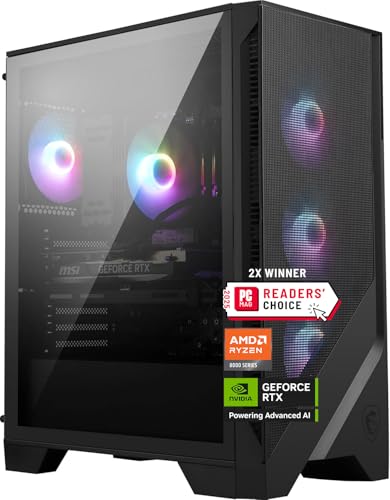
- Best overall for streaming: MSI Codex Z2 Gaming Desktop, Ryzen 7 8700F, RTX 5070, 32GB DDR5, 2TB SSD — Check on Amazon
- Skytech Omega Gaming PC, Ryzen 7 7800X3D, RTX 4070 Super, 32GB DDR5, 1TB NVMe — Check on Amazon
- iBUYPOWER Slate 8 MESH Gaming PC, Intel Core i7-14700F, RTX 4070 Super, 2TB NVMe — Check on Amazon
- Thermaltake LCGS View i4770 Gaming Desktop, Intel Core i7-14700KF, RTX 4070, 32GB DDR5 — Check on Amazon
See 2 more Amazon options
- Skytech Omega Gaming PC, Ryzen 7 7700X, RTX 4070 Super, 32GB DDR5, 1TB NVMe, White — Check on Amazon
- ASUS ROG Strix G15DS Gaming Desktop, Ryzen 7 7700X, RTX 4070, 16GB DDR5, 1TB SSD — Check on Amazon
Read the full guide ↓
Disclosure: As an Amazon Associate, reviewstook.com earns from qualifying purchases. Links to Amazon on this page are affiliate links; they cost you nothing extra. Listing details such as price and availability change often, so check the current Amazon listing before you buy.
Streaming from a single PC is a specific workload, and it deserves to be defined before any hardware is graded against it. One machine runs the game at 1440p, runs OBS, encodes the broadcast, and holds chat, a browser, a voice client and a second monitor of dashboards — all at the same time, all without dropping the frames your viewers came to watch. The platform numbers set the terms. Twitch’s standard broadcast is a constant-bitrate (CBR) stream at around 6,000 kbps with two-second keyframes, encoded in H.264; YouTube accepts higher bitrates, takes a 1440p ingest that earns your stream a better processing tier, and supports AV1 encoding where the hardware offers it. Live 4K streaming, by contrast, remains platform-limited rather than hardware-limited — no machine at this price turns a mainstream platform live at 4K today — so 4K belongs in local recordings, not in the buying decision. Grade every pick below against that workflow: the encoder hardware on the graphics card, the CPU headroom behind it, the memory the whole stack shares, and whether the live listing fits this budget — check price on Amazon.
That grading produces good news and one sharp caveat. The good news: $1,500 is the first budget where the encoder hardware stops being a compromise. Five of the six machines below carry RTX 4070 or 4070 Super desktop cards with two NVENC encoder blocks, which lets a stream and a high-quality local recording run on separate hardware encoders at once, and all six cards encode AV1 for YouTube. The caveat is the same one this tier always carries: prebuilt prices here are volatile, several of these machines sit well above this budget for much of the year and only dip into it at times, and every recommendation in this guide is conditional on the live listing sitting at or under $1,500 when you check it — check price on Amazon. Nothing here is an RTX 4070 Ti Super or 5070 Ti machine, because no verified prebuilt with either card fits this budget — the Ti tier lives at $2,500, as the closing sections note. If you want this same tier graded purely as gaming hardware, the parent guide is Best High End Gaming PC Under $1500; this page grades the identical machines as broadcast tools.
In this guide
Quick Picks
Short on time, or comparing several options at once? Each row below names a streamer type and the machine that suits it, with a link to the listing.
| Streamer type | Pick | Why it stands out | Link |
|---|---|---|---|
| Best overall for streaming | MSI Codex Z2, Ryzen 7 8700F, RTX 5070, 32GB, 2TB | Newest-generation NVENC with AV1, 32GB of memory and the biggest SSD in the guide | Check on Amazon |
| Best for competitive streamers | Skytech Omega, Ryzen 7 7800X3D, RTX 4070 Super, 32GB, 1TB | Dual NVENC for stream-plus-record, the benchmark gaming CPU, a published 750W Gold PSU | Check on Amazon |
| Best for streamers who also edit | iBUYPOWER Slate 8 MESH, i7-14700F, RTX 4070 Super, 2TB | Twenty-core CPU for the editing week and dual NVENC for the broadcast — with a 16GB memory catch, named in the review | Check on Amazon |
| Best on-camera showpiece | Thermaltake LCGS View i4770, i7-14700KF, RTX 4070, 32GB | Liquid-cooled glass showcase for a facecam backdrop, dual NVENC underneath — strictly deal-only | Check on Amazon |
| Best value when it dips | Skytech Omega, Ryzen 7 7700X, RTX 4070 Super, 32GB, 1TB, White | Strong value in this tier — a dual-encoder 4070 Super machine; check price on Amazon | Check on Amazon |
| Best brand-name alternative | ASUS ROG Strix G15DS, Ryzen 7 7700X, RTX 4070, 16GB, 1TB | Dual NVENC in a major maker’s engineered chassis — with a 16GB catch and a seller check, both in the review | Check on Amazon |
How These Picks Were Chosen
The encoder came first, because for a streaming PC the encoder is the product. Every machine below carries a desktop RTX 4070, RTX 4070 Super or RTX 5070 — cards whose NVENC hardware encodes the broadcast without taxing the game’s rendering. Older and smaller cards were excluded however attractive the rest of the build: a streaming guide that starts with a compromise encoder is a gaming guide wearing the wrong title, and readers comparing pure gaming value should use Best Gaming PC Under $1500 instead. Within the six, the encoder count splits the field, and the encoder map below the reviews grades it precisely: five picks carry two NVENC blocks and stream and record simultaneously on hardware; the RTX 5070 machine carries one, newer, block.
The second filter was everything the stream shares the machine with. OBS, the game, a browser full of dashboards and a voice client all draw on the same memory and CPU, so 32GB of DDR5 is this guide’s standard and four picks meet it; the two that ship 16GB carry that shortfall as their named honest limitation, considered as a machine plus a memory kit wherever they are compared. CPUs were graded on gaming strength for the played half of the workload and on core count for the streamer’s second job — editing, rendering, compiling — where the twenty-core Intel picks earn their place.
The ceiling was enforced with evidence rather than optimism: every pick was selected for this budget tier. Where a machine often sits above the budget, the review says so in qualitative terms, so opportunity and odds are both visible. Check price on Amazon to confirm the live listing fits the budget before you buy. The one qualifying marketplace-seller case (the ASUS) is flagged at full size in its review, seller and warranty checks spelled out.
We did not use these machines ourselves. We read the maker listings, model pages and specification records, and compared what is actually published: GPU model and encoder hardware, CPU core configuration, memory capacity, storage size, and — only where the maker prints it — power supply wattage and memory speed. That discipline cuts both ways, and streaming shoppers feel it in two specific places. Where two picks publish a 750W Gold PSU, the guide claims exactly that; where the other four publish no wattage in the sources we could verify, none is invented for them. And no pick’s listing documents a wired Ethernet port speed in the verified material, so the OBS section below insists on a wired connection without attaching a number to any machine’s port — check the live listing if a specific speed matters to your setup.
The 6 Best High End Gaming PCs for Streaming Under $1,500
MSI Codex Z2 Gaming Desktop — Ryzen 7 8700F, RTX 5070, 32GB DDR5, 2TB SSD
Who it suits: The streamer who records and broadcasts to YouTube as seriously as to Twitch, wants the newest encoder generation and the roomiest specification in the guide, and can buy on a price drop rather than on a schedule.
The Codex Z2’s streaming headline is generational. Its RTX 5070 is a Blackwell card, and its NVENC encoder is NVIDIA’s ninth-generation block: the newest hardware encoder in this guide, with AV1 encoding for YouTube uploads and streams, and the sharpest H.264 output for Twitch’s 6,000 kbps ceiling. One discipline matters here, and this guide will not blur it: the plain desktop RTX 5070 carries a single NVENC block. The five Ada-generation picks below carry two. In practice that means the MSI broadcasts beautifully but runs one hardware encode at a time — stream and record simultaneously and the recording shares the block or falls back to the CPU, where the eight-core Ryzen 7 8700F handles a software recording encode without drama, just not for free. A one-live-output workflow never feels the difference; an archive-every-session workflow should weigh it directly against the dual-block Omegas.
Around the card sits the most complete specification here for a working streamer: 32GB of DDR5 for the game-plus-OBS-plus-browser stack, and a 2TB SSD — the storage pick of the guide, because local recordings accumulate in hundreds of gigabytes and this is the only machine that does not make you manage them monthly. The conditions are price and one unpublished number. This machine often sits well above this budget and only dips into it at times: it is the best streaming pick in the guide when its live listing fits the budget — check price on Amazon — and an easy skip when it sits well above it, and the recommendation and the live price are the same statement. MSI also does not publish the PSU wattage for this configuration in the material we could verify, which matters for exactly one reason — a future GPU upgrade — so confirm it in the live listing’s specification section before ordering.
- RTX 5070 (Blackwell) — ninth-generation NVENC with AV1 encode, the newest encoder hardware here.
- 32GB DDR5 and a 2TB SSD: the memory and recording-storage spec a streaming workload actually wants.
- Ryzen 7 8700F eight-core CPU on the current AM5 platform, with cores to spare for a software-recorded archive.
Honest limitation: A single NVENC block where the five rival picks carry two — simultaneous stream-plus-record is a shared-encoder or CPU affair — and the guide’s most volatile pricing, with long stretches well above this budget, with the PSU wattage unpublished.
Choose it if YouTube and AV1 are central to your plans and one hardware encode at a time fits your workflow. Skip it if you record every stream locally at high quality while broadcasting — that is the dual-block picks’ home turf — or you need to buy this week at whatever the live price is.

Skytech Omega Gaming PC — Ryzen 7 7800X3D, RTX 4070 Super, 32GB DDR5, 1TB NVMe
Who it suits: Competitive players who stream their ranked sessions and scrim blocks — the audience that feels a dropped frame in the game, not just on the broadcast — and who want the stream-plus-record split handled entirely in hardware.
The RTX 4070 Super in this Omega carries two eighth-generation Ada NVENC blocks, and for a streamer that number is the specification. One block encodes the Twitch broadcast at 6,000 kbps CBR; the second simultaneously records a high-bitrate local archive for editing and clips, and neither touches the game’s rendering budget. The card also encodes AV1, so the same machine covers a YouTube stream or a hardware-encoded AV1 upload without a settings compromise. Feeding it is the Ryzen 7 7800X3D, whose stacked 3D V-Cache lifts frame rates and, more importantly for a live broadcast, frame consistency in the CPU-bound competitive titles where ordinary chips stutter — a stutter the audience sees twice, once in your aim and once in the stream. The supporting specification is published in full: 32GB of DDR5 and a 750W Gold power supply whose wattage and rating Skytech actually prints, which makes this the easiest machine in the guide to plan a future GPU upgrade around.
Pricing is the shape of this whole tier: this machine sits at the top of this budget tier when it fits it, and well above it at other times. The advice is mechanical — when the live listing fits this budget, check price on Amazon, this is arguably the purest streaming-gaming purchase here; above it, you are paying a premium for a last-generation platform and should be comparing against the $2,000 tier. Two fit notes. The 1TB SSD is the smaller storage spec among the top picks, and local recordings are how it fills — plan an archive habit or a second drive. And the 7800X3D is a gaming specialist: eight superb cores for play and broadcast, but if your week is half video editing, the twenty-core iBUYPOWER below trades a little gaming focus for a great deal of work throughput.
- Two NVENC blocks on the RTX 4070 Super: hardware stream and hardware record, at the same time.
- Ryzen 7 7800X3D — the benchmark gaming CPU of its generation, chosen for frame consistency under broadcast load.
- A specification with nothing left to guess: 750W Gold PSU, published; 32GB DDR5, fitted.
Honest limitation: It sits at the top end of this budget tier when it fits it — check price on Amazon — and the 1TB SSD needs an archiving habit once local recordings become routine.
Choose it if competitive gaming is the content and you want the broadcast handled entirely by dedicated hardware. Skip it if half your week is production work, or if the live price has wandered well above this budget.

iBUYPOWER Slate 8 MESH Gaming PC — Intel Core i7-14700F, RTX 4070 Super, 2TB NVMe
Who it suits: The streamer whose PC also earns its keep — broadcasting at night, then editing the VOD, rendering the highlights package and compiling or multitasking through the day — and who wants one machine that refuses neither job.
The Slate 8 MESH (model SMI7N47S01) pairs the same dual-NVENC RTX 4070 Super as the Omega above with Intel’s Core i7-14700F, a twenty-core hybrid processor — eight performance cores and twelve efficiency cores. For a streamer that core count is a second workflow, not a spec-sheet flourish: the GPU’s two encoder blocks handle the broadcast and the local record, while twenty cores absorb the background stack of dashboards, bots and browser tabs, then chew through the evening’s edit and render queue faster than anything else here. The card encodes AV1 as well as H.264, so YouTube is covered on the same terms as Twitch. Storage matches the working brief at 2TB of NVMe — the joint-biggest drive here, and the one a recording habit wants — the case is a mesh-fronted tower with RGB fans, and iBUYPOWER includes a keyboard and mouse in the box. Check price on Amazon for the current price and availability — at this tier, listings move often.
Now the catch, printed at full size because streaming makes it bigger, not smaller: this machine ships with 16GB of DDR5-5200 memory in a two-by-eight configuration. A game alone can lean on 16GB; a game plus OBS, a browser of dashboards, a voice client and a chat overlay will lean on it hard, and memory pressure is exactly what turns into stutter on both sides of the broadcast. The saving grace is that it is the cheapest flaw in this guide to fix — memory is the one upgrade that takes five minutes and no courage — so plan for a 32GB kit as part of the purchase and judge the complete setup, not the headline. Judged that way, with 32GB fitted, this is the most versatile streaming machine here; judged as it ships, it is a dual-encoder 4070 Super wearing a budget machine’s memory spec. One encoder note, because listings blur it: the 14700F is an F-suffix chip with no integrated graphics, so no Quick Sync encoder hides in this machine as a third option — the two NVENC blocks are the whole hardware-encoding story, and they are enough.
- Twenty-core i7-14700F: the strongest multitasking and production CPU in the guide, built for the streamer’s second job.
- Dual NVENC on the RTX 4070 Super, with AV1 — stream and record in hardware, on both platforms.
- 2TB NVMe storage for the recording archive, mesh-front case, keyboard and mouse included.
Honest limitation: 16GB of DDR5-5200 in a 2×8 layout is below the tier standard and is felt harder by a streaming stack than by gaming alone; plan for the memory upgrade as part of the purchase, and note the PSU wattage is not published in the verified listing material.
Choose it if the PC broadcasts and produces in the same week and you are comfortable adding memory on day one. Skip it if the finished 32GB specification has to come out of the box — MSI and both Omegas are the picks that ship it.

Thermaltake LCGS View i4770 Gaming Desktop — Intel Core i7-14700KF, RTX 4070, 32GB DDR5
Who it suits: The facecam streamer whose PC sits in the shot — a liquid-cooled glass showcase that is part of the set design — who still wants dual hardware encoders and a full-size specification underneath the presentation.
Thermaltake’s LCGS range is built on the View case idea — a panoramic glass tower meant to put the build on display, with liquid cooling fitted before it leaves the factory. For a streamer with a camera on the desk, that presentation is a working feature, not vanity — the tower behind you is set dressing your audience sees for hours, and the liquid cooler’s acoustic manners under load are the other half of the same argument, because fan noise is a microphone problem before it is a thermal one. Under the glass, the broadcast hardware is complete: an RTX 4070 with two eighth-generation Ada NVENC blocks — stream on one, record on the other — plus AV1 encoding for YouTube, an Intel Core i7-14700KF with the same twenty-core layout as the iBUYPOWER for the editing week, 32GB of DDR5 at 5600 MT/s, the fastest published memory speed in this guide, and a 1TB NVMe SSD. The card is the deliberate step down in this pick: the plain 4070 sits one rung below the 4070 Super machines for gaming headroom, though for the encoding workload itself the dual blocks are the same hardware the Super carries.
Pricing tells the tier’s usual story in its sharpest form, and this guide will not soften it: this machine only fits this budget on a dip — check price on Amazon — while it often sits well above the budget at other times. Those dips are real but occasional, so the discipline is absolute: buy the dip or do not buy. Like its Intel sibling above, the 14700KF is an F-suffix chip, so no Quick Sync encoder exists in this machine either — the graphics card’s two blocks carry the whole broadcast, which they are built to do. One fit note: a glass showcase is a commitment to cable tidiness and dusting, doubly so on camera; buyers who do not enjoy that should take their budget to the mesh-fronted iBUYPOWER above.
- Liquid-cooled panoramic glass build — the on-camera presentation pick of the guide.
- Dual NVENC plus AV1 on the RTX 4070: hardware stream and record, both platforms covered.
- i7-14700KF twenty-core CPU for the production workload, 32GB DDR5-5600 — the fastest memory spec here.
Honest limitation: The GPU is the plain 4070 rather than the Super for gaming headroom, and it only fits this budget on a dip, so at its everyday pricing it belongs to a different comparison.
Choose it if the build’s looks are part of the broadcast and you can wait for the price to visit the budget. Skip it if your purchase date is fixed, or if raw gaming headroom outranks every other consideration.

Skytech Omega Gaming PC — Ryzen 7 7700X, RTX 4070 Super, 32GB DDR5, 1TB NVMe, White
Who it suits: The value-hunting streamer with patience — the buyer who sets a price alert, waits for the dip, and wants strong value in this tier, in a white chassis that suits a bright on-camera setup, when it comes.
Mechanically, this is the second Omega in the guide, and for the streaming workload it is the first one’s equal where it counts. The same RTX 4070 Super means the same two eighth-generation Ada NVENC blocks: the broadcast on one, a high-bitrate local record on the second, AV1 available for YouTube, and none of it drawn from the game’s rendering budget. The same 32GB of DDR5 carries the streaming stack without the memory homework two rival picks assign, and the same published 750W Gold power supply gives the machine a documented foundation for a future GPU upgrade. The differences sit on the gaming side of the ledger: the CPU is the Ryzen 7 7700X, a strong eight-core chip that lacks the X3D’s stacked cache and therefore gives back some frame consistency in CPU-bound titles, while holding a small edge in clock-driven productivity work — and the case is the white edition of the Omega chassis, which for a streamer whose tower appears on camera is not a footnote but part of the set.
What earns it a separate slot rather than a mention inside its sibling’s review is its value positioning in this tier: a dual-encoder 4070 Super prebuilt with the full specification fitted, positioned toward the lower end of this budget tier when it dips — check price on Amazon. The necessary honesty travels with it: that lower positioning is a sale event, pricing is far higher at other times, and a streamer who needs a machine this month may never see it. When it does dip, the question inverts: not whether the machine fits the budget, but whether anything else here offers enough extra to justify stepping up within the tier. For streamers, whose bottleneck is the encoder rather than the last increment of CPU cache, the honest answer is usually no — which makes this the default recommendation for everyone except the competitive specialist. The one shared Omega caveat applies: the 1TB SSD fills with local recordings, so an archiving habit or a second drive belongs in the plan.
- Strong value positioning in this tier for the full dual-NVENC 4070 Super specification — check price on Amazon.
- The X3D sibling’s published 750W Gold PSU and 32GB DDR5, carried over unchanged.
- White Omega chassis — the bright-setup option at this tier without a color tax.
Honest limitation: In CPU-bound games the 7700X gives back the cache advantage its X3D sibling holds, and its most attractive pricing is a sale event rather than the price this machine usually rests at.
Choose it if you can buy on the dip and want maximum streaming specification for the budget. Skip it if competitive frame consistency is your content’s whole point — that is precisely what the X3D model above charges its premium for.
ASUS ROG Strix G15DS Gaming Desktop — Ryzen 7 7700X, RTX 4070, 16GB DDR5, 1TB SSD
Who it suits: The streamer who values a major manufacturer’s engineering, chassis design and support network over boutique spec-sheet value — and who accepts the same memory homework as the iBUYPOWER buyer before the first broadcast.
ASUS builds the ROG Strix G15DS (model G15DS-DH774) the way large manufacturers do: an engineered chassis with a multi-zone airflow design that keeps hot and cool components in separate thermal neighborhoods, a carry handle rated to 20 kg, a headphone hook, and Aura Sync lighting that matches the wider ROG ecosystem — a tidy backdrop for a desk that appears on camera. The broadcast hardware is the tier’s standard equipment: an RTX 4070 Dual, ASUS’s own two-fan card, with the same two eighth-generation Ada NVENC blocks as the other 4070-family picks — stream-plus-record in hardware, AV1 for YouTube — alongside a Ryzen 7 7700X, a 1TB PCIe SSD and a wired keyboard and mouse in the box. For streamers who have been burned by boutique builders’ support mid-season, the appeal is institutional: a global maker’s warranty process and documentation that stays findable for years. That institutional backing is a genuine feature — at this tier, it is the principal reason the machine earns its slot.
Two flags must fly at full size. The first is memory: the G15DS ships with 16GB of DDR5-4800 — below this tier’s 32GB standard and the slowest published memory speed here — and a streaming stack of game, OBS, browser and voice client is exactly the workload that exposes it, so plan for a 32GB kit as part of the purchase before comparing options, and fit it before your first scheduled stream rather than after your first stutter. The second flag is the seller itself: in our research this model was offered by a marketplace seller (Jztech LLC) rather than by Amazon or ASUS directly, and other coverage has also noted that it trades near this budget, without removing the caveat. Check price on Amazon and confirm the seller on the live listing. Before ordering, work through three checks on the live listing: who the seller is, whether the warranty is the manufacturer’s rather than a marketplace substitute, and whether the configuration is exactly this one — variants in this line differ. Do that homework and this is a defensible, well-engineered route into dual-encoder streaming; skip it and the boutique picks above are the safer spend.
- Engineering from a major maker: an airflow-zoned chassis, a carry handle, and the Aura Sync ecosystem.
- Dual NVENC plus AV1 on ASUS’s own RTX 4070 Dual — the full streaming hardware set.
- Institutional warranty and documentation — the support-network pick.
Honest limitation: 16GB of DDR5-4800 is the weakest memory spec in the guide and the first thing a streaming workload will expose, and its qualifying offer in our research came from a marketplace seller — verify seller and warranty on the live listing before ordering.
Choose it if a maker’s support network and chassis engineering outweigh spec-sheet maximums for you. Skip it if 32GB from the factory is non-negotiable, or if the live seller is not one you would trust with a warranty claim.

Comparison Table
| Product | Encoder hardware | CPU / Memory / Storage | Best use | Link |
|---|---|---|---|---|
| MSI Codex Z2 | RTX 5070 — single 9th-gen NVENC, AV1 | Ryzen 7 8700F / 32GB / 2TB | Newest encoder generation, YouTube-first workflows | Check on Amazon |
| Skytech Omega (7800X3D) | RTX 4070 Super — dual NVENC, AV1 | Ryzen 7 7800X3D / 32GB / 1TB | Competitive streaming with hardware record | Check on Amazon |
| iBUYPOWER Slate 8 MESH | RTX 4070 Super — dual NVENC, AV1 | i7-14700F 20-core / 16GB / 2TB | Streaming plus editing and production | Check on Amazon |
| Thermaltake LCGS View i4770 | RTX 4070 — dual NVENC, AV1 | i7-14700KF 20-core / 32GB / 1TB | On-camera showpiece streaming, deal-only | Check on Amazon |
| Skytech Omega (7700X, White) | RTX 4070 Super — dual NVENC, AV1 | Ryzen 7 7700X / 32GB / 1TB | Best verified streaming value on a dip | Check on Amazon |
| ASUS ROG Strix G15DS | RTX 4070 — dual NVENC, AV1 | Ryzen 7 7700X / 16GB / 1TB | Brand-name support with dual encoders | Check on Amazon |
The Encoder Map: What Each Pick Can Actually Broadcast
Every encoder claim in this guide derives from the documented silicon in these six machines, and the map is simpler than listing copy usually makes it. Five picks — both Skytech Omegas, the iBUYPOWER, the Thermaltake and the ASUS — carry desktop RTX 4070 or 4070 Super cards, and those cards carry two eighth-generation NVENC encoder blocks, each encoding AV1 alongside H.264 and HEVC. Two blocks is the streaming feature of this tier: OBS sends the live broadcast to one block and the local recording to the other, so a high-bitrate archive never competes with the stream or with the game. The sixth pick, the MSI Codex Z2, carries the plain desktop RTX 5070, whose NVENC is a single ninth-generation block — newer silicon, sharper H.264 at Twitch’s bitrate ceiling, AV1 included — but one block, so simultaneous stream-plus-record shares it or sends the recording to the CPU. Newer is not the same as more, and this guide grades the MSI as the set’s single-encoder machine on purpose.
Just as important is what does not exist anywhere in this set. There is no Intel Quick Sync encoder on any pick: the MSI’s Ryzen 7 8700F and the two Intel chips — the i7-14700F and i7-14700KF — are all F-suffix parts with integrated graphics disabled or absent, and no integrated encoder is documented for the AMD picks’ onboard graphics, so none is claimed. Any source promising a Quick Sync fallback on these configurations is describing a different machine. Software encoding is the honest fallback where it exists: the two twenty-core Intel picks have the core count to run a CPU encode as a backup or a dedicated recording encode, the eight-core AMD picks manage a light software encode at modest settings, while the 7800X3D’s cores are better spent on the game. But on all six machines, the hardware encoder is the plan — that is what this budget buys, and it is why the tier below — Best Streaming PC Under $1200 — involves compromises this one does not.
Setting Up OBS on Any of These Machines
The settings below are the working baseline for every pick in this guide; the per-pick notes say which encoder each machine should use. In OBS, set the encoder to NVENC H.264 for Twitch or NVENC AV1 for a YouTube stream where your channel and ingest support it, the rate control to CBR, the bitrate to around 6,000 kbps for Twitch (higher for YouTube, which accepts far more), and the keyframe interval to two seconds — the value Twitch’s ingest expects and the one that keeps quality consistent when scenes change. Use a quality-oriented NVENC preset; on the dual-block picks, add a separate recording output on the second encoder at a much higher bitrate for your archive and clips, and on the MSI either record on the same block at stream settings or assign the recording to the CPU encoder and accept the core cost.
- MSI Codex Z2: NVENC (9th gen) for the broadcast; a simultaneous archive shares the single block or goes to the 8700F as a software encode — pick one deliberately rather than discovering it mid-stream.
- Skytech Omega (7800X3D): NVENC block one for the stream, block two for the record; keep the CPU out of encoding entirely so the X3D’s cores serve the game.
- iBUYPOWER Slate 8 MESH: Dual NVENC as above; the twenty-core 14700F also makes this the one pick where a CPU-encoded second output is a genuinely comfortable option — once the memory is at 32GB.
- Thermaltake LCGS View i4770: Dual NVENC as above; the liquid cooling keeps fan noise down, which your microphone will appreciate more than any setting in this list.
- Skytech Omega (7700X, White): Dual NVENC as above — identical encoder instructions to its X3D sibling.
- ASUS ROG Strix G15DS: Dual NVENC as above; fit the 32GB memory kit before relying on the full game-plus-OBS-plus-browser stack.
When a stream goes wrong, OBS’s stats window separates the failures into three counters, and each has a different owner and a different fix. Rendering lag means the GPU could not composite OBS’s scenes because the game was using all of it: cap the game’s frame rate, lower its heaviest settings, or run OBS as administrator so it gets compositing priority. Encoding lag means the encoder itself fell behind: on these machines that points to an overloaded shared block — move the recording to the second NVENC block where one exists, ease the recording’s bitrate or preset, or stop asking a software encoder to do a hardware encoder’s job. Network dropped frames are not the PC’s fault at all: they are the connection between you and the ingest server, and the fixes are a lower bitrate, a different ingest server, or a better connection — which brings up the one rule with no exceptions in this guide. Stream on a wired Ethernet connection, never on Wi-Fi, however strong the signal looks. No pick’s listing documents a port speed in the verified material, so none is claimed; what matters is the cable, whose stability under a sustained 6,000 kbps upload Wi-Fi cannot promise.
What the Rest of the Streaming Desk Costs
The PC is the largest purchase in a streaming setup, not the only one, and the order in which the rest is bought matters more than the total. Buy the microphone first: audiences forgive a soft picture for an entire stream and abandon a harsh, echoing voice in minutes, and a decent USB or XLR microphone is the highest-value addition to any machine here — quiet towers give it an easier room to work in, but no PC fixes a bad mic. Lighting and the camera come second, because a lit face on an ordinary webcam reads as more professional than an expensive camera in the dark. A second monitor comes third — chat, OBS and dashboards need a home that is not your game screen, and every pick here drives one from its documented graphics outputs. The item to buy last, if ever is the capture card: it exists to bring an external source — a console, a camera, a second PC — into OBS, and for streaming games played on the machine itself it does literally nothing. Console converts should also read Best Streaming PC Under $1500, where the dedicated streaming tier frames the same kit decisions. Peripheral pricing moves independently of this guide’s research, so check the live listings for the machine and the kit. For the two 16GB picks, the first kit purchase is not a peripheral at all but the memory upgrade their reviews describe.
How to Choose a High End Gaming PC for Streaming Under $1,500
- Count the encoder blocks before anything else. Two NVENC blocks — the five 4070-family picks — means hardware stream and hardware record at once. One newer block — the RTX 5070 machine — means the sharpest single encode and a shared or CPU-handled recording. Neither is wrong; they are different workflows, and yours decides.
- Demand AV1 if YouTube matters to you. All six picks encode it, which is a genuine tier privilege — the machines a step down do not all manage it. For a Twitch-only broadcaster it is a future-proofing line; for a YouTube streamer it is a working feature today.
- Read the live price as part of the specification. This tier’s listings swing widely. Every recommendation here is conditional on a live price at or under $1,500; if a machine sits well above the budget today, the correct move is a price alert, not a compromise purchase of a weaker encoder.
- Insist on 32GB of memory — fitted, or planned into the purchase. Streaming stacks game, OBS, browser and voice on one memory pool. Four picks ship 32GB; the two that ship 16GB are worth considering only with a kit planned as part of the purchase before you compare.
- Match the CPU to your second job. Pure broadcast gaming points to the 7800X3D’s consistency or the 7700X’s value. Streaming plus editing, rendering or compiling points to the twenty-core Intel picks, whose cores also make the most comfortable software-encoding fallback in the guide.
- Size storage for recordings, not installs. A high-bitrate local archive grows by the hour of footage. The 2TB machines remove the chore; the 1TB picks need an archiving habit or a second drive in the plan.
- Interrogate the power supply before planning any upgrade. Where a wattage is published — 750W Gold, on both Omegas — you have a foundation to build on. Where it is not, the live listing owes you an answer, because the next GPU and its encoder will stand on whatever is fitted.
- Do not pay for a Quick Sync fallback that is not there. Every CPU in this guide is an F-suffix or AMD part with no documented integrated encoder. The NVENC hardware is the encoding story on all six machines — grade that, not a fallback the silicon does not offer.
Common Buying Mistakes
- Believing the listing title. “High end” and “streaming ready” are unregulated phrases in a product name; the truth lives in the GPU model and its encoder hardware, so read those before anything else on the page.
- Assuming two NVENC blocks because the card is newer. The plain RTX 5070 carries one encoder block; the older 4070-family cards in this guide carry two. Generation and count are different axes, and stream-plus-record workflows feel the count.
- Paying the resting price for a dip-tier machine. Across a year, several of these picks sit well above this budget on average; buying at that level while calling the result a $1,500 streaming PC is how this tier manufactures regret.
- Comparing a 16GB machine against a 32GB machine without accounting for the memory kit the first one needs — a streaming stack exposes the gap faster than gaming alone ever will.
- Buying a capture card to stream games played on the same PC. It adds nothing to a single-PC workflow; its job is external sources — consoles, cameras, a second machine.
- Chasing the Ti cards inside this budget. A listing that seems to offer a 4070 Ti Super system for $1,500 should be read forensically — the catch will be hiding in the card, the memory or the seller, because the verified market never clears that bar.
- Skipping the seller check on marketplace offers. The same machine from an unknown seller is a different purchase than it is from the maker or Amazon, however familiar the brand name looks — settle the warranty question before the checkout question.
Final Recommendation
- Most streamers: Skytech Omega (7800X3D) — dual NVENC, the consistency CPU, a published PSU — when its live price fits this budget — check price on Amazon.
- YouTube-first and newest-platform buyers: MSI Codex Z2 (RTX 5070), accepting the single encoder block as the trade.
- Streaming plus production work: iBUYPOWER Slate 8 MESH, with a memory kit budgeted.
- The on-camera showpiece: Thermaltake LCGS View i4770, bought on the dip or not at all.
- Maximum value with patience: the white Skytech Omega 7700X, bought when it dips toward the lower end of this tier.
- Brand-name support first: ASUS ROG Strix G15DS, seller and warranty verified, memory upgraded.
Our top two at this budget are the 7800X3D Skytech Omega, for the streamer who wants broadcast and archive both handled in hardware behind its generation’s most consistent gaming CPU, and the MSI Codex Z2, for the YouTube-first streamer who prioritizes the newest encoder silicon and the roomiest specification. Between them they cover the two honest shapes of this search: the most encoders, or the newest one. The white Omega is the standing alternative to both whenever its price dips toward the lower end of this tier — at that point it is simply a great deal of streaming hardware for this budget. The same tier is filtered by desk footprint at Best High End Gaming PC For Small Spaces Under $1500, aimed at newcomers at Best High End Gaming PC For Beginners Under $1500, and graded purely for native 1440p play at Best High End Gaming PC For 1440p Gaming Under $1500. So set the alert, verify GPU, memory and seller on the live listing, and buy when the dip arrives — at this tier, timing is not a detail of the purchase but half of it.
Frequently Asked Questions
Can one PC really game at 1440p and stream at the same time?
Yes — that is precisely the workload this tier is built for. NVENC encodes the broadcast on dedicated silicon, so the game’s rendering budget is barely touched, and the CPUs have the cores for OBS, chat and the background stack. What no single PC can do is make live 4K streaming happen: that limit belongs to the platforms, not these machines, so 4K belongs in your local recordings.
What is the difference between one and two NVENC encoders?
One encoder block runs one hardware encode at a time. Two blocks — carried by the five RTX 4070 and 4070 Super picks here — let OBS stream on the first block and record a high-bitrate local archive on the second, simultaneously and independently. The RTX 5070 pick carries a single, newer-generation block: sharper output, one encode at a time, with simultaneous recording shared or handed to the CPU.
Twitch or YouTube — does the platform change which pick is best?
Somewhat. Twitch’s standard is H.264 at around 6,000 kbps CBR, which every pick handles identically well on NVENC. YouTube accepts higher bitrates, rewards a 1440p ingest and supports AV1 — which all six cards encode — so the ranking rarely moves; only at the margin do the MSI’s newest-generation encoder and the dual-block picks’ recording split pull in opposite directions.
Are the prices in this guide what I will pay today?
Check price on Amazon for the current price on every pick. Prices in this tier change often and swing widely across a year, and this guide does not print static product prices. Each recommendation holds only while the live listing sits at or under $1,500 at the moment you check; when it does not, the move is an alert and patience, because dips in this tier have happened before and dips repeat.


